UI / UX
|
This content was generated with the assistance of AI and should be verified against the official documentation of the tools it describes before being relied on in production. The section bibliography lists the reference material consulted while preparing these pages. |
User interface (UI) design is the craft of the surface people see and touch: layout, typography, colour, components, icons and motion. User experience (UX) design is wider: it covers who the users are, which tasks they want to finish, how the product is structured, how it behaves and whether it actually helps. UI is therefore a part of UX, and a beautiful interface can still deliver a poor experience if the flow behind it is wrong.
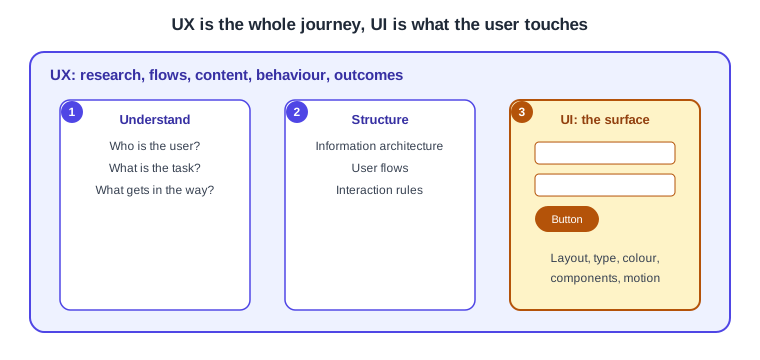
| Aspect | UI design | UX design |
|---|---|---|
Question |
How does it look and feel to use? |
Does it solve the right problem in a way people can follow? |
Typical outputs |
Visual styles, components, screens, design tokens |
Research findings, personas, journey maps, sitemaps, flows, test reports |
Typical evidence |
Consistency, contrast, readability, visual hierarchy |
Task success, time on task, errors, satisfaction |
The UX process at a glance
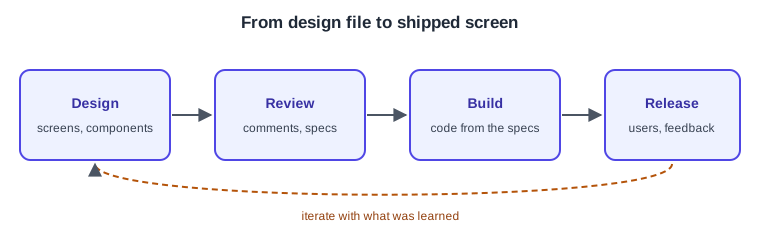
Real projects loop and skip steps, but most follow the same shape: learn about the problem, decide what to solve, explore solutions, make them tangible, test them with people, give developers what they need and keep improving after release.
-
Discover: interviews, observation and analytics reveal who the users are and what they struggle with.
-
Define: the findings become a clear problem statement, personas and success measures.
-
Ideate: sketches, flows and information architecture explore several ways to solve it.
-
Prototype: clickable mock-ups make the best ideas concrete enough to react to.
-
Test: usability sessions show where the prototype fails real people.
-
Hand off: specifications, assets and a design system let developers build what was designed.
-
Iterate: metrics and feedback after release start the next round.
Accessibility belongs to every step, not only the last one. See Web Accessibility for the web, and for platform conventions the Apple Human Interface Guidelines, Liquid Glass and the Design System and Material 3 and Theming in Compose pages.
Design tools landscape
Interface design tools differ in platform, collaboration model and how close they sit to code. This site documents one of them in depth; the others are only named so that readers know the landscape.
| Tool | What it is | Coverage here |
|---|---|---|
Figma |
Browser-based collaborative design, prototyping and developer handoff. |
Documented in depth: Figma. |
Sketch |
macOS-only vector interface design application. |
Named only. |
Penpot |
Open-source design and prototyping tool, self-hostable. |
Named only. |
Adobe XD |
Adobe’s interface design tool, now in maintenance mode with no new features; check Adobe’s announcements for its current status. |
Named only. |
Framer |
Design and publishing tool that produces live websites. |
Named only. |
Product status changes quickly, so verify a tool’s current state on its official site before choosing it.
Figma
Frames, auto layout, components, variables, prototyping, Dev Mode, collaboration, plugins and the REST API, taught through one running scenario, the Bookshelf app. |
Further tools may be added later as sibling sub-sections next to Figma.
References
-
Nielsen Norman Group: The Definition of User Experience — the broad definition of UX that frames UI as one part of it.
-
W3C WAI: Introduction to Web Accessibility — why accessibility is part of every design step.