Introduction and Infrastructure as Code
|
This content was generated with the assistance of AI and should be verified against the official documentation before being relied on in production; see the section bibliography for the reference material consulted while preparing these pages. |
Terraform is a tool for defining, changing and versioning cloud and on-premises infrastructure as code. You describe the resources you want in text files, Terraform compares that description with what exists and with what it recorded last time, shows you the difference as a plan, and, once you approve it, calls the relevant APIs in dependency order to make reality match. This page, and the rest of the section, is written against Terraform 1.17 (1.17.0 was released on 2026-10-21) and OpenTofu 1.13 (latest stable 1.13.2, also 2026-10-21); the version baseline, provider majors and the reading path are in the section index. It answers three questions before anything else: why does infrastructure need to be treated as code, what are the moving parts inside Terraform, and where does Terraform stop being the right tool? Later pages assume the vocabulary introduced here, and Getting Started installs the tool and runs the workflow end to end.
The running example of the whole section is Bookshelf, a small system made of catalog-api, reviews-api and web
services backed by PostgreSQL and Redis, plus a bucket for cover images, a network, DNS, secrets and IAM. Core pages
run it locally with the Docker provider and the utility providers; cloud variants live on the AWS, Azure and Google
Cloud pages of the section.
Why infrastructure as code
Before infrastructure as code, a server, a network or a database was usually created by someone clicking through a cloud console ("click-ops") or typing a sequence of CLI commands from memory or from a wiki page. That works for a first prototype and fails in predictable ways as soon as the system, the team or the time horizon grows:
-
Not repeatable. A second environment (staging, a customer-specific copy, a disaster-recovery region) is built from memory, so it differs from the first in dozens of small, undocumented ways.
-
Slow and error-prone at scale. Creating fifty similar resources by hand takes fifty times as long and has fifty chances to misconfigure one.
-
Drift. Someone "fixes" a security group in the console during an incident and never records it. The real infrastructure now differs from every document that claims to describe it, and nobody can say how.
-
No review and no audit trail. A console click has no pull request, no diff and no reviewer. When something breaks, the question "what changed?" has no reliable answer.
-
Slow recovery. After a region outage or an accidental deletion, rebuilding means reproducing a long, partly forgotten manual procedure under pressure.
-
Knowledge locked in people. Only the engineer who built it knows how it fits together.
Infrastructure as code (IaC) replaces those manual steps with text files kept in version control. The files are the single description of the infrastructure, so the usual software practices apply to it:
-
Repeatability. The same files produce the same shape of infrastructure in every environment, with differences expressed explicitly as input variables.
-
Review. A change to infrastructure is a diff in a pull request (see Pull Requests), reviewed before anything is touched.
-
Audit and history.
git loganswers "who changed the database size and why". -
Automation. A CI/CD pipeline can plan on every pull request and apply on merge (see the "CI/CD and Automation" page of this section).
-
Reuse and sharing. Pieces are packaged as modules and shared inside a company or publicly (see Modules).
-
Recovery. Rebuilding after a disaster is running the same code against a new account or region.
IaC also has costs. It adds a tool and a language to learn, it makes a bad change easy to roll out at scale, it requires a place to keep sensitive data and state safely, and it demands discipline: if people keep editing resources by hand, the code stops being the truth. Those challenges, and the practices that tame them, are the subject of most of the later pages of this section.
Declarative versus imperative, and idempotence
IaC tools fall into two styles, and the difference explains most of Terraform’s behaviour.
An imperative tool (or script) describes steps: "create a network, then create a server in it, then open port 443". Run it twice and the second run either fails because the network exists, or creates a duplicate. To change something, you write a different script that moves from the old state to the new one, and you must know what the old state was.
A declarative tool describes the end state: "there is a network, and a server in it, and port 443 is open". The tool is responsible for finding out what exists and computing the steps. Running it twice is safe, and changing something means editing the description.
Terraform is declarative. Its language, HCL, has no instruction for "create"; a resource block states that an object
with these properties should exist, and a reference from one block to another states a dependency. Terraform builds a
dependency graph from those references, so you do not write ordering: independent resources are created in parallel
and a dependent one waits for what it needs. Deleting infrastructure is equally implicit — remove a block and the next
plan proposes to destroy the object.
The property that makes this safe is idempotence: applying the same configuration repeatedly produces the same
result, and a run that has nothing to do changes nothing. A second terraform apply of an unchanged configuration
ends with "No changes. Your infrastructure matches the configuration." Idempotence is not free. It depends on Terraform
being able to answer "what exists now?", which is why it keeps a record of what it manages (the state, below) and
refreshes it against the real API before planning. Imperative escape hatches (local-exec provisioners, scripts run
by terraform_data) are not idempotent by themselves and are treated as a last resort (see the "Provisioners, Actions and Post-Apply Operations" page of this section).
The declarative model does not remove all procedure. Some operations are inherently imperative (a database migration, "run this script once"), and some changes force a resource to be destroyed and recreated because the underlying API cannot update a property in place. Terraform tells you which in the plan, which is exactly why the plan step exists.
Source: What is Terraform?
Architecture
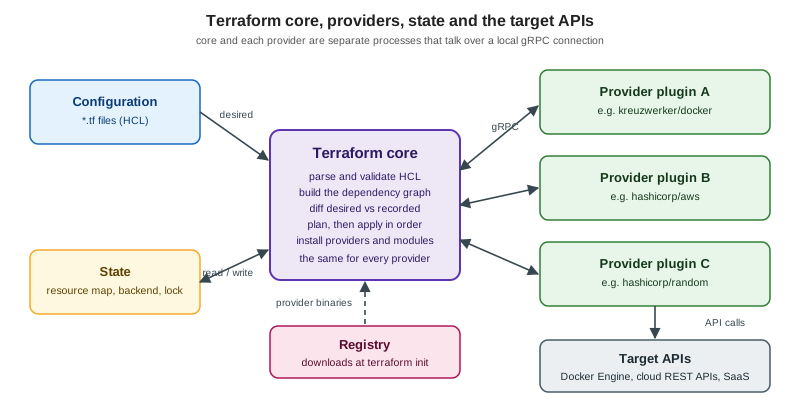
Terraform is a single command-line program (terraform) written in Go, plus a set of separate plugin programs. Four
pieces cooperate, and [terraform-architecture] shows how.
Terraform core
Core is the terraform binary itself. It knows nothing about AWS, Docker or any particular service. Its
responsibilities are generic:
-
reading and validating configuration (HCL, or its JSON variant);
-
building the resource dependency graph and walking it with as much parallelism as the graph allows;
-
reading and writing state, including locking it while a run is in progress;
-
computing the plan by comparing the configuration, the state and the refreshed real objects;
-
applying the plan by asking providers to create, update or delete objects in the right order;
-
installing providers and modules during
terraform init; -
the user interface: commands, flags, output, and the machine-readable JSON forms.
Because core is the same for every platform, everything you learn about the language, the workflow and the state applies identically to a Docker container, an S3 bucket or a DNS record.
Providers and the plugin protocol
A provider is a separate executable that teaches Terraform about one platform or service: which resource types and
data sources exist (docker_container, aws_s3_bucket, random_password, …), which arguments they take, and how
to create, read, update and delete each one against the platform’s API. Providers are distributed through a registry,
identified by a source address (registry.terraform.io/kreuzwerker/docker, written kreuzwerker/docker), and pinned
by version constraints and a lock file. See Providers for installation,
configuration, aliases and the lock file.
Core and providers are different processes. During init, core downloads each required provider binary into the
working directory. During a run, core launches the binary and talks to it over a local connection using a versioned
protocol built on Protocol Buffers and gRPC. The protocol defines operations such as "describe your schema", "validate
this block", "plan this change" and "apply this change". Two protocol major versions are in use: version 5 (Terraform
version 0.12 and later) and version 6 (Terraform 1.0
and later), which adds nested attributes. A provider author chooses a
framework — the current recommendation is the Terraform Plugin Framework, which supports both versions, while the
older Plugin SDK v2 supports only version 5 — and the protocol hides the difference from the user.
The split has practical consequences:
-
New platforms are supported by writing a provider, not by changing Terraform. There are thousands of them, most maintained by the platform vendor or the community.
-
A provider’s resources, arguments and bugs are the provider’s responsibility. A new Terraform version does not change what
aws_s3_bucketaccepts; a new provider version does. Upgrading each is a separate decision. -
Terraform’s compatibility promises for the 1.x series cover core’s side of the protocol, not the behaviour of individual providers.
-
Because the providers speak a standard protocol, OpenTofu uses the same providers, as described later on this page.
State
Terraform records what it manages in state, by default a JSON file called terraform.tfstate. State maps each
resource address in your configuration (docker_container.catalog_api) to the real object it created (a container ID)
and stores the attribute values the provider last reported. It exists for four reasons: to know which real objects
belong to this configuration, to detect what changed so the plan can be minimal, to store metadata such as dependency
order for deletion, and to make planning fast by caching attribute values instead of querying everything every time.
State is shared and sensitive. It can contain secrets in plain text, and two people applying at once can corrupt it.
So production setups store it in a remote backend (S3, Azure Blob Storage, Google Cloud Storage, HCP Terraform, …)
that provides locking and encryption. Locking, drift, import, moved and the commands that edit state are covered in
State; the files in your working directory are described in
HCL Syntax and Configuration Files.
Registry
The Terraform Registry (registry.terraform.io) is the public index of providers and modules. It gives each
provider a namespace and a name (hashicorp/aws), serves versioned binaries with checksums and signatures, and hosts
the documentation for every resource and data source. Modules live there too and are consumed with a source and a
version. Private registries (in HCP Terraform and Terraform Enterprise) offer the same experience for internal
modules; see HCP Terraform and Enterprise. OpenTofu has its
own registry at search.opentofu.org and does not host providers itself; it resolves most of the same ones.
Source: Plugin protocol and Terraform glossary
The write, plan and apply workflow
Every Terraform run follows the same loop, shown in [terraform-core-workflow]:
-
Write configuration in
.tffiles. -
Init the working directory: download providers and modules, configure the backend. Done once, and again after adding a provider, module or backend.
-
Plan: refresh the state against the real world, compare it with the configuration and print the actions that would be taken, without changing anything.
-
Apply: after approval, execute those actions in dependency order and update the state.
The plan is the central safety feature. It lists each action with a symbol — + create, - destroy, ~ update in
place, and -/+ replace (destroy then create, or create then destroy) — and a summary line such as
Plan: 3 to add, 1 to change, 0 to destroy. Reading plans well is the single most valuable Terraform skill;
Getting Started shows real output and the plan/apply page of this section
goes into saved plans, -target, -replace and -refresh-only.
A minimal Bookshelf example makes the loop concrete. It uses three providers that need no cloud account: random
generates a database password (never written by hand), docker runs a PostgreSQL container, and local writes a
connection note to disk.
terraform {
  required_version = ">= 1.9"

  required_providers {
    docker = {
      source  = "kreuzwerker/docker"
      version = "~> 4.0"
    }
    random = {
      source  = "hashicorp/random"
      version = "~> 3.7"
    }
    local = {
      source  = "hashicorp/local"
      version = "~> 2.5"
    }
  }
}

provider "docker" {}

resource "random_password" "db" {
  length  = 24
  special = false
}

resource "docker_image" "postgres" {
  name         = "postgres:17"
  keep_locally = true
}

resource "docker_container" "bookshelf_db" {
  name  = "bookshelf-db"
  image = docker_image.postgres.image_id

  env = [
    "POSTGRES_DB=bookshelf",
    "POSTGRES_USER=catalog",
    "POSTGRES_PASSWORD=${random_password.db.result}",
  ]

  ports {
    internal = 5432
    external = 15432
  }
}

resource "local_file" "connection_note" {
  filename = "${path.module}/connection.txt"
  content  = "postgresql://catalog@localhost:15432/bookshelf\n"
}

output "db_port" {
  value = docker_container.bookshelf_db.ports[0].external
}
Three things in this short file illustrate the whole model. The container refers to docker_image.postgres.image_id
and to random_password.db.result, so Terraform infers that it must create the image and the password first and does
not need an explicit ordering. The password is generated, so it never appears in the source (although it is stored in
state, which is why state must be protected). And nothing says "if it already exists": run terraform apply again and
the plan is empty.
$ terraform init
Initializing provider plugins...
- Installing kreuzwerker/docker v4.6.0...
- Installing hashicorp/random v3.9.1...
- Installing hashicorp/local v2.9.1...
Terraform has been successfully initialized!

$ terraform plan
  # docker_container.bookshelf_db will be created
  + resource "docker_container" "bookshelf_db" { ... }
Plan: 4 to add, 0 to change, 0 to destroy.

$ terraform apply -auto-approve
...
Apply complete! Resources: 4 added, 0 changed, 0 destroyed.

$ terraform apply -auto-approve
No changes. Your infrastructure matches the configuration.

$ terraform destroy -auto-approve
Destroy complete! Resources: 4 destroyed.
The output is abbreviated and the provider versions shown are the latest at the time of writing; ~> constraints
accept newer compatible releases. -auto-approve is used here only because this is a local sandbox; in shared
environments, plans are reviewed (see the "CI/CD and Automation" page of this section).
Use cases
HashiCorp lists nine broad use cases, which group naturally into a few themes:
-
Provisioning application infrastructure. Networks, compute, databases, load balancers, DNS and permissions for a multi-tier application, with Terraform tracking the dependencies between tiers. This is Bookshelf’s core job.
-
Multi-cloud and hybrid deployments. One workflow and one language for several providers, for fault tolerance or because different teams use different clouds. Terraform does not abstract the clouds away — an
aws_instanceand anazurerm_linux_virtual_machineare different resources — it unifies the workflow. -
Platform building and self-service. A platform team publishes vetted modules, and product teams provision their own environments from them without filing tickets.
-
Parallel and ephemeral environments. Create and destroy development, test, QA and production copies on demand to keep costs down.
-
Policy and compliance. Check a plan against rules (allowed regions, mandatory tags, no public buckets) before it is applied; see the "Policy as Code" page of this section.
-
PaaS and SaaS configuration. Because anything with an API can have a provider, Terraform manages DNS records, database add-ons, CDN settings, monitoring dashboards and Git repositories, not only servers.
-
Software-defined networking. Network configuration that follows application needs rather than waiting for tickets.
-
Kubernetes. Create the clusters and, if desired, the objects in them (see below for where that stops being a good idea).
-
Demos and training. Reproducible environments anyone can create and delete.
Source: Terraform use cases
How Terraform compares with other tools
No tool is best everywhere, and several can sensibly coexist. The table compares Terraform with the tools it is most often weighed against; the cloud-specific pages of this site explain the provider-native tools in depth.
| Tool | Model and language | State | Scope and trade-off |
|---|---|---|---|
Terraform |
Declarative HCL; plan then apply; dependency graph |
A state file you store (local, remote backend, or HCP Terraform) |
Any platform with a provider; one workflow across clouds and SaaS; needs a state backend and operational care |
AWS CloudFormation (and CDK, SAM) |
Declarative JSON or YAML templates; CDK and SAM generate them |
Held by the AWS service as stacks; nothing to store yourself |
AWS only; new AWS features are usually available at launch; see AWS Infrastructure as Code |
Azure Bicep (and ARM templates) |
Declarative DSL compiled to ARM JSON; the |
None to manage — Azure stores deployment state |
Azure only; supports new resource types and API versions immediately; see Azure Infrastructure as Code |
Google Cloud Infrastructure Manager and Config Connector |
Terraform-based managed service, and Kubernetes custom resources |
Managed service state, or the Kubernetes API |
Google Cloud only; Infrastructure Manager actually runs Terraform for you; see Google Cloud Infrastructure as Code |
Pulumi |
General-purpose languages (TypeScript, Python, Go, C#, Java, YAML); declarative result via an engine |
Stored in Pulumi Cloud or a self-managed backend |
Real loops, functions, types and unit tests; many providers are bridged from Terraform providers; a different ecosystem and licensing model |
Crossplane |
Kubernetes custom resources and compositions reconciled by controllers |
The Kubernetes API (etcd) |
Continuous reconciliation instead of run-based apply, and a platform API for application teams; requires running a control plane. A CNCF graduated project since 2025-10-28 |
Ansible |
Procedural-leaning YAML playbooks of modules, run over SSH or an API |
None; relies on each module being idempotent |
Strong at configuring what is already inside machines (packages, files, services); provisioning modules exist but there is no plan or dependency graph |
Some practical rules of thumb follow from the table:
-
Single cloud, no appetite for a state file: the provider-native tool (CloudFormation, Bicep) removes the state problem. Terraform pays off when you need more than one provider, when the team already knows HCL, or when you want the plan and module ecosystem.
-
Multi-cloud or SaaS plus cloud: Terraform’s provider model is the main reason to choose it.
-
Developers who prefer real languages: Pulumi (or, for a cloud’s own constructs, CDK) trades HCL’s constrained simplicity for expressiveness; the cost is that infrastructure code can become as complicated as application code. HashiCorp’s own CDK for Terraform (CDKTF) was deprecated and archived on 2025-12-10, with
cdktf synth --hclas the documented migration path to plain HCL. -
Kubernetes-centric platforms: Crossplane keeps everything in the cluster’s reconciliation loop; Terraform runs once and exits. Many teams use Terraform to create the cluster and a GitOps tool for what runs in it (see GitOps and CI/CD).
-
Configuration inside machines: Ansible and Terraform complement each other. Terraform creates the server and hands off; Ansible (or an image built in advance) configures it.
Licensing history, OpenTofu and IBM
Terraform’s licence has changed once and its owner once, and both matter when choosing a tool or reading older material.
| Date | Event |
|---|---|
Until 2023 |
Terraform is developed in the open by HashiCorp under the Mozilla Public License 2.0 (MPL-2.0). |
2023-08-10 |
HashiCorp announces that future releases of its products move to the Business Source License 1.1 (BSL, also written BUSL). Terraform 1.5.x remains MPL-2.0; Terraform 1.6.0 is the first BSL release. APIs, SDKs and almost all other libraries stay MPL-2.0. |
2023-08 to 2023-09 |
The "OpenTF" manifesto asks HashiCorp to return to an open-source licence and, without a response, a community fork of the last MPL code is created. It is renamed OpenTofu and accepted by the Linux Foundation (announced 2023-09-20). |
2024-01-10 |
OpenTofu 1.6.0, the first stable release, ships as a drop-in replacement for Terraform 1.5.x configurations, under MPL-2.0. |
2025-02-27 |
IBM completes its acquisition of HashiCorp. Terraform’s BSL notice now names IBM as licensor. The announced price was USD 35 per share (an enterprise value of about USD 6.4 billion). |
2025-04-23 |
OpenTofu is accepted into the CNCF at the Sandbox maturity level. |
2025-12-10 |
CDK for Terraform is archived after being deprecated. |
What the BSL means in practice: the source is public and you may use, modify and redistribute it, including for
commercial purposes in production. The Additional Use Grant withholds one thing — offering Terraform to third parties
on a hosted or embedded basis in competition with IBM’s paid offerings. A "competitive offering" is a paid product that
significantly overlaps with IBM’s paid capabilities, products not offered for payment are not competitive, and internal
use within an organisation and its affiliates is not a competitive offering. Each BSL release converts to MPL-2.0 on
its Change Date, four years after that version is published. Because the BSL is not an OSI-approved open-source
licence, vendors that build competing hosted services, and organisations whose policy requires open-source licences,
cannot use Terraform 1.6 or later; that is the audience for OpenTofu. For everyone else — most application teams
running terraform in their own pipelines — the day-to-day effect is nil.
OpenTofu is a community-governed fork under the Linux Foundation. It reads the same configuration language, uses the
same providers through the same plugin protocol, and aims at parity with Terraform; it works with state files created
by Terraform up to 1.5.x. It then diverges in features of its own (its version numbers are independent: OpenTofu 1.13 is not "Terraform 1.13"). A migration is
usually a matter of swapping the binary and running tofu init, but compatibility is not guaranteed forever, because
each project now chooses its own features. OpenTofu covers the differences,
the migration steps and how to write configuration that works with both, and the "CI/CD and Automation" page of this section shows a matrix build against both tools.
Older books and articles often describe this timeline incompletely: one stops at the licence change, another predates the IBM acquisition and the CNCF acceptance, and some claim the package managers stop at 1.5.7, whereas the HashiCorp Homebrew tap and the apt and yum repositories ship current releases.
Editions
Terraform is available in three forms that share the same language and core workflow:
-
Terraform CLI (the Community Edition): the free command-line tool this section mostly uses. It manages configuration, plugins, infrastructure and state, and you decide where state lives and how runs are automated.
-
HCP Terraform: a SaaS platform (formerly Terraform Cloud) that runs Terraform remotely and stores state with encryption and locking. It adds a web UI, role-based access control, single sign-on, VCS integrations that trigger plans from commits, a private registry for modules and providers, policy enforcement with Sentinel, and an API. Some features are free for small teams; larger organisations need paid plans.
-
Terraform Enterprise: a self-hosted distribution of HCP Terraform for organisations with strict security and compliance needs, supporting private networking, air-gapped and active/active installations and dedicated support. It moved to semantic versioning with the 2.0.x line.
"Terraform Cloud" was renamed HCP Terraform in 2024, so older tutorials use the former name. Pricing and the free tier have changed several times, which makes any figure printed in a book unreliable. The platform features are described in HCP Terraform and Enterprise, and nothing in this section requires them: every core page runs with the CLI alone, a local state file and the providers above.
Source: Terraform editions
When Terraform is not the right tool
Terraform is excellent at creating and changing long-lived infrastructure objects that have an API. It is a poor fit when the job is different:
-
Building images and artefacts. Compiling code, building a container image or baking a VM image is a build, not a desired-state reconciliation, and Terraform has no notion of "has the source changed". Use a build tool (see BuildKit and Buildx) or HashiCorp Packer for machine images, and let Terraform consume the resulting image by name or ID.
-
Delivering applications inside Kubernetes. Terraform can manage Kubernetes and Helm objects, but a deployment pipeline wants rolling updates, rollbacks, progressive delivery and continuous reconciliation, which Helm, Kustomize and a GitOps controller provide (see Helm). A common split is Terraform for the cluster and its cloud dependencies, and the cluster tooling for what runs in it.
-
Configuration management inside machines. Installing packages, editing files and restarting services on existing hosts is Ansible’s, cloud-init’s or an immutable image’s job. Terraform’s provisioners exist but are a last resort.
-
Frequently changing, high-volume data. Application data, user accounts and feature flags that change many times a day do not belong in a plan-and-apply cycle with state.
-
One-off or exploratory work. Trying a service for ten minutes in a console, or a script that runs once, does not need a state file.
-
Fast, event-driven reaction. Terraform runs when something runs it; it does not watch for drift and correct it continuously (that is a controller’s job, or a scheduled drift check in HCP Terraform or CI).
-
Highly dynamic collections without stable identity. Resources created and destroyed by an autoscaler are better left to the autoscaler; Terraform should define the scaling group, not each instance.
Even where Terraform is right, remember what it will not do for you: it does not make a bad architecture good, it does not protect secrets in state automatically, and it cannot undo a destructive apply. The plan, code review, remote state with locking and sensible permissions are the safeguards.
Source: What is Terraform? and Packer
What changed recently
-
Terraform 1.17 (2026-10-21) is the current release; the full list of what changed since earlier releases that this section cares about is collected in the "What Changed and Migration" page of this section.
-
Licence and ownership: BSL 1.1 since Terraform 1.6.0 (2023-08-10 announcement), IBM as owner since 2025-02-27.
-
Naming: Terraform Cloud is now HCP Terraform; the free download is called the Community Edition in the current editions page.
-
CDK for Terraform was deprecated and archived on 2025-12-10, so it is mentioned only as history.
-
OpenTofu reached the CNCF Sandbox on 2025-04-23 and releases on its own schedule (1.13.2 is the current stable release at the time of writing).
References
-
What is Terraform? — the official overview.
-
Terraform use cases — the nine use cases.
-
Terraform editions — CLI, HCP Terraform and Terraform Enterprise.
-
AWS CloudFormation, Azure Bicep, Pulumi, Crossplane and Ansible