Server Rendering, SSG and React Server Components
|
This section documents React 19.x for the web, using function components and Hooks throughout (class components appear only where React still requires them, such as error boundaries). React Native is out of scope and gets only a pointer. The React 19 additions follow the current official React documentation. This content was generated with the assistance of AI and should be verified against react.dev before being relied on in production, since React APIs continue to evolve between releases. This section’s bibliography lists the reference material consulted while preparing these pages. |
Where the initial HTML is produced — in the browser, on a server per request, or ahead of time at build — shapes an app’s time-to-first-byte, SEO, and hosting model. This page is a brief, example-led tour; a framework (Next.js, React Router) implements these for you. For how Next.js decides between them, see Next.js Rendering Fundamentals.
CSR vs. SSR vs. SSG vs. ISR
| Strategy | How | Optimizes for |
|---|---|---|
CSR (client-side) |
Server sends a near-empty HTML shell + JS; the browser renders everything. |
Simple static hosting; highly dynamic, auth-gated apps. Poor SEO, slow first paint. |
SSR (server-side) |
Server renders full HTML per request, browser hydrates it. |
SEO + fast first contentful paint for dynamic, per-user pages. Needs a running server. |
SSG (static generation) |
HTML rendered once at build time, served from a CDN. |
Fastest TTFB, cheapest hosting. Content that changes rarely (docs, marketing, blog). |
ISR (incremental) |
SSG + background revalidation after a TTL or on demand. |
Static speed with periodically fresh content (product catalog, news). |
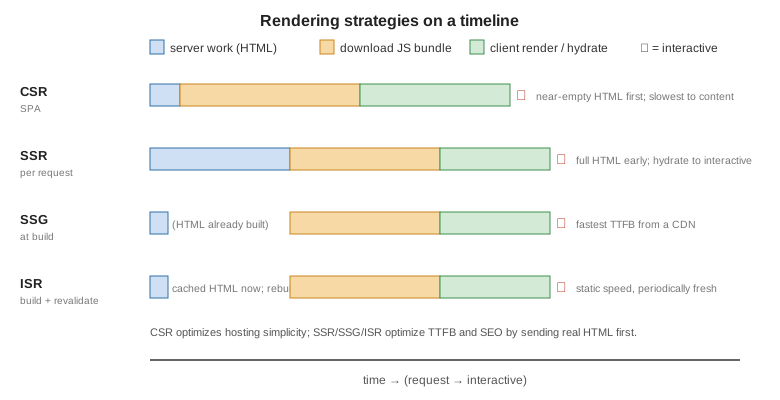
Next.js treats these as per-route outcomes rather than global choices; see Next.js Server-Side Rendering, Static Site Generation and Incremental Static Regeneration.
Hydration
Server-rendered HTML is inert. Hydration attaches React’s event listeners and state to that existing markup instead of recreating it.
import { hydrateRoot } from 'react-dom/client';
import App from './App';

hydrateRoot(document.getElementById('root'), <App />);
The tree React renders on the client must match the server HTML. Common hydration mismatches: rendering
Date.now() / Math.random() / window during render, locale-dependent formatting, and invalid nesting
(<div> inside <p>). See
hydrateRoot.
-
Selective hydration — content wrapped in
<Suspense>hydrates as a separate unit, so React does not have to wait for a slow part’s code or data before hydrating the rest of the page. A boundary that streamed in later hydrates when it arrives. -
suppressHydrationWarningis an escape hatch with limits — it silences the mismatch warning for one element’s attributes or text content only (one level deep), and React does not patch the mismatched text. Use it for unavoidable differences such as a timestamp, not to hide real bugs. SeehydrateRoot. -
use(browser())(React 19.3) — a Client Component can calluse(browser())fromreact-domto opt out of server rendering. During server rendering it stops the component and leaves the nearest<Suspense>fallback in the HTML; in the browser it returnsundefinedand the component renders normally. It must be inside a<Suspense>boundary, and it replacestypeof windowchecks and amountedstate set in an Effect. Seebrowserand the React 19.3 post.
'use client';
import { Suspense, use } from 'react';
import { browser } from 'react-dom';

function TimeZone() {
  use(browser('Needs the browser time zone.'));   // server: Suspense fallback; browser: renders
  return <p>{Intl.DateTimeFormat().resolvedOptions().timeZone}</p>;
}

export default function Zone() {
  return <Suspense fallback="Loading…"><TimeZone /></Suspense>;
}
For the full treatment — the hydration timeline, the catalogue of mismatch causes, measuring hydration cost — see Next.js Hydration.
react-dom/server
-
renderToPipeableStream— Node streams; the standard SSR entry point. Streams HTML as it renders and supports<Suspense>. -
renderToReadableStream— the same for Web Streams (edge runtimes, Deno, workers). -
renderToString/renderToStaticMarkup— synchronous, no streaming; legacy or for tiny cases (emails, static fragments). -
prerender/prerenderToNodeStream— render to a fully-formed static HTML string for SSG. -
resume/resumeToPipeableStream,resumeAndPrerender(React 19.2) — continue a render thatprerenderpostponed; see Partial Prerendering.
With streaming SSR, content wrapped in <Suspense> is sent as a fallback first, then the real markup is
streamed in and swapped when its data resolves — the user sees the shell immediately. See
Server React APIs. Since React 19.2, the server batches the
reveal of Suspense boundaries for a short time so more content appears together, matching client rendering; see
the React 19.2 post.
Partial Prerendering and the React prerender/resume APIs
React 19.2 added the building blocks for Partial Prerendering: call prerender with an AbortController
to render the static part of the tree ahead of time, which returns the HTML prelude and a postponed state;
serve the prelude from a CDN, and later call resume (or resumeToPipeableStream) with the postponed state to
stream in the dynamic content. resumeAndPrerender resumes to static HTML instead. See
prerender and
resume. Next.js builds Partial Prerendering on these
APIs with Cache Components; see
Partial Prerendering and Cache Components.
Caching and revalidation in frameworks
React itself caches nothing across requests; the framework does. A framework decides which rendered output or fetched data is reused and when it is refreshed, by time or on demand after a mutation. In Next.js these layers and the revalidation functions are described in Caching and Incremental Static Regeneration.
Static export
When every route can be rendered at build time, the output can be plain files served by any static host, with no
Node.js server. In Next.js this is output: 'export'; the trade-offs (no request-time features) are in
Static Site Generation and
Deployment and Self-Hosting.
React Server Components and Server Functions
Server Components render only on the server: their code and data-layer dependencies never reach the
browser bundle. Client Components (marked 'use client' at the top of the file) are the interactive
islands that hydrate. Server Functions (marked 'use server') are callable from the client and run on the
server — the mechanism behind Actions.
// ProductPage.jsx — a Server Component (no directive needed in an RSC framework)
import db from './db';
import AddToCart from './AddToCart';        // a Client Component

export default async function ProductPage({ id }) {
  const product = await db.product.find(id);   // runs on the server
  return (
    <article>
      <h1>{product.name}</h1>
      <p>{product.price}</p>
      <AddToCart productId={product.id} />     {/* interactive island */}
    </article>
  );
}
// AddToCart.jsx
'use client';
import { useState } from 'react';
export default function AddToCart({ productId }) {
const [added, setAdded] = useState(false);
return <button onClick={() => setAdded(true)}>{added ? 'Added' : 'Add to cart'}</button>;
}Next.js (App Router) is the reference implementation — see nextjs.org/docs/app
and, in this reference, Next.js Server and Client Components.
React 19 also hoists document metadata (<title>, <meta>, <link>) rendered anywhere into <head>, and
adds resource-preloading APIs (preload, preinit, prefetchDNS, preconnect). References:
Server Components,
'use client',
'use server'.
Worked example A — SEO-friendly e-commerce
Goal: product pages must return full HTML (name, description, price, JSON-LD) on the first response so Googlebot indexes them, while volatile pieces (live stock, "customers also bought", reviews) load client-side afterward.
This example uses Next.js conventions: a file at app/products/[id]/page.jsx becomes the route
/products/:id, and its generateMetadata export produces the <title> and description in the server HTML. In
Next.js 15 and later params is a Promise, so it must be awaited (const { id } = await params); reading
params.id synchronously is no longer valid. See
Dynamic Routes and Route Groups and
Metadata and SEO.
// app/products/[id]/page.jsx — Server Component: indexable HTML on first byte
import db from '@/lib/db';
import LiveStock from './LiveStock';
import Recommendations from './Recommendations';

export async function generateMetadata({ params }) {
  const { id } = await params;                      // params is a Promise
  const p = await db.product.find(id);
  return { title: p.name, description: p.summary };
}

export default async function Page({ params }) {
  const { id } = await params;
  const p = await db.product.find(id);      // rendered on the server
  return (
    <article>
      <script type="application/ld+json" dangerouslySetInnerHTML={{
        // escape "<" as \u003c so a product name containing </script> cannot close the tag
        __html: JSON.stringify({
          '@context': 'https://schema.org', '@type': 'Product',
          name: p.name, description: p.summary, offers: { '@type': 'Offer', price: p.price },
        }).replace(/</g, '\\u003c'),
      }} />
      <h1>{p.name}</h1>
      <p>{p.summary}</p>
      <p className="price">{p.price}</p>

      <LiveStock sku={p.sku} />              {/* 'use client' — AJAX after hydration */}
      <Recommendations productId={p.id} />  {/* 'use client' — AJAX after hydration */}
    </article>
  );
}
In a TypeScript project, type it as { params }: { params: Promise<{ id: string }> }.
dangerouslySetInnerHTML does no escaping, and JSON.stringify leaves < as is, so a product name such as
</script><script>alert(1)</script> would close the JSON-LD script and run. Replacing < with its Unicode escape
\u003c keeps the JSON valid and makes </script> impossible; see
Next.js: JSON-LD and
Data Security and CSP.
// app/products/[id]/LiveStock.jsx
'use client';
import { useQuery } from '@tanstack/react-query';

export default function LiveStock({ sku }) {
  const { data } = useQuery({
    queryKey: ['stock', sku],
    queryFn: () => fetch(`/api/stock/${sku}`).then((r) => r.json()),  // client-side AJAX
    refetchInterval: 30_000,
  });
  if (!data) return <p>Checking availability…</p>;
  return <p>{data.inStock ? `${data.count} in stock` : 'Out of stock'}</p>;
}
LiveStock uses TanStack Query, so the root layout must wrap the app in a QueryClientProvider (a small
'use client' component), otherwise the Client Component fails while it is server-rendered:
// app/providers.jsx
'use client';
import { useState } from 'react';
import { QueryClient, QueryClientProvider } from '@tanstack/react-query';

export default function Providers({ children }) {
  const [client] = useState(() => new QueryClient());
  return <QueryClientProvider client={client}>{children}</QueryClientProvider>;
}
A pure CSR SPA would serve <div id="root"></div> and fill the product data in with JavaScript; crawlers that
do not execute JS (or execute it on a delay) then see an empty page, and ranking suffers for pages whose value
is the content. Server-rendering the stable parts fixes that; the dynamic parts stay client-side where
freshness matters. Cross-links: Data Fetching,
SEO with Semantic HTML.