Concurrency and Async
|
This section documents the current Python release line as published at the official Python documentation, which is the reference these pages are written and verified against. No specific patch version is pinned. This content was generated with the assistance of AI and should be verified against the official documentation before being relied on in production. This section’s bibliography lists the reference material consulted while preparing these pages. |
Python offers three different ways to run work concurrently — threading, multiprocessing, and asyncio — and picking the wrong one for the job either wastes effort or does not speed anything up at all.
threading: Concurrency for I/O-Bound Work
A Thread lets several pieces of Python code make progress "at the same time" from the program’s point of
view. That "at the same time" is real when threads are waiting on I/O (a network call, a disk read, a
time.sleep()), because the waiting thread releases the GIL (Global Interpreter Lock) while it blocks.
It is not real for CPU-bound Python bytecode: the GIL lets only one thread execute Python bytecode at a
time, so pure computation spread across threads does not run any faster than a single thread — full details
in the threading module documentation.
import threading
import time

def download(name: str, seconds: float) -> None:
    print(f"{name}: starting")
    time.sleep(seconds)          # simulates a network wait; releases the GIL
    print(f"{name}: done")

t1 = threading.Thread(target=download, args=("file1", 1.0))
t2 = threading.Thread(target=download, args=("file2", 1.0))
t1.start()
t2.start()
t1.join()                        # wait for t1 to finish
t2.join()                        # wait for t2 to finish
# elapsed time is ~1.0s, not ~2.0s -- the two sleeps overlapped
Use threads for I/O-bound work (network requests, file I/O, waiting on other processes). Do not reach for threads to speed up a CPU-bound loop — see the next section.
multiprocessing and concurrent.futures: Parallelism for CPU-Bound Work
multiprocessing sidesteps the GIL entirely by running each worker in its own interpreter process, each
with its own GIL — true parallelism across CPU cores, at the cost of higher startup overhead and needing to
serialize (pickle) data passed between processes. Reference:
the multiprocessing module documentation.
from multiprocessing import Process

def square_sum(n: int) -> None:
    total = sum(i * i for i in range(n))   # CPU-bound work
    print(f"sum of squares up to {n}: {total}")

p1 = Process(target=square_sum, args=(5_000_000,))
p2 = Process(target=square_sum, args=(5_000_000,))
p1.start()
p2.start()
p1.join()
p2.join()
# both processes run on separate cores, in parallel
concurrent.futures is the higher-level API over both models: ThreadPoolExecutor (I/O-bound, backed by
threads) and ProcessPoolExecutor (CPU-bound, backed by processes) share the same interface, so switching
between them is a one-line change. Documented at
the concurrent.futures module documentation.
from concurrent.futures import ThreadPoolExecutor, ProcessPoolExecutor

def fetch(url: str) -> int:
    return len(url)              # stand-in for an I/O-bound network call

def crunch(n: int) -> int:
    return sum(i * i for i in range(n))   # CPU-bound work

with ThreadPoolExecutor(max_workers=4) as pool:
    lengths = list(pool.map(fetch, ["a", "bb", "ccc"]))   # I/O-bound -> threads

with ProcessPoolExecutor(max_workers=4) as pool:
totals = list(pool.map(crunch, [1_000_000, 2_000_000])) # CPU-bound -> processesasyncio: Cooperative Concurrency on a Single Thread
asyncio runs many I/O-bound operations concurrently on a single thread by having each task voluntarily
give up control at an await point instead of being pre-emptively switched out. A function defined with
async def is a coroutine function; calling it returns a coroutine object that does nothing until it is
awaited or scheduled. The entry point from ordinary code is asyncio.run(), and full task/coroutine mechanics
are documented at Coroutines and Tasks, with the module
overview at the asyncio module documentation.
import asyncio

async def fetch(name: str, seconds: float) -> str:
    print(f"{name}: starting")
    await asyncio.sleep(seconds)     # yields control back to the event loop
    print(f"{name}: done")
    return name

async def main() -> None:
    result = await fetch("page1", 1.0)   # runs one coroutine, waits for it
    print(result)

asyncio.run(main())                      # creates the event loop, runs main(), closes the loop
A single await in sequence does not buy any concurrency — it just runs one coroutine after another. Real
concurrency needs several tasks scheduled together, with asyncio.gather() or, from Python 3.11,
asyncio.TaskGroup:
import asyncio

async def fetch(name: str, seconds: float) -> str:
    await asyncio.sleep(seconds)
    return name

async def main() -> None:
    # gather: runs both concurrently, returns results in the same order as the inputs
    results = await asyncio.gather(
        fetch("page1", 1.0),
        fetch("page2", 1.0),
    )
    print(results)                       # ~1.0s elapsed, not ~2.0s

    # TaskGroup (3.11+): structured alternative, cancels siblings if one task raises
    async with asyncio.TaskGroup() as tg:
        tg.create_task(fetch("page3", 1.0))
        tg.create_task(fetch("page4", 1.0))

asyncio.run(main())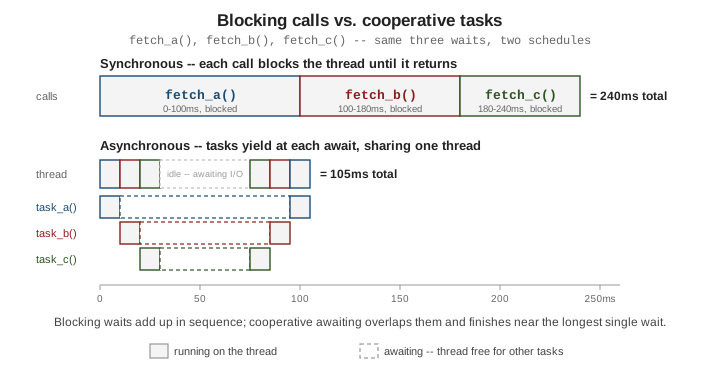
Choosing Between Them
-
I/O-bound, many concurrent operations (thousands of network requests, WebSocket connections):
asyncioscales best — no per-task thread or process overhead, just a coroutine object. -
I/O-bound, a handful of blocking calls, or working with a library that is not async-aware:
threading(directly, or viaThreadPoolExecutor) is simpler to retrofit than rewriting everything as coroutines. -
CPU-bound work: only
multiprocessing(directly, or viaProcessPoolExecutor) achieves real parallelism, because it is the only one of the three that escapes the GIL.
Note that none of this section’s three consulted books cover async/await at all — the feature postdates
all of them (the oldest, Learning Python, predates Python 3.1) — so this page is grounded entirely in the
official threading, multiprocessing, concurrent.futures, and asyncio documentation linked above.
See Also
-
Standard Library Tour — where
threading,multiprocessing, andasynciosit among the rest of the standard library. -
Unit Testing with pytest & Mocking — testing code that uses threads, processes, or coroutines.