Component Communication
|
This section documents modern, standalone Angular — signals, the built-in This content was generated with the assistance of AI and should be verified against angular.dev before being relied on in production. Angular ships a major release roughly every six months and its APIs continue to evolve: the examples here target the current major release; where a consulted source disagrees with the current documentation, the documentation wins and the difference is noted. This section’s bibliography lists the reference material consulted while preparing these pages. |
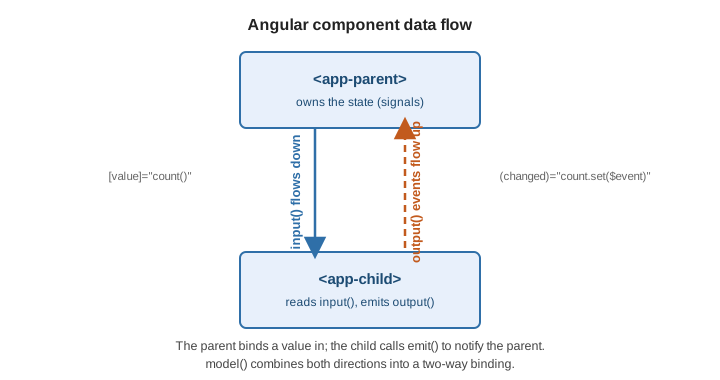
Components talk to each other through a small, one-directional contract: inputs carry data down from a
parent, outputs send events up to it, model() combines both for two-way binding, queries let a
component reach into its own view or projected content, and <ng-content> projects a parent’s markup into a
child.
Signal inputs
input() declares a read-only signal that Angular keeps in sync with the parent’s binding. input() gives
an optional default; input.required() has no default and the template binding is mandatory. alias renames
the binding; transform coerces the incoming value.
import { Component, input, booleanAttribute } from '@angular/core';

@Component({ selector: 'app-user-card', templateUrl: './user-card.html' })
export class UserCard {
  readonly userId = input.required<string>();                 // <app-user-card [userId]="id">
  readonly title = input('Untitled');                          // optional, default provided
  readonly badge = input('', { alias: 'label' });              // bound as [label]
  readonly disabled = input(false, { transform: booleanAttribute }); // "" / "true" -> true
}
Read an input like any signal (this.userId()), and derive from it with computed():
readonly greeting = computed(() => `Hello, ${this.title()}`);|
The legacy pattern is the |
References: Accepting data with input properties and Signal inputs.
Outputs
output() returns an emitter; call .emit(value) to raise a custom event the parent binds with (name).
outputFromObservable() (from @angular/core/rxjs-interop) turns an Observable into an output.
import { Component, output } from '@angular/core';
import { outputFromObservable } from '@angular/core/rxjs-interop';
import { Subject } from 'rxjs';

@Component({ selector: 'app-rating', templateUrl: './rating.html' })
export class Rating {
  readonly rated = output<number>();                 // (rated)="onRated($event)"
  private readonly hovers = new Subject<number>();
  readonly hovered = outputFromObservable(this.hovers);

  choose(stars: number): void {
    this.rated.emit(stars);
  }
}
<app-rating (rated)="score.set($event)" (hovered)="preview.set($event)" />|
The legacy pattern is |
Reference: Custom events with outputs.
Two-way binding with model()
model() is a writable signal that is both an input and an implicit nameChange output, so a parent can
use the [(name)] banana-in-a-box syntax. Writing to the model signal in the child emits the change.
import { Component, model } from '@angular/core';

@Component({
  selector: 'app-toggle',
  template: `<button (click)="checked.set(!checked())">{{ checked() ? 'On' : 'Off' }}</button>`,
})
export class Toggle {
  readonly checked = model(false);        // input `checked` + output `checkedChange`
}
<app-toggle [(checked)]="isOn" />
<!-- desugars to: -->
<app-toggle [checked]="isOn" (checkedChange)="isOn = $event" />The xChange naming convention (checked + checkedChange) is what makes any input/output pair usable with
[(x)]. Reference: Model inputs.
Queries
Queries retrieve child directives, components, or DOM elements. Signal queries are the modern form and
return signals; the decorator forms (@ViewChild / @ViewChildren / @ContentChild /
@ContentChildren) remain supported.
-
viewChild()/viewChildren()— elements in this component’s own template. -
contentChild()/contentChildren()— elements projected in through<ng-content>.
import { Component, ElementRef, viewChild, viewChildren, contentChildren } from '@angular/core';
import { Tab } from './tab';

@Component({ selector: 'app-tabs', templateUrl: './tabs.html' })
export class Tabs {
  readonly search = viewChild<ElementRef<HTMLInputElement>>('search'); // #search in template
  readonly panels = viewChildren(Panel);                                // Signal<readonly Panel[]>
  readonly tabs = contentChildren(Tab);                                 // projected <app-tab>s

  focusSearch(): void {
    this.search()?.nativeElement.focus();
  }
}
The decorator forms take options: \{ static: true } resolves the query before the first change detection
(only for children not inside @if / @for), and \{ read: ElementRef } selects which token to return from
the matched node.
@ViewChild('search', { static: true, read: ElementRef }) searchEl!: ElementRef<HTMLInputElement>;
@ContentChild(Tab) firstTab?: Tab;
Signal queries need no static option — read them in an effect() or in ngAfterViewInit and they are
always current. References: Referencing component children with
queries and Signal queries.
Content projection
<ng-content> marks where a parent’s markup is rendered inside a child. A bare <ng-content> projects
everything; select="…" (a CSS selector) projects a matching subset for multi-slot projection.
Fallback content between the tags shows when nothing is projected into that slot.
<!-- card.html -->
<article class="card">
  <header><ng-content select="[card-title]">Untitled</ng-content></header>
  <div class="body"><ng-content /></div>
  <footer><ng-content select="card-actions" /></footer>
</article>
<!-- usage -->
<app-card>
<h2 card-title>Invoice #42</h2>
<p>Amount due: {{ total() | currency }}</p>
<card-actions><button>Pay</button></card-actions>
</app-card>Projected nodes stay owned by the parent for change detection and are queried with contentChild() /
contentChildren(). Reference: Content projection.