Deployment
|
This content was generated with the assistance of AI and should be verified against the official documentation before being relied on in production. The reference material consulted while preparing these pages is listed in the section bibliography. |
This page is written against FastAPI 0.142.2 (released 2026-09-30), Pydantic 2.13, Starlette 1.7 and Uvicorn 0.54,
checked on 2026-10-02 (FastAPI CLI 0.0.32, Gunicorn 26.2, uvicorn-worker 0.4). The Python examples and the server
commands were executed on Python 3.13: the servers were started for real (fastapi run, uvicorn --workers,
Gunicorn, Hypercorn, Daphne and Granian), exercised with curl, and stopped with signals; the outputs shown come from
those runs. Examples that need a domain name, a Docker daemon or a FastAPI Cloud account (Traefik with Let’s Encrypt,
the Compose file, fastapi deploy) could not be run in the verification environment and are marked as such. To
deploy the Bookshelf API is to make it available to its users: on a machine that stays up, behind HTTPS, restarted
when it crashes, able to use all the CPU cores, with its database schema ready. None of that is FastAPI-specific code;
it is a set of decisions about what runs around your app, and this page walks through them in the order the official
documentation does, then shows the commands.
Deployment Strategies at a Glance
There is no single recipe. The official guide lists three families, and everything on this page is a way of combining a few components:
| Strategy | You run | The platform runs |
|---|---|---|
Your own server (a VM or bare metal) |
A TLS proxy, the ASGI server (under a process manager), restarts, certificates, upgrades |
Nothing: you own all six concerns |
Containers (Docker, Compose, Kubernetes, a managed container service) |
One image with one Uvicorn process; cluster configuration |
Replication, restarts, rolling updates, usually HTTPS and load balancing |
A platform that hosts FastAPI itself (FastAPI Cloud, other PaaS) |
|
HTTPS, replication with autoscaling, restarts |
Source: FastAPI: Deployment
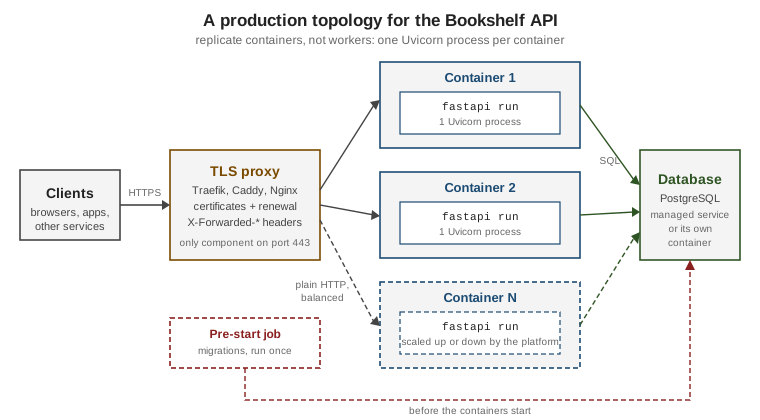
The picture below is the topology the rest of the page builds towards, and the one the container guide in FastAPI in Docker & Kubernetes implements: a single TLS proxy on port 443, a variable number of identical containers each running one Uvicorn process, a database, and a pre-start job that runs the migrations once.
The Six Deployment Concepts
The official concepts page names six things to decide, and they are a better checklist than any tool list. For each one this section gives the question, the usual answer, and what FastAPI itself contributes (often: nothing, which is the point).
| Concept | Question | Typical tools |
|---|---|---|
Security - HTTPS |
Who terminates TLS, who obtains and renews the certificates? |
Traefik and Caddy (renew automatically), Nginx or HAProxy with Certbot, Kubernetes ingress with cert-manager, a cloud load balancer |
Running on startup |
What starts the server when the machine boots? |
Docker, Docker Compose, Docker Swarm, Kubernetes, systemd, Supervisor, a cloud service |
Restarts |
What brings it back after a crash? |
The same tool that starts it |
Replication (processes) |
How many processes serve requests, and who listens on the port? |
|
Memory |
How much RAM does each process hold, and how many fit? |
Measurement ( |
Previous steps before starting |
Who runs migrations or other one-time steps, exactly once? |
An init container, a start script, a release job |
Source: FastAPI: Deployments Concepts
HTTPS
HTTPS is plain HTTP inside a TLS connection. The encryption happens at the TCP level, before the HTTP request and the domain name are known, which is why only one process per IP address and port (443) can own the certificates; the TLS SNI extension lets that one process hold a certificate per domain. The usual design is therefore a TLS termination proxy in front of the application: it decrypts the request, forwards plain HTTP to Uvicorn and encrypts the response. A separate component, or the same proxy, renews the certificates before they expire (Let’s Encrypt certificates live about three months). The details, including Traefik and Let’s Encrypt, are in HTTPS.
Running on startup and restarts
Starting fastapi run over SSH works until the connection drops or the machine reboots. A supervisor outside of your
Python process has to start the server at boot and start it again when it exits. FastAPI contains an error to the
request that raised it (the client gets a 500 and the process carries on), so the case to handle is the crash of the
whole process: a segmentation fault in a C extension, the out-of-memory killer, a bug in startup code. By then nothing
inside the same process can help, so the restarter must be external. On a plain Linux host that is typically systemd;
in containers it is the restart policy of Docker or Kubernetes.
# /etc/systemd/system/bookshelf-api.service
[Unit]
Description=Bookshelf API (FastAPI)
After=network.target

[Service]
User=bookshelf
WorkingDirectory=/srv/bookshelf
EnvironmentFile=/etc/bookshelf/api.env
ExecStartPre=/srv/bookshelf/.venv/bin/python prestart.py
ExecStart=/srv/bookshelf/.venv/bin/fastapi run main.py --port 8000 --workers 2
Restart=on-failure
RestartSec=2
TimeoutStopSec=40

[Install]
WantedBy=multi-user.targetRestart=on-failure restarts the service when the process exits with an error, is killed by a signal or times out,
ExecStartPre runs the pre-start step before every start, and TimeoutStopSec should be a little larger than the
server’s graceful-shutdown timeout (see Graceful Shutdown and Health). This unit file is a sketch assembled from the
documented systemd directives (see the systemd link in the references) and was not run for this page. Do not restart
forever blindly: an app that crashes immediately on every start is a bug to find, which is what the restart-rate limits
of the supervisor are for.
Replication and the port
Several worker processes can serve the same API, but only one process can listen on a given IP address and port. So
there is always one component that owns the port and hands connections to the others: a Uvicorn parent process
(--workers), a Gunicorn master, a load balancer in front of several containers, or a cloud service. The next
sections show each.
Memory
Processes do not share memory. Everything your app loads at startup (a cache, a machine-learning model, a large file)
is loaded once per process. The official example: a 1 GB model costs 1 GB with one process and 4 GB with four
workers, which is a problem on a 3 GB machine. The lifespan function of the Bookshelf API below makes that visible,
because it runs once per worker process and stores a "catalog" on app.state; each worker holds its own copy and the
response reports the process ID that served it.
import logging
import os
from contextlib import asynccontextmanager

from fastapi import FastAPI

logger = logging.getLogger("uvicorn.error")


@asynccontextmanager
async def lifespan(app: FastAPI):
    # Runs once PER WORKER PROCESS, not once per deployment.
    logger.info("lifespan startup in pid %s", os.getpid())
    app.state.catalog = {1: "Dune", 2: "Emma"}  # per-process memory
    yield
    logger.info("lifespan shutdown in pid %s", os.getpid())


app = FastAPI(title="Bookshelf API", lifespan=lifespan)


@app.get("/healthz")
async def healthz() -> dict[str, str]:
    return {"status": "ok"}


@app.get("/books/{book_id}")
async def read_book(book_id: int) -> dict[str, int | str]:
    return {"id": book_id, "title": app.state.catalog.get(book_id, "unknown"), "pid": os.getpid()}


@app.get("/env")
async def env() -> dict[str, str | None]:
    return {"FASTAPI_ENV": os.environ.get("FASTAPI_ENV")}
Source: FastAPI: Lifespan Events
This file, main.py, is the application used by the commands in the rest of the page. Startup and shutdown work such
as opening connection pools belongs in lifespan (see
Settings, Lifespan & Background Tasks); the
consequence for deployment is that with N workers it runs N times and every pool is multiplied by N. Size database
pools as connections per process times processes times replicas, and compare the result with the database’s
connection limit (see SQL Databases with SQLModel).
A rule of thumb from the official concepts page is to aim for roughly 50 to 90 percent utilisation of CPU and memory:
well below that you pay for idle machines, at 100 percent a spike pushes the server into swap or an out-of-memory kill.
Measure with htop or a monitoring stack rather than guessing.
Previous steps before starting
Some steps must happen once per release, before the first request: database migrations, creating a schema, warming a
cache. If every worker or replica ran them, they would duplicate the work or, for a migration, conflict with each
other. So run them in a single process before the servers start. The simplest portable form is a start script that
runs the step and then replaces itself with the server using exec, so that the server becomes the main process (and
receives the signals):
"""Pre-start step: runs exactly once, before any server process exists."""
import sqlite3
import sys

DB = "bookshelf.db"


def migrate() -> None:
    with sqlite3.connect(DB) as con:
        con.execute("CREATE TABLE IF NOT EXISTS book (id INTEGER PRIMARY KEY, title TEXT NOT NULL)")
        con.execute("INSERT OR IGNORE INTO book (id, title) VALUES (1, 'Dune')")
    print("pre-start: schema ready", file=sys.stderr)


if __name__ == "__main__":
migrate()#!/bin/sh
set -eu
python prestart.py # once; a failure stops the script (set -e)
exec fastapi run main.py --port "${PORT:-8000}" --workers "${WEB_CONCURRENCY:-2}"Running PORT=8213 ./start.sh printed pre-start: schema ready, then the server banner, answered /healthz and left
bookshelf.db behind. A second script whose pre-start command exited with status 3 stopped immediately with exit code 3
and never started a server, which is the behaviour you want from a failed migration. A real project would call Alembic
here (alembic upgrade head); in Kubernetes the same role is played by an init container or a Job, covered in
FastAPI in Docker & Kubernetes. With several replicas a plain script is
not enough, because every replica would run it: use a migration job or a lock.
fastapi run
Since FastAPI 0.111.0 (2024-05-03) the fastapi command is the front door to the server. It comes with
fastapi[standard] (the plain fastapi package does not install it, a change made in 0.112.0), wraps Uvicorn, and
finds the app for you. There are two modes:
fastapi dev |
fastapi run |
|
|---|---|---|
Purpose |
Local development |
Production |
Auto-reload |
On by default ( |
Off by default |
Listens on |
|
|
|
Set to |
Left unchanged: set it yourself if the app needs to detect production |
Reload directories |
|
Not available |
Source: FastAPI: FastAPI CLI
The options of fastapi run (from fastapi run --help on FastAPI CLI 0.0.32) are:
| Option | Meaning |
|---|---|
|
A Python file or package directory. Without it the CLI tries |
|
Interface to bind. Default |
|
Port to bind. Default 8000; also read from the |
|
Auto-reload. Default off; never use it in production. |
|
Number of worker processes. Mutually exclusive with |
|
The path prefix a proxy adds, see Middleware, CORS & Proxies. |
|
Name of the variable holding the app in the imported module (otherwise it looks for |
|
An import string such as |
|
Interpret |
|
Comma-separated IPs trusted to send those headers; |
|
Show how the app was discovered and imported. |
Source: FastAPI: FastAPI CLI
Running it and calling the app from curl gave:
$ fastapi run main.py --port 8201
$ curl -s localhost:8201/books/1
{"id":1,"title":"Dune","pid":22609} ⚡️ Starting FastAPI in production mode
🐍 Using import string: main:app
🌐 Server started at http://0.0.0.0:8201
Documentation at http://0.0.0.0:8201/docs
Logs:
INFO: Started server process [22609]
INFO: Waiting for application startup.
INFO: lifespan startup in pid 22609
INFO: Application startup complete.
INFO: Uvicorn running on http://0.0.0.0:8201 (Press CTRL+C to quit)
INFO: 127.0.0.1:60352 - "GET /books/1 HTTP/1.1" 200 OK
INFO: Shutting down
INFO: Waiting for application shutdown.
INFO: lifespan shutdown in pid 22609
INFO: Application shutdown complete.
INFO: Finished server process [22609]Declaring the entrypoint once
Passing a path to every command is easy to forget, and other tools (an editor extension, FastAPI Cloud) cannot guess
it. The recommended way is to declare the import string once in pyproject.toml:
[project]
name = "bookshelf"
version = "0.1.0"

[tool.fastapi]
entrypoint = "backend.main:app"With the app in backend/main.py and that file in the working directory, plain fastapi run --port 8208 printed
Using import string: backend.main:app and served the app, with no path argument.
Telling the app which environment it is in
fastapi dev sets the environment variable FASTAPI_ENV to development before importing your app (keeping a value
you already set). The documented conventional values are development and production. fastapi run does not set it
at all, so set it in the unit file, the container or the platform when the app has to behave differently. The /env
endpoint of main.py returned {"FASTAPI_ENV":"development"} under fastapi dev, null under a plain fastapi run,
and {"FASTAPI_ENV":"production"} with FASTAPI_ENV=production fastapi run main.py. Configuration in general, such as
database URLs and secrets read from the environment, is covered in
Settings, Lifespan & Background Tasks.
ASGI Servers
FastAPI is an ASGI framework, so it needs an ASGI server to listen on sockets and speak HTTP. fastapi run uses
Uvicorn, but any of the following can serve the same app:
| Server | Character | Command used to serve main:app (executed) |
|---|---|---|
Uvicorn |
The default; a high-performance ASGI server. |
|
Hypercorn |
ASGI server with HTTP/2 and Trio support |
|
Daphne |
The ASGI server built for Django Channels |
|
Granian |
A Rust HTTP server for Python applications |
|
Source: FastAPI: Run a Server Manually
Each of these servers answered /healthz with {"status":"ok"} on Hypercorn 0.18, Daphne 4.2 and Granian 2.8 (in a
separate virtual environment from the Uvicorn runs). The first argument is an import string, main:app, meaning
“from main import app”. To install Uvicorn yourself, add uvicorn[standard] to the project (it is already included
in fastapi[standard]). Never run any of them with --reload in production: reloading watches the file system,
consumes far more resources and is less stable.
Uvicorn options that matter in production
Everything the CLI does can be done with uvicorn directly, which also exposes more settings. Uvicorn can be configured
through the command line, through keyword arguments of uvicorn.run(), or through environment variables with the
prefix UVICORN_ (command line and arguments win). The production-relevant options are:
| Option | Meaning |
|---|---|
|
Where to listen. Default host is |
|
Number of worker processes. Default: the |
|
Trust forwarded headers. Default trusts only |
|
The ASGI |
|
Terminate TLS in Uvicorn itself, see TLS in Uvicorn itself. |
|
Maximum concurrent connections or tasks; beyond it Uvicorn answers |
|
Restart a worker after that many requests (plus random jitter), a pragmatic guard against slow memory leaks under a process manager. |
|
Size of the TCP accept queue (OS-level, default 2048). |
|
Close idle keep-alive connections after this many seconds (default 5). |
|
Maximum seconds to wait for in-flight requests on shutdown. |
|
Seconds to wait for a worker to answer a health check (default 5). |
|
Logging verbosity, access log and a logging configuration file. |
|
Choose implementations ( |
Source: Uvicorn: Settings
fastapi run forwards only the options listed in the table of the previous section; to use the others, call uvicorn
(or put the application in a script that calls uvicorn.run).
import uvicorn

if __name__ == "__main__":
    # Import string (not the app object) is required for workers > 1 and reload.
uvicorn.run("main:app", host="0.0.0.0", port=8215, workers=2, log_level="info")Running python serve.py started two server processes and served /books/1. Pass an import string rather than the app
object whenever workers or reload is used, and keep the call inside the if name == "main" guard, because
worker processes are started by spawning and re-import the module.
Workers
One Uvicorn process serves many concurrent clients, but only on one CPU core: Python code in one process does not run in parallel (see Async & Concurrency). To use several cores on one machine, run several worker processes behind the single listening socket.
fastapi run --workers and uvicorn --workers
Both commands take --workers. The count can also come from the WEB_CONCURRENCY environment variable, which Uvicorn
reads when --workers is not given.
fastapi run main.py --port 8202 --workers 3
uvicorn main:app --host 0.0.0.0 --port 8080 --workers 4
WEB_CONCURRENCY=2 uvicorn main:app --host 127.0.0.1 --port 8203The log of the first command shows the structure: one parent and three worker processes, each running its own lifespan.
INFO:     Uvicorn running on http://0.0.0.0:8202 (Press CTRL+C to quit)
INFO:     Started parent process [22642]
INFO:     Started server process [22653]
INFO:     lifespan startup in pid 22653
INFO:     Started server process [22652]
INFO:     lifespan startup in pid 22652
INFO:     Started server process [22651]
INFO:     lifespan startup in pid 22651
Eight requests to /books/2 were answered by two of the three process IDs (22651 and 22652); the connections were not
shared evenly, which is normal when the requests are short and sequential. Do not expect round-robin. The kernel hands
each new connection to whichever worker accepts it, so distribution evens out only under real concurrent load.
On shutdown (SIGTERM) the parent terminated each child, each worker ran its own shutdown lifespan, and the parent
stopped last (Terminated child process, lifespan shutdown in pid …, Stopping parent process).
What the Uvicorn process manager does for you
The built-in manager monitors its children. Uvicorn starts workers by spawning (not forking), so it works on Windows too, and:
-
It restarts workers that die. With two workers, a
kill -9on one of them producedChild process [22979] diedin the parent’s log, and a new server process [23036] started and served the following requests. -
It restarts workers that hang. A child that stops answering its health check (
--timeout-worker-healthcheck) is killed and replaced. -
It reacts to signals sent to the parent (not on Windows).
SIGHUPrestarts the workers one at a time without dropping requests, so new code on disk is picked up (a run printedReceived SIGHUP, restarting processes.and every later request was served by a new process);SIGTTINadds one worker andSIGTTOUremoves one.
kill -HUP "$(cat bookshelf.pid)"    # rolling restart of the workers
kill -TTIN "$(cat bookshelf.pid)"   # one more worker
kill -TTOU "$(cat bookshelf.pid)" # one fewer workerThe SIGHUP form was run; SIGTTIN and SIGTTOU are taken from the Uvicorn documentation and were not run. With this
built-in manager the workers cover replication and, partly, restarts. Starting at boot, HTTPS, memory and pre-start
steps are still yours (The Six Deployment Concepts), and nothing restarts the parent if it dies, so the whole thing still needs
systemd or a container restart policy around it.
Gunicorn and the UvicornWorker deprecation
For years the standard production setup was Gunicorn, a mature pre-fork process manager, running Uvicorn workers, and an official Docker image was built around it. Two things changed:
-
Uvicorn gained its own process manager (the
--workersoption above, which restarts dead workers), removing the main reason to add Gunicorn. FastAPI’s container guide now states that the oldtiangolo/uvicorn-gunicorn-fastapiimage is deprecated and tells you to use--workersinstead. -
The worker classes that shipped inside Uvicorn are deprecated. The Uvicorn documentation says the
uvicorn.workersmodule is deprecated and will be removed in a future release, and points to the separateuvicorn-workerpackage. Verified on Uvicorn 0.54.0: importinguvicorn.workersstill works but emits aDeprecationWarningthat reads: The uvicorn.workers module is deprecated. Please use uvicorn-worker package instead.
So Gunicorn with Uvicorn workers is not dead; only the old import path is. If you want Gunicorn (graceful rolling
upgrades through Gunicorn’s own signals, its configuration file, or to reuse existing operational tooling), install
the new package and change the worker class to uvicorn_worker.UvicornWorker (or uvicorn_worker.UvicornH11Worker on
PyPy):
pip install gunicorn uvicorn-worker
gunicorn main:app -w 2 -k uvicorn_worker.UvicornWorker -b 127.0.0.1:8204
Source: uvicorn-worker: Getting Started
import os

bind = f"0.0.0.0:{os.environ.get('PORT', '8000')}"
workers = int(os.environ.get("WEB_CONCURRENCY", "2"))
worker_class = "uvicorn_worker.UvicornWorker"
graceful_timeout = 30
timeout = 30
Source: Gunicorn
Saved as gunicorn.conf.py next to main.py, which Gunicorn picks up automatically, PORT=8216 gunicorn main:app
started the master and two workers (log lines Using worker: uvicorn_worker.UvicornWorker and
Booting worker with pid: …) and served /books/2. Differences to keep in mind:
-
Gunicorn has its own options, so some Uvicorn flags such as
--limit-concurrencyare not available through it. To pass Uvicorn configuration to the worker, subclass the worker and set itsCONFIG_KWARGSdictionary. -
Certificates can be given to Gunicorn directly with
--keyfileand--certfile. -
uvicorn.workers.UvicornWorkerstill ran in the test environment, but plan to migrate: it is documented as to be removed.
How many workers, and when not to use them
The official guidance is to use --workers when you run on a single machine (a VM) and want its cores used, and not to
use them in a cluster. On Kubernetes, Docker Swarm, Nomad or a managed container service the platform already replicates
and restarts containers, so a second process manager inside each container only adds complexity. There the rule is one
Uvicorn process per container, several containers (the topology figure above). Practical points for choosing the number:
-
Start with the number of CPU cores available to the process (a container limited to one CPU gains nothing from four workers) and measure. I/O-bound
async defapps gain less from extra workers than CPU-bound ones, because one process already overlaps many waits. -
Multiply memory by the worker count (Memory) and database connections by the worker count.
-
In-process state is per worker: a Python dict used as a cache or a rate-limit counter is not shared. Use the database, Redis or another shared store for anything that must be consistent across requests.
-
Workers are processes, not threads: they do not help with a blocking call inside an
async defhandler in one process (see Async & Concurrency); they only add parallelism. -
A background task or a schedule started inside the app runs once per worker. A job that must run once per deployment belongs in a separate process or a platform scheduler.
Graceful Shutdown and Health
A deployment replaces processes constantly: new releases, scale-down, node maintenance. The server receives SIGTERM
(or SIGINT) and should stop accepting connections, let in-flight requests finish, run the shutdown part of the
lifespan, and exit. Uvicorn does exactly that, bounded by --timeout-graceful-shutdown.
import asyncio

from fastapi import FastAPI

app = FastAPI(title="Bookshelf API")


@app.get("/slow")
async def slow(seconds: float = 3) -> dict[str, float]:
    await asyncio.sleep(seconds)
    return {"slept": seconds}
Source: Uvicorn: Settings - Timeouts
With uvicorn slow:app --timeout-graceful-shutdown 10, a request for /slow?seconds=3 was in flight when SIGTERM
arrived one second after it started. The server logged Shutting down and Waiting for connections to close, the
client still received {"slept":3.0} with status 200, and only then did Waiting for application shutdown run. With
--timeout-graceful-shutdown 1 and a five-second request the server logged
Cancel 1 running task(s), timeout graceful shutdown exceeded, the handler received a CancelledError, and the client
got 500 Internal Server Error. Set the timeout above your slowest normal request, and set the platform’s own
termination grace period (TimeoutStopSec in systemd, the pod’s grace period in Kubernetes) above Uvicorn’s.
To protect a replica from overload, --limit-concurrency makes Uvicorn answer 503 immediately instead of queueing
without bound. A run with uvicorn slow:app --limit-concurrency 2 and four simultaneous two-second requests returned
503 to three of them and 200 to one. Choose the limit from a load test (see
Property-Based & Load Testing) and let the load balancer
retry or shed. A health endpoint such as the /healthz of main.py is what a load balancer, a Docker health check or
a Kubernetes probe polls; probes and graceful termination in Kubernetes are covered in
Health Probes & Lifecycle.
A test that the app starts, runs its lifespan and answers is cheap insurance before every deployment:
from fastapi.testclient import TestClient

from main import app


def test_health_and_per_process_state() -> None:
    with TestClient(app) as client:  # runs lifespan startup/shutdown
        assert client.get("/healthz").json() == {"status": "ok"}
        body = client.get("/books/1").json()
        assert body["title"] == "Dune"
assert isinstance(body["pid"], int)This passed (1 passed) with pytest. Using TestClient as a context manager is what triggers the lifespan; without
with, the startup code never runs.
HTTPS
HTTPS is not a switch you turn on in FastAPI; it is a property of the whole path from the browser to the server, and the application normally never sees it.
The TLS termination proxy
The proxy listens on port 443, holds the certificates (one per domain, selected with SNI), decrypts the request, and sends plain HTTP to the application on a private network or the same host. The responses take the reverse path. The proxy is also the natural place for HTTP to HTTPS redirects, rate limits, compression and static files. Candidates:
-
Traefik and Caddy obtain and renew certificates by themselves.
-
Nginx and HAProxy need an external renewal program such as Certbot.
-
Kubernetes ingress controllers use cert-manager.
-
A cloud load balancer or platform (Azure Front Door, AWS CloudFront and load balancers, Google Cloud load balancing, FastAPI Cloud) terminates TLS for you, and may charge or restrict.
A certificate is bound to a domain name, not to an IP address. To get one, you create a DNS record pointing the domain to your server and then prove control of the domain to the certificate authority.
Let’s Encrypt and renewal
Let’s Encrypt is a free, automated certificate authority run as a project of the Linux Foundation. Its certificates are short-lived (about three months) so that renewal has to be automatic. Renewal proves domain control in one of two popular ways: by changing a DNS record (which requires the program to support your DNS provider’s API), or by serving a challenge on the public IP address, port 80 or 443. The second way is one reason why one component should own both TLS and renewal: if the renewal program and the proxy both need the port, you would have to stop the proxy during renewal, and your apps would be down.
Traefik with Let’s Encrypt
Traefik reads routing rules from labels on Docker containers (the Docker provider) and has built-in ACME support for Let’s Encrypt. The Compose file below puts the Bookshelf API behind it: Traefik owns ports 80 and 443, redirects HTTP to HTTPS, requests a certificate for the domain in the router rule with the HTTP challenge, and keeps the certificates in a volume.
services:
  traefik:
    image: traefik:v3
    command:
      - --providers.docker=true
      - --providers.docker.exposedbydefault=false
      - --entryPoints.web.address=:80
      - --entryPoints.websecure.address=:443
      - --entryPoints.web.http.redirections.entryPoint.to=websecure
      - --entryPoints.web.http.redirections.entryPoint.scheme=https
      - --certificatesresolvers.letsencrypt.acme.email=admin@bookshelf.example
      - --certificatesresolvers.letsencrypt.acme.storage=/letsencrypt/acme.json
      - --certificatesresolvers.letsencrypt.acme.httpchallenge.entrypoint=web
    ports:
      - "80:80"
      - "443:443"
    volumes:
      - /var/run/docker.sock:/var/run/docker.sock:ro
      - letsencrypt:/letsencrypt

  api:
    build: .
    command: ["fastapi", "run", "app/main.py", "--port", "8000", "--forwarded-allow-ips", "*"]
    labels:
      - "traefik.enable=true"
      - "traefik.http.routers.bookshelf-api.rule=Host(`bookshelf.example`)"
      - "traefik.http.routers.bookshelf-api.entrypoints=websecure"
      - "traefik.http.routers.bookshelf-api.tls.certresolver=letsencrypt"
      - "traefik.http.services.bookshelf-api.loadbalancer.server.port=8000"

volumes:
letsencrypt:This file was assembled from the documented Traefik options (the Docker provider flags and labels, the entry-point
redirection, and the ACME resolver with the HTTP challenge) and was not run: it needs a public domain and a Docker
daemon, and neither was available. Check three things before using it. The image tag should be the Traefik version you
tested (traefik:v3 is a moving tag), the e-mail is a placeholder, and acme.json must stay on a persistent volume or
you will request new certificates on every start and hit the certificate authority’s rate limits. Mounting the Docker
socket gives Traefik broad control of the host, so treat it as a sensitive component. "*" for --forwarded-allow-ips
is acceptable here only because the api container publishes no port and can be reached only from Traefik through the
Compose network. The experiment with a path prefix (StripPrefix and --root-path) is in
Middleware, CORS & Proxies, and Compose in general in
Compose in Practice.
Forwarded headers: telling the app about HTTPS
Behind the proxy, Uvicorn talks plain HTTP and knows nothing about TLS. The proxy therefore adds X-Forwarded-For,
X-Forwarded-Proto and X-Forwarded-Host (Uvicorn itself reads the first two), and the server must be told which
connecting addresses it may believe. Without trust the application thinks it is on http at the proxy’s address, so
request.url, redirects and generated links are wrong. The Bookshelf API can print what it believes:
from fastapi import FastAPI, Request

app = FastAPI(title="Bookshelf API")


@app.get("/whoami")
async def whoami(request: Request) -> dict[str, str | None]:
    return {
        "scheme": request.url.scheme,
        "client": request.client.host if request.client else None,
        "url": str(request.url),
}Three servers were started with different trust and called with the headers a proxy would send:
fastapi run proxied.py --port 8210                                  # default trust
fastapi run proxied.py --port 8211 --forwarded-allow-ips 127.0.0.1  # trust the caller
fastapi run proxied.py --port 8212 --forwarded-allow-ips 192.0.2.1  # trust someone else
curl -s -H "X-Forwarded-Proto: https" -H "X-Forwarded-For: 203.0.113.7" \
-H "Host: api.bookshelf.example" localhost:8210/whoami{"scheme":"https","client":"203.0.113.7","url":"https://api.bookshelf.example/whoami"}The first two servers returned the response above (the default already trusts 127.0.0.1, the address curl came
from); the third, which trusts only 192.0.2.1, ignored the headers and returned
{"scheme":"http","client":"127.0.0.1","url":"http://api.bookshelf.example/whoami"}. In production set
--forwarded-allow-ips to the proxy’s address or network; use "*" only when nothing but the proxy can reach the
port, because otherwise any client can forge its address and scheme. Using several headers, several proxies,
HTTPSRedirectMiddleware and TrustedHostMiddleware together is the subject of
Middleware, CORS & Proxies.
TLS in Uvicorn itself
Uvicorn can terminate TLS directly, which is reasonable for local HTTPS testing, an internal service, or a single
small host without a proxy. It needs a certificate and a private key (for local work, mkcert or a self-signed
certificate); the recommended source for a public certificate is Let’s Encrypt.
openssl req -x509 -newkey rsa:2048 -nodes -keyout key.pem -out cert.pem -days 1 -subj "/CN=localhost"
uvicorn main:app --port 8209 --ssl-keyfile key.pem --ssl-certfile cert.pem
curl -sk https://localhost:8209/healthzThe curl printed {"status":"ok"} (-k skips verification of the self-signed certificate; never do that outside
of a local test), and a plain http:// request to the same port failed instead of being served. The drawbacks of doing
it this way are the reasons the proxy design exists: no automatic renewal, one certificate, the port must be 443 (a
privileged port on Linux), and a restart is needed to load a renewed certificate. For TLS needs the flags do not cover,
such as mutual TLS, Uvicorn accepts an ssl_context_factory in uvicorn.run(); see its documentation. The key file is
a secret: keep it out of Git and out of the image, and mount it from a secret store.
Pinning Versions
FastAPI is still a 0.x project, and under Semantic Versioning anything below 1.0.0 may introduce breaking changes. The project’s convention is that a PATCH release (the last number) contains bug fixes and non-breaking changes, while a MINOR release (the middle number) may contain new features and breaking changes. Therefore:
-
Pin FastAPI to the version you tested, either exactly or to a patch range.
-
Do not pin Starlette. Each FastAPI version requires a Starlette range it works with; let FastAPI choose.
-
Pydantic may be pinned to a range that works for you: Pydantic includes FastAPI’s tests in its own test suite, so new versions are compatible. The range is
>=2.13.5,<3.0.0here. -
Add tests, then upgrade deliberately: raise the pin, run the tests, fix what broke, commit the new pin.
fastapi[standard]>=0.142.2,<0.143.0
pydantic>=2.13.5,<3.0.0Resolving those two lines with pip install --dry-run produced fastapi 0.142.2, starlette 1.7.0, pydantic 2.13.5,
uvicorn 0.54.0 and fastapi-cli 0.0.32, with no Starlette pin in the file. A range is convenient but still floats
between installs; for reproducible deployments commit a lock file (the output of pip freeze or pip-compile,
uv.lock, poetry.lock) so that the image you test is the image you ship; see the pip and uv references. A small startup
check can make drift loud instead of subtle:
"""Fail fast if the environment drifted from what was tested."""
from importlib.metadata import version

from packaging.specifiers import SpecifierSet
from packaging.version import Version

EXPECTED = {
    "fastapi": SpecifierSet(">=0.142.2,<0.143.0"),
    "pydantic": SpecifierSet(">=2.13.5,<3.0.0"),
}


def check() -> dict[str, str]:
    installed = {name: version(name) for name in EXPECTED}
    for name, spec in EXPECTED.items():
        if Version(installed[name]) not in spec:
            raise RuntimeError(f"{name} {installed[name]} is outside {spec}")
    return installed


if __name__ == "__main__":
print(check())The script printed {'fastapi': '0.142.2', 'pydantic': '2.13.5'}. The packaging library it uses is not a FastAPI
dependency, so add it to your requirements if you keep such a check. Running it from the pre-start step (Previous steps before starting)
stops a bad rollout before a worker starts. When you upgrade, read the release notes between your pin and the target,
since a MINOR release can change behaviour (for example 0.132.0 made strict content-type checking the default and 0.137.0
changed how routers are stored); the table of dated changes is in
What’s Changed & Migration.
FastAPI Cloud
FastAPI Cloud is a hosting service built by the author and team of FastAPI (and the main sponsor of the FastAPI
open-source projects), launched in the CLI with FastAPI 0.116.0 (2025-07-07). It aims to make deploying a FastAPI app one
command and takes care of HTTPS, replication with autoscaling based on requests, and the other concepts of this page. The
commands come with fastapi[standard]:
fastapi login        # authenticate; opens the browser
fastapi deploy       # detect the app, upload it, build and deploy it
Source: FastAPI: FastAPI Cloud
If you are not logged in, fastapi deploy opens the browser for authentication by itself. The CLI detects the FastAPI
application (so the [tool.fastapi] entrypoint from Declaring the entrypoint once helps), and when it finishes prints the URL, in the
documentation example of the form https://myapp.fastapicloud.dev. Both commands exist in the installed CLI 0.0.32;
fastapi deploy --help lists --no-wait, --app-id, --large-file-threshold and --json, fastapi login --help lists
--no-open, --timeout and --json, and the fastapi cloud group also contains logs, env, domains, link,
unlink, setup-ci, whoami, logout, teams and tokens. These commands were not run: they need a FastAPI Cloud
account. For the quick start, environment variables, custom domains, autoscaling and CI integration, follow the
FastAPI Cloud documentation linked below, which is the authority for that service.
Because it is a commercial platform, treat it like any other choice from Deployment Strategies at a Glance: it removes work, and the price is the platform’s pricing, limits and lock-in. FastAPI is open source and standards-based, so nothing in the code ties the app to it, and the container route stays open.
Cloud Providers
You can run FastAPI on virtually any cloud. The official guides point to your provider’s documentation and name
some sponsors with their own guides (Render and Railway at the time of checking). For the three big clouds the site has
its own guides, and the FastAPI-specific part is almost always the same: a container image with one Uvicorn process
(fastapi run, port from the PORT environment variable, --forwarded-allow-ips for the platform’s proxy), a health
endpoint, configuration from environment variables and secrets from the provider’s secret store.
Cloud |
Container services |
Pages |
Azure |
Container Apps, AKS, App Service |
Container Apps, AKS clusters, App Service and Functions, choosing a compute service |
AWS |
ECS on Fargate, EKS, Lambda |
ECS and Fargate, EKS clusters, Lambda, choosing a compute service |
Google Cloud |
Cloud Run, GKE |
On Kubernetes (any cloud) the proxy role belongs to an ingress or the Gateway API, replication to the Deployment, and pre-start steps to an init container or a Job; see Ingress, Health Probes & Lifecycle and the container guide FastAPI in Docker & Kubernetes. A function-as-a-service setup, which runs the app per request instead of as a long-lived process, changes the model again: lifespan and in-process state behave differently there,, so read the platform’s guide: Lambda on AWS, or the Azure and Google Cloud pages in the table above.
Putting It Together: Which Setup for Which Situation
| Situation | Setup |
|---|---|
Learning, demos, internal tools on one VM |
|
A containerised service on Kubernetes or a managed container platform |
One Uvicorn process per container ( |
Existing Gunicorn operations |
|
The least operations work possible |
FastAPI Cloud ( |
HTTP/2 or a different server runtime is required |
Hypercorn or Granian under the same process model, or HTTP/2 at the proxy |
Where Older Guides Are Outdated, and What Changed Recently
-
Gunicorn plus
uvicorn.workers.UvicornWorkeras the default. Uvicorn now manages workers itself (--workers, which restarts dead workers and supportsSIGHUP), theuvicorn.workersmodule is deprecated in favour of theuvicorn-workerpackage (aDeprecationWarningon Uvicorn 0.54.0), and the oldtiangolo/uvicorn-gunicorn-fastapiimage is deprecated. Prefer--workers, or one process per container. -
uvicorn main:appas the way to start. Thefastapicommand (fastapi dev,fastapi run) arrived in 0.111.0 (2024-05-03) and thefastapi[standard]extra in 0.112.0 (2024-08-02); the plain package no longer installs the server and the CLI, and the slim variant of the package was deprecated and then dropped in February 2026 (0.129.2, 0.128.8). Installfastapi[standard]. -
--reloadoutside development. Reload is forfastapi dev;fastapi runhas none, and it cannot be combined with--workers. -
--proxy-headersalone. Forwarded headers are enabled by default but only for trusted addresses (127.0.0.1and::1); the setting that matters is--forwarded-allow-ips(orFORWARDED_ALLOW_IPS). -
Startup and shutdown events.
@app.on_eventis superseded by lifespan (0.93.0, 2023-03-07), and lifespan code runs once per worker, which matters for pools and caches. -
The pin advice. Pin FastAPI, let it choose Starlette, and keep Pydantic to a compatible v2 range; Pydantic v1 is no longer supported (0.126.0, 2025-12-20).
-
Python versions. Python 3.8 was dropped in 0.125.0 (2025-12-17) and 3.9 in 0.129.0 (2026-02-12); 3.14 is supported since 0.118.3 (2025-10-10) and the official Dockerfile example now uses a recent Python base image.
-
FastAPI Cloud.
fastapi deployappeared in 0.116.0 (2025-07-07); older guides know only self-hosting and other platforms. -
Tool-specific syntax ages quickly. Traefik configuration changed between major versions, and old tutorials use labels that current versions do not read. Copy from the current documentation for the version you run.
-
Native OpenTelemetry (0.142.0, 2026-09-29). Tracing no longer requires hand-written instrumentation; see the observability page of this section once it is published.
Pitfalls
-
Binding to
127.0.0.1in a container. The default ofuvicornis127.0.0.1, which is unreachable from outside the container.fastapi runlistens on0.0.0.0, which is why it is the better container command. -
--workersinside Kubernetes. Several replicas times several workers multiplies memory and connections and hides the true process count from the scheduler. Scale replicas instead. -
--reloadorfastapi devin production. Slower, less stable, andfastapi devbinds only to localhost, so it also looks broken. -
Running pre-start migrations in every worker. Duplicate or conflicting migrations. Run them once.
-
Per-process state treated as global. An in-memory cache, counter or rate limiter differs per worker. Use a shared store.
-
Memory multiplied. A 1 GB model loaded at startup costs 4 GB with four workers. Measure resident memory per process and set the container memory limit accordingly.
-
Database pool times workers times replicas. Easily exceeds the database’s connection limit.
-
Trusting
X-Forwarded-from everyone.*--forwarded-allow-ips "*"on a port the internet can reach lets any client forge its IP address and scheme. -
Self-signed certificate with verification off. Fine locally, wrong in production; use a certificate authority.
-
Certificate storage not persistent. A proxy that loses
acme.jsonrequests new certificates on every restart and runs into rate limits. -
Grace periods in the wrong order. If the platform kills the process before Uvicorn’s
--timeout-graceful-shutdownelapses, in-flight requests are cut anyway. -
Unpinned FastAPI. A routine rebuild pulls a new MINOR release with a breaking change. Pin and test.
-
Starting from an SSH session. The process dies with the connection and does not come back after a reboot. Use a supervisor.
-
Secrets in the image or the unit file. Pass them with an environment file or the platform’s secret store, not in the repository (see Settings, Lifespan & Background Tasks).