Deployment: WSGI Servers & Proxies
|
This content was generated with the assistance of AI and should be verified against the official documentation before being relied on in production. The reference material consulted while preparing these pages is listed in the section bibliography. |
This page is written against Flask 3.1.3 (released 2026-02-19), Werkzeug 3.1.9 and Python 3.13, with Gunicorn 26.2.0, Waitress 3.0.2, pyuwsgi 2.0.30.post1 (uWSGI 2.0.30), mod_wsgi 6.1.0, Hypercorn 0.18.0, Uvicorn 0.54.0, Supervisor 4.3.0 and Tornado 6.5.10, checked on 2026-10-07. Flask 3.2 is not released yet; everything below describes 3.1.x. Every Python example was executed with those versions: the servers were started for real on loopback ports, queried over HTTP and stopped with signals, and the outputs shown come from those runs. The nginx and Apache httpd configuration files and the systemd units are shown as configuration, not Python: the Apache httpd configuration was checked against Apache 2.4.67 on macOS (including a proxied request to a Gunicorn socket), while the nginx files, the systemd units and the mod_wsgi commands could not be run in the verification environment and are marked as such. The page follows the production checklist of the official documentation: a topology, a WSGI server, a reverse proxy, the headers that tell Flask about that proxy, HTTPS, a supervisor, and then sizing, ASGI and the things you should not do.
The Bookshelf to Deploy
The running scenario is the Bookshelf application. Deployment does not change how the application is written, but it
does change three habits: the application is created by a factory (so every server can import it by name), its secrets
come from the environment (never from the source), and it is told how many proxies stand in front of it. The first
example writes a small package and a wsgi.py entry point into a temporary directory, so that every server command on
this page imports exactly the same code. The secret key is generated with secrets.token_hex() and passed through an
environment variable; in a real deployment it lives in a root-owned file loaded by the supervisor (see
Process Supervision).
import os
import pathlib
import secrets
import sys
import tempfile
import textwrap

root = pathlib.Path(tempfile.mkdtemp(prefix="bookshelf-deploy-"))
(root / "bookshelf").mkdir()

(root / "bookshelf" / "__init__.py").write_text(textwrap.dedent('''\
    import os

    from flask import Flask, request
    from werkzeug.middleware.proxy_fix import ProxyFix


    def create_app(config=None, proxy_hops=None):
        app = Flask(__name__)
        app.config.from_mapping(
            SECRET_KEY=os.environ["BOOKSHELF_SECRET_KEY"],
            SESSION_COOKIE_SECURE=os.environ.get("BOOKSHELF_HTTPS", "1") == "1",
        )
        app.config.update(config or {})

        # How many reverse proxies stand in front of this process (0 = none).
        if proxy_hops is None:
            proxy_hops = int(os.environ.get("BOOKSHELF_PROXY_HOPS", "0"))
        if proxy_hops:
            app.wsgi_app = ProxyFix(
                app.wsgi_app, x_for=proxy_hops, x_proto=proxy_hops, x_host=proxy_hops
            )

        @app.get("/healthz")
        def healthz():
            return {"status": "ok", "pid": os.getpid()}

        @app.get("/whoami")
        def whoami():
            return {
                "remote_addr": request.remote_addr,
                "scheme": request.scheme,
                "host": request.host,
            }

        return app
    '''))

(root / "wsgi.py").write_text(textwrap.dedent('''\
    from bookshelf import create_app

    # The name `application` is what mod_wsgi looks for; `app` suits Gunicorn and uWSGI.
    application = app = create_app()
    '''))

secret = secrets.token_hex(32)
os.environ["BOOKSHELF_SECRET_KEY"] = secret
sys.path.insert(0, str(root))

from bookshelf import create_app

client = create_app().test_client()
response = client.get("/healthz")
assert response.status_code == 200 and response.json["status"] == "ok"
print(response.json)
Source: Flask: Application Factories
A server starts the application in one of two ways, and the rest of the page uses both. Servers that accept a
module-and-callable argument (Gunicorn, Waitress, Hypercorn) can import the factory directly, as in
'bookshelf:create_app()'. Servers that want a variable (mod_wsgi’s application, uWSGI’s -w wsgi:app) import the
small wsgi.py file above. The application-factory page explains why the factory is the better design; this page only
needs the two entry points. Detail on the configuration keys read here is in
Configuration.
Production Means Not Development
The official deployment page opens with a sentence worth taking literally: "production" means "not development", and that applies whether the application serves millions of users or one person on a private network. Three things that are convenient while you write code must not exist in production:
-
the development server that
flask runandapp.run()start: it is Werkzeug’s single-purpose server, "not designed to be particularly secure, stable, or efficient"; -
the interactive debugger, enabled by
flask run --debug, theFLASK_DEBUGenvironment variable orapp.run(debug=True): it serves a console on a traceback page, which is remote code execution for anyone who can reach the port (the PIN is a speed bump, not a defence); -
the reloader, which restarts the process when files change and has no place in a supervised service.
The development server prints its own reminder, which the next example captures by starting flask run for a moment on
a loopback port. The command is the documented current form, flask --app <module> run; the older FLASK_APP
environment variable still works, and FLASK_ENV (used in many .flaskenv files and Dockerfiles of older books) was
deprecated in 2.2 and removed in 2.3, so setting it today does nothing.
import subprocess
import time

env = {**os.environ, "PYTHONPATH": str(root)}
proc = subprocess.Popen(
    [sys.executable, "-m", "flask", "--app", "bookshelf", "run", "--port", "5871"],
    cwd=root, env=env, stdout=subprocess.PIPE, stderr=subprocess.STDOUT, text=True,
)
time.sleep(2)
proc.terminate()
output, _ = proc.communicate(timeout=10)
print(output)
assert "development server" in output
Source: Flask: Deploying to Production
The warning in that output is the whole message of this page: swap the server and put a proxy in front of it. A habit
to unlearn is the Dockerfile whose last line is python app.py with app.run(host="0.0.0.0", debug=True) at the
bottom of the module: it ships the debugger and the development server to production. A container runs Gunicorn or
Waitress exactly as a virtual machine does (see Docker and
Kubernetes for the container side).
| Development convenience | Production replacement | Why |
|---|---|---|
|
A WSGI server: Gunicorn, Waitress, mod_wsgi, uWSGI |
Real concurrency model, process management, hardened HTTP parser |
Debugger ( |
Error logging, an error tracker, |
The debugger executes code in the browser |
Reloader |
A supervisor that restarts the service on deploy |
No file watching, no half-reloaded state |
|
A random key from the environment or a secrets manager |
Anyone with the key can forge sessions (see Security Considerations) |
|
A reverse proxy with TLS and a firewall |
The proxy is the only public listener |
The Production Topology
A production deployment of a Flask application is several processes, each with one job. The picture is the topology the rest of this page builds, from left to right.
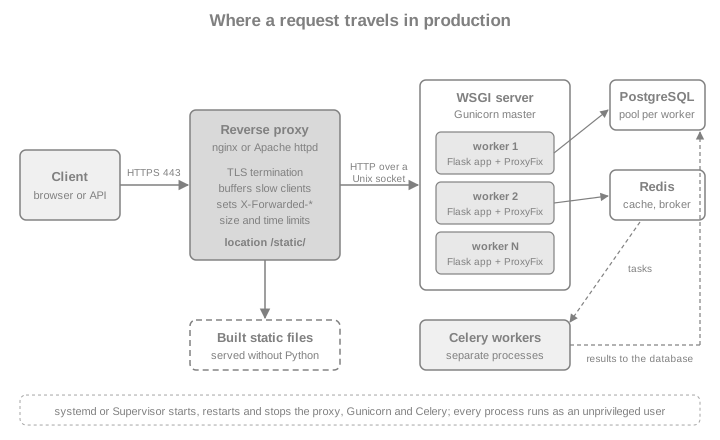
Each box exists for a reason that comes from how WSGI servers work:
-
The reverse proxy speaks to the internet. A synchronous Gunicorn worker is tied up for as long as a client takes to send its request or read its response, so a client on a slow mobile link (or a deliberately slow one) can exhaust all workers. The proxy buffers the request until it is complete and the response until it is sent, so a worker is busy only for the time the application actually works. It also terminates TLS, serves static files, enforces body-size and timeout limits, and is the one place that sets the
X-Forwarded-*headers. -
The WSGI server speaks HTTP to the proxy and WSGI to Flask. It manages worker processes (and threads), restarts a worker that dies or hangs, and exposes the signals that make a graceful reload possible.
-
The application is plain Flask, wrapped in
ProxyFixso it knows about the proxy. -
The supervisor (systemd, Supervisor, or the container runtime) starts everything at boot and restarts what crashes.
-
Background workers such as Celery are not WSGI at all: they are separate programs started from the same code base (see Background Jobs, Celery & Email).
The shape is the same on a virtual machine, in Docker and in Kubernetes, where the reverse proxy becomes an ingress and the supervisor becomes the kubelet; the Docker & Kubernetes page of this section covers the container side, and the generic deployment concepts (HTTPS, restarts, replication, memory) are explained once for ASGI applications in FastAPI: Deployment.
Choosing a WSGI Server
The official documentation lists four self-hosted WSGI servers (plus gevent and ASGI variants). They all run the same Flask object; they differ in platform support, concurrency model and operational weight.
| Server | Concurrency model | Platform and install | Choose it when |
|---|---|---|---|
Gunicorn 26.2 |
Pre-fork: a master supervises worker processes; worker classes |
Pure Python, no compilation; no native Windows support (it runs under WSL) |
The default choice on Linux and in containers |
Waitress 3.0.2 |
One process, a pool of threads (4 by default) |
Pure Python; works on Windows; buffers whole request bodies, so no streamed request uploads |
Windows hosts, or when a single multithreaded process is enough |
mod_wsgi 6.1 (and |
Apache httpd runs the application in embedded or daemon processes |
Needs a compiler and the Apache development headers; runs on Windows; can bind privileged ports then drop privileges |
Apache is already the platform and one server for both HTTP and Python is wanted |
uWSGI 2.0.30 |
Pre-fork master and workers, many extra features |
|
An existing uWSGI estate, or its nginx |
Source: Flask: Deploying to Production
Three further options appear in older tutorials and are not recommended. The Werkzeug development server is covered
above. Tornado’s WSGIContainer is covered in its own section. And running Flask under an ASGI server
through an adapter is possible but is not a way to make it faster (see ASGI Deployment). A simple rule covers
most projects: Gunicorn behind nginx on Linux, Waitress on Windows, mod_wsgi when Apache is mandated, and uWSGI only
when you inherit it. The same rule is why the later sections spend most of their words on Gunicorn.
Gunicorn
Gunicorn is a pure Python WSGI server with simple configuration and several worker implementations. It needs no compilation, integrates easily with hosting platforms and has built-in async worker support through gevent. It does not run on Windows natively, and it should not run as root.
Installing and running
Create a virtual environment, install the application, then install gunicorn. The only required argument says how to
load the application, in the form module:variable. If the variable part is a call (with any arguments), Gunicorn
evaluates it: that is how an application factory is served, with no wsgi.py file at all.
$ python -m venv .venv
$ . .venv/bin/activate
$ pip install .            # install your application
$ pip install gunicorn

# equivalent to 'from bookshelf import app'
$ gunicorn -w 4 'bookshelf:app'

# equivalent to 'from bookshelf import create_app; create_app()'
$ gunicorn -w 4 'bookshelf:create_app()'
Source: Flask: Gunicorn
Logs for each request are not shown by default, only worker information and errors; add --access-logfile=- to print
access logs on standard output. The next example starts Gunicorn with two workers on a loopback port, queries it, and
shows the startup log. Every example that starts a server uses the small helper below, which launches the process,
waits until /healthz answers, and always stops it with SIGTERM.
import contextlib
import http.client
import json
import socket
import urllib.request

BASE_ENV = {**os.environ, "PYTHONPATH": str(root)}


def free_port():
    with socket.socket() as s:
        s.bind(("127.0.0.1", 0))
        return s.getsockname()[1]


def get(port, path="/healthz", headers=None):
    request = urllib.request.Request(f"http://127.0.0.1:{port}{path}", headers=headers or {})
    with urllib.request.urlopen(request, timeout=5) as response:
        return response.status, response.headers, json.load(response)


@contextlib.contextmanager
def running(argv, port, env=None, ready="/healthz"):
    """Start a server process, wait until it answers, stop it with SIGTERM."""
    proc = subprocess.Popen(
        argv, cwd=root, env={**BASE_ENV, **(env or {})},
        stdout=subprocess.PIPE, stderr=subprocess.STDOUT, text=True,
    )
    try:
        for _ in range(150):
            try:
                get(port, ready)
                break
            except OSError:
                if proc.poll() is not None:
                    raise RuntimeError(proc.communicate()[0])
                time.sleep(0.1)
        else:
            raise RuntimeError("the server did not start")
        yield proc
    finally:
        proc.terminate()
        try:
            proc.log, _ = proc.communicate(timeout=20)
        except subprocess.TimeoutExpired:
            proc.kill()
            proc.log, _ = proc.communicate()


GUNICORN = [sys.executable, "-m", "gunicorn"]

port = free_port()
argv = GUNICORN + ["-w", "2", "-b", f"127.0.0.1:{port}", "bookshelf:create_app()"]
with running(argv, port) as proc:
    status, headers, body = get(port)
    print(status, headers["Server"], body)
print(proc.log)
assert status == 200 and headers["Server"] == "gunicorn"
assert "Using worker: sync" in proc.log
Source: Python: subprocess
The default sync worker handles one request at a time per process. The documented starting point for the number of
workers is CPU * 2 (the Gunicorn design page recommends (2 x CPU) + 1); the default is a single worker, "which is
probably not what you want". The sizing section turns the rule into numbers.
Binding
Gunicorn binds to 127.0.0.1:8000 by default. It should not run as root, which means it cannot bind to ports 80 or
443: that is the proxy’s job. Two rules follow.
-
Behind a proxy, bind to loopback or a Unix socket, never to
0.0.0.0. The documentation warns that binding to all addresses when a reverse proxy is in use makes it possible to bypass the proxy (and its TLS, limits and logging). -
A Unix socket needs no port and is the usual choice on one host:
-b unix:/run/bookshelf/gunicorn.sock. The socket is a file, so file permissions decide who may connect: the proxy’s user must be able to read and write it.
import tempfile


class UnixHTTPConnection(http.client.HTTPConnection):
    def __init__(self, path):
        super().__init__("localhost")
        self.unix_path = path

    def connect(self):
        self.sock = socket.socket(socket.AF_UNIX)
        self.sock.connect(self.unix_path)


sock_dir = pathlib.Path(tempfile.mkdtemp(prefix="bs-sock-"))
sock = sock_dir / "gunicorn.sock"
argv = GUNICORN + ["-w", "1", "-b", f"unix:{sock}", "--umask", "0o007", "bookshelf:create_app()"]
proc = subprocess.Popen(argv, cwd=root, env=BASE_ENV, stdout=subprocess.PIPE, stderr=subprocess.STDOUT, text=True)
try:
    for _ in range(150):
        if sock.exists():
            break
        time.sleep(0.1)
    conn = UnixHTTPConnection(str(sock))
    conn.request("GET", "/healthz")
    reply = conn.getresponse()
    print(reply.status, json.load(reply), oct(sock.stat().st_mode & 0o777))
    assert reply.status == 200
finally:
    proc.terminate()
    proc.communicate(timeout=20)
Source: Gunicorn: Settings
The socket mode shown is the result of --umask 0o007: owner and group may use it, others may not. In a real deployment
the group is the proxy’s group (often www-data or nginx) and systemd’s RuntimeDirectory= creates the directory
(see Process Supervision).
The options that matter
gunicorn --help lists everything; the settings reference documents each one. These are the ones a Flask deployment
actually sets. Every command-line flag has an equivalent name in a configuration file.
| Flag (setting) | Default | Meaning and advice |
|---|---|---|
|
|
Number of worker processes. A positive integer, generally in the |
|
|
Threads per worker. Only the |
|
|
|
|
|
|
|
|
A worker silent for longer than this is killed and restarted. See the pitfall below: this is a liveness limit, not a per-request limit for |
|
|
How long a worker may finish its requests after a restart or shutdown signal. |
|
|
How long to wait for the next request on a keep-alive connection (not used by |
|
|
Restart a worker after this many requests (plus a random jitter so all workers do not restart together). A cheap defence against slow memory growth. |
|
off |
Import the application in the master before forking. Saves memory (copy-on-write) and startup time, but see the pitfall below. |
|
the system temporary directory |
Where workers write their heartbeat file. On disk-backed filesystems the heartbeat can block a worker; point it at a memory filesystem such as |
|
|
The addresses (or CIDR networks) of front-end proxies whose secure-scheme headers Gunicorn believes. |
|
none, |
|
|
Privilege drop (only when started as root), socket file permissions, PID file and working directory. Under systemd set |
|
|
|
HTTP request size limits at the server level. |
|
off |
Validate the configuration and exit; print the fully resolved settings. Use them in deployment scripts. |
|
off |
Development only. It restarts workers on code changes and has no place in production. |
Source: Gunicorn: Settings
Worker classes
The worker class decides how a worker handles concurrency. The Flask application code is identical for all of them.
| Class | How it works | Use it for |
|---|---|---|
|
One request at a time per worker process; no keep-alive. Predictable and simple. |
Ordinary request/response applications behind a buffering proxy, where each request is short and CPU or database bound. |
|
Each worker has a pool of threads ( |
Mixed workloads and applications that wait on I/O, when the code and its extensions are thread-safe. Flask itself is: contexts are per thread. |
|
Greenlets in each worker; thousands of simultaneous connections. Requires |
Many long-lived or slow connections (long polling, Server-Sent Events) and I/O-bound code. See Async, gevent & Quart for the pitfalls. |
|
A worker for applications written for Tornado’s own framework. |
Not for Flask. |
|
Gunicorn’s own asyncio worker for ASGI applications (new in the 25 and 26 series). |
ASGI applications; see ASGI Deployment. |
Source: Gunicorn: Design
The installed 26.2.0 package lists exactly sync, gevent, gevent_wsgi / gevent_pywsgi, tornado, gthread and
asgi among its bundled workers: there is no eventlet worker any more, which matches the Flask documentation’s
statement that eventlet is no longer maintained. Anything in a book or tutorial that says -k eventlet should become
-k gevent.
for worker_class, extra in (("gthread", ["--threads", "4"]), ("gevent", [])):
    port = free_port()
    argv = GUNICORN + ["-w", "1", "-k", worker_class, *extra, "-b", f"127.0.0.1:{port}", "bookshelf:create_app()"]
    with running(argv, port) as proc:
        status, _, body = get(port)
    print(worker_class, status, [l for l in proc.log.splitlines() if "Using worker" in l][0].split("] ")[-1])
    assert f"Using worker: {worker_class}" in proc.log
Source: Flask: Gunicorn
A configuration file
Past three or four flags, a file is easier to review and to keep in version control. Gunicorn reads gunicorn.conf.py
from the current directory (or the file given with -c). It is a Python module whose top-level names are settings, so
it can compute values from the environment. Hooks such as when_ready and post_fork are plain functions in the same
file.
(root / "gunicorn.conf.py").write_text(textwrap.dedent('''\
    import multiprocessing
    import os

    bind = os.environ.get("GUNICORN_BIND", "127.0.0.1:8000")
    workers = int(os.environ.get("WEB_CONCURRENCY", multiprocessing.cpu_count() * 2 + 1))
    worker_class = "gthread"
    threads = int(os.environ.get("GUNICORN_THREADS", 2))
    timeout = 30
    graceful_timeout = 30
    max_requests = 2000
    max_requests_jitter = 200
    worker_tmp_dir = "/dev/shm" if os.path.isdir("/dev/shm") else None
    accesslog = "-"
    errorlog = "-"
    forwarded_allow_ips = os.environ.get("FORWARDED_ALLOW_IPS", "127.0.0.1")


    def when_ready(server):
        server.log.info("Bookshelf is ready: %s workers", server.cfg.workers)


    def post_fork(server, worker):
        server.log.info("Worker %s forked", worker.pid)
    '''))

check = subprocess.run(GUNICORN + ["-c", "gunicorn.conf.py", "--check-config", "bookshelf:create_app()"],
                       cwd=root, env=BASE_ENV, capture_output=True, text=True)
print("check-config exit status:", check.returncode)
assert check.returncode == 0, check.stderr

port = free_port()
argv = GUNICORN + ["-c", "gunicorn.conf.py", "-w", "2", "-b", f"127.0.0.1:{port}", "bookshelf:create_app()"]
with running(argv, port) as proc:
    get(port)
print(proc.log)
assert "Bookshelf is ready: 2 workers" in proc.log and "GET /healthz" in proc.log
Source: Gunicorn: Settings
Command-line flags override the file, which is why -w 2 -b ... could be added above; the environment variables read
by the file (WEB_CONCURRENCY, GUNICORN_BIND) are what a container image or a systemd EnvironmentFile sets.
Preloading and fork safety
By default each worker imports the application itself after the fork. With --preload the master imports it once and
the workers inherit it: memory is shared copy-on-write and the workers start faster, but the code in them can no longer
be reloaded by HUP without a full restart, and anything created before the fork is shared between the workers:
open database connections, threads, locks, random-number generator state. A connection pool opened at import time is
the classic casualty, because two processes then talk on the same socket. The next example makes the difference
visible: the module prints a line each time it is imported, once per worker without --preload and once (in the
master) with it.
(root / "traced.py").write_text(textwrap.dedent('''\
    import os

    from bookshelf import create_app

    print(f"loading the application in pid {os.getpid()}", flush=True)
    app = create_app()
    '''))

for flags in ([], ["--preload"]):
    port = free_port()
    argv = GUNICORN + ["-w", "2", *flags, "-b", f"127.0.0.1:{port}", "traced:app"]
    with running(argv, port) as proc:
        pass
    loads = proc.log.count("loading the application")
    print(f"{' '.join(flags) or 'no --preload':>12}: application imported {loads} time(s)")
    assert loads == (1 if flags else 2)
Source: Gunicorn: preload_app
When you must preload (for the memory saving, or to fail fast on import errors), do not open connections at import time
and dispose of inherited pools in the child. SQLAlchemy documents the call: engine.dispose(close=False) in the new
process discards the pool without closing the parent’s connections. Flask-SQLAlchemy opens connections lazily, so the
problem appears mainly when code touches the database during import (for example create_all() in module scope); the
fix is a post_fork hook in gunicorn.conf.py:
import sqlalchemy as sa

engine = sa.create_engine(f"sqlite:///{root / 'bookshelf.db'}")
with engine.connect() as connection:           # opened in the "master" before the fork
    connection.execute(sa.text("select 1"))


def post_fork(server, worker):
    # In the child: forget the parent's pooled connections without closing them.
    engine.dispose(close=False)


post_fork(None, None)
with engine.connect() as connection:           # the child opens a brand-new connection
    assert connection.execute(sa.text("select 1")).scalar() == 1
print("pool re-created after the fork")
Source: SQLAlchemy: Connection Pooling
Timeouts
--timeout is the most misunderstood setting. For the sync worker it is effectively a per-request limit: a worker
that does not report back for 30 seconds is killed, the log says WORKER TIMEOUT, and the client gets a 502 or 504
from the proxy. For gthread and gevent the same timeout applies to the worker’s heartbeat rather than to one
request, so a long request does not trip it, but a blocked event loop or a native call that never returns does. Raising
--timeout to hide slow requests is a smell: move the work to a task queue (see
Background Jobs, Celery & Email) or stream it (see
Streaming & Server-Sent Events). Keep the three layers
consistent: the proxy’s proxy_read_timeout (60 seconds by default in nginx) should be at least as long as Gunicorn’s
timeout, otherwise the proxy gives up first and the user sees a 504 while the worker keeps working.
Logging and Gunicorn 25 and 26
Gunicorn writes its own error log and an optional access log; app.logger is Flask’s logger, which has no handler
until you add one. To send application messages through Gunicorn’s handlers (and so to the same destination as the rest
of the service logs), reuse its logger in the factory when running under Gunicorn; the logging page of this section
covers formats and structured logs.
(root / "traced_logs.py").write_text(textwrap.dedent('''\
    import logging

    from bookshelf import create_app

    app = create_app()
    gunicorn_error = logging.getLogger("gunicorn.error")
    app.logger.handlers = gunicorn_error.handlers
    app.logger.setLevel(gunicorn_error.level)


    @app.get("/log")
    def log():
        app.logger.warning("the Bookshelf says hello from the application logger")
        return "ok"
    '''))

port = free_port()
argv = GUNICORN + ["-w", "1", "--access-logfile", "-", "-b", f"127.0.0.1:{port}", "traced_logs:app"]
with running(argv, port) as proc:
    urllib.request.urlopen(f"http://127.0.0.1:{port}/log").read()
print("\n".join(line for line in proc.log.splitlines() if "Bookshelf says" in line or "GET /log" in line))
assert "the Bookshelf says hello" in proc.log and '"GET /log HTTP/1.1" 200' in proc.log
Source: Gunicorn: Logging settings
Recent Gunicorn releases changed the surroundings of a Flask deployment, none of which affects application code. Version
25.1.0 added a control socket (default $XDG_RUNTIME_DIR/gunicorn.ctl, else $HOME/.gunicorn/gunicorn.ctl) that the
gunicornc tool uses to inspect workers and change their number at run time; the startup log shows it, and
--no-control-socket disables it, which is sensible in a container with no writable home directory. The 26.x series
also bundles the asgi worker, HTTP/2 options (--http-protocols), a uWSGI-protocol option and "dirty" worker pools.
They matter for ASGI applications, not for a Flask WSGI deployment behind nginx; the documentation has a page on each.
Waitress
Waitress is a pure Python WSGI server that is easy to configure and supports Windows directly. It uses a single
process with several worker threads, and it always buffers a complete request body before calling the application: it
does not support streaming request uploads. It needs no compilation. The only required argument to waitress-serve is
the application in module:object form, and --call tells it to call the object to get the application, which is how
a factory is served.
$ pip install waitress

# equivalent to 'from bookshelf import app'
$ waitress-serve --host 127.0.0.1 bookshelf:app

# equivalent to 'from bookshelf import create_app; create_app()'
$ waitress-serve --host 127.0.0.1 --call bookshelf:create_app
Serving on http://127.0.0.1:8080
Source: Flask: Waitress
Waitress listens on all addresses (0.0.0.0) and port 8080 by default, so a reverse-proxy setup must pass
--host 127.0.0.1 (or --unix-socket). It does not log requests unless you configure Python logging. For anything
beyond the command-line options, call waitress.serve() from a small script: it takes the settings as keyword
arguments, and it is the only way to set the trusted-proxy options (the command-line runner of 3.0.2 has no
--trusted-proxy flag; waitress-serve --help lists the options it does have, including --threads,
--unix-socket, --url-scheme, --url-prefix, --channel-timeout and --max-request-body-size).
| Argument | Default | Meaning |
|---|---|---|
|
|
Where to listen. |
|
|
Size of the worker thread pool. This is Waitress’s whole concurrency model: scale it for I/O wait. |
|
1 GiB |
Largest request body accepted. The default is far larger than any Flask application should accept; set a limit that matches |
|
|
Idle connection timeout, maximum simultaneous connections (each uses at least one file descriptor) and the listen backlog. |
|
|
Value of the |
|
|
Keep it off in production. |
|
|
Address of the proxy whose forwarded headers Waitress believes. Without it, all |
|
|
How many proxies to trust and which headers to apply ( |
|
|
Drop forwarded headers that were not trusted, so the application cannot be fooled by them. |
Waitress can apply the forwarded headers itself, which makes ProxyFix unnecessary (applying both would count the
proxy twice). The next example writes a launcher script and shows an application behind a trusted proxy seeing the
client address, scheme and host that the proxy forwarded, with no middleware in Flask.
(root / "serve_waitress.py").write_text(textwrap.dedent('''\
    import os

    from waitress import serve

    from bookshelf import create_app

    serve(
        create_app(),
        host="127.0.0.1",
        port=int(os.environ["BOOKSHELF_PORT"]),
        threads=8,
        trusted_proxy="127.0.0.1",
        trusted_proxy_count=1,
        trusted_proxy_headers={"x-forwarded-for", "x-forwarded-proto", "x-forwarded-host"},
        clear_untrusted_proxy_headers=True,
    )
    '''))

port = free_port()
argv = [sys.executable, "serve_waitress.py"]
forwarded = {
    "X-Forwarded-For": "6.6.6.6, 203.0.113.7",   # a forged value, then the address nginx saw
    "X-Forwarded-Proto": "https",
    "X-Forwarded-Host": "bookshelf.example.com",
}
with running(argv, port, env={"BOOKSHELF_PORT": str(port)}) as proc:
    status, headers, body = get(port, "/whoami", forwarded)
print(headers["Server"], body)
assert body == {"remote_addr": "203.0.113.7", "scheme": "https", "host": "bookshelf.example.com"}mod_wsgi and mod_wsgi-express
mod_wsgi is a WSGI server integrated into Apache httpd. The modern mod_wsgi-express command configures and starts
Apache for you, with no hand-written httpd configuration. It is tightly integrated with Apache, supports Windows,
needs a compiler and the Apache development headers to install (the installation fails with an error otherwise),
and, unlike the other servers, does not need a reverse proxy in front of it. Install it into the virtual environment
that holds the application. The only argument is a script that defines a variable called application; that is what
the wsgi.py file written earlier is for.
$ pip install mod_wsgi

# the script must define a variable named 'application'
$ mod_wsgi-express start-server wsgi.py --processes 4
Source: Flask: mod_wsgi
--processes sets the number of worker processes (CPU * 2 is a starting value). Request logs do not appear in the
terminal; on an error the information goes to the error log whose path is printed at startup. Binding a privileged port
is the one place where running as root is acceptable, because mod_wsgi drops privileges for the workers: the official
example creates a dedicated user and group, installs the application as that user, and starts the server with sudo.
$ sudo /home/bookshelf/.venv/bin/mod_wsgi-express start-server \
    /home/bookshelf/wsgi.py \
    --user bookshelf --group bookshelf --port 80 --processes 4
Source: Flask: mod_wsgi
When Apache httpd is already installed and managed with its own configuration (the style of the older books, which
configured mod_wsgi by hand), use daemon mode. The application then runs in a separate group of processes, so code
changes need no server restart: touching the WSGI script file makes mod_wsgi reload the daemon processes. In the
default embedded mode the application runs inside the Apache worker processes and every code change requires an
Apache restart. The directives are WSGIScriptAlias (mount the script), WSGIDaemonProcess (define the group, with
processes, threads and python-home for the virtual environment) and WSGIProcessGroup.
# not run: needs Apache httpd with mod_wsgi installed
<VirtualHost *:80>
    ServerName bookshelf.example.com

    WSGIDaemonProcess bookshelf processes=2 threads=15 python-home=/srv/bookshelf/.venv
    WSGIProcessGroup bookshelf
    WSGIScriptAlias / /srv/bookshelf/wsgi.py

    <Directory /srv/bookshelf>
        Require all granted
    </Directory>
</VirtualHost>Even here, a ProxyFix is only needed when Apache itself sits behind another proxy. Because mod_wsgi runs inside
Apache, the Python code must be built for the same Python and architecture as the module; the usual cause of an
Internal Server Error after an upgrade is a virtual environment created with a different interpreter than the one
mod_wsgi was compiled against, so rebuild the module whenever the Python version changes.
uWSGI
uWSGI is a fast, compiled server suite with extensive configuration. It can be very performant, but it is complex to
configure beyond the basics, it does not run natively on Windows, and its documentation states that the project is in
maintenance mode (bug fixes and updates for new language APIs only), so new projects usually prefer Gunicorn. The
simplest way to install it is the pyuwsgi package, which ships precompiled wheels; it has no SSL support, which is
supplied by a reverse proxy anyway. If a compiler is available, pip install uwsgi (or pip install --no-binary pyuwsgi
pyuwsgi) builds a version with SSL.
$ pip install pyuwsgi

# start an HTTP server, a master process, 4 workers, load wsgi:app
$ uwsgi --http 127.0.0.1:8000 --master -p 4 -w wsgi:app
Source: Flask: uWSGI
--http starts uWSGI’s own HTTP server (so that a browser or curl can talk to it), --master enables the standard
worker manager, -p is the number of worker processes and -w says how to import the application. With an application
factory you need the small wsgi.py file above, because -w wants a variable. In production the more common setup is
not HTTP between nginx and uWSGI but uWSGI’s own binary protocol: uWSGI listens with socket (or http-socket for
plain HTTP on a socket) and nginx uses uwsgi_pass with include uwsgi_params (the ngx_http_uwsgi_module), which is
slightly more efficient and keeps the HTTP parser out of the picture. A configuration file keeps all of that in one
place; the example below uses http-socket so that the verification can speak plain HTTP.
(root / "uwsgi.ini").write_text(textwrap.dedent('''\
    [uwsgi]
    module = wsgi:app
    master = true
    processes = 2
    die-on-term = true
    need-app = true
    vacuum = true
    harakiri = 30
    max-requests = 2000
    '''))

port = free_port()
argv = [str(pathlib.Path(sys.executable).parent / "uwsgi"), "--ini", "uwsgi.ini", "--http-socket", f"127.0.0.1:{port}"]
with running(argv, port) as proc:
    status, headers, body = get(port)
print(status, body)
assert status == 200 and "spawned uWSGI worker 2" in proc.log
Source: uWSGI: Options
The options in the file, as described by uwsgi --help: die-on-term makes uWSGI exit on SIGTERM instead of doing a
brutal reload (systemd and containers stop services with SIGTERM, so without it a stop request restarts the workers);
need-app exits when no application can be loaded; vacuum removes the files and sockets uWSGI created; harakiri
kills a worker stuck for longer than that many seconds; max-requests recycles workers; lazy-apps (not set here)
loads the application in each worker instead of in the master, which has the same fork-safety motivation as Gunicorn’s
non-preloaded default. Nginx also speaks to uWSGI directly with uwsgi_pass, and Apache with mod_proxy_uwsgi.
Reverse Proxies
WSGI servers have HTTP servers built in, and the Flask documentation notes that "a dedicated HTTP server may be safer, more efficient, or more capable". Putting one in front is called a reverse proxy. The proxy listens on ports 80 and 443, runs as a user allowed to bind them, and forwards requests to the WSGI server on a loopback address or a Unix socket. Whatever proxy you pick must do four things.
| Job | Detail |
|---|---|
Forward the real client information |
|
Limit and buffer |
A maximum request body, read and send timeouts, and buffering of slow clients. |
Terminate TLS |
Certificates, protocol versions, HSTS and the redirect from HTTP to HTTPS (see HTTPS). |
Serve static files |
Straight from disk, without Python (see Static Files from the Proxy). |
nginx
nginx is a fast production HTTP server. The Flask documentation’s minimal configuration is a server block with a
proxy_pass to the WSGI server and the four proxy_set_header lines. The version below is the production shape for the
Bookshelf: two server blocks (one only redirects to HTTPS), an upstream that points at the Gunicorn socket, TLS,
a body limit that matches the application’s, the static location, and the forwarded headers. It is shown as
configuration and was not run (no nginx binary was available).
# not run: needs nginx
upstream bookshelf {
    server unix:/run/bookshelf/gunicorn.sock fail_timeout=0;
}

server {
    listen 80;
    server_name bookshelf.example.com;
    return 301 https://$host$request_uri;
}

server {
    listen 443 ssl;
    http2 on;
    server_name bookshelf.example.com;

    ssl_certificate     /etc/letsencrypt/live/bookshelf.example.com/fullchain.pem;
    ssl_certificate_key /etc/letsencrypt/live/bookshelf.example.com/privkey.pem;
    ssl_protocols       TLSv1.2 TLSv1.3;

    add_header Strict-Transport-Security "max-age=31536000; includeSubDomains" always;

    client_max_body_size 8m;          # keep in step with Flask's MAX_CONTENT_LENGTH

    location /static/ {
        alias /srv/bookshelf/current/bookshelf/static/;
        expires 7d;
        access_log off;
    }

    location / {
        proxy_pass http://bookshelf;
        proxy_redirect off;
        proxy_set_header Host              $host;
        proxy_set_header X-Forwarded-For   $proxy_add_x_forwarded_for;
        proxy_set_header X-Forwarded-Proto $scheme;
        proxy_set_header X-Forwarded-Host  $host;
        proxy_read_timeout 60s;
    }
}
Source: Flask: nginx
The details that matter: http2 on; is a directive of its own since nginx 1.25.1 (the http2 parameter of listen is
deprecated); client_max_body_size defaults to 1m, so uploads of more than a megabyte fail with 413 at the proxy
unless you raise it; proxy_read_timeout defaults to 60 seconds; and $proxy_add_x_forwarded_for appends the address
nginx saw to whatever X-Forwarded-For the client sent, which is exactly why the number of trusted hops must be
configured in Flask (see the next section). When nginx is the outermost proxy you can instead overwrite the header with
proxy_set_header X-Forwarded-For $remote_addr;, so that no client-supplied value ever reaches the application. For a
server-sent-events or other streaming response, nginx buffers by default: the application can send an
X-Accel-Buffering: no header, or the location can set proxy_buffering off.
Apache httpd
Apache httpd works as a reverse proxy with mod_proxy and mod_proxy_http. ProxyPass sets X-Forwarded-For and
X-Forwarded-Host itself; X-Forwarded-Proto must be set with RequestHeader because ProxyPass does not know the
scheme the client used. The configuration below proxies to the same Gunicorn socket, keeps /static/ out of the proxy
with ProxyPass /static/ ! (rules are evaluated in order, so the exclusion comes first) and serves it with Alias. A
proxied request through this configuration to a real Gunicorn socket was verified against Apache 2.4.67 on macOS (with
the paths and the TLS block adapted); the TLS lines are not run.
# the proxy section was run against Apache 2.4.67; the TLS lines were not
LoadModule proxy_module modules/mod_proxy.so
LoadModule proxy_http_module modules/mod_proxy_http.so
LoadModule headers_module modules/mod_headers.so
LoadModule ssl_module modules/mod_ssl.so

<VirtualHost *:443>
    ServerName bookshelf.example.com
    SSLEngine on
    SSLCertificateFile    /etc/letsencrypt/live/bookshelf.example.com/fullchain.pem
    SSLCertificateKeyFile /etc/letsencrypt/live/bookshelf.example.com/privkey.pem
    Header always set Strict-Transport-Security "max-age=31536000; includeSubDomains"

    Alias /static/ /srv/bookshelf/current/bookshelf/static/
    <Directory /srv/bookshelf/current/bookshelf/static/>
        Require all granted
    </Directory>
    ProxyPass /static/ !

    ProxyPreserveHost On
    RequestHeader set X-Forwarded-Proto "https"
    ProxyPass        / "unix:/run/bookshelf/gunicorn.sock|http://localhost/"
    ProxyPassReverse / "unix:/run/bookshelf/gunicorn.sock|http://localhost/"
</VirtualHost>
Source: Flask: Apache httpd
Telling Flask It Is Behind a Proxy
From the WSGI server’s and Flask’s point of view, every request now comes from the proxy, on the proxy’s address and over plain HTTP, to the proxy’s idea of a host name. The consequences are all the same bug in different clothes:
-
request.remote_addris always127.0.0.1(or the proxy’s address), so rate limiting, audit logs andstrongsession protection in Flask-Login treat every user as one; -
request.schemeishttpalthough the browser used HTTPS, sourl_for(..., _external=True)andredirect()producehttp://URLs, OAuth redirect URIs do not match what the provider registered, and a "redirect to HTTPS" rule loops; -
request.hostis the proxy’s upstream name rather than the public name, which breaks absolute URLs and host checks; -
the application’s mount path is invisible, so
url_forgenerates links without the/shelfprefix.
The proxy tells the application the truth in X-Forwarded-* headers. Werkzeug ships the middleware that reads them,
werkzeug.middleware.proxy_fix.ProxyFix, and the Flask documentation’s recipe wraps app.wsgi_app (not app, so the
Flask object keeps its methods). The headers can be forged by any client, so the middleware is told how many
proxies set each header and trusts exactly that many entries, counting from the right (the closest proxy’s entry is the
last one in a list).
| Argument | Default | What it trusts and what it changes |
|---|---|---|
|
|
Number of proxies setting |
|
|
Number of proxies setting |
|
|
|
|
|
|
|
|
|
Two details deserve emphasis. First, x_for and x_proto default to 1, not 0: ProxyFix(app.wsgi_app) with no
arguments already trusts one proxy for the address and the scheme, but not for the host or the prefix. Second, the
middleware must only be used if the application really is behind the proxies you configured; used on an application that
clients can reach directly, it lets anyone choose their own address. The original values are kept in the environ under
werkzeug.proxy_fix.orig for logging.
Counting hops
The example sends the same request through the ProxyFix settings that three different topologies need. In every case
the real client is 203.0.113.7, a hostile client adds a forged X-Forwarded-For: 6.6.6.6 of its own, and nginx
(10.0.0.5) appends the address it saw with $proxy_add_x_forwarded_for, so the application receives
6.6.6.6, 203.0.113.7. Only a hop count of one is right for a single nginx; one too many believes the forgery; none
sees only the proxy.
def client_address(hops, forwarded_for, remote="10.0.0.5"):
    app = create_app(proxy_hops=hops)
    response = app.test_client().get(
        "/whoami",
        headers={"X-Forwarded-For": forwarded_for},
        environ_base={"REMOTE_ADDR": remote},
    )
    return response.json["remote_addr"]


forged = "6.6.6.6, 203.0.113.7"          # what nginx passes on when a client forges the header
print("one nginx, hops=0:", client_address(0, forged))   # the proxy's own address
print("one nginx, hops=1:", client_address(1, forged))   # correct
print("one nginx, hops=2:", client_address(2, forged))   # trusts the forgery
assert client_address(0, forged) == "10.0.0.5"
assert client_address(1, forged) == "203.0.113.7"
assert client_address(2, forged) == "6.6.6.6"

# A CDN (198.51.100.9) in front of nginx: the CDN appends the client, nginx appends the CDN.
chained = "203.0.113.7, 198.51.100.9"
print("CDN + nginx, hops=1:", client_address(1, chained))   # the CDN's address: safe but wrong
print("CDN + nginx, hops=2:", client_address(2, chained))   # correct
assert client_address(1, chained) == "198.51.100.9"
assert client_address(2, chained) == "203.0.113.7"The hop count is a property of the infrastructure, so it belongs in configuration (the factory above reads
BOOKSHELF_PROXY_HOPS), and it must be revisited when the infrastructure changes: adding a CDN or an AWS load balancer
in front of nginx means one more hop. The usual counts are:
| Topology | x_for |
Note |
|---|---|---|
Gunicorn bound to loopback behind one nginx or Apache httpd |
|
The common case. |
Cloud load balancer, then Gunicorn directly (no nginx) |
|
The balancer appends the client address; check its documentation for |
CDN, then nginx, then Gunicorn |
|
Each proxy appends one entry. |
Kubernetes ingress controller, then the pod |
|
Depends on the controller and on any cloud load balancer in front of it; read the headers actually received. |
Developer machine, tests, |
|
Do not apply |
Host, scheme and prefix
The same middleware fixes the other three problems. This example mounts the application below /shelf the way a proxy
that strips the prefix would, and checks that absolute URLs come out as the browser sees them.
from flask import Flask, url_for
from werkzeug.middleware.proxy_fix import ProxyFix

demo = Flask(__name__)
demo.wsgi_app = ProxyFix(demo.wsgi_app, x_for=1, x_proto=1, x_host=1, x_prefix=1)


@demo.get("/books")
def books():
    return {"self": url_for("books", _external=True)}


reply = demo.test_client().get("/books", headers={
    "X-Forwarded-Proto": "https",
    "X-Forwarded-Host": "bookshelf.example.com",
    "X-Forwarded-Prefix": "/shelf",
})
print(reply.json)
assert reply.json["self"] == "https://bookshelf.example.com/shelf/books"Complements and alternatives
ProxyFix is not the only layer that reads these headers, and doubling up causes confusion rather than safety.
-
Gunicorn looks at
secure_scheme_headers(by defaultX-Forwarded-Proto: https,X-Forwarded-Protocol: ssl,X-Forwarded-Ssl: on) and setswsgi.url_schemetohttpsonly when the request comes from an address inforwarded_allow_ips. It does not touch the client address. The next example proves it by sendingX-Forwarded-Proto: httpsstraight to a Gunicorn started withoutProxyFix. Because the default allow-list is loopback, a proxy on another host needs--forwarded-allow-ipsset to its address, never to*on an exposed port. -
Waitress does it all itself with
trusted_proxy(see above). -
Uvicorn has
--proxy-headers(on by default) and--forwarded-allow-ips; other ASGI servers, Hypercorn included, need their own configuration (see ASGI Deployment). -
Flask can reject requests whose
Hostis not on a list: theTRUSTED_HOSTSconfiguration key (new in 3.1) takes host patterns, and Flask answers400for any otherHostheader. Combine it withx_host=1so that the checked host is the forwarded one. See Security Considerations for the other host-header attacks.
port = free_port()
argv = GUNICORN + ["-w", "1", "-b", f"127.0.0.1:{port}", "bookshelf:create_app()"]
with running(argv, port) as proc:
    _, _, body = get(port, "/whoami", {"X-Forwarded-Proto": "https", "X-Forwarded-For": "6.6.6.6"})
print(body)
assert body["scheme"] == "https"            # Gunicorn trusted the loopback "proxy" for the scheme...
assert body["remote_addr"] == "127.0.0.1"   # ...but left the address alone

strict = create_app(config={"TRUSTED_HOSTS": ["bookshelf.example.com"]}, proxy_hops=0)
ok = strict.test_client().get("/healthz", base_url="http://bookshelf.example.com")
bad = strict.test_client().get("/healthz", base_url="http://evil.example.net")
print(ok.status_code, bad.status_code)
assert (ok.status_code, bad.status_code) == (200, 400)HTTPS
The WSGI server speaks plain HTTP; the proxy terminates TLS. Gunicorn can serve TLS itself (--certfile, --keyfile),
and Flask’s development ssl_context exists, but neither is the right place for certificates in production: a proxy
renews certificates, supports modern protocols and does it in a process that runs nothing of yours. The checklist is
short.
-
Get a certificate from a public CA. Let’s Encrypt with Certbot automates issuance and renewal, and the nginx and Apache configurations above already point at the certificate paths Certbot uses.
-
Redirect port 80 to 443 in the proxy (the first
serverblock above), not in Flask, so that no application worker is spent on it. -
Send
Strict-Transport-Securityfrom the proxy (or with Flask-Talisman). HSTS tells the browser never to use plain HTTP for the site again formax-ageseconds, so start with a short value and addincludeSubDomainsonly when every subdomain is ready. See Security Considerations for the other security headers. -
Tell Flask the request was secure (
X-Forwarded-Protoandx_proto), so thatrequest.is_secure,request.schemeand every external URL sayhttps, and setSESSION_COOKIE_SECURE = Trueso that browsers only send the session cookie over HTTPS. Flask adds theSecureattribute to the cookie whenever the setting is on, whatever scheme it thinks the request used; the browser enforces it. The consequence is that the setting must be off for plain-HTTP development (which is why the factory above reads it from the environment) and on in production. -
Redirect loops are almost always a missing
X-Forwarded-Protoor a missingProxyFix: the application seeshttp, redirects tohttps, the proxy forwards the redirect target as a new request, and so on.
from flask import request, session

secure = Flask(__name__)
secure.config.update(SECRET_KEY=secrets.token_hex(32), SESSION_COOKIE_SECURE=True)
secure.wsgi_app = ProxyFix(secure.wsgi_app, x_for=1, x_proto=1)


@secure.get("/login")
def login():
    session["user"] = "ana"
    return "ok"


client = secure.test_client()
@secure.get("/scheme")
def scheme():
    return {"is_secure": request.is_secure, "scheme": request.scheme}


tls = client.get("/login", headers={"X-Forwarded-Proto": "https"})
cookie = tls.headers["Set-Cookie"]
print("cookie attributes:", "; ".join(cookie.split("; ")[1:]))
print("behind TLS:", client.get("/scheme", headers={"X-Forwarded-Proto": "https"}).json)
print("plain HTTP:", client.get("/scheme", headers={"X-Forwarded-Proto": "http"}).json)
assert "Secure" in cookie and "HttpOnly" in cookie
assert client.get("/scheme", headers={"X-Forwarded-Proto": "https"}).json["is_secure"] is True
Source: Flask: SESSION_COOKIE_SECURE
Process Supervision
Nothing in the topology restarts itself. A supervisor starts the services at boot, restarts them when they crash, stops them cleanly on deploy, and keeps their logs. On a Linux host the standard supervisor is systemd; Supervisor is the alternative that runs without root and is the tool the Cookbook-style recipes use; in containers the runtime does the job and the application runs in the foreground.
systemd
A unit for Gunicorn uses Type=notify (Gunicorn tells systemd when it is ready), runs as an unprivileged user,
creates the socket directory with RuntimeDirectory=, and reloads gracefully with SIGHUP. The environment file is
owned by root with mode 0600, outside the repository, and holds the secrets. Gunicorn’s own documentation also shows
socket activation with a gunicorn.socket unit, which lets systemd own the socket across restarts. Not run: the
verification host is not Linux.
# /etc/systemd/system/bookshelf.service  (not run: needs systemd)
[Unit]
Description=Bookshelf (Gunicorn)
After=network.target

[Service]
Type=notify
User=bookshelf
Group=www-data
RuntimeDirectory=bookshelf
WorkingDirectory=/srv/bookshelf/current
EnvironmentFile=/etc/bookshelf/bookshelf.env
ExecStart=/srv/bookshelf/venv/bin/gunicorn --config /srv/bookshelf/current/gunicorn.conf.py 'bookshelf:create_app()'
ExecReload=/bin/kill -s HUP $MAINPID
Restart=on-failure
TimeoutStopSec=35
PrivateTmp=true
NoNewPrivileges=true

[Install]
WantedBy=multi-user.target
Source: Gunicorn: Deploying Gunicorn
TimeoutStopSec is a little longer than graceful_timeout, so systemd waits for Gunicorn’s graceful shutdown before
it sends SIGKILL. /etc/bookshelf/bookshelf.env contains lines such as BOOKSHELF_SECRET_KEY=... and
DATABASE_URL=...; create it once on the server (generate the key with python -c 'import secrets; print(secrets.token_hex(32))') and never put it in version control. A Celery worker gets a unit of its own, with the
same EnvironmentFile.
Supervisor
Supervisor is a process-control system written in Python. A [program:...] section describes each service;
autorestart keeps it alive, and %(ENV_NAME)s expansions let the file read variables from the environment of the
supervisord process, so the secrets still live outside the file. The next example writes a configuration for the
Bookshelf with local paths, starts supervisord, shows supervisorctl status, sends a request through the supervised
Gunicorn, and shuts everything down.
sup = pathlib.Path(tempfile.mkdtemp(prefix="bs-sup-"))
port = free_port()
conf = sup / "supervisord.conf"
conf.write_text(textwrap.dedent(f'''\
    [unix_http_server]
    file={sup}/supervisor.sock

    [supervisord]
    logfile={sup}/supervisord.log
    pidfile={sup}/supervisord.pid
    childlogdir={sup}

    [rpcinterface:supervisor]
    supervisor.rpcinterface_factory = supervisor.rpcinterface:make_main_rpcinterface

    [supervisorctl]
    serverurl=unix://{sup}/supervisor.sock

    [program:bookshelf]
    command={sys.executable} -m gunicorn -w 2 -b 127.0.0.1:{port} 'bookshelf:create_app()'
    directory={root}
    autostart=true
    autorestart=true
    stopsignal=TERM
    stopwaitsecs=35
    environment=PYTHONPATH="{root}",BOOKSHELF_SECRET_KEY="%(ENV_BOOKSHELF_SECRET_KEY)s"
    '''))

bin_dir = pathlib.Path(sys.executable).parent
subprocess.run([str(bin_dir / "supervisord"), "-c", str(conf)], check=True, env=os.environ)
try:
    for _ in range(100):
        try:
            get(port)
            break
        except OSError:
            time.sleep(0.2)
    for _ in range(50):                      # RUNNING after "startsecs" (1 second by default)
        status = subprocess.run([str(bin_dir / "supervisorctl"), "-c", str(conf), "status"],
                                capture_output=True, text=True).stdout
        if "RUNNING" in status:
            break
        time.sleep(0.2)
    print(status.strip())
    print(get(port)[2])
    assert "RUNNING" in status
finally:
    subprocess.run([str(bin_dir / "supervisorctl"), "-c", str(conf), "shutdown"], capture_output=True)
Source: Supervisor: Configuration File
Supervisor’s own web interface and inet_http_server are not needed and should stay off; the control socket above is a
file. In a container none of this applies: run Gunicorn as the main process, let the platform restart the container,
and make sure the process handles SIGTERM (Gunicorn does) and runs as PID 1 or under a small init.
Static Files from the Proxy
Flask serves its static folder, but it spends a worker on every image, stylesheet and script. In production the proxy
serves them: nginx’s location /static/ { alias ...; } (and the Apache Alias plus ProxyPass /static/ !) in the
configurations above. Three consequences:
-
the proxy must be able to read the files, so deploy the built assets to a directory the web user can read, and keep them in step with the release (a directory per release behind a
currentsymlink is the usual layout); -
url_for("static", ...)still builds the URLs, with a version query string or a hashed file name for cache busting, and the proxy sets the longCache-Control/expireslifetime; -
files that need authorization are not static. The proxy can still send them without Python: the application checks permission and answers with an internal-redirect header (
X-Accel-Redirectfor nginx,X-Sendfilefor Apache) naming the file, which the proxy then serves.
The static-files page has the Flask side in full (static_folder, static_url_path, cache headers, X-Sendfile, CDNs
and Vite manifests): see Static Files & Assets. Uploaded files that
users submit are a different matter; see File Uploads for where they should live.
Sizing Workers and Threads
There is no formula that replaces measurement, but the rules of thumb are good starting points and they cap the damage of a wrong guess.
-
CPU-bound code (templates, serialization, image work): one worker per core, a few more at most. More processes than cores only add context switches.
-
I/O-bound code (waiting for a database, an HTTP call, a cache): either more
syncworkers (2 x CPU + 1is the documented rule), or fewer workers with threads (gthread) or greenlets (gevent), which hold many waiting requests in little memory. The Python GIL still serializes Python bytecode inside one process. -
Memory limits the count: every worker holds a full copy of the application. Measure the resident size of one worker under load, multiply by the number of workers, and keep the total below the memory you can afford (minus what the database, proxy and Celery use).
--preloadshares the imported modules between workers. -
The database limits it more often than the CPU. Each worker process has its own connection pool (SQLAlchemy’s default
QueuePoolallows 5 connections plus 10 overflow), so the number of connections the application may open isworkers x threads-or-pool x (pool_size + max_overflow), to be compared with the database’s connection limit (PostgreSQL’smax_connections). Shrink the pools or use a pooler such as PgBouncer before adding workers; see Flask-SQLAlchemy for the engine options.
The next example turns the advice into two small functions and checks them with the numbers of a typical small server.
import multiprocessing


def recommended_workers(cores):
    """The documented starting point for sync workers: (2 x cores) + 1."""
    return 2 * cores + 1


def memory_limited(workers, rss_mb, budget_mb):
    """Never start more workers than the memory budget allows."""
    return min(workers, budget_mb // rss_mb)


def max_db_connections(workers, pool_size=5, max_overflow=10):
    """Worst case for one pool per process (sync workers use one connection at a time)."""
    return workers * (pool_size + max_overflow)


cores = 4
workers = memory_limited(recommended_workers(cores), rss_mb=120, budget_mb=1024)
print("this machine has", multiprocessing.cpu_count(), "cores; the example server has", cores)
print("workers:", workers, "| worst-case database connections:", max_db_connections(workers))
assert workers == 8                       # 9 would be allowed by the rule, memory allows 8
assert max_db_connections(workers) == 120 # more than a default PostgreSQL max_connections of 100
assert max_db_connections(workers, pool_size=2, max_overflow=1) == 24
Source: Gunicorn: Design
The second assertion is the point: eight workers with default pools can ask a default PostgreSQL for more connections
than it allows, so size the pool to the worker (a sync worker needs one connection at a time) and the worker count to
the database. Verify with a load test (wrk, hey, Locust), watch the workers' resident size and the queue in the
proxy’s logs, and change one number at a time. Rolling restarts with --max-requests keep slow leaks from accumulating.
Reloading and Zero-Downtime Deploys
A deploy should not drop requests. Gunicorn’s signals cover it: HUP reloads the configuration, starts new workers and
gracefully stops the old ones (and, if the application is not preloaded, reloads the application code too); TERM is a
graceful shutdown that waits up to graceful_timeout; USR2 starts a new master and workers for a binary upgrade (then
TERM the old master); TTIN and TTOU add and remove a worker; USR1 reopens log files. systemd’s ExecReload
above sends HUP, so systemctl reload bookshelf is the deploy command for code changes without a preload. With
--preload, send USR2 or restart the service. Database migrations are the other half of a deploy: apply migrations
that are compatible with both the old and the new code before the reload (see
Database Migrations).
import signal

port = free_port()
argv = GUNICORN + ["-w", "2", "-b", f"127.0.0.1:{port}", "bookshelf:create_app()"]
with running(argv, port) as proc:
    first = {get(port)[2]["pid"] for _ in range(20)}
    proc.send_signal(signal.SIGHUP)               # reload: new workers replace the old ones
    time.sleep(2)
    second = {get(port)[2]["pid"] for _ in range(20)}
print("worker pids before the reload:", sorted(first))
print("worker pids after the reload :", sorted(second))
assert not first & second, "all workers should have been replaced"
assert "Handling signal: hup" in proc.log
Source: Gunicorn: Signal Handling
ASGI Deployment
Flask is a WSGI application. To run it on an ASGI server you need adapter middleware; the Flask documentation
recommends asgiref’s WsgiToAsgi, because it integrates with the event loop Flask uses for its own async def
support. Wrap the application and serve the wrapper:
(root / "asgi_app.py").write_text(textwrap.dedent('''\
    from asgiref.wsgi import WsgiToAsgi

    from bookshelf import create_app

    asgi_app = WsgiToAsgi(create_app())
    '''))

results = {}
for name, server in (
    ("Hypercorn", [sys.executable, "-m", "hypercorn", "asgi_app:asgi_app", "--bind", "{bind}"]),
    ("Uvicorn", [sys.executable, "-m", "uvicorn", "asgi_app:asgi_app", "--host", "127.0.0.1", "--port", "{port}"]),
    ("Gunicorn", GUNICORN + ["-k", "asgi", "-w", "1", "-b", "{bind}", "--no-control-socket", "asgi_app:asgi_app"]),
):
    port = free_port()
    argv = [part.format(bind=f"127.0.0.1:{port}", port=port) for part in server]
    with running(argv, port) as proc:
        status, headers, body = get(port, "/whoami", {"X-Forwarded-Proto": "https"})
    print(f"{name:9}", status, headers.get("server"), body)
    results[name] = body
    assert status == 200
assert results["Uvicorn"]["scheme"] == "https"      # Uvicorn applied X-Forwarded-Proto itself
assert results["Hypercorn"]["scheme"] == "http"     # Hypercorn did not
Source: Flask: ASGI
The output shows a difference worth remembering: Uvicorn trusts X-Forwarded-Proto from loopback by default and
reported https, while Hypercorn left the scheme as http, so each ASGI server needs its own proxy-header
configuration (or a ProxyFix around the Flask application, but not both). This works, and it is useful in two situations: a platform that only runs ASGI servers, and a project that wants Flask
and an ASGI application (a FastAPI sub-application, a WebSocket endpoint) in one process. It is not a performance
feature. The adapter runs each Flask request in a worker thread of the ASGI server, so the application still handles one
request per thread, and its blocking calls still block that thread. The concurrency model of async def views and its
limits are in Async, gevent & Quart, including when to move to Quart
instead. To serve ASGI from Gunicorn, the 26 series has its own asgi worker class (gunicorn -k asgi asgi_app:asgi_app, run in the example above);
the older uvicorn.workers module is deprecated upstream and the maintained package is uvicorn-worker, as the
FastAPI deployment page explains. The same adapter idea runs in the other direction too: FastAPI can mount a Flask
application with WSGIMiddleware, covered in
FastAPI: Sub-Applications, WSGI & GraphQL.
Forwarded headers still apply: under ASGI the server fills the scope’s client and scheme (Uvicorn honours
X-Forwarded-Proto from trusted addresses by default through --proxy-headers and --forwarded-allow-ips), the adapter
translates the scope into the WSGI environ, and a ProxyFix inside the Flask application keeps working because the
X-Forwarded-* request headers are passed through. Apply one mechanism, not both.
Tornado’s WSGIContainer, and Why Not
The Flask Cookbook’s deployment chapter includes a recipe that serves Flask with Tornado: wrap the application in
tornado.wsgi.WSGIContainer and start Tornado’s HTTP server. It works, so it is worth knowing, and the Tornado
documentation itself explains why it is not a production recommendation: WSGI is a synchronous interface and Tornado is
a single-threaded asynchronous server, so by default the whole application runs on the event-loop thread (one request at
a time per process, and every blocking call stalls every connection), and Tornado’s own strengths (long polling,
WebSockets) are unavailable to the WSGI part. For a WSGI-only application the Tornado documentation recommends a
dedicated WSGI server such as Gunicorn or uWSGI; WSGIContainer exists so that WSGI applications and native Tornado
handlers can live in one process. Since Tornado 6.3 the container accepts an executor argument; running the
application in a ThreadPoolExecutor removes the worst of the problem, and Tornado "highly recommends" it for any
thread-safe application. The Tornado section’s WSGI Interoperability page covers the integration in depth; here is the
shape, run for real.
(root / "serve_tornado.py").write_text(textwrap.dedent('''\
    import asyncio
    import os
    from concurrent.futures import ThreadPoolExecutor

    from tornado.httpserver import HTTPServer
    from tornado.wsgi import WSGIContainer

    from bookshelf import create_app


    async def main():
        container = WSGIContainer(create_app(), executor=ThreadPoolExecutor(8))
        HTTPServer(container).listen(int(os.environ["BOOKSHELF_PORT"]), address="127.0.0.1")
        await asyncio.Event().wait()


    asyncio.run(main())
    '''))

port = free_port()
with running([sys.executable, "serve_tornado.py"], port, env={"BOOKSHELF_PORT": str(port)}) as proc:
    status, headers, body = get(port)
print(status, headers["Server"], body)
assert status == 200
Source: Tornado: tornado.wsgi
Pitfalls
| Symptom | Cause and fix |
|---|---|
Users are logged out at random |
Each worker generated its own |
|
The proxy cannot reach the WSGI server: it is not running, the socket path differs, or the proxy’s user cannot read the socket (check the socket directory and |
|
A request ran longer than |
Every request comes from |
No |
Redirects and external URLs use |
The proxy does not send |
|
The proxy’s |
The application is reachable on the server’s port, bypassing the proxy |
The WSGI server is bound to |
Static files return 404 after a deploy |
The proxy’s |
A streamed response arrives all at once |
The proxy buffers it. Set |
Changes are not picked up |
The WSGI server was not reloaded ( |
Database errors that only appear in production |
A connection pool was opened before the fork ( |
The first row deserves its demonstration. Two application objects stand for two workers that each draw their own random key at start-up; a session cookie issued by one is unreadable to the other. The fix is not to avoid random keys but to create the key once and hand it to every worker.
def broken_factory():
    """One key per process: the bug."""
    app = Flask(__name__)
    app.secret_key = secrets.token_hex(32)

    @app.get("/set")
    def set_value():
        session["user"] = "ana"
        return "set"

    @app.get("/who")
    def who():
        return {"user": session.get("user")}

    return app


worker_a, worker_b = broken_factory(), broken_factory()
browser = worker_a.test_client()
browser.get("/set")
cookie = browser.get_cookie("session")
other = worker_b.test_client()
other.set_cookie("session", cookie.value, domain="localhost")
print("worker A:", browser.get("/who").json, "| worker B:", other.get("/who").json)
assert browser.get("/who").json == {"user": "ana"}
assert other.get("/who").json == {"user": None}
Source: Flask: SECRET_KEY
Where the Books Are Outdated
The Flask Cookbook’s deployment chapter (and the containers chapter of the same book, and the deployment chapter of the full-stack book) is the reason this page exists; its structure is sound and a lot of its detail has aged. The page above replaces these points.
| In the books | Today |
|---|---|
Apache httpd with |
|
uWSGI with nginx as the standard recommendation |
uWSGI is in maintenance mode; Gunicorn is the usual default. |
Gunicorn with Supervisor, |
Still a valid recipe (see Process Supervision), but systemd is the common supervisor on Linux, and there is no |
|
Always a production WSGI server; never the development server or the debugger. |
|
|
|
|
Tornado |
Not recommended (see above); use it only to mix Tornado handlers and a WSGI application, with an |
Heroku (free tier) and Elastic Beanstalk as the deployment platforms |
The Heroku free tier is gone; see the hosting platforms of the official documentation in the cloud-platforms page of this section. |
Hard-coded |
A key generated once and kept in the environment or a secrets manager. |
Self-signed or hand-managed certificates, TLS in the application |
Certificates and TLS in the proxy, renewed automatically with an ACME client such as Certbot. |
Hosting platforms (PythonAnywhere, Google App Engine, Cloud Run, AWS Elastic Beanstalk, Azure App Service), the container build and its CI, and the monitoring tools that the book’s same chapter covers are in the pages Docker & Kubernetes and Cloud Platforms & Monitoring of this section. For the cloud services themselves, see Cloud. File uploads to object storage (the chapter’s S3 recipe) are in File Uploads.
Recent Changes
| Version | Change |
|---|---|
Flask 2.2 |
|
Flask 2.3 |
|
Flask 3.1 |
|
Tornado 6.3 |
|
Gunicorn 25.1 |
A control socket is enabled by default (disable with |
Nginx 1.25.1 |
|
Flask 3.2 (unreleased) |
No deployment-specific changes are documented at the time of writing. |