JSON:API in Drupal Core
|
This content was generated with the assistance of AI and should be verified against the official Drupal documentation before being relied on in production. This sub-section’s Drupal bibliography lists the reference material consulted while preparing these pages. |
The JSON:API module is part of Drupal core. Enable it and every content entity of the site becomes available as a
web API that follows the JSON:API specification: a URL for each bundle, a URL for each item,
standard query parameters for filtering, sorting, paging, embedding related items and trimming fields, and the
application/vnd.api+json media type. There is no resource to define, no route to write and no serializer to configure.
This page explains the whole module: what it exposes, how every query parameter works, how to write data and upload
files safely, how to shape the API with code or with JSON:API Extras, how its responses are cached and what to
lock down before a site goes public.
This page was checked against the official documentation on 2026-10-30 and written for Drupal 11.4.x, Drush 13 or 14
and PHP 8.3 or later. The JSON:API module has been in core since Drupal 8.7 and its URL scheme is stable across Drupal
10 and 11; Drupal 10 reaches end of life on 2026-12-09 and Drupal 12 (planned for the week of 2026-12-07) keeps the
module. The examples use the fictitious Meridian Museum: the content types exhibition and event, the taxonomy
vocabularies topic and gallery, the media type image, and the custom content entity collection_object from
meridian_collection (see Custom entity types). The museum’s Next.js "gallery
kiosk" that consumes this API is built in Decoupled Drupal with
Next.js.
Who uses JSON:API, and when to choose it
-
Front-end developers build kiosks, single-page applications, mobile apps and static sites that read Drupal content without writing PHP.
-
Integrators push data in (for example a collections-management system creating
collection_objectitems) with the write operations. -
Site builders only enable the module and decide which roles may do what; the API honours the same permissions as the administration screens.
-
Module developers shape the exposed resources with an event subscriber or a contrib module.
Drupal core offers other ways to build an HTTP API, and it helps to know where JSON:API fits:
| Question | JSON:API | RESTful Web Services |
|---|---|---|
What can it expose? |
Entities only, all of them, automatically |
Entities and any custom data through a resource plugin |
Setup |
Enable the module |
Enable the module, then configure each resource, format and authentication provider |
Lists, filters, sort, paging |
Built in |
A View with a REST export display and an exposed filter for each combination |
Related items |
|
Only the HAL format embeds them, and HAL was removed from core in Drupal 10 |
Field selection |
Sparse fieldsets |
Not available |
Flexibility |
Opinionated, fixed URL scheme |
Any URL, format and logic |
Source: JSON:API vs. core’s REST module
Choose JSON:API when the data you need is entity data and the client is yours or a third party that understands the specification. Choose REST (see REST and serialization) when you must expose something that is not an entity or need a bespoke contract, and GraphQL (see GraphQL) when clients need to describe exactly the graph of data they want in a single query. JSON:API is also the best-supported choice for Canvas and for the Next.js tooling used in the museum kiosk.
Enabling the module and the settings screen
JSON:API is a stable core module named jsonapi. It depends on the core Serialization module, which Drupal enables
automatically with it.
# From the project root of the Meridian site (DDEV)
ddev drush en jsonapi -y
ddev drush cex -y            # export core.extension.yml and jsonapi.settings.yml

# Check what the module installed
ddev drush config:get jsonapi.settings
Source: Drupal Docs: JSON:API module
The only screen is Administration > Configuration > Web services > JSON:API at /admin/config/services/jsonapi. It
requires the administer site configuration permission, which should be limited to trusted administrators. The page
holds the Allowed operations choice:
-
Accept only JSON:API read operations (the default on a new installation) stores
read_only: trueinjsonapi.settings. Every create, update and delete request is refused. -
Accept all JSON:API create, read, update, and delete operations stores
read_only: false.
After an installation of the module on Drupal 8.7 and later the default is read-only, which is the safe choice for a
public, read-only gallery kiosk. A site that was upgraded from the older contributed JSON:API project (2.x before 2.4)
may have kept write operations on, so review the setting. The installed configuration also contains
maintenance_header_retry_seconds (a minimum and maximum, in seconds, used for the Retry-After header that
JSON:API sends while the site is in maintenance mode). Config entities are always read-only through the API.
# config/sync/jsonapi.settings.yml
read_only: true
maintenance_header_retry_seconds:
  min: 5
  max: 10
Source: JSON:API security considerations
The base path /jsonapi is the container parameter jsonapi.base_path. It can be changed in a services file, as shown
in the security section below; changing it is obscurity, not protection.
The resource model
Resource types and URLs
JSON:API describes every entity type and bundle as a resource type named entity_type--bundle. The double hyphen is
part of the name. Each resource type gets a collection URL and, per item, an individual URL that uses the entity’s
UUID, never its numeric ID.
| Kind of resource | Methods | URL pattern |
|---|---|---|
Entry point (list of all resource types) |
GET |
|
Collection |
GET, POST |
|
Individual |
GET, PATCH, DELETE |
|
Relationship |
GET, POST, PATCH, DELETE |
|
Related |
GET |
|
File upload |
POST |
|
Source: JSON:API API overview
Some consequences that surprise newcomers:
-
There is no collection at
/jsonapi/node, because it would mix bundles with different fields. Request/jsonapi/node/exhibitionand/jsonapi/node/eventseparately. -
PUT is not supported. Use PATCH for a partial update.
-
Config entities (menus, vocabularies, views and so on) are exposed read-only, for example
/jsonapi/menu/menu. Reading them requires the permission to administer the thing in question. -
The response is
application/vnd.api+jsonand a client must sendAccept: application/vnd.api+json. A write request must also send thatContent-Type. -
The entry point
/jsonapilists the resource types the current user may discover, which is how generic clients find the API. -
Bundles and entity types that are marked internal by their developers are not exposed, and a bundle with no accessible items simply yields an empty collection.
For the museum, the interesting URLs are:
/jsonapi/node/exhibition                      exhibitions
/jsonapi/node/event                           events
/jsonapi/taxonomy_term/gallery                gallery terms
/jsonapi/media/image                          image media items
/jsonapi/file/file                            managed files
/jsonapi/collection_object/collection_object  objects of meridian_collection
/jsonapi/user/user                            accounts (anonymous cannot list them)
An entity type without bundles, such as the museum’s collection_object, repeats its machine name for the bundle:
collection_object--collection_object.
Anatomy of a resource object
GET /jsonapi/node/exhibition/0d6d2f4c-3a5e-4b8e-9f4a-1c2b3d4e5f60 HTTP/1.1
Host: meridian.ddev.site
Accept: application/vnd.api+json
{
"jsonapi": { "version": "1.0", "meta": { "links": { "self": { "href": "http://jsonapi.org/format/1.0/" } } } },
"data": {
"type": "node--exhibition",
"id": "0d6d2f4c-3a5e-4b8e-9f4a-1c2b3d4e5f60",
"links": { "self": { "href": "https://meridian.ddev.site/jsonapi/node/exhibition/0d6d2f4c-3a5e-4b8e-9f4a-1c2b3d4e5f60" } },
"attributes": {
"drupal_internal__nid": 42,
"drupal_internal__vid": 118,
"langcode": "en",
"status": true,
"title": "Tides and Moons",
"created": "2026-09-01T09:00:00+00:00",
"changed": "2026-10-12T14:30:12+00:00",
"path": { "alias": "/exhibitions/tides-and-moons", "pid": 17, "langcode": "en" },
"field_start_date": "2026-11-05",
"field_end_date": "2027-03-28",
"body": { "value": "<p>How the Moon moves the sea.</p>", "format": "basic_html", "processed": "<p>How the Moon moves the sea.</p>", "summary": "" }
},
"relationships": {
"node_type": { "data": { "type": "node_type--node_type", "id": "5d0c1f3e-0f6a-4c52-8d86-7a9a54a6b6f1" } },
"uid": { "data": { "type": "user--user", "id": "c4a1e9b2-7d3f-4e5a-8b6c-2f1d0e9a8b7c" } },
"field_hero": { "data": { "type": "media--image", "id": "9b8a7c6d-5e4f-4a3b-8c2d-1e0f9a8b7c6d", "meta": { "drupal_internal__target_id": 31 } } },
"field_gallery": { "data": [ { "type": "taxonomy_term--gallery", "id": "2e1d0c9b-8a7f-4e6d-9c5b-4a3f2e1d0c9b", "meta": { "drupal_internal__target_id": 4 } } ] }
}
},
"links": { "self": { "href": "https://meridian.ddev.site/jsonapi/node/exhibition/0d6d2f4c-3a5e-4b8e-9f4a-1c2b3d4e5f60" } }
}Source: JSON:API core concepts
Reading the document:
-
The top level holds
data(an object for one resource, an array for a collection),included,links,metaanderrors. A document hasdataorerrors, never both. -
Plain field values, including the sub-properties of compound fields such as
body(value,format,processed,summary) andpath, are underattributes. Entity reference fields are underrelationshipsas resource identifier objects made oftypeandid(andmeta). -
Numeric identifiers survive as
drupal_internal__nid,drupal_internal__vidand similar attributes, and asmeta.drupal_internal__target_idon each reference. They matter for filtering by target ID. -
A relationship to a deleted entity is shown with
"id": "missing"and"type": "unknown", because Drupal stores only the target entity type, not the bundle. The root parent of a taxonomy term appears as"id": "virtual". -
A reference to an entity the user may not view still appears in
relationships, but cannot be followed.
Relationship and related endpoints
The relationships object of a resource links to two further URLs for each reference field, both visible in the
links of that relationship:
-
the relationship resource,
/relationships/field_gallery, returns only the resource identifier objects. It is also where a client changes a reference without touching the rest of the entity; -
the related resource,
/field_gallery, returns the referenced entities as complete resource objects (read-only).
GET /jsonapi/node/exhibition/0d6d2f4c-3a5e-4b8e-9f4a-1c2b3d4e5f60/relationships/field_gallery HTTP/1.1
Accept: application/vnd.api+json

GET /jsonapi/node/exhibition/0d6d2f4c-3a5e-4b8e-9f4a-1c2b3d4e5f60/field_gallery HTTP/1.1
Accept: application/vnd.api+json
Source: JSON:API glossary of terms
Access to the relationship endpoint follows the field access of the reference field: viewing it needs view access to the field, changing it needs edit access, and writes also need update access to the host entity.
Fetching content
Enable and test locally with DDEV
# .ddev/config.yaml
name: meridian
type: drupal
docroot: web
php_version: "8.3"
database:
  type: mariadb
  version: "10.11"
webserver_type: nginx-fpm
ddev start
ddev composer install
ddev drush site:install minimal --account-name=admin --account-pass="$MERIDIAN_ADMIN_PASS" -y
ddev drush en jsonapi node taxonomy media -y
curl -s -H 'Accept: application/vnd.api+json' https://meridian.ddev.site/jsonapi | head -c 600Source: DDEV quickstart: Drupal
Set MERIDIAN_ADMIN_PASS in your shell to a value of your choosing; never commit it.
The basic requests
# one exhibition
GET /jsonapi/node/exhibition/0d6d2f4c-3a5e-4b8e-9f4a-1c2b3d4e5f60
# the first (up to 50) published exhibitions the caller may see
GET /jsonapi/node/exhibition
# pages, sort and filter
GET /jsonapi/node/exhibition?page[limit]=10&sort=-created&filter[status]=1
Source: Fetching resources (GET)
Anonymous visitors see what the access content permission and the entities' own access rules allow. The user
collection answers 403 to a plain request because the anonymous account (user 0) cannot be viewed; filter it out with a
condition such as filter[uid.name][operator]=<> when listing users with permission to do so.
Filtering
Without a filter a collection returns every item the current user can access. Filters are written
filter[...] and come in four flavors.
Shortcut form. Equality on a field or a path:
GET /jsonapi/node/exhibition?filter[status]=1&filter[field_gallery.name]=Ocean%20HallCondition form. Each condition has a free label (here soon) and a path, an operator and a value:
GET /jsonapi/node/exhibition
  ?filter[soon][condition][path]=field_start_date
  &filter[soon][condition][operator]=%3E%3D
  &filter[soon][condition][value]=2026-11-01
The operators are =, <>, >, >=, <, <=, STARTS_WITH, CONTAINS, ENDS_WITH, IN, NOT IN, BETWEEN,
NOT BETWEEN, IS NULL and IS NOT NULL. Symbol operators must be URL-encoded (%3D for equals, %3E%3D for
greater than or equal). An omitted operator means =.
Multiple values. IN, NOT IN and BETWEEN take an indexed list:
GET /jsonapi/node/exhibition
  ?filter[galleries][condition][path]=field_gallery.name
  &filter[galleries][condition][operator]=IN
  &filter[galleries][condition][value][1]=Ocean%20Hall
  &filter[galleries][condition][value][2]=Sky%20Hall
Use explicit indexes such as [1] and [2]. Empty brackets can collide in HTTP clients that build query strings from
arrays, because a later value overwrites an earlier one.
Groups. A group has a conjunction of AND or OR, and conditions or other groups join it with memberOf.
Everything not in a group belongs to an implicit root group with AND. Nesting has no limit.
# published AND (promoted OR sticky)
GET /jsonapi/node/exhibition
  ?filter[published][condition][path]=status
  &filter[published][condition][value]=1
  &filter[featured][group][conjunction]=OR
  &filter[promoted][condition][path]=promote
  &filter[promoted][condition][value]=1
  &filter[promoted][condition][memberOf]=featured
  &filter[sticky][condition][path]=sticky
  &filter[sticky][condition][value]=1
  &filter[sticky][condition][memberOf]=featured
Source: JSON:API filtering
Path rules worth remembering:
-
A dot walks relationships:
field_gallery.name, or longer chains. A non-negative integer selects one item of a multi-value reference, counting from zero. -
A dot also reaches the sub-properties of a compound field, for example
field_location.locality. -
To filter by the numeric target ID of a reference, use the meta path
field_gallery.meta.drupal_internal__target_id(available since Drupal 9.3), or filter by the target’s UUID withfield_gallery.id. -
Dates in a date-only field use
2026-11-05, a date-and-time field uses ISO 8601 (2026-11-05T16:00:00, with the colons URL-encoded), and the base fieldscreatedandchangedare filtered with Unix timestamps. -
A checkbox or list field with no value is stored as no value at all, so filter with the
IS NULLoperator and novalue, not with=and0. -
For a vocabulary-based filter put the vocabulary machine name in the condition label, as in
filter[taxonomy_term--topic][condition][path]=field_topics.name; the label is only an identifier. -
Config entities accept a
*wildcard inside a path of an array property.
Filters are a convenience, not access control. JSON:API always removes items and fields the user may not see, and
reports the removed items under meta.errors in the response. Filtering by status=1 is still worthwhile because it
saves the server from loading and discarding unpublished items.
Sorting
# newest first, then by author name
GET /jsonapi/node/exhibition?sort=-created,uid.name

# long form
GET /jsonapi/node/exhibition
  ?sort[by-date][path]=field_start_date
  &sort[by-date][direction]=DESC
  &sort[by-title][path]=title
Source: JSON:API sorting
A leading minus sign in the short form means descending. Several fields are separated by commas and applied in order.
The long form needs a unique label for each sort; its direction is ASC (the default) or DESC. Paths may traverse
relationships. A stable order should end with a unique field such as drupal_internal__nid or created, because
equal values can come back in any order between pages.
Pagination
A collection returns at most 50 resources. page[limit] lowers it (never raises it) and page[offset] skips items:
GET /jsonapi/node/exhibition?page[limit]=10&page[offset]=20{
"data": [ "... up to 10 resources ..." ],
"links": {
"self": { "href": "https://meridian.ddev.site/jsonapi/node/exhibition?page%5Blimit%5D=10&page%5Boffset%5D=20" },
"prev": { "href": "https://meridian.ddev.site/jsonapi/node/exhibition?page%5Blimit%5D=10&page%5Boffset%5D=10" },
"next": { "href": "https://meridian.ddev.site/jsonapi/node/exhibition?page%5Blimit%5D=10&page%5Boffset%5D=30" }
}
}Source: JSON:API pagination
Rules:
-
A
nextlink means there is another page; nonextmeans the last page; noprevmeans the first. Clients should follownextandprevand not build their own URLs. -
The limit is a maximum, not a guarantee: items the user cannot access are removed after the query, so a page can hold fewer items than requested while a
nextlink still exists. -
The cap of 50 protects the server from resource exhaustion. The contributed JSON:API Page Limit module raises or lowers it per resource type, and JSON:API Defaults (shipped with JSON:API Extras) sets default values for
page[limit],includeandfilter. -
Offset paging reads and discards the skipped rows, so very deep offsets are slow. Prefer filters (for example
createdearlier than the last item received) for large exports.
Including related resources
include embeds the targets of reference fields in a top-level included array, so a client needs one request, not
one per reference. Paths are dot-separated and may be as long as needed:
GET /jsonapi/node/exhibition/0d6d2f4c-3a5e-4b8e-9f4a-1c2b3d4e5f60
  ?include=field_hero,field_hero.field_media_image,field_gallery,uid
Source: JSON:API includes
-
Each included resource appears once even if several items reference it, and the
relationshipsof the main resource keep theirdataso the client can match identifiers. -
includealso works on collections, on relationship endpoints and with other parameters. -
To use an image you must include both the media item and its file:
field_herois amedia--imagewhosefield_media_imageis afile--filecarrying theuri.url. Image style derivatives are not part of the file resource; use the contrib Consumer Image Styles module or the responsive image information your front end needs. -
Deep or wide includes make large documents and slow responses. When the time to first byte matters, several smaller parallel requests can outperform one big compound document.
-
An included resource the user cannot view is omitted and reported under
meta.errors.
Sparse fieldsets
fields[resource_type] restricts the members of that resource type to a comma-separated list. It applies to the main
data and to the included resources of that type independently.
GET /jsonapi/node/exhibition
  ?fields[node--exhibition]=title,field_start_date,field_end_date,field_hero
  &include=field_hero,field_hero.field_media_image
  &fields[media--image]=name,field_media_image
  &fields[file--file]=uri
Source: Fetching resources (GET)
A relationship field you want to read must be listed in the fieldset of its resource type, and fields left out of the
response are not serialized, so sparse fieldsets also reduce the size of the response.
Older Drupal documentation shows a fields[field_image]=image syntax from the pre-core era; use the resource type
syntax shown above.
Revisions and translations
Resource versions
The resourceVersion query parameter selects a revision of a content resource. The value is
negotiator:argument:
# the revision with this revision ID
GET /jsonapi/node/exhibition/0d6d2f4c-3a5e-4b8e-9f4a-1c2b3d4e5f60?resourceVersion=id:118

# the latest published (default) revision
GET /jsonapi/node/exhibition/0d6d2f4c-3a5e-4b8e-9f4a-1c2b3d4e5f60?resourceVersion=rel:latest-version

# the newest draft, as used for previews
GET /jsonapi/node/exhibition/0d6d2f4c-3a5e-4b8e-9f4a-1c2b3d4e5f60?resourceVersion=rel:working-copy
Source: JSON:API revisions
-
Revisions are read-only. A PATCH creates a new revision only when the entity type or bundle is configured to create revisions on save (for nodes, the content type’s Create new revision setting).
-
Only
nodeandmediaresource types support version negotiation; other types ignore or reject it. -
There is no endpoint that lists the revisions of an item. To show a history, store the revision IDs another way or use Views.
-
Access to a revision that is not the default one is checked with the entity’s revision access rules, so the caller needs the matching permissions (for nodes, view and revision permissions for the content type), and a preview client needs an authenticated, authorised account.
-
With Content Moderation (see Content moderation, workflows and revisions) the latest revision may be a draft or in review while the default revision is the published one.
rel:latest-versionandrel:working-copyexist to tell these apart. The museum’s preview route for curators usesrel:working-copy; the public kiosk never sendsresourceVersion. -
Version negotiation is Drupal’s own extension; it is not part of the JSON:API specification.
Translations
JSON:API in core relies on Drupal’s normal language negotiation to choose the translation of an entity. With URL-based negotiation configured for Spanish, a prefixed request returns the Spanish translation:
GET /es/jsonapi/node/exhibition/0d6d2f4c-3a5e-4b8e-9f4a-1c2b3d4e5f60
Accept: application/vnd.api+json
Source: JSON:API translations
What core supports and what it does not:
-
GET works for individual resources, collections and includes in the negotiated language, with Drupal’s usual fall back to another translation when one is missing.
-
PATCH can update an existing translation.
-
POST can create an entity in a non-default language but cannot add a new translation to an existing entity.
-
DELETE removes the whole entity, not one translation.
-
The resource carries a
langcodeattribute and the default language of the entity. Keep that in mind when the same UUID is served in two languages.
The contributed JSON:API Multilingual module replaces URL-prefix negotiation with an explicit langCode query
parameter (for example ?langCode=es, optionally with includeFallback=1) and adds per-translation GET, POST, PATCH
and DELETE. The documentation describes the long-term direction of core as a formal, specification-compliant
translation model, so check the page before depending on prefix behaviour in a new project. See
Multilingual for languages, negotiation and translation workflow.
Writing content
Enabling and authenticating writes
Writing needs three things: the Accept all JSON:API create, read, update, and delete operations setting
(read_only: false), an authentication provider that identifies the client, and a user whose role has the entity
permissions for the operation. Cookie authentication (the session of a logged-in browser user) is part of core. Basic
authentication is available with the core basic_auth module. OAuth 2.0 comes from the contributed Simple OAuth module
(see Authentication and OAuth). An external integration such as the
collections-management system should use OAuth or a similar token flow, not a shared administrator password.
JSON:API adds no permissions of its own. Each request is authorised by the usual checks:
| Operation | What Drupal checks |
|---|---|
GET (collection, individual) |
View access to the entity ( |
POST |
Create access for the bundle (for example |
PATCH |
Update access to the entity (for example |
DELETE |
Delete access to the entity (for example |
Relationship GET / write |
View or edit access to the reference field, plus update access to the host entity |
File upload |
Create or update access to the host entity and edit access to the file field |
Source: JSON:API security considerations
Create, update, delete, relationship and upload routes also require a CSRF token in the X-CSRF-Token header when the
request is authenticated by the session cookie. A client gets the token as plain text from /session/token. Requests
authenticated with OAuth bearer tokens or Basic authentication do not rely on a cookie; core accepts them without the
session token. Login and logout themselves are not JSON:API resources: the paths /user/login?_format=json,
/user/logout and /session/token are part of the user module and the plain-text response of the token and login
status endpoints is by design.
Creating a resource (POST)
# Environment variables, never literals in scripts
export MERIDIAN_URL="https://meridian.ddev.site"
export MERIDIAN_USER="curator-bot"
export MERIDIAN_PASS="CHANGE_ME"        # supply the real value from your secret store

TOKEN=$(curl -s -c cookies.txt -H 'Content-Type: application/json' \
  -d "{\"name\":\"$MERIDIAN_USER\",\"pass\":\"$MERIDIAN_PASS\"}" \
  "$MERIDIAN_URL/user/login?_format=json" | jq -r .csrf_token)

curl -s -b cookies.txt -X POST "$MERIDIAN_URL/jsonapi/node/exhibition" \
  -H 'Accept: application/vnd.api+json' \
  -H 'Content-Type: application/vnd.api+json' \
  -H "X-CSRF-Token: $TOKEN" \
  --data-binary @new-exhibition.json
{
"data": {
"type": "node--exhibition",
"attributes": {
"title": "Tides and Moons",
"status": false,
"field_start_date": "2026-11-05",
"field_end_date": "2027-03-28",
"body": { "value": "<p>How the Moon moves the sea.</p>", "format": "basic_html" }
},
"relationships": {
"field_gallery": {
"data": [ { "type": "taxonomy_term--gallery", "id": "2e1d0c9b-8a7f-4e6d-9c5b-4a3f2e1d0c9b" } ]
}
}
}
}Source: Creating new resources (POST)
-
The response is 201 Created with the new resource in the body. A client may supply its own UUID in
id; otherwise Drupal generates one. -
Entity references belong under
relationships, with UUIDs. Putting them underattributesfails with the error "The following relationship fields were provided as attributes". -
Each POST creates exactly one entity. A client that needs several entities creates them one after the other (the contrib Subrequests module can batch requests).
-
The
formatof a text field must be a text format the user may use; a visitor-controlled account should not be allowedfull_html, because the value is stored and later rendered by clients. -
Validation errors come back as 422 Unprocessable Entity with an error object that has a
source.pointerto the offending member. Access errors are 403 and a malformed document is 400.
Updating a resource (PATCH)
PATCH /jsonapi/node/exhibition/0d6d2f4c-3a5e-4b8e-9f4a-1c2b3d4e5f60 HTTP/1.1
Accept: application/vnd.api+json
Content-Type: application/vnd.api+json
Authorization: Bearer CHANGE_ME_ACCESS_TOKEN
X-CSRF-Token: CHANGE_ME_ONLY_WITH_COOKIE_AUTH

{
  "data": {
    "type": "node--exhibition",
    "id": "0d6d2f4c-3a5e-4b8e-9f4a-1c2b3d4e5f60",
    "attributes": { "title": "Tides and Moons (extended)", "status": true }
  }
}-
The body must repeat the
typeand theid, and theidmust match the URL. -
Only the fields sent are changed. A compound field is replaced as a whole, so send every sub-property of
bodyyou want to keep. -
To empty a to-one relationship the JSON:API specification uses
"data": null, and an empty list for a to-many relationship. The Drupal documentation page shows an empty object for a to-one relationship, so test your Drupal version before relying on one form. -
The response is 200 with the updated resource. A request that changes nothing still succeeds.
-
If the content type creates revisions, the PATCH creates a new revision, and with Content Moderation a PATCH changing
moderation_statefollows the workflow transitions allowed to the user.
Changing references on their own
The relationship endpoint can add, replace or remove references without sending the whole entity:
POST /jsonapi/node/exhibition/0d6d2f4c-3a5e-4b8e-9f4a-1c2b3d4e5f60/relationships/field_gallery HTTP/1.1
Content-Type: application/vnd.api+json
Accept: application/vnd.api+json

{ "data": [ { "type": "taxonomy_term--gallery", "id": "8a7f6e5d-4c3b-4a29-9180-7f6e5d4c3b2a" } ] }
POST adds the listed identifiers, PATCH replaces the whole set and DELETE removes the listed ones. A to-one field only accepts PATCH.
Source: JSON:API API overview
Deleting a resource (DELETE)
DELETE /jsonapi/node/event/6f5e4d3c-2b1a-4098-8765-4321fedcba98 HTTP/1.1
Accept: application/vnd.api+json
X-CSRF-Token: CHANGE_ME_ONLY_WITH_COOKIE_AUTH
A successful delete answers 204 No Content. Deleting is irreversible: Drupal has no trash. If an integration only needs to
retire items, PATCH status to false instead, or remove the DELETE routes entirely as shown in the security section.
Source: JSON:API security considerations
Uploading files
A file is uploaded to the file field of an entity, not to a generic endpoint. The request body is the raw binary file,
not a multipart form, and the header Content-Disposition carries the file name.
# New media item: create the file through the media field
curl -s -b cookies.txt -X POST \
  "$MERIDIAN_URL/jsonapi/media/image/field_media_image" \
  -H 'Accept: application/vnd.api+json' \
  -H 'Content-Type: application/octet-stream' \
  -H 'Content-Disposition: file; filename="tide-chart.jpg"' \
  -H "X-CSRF-Token: $TOKEN" \
  --data-binary @tide-chart.jpg
The response contains the new file--file resource, whose data.id is its UUID. The file starts temporary and is made
permanent when an entity references it. A second step creates the media item that uses it:
{
  "data": {
    "type": "media--image",
    "attributes": { "name": "Tide chart" },
    "relationships": {
      "field_media_image": {
        "data": {
          "type": "file--file",
          "id": "7c6b5a49-3827-4165-9403-b2a190817263",
          "meta": { "alt": "Chart of spring and neap tides", "title": "", "width": 1200, "height": 800 }
        }
      }
    }
  }
}
For an existing entity, post to its own field URL
(/jsonapi/media/image/{uuid}/field_media_image) and the file is attached and replaced in one step.
Source: JSON:API file uploads
Points to watch:
-
Do not send multipart form data. Read the file in binary mode: a script that converts the content to text produces a corrupt image that still returns a success status.
-
Drupal applies the file field’s own constraints: allowed extensions, maximum size and the upload directory configured for the field. A violation is reported in the response. Filenames are sanitised and made unique by the file system.
-
The user needs permission to create or edit the host entity and to edit the file field. Uploaded files are stored in the public or private file system the field is configured with (see File system and private files).
-
The upload route is created for each file field of mutable entity types, and the documentation page for it is marked as needing work, so check the response of your Drupal version.
-
Orphaned temporary files are removed by cron (see Cron, queues and maintenance).
Shaping the API
In code: ResourceTypeBuildEvent
Core lets a module rename, hide or disable resources by subscribing to ResourceTypeBuildEvents::BUILD. The event is
dispatched while the resource type repository is built, so changes apply to every request and the result is cached.
# meridian_collection/meridian_collection.services.yml
services:
  meridian_collection.jsonapi_resource_types:
    class: Drupal\meridian_collection\EventSubscriber\ResourceTypeSubscriber
    tags:
      - { name: event_subscriber }
<?php
declare(strict_types=1);
namespace Drupal\meridian_collection\EventSubscriber;
use Drupal\jsonapi\ResourceType\ResourceTypeBuildEvent;
use Drupal\jsonapi\ResourceType\ResourceTypeBuildEvents;
use Symfony\Component\EventDispatcher\EventSubscriberInterface;
/**
* Hides internal fields and renames the collection object resource.
*/
final class ResourceTypeSubscriber implements EventSubscriberInterface {
public static function getSubscribedEvents(): array {
return [ResourceTypeBuildEvents::BUILD => 'onBuild'];
}
public function onBuild(ResourceTypeBuildEvent $event): void {
$name = $event->getResourceTypeName();
// Never expose the staging content type.
if ($name === 'node--staging_note') {
$event->disableResourceType();
return;
}
if ($name === 'collection_object--collection_object') {
// The path becomes /jsonapi/collection_object/object.
$event->setResourceTypeName('collection_object--object');
foreach ($event->getFields() as $field) {
if ($field->getInternalName() === 'internal_notes') {
$event->disableField($field);
}
}
}
}
}Source: Customizing resources
The event offers getResourceTypeName(), setResourceTypeName(), disableResourceType(), getFields(),
disableField(), enableField() and setPublicFieldName(). A field must be passed to the setters as the same object
that getFields() returned. Renaming a resource type changes its type and its URL, so clients must be updated at the
same time. After changing the subscriber, rebuild caches with drush cr. Constructing the service with
autowiring, as in other event subscribers, is explained in
Events and subscribers. For route-level control (for example adding an
extra permission to every JSON:API route), subscribe to RoutingEvents::ALTER and add a _permission requirement,
as described in the security section.
JSON:API Extras and JSON:API Defaults (contrib)
The contributed JSON:API Extras module (version 3.28 at the check date, compatible with Drupal 9.5, 10 and 11, including
11.3) provides a configuration screen for the same customisations at /admin/config/services/jsonapi and more:
-
turn resources on and off, with the option to disable resources by default and enable only a list;
-
rename a resource type and change its URL path, for example
/api/objectsinstead of/jsonapi/collection_object/collection_object; -
hide fields and give fields public aliases, such as
tagsinstead offield_tags; -
apply enhancers that reformat values, for example formatting dates;
-
a settings section to change the global path prefix, and an overview of everything the API exposes.
The companion JSON:API Defaults submodule sets default include, page[limit] and filter values per resource type, so
a client that sends a bare URL receives the museum’s preferred set of includes. Its configuration is stored as exportable
configuration, so the same setup moves from DDEV to production with drush cim. Renaming and disabling resources and
fields is now possible in core, so Extras is useful mostly for the path prefix, enhancers, defaults and a configuration
screen. Because renamed paths and aliases change the contract, document them for the front-end team and keep Extras on a
supported release.
Source: Drupal.org: JSON:API Extras
Other useful contrib modules
-
JSON:API Page Limit changes the maximum page size.
-
JSON:API User Resources adds registration, password reset and user update endpoints, which core JSON:API does not provide.
-
JSON:API Explorer and JSON:API Hypermedia help discovery and generic clients.
-
Simple OAuth handles tokens, and Decoupled Router (see Decoupled Drupal with Next.js) resolves a path alias to its resource.
Source: What JSON:API doesn’t do
Caching behaviour
JSON:API responses carry cacheability metadata, the same system explained in Render API and cache metadata:
-
A response lists the cache tags of every entity and config object it contains, for example
node:42andtaxonomy_term:4, plus a tag for the list of resource types. When an exhibition is saved, every cached response that contains it is invalidated automatically. -
Cache contexts such as
user.permissions,url.site, the query arguments and the language make sure that different callers and different query strings get different cache entries. A request for?page[limit]=10is a different cache entry from one for?page[limit]=20. -
Anonymous requests can be served by the Internal Page Cache, and authenticated requests by Dynamic Page Cache, as for HTML pages. A reverse proxy such as Varnish uses the same tags (see Performance and caching).
-
JSON:API keeps its own cache bins: the resource type repository is cached in memory and in the default bin, and normalised resource objects are cached in the
jsonapi_normalizationsbin, so repeated serialisation of the same entity is cheap. Use Redis or Memcache for these bins on busy sites. -
GET requests are cacheable; POST, PATCH and DELETE never are.
-
Because lists depend on every item they contain, a site that publishes often produces many invalidations. Narrow the requests (filters, sparse fieldsets) so that a change affects fewer cached documents.
-
A decoupled front end that caches JSON:API responses itself (for example Next.js data cache) needs an explicit revalidation signal, described in Decoupled Drupal with Next.js.
To see tags during development, enable debugging of cacheability headers in services.yml (development only):
# web/sites/development.services.yml
parameters:
  http.response.debug_cacheability_headers: true
curl -sI -H 'Accept: application/vnd.api+json' "https://meridian.ddev.site/jsonapi/node/exhibition?page[limit]=2" \
| grep -iE 'x-drupal|cache-control'Source: Cacheability of render arrays
Security
The JSON:API module is deliberately thin: it exposes Drupal’s entity and field access, and nothing more. That has two consequences. A mistake in an access handler, a custom field type or a validation constraint is visible through the API, and every non-internal entity type is exposed by default, which is a wider surface than most hand-written APIs.
Checklist for the Meridian site:
-
Keep read-only mode on unless an integration needs writes. Write requests then fail before reaching any entity code.
-
Audit permissions of the anonymous and authenticated roles: anything they can view in the UI is available as structured data, including fields hidden by display settings (a field display mode controls rendering, not API access). Use field permissions or access hooks for sensitive fields.
-
Disable resource types and fields that clients should never see, either with the subscriber above or with JSON:API Extras.
-
When writes are enabled, expose only the mutable types you need. Drop the other POST, PATCH and DELETE routes with a route subscriber.
-
Require an extra permission on every JSON:API route for closed back-end integrations.
-
Use OAuth or tokens for machine clients with a role of the least privilege, and never cookie authentication with shared credentials.
-
Restrict cross-origin access to the front end’s origin with the CORS settings in
services.yml(see CORS and Authentication and OAuth). -
Use the stable, security-covered releases of contrib modules; custom and non-stable modules are not covered by the security advisory policy.
<?php

declare(strict_types=1);

namespace Drupal\meridian_collection\Routing;

use Drupal\Core\Routing\RouteSubscriberBase;
use Symfony\Component\Routing\RouteCollection;

/**
 * Restricts JSON:API: an extra permission everywhere, and no deletes.
 */
final class JsonApiRouteSubscriber extends RouteSubscriberBase {

  protected function alterRoutes(RouteCollection $collection): void {
    foreach ($collection->all() as $name => $route) {
      if (!str_starts_with($name, 'jsonapi.')) {
        continue;
      }
      if ($route->getMethods() === ['DELETE']) {
        $collection->remove($name);
        continue;
      }
      $route->setRequirement('_permission', 'access meridian jsonapi');
    }
  }

}
# meridian_collection.permissions.yml
access meridian jsonapi:
title: 'Access the Meridian JSON:API'
restrict access: true# meridian_collection.services.yml (route subscriber)
services:
meridian_collection.jsonapi_routes:
class: Drupal\meridian_collection\Routing\JsonApiRouteSubscriber
tags:
- { name: event_subscriber }Removing write routes requires read-only mode to be off for the routes that remain, and may need a router rebuild.
Source: JSON:API security considerations
Obscuring the base path is a weak extra measure:
# web/sites/default/services.yml
parameters:
  jsonapi.base_path: /meridian-api
Further reading on authentication in the wider platform: OAuth and the general hardening guidance in Security hardening.
Common errors and pitfalls
| Symptom | Cause and fix |
|---|---|
403 on a POST or PATCH, message about read-only mode |
The site is in read-only mode. Change Allowed operations at |
403 with a CSRF message |
Cookie-authenticated write without |
406 or 415 |
Missing |
The collection is empty or short |
Access is applied per item; unpublished items and items without view access are removed. Check |
|
Items removed by access checks after the query. Keep following |
404 on |
Use |
404 after enabling a bundle or field |
Clear caches, because the resource type repository is cached; with Extras, check the resource is enabled. |
"The following relationship fields were provided as attributes" |
References were put under |
Filter finds nothing for a reference |
Filter by |
Equality filter on a symbol operator fails |
The operator was not URL-encoded, for example |
Image shows no URL |
The media item and the file were not both included, or the file field was removed from the sparse fieldset. |
A corrupt, blank upload |
The file was sent as text or multipart. Send binary with |
Front end sees stale data |
The client or proxy caches responses without honouring tags. Use revalidation (see the Next.js page) or lower |
A renamed resource breaks the client |
Renaming changes the resource type and URL. Release the front end and back end together. |
Deep |
Reduce the include paths, add sparse fieldsets or use parallel requests. |
Source: Drupal Docs: JSON:API module
Version notes and corrections of older material
-
JSON:API entered core in Drupal 8.7; it is a stable core module in 10.x and 11.x, and the standalone project is no longer maintained.
-
Read-only mode has been the default of the core module since it was introduced; sites that came from the contributed project before version 2.4 may still allow writes.
-
Filtering by a reference’s numeric target ID through
drupal_internal__target_idarrived in Drupal 9.3. -
File uploads, revisions (
resourceVersion) and theResourceTypeBuildEventAPI are core features; older tutorials that customise resources with the JSON:API Extras project alone describe a time before core could rename and disable resources. -
Core RESTful Web Services lost the HAL module in Drupal 10; relying on HAL for embedded relations is no longer an option, so JSON:API is the supported way to embed related items.
-
Drupal 12 keeps JSON:API in core. The platform changes around it (PHP 8.5, Symfony 8) do not change the URL scheme.
-
Older books such as Drupal 10 Development Cookbook (2023) present JSON:API and REST as equal options configured by hand and show REST with HAL and Basic authentication; since Drupal 10.0 HAL is gone, JSON:API needs no configuration and OAuth through Simple OAuth 6 (which no longer supports the implicit and password grants) is the usual way to authenticate an application. Drupal 10 Masterclass (2023) and Modernizing Drupal 10 Theme Development (2023) use JSON:API for decoupled examples with the Next.js Pages Router and
getStaticProps; current next-drupal guidance uses the App Router, described in Decoupled Drupal with Next.js. Their Drupal 10.0 and 10.1 baselines, PHP 8.1 and Drush 12 are below what Drupal 11.4 requires. -
Treat client libraries and tutorials that call
/jsonapi/...with numeric IDs, withfields[field_image]syntax or with PUT as out of date: resources are addressed by UUID, sparse fieldsets are keyed by resource type, and updates use PATCH.
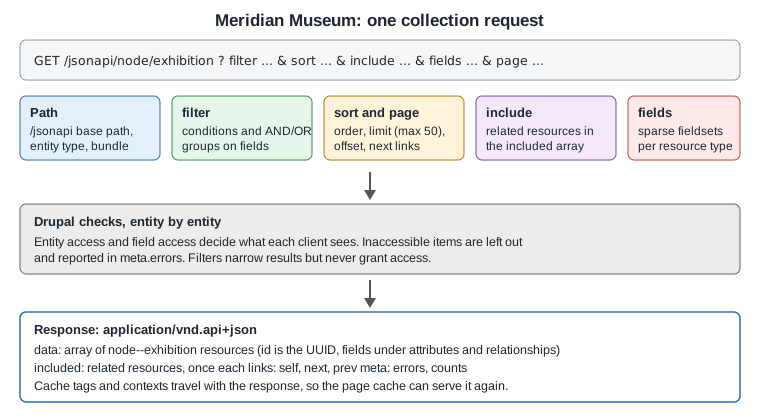
Request lifecycle at a glance
Putting it together: the gallery kiosk query
The museum’s kiosk shows the exhibitions currently on, with the hero image, galleries and objects on display. One request does it:
GET /jsonapi/node/exhibition
  ?filter[status]=1
  &filter[open][condition][path]=field_end_date
  &filter[open][condition][operator]=%3E%3D
  &filter[open][condition][value]=2026-10-30
  &sort=field_start_date
  &page[limit]=12
  &include=field_hero.field_media_image,field_gallery,field_related_objects
  &fields[node--exhibition]=title,field_start_date,field_end_date,field_hero,field_gallery,field_related_objects
  &fields[media--image]=name,field_media_image
  &fields[file--file]=uri
  &fields[taxonomy_term--gallery]=name
  &fields[collection_object--collection_object]=title,accession_number,period
Accept: application/vnd.api+json
Source: Fetching resources (GET)