Settings and Admin Pages
|
This content was generated with the assistance of AI and should be verified against the official documentation of each platform before being relied on in production. This section’s bibliography lists the reference material consulted while preparing these pages. |
Every WooCommerce extension that a merchant can configure needs a place to keep its options and a screen to edit them. WooCommerce
offers four such places that are in daily use and one that is still experimental: a settings object (WC_Settings_API) for a
payment gateway, a shipping method or an integration; a whole tab under WooCommerce > Settings; a section under a tab that
already exists; a standalone admin page, written in PHP or in React; and, behind a feature flag, a React renderer for the tabs
and sections themselves. This page walks through all of them with one running example, the settings of the Pocket Coffee roast
date badge, and then goes further into the React side: how a page is registered, how the bundle is built and loaded, and what
the @woocommerce/components, @woocommerce/data and @woocommerce/navigation packages offer. The WordPress menus
and Settings API underneath are covered in
Administration Menus and Settings API.
The page was written against WooCommerce 11.2.1 (the stable release of 2026-10-09; 11.3.0-beta.1 followed on 2026-10-26) on
WordPress 7.1.3 and PHP 8.3.36, and checked on 2026-10-27. Settings screens and admin pages are part of the free WooCommerce
plugin and behave the same on every hosting plan; nothing here needs a WooCommerce.com account. The extension used throughout is
the plugin pocket-coffee-settings: it registers a Pocket Coffee tab with two sections, an integration page for the roaster’s
system, a Roast badge section under Products (classic filters), a Roast parcels section under Shipping (section
registry), a PHP-powered Roast log page and a React-powered Pocket Coffee page. It was installed on the lab store,
driven through the admin forms, WP-CLI, the REST API and a headless browser; the PHP was checked with the WooCommerce coding
standards and the JavaScript was built and run. The plugin skeleton itself (headers, compatibility declarations, uninstall) is the subject
of Extension Development; the hooks used here follow the conventions of
Hooks: Actions and Filters; the REST routes that expose the settings
are covered in REST API and Webhooks. The React and JavaScript basics the
bundle relies on are in React build and deployment and
JavaScript modules; PHP basics are in
PHP namespaces and autoloading.
Where settings belong
The first decision is placement, because it decides the class, the hooks, the URL the merchant sees and whether the values are reachable through the REST API.
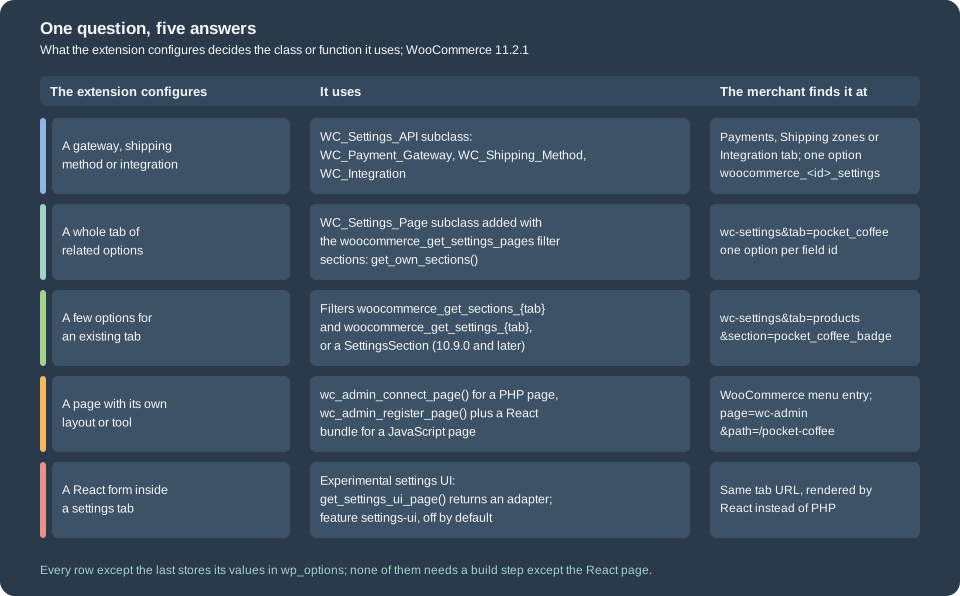
| Approach | Use when | Trade-off |
|---|---|---|
|
A configurable component such as a payment gateway, a shipping method or a connection to an external service. |
The fields live in a single array option named after the component. The base class draws and saves the form; the code that registers the component must call the save method. |
|
The extension has several related options and deserves a tab with one or more sections. |
One more tab for the merchant to scan. WooCommerce draws the fields, saves them as one option per field and exposes them to the REST API. |
Section under an existing tab |
A few options clearly belong to a core tab, for example a product display option under Products. |
The URL needs both a tab and a section, so it is harder to link from documentation. Two ways exist: two filters (works on every release) or a |
Admin page ( |
A tool, report or dashboard with its own layout that does not fit a settings form. |
A PHP page is simple but static; a React page needs a JavaScript build step and the |
Settings UI (experimental) |
A settings tab or section that should render with React and custom controls. |
Behind the |
WooCommerce’s UX guidelines for extensions give the same advice from the merchant’s side: include only the options that are crucial, choose smart defaults, group related options and keep frequently used ones at the top, avoid long lists, use impersonal titles and add helper text where an option is not obvious. Those rules decide how many fields the Pocket Coffee tab has (four saved options and a preview on the General section, three options on Coffee Club) more than any technical constraint does.
The Settings API
WC_Settings_API is the base class of every configurable WooCommerce component. A payment gateway (WC_Payment_Gateway), a
shipping method (WC_Shipping_Method), an integration (WC_Integration) and each transactional email extend it. It defines
the fields in an array, draws the form, validates the posted values and stores everything in one WordPress option; it does not
create a screen and does not hook its own save method, so the class that registers the component has to do both. Gateways and
shipping methods registered with WooCommerce already get a save action named after their id, and integrations are saved on
woocommerce_update_options_integration_{id}. Extend WC_Settings_API directly only when none of those fits, and then print the
form and call process_admin_options() yourself.
Field definitions
The fields are the form_fields array, usually built in init_form_fields(). The array key is the field key; it becomes part of
the HTML field name and the key of the stored array. The default values and the extra keys that WooCommerce understands are:
| Key | Meaning |
|---|---|
|
Label in the left column. |
|
One of the built-in types (below) or a custom one. A missing type is |
|
Help text under the field; with |
|
|
|
Value used before anything is saved. An empty default is stored as an empty string. |
|
CSS class and inline style of the input. |
|
Placeholder text. |
|
Renders the input disabled. |
|
Array of extra HTML attributes ( |
|
Checkbox only: the text next to the box. |
|
|
|
Callable that receives the posted value and returns what is stored; checked before the validate methods. |
The built-in types are text, safe_text (added in 7.6.0, mostly used for gateway-related settings), price, decimal,
password, color, textarea, checkbox, select, multiselect and title. Each has a generate_<type>_html() method that
prints the table row and a validate_<type>_field() method that cleans the posted value. A title field prints a heading and
stores nothing. A checkbox is stored as yes or no; price and decimal run the value through wc_format_decimal();
password is trimmed but otherwise untouched so that special characters survive.
Loading, saving and where the data goes
init_settings() reads the option woocommerce_<id>_settings (the base class joins plugin_id, which is woocommerce_, the
object’s id and the suffix _settings; get_option_key() returns it) and falls back to the field defaults while the option
does not exist. get_option( $key ) returns one value, with the default when the key is missing. Saving is
process_admin_options(): for every field except titles it calls get_field_value(), which resolves the cleaner in this
order, and then stores the whole array in one update_option() call:
-
the field’s own
sanitize_callback, when it is callable; -
a method named
validate_<key>_field( $key, $value )on the object; -
a method named
validate_<type>_field( $key, $value ); -
validate_text_field()as the fallback.
The whole array passes through the filter woocommerce_settings_api_sanitized_fields_{id} just before it is written, which is
the place for a rule that involves several fields. An exception thrown by a validate method is caught by
process_admin_options() and stored in the object’s errors list; the field keeps the value it had before.
The example is the roaster integration of the Pocket Coffee shop: a base URL, an API token and a debug switch. The class is
registered with the woocommerce_integrations filter in the main plugin file (shown later) and appears under
WooCommerce > Settings > Integration.
<?php
/**
 * Integration with the roaster's system.
 *
 * @package PocketCoffee\Settings
 */

defined( 'ABSPATH' ) || exit;

/**
 * Settings stored in one option: woocommerce_pocket-coffee-roaster_settings.
 */
class PC_Roaster_Integration extends WC_Integration {

	/**
	 * Roaster API token.
	 *
	 * @var string
	 */
	public $api_token = '';

	/**
	 * Constructor.
	 */
	public function __construct() {
		$this->id                 = 'pocket-coffee-roaster';
		$this->method_title       = __( 'Pocket Coffee Roaster', 'pocket-coffee-settings' );
		$this->method_description = __( 'Connects the shop to the roaster system that publishes roast batches.', 'pocket-coffee-settings' );

		$this->init_form_fields();
		$this->init_settings();

		$this->api_token = $this->get_option( 'api_token' );

		add_action( 'woocommerce_update_options_integration_' . $this->id, array( $this, 'process_admin_options' ) );
		add_filter( 'woocommerce_settings_api_sanitized_fields_' . $this->id, array( $this, 'sanitize_settings' ) );
	}

	/**
	 * Field definitions (keys become keys of the stored array).
	 *
	 * @return void
	 */
	public function init_form_fields() {
		$this->form_fields = array(
			'endpoint'  => array(
				'title'       => __( 'Endpoint', 'pocket-coffee-settings' ),
				'type'        => 'text',
				'description' => __( 'Base URL of the roaster API.', 'pocket-coffee-settings' ),
				'desc_tip'    => true,
				'default'     => 'https://roaster.example.test/api',
			),
			'api_token' => array(
				'title'       => __( 'API token', 'pocket-coffee-settings' ),
				'type'        => 'password',
				'description' => __( 'Read from the roaster dashboard. Use a constant in wp-config.php for production.', 'pocket-coffee-settings' ),
				'desc_tip'    => true,
				'default'     => '',
			),
			'debug'     => array(
				'title'   => __( 'Debug log', 'pocket-coffee-settings' ),
				'type'    => 'checkbox',
				'label'   => __( 'Log API requests', 'pocket-coffee-settings' ),
				'default' => 'no',
			),
		);
	}

	/**
	 * Called as validate_{key}_field() for the field "api_token" (WC_Settings_API::get_field_value()).
	 *
	 * @param string $key   Field key.
	 * @param string $value Posted value.
	 * @return string
	 */
	public function validate_api_token_field( $key, $value ) {
		$value = parent::validate_password_field( $key, $value );
		if ( strlen( $value ) > 64 ) {
			// Show a red notice and keep the stored token.
			WC_Admin_Settings::add_error( esc_html__( 'The API token is longer than 64 characters; it was not saved.', 'pocket-coffee-settings' ) );
			return $this->get_option( $key );
		}
		return $value;
	}

	/**
	 * Filter applied to the whole settings array before it is stored.
	 *
	 * @param array $settings Settings about to be saved.
	 * @return array
	 */
	public function sanitize_settings( $settings ) {
		if ( isset( $settings['endpoint'] ) ) {
			$settings['endpoint'] = untrailingslashit( esc_url_raw( $settings['endpoint'] ) );
		}
		return $settings;
	}
}
Source: WooCommerce docs: Settings API
Saving the form with an endpoint that ends in a slash, a debug box ticked and first a 70-character token and then a short one gave
this on 11.2.1. The long token was refused with a red notice and the stored token stayed as it was; the short one was stored in
clear text, because a password field only hides the characters in the browser:
integration (70 chars) notices: ['The API token is longer than 64 characters; it was not saved.']
integration option: {"endpoint":"https:\/\/roaster.example.test\/api","api_token":"tok_test_abc","debug":"yes"}
Three details are worth knowing. First, the trailing slash of the endpoint was removed by the woocommerce_settings_api_sanitized_fields_{id}
filter, after the field validators ran. Second, the first version of validate_api_token_field() threw an Exception instead of
calling WC_Admin_Settings::add_error(): the field was left unchanged, the page still said Your settings have been saved and
no error appeared, because the integration screen does not print the object’s errors list. WC_Admin_Settings::add_error()
queues a notice that the settings screen does print. Third, an option stored in plain text is readable by every plugin and by
anyone with a database dump; for a real secret keep the value in a constant in wp-config.php or an environment variable, and
let the field only show whether it is set.
Custom field types
A field with an unknown type is drawn by a method called generate_<type>_html( $key, $data ) on the object, when one exists,
or else by whatever is attached to the filter woocommerce_generate_{type}_html (added in 6.5.0), which receives an empty string,
the key, the field array and the settings object and returns the markup of one table row. The posted value is cleaned by
validate_<type>_field() or by the text fallback. WC_Settings_API also offers helpers for the markup (get_tooltip_html(),
get_description_html(), get_custom_attribute_html()) that the built-in renderers use.
Settings pages
A settings page is an object of a class that extends WC_Settings_Page. WooCommerce collects the page objects in
WC_Admin_Settings::get_settings_pages(): it includes the core pages in a fixed order (General, Products, Tax, Shipping,
Payments, Accounts and Privacy, Emails, Integration, Site visibility, Point of Sale and Advanced), then applies the filter
woocommerce_get_settings_pages to the array, so an extension adds its object there. Everything else follows from the page id.
How a page is wired
WC_Settings_Page registers its hooks in the constructor, and every hook name contains the page id, so the subclass must set
$this->id and $this->label before it calls parent::__construct():
| Hook | What it does |
|---|---|
|
Adds the tab, keyed by the page id. |
|
Prints the section links (only when the page has more than one section). |
|
Prints the fields of the current section. |
|
Saves the fields of the current section. |
The tab is available at wp-admin/admin.php?page=wc-settings&tab=<id>, and a named section at §ion=<section id>. On the lab
store the Pocket Coffee tab appeared between Point of Sale and Advanced: the settings screen moves the tab with the
id advanced to the end of the tab bar, so an extension tab never comes after it. The page class of the lab is loaded lazily,
from the filter callback, because WC_Settings_Page only exists once WooCommerce has included it.
Sections
A page has one section by default: the empty string. Override get_own_sections() to return an array of section id => label;
the empty key is the default section and should always be there. The links are only drawn when there is more than one section.
The id goes into the URL through sanitize_title(), so keep it lowercase. The fields of a section come from, in this order:
-
a method named
get_settings_for_<section>_section()(get_settings_for_default_section()for the empty id); -
otherwise
get_settings_for_section_core( $section_id ), which an extension can override to serve many dynamic sections from one method (the default implementation looks the section up in the section registry, covered below).
The older get_settings() still exists and WooCommerce still calls it internally for the sake of legacy classes, but it is
deprecated since 5.4.0: do not override it in new code. Whatever the method returns passes through the filter
woocommerce_get_settings_{id}, which receives the settings array and the section id, so other plugins can add or remove
fields. The section list passes through woocommerce_get_sections_{id}.
The field array
WC_Admin_Settings::output_fields() draws a settings array and WC_Admin_Settings::save_fields() saves it. The array is a list
of field arrays, which are close to the WC_Settings_API ones but not identical:
| Key | Meaning |
|---|---|
|
The option name and the HTML id. Required for every field that is saved. |
|
See the list below. |
|
Label; |
|
Description next to the field (for checkboxes, the text after the box). |
|
|
|
Value shown and returned while the option does not exist. |
|
|
|
CSS class and inline style of the input; the class |
|
Placeholder and text printed after the input (the suffix of the freshness window prints "days"). |
|
Extra HTML attributes: |
|
CSS class of the table row (WooCommerce prefixes it with |
|
Whether the option autoloads; |
|
Input name when it differs from the id, including array-style names such as |
|
|
|
Draws a fixed value instead of the saved one. |
|
Checkbox options: disabled state, show or hide the following rows ( |
The types WooCommerce draws itself are title, sectionend, info (read-only text in text), notice (notice_type and
text), text, password, number, email, url, tel, color, date, datetime, datetime-local, month, time,
week, textarea, select, multiselect, radio, checkbox, single_select_page, single_select_page_with_search,
single_select_country, multi_select_countries, relative_date_selector, image_width (kept for old code) and
slotfill_placeholder. They are also available as constants (WC_Settings_Page::TYPE_TEXT, WC_Settings_Page::TYPE_SELECT
and so on). Any other type is passed to do_action( 'woocommerce_admin_field_' . $type, $field ), which is where a custom
renderer attaches. A title field also fires woocommerce_settings_{id} right after it opens the table, and a sectionend
fires woocommerce_settings_{id}_end and woocommerce_settings_{id}_after, which makes them anchors for extra rows or notes.
Group the fields of one section between a title and a matching sectionend with the same id.
The Pocket Coffee tab
The tab has two sections. General holds the badge options (show it, label, freshness window, display mode) and a read-only
preview drawn by a custom field type; Coffee Club holds the discount, the free-shipping threshold and the member roles. The
class overrides get_settings_for_default_section() and get_settings_for_club_section(), attaches two option-specific
sanitizers and an action that runs after the club section is saved.
<?php
/**
 * Tab "Pocket Coffee" under WooCommerce > Settings.
 *
 * @package PocketCoffee\Settings
 */

defined( 'ABSPATH' ) || exit;

use Automattic\WooCommerce\Admin\Settings\LegacySettingsPageAdapter;
use Automattic\WooCommerce\Admin\Settings\SettingsUIPageInterface;

/**
 * Settings tab with a General and a Coffee Club section.
 */
final class PC_Settings_Page extends WC_Settings_Page {

	/**
	 * Set the tab id and label before calling the parent constructor.
	 */
	public function __construct() {
		$this->id    = 'pocket_coffee';
		$this->label = __( 'Pocket Coffee', 'pocket-coffee-settings' );

		parent::__construct();

		add_action( 'woocommerce_admin_field_pc_badge_preview', array( $this, 'output_badge_preview' ) );
		add_filter( 'woocommerce_admin_settings_sanitize_option_pocket_coffee_freshness_days', array( $this, 'sanitize_freshness_days' ), 10, 3 );
		add_filter( 'woocommerce_admin_settings_sanitize_option_pocket_coffee_club_free_shipping', array( $this, 'sanitize_price' ), 10, 3 );
		add_action( 'woocommerce_update_options_pocket_coffee_club', array( $this, 'after_club_saved' ) );
	}

	/**
	 * Opt in to the experimental React settings UI. Ignored while the "settings-ui" feature is off.
	 *
	 * @return SettingsUIPageInterface|null
	 */
	public function get_settings_ui_page(): ?SettingsUIPageInterface {
		return new LegacySettingsPageAdapter( $this );
	}

	/**
	 * Sections of the tab. The empty key is the default section.
	 *
	 * @return array
	 */
	protected function get_own_sections() {
		return array(
			''     => __( 'General', 'pocket-coffee-settings' ),
			'club' => __( 'Coffee Club', 'pocket-coffee-settings' ),
		);
	}

	/**
	 * Fields of the default section.
	 *
	 * @return array
	 */
	protected function get_settings_for_default_section() {
		return array(
			array(
				'title' => __( 'Roast date badge', 'pocket-coffee-settings' ),
				'type'  => 'title',
				'desc'  => __( 'Shows the roast date on the product page of single-origin beans.', 'pocket-coffee-settings' ),
				'id'    => 'pocket_coffee_badge_options',
			),
			array(
				'title'   => __( 'Show badge', 'pocket-coffee-settings' ),
				'desc'    => __( 'Show the roast date badge on product pages', 'pocket-coffee-settings' ),
				'id'      => 'pocket_coffee_show_badge',
				'type'    => 'checkbox',
				'default' => 'yes',
			),
			array(
				'title'    => __( 'Badge label', 'pocket-coffee-settings' ),
				'id'       => 'pocket_coffee_badge_label',
				'type'     => 'text',
				'default'  => __( 'Roasted on', 'pocket-coffee-settings' ),
				'desc'     => __( 'Text shown before the date.', 'pocket-coffee-settings' ),
				'desc_tip' => true,
			),
			array(
				'title'             => __( 'Freshness window', 'pocket-coffee-settings' ),
				'id'                => 'pocket_coffee_freshness_days',
				'type'              => 'number',
				'default'           => '30',
				'suffix'            => __( 'days', 'pocket-coffee-settings' ),
				'desc'              => __( 'Beans roasted longer ago than this are labelled "past peak".', 'pocket-coffee-settings' ),
				'desc_tip'          => true,
				'custom_attributes' => array(
					'min'  => '1',
					'max'  => '365',
					'step' => '1',
				),
			),
			array(
				'title'   => __( 'Display mode', 'pocket-coffee-settings' ),
				'id'      => 'pocket_coffee_display_mode',
				'type'    => 'select',
				'default' => 'date',
				'options' => array(
					'date'     => __( 'Roast date', 'pocket-coffee-settings' ),
					'relative' => __( 'Days since roast', 'pocket-coffee-settings' ),
				),
			),
			array(
				'title'     => __( 'Preview', 'pocket-coffee-settings' ),
				'id'        => 'pocket_coffee_badge_preview',
				'type'      => 'pc_badge_preview', // No built-in renderer: woocommerce_admin_field_pc_badge_preview prints it.
				'is_option' => false,              // Nothing to save.
			),
			array(
				'type' => 'sectionend',
				'id'   => 'pocket_coffee_badge_options',
			),
		);
	}

	/**
	 * Renderer of the custom field type "pc_badge_preview".
	 *
	 * @param array $field The field definition, after WC_Admin_Settings::output_fields() filled the defaults.
	 * @return void
	 */
	public function output_badge_preview( $field ) {
		$label = get_option( 'pocket_coffee_badge_label', __( 'Roasted on', 'pocket-coffee-settings' ) );
		?>
		<tr valign="top">
			<th scope="row" class="titledesc"><?php echo esc_html( $field['title'] ); ?></th>
			<td class="forminp">
				<span class="pc-roast-badge"><?php echo esc_html( $label . ' ' . wp_date( get_option( 'date_format' ) ) ); ?></span>
			</td>
		</tr>
		<?php
	}

	/**
	 * Fields of the "club" section (the method name comes from the section id).
	 *
	 * @return array
	 */
	protected function get_settings_for_club_section() {
		return array(
			array(
				'title' => __( 'Coffee Club', 'pocket-coffee-settings' ),
				'type'  => 'title',
				'id'    => 'pocket_coffee_club_options',
			),
			array(
				'title'             => __( 'Beans discount', 'pocket-coffee-settings' ),
				'id'                => 'pocket_coffee_club_discount',
				'type'              => 'number',
				'default'           => '10',
				'suffix'            => '%',
				'custom_attributes' => array(
					'min'  => '0',
					'max'  => '50',
					'step' => '0.5',
				),
			),
			array(
				'title'    => __( 'Free shipping from', 'pocket-coffee-settings' ),
				'id'       => 'pocket_coffee_club_free_shipping',
				'type'     => 'text',
				'class'    => 'wc_input_price',
				'default'  => '40',
				'desc_tip' => __( 'Order total in the shop currency.', 'pocket-coffee-settings' ),
			),
			array(
				'title'    => __( 'Member roles', 'pocket-coffee-settings' ),
				'id'       => 'pocket_coffee_club_roles',
				'type'     => 'multiselect',
				'class'    => 'wc-enhanced-select',
				'default'  => array( 'customer' ),
				'options'  => array(
					'customer'    => __( 'Customer', 'pocket-coffee-settings' ),
					'coffee_club' => __( 'Coffee Club member', 'pocket-coffee-settings' ),
				),
				'desc_tip' => __( 'Roles that receive the discount.', 'pocket-coffee-settings' ),
			),
			array(
				'type' => 'sectionend',
				'id'   => 'pocket_coffee_club_options',
			),
		);
	}

	/**
	 * Keep the freshness window between 1 and 365 whole days.
	 *
	 * @param mixed $value     Value after the built-in sanitising.
	 * @param array $option    The field definition.
	 * @param mixed $raw_value Posted value.
	 * @return string
	 */
	public function sanitize_freshness_days( $value, array $option, $raw_value ) {
		return (string) min( 365, max( 1, absint( $raw_value ) ) );
	}

	/**
	 * Store a price with a dot as decimal separator, whatever the merchant typed.
	 *
	 * @param mixed $value     Value after the built-in sanitising.
	 * @param array $option    The field definition.
	 * @param mixed $raw_value Posted value.
	 * @return string
	 */
	public function sanitize_price( $value, array $option, $raw_value ) {
		return wc_format_decimal( $raw_value );
	}

	/**
	 * Runs after the Coffee Club section is saved.
	 *
	 * @return void
	 */
	public function after_club_saved() {
		update_option( 'pocket_coffee_club_saved_at', gmdate( 'c' ), false );
	}
}The main plugin file loads the class from the registration callback and registers the other pieces of the example. It also declares HPOS compatibility, as every extension does (see HPOS): a settings plugin never touches orders, but an undeclared plugin makes WooCommerce show a compatibility warning.
<?php
/**
 * Plugin Name:       Pocket Coffee Settings
 * Description:       Settings tab, sections, an integration and admin pages for the Pocket Coffee roast badge.
 * Version:           1.0.0
 * Requires at least: 7.0
 * Requires PHP:      7.4
 * Requires Plugins:  woocommerce
 * Text Domain:       pocket-coffee-settings
 * License:           GPL-2.0-or-later
 *
 * @package PocketCoffee\Settings
 */

defined( 'ABSPATH' ) || exit;

define( 'POCKET_COFFEE_SETTINGS_FILE', __FILE__ );

add_action(
	'before_woocommerce_init',
	function () {
		if ( class_exists( \Automattic\WooCommerce\Utilities\FeaturesUtil::class ) ) {
			\Automattic\WooCommerce\Utilities\FeaturesUtil::declare_compatibility( 'custom_order_tables', __FILE__, true );
		}
	}
);

// 1. A full tab: WooCommerce > Settings > Pocket Coffee.
add_filter(
	'woocommerce_get_settings_pages',
	function ( array $pages ): array {
		require_once __DIR__ . '/includes/class-pc-settings-page.php';
		$pages[] = new PC_Settings_Page();
		return $pages;
	}
);

// 2. An integration: WooCommerce > Settings > Integrations > Pocket Coffee Roaster.
add_filter(
	'woocommerce_integrations',
	function ( array $integrations ): array {
		require_once __DIR__ . '/includes/class-pc-roaster-integration.php';
		$integrations[] = 'PC_Roaster_Integration';
		return $integrations;
	}
);

// 3. A section added with the classic filters: WooCommerce > Settings > Products > Roast badge.
require_once __DIR__ . '/includes/products-section.php';

// 4. A section added with the registry (WooCommerce 10.9.0 and later): Settings > Shipping > Roast parcels.
add_action(
	'woocommerce_settings_sections_registration',
	function ( \Automattic\WooCommerce\Admin\Settings\SettingsSectionRegistry $registry ): void {
		require_once __DIR__ . '/includes/class-pc-shipping-section.php';
		$registry->register( new PC_Shipping_Section() );
	}
);

// Development aid: records the order of the save hooks in an option.
require_once __DIR__ . '/includes/save-trace.php';

// 5. Admin pages: one PHP-powered and one React-powered.
require_once __DIR__ . '/includes/admin-pages.php';

// TEMPORARY test switch: enable the experimental settings-ui feature for requests with ?pc_settings_ui=1 only.
add_filter(
	'woocommerce_admin_features',
	static function ( array $features ): array {
		if ( isset( $_GET['pc_settings_ui'] ) ) { // phpcs:ignore WordPress.Security.NonceVerification.Recommended
			$features[] = 'settings-ui';
		}
		return array_values( array_unique( $features ) );
	}
);The final block of that file, the filter on woocommerce_admin_features, is a test switch for the experimental settings UI that
a later section explains; it only acts on requests that carry the query argument pc_settings_ui, and it is not part of a normal
extension.
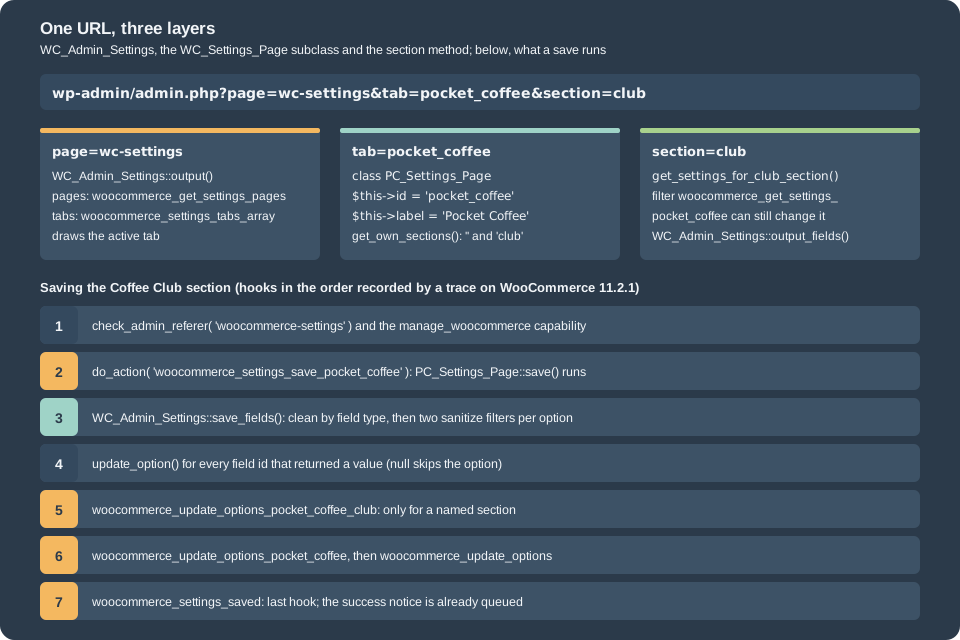
Saving, sanitizing and the order of the hooks
When the merchant presses Save changes, WC_Admin_Settings::save() checks that the user has the manage_woocommerce
capability (otherwise it ends the request with a 403) and the nonce of the form (check_admin_referer( 'woocommerce-settings' )),
fires the save hooks, queues the success notice and queues a rewrite-rule flush. For a WC_Settings_Page the page’s save() method
calls WC_Admin_Settings::save_fields() on the fields of the current section. save_fields() handles each field by type:
checkboxes become yes or no, textareas pass through wp_kses_post(), multiselects are cleaned item by item, a select is
forced to one of the keys of its options (or the default), a password is only trimmed, and everything else goes through
wc_clean(). Then two filters run, in this order, and the second can overrule the first:
-
woocommerce_admin_settings_sanitize_option, with the cleaned value, the field array and the raw posted value; -
woocommerce_admin_settings_sanitize_option_{option name}, with the same arguments.
A filter that returns null skips the option: nothing is written and the stored value stays. The values are written with
update_option(), with the autoload flag of the field. A trace of the save hooks on the lab store, recorded by a small
development aid in the plugin that appends each hook name to an option, gave this order for the default section followed by the
Coffee Club section:
woocommerce_settings_save_pocket_coffee
woocommerce_update_options_pocket_coffee
woocommerce_update_options
woocommerce_settings_saved
woocommerce_settings_save_pocket_coffee
woocommerce_update_options_pocket_coffee_club
woocommerce_update_options_pocket_coffee
woocommerce_update_options
woocommerce_settings_saved
The default section does not fire a section-specific hook because its section id is empty, so code that must run on every save
of the tab belongs on woocommerce_update_options_{id}; code for one section belongs on
woocommerce_update_options_{id}_{section} (the class attaches after_club_saved() there). woocommerce_update_options fires
for every settings tab and woocommerce_settings_saved is the last hook of the save.
The sanitizers did their work. Posting 900 as the freshness window stored 365; posting 45,50 as the free-shipping threshold
stored 4550 and not 45.50, because wc_format_decimal() treats the comma as a thousands separator when the shop’s decimal
separator is a dot. The first rule is a reason to add a sanitizer; the second is a reason to test with the locale of the shop:
option pocket_coffee_freshness_days = "365"
option pocket_coffee_display_mode = "relative"
option pocket_coffee_club_discount = "12.5"
option pocket_coffee_club_free_shipping = "4550"
option pocket_coffee_club_roles = ["customer","coffee_club"]
A settings tab saves one option per field, so the values read back with get_option( 'pocket_coffee_freshness_days' ). Use
WC_Admin_Settings::get_option( 'pocket_coffee_freshness_days', '30' ) when the field has a default and the option may not exist
yet; it also understands array-style option names (my_option[key]). Compare with yes and no for checkboxes.
What WooCommerce does with the page for you
Every WC_Settings_Page is exposed to the settings REST API without any extra code. WC_Register_WP_Admin_Settings hooks the
page into woocommerce_settings_groups and woocommerce_settings-{id} and lists the fields of all its sections, so the group
pocket_coffee exists next to general, products and the others:
groups: ['wc_admin', 'general', 'products', 'tax', 'shipping', 'checkout', 'account', 'email', 'integration', 'site-visibility', 'point-of-sale', 'advanced', 'pocket_coffee']
REST group settings:
   pocket_coffee_show_badge checkbox "yes"
   pocket_coffee_badge_label text "Roasted on"
   pocket_coffee_freshness_days number "365"
   pocket_coffee_display_mode select "relative"
   pocket_coffee_club_discount number "12.5"
   pocket_coffee_club_free_shipping text "4550"
   pocket_coffee_club_roles multiselect ["customer", "coffee_club"]
The same data is reachable at /wc/v3/settings/pocket_coffee (with a consumer key and secret) and at the wc-analytics route that
the React admin uses. A write through the REST API goes through WC_Admin_Settings::save_fields() as well, so the sanitizers apply:
a PUT of 900 to pocket_coffee_freshness_days answered with 900 and left 365 in the database. The response echoes the request;
the stored value is what the filters returned, so read the option back when the exact value matters.
PUT 900 -> response value 900 | stored 365The title and sectionend rows are not listed, and neither is the preview row (a custom type with is_option set to false). The
products and shipping groups also list the fields of the sections that the example adds to those tabs.
Sections of existing tabs
An extension that has two or three options for a core tab should not add a tab. The classic way, available on every release since
2.2.2, is two filters named after the tab id; the way added in 10.9.0 is a SettingsSection object.
The two filters
woocommerce_get_sections_{tab} adds the section link; woocommerce_get_settings_{tab} returns the fields when the current
section is yours and returns the received array otherwise. The tab ids are the page ids: general, products, tax,
shipping, checkout (the Payments tab), account, email, integration, site-visibility, point-of-sale and advanced.
The example adds a Roast badge section to Products:
<?php
/**
 * A "Roast badge" section under WooCommerce > Settings > Products, using the classic filters.
 *
 * @package PocketCoffee\Settings
 */

defined( 'ABSPATH' ) || exit;

add_filter(
	'woocommerce_get_sections_products',
	function ( array $sections ): array {
		$sections['pocket_coffee_badge'] = __( 'Roast badge', 'pocket-coffee-settings' );
		return $sections;
	}
);

add_filter(
	'woocommerce_get_settings_products',
	function ( array $settings, string $current_section ): array {
		if ( 'pocket_coffee_badge' !== $current_section ) {
			return $settings;
		}

		return array(
			array(
				'title' => __( 'Roast badge', 'pocket-coffee-settings' ),
				'type'  => 'title',
				'id'    => 'pocket_coffee_products_badge',
			),
			array(
				'title'   => __( 'Hide on grinders', 'pocket-coffee-settings' ),
				'desc'    => __( 'Do not show the badge on products of the Equipment category', 'pocket-coffee-settings' ),
				'id'      => 'pocket_coffee_hide_on_equipment',
				'type'    => 'checkbox',
				'default' => 'yes',
			),
			array(
				'type' => 'sectionend',
				'id'   => 'pocket_coffee_products_badge',
			),
		);
	},
	10,
	2
);The section appears at wc-settings&tab=products§ion=pocket_coffee_badge, saves with the Products tab’s own save(), and its
unticked checkbox was stored as no:
products section option pocket_coffee_hide_on_equipment = noBecause the hook receives the whole page’s settings, the callback must return $settings unchanged for every other section:
returning only your own fields on every call would replace the core fields of the Products tab.
The section registry (10.9.0 and later)
Since 10.9.0 a section can be an object. SettingsSectionInterface has six methods: get_parent_page_id() (the tab id),
get_id(), get_label(), get_settings( WC_Settings_Page $parent_page ) (the same field arrays as above),
get_script_handles() (scripts to load before the experimental settings UI mounts) and get_save_adapter() (form_post or
none). The abstract class Automattic\WooCommerce\Admin\Settings\SettingsSection implements the last two with defaults, so
an extension only writes the first four methods. The object is registered on the action
woocommerce_settings_sections_registration, which receives the SettingsSectionRegistry. The registry fires that action lazily,
the first time any code asks for a registered section, and logs a failure inside a registration callback instead of letting it
break the page.
<?php
/**
 * A section registered through the settings section registry (WooCommerce 10.9.0 and later).
 *
 * @package PocketCoffee\Settings
 */

defined( 'ABSPATH' ) || exit;

use Automattic\WooCommerce\Admin\Settings\SettingsSection;

/**
 * Settings > Shipping > Roast parcels.
 */
final class PC_Shipping_Section extends SettingsSection {

	/**
	 * The settings tab the section belongs to.
	 *
	 * @return string
	 */
	public function get_parent_page_id(): string {
		return 'shipping';
	}

	/**
	 * Section id (used in the URL).
	 *
	 * @return string
	 */
	public function get_id(): string {
		return 'pocket_coffee_parcels';
	}

	/**
	 * Section label.
	 *
	 * @return string
	 */
	public function get_label(): string {
		return __( 'Roast parcels', 'pocket-coffee-settings' );
	}

	/**
	 * Fields of the section, in the usual settings array format.
	 *
	 * @param WC_Settings_Page $parent_page Parent settings page.
	 * @return array
	 */
	public function get_settings( WC_Settings_Page $parent_page ): array {
		return array(
			array(
				'title' => __( 'Roast parcels', 'pocket-coffee-settings' ),
				'type'  => 'title',
				'id'    => 'pocket_coffee_parcel_options',
			),
			array(
				'title'             => __( 'Maximum parcel weight', 'pocket-coffee-settings' ),
				'id'                => 'pocket_coffee_max_parcel_kg',
				'type'              => 'number',
				'default'           => '5',
				'suffix'            => 'kg',
				'custom_attributes' => array(
					'min'  => '1',
					'step' => '0.5',
				),
			),
			array(
				'type' => 'sectionend',
				'id'   => 'pocket_coffee_parcel_options',
			),
		);
	}
}SettingsSectionRegistry::register() returns false and calls wc_doing_it_wrong() when the parent page id or the section id is
empty, when a section with the same ids is already registered, and, on the checkout tab, when the id equals the id or the class
name of an installed payment gateway (those ids are the gateways' own sections). The ids go through sanitize_title(). The
section above appeared at wc-settings&tab=shipping§ion=pocket_coffee_parcels, accepted 5.5 and saved it in the option
pocket_coffee_max_parcel_kg; the shipping REST group listed the field.
| Two filters | SettingsSection object |
|
|---|---|---|
Works since |
2.2.2 |
10.9.0 |
Code |
Two callbacks, a branch on the section id |
One class: id, label, fields, scripts, save adapter |
Reaches the settings UI |
Through the legacy adapter, as a plain array |
As a first-class section with script handles |
Name conflicts |
Silent: the last callback wins |
|
Choose it when |
The extension supports WooCommerce older than 10.9 |
The minimum version is 10.9 or later |
The experimental settings UI
WooCommerce 10.9.0 introduced a second renderer for settings: a React form built from DataViews' DataForm, mounted in place of
the PHP table. The merchant-facing URLs, the permission check, the nonce and the save are unchanged, because PHP still owns the
registration, the field schema and the persistence. The renderer is behind the feature flag settings-ui, which is false in
the feature configuration shipped with 11.2.1, and WooCommerce’s own documentation marks the whole API (the PHP interfaces
under Automattic\WooCommerce\Admin\Settings, the schema format and the @woocommerce/settings-ui package) as experimental and
free to change in any release. The core Products tab is the reference migration. Treat it as something to test against, not to
depend on.
An extension opts in by returning an adapter from get_settings_ui_page(); with the flag off, or with no adapter, the classic
table is drawn. LegacySettingsPageAdapter converts the get_settings() array into the schema, so a page that uses built-in
field types needs no other change:
use Automattic\WooCommerce\Admin\Settings\LegacySettingsPageAdapter;
use Automattic\WooCommerce\Admin\Settings\SettingsUIPageInterface;

public function get_settings_ui_page(): ?SettingsUIPageInterface {
	return new LegacySettingsPageAdapter( $this );
}
Source: WooCommerce docs: Settings UI
The flag is switched on with a filter. The documentation proposes a small mu-plugin that adds settings-ui to the features
returned by woocommerce_admin_features; on the shared lab store the equivalent filter in the plugin only acted on requests with
pc_settings_ui in the query string, so the other screens kept the classic renderer:
add_filter(
	'woocommerce_admin_features',
	static function ( array $features ): array {
		$features[] = 'settings-ui';
		return array_values( array_unique( $features ) );
	}
);With the flag on, the Pocket Coffee tab rendered through React: the same tab bar and section links, a card for the badge
group with the same labels, descriptions and values, and a Save button that posted the usual form. The suffix days of the
freshness window and the custom preview row (which has no schema entry) were not drawn, which is the kind of difference to look
for when migrating a page. A field can name a custom component with the key component, a script registered with WordPress and
returned from get_script_handles() calls registerSettingsExtension() from @woocommerce/settings-ui with the component,
and a field that names a component nobody registered makes the page fail closed, with a Use classic settings link that adds
wc_settings_ui=classic to the URL for that request. The lab built no custom component: the package is not published on npm (the
dependency extraction plugin maps it to a WooCommerce script instead), and the custom-component path described in the
documentation was not run.
Admin pages
A settings tab is the right place for options. A report, a tool or a dashboard needs a page of its own. WooCommerce Admin (the
wc-admin application that renders the home screen, Analytics and Marketing) exposes two ways to place such a page inside its
frame, with the header, the breadcrumbs and the activity panel:
wc_admin_connect_page() |
wc_admin_register_page() |
|
|---|---|---|
For |
A page that WordPress renders with PHP |
A page rendered by a React component |
Menu entry |
You create it ( |
WooCommerce creates it |
URL |
Whatever the page uses |
|
JavaScript |
None |
A bundle that registers a container with the |
Both functions are thin wrappers around Automattic\WooCommerce\Admin\PageController. wc_admin_register_page() creates a
menu entry and so has to run on admin_menu; wc_admin_connect_page() is called on the same hook by convention. The example registers one page of each kind:
<?php
/**
 * Two admin pages: a PHP-powered "Roast log" and a React-powered "Pocket Coffee" page.
 *
 * @package PocketCoffee\Settings
 */

defined( 'ABSPATH' ) || exit;

use Automattic\WooCommerce\Admin\PageController;

/**
 * PHP-powered page: register it with WordPress, then connect it to the WooCommerce Admin shell.
 */
add_action(
	'admin_menu',
	function () {
		add_submenu_page(
			'woocommerce',
			__( 'Roast log', 'pocket-coffee-settings' ),
			__( 'Roast log', 'pocket-coffee-settings' ),
			'manage_woocommerce', // phpcs:ignore WordPress.WP.Capabilities.Unknown -- the capability is registered by WooCommerce.
			'pocket-coffee-roast-log',
			function () {
				echo '<div class="wrap"><h1>' . esc_html__( 'Roast log', 'pocket-coffee-settings' ) . '</h1>';
				echo '<p>' . esc_html__( 'Rendered by PHP inside the WooCommerce Admin header.', 'pocket-coffee-settings' ) . '</p></div>';
			}
		);

		if ( function_exists( 'wc_admin_connect_page' ) ) {
			wc_admin_connect_page(
				array(
					'id'        => 'pocket-coffee-roast-log',
					'screen_id' => 'woocommerce_page_pocket-coffee-roast-log',
					'title'     => array( __( 'Pocket Coffee', 'pocket-coffee-settings' ), __( 'Roast log', 'pocket-coffee-settings' ) ),
					'path'      => add_query_arg( 'page', 'pocket-coffee-roast-log', 'admin.php' ),
				)
			);
		}
	}
);

/**
 * React-powered page: wc_admin_register_page() creates the menu entry and the route
 * wp-admin/admin.php?page=wc-admin&path=/pocket-coffee.
 */
add_action(
	'admin_menu',
	function () {
		if ( ! function_exists( 'wc_admin_register_page' ) ) {
			return;
		}

		wc_admin_register_page(
			array(
				'id'         => 'pocket-coffee-settings-page',
				'title'      => __( 'Pocket Coffee', 'pocket-coffee-settings' ),
				'parent'     => 'woocommerce',
				'path'       => '/pocket-coffee',
				'capability' => 'manage_woocommerce',
			)
		);
	}
);

/**
 * Load the bundle on WooCommerce Admin pages only. The dependencies (wc-components, wc-store-data, ...)
 * come from the index.asset.php file written by the build.
 */
add_action(
	'admin_enqueue_scripts',
	function () {
		if ( ! PageController::is_admin_or_embed_page() ) {
			return;
		}

		$asset_file = plugin_dir_path( POCKET_COFFEE_SETTINGS_FILE ) . 'build/index.asset.php';
		if ( ! file_exists( $asset_file ) ) {
			return;
		}

		$asset = require $asset_file;

		wp_enqueue_script(
			'pocket-coffee-settings',
			plugins_url( 'build/index.js', POCKET_COFFEE_SETTINGS_FILE ),
			$asset['dependencies'],
			$asset['version'],
			true
		);
		wp_set_script_translations( 'pocket-coffee-settings', 'pocket-coffee-settings' );
	}
);PHP-powered pages
wc_admin_connect_page( $options ) tells the controller that a screen WordPress already renders belongs to WooCommerce Admin. The
options are id (required: the name of the page in the controller), screen_id (required for a connected page: what
PageController::get_current_screen_id() returns on that screen), title (a string, or an array of breadcrumb pieces of which
only the first links to path), path (the page’s address), parent (the id of a parent page, for breadcrumbs), and the
optional capability, icon, position and js_page. Connected pages get the WooCommerce Admin header; the page itself is
drawn by the callback you passed to WordPress.
The screen id is built from the WordPress screen id, the action and, for the pages in a list of pages with tabs (wc-reports,
wc-settings, wc-status, wc-addons), the current tab, and for a few tabs also the section. A submenu page under the
WooCommerce menu with the slug pocket-coffee-roast-log therefore has the screen id woocommerce_page_pocket-coffee-roast-log, the
value used above. Three filters adjust the computation. The names in the public documentation (wc_admin_pages_with_tabs,
wc_admin_page_tab_sections, wc_admin_current_screen_id) are not the ones in the 11.2.1 source, which are
woocommerce_navigation_pages_with_tabs, woocommerce_navigation_page_tab_sections and woocommerce_navigation_current_screen_id;
use the latter, and check the version you target. woocommerce_navigation_connect_page_options filters the options of every
connected or registered page, and woocommerce_navigation_get_breadcrumbs, woocommerce_navigation_is_connected_page and
woocommerce_navigation_is_registered_page change the breadcrumbs and the detection.
When the lab opened the Roast log page, WordPress printed the callback’s output under the WooCommerce Admin header titled Roast log, and the submenu entry was highlighted under WooCommerce.
React-powered pages
wc_admin_register_page( $options ) takes the same options and adds the defaults parent null, capability
view_woocommerce_reports, js_page true and path empty. The path is relative to the application: a value that does not
start with wc-admin is turned into wc-admin&path=<path>, which WordPress shows as the menu link admin.php?page=wc-admin&path=<path>. With parent set to the id of an
existing page (woocommerce is the top-level WooCommerce menu), the function calls add_submenu_page(); with parent null it
calls add_menu_page() and the icon (a Dashicons class or a base64 SVG) and position options apply. The user needs the
capability for the menu entry to show and the page to open. The public documentation says the default capability is
manage_options; the source of 11.2.1 says view_woocommerce_reports, which shop managers have and administrators too. Pass
capability explicitly, as the example does with manage_woocommerce.
Registration only creates the route and the menu entry. The page content comes from a JavaScript filter in your bundle:
addFilter( 'woocommerce_admin_pages_list', 'pocket-coffee-settings', ( pages ) => {
	pages.push( {
		container: RoastPage,
		path: '/pocket-coffee',
		breadcrumbs: [ __( 'Pocket Coffee', 'pocket-coffee-settings' ) ],
		navArgs: { id: 'pocket-coffee-settings' },
	} );
	return pages;
} );container is a React component, path must equal the PHP path, breadcrumbs is an array of strings or elements, and navArgs
is the identifier the scaffold adds. An address that the application has no entry for showed Sorry, you are not allowed to access this page inside the
WooCommerce Admin frame on the lab store (path=/does-not-exist), and a JavaScript entry without a PHP registration has no menu
entry, no breadcrumb parent and no capability of its own, so register both halves together.
One helper deserves a warning: wc_admin_url( $path, $query ) builds the &path= form only when $query is a non-empty array.
Called as wc_admin_url( '/pocket-coffee' ) on the lab store it returned admin.php?page=wc-admin/pocket-coffee, an address that
does not exist, while wc_admin_url( '/analytics/orders', array( 'period' => 'last_week' ) ) returned the right
admin.php?page=wc-admin&path=/analytics/orders&period=last_week. For a page without a query use admin_url( 'admin.php?page=wc-admin&path=/pocket-coffee' ).
The home screen has a third, much smaller, extension point for navigation: the JavaScript filter woocommerce_admin_homescreen_quicklinks
adds a link (title, href, icon) to the Extensions category of the store management links. The links must point to pages
inside WooCommerce; external addresses are not supported. It improves discoverability, not configuration, and was not run.
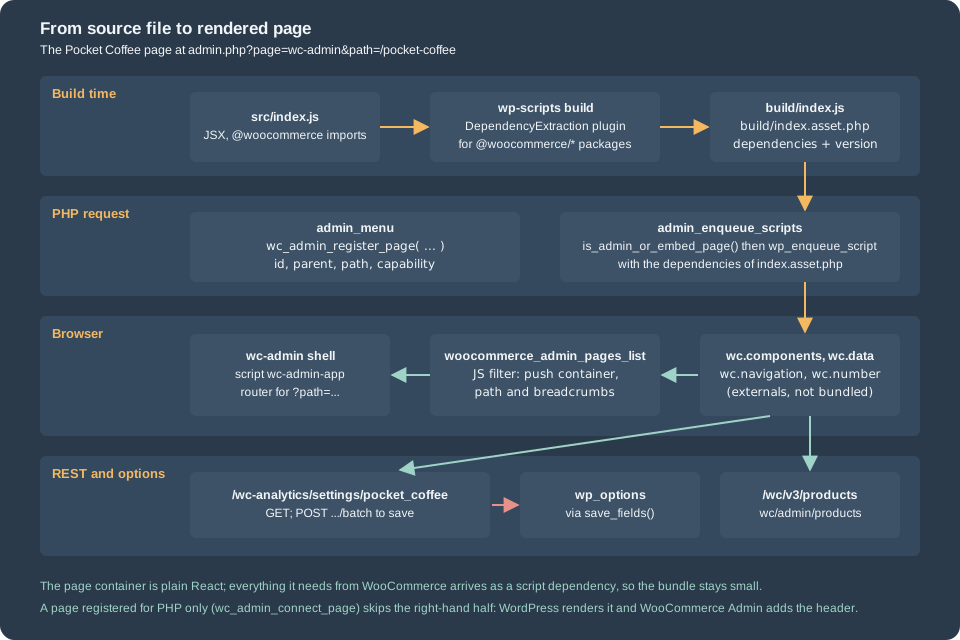
Building the React page
A React admin page is an ordinary WordPress script. It is compiled with @wordpress/scripts (a webpack, Babel and ESLint
wrapper), it is written with the packages that WordPress and WooCommerce already ship to the browser, and the build records
those packages as script dependencies instead of bundling them.
Toolchain
The versions checked on 2026-10-27 were Node.js 24.21.0 and npm 11.19.0 on the build machine, @wordpress/scripts 37.0.0,
@woocommerce/dependency-extraction-webpack-plugin 5.1.0 and React 18.3 (the range that @woocommerce/components 14.1.0
supports; the scaffold pins react and react-dom to 18.3.x for that reason). The scaffold @woocommerce/create-woo-extension
2.1.0 generates exactly this setup; it requires Node.js 24.15 or later.
npx @wordpress/create-block@latest -t @woocommerce/create-woo-extension pocket-coffee-settingsThe scaffold has a default variant (a React page with a few @woocommerce/components examples, an Admin/Setup class that
registers the page and enqueues the bundle, tests, a .wp-env.json and a Composer package) and five others: add-report,
add-task, dashboard-section, sql-modification and table-column, which extend Analytics, the task list and the home screen. The
lab did not run the generator; it wrote the equivalent files by hand so that the page and the PHP stay small, and checked the
scaffold’s template files in the 2.1.0 package (its Setup class enqueues the bundle in the same way as the listing below).
The two files that make the build WooCommerce-aware are the package.json and the webpack configuration. The configuration
replaces the default DependencyExtractionWebpackPlugin of @wordpress/scripts with the WooCommerce subclass:
{
  "name": "pocket-coffee-admin",
  "version": "1.0.0",
  "private": true,
  "scripts": { "build": "wp-scripts build", "start": "wp-scripts start" },
  "devDependencies": {
    "@woocommerce/dependency-extraction-webpack-plugin": "latest",
    "@wordpress/scripts": "latest",
    "react": "18.3.x",
    "react-dom": "18.3.x"
  }
}const defaultConfig = require( '@wordpress/scripts/config/webpack.config' );
const WooCommerceDependencyExtractionWebpackPlugin = require( '@woocommerce/dependency-extraction-webpack-plugin' );
module.exports = {
...defaultConfig,
plugins: [
...defaultConfig.plugins.filter(
( plugin ) =>
plugin.constructor.name !== 'DependencyExtractionWebpackPlugin'
),
new WooCommerceDependencyExtractionWebpackPlugin(),
],
};npm install added 1263 packages and npm run build finished in about a tenth of a second. The output, in build/, is the script and a
PHP file that lists what the script needs:
asset index.js 2.57 KiB [emitted] [minimized] (name: index)
asset index.asset.php 244 bytes [emitted] (name: index)
Entrypoint index 2.81 KiB = index.js 2.57 KiB index.asset.php 244 bytes
webpack 5.112.2 compiled successfully in 124 ms
<?php return array(
'dependencies' => array(
'react-jsx-runtime',
'wc-components',
'wc-navigation',
'wc-store-data',
'wp-components',
'wp-data',
'wp-element',
'wp-hooks',
'wp-i18n'
),
'version' => 'a2bd02db1fe9288a3321'
);The bundle is 2.6 KiB because WooCommerce, React and the WordPress packages are not in it. The asset file is what the plugin
reads when it enqueues the script: WordPress then loads wc-components, wc-store-data and the rest first, in dependency order,
and uses version (a hash of the content) as the cache buster.
Externals, handles and globals
The plugin maps every @woocommerce/<name> package that is listed in its packages.js to a script handle and a global. The rule
is mechanical: the handle is wc-<name> and the global is wc.<camelCaseName>, with a few irregular cases that the table
shows. The handles below were all present on the page of the lab (wc-components, wc-store-data, wc-navigation, wc-settings, wc-number, wc-currency, wc-date, wc-csv, wc-experimental, wc-notices, wc-sanitize and wc-tracks); the blocks packages follow the same rule in the plugin’s source.
| Import | Script handle | Global |
|---|---|---|
|
|
|
|
|
|
|
|
|
|
|
|
|
|
|
|
|
|
|
|
|
|
|
|
The list of packages in version 5.1.0 of the plugin has no @woocommerce/product-editor: the product block editor was removed in
11.0.0, and its package went with it (see Products and Product Types).
The bundledPackages option of the plugin keeps a package in the bundle instead of externalizing it. The @wordpress/* packages
follow WordPress’s own rules (wp-element, wp-data, wp-components, wp-i18n and so on, plus react-jsx-runtime for the
automatic JSX transform).
On the running page the globals were: wc.adminLayout, wc.app, wc.commandPalette, wc.components, wc.csvExport,
wc.currency, wc.customerEffortScore, wc.data, wc.date, wc.experimental, wc.explat, wc.navigation, wc.notices,
wc.number, wc.remoteLogging, wc.sanitize, wc.tracks, wc.wcEntities, wc.wcSettings and wc.wcTypes, and window.wcSettings
held, among others, adminUrl, countries, currency, currentUserId, homeUrl, locale, orderStatuses, siteTitle,
storePages, wcVersion, wpVersion and an admin object with preloadOptions, preloadSettings, currentUserData,
manageStock, notifyLowStockAmount and shopUrl. The @woocommerce/settings helper getSetting( 'name', fallback ) reads
that object.
Enqueueing the bundle
The scaffold’s Setup class and the admin-pages.php file above enqueue the bundle on admin_enqueue_scripts, but only on
WooCommerce Admin pages: PageController::is_admin_or_embed_page() is true on the wc-admin application and on connected
(embedded) pages, so the script does not load on every wp-admin screen. The function exists in WooCommerce 11.2.1 and the scaffold
guards the call with method_exists(), which is worth copying when the extension supports older releases. A script that is
registered but whose dependency list contains an unknown handle never runs; a missing index.asset.php (the listing returns before
enqueueing) means the page is empty with no error, which is why the listing checks file_exists().
The page itself
The container below is the whole of src/index.js. It has two parts. BadgeSettings is a form for the two main badge options,
backed by the settings group of the PHP tab; ProductsTable lists products in a TableCard, with paging driven by the URL.
import { addFilter } from '@wordpress/hooks';
import { __ } from '@wordpress/i18n';
import { useSelect, useDispatch } from '@wordpress/data';
import { Button, TextControl, ToggleControl } from '@wordpress/components';
import { useState, useEffect } from '@wordpress/element';
import { Section, SectionHeader, TableCard } from '@woocommerce/components';
import { PRODUCTS_STORE_NAME, SETTINGS_STORE_NAME } from '@woocommerce/data';
import { getQuery, updateQueryString } from '@woocommerce/navigation';

const GROUP = 'pocket_coffee';
const PER_PAGE = 25;

const headers = [
	{ key: 'name', label: __( 'Product', 'pocket-coffee-settings' ), isLeftAligned: true, isSortable: true, required: true },
	{ key: 'sku', label: __( 'SKU', 'pocket-coffee-settings' ), isLeftAligned: true },
	{ key: 'price', label: __( 'Price', 'pocket-coffee-settings' ), isNumeric: true },
	{ key: 'stock', label: __( 'Stock', 'pocket-coffee-settings' ), isNumeric: true },
];

/**
 * Settings form backed by the "pocket_coffee" settings group (the tab registered in PHP).
 * The wc/admin/settings store requests /wc-analytics/settings/pocket_coffee the first time getSettings() is called.
 */
const BadgeSettings = () => {
	const { settings, isRequesting } = useSelect( ( select ) => {
		const store = select( SETTINGS_STORE_NAME );
		return {
			settings: store.getSettings( GROUP )[ GROUP ],
			isRequesting: store.isUpdateSettingsRequesting( GROUP ),
		};
	}, [] );
	const { updateAndPersistSettingsForGroup } = useDispatch( SETTINGS_STORE_NAME );
	const [ days, setDays ] = useState( '' );
	const [ show, setShow ] = useState( true );

	useEffect( () => {
		if ( settings ) {
			setDays( settings.pocket_coffee_freshness_days );
			setShow( settings.pocket_coffee_show_badge === 'yes' );
		}
	}, [ settings ] );

	return (
		<Section component="article">
			<SectionHeader title={ __( 'Roast badge', 'pocket-coffee-settings' ) } />
			<ToggleControl
				label={ __( 'Show the badge on product pages', 'pocket-coffee-settings' ) }
				checked={ show }
				onChange={ setShow }
			/>
			<TextControl
				label={ __( 'Freshness window (days)', 'pocket-coffee-settings' ) }
				type="number"
				value={ days }
				onChange={ setDays }
			/>
			<Button
				variant="primary"
				isBusy={ isRequesting }
				disabled={ ! settings }
				onClick={ () =>
					updateAndPersistSettingsForGroup( GROUP, {
						[ GROUP ]: {
							...settings,
							pocket_coffee_freshness_days: days,
							pocket_coffee_show_badge: show ? 'yes' : 'no',
						},
					} )
				}
			>
				{ __( 'Save', 'pocket-coffee-settings' ) }
			</Button>
		</Section>
	);
};

/**
 * Table of products read through the wc/admin/products store.
 */
const ProductsTable = () => {
	const query = getQuery();
	const page = parseInt( query.paged || '1', 10 );

	const { products, total, isLoading } = useSelect(
		( select ) => {
			const store = select( PRODUCTS_STORE_NAME );
			const args = { per_page: PER_PAGE, page, orderby: 'title', order: 'asc' };
			return {
				products: store.getProducts( args ),
				total: store.getProductsTotalCount( args ),
				isLoading: store.isResolving( 'getProducts', [ args ] ),
			};
		},
		[ page ]
	);

	const rows = ( products || [] ).map( ( product ) => [
		{ display: product.name, value: product.name },
		{ display: product.sku, value: product.sku },
		{ display: product.price ? Number( product.price ).toFixed( 2 ) : '-', value: Number( product.price || 0 ) },
		{ display: product.stock_quantity ?? '-', value: product.stock_quantity ?? 0 },
	] );

	return (
		<TableCard
			title={ __( 'Products', 'pocket-coffee-settings' ) }
			headers={ headers }
			rows={ rows }
			rowsPerPage={ PER_PAGE }
			totalRows={ total || 0 }
			isLoading={ isLoading }
			query={ { ...query, paged: page } }
			onQueryChange={ ( param ) => ( value ) => updateQueryString( { [ param ]: value } ) }
		/>
	);
};

const RoastPage = () => (
	<>
		<BadgeSettings />
		<ProductsTable />
	</>
);

addFilter( 'woocommerce_admin_pages_list', 'pocket-coffee-settings', ( pages ) => {
	pages.push( {
		container: RoastPage,
		path: '/pocket-coffee',
		breadcrumbs: [ __( 'Pocket Coffee', 'pocket-coffee-settings' ) ],
		navArgs: { id: 'pocket-coffee-settings' },
	} );
	return pages;
} );Opened at wp-admin/admin.php?page=wc-admin&path=/pocket-coffee in a headless Chromium, the page showed the WooCommerce Admin
header with Pocket Coffee, the store activity panel, a Roast badge card with the toggle on and the freshness window at
30, and a Products table with the columns Product, SKU, Price and Stock and the paging footer, with no console errors.
Changing the number to 21 and pressing Save sent one request,
POST /wp-json/wc-analytics/settings/pocket_coffee/batch, with the whole group in update, and the option changed. The Price
column shows the price field of each product as the REST API returns it, with two decimals; the first version of the page
used formatValue() from @woocommerce/number for it and printed an empty cell, because that helper needs the full number
configuration (separators and precision) rather than a bare precision.
Three lessons came out of building it. The useSettings() hook threw on first render (see the section on the data package); the
number helper needs its whole configuration; and the table shows every product, because the example does not filter by status
or type: a real report passes status, type or category in the arguments of getProducts().
@woocommerce/components
@woocommerce/components (14.1.0 at the time of writing, from the packages/js/components directory of the WooCommerce monorepo)
is the component library of WooCommerce Admin, built on @wordpress/components. It is loaded as the wc-components script and
needs React 18. The index of the package exports the following families; the exports prefixed with __experimental are subject
to change.
| Family | Components |
|---|---|
Layout |
|
Tables and lists |
|
Paging and search |
|
Inputs |
|
Analytics |
|
Domain widgets |
|
TableCard is the component the example uses. Its important props are title, headers (an array of column objects with key,
label, isLeftAligned, isNumeric, isSortable, required, defaultSort and defaultOrder), rows (an array of rows, each an array of
{ display, value } objects: display is what is drawn and value is what sorting uses), rowsPerPage, totalRows, query
(the object that holds paged, per_page, orderby and order), onQueryChange (a function that receives a parameter name and
returns the handler that applies the new value), onSort, isLoading, summary and emptyMessage. The component is controlled:
it never changes the URL itself, so the page decides what a click on a column or a page number does, and the example updates the
query string with updateQueryString() from @woocommerce/navigation.
@woocommerce/data
@woocommerce/data (7.0.0, packages/js/data) registers the data stores of WooCommerce Admin with @wordpress/data. A store
is a Redux-style store with selectors and resolvers; the first call of a selector with its arguments triggers the request, and
useSelect() re-renders the component when the answer arrives. The package is loaded as the wc-store-data script. The names
that matter for an extension:
| Constant | Store | What it wraps |
|---|---|---|
|
|
The settings groups of |
|
|
|
|
|
|
|
|
|
|
|
|
|
|
The current user’s preferences, plugin state, inbox notes, product reviews, countries |
|
Store setup stores (for example |
Gateway and shipping method lists and the onboarding profile |
|
Product attributes, terms, categories, tags, variations, shipping classes and zones, tax classes (names such as |
Subject to change; do not build on them without pinning the version |
The package also exports hooks (useSettings, useUser, useUserPreferences), hydration helpers (withSettingsHydration,
withOptionsHydration, withCurrentUserHydration and so on, which fill a store from data that PHP printed into the page) and
getFilterQuery, getReportTableData and friends for analytics pages. PHP can preload data: the filters
woocommerce_admin_preload_options (a list of option names that appear in wcSettings.admin.preloadOptions) and
woocommerce_admin_preload_settings (a list of settings groups, in preloadSettings) avoid a first request, and the filter
woocommerce_admin_shared_settings adds keys to the wcSettings.admin object.
Two behaviours of the stores cost time on the lab store, and both are specific to extensions that keep their own options.
The options store is a closed list. /wc-admin/options only reads and writes the option names in a hard-coded array in
Automattic\WooCommerce\Admin\API\Options (68 woocommerce_* options such as woocommerce_demo_store,
woocommerce_default_country or woocommerce_manage_stock). An option of an extension is rejected with
woocommerce_rest_cannot_view or woocommerce_rest_cannot_update. The filter that used to extend the list,
woocommerce_rest_api_option_permissions, has been deprecated since 6.3.0. An extension’s options belong in a settings group
(WC_Settings_Page or the woocommerce_settings_groups filter) and are read through SETTINGS_STORE_NAME, or are registered with
register_setting() and show_in_rest and read through the WordPress core data store.
useSettings() needs a loaded group. The hook useSettings( group, [ ...keys ] ) returned an error on the first render of the
lab page: the page showed WooCommerce’s Oops, something went wrong screen and the console printed
Cannot read properties of undefined (reading 'dirty'). Its selector for the dirty flag reads the state of the group before the
first request has created it. The hook works once the group is in the store: a test page that first selected
getSettings( 'pocket_coffee' ) from the store, waited for the answer and only then rendered a child that called
useSettings() printed the saved value without error. The example therefore selects from the store directly, which has no such
assumption: getSettings( group ) triggers the request through its resolver and returns an empty object until the data arrives,
and updateAndPersistSettingsForGroup( group, { [ group ]: values } ) marks the group dirty and posts the batch. If you use the
hook, load the group first (for example with that selector in a parent component).
@woocommerce/navigation and the other helpers
@woocommerce/navigation (9.0.0) wraps the browser history of wc-admin. getQuery() returns the current query string as an
object (the example reads paged from it), updateQueryString( query, path, currentQuery, page ) changes parameters in place
and keeps the others, getNewPath() builds an address, onQueryChange( param ) returns a handler for a table or a filter,
getHistory() gives the history object, useQuery() is the hook version of getQuery(), isWCAdmin() and navigateTo() test and
change the location, and useConfirmUnsavedChanges() asks before leaving a dirty form. @woocommerce/number formats numbers
(formatValue()), @woocommerce/currency formats prices from the store’s currency settings and
@woocommerce/date formats and compares dates; all three read their configuration from wcSettings.
Pocket Coffee in the admin
Put together, the Pocket Coffee settings plugin gives the merchant six places:
| Place | Code | Stored in |
|---|---|---|
WooCommerce > Settings > Pocket Coffee |
|
One option per field |
Settings > Integration > Pocket Coffee Roaster |
|
|
Settings > Products > Roast badge |
Two filters |
|
Settings > Shipping > Roast parcels |
|
|
WooCommerce > Roast log |
|
Nothing |
WooCommerce > Pocket Coffee |
|
The group of the tab, through the REST API |
The badge options are read by the product page badge of
Products and Product Types: it hides itself when the checkbox is off,
uses the label, switches between the date and the days since the roast, and adds "past peak" after the freshness window. The PHP
files pass the WooCommerce coding standards (WooCommerce-Core and WordPress-Extra, PHP_CodeSniffer 3.13.6 with
woocommerce-sniffs 2.0.0); the one exception the standard needs is a comment on the capability argument of add_submenu_page(),
because manage_woocommerce is a capability that WooCommerce registers rather than one that WordPress core knows.
Pitfalls
-
The constructor of
WC_Settings_Pagebuilds its hook names from$this->id; an id set afterparent::__construct()leaves the page registered under an empty id. -
A
WC_Settings_Pagetab only shows for users withmanage_woocommerce; the save is refused with a 403 for anyone else. -
The
woocommerce_get_settings_{tab}callback must return the received array for other sections, or the core fields vanish. -
A sanitizer that returns an empty string writes an empty string; return
nullto keep the stored value. -
wc_format_decimal()depends on the shop’s separators: test price fields with the shop’s real locale. -
A
passwordfield is plain text in the database. A value that returns fromget_option()is the secret itself. -
A REST
PUTresponse echoes the request; the stored value is what the sanitizers returned. -
The names of the screen-id filters in the public documentation differ from the source of 11.2.1.
-
wc_admin_url()without a query array returns an address that does not exist. -
The
OPTIONS_STORE_NAMEstore cannot read an extension’s options; use a settings group. -
useSettings()before the group is loaded fails the whole page; select from the store or hydrate first. -
The experimental settings UI drops what it cannot describe in its schema (suffixes, custom rows): re-test each screen.
-
A bundle that needs a handle the page does not load runs nothing and reports nothing; read the dependency list in
index.asset.phpand the Network tab.
What was and was not run
Run on the lab store (WordPress 7.1.3, WooCommerce 11.2.1, PHP 8.3.36, MariaDB 11.8.9): the plugin’s activation; the tab, both
sections, the integration, the filter section and the registry section, each rendered and saved through the real admin form
with a nonce; the sanitizers, the error notice, the hook order and the stored options; the REST group listing and the
PUT through a consumer key; the React page in a headless Chromium, including the failed useSettings() and the working
store-based version, and a save that posted the batch; the PHP-powered page; the settings UI with the flag on for one request;
@wordpress/scripts 37.0.0 builds; PHP_CodeSniffer on the PHP files.
Not run: a custom settings UI component and registerSettingsExtension(), because the package is not on npm and the flag is
off by default; the woocommerce_admin_homescreen_quicklinks link; the scaffold generator (the files it would write were read in
the published package instead); the add-report, add-task, dashboard-section and table-column variants; multisite and
role-restricted users; anything that needs an account at WooCommerce.com or the Marketplace.