State Management
|
This section documents the current Vue 3.x release line as published at
the official Vue.js documentation, which is the reference these pages are written and
verified against. No specific patch version is pinned. The Composition API with This content was generated with the assistance of AI and should be verified against the official documentation before being relied on in production, since Vue and its ecosystem iterate quickly. This section’s bibliography lists the reference material consulted while preparing these pages. |
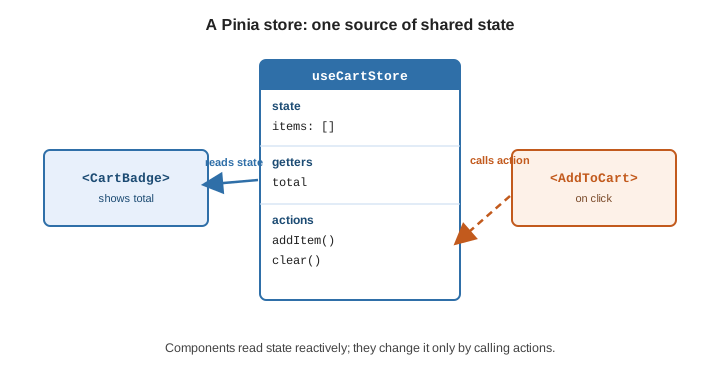
State management is about state that several components need to read and change. Vue’s reactivity APIs can hold such state on their own for small cases; Pinia is the official library once it grows. The trade-offs are laid out in State Management.
A store from the reactivity APIs
A shared reactive object in a module is already a working store — any component that imports it sees the
same instance and re-renders when it changes:
// stores/counter.js
import { reactive } from 'vue'

export const counter = reactive({
  count: 0,
  increment() {
    this.count++
  },
})
<script setup>
import { counter } from '@/stores/counter'
</script>
<template>
<button @click="counter.increment()">{{ counter.count }}</button>
</template>This works, but nothing stops a component from writing counter.count = -5 directly, there is no naming
convention for many stores, no DevTools timeline, no plugin hook, and server-side rendering needs care to
avoid sharing one instance across requests. Pinia adds all of that.
Global state vs. props and provide/inject
Reach for a store only for state that is genuinely app-wide — the signed-in user, a cart, feature flags. Prefer passing data down as props for parent-to-child flow, and Provide / Inject for handing a value to a deep subtree without a store. A store is the right tool when unrelated parts of the tree read and write the same data.
Pinia
Install Pinia and register it once:
import { createApp } from 'vue'
import { createPinia } from 'pinia'
import App from './App.vue'

createApp(App).use(createPinia()).mount('#app')defineStore: setup stores vs. option stores
defineStore(id, …) returns a use function. A setup store is a function that looks like <script
setup> — ref is state, computed is a getter, functions are actions:
// stores/cart.js
import { ref, computed } from 'vue'
import { defineStore } from 'pinia'
export const useCartStore = defineStore('cart', () => {
const items = ref([])
const total = computed(() => items.value.reduce((s, i) => s + i.price, 0))
function addItem(item) {
items.value.push(item)
}
function clear() {
items.value = []
}
return { items, total, addItem, clear }
})An option store passes an object with state, getters, and actions instead — closer to Vuex and to
the Options API:
export const useCartStore = defineStore('cart', {
state: () => ({ items: [] }),
getters: { total: (state) => state.items.reduce((s, i) => s + i.price, 0) },
actions: {
addItem(item) { this.items.push(item) },
clear() { this.items = [] },
},
})state must be a function so each app (and each SSR request) gets a fresh object. See
Defining a Store.
Using a store in a component
Call the use function inside setup. The returned store is reactive; access properties directly for
templates, but use storeToRefs() to destructure state and getters without losing reactivity (actions can
be destructured directly):
<script
setup>
import { storeToRefs } from 'pinia'
import { useCartStore } from '@/stores/cart'
const cart = useCartStore()
const { items, total } = storeToRefs(cart) // stay reactive
const { addItem, clear } = cart // actions: plain to destructure
</script>
<template>
<p>{{ items.length }} items — {{ total }}</p>
<button @click="clear">Empty cart</button>
</template>Mutating and observing a store
-
store.$patch(\{ … })orstore.$patch(state ⇒ \{ … })— apply several state changes as one transaction (cheaper, and one DevTools entry). -
store.$reset()— restore the initial state (option stores only; a setup store must define its own reset action). -
store.$subscribe((mutation, state) ⇒ \{ … })— run a callback after every state change, e.g. to persist tolocalStorage. -
store.$onAction((\{ name, args, after, onError }) ⇒ \{ … })— hook every action call, withafterandonErrorfor its outcome.
const cart = useCartStore()

cart.$patch((state) => {
  state.items.push(newItem)
  state.coupon = null
})

cart.$subscribe((_mutation, state) => {
  localStorage.setItem('cart', JSON.stringify(state.items))
})Plugins
A Pinia plugin is a function registered with pinia.use(); what it returns is merged onto every store, and
it can also wrap actions or add subscriptions. This is how persistence, router access, or shared HTTP
clients are attached:
pinia.use(({ store }) => {
  store.$subscribe(() => {
    localStorage.setItem(store.$id, JSON.stringify(store.$state))
  })
})
Plugins documents the full context object.
DevTools, HMR, and SSR
-
DevTools — with Vue DevTools installed, Pinia adds a panel with each store’s state, a timeline of patches and actions, and time-travel.
-
HMR — add
import.meta.hotglue so editing a store file keeps its current state:if (import.meta.hot) { import.meta.hot.accept(acceptHMRUpdate(useCartStore, import.meta.hot)) } -
SSR — because
stateis a factory, each request gets its own stores; serializepinia.state.valueinto the HTML and hydrate it on the client. See SSR and Server-Side Rendering.
Vuex is legacy
Vuex was the previous official store. It is in maintenance mode and the Vue team recommends Pinia — effectively Vuex 5 — for all new projects.
See also
-
Pinia documentation — full API, testing guide, and recipes.
-
Provide / Inject — dependency injection for a subtree, without global state.
-
Routing — a common Pinia plugin target (
store.$router). -
State Management and Signals — comparable approaches in other frameworks.