Files and Context Managers
|
This section documents the current Python release line as published at the official Python documentation, which is the reference these pages are written and verified against. No specific patch version is pinned. This content was generated with the assistance of AI and should be verified against the official documentation before being relied on in production. This section’s bibliography lists the reference material consulted while preparing these pages. |
Reading and writing files is one of the main places Python asks you to release a resource once you’re done
with it — the with statement and the context manager protocol behind it exist largely for this reason.
Opening, Reading, and Writing Files
open() returns a file object for a given path and mode: "r" (read text, the default), "w" (write,
truncating), "a" (append), and "b" combined with any of those for binary I/O ("rb", "wb"). The full
mode table and encoding rules are in the tutorial’s
Reading and Writing Files
section (see also the open() reference for every
argument).
f = open("notes.txt", "w")
f.write("first line\n")
f.write("second line\n")
f.close()                       # must close explicitly to flush and release the handle
Reading offers .read() (the whole file, or up to a given size, as one string), .readline() (one line at a
time), and plain iteration (line by line, memory-efficient for large files):
f = open("notes.txt", "r")
whole = f.read()                # entire remaining contents as one string
f.close()

f = open("notes.txt", "r")
first = f.readline()            # 'first line\n'
f.close()

f = open("notes.txt", "r")
for line in f:                  # iterate lazily, one line per iteration
    print(line.rstrip("\n"))
f.close()
Every one of these examples has a bug waiting to happen: if .write() or .read() raises, .close() is
never reached, and the underlying file descriptor leaks.
The with Statement
The idiomatic fix is not a manual try/finally — it’s the with statement, specified in
the language reference’s with
statement section. open() returns a context manager, so .close() is guaranteed to run when the block
exits, exception or not:
# Equivalent to the with-statement below, spelled out manually
f = open("notes.txt", "r")
try:
    data = f.read()
finally:
    f.close()                   # always runs, even if .read() raised

# Idiomatic: with guarantees the close()
with open("notes.txt", "r") as f:
    data = f.read()
# f.close() has already happened here, on every exit path
A single with can open several context managers at once, each closed in reverse order when the block ends:
with open("in.txt") as src, open("out.txt", "w") as dst:
    for line in src:
dst.write(line.upper())pathlib.Path: the Modern Alternative to os.path
pathlib.Path represents a filesystem path as an object instead of a plain string, so joining paths uses
the / operator and checks/reads are methods rather than free functions from os.path. Full reference:
the pathlib module documentation.
from pathlib import Path

base = Path("data")
config_path = base / "config" / "settings.txt"   # join with '/', not os.path.join(...)

print(config_path.exists())                       # True/False, no os.path.exists() call needed
For text files, Path.read_text() opens, reads, and closes in a single call — no with block needed for
this common case, since the file handle never outlives the method call:
from pathlib import Path

contents = Path("notes.txt").read_text()          # open + read + close, in one expression
Path("notes.txt").write_text(contents.upper())     # open + write + close
See Path.read_text() and
Path.write_text() for their
encoding and error-handling arguments. pathlib has far more to it than path joining and text
I/O — globbing, renaming, stat info, and more — covered in full in
Standard Library Tour's pathlib section rather than repeated here.
The Context Manager Protocol
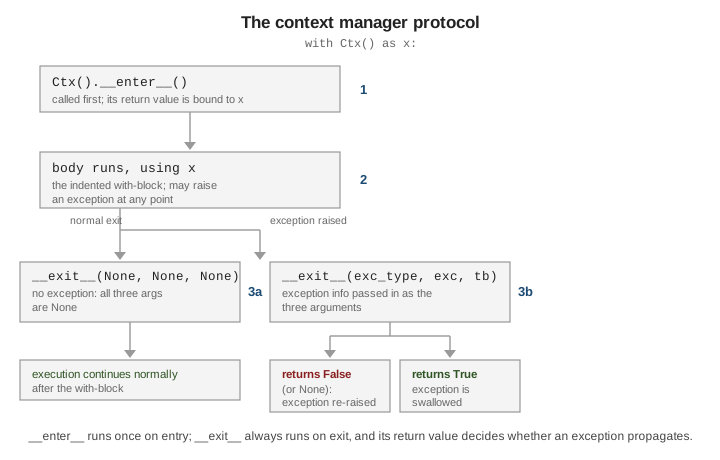
with EXPR as x: is not special-cased to files — it works with any object implementing two methods,
enter() and exit(), together called the context manager protocol (same language-reference
section as above). enter() runs first and its return value is bound to x; the block body then runs;
exit() always runs when the block ends, whether it ended normally or via an exception. If an exception
occurred, exit() receives its type, value, and traceback as three arguments — and if exit()
returns a truthy value (typically True), that exception is treated as handled and does not propagate
past the with block.
with open("notes.txt") as f:      # f.__enter__() returns f itself; bound to 'f'
    data = f.read()
    raise ValueError("oops")      # f.__exit__(ValueError, ..., ...) still runs, then re-raises
Writing a custom class with its own enter/exit — including one whose exit swallows a
particular exception by returning True — is covered on Operator Overloading, which
this page defers to rather than duplicating.
See Also
-
Exceptions — the
try/except/finallymachinery thatwithreplaces for resource cleanup, and how exceptions interact withexit(). -
Operator Overloading — implementing a custom context manager’s
enterandexitmethods.