Liquid Language
|
This content was generated with the assistance of AI and should be verified against the official documentation of each platform before being relied on in production. This section’s bibliography lists the reference material consulted while preparing these pages. |
This page describes Liquid as it is used in Shopify Online Store themes. Liquid is not versioned: the open-source engine
is the Ruby gem liquid (latest 5.14.0 on 2026-10-27, which needs Ruby 3.0 or newer), and Shopify extends it with its own
tags, filters and objects. At the Liquid reference revision used for this page the Shopify variant documents 33 tag
entries (31 distinct names), 155 filter entries (154 distinct names, because date is listed in two categories) in 19 categories and 142 objects. The facts below were checked on 2026-10-27
against the Liquid reference on shopify.dev, Shopify CLI 5.0.0 with Theme Check 3.31.0, the Ruby gem 5.3.0 (the last
release that runs on the macOS system Ruby 2.6 used for the tests) and LiquidJS 10.30.0.
Liquid is the layer where a theme turns store data into HTML on Shopify’s servers, so it is the language of every file in
the layout, templates, sections, blocks and snippets folders described in
the theme architecture page. The running example is Pocket Coffee, the small specialty-coffee shop with the single-origin
beans product (18 variants, SKUs such as PC-ETH-WHL-250), the Coffee Club customer segment and free shipping to Spain
from 40 EUR. Every snippet in this page belongs to a small Pocket Coffee theme built from the Skeleton theme and
validated with Theme Check.
How the examples were verified is worth stating once. Plain Liquid constructs were run with the Ruby gem 5.3.0 and with
LiquidJS 10.30.0. Shopify-specific tags, filters and objects (money, t, image_url, paginate, product, cart) do
not exist in those engines, so the Pocket Coffee snippets were validated with Theme Check, the same engine that
shopify theme check embeds, and their logic was rendered with the Ruby gem plus a few stub filters that stand in for
money and t. Real theme rendering needs a store (shopify theme dev or shopify theme console), and no store or
account was used, so nothing on this page was rendered by Shopify itself. Where a result depends on Shopify’s own engine,
the text says that it comes from the documentation.
What Liquid is and where it runs
Liquid is a template language created by Shopify and released as an open-source project. A template mixes static text (usually HTML) with Liquid code. When a storefront request arrives, Shopify’s servers evaluate the Liquid, substituting store data, and send plain HTML to the browser. Nothing of the Liquid reaches the browser, so Liquid cannot react to clicks; behaviour after page load belongs to JavaScript, and the Ajax APIs or the Section Rendering API fetch fresh HTML when a page must change without a reload.
Shopify documents four other variations of Liquid that use different tags, filters and objects: notification templates (emails), Shopify Flow, order printer templates and packing slip templates. This page covers only the theme variation.
Liquid is evaluated in some theme files and deliberately not in others:
| File or construct | Liquid evaluated | Notes |
|---|---|---|
Layouts, templates ( |
Yes |
Every Liquid file; |
|
No |
The body is emitted as written; Liquid inside can cause syntax errors, and the Theme Check rule StaticStylesheetAndJavascriptTags reports it. |
|
Yes |
Rendered as a |
|
No |
Settings values must be Liquid free (Theme Check rule LiquidFreeSettings). |
JSON templates, section groups, |
No |
Data only; they name sections and blocks that are Liquid files. |
Locale files in |
Placeholders only |
A |
Source: Shopify docs: Liquid reference
Reproducing the tests
Everything that can be run offline was run from a scratch folder with these commands. The first Theme Check run needs network access once to download the Liquid reference data, which it then caches.
npm install liquidjs @shopify/cli     # CLI 5.0.0 needs Node 22.12 or newer
gem install liquid -v 5.3.0           # or the latest gem on Ruby 3.0 or newer
git clone --depth 1 https://github.com/Shopify/skeleton-theme.git pocket-coffee-theme
cd pocket-coffee-theme
npx shopify theme check               # Theme Check, bundled in the CLI
npx shopify theme check --list        # every enabled check with severity and docs URL
npx shopify theme check -o json       # machine-readable result (one-based startRow and startColumn)
Source: Shopify docs: Theme Check
Syntax: output, tags and filters
Liquid has three kinds of markup. Output tags {{ ... }} print the value of an expression. Logic tags {% ... %}
control what is rendered and print nothing themselves. Filters, written after a pipe | inside either kind, transform a
value. Everything outside the delimiters is copied to the output unchanged.
| Markup | Meaning |
|---|---|
|
Output the value of an object property. A missing value ( |
|
A chain of filters: each filter receives the result of the previous one. Arguments follow a colon and are separated by commas. |
|
Some filters take named arguments ( |
|
A logic tag that stores a value in a variable. Tags that wrap content close with an |
|
A block of tags written one per line without delimiters; use |
|
The hyphens strip whitespace on that side of the tag (see Whitespace control). |
|
Content that is parsed but not executed or printed. |
|
A single-line comment; inside a |
|
Prints Liquid-looking text without evaluating it. |
|
LiquidDoc documentation of a snippet or block (see LiquidDoc below). |
Literals are strings in single or double quotes, numbers (7, 7.5), the booleans true and false, the nil value
nil, and ranges written (1..5) that exist only inside for loops and similar tags. You cannot write an array or an
object literal in Liquid; you obtain arrays from objects, from the split filter or from settings.
The tour below exercises comments, raw, the liquid tag and echo. It was run with Ruby Liquid 5.3.0, whose parser
predates inline comments, so the inline form is left out of the run; the Shopify documentation lists it as supported.
A{% comment %}hidden {{ 1 }}{% endcomment %}B{% raw %}{{ not parsed }}{% endraw %}C
{% liquid
  assign x = 'a'
  if x == 'a'
    echo 'is a'
  endif
  for i in (1..2)
    echo i
  endfor
%}
Observed output (Ruby Liquid 5.3.0 and LiquidJS 10.30.0 agree):
AB{{ not parsed }}C
is a12
Source: Shopify docs: liquid tag
Types and truthiness
Liquid output is one of six data types. The Shopify reference lists them as string, number, boolean, nil, array and
empty, the last being the value returned for something that exists but has no content, such as a deleted page.
| Type | Behaviour |
|---|---|
|
Characters in single or double quotes. Concatenate with the |
|
Integers and floats. The result type matters: |
|
|
|
The value of anything undefined, and of a property path that does not exist. It prints nothing and counts as false. The text |
|
A list of any type, indexed from zero with |
|
What Liquid returns for a defined object without content. Compare with the keyword |
Objects such as product or cart are not one of the six types: they are structured values whose properties you read
with dot notation (product.title) or bracket notation (product['title'], pages['about-us']). Square brackets accept
a quoted handle, a variable or an object reference, which is how you look up a property whose name is held in a variable.
Reading a property of nil is safe and gives nil again: nope.deeply.nested prints nothing and is false in an if.
Truthy and falsy
Only nil and false are falsy. This surprises developers coming from JavaScript or PHP, because the empty string, 0
and the empty array are all truthy. The table was produced by evaluating {% if value %} in both engines, and the two
agree on every row.
| Value | Result of {% if value %} |
|---|---|
|
truthy |
|
falsy |
|
falsy |
|
truthy |
|
truthy |
|
truthy |
any non-empty string, number, object |
truthy |
Because the empty string is truthy, test for content with blank: {% if product.vendor != blank %}. The keyword
blank is true for nil, false, empty strings and whitespace-only strings, and for empty arrays; empty is true for
empty strings, empty arrays and the empty object. The stock Ruby gem implements both keywords by calling blank? and
empty? on the value, and blank? comes from Rails, so the plain gem 5.3.0 answers false for '' == blank and
nil == blank, while LiquidJS and Shopify answer true. The practical rule is to rely on blank only inside a real
Shopify render, and to define blank? yourself when you test with the bare gem.
require "liquid"

d = { "zero" => 0, "empty_s" => "", "arr" => [], "product" => { "compare" => nil, "available" => true } }
%w[empty_s zero arr product.compare product.available nope].each do |k|
  out = Liquid::Template.parse("{% if #{k} %}truthy{% else %}falsy{% endif %}").render(d)
  puts "#{k.ljust(18)} => #{out}"
endComparing and converting values
The comparison operators are ==, !=, >, <, >=, <=, and, or and contains. Comparing values of different
types does not coerce them: {% if '10' == 10 %} is false in both engines, and 10 > 9 is true. Arithmetic filters
do coerce strings that look like numbers: {{ '10' | plus: 5 }} prints 15, {{ '1.5' | plus: 1 }} prints
2.5, and a string with no number in it counts as 0 ({{ 'a' | plus: 'b' }} prints 0). Passing a number to
append or prepend converts it to text ({{ 1 | append: 2 }} prints 12).
contains checks for a substring in a string and for an exact string element in an array of strings. It cannot find an
object in an array of objects, and product.tags contains 'bea' is false because tags are compared whole.
Operators have a fixed order and no parentheses
When a tag mixes and and or, Liquid evaluates the operators from right to left and the order cannot be changed.
Parentheses are not valid inside Liquid conditions: a tag that contains them fails to parse. All three results below were
measured in both engines.
{% if true and false and false or true %}T{% else %}F{% endif %}
{% if true or false and false %}T{% else %}F{% endif %}
{% if false and false or true %}T{% else %}F{% endif %}
F
T
FThe first line is read as true and (false and (false or true)), which is false. Write conditions that need grouping as
nested if tags or as separate assign steps. With parentheses the Ruby gem raises
Expected dotdot but found comparison (it tries to read (1 == 1) as a range) and LiquidJS raises
invalid range syntax; Theme Check reports Syntax error in 'if' tag.
Objects
Objects carry the store data. Shopify groups them by where they are available, and using one outside its scope gives
nil, which is the source of many silent bugs.
-
Global objects exist in every file. The reference flags 34, among them
shop,settings,routes,request,template,cart,customer,localization,linklists,pages,collections,all_products,blogs,articles,images,metaobjects,theme,scripts,canonical_url,current_page,page_title,page_description,page_image,handle,content_for_headerandcontent_for_layout. -
Template-bound objects exist when the template (or a section or snippet inside it) is rendered for that resource: for example
product(andremote_product) on the product template,collection(andcurrent_tags) on collections,articleandblog,page,search,orderon the customer order page,gift_cardandrecipienton the gift card template,robotsinrobots.txt.liquid,checkoutandmetaobjecton their own pages. -
Scoped objects exist only inside the tag or file that creates them:
section(in a section),block(in a theme block or a loop oversection.blocks),forloopandtablerowloop(inside their loops),paginate(inside apaginatetag) andform(inside aformtag).
The objects the Pocket Coffee snippets use most, with the properties that matter:
| Object | Properties used in this page and why |
|---|---|
|
|
|
|
|
|
|
|
|
|
|
|
|
The theme settings from |
|
|
|
|
|
|
|
|
|
|
|
|
|
|
|
Required in |
Two limits are easy to miss. The all_products object accepts only 20 unique handles per page, so a longer list should
come from a collection. And fetching an array does not respect your limit: collection.products loads up to 50
products regardless of the loop’s limit, which is why the pagination section below recommends paginate.
Metafields
Custom data reaches Liquid through metafields. Read a value with resource.metafields.<namespace>.<key>.value; the
shape of the value depends on the metafield type, and it is a string for text types, a number for number types, an object
for reference types (product_reference returns a product) and a date string for date and date_time, which you
format with the date filter. Metafields cannot be created from Liquid. When a key is named size, first or last,
use bracket notation (product.metafields.custom['size']) because dot notation can resolve to the filter of the same
name. The Pocket Coffee roast date is a metafield custom.roast_date of type date, rendered by the first snippet below.
Source: Shopify docs: metafield object
Tags
Tags are the logic of Liquid. Shopify’s reference lists 33 tag entries in these groups; else and break are each
documented twice (conditional and loop else; loop break and a theme-level break that stops the rest of a file from
rendering), which is why the entries number 33 for 31 distinct names. elsif and when are clauses of if and case,
and schema is documented with sections rather than in the Liquid reference.
| Group | Tags |
|---|---|
Variables |
|
Conditionals |
|
Iteration |
|
Syntax helpers |
|
Theme |
|
HTML |
|
Variable tags
assign creates a variable that lives for the rest of the file and in snippets rendered with include; it is not
scoped to the block where you write it, so a value assigned inside a for loop is still there after the loop (measured:
the variable holds the last item). capture stores rendered text, filters included, in a string variable. increment
and decrement keep their own counters: in the measured run two {% increment a %} tags printed 0 then 1, and
two {% decrement b %} tags printed -1 then -2.
{% assign tag_line = product.tags | join: ' | ' | upcase %}
{% capture heading %}{{ product.title | downcase }}-{{ product.variants.size }}{% endcapture %}
Source: Shopify docs: assign tag
Conditionals
if, elsif, else and unless branch on the truthiness rules above; case compares one value with several when
values, and a when can list alternatives separated by commas or or. Logical operators work only in conditions: you
cannot write {% assign vip = a or b %} (the strict parser rejects it, see below), so compute the boolean with an if.
{% case product.tags.size %}
  {% when 0 %}no tags
  {% when 1, 2 %}few tags
  {% else %}many tags
{% endcase %}
Source: Shopify docs: case tag
Iteration
for repeats a block for each element of an array or range, accepts the parameters limit, offset and reversed,
and supports an else branch that runs when the array is empty. Inside the loop the forloop object gives the position:
for a three-tag array, forloop.index runs 1 to 3, forloop.index0 0 to 2, forloop.rindex 3 to 1 and
forloop.rindex0 2 to 0. break leaves the loop and continue skips to the next element. cycle rotates through a list
of strings inside a loop (odd and even row classes), and tablerow emits table rows and cells with cols, limit and
offset parameters and a tablerowloop object.
A for loop is limited to 50 iterations per page in themes. To go through more items, wrap the array in paginate,
which splits it into pages of 1 to 250 items and exposes the paginate object for the navigation links. Pagination
works only up to the 25,000th item of an array, so filter a larger collection before paginating it. The arrays that
can be paginated are article.comments, blog.articles, collections, collection.products, customer.addresses,
customer.orders, metaobject_definition.values, pages, product.variants, search.results and the
article_list, collection_list and product_list settings.
{% paginate collection.products by 12 %}
  <ul class="grid">
    {%- for product in collection.products -%}
      {% render 'product-card', product: product, index: forloop.index %}
    {%- endfor -%}
  </ul>
  {{ paginate | default_pagination }}
{% endpaginate %}
Source: Shopify docs: paginate tag
The limit parameter of for bounds the iterations but not the amount of data fetched. To fetch only what you show, put
a paginate with a matching page size around the loop and keep limit as well; the documentation measures this as
faster than a bare loop with limit.
{% paginate collection.products by 4 %}
  {% for product in collection.products limit: 4 -%}
    {{ product.title }}
  {%- endfor %}
{% endpaginate %}
Source: Shopify docs: for tag
Syntax helper tags
The liquid tag removes the delimiters from a block of statements, one statement per line, and echo prints an
expression inside it (equivalent to {{ }}, filters included). Long logic reads much better this way, and the lines
inside a liquid tag produce no whitespace of their own. A comment inside it must be on its own line and start with #.
The doc tag documents a snippet or block and is never rendered.
Theme tags
These tags assemble pages from other files; each has its own page of detail, so here is the summary.
| Tag | Purpose |
|---|---|
|
Chooses the layout file (default |
|
Statically renders one section file. |
|
Renders a section group, used in layouts for the header and footer groups. |
|
Renders a snippet or an app block in an isolated scope (see the next section). |
|
Deprecated predecessor of |
|
Creates the area where a section renders the theme blocks configured in the editor, or renders one static theme block with extra arguments. |
|
Tags of the Liquid July '26 developer preview that compose a page from blocks directly in a Liquid template; the current Skeleton theme already uses |
|
Generates an HTML form of a given type with the hidden fields Shopify needs. The types are |
|
A |
|
CSS or JavaScript that belongs to one section, block or snippet. One of each per file, no Liquid inside, only in those three file types (Theme Check rules StylesheetOncePerFile, JavascriptOncePerFile and the TagInWrongFile checks). |
Source: Shopify docs: content_for tag
A Pocket Coffee product page combines several of these: a form for the add-to-cart button, a render for each piece of
reusable markup, and conditionals around the Coffee Club note. The next snippet reads the logged-in customer’s tags.
customer is nil for guests, so the outer if customer protects the property access, and the result is stored in a
boolean before it is used.
{%- liquid
  assign is_member = false
  if customer
    if customer.tags contains 'Coffee Club'
      assign is_member = true
    endif
  endif
-%}

{%- if is_member and product.type == 'Beans' -%}
  <p>{{ 'products.product.club_discount' | t }}</p>
{%- endif -%}
Source: Shopify docs: customer object
Rendered with stub filters, a Coffee Club member viewing a Beans product gets
<p>Coffee Club members save 10% on beans.</p> and a guest gets an empty string. Theme Check passes the file.
Filters
A filter takes the value on its left as its first input and returns a new value. Filters chain left to right: each one
receives the result of the previous one, so {{ 'Hello, World' | split: ', ' | join: '-' }} prints Hello-World.
Arguments are positional (truncate: 10) or named (image_url: width: 400, crop: 'center'). Arguments themselves cannot
contain filters or operators, so compute a value with assign first. Applying a filter to nil usually gives nil,
0 or an empty string rather than an error, and an unknown filter name is silently ignored by the plain Ruby gem
({{ 1 | money }} prints 1), but Theme Check reports it as the error UnknownFilter. Liquid does not escape output
automatically: {{ '<b>x</b>' }} prints the tag as written (confirmed with both engines), so text that comes from
customers or merchants should go through escape, as the Skeleton collection template does for product titles.
The 155 filters of the Shopify reference fall into these categories:
| Category | Count | Filters |
|---|---|---|
Standard string |
40 |
|
Array |
17 |
|
Color |
16 |
|
Math |
11 |
|
Media |
12 |
|
HTML |
8 |
|
Format |
6 |
|
Hosted file |
6 |
|
Collection |
7 |
|
Money |
5 |
|
Customer |
5 |
|
Payment |
4 |
|
Localization, default, metafield, font, tag, cart, date |
3, 3, 3, 3, 3, 2, 1 |
|
Source: Shopify docs: Liquid filters
Seven filters are flagged as deprecated in the reference data and reported by Theme Check as DeprecatedFilter:
hex_to_rgba, currency_selector, article_img_url, collection_img_url, img_tag, img_url and
product_img_url. The image ones are replaced by image_url and image_tag.
Filters you use every day
The standard filters below were run with Ruby Liquid 5.3.0; the results are exactly what the engine printed.
| Expression | Result |
|---|---|
|
|
|
|
|
|
|
|
|
|
|
|
|
|
|
|
|
|
|
|
|
|
|
|
|
|
|
|
|
|
A few behaviours deserve attention. default replaces nil, false and the empty string, but not a whitespace-only
string and not 0; pass allow_false: true to keep an explicit false. divided_by returns a result of the same type as
the divisor, so use a float divisor for percentages, as the free-shipping snippet below does. date accepts the strftime
directives, formats date strings from metafields, and prints nothing for nil. json serializes any value for use in
JavaScript and includes the quotes itself; applied to a product on a store created after 2017-12-05 it omits the variants' inventory_quantity and
inventory_policy, which you read from the variant objects. Newer filters such as sum, find, find_index and has
exist in Shopify and in LiquidJS 10.30.0 ({{ items | sum: 'q' }} printed 3), but the Ruby gem 5.3.0 does not know
sum and echoes the array instead.
Shopify-specific filters
Shopify adds the filters that need store data: money formatting, CDN URLs, translations, URL helpers. None of them exist in the plain engines, so they were checked with Theme Check and are described here from the reference.
| Filter | Behaviour |
|---|---|
|
Formats an amount in the currency’s smallest unit using the store’s HTML-without-currency format; variants include |
|
CDN URL of a file in the theme’s |
|
CDN URL of an image of an |
|
Builds the complete |
|
Looks the key up in the locale files (alias of |
|
Converts text to a handle: lower case, runs of whitespace and special characters replaced by one hyphen. |
|
Outputs the page links of the current |
|
Renders the dynamic checkout buttons for a product form. |
Source: Shopify docs: money filter
The rule that causes most filter bugs
Because each filter receives the previous filter’s result, an expression such as {{ 'cart.free_shipping_missing' | t: amount: missing | money }}
applies money to the translated sentence, not to the number. The next figure shows both versions. In the
measured run with stub filters the wrong form printed €0.00 instead of the sentence, because the text is not a number
(how Shopify’s own money treats a non-numeric string was not tested). The fix is to format the number into a variable
and pass the variable to t.
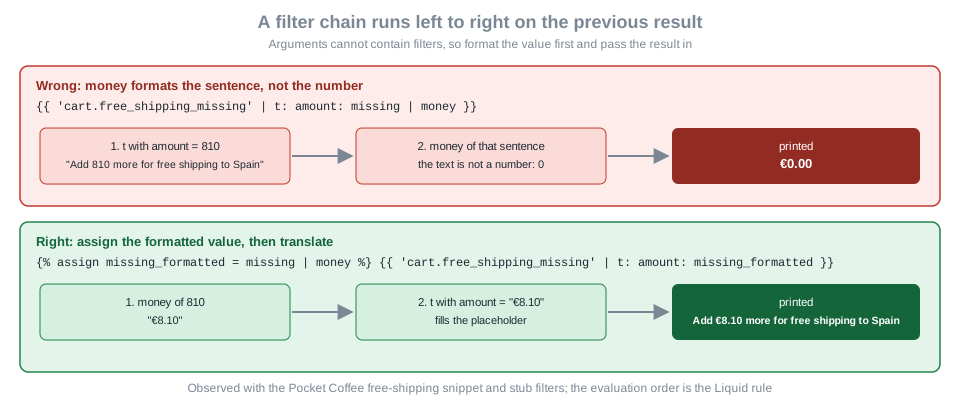
Figure: a filter chain runs left to right on the previous result, and arguments cannot contain filters.
Pocket Coffee price and free-shipping snippets
The first snippet prints a variant’s price, with the struck-through compare-at price when the variant is on sale. It
documents its parameters with LiquidDoc, computes the sale flag in a liquid block and uses whitespace control so the
markup has no stray blank lines.
{% doc %}
  Renders the price of a variant, with the compare-at price when it is on sale.

  @param {variant} variant - The variant to price
  @param {boolean} [show_currency] - Show the ISO currency code after the amount

  @example
  {% render 'price', variant: product.selected_or_first_available_variant %}
{% enddoc %}

{%- liquid
  assign on_sale = false
  if variant.compare_at_price > variant.price
    assign on_sale = true
  endif
-%}

<p class="price">
  {%- if on_sale -%}
    <s>{{ variant.compare_at_price | money }}</s>
  {%- endif -%}
  {%- if show_currency -%}
    {{ variant.price | money_with_currency }}
  {%- else -%}
    {{ variant.price | money }}
  {%- endif -%}
</p>Rendered with stub money filters (euro sign, two decimals), a variant priced 890 cents with a compare-at price of 1090
cents gives <p class="price"><s>€10.90</s>€8.90</p>, and a 2990 cent variant with show_currency gives
<p class="price">€29.90 EUR</p>. When compare_at_price is nil the comparison is false and no error is raised.
The second snippet implements the Zone 1 rule: free shipping to Spain from 40 EUR (4000 cents). It uses the math filters
and the float divisor, clamps the values with at_least and at_most, and applies the lesson of the previous figure.
{% doc %}
  Tells the customer how far the cart is from free shipping in Spain.

  @param {number} threshold - The free shipping threshold in cents, for example 4000
{% enddoc %}

{%- liquid
  assign missing = threshold | minus: cart.total_price | at_least: 0
  assign progress = cart.total_price | times: 100.0 | divided_by: threshold | at_most: 100 | round
  assign missing_formatted = missing | money
-%}

{%- if missing == 0 -%}
  <p>{{ 'cart.free_shipping_reached' | t }}</p>
{%- else -%}
  <p>{{ 'cart.free_shipping_missing' | t: amount: missing_formatted }}</p>
{%- endif -%}
<progress value="{{ progress }}" max="100"></progress>
The two translation keys live in the locale file, where {{ amount }} is the placeholder the t filter fills:
{
  "cart": {
    "free_shipping_reached": "Free shipping to Spain unlocked",
    "free_shipping_missing": "Add {{ amount }} more for free shipping to Spain"
  }
}
Source: Shopify docs: translate filter
Measured with the stub filters: a cart of 31.90 EUR (3190 cents) renders
<p>Add €8.10 more for free shipping to Spain</p><progress value="80" max="100"></progress>, a cart of 45.00 EUR renders
<p>Free shipping to Spain unlocked</p><progress value="100" max="100"></progress>, and an empty cart renders the
40.00 EUR message with value="0". The stub that supplied money and t is short:
require "liquid"
require "json"

LOCALE = JSON.parse(File.read("locales/en.default.json"))

module ShopStubs
  def money(cents) = format("€%.2f", cents.to_f / 100)

  def t(key, opts = {})
    text = key.split(".").reduce(LOCALE) { |h, k| h.is_a?(Hash) ? h[k] : nil }.to_s
    text.gsub(/\{\{\s*(\w+)\s*\}\}/) { opts[Regexp.last_match(1)].to_s }
  end
end
Liquid::Template.register_filter(ShopStubs)

# The doc tag is Shopify-specific: register it as a block that renders nothing.
class DocTag < Liquid::Block
  def render(_context) = ""
end
Liquid::Template.register_tag("doc", DocTag)

snippet = File.read("snippets/free-shipping-bar.liquid")
puts Liquid::Template.parse(snippet).render("threshold" => 4000, "cart" => { "total_price" => 3190 })The stub does not reproduce Shopify’s currency formatting, translation fallbacks or pluralization, so treat these runs as checks of the Liquid logic only.
Whitespace control
Every line of Liquid that prints nothing still leaves its newline and indentation in the output. Add a hyphen inside the
delimiter to strip whitespace, including newlines, on that side: {%- ... %} removes everything before the tag,
{% ... -%} removes everything after it, and both together do both. The same works for output tags with {{- and
-}}. Whitespace is only text, so the control also removes the spaces between two inline elements, which is the usual
way to glue words together by accident.
The table shows the exact string each template renders, measured with Ruby Liquid 5.3.0 and the origins list of the
Pocket Coffee beans (Ethiopia, Colombia, Brazil). The columns use \n for a newline. LiquidJS printed the same
strings for the cases it was given.
| Case | Template | Rendered text |
|---|---|---|
None |
|
|
Both sides of loop tags |
|
|
Right side only |
|
|
Left side of the inner lines |
|
|
Output tags, hyphens |
|
|
Output tags, none |
|
|
|
|
|
|
|
|
|
|
|
|
|
|
|
|
|
The hyphen on the right of {%- if club -%} in case 8 also removed the newline between A and the text, which is why
A, member and B ended up on one line. Remove only as much as you need: strip around block tags, keep the spaces
between inline elements, and remember that stripping inside <pre> or between words changes what the visitor sees.
The strip, lstrip, rstrip and strip_newlines filters act on string values, not on the template text around tags
({{ ' padded ' | strip }} gives padded).
Snippets: render versus include
Both tags insert a file from the snippets folder, but they differ in scope, and that difference is why Shopify
deprecated include. The figure summarizes the measured behaviour, and the table adds the other differences.
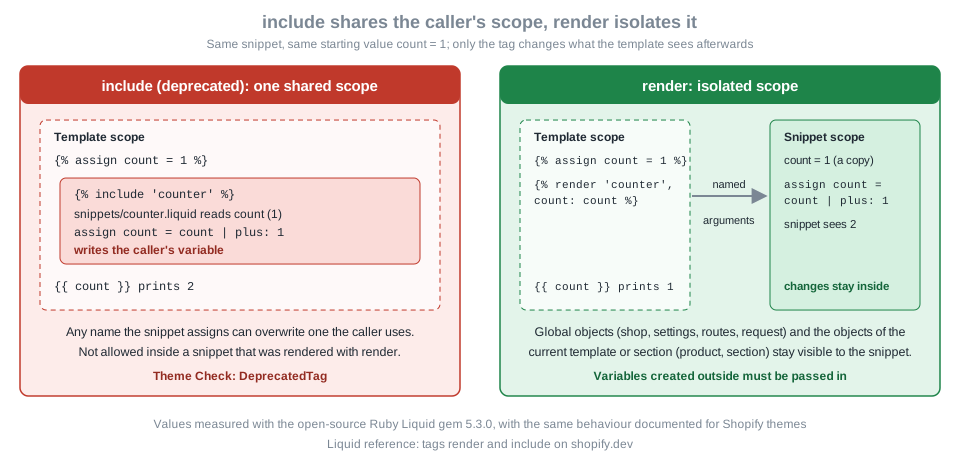
Figure: include shares the caller’s variables and can overwrite them, render isolates the snippet and passes only named arguments.
| Aspect | render |
include (deprecated) |
|---|---|---|
Scope |
The snippet cannot see variables created outside it and what it assigns stays inside. |
The snippet reads and changes the caller’s variables. |
Passing data |
Named arguments |
Needs no arguments, because everything is shared; accepts |
Global and template objects |
Documented as accessible (shop, settings, routes and the objects of the current template such as |
Accessible. |
Snippet name |
A quoted string literal only ( |
May be a variable. |
Nesting |
A rendered snippet cannot use |
A snippet included by |
Status |
Current. Theme Check can validate its arguments against LiquidDoc. |
Deprecated: it hurts performance and readability. Theme Check reports it as the warning DeprecatedTag. |
The values behind the figure come from this harness, which was run with Ruby Liquid 5.3.0; LiquidJS 10.30.0 printed the same results for the five scope cases it was given.
require "liquid"

class MemFS
  def initialize(files) = @files = files
  def read_template_file(name) = @files.fetch(name)
end

Liquid::Template.file_system = MemFS.new(
  "counter" => "{% assign count = count | plus: 1 %}[snippet count={{ count }}]",
  "badge"   => "<span class=\"badge\">{{ label | default: 'none' }}</span>"
)

def run(template) = Liquid::Template.parse(template).render({})

puts run("{% assign count = 1 %}{% include 'counter' %} outer count={{ count }}")
puts run("{% assign count = 1 %}{% render 'counter' %} outer count={{ count }}")
puts run("{% assign count = 1 %}{% render 'counter', count: count %} outer count={{ count }}")
puts run("{% assign label = 'Roasted today' %}{% include 'badge' %}")
puts run("{% assign label = 'Roasted today' %}{% render 'badge' %}")
puts run("{% assign x = 'Roasted today' %}{% render 'badge', label: x %}")
[snippet count=2] outer count=2
[snippet count=1] outer count=1
[snippet count=2] outer count=1
<span class="badge">Roasted today</span>
<span class="badge">none</span>
<span class="badge">Roasted today</span>Source: Shopify docs: render tag
Two details of the run are worth knowing. In the second line the snippet received no count, so nil | plus: 1 made it
1 inside, and the outer variable stayed 1; with the argument in the third line the snippet saw 1, changed its own
copy to 2, and the outer value was untouched. And the stock Ruby gem keeps even top-level render data out of a rendered
snippet ({% render 'seesproduct' %} printed an empty product), while Shopify documents that global objects and the
template’s own objects remain reachable. That is a difference between the bare gem and Shopify, so test object access in a
store, not in the gem.
The forms of render
{% render 'price', variant: variant, show_currency: true %}
{% render 'badge' with product.title as label %}
{% render 'product-card' for collection.products as product %}
Source: Shopify docs: render tag
With for, the snippet also sees a forloop object for that implicit loop. With with and no as, the object is
available under the snippet’s file name. A variable changed inside the snippet changes only the snippet’s copy. The
parameters of render accept values, not expressions: Shopify’s strict parser rejects filters, comparison operators
or a bare variable name among the arguments (see the strict parsing section for the exact rewrites).
Migrating from include
Replace each include with render in three steps. First list the variables the snippet reads from its caller; Theme
Check helps because a snippet documented with LiquidDoc reports the parameters it expects. Second, pass those variables
as named arguments. Third, if the snippet used to assign a variable for the caller, return the value another way: compute
it in the caller, move the assignment into the caller, or render the snippet into a variable with capture.
{% comment %} before {% endcomment %}
{% assign current_variant = product.selected_or_first_available_variant %}
{% include 'price' %}

{% comment %} after {% endcomment %}
{% assign current_variant = product.selected_or_first_available_variant %}
{% render 'price', variant: current_variant %}
Source: Shopify docs: include tag
LiquidDoc: typed snippet interfaces
Without documentation, a misspelled argument passes silently: {% render 'loading-spinner', produt: product %}
renders without an error and without the data. LiquidDoc fixes this. Put a doc tag at the top of a snippet or block
file with a JSDoc-like syntax, and tools validate every render against it:
-
@descriptionexplains the file (a leading paragraph with no tag works too). -
@param {type} name - descriptiondeclares an input. The type is optional and one ofstring,number,boolean,objector a Liquid object such asvariantorproduct. Square brackets around the name ([show_currency]) make the parameter optional. -
@exampleshows a usage and can span several lines.
Theme Check turns the declaration into checks. For documentation: UniqueDocParamNames, UnsupportedDocTag (the doc tag
belongs to snippet files), ValidDocParamTypes and UnusedDocParam (a declared parameter must be used). For usage:
MissingRenderSnippetArguments (a required parameter is missing), UnrecognizedRenderSnippetArguments (an unknown name),
DuplicateRenderSnippetArguments and the content_for equivalents for static blocks. The editor integration (hover, code
completion, type fallbacks of '', 0, false) comes from the Liquid language server that shopify theme language-server
starts.
The Pocket Coffee roast-date badge uses all three tags. It reads a date metafield, formats it with date, and builds the
sentence with the t filter, formatting the date before the translation as the previous section requires.
{% doc %}
  Renders the roast date of a product as a badge.

  @param {product} product - The product that may carry a roast date metafield
  @param {string} [class] - Optional CSS class added to the badge

  @example
  {% render 'roast-date-badge', product: product %}
  {% render 'roast-date-badge', product: product, class: 'badge--small' %}
{% enddoc %}

{%- assign roast_date = product.metafields.custom.roast_date.value -%}

{%- if roast_date != blank -%}
  {%- assign roast_label = roast_date | date: '%-d %B %Y' -%}
  <span class="badge{% if class != blank %} {{ class }}{% endif %}">
    {{- 'products.product.roasted_on' | t: date: roast_label -}}
  </span>
{%- endif -%}
Source: Shopify docs: LiquidDoc
With the locale entry "roasted_on": "Roasted on {{ date }}" and a roast date of 2026-10-20, the stubbed render gives
<span class="badge">Roasted on 20 October 2026</span>, and a product without the metafield gives an empty string. Used
from the product card it is rendered like this:
{% doc %}
  A product card for collection grids.

  @param {product} product - The product to show
  @param {number} [index] - Position in the grid, starting at 1
{% enddoc %}

<li class="card" id="card-{{ product.id }}" data-position="{{ index }}">
  <a href="{{ product.url }}">{{ product.title | escape }}</a>
  {% render 'price', variant: product.selected_or_first_available_variant %}
  {% render 'roast-date-badge', product: product %}
</li>
Source: Shopify docs: LiquidDoc
The variants of the beans product (18 of them) are a good fit for for with else, cycle, limit and the
translation filter. The snippet lists SKU, option title, price and stock, with an empty-state row:
{% doc %}
  Lists every variant of a product with its SKU and availability.

  @param {product} product - The product to list
{% enddoc %}

<table>
  {%- for variant in product.variants limit: 50 -%}
    <tr class="{% cycle 'odd', 'even' %}">
      <td>{{ variant.sku }}</td>
      <td>{{ variant.title | escape }}</td>
      <td>{{ variant.price | money }}</td>
      <td>{% if variant.available %}{{ 'products.product.in_stock' | t }}{% else %}{{ 'products.product.sold_out' | t }}{% endif %}</td>
    </tr>
  {%- else -%}
    <tr><td colspan="4">{{ 'products.product.no_variants' | t }}</td></tr>
  {%- endfor -%}
</table>
Source: Shopify docs: for tag
All the Pocket Coffee snippets in this page (price, free-shipping-bar, roast-date-badge, coffee-club-note,
variant-table, product-card, collection-grid) were wired into the Skeleton templates and checked together:
shopify theme check reported 33 files inspected with no offenses found. The checks include the translation keys, the
LiquidDoc parameters of every render and the orphaned-snippet rule.
Strict parsing and where Liquid is heading
Until 2026 the Liquid parser accepted some code that looked valid but was evaluated wrongly. On 2026-01-13 Shopify began enforcing stricter parsing for all themes and theme app extensions, and it automatically rewrites non-conforming files, adding a comment that says what changed. New Theme Store and App Store submissions must already be strict-parsable. The cases in the migration guide are listed below; all but the same-line comment were reproduced with Theme Check 3.31.0 in one-line snippets (the reported check was LiquidSyntaxError, UnsupportedFilterArguments or LiquidHTMLSyntaxError).
| Code that now fails | Why | Fix |
|---|---|---|
|
Filters are allowed only in output, |
|
|
Logical operators work only in conditions. |
Compute the boolean in an |
|
|
|
|
Arguments must be |
|
|
|
Use |
|
Unexpected characters in |
Write |
|
Bare bracket access is reserved for array literals. |
|
The same changelog entry points to the direction of the language. The Liquid July '26 developer preview (2026-07-21) adds
the block and partial tags so that page structure can live in a Liquid template, and Theme Check 3.28.0 added rules
for such Liquid-first themes. The Skeleton theme cloned for these tests already contains {% block 'container' %} in
its templates. Existing sections, JSON templates and theme settings keep working, and the preview needs a development
store, so it is out of scope here beyond this note.
Common errors
Liquid reports two classes of problem. Syntax errors stop a file from parsing; in a store they appear as a message such
as Liquid syntax error (line 3): Unexpected character = and strict parsing now rejects more of them. Runtime errors happen while rendering a valid file and appear inline in the rendered text as Liquid error: ... with the
cause, for example Liquid error: divided by 0, Liquid error: Could not find asset snippets/nope.liquid or
Liquid error: include usage is not allowed in this context (all measured with Ruby Liquid 5.3.0, which prints no file or
line position; the Shopify messages quoted in the migration guide include (line N)). Often there is no error at all, only a wrong or empty output.
Syntax errors in the plain engines
Measured with Ruby Liquid 5.3.0 in strict mode. Theme Check reports the same defects through the LiquidHTMLSyntaxError or LiquidSyntaxError checks with its own, shorter wording.
| Template | Ruby Liquid 5.3.0 message |
|---|---|
|
|
|
|
|
|
|
|
|
|
|
|
|
|
|
|
Source: Liquid documentation
What Theme Check reports
The next file collects the mistakes that Theme Check can find. It was added to the Skeleton copy and checked; the output follows (line numbers are one-based and omitted here).
{% assign unused = 'x' %}
{% assign myVar = 1 %}
{% include 'price' %}
{% render 'does-not-exist' %}
{{ product.title | upcasee }}
{{ undefined_thing.title }}
<img src="{{ product.featured_image | img_url: '200x' }}">
<a href="/cart">Cart</a>
{% render 'price', variant: product, bogus: 1 %}
{{ 'cart.not_a_key' | t }}| Severity | Check | Message |
|---|---|---|
error |
ImgWidthAndHeight |
Missing width and height attributes on img tag |
error |
MissingTemplate |
'snippets/does-not-exist.liquid' does not exist |
error |
UnknownFilter |
Unknown filter 'upcasee' used. |
error |
TranslationKeyExists |
'cart.not_a_key' does not have a matching entry in 'locales/en.default.json' |
warning |
DeprecatedTag |
Use the 'render' tag instead of 'include' |
warning |
DeprecatedFilter |
Deprecated filter 'img_url', consider using 'image_url'. |
warning |
HardcodedRoutes |
Use routes object {{ routes.cart_url }} instead of hardcoding /cart |
warning |
MissingRenderSnippetArguments |
Missing required argument 'variant' in render tag for snippet 'price'. |
warning |
UnrecognizedRenderSnippetArguments |
Unknown argument 'bogus' in render tag for snippet 'price'. |
warning |
UnusedAssign |
The variable 'unused' is assigned but not used (also reported for 'myVar') |
warning |
VariableName |
The variable 'myVar' uses wrong naming format |
warning |
OrphanedSnippet |
This snippet is not referenced by any other files |
Source: Shopify docs: Theme Check checks
undefined_thing was not reported in that snippet because Theme Check does not know which objects a snippet receives; in
a template the same mistake is caught. Adding {{ produt.title }} to the product template produced the warning
UndefinedObject, Unknown object 'produt' used. Other defects found in separate files: an unclosed if gave
the error LiquidHTMLSyntaxError Attempting to end parsing before LiquidTag 'if' was closed; a trailing pipe gave
Syntax is not supported. Remove the trailing | character.; an unclosed {{ gave
Expected LiquidVariableOutputClose but got EndOfInput; an HTML element opened inside an if and never closed gave the
warning UnclosedHTMLElement; and parentheses in a condition gave Syntax error in 'if' tag. A stray closing div left in a collection
template after an edit is caught the same way: Attempting to close HtmlElement 'div' before it was opened.
The CLI exits with a non-zero code only for errors by default, which suits CI. Use --fail-level warning to fail on
warnings, -a to apply the automatic fixes, -C theme-check:all to enable every check and --init to write a
.theme-check.yml. The checks with thresholds are LiquidComplexity (a warning above 120) and ExcessiveSettingsCount
(above 40 settings).
Source: Shopify docs: Theme Check checks
Wrong output without an error
| Symptom | Cause | Remedy |
|---|---|---|
Block printed for an empty setting or vendor |
The empty string is truthy. |
Test with |
|
No parentheses; right-to-left evaluation. |
Nest |
A percentage shows |
|
Divide by a float ( |
A price is 100 times too large |
Prices are integers in cents and were printed without |
Format with |
The message shows |
A formatting filter was chained after |
Format into a variable, then pass it as the argument. |
A variable keeps a value from a previous loop iteration |
|
Reassign at the top of the loop body, or use |
A snippet shows defaults for everything |
|
Pass them as named arguments. |
|
The object only exists on its own template. |
Take the product from a setting of type |
Only the first 50 items appear |
The 50-iteration limit of |
Wrap the array in |
|
Neither |
Pass at least one of them. |
A |
Liquid is not evaluated there. |
Move the logic to the markup or a |
A block is matched by a literal |
The ID is generated by Shopify and may change. |
Match on |
Source: Shopify docs: Liquid basics
Engines compared
If you test Liquid offline, know where the engines differ from Shopify. These differences were measured on 2026-10-27.
| Construct | Ruby Liquid 5.3.0 | LiquidJS 10.30.0 |
|---|---|---|
|
|
|
|
false without Rails' |
true |
|
Syntax error (not supported by this release) |
Accepted |
Parentheses in a condition |
|
|
Unknown filter |
Ignored in lax mode, |
Controlled by the |
|
|
Supported |
|
Isolated scope; does not see top-level data |
Isolated scope (top-level data not tested) |
Shopify filters, tags and objects |
Not available |
Not available |
Neither engine knows money, t, asset_url, image_url, link_to, paginate, form, section, content_for,
schema or style, nor the objects product, cart, shop or settings. Use Theme Check as the validator and
shopify theme console as the interactive Liquid evaluator against real store data (shopify theme console --url /products/<handle>
supplies the context of a page). The console and shopify theme dev need a store and a login, and were not run.
Source: LiquidJS documentation
Formatting and editor support
The Prettier plugin @shopify/prettier-plugin-liquid (1.11.3) formats Liquid with the parser liquid-html, and
@shopify/liquid-html-parser (2.11.0) exposes the syntax tree; an unclosed tag throws while parsing. Running the plugin on
untidy input produced this result:
{%- assign   title=product.title|upcase -%}
{% if   product.available==true and product.tags contains 'coffee-club' %}<p class="note">{{title}}</p>{%endif%}
{%liquid
assign   n=1
echo n
%}
{%- assign title = product.title | upcase -%}
{% if product.available == true and product.tags contains 'coffee-club' %}
<p class="note">{{ title }}</p>
{% endif %}
{% liquid
assign n = 1
echo n
%}Performance habits
Liquid runs on every uncached request, so the way you write it affects server response time. The measured and documented points are:
-
Fetch less. Put
paginatewith the page size you display around a loop and keeplimit, instead of relying onlimitalone, becauselimitdoes not reduce the data fetched. -
Keep loops small: 50 iterations per page is the cap, and a loop inside a loop multiplies the work. Theme Check reports high complexity (LiquidComplexity, maximum 120) and deep nesting (LiquidNestingDepth).
-
Assign expensive lookups once to a variable and reuse it instead of repeating
product.metafields.custom.roast_date.value. -
Prefer
rendertoincludeso snippets stay isolated and cheap to reason about. -
Use
image_urlwith explicitwidthandheightso the layout does not shift (ImgWidthAndHeight);asset_urlandimage_urlreturn CDN URLs. -
Do not parse or edit
content_for_header(ContentForHeaderModification), and avoid remote assets (RemoteAsset) and manual preloads (AssetPreload) that duplicate what Shopify filters already do.
References
-
Shopify docs: Liquid reference (tags, filters, objects, basics)
-
Shopify docs: Liquid basics (types, truthy and falsy, operators, whitespace control)
-
Shopify changelog: stricter Liquid parsing for themes and theme app extensions (2026-01-13)
-
Shopify changelog: Liquid block and partial tags developer preview (2026-07-21)
-
Ivan Djordjevic, Shopify Theme Customization with Liquid, Packt, 2021, ISBN 978-1-80181-396-9: a book-length introduction to Liquid and theme customization written for the Online Store 2.0 launch; its Debut theme and
include-era examples predate theme blocks, Theme Check and the current CLI.