Getting Started
|
This section documents the Swift 6 language mode as shipped by Swift 6.3, as published in The Swift Programming Language at docs.swift.org, which is the reference these pages are written and verified against. 6.4-beta-only features are always flagged as such — never presented as baseline. This content was generated with the assistance of AI and should be verified against docs.swift.org before being relied on in production. This section’s bibliography lists the reference material consulted while preparing these pages. |
Swift is a general-purpose, type-safe, compiled language from Apple, designed to be safe by default, fast, and expressive. Three ideas run through the whole language:
-
Value semantics — structs, enums and collections are copied on assignment and mutation, which makes state predictable and lets the compiler reason about ownership without a garbage collector.
-
Optionals — the absence of a value (
nil) is part of a type’s spelling (Int?), not a hidden possibility every reference type carries; the compiler forces you to handle it. -
Protocols and structured concurrency — behaviour is described through protocols and protocol extensions rather than deep class hierarchies, and asynchronous code is written with
async/awaitand `Task`s that compose into a structured tree the compiler can check for data races.
A Short History
| Year | Milestone | What it introduced |
|---|---|---|
2014 |
Swift 1.0 announced at WWDC |
The language itself, as a safer replacement for Objective-C on Apple platforms. |
2015 |
Swift 2.2 open-sourced |
Development moves to swift.org; Linux becomes a supported platform. |
2019 |
Swift 5.0 — ABI stability |
A stable binary interface on Apple platforms; |
2021 |
Swift 5.5 — structured concurrency |
|
2024 |
Swift 6.0 — the Swift 6 language mode |
Opt-in strict concurrency checking that eliminates data races at compile time. |
2025 |
Swift 6.1—6.2 |
Approachable-concurrency refinements, |
2026 |
Swift 6.3 (current, 6.3.2) |
Further concurrency ergonomics and standard-library additions; this section’s baseline. |
2026 |
Swift 6.4 (beta) |
In active development; features from it are flagged 6.4-beta-only wherever mentioned. |
|
Language mode and compiler version are two different dials. The compiler version (6.3.2, say) is which
toolchain you installed. The language mode ( |
Toolchains
-
Xcode (macOS) — the primary IDE on Apple platforms; bundles a Swift toolchain, SwiftUI/UIKit previews and the full Apple SDK set. Installed from the Mac App Store or developer.apple.com.
-
Swiftly — the official toolchain-version manager (
swiftly install 6.3.2,swiftly use 6.3.2), the recommended way to install and switch Swift versions on macOS and Linux without Xcode. -
swift.org toolchains — standalone installers/tarballs for Linux (Ubuntu, Amazon Linux, other distros via Docker images) and an experimental Windows toolchain, for building and running Swift outside the Apple ecosystem entirely.
-
Visual Studio Code + the official Swift extension (built on SourceKit-LSP) — the common cross-platform editor setup, providing completion, diagnostics and debugging without Xcode.
See Swift IDEs & Tools for more on IDEs and editors.
Verify an install:
swift --version    # e.g. Apple Swift version 6.3.2 (swiftlang-...)
swiftly list        # every toolchain installed side by side, when using Swiftly
The REPL, Scripts and swiftc
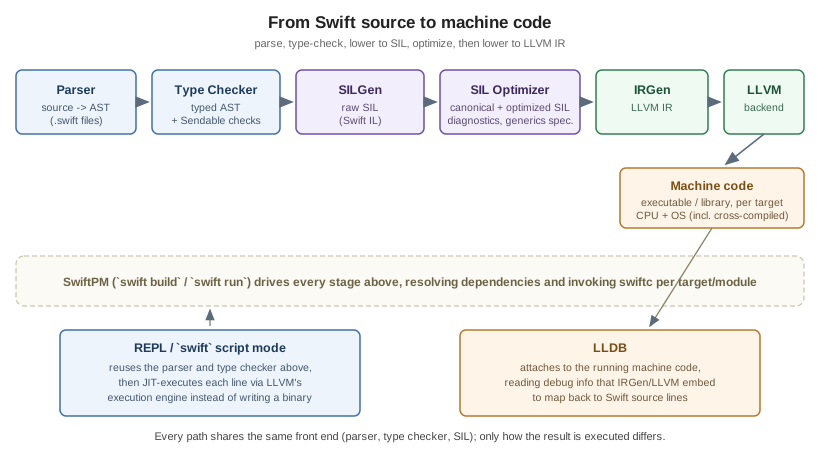
Running swift with no arguments starts the REPL (read-eval-print loop), useful for trying out expressions
interactively:
swift
1> let numbers = [1, 2, 3, 4, 5]
2> numbers.reduce(0, +)
$R0: Int = 15
A single file runs directly as a script, with no separate compile step visible to you:
swift hello.swiftswiftc invokes the compiler explicitly to produce a binary:
swiftc hello.swift -o hello
./hello
// hello.swift
print("Hello, World!")Your First Package
swift package init scaffolds a Swift Package Manager (SwiftPM) project — the standard unit of distribution and
build configuration, covered in full in Build and
Tooling:
mkdir HelloPackage && cd HelloPackage
swift package init --type executable
swift run
This produces a Package.swift manifest and a Sources/HelloPackage/HelloPackage.swift entry point:
// swift-tools-version: 6.0
import PackageDescription

let package = Package(
    name: "HelloPackage",
    targets: [
        .executableTarget(name: "HelloPackage")
    ]
)
The // swift-tools-version: comment pins which SwiftPM manifest API is used to parse Package.swift; it is
independent of the swiftLanguageMode setting that governs the source code inside the targets.
Playgrounds (an Xcode document type mixing Swift source with live, inline results) remain a quick way to
experiment visually on macOS, though swift run/the REPL cover the same need on any platform.
A Swift Tour, the first chapter of The Swift Programming Language, is the official condensed introduction — every construct it shows is covered here in depth, and it remains the fastest way to see the whole language in one sitting.
See Also
-
Lexical Structure and Style — comments, identifiers, literals and the API Design Guidelines this section follows.
-
Build and Tooling — SwiftPM in depth: manifests, targets, dependencies and plugins.
-
Async/Await and Tasks — structured concurrency and the Swift 6 data-race checker in depth.