Filters and the MVC Pipeline
|
This section documents ASP.NET Core on .NET 10 (LTS), the current release — the minimal hosting model, the middleware pipeline, dependency injection, Minimal APIs, MVC & Razor Pages, Blazor with the current render modes, SignalR and gRPC, EF Core, ASP.NET Core Identity and policy-based authorization, output caching, rate limiting, and Native-AOT-aware building — as described by the official documentation at Microsoft Learn, which is the reference these pages are written and verified against. This content was generated with the assistance of AI and should be verified against the official documentation before being relied on in production. .NET ships a major release every November and its APIs continue to evolve: the examples here target .NET 10 / C# 14. This section’s bibliography lists the reference material consulted while preparing these pages. |
Filters let cross-cutting logic (logging, validation, caching, exception mapping) run at defined points around an action or page handler, without every action repeating that logic itself.
The filter pipeline
Filters run in a fixed sequence around the handler, and most kinds run both before and after it:
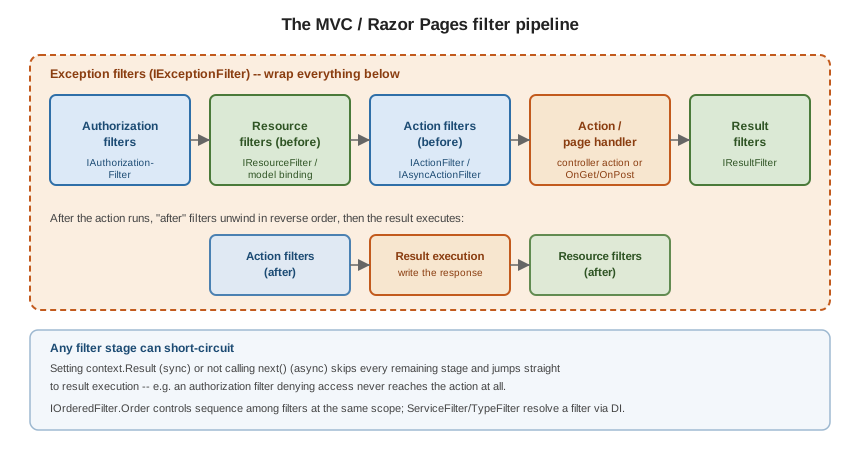
The filter kinds
| Filter | Runs |
|---|---|
|
First, before model binding — can short-circuit the whole request (this is how
|
|
Around model binding — the earliest point that can short-circuit and the latest point that can affect binding (e.g. output caching reading/writing a cache before binding even happens). |
|
Immediately before and after the action method itself — can inspect or replace bound arguments, or short-circuit with a result before the action runs. |
|
Only when an unhandled exception propagates out of everything inside it — the filter
analog of |
|
Immediately before and after the |
|
The Razor Pages equivalent, combining authorization/resource/action-like hooks around a page handler; see Razor Pages. |
public sealed class TimingFilter(ILogger<TimingFilter> logger) : IAsyncActionFilter
{
    public async Task OnActionExecutionAsync(ActionExecutingContext context, ActionExecutionDelegate next)
    {
        var sw = Stopwatch.StartNew();
        var executed = await next();   // runs model-bound action; executed.Result is set if it ran
        logger.LogInformation("{Action} took {Ms}ms", context.ActionDescriptor.DisplayName, sw.ElapsedMilliseconds);
    }
}Order and scope
A filter can be registered globally (o.Filters.Add<T>() in AddControllers/AddRazorPages), on a controller
([ServiceFilter(typeof(T))]), or on a single action — global filters run outermost, action-level filters
innermost, for filters of the same kind. IOrderedFilter sets an explicit Order among filters that would
otherwise tie, lower values running first (outer) on the way in:
public sealed class AuditFilter : IActionFilter, IOrderedFilter
{
    public int Order => -100;   // runs before default-ordered (Order == 0) action filters
    public void OnActionExecuting(ActionExecutingContext context) { }
    public void OnActionExecuted(ActionExecutedContext context) { }
}
Short-circuiting
Any filter can stop the request from reaching later stages: set context.Result in a synchronous filter, or
simply not call next() in an async one. This is exactly how [Authorize] (an authorization filter) returns a
403 without ever invoking the action, and how output caching (a resource filter) can serve a cached response
without ever running model binding.
DI in filters: ServiceFilter and TypeFilter
Attributes are compile-time constants, so a filter attribute cannot take constructor-injected dependencies
directly. ServiceFilter resolves an already-DI-registered filter type; TypeFilter instantiates a type
through DI without requiring it to be separately registered:
builder.Services.AddScoped<AuditFilter>();

[ServiceFilter(typeof(AuditFilter))]                 // AuditFilter must be registered above
public sealed class OrdersController : Controller { }

[TypeFilter(typeof(RateLimitFilter), Arguments = new object[] { 100 })]  // constructed via DI, extra ctor args allowed
public sealed class PublicApiController : ControllerBase { }
A filter implementing IFilterFactory (most attribute-based filters do this implicitly through
TypeFilterAttribute) is how attributes like [ServiceFilter] bridge attribute syntax to DI-constructed
instances.
Filters vs. middleware vs. endpoint filters
| Mechanism | Scope and capabilities |
|---|---|
Every request, before routing has even selected an endpoint — no access to bound action arguments, model state, or MVC-specific context. |
|
MVC/Razor Pages filters (this page) |
Only requests routed to a controller action or page handler — has
full access to bound arguments, |
|
The Minimal API equivalent of action filters — wraps a single endpoint’s handler with access to its bound arguments, without the controller/action machinery. |
Choose middleware for concerns that apply to the whole app regardless of what handles the request (e.g. response compression); choose MVC filters or endpoint filters for concerns that need the bound arguments/action-specific context. See Comparing filters and middleware.