Strings and Characters
|
This section documents the Swift 6 language mode as shipped by Swift 6.3, as published in The Swift Programming Language at docs.swift.org, which is the reference these pages are written and verified against. 6.4-beta-only features are always flagged as such — never presented as baseline. This content was generated with the assistance of AI and should be verified against docs.swift.org before being relied on in production. This section’s bibliography lists the reference material consulted while preparing these pages. |
String is a value type built on Unicode from the ground up: what looks like "one character" to a reader is,
internally, a cluster of one or more Unicode scalars, and almost every quirk in this page follows from taking
that seriously instead of papering over it with a fixed-width code unit.
String Literals
let quotation = "Even the all-powerful Pantagruel was affected by his mother's death."

let quotationWithEscapes = "Imagination is more \"important\" than knowledge.\n\tAlbert Einstein"

let threeDoubleQuotationMarks = """
Escaping the first quotation mark \"""
Escaping all three quotation marks \"\"\"
"""

// Multiline strings: opening/closing """ each on their own line; the closing """'s
// leading whitespace sets the indentation stripped from every line of content.
let softWrappedQuotation = """
    The White Rabbit put on his spectacles.  "Where shall I begin,
    please your Majesty?" he asked.

    "Begin at the beginning," the King said gravely, "and go on
    till you come to the end; then stop."
    """

// A single trailing backslash at the end of a line joins it to the next, without a newline.
let singleLineFromMultipleLines = """
    This string starts with a line break, then has a second line, \
    joined to the third.
    """

// Extended delimiters (`#"..."#`): backslash escapes and interpolation are disabled by
// default, so backslashes and quotes need no escaping -- add matching `#`s for interpolation.
let noEscaping = #"Line 1 \n Line 2"#                          // the \n is literal text, not a newline
let stillInterpolates = #"6 times 7 is \#(6 * 7)."#            // "6 times 7 is 42."
let alsoNoEscaping = ###"Line1\###nLine2"###                    // more #s if the content itself contains #"
Mutability and Value Semantics
Strings and characters use let/var exactly like every other Swift value — there is no separate mutable
string builder type for ordinary use:
var variableString = "Horse"
variableString += " and carriage"     // fine -- variableString is a var

let constantString = "Highlander"
// constantString += " and another Highlander"   // error: constantString is a let
Assigning a String to a new constant or variable, or passing it to a function, copies it, in keeping with
Swift’s value semantics for structs — see
Structures and Classes. Swift’s implementation
makes this efficient in practice: a copy is only actually made — copy-on-write — the moment either the
original or the copy is mutated, not at the point of assignment.
Character
A Character represents a single extended grapheme cluster — one or more Unicode scalars that together
produce a single human-perceived glyph:
for character in "Dog!🐶" {
    print(character)          // D, o, g, !, 🐶 -- five iterations, five Characters
}

let exclamationMark: Character = "!"
let catCharacters: [Character] = ["C", "a", "t", "!", "🐱"]
let catString = String(catCharacters)     // "Cat!🐱" -- build a String back up from Characters
Concatenation and Interpolation
let string1 = "hello"
let string2 = " there"
var welcome = string1 + string2          // "hello there" -- + concatenates two Strings
welcome += "!"                            // += appends in place

var instruction = "look over"
instruction += exclamationMark            // a String can also append a single Character

let multiplier = 3
let message = "\(multiplier) times 2.5 is \(Double(multiplier) * 2.5)"   // interpolation embeds any expression
Unicode Scalars vs. Extended Grapheme Clusters
A Unicode scalar is a single 21-bit Unicode code point (U+0000…U+D7FF or U+E000…U+10FFFF); an
extended grapheme cluster is a sequence of one or more scalars that together produce what a reader perceives
as one character. String, Character and count are all defined in terms of grapheme clusters, not
scalars:
let eAcute: Character = "\u{E9}"                       // é, a single scalar
let combinedEAcute: Character = "\u{65}\u{301}"        // e + ́  (COMBINING ACUTE ACCENT) -- STILL one Character
print(eAcute == combinedEAcute)                         // true -- canonically equivalent grapheme clusters

let precomposed = "\u{D55C}"                             // 한, precomposed
let decomposed = "\u{1112}\u{1161}\u{11AB}"              // ᄒ+ᅡ+ᆫ, three scalars -- STILL one Character/한
print(precomposed == decomposed)                         // true

let enclosedEAcute: Character = "\u{E9}\u{20DD}"         // é + combining enclosing circle -- one Character: é⃝
print("\(eAcute) has \(String(eAcute.unicodeScalars.count)) scalar(s); "
    + "\(enclosedEAcute) has \(String(enclosedEAcute.unicodeScalars.count)) scalar(s)")
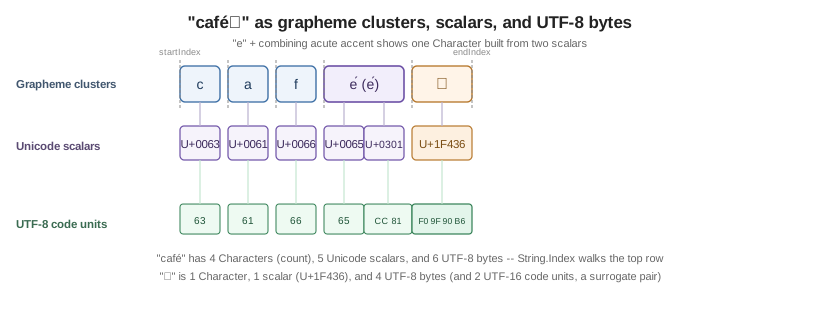
This is why "café".count is 4 even when "é" is stored as two scalars, and why counting characters walks
the whole string rather than reading a stored length — see the figure below.
String.Index and Why There Is No Integer Indexing
Because a Character can occupy a variable number of bytes, String has no subscript(Int) — indexing by
an arbitrary integer would be either wrong (if it meant "the nth UTF-8 byte", possibly slicing through a
multi-byte scalar) or O(n) every time (if it meant "the nth grapheme cluster"), so Swift makes that cost
visible instead of hiding it behind []:
let greeting = "Guten Tag!"

print(greeting[greeting.startIndex])                          // "G"
print(greeting[greeting.index(before: greeting.endIndex)])    // "!"
print(greeting[greeting.index(after: greeting.startIndex)])   // "u"

let index = greeting.index(greeting.startIndex, offsetBy: 7)
print(greeting[index])                                          // "a"

// greeting[greeting.endIndex]                    // runtime error: endIndex is one-past-the-end
// greeting.index(after: greeting.endIndex)        // runtime error: nothing after the end

for index in greeting.indices {
    print(greeting[index], terminator: "")           // walks every grapheme cluster, in order
}
Inserting and Removing
var welcome = "hello"
welcome.insert("!", at: welcome.endIndex)                          // "hello!"
welcome.insert(contentsOf: " there", at: welcome.index(before: welcome.endIndex))   // "hello there!"

welcome.remove(at: welcome.index(before: welcome.endIndex))         // removes "!" -> "hello there"
let range = welcome.index(welcome.endIndex, offsetBy: -6)..<welcome.endIndex
welcome.removeSubrange(range)                                        // "hello"
Substring and Slicing
Subscripting a String with a Range<String.Index> yields a Substring, a value that shares the original
string’s storage instead of copying it — meant only for short-term use, since holding one keeps the whole
original string’s storage alive:
let greeting = "Hello, world!"
let index = greeting.firstIndex(of: ",") ?? greeting.endIndex
let beginning = greeting[..<index]        // "Hello" -- a Substring, no copy made yet

let newString = String(beginning)          // convert to a String once you plan to keep it around
Comparison and Prefix/Suffix Equality
let quotation = "We're a lot alike, you and I."
let sameQuotation = "We're a lot alike, you and I."
print(quotation == sameQuotation)                     // true -- Unicode canonical equivalence, not byte equality

let romeoAndJuliet = [
    "Act 1 Scene 1: Verona, A public place",
    "Act 1 Scene 2: Capulet's mansion",
    "Act 2 Scene 1: Outside Capulet's house",
]
let act1SceneCount = romeoAndJuliet.filter { $0.hasPrefix("Act 1 ") }.count      // 2
let mansionCount = romeoAndJuliet.filter { $0.hasSuffix("mansion") }.count       // 1
== compares strings for Unicode canonical equivalence: two strings are equal if their extended grapheme
clusters are canonically equivalent, even when composed from a different number of underlying scalars, exactly
as shown for eAcute/combinedEAcute above.
The UTF-8, UTF-16, and Unicode Scalar Views, and Common StringProtocol Operations
Every String exposes three alternative views over the same underlying data, each a Collection in its own
right:
let dogString = "Dog‼🐶"

for codeUnit in dogString.utf8 { print(codeUnit, terminator: " ") }
print()   // 68 111 103 226 128 188 240 159 144 182 -- UTF-8 code units

for codeUnit in dogString.utf16 { print(codeUnit, terminator: " ") }
print()   // 68 111 103 8252 55357 56374 -- UTF-16 code units (the "🐶" needs a surrogate pair)

for scalar in dogString.unicodeScalars { print(scalar.value, terminator: " ") }
print()   // 68 111 103 8252 128054 -- Unicode scalars

// Common StringProtocol operations, shared by both String and Substring:
print(dogString.isEmpty, dogString.count, dogString.uppercased(), dogString.lowercased())
print(dogString.contains("🐶"), dogString.replacingOccurrences(of: "Dog", with: "Cat"))
print("  padded  ".trimmingCharacters(in: .whitespaces))
StringProtocol is the shared protocol behind both String and Substring, which is why a function parameter
typed some StringProtocol (or String, accepting a Substring implicitly converted at the call) works with
either — see Standard Library Overview for
where String sits among the other collection types.
See Also
-
Collections —
Array,SetandDictionary, the other standard-library value typesStringshares itsCollectionconformance style with. -
Lexical Structure and Style — every string-literal token form, at the lexical level.
-
Regular Expressions — pattern matching over strings with
Regexand regex literals. -
Functional Programming —
map/filter/reduceas used above over a string’s characters.