Upload Pipelines, Queues and Jobs
|
This content was generated with the assistance of AI and should be verified against the official documentation before being relied on in production. See the section bibliography for the reference material consulted while preparing these pages. |
Baseline date: 2026-10-07. Image resizing takes tens of milliseconds to seconds, AVIF encoding takes seconds and video transcoding takes minutes to hours. None of it can happen in the request that receives the upload. The request would time out, hold a thread and memory for the whole duration, and make the upload fail when the work fails. The fix is the same for every stack: accept the file, record a job, answer immediately, and process in the background.
The reference architecture
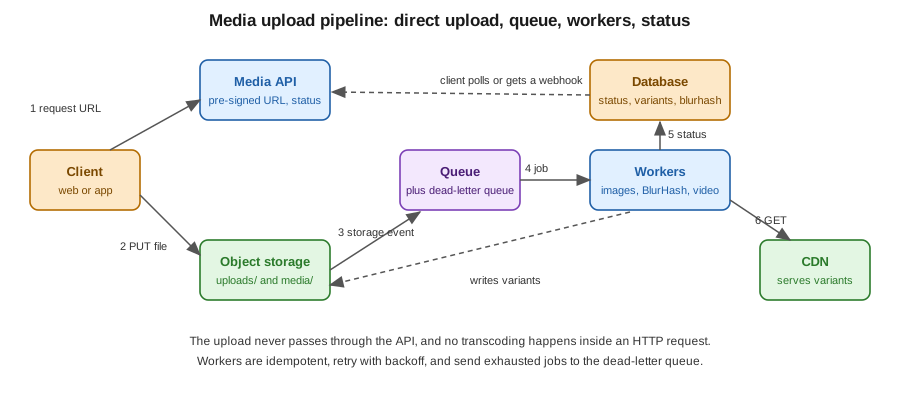
Direct upload with a pre-signed URL
The client asks the API for an upload slot. The API creates a database row in the state awaiting_upload, signs a short-lived PUT URL for a specific key, content type and
maximum length, and returns the URL and the media id. The client then uploads straight to object storage, and the
bytes never pass through your servers. For files above a few tens of megabytes, use multipart or resumable uploads
(S3 multipart upload, Google Cloud Storage resumable upload, Azure Blob block upload). The details per cloud are in
S3, Cloud Storage and
Blob Storage.
Upload to a private uploads/ prefix that no CDN serves, and write results to a different prefix (or bucket). That
separation means an unprocessed or malicious file is never public.
Trigger: storage event or API call
-
Storage event. The bucket publishes an event when the object is created (S3 event notifications, Cloud Storage Pub/Sub notifications or Eventarc, Azure Event Grid). No client cooperation is needed, so a client that crashes after the upload does not leave an orphan. Events are delivered at least once, so the consumer must be idempotent.
-
API call. The client calls
POST /media/{id}/complete, and the API verifies that the object exists and has the expected size before it enqueues the job. It is simple, easy to test and works with any storage. A client that never calls it leaves an orphan, so a scheduled cleanup should delete expiredawaiting_uploadrows and their objects, see scheduling.
Many platforms use both: the event as the trigger, the API call as a fast path.
Queues and jobs
A job message carries identifiers, never the file: { "mediaId": "...", "key": "uploads/.../original", "recipe": 3 }. The
worker reads the file from storage. Pick the queue to match the stack you already run:
| Stack | Where to read about it |
|---|---|
Spring Boot with Kafka or RabbitMQ |
Messaging, Spring Boot with RabbitMQ, Spring Boot with Kafka and messaging patterns in practice |
Quarkus |
|
NestJS |
events, scheduling and queues (BullMQ) |
FastAPI |
settings, lifespan and background tasks. |
Scheduled and batch work |
Scheduling (Quartz) and Spring Batch for backfills and cleanups |
Containers |
Docker for the worker image and Kubernetes Jobs and CronJobs for run-to-completion video jobs |
The cloud providers offer the same building blocks as managed services, and for video, a fully managed transcoder that replaces the worker: AWS Video on Demand pipeline, Google Cloud Transcoder API and Cloud Run jobs and Azure Container Apps jobs. Use a managed transcoder when the volume or the codec work (HDR, DRM, many renditions) would otherwise make you operate FFmpeg at scale.
Worker design
- Idempotency
-
A job can be delivered twice, and a worker can crash after producing half the output. Make every step safe to repeat: write outputs to deterministic keys (
media/<id>/w640.avif), overwrite on retry, and set the final status last. Skip the job when the row is alreadyreadyfor the same recipe version. Use the job id or media id as a dedup key where the queue supports it. - Retries and backoff
-
Retry transient failures (storage timeouts, a busy encoder) with exponential backoff and jitter, and a cap on attempts. Do not retry permanent failures (unsupported or corrupt file): mark them
failedwith a reason at once. - Dead-letter queues
-
After the maximum attempts, the message moves to a dead-letter queue. Alert on its depth, keep the messages for inspection, and provide a way to replay them after a fix.
- Timeouts and resource limits
-
Put a hard time limit on every FFmpeg or libvips call, and a memory and CPU limit on the container (see Kubernetes resource management). A single corrupt file must not stall a worker for hours. Size the limit from the duration of the video.
- Concurrency control
-
FFmpeg already uses several cores, so run one or two transcodes per worker. Image jobs can run in parallel up to the CPU count. Scale the number of workers on queue depth (KEDA, or the queue-based autoscaling of the platform) rather than on CPU of the web tier.
- Visibility timeout
-
For queues that hide a message while it is processed (SQS, Azure Service Bus), set the visibility timeout above the longest job, or extend it with a heartbeat, so that a running job is not delivered a second time.
- Separate queues
-
Keep images and videos on different queues, so a backlog of long transcodes cannot delay thumbnails.
Status and notifications
Store the state in the database, with the failure reason, the number of attempts and, for video, a progress percentage that
the worker updates (FFmpeg prints progress with -progress pipe:1). The client sees the status in one of three ways:
-
Polling.
GET /media/{id}returns the status and, onceready, the variants and BlurHash. Simple, works everywhere, and fine with a backoff on the client. -
Webhook. The platform calls a URL registered by another system when a job finishes. Sign the payload, and retry deliveries.
-
Push. Server-sent events, WebSockets, or a mobile push notification for apps, where a user waits for a video. See device-side compression and uploads.
Return 202 Accepted with a Location header from the endpoint that starts the work, and make the API describe the
processing state so that the UI can show the BlurHash or a placeholder in the meantime, see
BlurHash.