Customization and Configuration
|
This section documents Tailwind CSS v4.x — the CSS-first configuration line, whose v4.0 release shipped in January 2025 — as published at the official Tailwind CSS documentation, which is the reference these pages are written and verified against. No specific patch version is pinned. This content was generated with the assistance of AI and should be verified against the official documentation before being relied on in production, since Tailwind iterates quickly. This section’s bibliography lists the reference material consulted while preparing these pages. |
In v4 there is no tailwind.config.js by default — the whole framework is configured in CSS. You
@import "tailwindcss" and then use a handful of at-rules (@theme, @utility, @custom-variant,
@plugin, @source) in the same stylesheet. See
Functions and Directives and
Theme Variables.
The build and scan pipeline
Tailwind never ships a giant stylesheet you trim down. It reads your source files as plain text, extracts anything that looks like a class name, generates CSS only for the ones it recognises, and (in a production build) minifies the result.
HTML / JS / JSX / Vue"] --> B["Scan for
class-name tokens"] C["@import tailwindcss
@theme / @utility / @source"] --> D["Tailwind engine"] B --> D D --> E["Generate CSS for
matched utilities + variants"] E --> F["Minified stylesheet
for the browser"]
Detecting classes in source files
Detection is automatic and .gitignore-aware; node_modules, binary files, CSS files, and lock files are
skipped. The one hard rule: a class must appear as a complete, unbroken string — Tailwind does not evaluate
a constructed name like text-${color}-500. Map props to whole class names instead. This also applies to
multi-class strings: each class in class="px-4 py-2 bg-sky-500" is detected individually and must appear
complete in the source, never as concatenated fragments.
@import "tailwindcss";

/* scan an external package that ships Tailwind classes */
@source "../node_modules/@acme/ui";

/* exclude a folder */
@source not "../src/legacy";

/* force-generate classes that never appear literally in source */
@source inline("underline");
@source inline("{hover:,focus:,}bg-sky-{500,600,700}");
To turn off automatic detection and register every path yourself (monorepos):
@import "tailwindcss" source(none);
@source "../app";
@source "../../packages/ui/src";Plugins
@import "tailwindcss";
@plugin "@tailwindcss/typography";
@plugin "@tailwindcss/forms";
@plugin "./plugins/my-plugin.js";   /* a JS plugin still works */
Using a legacy JavaScript config
An existing v3 config can be loaded explicitly:
@import "tailwindcss";
@config "../tailwind.config.js";
// tailwind.config.js -- still read via @config
module.exports = {
theme: { extend: { colors: { brand: "#3f3cbb" } } },
plugins: [require("@tailwindcss/typography")],
};v4 does not support the corePlugins, safelist, or separator keys, and content is replaced by
@source. Prefer moving the theme into @theme over time.
The prefix option
@import "tailwindcss" prefix(tw);<div class="tw:flex tw:items-center tw:hover:tw:bg-black">…</div>The prefix sits at the front of the whole chain, so variants are prefixed too.
Functions in custom CSS
.card {
  padding: --spacing(6);                              /* calc(var(--spacing) * 6) */
  background: --alpha(var(--color-slate-900) / 10%);  /* color-mix(… 10%, transparent) */
}

@media (width >= theme(--breakpoint-xl)) { /* … */ }
The old theme(spacing.6) dot-notation still works but is deprecated — reference the CSS variable
(var(--color-slate-900)) or, for media queries, theme(--breakpoint-xl).
The cascade-layer model
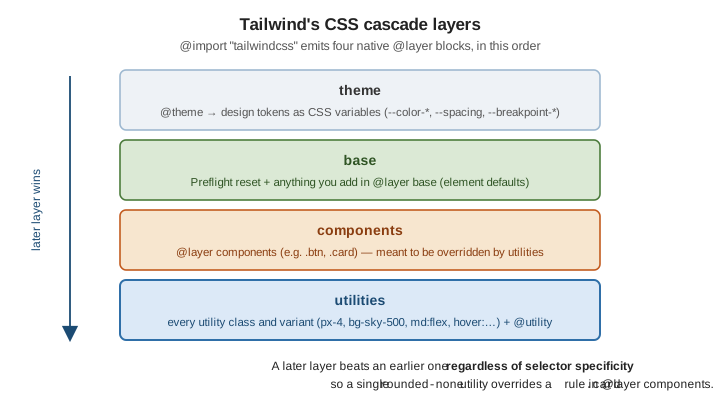
Because utilities is the last layer, a single utility class overrides a more specific rule you wrote in
@layer components — which is exactly why component classes stay overridable by utilities. Anything outside a
layer still beats everything inside one, so unlayered custom CSS always wins.
Related pages
-
Theme Variables and Colors — the
@themedirective and every theme-variable namespace. -
Custom Styles and Arbitrary Values —
@utility,@custom-variant,@apply, and@reference. -
Build and Production — wiring the scan/build step into Vite, PostCSS, or the CLI.
-
CSS Custom Properties and Media Queries — CSS custom properties and
@mediain plain CSS.