Server & Client Components
|
This content was generated with the assistance of AI and should be verified against the official documentation before being relied on in production. The reference material consulted while preparing these pages is listed in the section bibliography. |
This page is written against Next.js 16.3.8 (the latest release on 2026-10-03, when the facts and examples below were
checked; the official documentation reports @doc-version 16.3.8), React 19.3.0, Node.js 20.9.0 or later and
TypeScript 5.1 or later. Server Components and Client Components exist only in the App Router, so the page covers the
App Router and compares it with the Pages Router in a dedicated section. Caching is secondary here: every example
builds and runs in both the previous model (the default) and the opt-in Cache Components model
(cacheComponents: true), and the page says where the two differ. Every example was built and run with Next.js 16.3.8
and Node.js 24.16 on macOS, in a scratch copy of the Bookshelf — the catalogue of books that the rest of this
section grows, also built as a back end in the Django and
NestJS sections — and each one is followed by the official page it derives
from.
The page explains the one idea that separates the App Router from everything before it: a component tree is split between two module graphs, one that runs only on the server and one that also ships to the browser. It then covers what crosses between them (code through imports, data through props), the wire format that carries the server’s output (the RSC payload), and the directives and packages that control the split. If components, props and state are new to you, read React Getting Started and Server Rendering, SSG and React Server Components first. The overall rendering vocabulary (prerendering, request-time rendering, streaming) is introduced in Introduction & Architecture; later pages in this section go deeper on rendering fundamentals, server-side rendering, streaming and hydration, and are mentioned here in plain prose only.
The Two Kinds of Component at a Glance
In the App Router every component is a Server Component unless a file above it opts in to the client with the
'use client' directive. The names are slightly misleading, and the official boundary guide spells it out: a Server
Component runs on the server only, and a Client Component runs on the server (to produce the first HTML) and again in
the browser. The word "Client" says the code also reaches the browser, not that it is skipped on the server.
| On the server | In the browser | |
|---|---|---|
Server Component |
Yes: renders during a prerender (build time or revalidation) or for a request, and produces the RSC payload. |
No: its code is never sent. Only its rendered output arrives, inside the RSC payload. |
Client Component |
Yes: renders to HTML during the prerender or the request, using the RSC payload for its props. |
Yes: its code is sent, hydrated on first load, and re-rendered in the browser when state or props change. |
The choice is made per component, from what the component needs.
| Capability | Server Component | Client Component |
|---|---|---|
|
Yes |
No (read a promise with |
Read a database, the filesystem, secrets or environment variables directly |
Yes |
No: the code is public by definition |
|
No |
Yes |
Event handlers ( |
No |
Yes |
Custom hooks that use any of the above |
No |
Yes |
JavaScript added to the client bundle |
None for the component itself |
The component and everything it imports |
Can render the other kind |
Yes: it imports and renders Client Components |
Only as already rendered output received through |
The rest of the page shows each row of those tables on the same small page, the Bookshelf shelf.
React Server Components
A Server Component is an ordinary function component that React renders in a separate environment, once per render of
the route, before any JavaScript reaches the browser. It may be async, so it can read data where the data lives
instead of calling an API from the browser. Its output is not HTML: it is a serialised description of the rendered tree,
the RSC payload, which React on the client merges into the page. The component’s own code, and every library it
imports that no Client Component also imports, stays on the server and adds nothing to the bundle.
import { listBooks } from "@/lib/books"; // a server-only data module, see below

export async function ShelfStats() {
  const books = await listBooks(); // runs on the server, during render
  return <p>{books.length} books on the shelf</p>;
}Three consequences follow from "runs once, on the server":
-
No state, effects or handlers. A Server Component renders and is done; there is no later render to attach state to. Importing
useStateorcreateContextfromreactinto a Server Component fails the build (see Pitfalls). -
Secrets and data access are safe by construction, because the code is not shipped. They are only as safe as what you then pass on as props (see Passing data).
-
Less JavaScript. The bundle contains only what Client Components import. Pages made mostly of Server Components therefore download, parse and hydrate less.
Built-in HTML behaviour still works without a Client Component: a <details> element opens and closes, a <form> can
submit to a Server Function through its action prop, and <video controls> plays. Reach for 'use client' when
browser state changes over time, such as a controlled input, a live filter or a drag handle.
Server Components are also what Next.js’s data fetching, fetch memoisation and Cache Components build on. Those
topics get their own pages later in this section (data fetching, caching, and partial prerendering with Cache
Components); here only the boundary matters.
Source: React: Server Components and Server and Client Components
The RSC Payload
When Next.js renders a route it runs the Server Component tree and serialises the result with React’s Flight format. The official guide describes the payload as "a compact, serialized representation of the rendered React Server Components tree" and lists what it contains: the rendered result of the Server Components, placeholders for where Client Components render together with references to their JavaScript files, and the props that Server Components pass to Client Components. The rendering work is split into chunks by route segment (layouts and pages), including parallel route slots whether or not they are displayed.
You can see the payload yourself. Ask the running server for a page with the rsc: 1 request header, the same header
the browser router sends on a client-side navigation. In Next.js 16.3.8 next start first answers such a request with a
307 to the same URL plus a _rsc query parameter (a cache-busting key), so follow redirects with -L.
npm run build && PORT=3402 npm start

curl -sL -H 'rsc: 1' -D - http://localhost:3402/en/shelf -o shelf.rsc
# HTTP/1.1 307 Temporary Redirect
# location: /en/shelf?_rsc
# HTTP/1.1 200 OK
# Content-Type: text/x-component
# Vary: rsc, next-router-state-tree, next-router-prefetch, next-router-segment-prefetch, Accept-Encoding
Source: Streaming: the component payload
The body is not HTML. Each line is a numbered row. This is an abridged copy of the payload of the worked example below (long attribute lists and the action id are trimmed):
2:I[39756,["/_next/static/chunks/3fntmmi971322.js"],"default"]
7:"$Sreact.suspense"
f:I[10305,["/_next/static/chunks/3fntmmi971322.js","/_next/static/chunks/32cvtmjkqz-20.js"],"ShelfProviders"]
11:I[27378,["/_next/static/chunks/3fntmmi971322.js","/_next/static/chunks/32cvtmjkqz-20.js"],"LikeButton"]
13:I[60216,["/_next/static/chunks/3fntmmi971322.js","/_next/static/chunks/32cvtmjkqz-20.js"],"Drawer"]
12:{"id":"<action-id>","bound":null}
5:["$","$Lf",null,{"children":["$","main",null,{"children":[["$","h1",null,{"children":["Shelf (","en",")"]}],"$L10",[["$","article","1",{"children":[["$","h2",null,{"children":"Dune"}],["$","p",null,{"children":["Frank Herbert"," - ","9.99"," EUR"]}],[["$","$L11",null,{"bookId":"1","initialLikes":4,"subscribe":"$h12"}],["$","$L13",null,{"title":["$","strong",null,{"children":["Reviews of ","Dune"]}],"children":["$","$7",null,{"fallback":["$","p",null,{"children":"loading reviews"}],"children":"$L14"}]}]]]}], ...
10:["$","p",null,{"children":[3," books on the shelf"]}]
14:["$","p",null,{"children":[0," reviews (rendered on the server)"]}]
Reading it row by row shows the whole model:
| What you see | What it is |
|---|---|
|
A client reference: the module id, the JavaScript chunks to load and the export name of a component marked
|
|
An element whose type is a reference to a row ( |
|
The props the Server Component passed to |
|
The rendered output of Server Components ( |
|
A |
|
The awaited result of the async |
|
The root row, with the segment tree of the route ( |
Two properties matter for design. First, the payload is the only thing that carries Server Component output, so anything a Server Component reads and renders, including text you did not intend to show, is in the payload and therefore in the page. Second, the format is internal: the row syntax above is what 16.3.8 emitted, not a public contract, so inspect it to understand the model but never parse it in application code.
The same payload takes two routes to the browser. On first load it is embedded in the HTML as a stream of inline
<script>self.__next_f.push(…)</script> tags; on a client navigation it is fetched alone (Content-Type:
text/x-component) and no HTML is transferred. Both are shown under What Runs Where.
grep -rl "rendered on the server\|books on the shelf\|Frank Herbert" .next/static
# (no output: none of the Server Component strings is in any client chunk)

grep -rl "Subscribe" .next/static
# .next/static/chunks/32cvtmjkqz-20.js <- the one 1 KB chunk holding the three 'use client' modules'use client': a Boundary in the Module Graph
'use client' is not a component type annotation. It is a boundary in the module graph. The directive must be the
first statement of a file, before any imports. It declares that this file, and everything it imports, belongs to the
client module graph. The official description: once a file is marked, "all of its imports and the components it
directly renders are included in the client bundle", so you do not mark every component, only the entry points that a
Server Component imports.
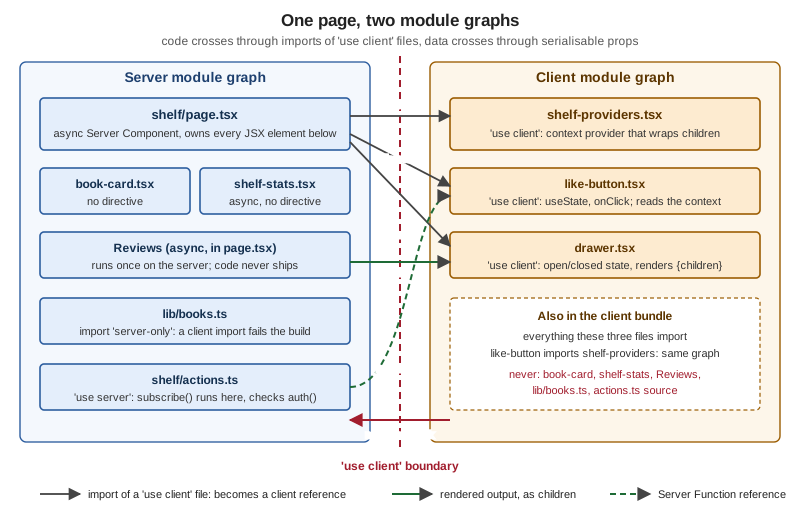
Reading the figure from the top: page.tsx is a Server Component that imports three 'use client' files. Those imports
are the only places where code crosses; at each of them the server graph does not follow the import into the client
file, it emits a client reference (the I[…] rows above). The client graph never imports the server graph, which is
why the red arrow is crossed out. A module that both graphs use is compiled once per environment.
"use client";

import { useState } from "react";
import { useShelf } from "./shelf-providers";

export function LikeButton({
  bookId,
  initialLikes,
  subscribe,
}: {
  bookId: string;
  initialLikes: number;
  subscribe: (bookId: string) => Promise<void>;
}) {
  const [likes, setLikes] = useState(initialLikes);
  const { compact } = useShelf();
  console.log("LikeButton rendered", bookId, typeof window === "undefined" ? "(server)" : "(browser)");
  return (
    <div>
      <button onClick={() => setLikes(likes + 1)}>{compact ? "+1" : "Like"} ({likes})</button>
      <button onClick={() => subscribe(bookId)}>Subscribe</button>
    </div>
  );
}
Source: use client and
React: 'use client'
Practical rules that follow from the boundary:
-
Put the directive as low in the tree as you can. Marking a layout
'use client'pulls its whole import graph into the bundle. The official example keeps a<Layout>and<Logo>on the server and marks only the interactive<Search />. -
Entry points only.
like-button.tsximportsshelf-providers.tsx; the second file would also need the directive only because a Server Component imports it directly. Files imported solely from client files are already in the client graph. -
Wrap, do not edit, a shared module. To use a shared component that calls
useStatefrom a Server Component without changing it, create a thin Client Component wrapper that imports it and carries the directive. -
The directive is not inherited by siblings. It marks a file; a Server Component that renders a Client Component stays a Server Component.
-
Type-only imports are free.
import type { Review } from "@/lib/books"in a Client Component is erased at build time and does not pull the server-only module in, as shown in Passing promises.
A rendered Client Component runs twice on a direct visit: once on the server, to produce HTML, and once in the browser
during hydration. The console.log in LikeButton above prints (server) in the terminal during the prerender (in the
build output for a static route, in the server log for a request-time one) and (browser) in the DevTools console on
first load. On a client-side navigation only the browser line appears, because the server sends the RSC payload and not
HTML.
Source: The Server and Client Boundary
Passing Data Across the Boundary: Serialisable Props
Code crosses the boundary through imports; data crosses through props, and props must be serialisable by React. A
Server Component can pass strings, numbers, booleans, null, undefined, BigInt, symbols registered with
Symbol.for, plain objects and arrays of serialisable values, Date, Map, Set, typed arrays and ArrayBuffer,
promises, React elements (JSX), and Server Functions. It cannot pass ordinary functions, class instances, objects with a
null prototype or local symbols.
| Value | Passes? | Observed result |
|---|---|---|
|
yes |
Plain JSON. Appears in the payload and in the page source. |
|
yes |
Build succeeds; the value is restored on the client with its type. |
|
yes |
Build succeeds. A Client Component reads it with |
JSX such as |
yes |
Serialised element or already-rendered output. This is how interleaving works. |
a function marked |
yes |
Crosses as a reference ( |
|
no |
Prerender fails: |
|
no |
|
|
no |
|
Source: React: serializable types
and use client: usage
Two traps in that table deserve a sentence each. TypeScript does not catch the function-prop case: onClick: () ⇒ void is a valid prop type, so the failure appears when the route is prerendered or requested, not when you type-check
(the Next.js TypeScript plugin in the editor flags function props whose name is not action or does not end in
Action, because those names conventionally carry Server Functions). And everything you pass is public: the props are
written into the payload and the HTML, so passing a whole database row to show one field ships every column to the
browser. Select the fields in the Server Component, as LikeButton receives only bookId and initialLikes.
The data security guide recommends a data access layer that returns only what the UI needs, and an experimental
taint API as a second safety net; both are covered on the data security page later in this section.
Source: Data security: passing data from server to client and The Server and Client Boundary: crossing the boundary
Passing a promise instead of the data
A Server Component does not have to await before it renders a Client Component. It can start the request and pass the
pending promise as a prop; the Client Component reads it with React’s use() API, and the nearest <Suspense>
boundary shows its fallback until the promise settles. The request starts on the server, so the client does not refetch
after mounting, and the shell can stream first.
// page.tsx -- Server Component
import { Suspense } from "react";
import { listReviews } from "@/lib/books";
import { ReviewList } from "./review-list";

export default function Page() {
  const reviews = listReviews("1"); // not awaited: a promise crosses the boundary
  return (
    <Suspense fallback={<p>loading reviews</p>}>
      <ReviewList reviews={reviews} />
    </Suspense>
  );
}

// review-list.tsx -- Client Component
"use client";

import { use } from "react";
import type { Review } from "@/lib/books"; // type-only import: erased at build time

export function ReviewList({ reviews }: { reviews: Promise<Review[]> }) {
  const all = use(reviews);
  return <p>{all.length} reviews</p>;
}
Source: The Server and Client Boundary: how data enters the tree
and React: use, streaming data from server to client
The route builds as ● (SSG) in the previous model, and the page’s HTML already contains the resolved text because the
promise settled during the prerender. Streaming, and what use() costs, are covered on the streaming page that follows
this one.
'use server' and Server Functions
'use server' is the mirror image of 'use client', and the two are often confused. It does not mark a component as a
Server Component (components are Server Components by default). It marks functions that run on the server and can be
called from the client: Server Functions, which Next.js calls Server Actions when they are used for mutations. The
directive goes at the top of a file, which exports only such functions, or at the top of one function body inside a
Server Component.
"use server";

import { auth } from "@/auth";

export async function subscribe(bookId: string): Promise<void> {
  const session = await auth(); // authorise on the server, every time
  if (!session?.user) throw new Error("Not signed in");
  console.log("subscribed to", bookId);
}
Source: use server
In the shelf page, subscribe is imported into the Server Component and passed to LikeButton as a prop. This is the
one kind of function that may cross the boundary, and it crosses as the $h12 reference you saw in the payload. When the
user presses Subscribe, the browser sends a request to the server naming that action id with the arguments; the server
runs the function and returns its result. Three rules follow, and they are about security rather than style:
-
A Server Function is a public HTTP endpoint. Anyone can call it with arbitrary arguments. Check authentication and authorisation inside the function, validate its arguments, and never rely on the UI having hidden the button.
-
Arguments and return values must be serialisable by the same rules as props.
-
A Client Component cannot define one inline. Inline
'use server'works inside a Server Component’s body; for a Client Component, put the function in a'use server'file and import it.
Forms, useActionState, revalidation and progressive enhancement are the subject of the Server Actions page later in
this section; here the point is only that a Server Function is the one function type that survives the boundary.
Source: Server Actions and Mutations and React: Server Functions
Interleaving: Server Components as children of Client Components
A Client Component cannot import a Server Component, because the client graph never imports the server graph. But a
Server Component can render a Client Component and pass other Server Component output into it. In React’s terms, the
Server Component owns the JSX, so the child is rendered on the server and the Client Component receives the finished
result as a prop. The usual form is children, which turns a Client Component into a slot.
"use client";

import { useState, type ReactNode } from "react";

export function Drawer({ title, children }: { title: ReactNode; children: ReactNode }) {
  const [open, setOpen] = useState(true);
  return (
    <section>
      <header>
        {title} <button onClick={() => setOpen(!open)}>{open ? "Hide" : "Show"}</button>
      </header>
      {open && children}
    </section>
  );
}async function Reviews({ bookId }: { bookId: string }) {
const reviews = await listReviews(bookId); // server-only data module
return <p>{reviews.length} reviews (rendered on the server)</p>;
}
// inside the page:
<Drawer title={<strong>Reviews of {b.title}</strong>}>
<Suspense fallback={<p>loading reviews</p>}>
<Reviews bookId={b.id} />
</Suspense>
</Drawer>Source: Server and Client Components: interleaving and The Server and Client Boundary: crossing the boundary
Drawer toggles visibility with client state, yet Reviews never reaches the browser: in the payload excerpt the
$L13 (Drawer) element carries title and children as rendered elements, and the Suspense content is another row
($L14). Drawer decides where the output appears; it never sees Reviews’s code. The same trick keeps a modal,
tab panel, accordion, carousel or layout shell interactive while its content stays on the server. Anything in the
`children is a prop, so title works the same way.
The mistake to avoid is the inverse: importing the Server Component inside the Client Component’s file. That puts it in
the client graph, where it is bundled and, if it imports a server-only module, fails the build.
Compound components break at the boundary. A common pattern attaches subcomponents as static properties (Menu.Item).
When a Server Component imports such a component from a Client Component file it receives a client reference, not the
function object, so Menu.Item is undefined:
// menu.tsx
"use client";
function Menu({ children }: { children: ReactNode }) { return <ul>{children}</ul>; }
function Item({ children }: { children: ReactNode }) { return <li>{children}</li>; }
Menu.Item = Item;
export { Menu };

// page.tsx -- Server Component
<Menu><Menu.Item>a</Menu.Item></Menu>
// build: Error: Element type is invalid: expected a string (for built-in components)
//        or a class/function (for composite components) but got: undefined.

// fix: export the pieces as named exports
export function Menu({ children }: { children: ReactNode }) { return <ul>{children}</ul>; }
export function MenuItem({ children }: { children: ReactNode }) { return <li>{children}</li>; }
// <Menu><MenuItem>a</MenuItem></Menu> buildsContext Providers Deep in the Tree
React context is not available in Server Components: importing createContext into a file without 'use client' fails
the build. To provide context, create a Client Component that accepts children, then render it from a Server
Component. Because children is a slot, everything inside it can stay a Server Component.
"use client";

import { createContext, useContext, type ReactNode } from "react";

const ShelfContext = createContext({ compact: false });

export function ShelfProviders({ children }: { children: ReactNode }) {
  return <ShelfContext.Provider value={{ compact: true }}>{children}</ShelfContext.Provider>;
}

export function useShelf() {
  return useContext(ShelfContext);
}Render the provider as deep as possible. In the shelf page it wraps only <main>; in a root layout it should wrap
{children}, not the whole <html> document. The official guidance is that this "makes it easier for Next.js to
optimize the static parts of your Server Components". ShelfStats, BookCard and Reviews sit inside the provider
and are still Server Components, because they arrive as children. Only LikeButton, the one consumer, reads the
context, and it does so in the client graph.
Server-fetched data can be handed to the provider as a promise prop and read with use() in the Client Components that
need it; the official guide on single-page applications has the pattern. Two cautions: a provider’s value is
client state, so it is not shared between requests (each browser gets its own), and everything in the provider value is
serialised and public, exactly like any prop.
server-only and client-only: Preventing Environment Poisoning
Plain modules can be imported from either graph, so a function that reads process.env.API_KEY can end up imported by a
Client Component by accident. Next.js only inlines environment variables prefixed NEXT_PUBLIC_ into the client
bundle and replaces the others with an empty string, so the leak would be a runtime failure rather than a disclosed
secret, but a confusing one. The server-only package turns the mistake into a build error:
import "server-only";

export type Book = { id: string; title: string; author: string; priceCents: number };

const books: Book[] = [
  { id: "1", title: "Dune", author: "Frank Herbert", priceCents: 999 },
  { id: "2", title: "Neuromancer", author: "William Gibson", priceCents: 899 },
];

export async function listBooks(query = ""): Promise<Book[]> {
  const q = query.trim().toLowerCase();
  return books.filter((b) => b.title.toLowerCase().includes(q) || b.author.toLowerCase().includes(q));
}
If a Client Component imports this module, next build fails with an import trace:
./lib/books.ts:1:1
Error: 'server-only' cannot be imported from a Client Component module
> 1 | import "server-only";
    | ^^^^^^^^^^^^^^^^^^^^^
It should only be used from a Server Component.

Import traces:
  #4 [Client Component Browser]:
    ./lib/books.ts [Client Component Browser]
    ./app/[locale]/exp/bad.tsx [Client Component Browser]
    ./app/[locale]/exp/bad.tsx [Server Component]
    ./app/[locale]/exp/page.tsx [Server Component]
The counterpart client-only marks modules that must not run on the server, for example code that reads window at
import time; importing it from a Server Component fails the same way. Installing either package is optional in Next.js,
which handles the imports internally and ignores the contents of the npm packages, but install them if your linter
flags undeclared dependencies. Next.js also ships type declarations for both, for projects with
noUncheckedSideEffectImports enabled.
server-only guards a module. It does not stop a Server Component from passing a secret down as a prop, and it does
not apply to Client Components that run on the server during prerendering: those must follow the same assumptions as
code in the browser. For data you must never serialise, the experimental experimental.taint option (React’s
experimental_taintObjectReference and experimental_taintUniqueValue) is a second layer, not a substitute for
returning only safe fields.
Third-Party Components
A package written before the App Router may use useState or useEffect without carrying a 'use client' directive.
Next.js cannot tell, so using it from a Server Component fails. In the scratch app a local package acme-carousel
(CommonJS, with a useState call and no directive) rendered from a Server Component broke the build:
Error occurred prerendering page "/en/exp". Read more: https://nextjs.org/docs/messages/prerender-error
TypeError: d.useState is not a function or its return value is not iterable
The fix is a one-file wrapper that carries the directive; any Server Component can then import the wrapper:
"use client";

import { Carousel } from "acme-carousel";

export default Carousel;
// any Server Component
import Carousel from "./carousel";
export default function Page() {
return <Carousel />; // builds and renders: the wrapper is the client boundary
}Using the unwrapped component inside one of your own Client Components also works, since the whole file is already in
the client graph. Library authors should add "use client" to the entry points that rely on client-only features, so
that users can import them from Server Components without wrappers. Some bundlers strip module-level directives, so check
that the directive survives your build; the official page links the esbuild configurations used by two published
libraries.
What Runs Where: First Load versus Navigation
On the server, React renders in two passes. The Server Component tree becomes the RSC payload; the payload and the Client Components are then used to prerender HTML (at build time for a static route, or per request). On the client, the first load uses three things: the HTML shows a fast, non-interactive preview; the RSC payload reconciles the Server and Client trees; JavaScript hydrates the Client Components so handlers attach.
page, BookCard, ShelfStats, Reviews S->>S: output becomes the RSC payload Note over S: Client Components render once
on the server from the payload, to HTML S-->>B: HTML with the payload inlined as script tags B-->>U: non-interactive preview paints B->>S: load the client chunks named by the payload S-->>B: JavaScript for LikeButton, Drawer, ShelfProviders Note over B: Hydration: React attaches handlers
and reconciles with the payload B-->>U: Like and Hide work, Server Component code never ran here
On a client-side navigation, such as a <Link> click, the page is not fetched as HTML again. The router asks for the
payload alone, replaces the changed segments, and renders the Client Components in the browser without server-rendered
HTML. Shared layouts above the changed segment are kept, with their state. The payload for visited and prefetched
routes is also kept in the client-side router cache, which is what makes revisiting instant; the details live in
Linking & Navigation.
Client Components render in the browser,
layouts above keep their state R-->>U: new page, no full reload
| Moment | Server Component | Client Component |
|---|---|---|
|
Renders once; output becomes payload and prerendered HTML. |
Renders once to HTML from the payload (the |
Request to a dynamic route |
Renders for the request, output streamed as payload rows. |
Renders on the server for that request, to HTML. |
First load in the browser |
Not run. Its output is read from the inline payload. |
Hydrated: code loaded, handlers attached, state created. |
Client navigation |
Re-rendered on the server only if its segment changes and is not cached. Output arrives as payload. |
Renders in the browser from props in the payload; no server HTML. |
|
Re-rendered on the server; the browser reconciles the new payload. Client state in the tree is kept. |
Same instance, updated props. |
A consequence worth remembering is that Server Component output in the DOM is not yours to mutate. Changing it directly in the browser can put the DOM out of sync with React’s tree; to change it, render the component again on the server and let the new payload reconcile. Hydration, and what happens when the server HTML and the client render disagree, have their own page later in this section.
Where to Put the Directive
Start with the default (a Server Component) and move the boundary down to the smallest piece that needs the browser.
state, effects, context or
browser APIs?"} start -- no --> handler{"Does it attach event handlers
or use a hook that does?"} handler -- no --> server["Keep it a Server Component"] handler -- yes --> client["Add use client, at the
smallest interactive piece"] start -- yes --> client client --> children{"Does it need to show
server-rendered content?"} children -- yes --> slot["Accept children or another prop
and let a Server Component pass it"] children -- no --> done["Done"] server --> data{"Does it read secrets or data?"} data -- yes --> only["Import them from a
server-only module"] data -- no --> done
Worked Example: the Bookshelf Shelf
The shelf page ties the pieces together. It lists the books, shows a like counter and a subscribe action per book, and
lets the reader hide each book’s reviews. The files live in app/[locale]/shelf/ of the scratch app.
| File | Kind | Role |
|---|---|---|
|
Server (async) |
Reads the books, owns the JSX, passes a Server Function and rendered |
|
Server |
Layout for one book; takes |
|
Server (async) |
Reads the books again to show a count; a Server Component inside a Client Component’s |
|
Client |
Context provider for |
|
Client |
|
|
Client |
Open/closed state; renders |
|
|
|
|
|
The data access layer; build fails if a Client Component imports it. |
import { Suspense } from "react";
import { listBooks, listReviews } from "@/lib/books";
import { BookCard } from "./book-card";
import { LikeButton } from "./like-button";
import { Drawer } from "./drawer";
import { ShelfStats } from "./shelf-stats";
import { subscribe } from "./actions";
import { ShelfProviders } from "./shelf-providers";

async function Reviews({ bookId }: { bookId: string }) {
  const reviews = await listReviews(bookId);
  return <p>{reviews.length} reviews (rendered on the server)</p>;
}

export default async function Page({ params }: PageProps<"/[locale]/shelf">) {
  const { locale } = await params;
  const books = await listBooks();
  return (
    <ShelfProviders>
      <main>
        <h1>Shelf ({locale})</h1>
        <ShelfStats />
        {books.map((b) => (
          <BookCard key={b.id} book={b}>
            <LikeButton bookId={b.id} initialLikes={b.title.length} subscribe={subscribe} />
            <Drawer title={<strong>Reviews of {b.title}</strong>}>
              <Suspense fallback={<p>loading reviews</p>}>
                <Reviews bookId={b.id} />
              </Suspense>
            </Drawer>
          </BookCard>
        ))}
      </main>
    </ShelfProviders>
  );
}import type { ReactNode } from "react";
import type { Book } from "@/lib/books";
// Server Component: no directive, receives children from the page
export function BookCard({ book, children }: { book: Book; children: ReactNode }) {
return (
<article>
<h2>{book.title}</h2>
<p>{book.author} - {(book.priceCents / 100).toFixed(2)} EUR</p>
{children}
</article>
);
}The three Client Components and the Server Function are the listings in the earlier sections
(like-button.tsx, drawer.tsx, shelf-providers.tsx and
actions.ts).
npm run build
# Route (app)
# ├   /[locale]/shelf
# │ ├ ● /en/shelf
# │ └ ● /es/shelf

PORT=3402 npm start
curl -s http://localhost:3402/en/shelf | grep -o '<h1>.*</h1>'
# <h1>Shelf (<!-- -->en<!-- -->)</h1>
curl -s http://localhost:3402/en/shelf | grep -o 'reviews (rendered on the server)' | head -1
# reviews (rendered on the server)
The route prerenders as ● (SSG, because the layout’s generateStaticParams supplies the locales) in the previous
model, and with cacheComponents: true the table shows ○ (static) for /en/shelf and /es/shelf and ◐ (Partial Prerender) for the [locale] route pattern. Both models build the same files unchanged, because
the shelf reads its data in Server Components, awaits only params (which the layout makes static) and keeps request-time
APIs out of the page. A page that awaited searchParams or cookies() directly would need a <Suspense> boundary under
Cache Components; that rule belongs to the rendering and Cache Components pages. The server-side and client-side
checks that matter here:
-
grepover.next/staticfinds none ofrendered on the server,books on the shelforFrank Herbert: Server Component output reaches the browser only as payload text, not as component code. -
The
LikeButton,DrawerandShelfProvidersmodules together form one chunk of about 1 KB, which is everything this page adds to the client bundle besides the framework. -
subscribethrowsNot signed inwhenauth()returns no user, so authorisation happens on the server, whatever the UI shows. The button press itself was not exercised in a browser here; the build, the route table and thecurlchecks above were.
Pages Router Comparison
The Pages Router has no Server Components. Every component under pages/ is what the App Router calls a Client
Component: it renders to HTML on the server (static generation or per request) and its code ships to the browser to
hydrate. Server-only work happens in data functions that run outside the component, and their results travel as JSON.
import type { GetStaticProps } from "next";
import { useState } from "react";

type Book = { id: string; title: string; author: string };
type Props = { books: Book[]; builtAt: string };

export const getStaticProps: GetStaticProps<Props> = async () => {
  // runs on the server only; the result must be JSON-serialisable
  const books: Book[] = [
    { id: "1", title: "Dune", author: "Frank Herbert" },
    { id: "2", title: "Solaris", author: "Stanislaw Lem" },
  ];
  return { props: { books, builtAt: new Date().toISOString() } };
};

// Every Pages Router component is rendered to HTML on the server AND ships to the browser
export default function LegacyShelf({ books, builtAt }: Props) {
  const [likes, setLikes] = useState(0);
  return (
    <main>
      <h1>Legacy shelf</h1>
      <p>{books.length} books, built {builtAt}</p>
      <button onClick={() => setLikes(likes + 1)}>Like ({likes})</button>
    </main>
  );
}
The build lists it under Route (pages) as ● /legacy-shelf. The data travels in the HTML as a JSON script, not as an
RSC payload:
<script id="__NEXT_DATA__" type="application/json">{"props":{"pageProps":{"books":[{"id":"1","title":"Dune",
"author":"Frank Herbert"}, ...],"builtAt":"..."},"__N_SSG":true},"page":"/legacy-shelf", ...}</script>
The author strings are in that JSON and not in any client chunk, but the page component itself (Legacy shelf) is in a
client chunk and is hydrated in full.
Source: Pages Router: getStaticProps
| Concern | Pages Router | App Router |
|---|---|---|
Component model |
One kind: every component renders on the server for HTML and hydrates in the browser. |
Two kinds: Server Components (default) and Client Components ( |
Where server-only code lives |
In |
Anywhere in a Server Component, or in a |
How data reaches the component |
As |
By the component reading it during render ( |
Bundle |
Every page component and its imports |
Only Client Components and their imports |
Context providers |
|
A Client Component provider with |
Navigation |
Client router fetches the page’s JSON data (and component chunk) and renders in the browser. |
Client router fetches the RSC payload; shared layouts keep their state. |
Mutations |
API routes, or a custom |
Server Functions ( |
Secrets |
In the data functions and API routes only. |
Anywhere on the server graph; |
Migrating a page is mostly moving the data function’s body into the Server Component and splitting the interactive
parts into 'use client' files; the Pages Router remains supported and both routers can coexist in one project.
Pitfalls
| Symptom | Cause | Fix |
|---|---|---|
Build error: |
A hook (or |
Move the stateful part into a Client Component and import it. Keep the rest on the server. |
|
A Server Component passes |
Define the handler inside the Client Component. For a mutation, pass a Server Function ( |
|
A class instance (an ORM entity, a domain object) or a null-prototype object is a prop. |
Map it to a plain object with the fields the UI needs; return DTOs from the data layer. |
|
A |
Pass the data in as props, or call a Server Function. Never import the data layer into the client graph. |
|
A static property of a Client Component accessed from a Server Component. |
Export subcomponents as named exports. |
|
A third-party component uses client features and has no |
Re-export it from your own |
The whole app is a Client Component and the bundle is large |
|
Move the directive down to the interactive leaf; pass server output as |
A secret or a whole database row appears in the page source |
It was passed as a prop, or returned from a Server Function. |
Select only the needed fields. Everything serialised across the boundary is public. |
A Server Function runs for a user who should not call it |
It relied on the UI to hide the button. |
Authorise inside every Server Function. It is a public endpoint. |
A provider re-renders or de-optimises the whole page |
The provider wraps |
Wrap only |
|
|
Move the |
Treating "server-rendered" as "Server Component" |
A Client Component also renders on the server, to HTML. |
Remember the table at the top: "Client" means the code also reaches the browser. For SEO, what matters is whether the server render includes the content. |
What Changed Since Next.js 13 and 14
The model of this page is stable, but the surrounding rules moved. Versions are the Next.js release in which the change shipped; the dates are from the release blog.
| Version | Change |
|---|---|
13.4 (May 2023) |
The App Router became stable, and Server Components became the default for components under |
14 (October 2023) |
Server Actions became stable ( |
15 (October 2024) |
Requests for |
15 |
|
16 (October 2025) |
The |
16.2 (March 2026) |
Server function logging in dev, and a hydration diff indicator in the error overlay that shows |
16.3 (August 2026) |
Instant Navigations (opt in with |
Source: Upgrade guides, Next.js 16.3 and Server and Client Components
Where the Books Are Outdated
Both requester-provided books target the Pages Router (Next.js 12 and 13.2, React 17 and 18), and the concepts on this page postdate them or were experimental when they were written.
| Book | What differs today |
|---|---|
Real-World Next.js (Packt, 2022) |
Teaches the Pages Router, in which every component is a Client Component in the App Router sense and server-only work
is confined to |
Practical Next.js for E-Commerce (Apress, 2023) |
Builds a Pages Router site (it mentions the |
Anything in a book that stores a secret in a NEXT_PUBLIC_ variable, or that builds a checkout from client-posted prices,
is wrong for the reasons in this page: public environment variables are inlined into client JavaScript, and everything
on the client side of the boundary is public. The data security and authentication pages later in this section show the
correct forms.
Source: Data security
Related Topics
-
Introduction & Architecture: the request flow for the whole server pipeline that produces the payload.
-
Layouts, Templates & Special Files for layouts that stay Server Components, and for
loading.tsxas an implicit<Suspense>boundary. -
Linking & Navigation for how the client router fetches payloads and keeps its cache.
-
Parallel & Intercepting Routes for slots, which are rendered as separate payload chunks.
-
Configuration, TypeScript & Environment Variables for
NEXT_PUBLIC_and the other variable rules. -
React Server Rendering, SSG and React Server Components for the React-level explanation.
Later pages in this section cover rendering fundamentals, server-side rendering, streaming and Suspense, hydration, data fetching, Server Actions, caching and data security in depth.