Deployment
|
This content was generated with the assistance of AI and should be verified against the official documentation before being relied on in production. The reference material consulted while preparing these pages is listed in the section bibliography. |
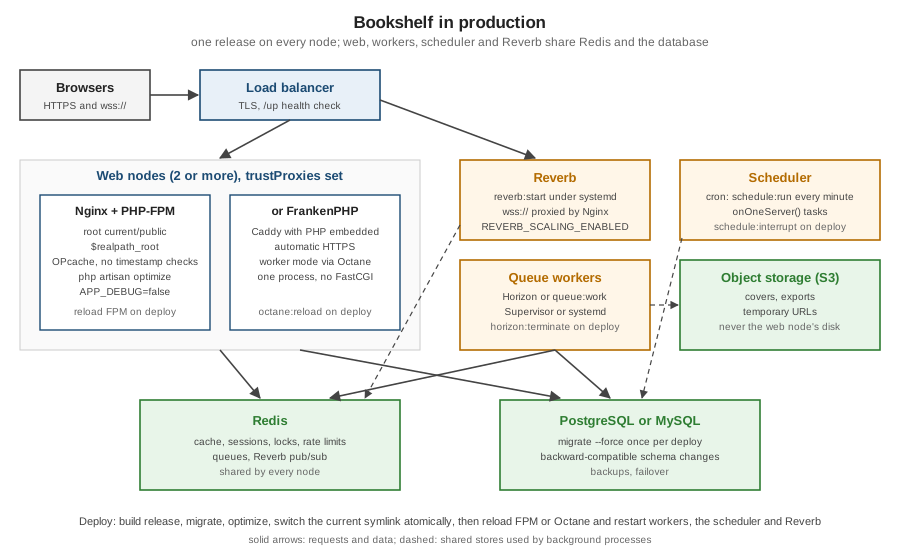
This page is written against Laravel 13.x (13.34.0) on PHP 8.3 to 8.5, checked on 2026-10-05. A Laravel application in production is several processes: the web server and PHP, queue workers, the scheduler and, for Bookshelf, Reverb. They all run the same release of the code and share Redis and the database. The configuration on this page ran in containers against the Bookshelf application: Nginx 1.31.6 with PHP-FPM 8.5.11, and FrankenPHP 1.13.0. How PHP serves requests underneath, with FPM workers versus worker mode, is on PHP Request Model and Servers.
Nginx and PHP-FPM
Nginx serves the files in public/ and passes everything else to index.php over FastCGI. The configuration below is
the one from the Laravel documentation, with the FPM container’s address and $realpath_root:
server {
    listen 80;
    server_name bookshelf.test;
    root /srv/bookshelf/public;

    add_header X-Frame-Options "SAMEORIGIN";
    index index.php;
    charset utf-8;

    location / {
        try_files $uri $uri/ /index.php?$query_string;
    }

    location = /favicon.ico { access_log off; log_not_found off; }
    location = /robots.txt  { access_log off; log_not_found off; }

    error_page 404 /index.php;

    location ~ ^/index\.php(/|$) {
        fastcgi_pass bookshelf-fpm:9000;
        fastcgi_param SCRIPT_FILENAME $realpath_root$fastcgi_script_name;
        include fastcgi_params;
        fastcgi_hide_header X-Powered-By;
    }

    location ~ /\.(?!well-known).* {
        deny all;
    }
}
Source: Laravel — Nginx
PHP-FPM clears the environment of its workers by default, so variables are set in the pool configuration. The first version of this file stopped FPM from starting at all:
; /usr/local/etc/php-fpm.d/zz-bookshelf.conf
[www]
env[APP_ENV] = "production"
env[APP_DEBUG] = "false"          ; unquoted false: "Unable to include …/zz-bookshelf.conf", FPM initialization failed
env[APP_URL] = "http://bookshelf.test"
env[LOG_CHANNEL] = "stderr"
Source: PHP — FPM Configuration
FPM parses pool files as INI, where a bare false is a boolean and env[...] needs a string. Quoting every value
fixed it. Real secrets usually come from the environment or a secrets manager rather than a file in the image
(Security: CSRF, Encryption and Hashing covers
encrypted .env files).
The first requests through the stack:
/up 500       ErrorException: tempnam(): file created in the system's temporary directory
/books 500
/.env 403     the "deny all" location for dotfiles
/storage/../.env 403
Source: Laravel — Directory Permissions
Directory permissions. FPM workers run as www-data (uid 33), and storage/ and bootstrap/cache belonged to
root. Blade could not write a compiled view and PHP fell back to /tmp, which Laravel turns into an exception.
chown -R www-data:www-data storage bootstrap/cache fixed it, as would a chmod for a deploy user in the www-data
group. The next failure was filemtime(): stat failed for /tmp/claude-0/…/storage/framework/views/…: compiled views
from the development machine referred to its absolute paths. php artisan optimize:clear removed them. Caches are
built on the server, or in the image at the final path, never copied from development.
optimize and OPcache
php artisan optimize caches the configuration, routes, events and compiled views. Without caches, every request
reads config/*.php, registers every route and scans for listeners. OPcache keeps compiled PHP in shared memory,
and with opcache.validate_timestamps=0 it stops checking files for changes. Two hundred requests to /books after 20
warm-up requests, on each setup:
no caches:                                median 13.7 ms, p95 15.7 ms
after php artisan optimize:               median  9.7 ms, p95 13.5 ms
plus opcache.validate_timestamps=0:       median  9.2 ms, p95 11.6 ms
FrankenPHP php-server (no worker mode):   median 10.7 ms, p95 16.3 ms
Source: Laravel — Optimization
optimize cut the median by about 30% on a page that runs two queries, and OPcache without timestamp checks took
off a little more.
config:cache has one consequence that catches people: env() returns null outside config/ files once the
cache exists (Directory Structure and Configuration).
Without timestamp checks, nothing changes until PHP-FPM reloads. A /version route was added and php artisan
route:cache rebuilt the route file twice, with release v1 and then release v2:
1: <h1>Not on the shelf</h1> …                 the route file from before the change was still in OPcache
2 after route:cache with v2: <h1>Not on the shelf</h1> …
3 after reloading PHP-FPM (kill -USR2): release v2The new bootstrap/cache/routes-v7.php was on disk, but OPcache served the copy it had compiled at the first
request. A graceful reload (systemctl reload php8.5-fpm, or USR2 to the master) is therefore part of every
deploy on such a server.
Releases and the current symlink
Zero-downtime deploys build each release in its own directory, run composer install --no-dev --optimize-autoloader,
npm run build, php artisan migrate --force and php artisan optimize there, and then point a current symlink
at it with an atomic rename (ln -sfn releases/2 current.tmp && mv -T current.tmp current). Two Nginx servers in
front of the same FPM pool, one passing $document_root (the symlink path) and one $realpath_root (the resolved
directory), each served a one-line release:
before switch :8081  release 1 from /srv/app/releases/1/public
before switch :8082  release 1 from /srv/app/releases/1/public
current -> releases/2
after switch  :8081  release 1 from /srv/app/releases/1/public      ($document_root, three requests)
after switch  :8082  release 2 from /srv/app/releases/2/public      ($realpath_root)
Source: nginx — $realpath_root
With $document_root, PHP received /srv/app/current/public/index.php, and its realpath cache and OPcache had
already resolved that to release 1. It kept serving the old release, even with timestamp checks on, until the cache
expired or FPM reloaded. With $realpath_root, Nginx resolves the symlink itself, PHP sees the new path, and the
switch is immediate. Envoy (laravel/envoy), Deployer and Forge’s zero-downtime deployments all automate this
layout. storage/ and .env live in a shared directory linked into each release.
Schema changes must work with both releases during the switch. A column is added in one release and used in the next, and a column is dropped only after no running code reads it. The ordering patterns are on Schema Evolution Best Practices.
Long-running processes
Workers, the scheduler loop, Reverb and Octane keep the old code in memory, so every deploy must restart them.
php artisan reload signals all of them at once. In Bookshelf it reported:
$ php artisan reload
 INFO Reloading services.
 queue .. 12.43ms DONE
 schedule .. 2.05ms DONE
 reverb .. 2.09ms DONE
Source: Laravel — Reloading Services
The command only asks the processes to exit after their current work. A process monitor starts them again with the
new release. Horizon is restarted with php artisan horizon:terminate. With systemd:
# /etc/systemd/system/bookshelf-horizon.service
[Unit]
Description=Bookshelf Horizon
After=network.target redis.service

[Service]
User=www-data
WorkingDirectory=/srv/bookshelf/current
ExecStart=/usr/bin/php artisan horizon
Restart=always
RestartSec=3
KillSignal=SIGTERM
TimeoutStopSec=3600

[Install]
WantedBy=multi-user.target
Source: Laravel — Deploying Horizon
The same shape works for php artisan reverb:start and php artisan queue:work, or Supervisor can be used as on
Queues and Jobs. WorkingDirectory points at current, so a restarted
process picks up the new release. TimeoutStopSec must exceed the longest job. The scheduler is the single cron
line from Task Scheduling, on one server or with onOneServer() tasks on
all of them.
FrankenPHP
FrankenPHP is Caddy with PHP embedded, so one process replaces Nginx and FPM and handles HTTPS certificates itself.
frankenphp php-server --root public served Bookshelf from the official dunglas/frankenphp:php8.5 image:
$ docker run -e APP_ENV=production -e APP_DEBUG=false -v "$PWD":/srv/bookshelf -w /srv/bookshelf \
    dunglas/frankenphp:php8.5 frankenphp php-server --root public --listen :80
$ curl -s -o /dev/null -w '%{http_code}\n' http://$FRANKENPHP/up
400
$ curl -s -o /dev/null -w '%{http_code}\n' -H 'Host: bookshelf.test' http://$FRANKENPHP/up
200
Source: Laravel — FrankenPHP
The 400 came from Bookshelf itself. trustHosts(at: ['^bookshelf\.test$']) from
Middleware rejects any other Host header in production. That protects
password-reset links and redirects from host header injection, but it also refuses a load balancer’s health check
that uses the IP address, so the health check must send the real host name. Without worker mode, FrankenPHP was
about as fast as Nginx and FPM (10.7 against 9.5 ms). Worker mode through Octane, which keeps the application
booted, is where it differs (Octane and Performance).
Production settings
-
APP_DEBUG=falseandAPP_ENV=production. With debug on, error pages show stack traces and configuration values. -
The
/uphealth route boots the application and answers 200 or 500. It is the target for the load balancer, the container orchestrator and uptime checks. It does not test the database unless aDiagnosingHealthlistener does. -
trustProxiesbehind a load balancer, so$request->ip(), HTTPS detection and signed URLs see the client’s values. Rate limits and logs are wrong without it. -
Logs to
stderror a collector in containers,dailywith rotation on servers. -
Assets built in CI (
npm run build), withpublic/build/manifest.jsonin the release (Vite and Frontend Assets). -
Sessions, cache and queues on Redis or the database, never
fileon more than one node.
Managed platforms
Laravel Cloud runs Laravel applications without servers to manage: it builds from Git and runs web, workers and the scheduler. It also provides managed databases, Redis-compatible caches and object storage, scales automatically and reloads services itself. Laravel Forge provisions and manages servers on a provider such as AWS, DigitalOcean or Hetzner, with Nginx, PHP-FPM, Supervisor, cron and zero-downtime deployments configured as above. Vapor deploys to AWS Lambda. These platforms remove the work on this page, at a price per month. Containers on a cloud platform, such as ECS and Fargate (ECS and Fargate) or Kubernetes (Kubernetes), are the self-managed alternative, with the image from Docker and Sail.
Where older books and tutorials are outdated
-
FTP upload of the whole project into
public_htmlexposes.env,vendor/andstorage/. Onlypublic/belongs in the web root. -
php artisan config:cacheandroute:cacheas separate steps are combined inphp artisan optimize. Closure routes have been cacheable since Laravel 8. -
queue:restartplus a list of service-specific commands can be replaced byphp artisan reload. -
Apache with
mod_phpstill works. Nginx with PHP-FPM, or FrankenPHP, is the documented setup.