Hardware Sizing
|
This content was generated with the assistance of AI and should be verified against the official documentation of each tool and framework before being relied on in production. This section’s bibliography lists the reference material consulted while preparing these pages. |
This page was written against Ollama 0.34.4 and llama.cpp v0.5.0 (the llama serve / llama-server flags
quoted below come from its server README) and Python 3.12 for the calculator, as checked on 2026-09-28 (see the
Running LLMs Locally baseline). It sizes the machine; the formats that make a model
smaller are on Quantization for Inference, and the latency
metrics that the bandwidth argument below feeds into are on
Inference Optimization.
Sizing a local model is mostly arithmetic. Three things have to fit in the accelerator’s memory at once: the weights, the KV cache for every token of context being served, and the runtime’s own overhead. If they do not fit, the engine either refuses to load, silently shrinks the context, or spills layers to the CPU and slows down by a large factor. Once they fit, decode speed is governed by memory bandwidth, not by compute.
Weights memory
A model with parameters stored at bytes per parameter needs approximately
bytes for its weights. The bytes per parameter depend on the precision the file was saved in:
| Precision | Bytes per parameter ( ) | Notes |
|---|---|---|
FP32 |
4 |
Training precision; never used to serve a model locally. |
FP16 / BF16 |
2 |
The "unquantized" release format of most open-weight models. |
FP8 / INT8 |
1 |
Server-class GPUs (vLLM, SGLang, NIM); see Quantization for Inference. |
GGUF |
about 1.06 |
llama.cpp’s quantize README reports 8.5 bits per weight for Llama-3.1-8B. |
GGUF |
about 0.61 |
4.89 bits per weight in the same README — the usual laptop default. |
The GGUF figures are averages over the whole file, because K-quants keep some tensors at higher precision. The
README’s own size table is a useful check on the formula: an 8B model is about 15 GiB at FP16 and about 4.6 GiB at
Q4_K_M, which is what the formula gives. See the
llama.cpp quantize README.
KV-cache size
Every token already in the context keeps a key vector and a value vector per layer and per KV head. For layers, KV heads of dimension , a context of tokens, bytes per cached element and concurrent sequences, the cache needs
bytes. The leading 2 counts K and V. Three consequences matter in practice:
-
The cache grows linearly with context: quadrupling
num_ctxfrom 8k to 32k quadruples it. -
It grows linearly with concurrency: every parallel slot in llama.cpp (
-np) or every concurrent sequence in vLLM needs its own share, which is why Ollama documents that required RAM scales withOLLAMA_NUM_PARALLELtimesOLLAMA_CONTEXT_LENGTH. -
Grouped-query attention (GQA) shrinks it by using fewer KV heads than query heads. A model with 8 KV heads and 32 query heads caches a quarter of what full multi-head attention would. Architectures with sliding-window layers cache even less than the formula, so treat it as an upper bound.
Quantizing the cache itself ( for q8_0 instead of 2 for f16) halves it. Both llama.cpp
(--cache-type-k / --cache-type-v) and Ollama (OLLAMA_KV_CACHE_TYPE) support this; see
KV-cache quantization.
The conceptual background — what the KV cache is and why long contexts degrade — is on Context Windows & Memory; this page only sizes it.
Runtime overhead
On top of weights and cache, every engine allocates compute buffers (activations for a batch of prompt tokens), CUDA or Metal context, and, for multimodal models, the vision projector. The overhead depends on the engine, the batch size and the backend, so this page uses a flat GiB as an explicit assumption:
Measure the real value on your machine rather than trusting the assumption. With Ollama, ollama ps shows the
allocated size, the context actually allocated and how the model was split between GPU and CPU:
ollama run llama3.1:8b "hello" >/dev/null
ollama ps
A PROCESSOR column of 100% GPU means everything fitted; a split such as 48%/52% CPU/GPU means layers were
offloaded and decode will be much slower. See Ollama — Context length.
vLLM takes the opposite approach: it pre-allocates a fraction of the GPU (--gpu-memory-utilization, which
its metrics report as 0.9 unless changed) and fills whatever is left after the weights with KV-cache blocks, so the question there is "how many
tokens of cache does the rest buy" rather than "does it fit". See
vLLM & SGLang.
MoE: total vs. active parameters
A mixture-of-experts model routes each token through only a few of its experts. That splits "model size" into two numbers with different consequences:
-
Total parameters decide memory: every expert must be resident, because the next token may need any of them.
gpt-oss-120bhas 117B parameters in total, so its weights occupy the memory of a 117B model. -
Active parameters decide speed: per token, only the routed experts (5.1B for
gpt-oss-120b, 3.6B forgpt-oss-20b, per OpenAI’s model README) are read from memory, so decode runs roughly at the speed of a model that size.
MoE models therefore suit machines with a lot of memory but modest bandwidth — large unified-memory Macs, or a GPU plus plenty of system RAM. llama.cpp can keep the expert weights in system RAM and the rest on the GPU:
# keep all MoE expert tensors in CPU RAM, everything else on the GPU
llama serve -hf ggml-org/gpt-oss-120b-GGUF --cpu-moe -ngl all -c 32768
--cpu-moe and -ngl are documented in the
llama.cpp server README; the model
figures come from openai/gpt-oss.
Memory bandwidth and MBU
During decode, generating each new token requires reading every active weight (and the KV cache) from memory once, while doing comparatively little arithmetic on them. For a single stream, the upper bound on decode speed is therefore
and model bandwidth utilization (MBU) measures how close an engine gets to that bound:
Two practical conclusions follow. First, for decode, bandwidth matters more than FLOPS: a GPU with more memory bandwidth decodes faster even if its compute is similar. Second, quantization speeds decode up roughly in proportion to the bytes it removes, because there is less to read per token. Prefill (processing the prompt) is the opposite — compute-bound — which is why the two phases are measured separately on Inference Optimization.
To estimate the bound for your hardware, take the peak bandwidth from the vendor’s specification sheet and the bytes per token from the calculator below. This page deliberately quotes no tokens-per-second figures; measure them with the timing script on the optimization page.
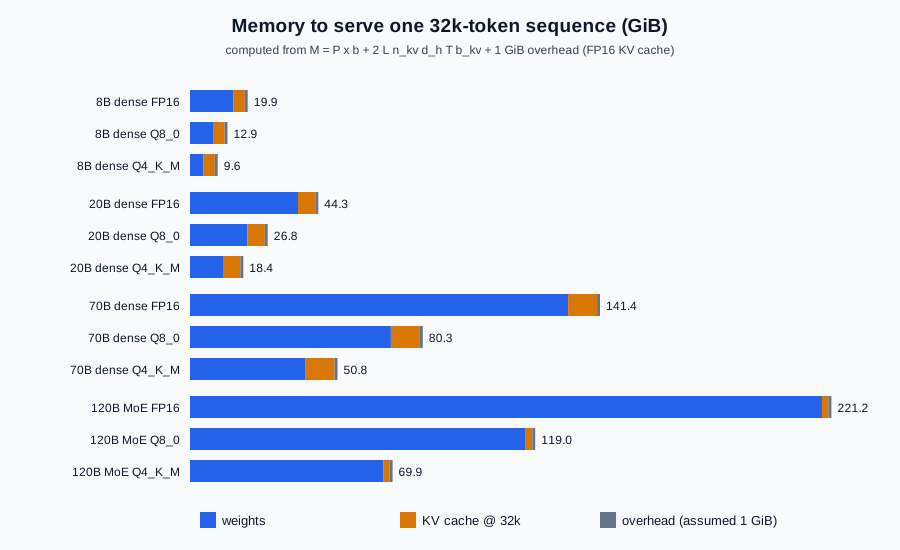
Worked table
The table below is computed from the three formulas above — not quoted from vendors — with these stated architecture assumptions (FP16 KV cache, one sequence, 1 GiB overhead):
-
8B dense: 32 layers, 8 KV heads, head dimension 128 (the shape of Llama-3.1-8B).
-
20B dense: 48 layers, 8 KV heads, head dimension 128 (an illustrative mid-size model).
-
70B dense: 80 layers, 8 KV heads, head dimension 128 (the shape of Llama-3.1-70B).
-
120B MoE: 117B total parameters, 36 layers, 8 KV heads, head dimension 64 (an illustrative 120B-class MoE, with every layer assumed to use full attention).
Values are GiB.
| Model | Precision | Weights | KV @ 8k | KV @ 32k | Total @ 8k | Total @ 32k |
|---|---|---|---|---|---|---|
8B dense |
FP16 |
14.9 |
1.0 |
4.0 |
16.9 |
19.9 |
8B dense |
Q8_0 |
7.9 |
1.0 |
4.0 |
9.9 |
12.9 |
8B dense |
Q4_K_M |
4.6 |
1.0 |
4.0 |
6.6 |
9.6 |
20B dense |
FP16 |
37.3 |
1.5 |
6.0 |
39.8 |
44.3 |
20B dense |
Q8_0 |
19.8 |
1.5 |
6.0 |
22.3 |
26.8 |
20B dense |
Q4_K_M |
11.4 |
1.5 |
6.0 |
13.9 |
18.4 |
70B dense |
FP16 |
130.4 |
2.5 |
10.0 |
133.9 |
141.4 |
70B dense |
Q8_0 |
69.3 |
2.5 |
10.0 |
72.8 |
80.3 |
70B dense |
Q4_K_M |
39.8 |
2.5 |
10.0 |
43.3 |
50.8 |
120B MoE |
FP16 |
217.9 |
0.6 |
2.2 |
219.5 |
221.2 |
120B MoE |
Q8_0 |
115.8 |
0.6 |
2.2 |
117.3 |
119.0 |
120B MoE |
Q4_K_M |
66.6 |
0.6 |
2.2 |
68.2 |
69.9 |
Reading it: DocsAssistant's llama3.1:8b at Q4_K_M fits a 16 GB laptop with room for a 32k context; a 70B at
Q4_K_M needs a 48 GB-class GPU or a large unified-memory Mac; the 120B MoE needs roughly the memory of a 70B at
Q8_0 but decodes like a ~5B model. Published MoE checkpoints are often shipped already quantized (gpt-oss ships
MXFP4 expert weights), so check the actual file size on the model card before relying on the FP16 row.
Apple unified memory vs. discrete VRAM
On a discrete GPU, the budget is the card’s VRAM. System RAM does not add to it: whatever does not fit is
offloaded to the CPU, and those layers run at system-RAM bandwidth. llama.cpp’s -ngl (--n-gpu-layers, auto
by default) and Ollama’s automatic split make that trade explicit; ollama ps shows the result.
On Apple silicon, CPU and GPU share one pool of unified memory, so a 64 GB or 128 GB Mac can hold models that would need a multi-GPU server on discrete cards. macOS keeps part of that memory for the system, so the usable budget is less than the installed amount. Two consequences follow:
-
Capacity is generous, bandwidth is the limit: large MoE models are the sweet spot, because they need memory but read only their active experts per token.
-
The Metal backend of llama.cpp (used by Ollama and LM Studio) and Apple’s own MLX framework (MLX-LM) are the engines that use it well.
# offload all layers to the Apple GPU (Metal) and allocate a 32k context
llama serve -hf ggml-org/Qwen3.5-0.8B-GGUF -ngl all -c 32768
See the llama.cpp server README for
-ngl and -c, and mlx-lm for MLX.
CPU-only expectations
Running on the CPU alone works — llama.cpp is built for it, with AVX / AVX2 / AVX-512 / AMX on x86 and NEON on ARM — but set expectations qualitatively:
-
Prefill is slow: it is compute-bound, and CPUs have far less compute than GPUs, so long prompts (RAG context, agent histories, coding assistants) take a long time before the first token.
-
Decode is bandwidth-bound: dual-channel desktop RAM has a fraction of GPU memory bandwidth, so apply the bandwidth formula above with your RAM’s bandwidth to see the ceiling.
-
Small, quantized models work best: a 1B-8B model at
Q4_K_Mfor classification, extraction or short answers is realistic; an interactive coding assistant on a 70B is not.
Measure rather than guess, using the script on Inference Optimization. For a CPU-only server, force it explicitly:
llama serve -hf ggml-org/Qwen3.5-0.8B-GGUF -ngl 0 -c 8192See the llama.cpp README for the supported CPU instruction sets.
A Python sizing calculator
The calculator below implements the three formulas and prints the worked table above (its output was checked
against the table on 2026-09-28). Change MODELS to your model’s config.json values — num_hidden_layers,
num_key_value_heads and head_dim (or hidden_size / num_attention_heads) — and BYTES_PER_WEIGHT to the
format you download.
"""Estimate the memory needed to serve an LLM locally (weights + KV cache + overhead)."""
from dataclasses import dataclass

GIB = 1024**3

# Average bytes per weight; Q8_0 and Q4_K_M use the bits/weight llama.cpp's quantize README reports.
BYTES_PER_WEIGHT = {"FP16": 2.0, "Q8_0": 8.5 / 8, "Q4_K_M": 4.89 / 8}


@dataclass
class Model:
    name: str
    params_b: float    # total parameters, in billions (MoE: all experts)
    layers: int        # L
    kv_heads: int      # n_kv (grouped-query attention)
    head_dim: int      # d_h


def weights_gib(m: Model, precision: str) -> float:
    return m.params_b * 1e9 * BYTES_PER_WEIGHT[precision] / GIB


def kv_cache_gib(m: Model, context: int, batch: int = 1, kv_bytes: float = 2.0) -> float:
    # 2 (K and V) * L * n_kv * d_h * T * b * B
    return 2 * m.layers * m.kv_heads * m.head_dim * context * kv_bytes * batch / GIB


def total_gib(m: Model, precision: str, context: int, overhead_gib: float = 1.0) -> float:
    return weights_gib(m, precision) + kv_cache_gib(m, context) + overhead_gib


MODELS = [
    Model("8B dense", 8.0, 32, 8, 128),
    Model("20B dense", 20.0, 48, 8, 128),
    Model("70B dense", 70.0, 80, 8, 128),
    Model("120B MoE", 117.0, 36, 8, 64),
]

if __name__ == "__main__":
    print(f"{'model':<10} {'precision':<7} {'weights':>8} {'KV 8k':>6} {'KV 32k':>6} {'total 8k':>9} {'total 32k':>9}")
    for m in MODELS:
        for p in BYTES_PER_WEIGHT:
            print(f"{m.name:<10} {p:<7} {weights_gib(m, p):8.1f} {kv_cache_gib(m, 8192):6.1f} "
                  f"{kv_cache_gib(m, 32768):6.1f} {total_gib(m, p, 8192):9.1f} {total_gib(m, p, 32768):9.1f}")
For a concurrency plan, call kv_cache_gib(m, context, batch=4) for four parallel slots, and pass
kv_bytes=1.0 to model a q8_0 KV cache. The bits-per-weight constants come from the
llama.cpp quantize README; the KV
formula is the standard one that paged KV-cache managers such as vLLM’s allocate against (see the
PagedAttention paper).
References
-
llama.cpp — quantize README (bits per weight and model sizes per quantization type)
-
llama.cpp — server README (
-ngl,-c,-np,--cpu-moe,--cache-type-k) -
llama.cpp — README (backends and CPU support)
-
Ollama — FAQ (
OLLAMA_NUM_PARALLEL,OLLAMA_KV_CACHE_TYPE) -
openai/gpt-oss (total and active parameters)
-
Kwon et al. — Efficient Memory Management for Large Language Model Serving with PagedAttention