Canvas Visual Page Building
|
This content was generated with the assistance of AI and should be verified against the official Drupal documentation before being relied on in production. This sub-section’s Drupal bibliography lists the reference material consulted while preparing these pages. |
Drupal Canvas is a contributed module that turns page building into a visual, component-based task. A site builder or editor opens a page, drags components from a library onto it, fills in their properties in a form and sees the result immediately, without writing a template. The components come from three kinds of source: Single Directory Components shipped by a theme or module, Drupal blocks, and code components, small pieces of JavaScript and CSS that are written in the browser or in a local project and rendered with Preact through its React compatibility layer. Canvas was developed under the working name Experience Builder and was renamed before its first stable release. It is the default editor of Drupal CMS 2 and is the part of the Drupal ecosystem that is changing fastest, so this page names the Canvas version each fact belongs to.
Facts on this page were checked against the Canvas documentation at project.pages.drupalcode.org/canvas, the project page
and the release notes on 2026-10-30. At that date the newest stable release is Canvas 1.12.0 (published on 2026-09-25),
which works with Drupal ^11.3; Canvas 1.0.0 was the first stable release (December 2025). The rest of this sub-section
is written against Drupal 11.4.x, Drush 13/14 and PHP 8.3 or later, and the examples use the fictitious Meridian Museum
introduced in the sub-section index: the meridian theme with its card, hero,
exhibition-teaser and opening-hours components, the meridian_collection module with its "On display now" block, and
a Canvas code component named ticket-banner.
What Canvas is and why it exists
Drupal’s strength is structured content: typed fields, entity references, revisions and fine-grained access control. Its traditional weakness is page composition by non-developers. Core’s Layout Builder places blocks and fields in sections and is still part of core, but it works on one entity at a time or on a view mode, has no concept of a reusable, typed component with its own properties, and edits blocks through modal forms that are not a visual preview. Contributed alternatives (Paragraphs, Bootstrap-style layout modules, Panels) each solve one part of the problem and tie content to their own data model.
Canvas is the Drupal community’s answer. It aims at four things, in the words of the project page: reusable components across channels, large-scale content management that keeps Drupal’s structured data and access control, support for both coupled and headless contexts from one CMS, and large-scale design changes such as rebranding. In practice it provides:
-
A visual editor embedded in the Drupal front end, with a component library, a layer tree, a properties form, a live preview and responsive viewports.
-
A component model. Every building block is a component with typed props (text, rich text, link, image, number, list, entity reference, …) and optional slots that hold other components. The editor generates the editing form from the component’s metadata.
-
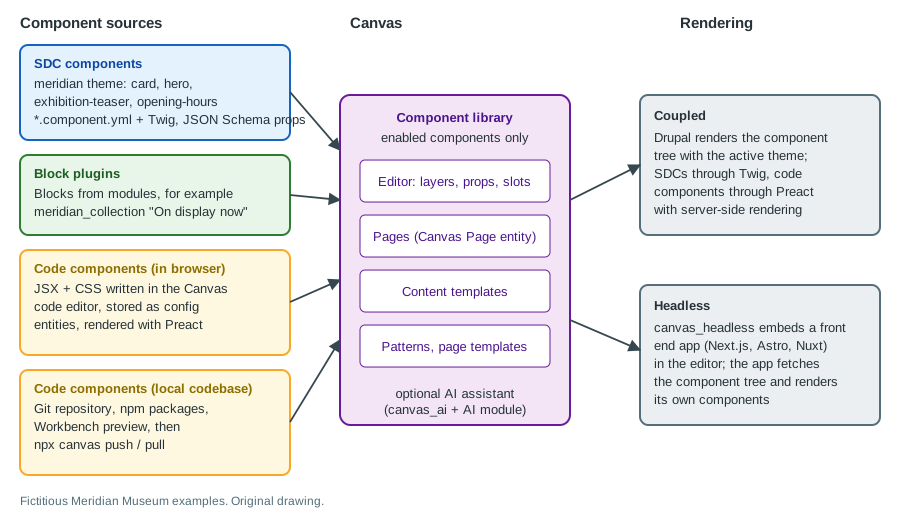
Several component sources feeding one library: SDCs from the theme or modules, blocks, and code components, so a designer can write a new component in JSX without a Drupal release cycle.
-
Page-level constructs: Canvas pages, content templates that lay out an entity’s view mode with components, and, from Canvas 1.11, page templates that control the full page layout independently of the theme.
-
Developer tooling: a command-line interface, a local preview application called Workbench, an optional AI assistant and a headless SDK.
Who uses it: editors compose pages; site builders curate the library and build content templates; themers provide SDCs; front-end developers write code components; back-end developers add block plugins and integrations.
Versions and requirements
| Fact | Detail |
|---|---|
Core requirement |
Drupal |
Latest stable |
1.12.0, 2026-09-25 (Brand Kit for site colours and fonts, SVG image support in components, revised page-editing navigation). 1.11.0 followed on 2026-09-08 and 1.10.0 before it. |
Install |
|
Support |
Stable releases are covered by the Drupal security advisory policy. Releases 1.1.1, 1.4.2, 1.5.2, 1.6.1 and 1.7.1 were security updates, so a site must stay on the newest stable release rather than pinning an old one. |
Drupal CMS |
Drupal CMS 2.x enables Canvas as the default editor (see Drupal CMS and site templates). |
Submodules |
|
A short history helps when reading tutorials. Canvas
1.0 (December 2025) was the first stable release and defined the editing model; 1.3 let code components import npm
packages and added the push and pull CLI commands and TypeScript; 1.8 enabled translation support without a feature
flag and added the Entity Reference prop type for code components; 1.10 added editable patterns and the configurable
AI settings form; 1.11 added page templates and the Document prop type; 1.12 added Brand Kit and SVG support.
Because the module moves quickly, review the release notes before every minor update, and re-export configuration after updating (see Deployment and configuration).
Installing Canvas
On a Drupal CMS 2.x site Canvas is already installed. On a core project, add and enable it with Composer and Drush:
composer require 'drupal/canvas:^1.12'
vendor/bin/drush pm:install canvas
vendor/bin/drush cache:rebuild
vendor/bin/drush canvas:doctor
canvas:doctor is a health-check command that arrived with Canvas 1.9; run it after installing and after updating to
find configuration that Canvas cannot render. Canvas needs Drupal 11.3 or later, so a Drupal 10 site must first be
upgraded (see Upgrading Drupal 10 to 11); Drupal 10 itself reaches end of
life on 2026-12-09.
A DDEV configuration that runs the examples on this page locally, including Node.js for the Canvas CLI:
name: meridian
type: drupal11
docroot: web
php_version: "8.3"
database:
  type: mariadb
  version: "10.11"
nodejs_version: "24"
webserver_type: nginx-fpm
Source: Drupal Canvas documentation
How Canvas fits into a site
Canvas does not replace Drupal’s content model; it adds a layer on top of it.
-
Canvas pages. The module provides its own content entity, the Canvas page, for free-form pages such as the museum’s "Visit" and "About" pages. A page has structured fields (title, meta description, meta image) and a component tree: an ordered, nested list of component instances with their prop values.
-
Content templates. For an existing entity type (currently nodes), a content template describes how components render a given bundle in a given view mode: for example, the
exhibitioncontent type in itsfullview mode becomes aherobound to the title and hero image, followed by the body in a text component. The editor then edits the template once, and every exhibition shares it. Template values come from the entity (bound fields) or are static. -
Page templates (1.11). Editable, theme-independent templates that give control over the full page layout, including what surrounds the main content. They replace global regions (shared headers and footers rendered into a theme region), which older Canvas versions and older tutorials still describe; the 1.11 change records list the replacement, while the Workbench documentation still describes region files. Check which one your Canvas version uses.
-
Patterns. Reusable, named groups of components; editable since 1.10.
-
Components as configuration. Each component the library offers has a component configuration entity, so exports from
drush config:exportinclude the library’s state and code components.
The component tree is stored as data, not as HTML. Drupal renders it at request time (coupled) or hands it to another application as structured data (headless), so one tree can feed several channels.
The editing interface
An editor with the right permissions sees an Edit link on a Canvas page (and on entities that have a content template). Choosing it opens the editor in the page itself. The exact layout changes between minor releases (1.12 revised the page-editing navigation and added a close button for the right panel), so this section describes the concepts rather than pixel positions.
-
Page navigator. The page title at the top opens a navigator to switch pages or create a new draft page.
-
Library. A panel listing the available components in groups: SDCs by the
groupnamed in their metadata, blocks, code components, and patterns. Hovering an SDC shows a preview with default prop values; dragging it onto the canvas places it. Components that are disabled or invalid do not appear (see Why an SDC is missing from the library). -
Layers. A tree of the component instances on the page. Slots show as drop targets once a component with slots is placed.
-
Preview. The live page, rendered by the site’s theme (or, headless, by the front-end app) with viewport buttons for mobile, tablet, desktop and large desktop. A theme can change the default widths with a
{theme}.canvas.ymlfile; see Theme settings. -
Properties form. The right panel generates a form from the selected component’s prop definitions: text input, rich text editor, link field, media-library image selector, checkbox, number, dropdown, date picker or repeatable list. Required props are marked and a page cannot be saved while they are empty.
-
Component Data pane. Code components have an additional pane for props, slots and, below the preview, the data returned by fetches.
-
Code editor. Opens the in-browser editor for a code component (see The in-browser code editor).
-
AI icon. Appears when the optional
canvas_aimodule is enabled (see AI-assisted page generation).
Drafts, publishing and revisions
Edits are saved as a draft that does not change the live site until the page is published; Canvas 1.5 added autosave conflict detection so that two editors working on the same page notice each other. Each publish creates a new revision, which can be viewed and restored if revisions are enabled for the entity type. Canvas has no approval workflow of its own: instead, permissions can allow some users to create and edit without being able to publish. For a draft → review → published process, combine Canvas pages with Content Moderation (see Content moderation, workflows and revisions).
Permissions and security of the editor
-
Editing, creating and publishing Canvas pages, editing content templates and page templates, administering the component library and (for headless) administering frontends are separate permissions granted per role at
/admin/people/permissions(see Users, roles and permissions). Site-wide layout editing (shared regions or page templates) should be limited to site builders because a change affects every page. -
Code components run JavaScript in every visitor’s browser. Whoever may create or edit code components can therefore inject script into the public site; grant that permission only to trusted developers, exactly as you would grant "use the Full HTML text format".
-
FormattedText, the helper that renders rich-text props, outputs trusted HTML. It is safe only when the text format that produced the value is configured correctly (see Text formats and CKEditor 5); never feed it unfiltered user input. -
PageAccessControlHandlerwas hardened in 1.0.4 (SA-CONTRIB-2026-006), and 1.1.1 hardened image downloads in the AI integration (SA-CONTRIB-2026-017). Stay on the newest stable release.
Component sources
SDC components from themes and modules
Any Single Directory Component whose metadata meets Canvas’s rules becomes available in the library. SDCs are part of core’s render system (see Single Directory Components); Canvas only reads their metadata. The relevant rules:
-
The component folder contains
<name>.component.ymland<name>.twig;.css,.jsand assets are optional. Libraries the component needs go underlibraryOverrides. -
propsdeclares a JSON Schema for each input and is required for Canvas. Canvas turns each prop into an editor widget. -
groupin the metadata decides which library group lists the component. -
A required prop must also have
examples, and only the first example is used as the default value when the editor adds the component.examplesis always an array. -
Slots are declared under
slots; the slottitleis the placeholder text in the editor.
# themes/custom/meridian/components/exhibition-teaser/exhibition-teaser.component.yml
$schema: https://git.drupalcode.org/project/drupal/-/raw/HEAD/core/assets/schemas/v1/metadata.schema.json
name: Exhibition teaser
status: stable
group: Meridian
description: A card announcing an exhibition with dates and a link.
props:
  type: object
  required:
    - title
    - link
  properties:
    title:
      type: string
      title: Title
      examples: ['Deep Sea Light']
    kicker:
      type: string
      title: Kicker
      examples: ['Now open']
    dates:
      type: string
      title: Dates
      examples: ['12 March - 30 June']
    image:
      title: Hero image
      $ref: json-schema-definitions://canvas.module/image
      type: object
      examples:
        - src: '/themes/custom/meridian/images/teaser.jpg'
          alt: 'Glowing jellyfish in a dark tank'
          width: 800
          height: 600
    link:
      type: string
      format: uri-reference
      title: Link
      examples: ['/exhibitions/deep-sea-light']
    layout:
      type: string
      title: Layout
      enum: ['stacked', 'side-by-side']
      meta:enum:
        stacked: Stacked
        side-by-side: Side by side
      examples: ['stacked']
slots:
  actions:
    title: Actions
    description: Optional buttons shown under the dates.
{# themes/custom/meridian/components/exhibition-teaser/exhibition-teaser.twig #}
<article class="exhibition-teaser exhibition-teaser--{{ layout|default('stacked') }}">
{% if image %}
{% include 'canvas:image' with image only %}
{% endif %}
<div class="exhibition-teaser__body">
{% if kicker %}<p class="exhibition-teaser__kicker">{{ kicker }}</p>{% endif %}
<h3 class="exhibition-teaser__title"><a href="{{ link }}">{{ title }}</a></h3>
<p class="exhibition-teaser__dates">{{ dates }}</p>
{% if actions %}<div class="exhibition-teaser__actions">{{ actions }}</div>{% endif %}
</div>
</article>Source: Canvas: SDC components
The metadata $schema URL above is the path used by current core; tutorials from 2024 and early 2025 (and Modernizing
Drupal 10 Theme Development, which targets Drupal 10.1) show an older path under core/modules/sdc, because SDC was an
experimental module before it entered core in Drupal 10.3. It is a hint for IDEs and does not affect rendering.
Prop types
| Editor widget | Schema | Notes |
|---|---|---|
Text input |
|
Plain text. |
Rich text editor |
|
HTML in a block context. Render it with |
Multi-line text |
|
Line breaks are not rendered automatically; apply |
Checkbox |
|
|
Number |
|
|
Link |
|
|
Image |
|
Only the file URL is required; |
Video and document |
|
Documents (PDF, Word, Excel, PowerPoint) arrived in 1.11. |
Dropdown |
|
Enum values cannot contain dots. |
Date |
|
|
List |
|
|
Entity reference |
|
Must be optional and takes no |
Canvas validates values from the type and format (for example format: email) and honours minLength, maxLength,
minItems, maxItems, minimum and maximum.
Why an SDC is missing from the library
If a component does not show up:
-
Open
/admin/appearance/componentand confirm the SDC is listed and marked enabled. -
If it is not enabled, open
/admin/appearance/component/status, which explains why a component is disabled or invalid. Typical causes are a prop type with no matching widget or a required prop withoutexamples. -
Rebuild caches (
drush cache:rebuild) after adding the component folder.
Source: Canvas: SDC troubleshooting
Blocks
Blocks defined by block plugins can also be placed from the library, so a site’s existing blocks, such as the museum’s
"On display now" block from meridian_collection (see Blocks and block
layout), are usable inside a Canvas page without being rewritten. A block’s configuration form is shown in the
properties panel. The AI documentation refers to "SDC, Block or JS" components as the three types the assistant can
place. Because a block carries its own cache metadata, it keeps working with Drupal’s render cache.
Code components
A code component is a component defined by JavaScript and CSS instead of Twig. It includes its own code, can be managed in the Canvas UI, can be reused, and can pull in page data, custom input and third-party API responses. It is rendered with Preact, using its React compatibility layer, so ordinary React syntax and most React libraries work; the bundle is small and the component is server-rendered (and hydrated in the browser) when Drupal renders the page. For the React concepts used below see React components and props.
A minimal code component is a JSX function that receives camelCased props and slots. Its metadata lives in a
component.yml file next to it:
# src/components/ticket-banner/component.yml
name: Ticket banner
machineName: ticket-banner
status: true
required:
  - heading
props:
  heading:
    title: Heading
    type: string
    examples:
      - Book your visit
  ticketUrl:
    title: Ticket link
    type: string
    format: uri-reference
    examples:
      - /visit/tickets
  tone:
    title: Tone
    type: string
    enum: ['info', 'urgent']
    meta:enum:
      info: Information
      urgent: Urgent
    examples:
      - info
slots:
  details:
    title: Details
    description: Opening hours or a short note shown under the heading.
    examples:
      - '<p>Open daily 9:00 - 17:00</p>'
// src/components/ticket-banner/index.jsx
import { cn } from 'drupal-canvas';
const TicketBanner = ({ heading, ticketUrl, tone, details }) => {
return (
<section
className={cn(
'rounded-lg p-6 text-white',
tone === 'urgent' ? 'bg-red-800' : 'bg-blue-900',
)}
>
<h2 className="text-2xl font-bold">{heading}</h2>
<div className="mt-2">{details}</div>
<a
className="mt-4 inline-block rounded bg-white px-4 py-2 font-semibold text-blue-900 underline"
href={ticketUrl}
>
Buy tickets
</a>
</section>
);
};
export default TicketBanner;Points that surprise newcomers:
-
Names. Prop and slot names in
component.ymlare written as in the metadata but are passed to the component as camelCase; a slot calleddetailsarrives as thedetailsprop containing rendered children. When a component’smachineNameis still the scaffold placeholderhello-worldorstatusisfalse, the component cannot be placed. -
Prop schemas are limited to the types the in-browser editor supports (text, formatted text, link, image, video, document, boolean, integer, number, text and integer lists, and content entity reference).
-
Styling. Tailwind CSS 4 is available to every code component by default; the global CSS includes
@import "tailwindcss", and@plugin "@tailwindcss/typography";enablesproseclasses for rich text. Component-specific styles go in the component’s CSS file, global styles in the global CSS file. CSS side-effect imports in JavaScript do not work. -
Accessibility. A code component is plain HTML in the end: use headings in order, give images alt text and test contrast (see Web accessibility). Canvas does not check any of it for you.
Built-in packages and helpers
Code components can import the following without installing anything:
| Package | Purpose |
|---|---|
|
Base utilities and components: |
Tailwind 4, |
Utility CSS, |
|
Conditional class names ( |
|
Data fetching with caching and revalidation. |
|
A JSON:API client and a query-string builder. |
Other code components are imported with @/components/<name> (components must sit directly in componentDir, with no
grouping folders). Third-party npm packages can be installed locally and are bundled by npx canvas push; they must be
able to run in a browser. The in-browser editor cannot add packages, local modules or static assets.
Fetching data
Code components fetch their own data. useSWR is the general tool; it accepts any URL and fetcher, and whatever it
returns is shown in the Data Fetch pane under the preview. The museum’s "next exhibitions" strip reads exhibitions from
core’s JSON:API (which must be enabled; see JSON:API):
// src/components/upcoming-exhibitions/index.jsx
import useSWR from 'swr';

const fetcher = (url) =>
  fetch(url, { headers: { Accept: 'application/vnd.api+json' } }).then((response) => response.json());

const UpcomingExhibitions = ({ heading, limit }) => {
  const { data, error } = useSWR(
    `/jsonapi/node/exhibition?filter[status]=1&sort=-created&page[limit]=${limit ?? 3}`,
    fetcher,
  );

  if (error) {
    return <p role="alert">Exhibitions are not available right now.</p>;
  }
  if (!data) {
    return <p>Loading exhibitions...</p>;
  }

  return (
    <section>
      <h2 className="text-2xl font-bold">{heading}</h2>
      <ul className="mt-4 grid gap-4 md:grid-cols-3">
        {data.data.map((item) => (
          <li key={item.id} className="rounded border p-4">
            {item.attributes.title}
          </li>
        ))}
      </ul>
    </section>
  );
};

export default UpcomingExhibitions;
Source: Canvas: Data fetching
Notes from the official data-fetching page:
-
usePageContext()returns the page title, breadcrumbs andmainEntity;useSiteContext()returns branding, the base URL, theme assets and the language code. Both returnnullwhen nothing is supplied and must be called at the top level of a component.mainEntityisnullon routes such as the front page, the login page and the code editor, so check it before reading fields. It also carries the requested and rendered languages and the list of translations, which is enough to build a language switcher. -
getPageData()andgetSiteData()still work in Drupal and Workbench but throw in headless front ends;npx canvas pullmigrates safe calls to the hooks.new JsonApiClient()is deprecated in favour ofuseJsonApiClient()(in components) or the Headless SDK’sgetClient()(in server code).useJsonApiClient()returnsnullwhen no provider exists, in which case passnullas the SWR key so that no request runs. -
SWR fetchers do not run during server rendering. To prefetch on the server, call
getClient()from the Headless SDK and pass the result toSWRConfigasfallbackunder the same key. -
Keep backend URLs, globals and credentials out of components so they stay portable; never embed an access token in a code component, because every visitor receives the code. Anonymous JSON:API access respects normal Drupal permissions, so fetch only data the anonymous role may view (see Authentication and OAuth).
-
getNodePathreturns a node’s alias or/node/[nid];sortMenuandsortLinksetMenuorder menu items obtained from the JSON:API Menu Items module or from core’s linkset endpoint (/system/menu/main/linkset).
The in-browser code editor
The Canvas code editor edits a code component directly in the browser: the component’s JSX, its CSS and its props and slots (the Component Data pane), with a live preview. It is the right tool for a change confined to one component and works with every import that is already available, including components and packages pushed earlier from a local codebase. It cannot add new source files, static assets, SVGs or npm packages; for those, use a local codebase.
Saving makes the component available in the library as a code component. Because component code is stored as configuration, it moves between environments with configuration management like any other config.
A local codebase and the Canvas CLI
For real projects, keep components in Git and work with your own editor, tests and dependencies. The tooling is distributed as npm packages:
| Package | Purpose |
|---|---|
|
Scaffolds a new local codebase (also scaffolds headless front ends). |
|
The |
|
A local preview and development app, comparable to Storybook. |
|
ESLint configuration that validates code components. |
npx @drupal-canvas/create@latest
cd meridian-canvas
npx canvas scaffold --name ticket-banner   # new component with a placeholder component.yml
npx @drupal-canvas/workbench@latest        # local preview, no Drupal needed
npx canvas pull                            # download components, global CSS, pages, templates and regions
npx canvas push                            # build assets, run Tailwind, upload components and global CSS
canvas pull downloads code components, global CSS, pages, content templates and global regions by default;
canvas push builds the browser assets, runs the Tailwind CSS build, uploads component configuration, syncs global CSS and
pushes pages, content templates and regions. The flags --no-pages, --no-content-templates and --no-regions exclude
a content type for one run, and --include-brand-kit (or CANVAS_INCLUDE_BRAND_KIT=true) adds Brand Kit fonts. The
project’s connection to the Drupal site is configured through the scaffolded environment file and the Drupal-side
credentials the CLI README describes; keep those values in the environment, never in committed files, and use a
dedicated Drupal account with only the permissions needed to push components.
The optional canvas.config.json at the project root changes the defaults:
{
  "componentDir": "src/components",
  "pagesDir": "pages",
  "contentTemplatesDir": "content-templates",
  "regionsDir": "regions",
  "layoutPath": "src/layout.jsx",
  "aliasBaseDir": "src",
  "outputDir": "dist",
  "globalCssPath": "src/global.css",
  "sync": { "pages": true, "contentTemplates": true, "regions": true }
}
componentDir must be inside aliasBaseDir; layoutPath is used only by Workbench previews; outputDir only by the CLI.
The @/ alias points to aliasBaseDir, so import { formatDate } from '@/lib/formatDate' shares code between components.
Static files are imported relative to the component (./) or through @/; .svg imports give a URL, and ?react gives a
React component (SVGR; TypeScript projects need the vite-plugin-svgr/client types). Font packages such as @fontsource
cannot be imported; use Brand Kit fonts instead.
Source: Canvas: Local codebase
Workbench, mocks, pages and templates
Workbench scans the configured directories and previews each component in an isolated frame. It discovers component.yml
or *.component.yml files with index.(ts|tsx|js|jsx) or <name>.(ts|tsx|js|jsx) sources, optional index.css or
<name>.css, mocks.json or *.mocks.json, and the JSON files in pages/, content-templates/ and regions/. The
Default preview uses the first example of each prop; each entry of a mock file adds a tab, which is how a designer
previews a long exhibition title or an empty field.
A content template is a JSON file named {entityType}.{bundle}.{viewMode}.json with the keys label, entityType
(currently only node), bundle, viewMode and elements. Element props can be static or bound to entity fields. The
simplest way to obtain correct field expressions is to build the template in the Canvas UI and then run npx canvas pull.
{
  "label": "Exhibition, full",
  "entityType": "node",
  "bundle": "exhibition",
  "viewMode": "full",
  "elements": {
    "banner": {
      "type": "ticket-banner",
      "props": { "heading": "Book your visit", "ticketUrl": "/visit/tickets", "tone": "info" },
      "slots": { "details": ["note"] }
    },
    "note": {
      "type": "text",
      "props": { "text": "Included with general admission." }
    }
  }
}For a page, pages/home.json has a title and an elements tree in the same format, and the filename becomes the page
slug. Because the representation is normalised before rendering, fields written by hand can differ from what Drupal
stores; treat pulled files as the reference.
Brand Kit
Brand Kit (1.12) manages the site’s fonts, and colours, in Canvas. With the CLI, canvas pull --include-brand-kit writes
canvas.brand-kit.json and downloads font files into fonts/, and canvas push --include-brand-kit replaces the remote
font set with the configured one. A family comes from a provider (google, bunny, fontshare, fontsource, npm, adobe) or from
a local src file.
{
  "fonts": {
    "defaults": { "weights": [400, 700], "styles": ["normal"], "subsets": ["latin"] },
    "families": [
      { "name": "Source Sans 3", "provider": "google" },
      { "name": "Meridian Display", "src": "fonts/meridian-display.woff2", "weights": [700] }
    ]
  }
}
Source: Canvas: Brand Kit
The exact schema is documented in the @drupal-canvas/cli README; the example above shows the shape only. Check the font
licences before uploading a local file and prefer self-hosted fonts if privacy rules forbid third-party font requests.
Theme settings and extension points
Theme settings
A theme can describe the editor’s responsive viewports in {theme}.canvas.yml. The defaults are mobile 468, tablet 1024,
desktop 1920 and large_desktop 2560; an invalid or missing value falls back to the default.
# themes/custom/meridian/meridian.canvas.yml
viewports:
  mobile: 375
  desktop: 1440
Source: Canvas: Theme settings
Import maps
Canvas injects an import map so code components can resolve bare module names. A module or theme can extend it with
hook_canvas_importmap_alter() to add a local JavaScript package, register a Tailwind plugin or replace a bundled package.
In a theme the procedural form below is the documented one; it can also be written as an OOP hook (themes support them from
Drupal 11.3, see Hooks and OOP hooks). Canvas plans to move to core’s
hook_importmap_alter once that exists, so expect this hook to be deprecated.
<?php

/**
 * Implements hook_canvas_importmap_alter().
 */
function meridian_canvas_importmap_alter(array &$import_maps): void {
  $path = \Drupal::service('extension.path.resolver')->getPath('theme', 'meridian');
  // A small local helper package that code components can import by name.
  $import_maps['imports']['meridian-dates'] = \base_path() . $path . '/js/meridian-dates.js';
}
Source: Canvas: Import maps
Canvas also documents an API for customising component forms with hooks (Customizing forms).
AI-assisted page generation
Enabling the canvas_ai submodule adds an assistant (the sparkle icon) to the editor. It needs the AI module and a
provider that supports function calling; configure the provider for all Chat operation types at
/admin/config/ai/settings (see AI module and providers).
How it works: an orchestrator reads the prompt and routes it to an agent.
-
Verbs such as "Place" or "Use" go to the page builder agent, which uses the enabled components as context to build the page.
-
Ambiguous verbs such as "Create" or "Add" may go to the component agent, which writes a new code component.
-
A template builder agent builds full pages, adds content to the content region, and adds a header, navigation or footer only when the prompt asks for one.
Tips from the documentation: start a prompt with a phrase such as "Using the page builder tool" to force reuse of an
existing SDC; use "top", "bottom", "above" and "below" to position content; select a parent and say "into" or "inside" to
nest; break a large request into several focused prompts. Describe each component, props and slots in the component guidance
form (stored in canvas_ai.component_description.settings, so it can be exported), because there are no built-in slot
restrictions.
Known issues: results are non-deterministic, the model can invent an enum value or component ID, and vague prompts give wrong results. Costs: context can exceed 30,000 tokens when many components are enabled, so disable unused components and shorten descriptions under the Canvas AI component description settings. Canvas 1.10 added an Agents & Tools settings form and 1.11 added a Tools dropdown. API keys for the provider belong in the Key module backed by environment variables, never in exported configuration. Review everything the assistant generates before publishing, and remember that generated code components run in visitors' browsers.
Source: Canvas: AI assistant
Coupled and headless use
Coupled is the default: Drupal stores the component tree and renders it with the active theme. SDCs render through Twig, and code components render with Preact on the server and hydrate in the browser. The editor previews the same HTML that visitors receive.
Headless keeps Drupal as the editing and content back end but renders the site in a separate application. The Headless SDK
and framework adapters are published as @drupal-canvas/headless (framework-agnostic) and
@drupal-canvas/headless-next, -astro, -nuxt, -tanstack-start and -angular. On the Drupal side enable the
canvas_headless submodule; it installs Simple OAuth (6.1.0 or later), Consumers and Custom Elements, and adds two restricted
permissions, "Administer Canvas Headless frontends" and "Access Canvas Headless preview". The SDK exposes fetchPage()
(route context, document head and the component tree) and fetchEntity() (one entity in a content template view mode), plus a
component metadata endpoint that publishes the app’s components so editors can place them.
vendor/bin/drush pm:install canvas_headless
npx @drupal-canvas/create@latest meridian-kiosk \
  --template nextjs \
  --site-url https://meridian.ddev.site \
  --agents none
cd meridian-kiosk
npm run dev
curl -i http://localhost:3000/api/canvas/components   # 401 with "missing_assertion" is the expected answer
Then, in the Canvas editor, open Headless frontends in the icon rail, choose Add frontend and enter the dev server URL
without trailing slash, query or fragment. A row shows Ready, Setup needed or Unreachable, and Canvas previews through the
first app in the list. The app holds no client secret; the preview uses single-use assertions signed by the Simple OAuth key
pair and a read-only preview scope, which is why unpublished content can appear in the editor’s frame. Prerequisites are
Node.js 22.19+ or 24.5+ (Node 23 is not supported), a Chromium-based browser for local HTTP development (Firefox needs HTTPS and
Safari needs CHIPS support), and a Simple OAuth keypair configured at /admin/config/people/simple_oauth. Note that
getPageData() and getSiteData() throw in headless front ends.
Source: Canvas: Headless setup
Use coupled Canvas when editors need the closest preview and the team already themes in Drupal. Use headless when the site must be rendered by an existing JavaScript application, or when several channels share components; the museum’s gallery kiosk (see Decoupled Drupal with Next.js) can keep using JSON:API alone, and adopt Canvas Headless only if editors need to compose its pages visually. CORS, caching and CDN configuration for a decoupled front end are described in CORS and in the Next.js section of this site (Next.js). Related: GraphQL and JSON:API for data-only access.
Translations
Canvas supports symmetric translation: every language shares the same component tree and only the translatable inputs of each
component differ. The steps are: enable Language, Content Translation (for Canvas pages) and Configuration Translation (for
templates and regions), add languages at /admin/config/regional/language, mark the Page entity and its Components field as
translatable at /admin/config/regional/content-language, and install a translation interface. Core’s Content Translation
cannot translate a component tree by itself, so use Translation Management Tool (TMGMT) with its Content Entity Source and Config
Entity Source plugins, or the experimental Canvas Translate project, which adds translation inside the editor. Translation
support has been available without a feature flag since 1.8, and the editor has a language switcher with a tick for translated
languages. See also Multilingual Drupal.
Source: Canvas: Translations
Deployment and configuration
Canvas stores its component library, code components, content templates, patterns and component guidance as configuration, and
Canvas pages as content. Export configuration after every change to the library and import it on the next environment (see
Configuration management and
Deployment and CI/CD). Typical pipeline for a code component: develop and test in
Workbench, commit the source, run npx canvas push against a development site, export configuration there, review the diff and
deploy it with drush deploy. Pushing straight to production bypasses review and should be avoided. After a Canvas update run
drush updatedb, drush config:export and drush canvas:doctor; component trees are validated more strictly in 1.11
(parent cycles rejected, lowercase UUIDs required, invalid slot placement no longer fatal), which can surface old data issues.
Migrating from Layout Builder or Paragraphs
There is no automatic migration. Drupal CMS 2.0 shipped without a tool that converts Layout Builder sections or Paragraphs into Canvas component trees, so a site that adopts Canvas should plan content migration itself (see Migrate API) or run both side by side: Layout Builder stays in core and Canvas pages and content templates can coexist on different content types. This is worth re-checking against the Drupal CMS and Canvas release notes before a project starts, as the roadmap may add one. Compare options in Layout Builder and in the Paragraphs row of Field types and entity references.
Common errors and pitfalls
-
Component missing in the library. Check
/admin/appearance/componentand/admin/appearance/component/status(see Why an SDC is missing from the library). A code component withstatus: falseor the placeholdermachineNameis also hidden. -
Required prop without
examples. The SDC is rejected as invalid, or the editor cannot add it. -
Link prop rejects
/about.format: urirequires an absolute URL; useuri-referencefor relative paths. -
Enum with dots. Enum values cannot contain a dot.
-
mainEntityisnullon the front page and in the code editor; guard every access. -
Import fails in the browser editor. Only built-in packages and already pushed local code are importable there; install other packages locally and push.
-
Import fails after push. Helper modules must live outside
componentDir(for examplesrc/lib); nested grouping folders insidecomponentDirare not scanned. -
Rendering differs between Workbench and Drupal. Workbench applies the layout and global CSS you configure; confirm
layoutPathandglobalCssPath, and test on the real site before release. -
AI invents component IDs. Review generated trees; fix invalid enum values by hand.
-
Headless preview shows "Setup needed". The URL answers but is not a Canvas adapter; check the adapter package and the
/api/canvas/componentsroute. -
Proxies and CDNs. From Drupal 11.3 the HTMX headers
HX-RequestandHX-Redirectmust pass through proxies (see AJAX and htmx); a CDN that strips them can break editor interactions. -
Outdated advice. Tutorials that still call the module Experience Builder or describe it as experimental describe a pre-1.0 product.
Current limitations
-
Canvas is a contributed module that evolves in minor releases, with breaking changes recorded in change records (1.11 replaced global regions with page templates and tightened component-tree validation). Pin the version in
composer.jsonand read the release notes before updating. -
It requires Drupal 11.3 or later; it is not available for Drupal 10.
-
Content templates currently support nodes only.
-
Code component props are limited to a fixed set of types, packages must run in a browser, and the in-browser editor cannot add files or dependencies.
-
Slots have no built-in restriction on which components they accept, although the slot description text suggests one.
-
There is no approval workflow of its own and no automatic conversion from Layout Builder or Paragraphs.
-
AI features are optional, non-deterministic and cost tokens.
-
Search API integration for components and code components exists from 1.0.2, but search over component-rendered content depends on how the site indexes pages (see Search and Search API).
-
The official documentation is still growing; some pages (for example the SDC props page) point to test modules rather than complete references.
Older books and tutorials
None of the five reference books covers Canvas. Drupal 10 Masterclass (2023) treats Layout Builder as the only visual
builder in core and presents later initiatives as future work; since 2025 Drupal CMS ships Canvas, and Layout Builder remains
available but is no longer the only choice. Modernizing Drupal 10 Theme Development (2023) describes Single Directory
Components as an experimental module with sdc/... library names; SDC has been part of core since 10.3 and is the component
format Canvas consumes. Drupal 10 Development Cookbook (2023) covers Layout Builder only and its Drupal 10 baseline is
end of life on 2026-12-09, while Canvas needs Drupal 11.3 or later. For Canvas the online documentation and release notes are
the only sources.