Quartz on SQL Server
|
This content was generated with the assistance of AI and should be verified against the official documentation before being relied on in production. The reference material consulted while preparing these pages is listed in the section bibliography. |
SQL Server is one of the databases that Quartz supports through its official JDBC job store, so a Spring Boot service that already runs on SQL Server
(or on Azure SQL) can keep its triggers, job definitions and cluster state in the same engine as its business data. Of the databases covered in this
section it is the one whose DDL script needs the most attention: the script that ships in the Quartz jar is written for a client tool such as sqlcmd, not
for a JDBC driver, and a Quartz scheduler that uses the default delegate fails at startup because of the way it locks rows. This page walks through
the setup in the order in which a reader hits the problems, and every statement about what works or fails was produced by running it.
The generic concepts (what the QRTZ_ tables are, initialize-schema, @QuartzDataSource, pool sizing) are on
Job Stores & Persistence; the reference database page is
Quartz on PostgreSQL, and clustering in general is on
Clustering.
It was written against Quartz 2.5.2, Spring Boot 4.1.1, Spring Framework 7.0.9 and Java 21 and verified on 5 October 2026 with the Microsoft JDBC driver
mssql-jdbc 13.4.0.jre11 (the version Spring Boot 4.1.1 manages), Flyway 12.4.0, Liquibase 5.0.3, Testcontainers 2.0.5 and the Docker image
mcr.microsoft.com/mssql/server:2022-latest, which reported SQL Server 2022 (RTM-CU27) 16.0.4295.3, Developer edition, on Linux, with the server collation
SQL_Latin1_General_CP1_CI_AS. That image is published for amd64 only; the tests ran on an Apple Silicon (arm64) machine, where Docker Desktop runs it
under Rosetta emulation, and every result below comes from that emulated server. Azure SQL Database was not available and was not tested: everything on this page
about Azure is taken from Microsoft’s documentation and is labelled that way. Spring Boot 3.5.16 manages the same Quartz 2.5.2, so everything about Quartz is identical there;
only the package of @QuartzDataSource and SchedulerFactoryBeanCustomizer differs (org.springframework.boot.autoconfigure.quartz instead of
org.springframework.boot.quartz.autoconfigure), Spring Framework is 6.2.19 and the Boot-managed mssql-jdbc, Flyway and Liquibase versions are older.
Status and dependencies
Status: official. The JDBC job store, the MSSQLDelegate and the DDL script are part of Quartz itself and are maintained with it. Nothing about the job store is community
code, unlike the MongoDB and Redis stores.
<dependencies>
    <dependency>
        <groupId>org.springframework.boot</groupId>
        <artifactId>spring-boot-starter-quartz</artifactId>
    </dependency>
    <dependency>
        <groupId>org.springframework.boot</groupId>
        <artifactId>spring-boot-starter-jdbc</artifactId>
    </dependency>
    <dependency>
        <groupId>com.microsoft.sqlserver</groupId>
        <artifactId>mssql-jdbc</artifactId>
        <scope>runtime</scope>
    </dependency>
    <dependency>
        <groupId>org.springframework.boot</groupId>
        <artifactId>spring-boot-starter-flyway</artifactId>
    </dependency>
    <dependency>
        <groupId>org.flywaydb</groupId>
        <artifactId>flyway-sqlserver</artifactId>
    </dependency>

    <dependency>
        <groupId>org.springframework.boot</groupId>
        <artifactId>spring-boot-starter-test</artifactId>
        <scope>test</scope>
    </dependency>
    <dependency>
        <groupId>org.springframework.boot</groupId>
        <artifactId>spring-boot-testcontainers</artifactId>
        <scope>test</scope>
    </dependency>
    <dependency>
        <groupId>org.testcontainers</groupId>
        <artifactId>testcontainers-mssqlserver</artifactId>
        <version>2.0.5</version>
        <scope>test</scope>
    </dependency>
    <dependency>
        <groupId>org.testcontainers</groupId>
        <artifactId>testcontainers-junit-jupiter</artifactId>
        <version>2.0.5</version>
        <scope>test</scope>
    </dependency>
</dependencies>
Source: Spring Boot: Quartz Scheduler and
Testcontainers: Microsoft SQL Server Module. All versions except the two Testcontainers
ones are managed by Spring Boot 4.1.1 (checked with mvn dependency:tree: mssql-jdbc 13.4.0.jre11, flyway-sqlserver 12.4.0, Quartz 2.5.2). Maven Central lists mssql-jdbc
13.6.0.jre11 as newer; the page was verified with the Boot-managed 13.4.0.
Three details of that list matter. Flyway ships database support as separate modules since version 10, so the project that was tested has flyway-sqlserver next to the Boot starter. The Testcontainers 2.x artifact is testcontainers-mssqlserver and the container class is
org.testcontainers.mssqlserver.MSSQLServerContainer (the 1.x class org.testcontainers.containers.MSSQLServerContainer still exists as a deprecated alias). And the
Testcontainers module needs an explicit acceptLicense() call, because the image is covered by Microsoft’s end-user licence agreement.
The delegate: MSSQLDelegate
A driver delegate is the class that issues the SQL for one database. The default, StdJDBCDelegate, uses plain JDBC and works on several databases (MySQL and MariaDB
among them); engines with a different dialect or a different way of handling binary columns need their own subclass. org.quartz.impl.jdbcjobstore.MSSQLDelegate is the one for SQL Server.
Reading its 2.5.2 source, it extends StdJDBCDelegate and overrides exactly three methods:
| Method | Why |
|---|---|
|
Reads a serialised object from a |
|
The same for |
|
Rewrites the "next trigger to acquire" query as |
Source: MSSQLDelegate.java (v2.5.2) and MSSQLDelegate Javadoc.
The delegate does not change the lock statement. That belongs to the job store: JobStoreSupport.initialize looks at the configured driverDelegateClass, and if its name contains
the text MSSQLDelegate and selectWithLockSQL is not set, it installs an SQL Server specific one (see Locking: selectWithLockSQL, UPDLOCK and ROWLOCK). The consequence is that the delegate is mandatory, not an
optimisation. Spring Boot does not set a delegate (the property is not part of spring.quartz.*), so the effective delegate is StdJDBCDelegate unless you name another one in
spring.quartz.properties. The measured behaviour on SQL Server 2022 with the schema in place:
| Delegate | Result | Evidence |
|---|---|---|
none set (Boot’s default, |
fails at startup |
|
|
works |
the Bookshelf jobs fire, a dynamically scheduled job with a serialised |
The failure message is worth recognising, because it does not mention Quartz, a delegate or SQL Server’s locking: it comes from the default lock statement, SELECT * FROM QRTZ_LOCKS WHERE … FOR UPDATE,
which is valid on PostgreSQL, MySQL and Oracle but not in T-SQL, where FOR UPDATE exists only for cursors.
The DDL script and the edits it needs
Quartz ships org/quartz/impl/jdbcjobstore/tables_sqlServer.sql in the quartz-2.5.2.jar. Reading it from the jar gives this anatomy:
| Part | What it is |
|---|---|
Comment header |
Lines starting with |
|
A placeholder: the database the script is meant to run in. It fails if executed as is (below). |
47 lines containing only |
The batch separator of |
|
The script drops every foreign key and every |
|
|
Primary keys, foreign keys, indexes |
Clustered primary keys on each table, |
Source: tables_sqlServer.sql (v2.5.2) and the Spring Boot reference, which says that "the SQL Server, Azure SQL and Sybase scripts may need editing" without saying how (Spring Boot: Quartz Scheduler).
The two edits
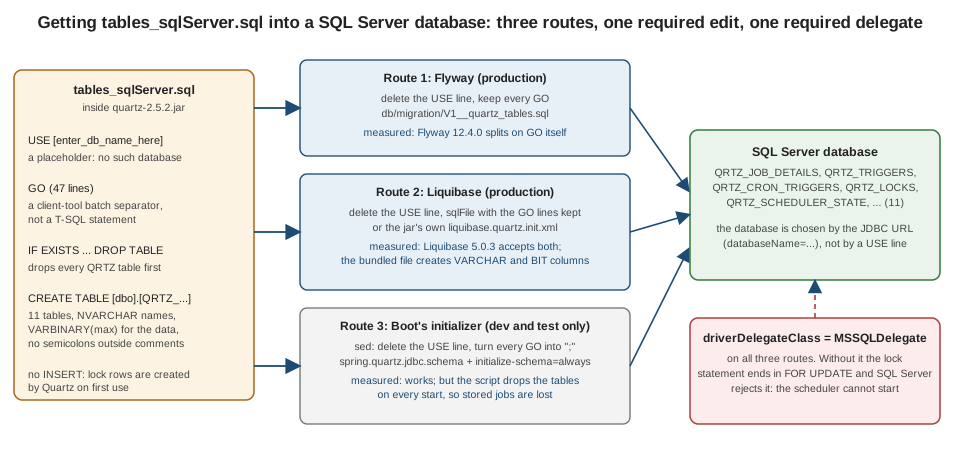
Two lines of the script are a problem for anything that is not a SQL client: the USE line and the GO lines. What each one does depends on who runs the script, and these are the measured results on the SQL Server 2022 container.
Every row used a fresh database, MSSQLDelegate and spring.quartz.jdbc.initialize-schema=always where Boot ran the script.
| Who runs it, and how | Result | What happened |
|---|---|---|
Boot’s initializer, the script untouched, |
fails |
|
Boot’s initializer, the script untouched, |
fails later, and misleadingly |
Boot silently skips the failing statements, so no table is created. The scheduler bean then fails with |
Boot’s initializer, only the |
fails |
|
Flyway 12.4.0, the script untouched |
fails |
|
Flyway 12.4.0, the |
works |
Flyway understands |
Liquibase 5.0.3 |
works |
13 tables: the 11 |
Liquibase 5.0.3 |
works |
the same 13 tables |
Liquibase 5.0.3 |
works |
the same 13 tables |
Boot’s initializer, the |
works |
see the |
Two conclusions follow. The USE line must always go, because the database is selected by the connection (see JDBC URL options and, for Azure SQL, Azure SQL Database), not by the script. And
the GO lines are a problem only for tools that do not know them: Flyway and Liquibase each cope on their own, while Spring Boot’s own script runner needs them converted. The reason for
that last point is a property of the file: it contains no semicolons outside comments, so Spring’s ScriptUtils, which splits on ; and falls back to newlines when it finds none, would cut each multi-line CREATE TABLE
into fragments, and a GO line would still be sent as if it were a statement.
# extract the script from the jar, delete the USE line and turn every GO line into a semicolon
unzip -p quartz-2.5.2.jar org/quartz/impl/jdbcjobstore/tables_sqlServer.sql \
  | sed -e '/^USE \[/d' -e 's/^GO$/;/' > src/main/resources/quartz/tables_sqlServer_boot.sql
Source: Spring Boot: Quartz Scheduler. The command reproduces, byte for byte, the file used in the tests (checked with diff).
spring:
  quartz:
    job-store-type: jdbc
    jdbc:
      initialize-schema: always          # the script DROPS the tables first: never in production
      continue-on-error: false           # surface script errors instead of hiding them
      schema: classpath:quartz/tables_sqlServer_boot.sql
    properties:
      org.quartz.jobStore.driverDelegateClass: org.quartz.impl.jdbcjobstore.MSSQLDelegate
Source: Spring Boot: Quartz Scheduler. Property names and defaults were read from QuartzProperties and the initializer in the 4.1.1 sources.
The script’s first block drops all QRTZ_ tables, so with initialize-schema=always every restart deletes every stored job and trigger (the same pitfall as on every database,
measured on PostgreSQL and described on Job Stores & Persistence). Setting continue-on-error: false is the
sensible choice when Boot runs this script, because the default of true produced the misleading failure in the table above. (On Spring Boot 3.5.16 the property does not exist and the initializer hard-codes true, so run the script with Flyway or Liquibase there.)
NVARCHAR in 2.5.2, and the fix that is not released
The columns are NVARCHAR in the Quartz 2.5.2 jar: reading tables_sqlServer.sql from the released jar shows [NVARCHAR] for every name and flag column. That change is commit b9e92c33 of 29 November 2025
("Change SQL Server DDL to use NVARCHAR instead of VARCHAR for perf reasons, see #1422"), and it is included in 2.5.2. Some summaries describe it as a coming 2.5.3 change; that is not accurate, and no 2.5.3 release exists as of this writing
(the latest release is 2.5.2).
What is not released yet is a separate fix in the delegate. Pull request #1515, "Bind MSSQL scheduler-state instance name as NVARCHAR", was merged into the Quartz main branch on 28 September 2026. It overrides
MSSQLDelegate.updateSchedulerState so that the instance name is bound with PreparedStatement.setNString, and it fixes issue #1514, in which a user reported frequent deadlocks on QRTZ_SCHEDULER_STATE in a cluster:
the cluster check-in update binds INSTANCE_NAME with setString, which the reporter says SQL Server then treats as VARCHAR, so the clustered primary key on the NVARCHAR(200) column cannot be used. The override is for SQL Server only.
What was and was not verified here, stated precisely:
-
The 2.5.2 jar contains the
NVARCHARDDL and anMSSQLDelegatewithout theupdateSchedulerStateoverride (read from the sources). -
The 2.5.2 behaviour in a short cluster test is described in Clustering: no deadlock was observed. The deadlock in #1514 is reported, not reproduced here.
-
The
mssql-jdbcdocumentation says that the driver sendsStringparameters as Unicode by default (sendStringParametersAsUnicode=true), which would make the reported mismatch depend on the connection settings. That is documentation-derived; the report does not say which settings the reporter used, and this page does not claim to know. -
Until a release that contains #1515 exists, a deployment that sees check-in deadlocks has two options: check the driver settings, and move to the release when it is published. Do not copy the fix into a custom delegate unless you can test it under load.
Source: Quartz pull request #1515, Quartz issue #1514, commit b9e92c33 and Microsoft: Setting the connection properties. The state of the pull request was read from the GitHub API on 5 October 2026.
Flyway: the production route
In production the schema should be created by a migration tool, run once and recorded, not by the application’s initializer. With Flyway the edit is one line: delete the USE line, keep everything else, and name the file by Flyway’s convention.
unzip -p quartz-2.5.2.jar org/quartz/impl/jdbcjobstore/tables_sqlServer.sql \
  | sed -e '/^USE \[/d' > src/main/resources/db/migration/V1__quartz_tables.sql
Source: Spring Boot: Database Initialization. The result was run through Flyway 12.4.0 on SQL Server 2022 and created the 11 tables.
spring:
  datasource:
    url: jdbc:sqlserver://${DB_HOST}:1433;databaseName=bookshelf;encrypt=true
    username: ${DB_USER}
    password: ${DB_PASSWORD}
  flyway:
    enabled: true
    locations: classpath:db/migration
  quartz:
    job-store-type: jdbc
    jdbc:
      initialize-schema: never           # Flyway owns the schema
    properties:
      org.quartz.jobStore.driverDelegateClass: org.quartz.impl.jdbcjobstore.MSSQLDelegate
Source: Spring Boot: Quartz Scheduler. The keys were run with these values, with the container’s URL and credentials in place of the placeholders.
Boot orders the scheduler after the database initializers, so on startup Flyway runs before Quartz reads its tables; that was visible in the tests, where Quartz started on a database that Flyway had just migrated. Three remarks on the migration itself:
-
The script still contains the
DROP TABLEguards. They are harmless in a migration that runs once on an empty database, and Flyway never re-runs a versioned migration. If you prefer, delete the guard block; it is plainIF EXISTSstatements before the firstCREATE TABLE. -
Do not edit the migration after it was applied. A later change to the Quartz tables, for example when upgrading Quartz, is a new
V2__migration. -
A Flyway run needs the right to create tables, a Quartz run does not (see A dedicated database, schema and users).
Liquibase: the other production route
Liquibase handles the same script through sqlFile. All three variants in the measured table worked; the shortest one keeps the GO lines and sets no attribute at all.
<?xml version="1.0" encoding="UTF-8"?>
<databaseChangeLog xmlns="http://www.liquibase.org/xml/ns/dbchangelog"
                   xmlns:xsi="http://www.w3.org/2001/XMLSchema-instance"
                   xsi:schemaLocation="http://www.liquibase.org/xml/ns/dbchangelog https://www.liquibase.org/xml/ns/dbchangelog/dbchangelog-latest.xsd">
  <changeSet id="quartz-tables" author="bookshelf">
    <sqlFile path="quartz/tables_sqlServer.sql" relativeToChangelogFile="true"
             splitStatements="true" endDelimiter="\nGO"/>
  </changeSet>
</databaseChangeLog>
Source: Liquibase: SQL changelogs and Spring Boot: Database Initialization. The quartz/tables_sqlServer.sql file is the jar script with the USE line removed.
This exact changelog, with the file next to it, created the 11 tables on SQL Server 2022 under Liquibase 5.0.3 and the application then ran the Bookshelf jobs.
Liquibase’s documentation says that statements are split on ; or on a go at the end of a line by default, and the measurement agrees: the variant without splitStatements and endDelimiter, and the variant with the GO lines replaced by semicolons, both worked too.
splitStatements="true" with endDelimiter="\nGO" is shown above because it states the intent, and it behaves the same. Setting spring.liquibase.change-log is only needed when the changelog is not at Boot’s default classpath:/db/changelog/db.changelog-master.yaml; with the XML name above, set it to classpath:db/changelog/db.changelog-master.xml.
The general Liquibase workflow is on Liquibase: Getting Started, and the choice between the tools is on Choosing a Migration Tool.
The bundled liquibase.quartz.init.xml
The Quartz 2.5.2 jar also contains org/quartz/impl/jdbcjobstore/liquibase.quartz.init.xml, a database-neutral Liquibase changelog (a single changeset, quartz-init, that creates the same 11 tables and uses a blob_type property that is BYTEA on PostgreSQL and BLOB elsewhere).
It can be included from a master changelog with <include file="org/quartz/impl/jdbcjobstore/liquibase.quartz.init.xml"/>, and it was run on SQL Server 2022 with MSSQLDelegate: it works, the Bookshelf jobs fired and the stored state survived a restart. It produces a different schema from the T-SQL script, though.
Querying the catalogue afterwards showed VARCHAR(200) for INSTANCE_NAME (not NVARCHAR), BIT for IS_DURABLE and VARBINARY(max) for JOB_DATA. It also has no [dbo] hard-coding. Choose it when you want one changelog for every database in the fleet, and the T-SQL script when you want the schema that Quartz’s SQL Server maintainers
describe and test; do not mix them in one environment.
Source: liquibase.quartz.init.xml (v2.5.2). The column types are from INFORMATION_SCHEMA.COLUMNS of a database created by this file.
A dedicated database, schema and users
Like the PostgreSQL page, this one recommends that Quartz’s tables are kept apart from the business tables and that the runtime user can do less than the migration user. On SQL Server there are two levels of separation: a database of its own (selected by databaseName in the URL, no script change) or a schema of its own in the application’s database.
The second needs one more edit, because the script hard-codes [dbo].
-- run in the application's database
CREATE LOGIN quartz_migrator WITH PASSWORD = '<migrator-password>';
CREATE LOGIN quartz_app      WITH PASSWORD = '<runtime-password>';

CREATE USER quartz_migrator FOR LOGIN quartz_migrator;
ALTER ROLE db_owner ADD MEMBER quartz_migrator;       -- creates tables, schema and grants

CREATE USER quartz_app FOR LOGIN quartz_app WITH DEFAULT_SCHEMA = quartz;
Source: Microsoft: CREATE USER. The passwords in the test were random values generated per run; use secrets from your vault.
printf 'CREATE SCHEMA [quartz]\nGO\n' > V1__quartz_schema.sql
unzip -p quartz-2.5.2.jar org/quartz/impl/jdbcjobstore/tables_sqlServer.sql \
  | sed -e '/^USE \[/d' -e 's/\[dbo\]/[quartz]/g' > V2__quartz_tables.sql
printf 'GRANT SELECT, INSERT, UPDATE, DELETE ON SCHEMA::[quartz] TO [quartz_app]\nGO\n' > V3__grant_runtime_user.sql
Source: Microsoft: GRANT Schema Permissions. The three files ran under Flyway 12.4.0; the replacement touches only the bracketed [dbo], so the dbo.sysobjects catalogue view in the drop guards stays as it is.
spring:
  datasource:
    url: jdbc:sqlserver://${DB_HOST}:1433;databaseName=bookshelf;encrypt=true
    username: quartz_app
    password: ${QUARTZ_APP_PASSWORD}
  flyway:
    user: quartz_migrator
    password: ${QUARTZ_MIGRATOR_PASSWORD}
  quartz:
    job-store-type: jdbc
    jdbc:
      initialize-schema: never
    properties:
      org.quartz.jobStore.driverDelegateClass: org.quartz.impl.jdbcjobstore.MSSQLDelegate
      org.quartz.jobStore.tablePrefix: quartz.QRTZ_
Source: Quartz: Configure JDBC JobStoreTX and
Spring Boot: Database Initialization. The same keys, with the test’s values, ran with the Bookshelf jobs on SQL Server 2022: the jobs fired and survived a restart with a runtime user that holds only SELECT, INSERT, UPDATE, DELETE on the schema.
tablePrefix is the property that carries the schema: Quartz substitutes it into every statement, so quartz.QRTZ_ produces quartz.QRTZ_JOB_DETAILS and so on, and with the user’s DEFAULT_SCHEMA set to quartz as well, the unqualified names used by monitoring queries resolve too.
The runtime user needs no DDL rights. It does need INSERT as well as SELECT, UPDATE and DELETE, because the QRTZ_LOCKS rows are inserted by Quartz itself on first use.
Locking: selectWithLockSQL, UPDLOCK and ROWLOCK
Quartz uses a lock table, QRTZ_LOCKS, with two rows per scheduler name (TRIGGER_ACCESS and STATE_ACCESS), and takes a lock by selecting one of them with a row lock inside a transaction. The statement is selectWithLockSQL, and the code default in StdRowLockSemaphore is
SELECT * FROM {0}LOCKS WHERE SCHED_NAME = {1} AND LOCK_NAME = ? FOR UPDATE, in which {0} is the table prefix and {1} the scheduler name. SQL Server rejects FOR UPDATE, which is the failure of the delegate table above. Instead, JobStoreSupport.initialize contains this block (at line 671 of the 2.5.2 source):
if (getDriverDelegateClass() != null && getDriverDelegateClass().contains(MSSQLDelegate.class.getSimpleName())) {
    if (getSelectWithLockSQL() == null) {
        String msSqlDflt = "SELECT * FROM {0}LOCKS WITH (UPDLOCK,ROWLOCK) WHERE " + COL_SCHEDULER_NAME + " = {1} AND LOCK_NAME = ?";
        getLog().info("Detected usage of MSSQLDelegate class - defaulting 'selectWithLockSQL' to '{}'.", msSqlDflt);
        setSelectWithLockSQL(msSqlDflt);
    }
}
Source: JobStoreSupport.java (v2.5.2). The code is quoted from the 2.5.2 sources.
The block runs only when the job store uses database locks, which Spring Boot’s LocalDataSourceJobStore (a JobStoreCMT subclass) always does, and it also runs when the scheduler is not clustered. The INFO message is logged by the job store class, so its logger is org.springframework.scheduling.quartz.LocalDataSourceJobStore, not a org.quartz logger. Setting
logging.level.org.springframework.scheduling.quartz=INFO produced exactly this line in the test log:
Detected usage of MSSQLDelegate class - defaulting 'selectWithLockSQL' to 'SELECT * FROM {0}LOCKS WITH (UPDLOCK,ROWLOCK) WHERE SCHED_NAME = {1} AND LOCK_NAME = ?'.
Using db table-based data access locking (synchronization).
Source: Quartz: Configure Clustering with JDBC-JobStore. The two lines are copied from the log of the test run.
The hints do what their names say: UPDLOCK takes an update lock that other UPDLOCK readers wait for (and keeps it until the end of the transaction), and ROWLOCK asks for a row-level lock rather than a page or table lock, so that the two lock rows do not block each other at a coarser level.
Because the default is installed only when selectWithLockSQL is null, a property of your own wins. The hints were observed with two plain JDBC connections against the real server:
| Step | Result |
|---|---|
Connection A runs the Quartz default |
|
Connection A runs the |
|
Connection B runs the same statement and reads the row (lock timeout 1000 ms) |
|
A commits, B runs the statement again |
B gets the row |
Source: Microsoft: Table hints (Transact-SQL). The test read the first row of each result, because the driver returns from executeQuery before the row lock is requested.
It is worth knowing when writing such a probe yourself: a statement that is blocked on the lock reports it when the result is read, not when it is sent.
By default, trigger acquisition takes no row lock: JobStoreSupport.acquireNextTriggers claims each trigger with a conditional UPDATE from WAITING to ACQUIRED, and a node whose UPDATE affects 0 rows simply moves on.
The WITH (UPDLOCK,ROWLOCK) statement on the TRIGGER_ACCESS row is taken afterwards, in triggersFired and triggeredJobComplete, and that is where a second node waits.
Acquisition runs inside the same lock only when org.quartz.jobStore.acquireTriggersWithinLock=true or org.quartz.scheduler.batchTriggerAcquisitionMaxCount is greater than 1.
Source: JobStoreSupport.java (v2.5.2), methods acquireNextTriggers, triggersFired and triggeredJobComplete. The statements are drawn from the source; the behaviour of the lock row itself is the measurement above. The same shape, with FOR UPDATE in place of the hints, is drawn on Quartz on PostgreSQL and Quartz on Oracle.
Isolation level and READ_COMMITTED_SNAPSHOT
Quartz does not change the isolation level unless asked. The job store has two switches, org.quartz.jobStore.txIsolationLevelSerializable (default false, in JobStoreSupport) and txIsolationLevelReadCommitted (default false, in JobStoreCMT), and with Spring’s data source neither is set, so connections run at the driver’s default.
On SQL Server that is READ COMMITTED: a new session on the test server reported level 2 (READ COMMITTED) and a plain JDBC connection reported Connection.TRANSACTION_READ_COMMITTED. The correctness of Quartz’s locking does not depend on a higher level, because the lock row serialises the critical sections.
The SERIALIZABLE switch exists for engines where that is not true, and on SQL Server it only adds range locks and deadlock risk.
One database option does interact with it: READ_COMMITTED_SNAPSHOT. With it on, plain reads under READ COMMITTED use row versions instead of shared locks, while a statement with UPDLOCK still takes update locks. It is off by default on SQL Server and on by default in Azure SQL Database (Microsoft’s documentation). A two-node cluster test on a database with
the option turned on (is_read_committed_snapshot_on was 1) ran for 10 seconds with no duplicate execution and both nodes firing jobs, the same result as with it off. Microsoft’s guide also warns that UPDLOCK under SNAPSHOT isolation (not READ_COMMITTED_SNAPSHOT) can raise error 3960, an update conflict; Quartz does not use snapshot isolation, so avoid setting it as the default isolation of the Quartz connections.
Source: Microsoft: Transaction locking and row versioning guide and JobStoreSupport.java (v2.5.2). For Spring-managed transactions and isolation levels in general, see Transaction Isolation & Locking.
Azure SQL Database
Azure SQL Database was not available for the tests, so this section is derived from Microsoft’s documentation and from what the script and the delegate do; it is not a measurement.
-
No
USE. In Azure SQL Database theUSEstatement can name only the current database; any other database gives error 40508, and "to change databases, you must directly connect to the database" (Microsoft’sUSEpage). The script’sUSE [enter_db_name_here]line must be deleted exactly as above, and the database is part of the connection (databaseName=…). -
Same T-SQL, same delegate. The script is plain T-SQL (
NVARCHAR,VARBINARY(max),IF EXISTSguards,sysobjects) andMSSQLDelegateis used unchanged; the Spring Boot reference lists Azure SQL together with SQL Server as needing the script edited, and the edits are the same. -
READ_COMMITTED_SNAPSHOTis on by default, so the two notes in the previous section apply from the first day: the update lock is still taken, and nothing needs to change. -
Connections need
encrypt=true(the driver’s default, see JDBC URL options) and a certificate the JVM trusts; do not usetrustServerCertificate=trueagainst Azure.
Source: Microsoft: USE (Transact-SQL) and Microsoft: T-SQL differences between SQL Server and Azure SQL Database. These statements were not run against Azure SQL.
JDBC URL options
Version 10.2 of the Microsoft driver changed the default of encrypt to true (and since 11.2 the property is a string that also accepts strict), and trustServerCertificate defaults to false. A server with a valid certificate therefore needs no option at all. The Docker image generates a self-signed certificate,
so a container needs either encrypt=false or trustServerCertificate=true.
# production: a server with a certificate the JVM trusts
spring.datasource.url=jdbc:sqlserver://${DB_HOST}:1433;databaseName=bookshelf;encrypt=true

# Testcontainers only: a self-signed certificate (this is what MSSQLServerContainer#getJdbcUrl() returns)
# jdbc:sqlserver://localhost:54430;encrypt=false
# alternatively: jdbc:sqlserver://localhost:54430;databaseName=bookshelf;encrypt=false;trustServerCertificate=true
Source: Microsoft: Setting the connection properties. The container URL is the one Testcontainers 2.0.5 returned in the run; the port is random per run.
Do not copy trustServerCertificate=true or encrypt=false into a deployed configuration; they turn off the server authentication that TLS exists for. Two tips in the script’s old header were not needed in any test: SelectMethod=cursor was advice for the SQL Server 2000 driver, and the jTDS driver it mentions is not the Microsoft driver used here.
sendStringParametersAsUnicode is true by default; the Microsoft documentation recommends false for VARCHAR columns, but Quartz’s columns are NVARCHAR, so leave it alone unless you have measured a reason (it is also the one setting connected to #1514 above).
Clustering
Clustering needs nothing SQL Server specific beyond what is on this page: the MSSQLDelegate, the lock statement above, and the usual properties on every node.
spring:
  quartz:
    scheduler-name: BookshelfScheduler
    properties:
      org.quartz.scheduler.instanceId: AUTO
      org.quartz.jobStore.isClustered: "true"
      org.quartz.jobStore.clusterCheckinInterval: "7500"     # the default; every node must see the same settings
      org.quartz.jobStore.driverDelegateClass: org.quartz.impl.jdbcjobstore.MSSQLDelegate
Source: Quartz: Configure Clustering with JDBC-JobStore. The clustered runs below used these keys with a 2000 ms check-in interval.
The measurements, all on the SQL Server 2022 container with the edited script, MSSQLDelegate, a three-thread pool per node and the fast Bookshelf schedule (cache refresh every second, reminders every two seconds):
| Run | Duplicates | Result |
|---|---|---|
Two nodes, 10 s (earlier verification run) |
none |
work shared between both nodes |
Three nodes in one JVM, 15 s, check-in 2000 ms |
none |
|
Two nodes, 10 s, |
none |
|
Three nodes, 20 s, check-in 300 ms (a probe for #1514) |
none |
25 and 13 executions, no log line containing |
The same with |
none |
25 and 12 executions, no |
Source: Quartz: Configure Clustering with JDBC-JobStore. "Duplicates" means a scheduled fire time executed more than once; the check is made by recording every execution in the test.
Three honest limits apply. The nodes were schedulers in one JVM, so the test shows the locking, not network behaviour. The runs lasted seconds, so they say nothing about the low-probability deadlocks of #1514, which was reported under production load and is not reproduced here: absence of a deadlock in a 20-second probe is not evidence that the report is wrong.
And the uneven split of executions between nodes (31 executions of one job: 8, 6 and 17) is normal; Quartz does not load-balance, the first node to take the lock fires. How fail-over and requestsRecovery work is measured on PostgreSQL and described on Clustering.
A Testcontainers test for the Bookshelf jobs
The test starts SQL Server, lets Flyway create the tables from V1__quartz_tables.sql (the script with the USE line removed), starts the Bookshelf service with the JDBC job store and checks that the jobs were stored and that one of them fires.
The Bookshelf schedule is the one from Getting Started with Spring Boot, with a property that makes the cache refresh fire every second.
package bookshelf;

import static org.assertj.core.api.Assertions.assertThat;
import static org.awaitility.Awaitility.await;

import java.time.Duration;

import org.junit.jupiter.api.Test;
import org.quartz.Scheduler;
import org.springframework.beans.factory.annotation.Autowired;
import org.springframework.boot.test.context.SpringBootTest;
import org.springframework.boot.testcontainers.service.connection.ServiceConnection;
import org.springframework.jdbc.core.JdbcTemplate;
import org.testcontainers.junit.jupiter.Container;
import org.testcontainers.junit.jupiter.Testcontainers;
import org.testcontainers.mssqlserver.MSSQLServerContainer;

@SpringBootTest(properties = {
        "bookshelf.fast=true",
        "spring.quartz.job-store-type=jdbc",
        "spring.quartz.jdbc.initialize-schema=never",
        "spring.quartz.scheduler-name=BookshelfScheduler",
        "spring.quartz.properties.org.quartz.scheduler.instanceId=AUTO",
        "spring.quartz.properties.org.quartz.jobStore.isClustered=true",
        "spring.quartz.properties.org.quartz.jobStore.driverDelegateClass=org.quartz.impl.jdbcjobstore.MSSQLDelegate"
})
@Testcontainers
class BookshelfSqlServerIT {

    @Container
    @ServiceConnection
    static final MSSQLServerContainer SQL_SERVER =
            new MSSQLServerContainer("mcr.microsoft.com/mssql/server:2022-latest").acceptLicense();

    @Autowired
    Scheduler scheduler;

    @Autowired
    JdbcTemplate jdbc;

    @Test
    void bookshelfJobsAreStoredInSqlServerAndFire() throws Exception {
        assertThat(scheduler.getMetaData().getJobStoreClass().getSimpleName()).isEqualTo("LocalDataSourceJobStore");
        assertThat(scheduler.getMetaData().isJobStoreSupportsPersistence()).isTrue();
        assertThat(scheduler.getMetaData().isJobStoreClustered()).isTrue();

        // Flyway created the tables, Boot's initializer did nothing, the Bookshelf beans were stored on startup
        assertThat(jdbc.queryForObject("SELECT COUNT(*) FROM QRTZ_JOB_DETAILS", Integer.class)).isEqualTo(4);
        assertThat(jdbc.queryForObject("SELECT COUNT(*) FROM QRTZ_TRIGGERS", Integer.class)).isEqualTo(4);

        // the one-second cache refresh fires and the store records it (PREV_FIRE_TIME is -1, not NULL, until the first fire)
        await().atMost(Duration.ofSeconds(30)).untilAsserted(() ->
                assertThat(jdbc.queryForObject(
                        "SELECT COUNT(*) FROM QRTZ_TRIGGERS WHERE TRIGGER_NAME = 'cacheRefreshTrigger' AND PREV_FIRE_TIME > 0",
                        Integer.class)).isEqualTo(1));

        // this node checked in to the cluster table
        assertThat(jdbc.queryForObject("SELECT COUNT(*) FROM QRTZ_SCHEDULER_STATE WHERE SCHED_NAME = 'BookshelfScheduler'",
                Integer.class)).isEqualTo(1);
    }
}
Source: Testcontainers: Microsoft SQL Server Module and Spring Boot: Testcontainers. The test was run on 5 October 2026 and passed (1 test, 0 failures, about 50 seconds including the image start).
What the run established, stated plainly because the page is the only place it is written down:
-
The container is
mcr.microsoft.com/mssql/server:2022-latest, an amd64 image, run under Rosetta emulation on an arm64 Mac. It started in about eight seconds, the 47 batches of the migration ran, and the test passed. On an amd64 CI runner no emulation is involved; the image is amd64 only, so an arm64 host needs an emulation layer. -
@ServiceConnectionworks with the 2.xMSSQLServerContainer: it supplied the connection details of the container to the Boot data source, so no@DynamicPropertySourceis needed. -
The container’s default database is
masterand the user issa; that is acceptable for a throw-away container, and the test therefore does not need adatabaseName. A test for the dedicated-schema setup above creates a database and users first, with a plain JDBC connection to the container, and that variant was also run. -
The same Bookshelf scenario (the four stored jobs and triggers, a dynamically scheduled job whose
JobDataMapholds a serialisable record, and a restart withinitialize-schema=neverin which the job’s persisted counter kept growing) passed on SQL Server with each route in the table of edits that is marked as working.
The wider Testcontainers setup (reuse, @ServiceConnection, CI runners) is on Spring Boot Integration Tests with Testcontainers.
Business data and Quartz data on SQL Server
If the business data is also on SQL Server, the simplest layout is one Hikari data source, which Boot shares with Quartz: a single DataSource bean is picked up for the job store automatically. With a second data source you need @QuartzDataSource (and @QuartzTransactionManager when the Quartz data source has its own transaction manager),
exactly as on the Job Stores & Persistence page, and the pitfall measured there applies here too: two data sources with no @Primary make Boot silently fall back to the RAM store, and @QuartzDataSource does not rescue that (mark the application’s data source @Primary and Quartz’s @QuartzDataSource). Entities and repositories are covered on
Spring Data JPA; the general SQL material of this site is under SQL.
Collation can matter on SQL Server, and it was tested: a database created with the case-sensitive collation Latin1_General_100_CS_AS ran the Bookshelf jobs and the restart check without any change, because Quartz addresses its tables and columns in upper case, as the script creates them.
The pitfall is on your side: monitoring queries and any code that writes qrtz_triggers in lower case would fail on such a database.
Pitfalls
| Symptom | Cause | Fix |
|---|---|---|
|
the script’s first statement is |
delete that line ( |
|
Spring’s script runner sent a |
for Boot’s initializer, convert |
|
the default |
set |
|
Boot’s initializer ran the script, |
set |
Stored jobs and triggers vanish after every restart |
|
|
A schema other than |
the script hard-codes |
replace |
A dedicated runtime user cannot start the scheduler |
the user lacks |
grant |
Connection fails with a certificate or TLS error against a container |
|
|
Two |
neither is |
mark the application’s data source |
Check-in deadlocks on |
reported in #1514; fixed on Quartz |
check the driver and connection settings and move to a release that contains #1515 when one exists |
The Docker image does not start on an arm64 machine without emulation |
|
enable Rosetta (Docker Desktop on Apple Silicon) or run the tests on amd64 CI |
The same schema script is applied to Azure SQL Database and fails on |
|
remove the line, as everywhere |
Source: the measurements and sources cited in the sections above.
What changed
| Topic | Before | Now (Quartz 2.5.2, Boot 4.1.1) |
|---|---|---|
Column types in |
|
|
Binding of the instance name in the check-in update |
|
|
Delegates |
older articles mention |
|
Spring Boot reference |
"may need editing", with no detail |
the edits are the |
|
|
|
Flyway |
one artifact for every database |
database modules since Flyway 10: add |
Testcontainers |
|
|
Spring Boot 3.5.16 |
same Quartz 2.5.2 and the same behaviour |
only the package of the Quartz auto-configuration types and the managed driver and migration-tool versions differ |
The complete list of version changes and documentation discrepancies of the section is on Migration & What’s Changed.
Source: Quartz releases, Quartz pull request #1515 and commit b9e92c33.
Where to go next
-
The generic job-store concepts: Job Stores & Persistence.
-
The reference database page, with the full cluster test: Quartz on PostgreSQL.
-
The other engines: MySQL and MariaDB, Oracle and Embedded and Other SQL.
-
How a cluster shares work and recovers: Clustering.
-
Every
spring.quartz.*property: Spring Boot Configuration. -
Running this setup in production: Production & Best Practices.