Reference Themes: Skeleton, Dawn and Horizon
|
This content was generated with the assistance of AI and should be verified against the official documentation of each platform before being relied on in production. This section’s bibliography lists the reference material consulted while preparing these pages. |
Shopify publishes three open-source themes that it maintains itself: Skeleton, Dawn and Horizon. Every Shopify theme project starts from one of them, or from nothing, and the choice decides how much code you inherit, which composition model you learn first, and whether the result can ever be sold in the Shopify Theme Store. This page was written against the state of the three public repositories on 2026-10-27: Skeleton tag v1.0.0 (2025-05-20) and its main branch (a release candidate, commit of 2026-10-01), Dawn 16.0.0 (main at 2026-10-22) and Horizon 4.3.0 (main at 2026-10-13), with Shopify CLI 5.0.0 and Theme Check (@shopify/theme-check-node) 3.31.0. The Theme Store requirements are those published at shopify.dev and read on 2026-10-27.
The repositories were cloned read-only into a local directory, inspected, and checked with the Theme Check engine that Shopify CLI embeds; a small Pocket Coffee change was made to Skeleton and checked and packaged the same way, all offline. Nothing that needs a Shopify login was run: shopify theme dev, push, pull and publish, the Lighthouse benchmark that Shopify runs on submissions, and the submission form itself are described from the documentation and were not executed. Where a count is quoted it is a count of files in the cloned repository at the versions above, not a figure published by Shopify.
Within the Shopify learning path this page follows the architecture pages (theme folders and JSON templates, Liquid, sections and theme blocks) and precedes theme design, SEO and performance and the theme tooling workflow. It decides what you open in the editor on day one. The running example, Pocket Coffee, is a small specialty-coffee shop; here it is used to decide which theme it should start from and to add its "Roast date badge" to the product page.
The three themes at a glance
The figure summarises the numbers and the Theme Store position of each theme; the table that follows adds the details.
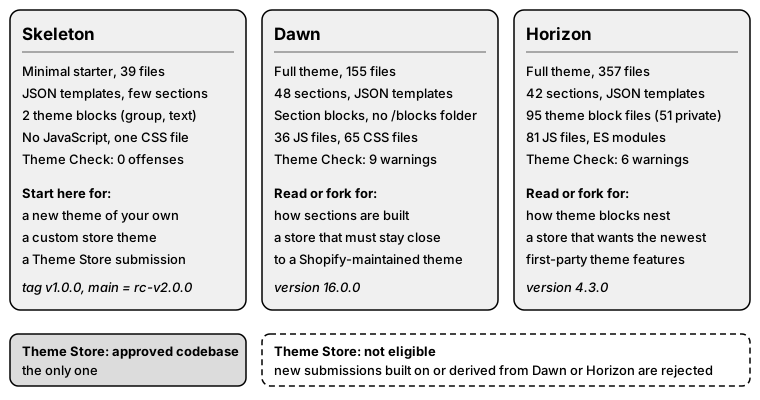
| Skeleton | Dawn | Horizon | |
|---|---|---|---|
Repository |
|||
Version checked |
Tag |
16.0.0 (git tag |
4.3.0 ( |
Intent |
Minimal, well-structured starting point |
HTML-first, JavaScript-only-as-needed reference theme; Online Store 2.0 reference theme, copyright from 2021 |
Flagship of a newer generation of first-party themes, built on theme blocks |
Composition model |
v1.0.0: JSON templates, sections, two theme blocks. |
JSON templates and sections; blocks are defined inside each section; no |
JSON templates, section groups, sections that accept |
Files inspected by Theme Check |
39 (v1.0.0), 26 ( |
155 |
357 |
Theme Check result (recommended preset) |
0 offenses |
9 warnings (OrphanedSnippet 1, VariableName 2, UnusedAssign 2, LiquidComplexity 1, UndefinedObject 3) |
6 warnings (ExcessiveSettingsCount 1, UnusedDocParam 5) |
Folder file counts |
assets 4, blocks 2, config 2, layout 2, locales 2, sections 16, snippets 3, templates 12 (v1.0.0) |
assets 190, config 2, layout 2, locales 51, sections 48, snippets 39, templates 13 |
assets 125, blocks 95, config 2, layout 2, locales 57, sections 42, snippets 144, templates 13 |
JavaScript and CSS in |
One CSS file ( |
36 JavaScript files, 65 CSS files (one per component) |
81 JavaScript files (ES modules with an import map), 3 CSS files |
Theme Store position |
The only approved codebase |
Not eligible for new submissions |
Not eligible for submissions |
Source: Shopify/skeleton-theme, Shopify/dawn, Shopify/horizon and the local Theme Check runs described below
Licences and what you may do with the code
All three repositories carry a LICENSE.md that starts like an MIT licence (permission to use, copy, modify, merge, publish, distribute, sublicense and sell) and then adds a restriction: the rights may only be exercised to develop themes that integrate or interoperate with Shopify software or services. Skeleton and Dawn add that, if applicable, themes may be distributed or sold through the Shopify Theme Store; Horizon’s text omits that sentence. The Skeleton README shows an MIT badge, but the text of its LICENSE.md is the restricted one, so read the file in the version you copy before reusing code outside a Shopify theme. Copyright lines are 2018-present (Skeleton), 2021-present (Dawn) and 2025-present (Horizon), all Shopify Inc.
The practical consequence is that the themes are freely usable for a merchant’s own store, for a client’s store and as study material, and that copying code from them into a Hydrogen storefront or another platform is not covered.
Source: Horizon LICENSE.md
Skeleton
Skeleton is the theme that shopify theme init clones by default, and the one the shopify.dev "Build a new theme" guide starts from. Its README describes it as a minimal, carefully structured theme designed for modularity and maintainability. The contribution rules in the repository say the same from the other side: the codebase must be minimalist, must be a common foundation for most developers, and must not include or reference legacy or non-recommended features. Anything that would turn it into a feature-rich theme is declined by design.
Two shapes: v1.0.0 and the release candidate
Two different themes live under the name Skeleton at the time of checking, and shopify theme init can hand you either depending on how it is called.
-
Tag v1.0.0 (2025-05-20) is the section-based Skeleton announced on 2025-05-21. Its release notes list the migration to JSON templates, the restructured architecture, critical CSS, an example reusable-blocks system, section and block schemas with documentation, a GitHub CI workflow and a
.shopifyignore. This is the theme the Theme Store requirements assume, and the one all examples on this page use. -
main(commit of 2026-10-01, "Port rc-v2.0.0") is the release candidate announced in the Liquid July '26 developer preview (2026-07-21). It has nosectionsfolder, no JSON templates and no schema presets. Each file intemplates/is a Liquid composition root that calls{% block 'container' %}and the other blocks directly, there is anAGENTS.mdthat tells coding agents the rules of this dialect, and the layout calls{% block 'header' %}and{% block 'footer' %}. The new{% block %}and{% partial %}tags need the developer preview feature on the development store.
The Theme Store requirements published on 2026-10-27 still require JSON templates ("sections everywhere"), a Custom Liquid section and section groups for the header and footer. A theme built on the release candidate therefore cannot satisfy them as written, and the requirements page does not mention the release candidate. Until Shopify updates the requirements, a Theme Store submission starts from v1.0.0, while a private or client theme that wants to try the Liquid-first model can start from main.
The behaviour of shopify theme init is described by the CLI itself: with no flag it clones the Git URL given by -u/--clone-url (default https://github.com/Shopify/skeleton-theme.git), and -l/--latest downloads the latest release of that URL. In the verification run the default produced the v1.0.0 layout (39 files). The CLI looks the releases up through the GitHub API, which anonymous callers can exhaust at 60 requests per hour; a plain git clone --branch v1.0.0 gives the same files without the API call.
What is in v1.0.0
The folders follow the standard theme layout and nothing else:
assets/     critical.css, icon-account.svg, icon-cart.svg, shoppy-x-ray.svg
blocks/     group.liquid, text.liquid
config/     settings_data.json, settings_schema.json
layout/     password.liquid, theme.liquid
locales/    en.default.json, en.default.schema.json
sections/   404, article, blog, cart, collection, collections, custom-section,
            footer, footer-group.json, header, header-group.json, hello-world,
            page, password, product, search
snippets/   css-variables.liquid, image.liquid, meta-tags.liquid
templates/  404, article, blog, cart, collection, gift_card.liquid, index,
            list-collections, page, password, product, search (JSON unless noted)
Source: Skeleton v1.0.0 file tree
The whole layout file fits on one screen, which is the point of the theme:
<!doctype html>
<html lang="{{ request.locale.iso_code }}">
  <head>
    {% # Inlined CSS Variables %}
    {% render 'css-variables' %}

    {% # Load and preload the critical CSS %}
    {{ 'critical.css' | asset_url | stylesheet_tag: preload: true }}

    {% # Social, title, etc. %}
    {% render 'meta-tags' %}

    {{ content_for_header }}
  </head>

  <body>
    {% sections 'header-group' %}

    {{ content_for_layout }}

    {% sections 'footer-group' %}
  </body>
</html>The points worth noticing are the ones the Theme Store checks. The lang attribute comes from request.locale.iso_code, the header and footer are rendered as section groups, content_for_header is output untouched, and the SEO tags live in a snippet.
What v1.0.0 teaches through its code:
-
Schema conventions. The README recommends that a setting controlling one CSS property is exposed as a CSS variable set inline (
style="--gap: {{ block.settings.gap }}px") and consumed in the stylesheet, and that a setting controlling several properties selects a CSS class ({{ block.settings.layout }}).blocks/group.liquidis the worked example: aselectfor the direction, arangefor padding, and avisible_ifcondition that shows the alignment setting only for vertical groups. -
Theme blocks.
groupaccepts any theme block through"blocks": [{ "type": "@theme" }]and renders them with thecontent_for 'blocks'tag;textis a leaf block. Both carryblock.shopify_attributeson the root element, which the theme editor needs, and both havepresets, which is what makes a block appear in the editor’s block picker. -
Styling and scripting. CSS and JavaScript go in the
stylesheetandjavascripttags inside each file, which Shopify de-duplicates when a section appears several times, and only the CSS needed on every page is split intoassets/critical.css, which the layout preloads. -
LiquidDoc.
snippets/image.liquiddocuments its parameters with adocblock (@param,@example), the style Theme Check validates. -
Settings.
config/settings_schema.jsonstarts with thetheme_infoentry (theme_nameSkeleton,theme_version0.1.0, author Shopify), one font picker (work_sans_n4), a maximum page width, a minimum page margin, a background and a foreground colour and an input corner radius: six settings in all.
The product page shows how much is left to the theme author. sections/product.liquid renders images, title, price, description and a variant select with a quantity field and payment_button, accepts no blocks, and has no recommendations, swatches, pickup availability or media gallery. That is deliberate and it is also the list of work between Skeleton and a theme that passes review.
Checking Skeleton and making the Pocket Coffee change
The following commands were run with Shopify CLI 5.0.0 (telemetry disabled with SHOPIFY_CLI_NO_ANALYTICS=1, no store connected). They clone the tagged theme and check it:
git clone --branch v1.0.0 --depth 1 https://github.com/Shopify/skeleton-theme.git pocket-coffee-theme
cd pocket-coffee-theme
shopify theme check
The result, with the box-drawing frame of the CLI removed:
39 files inspected with no offenses found.Source: Shopify CLI: theme check
The recommended Theme Check preset is selected by the one line of .theme-check.yml that Skeleton ships (extends: theme-check:recommended). shopify theme check -C theme-check:all selects the stricter preset and also reported no offenses on the Skeleton files.
Pocket Coffee wants the roast date metafield on the product page. In a Skeleton-based theme that is a theme block that the product section accepts. The block below reads a custom.roast_date product metafield of type date; a product page shows nothing when the metafield is empty. The header comment is a LiquidDoc block, and the preset is what lets the merchant add the block in the theme editor.
{% doc %}
  Shows the roast date of the product that is being rendered.

  @example
  {% content_for 'block', type: 'roast-date-badge', id: 'roast-date' %}
{% enddoc %}

{% assign roast_date = product.metafields.custom.roast_date.value %}
{% if roast_date != blank %}
  <p class="roast-date-badge" {{ block.shopify_attributes }}>
    {{ block.settings.label }} {{ roast_date | date: '%-d %b %Y' }}
  </p>
{% endif %}

{% stylesheet %}
  .roast-date-badge {
    margin: 0;
    font-size: 0.875rem;
  }
{% endstylesheet %}

{% schema %}
{
  "name": "Roast date badge",
  "settings": [
    { "type": "text", "id": "label", "label": "Label", "default": "Roasted on" }
  ],
  "presets": [{ "name": "Roast date badge" }]
}
{% endschema %}
Source: Shopify: theme blocks
Save it as blocks/roast-date-badge.liquid. Two small edits make the product section accept it. In sections/product.liquid add the output tag inside the product-info element and the block types to the schema:
  <p>{{ product.description }}</p>
  {% content_for 'blocks' %}
</div>

{% schema %}
{
  "name": "t:general.product",
  "blocks": [{ "type": "@theme" }, { "type": "@app" }],
  "settings": [],
  "disabled_on": {
    "groups": ["header", "footer"]
  }
}
{% endschema %}
and in templates/product.json place an instance of the block in the main section, which is what the theme editor writes when a merchant adds it:
{
  "sections": {
    "main": {
      "type": "product",
      "blocks": {
        "roast_date": { "type": "roast-date-badge", "settings": { "label": "Roasted on" } }
      },
      "block_order": ["roast_date"],
      "settings": {}
    }
  },
  "order": ["main"]
}
(The shipped product.json also begins with a comment header warning that the editor may rewrite the file; Theme Check accepts it.) After these edits shopify theme check reported 40 files inspected with no offenses found, the same under theme-check:all, and shopify theme package wrote Skeleton-0.1.0.zip locally without logging in. Seeing the badge on a real product page needs a development store and shopify theme dev, which were not run.
Dawn
Dawn was the first Online Store 2.0 theme (2021) and is still the best-documented example of the section-based architecture. Its README describes the principles: web-native, lean and fast ("functionality and design defaults to no"), server-rendered with Liquid and "functional, not pixel-perfect". The theme version in config/settings_schema.json is 16.0.0.
Structure
Dawn has 48 files in sections, 39 in snippets, 13 in templates (all JSON except gift_card.liquid) and no blocks folder, because it predates theme blocks. A section defines its own block types in its schema. The main product section lists them:
@app, text, title, price, sku, inventory, quantity_selector, variant_picker,
buy_buttons, description, share, custom_liquid, disclosures, collapsible_tab,
popup, rating, complementary, icon-with-text
Source: Shopify/dawn on GitHub
That list is how Dawn meets the Theme Store rule that product elements are blocks and that the main product section accepts app blocks; the requirements page names Dawn’s main-product.liquid as its example. The other sections follow the same shape: main-* sections render the content of one template (main-collection-product-grid, main-cart-items, main-search), while marketing sections such as image-banner, featured-collection, multicolumn, slideshow and video are placed freely by the merchant. A custom-liquid section and an apps section are included, and the header and footer are section groups (header-group.json, footer-group.json).
JavaScript is split into 36 files in assets (product-form.js, cart-drawer.js, facets.js, predictive-search.js, pickup-availability.js and so on) written as custom elements and loaded where needed, and CSS is split into 65 component and section files that are loaded by the sections that use them.
Features it implements that Skeleton does not
Counting the files that touch each feature in the four cloned trees (a search for the Liquid object, tag or file name over the Liquid, JSON, JavaScript and CSS files) gives a measure of how much a start from Skeleton leaves to write:
| Feature (as a search term) | Skeleton v1.0.0 | Skeleton main |
Dawn | Horizon |
|---|---|---|---|---|
|
0 |
0 |
3 |
2 |
predictive search |
0 |
0 |
29 |
37 |
filters and facets |
0 |
0 |
40 |
15 |
pickup availability |
0 |
0 |
59 |
62 |
|
0 |
1 |
1 |
6 |
selling plans |
0 |
0 |
3 |
2 |
unit price |
0 |
0 |
36 |
41 |
sort by |
0 |
0 |
34 |
3 |
localization (country and language) form |
0 |
0 |
4 |
1 |
colour schemes |
0 |
0 |
77 |
23 |
image focal point |
0 |
0 |
2 |
5 |
product recommendations |
0 |
0 |
25 |
65 |
swatches |
0 |
0 |
33 |
58 |
|
0 |
0 |
8 |
31 |
A non-zero count shows that the feature is implemented somewhere, not that every Theme Store checkpoint about it is met, and a zero shows that the term does not occur. The Skeleton columns are the reason Skeleton is described as a foundation and not as a theme: every cell that is zero is a Theme Store requirement (see below) that the submitter must build.
Source: Shopify/dawn; Dawn main-product section
Release history and customer accounts
Dawn 16.0.0 removed the legacy customer account templates and sections. Its release notes say that stores still on legacy customer accounts must upgrade to new customer accounts before publishing this version, and that the header account icon now opens Shopify’s customer account popover instead of a separate login page. Existing stores are therefore affected by the version of Dawn they run: a store customised on an older Dawn keeps the customers/* templates until the merchant updates.
Keeping up with upstream and the tooling Dawn ships
The README recommends adding the Dawn repository as an upstream remote to pull its changes into a fork:
git remote -v
git remote add upstream https://github.com/Shopify/dawn.git
git fetch upstream
git pull upstream main
These are the commands of the README and were not run against a fork. Because main may contain unreleased features ("the stable version of Dawn is available in the theme store"), pulling blindly merges work in progress; tags such as v16.0.0 mark releases. Dawn’s .theme-check.yml disables two checks (MatchingTranslations and TemplateLength), and its CI workflow runs Theme Check through the shopify/theme-check-action and the performance audits of Shopify/lighthouse-ci-action.
The README of Dawn still says that a Theme Store submission may use Dawn as a starting point if it is "substantively different". That sentence is out of date; the current requirements, quoted below, declare Dawn-derived submissions ineligible.
Source: Dawn README; Dawn release notes
Horizon
Horizon is described in its own README as the flagship of a new generation of first-party themes that incorporates the latest Liquid storefront features, theme blocks first among them. Version 4.3.0 (the release notes mention product disclosures shown only to buyers in the jurisdiction they are scoped to, plus fixes to cart, carousel and pickup behaviour) is what main contains.
Structure
-
Blocks first. The
blocksfolder holds 95 files. 51 of them start with an underscore (_card.liquid,_product-details.liquid,_slide.liquid): these are private theme blocks that exist to be nested inside another block and do not appear in the editor’s block picker. The remaining 44 (accordion,add-to-cart,button,group,price,product-card,text,variant-picker,videoand others) are public blocks that merchants add. -
Sections are thin. The 42 sections are mostly containers that accept
@themeand@appblocks (the product information section’s schema allows exactly those two), for examplehero,carousel,product-list,media-with-contentandproduct-information. One section,sections/_blocks.liquid, overrides the wrapper section that Shopify wraps around AI-generated theme blocks; its header comment links to the documentation of that feature. -
Snippets carry the shared markup. 144 snippets include style fragments (
accordion-styles,button-custom-styles), colour palette helpers (color-palette,contrast-override) and scripts (scripts.liquidrenders the import map and module preloads). -
JavaScript is modular. 81 files in
assetsuse ES modules loaded through that import map, with a basecomponent.js, amorph.jsfor partial page updates andperformance.jshelpers. There are only three CSS files inassets. -
Account component. Six files reference the
shopify-accountcomponent, the header element that Theme Store themes must now include.
Horizon’s README is explicit on the two things that matter for the choice. It recommends Skeleton as the starting point of a theme development project, and it states that themes based on, derived from or incorporating Horizon are not eligible for the Theme Store. It also warns that main may include Liquid API properties that are not yet publicly documented.
Using Horizon as a store theme
A merchant who only wants Horizon’s look does not need the repository: the theme can be customised in the theme editor and, when code is needed, a copy edited. A developer who forks the repository keeps it current with the same upstream-remote procedure as for Dawn. Because Horizon has no release tags, record the commit you fork from and read release-notes.md (it names the version at the top) before merging later changes. Theme Check run with the recommended preset on Horizon 4.3.0 gave 6 warnings of two kinds: one ExcessiveSettingsCount on a section and five UnusedDocParam on LiquidDoc comments.
Choosing where to start
The decision depends on who will own the code, whether the theme will be sold, and which composition model you want to learn.
The table gives the same decision with the reasons.
| Situation | Start from | Why |
|---|---|---|
A theme to publish in the Theme Store |
Skeleton v1.0.0 |
It is the only approved codebase; Dawn- and Horizon-derived submissions are rejected, and the uniqueness requirement says a theme must not be reproducible by adjusting settings or adding sections to another theme. |
A bespoke theme for one merchant or one agency client, with a custom design |
Skeleton v1.0.0 |
No inherited UI to undo, a single CSS file, no JavaScript framework and a clean Theme Check result. Add the features the shop needs from the Features list below rather than removing Dawn’s. |
A store that needs the standard feature set (filters, predictive search, pickup, swatches, subscriptions) with light modifications |
Dawn |
Every feature exists, the code is plain Liquid, CSS and web components, and Shopify’s CI shows how to test it. Smaller than Horizon, so easier to read in full. |
A store that wants the newest first-party features and a block-driven editor experience |
Horizon |
The block library and the account, disclosure and carousel work land here first. Expect to track |
Learning how sections and section blocks work |
Dawn |
The main product section and the Liquid schema of |
Learning how theme blocks nest, presets and private blocks |
Horizon, then Skeleton |
Horizon has the full pattern; Skeleton shows the minimum. |
Trying the Liquid-first model |
Skeleton |
Needs the Liquid July '26 developer preview on a development store; Shopify states that existing themes continue to work with sections, theme settings and JSON templates. |
Moving an old Debut-era or vintage theme |
Skeleton or Dawn |
Copy the settings and snippets onto a modern base instead of upgrading the old theme in place; the Theme Store also requires JSON templates. |
Pocket Coffee is a single store with a custom brand, the roast-date badge and a Coffee Club discount, and it will never be sold as a theme. Two choices are reasonable: take Dawn as it is, because filters, predictive search, pickup and swatches are present and the roast-date badge is one extra block, or start from Skeleton and build only the pages it needs (a coffee shop with 18 variants of one product and a starter kit needs a variant picker, a collection grid with filters and a cart, not 48 sections). Pocket Coffee here starts from Skeleton because that keeps the code the team owns small, and the badge shown above is the first block built on it.
Theme Store requirements
The Theme Store requirements apply to every theme and preset published in the Shopify Theme Store, and a submission that misses any requirement is rejected and must be corrected and resubmitted. Poorly tested themes are rejected without further review, and repeated issues can lead to suspension or permanent rejection. The page has 22 numbered sections; the relevant changes of the last year are listed after them.
Eligibility rules
-
Exclusivity. A theme in the Theme Store can only be distributed through the Theme Store, not on other marketplaces, and cannot contain designer credits or any affiliate links in the theme files.
-
Uniqueness. The theme must be fundamentally different from every other theme in the store, including the submitter’s own. Uniqueness is measured by the overall experience across core templates; a theme’s identity must not be reproducible by adjusting settings, superficial styling or adding sections to another theme. Spacing tweaks, colour or typography swaps, gradients, shape dividers, background effects, animation changes or a few extra settings are explicitly insufficient, and the uniqueness has to be embedded in the architecture.
-
Approved codebase. Skeleton is the only approved codebase for Theme Store development; otherwise themes must be built with fully original code. New submissions built on or derived from Dawn or Horizon are not eligible.
-
Design and UX. A checkpoint list covers visual design and art direction, layout, consistency of typography and interaction design, settings organisation, the customer shopping experience, and the demo store. Every checkpoint must be met.
Required features
All themes must support the following, each documented by a shopify.dev guide that the requirements page links:
-
Sections everywhere (Online Store 2.0 JSON templates).
-
Discounts shown for items and orders in the cart, including on the Cart page.
-
Accelerated checkout buttons on the product and cart pages, enabled by default, with the branded colours unchanged.
-
Faceted search filtering on collection and search pages, by availability, price, type, vendor and variant options.
-
A gift card template; image focal points; the
page_imageobject for social sharing. -
A country selector (when merchants sell in local currencies) and a language selector (when they sell in several languages), following the UX guidelines.
-
Multi-level menus; newsletter forms; pickup availability on product pages.
-
Related product recommendations and complementary product recommendations.
-
Rich product media (3D models and embedded video), including in quick-view features.
-
A search box or a link to search, with a search template and predictive search.
-
Selling plans shown in the cart, Shop Pay Installments banner on the product page, unit pricing on the collection, product and cart pages, and variant images.
-
A Follow on Shop button using the
login_buttonfilter, with the branded colours unchanged. -
The
shopify-accountcomponent in the header, visible in both desktop and mobile headers. It became a requirement on 2026-07-30; the legacy customer account templates are no longer required.
Templates, sections and blocks
The theme must provide theme.liquid (layout), the templates 404.json, article.json, blog.json, cart.json, collection.json, index.json, list-collections.json, page.json, page.contact.json, password.json, product.json, search.json and gift_card.liquid, and the config files settings_data.json and settings_schema.json. All templates must support sections as JSON templates, except customer account pages, gift card pages and checkout. Further rules:
-
A Custom Liquid section is required, with a setting of type
liquid, available on every template that supports sections; it doubles as an insertion point for apps. -
The header and footer must be rendered within section groups.
-
The main product section must use blocks for all or most elements (price, vendor, description each a block) and must accept app blocks (
@app) in the main product section and the featured product section. -
Custom Liquid blocks must be offered in certain sections.
-
config/markets.jsonmust not be included in the submission.
Performance, accessibility and pages
Themes must have a minimum average Lighthouse performance score of 60 and a minimum average accessibility score of 90 across the home, collection and product pages for both desktop and mobile, tested against a benchmark dataset with real images and content in the sections. A page-by-page checklist follows: for example the layout must set lang from request.locale, use the routes object for URLs, output payment icons from shop.enabled_payment_types in full colour and must not modify or parse content_for_header; the product page needs title, prices, unit price, compare-at price, description, option names and values, quantity, an Add to cart button, price updates for the selected variant, and cart.taxes_included handling; the cart page needs the line item fields, quantity change, total, a checkout button, cart notes, selling plans and automatic discounts; gift card pages need Apple Wallet support, a code, a QR code of at least 120 x 120px and a logo or shop name; a password page needs the logo or shop.name, shop.password_message and the password form.
Code and asset rules
-
Scripts must be hosted on Shopify’s servers, except approved third-party libraries; nothing may interfere with native Shopify features in the theme editor or the admin.
-
No Sass, no
.scssor.scss.liquidfiles; native CSS only. No minified.cssor.js, except ES6 code and third-party libraries (Shopify minifies ES5 JavaScript and CSS itself). -
SEO: include the theme SEO metadata snippet (title, meta description, canonical URL), Google rich product snippets, and no
robots.txt.liquid. -
Accessibility: keyboard-reachable dropdown navigation, visible focus states,
alton every image, unique IDs andforlabels on form inputs. -
Responsive images that load only when needed; social media icons plus Open Graph and Twitter card tags.
-
Supported browsers: Safari (latest two releases on Mac), Chrome (three, Mac and PC), Firefox (three, Mac and PC), Edge (two, PC), Mobile Safari (two), Chrome Mobile (three), Samsung Internet (two), and browsing and purchasing inside the Instagram, Facebook and Pinterest in-app browsers.
-
Since 2026-01-13 Liquid is parsed more strictly for all themes; new Theme Store and App Store submissions must be strict-parsable.
Settings, colours, fonts and naming
Settings need merchant-friendly names, grouping and default content that explains the setting (no Lorem Ipsum). The text rules are exact: sentence case for section, preset and category names; American English; no ampersands; declarative labels; buttons start with a verb; and a terminology table that prescribes words (for example "home page", "slideshow", "signup", "navigation", "cart type" with drawer, page or modal options instead of "Ajax cart"). A favicon setting is mandatory, and logo upload must work with different aspect ratios. Font pickers must use font_picker, load a default font (for example work_sans_n6) and use only currently available fonts. The colour system needs at least four colours, and every background colour setting needs a matching foreground colour setting (Skeleton v1.0.0 defines only two colour settings, a background and a foreground colour). Theme and preset names must be distinct from Shopify products and brands and from the submitter’s company name.
Presets, versions, demo stores and support
A theme with several presets includes a /listings folder in the zip, with templates (and optionally sections) per preset; with one preset it is not needed:
.
├── assets
├── blocks
├── config
├── layout
├── locales
├── listings
│   ├── preset-name-one
│   │   ├── templates
│   │   │   └── *.json
│   │   └── sections (optional)
│   │       └── *.json
│   └── another-preset-name
│       ├── templates
│       │   └── *.json
│       └── sections (optional)
│           └── *.json
├── sections
├── snippets
└── templatesEvery submission and update needs a version number and release notes. The requirement to include /listings folders came into force with the updated requirements of 2025-05-15, which also added industry tags (at most two per preset, from 20 categories) and a catalogue-size tag per preset; installing a specific preset became possible for approved /listings folders on 2025-05-26. Each preset needs at least one demo store, built as a client transfer store in the Dev Dashboard (a development store cannot be transferred), with the Bogus Gateway or Shopify Payments test mode enabled, authentic content, no apps except possibly free review and translation apps, and the right to use every asset. Documentation and a public support contact form must be ready before launch and linked from the listing; the partner must fix bugs and answer merchants' questions for the theme.
Checking a theme before you submit
Part of the list can be checked automatically and offline. Theme Check covers Liquid correctness, performance hints (for example images without width and height), deprecated tags and translation coverage, and its recommended preset gives errors for the mistakes that fail review. A deliberately broken snippet added to Skeleton (an unused variable, an img with no size, an include tag, a render of a missing snippet and an unknown filter) produced 5 errors (ImgWidthAndHeight, MissingAsset, MissingTemplate twice, UnknownFilter) and 3 warnings (DeprecatedTag, OrphanedSnippet, UnusedAssign), so a clean run is a necessary but not sufficient condition. The default failure level of shopify theme check is error; --fail-level lowers it for CI, -o json prints {valid, issues, errorCount}, --auto-correct fixes what can be fixed and --init writes a .theme-check.yml. Everything else (the Lighthouse averages on Shopify’s benchmark dataset, the browser matrix, the design checkpoints, and the human review) happens in the submission process and cannot be reproduced locally; Shopify documents how to run the same Lighthouse tests against a benchmark shop.
Summary of the recommendation
-
For anything that will be sold, start from Skeleton at tag v1.0.0 and build every feature on the list above yourself.
-
For a single store, take Dawn for the broadest, simplest feature set and Horizon for the newest block-driven one; when no code changes are needed, use them as they are and customise in the theme editor.
-
Read Dawn to learn sections and Horizon to learn theme blocks, regardless of which you start from.
-
Treat Skeleton
mainas a preview of Liquid-first composition until the Theme Store requirements mention it. -
Run
shopify theme checkon every change, and record the base commit or tag so later upstream changes can be reviewed.