Caching
|
This content was generated with the assistance of AI and should be verified against the official documentation before being relied on in production. The reference material consulted while preparing these pages is listed in the section bibliography. |
This page is written against Next.js 16.3.8 (the latest release on 2026-10-03, when the facts and examples below were
checked; the official documentation reports @doc-version 16.3.8), React 19.3.0 and Node.js 20.9.0 or later. It covers
the App Router, where almost all of Next.js caching lives, and the small part that belongs to the Pages Router
(The Pages Router). Next.js now has two caching models and a project uses exactly one of them: the previous model
(the default: nothing is cached unless you ask, with fetch options, unstable_cache and the dynamic, revalidate
and fetchCache segment config) and the opt-in Cache Components model (cacheComponents: true, with the 'use cache'
directives, cacheLife and cacheTag). Every section says which model it describes. Every example was built with
next build, started with next start (a few with next dev) and observed with curl, a counter on the data source
and, for the client cache, a headless browser, on Next.js 16.3.8 and Node.js 24.16 in a scratch copy of the Bookshelf
that the rest of this section grows; each example is followed by the official page it derives from, and every number,
header and log line quoted below is a real measurement from those runs.
"Caching" is not one thing in Next.js; it is a stack of independent layers, each with its own key, lifetime and way to invalidate it. Most caching bugs come from invalidating one layer and forgetting the others. Incremental Static Regeneration explains the stale-while-revalidate loop and every revalidation API in depth, and Partial Prerendering and Cache Components explains the static shell and the prerender rules. This page is the map of all the layers: where each one lives, what it stores, how it is keyed, when it expires, what clears it, and how to see what it is doing. The sibling pages on data fetching, on Server Actions and mutations, and on Route Handlers and the backend for frontend of this section use these layers from the calling side.
The Layers at a Glance
A request for a page can be answered by up to five layers, from the closest to the user to the closest to the data. It stops at the first layer that holds a fresh answer:
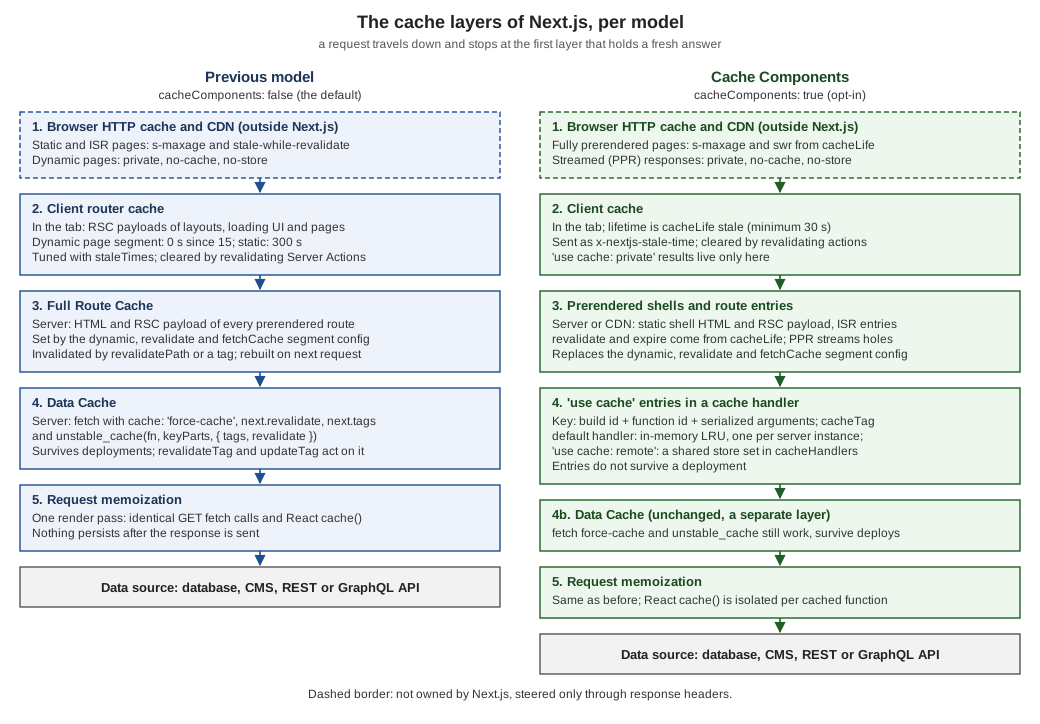
| Layer | Where it lives and what it stores | Key and lifetime | Cleared or refreshed by | Survives a deploy |
|---|---|---|---|---|
Request memoization (both models) |
The memory of one server render pass: the results of identical |
The URL and options of the call, or the arguments of the cached function. Lasts until the response is sent. |
Nothing: it is gone when the render ends. |
No |
Data Cache (previous model; still present with Cache Components) |
The server: |
URL, method, headers and body for |
|
Yes |
Full Route Cache (previous model) |
The server: the HTML and the RSC payload of every prerendered route (built or generated on demand). |
The route. The |
|
No: every build seeds its own |
Client router cache (previous model) |
The browser tab’s memory: RSC payloads of layouts, loading boundaries and page segments. |
The route segment. |
Reload, |
Not applicable (per tab) |
Prerendered shells and route entries (Cache Components) |
The server or a CDN: the static shell (HTML and RSC payload) of each route, and the concrete pages ISR adds later. |
The route, including the known params. |
|
No |
|
The cache handler: an in-memory LRU per server instance by default, or the store you register for |
Build id (or |
|
No (the key contains the build id) |
Client cache (Cache Components) |
The browser tab’s memory: the cached content of the RSC payloads of visited and prefetched routes, including |
The route and its cached scopes. The |
A Server Action that revalidates, |
Not applicable (per tab) |
Browser HTTP cache and CDN (both models) |
Outside Next.js: whatever the response headers allow a shared cache to keep. |
The URL (and the |
A purge call to the CDN; Next.js does not do it for you. |
Depends on the CDN |
Which model a project uses is one line in the config. Everything on this page that is not marked otherwise is true in both:
// next.config.ts
import type { NextConfig } from 'next'

const nextConfig: NextConfig = {
  cacheComponents: true, // omit (or false) for the previous model
}

export default nextConfig
cacheComponents and partialPrefetching are still opt-in in 16.3; the 16.3 release post says their behaviours
"will become the default in a future major version", so new projects can adopt Cache Components now and existing ones
can move route by route (see Partial Prerendering and Cache Components
for the migration).
How the Examples Were Measured
A cache is invisible until the thing behind it is counted. The experiments of this page use a lab inside the scratch app: a stand-in for the Bookshelf API (the "origin") that counts how often it is really called and returns the count with a timestamp. Whenever a layer answers instead of the origin, the number stays the same.
// lib/source.ts
import "server-only";

// Stands in for a slow upstream (CMS, database, REST API): counts how often it is really hit.
const g = globalThis as unknown as { __origin?: Record<string, number> };

export function originHit(label: string) {
  g.__origin ??= {};
  const n = (g.__origin[label] = (g.__origin[label] ?? 0) + 1);
  console.log(`[origin] ${label} hit #${n}`);
  return { label, n, at: new Date().toISOString().slice(11, 23) };
}

export const ORIGIN = "http://localhost:3603/api/source";

export async function readOrigin(label: string, init?: RequestInit) {
  const res = await fetch(`${ORIGIN}?label=${encodeURIComponent(label)}`, init);
  return (await res.json()) as { label: string; n: number; at: string };
}
// app/api/source/route.ts
import { connection } from "next/server";
import { originHit } from "@/lib/source";
// The "upstream": every real call increments a counter and returns it with a timestamp.
export async function GET(request: Request) {
await connection();
const label = new URL(request.url).searchParams.get("label") ?? "api";
return Response.json(originHit(`api:${label}`));
}Pages that prerender at build time have no running server to call, so for next build a short Node script stands in
for the origin on the same port (it prints [origin] stub:… hit #1 for every build-time call). Each model has its own
folder of lab routes (app/lab/…), built and started with the same two commands:
# previous model                                 # Cache Components
npm run build                                    CACHE_COMPONENTS=1 npm run build
PORT=3603 npm start                              CACHE_COMPONENTS=1 PORT=3603 npm start
where next.config.ts reads CACHE_COMPONENTS to set cacheComponents. The lab was always observed on a production
build (next build and next start), because next dev caches differently (Debugging Caches).
Source: cacheComponents, Route Handlers
Request Memoization (Both Models)
The cheapest layer is the one you rarely configure. During one server render, identical GET fetch calls are
memoized: the layout, the page and generateMetadata can all ask for the same URL, and the request leaves the server
once. This is separate from persistent caching: the memo lives for one render pass and is gone when the response is
sent. For data that does not come from fetch (an ORM, a database driver, an SDK), React’s cache function gives the
same per-render deduplication. Both are shown below with two components that need the same data.
// app/lab/memo/page.tsx
import { cache } from "react";
import { connection } from "next/server";
import { originHit, readOrigin } from "@/lib/source";

// Not a fetch: React cache() deduplicates it for the duration of one render pass.
const countOnce = cache(async () => originHit("react-cache"));

async function Header() {
  const book = await readOrigin("memo", { cache: "no-store" }); // same URL and options ...
  const again = await countOnce();
  return <p>header: fetch n={book.n}, cache() n={again.n}</p>;
}

async function Footer() {
  const book = await readOrigin("memo", { cache: "no-store" }); // ... so this reuses the answer
  const again = await countOnce();
  return <p>footer: fetch n={book.n}, cache() n={again.n}</p>;
}

export default async function Page() {
  await connection();
  return (
    <>
      <Header />
      <Footer />
    </>
  );
}
Each request to /lab/memo prints one api:memo and one react-cache line in the server log, although fetch and
countOnce() are called twice:
$ curl localhost:3603/lab/memo        # header and footer render the same numbers
header: fetch n=1, cache() n=1 | footer: fetch n=1, cache() n=1
$ curl localhost:3603/lab/memo        # a second request is a new render pass
header: fetch n=2, cache() n=2 | footer: fetch n=2, cache() n=2
The same page under cacheComponents (the connection() call moves into a component under <Suspense>, as the
prerender rules require) printed the same numbers, so memoization does not depend on the model. Four rules:
-
Memoization applies to
GETrequests with the same URL and options in the same render pass. It also coversgenerateStaticParams,generateMetadataandgenerateViewport. -
It does not apply in Route Handlers, which are not part of the React tree.
-
Passing an
AbortControllersignaltofetchopts that call out. -
Inside
'use cache',React.cachehas its own isolated scope: a value stored byReact.cacheoutside a cached function is not visible inside it, and calls from two separate cached functions do not share one result.
Because memoization lives for a single render, it is the layer that makes "fetch where you need it" cheap: put the data call in the component that uses it instead of passing props down.
The Previous Model
This is what runs when cacheComponents is not set. The mental model is a default of "dynamic where the code needs
it, static where it can": a route is prerendered at build time unless something in it needs the request (cookies(),
headers(), searchParams, an uncached fetch after one of them, connection()), and data is cached only where you say so.
fetch and the Data Cache
Next.js extends fetch so that each call on the server can set its own persistent cache and revalidation. The cache
option decides whether the server-side Data Cache is used:
| Option | Behaviour (16.3) |
|---|---|
none (the default, called |
Not cached. Fetched on every request in development, once during |
|
Fetched on every request, even without a request-time API; the route becomes dynamic. |
|
Looked up in the Data Cache. A request matches on URL, method, headers and body. A fresh match is returned; a missing or stale match fetches again and stores the response. Only |
|
Cache lifetime in seconds. |
|
Labels for on-demand invalidation with |
Combining options that contradict each other, such as { revalidate: 3600, cache: 'no-store' }, is not allowed: both are
ignored and development prints a warning. The next example reads the origin four ways in one render; the page calls
connection() first so it renders per request, which lets us watch the Data Cache without a Full Route Cache in front:
// app/lab/fetch/page.tsx
import { connection } from "next/server";
import { readOrigin } from "@/lib/source";

export default async function Page() {
  await connection(); // render per request, so we can watch the data cache on its own
  const [plain, forced, timed, tagged] = await Promise.all([
    readOrigin("plain"), // no option: not cached in Next.js 15 and 16
    readOrigin("force-cache", { cache: "force-cache" }),
    readOrigin("revalidate-5", { next: { revalidate: 5 } }),
    readOrigin("tagged", { cache: "force-cache", next: { tags: ["books"] } }),
  ]);
  return <pre>{JSON.stringify({ plain, forced, timed, tagged }, null, 2)}</pre>;
}
Observed with curl against next start (the number is the origin’s call counter; each row is one request):
| Moment | plain |
force-cache |
revalidate-5 |
tagged |
What happened |
|---|---|---|---|---|---|
request 1 |
1 |
1 |
1 |
1 |
Everything is fetched; the three cached ones are stored. |
request 2 |
2 |
1 |
1 |
1 |
Only the uncached call hits the origin. |
after |
3 |
1 |
1 |
1 |
The tagged entry is stale but is served (stale-while-revalidate); the refresh starts in the background. |
request 4 |
4 |
1 |
1 |
2 |
The tagged entry is now the refreshed one. |
6 s later |
5 |
1 |
1 |
2 |
|
next request |
6 |
1 |
2 |
2 |
The refreshed |
Time-based revalidation and tag-based revalidation are both stale-while-revalidate: the first caller after the
invalidation gets the old answer, never a wait. The exception is { expire: 0 } (Invalidation Flows).
A plain fetch in a page with no request-time API behaves differently: the route is prerendered, so the fetch runs once
at build time (the build log shows [origin] stub:… hit #1) and its result is frozen into the Full Route Cache
(The Full Route Cache and the Segment Config). That is why the same code can look "cached" in production and "fresh" in development.
Two further notes on the Data Cache. First, caching is strictly opt-in and includes POST requests and requests with
authorization or cookie headers; because a match includes the headers a per-user token gives per-user entries, but
the personalized response still sits in a server-wide store, so do not force-cache credentialed responses unless you
meant to. Draft Mode bypasses the cache entirely. Second, in development the HMR cache keeps fetch responses across hot
reloads (serverComponentsHmrCache), which is why an edit can seem not to refetch.
unstable_cache for Everything That Is Not a fetch
Database queries, ORM calls and SDK calls do not go through fetch, so they miss the Data Cache.
unstable_cache(fn, keyParts, { tags, revalidate }) wraps such a function so that its result is stored in the same Data
Cache, with the same tags and the same stale-while-revalidate behaviour. The arguments and the stringified function are
already part of the key; keyParts is only needed when the function reads outside variables that are not passed as
arguments.
// app/lab/unstable/page.tsx
import { unstable_cache } from "next/cache";
import { connection } from "next/server";
import { originHit } from "@/lib/source";

// Persists across requests (and deployments) in the data cache, like a tagged fetch.
const getBookRow = unstable_cache(
  async (id: string) => originHit(`unstable-cache:${id}`),
  ["book-row"], // key prefix; the arguments are added to the key automatically
  { tags: ["books"], revalidate: 5 },
);

export default async function Page() {
  await connection();
  const [one, two] = await Promise.all([getBookRow("1"), getBookRow("2")]);
  return <pre>{JSON.stringify({ one, two })}</pre>;
}
The two arguments make two entries. Observed: request 1 returned one=1 two=1 (both computed); a second request the
same second returned the same numbers; after revalidateTag('books', 'max') the next request still showed 1 and the one
after showed 2, as for fetch; and six seconds later (the revalidate: 5 had passed) a request showed the old
value and the next showed the refreshed one (3). Because it shares the tag books with the tagged fetch of the
previous example, one revalidateTag('books', …) call refreshed both.
Cookies, headers and other request data cannot be read inside the wrapped function; read them outside and pass the
values in. The name is historical: unstable_cache was introduced in 14.0 and, as of 16, the official docs mark it as
replaced by 'use cache'. It remains the way to cache a non-fetch function in the previous model, and it is also the
one that survives deployments (see fetch and unstable_cache Under Cache Components).
The Full Route Cache and the Segment Config
The Full Route Cache is the server-side store of prerendered routes: for every route that has no request-time
dependency, next build stores the HTML and the RSC payload, and ISR regenerates them later (see
Static Site Generation and
Incremental Static Regeneration). You steer it with three
route segment config exports from a page, layout or Route Handler:
| Export | Values and effect |
|---|---|
|
|
|
|
|
An advanced override of the default |
Seven small pages show what each one does. Each reads the origin once with fetch:
// app/lab/frc-static/page.tsx
import { readOrigin } from "@/lib/source";

// No request-time API anywhere: prerendered at build time into the Full Route Cache.
export default async function Page() {
  const book = await readOrigin("frc-static");
  return <p>static: origin n={book.n} at {book.at}</p>;
}// app/lab/frc-isr/page.tsx
import { readOrigin } from "@/lib/source";
export const revalidate = 5; // Full Route Cache entry goes stale after 5 seconds
export default async function Page() {
const book = await readOrigin("frc-isr");
return <p>isr: origin n={book.n} at {book.at}</p>;
}// app/lab/frc-dynamic/page.tsx
import { readOrigin } from "@/lib/source";
export const dynamic = "force-dynamic"; // never prerendered, never in the Full Route Cache
export default async function Page() {
const book = await readOrigin("frc-dynamic");
return <p>dynamic: origin n={book.n} at {book.at}</p>;
}// app/lab/frc-force-static/page.tsx
import { cookies } from "next/headers";
import { readOrigin } from "@/lib/source";
export const dynamic = "force-static"; // cookies() now returns an empty store
export default async function Page() {
const theme = (await cookies()).get("theme")?.value ?? "none";
const book = await readOrigin("frc-force-static");
return <p>force-static: theme={theme}, origin n={book.n} at {book.at}</p>;
}// app/lab/frc-fetchcache/page.tsx
import { readOrigin } from "@/lib/source";
export const fetchCache = "force-no-store"; // every fetch below behaves like cache: 'no-store'
export default async function Page() {
const book = await readOrigin("frc-fetchcache");
return <p>fetchCache: origin n={book.n} at {book.at}</p>;
}// app/lab/frc-nostore/page.tsx
import { readOrigin } from "@/lib/source";
export default async function Page() {
const book = await readOrigin("frc-nostore", { cache: "no-store" });
return <p>no-store: origin n={book.n} at {book.at}</p>;
}// app/lab/frc-fetchcache-mixed/page.tsx
import { readOrigin } from "@/lib/source";
export const fetchCache = "force-no-store"; // every fetch below is cache: 'no-store' ...
export default async function Page() {
const book = await readOrigin("frc-fetchcache", { cache: "force-cache" }); // ... even this one
return <p>fetchCache: origin n={book.n} at {book.at}</p>;
}next build printed these in the route table (○ static, ƒ dynamic; the Revalidate and Expire columns show the
lifetimes of prerendered routes):
Route (app)                Revalidate  Expire
├ ƒ /lab/frc-dynamic
├ ƒ /lab/frc-fetchcache
├ ○ /lab/frc-fetchcache-mixed
├ ○ /lab/frc-force-static
├ ○ /lab/frc-isr                   5s      1y
├ ƒ /lab/frc-nostore
└ ○ /lab/frc-static

Route (pages)              Revalidate  Expire
└ ● /lab-pages/static-isr          5s      1y
And curl showed the Full Route Cache working and its headers (x-nextjs-cache is a diagnostic of a self-hosted
next start, not an API):
| Route | x-nextjs-cache |
Cache-Control |
What it showed |
|---|---|---|---|
|
|
|
|
|
|
|
The first request after the lifetime got the old page and started a regeneration; the page then showed the regenerated copy ( |
|
none |
|
|
|
|
|
|
|
none |
|
A plain |
Two results deserve a warning. First, a cache: 'no-store' fetch on a page with no other request-time API is enough
to make the route dynamic (ƒ /lab/frc-nostore), so a single no-store deep in the tree changes the whole route.
Second, when I combined fetchCache = 'force-no-store' with a fetch that explicitly said cache: 'force-cache', the
route stayed prerendered and served the build-time value on 16.3.8, although the docs say force-no-store makes every
fetch re-fetch "even if they provide a 'force-cache' option". Treat the combination as unreliable and do not mix
fetchCache with per-call cache options; use one mechanism per route. A fetchCache = 'only-cache' segment that
contains cache: 'no-store' fails the build with Error: cache: 'no-store' used on fetch for … with 'export const
fetchCache = 'only-cache'.
Revalidation is global to the entry: after revalidatePath('/lab/frc-isr') or a tag used by its fetches, the next
request regenerates both the HTML and the RSC payload together, so a page load and a client navigation never disagree.
In development none of this happens: pages are always rendered on demand and never cached.
The Client Router Cache and staleTimes
The browser keeps its own cache of RSC payloads, so that moving between pages sends only the segments that changed and
back and forward buttons are instant (Linking and Navigation shows how
<Link> prefetching feeds it). Its lifetime is the one cache setting most people have never touched. In the previous
model the defaults since 15 are:
-
Dynamic pages (not statically generated and not fully prefetched):
staleTimes.dynamic= 0 seconds, so every click on a link requests the page again. In 14 the value was 30 seconds. -
Static pages, or links with
prefetch={true}:staleTimes.static= 5 minutes. -
Layouts and
loadingboundaries are still reused, because only the segment that changes is requested. -
Back and forward navigation restores the entry regardless, to keep scroll position and avoid layout shift.
staleTimes is the option to change them. The docs still label it experimental, so it sits under experimental in 16.3:
// next.config.ts (previous model)
import type { NextConfig } from 'next'

const nextConfig: NextConfig = {
  experimental: {
    staleTimes: {
      dynamic: 30, // seconds
      static: 180,
    },
  },
}

export default nextConfig
Observed with a headless Chrome (Playwright) clicking a <Link> to a dynamic page three times, going back in between,
and counting the RSC requests each click sent:
| Build | Click 1 | Click 2 | Click 3 |
|---|---|---|---|
defaults ( |
1 request |
1 request |
1 request |
|
1 request |
0 requests |
0 requests |
The same link with prefetch={false} was requested on every click in both builds in my runs, so do not rely on
staleTimes.dynamic for links that opt out of prefetching. A Server Action that calls revalidatePath, revalidateTag,
updateTag or refresh, and any change of cookies in a Server Action, clears the whole client cache regardless
of the stale time, and router.refresh() clears the current route.
Source: staleTimes, Upgrading to 15: Client Cache
Cache Components
This is what runs when cacheComponents: true. The default flips: everything that needs data at request time is dynamic,
and you choose what to cache, at the level of a function, a component or a whole file, with the 'use cache' directive.
Next.js prerenders a static shell (HTML plus RSC payload) from everything that can finish at build time, including the
results of cached functions, and streams the rest behind <Suspense> boundaries (Partial Prerendering, the subject of
Partial Prerendering and Cache Components). The route
segment config of the previous model is replaced: a route that exports dynamic, revalidate or fetchCache fails the
build (the exact message is in 'use cache': Forms, Keys and Restrictions); cacheLife and cacheTag take over the lifetime and invalidation roles.
// app/lab/shell/page.tsx
import { Suspense } from "react";
import { connection } from "next/server";
import { cacheLife, cacheTag } from "next/cache";
import { readOrigin } from "@/lib/source";

async function Catalogue() {
  "use cache";
  cacheLife("hours"); // stale 5 min, revalidate 1 h, expire 1 day
  cacheTag("catalogue");
  const book = await readOrigin("shell-cached");
  return <p>cached catalogue: origin n={book.n} at {book.at}</p>;
}

async function Live() {
  await connection(); // request time: never cached, never in the shell
  const book = await readOrigin("shell-live");
  return <p>live: origin n={book.n} at {book.at}</p>;
}

export default function Page() {
  return (
    <>
      <h1>Shelf</h1>
      <Catalogue />
      <Suspense fallback={<p>loading live data</p>}>
        <Live />
      </Suspense>
    </>
  );
}
next build printed ◐ /lab/shell 1h 1d (a partial prerender whose shell is revalidated after one hour and expires
after one day: the lifetime of cacheLife('hours')), and the build log showed one origin call (stub:shell-cached hit
#1) for the cached part. At runtime three requests returned the same cached catalogue (n=1, the build-time value) and
live numbers n=1, n=2, n=3: the cached component never ran again, the live one ran on every request, and the
fallback loading live data was part of the prerendered shell.
$ curl -sI localhost:3603/lab/shell
HTTP/1.1 200 OK
x-nextjs-stale-time: 300
x-nextjs-prerender: 1
Cache-Control: private, no-cache, no-store, max-age=0, must-revalidate
A route that is not partial, like a fully cached page, gets cache headers of its own (CDN Caching and Cache-Control).
Source: Caching, use cache, Migrating to Cache Components
'use cache': Forms, Keys and Restrictions
The directive caches the return value of an async function or component. It can sit at the top of a function body
(function or component level), or at the top of a file, where every export becomes a cached async function (including
generateMetadata and generateStaticParams, which must then be async). A page or layout file is a module like any
other, so a file-level directive caches that whole segment, and a cached layout does not cache the children it
renders, because slots pass through unread. A file with the directive at its top can have its exports imported into a
Client Component and called there, running on the server like a Server Function; prefer calling them on the server and
passing results down.
What Makes Up the Key
The entry of a cached function is stored under a key built from:
-
the build id (or the
deploymentIdwhen one is configured, which overrides it), so a new build invalidates everything -
the function id, a secure hash of the function’s location and signature
-
the serialized arguments: props of a component, parameters of a function
-
in development only, an HMR refresh hash
A variable captured from an enclosing scope is bound as an argument automatically, so it becomes part of the key too. Different inputs mean different entries; the same inputs mean one entry shared by every user and every request.
// app/lab/keys/page.tsx
import { Suspense } from "react";
import { cacheLife } from "next/cache";
import { readOrigin } from "@/lib/source";

async function getBook(id: string) {
  "use cache";
  cacheLife("lab"); // custom profile from next.config.ts: stale 30, revalidate 5, expire 60
  return readOrigin(`keys-book-${id}`); // the id argument is part of the cache key
}

async function Books({ searchParams }: { searchParams: Promise<{ id?: string; lang?: string }> }) {
  const { id = "1", lang = "en" } = await searchParams;

  // A value captured from the enclosing scope becomes part of the key as well.
  const getTitle = async () => {
    "use cache";
    cacheLife("lab");
    return readOrigin(`keys-title-${id}-${lang}`);
  };

  const [a, b, title] = await Promise.all([getBook(id), getBook(id), getTitle()]);
  return <pre>{JSON.stringify({ first: a, second: b, title })}</pre>;
}

export default function Page(props: PageProps<"/lab/keys">) {
  return (
    <Suspense fallback={<p>loading</p>}>
      <Books searchParams={props.searchParams} />
    </Suspense>
  );
}
Observed (a custom lab profile with stale: 30, revalidate: 5, expire: 60 was used so the lifetimes are short enough
to watch):
| Request | Origin calls | What it shows |
|---|---|---|
|
|
|
|
unchanged |
Served from the cache: same |
|
|
A new argument is a new entry. |
|
|
|
|
both |
The |
The last row is a difference worth knowing. The route-level entries of ISR serve the old page while they regenerate
(CDN Caching and Cache-Control), but I measured the entries of runtime 'use cache' functions behaving like a time-to-live: once
revalidate had passed the call recomputed synchronously. Plan for a short pause at the first call after each
revalidate, not for an instant stale answer.
With NEXT_PRIVATE_DEBUG_CACHE=1 the key is visible (Debugging Caches): it is a JSON array of the build id, the function
id and the list of arguments, for example ["BUILD_ID","8048…",[]].
Serialization
Arguments and return values must be serializable, with two different rules: arguments use the Server Components
serialization (stricter), return values the Client Components one. Supported arguments are primitives, plain objects,
arrays, Date, Map, Set, typed arrays and ArrayBuffer, and React elements as pass-through only; return values
add JSX. Class instances, functions (except pass-through), symbols, WeakMap, WeakSet and URL instances are not
supported. Pass-through means the cached function accepts a value it never reads: children, other slots and Server
Actions can flow through a cached component without becoming part of its key, which keeps a cached wrapper around dynamic
content valid:
// app/lab/wrapper/page.tsx
import { Suspense, type ReactNode } from "react";
import { connection } from "next/server";
import { cacheLife } from "next/cache";
import { readOrigin } from "@/lib/source";

// children is passed through, never read: it does not become part of the cache key
async function CachedWrapper({ children }: { children: ReactNode }) {
  "use cache";
  cacheLife("hours");
  const book = await readOrigin("wrapper-cached");
  return (
    <section>
      <p>cached header: origin n={book.n} at {book.at}</p>
      {children}
    </section>
  );
}

async function Live() {
  await connection();
  const book = await readOrigin("wrapper-live");
  return <p>live child: origin n={book.n} at {book.at}</p>;
}

export default function Page() {
  return (
    <CachedWrapper>
      <Suspense fallback={<p>loading</p>}>
        <Live />
      </Suspense>
    </CachedWrapper>
  );
}
Built, this route is ◐ /lab/wrapper 1h 1d. Two requests returned the same cached header (n=1, computed at build
time) and a live child whose counter went 1, 2: the child was rendered per request inside the cached component.
Restrictions and the Errors They Produce
A cached function runs in an isolated environment. Each restriction below was provoked in a scratch route and the error
copied from next build:
| Mistake | Where it fails |
|---|---|
Reading |
|
A function marked |
Compile time, in the bundler. |
A class instance as an argument |
When the cached function reads the object. |
|
Compile time, in the bundler. |
A short-lived cached function ( |
Prerendering ( |
A Promise of runtime data (for example |
The build hangs for about 50 seconds and then fails with a cache-fill timeout (documented, see below). |
|
Not allowed in |
The messages, copied from next build on 16.3.8, in the same order:
Error: Route /lab/err used `cookies()` inside "use cache". Accessing Dynamic data sources inside a cache scope is not
supported. If you need this data inside a cached function use `cookies()` outside of the cached function and pass the
required dynamic data in as an argument. See more info here: https://nextjs.org/docs/messages/next-request-in-use-cache

Error: "use cache" functions must be async functions.

Error: Cannot access q on the server. You cannot dot into a temporary client reference from a server component.

Error: Route segment config "dynamic" is not compatible with `nextConfig.cacheComponents`. Please remove it.

Error: A "use cache" with short `expire` (under 5 minutes) is nested inside another "use cache" that has no explicit
`cacheLife`, which is not allowed during prerendering. Add `cacheLife()` to the outer "use cache" to choose whether it
should be prerendered (with longer `expire`) or remain dynamic (with short `expire`). Read more:
https://nextjs.org/docs/messages/nested-use-cache-no-explicit-cachelife
The cache-fill timeout is described in the docs under the same heading as the others but was not reproduced in the lab: it
happens when a Promise created outside the scope (from cookies(), params or an uncached fetch) is passed in and
awaited inside it, because that Promise cannot resolve while the cache is being filled. Await the runtime value outside
and pass the plain value in.
In every case the cure is the same: read the request outside, pass a small plain value in. A cached function that
needs the signed-in user takes userId as an argument; the argument then is the cache key, which is also what keeps
one user’s data out of another user’s entry. Two more rules: when Draft Mode is on, every cached function re-executes
on every request and nothing is stored (reading draftMode().isEnabled inside is allowed, toggling it is not), and
React.cache inside a cached function is isolated from the outside (Request Memoization (Both Models)).
The correct shape is the one of recommendationsShared in 'use cache: private': Per-Browser Caching of Request-Dependent Work: the component reads the cookie, the cached
function receives its value as an argument, and the argument becomes part of the key.
cacheLife: Stale, Revalidate and Expire
Every cached scope has a lifetime with three numbers, in seconds. stale is how long the client may use the content
without asking the server. revalidate is how long the server serves it before a refresh is due (after that the next
request triggers a regeneration; for a route entry the old copy is served meanwhile). expire is the age after which
the server must regenerate synchronously. When both are set, expire must be longer than revalidate. Call
cacheLife inside the cached scope, once per call and never at module scope. The docs recommend setting it in every
'use cache' scope so that the lifetime is visible at the call site; without it the default profile applies.
| Profile | Use case | stale |
revalidate |
expire |
|---|---|---|---|---|
|
Standard content |
5 minutes |
15 minutes |
never |
|
Real-time data |
30 seconds |
1 second |
1 minute |
|
Frequently updated content |
5 minutes |
1 minute |
1 hour |
|
Several updates a day |
5 minutes |
1 hour |
1 day |
|
Daily updates |
5 minutes |
1 day |
1 week |
|
Weekly updates |
5 minutes |
1 week |
30 days |
|
Stable content that rarely changes |
5 minutes |
30 days |
1 year |
I checked the values against the defaults compiled into next@16.3.8 (defaultConfig.cacheLife); default has no
stale of its own and takes the 300 seconds of staleTimes.static. A profile can be used by name, as an inline object
(applies to that function only) or defined once in next.config.ts, where redefining a built-in name, default
included, is supported but surprising (days reads as 24 hours), so prefer your own names. Omitted properties of a
custom or inline profile inherit from default:
// next.config.ts (Cache Components)
import type { NextConfig } from 'next'

const nextConfig: NextConfig = {
  cacheComponents: true,
  cacheLife: {
    // used above as cacheLife("lab")
    lab: { stale: 30, revalidate: 5, expire: 60 },
    editorial: { stale: 600, revalidate: 3600, expire: 86400 },
  },
}

export default nextConfig// app/lab/profiles/page.tsx
import { Suspense } from "react";
import { connection } from "next/server";
import { cacheLife } from "next/cache";
import { readOrigin } from "@/lib/source";
async function getSettings() {
"use cache";
cacheLife("max"); // a built-in profile
return readOrigin("profile-max");
}
async function getOffer() {
"use cache";
cacheLife({ stale: 60, revalidate: 300, expire: 3600 }); // inline profile
return readOrigin("profile-inline");
}
async function getEditorial() {
"use cache";
cacheLife("editorial"); // custom profile from next.config.ts
return readOrigin("profile-editorial");
}
async function Data() {
await connection();
const [settings, offer, editorial] = await Promise.all([getSettings(), getOffer(), getEditorial()]);
return <pre>{JSON.stringify({ settings, offer, editorial })}</pre>;
}
export default function Page() {
return (
<Suspense fallback={<p>loading</p>}>
<Data />
</Suspense>
);
}Built with the editorial profile above, the three functions each hit the origin once for the first request and none
for the second (n=1 for all three), and next build accepted the mix of a built-in, an inline and a custom profile.
Short lifetimes change where the result lives. During prerendering, a cached scope with revalidate: 0 or an expire
under 5 minutes is excluded from the shell and becomes a "dynamic hole" resolved at request time; a stale under 30 seconds
is excluded too, because a prefetch would expire before the user could click; a stale between 30 seconds and 5
minutes is included in the prerender but excluded from the route’s App Shell. Of the presets only seconds crosses these
thresholds (its expire is 1 minute). Wrap holes in <Suspense>; the pages
Partial Prerendering and Cache Components and
Streaming & Suspense cover how.
Nested scopes. An outer scope with an explicit cacheLife always keeps its own lifetime, longer or shorter than the
inner ones. An outer scope without one uses default (15 minutes) and a shorter inner lifetime lowers it, while a longer
one cannot extend it; a short-lived inner scope with no explicit outer cacheLife fails the prerender (the error above).
Set cacheLife explicitly everywhere.
A whole page can be one cache entry. This page showed Cache-Control: s-maxage=5, stale-while-revalidate=3595 and
x-nextjs-stale-time: 120 (CDN Caching and Cache-Control):
// app/lab/cached-page/page.tsx
import { cacheLife } from "next/cache";
import { readOrigin } from "@/lib/source";

export default async function Page() {
  "use cache"; // the whole page is one cache entry
  cacheLife({ stale: 120, revalidate: 5, expire: 3600 });
  const book = await readOrigin("cached-page");
  return <p>cached page: origin n={book.n} at {book.at}</p>;
}cacheTag and Invalidation by Tag
cacheTag('a', 'b') labels the entry of the enclosing cached scope; a single call accepts up to 128 tags of at most 256
characters (extra or longer tags are dropped or skipped with a console warning). Tags are idempotent and
case-sensitive, and may be computed from the data (cacheTag('book', data.id) after the fetch). The labels are what
revalidateTag and updateTag act on. Next.js also attaches soft tags to every entry, derived from the route
(N_T/layout, N_T/books/layout, N_T/books/1…), which is how revalidatePath reaches entries through the
same mechanism and what a custom cache handler receives as softTags in get().
The invalidation API is small and the difference between its members is a choice about who waits:
| Call | Where | Behaviour |
|---|---|---|
|
Server Actions only |
Expires the tag now: the next read waits for fresh data. Read-your-own-writes after a mutation. |
|
Server Actions and Route Handlers |
Marks the tag stale; the next request is served stale content while a refresh runs. The profile ( |
|
Server Actions and Route Handlers |
Never serves stale: the next request blocks on fresh data. The one-argument form |
|
Server Actions and Route Handlers |
Invalidates the entries of a route (or a layout and below) through the soft tags. |
|
Server Actions only |
Refreshes the client router for the current page; does not touch the server caches. |
None of them can be called from a Client Component or from Proxy. A revalidation is triggered by the next request, not
by the call. The full treatment, including revalidatePath types and webhooks, is in
Incremental Static Regeneration; below are the two ways to call
them that every project needs. A Route Handler that a CMS webhook or a script can call, protected by a secret header:
// app/api/revalidate/route.ts
import { revalidateTag } from "next/cache";
import type { NextRequest } from "next/server";

export async function POST(request: NextRequest) {
  if (request.headers.get("x-revalidate-secret") !== process.env.REVALIDATE_SECRET) {
    return Response.json({ ok: false }, { status: 401 });
  }
  const tag = request.nextUrl.searchParams.get("tag");
  if (!tag) return Response.json({ ok: false }, { status: 400 });
  const expire = request.nextUrl.searchParams.get("expire");
  revalidateTag(tag, expire === "0" ? { expire: 0 } : "max");
  return Response.json({ ok: true, tag, expire: expire === "0" ? 0 : "max" });
}
And a Server Action that uses updateTag for the user who just changed something:
// app/lab/tags/actions.ts
"use server";

import { revalidateTag, updateTag } from "next/cache";

export async function publish() {
  // A real application authorises the caller here (see the Server Actions page of this section).
  updateTag("catalogue"); // expire now: the next read waits for fresh data
}

export async function markStale() {
  revalidateTag("catalogue", "max"); // next read is served stale, refreshed in the background
}
// app/lab/tags/page.tsx
import { Suspense } from "react";
import { connection } from "next/server";
import { cacheLife, cacheTag } from "next/cache";
import { readOrigin } from "@/lib/source";
import { markStale, publish } from "./actions";
async function Catalogue() {
"use cache";
cacheLife("hours");
cacheTag("catalogue");
const book = await readOrigin("tags-catalogue");
return <p>catalogue: origin n={book.n} at {book.at}</p>;
}
async function Dynamic() {
await connection();
return <Catalogue />;
}
export default function Page() {
return (
<>
<Suspense fallback={<p>loading</p>}>
<Dynamic />
</Suspense>
<form action={publish}>
<button type="submit">Publish (updateTag)</button>
</form>
<form action={markStale}>
<button type="submit">Mark stale (revalidateTag)</button>
</form>
</>
);
}Observed on the /lab/tags page (counter of the tagged catalogue; REVALIDATE_SECRET is a throw-away value of the lab):
$ curl localhost:3603/lab/tags                      # catalogue: origin n=5   (cached)
$ curl -X POST "localhost:3603/api/revalidate?tag=catalogue" -H "x-revalidate-secret: $REVALIDATE_SECRET"
{"ok":true,"tag":"catalogue","expire":"max"}
$ curl localhost:3603/lab/tags                      # n=5  (stale, served while refreshing)
$ curl localhost:3603/lab/tags                      # n=6  (the refreshed entry)
$ curl -X POST "localhost:3603/api/revalidate?tag=catalogue&expire=0" -H "x-revalidate-secret: $REVALIDATE_SECRET"
$ curl localhost:3603/lab/tags                      # n=7  (blocked, no stale value ever served)
The Server Action was posted with curl too (the hidden $ACTION_ID_… field of the rendered form identifies the
action, and an Origin header is required). After updateTag("catalogue") the first read returned a fresh value (the
counter went from 7 to 9 across the action, whose response re-renders the page, and the first read) and the second read
was a hit on 9, with no stale answer in between. The endpoint above rejected a request without the secret with 401; in
production compare the secret in constant time and verify the signature of the CMS webhook instead (see the
Route Handlers page of this section).
Source: cacheTag, revalidateTag, updateTag, Revalidating, How revalidation works
'use cache: private': Per-Browser Caching of Request-Dependent Work
The default directive is for content that every user shares. 'use cache: private' is for the rare function that must
read cookies(), headers() or searchParams itself and still wants a lifetime. Nothing is stored on the server
across requests: Next.js may reuse a matching call within one request, and the client router keeps the rendered output
in browser memory for the stale time of its cacheLife. Private functions run at request time and are excluded from
the static shell, they cannot be configured with a custom cache handler, and connection() is still forbidden.
'use cache' |
'use cache: remote' |
'use cache: private' |
|
|---|---|---|---|
Server-side storage |
In-memory or the cache handler |
The |
None |
Scope |
Shared by all users |
Shared by all users |
Per browser |
Reads |
No |
No |
Yes |
Extra cost |
None |
Storage and a network round trip |
None |
Survives a deploy |
No |
No |
Not applicable |
// app/lab/private/page.tsx
import { Suspense } from "react";
import { cookies } from "next/headers";
import { cacheLife } from "next/cache";
import { readOrigin } from "@/lib/source";

// Reads the cookie itself: allowed only with 'use cache: private'.
async function recommendationsPrivate() {
  "use cache: private";
  cacheLife({ stale: 60 }); // browser keeps it for 60 s; nothing is shared on the server
  const session = (await cookies()).get("session")?.value ?? "guest";
  return readOrigin(`private-${session}`);
}

// Shared alternative: read the cookie outside, pass the value in.
async function recommendationsShared(session: string) {
  "use cache";
  cacheLife("lab");
  return readOrigin(`shared-${session}`);
}

async function Recs() {
  const session = (await cookies()).get("session")?.value ?? "guest";
  const [priv, shared] = await Promise.all([recommendationsPrivate(), recommendationsShared(session)]);
  return <pre>{JSON.stringify({ priv, shared })}</pre>;
}

export default function Page() {
  return (
    <Suspense fallback={<p>loading</p>}>
      <Recs />
    </Suspense>
  );
}
Observed with the cookie session=alice sent twice, then bob, then none:
| Request | Private function | Shared function (cookie passed in) |
|---|---|---|
|
|
|
|
|
|
|
|
|
no cookie |
|
|
The private function ran again on the second request of the same user (nothing was kept on the server), while the shared
function that receives the cookie value as an argument was served from the cache. That is the guidance of the docs: pass
the value in whenever you can, and keep 'use cache: private' for compliance needs or code you cannot refactor. Two
sizing notes: a stale of at least 30 seconds is needed for the result to join a per-link prefetch and at least 5 minutes
for it to be part of the route’s App Shell, and cacheLife({ stale: Infinity }) keeps a function that only needs
request-scoped deduplication from lowering the route’s client stale time.
Source: use cache: private
'use cache: remote' and cacheHandlers
The default 'use cache' stores entries in memory, which has limits: entries are evicted, memory is finite, and on
serverless platforms each instance is short-lived with its own memory, so a runtime entry is rarely reused. 'use cache:
remote' stores the output in a remote cache handler instead, shared by every instance and surviving restarts, at the
price of a network lookup and storage cost. It pays off for content that is deferred to request time (read behind
cookies(), headers() or searchParams inside <Suspense>) and expensive or fragile to compute: rate-limited APIs,
slow databases, costly aggregations, flaky services. Avoid it when operations already take under about 50 ms, when keys
are mostly unique per request (search filters, per-user ids: near-zero hit rate), or when the data changes every few
seconds. Cache on the dimension with few values (category, language) and filter the rest in memory.
Nesting rules: a remote cache may sit inside a remote or a regular cache; it cannot sit inside a private one, and a private cache cannot sit inside a remote one.
// app/lab/remote/page.tsx
import { Suspense } from "react";
import { connection } from "next/server";
import { cacheLife, cacheTag } from "next/cache";
import { readOrigin } from "@/lib/source";

async function getCatalogue(language: string) {
  "use cache: remote";
  cacheLife({ stale: 30, revalidate: 5, expire: 60 });
  cacheTag("catalogue-remote");
  return readOrigin(`remote-${language}`);
}

async function Remote() {
  await connection();
  const [en, es] = await Promise.all([getCatalogue("en"), getCatalogue("es")]);
  return <pre>{JSON.stringify({ en, es })}</pre>;
}

export default function Page() {
  return (
    <Suspense fallback={<p>loading</p>}>
      <Remote />
    </Suspense>
  );
}
The handler that stores it is configured with cacheHandlers (plural; see below for the singular one). Two names are
built in: default serves 'use cache' and remote serves 'use cache: remote'; extra names can be used as 'use
cache: <name>'. Without configuration both use an in-memory LRU. A handler implements five methods: get(cacheKey,
softTags) (return undefined for a missing or expired entry), set(cacheKey, pendingEntry) (await the pending entry,
whose value is a ReadableStream), refreshTags() (called before a request, to sync tag state in a cluster),
getExpiration(tags) (the most recent revalidation timestamp for those tags, 0 for none, Infinity to check soft
tags in get) and updateTags(tags, durations) (invalidate entries with those tags). A CacheEntry has value,
tags, stale, timestamp, expire and revalidate. This minimal handler keeps entries in a Map and logs every call;
it is not for production (a real one talks to Redis, DynamoDB or similar and must catch its own errors, since an
exception thrown from refreshTags() or get() fails the request):
// A minimal in-process "remote" handler that logs every call. A production handler
// would talk to Redis, DynamoDB or another store shared by all instances.
const cache = new Map();
const pending = new Map();
const log = (...a) => console.log("[handler:remote]", ...a);

module.exports = {
  async get(cacheKey, softTags) {
    const p = pending.get(cacheKey);
    if (p) await p;
    const entry = cache.get(cacheKey);
    log("get", cacheKey.slice(0, 40), entry ? "HIT" : "MISS", "softTags=" + softTags.length);
    if (!entry) return undefined;
    if (Date.now() > entry.timestamp + entry.revalidate * 1000) return undefined;
    // the stored stream can be read once: hand out a copy
    const [a, b] = entry.value.tee();
    entry.value = b;
    return { ...entry, value: a };
  },
  async set(cacheKey, pendingEntry) {
    let done;
    pending.set(cacheKey, new Promise((r) => (done = r)));
    try {
      const entry = await pendingEntry;
      log("set", cacheKey.slice(0, 40), "tags=" + entry.tags.join(","));
      cache.set(cacheKey, entry);
    } finally {
      done();
      pending.delete(cacheKey);
    }
  },
  async refreshTags() {},
  async getExpiration() {
    return 0;
  },
  async updateTags(tags) {
    log("updateTags", tags.join(","));
    for (const [key, entry] of cache) {
      if (entry.tags.some((t) => tags.includes(t))) cache.delete(key);
    }
  },
};
// next.config.ts
import { createRequire } from 'node:module'
import type { NextConfig } from 'next'
const require = createRequire(import.meta.url)
const nextConfig: NextConfig = {
cacheComponents: true,
cacheHandlers: {
remote: require.resolve('./cache-handlers/remote.cjs'),
},
}
export default nextConfigObserved in the server log for two calls (en and es), then two more requests, then one after the 5 s revalidate:
[handler:remote] get ["BUILD_ID","c0c842a4 MISS softTags=5
[handler:remote] get ["BUILD_ID","c0c842a4 MISS softTags=5
[origin] api:remote-en hit #1
[origin] api:remote-es hit #1
[handler:remote] set ["BUILD_ID","c0c842a4 tags=catalogue-remote
[handler:remote] set ["BUILD_ID","c0c842a4 tags=catalogue-remote
[handler:remote] get ["BUILD_ID","c0c842a4 HIT softTags=5     # second request: no origin call
...
[handler:remote] updateTags catalogue                                              # after revalidateTag
The log shows what the docs promise: the handler is asked first, the origin is called only on a miss, the entry is
stored afterwards with its tags, and tag invalidation calls updateTags. (After the 5 s revalidate my handler
returned undefined because it treats an entry past revalidate as expired, and the origin was called again: the
handler decides.) Cache keys are opaque strings: do not parse them.
There are two handler options with similar names, and mixing them up is a common mistake:
| Option | Used for | Notes |
|---|---|---|
|
|
Entries are scoped to one deployment. |
|
The server cache of ISR: prerendered pages, Route Handler responses, |
Set |
cacheMaxMemorySize (default 50 MB) sizes both the server cache and the built-in 'use cache' handler; if you register
your own cacheHandlers handler, that handler manages its own memory. Setting it to 0 disables the in-memory caches,
which mimics a serverless platform. Rebuilt with cacheMaxMemorySize: 0, the lab’s /lab/keys recomputed on every
request (n=1, then n=2) while the prerendered /lab/cached-page kept answering HIT: the runtime 'use cache'
entries are the ones that need a shared store when instances are many or short-lived.
Prerendered Shells, App Shell and ISR
The layer that most users see without configuring anything is the prerendered shell: at build time Next.js renders the
component tree, completes everything that can finish (cached functions whose lifetime is long enough, module imports,
pure computation) and stores the result as static HTML and an RSC payload; the holes (<Suspense> boundaries around
request-time work) are filled when the request arrives, by resuming the render. When the params of a dynamic route are not
known at build time, the reusable, URL-independent shell is the App Shell, served instantly and upgraded in the
background with the concrete params (ISR with Cache Components, 16.3). Where the shell lives, how it is resumed and how
a CDN can serve it are in Partial Prerendering and Cache Components and
Incremental Static Regeneration; for caching purposes remember two
points. The shell is a cache like any other: its lifetime comes from the cached scopes it contains (the single hours scope of
◐ /lab/shell 1h 1d above), and updateTag/revalidateTag of a tag used in it regenerates it. And bots and crawlers
are detected by user agent and get a complete document rendered at request time instead of the shell, so everything
the shell used at build time must also be reachable at request time.
The Client Cache
With Cache Components the browser keeps the cached content of visited and prefetched routes in memory, and its freshness
is the stale of the cacheLife profiles involved. The server communicates it with the x-nextjs-stale-time response
header, the router enforces a minimum of 30 seconds so that prefetched links stay usable until clicked, and the
lifetime applies only to time-based expiry: any Server Action that calls revalidateTag, revalidatePath, updateTag
or refresh clears the whole client cache immediately. This stale is per function or per route; staleTimes of the
previous model is a global setting (and updating staleTimes.static also updates the stale of the default profile).
'use cache: private' results live only here. 16.3 adds partialPrefetching, which prefetches each route’s App Shell by
default and, with <Link prefetch={true}>, the cached content that depends on the link’s URL data (see
Linking and Navigation).
curl shows the header; on the lab’s fully cached page (stale: 120) it was x-nextjs-stale-time: 120, on a route whose
scopes use the default profile 300. A headless browser confirmed the effect: a <Link> to /lab/cached-page sent
no RSC request on the click (0 requests on three clicks), because its content had already been prefetched and was fresh
for 120 seconds.
fetch and unstable_cache Under Cache Components
Turning Cache Components on does not remove the Data Cache: the migration guide says existing fetch and
unstable_cache caching "keeps working as a separate layer". The page below uses both under cacheComponents and
three requests returned the same counters:
// app/lab/datacache/page.tsx
import { Suspense } from "react";
import { connection } from "next/server";
import { unstable_cache } from "next/cache";
import { originHit, readOrigin } from "@/lib/source";

const legacy = unstable_cache(async () => originHit("cc-unstable-cache"), ["cc-legacy"], { revalidate: 60 });

async function Data() {
  await connection();
  const [fetched, wrapped] = await Promise.all([
    readOrigin("cc-force-cache", { cache: "force-cache" }), // the fetch Data Cache still works
    legacy(), // so does unstable_cache
  ]);
  return <pre>{JSON.stringify({ fetched, wrapped })}</pre>;
}

export default function Page() {
  return (
    <Suspense fallback={<p>loading</p>}>
      <Data />
    </Suspense>
  );
}
Why you might keep them: the Data Cache persists across deployments and serverless instances, while 'use cache' entries
are scoped to one deployment and, with the default handler, to one instance. Why you would normally not: the model is
two-tier for no benefit, so the docs steer new code to 'use cache', where cache/next.revalidate/next.tags of a
fetch become the directive, cacheLife and cacheTag. Even with durable storage, expect cached values to recompute
after a new deployment. GET Route Handlers follow the page model under Cache Components (they prerender when they
touch no uncached or runtime data, and cache uncached data through a helper marked 'use cache'); the Route Handlers
page of this section shows them.
Invalidation Flows
Every cache above is filled by a read and emptied by one of three things: time, a call that names a tag or a path, or a deployment. The diagram shows which call reaches which layer; the layer it does not reach (the CDN) is the one that causes most "I revalidated but still see the old page" reports.
after a mutation"] RH["Route Handler
or CMS webhook"] TM["Time passes
(revalidate, expire)"] end subgraph api["Invalidation API"] UT["updateTag(tag)"] RT["revalidateTag(tag, 'max')"] RT0["revalidateTag(tag, expire 0)"] RP["revalidatePath(path)"] RF["refresh()"] end subgraph server["Server caches"] DC["Data Cache and
'use cache' entries
with that tag"] FR["Full Route Cache or
prerendered shell
of that route"] end CL["Client router cache
of every open tab page"] CDN["CDN copy
(not reached)"] SA --> UT SA --> RT SA --> RP SA --> RF RH --> RT RH --> RT0 RH --> RP UT -->|"expired: next read waits"| DC RT -->|"stale: served while refreshed"| DC RT0 -->|"expired: next read waits"| DC RP -->|"soft tags of the route"| FR TM -->|"stale, then regenerate"| DC TM -->|"stale, then regenerate"| FR DC -.->|"entries that read the tag are rebuilt"| FR UT -.->|"clears everything"| CL RT -.->|"clears everything"| CL RP -.->|"clears everything"| CL RF -->|"current page only"| CL FR -.->|"purge it yourself"| CDN
Reading the diagram:
-
Time works on the two server layers by itself. In both models an entry is fresh, then stale (served while a regeneration runs, except in the cases noted above), then expired (the next request waits).
-
A tag call reaches the Data Cache and the
'use cache'entries that carry the tag; the routes whose render read those entries are rebuilt on the next visit.revalidatePathgoes through the route’s soft tags and reaches the route entry. -
Any of the Server Action calls clears the whole client cache at once, ignoring
stale/staleTimes;refresh()touches only the client side and leaves every server cache alone. -
The CDN is outside the picture. Purge it yourself right after the Next.js call, for the HTML and the RSC variants of the URL (CDN Caching and
Cache-Control). -
With several server instances the call only reaches the instance that received it unless a shared cache handler coordinates them through
updateTags()andrefreshTags()('use cache: remote'andcacheHandlers).
| Situation | Call |
|---|---|
A user saves a form and must see the new value on the next render |
|
An editor publishes in the CMS and a visitor may see the old page once |
|
A background job deleted data and no stale copy may ever be served |
|
A whole section of the site changed shape |
|
Only the browser’s copy is wrong (a count in a header) |
|
Everything, once, because the code changed |
Deploy: the build id is part of every key |
Source: Revalidating, How revalidation works
The 14 to 15 to 16 Default Changes
The same code behaves differently across versions because the defaults moved. This is the list to check when a tutorial, a book or an old codebase says something is cached that is not (or the reverse):
| Behaviour | 13 and 14 | 15 | 16, previous model | 16, Cache Components |
|---|---|---|---|---|
|
Cached (as |
Not cached |
Not cached |
Not cached; wrap the call in a |
|
Cached unless they read the request |
Not cached; |
Same as 15 |
Follow the page model: prerendered when they touch no uncached or runtime data, |
Client router cache for page segments |
30 s for dynamic pages, 5 min for static (the values behind |
|
Same as 15 |
|
Request APIs ( |
Synchronous |
Async (sync access still worked with warnings) |
Async only |
Async only; runtime data needs |
Caching a non- |
|
|
|
|
|
Not available |
|
Stable names, no |
Same |
|
One argument |
One argument |
Two arguments required; one is deprecated (16.0) |
Same; |
Partial Prerendering |
Not available |
|
Not available (the flag was removed) |
The default behaviour; |
The practical rules that follow: in Next.js 15 and 16 nothing is cached unless the code asks, so a codebase that looks
slow after an upgrade from 14 probably relied on implicit caching and needs cache: 'force-cache', revalidate or
'use cache' where it used to get caching for free; and the old export const fetchCache = 'default-cache' in a root
layout is the documented way to get the 14 behaviour back for every fetch of the app in the previous model. Check
staleTimes too: pages that "felt instant" in 14 felt so because of the 30 second dynamic router cache.
CDN Caching and Cache-Control
Next.js sets standard Cache-Control headers from the rendering strategy of each route, and a CDN in front of it can
use them. All the values below were read with curl -I against next start, in each model:
| Route (model) | Cache-Control |
Other headers |
|---|---|---|
Static page, no lifetime ( |
|
|
Time-revalidated page ( |
|
|
Whole page cached with |
|
|
Dynamic page ( |
|
no |
Partial prerender ( |
|
|
A Route Handler that reads the request ( |
none set by Next.js |
|
|
|
|
|
|
|
|
|
nothing is cached |
$ curl -sI localhost:3603/lab/cached-page            # Cache Components, one page = one cache entry
HTTP/1.1 200 OK
Vary: rsc, next-router-state-tree, next-router-prefetch, next-router-segment-prefetch, Accept-Encoding
x-nextjs-cache: HIT
x-nextjs-prerender: 1
x-nextjs-stale-time: 120
Cache-Control: s-maxage=5, stale-while-revalidate=3595
ETag: "q5qlhymj6z4pq"
Content-Type: text/html; charset=utf-8

$ curl -sI localhost:3603/lab/frc-dynamic            # previous model, force-dynamic
HTTP/1.1 200 OK
Vary: rsc, next-router-state-tree, next-router-prefetch, next-router-segment-prefetch, Accept-Encoding
Cache-Control: private, no-cache, no-store, max-age=0, must-revalidate
Content-Type: text/html; charset=utf-8
Note the asymmetry of a partial prerender. The static shell is stored as a prerender, but the response of a route that also streams holes is a live, per-request response, so Next.js itself marks it non-cacheable; a CDN that wants to serve the shell from the edge must be able to resume the postponed holes (see Partial Prerendering and Cache Components). A fully prerendered route is the one a plain CDN can cache with the headers above.
What a CDN must get right, per the official CDN guide:
-
Honour
s-maxageandstale-while-revalidateand cache the HTML and the RSC payload of a route together, with the same lifetime and invalidation, otherwise client navigation can show different content from a page load. -
Respect
Vary. App Router responses vary onrsc,next-router-state-tree,next-router-prefetch,next-router-segment-prefetchand, for interception routes,next-url. For CDNs that ignoreVary, Next.js adds an_rscquery parameter, a hash of those header values, that must stay in the cache key. A request withrsc: 1but without the right_rscvalue gets a307to the URL with the correct hash (observed), which the CDN must follow. -
Never strip the
rscrequest header: the server would answer with HTML where the client router expects an RSC payload and navigation would fall back to full page loads. -
Purge on demand revalidation.
revalidateTagandrevalidatePathinvalidate the Next.js server cache only. The CDN keeps its copy untils-maxageends, so call the CDN purge API for the affected URLs (both variants) right after the Next.js call. -
Run Proxy before the CDN cache, or bypass the CDN for routes whose behaviour depends on
proxy.tsdecisions (see Redirects, Rewrites and Proxy). -
Static assets under
/_next/static/are immutable and can be cached for a year;assetPrefixserves them from another origin. The official guide also describes a direction of travel: moving every cache-affecting input into the URL pathname so thatVaryand_rscare no longer needed. It is still design work in 16.3.
The stale-while-revalidate and s-maxage directives are the standard ones of HTTP caching (RFC 9111 and RFC 5861);
expireTime in next.config lowers the one-year default of the second number for every ISR page of the previous model
(see Incremental Static Regeneration).
Source: CDN caching, How revalidation works
The Pages Router
The Pages Router has a much shorter list of caches, none of which is controlled by cacheComponents (Cache Components,
'use cache' and the segment config belong to the App Router): a page is statically generated with getStaticProps
(optionally with revalidate, which is ISR), rendered per request with getServerSideProps, or neither. The server
cache behind ISR is the one that cacheHandler (singular) replaces, and res.revalidate() is the on-demand call.
getServerSideProps has no cache of its own, so the only way to cache its responses is a Cache-Control header,
which is set by the page and honoured by a CDN:
// pages/lab-pages/ssr-cached.tsx
import type { GetServerSideProps } from "next";

type Props = { renderedAt: string };

export const getServerSideProps: GetServerSideProps<Props> = async ({ res }) => {
  // Fresh for 10 s at a shared cache, then stale-while-revalidate for 59 s.
  res.setHeader("Cache-Control", "public, s-maxage=10, stale-while-revalidate=59");
  return { props: { renderedAt: new Date().toISOString() } };
};

export default function Page({ renderedAt }: Props) {
  return <p>getServerSideProps rendered at {renderedAt}</p>;
}
// pages/lab-pages/static-isr.tsx
import type { GetStaticProps } from "next";
type Props = { builtAt: string };
export const getStaticProps: GetStaticProps<Props> = async () => ({
props: { builtAt: new Date().toISOString() },
revalidate: 5, // ISR: regenerate at most once every 5 seconds
});
export default function Page({ builtAt }: Props) {
return <p>getStaticProps generated at {builtAt}</p>;
}Observed: /lab-pages/ssr-cached answered with Cache-Control: public, s-maxage=10, stale-while-revalidate=59 and
rendered anew on every request that reached the server (the timestamp changed between two requests); /lab-pages/static-isr
answered Cache-Control: s-maxage=5, stale-while-revalidate=31535995 with x-nextjs-cache: STALE once the 5 seconds
had passed and the regenerated page on the next request (the generation timestamp moved from 15:06:01 to 15:06:24
and then 15:06:30). The build table lists it as ● /lab-pages/static-isr 5s 1y under Route (pages). For
getServerSideProps the official advice is to consider getStaticProps with ISR first and use the header only when the
response is genuinely per-request but safe to share for seconds.
Self-Hosting, Instances and Deployments
Three facts decide how caching behaves outside a managed platform:
-
One instance, one cache. The default
'use cache'handler is an in-memory LRU per Node.js process and the server cache of ISR is a file-system cache of that machine. Several instances behind a load balancer each have their own, and a revalidation call reaches only the instance that received it. A sharedcacheHandlerand a sharedcacheHandlersstore, coordinated throughupdateTags()andrefreshTags(), are the answer; Incremental Static Regeneration works through a multi-instance setup. -
Serverless instances are short-lived, so runtime
'use cache'entries are rarely reused. Build-time caching works normally. Use'use cache: remote'for the expensive ones, and measure withcacheMaxMemorySize: 0first. -
A deployment starts clean. The build id (or
deploymentId) is part of every'use cache'key and the Full Route Cache is rebuilt, so the first visits after a deploy recompute. Only thefetchData Cache andunstable_cachepersist. During a rolling deploy, setdeploymentIdso that a client of deploy A that meets a server of deploy B does a hard navigation instead of mixing payloads.
Debugging Caches
A cache bug always has the same shape: a value that is older, or newer, than you expect. Work from the outside in.
-
Build output. The route table tells you what was prerendered:
○static,●generateStaticParams,ƒdynamic,◐partial prerender, plus Revalidate and Expire columns. A route you thought was cached and showsƒhas a request-time API or ano-storefetch somewhere below it. -
Response headers.
curl -IshowsCache-Control(what a CDN will do),x-nextjs-cache(HIT,STALE,MISS,REVALIDATED; self-hosted only),x-nextjs-prerenderandx-nextjs-stale-time(what the client will do). -
Count the origin. Put a counter, a log line or a timestamp on the data source, as the lab does. "Is it the Next.js cache or my own?" is answered by whether the counter moved.
-
Verbose cache logs.
NEXT_PRIVATE_DEBUG_CACHE=1 npm run start(ordev) logs every cache operation, including ISR, the file-system cache anduse cache. A shortened excerpt from the log while the lab’s fully cached page was requested after its 5 secondrevalidatehad passed:use-cache: initializing cache handlers use-cache: setting "default" cache handler from default use-cache: setting "remote" cache handler from default FileSystemCache: get /route-cache/APP_PAGE/dc2530ec.../$/lab/cached-page APP_PAGE true use-cache: Resume Data Cache entry not found ["BUILD_ID","80480...",[]] use-cache: registering as cross-request invocation leader ["BUILD_ID","80480...",[]] DefaultCacheHandler: get ["BUILD_ID","80480...",[]] not found [origin] api:cached-page hit #1 use-cache: Resume Data Cache entry saved ["BUILD_ID","80480...",[]] DefaultCacheHandler: set ["BUILD_ID","80480...",[]] done use-cache: delaying entry ["BUILD_ID","80480...",[]] until after the shell stage due to short stale value: 120 pending revalidates promise finished for: /lab/cached-pageEach
use-cache:line carries the key (What Makes Up the Key): the build id, the function id and the arguments. The two messages "leader" and "delaying entry" are exactly the rules of this page at work (one computation shared by concurrent requests, astaleunder 5 minutes kept out of the shell). -
Development behaves differently. In
next devpages are never cached for the Full Route Cache,Cache-Controlisno-cache, must-revalidate, andconsole.logcalls inside cached functions are replayed with aCacheprefix.logging: { fetches: { fullUrl: true } }innext.configprints everyfetchwith its cache outcome, and in the lab the second request showed:│ GET http://localhost:3603/api/source?label=force-cache 200 in 1ms (cache hit) │ GET http://localhost:3603/api/source?label=revalidate-5 200 in 1ms (cache hit) │ GET http://localhost:3603/api/source?label=tagged 200 in 1ms (cache hit) │ GET http://localhost:3603/api/source?label=plain 200 in 5ms (cache skip) │ │ Cache skipped reason: (auto no cache)A hard refresh (browser sends
cache-control: no-cache) makes development ignore thefetchoptions and read from the source, and the HMR cache can serve a response across hot reloads; always confirm a caching change on a production build. -
The dev overlay. With Cache Components it names the problem:
blocking-route,blocking-prerender-dynamic,blocking-prerender-random,blocking-prerender-current-time, each with fix suggestions, andnext-request-in-use-cachefor a request API inside a cached scope. -
Mimic production serverless.
cacheMaxMemorySize: 0turns the in-memory caches off. -
Log the handler. A logging
cacheHandlershandler (above) showsgethits, misses,setandupdateTagscalls, and is the quickest way to see whetherrevalidateTagreached a shared store. -
A build that hangs for about 50 seconds and fails is a cache fill waiting on a Promise of runtime data created outside the scope (
'use cache': Forms, Keys and Restrictions).
Choosing a Layer
| I want to | Previous model | Cache Components |
|---|---|---|
Deduplicate the same read within one render |
|
The same |
Cache one API call for everyone |
|
A |
Cache a database query for everyone |
|
A |
Prerender a page and refresh it over time |
|
|
Make a page always dynamic |
|
Read the request ( |
Cache per-user data |
Do not use the shared Data Cache; render per request |
Pass the user id into a |
Share the cache between instances |
A shared |
|
Make navigation reuse pages in the browser |
|
|
Common Pitfalls
-
Invalidating one layer and forgetting the next. A tag call updates the server; the CDN keeps its copy until you purge it, and an open browser tab keeps its own until a Server Action clears it or the
staletime passes. -
Assuming
fetchis cached. It was in 13 and 14; it is not in 15 and 16. The same page can feel fast in one version and slow in the next. -
One
cache: 'no-store'fetch deep in the tree makes the whole route dynamic in the previous model; it shows asƒin the build table. -
Mixing
fetchCachewith per-callcacheoptions. The measured result contradicted the docs on 16.3.8 (see above); use one mechanism. -
unstable_cacheand captured variables. Variables read from outside are not part of the key unless you pass them in the arguments or inkeyParts; two different closures can then share one entry. -
Per-user data in a shared cache.
'use cache'and'use cache: remote'are shared by all users. The user id (or its absence) must be part of the key; withfetch,force-cacheon a credentialed request stores a personal response server-wide. -
Over-keying. A cache keyed by a search string, a price range or a user id has a near-zero hit rate and fills memory. Cache the shared slice and filter in memory, especially for
'use cache: remote'. -
No
cacheLife. Thedefaultprofile (15 minutes) is applied silently and a short inner lifetime can shorten an outer one; name a profile in every'use cache'scope. -
Reading
cookies()inside'use cache'. It fails; read it outside and pass the value. -
Expecting entries to survive a deploy.
'use cache'keys contain the build id;fetchandunstable_cachedata survive. -
Expecting a shared cache on serverless. The in-memory handler is per instance; use
'use cache: remote'or accept that runtime entries are rarely reused. -
Treating
x-nextjs-cacheas an API. It is a diagnostic of a self-hosted server and may change. -
Revalidation endpoints with secrets in the URL, or on
GET. UsePOST, a header secret or a verified signature, and never put the secret in the query string. -
Single-argument
revalidateTag(tag). Deprecated since 16; use'max', a profile or{ expire: 0 }, orupdateTagin a Server Action. -
Trusting
next dev. Development does not cache pages and behaves differently forfetch; confirm withnext buildandnext start. -
Bots and crawlers skip the static shell and render everything at request time; data the shell used at build time must be reachable then too.
What Changed Recently
| Version | Change for caching |
|---|---|
13.0, 13.4 |
App Router (13.4 stable) with the four caches: request memoization, Data Cache, Full Route Cache, client router cache; |
14.0, 14.1, 14.2 |
|
15.0 |
|
16.0 |
Cache Components ( |
16.2 |
|
16.3 |
App Shell ISR for unknown params, |
Two statuses to keep in mind in October 2026: staleTimes is still documented as experimental, and unstable_cache
keeps its name although the docs call it replaced.
Where the Books Are Outdated
The two reference books were written for the Pages Router, before any of the App Router caches existed. Their caching material is correct for the Pages Router and incomplete for everything else:
| The books say | Today |
|---|---|
Pages are cached through |
Still valid in the Pages Router (and shown above). In the App Router the same ideas are |
There is one cache to think about: the server’s |
There are up to five layers (The Layers at a Glance), and most surprises come from the client router cache, the CDN or the Data Cache. |
Client libraries (an Apollo |
Those are client-side caches of another layer (see Client-Side Rendering). With Server Components the data layer is on the server (Data Cache, |
Data is fetched in |
Data is fetched in async Server Components, and the cache is a property of the function ( |
|
Valid for the Pages Router. In the App Router use |
Pages are static or dynamic as a whole |
A route can mix static, cached and dynamic parts with Cache Components, each with its own lifetime. |
Performance advice about cache policy of static assets (Lighthouse) |
|
Related Material on This Site
-
Incremental Static Regeneration: the stale-while-revalidate loop, every revalidation API, webhooks,
expireTimeand multi-instance setups. -
Partial Prerendering and Cache Components: the static shell, the prerender rules and the migration from the previous model.
-
Static Site Generation: the build-time end of the spectrum and the Full Route Cache’s seed.
-
Linking and Navigation: prefetching and the client router cache.
-
Streaming & Suspense: the holes of a prerendered shell.
-
Rendering Fundamentals and Server and Client Components: where each layer sits in the rendering model.
-
Redirects, Rewrites and Proxy: what runs before every cache.
-
Client-Side Rendering: SWR and TanStack Query, the caches of the browser.
-
React: Data Fetching and React: Server Rendering: the React primitives (
cache, Suspense) underneath.
The sibling pages of this section on data fetching, on Server Actions and mutations (where updateTag and refresh are
used in forms) and on Route Handlers and the backend for frontend (where GET handlers and webhooks meet these caches)
use the layers described here.