REST API and Webhooks
|
This content was generated with the assistance of AI and should be verified against the official Figma documentation before being relied on in production. This sub-section’s Figma bibliography lists the reference material consulted while preparing these pages. |
This page was checked on 2026-10-30 against the Figma developer documentation and the UI3 interface. The REST API is an HTTP interface to files, comments, libraries and more. It needs no seat of its own: what a call can read or write depends on the token’s scopes, the permissions of the person (or app) behind it, and the plan and seat type of the file’s owner or the caller. Some parts are plan-gated: the Variables endpoints need the Enterprise plan, and Plan Access Tokens are for Organization and Enterprise plans. The REST API and Webhooks V2 are generally available. The developer baseline for this site lists Plan Access Tokens as beta, but the current Plan Access Tokens page does not say so; treat their status as something to confirm on that page before relying on them in production.
The running example is the Bookshelf design system library file. You will read its icons with the API, export them as SVG files, and then ask Figma to call your server whenever the library is published. The plugin side of extending Figma is covered on Using Plugins and Widgets, Building Plugins and Building Widgets; embedding is on Embeds. Variables read through the API are the raw material of Design Tokens, and the published libraries that fire the LIBRARY_PUBLISH event are described on Libraries and Publishing.
Source: Figma Developer Docs: REST API
Where it lives and the base URL
The REST API has no screen of its own in the design tool. You meet it in three places: the account menu in the top-left of the file browser (Settings, then the Security tab) for personal access tokens; https://www.figma.com/developers/apps (My Apps) for OAuth apps; https://www.figma.com/developers/tokens for Plan Access Tokens; and nothing else in the design tool. In a file, the Actions menu (Cmd+K on macOS, Ctrl+K on Windows) is the quickest way to find commands, but nothing in it calls the REST API. There is also no Figma interface for webhooks: you create, change and delete them only with the Webhooks API.
The base URL is https://api.figma.com. Figma for Government customers use https://api.figma-gov.com instead.
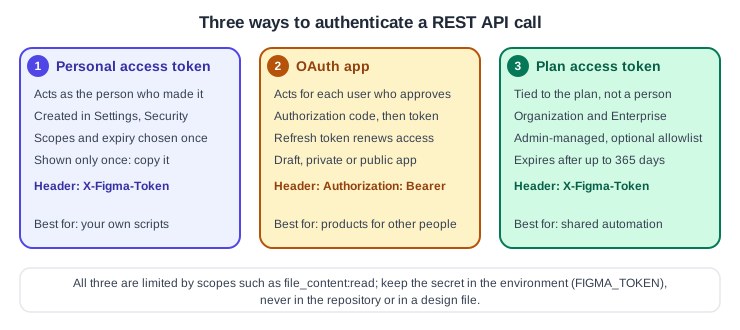
Authentication options
-
A personal access token acts as the person who generated it. Generate it from the file browser: open the account menu in the top-left, choose Settings, open the Security tab, and start a new token in the Personal access tokens section. Choose an expiration and the scopes, confirm, and copy the token immediately, because it is shown only once. Send it in the
X-Figma-Tokenheader. The Security tab shows when each token was last used, and revoking a token takes effect instantly. -
An OAuth app obtains OAuth 2 access tokens on behalf of users. It is the recommended option for anything other people will use, and it is required for the Activity Logs API, the Discovery API and the Embed API. Send the access token as
Authorization: Bearerfollowed by the token. -
A Plan Access Token is tied to an Organization or Enterprise plan instead of a user. Organization administrators create it at figma.com/developers/tokens; creating one requires multi-factor authentication (and Figma 2FA must be enabled first unless SSO is enforced). You can limit it to selected files, folders, teams or workspaces, it expires after up to 365 days, and it is sent in the
X-Figma-Tokenheader. It does not support the/v1/meor/v1/oembedendpoints or the endpoints that need thefile_code_connect:write,file_variables:writeorfile_comments:writescopes. Figma says it may change how these tokens are supported, including pricing, and will give notice before pricing changes.
OAuth apps in short
Create the app in My Apps, associate it with a team or organization, and copy the Client ID and Client Secret at once; the secret is shown only once. New apps start as drafts, which only you and your plan administrators can test. A private app works for users of the associated team or organization without a Figma review; a public app needs Figma’s review before users outside your team can authorize it. The flow follows the standard authorization code pattern:
-
Register your redirect URIs on the app’s OAuth credentials page.
-
Send the user’s browser (not an embedded web view) to
https://www.figma.com/oauthwithclient_id,redirect_uri,scope,stateandresponse_type=code. Generate a randomstate, store it and check it when the callback arrives. A PKCEcode_challengeis optional but recommended and must use S256. -
Exchange the code at
POST https://api.figma.com/v1/oauth/token, authenticating with HTTP Basic using the client ID and secret. The authorization code expires 30 seconds after it is issued. -
The response includes
access_token,expires_inandrefresh_token; access tokens expire after 90 days by default. Renew withPOST https://api.figma.com/v1/oauth/refresh. An app holds one active access token per user, so refreshing invalidates the previous one.
Figma has updated its requirements for registering OAuth apps; apps created before the change must be updated and republished, as described on the official re-publish page.
Source: Figma Developer Docs: OAuth apps
Scopes
A scope limits which endpoints a token can reach. Choose the narrowest set that works. A selection of the granular scopes:
| Scope | Allows |
|---|---|
|
Read file contents such as nodes, and render images |
|
Read file metadata |
|
Read comments |
|
Post and delete comments and reactions |
|
Read version history |
|
Read variables (Enterprise plan only) |
|
Write variables and collections (Enterprise plan only) |
|
Read or write dev resources |
|
Read published components and styles of a file |
|
Read published components and styles of teams |
|
Read, or create and manage, webhooks |
The older files:read scope is deprecated but still works and grants broad access; Figma recommends the granular scopes. This page lists only a selection, so use the official scopes page for the full list and for the OAuth-specific scope notes.
Source: Figma Developer Docs: Scopes
Rate limits
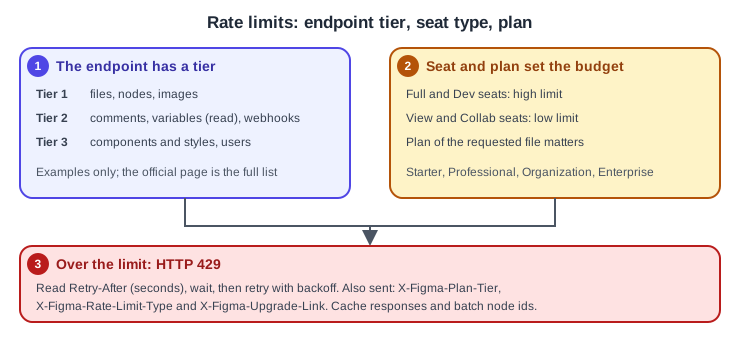
Limits depend on the seat type of the user, the tier of the endpoint, and the plan of the requested resource. Figma published updated limits that took effect on 2025-11-17 and reserves the right to change them, so read the current table rather than copying numbers from older guides. For example, requests to the file, nodes and images endpoints are in the most restrictive tier (Tier 1), comments, variables reads and webhooks are in Tier 2, and components and styles are in Tier 3. Limits are tracked per user and plan for personal access tokens, per token and plan for Plan Access Tokens, and per user, plan and app for OAuth apps. Figma uses a leaky bucket algorithm.
When you exceed the limit the endpoint answers HTTP 429. The response carries Retry-After (seconds to wait), X-Figma-Plan-Tier, X-Figma-Rate-Limit-Type (low for Collab and View seats, high for Full and Dev seats) and X-Figma-Upgrade-Link. Wait for the Retry-After interval, back off, cache responses and batch node ids into one request.
The main endpoints
All the endpoints below take the token headers described above. :key is the file key, the segment after /design/ (or /file/) in a file’s URL.
| Endpoint | Use |
|---|---|
|
The whole file as JSON; optional |
|
Only the nodes in a required, comma-separated |
|
Render nodes as |
|
List comments (scope |
|
Add a comment with |
The three file endpoints need the file_content:read scope. Rendered image URLs expire after 30 days, images over 32 megapixels are scaled down, and a null in the returned map means that node failed to render. A node id found in an app URL (the node-id query parameter) can use a hyphen where the API wants a colon; if a call returns null nodes, check the format. The Variables endpoints (GET local variables, GET published variables and POST variables) need the Enterprise plan: reading is open to any organization member, writing needs a Full seat or an admin, and guests cannot use them. Variables written through the API must be published before other files can use them. Folders were renamed from projects on 2026-08-03 in the product, but the REST API still says "projects" in endpoint and field names.
Procedure: export the Bookshelf icons with a script
-
In Figma, open the Bookshelf Design System file in a browser and copy the file key from the address bar.
-
Select an icon component and copy its node id from the
node-idparameter of the address; repeat for each icon you want. -
Create a personal access token with only the
file_content:readscope and export it asFIGMA_TOKENin your shell (never write it in the script). -
Run the script below. It asks the images endpoint for SVGs, then downloads each file.
// export-icons.ts - run with Node 22.6 or newer: node --experimental-strip-types export-icons.ts (no flag needed on Node 23.6+)
import { writeFile } from 'node:fs/promises'

const token = process.env.FIGMA_TOKEN
const fileKey = process.env.FIGMA_FILE_KEY
if (!token || !fileKey) throw new Error('Set FIGMA_TOKEN and FIGMA_FILE_KEY')

// node ids copied from the Bookshelf library, with the name for each file
const icons: Record<string, string> = {
  '1:2': 'shelf',
  '1:3': 'bookmark',
}

const ids = Object.keys(icons).join(',')
const url = `https://api.figma.com/v1/images/${fileKey}?ids=${encodeURIComponent(ids)}&format=svg`

const res = await fetch(url, { headers: { 'X-Figma-Token': token } })
if (res.status === 429) {
  throw new Error(`Rate limited, retry after ${res.headers.get('Retry-After')} seconds`)
}
if (!res.ok) throw new Error(`Figma API error ${res.status}`)

const body = (await res.json()) as { images: Record<string, string | null> }

for (const [id, name] of Object.entries(icons)) {
  const link = body.images[id]
  if (!link) {
    console.warn(`Node ${id} did not render`)
    continue
  }
  const svg = await (await fetch(link)).text()
  await writeFile(`${name}.svg`, svg)
}
The equivalent single request from a shell:
curl --header "X-Figma-Token: ${FIGMA_TOKEN}" \
"https://api.figma.com/v1/files/${FIGMA_FILE_KEY}/nodes?ids=1:2"Webhooks V2
A webhook asks Figma to send an HTTP POST with a JSON body to your server when something happens. It attaches to a context: a team, a folder or a file. In the API the folder context is still written project. Who can create one depends on the context: team administrators for a team, and people with Can edit permission for a folder or a file. The limits are 20 webhooks per team, 5 per folder and 3 per file, and the total number of file webhooks is capped per plan (150 on Professional, 300 on Organization and 600 on Enterprise at the time of checking). A team context notifies about files available to everyone on the team and files in view-only folders, but not files in invite-only folders.
The events, each with the common fields event_type, passcode, timestamp and webhook_id:
event_type |
Fires when |
|---|---|
|
The webhook is created successfully (no file fields) |
|
A file is edited |
|
A file is deleted |
|
A named version is added; the payload has |
|
A library is published; the payload lists created, modified and deleted components, styles and variables, and may arrive as several events |
|
A comment is added; the payload has |
|
A layer’s Dev Mode status changes to |
Create a webhook for library publishes
-
Expose your server at a public HTTPS address (a tunnelling tool is fine while developing); it must accept POST requests with a JSON body.
-
Create a token with the
webhooks:writescope. -
Send
POST /v2/webhookswithevent_type,context,context_id,endpoint(up to 2048 characters), apasscode(required, up to 100 characters) and optionallystatusanddescription. -
Figma sends a
PINGto the endpoint to confirm it works. List your webhooks later withGET /v2/webhooks, filtering bycontextandcontext_idor byplan_api_id, and inspect the last seven days of requests and responses with the webhook requests endpoint.
curl --request POST "https://api.figma.com/v2/webhooks" \
  --header "X-Figma-Token: ${FIGMA_TOKEN}" \
  --header "Content-Type: application/json" \
  --data '{
    "event_type": "LIBRARY_PUBLISH",
    "context": "file",
    "context_id": "'"${FIGMA_FILE_KEY}"'",
    "endpoint": "https://example.com/hooks/figma",
    "passcode": "'"${WEBHOOK_PASSCODE_FROM_ENV}"'",
    "description": "Bookshelf library published"
}'Receive and verify events
Webhooks are secured with the passcode you supplied. Compare the passcode in every incoming event with your own copy before acting; if it does not match, answer 400 Bad Request. When you read webhooks back, the passcode is redacted, so keep your own copy in a secret store. The security page describes the passcode only; it does not describe a cryptographic signature, so do not assume one exists. Reply with 200 OK quickly and do slow work afterwards.
import { createServer } from 'node:http'

const expected = process.env.WEBHOOK_PASSCODE_FROM_ENV

createServer((req, res) => {
  let raw = ''
  req.on('data', (chunk) => (raw += chunk))
  req.on('end', () => {
    const event = JSON.parse(raw)
    if (event.passcode !== expected) {
      res.writeHead(400).end()
      return
    }
    res.writeHead(200).end() // answer first, work later
    if (event.event_type === 'LIBRARY_PUBLISH') {
      console.log(`Library ${event.file_name} published, rebuild the design tokens`)
    }
  })
}).listen(3000)Retries
Any status other than 200, or a timeout, counts as an error. Figma retries up to three times with exponential backoff: 5 minutes after the first failure, 30 minutes after the second and 3 hours after the third. Figma does not currently deactivate endpoints that fail often, so remove webhooks you no longer need.
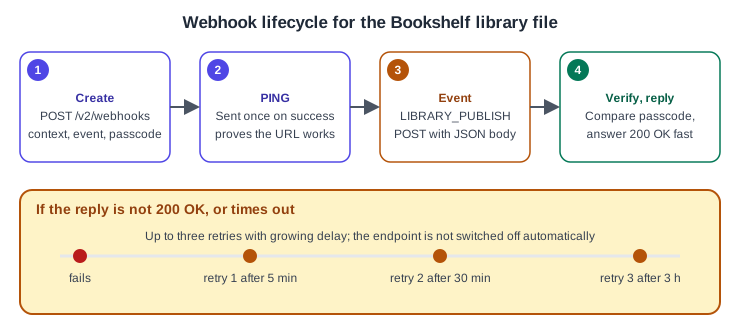
The sequence below puts the pieces together for the Bookshelf library: your build job asks for the icons with a token, and the webhook tells it when to do so again.
Source: Figma Developer Docs: Webhooks
Where older guides are outdated
-
Older guides describe "editor" and "viewer" seats. Since 2025-03-11 the model is Full, Dev, Collab and View, and the rate limits above depend on whether the seat type is high (Full, Dev) or low (Collab, View).
-
Projects are called folders in the product since 2026-08-03, but the REST API, including the
projectwebhook context, keeps the old word. -
Dev Mode has been a paid Dev or Full seat feature since 2024-01-31, and the old Inspect panel snippets are replaced by Dev Mode and Code Connect (see Dev Mode and Code Connect). The
DEV_MODE_STATUS_UPDATEwebhook event reflects it. -
Third-party plugins for exporting variables or CSS that older guides recommend must be re-checked before use; treat them as ecosystem tools, not Figma features. Variables themselves have been generally available since 2024-04-16 and can be read and written through the API on Enterprise plans.
Pitfalls
-
Keep tokens, the OAuth client secret and the webhook passcode in the environment or a secret store; never in a file that is committed or in a design file.
-
A personal access token is shown once. If you lose it, create a new one and revoke the old one.
-
Choose the narrowest scopes; the deprecated
files:readscope grants much more than most scripts need. -
Calls to the Tier 1 endpoints are the first to hit a 429. Request several node ids in one call and cache results.
-
Image URLs expire after 30 days; download the files instead of storing the links.
-
A webhook on a team context does not report files in invite-only folders.
-
Respond to webhook calls promptly with 200 OK, then process the event.