Security Hardening
|
This content was generated with the assistance of AI and should be verified against the official documentation before being relied on in production. This sub-section’s WordPress bibliography lists the reference material consulted while preparing these pages. |
This page was written against WordPress 7.1.3 (released 2026-10-06; 7.1.4, a security release of 2026-10-28, is the
version to run in production), PHP 8.4 and WP-CLI 2.12.0, and checked on 2026-10-28. WordPress 7.1 requires PHP 7.4 at
minimum, and PHP 8.3 or newer is recommended. WordPress 7.2 is in beta
and due in December 2026; nothing on this page is expected to change with it. Every command, request and header below
was run against a WordPress 7.1.3 site (official wordpress:7.1.3-php8.4-apache image, MariaDB 11.8, table prefix
lp_) and an nginx:1.29 container, and every output block is real output with the test host name and client addresses replaced by
lumenpress.test. A disposable site for trying the commands is described in
Local Development Environments.
This is the administrator’s view: what to configure on the server, in wp-config.php and in small must-use plugins so
that a WordPress site resists the attacks it actually receives. Writing secure plugin and theme code (capabilities,
nonces, sanitizing and escaping) is the developer’s side and is covered in
Security for Developers. User accounts, roles and the user side of
application passwords are in Users, Roles and Profiles.
The examples harden the production site of Lumen Press, the fictitious publisher used throughout this sub-section:
nginx in front of PHP-FPM, a MariaDB database, the lumen block theme and the lumen-catalog plugin.
Threat model
Hardening only pays off when it is aimed at the attacks that happen. For WordPress sites they are, roughly in order of how often they lead to a compromise:
| Threat | How it works | Main defenses |
|---|---|---|
Vulnerable extensions |
A plugin or theme with a known, unpatched vulnerability (XSS, SQL injection, broken access control, file upload); scanners try published exploits within hours of disclosure. This is the most common way in. |
Few, maintained plugins; prompt updates; virtual patching in a WAF; vulnerability alerts |
Brute force and credential stuffing |
Bots try leaked or common passwords against |
Unique passwords, two factors, rate limits at the edge or web server |
Supply chain |
A plugin changes owner and ships malicious code, an abandoned plugin is never fixed, a "nulled" theme carries a backdoor, or FTP/SSH credentials are stolen. |
Trusted sources only, review ownership changes, integrity monitoring, SSH keys |
Information disclosure and hosting |
Usernames from the REST API, a public |
Enumeration guard, server deny rules, supported PHP, private database network |
WordPress core itself is rarely the entry point: it has a dedicated security team, and fixes are released as minor versions that install automatically and are backported to older branches. The weak points are the extensions and the accounts, so most of this page is about limiting what an attacker can do once one of them fails.
Core is not immune, though, which is why core security releases are applied the day they ship. WordPress 7.1.4 (2026-10-28) is a security-only release whose most serious fix closes a weakness in the upgrade process that could lead to remote code execution during the upgrade window; it also fixes stored XSS in crafted block markup, the Interactivity API, Customizer selective refresh, privacy data removal requests, user logins and the Categories, Playlist, Image and comments-pagination blocks, a stored denial of service in the Interactivity API, unauthenticated discovery of unpublished Customizer changesets, Notes readable by users who cannot edit the post, and it updates the bundled root certificates. The announcement asks site owners to update immediately; sites with automatic background updates receive it on their own (see Updates and Auto-Updates).
Source: WordPress News: WordPress 7.1.4
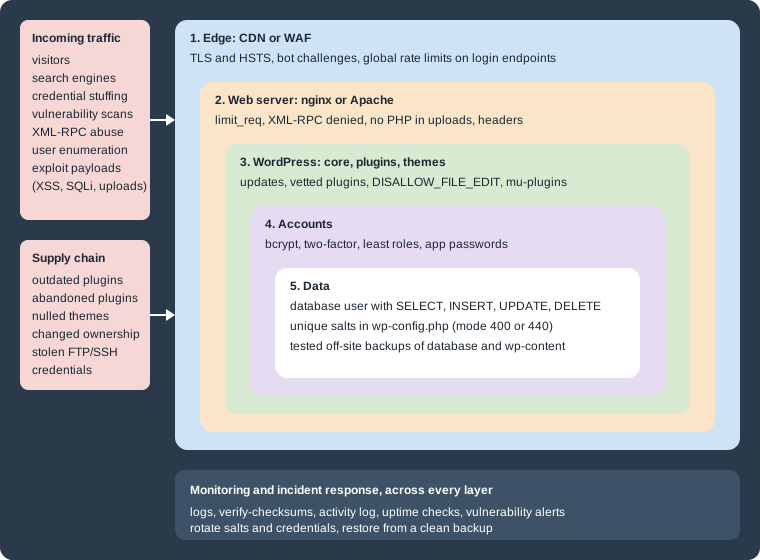
No single setting stops every attack, so Lumen Press applies controls in layers, each of which still helps when an outer one is bypassed: the edge (a CDN or web application firewall), the web server, WordPress and its extensions, the accounts, and the data. Monitoring and a rehearsed incident response cover all of them.
HTTPS everywhere
Login cookies and application passwords are bearer credentials, so every WordPress site needs HTTPS.
The site address must use HTTPS in Settings > General (the home and siteurl options). Since 5.7, Tools > Site
Health detects when HTTPS is available but unused and offers Update your site to use HTTPS, which switches both
options and rewrites old http:// links in content on the fly. With WP-CLI, wp search-replace rewrites them
permanently, as described in
Importing, Exporting and Migrating.
FORCE_SSL_ADMIN forces the dashboard and logins over HTTPS; it must be defined in wp-config.php, not in a plugin.
The older FORCE_SSL_LOGIN was deprecated in 4.0. When TLS ends at a load balancer or CDN and the request reaches PHP
over HTTP, WordPress believes it is on HTTP and loops redirecting to HTTPS. The fix is to trust the proxy’s
X-Forwarded-Proto header, and only from that proxy:
// wp-config.php, above "That's all, stop editing!".
// Only when every request reaches PHP through a TLS-terminating proxy that sets X-Forwarded-Proto.
if ( isset( $_SERVER['HTTP_X_FORWARDED_PROTO'] ) && false !== strpos( $_SERVER['HTTP_X_FORWARDED_PROTO'], 'https' ) ) {
	$_SERVER['HTTPS'] = 'on';
}
define( 'FORCE_SSL_ADMIN', true );The header-trust lines are only safe when PHP is reachable through the proxy alone. HSTS (Strict-Transport-Security)
is sent by the web server, as shown in Security headers. TLS configuration itself (certificates, protocols, HTTP/2
and HTTP/3) is in Web Servers: Apache and nginx.
Passwords and bcrypt
Since 6.8, WordPress hashes user passwords with bcrypt through PHP’s password_hash(), replacing the portable phpass
hashes used since 2.5. Because bcrypt only reads the first 72 bytes, WordPress first computes an HMAC-SHA384 of the
password (keyed with wp-sha384) and hashes that; the stored value is marked with a $wp prefix, so user_pass starts
with $wp$2y$ followed by the cost. Old phpass hashes ($P$) still validate and are replaced the next time the user
logs in, so a site upgraded from an older version holds a mix until everyone has logged in once. Application passwords,
which are long random strings, are hashed with the faster BLAKE2b instead ($generic$), as described in
Users, Roles and Profiles.
On the Lumen Press test site, under PHP 8.4, every hash started with $wp$2y$12$ (the query is shown in
Users, Roles and Profiles). That cost is PHP’s default, which PHP 8.4
raised from 10 to 12, so the same WordPress version produces cheaper hashes on PHP 8.3. Two filters control the
algorithm and its options, and wp_password_needs_rehash() (6.8) compares a stored hash against them, so a change is
applied gradually at each user’s next login. Lumen Press pins the cost in a must-use plugin so it does not depend on the
PHP version:
<?php
/**
 * Plugin Name: Lumen Password Hashing
 * Description: Pins the bcrypt cost for user passwords, whatever PHP version the host runs.
 * Version:     0.1.0
 * License:     GPL-2.0-or-later
 */

defined( 'ABSPATH' ) || exit;

add_filter(
	'wp_hash_password_options',
	static function ( $options, $algorithm ) {
		if ( PASSWORD_BCRYPT === $algorithm ) {
			$options['cost'] = 13; // PHP 8.4 defaults to 12, PHP 8.3 and older to 10.
		}
		return $options;
	},
	10,
	2
);Saved as wp-content/mu-plugins/lumen-password-hashing.php, it made wp_password_needs_rehash() return true for
the existing cost-12 hashes, and after tom.author logged in his hash started with $wp$2y$13$ while the others kept
cost 12. Each step of cost doubles the time of every login, so it should be measured on the production hardware.
The wp_hash_password_algorithm filter can switch to Argon2id (PASSWORD_ARGON2ID, when PHP was built with it); on
the test site the new hashes started with $argon2id$v=19$m=65536,t=4,p=1 and the old bcrypt ones still validated
(and were flagged for rehashing).
Core does not enforce password strength: it shows a strength meter and asks to confirm a weak password. Resetting a
password with an MD5 hash written into the database still works once (it is rehashed at the next login), but
wp user update <user> --user_pass=<password> is the clean route. Password policies, expiry and breached-password
checks come from plugins or from single sign-on. The hashing functions themselves are explained in
PHP: Cryptography, Hashing and Passwords.
Multi-factor authentication
WordPress core has no two-factor authentication; it is added with a plugin or by delegating logins to an identity provider. The reference implementation is Two Factor, maintained by WordPress.org contributors, which provides authenticator-app (TOTP) codes, email codes and backup codes, with passkeys and security keys through a companion WebAuthn provider plugin. Many security suites (listed in Security plugins) include their own two-factor module, and SSO through SAML or OpenID Connect moves the second factor to the identity provider.
wp plugin install two-factor --activateLumen Press requires a second factor for Administrators and Editors and enrolls two authenticators per administrator. A second factor protects the login form only; application passwords bypass it by design. The methods are explained in Authentication Methods: Passwordless and 2FA.
Application passwords
Application passwords (5.6+) authenticate REST API and XML-RPC requests with HTTP Basic authentication and never work on
wp-login.php. They are shown once, stored hashed, listed per user and revocable one by one; creating, using and
revoking them is covered in
Users, Roles and Profiles. For hardening:
-
They require HTTPS unless
WP_ENVIRONMENT_TYPEislocal(wp_is_application_passwords_supported()). -
A site with no API clients turns them off entirely with
add_filter( 'wp_is_application_passwords_available', '__return_false' );in a must-use plugin; per-user rules use thewp_is_application_passwords_available_for_userfilter. -
Some proxies and CGI setups strip the
Authorizationheader; the Apache rules WordPress writes to.htaccessrestore it withRewriteRule .* - [E=HTTP_AUTHORIZATION:%{HTTP:Authorization}]. -
An application password bypasses two factors and
wp-login.phprate limits, so give it a dedicated low-role user.
Brute-force defense at the edge
Core does not limit login attempts. Every attempt costs a full PHP request and a bcrypt verification, so the cheapest
place to stop a password-guessing bot is in front of PHP: a CDN or WAF rule, or the web server. A login-limiting plugin
also works but still pays the PHP cost of every blocked request. The official guidance adds strong passwords, two
factors, protecting or disabling XML-RPC, temporary IP bans from log monitoring (Fail2ban is the usual tool), and warns
that permanent country blocklists and HTTP Basic authentication on the whole of /wp-admin are unreliable or break
AJAX and REST calls from the front end.
Lumen Press throttles wp-login.php in nginx with limit_req: a burst of three attempts, then six per minute per
client address, answered with status 429. The same server block denies XML-RPC, blocks PHP in uploads and dotfiles, and
adds the security headers discussed below:
# /etc/nginx/conf.d/lumenpress.conf (included inside the http {} block)

limit_req_zone $binary_remote_addr zone=wp_login:10m rate=6r/m;
limit_req_status 429;

server {
    listen 443 ssl;
    http2 on;
    server_name lumenpress.test;
    root /var/www/lumenpress;
    index index.php;

    ssl_certificate     /etc/nginx/certs/fullchain.pem;
    ssl_certificate_key /etc/nginx/certs/privkey.pem;

    add_header Strict-Transport-Security "max-age=31536000; includeSubDomains" always;
    add_header X-Content-Type-Options "nosniff" always;
    add_header Referrer-Policy "strict-origin-when-cross-origin" always;
    add_header Permissions-Policy "camera=(), microphone=(), geolocation=()" always;

    location = /wp-login.php {
        limit_req zone=wp_login burst=3 nodelay;
        include fastcgi_params;
        fastcgi_param SCRIPT_FILENAME $document_root$fastcgi_script_name;
        fastcgi_pass 127.0.0.1:9000;
    }

    # XML-RPC is not used by Lumen Press.
    location = /xmlrpc.php {
        deny all;
    }

    location = /wp-config.php { deny all; }
    location ~ /\.(?!well-known/) { deny all; }
    location ~* ^/wp-content/uploads/.*\.(?:php[0-9]?|phtml|phar)$ { deny all; }

    location / {
        try_files $uri $uri/ /index.php?$args;
    }

    location ~ \.php$ {
        try_files $uri =404;
        include fastcgi_params;
        fastcgi_param SCRIPT_FILENAME $document_root$fastcgi_script_name;
        fastcgi_pass 127.0.0.1:9000;
    }
}nginx -t accepts the file in nginx:1.29 (1.29.8). With the same rules in front of the test site, six failed logins
in a row returned 200 200 200 200 429 429, xmlrpc.php, a PHP file in uploads and /.git/config returned 403, and
the error log recorded the throttling:
nginx: configuration file /etc/nginx/nginx.conf test is successful
[error] 27#27: *9 limiting requests, excess: 3.678 by zone "wp_login", client: <ip>, server: lumenpress.test, request: "POST /wp-login.php HTTP/2.0", host: "lumenpress.test"Points to get right:
-
The regular-expression locations are checked in file order and the first match wins, so the uploads and dotfile rules must come before
location ~ \.php$. -
add_headerdirectives inserverare not inherited by alocationthat has its ownadd_header. -
Behind a CDN or load balancer, restore the client address with
ngx_http_realip_modulefirst, or every visitor shares the proxy’s bucket. -
Apache has no
limit_req; Apache sites rely on the edge,mod_security, Fail2ban or a plugin, or restrictwp-login.phpto known networks withRequire ip.
XML-RPC
xmlrpc.php is the remote publishing API that predates the REST API: older versions of the WordPress mobile apps used
it, as do desktop blog editors, pingbacks and some services such as Jetpack. It accepts a username and
password in every request body, so it is a second login form without the protections that plugins add to
wp-login.php.
Its system.multicall method used to be a brute-force amplifier: one request could carry hundreds of password guesses.
Since 4.4 the first failed login in a request makes every later call in it fail; on the test site a multicall with a
wrong password followed by the right one returned two Incorrect username or password. faults. One guess per request
remains, so XML-RPC is disabled when unused and rate limited like wp-login.php when needed.
The xmlrpc_enabled filter is misleadingly named: returning false only disables the methods that need
authentication. pingback.ping and the system.* methods keep answering. Disabling everything needs the
xmlrpc_methods filter as well:
<?php
/**
 * Plugin Name: Lumen XML-RPC Off
 * Description: Turns off every XML-RPC method and the pingback discovery headers on Lumen Press.
 * Version:     0.1.0
 * License:     GPL-2.0-or-later
 */

defined( 'ABSPATH' ) || exit;

// Methods that need a login (wp.*, metaWeblog.*, blogger.*) answer "XML-RPC services are disabled".
add_filter( 'xmlrpc_enabled', '__return_false' );

// Remove every remaining method, including pingback.ping, so nothing is left to call.
add_filter( 'xmlrpc_methods', '__return_empty_array' );

// Stop advertising the endpoint: the X-Pingback header and the RSD link in <head>.
add_filter(
	'wp_headers',
	static function ( $headers ) {
		unset( $headers['X-Pingback'] );
		return $headers;
	}
);
remove_action( 'wp_head', 'rsd_link' );
Source: Code Reference: xmlrpc_enabled
The results on the test site, saved as wp-content/mu-plugins/lumen-xmlrpc-off.php:
| Request | Only xmlrpc_enabled |
Both filters |
|---|---|---|
|
Fault 405, |
Fault -32601, |
|
Processed (the server fetched the source URL) |
Fault -32601, method does not exist |
|
80 methods |
Only |
Source: Code Reference: xmlrpc_methods
The three system.* methods are built into the XML-RPC server class and cannot be removed by the filter, which is why
denying xmlrpc.php at the web server, as in the nginx block above, is the stronger option. On Apache 2.4 the
equivalent is a <FilesMatch "^(xmlrpc\.php|wp-config\.php)$"> section with Require all denied, placed above the
# BEGIN WordPress marker so WordPress never rewrites it; on the test site both files then answered 403.
Since 7.1, pingbacks and trackbacks (outgoing and incoming, including pingback.ping) are disabled automatically in
every environment type other than production; the wp_should_disable_pings_for_environment filter overrides it.
Before disabling XML-RPC, check for Jetpack, desktop editors and integrations that still need it.
A least-privilege database user
For day-to-day work (publishing, uploads, comments, new users, installing plugins), WordPress needs only SELECT,
INSERT, UPDATE and DELETE on its own database. Schema changes during major updates, and plugins that create
tables on activation, also need CREATE, ALTER, INDEX and DROP. The official handbook allows revoking the
structural privileges but advises against it unless tested backups are in place, because a major update that cannot
alter the schema fails half-way.
Lumen Press keeps two accounts: a runtime account for PHP with data privileges only, and a maintenance account that
WP-CLI uses during updates and plugin activations. Neither has GRANT, FILE or privileges on other databases, and
each site on the server has its own database and user:
-- Runtime account used by PHP: data only.
CREATE USER 'lumen_app'@'10.0.2.%' IDENTIFIED BY '<app-db-password>';
GRANT SELECT, INSERT, UPDATE, DELETE ON lumen_press.* TO 'lumen_app'@'10.0.2.%';

-- Maintenance account used by WP-CLI during updates and plugin activation.
CREATE USER 'lumen_maint'@'10.0.2.%' IDENTIFIED BY '<maint-db-password>';
GRANT SELECT, INSERT, UPDATE, DELETE, CREATE, ALTER, INDEX, DROP ON lumen_press.* TO 'lumen_maint'@'10.0.2.%';wp-config.php reads the account from the environment, so the web server’s PHP-FPM pool gets the runtime account and
the deployment shell exports the maintenance one:
// wp-config.php
define( 'DB_NAME', 'lumen_press' );
define( 'DB_USER', getenv( 'LP_DB_USER' ) ?: 'lumen_app' );
define( 'DB_PASSWORD', getenv( 'LP_DB_PASSWORD' ) ?: '' );
define( 'DB_HOST', getenv( 'LP_DB_HOST' ) ?: 'localhost' );As lumen_app, wp option update, wp post list and the front page worked on the test site, while creating a plugin
table failed with "CREATE command denied to user"; it succeeded as lumen_maint. Plugin activation and
wp core update-db therefore run as the maintenance account, which suits sites deployed from a pipeline (see
Deployment and CI/CD). The database listens only on a private network.
File editing and file modification constants
Two constants in wp-config.php remove the dashboard’s ability to change code, which is what an attacker with a
stolen Administrator session would use first:
-
DISALLOW_FILE_EDITremoves the theme and plugin file editors and nothing else. -
DISALLOW_FILE_MODSadditionally blocks installing, updating and deleting plugins and themes and updating core from the dashboard, including background updates. It is meant for sites deployed from version control.
On the test site, DISALLOW_FILE_EDIT removed only edit_plugins, edit_themes and edit_files from the
Administrator; adding DISALLOW_FILE_MODS also removed install_plugins, update_plugins, delete_plugins and
update_core, while activate_plugins remained.
// wp-config.php on the Lumen Press production server.
define( 'DISALLOW_FILE_EDIT', true );
define( 'DISALLOW_FILE_MODS', true ); // Updates arrive through the deployment pipeline.
define( 'WP_ENVIRONMENT_TYPE', 'production' );DISALLOW_FILE_MODS turns automatic security updates off as well, so a site that uses it needs its own process for
applying them quickly (see Updates and Auto-Updates). Both constants
are listed with the rest in wp-config.php Reference. They complement
correct file ownership and permissions (644 for files, 755 for directories, 400 or 440 for wp-config.php, the web
server writing only to wp-content/uploads where possible), which are explained in
File Permissions and Filesystem. Uploads must never execute
PHP: the nginx block above denies it, and on Apache a wp-content/uploads/.htaccess with a
<FilesMatch "\.(?i:php[0-9]?|phtml|phar)$"> section containing Require all denied does the same (on the test
site a PHP file in uploads went from 200 to 403).
Table prefix
The table prefix ($table_prefix, wp_ by default) is chosen at installation. A non-default prefix such as lp_
defeats some automated SQL injection payloads that hard-code the default table names; the handbook files it under
"security through obscurity", since an injection can still read information_schema. Changing it later is risky for
little gain: the <prefix>user_roles option and the <prefix>capabilities and <prefix>user_level user meta keys
carry it too, and a missed one leaves every user without a role.
Secret keys and salts
wp-config.php defines eight secrets: AUTH_KEY, SECURE_AUTH_KEY, LOGGED_IN_KEY, NONCE_KEY and their *_SALT
counterparts. wp_salt() combines them into the keys that sign login cookies and nonces. If a constant is missing or
still holds the placeholder text, WordPress generates a value and stores it in the options table, which is weaker
because a database leak then exposes it too.
Changing them invalidates every login cookie (everyone, including attackers holding a stolen cookie, is logged out) and every outstanding nonce. Rotate them:
-
after a compromise or a suspected cookie theft, or when
wp-config.phpmay have leaked (a backup in the web root, a public repository, a departing contractor), -
not on a schedule: routine rotation only logs everyone out, and plugins that encrypt stored data with a key derived from the salts (two-factor secrets, API tokens) can lose access to it.
New values come from https://api.wordpress.org/secret-key/1.1/salt/ or from WP-CLI:
wp config shuffle-salts # Success: Shuffled the salt keys.On the test site, a logged-in Editor’s cookie loaded /wp-admin/profile.php with 200 before the command and was
redirected to the login screen (302) after it. The session tokens stored in user meta survive, but no cookie matches
them any more; they can be cleared per user with wp user session destroy <user> --all (WP-CLI 2.12.0 has no
all-users flag, so a loop over wp user list --field=ID does it). shuffle-salts writes literal values into
wp-config.php: on the official Docker image it replaced the getenv_docker('WORDPRESS_AUTH_KEY', ...) expressions,
so sites that load secrets from the environment rotate them in the secret store instead.
Security headers
WordPress 7.1.3 already sends X-Frame-Options: SAMEORIGIN and Content-Security-Policy: frame-ancestors 'self';
(send_frame_options_header()) plus Referrer-Policy: strict-origin-when-cross-origin (wp_admin_headers(), 4.9+)
on wp-login.php and admin screens, and X-Content-Type-Options: nosniff on REST and admin-ajax.php responses.
Front-end pages get none of them.
The front end, static files and uploads get their headers from the web server (the nginx block above, or Header
always set on Apache), which covers every response including images and PDFs. On hosts without access to the server
configuration, a must-use plugin covers the WordPress-generated pages through the wp_headers filter:
<?php
/**
* Plugin Name: Lumen Security Headers
* Description: Sends baseline security headers on front-end pages when the web server cannot add them.
* Version: 0.1.0
* License: GPL-2.0-or-later
*/
defined( 'ABSPATH' ) || exit;
add_filter(
'wp_headers',
static function ( $headers ) {
$headers['X-Content-Type-Options'] = 'nosniff';
$headers['Referrer-Policy'] = 'strict-origin-when-cross-origin';
$headers['X-Frame-Options'] = 'SAMEORIGIN';
$headers['Content-Security-Policy'] = "frame-ancestors 'self'; object-src 'none'; base-uri 'self'";
$headers['Permissions-Policy'] = 'camera=(), microphone=(), geolocation=()';
if ( is_ssl() ) {
$headers['Strict-Transport-Security'] = 'max-age=31536000; includeSubDomains';
}
return $headers;
}
);Source: Code Reference: wp_headers
On the test site the home page then carried all five headers.
Choosing and tuning the values:
-
One place only. With the plugin and an Apache
Header always set X-Content-Type-Optionsboth active (aftera2enmod headers, which the official image does not enable), the test site sent the header twice. -
HSTS:
includeSubDomainsonly when every subdomain serves HTTPS, andpreloadonly after reading the preload list’s requirements, because removal takes months. -
Content Security Policy. The directives above leave scripts alone. Restricting scripts is hard on WordPress (the block editor and inline scripts need
'unsafe-inline'or nonces, which thewp_script_attributesandwp_inline_script_attributesfilters, 5.7+, can add); start withContent-Security-Policy-Report-Onlyon the front end. -
X-XSS-Protectionis obsolete; modern browsers ignore it, and the OWASP cheat sheet recommends not setting it.
CORS headers for the REST API are a different topic, covered in CORS.
User enumeration
A login name is half of a credential, and WordPress makes it easy to collect. The table shows what an anonymous visitor got from the test site, without and with the must-use plugin below:
| Request | Default answer | With the guard |
|---|---|---|
|
301 to |
404 |
|
|
404 |
|
The same users' archive URLs (core sitemaps, 5.5+) |
404, and no users entry in |
|
|
Both fields removed |
|
|
|
Source: REST API Handbook: Users
Usernames are not secrets, and hiding them does not replace strong passwords, two factors and rate limits. Reducing the leak still removes the easy half of credential stuffing and keeps staff logins out of public lists. Lumen Press uses this must-use plugin:
<?php
/**
 * Plugin Name: Lumen User Enumeration Guard
 * Description: Keeps user logins and IDs away from anonymous visitors: ?author=N, the REST users route, the users sitemap, oEmbed author data and login error details.
 * Version:     0.1.0
 * License:     GPL-2.0-or-later
 */

defined( 'ABSPATH' ) || exit;

// 1. "/?author=1" normally answers 301 to /author/<user_nicename>/. Answer 404 instead.
add_action(
	'template_redirect',
	static function () {
		if ( is_user_logged_in() || ! isset( $_GET['author'] ) ) { // phpcs:ignore WordPress.Security.NonceVerification.Recommended
			return;
		}
		global $wp_query;
		$wp_query->set_404();
		status_header( 404 );
		nocache_headers();
	},
	1 // Before redirect_canonical(), which runs at priority 10.
);

// 2. Remove /wp/v2/users and /wp/v2/users/<id> for requests without a logged-in user.
add_filter(
	'rest_endpoints',
	static function ( $endpoints ) {
		if ( ! is_user_logged_in() ) {
			unset( $endpoints['/wp/v2/users'], $endpoints['/wp/v2/users/(?P<id>[\d]+)'] );
		}
		return $endpoints;
	}
);

// 3. Drop the users provider from the core sitemap (wp-sitemap-users-1.xml).
add_filter(
	'wp_sitemaps_add_provider',
	static function ( $provider, $name ) {
		return 'users' === $name ? false : $provider;
	},
	10,
	2
);

// 4. Keep the author's name and archive URL out of oEmbed responses.
add_filter(
	'oembed_response_data',
	static function ( $data ) {
		unset( $data['author_name'], $data['author_url'] );
		return $data;
	}
);

// 5. One message for a wrong username and a wrong password.
add_filter(
	'login_errors',
	static function () {
		return '<strong>Error:</strong> The username or password is incorrect.';
	}
);
Source: Code Reference: rest_endpoints
The plugin is saved as wp-content/mu-plugins/lumen-user-privacy.php. What the guard does not hide, by design:
-
The author archive itself (
/author/tom-author/) still answers 200, since author pages are content. Give staff auser_nicenamedifferent from their login (wp user update tom.author --user_nicename=tom-author) and a display name that is not the login. -
Logged-in users, including Subscribers, still see the REST users route (the block editor needs it); on sites with open registration, check a capability such as
edit_postsinstead ofis_user_logged_in(). -
The lost-password and registration forms still reveal whether an account exists; rate limiting them matters more.
Security plugins
Security plugins bundle several of the controls on this page with others that need a service behind them. The categories, rather than the brands, decide what a site needs:
| Category | What it does, and where it runs |
|---|---|
Web application firewall |
Blocks exploit payloads: an endpoint WAF inside PHP (via |
Vulnerability monitoring |
Compares installed versions with a vulnerability database, alerts, or patches virtually until the update. |
Malware and integrity scanning |
Compares files with the official versions and looks for known malicious code. |
Login protection and activity logs |
Limits attempts, adds two factors or CAPTCHAs, and records who changed what for audits. |
Widely used plugins on WordPress.org, in alphabetical order, include Kadence Security (the plugin previously published as iThemes Security and, from version 9.0, Solid Security; renamed again in version 10.0), Limit Login Attempts Reloaded, Sucuri Security, Two Factor, Wordfence Security and WP Activity Log; several have paid tiers that add cloud firewalls, real-time rules or cleanup services. Vulnerability databases (Wordfence Intelligence, Patchstack, WPScan) also offer feeds and integrations independently of any plugin.
Choosing among them follows Choosing and Managing Plugins and Themes; a security plugin is itself code with vulnerabilities, and it adds a layer rather than replacing updates, backups or server rules.
Monitoring
The handbook’s monitoring page covers logs, uptime and performance; for security, Lumen Press adds:
-
Logs. Web server access and error logs, PHP-FPM slow logs and the WAF log, kept off the server for at least 90 days. Failed logins and 429 responses on
wp-login.phpare the first sign of a campaign. -
File integrity. WP-CLI compares core and WordPress.org plugins with their official checksums. Run nightly, it catches modified core files and files that should not be there:
wp core verify-checksums
wp plugin verify-checksums --all
Warning: File doesn't verify against checksum: wp-includes/version.php
Warning: File should not exist: wp-config-docker.php
Warning: File should not exist: wp-includes/class-wp-cache-helper.php
Error: WordPress installation doesn't verify against checksums.
Success: Verified 2 of 2 plugins.This is the test site after one core file was modified and one added (wp-config-docker.php comes with the Docker
image). Extra files only produce warnings, so read them rather than the exit code. Themes and premium plugins have no
published checksums; compare them with version control.
-
Inventory. A scheduled job alerts when the Administrators, must-use plugins or drop-ins differ from the expected list, and Google Search Console reports injected spam and malware.
-
Site Health flags outdated PHP, a public
debug.logand disabled updates; see Debugging, Site Health and Troubleshooting.
Incident response and cleaning a hacked site
Signs of a compromise include browser or search warnings, a suspended account, unknown Administrators, spam pages, redirects only some visitors see, and unexpected outgoing mail. Document symptoms and times first, then:
-
Contain. Take the site offline at the edge; rotate salts, destroy sessions, revoke application passwords and keys.
-
Preserve evidence. Copy files, a database dump and logs before cleaning; they show how the attacker got in.
-
Identify. Run the integrity checks above and review modified files, PHP in uploads, users, must-use plugins, drop-ins, every
.htaccess, cron events (wp cron event list) and thesiteurlandhomeoptions:find wp-content -type f -name '*.php' -newer wp-config.php -print # changed after wp-config.php find wp-content/uploads -type f -name '*.php' -print wp user list --role=administrator --fields=ID,user_login,user_registered wp plugin list --status=must-use,dropin --fields=name,status -
Clean. Restore from the last clean backup when one exists and its date is earlier than the intrusion. Otherwise reinstall rather than edit: delete
wp-adminandwp-includesand download the same core version, then reinstall every plugin and theme from its official source or repository. Reinstalling over the existing files is not enough; on the test sitewp core download --version=7.1.3 --skip-content --forcerestored the modifiedversion.phpbut left the added file inwp-includesin place. Remove unknown users, rewritewp-config.phpfrom a known template, and check the database for injected scripts in posts, widgets and options. -
Rotate everything again once clean: all user passwords, salts, the database password, SSH keys, hosting and CDN accounts, and API keys stored in options.
-
Update, harden and recover. Close the hole that was used, request a review in Google Search Console if the site was flagged, and watch the logs for weeks; attackers often leave more than one backdoor. Record the entry point and change the process that allowed it.
Backups that make the clean-up possible are covered in Backups and Disaster Recovery.
What not to do
Some popular advice adds work without adding security, or weakens it:
-
"Encrypting" values in
wp-config.php. PHP must decrypt them on every request, so the key sits next to the ciphertext and an attacker who can read the file can read both. Protect the file with permissions, keep it outside the web root if wanted (WordPress finds it one directory up automatically, without changingABSPATH; the benefit is disputed), or load secrets from the environment. -
Hiding the login URL. Renaming
wp-login.phpwith a plugin reduces log noise but is not a defense: the login form is still there, XML-RPC and the REST API still accept credentials, and the plugin can break other plugins and lock administrators out. Rate limits and two factors protect the form wherever it is. -
Removing the generator tag as protection. The version still shows in asset URLs and feeds; updating is the fix.
-
Turning off updates (
AUTOMATIC_UPDATER_DISABLED) without a replacement process. -
Stacking security plugins. Two firewalls or login limiters in PHP conflict and slow the site.
Where older books are outdated
| Older claim | Current behaviour (WordPress 7.1) |
|---|---|
WordPress core provides two-factor authentication |
Core has none; it comes from a plugin such as Two Factor or from SSO |
Passwords are stored as phpass (MD5-based) hashes |
bcrypt since 6.8 ( |
Writable folders need permissions 666 or 777 |
644 for files and 755 for directories; |
|
It also blocks installing and deleting plugins and themes and the file editors |
Deny rules use |
Apache 2.4 uses |
|
It only repairs tables and exposes the repair page without login |
|
Since 4.4, the first failed login in a request makes the rest fail; the endpoint is still worth disabling when unused |
iThemes Security |
Renamed Solid Security (version 9.0) and then Kadence Security (version 10.0); same WordPress.org plugin |
Further corrections across the whole sub-section are collected in Where Older Books and Tutorials Are Outdated.