The apply Family and Functionals
|
This content was generated with the assistance of AI and should be verified against the official documentation before being relied on in production. The reference material consulted while preparing these pages is listed in the section bibliography. |
Checked against R 4.6.1 (2026-06-24) on 2026-10-20; R 4.6.2 is scheduled for 2026-10-29. Everything on this page is base R (the base, stats and utils packages that ship with R) except the comparison table near the end, whose short example uses the purrr 1.2.2 package (a labelled add-on package); the lintr 3.4.0 default linters were used only to check the scripts. R has for, while and repeat, but much idiomatic R code replaces the loop by a function that takes another function as an argument and calls it for every element, row, group or pair of a data structure. These form a family: the apply family (lapply(), sapply(), vapply(), mapply(), Map(), apply(), tapply(), outer(), rapply() and eapply()) and the functionals that fold or select (Reduce(), Filter(), Find(), Position(), do.call() and Vectorize()). This page explains what each one returns, how the result is shaped and why that shape sometimes surprises, which one to choose, and what the failures look like.
Every example is a script that was run with Rscript on R 4.6.1 with warnings printed as they happen (options(warn = 1)), and the lines that start with #> are what it printed. The scripts also pass the default lintr linters; a # nolint: comment marks a line where the idiom on show is what a default linter dislikes, so the linter does not hide the lesson. The names books, loans, shelf_today, loan_days and the book() constructor come from the running library-shelf scenario described on the section index: a script that needs them starts with source("scenario.R"). Where a message contains quotation marks, they are the typographic quotes R prints in a UTF-8 locale. Lists and data frames are the subject of Lists and Data Frames, matrices and arrays of Matrices and Arrays; the language underneath, namely functions as values, closures and lazy arguments, is in Functions, Scoping, Environments and Closures and Lazy Evaluation and Promises.
What the family is for
The Language Definition mentions the apply functions in its section on looping: R has three statements for explicit looping (for, while and repeat), it also provides functions for implicit looping, tapply(), apply() and lapply() among them, and many operations, especially arithmetic ones, are vectorized, so a loop may not be needed at all (R-lang: Looping). Three ideas follow from that sentence and organise this page.
-
A function is a value you can hand to another function.
lapply(x, f)does not know whatfdoes; it only knows how to call it once for every element ofxand how to collect the answers. That is why the same few functions serve for counting rows, validating ISBNs and fitting models. -
The family differs in two things: what is looped over and how the answers are gathered.
lapply()loops over the elements of a vector or list,apply()over the rows or columns of a matrix,tapply()over groups,mapply()over several vectors in step,outer()over all pairs,rapply()over the leaves of a tree,eapply()over the objects of an environment. The answers are gathered as a list (lapply(),Map()), as a vector, matrix or array guessed from the answers (sapply(),mapply(),apply(),tapply()) or as a vector or array whose type you declared (vapply()). -
None of them is a vectorised kernel. They are loops.
lapply()andvapply()run the loop in C, but the function you pass is still an R function called once per element, so the speed is in the same range as a well-writtenforloop that preallocates its result (no timings are shown on this page, because they are platform-specific). The reason to prefer them is not speed but clarity: they say what is being computed and they return the result instead of filling a variable in a loop. Genuinely vectorised operations (x + 1,cumsum(),rowSums(),ifelse()) are faster and are the subject of Vectorisation and Iteration.
The figure summarises the family in one table: for each function, what you pass in, what comes back, and how much of the result type is known before the call. The rest of the page goes through the rows in the same order.
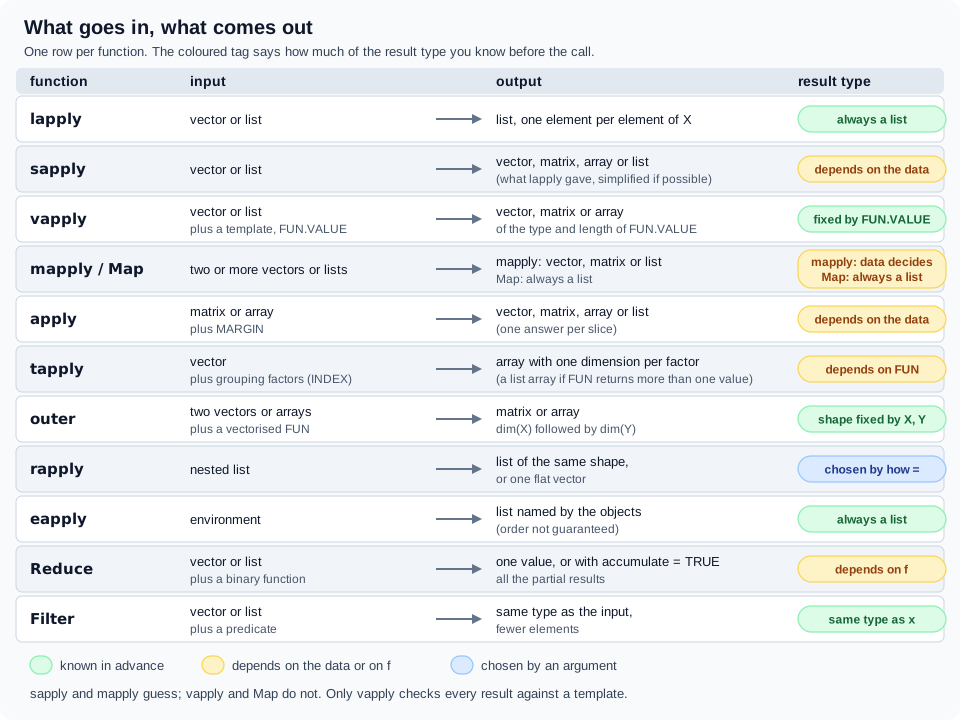
The single most useful column of that table is the last one. A function whose result type depends on the data (sapply() is the famous case) works in a test with three elements and fails in production with none. The recommendation used for every example on this page is therefore simple: use lapply() when you want a list, vapply() when you want a vector, a matrix or an array, and Map(), mapply() or apply() when the shape of the problem is pairs or margins. sapply() appears in the "surprise" demonstrations and in the section on older tutorials, and nowhere else.
lapply(): the one the others are built on
lapply(X, FUN, ...) returns a list of the same length as X, each element of which is the result of applying FUN to the corresponding element of X. The names of X are kept. X is a vector (atomic or list) or an expression object; the help page says that other objects, including classed objects, are coerced by base::as.list(), which is why a data frame (a list of columns) is visited column by column. FUN is found by match.fun(), so it can be a function, a symbol such as a backquoted operator, or a character string naming a function. Anything after FUN is passed on to every call, which is how na.rm = TRUE reaches mean(). If X is an atomic vector, FUN is always passed a length-one vector of the same type (R documentation: lapply).
source("scenario.R")

# lapply() returns a list with one element per element of X, in order.
squares <- lapply(1:3, \(i) i^2)
str(squares)
#> List of 3
#>  $ : num 1
#>  $ : num 4
#>  $ : num 9

# The names of X are kept, so a named list in gives a named list out.
lapply(list(short = 1:3, long = 1:10), length)
#> $short
#> [1] 3
#>
#> $long
#> [1] 10
#>

# Extra arguments after FUN are passed on to FUN on every call.
lapply(list(a = c(1, NA, 3), b = c(4, 5, 6)), mean, na.rm = TRUE)
#> $a
#> [1] 2
#>
#> $b
#> [1] 5
#>

# A data frame is a list of columns, so lapply() visits the columns.
lapply(books[c("year", "pages")], \(col) sum(is.na(col)))
#> $year
#> [1] 1
#>
#> $pages
#> [1] 2
#>

# The shelf question: split into groups, then count the rows of each group.
loans$member <- trimws(tolower(loans$member))
loans <- loans[nzchar(loans$member), ]
loans_by_member <- split(loans, loans$member)
counts <- lapply(loans_by_member, nrow)
str(counts[1:3])
#> List of 3
#>  $ ana ruiz    : int 14
#>  $ ben okafor  : int 5
#>  $ chloe martin: int 9

# FUN may be a function, or the name of one as a string.
lapply(list(c(3, 1, 2), c(9, 7)), "sort", decreasing = TRUE)
#> [[1]]
#> [1] 3 2 1
#>
#> [[2]]
#> [1] 9 7
#>

# Anything that is not a vector is converted with as.list() first.
str(lapply(books, class))
#> List of 6
#>  $ title : chr "character"
#>  $ author: chr "character"
#>  $ isbn  : chr "character"
#>  $ year  : chr "integer"
#>  $ genre : chr "character"
#>  $ pages : chr "integer"
Source: R documentation: lapply
Three details of the output are worth a look. First, lapply(loans_by_member, nrow) is the idiom behind the shelf question "how many loans per member": split() turns the data frame into a list of data frames, one per member, and lapply() maps nrow() over them (the script first folds the "Ana Ruiz" and "ana ruiz " spellings together and drops the loan whose member is empty, as the scenario intends). Second, a list of one-column answers prints as $name entries because the names of X were kept, and as [[1]] entries when X has no names. Third, FUN may be written as a string, but that is an inheritance from S: an anonymous function or a function name is clearer, and a string is not checked until the call runs.
Arguments in ... cannot have the same name as any of the other arguments of lapply(), and the help page warns that care may be needed to avoid partial matching to FUN: an argument named F or FU in the dots would be taken as FUN. In general-purpose code that passes ... through, it is good practice to name the first two arguments X and FUN, which both avoids the partial match and gives a sensible error message if an argument named X or FUN arrives through the dots. The argument-matching rules behind this are in Functions.
It is a loop, and the loop is in C
The next script writes lapply() by hand to show what it does, then looks at the real one. The hand-written version allocates the result with vector("list", n), calls FUN on X[[i]] in a for loop and copies the names. The real function has the same contract; its R code is a call to match.fun(), a conversion with as.list() when X is not a plain vector, and a call to .Internal(), and the loop is in C. One consequence is visible from the inside: the call that FUN sees (and that sys.call() and match.call() would return) is always FUN(X[[i]], ...), whatever you wrote, because the C code builds that call itself. The help page notes that this is for historical reasons and can matter for a primitive that inspects its call; wrap such a primitive in a function, as in lapply(ll, function(x) is.numeric(x)), so that method dispatch happens normally.
# A hand-written lapply(): allocate the result, loop over the positions of X,
# call FUN on X[[i]], keep the names.
my_lapply <- function(X, FUN, ...) { # nolint: object_name_linter.
  FUN <- match.fun(FUN) # nolint: object_name_linter.
  X <- as.list(X) # nolint: object_name_linter.
  out <- vector("list", length(X))
  for (i in seq_along(X)) {
    out[[i]] <- FUN(X[[i]], ...)
  }
  names(out) <- names(X)
  out
}

x <- list(a = 1:3, b = c(10, 20))
identical(my_lapply(x, sum), lapply(x, sum))
#> [1] TRUE
identical(my_lapply(x, rev), lapply(x, rev))
#> [1] TRUE

# The real one is a call to the C code behind .Internal(): the loop is
# in C, but FUN is still called from R once per element.
deparse(body(lapply))
#> [1] "{"
#> [2] "    FUN <- match.fun(FUN)"
#> [3] "    if (!is.vector(X) || is.object(X)) "
#> [4] "        X <- as.list(X)"
#> [5] "    .Internal(lapply(X, FUN))"
#> [6] "}"

# The call that FUN sees is always FUN(X[[i]], ...), whatever you wrote.
lapply(1:2, \(x) sys.call())
#> [[1]]
#> FUN(X[[i]], ...)
#>
#> [[2]]
#> FUN(X[[i]], ...)
#>
Source: R documentation: lapply
The same note explains a subtlety that older R versions got wrong. When FUN is a closure factory the elements reach it through promises, and a promise that is never forced captures the loop variable. R 3.2.0 changed the higher-order functions (the apply functions and Reduce()) to force the arguments of the functions they call, so lapply(1:3, make_adder) returns three adders for 1, 2 and 3 (R NEWS: Changes in R 3.2.0). The mechanism is explained, with an example, in Lazy Evaluation and Promises; the point here is that code on the web that calls force() inside every closure factory used with lapply() is from before that release.
sapply(): the user-friendly one, and its surprises
sapply() is a wrapper of lapply() that tries to make the answer simpler: by default it returns a vector or a matrix when that is appropriate, or an array with simplify = "array", by calling simplify2array() on the list that lapply() produced. The "when appropriate" is where the trouble is: whether you get a vector, a matrix or a list depends on the lengths of the answers, and the lengths depend on the data. The rules from the help page are:
-
Simplification is only attempted if
Xhas length greater than zero and all the return values have the same positive length. -
If the common length is 1 the result is a vector, with the type of the highest type among the answers in the order NULL, raw, logical, integer, double, complex, character, list, expression.
-
If the common length is greater than 1 the result is a matrix with one column per element of
X. -
Otherwise the result is what
lapply()returned, a list.
The next script shows each of the three outcomes with the shelf data, the two cases where "nothing to simplify" produces list(), and then two silent changes that simplification makes to a result: it can turn a "vector of classes" into a matrix, and it drops the class of dates, because unlisting a list of Date objects leaves their numbers.
source("scenario.R")

# Equal results of length 1 become a (named) vector ...
sapply(books[c("year", "pages")], \(col) sum(is.na(col)))
#>  year pages
#>     1     2

# ... equal results of length greater than 1 become a matrix, one column per
# element of X ...
sapply(books[c("year", "pages")], range, na.rm = TRUE)
#>      year pages
#> [1,] 1813    88
#> [2,] 2023   432

# ... and results of different lengths stay a list.
sapply(c(one = 1, two = 2, three = 3), seq_len)
#> $one
#> [1] 1
#>
#> $two
#> [1] 1 2
#>
#> $three
#> [1] 1 2 3
#>

# Zero-length input gives an empty *list*, whatever FUN would have returned.
sapply(character(0), nchar)
#> named list()
sapply(NULL, length)
#> list()

# So does a FUN that returns nothing (length 0) for every element.
sapply(1:2, \(i) NULL)
#> [[1]]
#> NULL
#>
#> [[2]]
#> NULL
#>
sapply(1:2, \(i) integer(0))
#> [[1]]
#> integer(0)
#>
#> [[2]]
#> integer(0)
#>

# class() of a date-time column has two parts, so the "vector of classes" idiom
# gives a matrix when all columns are date-times, and a list when mixed.
stamp <- data.frame(
  id = 1L,
  at = as.POSIXct("2026-06-30 09:30:00", tz = "UTC"),
  due = as.POSIXct("2026-07-21 09:30:00", tz = "UTC")
)
sapply(stamp[c("at", "due")], class)
#>      at        due
#> [1,] "POSIXct" "POSIXct"
#> [2,] "POSIXt"  "POSIXt"
sapply(stamp, class)
#> $id
#> [1] "integer"
#>
#> $at
#> [1] "POSIXct" "POSIXt"
#>
#> $due
#> [1] "POSIXct" "POSIXt"
#>

# Simplification unlists, and unlisting drops the class of Dates and factors.
due_dates <- lapply(loans$loan_date[1:3], \(d) d + loan_days)
class(due_dates[[1]])
#> [1] "Date"
sapply(loans$loan_date[1:3], \(d) d + loan_days)
#> [1] 20123 20125 20130
do.call(c, due_dates)
#> [1] "2025-02-04" "2025-02-06" "2025-02-11"
Source: R documentation: lapply
The empty-input row deserves a second look because the help page says "an empty list" and the output is named list() for a character vector. A character X gives the result names (the USE.NAMES argument, next section), so an empty character vector gives an empty named list; sapply(NULL, length) gives the plain list(). Either way it is a list, not integer(0), which is the surprise: code written and tested on inputs with elements stops working the first time a filter leaves nothing. The next script makes that concrete with a one-line helper, sum(sapply(words, nchar)), that works for two words and fails for none, with R’s own message; the vapply() version has the same body and returns 0.
# A summary function that is fine until a filter leaves nothing to summarise.
total_chars <- function(words) {
  sum(sapply(words, nchar))
}
total_chars(c("fiction", "poetry"))
#> [1] 13

# With no words, sapply() returns list(), and sum() rejects a list.
tryCatch(
  total_chars(character(0)),
  error = \(e) conditionMessage(e)
)
#> [1] "invalid 'type' (list) of argument"

# vapply() says what it expects, so the empty case is a plain 0.
total_chars_safe <- function(words) {
  sum(vapply(words, nchar, integer(1)))
}
total_chars_safe(character(0))
#> [1] 0
vapply(character(0), nchar, integer(1))
#> named integer(0)
Source: R documentation: lapply
The message is invalid 'type' (list) of argument, which does not mention sapply() at all. This is why the shelf scripts on this page, and the other pages of this section, use vapply() wherever a vector is wanted.
Names, arrays and the simplify argument
USE.NAMES = TRUE (the default) names the result by X when X is a character vector that has no names itself. simplify = FALSE gives the same answer as lapply(), and sapply(x, f, simplify = FALSE, USE.NAMES = FALSE) is exactly lapply(x, f). simplify = "array" returns an array of one rank higher than the answers when they are themselves arrays, instead of flattening them into a matrix; that option was added in R 2.13.0, together with the change that made replicate() and vapply() return a higher-dimensional array for array answers (R NEWS: Changes in R 2.13.0). Because the arguments simplify and USE.NAMES come after the dots, their names cannot be abbreviated: simp = FALSE does not partially match, it is passed to FUN, and the failure is about FUN, not about sapply(). replicate(n, expr) is the related wrapper for the repeated evaluation of an expression, usually one that draws random numbers; its simplify argument defaults to "array".
simplify2array(x, higher = TRUE, except = c(0L, 1L)) is the function that does the work for sapply() and mapply(). Its except argument controls the two exceptions to simplification: a list whose elements all have length 0 is returned as it is, and one whose elements all have length 1 is only unlisted into a vector, not made into an array. The argument was added in R 4.2.0 and can be set to NULL to always simplify to an array if possible.
# USE.NAMES: a character X becomes the names of the result ...
sapply(c("fiction", "poetry"), nchar)
#> fiction  poetry
#>       7       6
# ... unless you turn it off; a list of strings is not named this way.
sapply(c("fiction", "poetry"), nchar, USE.NAMES = FALSE)
#> [1] 7 6
sapply(list("fiction", "poetry"), nchar)
#> [1] 7 6

# simplify = "array" keeps the dimensions of matrix results.
v <- c(a = 10, b = 20, c = 30)
square_of <- \(x) matrix(c(x, 2 * x, 3 * x, 4 * x), nrow = 2)
dim(sapply(v, square_of))
#> [1] 4 3
dim(sapply(v, square_of, simplify = "array"))
#> [1] 2 2 3

# simplify = FALSE is lapply(), with names when X is a character vector.
identical(
  sapply(1:3, \(i) i, simplify = FALSE, USE.NAMES = FALSE),
  lapply(1:3, \(i) i)
)
#> [1] TRUE

# Arguments after ... must be named in full: an abbreviated 'simplify' is
# passed on to FUN, which does not have it.
tryCatch(
  sapply(1:3, \(i) i, simp = FALSE),
  error = \(e) conditionMessage(e)
)
#> [1] "unused argument (simp = FALSE)"

# simplify2array() is the function behind it; 'except' controls the exceptions.
simplify2array(list(1:2, 3:4))
#>      [,1] [,2]
#> [1,]    1    3
#> [2,]    2    4
simplify2array(list(1, 2, 3))
#> [1] 1 2 3
simplify2array(list(numeric(0), numeric(0)))
#> [[1]]
#> numeric(0)
#>
#> [[2]]
#> numeric(0)
#>
simplify2array(list(numeric(0), numeric(0)), except = NULL)
#>      [,1] [,2]
Source: R documentation: lapply
The last two calls of the script show the exceptions at work. A list of two empty numeric vectors is returned as it is, because the common length is 0; with except = NULL it becomes a matrix with zero rows and two columns.
vapply(): the same, with a contract
vapply(X, FUN, FUN.VALUE, ..., USE.NAMES = TRUE) is sapply() with a promise. FUN.VALUE is a template, "a (generalized) vector" in the help page’s words: a value of the type and length that every call of FUN must return. Simplification is always done; every result is checked against the template, and a result that does not fit is an error, not a different shape. The type of the template decides the type of the answer, so the empty input has the right type too. If FUN.VALUE has length 1 the answer is a vector of the length of X; if it has length greater than 1 the answer is a matrix with length(FUN.VALUE) rows and one column per element of X; if the template is itself an array the answer is an array of one more dimension, dim(FUN.VALUE) followed by length(X). The names of the rows come from the template when it has names and otherwise from the first result, and the names of the columns, or of the vector, come from X exactly as for sapply() (R documentation: vapply).
vapply() was added in R 2.11.0, "based on a suggestion from Bill Dunlap", with the stated purpose of requiring a template for the function value in order to determine the output type and check for consistency (R NEWS: Changes in R 2.11.0). The shelf example is the ISBN check: is_valid_isbn13() returns one logical per ISBN, so the template is logical(1).
source("scenario.R")

# FUN.VALUE is a template: here "one logical per element".
valid <- vapply(books$isbn, is_valid_isbn13, logical(1))
head(valid, 4)
#> 978-0-306-40615-7 978-0-14-143951-8     9780001000100 978-0-00-200029-1
#>              TRUE              TRUE              TRUE              TRUE
sum(valid)
#> [1] 14

# For a character X the result is named by X; USE.NAMES = FALSE drops the names.
valid_plain <- vapply(
  books$isbn, is_valid_isbn13, logical(1),
  USE.NAMES = FALSE
)
unname(valid) |> identical(valid_plain)
#> [1] TRUE

# The template fixes the type, so an empty input still has the right type.
vapply(list(), length, integer(1))
#> integer(0)
vapply(character(0), nchar, integer(1), USE.NAMES = FALSE)
#> integer(0)

# A character result: format() each book of a list of books.
first_two <- list(
  book("Notes on Gravity", "Elias Moreau", "978-0-01-000104-4", 2017L),
  book("Ten Winters", "Priya Raman", "9780013001331", 2022L)
)
vapply(first_two, format, character(1))
#> [1] "Notes on Gravity (Elias Moreau, 2017)"
#> [2] "Ten Winters (Priya Raman, 2022)"
Source: R documentation: vapply
Two features of the output come from the USE.NAMES rule. Because books$isbn is a character vector, the answer is named by the ISBNs as they appear in the data, hyphens and all; if the names are not wanted, USE.NAMES = FALSE drops them, and it is common to do that when the result goes into a data frame column. And vapply(list(), length, integer(1)) is integer(0), an integer vector of length zero, where sapply(list(), length) is list().
A matrix from a named template
When FUN returns several values, a named template names the rows. The next script computes the smallest and largest page count per genre (after cleaning the genre with tolower() and trimws(), because the raw column holds variants such as "Fiction "); na.rm = TRUE inside the function skips the two missing page counts. The same call written with sapply() would return the same matrix, but the vapply() version also states that every genre must give exactly two integers, so a genre whose pages were all missing would fail with a message instead of silently turning the result into a list.
source("scenario.R")

# A FUN.VALUE of length greater than 1 gives a matrix with length(FUN.VALUE)
# rows and one column per element of X. A named template names the rows.
genre <- tolower(trimws(books$genre))
pages_by_genre <- split(books$pages, genre)
range_template <- c(min = 0L, max = 0L)
vapply(
  pages_by_genre,
  \(p) c(min = min(p, na.rm = TRUE), max = max(p, na.rm = TRUE)),
  range_template
)
#>     classic fiction mystery non-fiction poetry science fiction
#> min     280     198     244         175     88             322
#> max     432     256     301         352     96             410

# The template may be an array: the result then has one more dimension.
dim(vapply(pages_by_genre, \(p) matrix(0, 2, 2), matrix(0, 2, 2)))
#> [1] 2 2 6

# Names come from the template when it has them, else from the first result.
vapply(pages_by_genre, \(p) c(n = length(p), na = sum(is.na(p))), numeric(2))
#>    classic fiction mystery non-fiction poetry science fiction
#> n        2       4       2           3      2               3
#> na       0       1       0           1      0               0
Source: R documentation: vapply
What goes wrong, in R’s own words
The point of the template is the error. The next script prints the real messages. Each one names the element that failed, as FUN(X[[1]]), and what it found; the line break before "but" is part of the message. Types may be promoted along the order logical, integer, double, complex, so a template of numeric(1) accepts an integer or a logical result, and may not be demoted: a double result for an integer(1) template is an error even when the value is a whole number. A NULL result has length 0 and fails a template of length 1; if "no answer" is legitimate, return NA of the right type instead.
# Print an error or warning message exactly as R words it.
show_message <- function(expr) {
  res <- tryCatch(expr, error = identity, warning = identity)
  cat(conditionMessage(res), "\n")
}

# A result of the wrong length ...
show_message(vapply(1:2, \(i) c(i, i), numeric(1)))
#> values must be length 1,
#>  but FUN(X[[1]]) result is length 2
# ... or of the wrong type.
show_message(vapply(1:2, \(i) "a", numeric(1)))
#> values must be type 'double',
#>  but FUN(X[[1]]) result is type 'character'
show_message(vapply(c(1.5, 2), \(x) x, integer(1)))
#> values must be type 'integer',
#>  but FUN(X[[1]]) result is type 'double'
show_message(vapply(1:2, \(i) i > 1, character(1)))
#> values must be type 'character',
#>  but FUN(X[[1]]) result is type 'logical'

# Types may be promoted along logical < integer < double < complex, not demoted.
vapply(c(TRUE, FALSE), \(x) x, numeric(1))
#> [1] 1 0
vapply(1:3, \(i) i, numeric(1))
#> [1] 1 2 3

# FUN.VALUE must be a vector: a function is rejected up front.
show_message(vapply(1:2, \(i) i, sum))
#> 'FUN.VALUE' must be a vector

# A NULL result has length 0, which does not match a template of length 1.
show_message(vapply(1:2, \(i) NULL, numeric(1)))
#> values must be length 1,
#>  but FUN(X[[1]]) result is length 0
Source: R documentation: vapply
The messages are values must be length 1, followed by but FUN(X[[1]]) result is length 2, and values must be type 'double', followed by but FUN(X[[1]]) result is type 'character'. The first one is the length rule and the second the type rule; both stop at the first element that disagrees, which is the reason to test a new FUN on a single element before running it over the whole list. A template that is not a vector (here the function sum) is rejected before any call: 'FUN.VALUE' must be a vector.
Because the check is part of the call, vapply() is also the right tool for turning a list of records into a column. The page Lists uses it that way for a list of book objects, and the example above does the same with format().
mapply() and Map(): several vectors in step
lapply() visits one vector. When the function needs a title and a year together, or a lower and an upper bound, the arguments come from several vectors and have to be walked in step: first elements, second elements, and so on. mapply(FUN, ..., MoreArgs = NULL, SIMPLIFY = TRUE, USE.NAMES = TRUE) does that. It is "a multivariate version of sapply" in the help page’s description: the vectors to loop over go in ..., arguments that do not vary go in the list MoreArgs, SIMPLIFY controls the same simplification as in sapply() (it can also be the string "array"), and USE.NAMES takes the names from the first argument or, if that is an unnamed character vector, uses it as the names. The arguments in the call are named if ... or MoreArgs are named, so named vectors match named parameters of FUN (R documentation: mapply).
Map(f, ...) is a wrapper of mapply() that never simplifies, in the words of the help page of funprog "similar to Common Lisp’s mapcar (with arguments being recycled, however)": it is mapply(FUN = f, ..., SIMPLIFY = FALSE). Its first argument is called f, not FUN, and it takes MoreArgs through the dots. For a result that you will index or loop over again, Map() is the safer choice; mapply() is for the case where you know the answers are scalars and want the vector (R documentation: funprog).
source("scenario.R")
titles <- trimws(books$title)

# Map(f, ...) calls f on the first elements of every argument, then the second.
pairs <- Map(\(t, a) sprintf("%s by %s", t, a), titles[1:3], books$author[1:3])
str(pairs)
#> List of 3
#>  $ The Dispossessed   : chr "The Dispossessed by Ursula K. Le Guin"
#>  $ Pride and Prejudice: chr "Pride and Prejudice by Jane Austen"
#>  $ the quiet streets  : chr "the quiet streets by Mara Quill"

# mapply() does the same and simplifies; USE.NAMES takes names from the first
# argument when it is a character vector.
mapply(\(t, a) sprintf("%s by %s", t, a), titles[1:2], books$author[1:2])
#>                        The Dispossessed                     Pride and Prejudice
#> "The Dispossessed by Ursula K. Le Guin"    "Pride and Prejudice by Jane Austen"
mapply(\(t, a) sprintf("%s by %s", t, a), titles[1:2], books$author[1:2],
       USE.NAMES = FALSE)
#> [1] "The Dispossessed by Ursula K. Le Guin"
#> [2] "Pride and Prejudice by Jane Austen"

# MoreArgs: arguments that do not vary, passed as a list.
label <- function(title, year, tag) sprintf("[%s] %s (%s)", tag, title, year)
mapply(label, titles[1:3], books$year[1:3], MoreArgs = list(tag = "new"))
#>                   The Dispossessed                Pride and Prejudice
#>    "[new] The Dispossessed (1974)" "[new] Pride and Prejudice (1813)"
#>                  the quiet streets
#>   "[new] the quiet streets (2019)"

# SIMPLIFY: equal lengths of 2 become a matrix, SIMPLIFY = FALSE keeps a list.
mapply(\(a, b) c(low = a, high = b), 1:3, 4:6)
#>      [,1] [,2] [,3]
#> low     1    2    3
#> high    4    5    6
mapply(\(a, b) c(low = a, high = b), 1:3, 4:6, SIMPLIFY = FALSE)[[1]]
#>  low high
#>    1    4

# Arguments can be named, and the names are used to match FUN's formals.
mapply(rep, times = 1:3, x = 3:1)
#> [[1]]
#> [1] 3
#>
#> [[2]]
#> [1] 2 2
#>
#> [[3]]
#> [1] 1 1 1
#>
Source: R documentation: mapply
The first call is the shelf example: pair every title with its author. The names of the result are the titles, as they appear in the data, because the first argument is a character vector; USE.NAMES = FALSE returns a plain vector. MoreArgs = list(tag = "new") passes the constant tag to every call without recycling it. And mapply(rep, times = 1:3, x = 3:1) shows that the names of the arguments decide which parameter of rep() each vector feeds, so the order in the call does not matter.
Recycling, zero length and the warning
The arguments in ... are recycled to the length of the longest, the same rule as for arithmetic. If the lengths are not multiples of one another R warns, and if any argument has length zero the answer is the empty list, not an empty vector. Since R 4.2.0 mapply(), and hence Map(), obey the "max-or-0-if-any" rule, so adding a vector to a zero-length vector with Map() is valid and returns list() (R NEWS: Changes in R 4.2.0). The bare-bones .mapply(FUN, dots, MoreArgs) is the version meant to be used inside other functions: the varying arguments go in one list and nothing is simplified or named.
# Shorter arguments are recycled to the length of the longest.
mapply(\(x, y) x + y, 1:6, 1:2)
#> [1] 2 4 4 6 6 8

# When the lengths are not multiples of each other, R warns.
tryCatch(
  mapply(\(x, y) x + y, 1:6, 1:4),
  warning = \(w) conditionMessage(w)
)
#> [1] "longer argument not a multiple of length of shorter"

# A zero-length argument gives a zero-length result: list(), not integer(0).
mapply(\(x, y) x + y, 1:3, integer(0))
#> list()
Map(`+`, 1:3, integer(0))
#> list()

# Map() recycles the same way as the arithmetic operators.
Map(`+`, 1, 1:3)
#> [[1]]
#> [1] 2
#>
#> [[2]]
#> [1] 3
#>
#> [[3]]
#> [1] 4
#>

# The bare-bones .mapply() takes the varying arguments as one list.
.mapply(\(x, y) x * y, list(1:3, 4:6), NULL)
#> [[1]]
#> [1] 4
#>
#> [[2]]
#> [1] 10
#>
#> [[3]]
#> [1] 18
#>
Source: R documentation: mapply
The warning is longer argument not a multiple of length of shorter; the script catches it with tryCatch(warning = ) so that its text can be shown, in the same way as the errors above. A warning like this is almost always a bug in the data (two vectors that should have the same length do not), and Map() does not turn it into an error, so a function that expects paired vectors checks lengths() itself, or uses stopifnot(length(a) == length(b)).
Building objects with Map()
Because the columns of a data frame are vectors of the same length, Map() is the natural way to build one object per row. The next script builds one book per valid row of the shelf, passing the six columns as named arguments, so that the names are the parameter names of book() and the call does not depend on their order. The answer is a list of book objects; vapply(..., format, character(1)) formats them, because format.book() is the S3 method that the scenario defines.
source("scenario.R")

# Build one book per valid row with Map(): the columns are the argument lists.
good <- books[is_valid_isbn13(books$isbn), ]
shelf_books <- Map(
  book,
  title = good$title, author = good$author, isbn = good$isbn,
  year = good$year, genre = good$genre, pages = good$pages
)
length(shelf_books)
#> [1] 14
class(shelf_books[[1]])
#> [1] "book"
unname(vapply(shelf_books, format, character(1)))[1:3]
#> [1] "The Dispossessed (Ursula K. Le Guin, 1974)"
#> [2] "Pride and Prejudice (Jane Austen, 1813)"
#> [3] "the quiet streets (Mara Quill, 2019)"

# The names come from the first argument, the untrimmed titles.
names(shelf_books)[3]
#> [1] "  the quiet streets "
Source: R documentation: funprog
The invalid rows (the empty ISBN of row 9 and the wrong check digit of row 13) were removed first with is_valid_isbn13(), because book() validates and would stop at the first of them with invalid ISBN-13. If the rejected rows should be reported rather than skipped, wrap the constructor in tryCatch() inside the mapped function and return NULL or a condition object; the page Conditions and Error Handling shows that pattern.
apply(): the margins of a matrix
apply(X, MARGIN, FUN, ..., simplify = TRUE) calls FUN on the slices of an array. X is a matrix or array (an object with a dim, such as a data frame, is first converted with as.matrix() or as.array()); MARGIN says which subscripts are kept: for a matrix 1 is the rows, 2 the columns and c(1, 2) every cell, and where X has named dimnames, MARGIN can be a character vector selecting them. FUN receives one slice (a row, a column, or a matrix for higher-rank arrays) and the extra arguments in ... (R documentation: apply).
The shape of the result follows the help page. If every call returns a vector of length n and simplify is TRUE, the answer is an array of dimension c(n, dim(X)[MARGIN]) when n > 1; when n is 1 the answer is a vector if MARGIN has length 1 and an array of dimension dim(X)[MARGIN] otherwise. If the calls return vectors of different lengths, or simplify is FALSE, the answer is a list of length prod(dim(X)[MARGIN]), with dim set to MARGIN when that has length greater than 1. In every case the result is coerced by as.vector() to one of the basic vector types first, so a factor result becomes a character array. The practical consequence is one famous surprise, which the next script shows with a table of loans per member and year.
source("scenario.R")

# A two-way table of loans: members in the rows, years in the columns.
loans$member <- trimws(tolower(loans$member))
loans <- loans[nzchar(loans$member), ]
per_year <- table(member = loans$member, year = format(loans$loan_date, "%Y"))
per_year
#>                year
#> member          2025 2026
#>   ana ruiz         9    4
#>   ben okafor       5    0
#>   chloe martin     6    3
#>   dev patel        3    3
#>   eva lindqvist    5    1
#>   farid karimi     1    1
#>   grace liu        4    3
#>   hugo silva       8    2

# MARGIN = 1 visits the rows, MARGIN = 2 the columns.
apply(per_year, 1, sum)
#>      ana ruiz    ben okafor  chloe martin     dev patel eva lindqvist
#>            13             5             9             6             6
#>  farid karimi     grace liu    hugo silva
#>             2             7            10
apply(per_year, 2, sum)
#> 2025 2026
#>   41   17

# MARGIN can name a dimension when the dimnames are named.
apply(per_year, "year", max)
#> 2025 2026
#>    9    4

# c(1, 2) visits every cell: the result has the shape of the input.
apply(per_year, c(1, 2), \(n) n * 7L)[1:3, ]
#>               year
#> member         2025 2026
#>   ana ruiz       63   28
#>   ben okafor     35    0
#>   chloe martin   42   21

# When FUN returns a vector of length n, the answers are the *columns*: this
# is the transposed matrix that surprises people.
shares <- apply(per_year, 1, \(r) round(r / sum(r), 2))
dim(per_year)
#> [1] 8 2
dim(shares)
#> [1] 2 8
shares[, 1:3]
#>       member
#> year   ana ruiz ben okafor chloe martin
#>   2025     0.69          1         0.67
#>   2026     0.31          0         0.33
t(shares)[1:3, ]
#>               year
#> member         2025 2026
#>   ana ruiz     0.69 0.31
#>   ben okafor   1.00 0.00
#>   chloe martin 0.67 0.33

# FUN may return different lengths: the result is then a list.
str(apply(per_year[1:3, ], 1, \(r) seq_len(max(r)))[1])
#> List of 1
#>  $ ana ruiz: int [1:9] 1 2 3 4 5 6 7 8 9
Source: R documentation: apply
The surprise is in the second to last block. The table has 8 rows (members) and 2 columns (years). A function that returns two numbers for each row, round(r / sum(r), 2), produces a matrix of 2 rows and 8 columns: the answers sit in the columns, one per slice, so the result looks transposed compared with the input. Nothing is wrong; the rule c(n, dim(X)[MARGIN]) puts the answers of length n first. The fix is t() on the result, or prop.table(per_year, 1) for this particular computation. The last block shows the list case: when the rows give answers of different lengths, here seq_len(max(r)), there is nothing to arrange as a matrix and apply() returns a list named by the rows.
The shelf matrix is built with table() (see Factors and Matrices and Arrays); the same functions work on any matrix. The row and column sums above are for illustration: rowSums(), colSums(), rowMeans() and colMeans() do the same work in C without calling an R function per row and are the right tool when they exist.
simplify = FALSE (R 4.1.0)
R 4.1.0 added the simplify argument ("to allow disabling of simplification of results" in the NEWS entry), so that a caller can always get a list (R NEWS: Changes in R 4.1.0). It matters for the same reason vapply() does: without it, the same call can return a matrix when every slice gives the same number of values and a list when they differ.
source("scenario.R")
loans$member <- trimws(tolower(loans$member))
loans <- loans[nzchar(loans$member), ]
per_year <- table(member = loans$member, year = format(loans$loan_date, "%Y"))

# Since R 4.1.0 simplify = FALSE always returns a list ...
str(apply(per_year[1:2, ], 1, sum, simplify = FALSE))
#> List of 2
#>  $ ana ruiz  : int 13
#>  $ ben okafor: int 5

# ... which removes a data-dependent result type. The same call returns a
# matrix when every row has two non-zero cells and a list when they differ;
# with simplify = FALSE it is a list both times.
keep_nonzero <- \(r) r[r > 0]
class(apply(per_year[c(1, 3), ], 1, keep_nonzero))
#> [1] "matrix" "array"
class(apply(per_year[1:3, ], 1, keep_nonzero))
#> [1] "list"
class(apply(per_year[c(1, 3), ], 1, keep_nonzero, simplify = FALSE))
#> [1] "list"

# A three-dimensional array: loans by member, year and returned or not.
returned <- !is.na(loans$return_date)
arr <- table(
  member = loans$member,
  year = format(loans$loan_date, "%Y"),
  returned = returned
)
dim(arr)
#> [1] 8 2 2
apply(arr, 3, sum)
#> FALSE  TRUE
#>     7    51
apply(arr, c(1, 3), sum)[1:3, ]
#>               returned
#> member         FALSE TRUE
#>   ana ruiz         2   11
#>   ben okafor       0    5
#>   chloe martin     1    8
apply(arr, c("year", "returned"), sum)
#>       returned
#> year   FALSE TRUE
#>   2025     0   41
#>   2026     7   10
Source: R documentation: apply
The last blocks use a three-dimensional table (member, year and returned or not). MARGIN = 3 collapses the first two dimensions, c(1, 3) keeps members and the returned flag, and c("year", "returned") does the same by name.
apply() on a data frame
apply() on a data frame converts it with as.matrix() first. If any column is not numeric, the whole matrix is character, and as.matrix() formats the numbers to a common width, with blanks on the left, as the first lines of the next script show. Arithmetic on a row then fails with non-numeric argument to binary operator, which looks unrelated to the data frame. The numeric-only case works, but there is a cheaper and clearer idiom for row-wise work on mixed columns: loop over the row positions with vapply(), or pass the columns as arguments to Map(), as in the last block.
source("scenario.R")

# apply() on a data frame calls as.matrix() first. One character column makes
# the whole matrix character, and numbers are formatted to a common width.
some <- books[c(7, 11, 1), c("title", "year", "pages")]
m <- as.matrix(some)
typeof(m)
#> [1] "character"
m[, "pages"]
#>     7    11     1
#> " 96" " 88" "387"

# So arithmetic on the row fails.
tryCatch(
  apply(some, 1, \(r) r[["pages"]] + 1),
  error = \(e) conditionMessage(e)
)
#> [1] "non-numeric argument to binary operator"

# A numeric-only data frame works, and the result is named by the row names.
apply(books[1:4, c("year", "pages")], 1, sum)
#>    1    2    3    4
#> 2361 2245 2233 2219

# Row-wise work on mixed columns: loop over the positions or use Map().
vapply(
  seq_len(4),
  \(i) books$pages[[i]] + 1L,
  integer(1)
)
#> [1] 388 433 215 199
unlist(Map(\(t, p) nchar(trimws(t)) + p, books$title[1:4], books$pages[1:4]))
#>     The Dispossessed  Pride and Prejudice   the quiet streets
#>                  403                  451                  231
#>           Loud Roofs
#>                  208
Source: R documentation: apply
tapply(): a function per group
tapply(X, INDEX, FUN = NULL, ..., default = NA, simplify = TRUE) applies FUN to each group of values of X defined by the unique combinations of one or more factors. X is typically a vector and INDEX a list of factors of the same length (a single factor or vector is allowed; non-factors are coerced with as.factor()). FUN is called for each cell that has any data in it. If it returns a single atomic value and simplify is TRUE, the answer is an array with one dimension per element of INDEX, with NA for the empty cells, and the dimnames are named by the names of INDEX (R documentation: tapply). An Introduction to R presents it as the function for ragged arrays, groups of different sizes (An Introduction to R: The function tapply() and ragged arrays). On the shelf, the question is the mean page count per genre.
source("scenario.R")

# The shelf example: mean pages per genre. The raw genre column is messy, so
# case and blanks create extra groups.
tapply(books$pages, books$genre, mean, na.rm = TRUE)
#>         Classic         fiction         Fiction        Fiction          Mystery
#>           356.0           198.0           214.0           256.0           272.5
#>     Non-fiction          Poetry science fiction Science fiction
#>           263.5            92.0           322.0           398.5

# Clean the grouping first (this is the INDEX that matters).
genre <- tolower(trimws(books$genre))
tapply(books$pages, genre, mean, na.rm = TRUE)
#>         classic         fiction         mystery     non-fiction          poetry
#>        356.0000        222.6667        272.5000        263.5000         92.0000
#> science fiction
#>        373.0000

# The result is a one-dimensional array with named dimnames.
res <- tapply(books$pages, genre, mean, na.rm = TRUE)
dim(res)
#> [1] 6
names(dimnames(tapply(books$pages, list(genre = genre), length)))
#> [1] "genre"

# Several grouping factors: INDEX is a list, the result a matrix with NA for
# the empty cells.
era <- ifelse(books$year < 2000, "before 2000", "since 2000")
tapply(books$pages, list(genre = genre, era = era), sum, na.rm = TRUE)
#>                  era
#> genre             before 2000 since 2000
#>   classic                 712         NA
#>   fiction                  NA        668
#>   mystery                  NA        545
#>   non-fiction              NA        527
#>   poetry                   NA         88
#>   science fiction         387        732
Source: R documentation: tapply
The first call shows the classic way for tapply() to go wrong without an error: the raw genre column has "Fiction", "fiction" and "Fiction " (with a trailing blank), and tapply() honestly reports them as three groups, and the same for the two spellings of science fiction. Every group is right; the grouping is the problem, which is a data-cleaning job (see Strings and Regular Expressions). After tolower() and trimws() there are six genres. The result is a one-dimensional array with a named dimension, not a plain vector; it prints like a named vector, and as.vector() or c() drops the array part. With two factors the answer is a matrix with the first factor in the rows. Two details of the last block: a combination without data is NA, not zero, and an observation with NA in any INDEX factor is dropped, which is why the pages of the poetry book of unknown year (96) do not appear anywhere in the table.
default, simplify and the classes tapply() drops
default is the value for the empty cells; before R 3.4.0 it was fixed at NA (R NEWS: Changes in R 3.4.0). For a count or a sum, 0 is usually the right value, and the help page suggests FUN(integer(0)) as the neutral default for the function. With simplify = FALSE, or when FUN returns something that is not a single atomic value, the answer is a "list array": a list with a dim attribute, whose empty cells are NULL. A classed result loses its class: the help page notes that if the return value has a class, such as Date, the class is discarded, which is why the last block converts the numbers back with as.Date() (without an origin, which R 4.3.0 made optional).
source("scenario.R")
genre <- tolower(trimws(books$genre))
era <- ifelse(books$year < 2000, "before 2000", "since 2000")

# default = 0 replaces NA in the empty cells (for a count or a sum).
tapply(books$title, list(genre = genre, era = era), length)
#>                  era
#> genre             before 2000 since 2000
#>   classic                   2         NA
#>   fiction                  NA          4
#>   mystery                  NA          2
#>   non-fiction              NA          3
#>   poetry                   NA          1
#>   science fiction           1          2
tapply(books$title, list(genre = genre, era = era), length, default = 0)
#>                  era
#> genre             before 2000 since 2000
#>   classic                   2          0
#>   fiction                   0          4
#>   mystery                   0          2
#>   non-fiction               0          3
#>   poetry                    0          1
#>   science fiction           1          2

# FUN returning more than one value: the result is a list array.
by_genre <- tapply(books$pages, genre, range, na.rm = TRUE)
class(by_genre)
#> [1] "array"
typeof(by_genre)
#> [1] "list"
by_genre[["poetry"]]
#> [1] 88 96

# simplify = FALSE forces a list array even for single values.
typeof(tapply(books$pages, genre, max, na.rm = TRUE, simplify = FALSE))
#> [1] "list"

# Classed results lose their class: a Date comes back as a number.
loans$member <- trimws(tolower(loans$member))
loans <- loans[nzchar(loans$member), ]
latest <- tapply(loans$loan_date, loans$member, max, na.rm = TRUE)
class(latest)
#> [1] "array"
as.Date(latest[1:2])
#>     ana ruiz   ben okafor
#> "2026-05-17" "2025-12-25"
Source: R documentation: tapply
R 4.3.0 added two conveniences for data frames: tapply() accepts a data frame as X and a formula as INDEX, in which case FUN receives the rows of each group as a data frame, and array2DF() converts the array, or list array, that tapply() returns into a data frame with one row per cell, "particularly useful for the list arrays created by tapply()" in the words of the NEWS entry (R NEWS: Changes in R 4.3.0). In the output below the two-factor result has NA for the member-and-returned combinations that did not occur, such as ben okafor with unreturned loans.
source("scenario.R")
loans$member <- trimws(tolower(loans$member))
loans <- loans[nzchar(loans$member), ]
loans$returned <- !is.na(loans$return_date)

# Since R 4.3.0, X can be a data frame and INDEX a formula: FUN gets the
# rows of each group as a data frame.
tapply(loans, ~ member, nrow)[1:3]
#> member
#>     ana ruiz   ben okafor chloe martin
#>           14            5            9

# array2DF() converts the array (or list array) that tapply() returns into a
# data frame with one row per cell.
counts <- tapply(loans$loan_id, loans$member, length)
head(array2DF(counts), 3)
#>           Var1 Value
#> 1     ana ruiz    14
#> 2   ben okafor     5
#> 3 chloe martin     9
by_member_returned <- tapply(
  loans$loan_id, loans[c("member", "returned")], length
)
head(array2DF(by_member_returned), 4)
#>         member returned Value
#> 1     ana ruiz    FALSE     2
#> 2   ben okafor    FALSE    NA
#> 3 chloe martin    FALSE     1
#> 4    dev patel    FALSE     2
Source: R documentation: array2DF
tapply() and its neighbours
Grouped summaries have several spellings in base R, and the choice is mostly about the container you want back. The next script computes the mean pages per genre four ways: tapply() (an array), vapply() over split() (a named vector, with the template to prove it), aggregate() with a formula (a data frame, which drops the rows with a missing pages) and ave() (one value per input row, the group mean repeated, for adding a column). rowsum() is the fast special case for group sums.
source("scenario.R")
shelf <- data.frame(
  genre = tolower(trimws(books$genre)),
  pages = books$pages
)

# One summary per group, four ways. The numbers agree; the containers differ.
tapply(shelf$pages, shelf$genre, mean, na.rm = TRUE)
#>         classic         fiction         mystery     non-fiction          poetry
#>        356.0000        222.6667        272.5000        263.5000         92.0000
#> science fiction
#>        373.0000
vapply(split(shelf$pages, shelf$genre), mean, numeric(1), na.rm = TRUE)
#>         classic         fiction         mystery     non-fiction          poetry
#>        356.0000        222.6667        272.5000        263.5000         92.0000
#> science fiction
#>        373.0000
aggregate(pages ~ genre, data = shelf, FUN = mean)
#>             genre    pages
#> 1         classic 356.0000
#> 2         fiction 222.6667
#> 3         mystery 272.5000
#> 4     non-fiction 263.5000
#> 5          poetry  92.0000
#> 6 science fiction 373.0000

# ave() returns one value per input row, the group mean repeated.
round(ave(shelf$pages, shelf$genre, FUN = \(p) mean(p, na.rm = TRUE)), 1)[1:6]
#> [1] 373.0 356.0 222.7 222.7 272.5 263.5

# rowsum() is the fast special case for sums.
rowsum(shelf$pages, shelf$genre, na.rm = TRUE)
#>                 [,1]
#> classic          712
#> fiction          668
#> mystery          545
#> non-fiction      527
#> poetry           184
#> science fiction 1119
Source: R documentation: aggregate
by() is the data-frame version that returns a list-like object of class by, and aggregate() and ave() are in the stats package (R documentation: by, R documentation: ave, R documentation: rowsum). Grouping by several columns of a data frame with the tidyverse verbs or data.table is the subject of The tidyverse and dplyr and data.table.
outer(): every pair
outer(X, Y, FUN = "*", ...) computes FUN for every combination of an element of X with an element of Y. The result is the array of dimension c(dim(X), dim(Y)) (the lengths, for plain vectors) whose element [i, j] is FUN(X[i], Y[j]); the dimnames of X and Y are copied to it. X %o% Y is the operator form of outer(X, Y, "*"), and FUN = "*" is handled as a special case through the matrix product, "intended only for numeric vectors and arrays" (R documentation: outer, An Introduction to R: The outer product of two arrays).
source("scenario.R")

# outer(X, Y, FUN) applies FUN to every pair; the default FUN is "*".
outer(1:3, 1:4)
#>      [,1] [,2] [,3] [,4]
#> [1,]    1    2    3    4
#> [2,]    2    4    6    8
#> [3,]    3    6    9   12
1:3 %o% 1:4
#>      [,1] [,2] [,3] [,4]
#> [1,]    1    2    3    4
#> [2,]    2    4    6    8
#> [3,]    3    6    9   12

# Names of X and Y become the dimnames. FUN can be any vectorised function.
pace <- outer(
  setNames(books$pages[c(1, 2, 4)], trimws(books$title[c(1, 2, 4)])),
  c(week = 7, fortnight = 14, month = 30),
  "/"
)
round(pace, 1)
#>                     week fortnight month
#> The Dispossessed    55.3      27.6  12.9
#> Pride and Prejudice 61.7      30.9  14.4
#> Loud Roofs          28.3      14.1   6.6

# Extra arguments after FUN go to FUN; a text grid of shelf positions.
outer(c("north", "south"), 1:3, paste, sep = "-")
#>      [,1]      [,2]      [,3]
#> [1,] "north-1" "north-2" "north-3"
#> [2,] "south-1" "south-2" "south-3"

# The result has dim c(dim(X), dim(Y)) (lengths for plain vectors).
dim(outer(1:2, matrix(1:6, 2)))
#> [1] 2 2 3
Source: R documentation: outer
In the shelf example the rows are three books and the columns three reading deadlines, and FUN is the division operator: pages per day needed to finish the book by the deadline. The names of the vectors became the dimnames, and ... carried sep = "-" to paste() in the text grid. outer() is not restricted to numbers: any function that takes two vectors and returns a vector of the same length as the first works, as paste() does here.
Why outer() "behaves strangely": R FAQ 7.17
outer() is the one member of the family that does not call FUN once per pair. It builds two long vectors that hold every combination, with X repeated to length length(X) * length(Y) and Y extended the same way, and calls FUN once on these. So FUN must be a vectorised function (or the name of one) that takes at least two arguments and returns a value of the same length as its first argument. A function that works only on single values breaks that, either with an error from the body or with a length check. This is R FAQ 7.17: the entry says that outer() does not work on arbitrary functions the way the apply() family does, because it passes two large vectors to the function at once, and gives the fix: wrap a scalar function so that it simulates vectorised behaviour, or use Vectorize().
show_message <- function(expr) {
  res <- tryCatch(expr, error = identity, warning = identity)
  cat(conditionMessage(res), "\n")
}

# outer() calls FUN *once*, with two long vectors holding every combination.
# A function written for scalars is the wrong shape for that.
due <- function(loan, extra) if (extra > 0) loan + 14 + extra else loan + 14
show_message(outer(1:3, c(0, 7), due))
#> the condition has length > 1

# A function that always returns one value breaks the length check.
show_message(outer(1:3, 1:3, \(x, y) max(x, y)))
#> dims [product 9] do not match the length of object [1]

# Fix 1: use the vectorised form of the operation.
outer(1:3, 1:3, pmax)
#>      [,1] [,2] [,3]
#> [1,]    1    2    3
#> [2,]    2    2    3
#> [3,]    3    3    3

# Fix 2: Vectorize() the scalar function.
outer(1:3, c(0, 7), Vectorize(due))
#>      [,1] [,2]
#> [1,]   15   22
#> [2,]   16   23
#> [3,]   17   24

# Fix 3 (R FAQ 7.17): a wrapper that loops over the pairs by position.
wrapper <- function(x, y, my_fun, ...) {
  vapply(seq_along(x), \(i) my_fun(x[i], y[i], ...), numeric(1))
}
outer(1:3, c(0, 7), wrapper, my_fun = due)
#>      [,1] [,2]
#> [1,]   15   22
#> [2,]   16   23
#> [3,] 17 24The two failures have two messages. A function with an if on a vector condition stops with the condition has length > 1 (an error since R 4.2.0, a warning before). A function that returns one value for the whole input, such as max(x, y) instead of pmax(x, y), makes outer() stop with dims [product 9] do not match the length of object [1]: it expected nine values, one per pair, and got one. The three fixes in the script are the three in the FAQ: use the vectorised relative of the operation (pmax()), apply Vectorize() to the scalar function, or write a wrapper that loops over the pairs by position (here with vapply() instead of the FAQ’s sapply()).
rapply(): the leaves of a tree
lapply() visits the top-level elements of a list and passes a sublist as a whole to FUN. rapply(object, f, classes = "ANY", deflt = NULL, how = c("unlist", "replace", "list"), ...) is the recursive version: it applies f to the leaves, the elements that are not list-like, whose class is in classes, and how decides the shape of the answer (R documentation: rapply). With how = "replace" each matching leaf is replaced by the result of f and every other leaf is kept as it was. With how = "list" or how = "unlist" the object is conceptually copied, the matching leaves are replaced by the result of f and all the others by deflt; with "unlist" the copy is then flattened by unlist(recursive = TRUE), which drops the NULL defaults. f is a function, not the name of a function, on purpose: the help page says rapply() is more recent than lapply() and does not accept a string. Since R 3.6.0 rapply() also accepts list-like objects of length 2^31 and more; in R 3.5.x and earlier object had to be a list (R NEWS: Changes in R 3.6.0). The page Lists has a first walk through the same function on a nested list; this section concentrates on the three values of how and on classes.
source("scenario.R")

# A nested catalogue: genre -> one record (title, pages) per book.
genre <- tolower(trimws(books$genre))
pick <- c(1, 2, 3, 4)
records <- Map(
  \(t, p) list(title = trimws(t), pages = p),
  books$title[pick], books$pages[pick]
)
catalogue <- split(unname(records), genre[pick])
str(catalogue)
#> List of 3
#>  $ classic        :List of 1
#>   ..$ :List of 2
#>   .. ..$ title: chr "Pride and Prejudice"
#>   .. ..$ pages: int 432
#>  $ fiction        :List of 2
#>   ..$ :List of 2
#>   .. ..$ title: chr "the quiet streets"
#>   .. ..$ pages: int 214
#>   ..$ :List of 2
#>   .. ..$ title: chr "Loud Roofs"
#>   .. ..$ pages: int 198
#>  $ science fiction:List of 1
#>   ..$ :List of 2
#>   .. ..$ title: chr "The Dispossessed"
#>   .. ..$ pages: int 387

# how = "unlist" (the default): FUN is applied to the leaves of the classes
# asked for, every other leaf becomes deflt (NULL), and unlist() flattens.
rapply(catalogue, \(p) p * 2L, classes = "integer", how = "unlist")
#>         classic.pages         fiction.pages         fiction.pages
#>                   864                   428                   396
#> science fiction.pages
#>                   774

# how = "replace": same structure, leaves of other classes left as they were.
str(rapply(catalogue, \(p) p * 2L, classes = "integer", how = "replace"))
#> List of 3
#>  $ classic        :List of 1
#>   ..$ :List of 2
#>   .. ..$ title: chr "Pride and Prejudice"
#>   .. ..$ pages: int 864
#>  $ fiction        :List of 2
#>   ..$ :List of 2
#>   .. ..$ title: chr "the quiet streets"
#>   .. ..$ pages: int 428
#>   ..$ :List of 2
#>   .. ..$ title: chr "Loud Roofs"
#>   .. ..$ pages: int 396
#>  $ science fiction:List of 1
#>   ..$ :List of 2
#>   .. ..$ title: chr "The Dispossessed"
#>   .. ..$ pages: int 774

# how = "list": same structure, leaves of other classes become deflt.
str(rapply(
  catalogue,
  \(p) p > 300L,
  classes = "integer", deflt = NA, how = "list"
))
#> List of 3
#>  $ classic        :List of 1
#>   ..$ :List of 2
#>   .. ..$ title: logi NA
#>   .. ..$ pages: logi TRUE
#>  $ fiction        :List of 2
#>   ..$ :List of 2
#>   .. ..$ title: logi NA
#>   .. ..$ pages: logi FALSE
#>   ..$ :List of 2
#>   .. ..$ title: logi NA
#>   .. ..$ pages: logi FALSE
#>  $ science fiction:List of 1
#>   ..$ :List of 2
#>   .. ..$ title: logi NA
#>   .. ..$ pages: logi TRUE

# classes is matched against class(leaf): an integer is not "numeric".
rapply(list(1L, 2.5, "a"), \(x) x * 10, classes = "numeric", how = "unlist")
#> [1] 25
rapply(list(1L, 2.5, "a"), \(x) x * 10, classes = c("integer", "numeric"),
       how = "unlist")
#> [1] 10 25
Source: R documentation: rapply
Each record has a character leaf (title) and an integer leaf (pages), so the three calls differ visibly. "unlist" returns only the doubled page counts, in a flat named vector (the names are the path through the tree, and two books of the same genre give two entries with the same name). "replace" returns the same tree with the pages doubled and the titles intact. "list" returns the same tree with the pages mapped through the predicate and the titles replaced by deflt, here NA. The last two calls show that classes is matched against class(leaf): an integer is not "numeric" for this purpose, so 1L is skipped unless "integer" is listed. As the help page states, the semantics differ in detail from lapply(): the arguments are evaluated before the C code is called.
eapply(): the objects of an environment
An environment holds named objects, and eapply(env, FUN, ..., all.names = FALSE, USE.NAMES = TRUE) applies FUN to each of them and returns the results as a list. Names that begin with a dot are skipped unless all.names = TRUE; no enclosing environment is searched, only the one given; the result is named unless USE.NAMES = FALSE; and, the help page stresses, the order of the elements is not sorted and is arbitrary for hashed environments (R documentation: eapply). That last point is the one to remember: an environment is a hash table, not a sequence, so code that depends on the order of eapply() should sort the names itself.
An environment is the right container for a keyed store that is modified in place: a cache, a registry or a lookup table keyed by a string (see Scoping, Environments and Closures for how environments work and why they have reference semantics). The shelf example is a store of book objects keyed by ISBN.
source("scenario.R")

# An environment used as a keyed store: ISBN -> book.
store <- new.env(hash = FALSE)
for (i in c(1, 2, 4)) {
  b <- book(
    books$title[[i]], books$author[[i]], books$isbn[[i]],
    books$year[[i]], books$genre[[i]], books$pages[[i]]
  )
  assign(b$isbn, b, envir = store)
}
ls(store)
#> [1] "9780002000291" "9780141439518" "9780306406157"

# eapply() returns a named list; with a non-hashed environment the order is
# the order R keeps, otherwise it is arbitrary: sort the names to be safe.
pages <- eapply(store, \(b) b$pages)
unlist(pages[sort(names(pages))])
#> 9780002000291 9780141439518 9780306406157
#>           198           432           387

# Names starting with a dot are skipped unless all.names = TRUE.
assign(".cache", "internal", envir = store)
length(eapply(store, identity))
#> [1] 3
length(eapply(store, identity, all.names = TRUE))
#> [1] 4

# USE.NAMES = FALSE drops the names; no enclosing environment is searched.
class(eapply(store, identity, USE.NAMES = FALSE))
#> [1] "list"
length(eapply(new.env(), identity))
#> [1] 0

# The same thing with ls() and mget(), where you control the order.
keys <- sort(ls(store))
vapply(mget(keys, envir = store), format, character(1))
#>                                9780002000291
#>              "Loud Roofs (Mara Quill, 2021)"
#>                                9780141439518
#>    "Pride and Prejudice (Jane Austen, 1813)"
#>                                9780306406157
#> "The Dispossessed (Ursula K. Le Guin, 1974)"
Source: R documentation: eapply
The script fills the store with assign(), lists the keys with ls() (which sorts them and also skips names that begin with a dot), maps over the values with eapply(), and shows the effect of all.names: the hidden .cache object is visited only when asked for. For an order you control, the last block uses mget(keys, envir = store), which returns a list in the order of the names you give, and vapply() over it. as.list(env) and mget() are the other two ways to turn an environment into a list; list2env() goes the other way (R documentation: mget, R documentation: list2env).
Reduce(): folding a vector into one value
Reduce(f, x, init, right = FALSE, accumulate = FALSE, simplify = TRUE) uses a binary function to combine the elements of x successively. This is the operation that other languages call fold (Haskell), reduce (Python, JavaScript) or accumulate (the C++ standard library); the help page says it is patterned after Common Lisp’s reduce. A left reduce computes f(f(f(x1, x2), x3), x4); a right reduce (right = TRUE) computes f(x1, f(x2, f(x3, x4))). If init is given it is added logically at the start (or at the end, when proceeding from the right), so f is called with init and the first element. With a single element that element is returned, with no elements NULL is returned (or init, if given), and f is always called with exactly two arguments. The current implementation is not recursive, so it does not hit the stack limit that a hand-written recursion would on a long vector (R documentation: funprog).
With accumulate = TRUE the successive combinations are all kept, which Haskell calls a scan (cumsum() is the special case for addition). simplify = TRUE then unlists the accumulated results when they all have length one.
# Reduce(f, x) folds x with a binary function: f(f(f(1, 2), 3), 4).
Reduce(`+`, 1:4)
#> [1] 10
Reduce(\(a, b) paste0("(", a, b, ")"), c("a", "b", "c", "d"))
#> [1] "(((ab)c)d)"

# right = TRUE folds from the right: f(1, f(2, f(3, 4))).
Reduce(\(a, b) paste0("(", a, b, ")"), c("a", "b", "c", "d"), right = TRUE)
#> [1] "(a(b(cd)))"

# init is added at the start (or the end with right = TRUE), so f is also
# called for a single element and the empty case has an answer.
Reduce(`+`, 1:4, 100)
#> [1] 110
Reduce(`+`, integer(0))
#> NULL
Reduce(`+`, integer(0), 0L)
#> [1] 0
Reduce(`+`, 5L)
#> [1] 5

# accumulate = TRUE keeps every intermediate value (a scan in other languages).
Reduce(`+`, 1:5, accumulate = TRUE)
#> [1]  1  3  6 10 15
Reduce(`+`, 1:5, accumulate = TRUE, right = TRUE)
#> [1] 15 14 12  9  5
Reduce(\(a, b) a * 10L + b, 1:4, accumulate = TRUE)
#> [1]    1   12  123 1234

# Division shows why the direction matters: (2 / 3) / 4 versus 2 / (3 / 4).
Reduce(`/`, c(2, 3, 4))
#> [1] 0.1666667
Reduce(`/`, c(2, 3, 4), right = TRUE)
#> [1] 2.666667
Source: R documentation: funprog
The empty-input lines are worth remembering: Reduce() of an empty vector with the plus operator is NULL, not 0, which is why a sum written as a Reduce() needs init = 0L to be correct for an empty input. And the division example from the help page shows that the direction matters for an operation that is not associative: (2 / 3) / 4 is 1/6 and 2 / (3 / 4) is 8/3.
Reduce() over loan dates
The shelf scenario has a natural fold in its loan dates. The next script takes the first six loan dates, folds them with max() for the latest, and uses accumulate = TRUE for the running maximum. The result of that call shows the same class loss as sapply(): simplify = TRUE unlists the accumulated list, and a list of Date objects unlisted is a vector of day numbers. The fix is simplify = FALSE, which keeps the list, and then do.call(c, running_max), which combines the dates and keeps the class. The last block folds a list of data frames with merge() into one table keyed by isbn, the use of Reduce() that is hard to write with any other function.
source("scenario.R")

# Reduce over loan dates: the running latest loan date, in loan order.
dates <- loans$loan_date[1:6]
dates
#> [1] "2025-01-14" "2025-01-16" "2025-01-21" "2025-01-26" "2025-02-19"
#> [6] "2025-02-28"
Reduce(max, dates)
#> [1] "2025-02-28"

# With accumulate = TRUE the list of results is simplified by unlisting, which
# drops the Date class ...
Reduce(max, dates, accumulate = TRUE)
#> [1] 20102 20104 20109 20114 20138 20147

# ... so ask for the list and combine it yourself.
running_max <- Reduce(max, dates, accumulate = TRUE, simplify = FALSE)
class(running_max)
#> [1] "list"
do.call(c, running_max)
#> [1] "2025-01-14" "2025-01-16" "2025-01-21" "2025-01-26" "2025-02-19"
#> [6] "2025-02-28"

# A fold that carries a small state: the longest gap between consecutive loans.
gaps <- diff(sort(dates))
gaps
#> Time differences in days
#> [1]  2  5  5 24  9
Reduce(max, gaps)
#> Time difference of 24 days

# Merge a list of data frames on a key: the fold keeps the merged table.
parts <- list(
  books[c("isbn", "title")],
  books[c("isbn", "year")],
  books[c("isbn", "pages")]
)
merged <- Reduce(\(a, b) merge(a, b, by = "isbn"), parts)
dim(merged)
#> [1] 16  4
names(merged)
#> [1] "isbn"  "title" "year"  "pages"
Source: R documentation: funprog
Folding functions: composition
A fold needs no numbers. Reduce() over a list of functions, with the value as the accumulator and function(value, step) step(value) as the combining function, is a pipeline; it is the standard way to compose functions in base R. The next script builds a title cleaner from three steps and a second function that keeps the intermediate values. Function factories and the planned Compose() of R-devel are on Function Factories and Higher-Order Functions.
# Reduce() over a list of functions composes them; the accumulator is the value.
pipeline <- function(...) {
  steps <- list(...)
  function(x) Reduce(\(value, step) step(value), steps, x)
}

clean_title <- pipeline(trimws, tolower, \(s) gsub("[^a-z ]", "", s))
clean_title("  The Quiet STREETS! ")
#> [1] "the quiet streets"

# The same fold, keeping every intermediate value.
trace_steps <- function(x, ...) {
  Reduce(\(value, step) step(value), list(...), x, accumulate = TRUE)
}
trace_steps("  The Quiet STREETS! ", trimws, tolower)
#> [1] "  The Quiet STREETS! " "The Quiet STREETS!"    "the quiet streets!"
Source: R documentation: funprog
Filter(), Find(), Position() and Negate()
Filter(f, x) applies the unary predicate f to each element of x, coercing to logical if necessary, and returns the subset of x for which the result is true. The help page notes that NA values from the predicate are currently always taken as false, and that control over NA handling may be added in the future. Find(f, x, right = FALSE, nomatch = NULL) returns the first (or, with right = TRUE, the last) element for which f is true; Position(f, x, right = FALSE, nomatch = NA_integer_) returns its index. Negate(f) builds the predicate that returns the logical negation of what f returns. They are patterned after Common Lisp’s remove-if-not, find-if, position-if and complement, and the help page adds that the current implementation of Find() and Position() is not optimised for performance (R documentation: funprog).
source("scenario.R")

# Filter(f, x) keeps the elements for which f is TRUE; NA counts as FALSE.
Filter(\(p) !is.na(p) && p > 300, books$pages)
#> [1] 387 432 301 352 410 322
Filter(\(p) p > 300, books$pages)
#> [1] 387 432 301 352 410 322

# A data frame is a list of columns, so Filter() selects columns.
names(Filter(is.numeric, books))
#> [1] "year"  "pages"
names(Filter(is.character, books))
#> [1] "title"  "author" "isbn"   "genre"

# Filter() on a list keeps the names and the slots.
short_titles <- Filter(\(t) nchar(t) < 12, trimws(books$title))
short_titles
#> [1] "Loud Roofs"  "Paper Moons" "Ten Winters"

# Find() returns the first (or last) matching element, Position() its index.
Find(\(p) !is.na(p) && p > 400, books$pages)
#> [1] 432
Find(\(p) !is.na(p) && p > 400, books$pages, right = TRUE)
#> [1] 410
Position(\(p) !is.na(p) && p > 400, books$pages)
#> [1] 2
Position(\(p) !is.na(p) && p > 400, books$pages, right = TRUE)
#> [1] 12

# nomatch: NULL for Find(), NA for Position(), both configurable.
Find(\(p) !is.na(p) && p > 4000, books$pages)
#> NULL
Position(\(p) !is.na(p) && p > 4000, books$pages)
#> [1] NA
Position(\(p) !is.na(p) && p > 4000, books$pages, nomatch = 0L)
#> [1] 0

# Negate() builds the opposite predicate.
Filter(Negate(is.na), books$year)
#>  [1] 1974 1813 2019 2021 2016 2008 1999 2012 2023 2005 2017 2020 2014 2022 2018
Source: R documentation: funprog
Three points from the output. Filter(\(p) p > 300, books$pages) returned the same six values as the version with !is.na(p), because the NA comparisons were treated as false; the explicit test documents the intent. Filter() on a data frame selects columns, because the data frame is a list of columns and Filter() uses [ on x: Filter(is.numeric, books) is the data frame of the numeric columns. And Find() and Position() differ only in what they return, with different defaults for no match: NULL for Find() and NA_integer_ for Position(), both settable with nomatch.
A Filter() and Reduce() pipeline reads well with the native pipe, with the data going into x through the placeholder (see Pipes and the Native Pipe). The second block of the next script does that for "total pages of the books that have a page count"; the first block does the same selection with indices, and vapply() to extract the values.
source("scenario.R")

# A pipeline in the functional style: keep the valid books, pair each with its
# page count, fold the page counts into a total.
valid_books <- Filter(
  \(i) is_valid_isbn13(books$isbn[[i]]),
  seq_len(nrow(books))
)
length(valid_books)
#> [1] 14
pages <- vapply(valid_books, \(i) books$pages[[i]], integer(1))
Reduce(\(total, p) if (is.na(p)) total else total + p, pages, 0L)
#> [1] 3228

# The same with the pipe; Filter() takes f first, so the data goes in x.
books$pages |>
  Filter(f = Negate(is.na), x = _) |>
  Reduce(f = `+`, x = _)
#> [1] 3755
Source: R documentation: funprog
do.call(): calling with a list
do.call(what, args, quote = FALSE, envir = parent.frame()) constructs and executes a call from a function (or a non-empty string naming one) and a list of arguments. The names of args become the argument names. It is the bridge between a list and a function that takes its arguments separately: if you have a list of data frames, do.call(rbind, frames) is rbind(frames[[1]], frames[[2]], ...) for however many there are. If the argument list already exists and you need to add arguments, combine them with c(), as in do.call(paste, c(parts, sep = "")). With quote = FALSE the arguments are evaluated (in the calling environment, not in envir); with quote = TRUE each is quoted, so a symbol or call stays unevaluated. envir is where a function given by name is looked up (R documentation: do.call).
source("scenario.R")

# do.call(what, args) calls what with the list args as its arguments.
do.call(paste, list("a", "b", sep = "-"))
#> [1] "a-b"
do.call("sum", list(1, 2, NA, na.rm = TRUE))
#> [1] 3

# The typical use: arguments that live in a list of unknown length.
loans$member <- trimws(tolower(loans$member))
loans <- loans[nzchar(loans$member), ]
counts <- lapply(split(loans, loans$member), nrow)
do.call(sum, counts)
#> [1] 59
rows <- lapply(names(counts), \(m) data.frame(member = m, n = counts[[m]]))
do.call(rbind, rows)
#>          member  n
#> 1      ana ruiz 14
#> 2    ben okafor  5
#> 3  chloe martin  9
#> 4     dev patel  6
#> 5 eva lindqvist  6
#> 6  farid karimi  2
#> 7     grace liu  7
#> 8    hugo silva 10

# The names of args are the argument names, so c() adds extras to a list.
parts <- list("x", "y", "z")
do.call(paste, c(parts, sep = ""))
#> [1] "xyz"

# do.call(rbind, ...) versus the fold: same result, one call instead of n - 1.
frames <- lapply(1:3, \(i) data.frame(i = i, sq = i^2))
identical(do.call(rbind, frames), Reduce(rbind, frames))
#> [1] TRUE

# quote = TRUE passes the arguments unevaluated, so symbols are not looked up.
a <- 1
do.call(paste, list(as.name("a"), "b"))
#> [1] "1 b"
do.call(paste, list(as.name("a"), "b"), quote = TRUE)
#> [1] "a b"

# envir: where a function given by name is looked up.
f <- function(x) "global f"
env <- new.env()
assign("f", function(x) "f in env", envir = env)
do.call("f", list(1))
#> [1] "global f"
do.call("f", list(1), envir = env)
#> [1] "f in env"
Source: R documentation: do.call
The shelf use is the one at the end of the script: turn a named list of counts into a data frame with one row per member, by building one one-row data frame per member and binding them with do.call(rbind, rows). The comparison of do.call(rbind, frames) with Reduce(rbind, frames) shows that both give the same answer; do.call() makes one call to rbind() with all the arguments, where the fold makes n - 1 calls, each of which copies the accumulated result, so for long lists do.call(rbind, ...) is the idiom of choice. In the quote example, as.name("a") is a symbol: with the default it is looked up and the call is paste(1, "b"), with quote = TRUE it is passed as the symbol a and the call becomes paste(a, "b"), giving "a b".
Two cautions from the help page. The behaviour of functions such as substitute() is not the same under do.call() as at the console, and "the precise semantics are currently undefined and subject to change". And a call built by do.call() with large arguments has the arguments themselves in the call: in an error message or in sys.call() the call shows the whole deparsed value, not the name of a variable, which can make a traceback unreadable. When that matters, pass names (quote = TRUE with as.name()) or call the function directly.
Vectorize(): a loop in disguise
Vectorize(FUN, vectorize.args = arg.names, SIMPLIFY = TRUE, USE.NAMES = TRUE) returns a function with the same arguments as FUN that accepts vectors for the arguments named in vectorize.args (all of them, by default) and calls FUN once per element through mapply(). Only the arguments that are actually passed are vectorised, default values are not, and the function cannot be used with a primitive, which has no formals. It also cannot be used with a function that has an argument named FUN, vectorize.args, SIMPLIFY or USE.NAMES, as they would clash with its own (R documentation: Vectorize). R 3.2.4 added a check for such argument-name clashes, and R 4.1.0 stopped the result function’s environment from keeping unneeded objects (R NEWS: Changes in R 3.2.4).
source("scenario.R")

# A function written for one loan: the status of a single pair of dates.
loan_status <- function(loan_date, return_date,
                        today = shelf_today) { # nolint: object_usage_linter.
  end <- if (is.na(return_date)) today else return_date
  if (is.na(loan_date)) {
    "unknown"
  } else if (end - loan_date > loan_days) { # nolint: object_usage_linter.
    "overdue"
  } else {
    "on time"
  }
}
loan_status(as.Date("2026-01-05"), as.Date("2026-01-20"))
#> [1] "on time"

# if() needs a single condition, so the vector call fails ...
tryCatch(
  loan_status(loans$loan_date[1:3], loans$return_date[1:3]),
  error = \(e) conditionMessage(e)
)
#> [1] "the condition has length > 1"

# ... and Vectorize() wraps the function in mapply().
vstatus <- Vectorize(loan_status)
table(vstatus(loans$loan_date, loans$return_date))
#>
#> on time overdue unknown
#>      27      32       1
names(formals(vstatus))
#> [1] "loan_date"   "return_date" "today"

# The wrapper is a closure whose body evaluates the arguments and calls
# mapply() through do.call(); there is no compiled loop in it.
body(vstatus)
#> {
#>     args <- lapply(as.list(match.call())[-1L], eval, parent.frame())
#>     names <- names(args) %||% character(length(args))
#>     dovec <- names %in% vectorize.args
#>     do.call("mapply", c(FUN = FUN, args[dovec], MoreArgs = list(args[!dovec]),
#>         SIMPLIFY = SIMPLIFY, USE.NAMES = USE.NAMES))
#> }
identical(
  vstatus(loans$loan_date[1:5], loans$return_date[1:5]),
  mapply(loan_status, loans$loan_date[1:5], loans$return_date[1:5])
)
#> [1] TRUE

# vectorize.args chooses which arguments are looped over; the others are
# passed whole to every call. Default arguments are never vectorised.
vrep <- Vectorize(rep.int, "times")
vrep(times = 1:3, x = 42)
#> [[1]]
#> [1] 42
#>
#> [[2]]
#> [1] 42 42
#>
#> [[3]]
#> [1] 42 42 42
#>
Source: R documentation: Vectorize
The script defines a scalar function, the status of one loan (an if chain that needs single dates), shows that calling it on a vector fails with the condition has length > 1, and wraps it. The body of the wrapper is the best explanation of what Vectorize() does: it captures the arguments of the call with match.call(), evaluates them, and calls mapply() through do.call(), with FUN as the function and the vectorised arguments as the varying ones. There is no vectorisation in the sense of a compiled loop; Vectorize() is a convenience that makes a scalar function accept vectors, with the speed of a loop in R. The name is therefore misleading: if you need speed, rewrite the function with vectorised building blocks (ifelse(), pmin(), cumsum(), indexing; see Vectorisation and Iteration); if you need convenience, Vectorize() is the right tool, in particular for outer() (see above) and for callers such as integrate() that expect a function of a vector.
Choosing a function
The functions differ in the shape of the loop, so the choice starts from what you have and what you want. The table is the decision procedure used for the examples on this page.
| You have | You want | Use |
|---|---|---|
A vector or list |
A list with one answer per element |
|
A vector or list |
A vector, one value per element, of a known type |
|
A vector or list |
A matrix, one column per element |
|
Two or more vectors in step |
A list, or a vector of known type |
|
Rows or columns of a matrix |
One answer per row or column |
|
A vector and one or more grouping vectors |
One summary per group |
|
Two vectors |
A result for every pair |
|
A nested list |
The leaves transformed |
|
An environment |
A list of its values |
|
A vector or list |
One value (a total, a latest date, a merged table) |
|
A vector or list |
The elements that satisfy a test |
|
A list of arguments |
One call |
|
A scalar function |
The same on vectors |
a vectorised rewrite first; |
Source: R documentation: lapply
A rule of thumb that covers most of the table: if the loop body is one expression and the answers are independent, use lapply() or vapply(); if each step needs the result of the previous one (a running total, a state machine), use Reduce() or a for loop; and if the operation already exists in vectorised form, use that. A for loop over seq_along(x) with a preallocated result is not wrong, and is the better choice when the body has side effects such as writing files or when the answer of step i depends on step i - 1.
Comparison with purrr
The purrr package, part of the tidyverse, redesigns the same family with consistent names and strict checks. This section uses purrr 1.2.2 (an add-on package, installed from CRAN; it is not part of R) and cites its reference pages, which are named in the table. The idea is the same as vapply(): the suffix of the function says what type of vector you get back, and a wrong result is an error that names the position of the failing element. The table lists the main functions, the base R function they correspond to and the main difference; the argument order is "data first, function second" in purrr, which suits the pipe, whereas lapply() and Map() differ among themselves (Map() and Filter() take the function first).
| purrr 1.2.2 | Base R | Difference |
|---|---|---|
|
|
Always a list. Accepts a function, a lambda ( |
|
|
Each result must have length 1 and exactly the named type: an integer is not coerced to a string, and base R’s |
|
|
An error when the lengths differ and neither is 1; |
|
|
The varying arguments are one list, which can be a data frame. |
|
|
|
|
|
Keeps the class of the elements, so a vector of dates stays a vector of dates in the cases where |
|
|
The predicate must return |
|
|
|
|
|
Passes the name, or the position when there are no names, as the second argument. |
|
|
For side effects; it returns its input invisibly so it can sit in the middle of a pipeline. |
The next script runs the correspondences on the shelf data: the per-member count and the ISBN check give the same answers as the base versions, map2_chr() and pmap_chr() do the title-and-author and title-and-year pairs of the Map() example, and the last block runs the fold and selection functions. walk() prints a line per element for its side effect.
source("scenario.R")
library(purrr)
packageVersion("purrr")
#> [1] ‘1.2.2’

# base R and purrr side by side: the same answers, different guarantees.
loans$member <- trimws(tolower(loans$member))
loans <- loans[nzchar(loans$member), ]
by_member <- split(loans, loans$member)

counts_base <- vapply(by_member, nrow, integer(1))
counts_purrr <- map_int(by_member, nrow)
identical(counts_base, counts_purrr)
#> [1] TRUE
counts_purrr[1:3]
#>     ana ruiz   ben okafor chloe martin
#>           14            5            9

# map() always returns a list; the suffix says the type of the result.
valid_base <- vapply(books$isbn, is_valid_isbn13, logical(1), USE.NAMES = FALSE)
valid_purrr <- map_lgl(books$isbn, is_valid_isbn13)
identical(valid_base, valid_purrr)
#> [1] TRUE

# map2() and pmap() are mapply() with the arguments named by their role.
map2_chr(books$title[1:2], books$author[1:2], \(t, a) paste(trimws(t), "-", a))
#> [1] "The Dispossessed - Ursula K. Le Guin"
#> [2] "Pride and Prejudice - Jane Austen"
pmap_chr(
  list(books$title[1:2], books$year[1:2]),
  \(t, y) sprintf("%s (%s)", trimws(t), y)
)
#> [1] "The Dispossessed (1974)"    "Pride and Prejudice (1813)"

# reduce(), accumulate(), keep(), discard(), detect(), detect_index().
reduce(1:4, `+`)
#> [1] 10
accumulate(1:4, `+`)
#> [1]  1  3  6 10
keep(books$pages, \(p) !is.na(p) && p > 400)
#> [1] 432 410
discard(books$pages, is.na) |> length()
#> [1] 14
detect(books$pages, \(p) !is.na(p) && p > 400)
#> [1] 432
detect_index(books$pages, \(p) !is.na(p) && p > 400)
#> [1] 2

# imap() passes the name (or position) as the second argument, walk() is for
# side effects and returns its input invisibly.
imap_chr(c(a = "x", b = "y"), \(value, name) paste0(name, "=", value))
#>     a     b
#> "a=x" "b=y"
walk(c("first", "second"), \(s) cat("shelf:", s, "\n"))
#> shelf: first
#> shelf: second
Source: purrr package documentation: map
Where purrr is stricter than base R, the messages come from the package, not from R. The next script puts the failures next to the base R equivalents: a wrong result length or type, lengths that differ, an NA from a predicate and an empty input. The purrr messages are the real text of conditionMessage() from purrr 1.2.2 (they begin with a line that names the index and are formatted with the cli package, so a different terminal may show them with other bullets).
library(purrr)

# purrr is stricter than base R in several places, and its messages name the
# position of the failing element.
msg <- function(expr) {
  res <- tryCatch(expr, error = identity, warning = identity)
  cat(conditionMessage(res), "\n")
}

# A result of the wrong length or type (compare vapply() above).
msg(map_dbl(1:3, \(x) c(x, x)))
#> ℹ In index: 1.
#> Caused by error:
#> ! Result must be length 1, not 2.
msg(map_chr(1:2, \(x) x))
#> ℹ In index: 1.
#> Caused by error:
#> ! Can't coerce from an integer to a string.

# Different lengths: an error in map2(), a warning in Map().
msg(map2(1:2, 1:3, `+`))
#> Can't recycle `.x` (size 2) to match `.y` (size 3).
msg(Map(`+`, 1:2, 1:3))
#> longer argument not a multiple of length of shorter

# An NA from the predicate: an error in keep(), a silent FALSE in Filter().
msg(keep(c(1, NA, 3), \(x) x > 1))
#> ℹ In index: 2.
#> Caused by error:
#> ! `.p()` must return a single `TRUE` or `FALSE`, not `NA`.
Filter(\(x) x > 1, c(1, NA, 3))
#> [1] 3

# An empty input: reduce() needs .init, Reduce() returns NULL.
msg(reduce(list(), `+`))
#> Must supply `.init` when `.x` is empty.
Reduce(`+`, list())
#> NULL
Source: purrr package documentation: map
The two families are not in competition: base R needs no extra package, so a script that runs in a Docker image or on a server without the tidyverse installed can rely on them, and package code that wants fewer dependencies uses them. purrr is a good fit for analysis code in the tidyverse style, where its consistent naming and its error messages pay off. The page tidyr, purrr and stringr describes purrr in more detail.
Errors and warnings in R’s own words
The next script collects the messages of the other failures that were not shown above: a FUN that is not a function, a failure inside FUN, an argument of the wrong kind for apply(), tapply(), eapply(), rapply() and do.call(), a function of the wrong arity for Reduce() or mapply(), and the quiet no-op of Vectorize() on a primitive. The helper prints conditionMessage().
# Each call fails on purpose; the helper prints R's own wording.
msg <- function(expr) {
  res <- tryCatch(expr, error = identity, warning = identity)
  cat(conditionMessage(res), "\n")
}

# FUN that is not a function.
msg(lapply(1:3, "no_such_function"))
#> object 'no_such_function' of mode 'function' was not found
msg(lapply(1:3, 42))
#> '42' is not a function, character or symbol

# FUN fails on an element: the call is always FUN(X[[i]], ...).
res <- tryCatch(lapply(1:3, \(x) stop("boom")), error = identity)
conditionMessage(res)
#> [1] "boom"
deparse(conditionCall(res))
#> [1] "FUN(X[[i]], ...)"

# apply() needs an object with dim().
msg(apply(1:3, 1, sum))
#> dim(X) must have a positive length

# tapply() needs INDEX as long as X.
msg(tapply(1:3, c("a", "b"), sum))
#> arguments must have same length

# eapply() and rapply() check their first argument.
msg(eapply(list(), identity))
#> argument must be an environment
msg(rapply(1:3, sqrt))
#> 'object' must be a list or expression

# Reduce() calls f with two arguments, so a unary f fails.
msg(Reduce(\(a) a, 1:3))
#> unused argument (x[[i]])

# mapply() passes one element of each argument.
msg(mapply(\(x) x, 1:3, 4:6))
#> unused argument (dots[[2]][[1]])

# do.call() wants a list of arguments and a function it can find.
msg(do.call(sum, 1:3))
#> second argument must be a list
msg(do.call("no_such_function", list()))
#> could not find function "no_such_function"

# Vectorize() needs formals: a primitive has none, so nothing is wrapped ...
identical(Vectorize(sum), sum)
#> [1] TRUE
# ... and naming one of its arguments is an error.
msg(Vectorize(rep, "times"))
#> must specify names of formal arguments for 'vectorize'
Source: R documentation: lapply
| Message | Raised by | What it means |
|---|---|---|
|
|
|
|
the same |
|
|
|
An error inside |
|
|
|
|
|
|
|
|
The first argument is a list, not an environment. |
|
|
The first argument is an atomic vector. |
|
|
|
|
|
|
|
|
|
|
|
The string names no function visible from |
|
|
A primitive has no formals, so naming one of them is an error; without names, |
|
|
A result does not match the length of |
|
|
A result does not match the type of |
|
|
The template is not a vector. |
|
|
The vectors do not recycle evenly. |
|
|
|
|
a scalar function used with |
An |
|
|
|
Source: R documentation: lapply
Pitfalls collected
-
sapply()returns a list for an empty input. Anything that sums, indexes or combines the result breaks for a filter that matches nothing. Usevapply()with a template; the empty case is theninteger(0)ornumeric(0). -
sapply()andReduce(accumulate = TRUE)drop classes. A list ofDateobjects becomes numbers, and a list of factors becomes integer codes. Keep the list withlapply()orsimplify = FALSEand combine it withdo.call(c, ...). -
apply()returns the transposed matrix whenFUNreturns a vector. The answers are the columns. Transpose witht(), or useprop.table(),sweep()orscale()when the operation already exists. -
apply()on a data frame converts it to a matrix. A character column turns every number into text, padded to a common width. Work on the numeric columns only, or loop over row positions. -
tapply()groups by exactly what is in the data."Fiction","fiction"and"Fiction "are three groups; a missing value in the grouping factor drops the row; an empty combination isNA, not zero. -
outer()callsFUNonce with all the pairs (R FAQ 7.17). A function that was written for single values must be vectorised first. -
mapply()andMap()recycle. A warning for lengths that do not divide evenly, silence for lengths that do; a zero-length argument giveslist(). -
Reduce()of an empty vector isNULL. Giveinit, so that the empty case is the identity of the operation. -
Filter()treatsNAas false. That is convenient for a count and dangerous for a selection that must not silently lose rows. -
eapply()has no order. Sort the names, or usemget()with the keys in the order you want. -
Vectorize()is a loop. It makes a scalar function accept vectors; it does not make it fast. -
do.call()puts the argument values in the call. The call shown in an error message is as long as the arguments; for large data pass a symbol withquote = TRUEor call the function directly. -
FUNas a string is looked up when the call runs. A misspelt name fails at run time, not at the point where the call is written.
Version notes
| Version | Change | Source |
|---|---|---|
R 2.11.0 |
|
NEWS 2.11.0 |
R 2.13.0 |
|
NEWS 2.13.0 |
R 3.2.0 |
The apply functions and |
NEWS 3.2.0 |
R 3.2.4 |
|
NEWS 3.2.4 |
R 3.4.0 |
|
NEWS 3.4.0 |
R 3.6.0 |
|
NEWS 3.6.0 |
R 4.1.0 |
|
NEWS 4.1.0 |
R 4.2.0 |
|
NEWS 4.2.0 |
R 4.3.0 |
|
NEWS 4.3.0 |
R-devel (4.7.0, under development) |
The R-devel NEWS lists new higher-order functions |
R-devel NEWS |
The older entries are in the NEWS files for R 2.x and 3.x (R NEWS: Changes in R 2.11.0 and 2.13.0, R NEWS: Changes in R 3.2.0 to 3.6.0). The R-devel entries are in the development NEWS; they may change before 4.7.0 is released.
Where older tutorials differ
Many pages on the web predate R 4.1.0, and some predate R 3.x. They teach the family with sapply() almost everywhere, because vapply() is less well known, and they have some habits that the current practice has replaced.
| Older tutorial | Current practice | Why | Version |
|---|---|---|---|
|
|
the answer’s shape depends on the data in |
R 2.11.0 |
|
|
|
always |
|
|
one call in C, no simplification |
R 3.2.0 |
|
|
the template documents the shape |
R 2.13.0 |
|
still valid; |
|
always |
|
|
same parsed call, shorter |
R 4.1.0 |
|
the same, plus |
avoids a result whose type depends on the data |
R 4.1.0 |
|
not needed for |
the higher-order functions force their arguments |
R 3.2.0 |
|
|
the argument exists |
R 3.4.0 |
|
a small |
a named helper is easier to read |
R-devel |
|
|
|
always |
|
|
|
always |
The next script shows three of the table rows in code: the empty-input behaviour of 1:length(x), the orientation difference between sapply() and do.call(rbind, ...), and the vapply() version. This is the only place on the page where sapply() is used as if it were a good default, and the seq_linter that objects to 1:length(x) is silenced for the contrast.
x <- character(0)

# Older: sapply(1:length(x), ...). For an empty x the sequence is c(1, 0), so
# the function runs twice, on x[1] (NA) and on x[0] (empty).
sapply(1:length(x), \(i) nchar(x[i])) # nolint: seq_linter.
#> [[1]]
#> [1] NA
#>
#> [[2]]
#> integer(0)
#>

# Current: vapply() over seq_along(), which is empty when x is empty.
vapply(seq_along(x), \(i) nchar(x[i]), integer(1))
#> integer(0)

# Older: do.call(rbind, lapply(...)) to get one row per element, because
# sapply() puts each result in a column.
rows <- lapply(1:3, \(i) c(n = i, square = i^2))
do.call(rbind, rows)
#>      n square
#> [1,] 1      1
#> [2,] 2      4
#> [3,] 3      9
sapply(1:3, \(i) c(n = i, square = i^2))
#>        [,1] [,2] [,3]
#> n         1    2    3
#> square    1    4    9
t(vapply(1:3, \(i) c(n = i, square = i^2), numeric(2)))
#>      n square
#> [1,] 1      1
#> [2,] 2      4
#> [3,] 3      9
Source: R documentation: lapply
For the full list of changes by release see What’s New and Migrating Older Code.
Where to go next
-
Vectorisation and Iteration for the difference between a vectorised operation and a loop, preallocation, and when a
forloop is the right tool. -
Function Factories and Higher-Order Functions for functions that return functions, memoisation, recursion and the experimental
Tailcall(). -
Functions for argument matching, the dots and
do.call()seen from the function’s side. -
Lists and Matrices and Arrays for the structures the family loops over, and Data Frames for
split(),aggregate()andmerge(). -
Conditions and Error Handling for
tryCatch()inside a mapped function. -
Parallel and Asynchronous Computing for
parallel::mclapply()and the other parallel versions oflapply()andMap(). -
tidyr, purrr and stringr for the tidyverse counterparts in more depth.
References
-
The R Language Definition: Looping
-
An Introduction to R: The function tapply() and ragged arrays; The outer product of two arrays
-
R FAQ 7.17: Why does outer() behave strangely with my function?
-
R NEWS: Changes in R 4.1.0, 4.2.0 and 4.3.0; Changes in R 3.x; Changes in R 2.x; R-devel NEWS
-
lapply (lapply, sapply, vapply, replicate and simplify2array)
-
purrr package documentation: map; map2; pmap; reduce; accumulate; keep; detect; imap; walk