Blazor Overview and Render Modes
|
This section documents ASP.NET Core on .NET 10 (LTS), the current release — the minimal hosting model, the middleware pipeline, dependency injection, Minimal APIs, MVC & Razor Pages, Blazor with the current render modes, SignalR and gRPC, EF Core, ASP.NET Core Identity and policy-based authorization, output caching, rate limiting, and Native-AOT-aware building — as described by the official documentation at Microsoft Learn, which is the reference these pages are written and verified against. This content was generated with the assistance of AI and should be verified against the official documentation before being relied on in production. .NET ships a major release every November and its APIs continue to evolve: the examples here target .NET 10 / C# 14. This section’s bibliography lists the reference material consulted while preparing these pages. |
Blazor builds interactive web UI from reusable components written in C# and Razor (.razor files) instead of
JavaScript. This page covers what Blazor is and how to choose a render mode; the rest of the cluster covers
components and lifecycle,
data binding and forms,
routing,
state management,
JS interop,
security,
WebAssembly/Hybrid/deployment, and
testing and diagnostics.
What Blazor is
A component is a class (usually authored as Razor markup) that renders a fragment of UI and reacts to events:
@* Counter.razor *@
<button class="btn" @onclick="Increment">Clicked @count times</button>

@code {
    private int count;
    private void Increment() => count++;
}The Blazor Web App project
dotnet new blazor creates a Blazor Web App: a single ASP.NET Core project with server-side rendering
enabled by default and interactivity opt-in per page or component. Choosing WebAssembly or Auto interactivity
during scaffolding also generates a second project, conventionally named <ProjectName>.Client:
MyApp/                       # server project: Program.cs, Components/, server-only services
  Components/
    App.razor                # the root document
    Routes.razor             # the Router
    Layout/MainLayout.razor
    Pages/Counter.razor
MyApp.Client/                # compiled to WebAssembly, referenced by MyApp
  Program.cs                 # WebAssemblyHostBuilder for the client-side pieces
  Pages/Counter.razor         # components that must run on WebAssembly live here
Components that only ever render on the server can stay in the server project; components that must be able to
run on WebAssembly (Interactive WebAssembly or Auto) belong in the .Client project so they compile to both
targets. See
ASP.NET Core Blazor project structure.
Static SSR, streaming SSR, and enhanced navigation
Static server-side rendering (SSR) renders a component to HTML once per request with no interactivity — the default for a page with no @rendermode. Streaming SSR flushes the initial HTML immediately and
patches in slow-loading sections as their data becomes available, instead of blocking the whole response:
@attribute [StreamRendering]

@if (report is null)
{
    <p>Loading...</p>
}
else
{
    <ReportView Data="report" />
}

@code {
    private Report? report;
    protected override async Task OnInitializedAsync() => report = await Reports.BuildAsync();
}
Enhanced navigation intercepts same-origin link clicks and form posts with JavaScript, patching the DOM instead of doing a full page reload — it applies to Static SSR pages too, so navigation feels app-like even without any interactive render mode. See Rendering Razor components and Enhanced navigation and form handling.
Interactive render modes
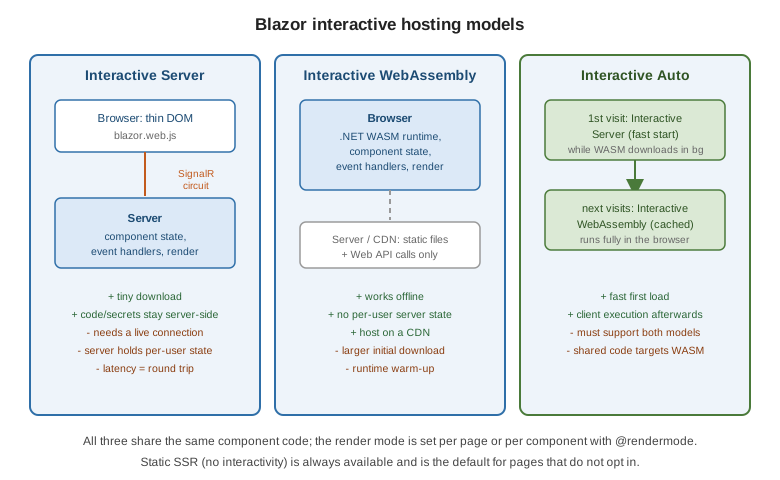
| Mode | How it runs | Good for |
|---|---|---|
Interactive Server |
Events run on the server over a SignalR circuit; DOM diffs pushed to the browser |
Low-latency networks, small download, server-side secrets never leaving the server |
Interactive WebAssembly |
The component runs in the browser on the .NET WASM runtime |
Offline, no per-user server state, CDN hosting |
Interactive Auto |
Starts on Server for a fast first load, switches to WebAssembly once the runtime is cached |
Best of both, at the cost of code that must run correctly under both |
Apply a mode per page, per component, or globally:
@page "/counter"
@rendermode InteractiveServer

@* or applied from a parent to one child instance: *@
<Counter @rendermode="InteractiveWebAssembly" />
// Program.cs -- set a default for every component (global interactivity)
app.MapRazorComponents<App>()
.AddInteractiveServerRenderMode()
.AddInteractiveWebAssemblyRenderMode();Standalone Blazor WebAssembly
dotnet new blazorwasm scaffolds a pure client-side app with no ASP.NET Core server component at all — every
page is Interactive WebAssembly, and the compiled output is static files servable from any CDN or static host.
It trades away Static/streaming SSR and server-only secrets for the simplest possible hosting story. See
Blazor WebAssembly, Hybrid, and Deployment.
Prerendering and the double-render trap
Interactive Server and Interactive WebAssembly components are prerendered by default: the framework renders
the component once as static HTML for a fast first paint, then re-renders it a second time once the
interactive runtime (the SignalR circuit or the WASM runtime) attaches. Code that runs in OnInitialized with a
side effect — incrementing a counter in a database, calling a non-idempotent API — runs twice unless guarded:
protected override async Task OnInitializedAsync()
{
    if (!RendererInfo.IsInteractive)
    {
        // this branch runs during prerendering; skip non-idempotent work here
        return;
    }
    await Metrics.RecordViewAsync();
}
Disable prerendering for a component that cannot tolerate the double render (@rendermode
"@(new InteractiveServerRenderMode(prerender: false))"), or make the initialization idempotent instead. See
Prerender ASP.NET Core Razor
components.
Choosing a render mode
or avoid per-user server state?"} B -- yes --> C{"Fast first load critical?"} C -- yes --> AUTO["Interactive Auto"] C -- no --> WASM["Interactive WebAssembly"] B -- no --> D{"Low-latency connection
and small download wanted?"} D -- yes --> SRV["Interactive Server"] D -- no --> AUTO
A single Blazor Web App can mix modes per page or component — a marketing page stays Static SSR, a dashboard uses Interactive Server, and an offline-capable tool uses Interactive WebAssembly, all in one project. See ASP.NET Core Blazor render modes.