Metafields and Metaobjects
|
This content was generated with the assistance of AI and should be verified against the official documentation of each platform before being relied on in production. This section’s bibliography lists the reference material consulted while preparing these pages. |
Shopify’s data model is fixed: a product has a title, a vendor and up to three options, and nothing more. Custom data is how a shop or an app adds the rest. A metafield is a typed value attached to an existing resource (a roast date on a product, a membership date on a customer, a gift message on an order). A metaobject is a new record type that you define yourself (a coffee origin with a name, a country, an altitude and a photo) and that products, pages or other metaobjects can point to. This page was written against the Admin GraphQL API and Storefront API version 2026-10, Shopify CLI 5.0.0 (Node.js 22.12 or later) and Theme Check 3.31.0, and every fact was checked on 2026-10-27. The guides state no plan restriction for custom data; the only plan-dependent number is the count of merchant-owned metaobject definitions, listed in Limits.
The page covers ownership and namespaces, how to create, read, update and delete definitions and values, the
capabilities that switch on filtering, uniqueness and smart collections, the metaobject capabilities (draft and
published entries, translations, web pages), declarative definitions in shopify.app.toml, and every surface that reads
the data: Liquid, the Storefront API, Shopify Functions, checkout and customer account extensions, webhooks and
analytics. It builds on the Admin GraphQL API page (versioning, cost,
pagination), the Apps Overview and Scaffolding page
(shopify.app.toml), the Authentication and Access Scopes
page (the scopes that custom data needs) and the Liquid Language page. The
running example is Pocket Coffee, a small specialty-coffee shop: a roast date, tasting notes and an origin on every
product, a Coffee Club tier that a Discount Function reads, a gift message that travels from the cart to the order, and
a member-since date on the customer.
Every GraphQL document on the page was validated against the public Admin and Storefront GraphQL schemas for 2026-10,
downloaded by introspection. The Liquid was checked with Theme Check, the Function was built and run with the Shopify
CLI, and the shopify.app.toml custom data was checked with a small offline script. Nothing was executed against a
Shopify store: that needs a store and an access token, and no account or credential was created. The section
What was run and what was not lists what each check covered.
What custom data is
Metafields and metaobjects are both custom data stored in Shopify, queryable through the Admin API, renderable in themes, readable by Functions and extensions, and editable by merchants in the Shopify admin when the definition allows it. They answer different questions.
| Metafield | Metaobject | |
|---|---|---|
What it is |
A typed key-value pair attached to an existing resource |
A record type that you define, with several typed fields, instantiated as many entries |
Use it when |
The data describes a product, variant, collection, customer, order, discount, shop or another Shopify resource |
The data does not belong to one resource, or is shared by many resources (an origin, a size chart, a store location) |
Identified by |
Namespace and key ( |
Definition type ( |
Created from |
A metafield definition per owner type |
A metaobject definition with its field definitions |
Pocket Coffee example |
|
The |
Most data models use both: a metaobject defines the record and a reference metafield attaches it to the products it applies to. The figure shows the model that the rest of the page builds.
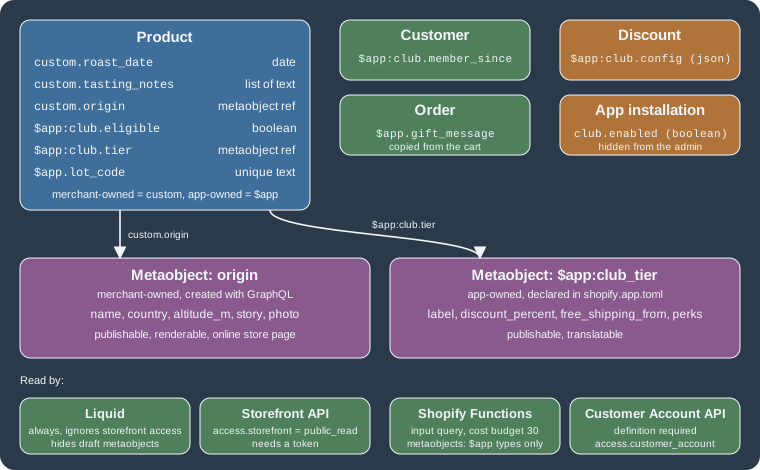
The model has two halves on purpose. The custom namespace and the origin metaobject are merchant-owned: store
staff and every installed app can edit them, and a theme can rely on them. The $app data (the Coffee Club tier, the
eligibility flag, the lot code, the gift message) is app-owned: only the Pocket Coffee app controls its structure.
Choosing which half a piece of data belongs to is the central design decision, and the next section explains the rules.
Ownership and namespaces
A metafield’s namespace groups related keys and prevents collisions. It also decides who owns the data. A metaobject has no namespace; its definition type plays the same role. The prefix in the namespace or type is what encodes the owner.
| Owner | Namespace or type prefix | Who can change the definition | Who can change the values |
|---|---|---|---|
Merchant-owned |
Any name that does not start with |
The merchant and every installed app that has the scope |
The merchant and every installed app that has the scope |
App-owned |
|
Only the owning app |
The owning app; merchants only if |
Shopify-reserved |
Namespaces and types that start with |
Shopify |
Usually merchant-owned values |
App-data (metafields only) |
Any namespace, on the |
The owning app |
The owning app; hidden from the Shopify admin and invisible to other apps |
Four rules follow from the table.
-
The
$appshorthand is resolved for you in most places. Shopify replaces$appwith the storedapp--<app id>in Admin GraphQL input, in theme app extensions, in checkout and customer account extension configuration and in Function input queries. Code that is not running as your app (the merchant’s own theme, a headless storefront) uses the full stored namespace, for exampleapp--123456--club. Look the definition up withmetafieldDefinitionsto see the namespace that Shopify stored. -
--is reserved. Since 2025-02-19 no new metafield namespace or metaobject type may contain two consecutive hyphens, because the form is used forshopify--standardandapp--<app id>. Existing definitions were left alone. -
App-owned data stopped being public in 2025. On 2025-05-19 Shopify converted every app-owned metafield and metaobject that had
PUBLIC_READtoMERCHANT_READandPUBLIC_READ_WRITEtoMERCHANT_READ_WRITE, in all API versions. Data that another app must read has to move to a merchant-owned namespace such ascustom. -
App-owned does not mean secret. Liquid reads any metafield regardless of its storefront access, and the merchant can see app-owned metafields in the admin (read-only by default). Keep credentials in the app’s own database or in environment variables. Use an app-data metafield for per-installation configuration that the merchant must not see, never for secrets.
Namespace and key syntax
The MetafieldsSetInput documentation of 2026-10 states that a namespace is 3 to 255 characters and a key is 2 to 64
characters, both made of letters, digits, hyphens and underscores. If namespace is omitted in metafieldsSet, the
app-reserved namespace is used. The Admin API and Liquid address a metafield as namespace.key; the search syntax
adds a prefix, metafields.custom.roast_date.
Standard definitions
Shopify publishes standard metafield definitions for common data (subtitle, ISBN, care instructions, ingredients) and
standard metaobject definitions (currently product_review, available to approved partners only). A standard
definition has a reserved namespace and key, a known type and preset access, does not count against the definition
limits, and is interoperable across themes and apps. List the templates with standardMetafieldDefinitionTemplates,
enable one with standardMetafieldDefinitionEnable (or standardMetaobjectDefinitionEnable with the type), or declare
it in shopify.app.toml with standard_metafields = ["descriptors.subtitle", "facts.isbn"] under
[product.metafields]. A standard metafield definition is also enabled automatically the first time a value is written
to its namespace and key. Once enabled, Shopify owns the schema while the values stay merchant-owned.
query ListStandardTemplates {
  standardMetafieldDefinitionTemplates(first: 25) {
    nodes {
      id
      namespace
      key
      name
      ownerTypes
      type {
        name
      }
    }
  }
}

mutation EnableSubtitle($id: ID!) {
  standardMetafieldDefinitionEnable(id: $id, ownerType: PRODUCT) {
    createdDefinition {
      id
      namespace
      key
    }
    userErrors {
      field
      message
      code
    }
  }
}Metafield definitions
A definition is the schema of a metafield: namespace, key, name, owner type, type, validations, access and capabilities. Without one a metafield is an untyped string that merchants cannot edit with a typed editor, search or validate. Create the definition before you write values.
The definition input
metafieldDefinitionCreate takes a MetafieldDefinitionInput. The fields of the 2026-10 schema are these.
| Field | Required | Meaning |
|---|---|---|
|
No |
Grouping and owner. Omitted: the app-reserved namespace. |
|
Yes |
Identifier inside the namespace. Immutable. |
|
Yes |
Label shown in the Shopify admin. |
|
No |
Help text of the definition. The per-metafield |
|
Yes |
The resource, from the |
|
Yes |
The data type name, for example |
|
No |
List of |
|
No |
Pins the definition so that the admin shows its field first (50 pinned definitions per owner type). |
|
No |
|
|
No |
Applies the definition only to a subtype of the resource (a conditional definition): a |
|
No |
|
The MetafieldOwnerType enum of 2026-10 has 26 values: API_PERMISSION, ARTICLE, BLOG, CARTTRANSFORM,
COLLECTION, COMPANY, COMPANY_LOCATION, CUSTOMER, DELIVERY_CUSTOMIZATION, DISCOUNT, DRAFTORDER,
FULFILLMENT_CONSTRAINT_RULE, GIFT_CARD_TRANSACTION, LOCATION, MARKET, MEDIA_IMAGE, ORDER,
ORDER_ROUTING_LOCATION_RULE, PAGE, PAYMENT_CUSTOMIZATION, PRODUCT, PRODUCTVARIANT, SELLING_PLAN, SHOP,
TRANSFER (added for inventory transfers in 2026-07) and VALIDATION. There is no CART owner: cart metafields exist
on the Storefront API and in checkout, and are copied to order metafields when the order is created. App-data metafields
use the AppInstallation resource as owner and need no definition.
Create a merchant-owned definition
A definition in a namespace that is not reserved is merchant-owned. Pocket Coffee needs the roast date to be editable by staff, readable by the theme and by a headless storefront, and filterable in the admin. The mutation takes the input as a variable, which is how an app that lets merchants configure their own fields would call it.
mutation CreateRoastDateDefinition($definition: MetafieldDefinitionInput!) {
  metafieldDefinitionCreate(definition: $definition) {
    createdDefinition {
      id
      namespace
      key
      ownerType
      type {
        name
      }
      access {
        admin
        storefront
        customerAccount
      }
      capabilities {
        adminFilterable {
          enabled
        }
      }
    }
    userErrors {
      field
      message
      code
    }
  }
}
Variables:
{"definition":{"namespace":"custom","key":"roast_date","name":"Roast date","description":"Date the batch on sale was roasted","type":"date","ownerType":"PRODUCT","access":{"storefront":"PUBLIC_READ"},"capabilities":{"adminFilterable":{"enabled":true}}}}A merchant-owned definition cannot be declared in shopify.app.toml. The app needs the owner’s scope: write_products
for product metafields, write_customers for customer metafields, write_orders for order metafields and so on.
Metaobject-reference types need the metaobject scopes too.
Create an app-owned definition with GraphQL
The same mutation with a $app namespace creates an app-owned definition. This one declares a lot code that must match
a pattern and be unique across products. Prefer shopify.app.toml for definitions that are the same in every shop (see
Declarative definitions); use GraphQL when the structure depends on what the merchant configures in your
app.
mutation CreateLotCodeDefinition {
  metafieldDefinitionCreate(
    definition: {
      namespace: "$app:roastery"
      key: "lot_code"
      name: "Lot code"
      description: "Internal lot identifier printed on the bag"
      type: "single_line_text_field"
      ownerType: PRODUCT
      access: { admin: MERCHANT_READ, storefront: NONE }
      validations: [{ name: "regex", value: "^LOT-[0-9]{6}$" }]
      capabilities: { uniqueValues: { enabled: true } }
    }
  ) {
    createdDefinition {
      id
      namespace
      key
    }
    userErrors {
      field
      message
      code
    }
  }
}Read definitions
metafieldDefinitions lists the definitions of one owner type, optionally filtered by namespace, key or a search
query. metafieldDefinitionTypes lists every type with the validations it supports and whether it supports definition
migrations. The validationStatus of a definition is ALL_VALID, SOME_INVALID or IN_PROGRESS after a validation
change, and metafieldsCount and metafields(validationStatus:) show how many values exist and how many break the rules.
query ListProductDefinitions {
  metafieldDefinitions(first: 50, ownerType: PRODUCT, namespace: "custom") {
    nodes {
      id
      namespace
      key
      name
      type {
        name
        category
      }
      access {
        admin
        storefront
      }
      validations {
        name
        value
      }
      metafieldsCount
    }
    pageInfo {
      hasNextPage
      endCursor
    }
  }
}

query FindOneDefinition {
  metafieldDefinitions(first: 1, ownerType: PRODUCT, namespace: "custom", key: "roast_date") {
    nodes {
      id
      validationStatus
      capabilities {
        adminFilterable {
          enabled
          eligible
        }
        smartCollectionCondition {
          enabled
        }
      }
    }
  }
}

query SupportedTypes {
  metafieldDefinitionTypes {
    name
    category
    supportedValidations {
      name
      type
    }
    supportsDefinitionMigrations
  }
}Update and delete
Only some parts of a definition can change after it is created.
| Part | Can change | Notes |
|---|---|---|
Name and description |
Yes |
|
Validations |
Yes, with limits |
Tightening a rule is accepted, but existing values that break it become invalid (see |
Access |
Yes |
|
Capabilities |
Yes |
A capability that is switched on can often not be switched off again ( |
Namespace and key |
No |
Create a new definition, copy the values, switch the readers, delete the old one |
Owner type |
No |
Same migration |
Type |
No through the API |
|
Update takes the owner type, namespace and key (there is no id argument in 2026-10), and delete takes the
definition’s ID. deleteAllAssociatedMetafields: true deletes the values with the definition; false keeps them as
untyped metafields.
mutation WidenStorefrontAccess {
  metafieldDefinitionUpdate(
    definition: {
      namespace: "custom"
      key: "roast_date"
      ownerType: PRODUCT
      access: { storefront: PUBLIC_READ }
      capabilities: { adminFilterable: { enabled: true } }
    }
  ) {
    updatedDefinition {
      id
      access {
        storefront
      }
    }
    userErrors {
      field
      message
      code
    }
  }
}

mutation RemoveDefinition($id: ID!) {
  metafieldDefinitionDelete(id: $id, deleteAllAssociatedMetafields: false) {
    deletedDefinitionId
    userErrors {
      field
      message
      code
    }
  }
}A definition that is declared in shopify.app.toml is read-only through the API: the mutation returns an error with the
code APP_CONFIG_MANAGED. Change it in the file and deploy.
What happens on uninstall
When a merchant uninstalls the app, Shopify deletes its app-owned definitions, whether they came from TOML or from GraphQL, and keeps the values without a definition for an unspecified time while cleanup runs asynchronously. If the app is reinstalled before cleanup, the definitions are recreated and the values reattached. TOML definitions are deleted and recreated with new GIDs; GraphQL definitions can outlive the uninstall until cleanup removes them. Shopify does not guarantee the retention period, and a definition ID is not a stable identifier across an uninstall: look definitions up by owner type, namespace and key. The same applies to a definition you remove from the TOML file and deploy: the values are retained for a short period and are reattached, with a new GID, if you add the definition back before cleanup.
Data types
Metafields and metaobject fields share the same type system. A value is always stored and exchanged as a string, even for numbers and booleans; a structured value is a JSON string. The type decides how the value is validated, how the admin edits it and what object Liquid returns.
| Group | Types | Value format |
|---|---|---|
Text |
|
A string; |
Numbers and booleans |
|
|
Dates |
|
ISO 8601 without a presumed time zone ( |
Money |
|
JSON |
Measurements |
|
JSON |
JSON |
|
Any JSON-serializable value, passed as a string |
References |
|
A GID, for example |
Lists |
|
A JSON array in a string, for example |
The guide lists 48 basic types in total, plus the reference and list types; metafieldDefinitionTypes returns the authoritative list for the API
version you call. A file_reference defaults to a generic file and can be restricted to images or videos with the
file_type_options validation. A metaobject_reference can be restricted to one definition, and a mixed_reference to
a set of definitions. Deleting a product or variant removes it from every list metafield that references it. integer,
json_string and string are older, deprecated types that Liquid still returns as plain values.
Size limits
Most types are limited to 64 KB (65,536 bytes). The exceptions are id and url (2 KB each) and json (128 KB). Since
API version 2026-04, writes of JSON values are limited to 128 KB; apps that already used JSON metafields before
2026-04-01 keep the previous 2 MB limit, and new apps that need more can ask for an exception. Large values already
stored stay readable in every version. A list holds at most 128 items (1,024 for metaobject references), and each item
obeys the size limit of its single type. Shopify Functions input queries do not return metafield values larger than
10,000 bytes: the value is stored and the Admin API returns it, but the Function receives null.
Validations
Validations constrain what a definition accepts. In GraphQL each is a {name, value} pair of strings; in TOML they are
keys under validations.
| Validation | GraphQL name | Applies to | TOML |
|---|---|---|---|
Minimum and maximum length |
|
|
|
Regular expression (RE2) |
|
text types |
|
Allowed domains |
|
|
|
Choices (up to 128) |
|
|
|
File types |
|
|
|
Precision |
|
|
|
Range of numbers |
|
|
|
Range of dates |
|
|
|
Range of measurements |
|
|
|
Referenced definition |
|
|
Not needed: the type shorthand |
JSON schema |
|
|
|
List length |
|
any list type |
|
Source: List of validation options
Access control
The access block of a definition says who may read and write the values.
| Surface | Setting (GraphQL / TOML) | Values and default | Effect |
|---|---|---|---|
Admin and Admin API |
|
App-owned: |
Whether merchants can edit the values in the admin. The owning app can always read and write. |
Storefront API |
|
|
Whether the Storefront API returns the value. It does not affect Liquid, which always reads the metafield. |
Customer Account API |
|
|
Whether customer account UI extensions and the Customer Account API can read or write the value |
Since 2026-06-16 a metafield on the app resource needs a definition with customer-account access to be returned by the
Customer Account API; metafields owned by customers and orders were not affected. The documentation adds that, for
merchant-owned metafields, the Customer Account API access can be changed only in the Shopify admin. The enum values
PRIVATE, PUBLIC_READ and PUBLIC_READ_WRITE of the admin access still exist in the schema for reading old data but
are never returned for metaobjects and cannot be set.
Source: About metafields, Permissions
Capabilities
Capabilities switch on optional behaviour for a definition.
| Capability | What it does | Limits and notes | In TOML |
|---|---|---|---|
|
Lets the admin and the Admin API filter products, orders, companies, company locations and metaobjects by the value |
Not for |
|
|
Lets an automated collection use the metafield as a rule. Supported for boolean, integer, decimal, rating, single-line text and metaobject reference ( |
128 definitions per shop can power smart collections |
Not supported |
|
Rejects a value already used by another resource. Meant for ERP, PIM or CRM identifiers. |
|
|
|
Copies a cart metafield to the order metafield with the same namespace and key when the order is created |
Order definitions only |
|
|
Makes the values available as dimensions and filters in analytics and ShopifyQL |
Customer, order, product and variant definitions of an eligible type; check the |
|
The metafieldInteger collection condition is removed in API version 2027-01. The documentation table of TOML
capabilities still marks analyticsQueryable as unsupported; the developer changelog of 2026-10-20 states that
declarative definitions now accept capabilities.analytics_queryable, so this page follows the changelog.
mutation EnableSmartCollectionCondition {
  metafieldDefinitionUpdate(
    definition: {
      namespace: "custom"
      key: "origin_country"
      ownerType: PRODUCT
      capabilities: { smartCollectionCondition: { enabled: true } }
    }
  ) {
    updatedDefinition {
      id
      useAsCollectionCondition
    }
    userErrors {
      field
      message
      code
    }
  }
}

mutation CreateCopyableOrderDefinition {
  metafieldDefinitionCreate(
    definition: {
      namespace: "custom"
      key: "gift_message"
      name: "Gift message"
      type: "single_line_text_field"
      ownerType: ORDER
      capabilities: { cartToOrderCopyable: { enabled: true } }
    }
  ) {
    createdDefinition {
      id
    }
    userErrors {
      field
      message
      code
    }
  }
}
Source: Use metafield capabilities
Limits
| Limit | Value | Where it is stated |
|---|---|---|
Metafield definitions per owner type, per app |
256 (limits page); 128 for definitions declared in TOML |
Metafield limits; TOML reference |
Metafield definitions per owner type, merchant-created |
256 |
Metafield limits |
Pinned definitions per owner type |
50 |
Metafield limits |
Metaobject definitions per app |
128 (limits page); 32 for definitions declared in TOML. A changelog of 2025-10-24 says 256. |
Metaobject limits; TOML reference; changelog |
Metaobject definitions, merchant-created |
128 on Basic, Shopify and Advanced; 256 on Plus and Enterprise |
Metaobject limits |
Fields per metaobject definition |
40 (limits page); 64 for definitions declared in TOML |
Metaobject limits; TOML reference |
Entries per metaobject definition |
1,000,000 (error |
Metaobject limits |
Definition changes per |
25, for metafields and for metaobjects |
TOML reference |
|
25 metafields and 10 MB per call; atomic |
Metafield limits |
|
250 metafields per call |
Metafield limits |
The documentation pages disagree on the app-level definition counts (the limits pages and a changelog give larger numbers than the TOML reference). Design for the smaller number when the definitions are declared in TOML and treat the larger one as an upper bound for definitions created by GraphQL. Standard definitions do not count.
metafieldsSet has a dynamic cost since 2026-09-15: 10 + sum(distinct owners of a type * weight of that type), with
weights of 10 for orders, 4 for products, 2 for variants and 1 for collections, customers and the shop. Setting two
metafields on one product, one on another product and one on a variant costs 10 + 2*4 + 1*2 = 20. Cost is charged per
mutation invocation, so aliases do not share the base cost, and putting all metafields of a resource in one call is the
cheapest way to write them.
Source: Metafield limits
Errors
| Code or message | Cause | Fix |
|---|---|---|
|
Namespace and key (or metaobject type) already in use |
Query the definitions first, or choose another key |
|
The namespace or type is reserved for Shopify or for another app |
Use |
|
The type does not exist, or the value does not match the type or the validations |
Check the format in the data types table and |
|
A metafield owned by another app was written |
Write only to your own namespace or to merchant-owned ones |
|
|
Read the metafield again and retry the update |
|
The definition is declared in |
Edit the TOML file and deploy |
|
The operation needs a capability that is off, or the type is ineligible |
Enable the capability first or choose an eligible type |
|
A definition limit was reached |
Delete unused definitions; see Limits |
|
The definition is used as a collection condition or by another definition |
Remove the usage first |
Writing metafield values
A value is written either on the resource’s own mutation, or on its own with metafieldsSet. Use metafieldsSet for
anything that is not part of creating or editing the resource.
metafieldsSet
metafieldsSet creates or updates up to 25 metafields in one atomic call: if one is invalid, none is saved. Each entry
has an ownerId, a namespace (default: the app-reserved one), a key, a value string and a type. The type is
optional when a definition exists and required otherwise. compareDigest turns the call into a compare-and-set: it is
applied only if the stored value still matches the digest you read earlier, and null means "only if it does not exist
yet".
mutation SetRoastMetafields($metafields: [MetafieldsSetInput!]!) {
  metafieldsSet(metafields: $metafields) {
    metafields {
      id
      namespace
      key
      type
      value
      compareDigest
    }
    userErrors {
      field
      message
      code
      elementIndex
    }
  }
}
Variables for a Pocket Coffee batch, including a reference to a metaobject entry, a list and an app-owned boolean:
{"metafields":[{"ownerId":"gid://shopify/Product/1234567890","namespace":"custom","key":"roast_date","type":"date","value":"2026-10-20"},{"ownerId":"gid://shopify/Product/1234567890","namespace":"custom","key":"origin","type":"metaobject_reference","value":"gid://shopify/Metaobject/2001"},{"ownerId":"gid://shopify/Product/1234567890","namespace":"custom","key":"tasting_notes","type":"list.single_line_text_field","value":"[\"jasmine\",\"bergamot\",\"honey\"]"},{"ownerId":"gid://shopify/Product/1234567890","namespace":"$app:club","key":"eligible","type":"boolean","value":"true"}]}Source: metafieldsSet
On the resource’s mutation
productCreate, productUpdate, productSet and the corresponding customer, order and collection mutations accept a
metafields list of MetafieldInput (namespace, key, type, value, optionally id) next to the resource fields.
In API version 2026-10 the product mutations take the resource as product: (a ProductUpdateInput), not the older
input: that several guide pages still show.
mutation UpdateProductWithMetafields($product: ProductUpdateInput!) {
  productUpdate(product: $product) {
    product {
      id
      metafields(first: 5, namespace: "custom") {
        nodes {
          namespace
          key
          value
        }
      }
    }
    userErrors {
      field
      message
    }
  }
}

query ProductByRoastLot($lot: UniqueMetafieldValueInput!) {
  productByIdentifier(identifier: { customId: $lot }) {
    id
    title
  }
}
Variables:
{"product":{"id":"gid://shopify/Product/1234567890","metafields":[{"namespace":"custom","key":"roast_date","type":"date","value":"2026-10-27"}]}}The second operation reads a product by a custom ID: an id-typed or unique metafield that holds the ERP’s lot or
product code. Lookup by custom ID works for products, variants, collections, customers, orders and locations, and
create-or-update by custom ID for products (productSet, productUpdate) and customers (customerSet).
Source: Working with custom IDs
Read, delete and optimistic updates
Read a metafield through its owner: metafield(namespace:, key:) for one, metafields(namespace:, first:) for a
connection. value is always a string; jsonValue parses it for you, and reference and references resolve
reference types in the same request. compareDigest is what you pass back to metafieldsSet. metafieldsDelete removes
specific values and keeps the resource; deleting the resource deletes its metafields.
query ReadProductMetafields($id: ID!) {
  product(id: $id) {
    title
    roastDate: metafield(namespace: "custom", key: "roast_date") {
      value
      type
      jsonValue
      compareDigest
      definition {
        id
        name
      }
    }
    origin: metafield(namespace: "custom", key: "origin") {
      reference {
        ... on Metaobject {
          id
          handle
          displayName
          name: field(key: "name") {
            value
          }
        }
      }
    }
    notes: metafield(namespace: "custom", key: "tasting_notes") {
      jsonValue
    }
    tier: metafield(namespace: "$app:club", key: "tier") {
      reference {
        ... on Metaobject {
          label: field(key: "label") {
            value
          }
          discount: field(key: "discount_percent") {
            value
          }
        }
      }
    }
    custom: metafields(first: 20, namespace: "custom") {
      nodes {
        key
        type
        value
      }
    }
  }
}

mutation DeleteRoastDate($ownerId: ID!) {
  metafieldsDelete(metafields: [{ ownerId: $ownerId, namespace: "custom", key: "roast_date" }]) {
    deletedMetafields {
      ownerId
      namespace
      key
    }
    userErrors {
      field
      message
    }
  }
}Value format by type
Because everything is a string, the most common write errors are formatting errors.
| Type | Value to send | Common mistake |
|---|---|---|
|
|
Sending a date-time ( |
|
|
Sending |
|
|
Sending thousands separators |
|
|
Sending a comma-separated text |
|
|
Using a unit that the type does not list |
|
|
Sending the handle; relations must be GIDs |
|
|
Forgetting that the outer value is a string |
Source: List of data types
App-data metafields
An app-data metafield belongs to the app installation, needs no definition and is invisible in the admin. Only your app
reads it through the Admin API, and Liquid reads it through the app object. It suits per-shop configuration: a feature
tier, a sync cursor, or a boolean that decides whether an app block is shown (available_if).
query CurrentInstallation {
  currentAppInstallation {
    id
  }
}

mutation SetAppDataMetafield($ownerId: ID!) {
  metafieldsSet(
    metafields: [
      { ownerId: $ownerId, namespace: "app_config", key: "feature_tier", type: "single_line_text_field", value: "club" }
      { ownerId: $ownerId, namespace: "club", key: "enabled", type: "boolean", value: "true" }
    ]
  ) {
    metafields {
      id
      namespace
      key
    }
    userErrors {
      field
      message
      code
    }
  }
}

query ReadAppDataMetafield {
  currentAppInstallation {
    tier: metafield(namespace: "app_config", key: "feature_tier") {
      value
    }
    enabled: metafield(namespace: "club", key: "enabled") {
      value
      type
    }
  }
}Querying by metafield value
Products, orders, companies, company locations and metaobjects can be filtered by a metafield value in the query
argument of their connection. The definition must have adminFilterable switched on; since API version 2026-10 a query
that filters by a metafield without a definition, without the capability, or with a comparison that the type does not
support returns an error. Earlier versions silently ignored the invalid predicate and returned unfiltered results.
The filter is metafields.<namespace>.<key>:<value> for resources and fields.<key>:<value> for metaobjects. The
syntax follows the general search syntax of the Admin API.
| Pattern | Example | Notes |
|---|---|---|
Exact match |
|
Case-sensitive for text; quote the value |
Prefix match |
|
Text types |
Exists, does not exist |
|
|
Negation |
|
|
Ranges |
|
Numbers, dates and measurements ( |
Boolean |
|
No quotes |
Reference |
|
Full GID |
List value |
|
Matches if any item matches |
Combination |
|
Also across different metafields |
App-owned |
|
The |
The query string is a GraphQL string, so quotes inside it are escaped. The variable keeps it readable.
query FreshBatches($query: String!) {
  products(first: 20, query: $query) {
    nodes {
      id
      title
      roastDate: metafield(namespace: "custom", key: "roast_date") {
        value
      }
    }
  }
}
Variables for "beans roasted in October 2026 from Colombia":
{
  "query": "metafields.custom.roast_date:>=2026-10-01 AND metafields.custom.origin_country:\"Colombia\""
}
Source: Query using metafields
Metaobject definitions
A metaobject definition has a type (immutable, unique in its owner’s scope), optional name and description, a list of
field definitions, an access block, a displayNameKey (the field whose value becomes the entry’s display name and
handle), and capabilities. Field definitions have a key, a type from the same type system, a name, a
description, required and validations. Since 2026-04 fieldDefinitions is optional in metaobjectDefinitionCreate,
so a definition can start empty.
The admin access of a metaobject definition is MERCHANT_READ or MERCHANT_READ_WRITE (app-owned only; merchant-owned
types are always fully editable) and the storefront access is NONE or PUBLIC_READ. A merchant-owned origin type
needs the read_metaobject_definitions and write_metaobject_definitions scopes to create, and read_metaobjects and
write_metaobjects to manage entries. Since API version 2026-04 an app needs no scope at all for its own $app: types.
mutation CreateOriginDefinition {
  metaobjectDefinitionCreate(
    definition: {
      type: "origin"
      name: "Origin"
      description: "A growing region Pocket Coffee sources beans from"
      displayNameKey: "name"
      access: { storefront: PUBLIC_READ }
      capabilities: {
        publishable: { enabled: true }
        translatable: { enabled: true }
        renderable: { enabled: true, data: { metaTitleKey: "name", metaDescriptionKey: "country" } }
        onlineStore: { enabled: true, data: { urlHandle: "origins" } }
      }
      fieldDefinitions: [
        { key: "name", name: "Name", type: "single_line_text_field", required: true }
        {
          key: "country"
          name: "Country"
          type: "single_line_text_field"
          required: true
          validations: [{ name: "choices", value: "[\"Ethiopia\",\"Colombia\",\"Brazil\"]" }]
        }
        {
          key: "altitude_m"
          name: "Altitude (m)"
          type: "number_integer"
          validations: [{ name: "min", value: "0" }, { name: "max", value: "3000" }]
        }
        { key: "story", name: "Story", type: "rich_text_field" }
        {
          key: "photo"
          name: "Photo"
          type: "file_reference"
          validations: [{ name: "file_type_options", value: "[\"Image\"]" }]
        }
      ]
    }
  ) {
    metaobjectDefinition {
      id
      type
      displayNameKey
      fieldDefinitions {
        key
        required
        type {
          name
        }
      }
      capabilities {
        publishable {
          enabled
        }
        onlineStore {
          enabled
          data {
            urlHandle
          }
        }
      }
    }
    userErrors {
      field
      message
      code
    }
  }
}

mutation AddFieldToOrigin($id: ID!) {
  metaobjectDefinitionUpdate(
    id: $id
    definition: {
      fieldDefinitions: [{ create: { key: "harvest", name: "Harvest season", type: "single_line_text_field" } }]
    }
  ) {
    metaobjectDefinition {
      id
    }
    userErrors {
      field
      message
      code
    }
  }
}

query ReadDefinitions {
  metaobjectDefinitionByType(type: "origin") {
    id
    name
    metaobjectsCount
  }
  metaobjectDefinitions(first: 20) {
    nodes {
      id
      type
      name
    }
  }
}
Source: Manage metaobject definitions
The schema calls the display key displayNameKey in GraphQL and display_name_field in TOML. Updating the field list
uses operations (create, update, delete) rather than a plain list, which is why the AddFieldToOrigin mutation
wraps the new field in create. The guide’s example of passing the new field directly is rejected by the 2026-10 schema.
Metaobject capabilities
| Capability | Effect | TOML |
|---|---|---|
|
Entries have a status, |
|
|
The fields can be translated with |
|
|
Exposes SEO title and description, taken from the fields named in |
|
|
Gives the definition a URL handle and a theme template, so each entry becomes a page at |
Not supported |
|
Makes the fields available to analytics. Needs API version 2027-01 or later and at least one field of a compatible type, otherwise |
|
Source: Use metaobject capabilities
Metaobject entries
An entry has an id, a handle (generated from the display name, or chosen), a displayName, its field values and its
capability states. metaobjectCreate and metaobjectUpdate take fields (a list of key and string value, patch
semantics: unspecified fields are left as they are) or values (announced on 2026-06-11 and present in 2026-10), a JSON object keyed by field key, where
omitted fields are cleared. metaobjectUpsert creates or updates by handle. The type of an entry cannot change.
mutation CreateOrigin($metaobject: MetaobjectCreateInput!) {
  metaobjectCreate(metaobject: $metaobject) {
    metaobject {
      id
      handle
      displayName
      capabilities {
        publishable {
          status
        }
      }
      values
    }
    userErrors {
      field
      message
      code
    }
  }
}

mutation UpsertOrigin($handle: MetaobjectHandleInput!, $metaobject: MetaobjectUpsertInput!) {
  metaobjectUpsert(handle: $handle, metaobject: $metaobject) {
    metaobject {
      id
      handle
    }
    userErrors {
      field
      message
      code
    }
  }
}

mutation PublishOrigin($id: ID!) {
  metaobjectUpdate(
    id: $id
    metaobject: { capabilities: { publishable: { status: ACTIVE } } }
  ) {
    metaobject {
      id
      capabilities {
        publishable {
          status
        }
      }
    }
    userErrors {
      field
      message
      code
    }
  }
}

mutation DeleteOrigin($id: ID!) {
  metaobjectDelete(id: $id) {
    deletedId
    userErrors {
      field
      message
      code
    }
  }
}
Variables for a fields create and for a values create:
{"metaobject":{"type":"origin","handle":"yirgacheffe","capabilities":{"publishable":{"status":"ACTIVE"}},"fields":[{"key":"name","value":"Yirgacheffe"},{"key":"country","value":"Ethiopia"},{"key":"altitude_m","value":"1900"},{"key":"photo","value":"gid://shopify/MediaImage/3001"}]}}
{"metaobject":{"type":"origin","values":{"name":"Huila","country":"Colombia","altitude_m":1750}}}
Source: Manage entries
Read entries by type, by handle or by ID. metaobjects(type:, query:, sortKey:) filters with fields.<key>:<value>
(keys are case-sensitive and normally snake_case), values returns every field as one JSON object, and
referencedBy lists the resources that reference an entry, which is how you find every product that uses an origin
before deleting it.
query OriginsByCountry($type: String!, $query: String) {
  metaobjects(type: $type, first: 20, query: $query, sortKey: "display_name") {
    nodes {
      id
      handle
      displayName
      updatedAt
      country: field(key: "country") {
        value
      }
      values
    }
    pageInfo {
      hasNextPage
      endCursor
    }
  }
}

query OriginByHandle {
  metaobjectByHandle(handle: { type: "origin", handle: "yirgacheffe" }) {
    id
    fields {
      key
      type
      value
      reference {
        ... on MediaImage {
          id
          image {
            url
          }
        }
      }
    }
    referencedBy(first: 10) {
      nodes {
        name
        key
        namespace
        referencer {
          ... on Product {
            id
            title
          }
        }
      }
    }
  }
}
Source: Query metaobjects
Creating thousands of entries one by one is slow. Use bulkOperationRunMutation with metaobjectCreate,
metaobjectUpdate or metaobjectDelete and a JSONL file of variables, as described on the
Bulk Operations page; metaobjectBulkDelete deletes many entries in one
call. Deleting a definition deletes all its entries, and the metafield definitions that point to it, asynchronously.
Metaobject limits
Each definition can hold 1,000,000 entries (the plan-based limits of 64,000 and 128,000 were removed in 2025-10). A list metafield can reference up to 1,024 entries. Liquid imposes its own, much lower, limits per page render, listed in Liquid limits.
Webhooks for metaobjects and definitions
The topics metaobjects/create, metaobjects/update and metaobjects/delete require a filter of the form type:<type>
(several types are joined with OR, wildcards are not supported). For an app-owned definition the filter must use the
stored form app--<app id>--<name>, not the $app: shorthand. Metafield definition changes have the topics
metafield_definitions/create, metafield_definitions/update and metafield_definitions/delete. Since 2026-07-21 Events
subscriptions can also trigger on changes to specific metafields of products, orders, customers, collections and
locations, for both $app and merchant-owned metafields.
[webhooks]
api_version = "2026-10"

  [[webhooks.subscriptions]]
  topics = ["metaobjects/update"]
  uri = "/webhooks/metaobjects/update"
filter = "type:app--123456--club_tier"Declarative definitions in shopify.app.toml
Definitions that are the same in every shop belong in the app’s configuration file. The CLI sends them with
shopify app deploy, Shopify creates or updates them in every shop where the app is installed, and shopify app dev
tests them on the development store first. The definitions are version-controlled with the app, roll out atomically with
the app version and cannot be edited through the API.
Syntax
A metafield is declared as [<owner>.metafields.<namespace>.<key>] and a metaobject as
[metaobjects.app.<name>] with [metaobjects.app.<name>.fields.<key>] tables for its fields. The owner is the
snake-case form of the owner type: product, product_variant, customer and order in the guides; the other owner types follow the enum names in lower case. The namespace segment app means $app; any other segment creates a sub-namespace of the app, so
[product.metafields.club.eligible] declares $app:club and eligible, which is stored as app--<app id>--club.
Only app-owned definitions can be declared in TOML; the file cannot create custom or other merchant-owned ones.
| Property | Meaning |
|---|---|
|
Label and help text in the admin |
|
A data type. For references to metaobjects use the shorthand that embeds the target: |
|
|
|
|
|
The names of the validations table, as dotted keys ( |
|
The field that supplies the display name and handle |
|
The field must have a value |
The Pocket Coffee definitions
This file declares the Coffee Club tier metaobject, the product, customer and order metafields that the Function, the theme app extension and checkout use, and the unique lot code. It also needs the scopes of the owner types it touches.
# ---- Pocket Coffee custom data (app-owned, declarative) ----

[metaobjects.app.club_tier]
name = "Coffee Club tier"
description = "Benefits of a Coffee Club membership tier"
display_name_field = "label"
access.admin = "merchant_read_write"
access.storefront = "public_read"
capabilities.publishable = true
capabilities.translatable = true

[metaobjects.app.club_tier.fields.label]
name = "Label"
type = "single_line_text_field"
required = true
validations.max = 40

[metaobjects.app.club_tier.fields.discount_percent]
name = "Discount on beans (%)"
type = "number_integer"
required = true
validations.min = 0
validations.max = 50

[metaobjects.app.club_tier.fields.free_shipping_from]
name = "Free shipping from (EUR)"
type = "number_decimal"
validations.min = 0
validations.max_precision = 2

[metaobjects.app.club_tier.fields.perks]
name = "Perks"
type = "list.single_line_text_field"

[product.metafields.club.eligible]
name = "Coffee Club eligible"
type = "boolean"
access.admin = "merchant_read_write"
capabilities.admin_filterable = true

[product.metafields.club.tier]
name = "Minimum tier"
type = "metaobject_reference<$app:club_tier>"
access.admin = "merchant_read_write"
access.storefront = "public_read"

[product.metafields.app.lot_code]
name = "Lot code"
description = "Internal lot identifier printed on the bag"
type = "single_line_text_field"
validations.regex = "^LOT-[0-9]{6}$"
capabilities.unique_values = true

[customer.metafields.club.member_since]
name = "Coffee Club member since"
type = "date"
access.admin = "merchant_read_write"
access.customer_account = "read"

[order.metafields.app.gift_message]
name = "Gift message"
type = "single_line_text_field"
validations.max = 240
capabilities.cart_to_order_copyable = trueDeploy with shopify app deploy. Remove a block and deploy again to delete the definition; the values are kept for a
short period and reattached if the block comes back.
Constraints
-
Only app-owned definitions can be declared, so that Shopify can guarantee the same state in every shop.
-
At most 25 definition changes (create, update or delete) per deploy. The guide does not say whether each field of a metaobject counts as a change, so deploy large schemas in several versions.
-
Declared definitions are read-only through the Admin API (
APP_CONFIG_MANAGED). -
smartCollectionCondition,pinand theonlineStoremetaobject capability cannot be declared in TOML. -
The definitions are distributed to all installations, including shops that never use the feature; keep the count low.
Migrating existing definitions
shopify app import custom-data-definitions (announced on 2026-01-22 as import-custom-data-definitions for CLI 3.89; CLI 5.0.0 lists it with a space) reads the
app-owned definitions of a development store, such as $app metafields and $app: metaobject types, and prints the
equivalent TOML without writing a file. Review it, copy it into shopify.app.toml, run shopify app dev to test and
shopify app deploy to distribute, then delete the code that created the definitions at runtime. Values keep working
unchanged. The command needs a development store and a login, so it was not run here; its --help was read.
An offline check before deploy
shopify app build --no-input validates the app configuration, but it does not look inside the custom data tables:
a misspelled access value, a reference to a metaobject that is not declared, a missing name, an unknown type and an
unknown owner are all accepted, and Shopify rejects them only at deploy. A short script catches the common mistakes earlier. It parses the TOML (npm i smol-toml),
resolves $app: references against the declared metaobjects, checks the access values, the owner of
cart_to_order_copyable, the display field, the counts of the limits table, and prints the namespace that each
declaration resolves to. It does not know the list of types or owner types, which Shopify validates on deploy.
// Offline pre-deploy lint for declarative custom data in shopify.app.toml.
// Usage: node check-custom-data.mjs shopify.app.toml
import {readFileSync} from 'node:fs';
import {parse} from 'smol-toml';

const toml = parse(readFileSync(process.argv[2], 'utf8'));
const errors = [];
const err = (where, msg) => errors.push(`${where}: ${msg}`);

const ADMIN = ['merchant_read', 'merchant_read_write'];
const STOREFRONT = ['none', 'public_read'];
const CUSTOMER = ['none', 'read', 'read_write'];
const oneOf = (where, key, value, allowed) =>
  value === undefined || allowed.includes(value) || err(where, `${key} = "${value}" is not one of ${allowed.join(', ')}`);

const defined = new Set(Object.keys(toml.metaobjects?.app ?? {}));
const refs = (type) => [...String(type).matchAll(/\$app:([a-z0-9_-]+)/gi)].map((m) => m[1]);
const checkType = (where, type) => {
  if (!type) return err(where, 'missing type');
  for (const ref of refs(type)) defined.has(ref) || err(where, `type references $app:${ref}, which is not declared under [metaobjects.app]`);
};

let changes = 0;
for (const [owner, section] of Object.entries(toml)) {
  if (!section || typeof section !== 'object' || !section.metafields) continue;
  const {standard_metafields: standard = [], ...namespaces} = section.metafields;
  const entries = Object.entries(namespaces).flatMap(([ns, keys]) => Object.entries(keys).map(([key, d]) => [ns, key, d]));
  entries.length + standard.length > 128 && err(`[${owner}.metafields]`, `${entries.length + standard.length} definitions, the limit is 128 per owner type`);
  for (const [ns, key, d] of entries) {
    const where = `[${owner}.metafields.${ns}.${key}]`;
    console.log(where + ' -> ' + (ns === 'app' ? '$app' : '$app:' + ns) + '.' + key);
    changes++;
    d.name || err(where, 'missing name');
    checkType(where, d.type);
    oneOf(where, 'access.admin', d.access?.admin, ADMIN);
    oneOf(where, 'access.storefront', d.access?.storefront, STOREFRONT);
    oneOf(where, 'access.customer_account', d.access?.customer_account, CUSTOMER);
    d.capabilities?.cart_to_order_copyable && owner !== 'order' && err(where, 'cart_to_order_copyable only applies to order definitions');
  }
}

const objects = Object.entries(toml.metaobjects?.app ?? {});
objects.length > 32 && err('[metaobjects.app]', `${objects.length} definitions, the TOML limit is 32`);
for (const [name, d] of objects) {
  const where = `[metaobjects.app.${name}]`;
  changes += 1;
  const fields = Object.entries(d.fields ?? {});
  fields.length > 64 && err(where, `${fields.length} fields, the TOML limit is 64`);
  oneOf(where, 'access.admin', d.access?.admin, ADMIN);
  oneOf(where, 'access.storefront', d.access?.storefront, STOREFRONT);
  d.display_name_field && !d.fields?.[d.display_name_field] && err(where, `display_name_field "${d.display_name_field}" is not a declared field`);
  for (const [key, f] of fields) checkType(`${where}.fields.${key}`, f.type);
}

changes > 25 && err('deploy', `${changes} definitions in one file; a deploy may change at most 25 (create, update, delete) definitions`);
errors.forEach((e) => console.log('ERROR', e));
console.log(errors.length ? `${errors.length} problem(s)` : `ok: ${changes} definition(s) checked`);
process.exit(errors.length ? 1 : 0);Run on the file above it prints:
[product.metafields.club.eligible] -> $app:club.eligible
[product.metafields.club.tier] -> $app:club.tier
[product.metafields.app.lot_code] -> $app.lot_code
[customer.metafields.club.member_since] -> $app:club.member_since
[order.metafields.app.gift_message] -> $app.gift_message
ok: 6 definition(s) checked
Run on files with one mistake each (a reference to $app:missing, access.admin = "public_read", a missing name,
cart_to_order_copyable on a product, access.storefront = "everyone") it printed, one per file:
ERROR [product.metafields.app.r]: type references $app:missing, which is not declared under [metaobjects.app]
ERROR [product.metafields.app.bad_access]: access.admin = "public_read" is not one of merchant_read, merchant_read_write
ERROR [product.metafields.app.nn]: missing name
ERROR [product.metafields.app.c]: cart_to_order_copyable only applies to order definitions
ERROR [metaobjects.app.thing]: access.storefront = "everyone" is not one of none, public_read
Reading custom data in Liquid
Liquid is the one surface that reads every metafield and every published metaobject entry regardless of the storefront access setting. A theme cannot create or change them: Liquid is read-only, and values are written by the admin or by an app. The Liquid reference describes the objects; this section collects the rules that cause most bugs.
The metafield object
A resource’s metafields property takes a namespace and then a key: {{ product.metafields.custom.roast_date }}. The
result is a metafield object with three properties, value, type and list?, and it is nil when no value is set,
so test it with blank and not with the value. Always read .value explicitly so that the code states what it expects.
| Metafield type | value returns |
|---|---|
|
A string |
|
A rich text structure (render it with |
|
A number |
|
A date string; format it with the |
|
A boolean |
|
A JSON object that you can read by property name or index, and loop over |
|
A color object |
|
A measurement object |
|
A rating object |
|
A money object in the customer’s presentment currency |
|
The product, collection, variant or page object |
|
A media object (images and videos) or a generic file object |
|
A metaobject object whose fields are read as |
Any |
An array; reference lists loop over objects |
Source: Liquid objects: metafield
Three details cause most of the confusion.
-
Lists have two ways to count. Reference lists expose
.count; non-reference lists are plain arrays and use thesizefilter. A loop over a reference list returns only the first 50 items; wrap the loop inpaginate(up to 250 per page) to reach more. -
size,firstandlastare also filters. With dot notation,product.metafields.custom.sizereturns the number of metafields in the namespace when no metafield is calledsize. Use brackets,product.metafields.custom["size"], which always looks the key up. -
Metafields without a type return
"string"since 2024-10-28 (metafield.type == blankno longer matches), and the deprecatedinteger,json_stringandstringtypes return plain values without thevalueandtypeproperties.
Filters that render a metafield
metafield_tag generates an element for the metafield: a <time> for dates, a <span> for numbers and text, an <a> for
URLs and references, a <div> for rich text, a <script type="application/json"> for JSON, an <img> or <video> for
files, and so on, each with a class such as metafield-date. metafield_text returns plain text (the title of a
referenced product, the URL of a file, the number). Neither supports every list type: both handle
list.single_line_text_field and list.metaobject_reference only. Dates are localized to the visitor.
Source: metafield_tag
Metaobjects in Liquid
The global metaobjects object gives access to published entries by type and handle:
{{ metaobjects.origin.yirgacheffe.name.value }} or, with brackets,
{{ metaobjects['origin']['yirgacheffe'].name.value }}. An entry is reached through the field keys of its definition,
and each field is a metafield object (so .value, .type). The system property groups the built-in properties so that
they do not collide with field keys: system.handle, system.id, system.type, system.template_suffix and
system.url (the relative URL, set only when the definition has the online store capability).
metaobjects.origin.values loops over every entry of a definition, and values_count returns their number.
shop.metaobjects was the older path; it still works and has been deprecated since 2025-01-28.
When the publishable capability is on, a DRAFT entry is invisible: a direct lookup returns nil and loops skip it.
A metaobject definition whose entries are web pages (renderable and onlineStore) adds a template
templates/metaobject/<type>.json or .liquid; inside it the metaobject object is the entry being rendered, and
metaobject.system.template_suffix returns the alternate template assigned to an entry, or nil.
Liquid limits
These limits apply to each page render. They are separate from the storage limits (a definition can hold a million entries, but one page can load only some of them). Exceeding a per-type limit renders a Liquid error instead of the entries.
| Limit | Value |
|---|---|
Entries returned by a loop over |
50 |
Entries per page with the |
250 |
Unique entries of one metaobject type loaded per page render |
1,000 |
Unique handles of one type looked up with |
20 |
Metaobject definitions reachable through the |
50 |
The size of a reference list and of values reports the real total, except that values.size and values_count stop at
25,001 for definitions with more than 25,000 entries. The 20-handle limit and the impossibility of paginating a lookup by
handle are the reasons to prefer values with paginate when you do not know the handles in advance.
Source: Metaobject limits, Liquid limits
App-owned data in themes and extensions
The code that runs inside your own theme app extension can use the shorthand: $app:sub for a namespace or a metaobject
type, resolved to your app’s reserved name. The merchant’s theme cannot; it addresses the same data with the stored name
app--<app id>--sub. Which spelling to use depends on who owns the Liquid file.
| Where the Liquid runs | App-owned metafield | App-owned metaobject |
|---|---|---|
Theme app extension (app block or app embed) |
|
|
The merchant’s theme |
|
|
Any theme app extension, app-data metafield |
|
Not applicable |
An app block can hide itself until the app has finished a setup step: available_if in the block’s schema takes a
reference to a boolean app-data metafield, and the block is rendered and offered in the theme editor only when the
value is true. The Pocket Coffee block below uses {{ app.metafields.club.enabled }}, written by the SetAppDataMetafield
mutation shown earlier.
A rule of thumb for safe data: store every value that your extension renders as markup, CSS or JavaScript in an
app-owned or app-data metafield, with MERCHANT_READ access. A public namespace such as custom can be changed by other
installed apps, by staff and collaborators who can edit the resource, and by translations (a translation of a
translatable metafield replaces what Liquid renders for that locale). Output every value through escape unless it is
already safe, and never put secrets in a metafield: Liquid reads them whatever the storefront access says. The app
security checks of the App Store report shared-namespace metafield values that reach HTML, JavaScript or URL output.
Theme settings and dynamic sources
A section or block setting of type metaobject opens a picker for entries of one definition (metaobject_type is
required); the value is a metaobject object, or blank when nothing is chosen or the entry is gone. metaobject_list is the
multiple version (limit defaults to and cannot exceed 50) and its value can be paginated. Custom definitions are not
allowed in themes that are listed in the Theme Store, which must use standard definitions; apps can use the settings with
their own app-owned definitions.
Dynamic sources let a merchant connect a section or block setting to a metafield in the theme editor, so the setting
follows the product (or collection, or page) being rendered. They are available for section and block settings only, not
for general theme settings. Theme blocks reach the nearest resource of a type through closest, for example
closest.product. Metaobjects with storefront visibility are available as dynamic sources in any setting, and market-
specific values (metafields and metaobjects that are localized per market) follow the market.
Source: Dynamic data sources
The Pocket Coffee theme code
The following files were added to a copy of the Skeleton theme (shopify theme init default). The roast date badge
reads the merchant-owned custom.roast_date and shows how fresh the beans are. date formats the stored ISO date,
'now' | date: '%s' gives the current Unix time, and the floor filter keeps the day count an integer whatever
the Liquid engine. doc documents the snippet’s parameter so Theme Check validates calls to it.
{% doc %}
  Shows when a product was roasted, read from the merchant-owned
  custom.roast_date metafield (type date).

  @param {product} product - The product whose roast date is shown

  @example
  {% render 'roast-badge', product: product %}
{% enddoc %}

{%- assign roast_date = product.metafields.custom.roast_date -%}

{%- if roast_date != blank -%}
  {%- assign roasted_label = roast_date.value | date: '%-d %b %Y' -%}
  {%- assign roasted_at = roast_date.value | date: '%s' -%}
  {%- assign now_at = 'now' | date: '%s' -%}
  {%- assign age_days = now_at | minus: roasted_at | divided_by: 86400 | floor -%}

  <p class="roast-badge" data-age-days="{{ age_days }}">
    {{ 'products.roast.roasted_on' | t: date: roasted_label }}
    ({{ 'products.roast.days_ago' | t: count: age_days }})
  </p>
{%- endif -%}
Source: Liquid objects: metafield
The strings live in the locale file. Shopify’s translation filter picks the one or other form from count.
{
  "products": {
    "roast": {
      "roasted_on": "Roasted on {{ date }}",
      "days_ago": {
        "one": "{{ count }} day ago",
        "other": "{{ count }} days ago"
      },
      "origin_altitude": "{{ meters }} m above sea level"
    }
  }
}
Source: Storefront locale files
The origin card is a theme block, so a merchant can add it to any section that accepts theme blocks. It reads the
metaobject reference, its fields (a file_reference photo, a rich_text_field story) and the list of tasting notes.
{% doc %}
  Card describing where the beans of the current product come from. It reads
  the custom.origin metafield (a metaobject_reference to the "origin"
  metaobject definition) and the custom.tasting_notes list.

  @example
  {% content_for 'block', type: 'origin-card', id: 'origin' %}
{% enddoc %}

{%- liquid
  assign product = closest.product
  assign origin = product.metafields.custom.origin.value
  assign notes = product.metafields.custom.tasting_notes.value
-%}

{%- if origin != blank -%}
  <article class="origin-card" {{ block.shopify_attributes }}>
    {%- assign photo = origin.photo.value -%}
    {%- if photo != blank -%}
      {{ photo | image_url: width: 480 | image_tag: loading: 'lazy', alt: photo.alt }}
    {%- endif -%}

    <h3>{{ origin.name.value | escape }}</h3>
    <p>
      {{ origin.country.value | escape }}
      {%- if origin.altitude_m.value != blank %}, {{ 'products.roast.origin_altitude' | t: meters: origin.altitude_m.value }}{% endif -%}
    </p>

    {{ origin.story | metafield_tag }}

    {%- if notes.size > 0 -%}
      <ul class="origin-card__notes">
        {%- for note in notes -%}
          <li>{{ note | escape }}</li>
        {%- endfor -%}
      </ul>
    {%- endif -%}
  </article>
{%- endif -%}

{% schema %}
{
  "name": "Origin card",
  "settings": [],
  "presets": [{ "name": "Origin card" }]
}
{% endschema %}A section lists every origin with pagination and highlights one chosen in the editor through a metaobject setting.
{% comment %}
  Lists every published entry of the "origin" metaobject definition, 12 per
  page, and highlights one entry chosen in the theme editor.
{% endcomment %}

{%- assign featured = section.settings.featured_origin -%}

{%- if featured != blank -%}
  <aside class="origin-featured" {{ section.shopify_attributes }}>
    <h2>{{ featured.name.value | escape }}</h2>
    <p>{{ featured.country.value | escape }}</p>
  </aside>
{%- endif -%}

{%- paginate metaobjects.origin.values by 12 -%}
  <ul class="origin-index">
    {%- for origin in metaobjects.origin.values -%}
      <li>
        <a href="{{ origin.system.url }}">{{ origin.name.value | escape }}</a>
        <span>{{ origin.country.value | escape }}</span>
      </li>
    {%- endfor -%}
  </ul>

  {%- if paginate.pages > 1 -%}
    {{ paginate | default_pagination }}
  {%- endif -%}
{%- endpaginate -%}

{% schema %}
{
  "name": "Origin index",
  "settings": [
    {
      "type": "metaobject",
      "id": "featured_origin",
      "label": "Featured origin",
      "metaobject_type": "origin"
    }
  ],
  "presets": [{ "name": "Origin index" }]
}
{% endschema %}
Source: Input settings, metaobject
When the origin definition has the online store capability each entry is a page. The template and its section render
the entry through the metaobject object.
{
  "sections": {
    "main": {
      "type": "main-origin",
      "settings": {}
    }
  },
  "order": ["main"]
}
{% comment %}
Renders one entry of the "origin" metaobject definition. Used by
templates/metaobject/origin.json when the definition has the online store
capability.
{% endcomment %}
<article class="origin-page" {{ section.shopify_attributes }}>
<h1>{{ metaobject.name.value | escape }}</h1>
<p>{{ metaobject.country.value | escape }}</p>
{{ metaobject.story | metafield_tag }}
</article>
{% schema %}
{
"name": "Origin page",
"settings": []
}
{% endschema %}Source: Liquid objects: metaobject
A section that accepts theme blocks puts the badge and the origin card on the product page.
{% comment %}
  Product facts for Pocket Coffee: the roast badge plus any theme blocks
  (for example the origin card) that the merchant adds in the theme editor.
{% endcomment %}

<div class="product-details" {{ section.shopify_attributes }}>
  {% render 'roast-badge', product: product %}
  {% content_for 'blocks' %}
</div>

{% schema %}
{
  "name": "Product details",
  "blocks": [{ "type": "@theme" }],
  "presets": [{ "name": "Product details" }]
}
{% endschema %}
Source: Theme blocks
shopify theme check knows every Shopify tag, filter, object, the section and block schema (including the
metaobject_type of a setting) and the translation files. On the files above it printed:
45 files inspected with no offenses found.To confirm that it checks what it should, a snippet with deliberate mistakes (a misspelled filter, a translation key
that does not exist, a missing snippet, an img tag without dimensions, a deprecated filter, an unused variable) and a
section whose metaobject setting lacked metaobject_type were added to a copy. Theme Check reported:
{{ product.metafields.custom.origin.value.story | metafield_tagg }}
{{ 'products.roast.missing_key' | t }}
{% render 'does-not-exist' %}
<img src="{{ product.featured_image | img_url: '200x' }}">
{% assign unused = product.metafields.custom.roast_date.value %}
sections/origin-index.liquid:34 ValidSchema error Missing property "metaobject_type".
snippets/bad.liquid:1 UnknownFilter error Unknown filter 'metafield_tagg' used.
snippets/bad.liquid:1 OrphanedSnippet warning This snippet is not referenced by any other files
snippets/bad.liquid:2 TranslationKeyExists error 'products.roast.missing_key' does not have a matching entry in 'locales/en.default.json'
snippets/bad.liquid:3 MissingTemplate error 'snippets/does-not-exist.liquid' does not exist
snippets/bad.liquid:4 ImgWidthAndHeight error Missing width and height attributes on img tag
snippets/bad.liquid:4 DeprecatedFilter warning Deprecated filter 'img_url', consider using 'image_url'.
snippets/bad.liquid:5 UnusedAssign warning The variable 'unused' is assigned but not used
5 errors, 3 warningsSource: Theme Check
shopify theme metafields pull writes the definitions of the store to a local file that the Liquid language server uses
to complete product.metafields.custom. in the editor. It needs a store and a password, so it was not run.
Rendering the badge without a store
Theme Check validates the code but does not render it, and there is no Shopify renderer without a store. The part of the
snippet that is plain Liquid (the date arithmetic, the if) can be run with LiquidJS, with stand-ins for the t
filter (which reads locales/en.default.json and picks one or other) and the doc tag, and with the clock fixed at
2026-10-27. The test data replaces the product object.
"2026-10-20" => <p class="roast-badge" data-age-days="7"> Roasted on 20 Oct 2026 (7 days ago) </p>
"2026-10-26" => <p class="roast-badge" data-age-days="1"> Roasted on 26 Oct 2026 (1 day ago) </p>
null => ""
The result checks the date logic and the empty case only. It does not prove how Shopify’s own t, date and metafield
objects behave.
A theme app extension block
The same data can be shown by an app instead of the theme. The block lives in the extension’s blocks folder, reads the
app-owned tier through the $app:club prefix, falls back to the standard entry of the $app:club_tier type, and is
offered only when the app-data metafield club.enabled is true. Theme Check needs the theme app extension preset to
accept the target, enabled_on and available_if schema keys; without it the keys are reported as not allowed.
{%- liquid
  assign tier = product.metafields['$app:club'].tier.value
  if tier == blank
    assign tier = shop.metaobjects['$app:club_tier'].standard
  endif
-%}

{%- if tier != blank -%}
  <div class="club-perk" {{ block.shopify_attributes }}>
    <strong>{{ tier.label.value | escape }}</strong>
    <span>{{ tier.discount_percent.value }}%</span>
    {%- if tier.perks.value.size > 0 -%}
      <ul>
        {%- for perk in tier.perks.value -%}
          <li>{{ perk | escape }}</li>
        {%- endfor -%}
      </ul>
    {%- endif -%}
  </div>
{%- endif -%}

{% schema %}
{
  "name": "Coffee Club perk",
  "target": "section",
  "enabled_on": { "templates": ["product"] },
  "available_if": "{{ app.metafields.club.enabled }}",
  "settings": []
}
{% endschema %}
The configuration file that selects the preset:
extends: theme-check:theme-app-extensionTheme Check on the extension folder printed 1 files inspected with no offenses found.
Source: Configure theme app extensions
Reading custom data with the Storefront API
The Storefront API is for headless storefronts, apps in the buyer’s browser and custom storefronts. It is read-only for metafields (apart from cart metafields) and reads only what the definition exposes.
Exposing and reading
A metafield or metaobject is returned only when its definition has access.storefront = PUBLIC_READ. The separate
metafieldStorefrontVisibilityCreate mutation was removed in API version 2025-01; a metafield that was exposed with it
must have its definition created or updated with the access setting. Reading metafields and metaobjects needs a
Storefront access token: the tokenless access of 2026 covers products, collections, selling plans, search, pages, blogs,
articles and the cart, but not metafields, metaobjects, product tags or menus. Use the public token from a
browser or the private token from a server (with the buyer IP), as described on the
Storefront API and Headless with Hydrogen page.
Resources that implement the HasMetafields interface have metafield(namespace:, key:) and
metafields(identifiers: [{namespace:, key:}]). The list form returns one slot per identifier, null in the slot of an identifier that has no
readable value, so the order of the response matches the order of the request. These types
implement it in 2026-10: Article, Blog, Cart, Collection, Company, CompanyLocation, Customer, Location,
Market, Order, Page, Product, ProductVariant, SellingPlan and Shop. A Metafield returns value, type,
list, reference and references (for reference types) and parentResource. The reference union can be an
Article, Collection, GenericFile, MediaImage, Metaobject, Model3d, Page, Product, ProductVariant or
Video.
Metaobjects have two root fields: metaobject(handle: {type:, handle:}) or metaobject(id:), and
metaobjects(type:, sortKey:, first:, after:, ...). The Storefront API has no field filter for metaobjects: filter in the
Admin API or on the client. A Metaobject has handle, type, fields, field(key:), id, updatedAt, and, for
definitions with the renderable and online store capabilities, seo and onlineStoreUrl. The seo title and
description are fields themselves, so they need a selection of value. Only active entries are returned when the
definition is publishable. The Storefront API accepts @inContext(country:, language:) to return the translation or the
market-specific value of a field.
query ProductWithCustomData($handle: String!) {
  product(handle: $handle) {
    title
    roastDate: metafield(namespace: "custom", key: "roast_date") {
      value
      type
    }
    custom: metafields(
      identifiers: [
        { namespace: "custom", key: "roast_date" }
        { namespace: "custom", key: "origin" }
        { namespace: "custom", key: "tasting_notes" }
      ]
    ) {
      key
      type
      value
      reference {
        ... on Metaobject {
          handle
          type
          name: field(key: "name") {
            value
          }
          photo: field(key: "photo") {
            reference {
              ... on MediaImage {
                image {
                  url(transform: { maxWidth: 480 })
                  altText
                }
              }
            }
          }
        }
      }
      references(first: 6) {
        nodes {
          ... on Metaobject {
            handle
          }
        }
      }
    }
  }
}

query OriginPage($handle: String!) {
  metaobject(handle: { type: "origin", handle: $handle }) {
    id
    handle
    seo {
      title {
        value
      }
      description {
        value
      }
    }
    onlineStoreUrl
    fields {
      key
      type
      value
    }
  }
}

query AllOrigins @inContext(country: ES, language: ES) {
  metaobjects(type: "origin", first: 10, sortKey: "display_name") {
    nodes {
      handle
      country: field(key: "country") {
        value
      }
    }
    pageInfo {
      hasNextPage
      endCursor
    }
  }
}Cart metafields
The cart is the one place where the Storefront API writes metafields. cartCreate accepts metafields in its input and
cartMetafieldsSet and cartMetafieldDelete change them, up to 25 per request. The key of these inputs is the
namespace and the key together, custom.gift_message. If the shop has an order metafield definition with the same
namespace and key and the cartToOrderCopyable capability, the value is copied to the order when it is created (since
API 2026-04). Cart metafields set through the Storefront API do not trigger Shopify Functions: the Functions see them
when the buyer goes to checkout or changes the cart. Checkout UI extensions read and write cart metafields too; checkout
metafields were removed from checkout and customer account UI extensions in API 2026-04.
mutation CartWithGiftMessage($lines: [CartLineInput!]!) {
  cartCreate(
    input: {
      lines: $lines
      metafields: [{ key: "custom.gift_message", type: "single_line_text_field", value: "Happy birthday, Ada" }]
    }
  ) {
    cart {
      id
      checkoutUrl
      giftMessage: metafield(namespace: "custom", key: "gift_message") {
        value
      }
    }
    userErrors {
      field
      message
      code
    }
  }
}

mutation UpdateCartGiftMessage($cartId: ID!) {
  cartMetafieldsSet(
    metafields: [{ ownerId: $cartId, key: "custom.gift_message", type: "single_line_text_field", value: "Enjoy" }]
  ) {
    metafields {
      key
      value
    }
    userErrors {
      field
      message
      code
    }
  }
}
Source: cartMetafieldsSet
Customer Account API
The Customer Account API reads and writes the metafields of the logged-in customer and their orders when the definition’s
access.customerAccount allows it. App-owned metafields need a definition with that access to be returned (rule of
2026-06-16).
== Using custom data in Functions and extensions
Shopify Functions
A Function’s input query can read the metafields of its function owner (a discount, a payment customization), of the
cart, its lines' products and variants, the customer, the shop and the delivery options, and, since API 2026-04, app-owned
metaobject entries by handle or ID through the shop field. The metaobject type must use the $app prefix;
merchant-owned types are not available. The input query is limited to 3,000 bytes, to a calculated cost of 30
(a metafield costs 3, a metaobject root 1, a field(key:) 3, any other leaf 1) and to values of at most 10,000 bytes.
Using a single json metafield for a complex configuration keeps both the query and the merchant interface simple, and
changing the shape of a configuration is safest as an expand-and-contract migration: read the old and the new metafield,
write both, migrate, then drop the old one.
The Coffee Club Discount Function reads a JSON configuration from the discount (created by the app with metafields on
discountAutomaticAppCreate) and the $app:club.eligible flag of each product, and discounts only eligible lines.
mutation CreateClubDiscount($discount: DiscountAutomaticAppInput!) {
  discountAutomaticAppCreate(automaticAppDiscount: $discount) {
    automaticAppDiscount {
      discountId
      title
    }
    userErrors {
      field
      message
    }
  }
}
Variables:
{"discount":{"title":"Coffee Club","functionHandle":"pocket-coffee-club","startsAt":"2026-11-01T00:00:00Z","combinesWith":{"orderDiscounts":false,"productDiscounts":false,"shippingDiscounts":true},"metafields":[{"namespace":"$app:club","key":"config","type":"json","value":"{\"percentage\":10,\"message\":\"Coffee Club 10% off beans\"}"}]}}The input query:
query RunInput {
  discount {
    club: metafield(namespace: "$app:club", key: "config") {
      jsonValue
    }
  }
  cart {
    lines {
      id
      merchandise {
        ... on ProductVariant {
          product {
            clubEligible: metafield(namespace: "$app:club", key: "eligible") {
              value
            }
          }
        }
      }
    }
  }
}
Source: Metafields for input queries
The Function (JavaScript, @shopify/shopify_function; the type RunInput is generated by shopify app function typegen
from the query and the schema of the target):
// @ts-check

/**
 * @typedef {import("../generated/api").RunInput} RunInput
 * @typedef {import("../generated/api").CartLinesDiscountsGenerateRunResult} CartLinesDiscountsGenerateRunResult
 */

/**
 * Applies the percentage stored in the discount's app-owned JSON metafield to
 * the cart lines whose product has the $app:club.eligible metafield set to true.
 * @param {RunInput} input
 * @returns {CartLinesDiscountsGenerateRunResult}
 */
export function run(input) {
  const config = input.discount.club?.jsonValue;
  if (!config || typeof config.percentage !== 'number') {
    return {operations: []};
  }

  const targets = input.cart.lines
    .filter((line) => 'product' in line.merchandise && line.merchandise.product.clubEligible?.value === 'true')
    .map((line) => ({cartLine: {id: line.id}}));

  if (targets.length === 0) {
    return {operations: []};
  }

  return {
    operations: [
      {
        productDiscountsAdd: {
          candidates: [
            {
              message: config.message ?? 'Coffee Club',
              targets,
              value: {percentage: {value: config.percentage}},
            },
          ],
          selectionStrategy: 'FIRST',
        },
      },
    ],
  };
}
The extension configuration:
api_version = "2026-07"

[[extensions]]
name = "Pocket Coffee Club discount"
handle = "pocket-coffee-club"
type = "function"
description = "Coffee Club discount configured by a metafield"

  [[extensions.targeting]]
  target = "cart.lines.discounts.generate.run"
  input_query = "src/run.graphql"
  export = "run"

  [extensions.build]
  command = ""
  path = "dist/function.wasm"
Source: Metafields for input queries
shopify app build --no-input generated the types, bundled the JavaScript and compiled it to a 1,941-byte
dist/function.wasm. shopify app function run executed the Wasm with this input (line 1 eligible, line 2 not):
{
  "discount": {
    "club": {"jsonValue": {"percentage": 10, "message": "Coffee Club 10% off beans"}}
  },
  "cart": {
    "lines": [
      {"id": "gid://shopify/CartLine/1", "merchandise": {"product": {"clubEligible": {"value": "true"}}}},
      {"id": "gid://shopify/CartLine/2", "merchandise": {"product": {"clubEligible": null}}}
    ]
  }
}
and printed:
{
  "operations": [
    {
      "productDiscountsAdd": {
        "candidates": [
          {
            "message": "Coffee Club 10% off beans",
            "targets": [
              {
                "cartLine": {
                  "id": "gid://shopify/CartLine/1"
                }
              }
            ],
            "value": {
              "percentage": {
                "value": 10
              }
            }
          }
        ],
        "selectionStrategy": "FIRST"
      }
    }
  ]
}
Source: shopify app function run
With "club": null (a discount that has no configuration) the output was {"operations": []}. The validation of the real input query against the complete
schema of the target is done by the typegen step. The full Function story (targets, limits, deployment) is on the
Shopify Functions page.
Checkout and customer account UI extensions
An extension declares the metafields it needs in shopify.extension.toml: for the whole
extension or for one target, each with namespace, key and, since 2026-10,
owner_type (CART, COMPANY, COMPANY_LOCATION, CUSTOMER, PRODUCT, PRODUCTVARIANT or SHOP). owner_type is
optional in 2026-10 and required in 2027-01, when a deployment that omits it is blocked. An app-owned metafield is
requested with namespace = "$app" or "$app:sub"; the fully qualified app--<app id> form is not supported there,
and an extension can read only the app-owned metafields of its own app. The values arrive through shopify.appMetafields.
Checkout and customer account extensions can use cart metafields (checkout) and order metafields (customer accounts)
in place of the removed checkout metafields.
# Requested by the checkout UI extension, API version 2026-10
[[extensions.metafields]]
namespace = "$app:club"
key = "tier"
owner_type = "PRODUCT"

[[extensions.targeting]]
target = "purchase.checkout.cart-line-item.render-after"
module = "./Extension.jsx"

  [[extensions.targeting.metafields]]
  namespace = "$app:club"
  key = "member_since"
owner_type = "CUSTOMER"This snippet is documented configuration and was not built: extension targets need a store and an account to preview. The Checkout Extensibility page covers the extension model.
Events, webhooks and analytics
-
Webhooks: metaobject topics need a
type:filter, and metafield definition topics exist, as shown earlier. -
Events: an Events subscription can name the metafields that trigger it,
product.metafield(namespace: 'custom', key:
'roast_date').value
, and query the resource that changed. Both$appand merchant-owned metafields are supported and the app must have access to the metafield. -
Flow and admin extensions: merchant automations and admin UI built on the same definitions are covered on the Flow, POS and Admin Extensions page.
-
Analytics: a definition with the
analyticsQueryablecapability can be grouped and filtered in analytics reports and ShopifyQL. -
Translations and markets: text types,
rich_text_field,json,link,urlandfile_referenceare translatable withtranslationsRegister, andmoneyand reference types such as products and pages can be localized per market withmarketLocalizationsRegister; Liquid and the Storefront API then return the value of the visitor’s market and language.
Modeling Pocket Coffee
A relational mental model maps cleanly onto Shopify’s. A built-in resource is a table; a metafield definition is a column
added to it; a metaobject definition is a new table; an entry is a row; the GID is the primary key; a reference type is a
foreign key; validations and required are constraints; shopify.app.toml is the migration file.
| Need | Choice | Reason |
|---|---|---|
Roast date, lot code, eligibility flag |
Metafield on the product |
Describes one product and is edited with it |
Where the beans come from |
Metaobject |
Shared by many products, with several fields and a page of its own |
Tasting notes |
|
Simple ordered strings with a list length validation |
Club tiers and their benefits |
App-owned metaobject |
Structure is the app’s, entries are edited by the merchant |
A relationship with data of its own (quantity per recipe) |
A third metaobject with two references and the extra fields |
Costly to query: nested reads can hit the Storefront API’s nesting limits |
Configuration of a Function |
One |
One value, one validation, easy to migrate |
Per-shop switch for an app block |
App-data boolean metafield |
Hidden from the admin; used by |
ERP identifier |
|
Look-up and upsert by custom ID |
Secrets, personal data, high-volume records |
The app’s own database |
Not a good fit for Shopify custom data (Liquid reads every metafield, definitions have size limits) |
Use references, never handles or IDs stored in text fields: a text field breaks the link, hides it from Liquid and the
Storefront API and prevents Shopify from resolving it. Use the GID for relationships and the handle for URLs and
cross-store migration. Choose the access settings explicitly: start with the narrowest and widen them, and enable
storefront only for headless use, since Liquid reads the data anyway.
Pitfalls and documentation differences
| Symptom | Cause and fix |
|---|---|
|
API 2026-10 takes |
|
Enum values are written without quotes. The Storefront guide shows |
|
The update identifies a definition by |
|
|
|
Fields of a definition are updated with |
|
The input type is |
Filter by metafield returns every product (before 2026-10) or an error (from 2026-10) |
The definition has no |
|
The |
Liquid prints nothing for an app-owned metafield in the merchant’s theme |
The theme must use |
A loop over a reference list stops at 50 items |
Wrap the loop in |
|
|
Draft metaobject missing on the storefront |
The |
|
At most 25 definition changes per deploy; deploy in several versions. |
Customer account extension gets |
Since 2026-06-16 the metafield needs a definition with |
The Function receives |
The value is larger than 10,000 bytes, or the metaobject type is not app-owned. |
What changed, and when
| Date | Change |
|---|---|
2024-10-28 |
Metafields without a type return |
2024-10-30 |
|
2024-12-05 |
|
2025-01-22 |
|
2025-01-28 |
|
2025-02-19 |
Namespaces and types containing |
2025-02-24 |
Explicit access grants for metafields stop working |
2025-05-19 |
Public access to app-owned metafields and metaobjects removed |
2025-10-24 |
Larger definition limits; 1,000,000 entries per definition without plan limits |
2025-12-10 |
Greater-than, less-than, prefix and boolean operators in metafield and metaobject queries; companies and company locations queryable |
2026-01-22 |
|
2026-02-19 |
JSON metafield writes limited to 128 KB from API 2026-04 |
2026-04-01 |
App-owned metaobjects need no scopes; metaobject access in Functions; cart-to-order copy (API 2026-04) |
2026-04-27 |
Checkout metafields removed from checkout and customer account UI extensions (API 2026-04) |
2026-06-11 |
|
2026-06-16 |
Customer Account API returns app metafields only with a definition |
2026-07-21 |
Metafield triggers for Events |
2026-09-15 |
Dynamic cost for |
2026-10-01 |
API 2026-10: invalid metafield filters return errors |
2026-10-08 |
|
2026-10-20 |
|
What was run and what was not
| Item | Result | Notes |
|---|---|---|
All GraphQL documents of the Admin API (definitions, values, metaobjects, app-data, discount, webhook) |
Validated against the Admin 2026-10 schema (downloaded by introspection, |
All passed after correction. The guide forms listed under pitfalls were validated on purpose and rejected with the messages quoted there. The webhook mutation first failed because |
The Storefront API documents (product and metaobject reads, cart metafields) |
Validated against the Storefront 2026-10 schema |
The first version failed on the |
JSON variables of the definition, the metafield batch, the entries and the discount |
Coerced against the mutation’s variable definitions with |
A deliberate |
|
|
The command accepted every semantic mistake tried (wrong access value, missing reference target, unknown type, unknown owner, missing name) and rejected only a TOML syntax error. Definitions are validated by Shopify at deploy. |
|
Reported |
A pre-deploy lint written for this page, not a Shopify tool; it knows neither the types nor the owner types. |
Theme files |
|
A copy with deliberate mistakes produced 5 errors and 3 warnings, quoted above, including the |
Theme app extension block |
|
Without the preset, |
Roast badge snippet |
Rendered with LiquidJS 10.30.0, stand-ins for |
Proves the date logic only. |
Discount Function |
|
Ran offline with the Function runner bundled in the CLI. |
Anything that needs a store |
Not executed |
The full-name forms |