The job repository & metadata schema
|
This section documents the current Spring Batch line — 6.0.x, on Spring Framework 7 and Spring Boot 4.1.x, with a Java 17+ baseline — as published at the Spring Batch reference documentation. No specific patch version is pinned. Some surfaces (Spring Cloud Task and Spring Cloud Data Flow orchestration, the deployer-based partition handler, and JSR-352) are linked, not documented in depth. This content was generated with the assistance of AI and should be verified against the official documentation before being relied on in production. |
The JobRepository is what makes Spring Batch more than a loop: it records every instance, every execution,
every step and every commit point, and it is the sole reason restart works. This page covers where that data
lives, how the schema is created, and how to read it back.
The metadata tables
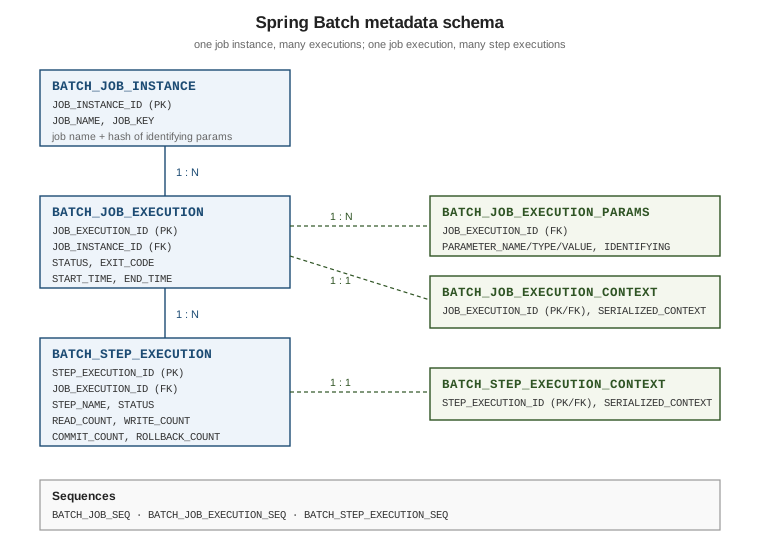
| Table | Contents |
|---|---|
|
One row per |
|
One row per attempt: |
|
The parameters of one execution: |
|
The serialized job-scoped |
|
One row per step attempt: |
|
The serialized step-scoped |
Three sequences supply the primary keys on databases that use them: BATCH_JOB_SEQ,
BATCH_JOB_EXECUTION_SEQ and BATCH_STEP_EXECUTION_SEQ.
An excerpt of the shape (PostgreSQL flavour):
CREATE TABLE BATCH_JOB_INSTANCE (
    JOB_INSTANCE_ID BIGINT      NOT NULL PRIMARY KEY,
    VERSION         BIGINT,
    JOB_NAME        VARCHAR(100) NOT NULL,
    JOB_KEY         VARCHAR(32)  NOT NULL,
    CONSTRAINT JOB_INST_UN UNIQUE (JOB_NAME, JOB_KEY)
);

CREATE TABLE BATCH_JOB_EXECUTION (
    JOB_EXECUTION_ID BIGINT      NOT NULL PRIMARY KEY,
    VERSION          BIGINT,
    JOB_INSTANCE_ID  BIGINT      NOT NULL,
    CREATE_TIME      TIMESTAMP   NOT NULL,
    START_TIME       TIMESTAMP   DEFAULT NULL,
    END_TIME         TIMESTAMP   DEFAULT NULL,
    STATUS           VARCHAR(10),
    EXIT_CODE        VARCHAR(2500),
    EXIT_MESSAGE     VARCHAR(2500),
    LAST_UPDATED     TIMESTAMP,
    CONSTRAINT JOB_INST_EXEC_FK FOREIGN KEY (JOB_INSTANCE_ID)
        REFERENCES BATCH_JOB_INSTANCE (JOB_INSTANCE_ID)
);

CREATE TABLE BATCH_STEP_EXECUTION (
    STEP_EXECUTION_ID  BIGINT      NOT NULL PRIMARY KEY,
    VERSION            BIGINT      NOT NULL,
    STEP_NAME          VARCHAR(100) NOT NULL,
    JOB_EXECUTION_ID   BIGINT      NOT NULL,
    STATUS             VARCHAR(10),
    COMMIT_COUNT       BIGINT,
    READ_COUNT         BIGINT,
    FILTER_COUNT       BIGINT,
    WRITE_COUNT        BIGINT,
    READ_SKIP_COUNT    BIGINT,
    WRITE_SKIP_COUNT   BIGINT,
    PROCESS_SKIP_COUNT BIGINT,
    ROLLBACK_COUNT     BIGINT,
    EXIT_CODE          VARCHAR(2500),
    EXIT_MESSAGE       VARCHAR(2500),
    CONSTRAINT JOB_EXEC_STEP_FK FOREIGN KEY (JOB_EXECUTION_ID)
        REFERENCES BATCH_JOB_EXECUTION (JOB_EXECUTION_ID)
);
The complete, authoritative DDL for every supported database is listed in Appendix A: meta-data schema. General DDL technique is covered in SQL DDL.
Creating the schema
The DDL ships inside spring-batch-core as classpath resources named
org/springframework/batch/core/schema-<platform>.sql — schema-postgresql.sql, schema-mysql.sql,
schema-oracle.sql, schema-h2.sql, schema-sqlserver.sql, and so on, each with a matching
schema-drop-<platform>.sql.
Spring Boot can run it for you:
spring:
  batch:
    jdbc:
      initialize-schema: embedded   # always | embedded | never
      table-prefix: BATCH_
      platform: postgresql          # override the detected platform
      schema: classpath:org/springframework/batch/core/schema-postgresql.sql
initialize-schema |
Behaviour |
|---|---|
|
Create the tables only when the datasource is an embedded database (H2, HSQL, Derby). |
|
Always run the DDL at startup — convenient in development, and safe because the scripts are idempotent-ish, but not what a controlled production deployment wants. |
|
Never touch the schema. The correct production setting: create the tables through your migration tool (Flyway, Liquibase) so they are versioned like every other table. |
table-prefix renames all six tables at once — useful when several applications share a schema, or when a DBA
requires a naming convention. Whatever prefix is chosen must also be given to the repository configuration
(@EnableJdbcJobRepository(tablePrefix = "…")), see
Infrastructure configuration.
Choosing a repository implementation
| Implementation | When to use it |
|---|---|
JDBC ( |
Production default. Durable, queryable with plain SQL, restartable, and works with the transaction manager the business steps already use — so metadata and business writes can commit together. |
MongoDB ( |
For applications whose only datastore is MongoDB. Collections mirror the six tables. Requires a
|
Resourceless ( |
Samples, prototypes and unit tests. Nothing is persisted, so there is no restart and no history. |
Why creating a JobExecution is SERIALIZABLE
Creating a JobExecution runs at ISOLATION_SERIALIZABLE by default. The repository must check "does an
execution of this instance already exist, and is it still running?" and then insert — and two launchers
starting the same job at the same moment must not both pass that check. Serializable isolation makes the
check-then-insert atomic, so the second launcher fails fast rather than producing a duplicate concurrent
execution.
The level can be relaxed (Isolation.READ_COMMITTED) when the database’s serializable implementation is
expensive and duplicate launches are prevented some other way — a deliberate trade-off, not a default to
change casually. Isolation levels themselves are covered in
SQL Transactions and
Transaction Isolation & Locking.
@Configuration
@EnableBatchProcessing
@EnableJdbcJobRepository(isolationLevelForCreate = Isolation.READ_COMMITTED)
public class RelaxedIsolationInfrastructure {
}
Querying run history
Since 6.0, JobRepository extends JobExplorer, so the read methods are on the repository itself — no
separate JobExplorer bean is needed. JobRegistry (optional, auto-populated) maps job names to Job beans
when a name must be resolved at runtime.
@Service
public class BatchHistoryService {

    private final JobRepository jobRepository;

    public BatchHistoryService(JobRepository jobRepository) {
        this.jobRepository = jobRepository;
    }

    /** Prints the last 10 instances of a job and how every execution of each one ended. */
    public void printHistory(String jobName) {
        List<JobInstance> instances = jobRepository.getJobInstances(jobName, 0, 10);
        for (JobInstance instance : instances) {
            System.out.printf("instance %d%n", instance.getInstanceId());
            for (JobExecution execution : jobRepository.getJobExecutions(instance)) {
                System.out.printf("  execution %d: %s (%s) %s -> %s%n",
                        execution.getId(),
                        execution.getStatus(),
                        execution.getExitStatus().getExitCode(),
                        execution.getStartTime(),
                        execution.getEndTime());
                for (StepExecution step : execution.getStepExecutions()) {
                    System.out.printf("    step %-20s read=%d write=%d skip=%d%n",
                            step.getStepName(),
                            step.getReadCount(),
                            step.getWriteCount(),
                            step.getSkipCount());
                }
            }
        }
    }

    public Set<String> runningExecutions(String jobName) {
        return jobRepository.findRunningJobExecutions(jobName).stream()
                .map(execution -> execution.getId().toString())
                .collect(Collectors.toSet());
    }
}
The same data is readable with plain SQL, which is often the quickest production diagnosis — see SQL Queries:
SELECT i.JOB_NAME, e.JOB_EXECUTION_ID, e.STATUS, e.EXIT_CODE, e.START_TIME, e.END_TIME
FROM   BATCH_JOB_EXECUTION e
JOIN   BATCH_JOB_INSTANCE  i ON i.JOB_INSTANCE_ID = e.JOB_INSTANCE_ID
WHERE  i.JOB_NAME = 'endOfDayJob'
ORDER  BY e.JOB_EXECUTION_ID DESC
FETCH FIRST 20 ROWS ONLY;
The metadata tables grow with every run; indexing and pruning them is discussed in Profiling & tuning.