Frontend: Hyvä, PWA Studio and Edge Delivery
|
This content was generated with the assistance of AI and should be verified against the official documentation of each platform before being relied on in production. This section’s bibliography lists the reference material consulted while preparing these pages. |
Magento ships with the Luma theme, rendered by the PHP server with RequireJS, Knockout.js and LESS (see Frontend: Luma Themes). Three other storefront options matter in 2026: the Hyvä Theme, a replacement theme that keeps the server-side rendering and swaps the JavaScript stack for Tailwind CSS and Alpine.js; PWA Studio, Adobe’s React toolkit for a single-page storefront on top of GraphQL; and the Commerce Storefront on Edge Delivery Services, the storefront of Adobe Commerce as a Cloud Service, built from authored documents, JavaScript blocks and ready-made drop-in components. This page explains what each one is, which editions it works with, what it costs, what it requires, how its extension model differs, and how the same Pocket Coffee feature (the roast date badge shown on a product page) looks in each.
The page was checked on 2026-10-27 against Magento 2.4.9 (released 2026-05-12) and Mage-OS 3.6.0, the Hyvä Theme
documentation and the main branch of hyva-themes/magento2-default-theme (whose package.json pins Tailwind CSS
4.3.1), PWA Studio 14.5.1 (released 2026-05-14) and the Commerce Storefront documentation. What was run locally and
what was not is listed in What was run and what was not: the ViewModel and template were run in the Mage-OS 3.6.0
test store, a Tailwind CSS 4.3.1 build scanned the template, and nothing that needs a Hyvä licence key, a Commerce
Storefront licence or an Adobe account was installed.
Choosing a storefront
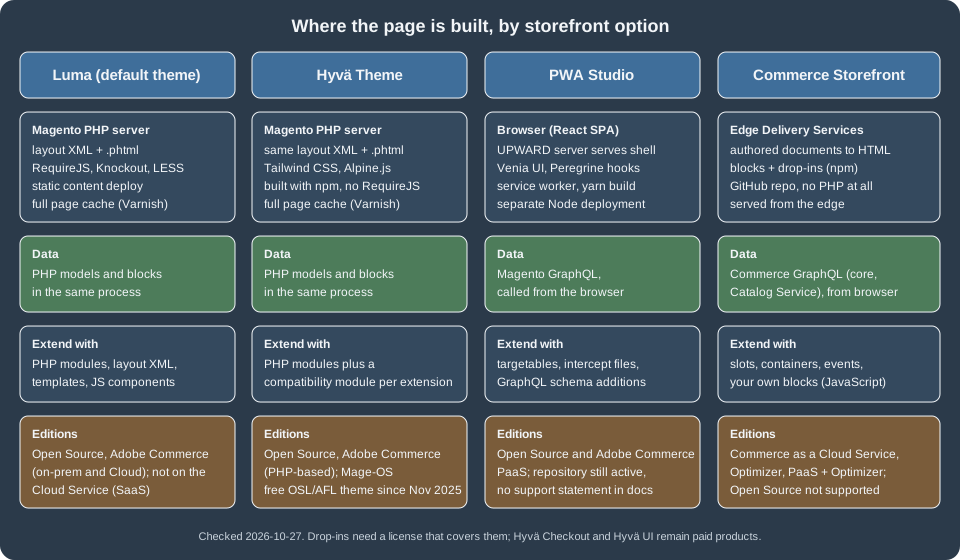
| Luma | Hyvä Theme | PWA Studio | Commerce Storefront | |
|---|---|---|---|---|
Rendering |
PHP server, layout XML and |
PHP server, the same layout XML and |
React single-page application in the browser, shell served by an UPWARD server |
Edge Delivery Services builds HTML from documents; blocks and drop-ins run in the browser |
JavaScript stack |
RequireJS, Knockout.js, jQuery, LESS |
Alpine.js, Tailwind CSS, no RequireJS or Knockout |
React, Peregrine hooks, Venia UI components, webpack, yarn |
Plain JavaScript blocks, drop-in npm packages, no PHP at all |
Data source |
PHP models and blocks |
PHP models and blocks |
Magento GraphQL |
Commerce GraphQL (core and Catalog Service), called from the browser |
Extension model |
PHP modules, layout XML, templates, JS components |
PHP modules, plus a compatibility module for every extension written for Luma |
Targets and intercept files, GraphQL schema additions |
Slots, containers, events and your own blocks |
Editions |
Open Source and Adobe Commerce (on-premises and on Cloud) |
The same PHP-based editions; not applicable to the Cloud Service |
Open Source and Adobe Commerce PaaS |
Adobe Commerce as a Cloud Service and Adobe Commerce Optimizer, also PaaS with an Optimizer licence; Open Source is not supported |
Cost |
Included |
The Theme is free (OSL 3.0 and AFL 3.0 since 2025-11-10); Checkout and UI are paid |
Free, open source |
Drop-ins need a licence that covers them |
Two rules of thumb follow from the table. A store that stays on Open Source or on the PaaS editions and mostly needs a faster, simpler theme than Luma chooses between Luma and Hyvä, because both keep the whole PHP extension ecosystem (with the cost of compatibility modules in Hyvä’s case). A store on Adobe Commerce as a Cloud Service has no choice: Adobe documents that it does not support Luma storefronts, so the Commerce Storefront is the storefront and PHP theme code does not apply at all. The in-process extension material in the rest of this subsection (modules, plugins, layouts) therefore describes the Luma and Hyvä cases; the out-of-process alternative is covered in Out-of-Process Extensibility.
Hyvä Theme
Hyvä is a theme and an ecosystem built by Hyvä Themes BV. It keeps the Magento server-side architecture (layout XML,
blocks, .phtml templates, ViewModels) and replaces what the browser receives: no RequireJS, no Knockout, no jQuery,
no LESS, only Tailwind CSS for styling and Alpine.js for interactivity. The result is much less JavaScript and a much
simpler front-end build, at the price that every extension that ships Luma-specific JavaScript or templates has to be
adapted.
Licensing and what is paid
Until November 2025 the theme itself was a paid, closed-source product. On 2025-11-06 the company announced that the Hyvä Theme is relicensed under the Open Software License 3.0 and the Academic Free License 3.0, and from 2025-11-10 it is available on GitHub and through free Composer keys. The repository README states that the package is dual-licensed under OSL 3.0 and AFL 3.0 and compatible with Magento 2.4.0 and higher. Other products stay proprietary.
| Product | Status on 2026-10-27 | Notes |
|---|---|---|
Hyvä Theme and the modules that support it |
Free, OSL 3.0 and AFL 3.0 |
Free Composer key from the Hyvä portal; also installable from GitHub repositories |
Hyvä Checkout |
Paid, proprietary |
The announcement lists 1,000 EUR; no longer requires a paid Theme licence |
Hyvä UI |
Paid, sold per Magento store |
The announcement lists 250 EUR per store; existing Theme licensees keep access |
Hyvä Enterprise and Hyvä Commerce |
Paid, proprietary |
Announcement list prices were 7,500 EUR per year and 3,000 EUR per year respectively; prices change, so check the vendor |
The prices come from the vendor’s announcement, which was read through a summary tool and not checked on the live pricing pages, so treat them as indicative. What is solid is the licence change of the Theme and that Checkout and UI remain commercial.
Requirements
The Hyvä documentation lists these requirements for the Theme:
-
Magento 2.4.4-p9, 2.4.5-p8, 2.4.6-p7, 2.4.7-p1 or higher (the README says "2.4.0 and higher" for the package itself).
-
PHP 8.1, 8.2, 8.3 or 8.4; PHP 7.4 is no longer supported. Magento 2.4.9 requires PHP 8.5 for production, and the Hyvä page did not list 8.5 on 2026-10-27, which is a documented tension: on a 2.4.9 store check the compatibility statement of the Hyvä version you are installing before upgrading PHP.
-
Node.js 20.0.0 or newer on development machines, for the Tailwind CSS compiler (the default theme’s
package.jsonsetsengines.nodeto>=20.0.0). The Tailwind build runs on a developer machine or in CI, not on the production server. -
From Hyvä 1.3.11 the CSP Nonce Provider is required, which needs Magento 2.4.4 or newer.
Installation
The recommended path is the private Packagist repository with a free key created in the Hyvä account dashboard. The placeholders below stand for the key and the project name that the dashboard shows. The commands were not run, because creating the key requires a Hyvä account.
# add the key to auth.json (never commit auth.json)
composer config --auth http-basic.hyva-themes.repo.packagist.com token <your-hyva-key>
composer config repositories.private-packagist composer https://hyva-themes.repo.packagist.com/<your-project>/

composer require hyva-themes/magento2-default-theme
bin/magento setup:upgradeThe alternative, installation from GitHub, adds each repository as a Composer git repository (the README lists
magento2-theme-module, magento2-default-theme, magento2-default-theme-csp, magento2-base-layout-reset,
magento2-compat-module-fallback, magento2-mollie-theme-bundle, magento2-luma-checkout, magento2-theme-fallback,
magento2-order-cancellation-webapi and magento2-email-module) and then runs the same composer require. The
private Packagist route is recommended because many compatibility modules are served from it as well.
After installation, activate hyva/default in the Admin under Content > Design > Configuration, and set the theme
at the website level too, because the Hyvä documentation warns that a theme assigned only to a store view can cause
storefront problems. The rest of the post-install list from the documentation:
-
Disable the legacy Magento captcha (
bin/magento config:set customer/captcha/enable 0) and use one of the supported Google reCAPTCHA versions. -
Disable Magento’s built-in JavaScript and CSS minification and bundling, and HTML minification, for the Hyvä store views (Stores > Configuration > Advanced > Developer, at store-view scope). The documentation says that they bring no benefit to Hyvä and can cause side effects. Keep them enabled for any Luma store views that remain. The
hyva-themes/magento2-minificationmodule minifies on the fly and is marked experimental. -
Make sure the Magento GraphQL modules that Hyvä features rely on are enabled (
bin/magento module:status).
A child theme and the Tailwind build
A Hyvä store never edits the parent theme. It creates a child theme under app/design/frontend/Vendor/ThemeName, copies
the Tailwind build files from the parent, and points the theme at the parent. The documentation gives the copy step as
mkdir -p app/design/frontend/Vendor/ThemeName/web and
cp -r vendor/hyva-themes/magento2-default-theme/web/* app/design/frontend/Vendor/ThemeName/web/. The two small files
that register the theme are ordinary Magento theme files (the Luma page explains them in detail).
<?xml version="1.0"?>
<theme xmlns:xsi="http://www.w3.org/2001/XMLSchema-instance" xsi:noNamespaceSchemaLocation="urn:magento:framework:Config/etc/theme.xsd">
    <title>Pocket Coffee Hyvä</title>
    <parent>Hyva/default</parent>
    <media>
        <preview_image>media/preview.png</preview_image>
    </media>
</theme>The parent value is Hyva/default for the standard theme and Hyva/default-csp for the variant that works with a
strict Content Security Policy. The default theme ships preview.png, not preview.jpg.
On the main branch of the default theme (package version 3.0.0, read on 2026-10-27) the front-end build is
Tailwind CSS 4 with the @hyva-themes/hyva-modules helper package. Its web/tailwind/package.json defines the
scripts below. The generate script merges the CSS of registered compatible modules and the design tokens; build and
build-prod produce the minified web/css/styles.css.
{
  "dependencies": {
    "@hyva-themes/hyva-modules": "^1.5.0",
    "@tailwindcss/cli": "^4.3.1",
    "tailwindcss": "^4.3.1"
  },
  "scripts": {
    "start": "npm run watch",
    "generate": "npx hyva-sources && npx hyva-tokens && npx hyva-fonts",
    "watch": "npm run generate && npx tailwindcss -i tailwind-source.css -o ../css/styles.css --watch",
    "build": "npm run generate && npx tailwindcss -i tailwind-source.css -o ../css/styles.css --minify",
    "build-prod": "npm run build"
  },
  "engines": { "node": ">=20.0.0" }
}Hyvä 1.1.x used Tailwind CSS 2 and 1.2.x and 1.3.x used Tailwind CSS 3, both configured in tailwind.config.js; the
Hyvä documentation keeps those descriptions, so check which one matches the version you install. Tailwind learns which
utility classes exist by scanning the templates, so the child theme’s web/tailwind/hyva.config.json lists where to
look. For a child of the default theme it includes the parent:
{
    "tailwind": {
        "include": [
            { "src": "vendor/hyva-themes/magento2-default-theme" }
        ]
    }
}In the Tailwind CSS 4 entry file (tailwind-source.css) the scan is declared with @source rules, and the design
tokens with an @theme block. This excerpt is the part of the default theme’s file that matters for a template author:
@import "@hyva-themes/hyva-modules/css";
@import "tailwindcss" source(none);
@source "../../**/*.phtml";
@source "../../**/*.xml";The Pocket Coffee roast date badge in Hyvä
A Hyvä template is a normal .phtml file. Business data comes from a ViewModel (a class that implements
Magento\Framework\View\Element\Block\ArgumentInterface), which Hyvä templates fetch with
$viewModels->require(...) and Luma templates receive through a layout argument. Because the ViewModel does not touch
the theme, the same class serves both. The class used here reads the roast batch that the
REST and GraphQL APIs page creates through its repository.
<?php
declare(strict_types=1);

namespace PocketCoffee\Api\ViewModel;

use Magento\Framework\Exception\NoSuchEntityException;
use Magento\Framework\View\Element\Block\ArgumentInterface;
use PocketCoffee\Api\Api\RoastBatchRepositoryInterface;

class RoastBadge implements ArgumentInterface
{
    public function __construct(private readonly RoastBatchRepositoryInterface $repository)
    {
    }

    public function getRoastDate(string $sku): ?string
    {
        try {
            return $this->repository->get($sku)->getRoastDate();
        } catch (NoSuchEntityException $e) {
            return null;
        }
    }
}This is the Luma version, registered in catalog_product_view.xml and run in the test store: the layout adds a block
below the price whose argument roast_badge_view_model is the ViewModel, and the template reads it.
<?xml version="1.0"?>
<page xmlns:xsi="http://www.w3.org/2001/XMLSchema-instance" xsi:noNamespaceSchemaLocation="urn:magento:framework:View/Layout/etc/page_configuration.xsd">
    <body>
        <referenceContainer name="product.info.main">
            <block class="Magento\Catalog\Block\Product\View" name="pocketcoffee.api.roast.badge"
                   template="PocketCoffee_Api::product/roast-badge.phtml" after="product.info.price">
                <arguments>
                    <argument name="roast_badge_view_model" xsi:type="object">PocketCoffee\Api\ViewModel\RoastBadge</argument>
                </arguments>
            </block>
        </referenceContainer>
    </body>
</page><?php
declare(strict_types=1);
use Magento\Catalog\Block\Product\View;
use Magento\Framework\Escaper;
use PocketCoffee\Api\ViewModel\RoastBadge;
/** @var View $block */
/** @var Escaper $escaper */
/** @var RoastBadge $viewModel */
$viewModel = $block->getData('roast_badge_view_model');
$roastDate = $viewModel->getRoastDate((string)$block->getProduct()->getSku());
?>
<?php if ($roastDate): ?>
<p class="pc-roast-badge inline-flex items-center rounded-full bg-amber-100 px-3 py-1 text-sm text-amber-900">
<?= $escaper->escapeHtml(__('Roasted on %1', $roastDate)) ?>
</p>
<?php endif; ?>With a roast batch stored for POCKET-001 the product page of the test store rendered
<p class="pc-roast-badge ...">Roasted on 2026-10-25</p>. The class names are Tailwind utilities on purpose, which is
how the same markup is styled in Hyvä. In Luma those classes have no effect unless the theme defines them. A layout
block name must be unique across modules and themes. While this example was tested, a first attempt with the generic
name pocketcoffee.roast.badge rendered nothing and raised no error, because the same name was already used by another
layout in the same store; renaming the block to pocketcoffee.api.roast.badge fixed it. Prefix block names with the
module name.
In a Hyvä child theme the template is placed at
app/design/frontend/Vendor/ThemeName/PocketCoffee_Api/templates/product/roast-badge.phtml and uses the registry:
<?php
declare(strict_types=1);

use Hyva\Theme\Model\ViewModelRegistry;
use Magento\Catalog\Block\Product\View;
use Magento\Framework\Escaper;
use PocketCoffee\Api\ViewModel\RoastBadge;

/** @var View $block */
/** @var Escaper $escaper */
/** @var ViewModelRegistry $viewModels */

/** @var RoastBadge $roastBadge */
$roastBadge = $viewModels->require(RoastBadge::class);
$roastDate = $roastBadge->getRoastDate((string)$block->getProduct()->getSku());
?>
<?php if ($roastDate): ?>
    <div x-data="{ open: false }" class="inline-flex flex-col gap-1">
        <button type="button"
                class="rounded-full bg-amber-100 px-3 py-1 text-sm text-amber-900"
                @click="open = !open"
                :aria-expanded="open">
            <?= $escaper->escapeHtml(__('Roasted on %1', $roastDate)) ?>
        </button>
        <p x-show="open" x-cloak class="text-sm text-gray-600">
            <?= $escaper->escapeHtml(__('Best between 5 and 30 days after roasting.')) ?>
        </p>
    </div>
<?php endif; ?>This Hyvä version was not run, because no Hyvä key was created. What was verified is the part that does not depend on
Hyvä: the PHP syntax of the ViewModel and template, the ViewModel and layout in the Luma store, and that Tailwind CSS
4.3.1, given @source "./tpl/**/*.phtml" and this markup, emitted the bg-amber-100, rounded-full and
text-amber-900 rules (about 4.6 KB of CSS for a one-template project). In Hyvä, x-data="{ open: false }" is
standard Alpine.js. In the CSP theme variant the Alpine.js CSP build forbids inline objects: x-data must name a
function registered with Alpine.data() inside an alpine:init listener.
function initRoastBadge() {
    return { open: false, toggle() { this.open = !this.open; } };
}

window.addEventListener(
    'alpine:init',
    () => Alpine.data('initRoastBadge', initRoastBadge),
    { once: true }
);The markup then reads x-data="initRoastBadge" and @click="toggle".
Compatibility modules
An extension written for Luma usually ships templates that include RequireJS or Knockout components. Such an extension
does not render properly in Hyvä. The Hyvä answer is a compatibility module: a small module, often named
Hyva_VendorModule, that provides Hyvä versions of the templates and the Tailwind CSS of the original module. Hyvä
maintains a tracker of existing compatibility modules, and many are installable from the same private Packagist
repository. The mechanism has three parts.
-
Registration. The compatibility module declares which original module it replaces in its
etc/frontend/di.xml, using the registry of themagento2-compat-module-fallbackpackage. -
Template overrides. Registration injects the compatibility module’s template directory into the design fallback path of the original module, so a file of the same name in the compatibility module’s
view/frontend/templatesdirectory replaces the original with no layout XML. A theme can still override it, using the original module name (app/design/frontend/Vendor/theme/Mirasvit_Gdpr/templates/cookie_bar.phtml). -
Tailwind scan. The module’s CSS source is
view/frontend/tailwind/module.css(Tailwind CSS 4 setups) or the oldertailwind.config.jsandtailwind-source.csspair. Whenmodule.cssexists the older files are ignored. The registered modules are written toapp/etc/hyva-themes.json, which the build tool reads.
<?xml version="1.0"?>
<config xmlns:xsi="http://www.w3.org/2001/XMLSchema-instance" xsi:noNamespaceSchemaLocation="urn:magento:framework:ObjectManager/etc/config.xsd">
    <type name="Hyva\CompatModuleFallback\Model\CompatModuleRegistry">
        <arguments>
            <argument name="compatModules" xsi:type="array">
                <item name="pocketcoffee_loyalty" xsi:type="array">
                    <item name="original_module" xsi:type="string">Vendor_LoyaltyWidget</item>
                    <item name="compat_module" xsi:type="string">Hyva_VendorLoyaltyWidget</item>
                </item>
            </argument>
        </arguments>
    </type>
</config>The names Vendor_LoyaltyWidget and Hyva_VendorLoyaltyWidget are placeholders for a hypothetical loyalty extension.
A minimal module.css for such a module scans its own templates and layouts:
@source "../templates";
@source "../layout";A module that is not a compatibility module but still needs its CSS compiled can register itself by observing the
hyva_config_generate_before event in etc/frontend/events.xml; to stop a module from being registered, disable that
observer or add the module to the exclusions argument of Hyva\CompatModuleFallback\Observer\HyvaThemeHyvaConfigGenerateBefore
in a frontend di.xml. The app/etc/hyva-themes.json file is regenerated by bin/magento module:enable and
module:disable (and by setup:upgrade before Magento 2.4.7). The effort per extension varies; the Hyvä documentation
calls it generally straightforward, and the practical risk for a store is the number and quality of its third-party
modules (payment, search, page builder, loyalty), each of which needs a compatibility module or a rewrite. Hyvä Checkout
replaces the Luma checkout and is a separate paid product, so payment extensions need to be Hyvä Checkout-compatible
as well.
Breeze, a theme by Swissup that also keeps PHP rendering and removes RequireJS-heavy storefront code, is the other established Luma alternative. Its licence statements conflicted between its Marketplace page and its vendor when this page was checked, so verify the current terms before relying on it.
PWA Studio
PWA Studio is a collection of tools and libraries for building a Progressive Web Application storefront for Magento
Open Source or Adobe Commerce. The Adobe documentation names three components: Buildpack (build and configuration
tools for a project), Peregrine (a collection of React hooks and logic components) and Venia UI (a React component
library). The repository magento/pwa-studio is a Yarn workspaces monorepo that also contains the Venia concept
storefront (venia-concept), pwa-buildpack, the UPWARD specification (upward-spec) and its JavaScript reference
implementation (upward-js), babel-preset-peregrine and a script that validates GraphQL queries against a schema.
Packages are published independently to npm, so the GitHub release number is not the version of each package: on
2026-10-27 the GitHub release was 14.5.1 while @magento/venia-ui on npm was 11.7.4.
| Item | Status on 2026-10-27 |
|---|---|
Latest release |
14.5.1, published 2026-05-14; previous releases 14.5.0 (2026-02-12), 14.4.0 (2025-10-16), 14.3.1 (2025-08-08) |
Repository |
Active (not archived), default branch |
Support statement |
None found. The documentation site and the repository README carry no deprecation, end-of-life or support-window notice, and the version compatibility page is generated from the source and could not be read as a table. "Maintained and not deprecated" means only that no notice was found |
Editions |
Documented for Magento Open Source and Adobe Commerce; the installation guide installs a backend, not a SaaS tenant |
Its architecture explains both its strengths and its cost. The browser loads a small shell, a service worker caches assets, and every piece of catalog and cart data is fetched through the Magento GraphQL API. A Node-based UPWARD server (UPWARD is a declarative specification of how a server answers a request) serves the shell and proxies the backend. That means a separate deployment next to Magento, server-side rendering concerns for SEO, and an upgrade tied to the GraphQL schema: the documentation describes version mismatches between the storefront and the backend as the usual source of incompatibility, because the Venia GraphQL queries break when the backend schema changes, and the build includes a query validation step.
The scaffolding commands, from the official tutorial, are below. They were not run; PWA Studio needs a Node and Yarn toolchain, a reachable Magento backend and, for service workers, an HTTPS hostname.
npm init @magento/pwa          # or: yarn create @magento/pwa
cd pwa-studio-fundamentals
yarn buildpack create-custom-origin ./
yarn watchSettings live in the .env file that the scaffolding tool creates (for example MAGENTO_BACKEND_URL). Customisation
is done through targets declared by the packages and implemented in intercept.js files, so that a project changes
Venia behaviour without forking it. For a new project in 2026 the practical position is: PWA Studio remains an option
for a PaaS or Open Source store that wants a React storefront and is prepared to maintain the Venia upgrade path
itself, but Adobe’s investment in headless storefronts is visible in the Commerce Storefront, described next, and
there is no migration guide between the two in the documentation read for this page.
Commerce Storefront on Edge Delivery Services
The Commerce Storefront is the storefront for Adobe Commerce as a Cloud Service (ACCS) and for Adobe Commerce Optimizer. It is not a theme of the Magento PHP application. It is a website hosted on Adobe Experience Manager Edge Delivery Services: merchants author pages in documents, each table in a document becomes a block, the commerce blocks mount drop-ins (pre-built JavaScript components for cart, checkout, product page and so on), and the drop-ins call the Commerce GraphQL API directly from the shopper’s browser. The documentation describes the overall approach as building storefronts with Edge Delivery Services, Commerce blocks and Commerce drop-in components.
How a page loads
The documented sequence has six steps, and an empty block can be a failure at any of them, not only a GraphQL problem.
-
A merchant or author writes a page in a document (DA.live, Google Docs or SharePoint). A table such as "Commerce Cart" defines a block.
-
Edge Delivery Services converts the document to HTML. Each table becomes a
divwhose class matches the block, such ascommerce-cart, and the HTML is served from servers close to the shopper. -
The browser loads the HTML.
-
For every block, the project’s own code runs: Edge Delivery Services finds the block’s
divand loads the matching file from the repository, for exampleblocks/commerce-cart/commerce-cart.js, whose default export imports the drop-in’s initializer (a module underscripts/initializers/that configures the drop-in: endpoints, dictionaries) and callsprovider.render()to mount the UI. -
The drop-in draws the interface, for example the cart or the checkout form.
-
The drop-in calls the Commerce endpoints and renders the response. The documentation stresses that this request goes from the browser directly to Commerce; Edge Delivery Services is not in the middle of it.
Backends, editions and licensing
| Backend | Supported | Notes |
|---|---|---|
Adobe Commerce as a Cloud Service |
Yes |
The licence includes the Storefront; setup is fully automated; Adobe manages the release cadence |
Adobe Commerce Optimizer |
Yes |
The licence includes the Storefront; a SaaS service with continuous releases |
Adobe Commerce on Cloud or on-premises (PaaS) |
Yes, with conditions |
Version 2.4.8 or later; drop-ins need an Optimizer or ACCS licence, a PaaS licence alone does not include them; the Storefront Compatibility package, the Services Connector and Catalog Service must be installed and connected; setup is manual |
Magento Open Source |
No |
The backends page states that Open Source is not supported for this storefront path |
The licensing page states that drop-ins are available only to customers with an active Adobe Commerce as a Cloud Service or Adobe Commerce Optimizer licence and are not available for other deployment types or standalone use. All drop-ins are governed by the Adobe Commerce Drop-in License Agreement. The B2C drop-ins were moving to version 3.0.0 with updated licence terms effective 2025-12-08, the B2B drop-ins launched at 1.0.0 beta under the new agreement, and existing 2.x implementations are not forced to upgrade. The consequence for planning is that the storefront is a commercial product tied to Adobe’s SaaS licences, unlike Luma, Hyvä and PWA Studio.
For a PaaS store migrating from Luma, the documentation names Luma Bridge, a PHP module that shares the cart and sign-in session between Luma and the Edge Delivery Services storefront while pages are moved one by one, and the Adobe Commerce Optimizer Connector, which syncs PaaS catalog and pricing data into Adobe Commerce Optimizer. A store that has only a few pages on the new storefront can run both.
Services behind the drop-ins
-
Core Commerce GraphQL handles cart, checkout, account, orders and other reads and writes; hosted services do not replace it.
-
Catalog Service is a hosted read-only GraphQL API for product data, used by the product details, search and category drop-ins and required by the Product Details drop-in.
-
Live Search powers the Product Discovery drop-in with results as the shopper types. On storefronts that do not use the PHP theme, storefront event collection must be turned on so that the models have data.
-
Product Recommendations feeds the Recommendations drop-in.
-
API Mesh (an Adobe Developer App Builder service) combines several backend sources behind one GraphQL endpoint. It is optional, and the documentation says most new storefronts do not need it.
Creating a storefront
The prerequisites are an Adobe ID, a GitHub account, DA.live access for the default content path, Node.js (a current
LTS release; the AEM CLI needs Node 18 or later and the boilerplate’s GitHub Actions run on Node 24), Git and the AEM
CLI (npm install -g @adobe/aem-cli). The steps below follow the official guide and were not run, because they need
an Adobe account, a GitHub organisation and a licensed backend.
-
Create a repository from the
hlxsites/aem-boilerplate-commercetemplate (lowercase letters, numbers and hyphens in the name). -
Install the AEM Code Sync GitHub app on that repository; it redeploys the storefront when
mainchanges. -
Generate the storefront configuration with the config generator, selecting the backend type and entering the endpoints, and save the result as
config.jsonat the repository root. Delete or ignoredemo-config.jsonso thatconfig.jsonis the only active configuration. -
Optionally add starter content with Site Creator on DA.live.
-
Clone the repository, then run:
git clone https://github.com/<your-org>/<your-repo>.git
cd <your-repo>
npm install
npm start # runs `aem up` and opens a preview, usually http://localhost:3000Drop-ins, containers, slots and events
The consumer drop-ins are published as npm packages named @dropins/storefront-*: account, auth, cart, checkout,
order, payment-services, pdp (product details), recommendations, wishlist, personalization and product-discovery. The
B2B drop-ins (Company Management, Company Switcher, Purchase Order, Quote Management, Quick Order and Requisition
List) require the B2B features to be enabled on the Commerce instance. Four concepts describe how a drop-in is used and
extended:
-
A container is a UI panel that a drop-in exposes for placement on a page, imported from the package’s
containers/path. -
A slot is a named extension point inside a drop-in’s layout where a project adds or replaces UI, such as a promo banner.
-
An event travels over the drop-in event bus; drop-ins coordinate through it instead of calling each other, and the documentation distinguishes common events and analytics events.
-
An initializer configures a drop-in once, for instance the GraphQL endpoint and the dictionaries of labels.
For Pocket Coffee the roast date badge is a slot on the product details drop-in: the block’s JavaScript registers a slot that renders a badge element from a product attribute returned by the GraphQL query, with no PHP involved. On ACCS the attribute and its value would be created through the platform’s APIs or an App Builder application, not by a PHP module. The exact slot name and the attribute setup depend on the drop-in version and were not run.
The roast date badge in each option
| Storefront | How Pocket Coffee shows the roast date |
|---|---|
Luma |
Layout XML adds a block that uses the ViewModel; styled with LESS. Run in the test store. |
Hyvä |
The same ViewModel through |
PWA Studio |
A GraphQL field on the product (the GraphQL example adds |
Commerce Storefront |
A slot on the product details drop-in reading an attribute from Commerce GraphQL. Not run. |
What was run and what was not
-
Run in the Mage-OS 3.6.0 test store (Magento 2.4.9 base, PHP 8.5, developer mode):
php -lon the ViewModel and template; the layout XML validated against the page configuration schema; the Luma product page rendered the badge after the module’s layout was loaded; a Tailwind CSS 4.3.1 build with an@sourcerule scanned the template and generated the utilities it uses. -
Not run: any Hyvä installation, compatibility module, Hyvä Checkout or Hyvä UI (they need a Hyvä account and key, and the rule for this work is that no account is created); the Alpine.js behaviour in a browser; PWA Studio scaffolding, build and UPWARD server; every Commerce Storefront step (an Adobe account, a licensed backend and a GitHub organisation are required); Luma Bridge and the Optimizer Connector.
-
Documentation tensions to know about: the Hyvä compatibility page lists PHP up to 8.4 while Magento 2.4.9 requires 8.5; the PWA Studio compatibility table is generated and was not readable as text; the Commerce Storefront prerequisites page does not state a minimum Commerce version although the backends page requires 2.4.8 or later for PaaS.