Buckets, scopes & collections
|
This section documents the current Couchbase Server 7.6.x line as published at the Couchbase Server documentation, which is the reference these pages are written and verified against. No specific patch version is pinned. Some capabilities (Enterprise-Edition-only Analytics, auditing, encryption at rest, the Backup service and rack-zone awareness, and Capella-only App Services and Columnar) are linked, not documented in depth. This content was generated with the assistance of AI and should be verified against the official documentation before being relied on in production, as Couchbase iterates quickly. This section’s bibliography lists the reference material consulted while preparing these pages. |
Couchbase groups documents into a three-level keyspace: a bucket contains scopes, and a scope contains collections. A collection is the unit a document actually belongs to, and it plays the role a table plays in a relational database.
The bucket.scope.collection keyspace
Every document is addressed as bucket.scope.collection plus its key. A collection is roughly an RDBMS
table; a scope is roughly a schema — a namespace that groups related collections and can carry its own
role-based access-control grants.
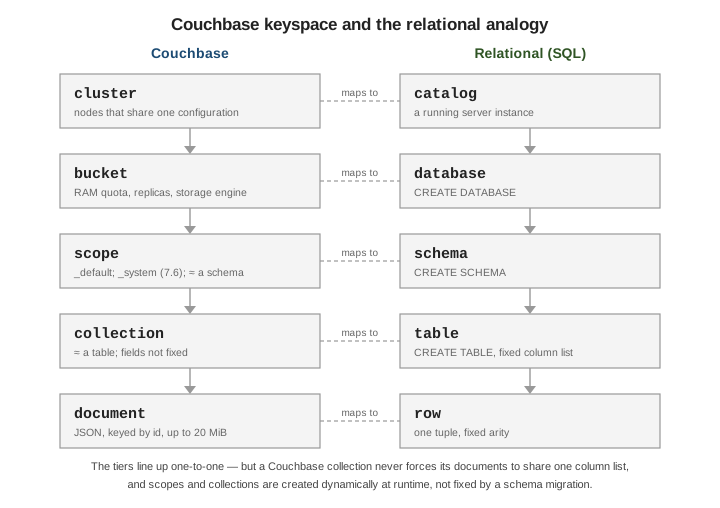
| Couchbase | Relational (SQL) |
|---|---|
bucket |
database / catalog |
scope |
schema |
collection |
table |
document key |
primary key |
fields not fixed by the collection |
column list fixed by DDL |
A new bucket always contains a _default scope holding a _default collection, so code written before
scopes and collections keeps working — documents simply land in _default._default. Couchbase Server 7.6
adds a read-only _system scope that the server uses for its own metadata (for example the Eventing and
Query catalogs); applications do not write to it.
# List the scopes and collections in a bucket.
couchbase-cli collection-manage -c localhost:8091 \
  -u Administrator -p password \
  --bucket travel-sample --list-scopes

# The same information is queryable from a system keyspace in SQL++.
SELECT `scope`, `name` AS collection
FROM system:keyspaces
WHERE `bucket` = "travel-sample";
Unlike a table, a collection never constrains the fields of the documents in it; structure lives in the application and, optionally, in indexes and query predicates. Data modeling covers how to divide data across scopes and collections, and Scopes and Collections describes the model and its default limits (up to 1000 scopes and 1000 collections per bucket).
Bucket types and settings
Couchbase has three bucket types:
| Type | Persistence & replication | Use |
|---|---|---|
Couchbase |
In memory with asynchronous persistence to disk; 0-3 replicas; supports every service |
The default; operational data of record |
Ephemeral |
In memory only, no disk persistence; optional replicas; full key-value and query API |
Session or transient state where disk I/O is unwanted but replication still matters |
Memcached (legacy) |
In memory only, no replicas, no persistence, plain key-value |
Deprecated — use an Ephemeral bucket instead |
Key per-bucket settings:
-
RAM quota — memory reserved on every Data node for this bucket’s working set and metadata.
-
Replica count — 0 to 3 copies of each vBucket on other nodes.
-
Bucket durability level — a floor applied to every write (
none,majority,majorityAndPersistToActive,persistToMajority); see Concurrency, locking & durability. -
Maximum TTL — an upper bound in seconds on document expiry; a longer per-document TTL is clamped to it.
0means no cap. -
Eviction / ejection policy — for Couchbase buckets, value-only or full ejection; for Ephemeral buckets,
noEviction(writes fail when full) ornruEviction(evict not-recently-used items). -
Flush — when enabled, a single command deletes every document in the bucket; off by default.
couchbase-cli bucket-create -c localhost:8091 -u Administrator -p password \
  --bucket orders \
  --bucket-type couchbase \
  --bucket-ramsize 512 \
  --bucket-replica 2 \
  --durability-min-level majorityAndPersistToActive \
  --max-ttl 2592000 \
  --enable-flush 0
The RAM quota is a hard reservation: it must be at least 100 MiB per bucket, it is taken from every Data node, and part of it always holds per-document metadata, so a bucket that only just fits in memory will start ejecting document values under load. Size it against the working set, not the total dataset. The on-disk storage engine (Couchstore or Magma) is also a per-bucket choice, covered in Storage, security & administration. For the full list of settings see Buckets, Memory, and Storage.
Addressing the keyspace: SQL++, SDKs, and DDL
In SQL++ the path is written with backticks around any name that is not a bare identifier — the hyphen in
travel-sample forces them:
SELECT a.name, a.icao
FROM `travel-sample`.inventory.airline a
WHERE a.country = "France"
LIMIT 3;

-- For the _default collection, the bucket name alone still works.
SELECT COUNT(*) FROM `beer-sample`;
In an SDK the three levels are separate calls:
// The Couchbase Java, .NET, Node.js, Python, Go and Scala SDKs all follow this shape.
cluster.bucket("travel-sample")
       .scope("inventory")
       .collection("airline");
Create scopes and collections with couchbase-cli, or with SQL++ DDL:
# couchbase-cli
couchbase-cli collection-manage -c localhost:8091 -u Administrator -p password \
  --bucket orders --create-scope sales
couchbase-cli collection-manage -c localhost:8091 -u Administrator -p password \
  --bucket orders --create-collection sales.invoice --max-ttl 0

-- SQL++ DDL, equivalent
CREATE SCOPE `orders`.sales;
CREATE COLLECTION `orders`.sales.invoice;

-- Drop them again (the _default scope and collection cannot be dropped).
DROP COLLECTION `orders`.sales.invoice;
DROP SCOPE `orders`.sales;
See Manage Scopes and Collections for the CLI, REST and SDK variants, and CREATE COLLECTION for the DDL form.
Continue with Documents, keys & metadata, or step back to What Couchbase Server is.