Routing
|
This section documents the current Vue 3.x release line as published at
the official Vue.js documentation, which is the reference these pages are written and
verified against. No specific patch version is pinned. The Composition API with This content was generated with the assistance of AI and should be verified against the official documentation before being relied on in production, since Vue and its ecosystem iterate quickly. This section’s bibliography lists the reference material consulted while preparing these pages. |
Vue’s official client-side router is Vue Router: it maps the URL to a tree of components, keeps the address bar in sync, and provides links, params, guards, and history control. The Vue guide introduces it at Routing; everything below is in the Vue Router docs.
Creating the router
Build a router instance with createRouter, choosing a history implementation, then install it with
app.use(router):
import { createRouter, createWebHistory } from 'vue-router'
import Home from './views/Home.vue'

const router = createRouter({
  history: createWebHistory(import.meta.env.BASE_URL),
  routes: [
    { path: '/', component: Home },
    { path: '/about', component: () => import('./views/About.vue') },
  ],
})
import { createApp } from 'vue'
import App from './App.vue'
import router from './router'
createApp(App).use(router).mount('#app')createWebHistory uses the HTML5 History API and needs a server fallback that serves index.html for
unknown paths. createWebHashHistory keeps the route after a #, so it works on any static host with no
server config. createMemoryHistory has no address bar and is for SSR and tests. See
History modes.
<RouterView> and <RouterLink>
<RouterView> is the outlet where the matched component renders; <RouterLink> renders an <a> that
navigates without a reload and adds active classes:
<template>
  <nav>
    <RouterLink to="/">Home</RouterLink>
    <RouterLink :to="{ name: 'user', params: { id: 42 } }">Profile</RouterLink>
  </nav>
  <RouterView />
</template>
Route records
Each entry in routes is a route record: at minimum \{ path, component }. A colon marks a dynamic
segment, whose value appears on route.params:
const routes = [
  { path: '/users/:id', component: UserProfile },
  { path: '/files/:pathMatch(.*)*', component: FileBrowser }, // custom regex + repeatable
]
To keep the component decoupled from the router, set props: true so params are passed as component props
instead of read from useRoute(). props can also be an object (static props) or a function
route ⇒ (\{ … }) (derive props, including from the query string):
{ path: '/users/:id', component: UserProfile, props: true },
{ path: '/search', component: Results, props: route => ({ q: route.query.q }) },Nested routes
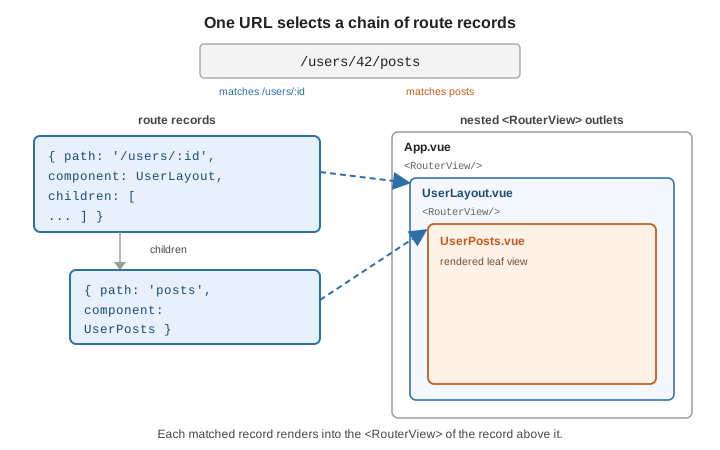
A record’s children render into a <RouterView> inside that record’s component, so a URL selects a
chain of records and each renders into the next outlet:
const routes = [
  {
    path: '/users/:id',
    component: UserLayout,
    children: [
      { path: '', name: 'user', component: UserHome },
      { path: 'posts', component: UserPosts },
      { path: 'settings', component: UserSettings },
    ],
  },
]
Named routes and named views
Give a record a name to navigate by identity instead of by URL string — router.push(\{ name: 'user', params: \{ id: 42 } }) — which survives path refactors. To render several
outlets at one level, give each <RouterView name="…"> a name and supply a components map (plural) on
the record:
{
  path: '/dashboard',
  components: { default: DashMain, sidebar: DashSidebar },
}
See Named Routes and Named Views.
Redirect, alias, and catch-all
-
redirectsends one path to another:\{ path: '/home', redirect: '/' }, or a function of the target route. -
aliaslets one record answer to several paths:\{ path: '/', component: Home, alias: '/home' }. -
A
/:pathMatch(.)record at the end matches anything unmatched — the 404 page:
{ path: '/:pathMatch(.*)*', name: 'not-found', component: NotFound }Catch-all
routes explains why the pathMatch param name matters when you navigate to it programmatically.
Programmatic navigation
useRouter() returns the instance; push, replace, or move through history:
<script setup>
import { useRouter } from 'vue-router'

const router = useRouter()

function save() {
  // ...persist...
  router.push({ name: 'user', params: { id: 42 } }) // new history entry
  // router.replace(...)  -> no new entry
  // router.go(-1)        -> like the back button
}
</script>
Navigation guards and the resolution flow
Guards can redirect (return \{ name: 'login' }), cancel (return false), or allow (return true or
nothing) a navigation. They run in a fixed order
(Navigation Guards):
-
router.beforeEach— global, e.g. an auth check. -
beforeRouteLeavein components being left. -
beforeEnteron the entering route record. -
beforeRouteEnterin entering components (nothisyet; use its callback). -
router.beforeResolve— global, after in-component guards and async components resolve. -
Navigation is confirmed;
router.afterEachruns (cannot cancel — use it for analytics and titles).
router.beforeEach((to) => {
  if (to.meta.requiresAuth && !isLoggedIn()) {
    return { name: 'login', query: { redirect: to.fullPath } }
  }
})
<script setup>
import { onBeforeRouteLeave } from 'vue-router'
onBeforeRouteLeave(() => {
if (formDirty.value) return window.confirm('Discard unsaved changes?')
})
</script>Lazy-loaded route components
Point component at a dynamic import() so the bundler splits that view into its own chunk, fetched on
first visit:
{ path: '/reports', component: () => import('./views/Reports.vue') }See Lazy Loading Routes; it pairs well with Async Components.
Scroll behavior
With HTML5 history, supply scrollBehavior to control the viewport on navigation — reset to top, restore
the saved position on back/forward, or scroll to an anchor:
const router = createRouter({
  history: createWebHistory(),
  routes,
  scrollBehavior(to, from, savedPosition) {
    if (savedPosition) return savedPosition
    if (to.hash) return { el: to.hash, behavior: 'smooth' }
    return { top: 0 }
  },
})
useRoute() and useRouter()
In <script setup>, useRoute() returns a reactive object describing the current route (params,
query, hash, meta, name), and useRouter() returns the router instance for navigation. Do not
destructure useRoute() — watch a getter instead so param changes on the same component are observed:
<script setup>
import { watch } from 'vue'
import { useRoute } from 'vue-router'

const route = useRoute()
watch(() => route.params.id, (id) => load(id), { immediate: true })
</script>
See also
-
Vue Router documentation — the complete API and guide.
-
State Management — Pinia stores read
useRoute()and the Router integrates with Vue DevTools. -
Server-Side Rendering —
createMemoryHistoryand per-request router instances. -
Routing and Routing and Navigation — the equivalent routers elsewhere.