Database and Entities
|
This content was generated with the assistance of AI and should be verified against the official documentation of each platform before being relied on in production. This section’s bibliography lists the reference material consulted while preparing these pages. |
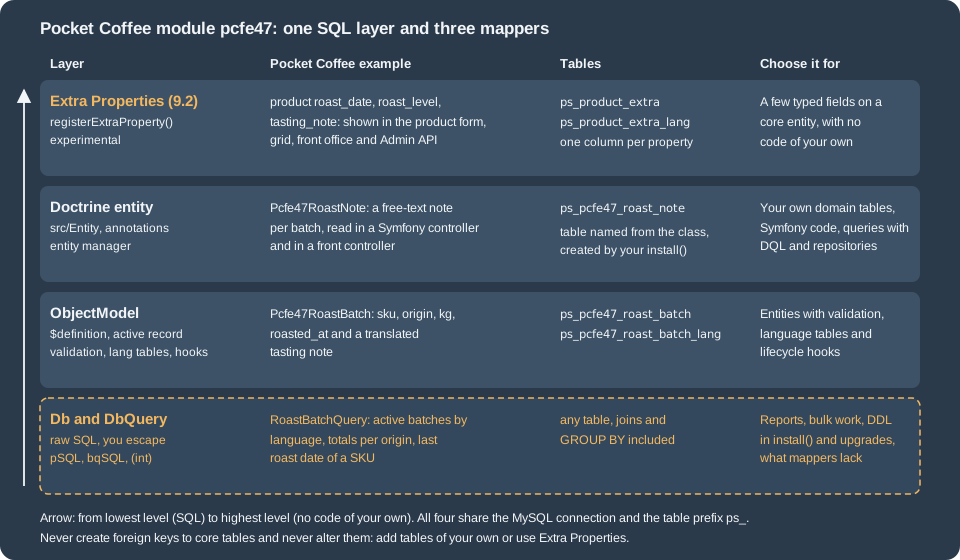
Every module that remembers anything ends up talking to MySQL. PrestaShop 9 offers four ways to do it, from the oldest
to the newest: raw SQL through the Db class (with the DbQuery builder), ObjectModel entities with a $definition
array, Doctrine entities declared in the module’s src/Entity folder, and, new in 9.2, Extra Properties, typed columns
that the core adds to an entity it already owns. This page explains each of them, the escaping and naming rules that make
them safe, and how to pick one. It was written against PrestaShop 9.2.0 (PHP 8.5.12, MySQL 8.4.13, Doctrine ORM 2.20.0,
Symfony 6.4.46 in the official Docker image) and checked on 2026-10-27. Extra Properties are marked @experimental in
9.2; Db, DbQuery and ObjectModel have existed since the 1.x series and Doctrine support for modules since 1.7.6.
The running example is Pocket Coffee’s roast log. The module pcfe47 records roast batches (SKU, origin, kilograms,
roast date, and a tasting note in two languages), lets a person attach free-text notes to a batch, and adds the roast
date, roast level and tasting note to every product. The batches use Db, DbQuery and an ObjectModel class, the
notes use a Doctrine entity, and the product fields use Extra Properties. All the code below was installed and executed in the
local PrestaShop 9.2.0 shop; the outputs are copied from that shop. The page builds on
Module Basics (structure, install()),
Module Upgrades, Overrides and Decoration
(upgrade scripts and why own tables beat overrides),
Module Translations (labels) and
Admin API (the OAuth2 flow used for the Extra Properties examples).
Tables of your own: naming and creation
The first decision is the table. These rules apply to all four approaches, and come from the good-practices page of the developer docs and from running the examples:
-
Table names always start with the shop prefix. In PHP use the constant
_DB_PREFIX_(ps_in a default install, but it is chosen at install time);Db::insert(),Db::update(),Db::delete()andDbQuery::from()add it for you,Db::execute()andDb::executeS()do not. Add the module name to your own tables (ps_pcfe47_roast_batch) so that two modules never collide. -
Create the tables in
install()(and in an upgrade script when a later version adds one) withCREATE TABLE IF NOT EXISTS, using_MYSQL_ENGINE_(InnoDB) andutf8mb4. Drop them inuninstall()withDROP TABLE IF EXISTS. A module that is reset must come back with its tables. -
Do not alter core tables and do not add foreign keys that point at them. Add your own tables or use Extra Properties.
-
A multilingual entity has a second table with the same name plus
_lang, with the base primary key andid_langas its composite primary key. A multistore entity adds_shopthe same way. -
Cast and escape every value you put into SQL:
(int)for integers,pSQL()for strings,bqSQL()for identifiers.
The module creates three tables, one per approach. This is the part of install() for the batch tables:
private function installTables(): bool
{
    $db = Db::getInstance();
    $engine = _MYSQL_ENGINE_;
    $p = _DB_PREFIX_;

    return $db->execute(
        "CREATE TABLE IF NOT EXISTS `{$p}pcfe47_roast_batch` (
            `id_pcfe47_roast_batch` INT UNSIGNED NOT NULL AUTO_INCREMENT,
            `sku` VARCHAR(32) NOT NULL,
            `origin` VARCHAR(32) NOT NULL,
            `kg` DECIMAL(10,3) NOT NULL DEFAULT 0,
            `roasted_at` DATE NOT NULL,
            `active` TINYINT(1) UNSIGNED NOT NULL DEFAULT 1,
            `date_add` DATETIME NOT NULL,
            `date_upd` DATETIME NOT NULL,
            PRIMARY KEY (`id_pcfe47_roast_batch`),
            UNIQUE KEY `sku_roasted_at` (`sku`, `roasted_at`)
        ) ENGINE={$engine} DEFAULT CHARSET=utf8mb4"
    ) && $db->execute(
        "CREATE TABLE IF NOT EXISTS `{$p}pcfe47_roast_batch_lang` (
            `id_pcfe47_roast_batch` INT UNSIGNED NOT NULL,
            `id_lang` INT UNSIGNED NOT NULL,
            `tasting_note` VARCHAR(255) NOT NULL DEFAULT '',
            PRIMARY KEY (`id_pcfe47_roast_batch`, `id_lang`)
        ) ENGINE={$engine} DEFAULT CHARSET=utf8mb4"
    ) && $db->execute(
        "CREATE TABLE IF NOT EXISTS `{$p}pcfe47_roast_note` (
            `id_note` INT UNSIGNED NOT NULL AUTO_INCREMENT,
            `id_batch` INT UNSIGNED NOT NULL,
            `author` VARCHAR(64) NOT NULL,
            `note` TEXT NOT NULL,
            `created_at` DATETIME NOT NULL,
            PRIMARY KEY (`id_note`),
            KEY `id_batch` (`id_batch`)
        ) ENGINE={$engine} DEFAULT CHARSET=utf8mb4"
    );
}

private function dropTables(): bool
{
    $db = Db::getInstance();
    $p = _DB_PREFIX_;

    return $db->execute("DROP TABLE IF EXISTS `{$p}pcfe47_roast_note`")
        && $db->execute("DROP TABLE IF EXISTS `{$p}pcfe47_roast_batch_lang`")
        && $db->execute("DROP TABLE IF EXISTS `{$p}pcfe47_roast_batch`");
}The module main class loads Composer’s autoloader and the ObjectModel class by hand, because PrestaShop does not
autoload a module’s classes/ folder; the Doctrine entity and the query class live in src/ under the PSR-4
namespace PrestaShop\Module\Pcfe47\. The complete main class, with the hooks and the Extra Properties
registration, is shown in the last section.
The Db class
Db::getInstance() returns the shared connection (a DbPDO object in 9.2.0; the first call opens it, later calls
reuse it). The docs also show Db::getInstance(_PS_USE_SQL_SLAVE_) for a read replica: use it only for reads that do
not depend on a write made a moment earlier. The methods used in modules:
| Method | What it does |
|---|---|
|
Runs a |
|
The first row as an associative array, or |
|
The first column of the first row. It returns |
|
Any statement that returns no rows ( |
|
One row or a list of rows, built from an associative array. |
|
|
|
|
|
The last auto-increment id, the rows changed by the last write, the rows of the last read (limited by its |
|
The MySQL error code and message of the last failed query. |
|
What |
Source: PrestaShop devdocs: Db class
Escaping
pSQL() and bqSQL() are global functions that call the connection’s escape():
foreach (["O'Brien", 'say "hi"', "1' OR '1'='1", 'back\\slash', '<b>x</b>'] as $s) {
    echo json_encode($s), '  pSQL => ', pSQL($s), '  bqSQL => ', bqSQL($s), "\n";
}
echo pSQL('<b>x</b><script>alert(1)</script>', true), "\n";
echo bqSQL('a`b'), "\n";
"O'Brien" pSQL => O\'Brien bqSQL => O\'Brien
"say \"hi\"" pSQL => say \"hi\" bqSQL => say \"hi\"
"1' OR '1'='1" pSQL => 1\' OR \'1\'=\'1 bqSQL => 1\' OR \'1\'=\'1
"back\\slash" pSQL => back\\slash bqSQL => back\\slash
"<b>x<\/b>" pSQL => x bqSQL => x
<b>x</b><script>alert(1)</script>
a\`bSource: PrestaShop devdocs: Db class
Three points follow from this output. pSQL() escapes quotes and backslashes, so a value placed inside quotes in a
statement is safe. By default it also strips HTML tags (<b>x</b> became x); the second argument true keeps the
markup (and the <script> too, so purify it before): use it only for fields that really hold HTML. bqSQL() is for
identifiers: it additionally escapes the backtick, so use it for a column or table name that comes from outside, always
between backticks. Numbers are not quoted, so they must be cast with (int) or (float) instead; a pSQL() on a number
that is not quoted in the statement does not protect anything.
Inserting, updating and deleting
Db::insert() builds the statement from an array, but it does not escape the values: it wraps each one in quotes as
it is. The docs example uses pSQL() for strings for this reason. The calls below ran against ps_pcfe47_roast_batch:
$db = Db::getInstance();
$now = date('Y-m-d H:i:s');

// one row
$db->insert('pcfe47_roast_batch', [
    'sku' => pSQL('PC-ETH-WHL-250'),
    'origin' => pSQL('Ethiopia Yirgacheffe'),
    'kg' => 12.5,
    'roasted_at' => '2026-10-20',
    'active' => 1,
    'date_add' => $now,
    'date_upd' => $now,
]);
echo $db->Insert_ID(), ' ', $db->Affected_Rows();   // 1 1

// a SQL expression instead of a quoted value
$db->insert('pcfe47_roast_batch', [
    'sku' => 'PC-COL-FIL-250', 'origin' => 'Colombia Huila', 'kg' => 8,
    'roasted_at' => '2026-10-21', 'active' => 1,
    'date_add' => ['type' => 'sql', 'value' => 'NOW()'],
    'date_upd' => ['type' => 'sql', 'value' => 'NOW()'],
]);

// several rows in one INSERT
$db->insert('pcfe47_roast_batch', [
    ['sku' => 'PC-BRA-ESP-1000', 'origin' => 'Brazil Cerrado', 'kg' => 20, 'roasted_at' => '2026-10-22', 'active' => 1, 'date_add' => $now, 'date_upd' => $now],
    ['sku' => 'PC-ETH-ESP-250', 'origin' => 'Ethiopia Yirgacheffe', 'kg' => 5.25, 'roasted_at' => '2026-10-22', 'active' => 0, 'date_add' => $now, 'date_upd' => $now],
]);
All three returned true. Then, against a row that already exists for the same SKU and day (the table has the unique
key sku_roasted_at), the four insert types behaved differently:
| Call | Result |
|---|---|
|
Throws |
|
Returns |
|
Returns |
|
|
The exceptions are part of the contract: in 9.2.0 a failed query in Db throws PrestaShopDatabaseException, and the
message holds the SQL. Never show it to a visitor; log it. A value that was not escaped fails like this (the SKU
PC-O'BRIEN stopped the statement at the quote):
PrestaShopDatabaseException: You have an error in your SQL syntax; check the manual that corresponds to your MySQL server version for the right syntax to use near 'BRIEN', 'Brazil Cerrado', '1', '2026-10-23', '1', '2026-10-27 17:...
update() and delete() take a raw WHERE string, so escape inside it:
$db->update(
    'pcfe47_roast_batch',
    ['kg' => 14.75, 'date_upd' => date('Y-m-d H:i:s')],
    "sku = '" . pSQL('PC-ETH-WHL-250') . "'",
    1                                   // LIMIT 1
);
echo $db->Affected_Rows();              // 1

$db->delete('pcfe47_roast_batch', "sku = 'PC-ETH-ESP-250'");
echo $db->Affected_Rows(); // 1Reading
$p = _DB_PREFIX_;
$rows = $db->executeS("SELECT `sku`, `kg` FROM `{$p}pcfe47_roast_batch` WHERE `active` = 1 ORDER BY `roasted_at`");
// [{"sku":"PC-ETH-WHL-250","kg":"13.000"},{"sku":"PC-COL-FIL-250","kg":"8.000"},{"sku":"PC-BRA-ESP-1000","kg":"20.000"}]
echo $db->numRows();                    // 3

$row = $db->getRow("SELECT `sku`, `origin` FROM `{$p}pcfe47_roast_batch` ORDER BY `kg` DESC");
// {"sku":"PC-BRA-ESP-1000","origin":"Brazil Cerrado"}

var_dump($db->getValue("SELECT COUNT(*) FROM `{$p}pcfe47_roast_batch` WHERE sku = 'nope'"));   // int(0)
var_dump($db->getRow("SELECT * FROM `{$p}pcfe47_roast_batch` WHERE sku = 'nope'"));            // bool(false)
Source: PrestaShop devdocs: Db class
Two guards are worth knowing, both observed. getRow() adds LIMIT 1, so a statement that already ends in a LIMIT
fails with a syntax error near LIMIT 1. And executeS() refuses anything that is not a read: calling it with an
UPDATE throws Db->executeS() must be used only with select, show, explain or describe queries. Use execute() for
writes.
PrestaShop’s Db has no transaction methods. The InnoDB statements work on the shared connection: after
$db->execute('START TRANSACTION') an inserted row was visible to getValue(), and after execute('ROLLBACK') it was gone.
This was checked in one process; nothing guarantees that a hook or another module does not open its own transaction
in the same request, and DDL statements commit implicitly.
The DbQuery builder
DbQuery assembles a SELECT (or a DELETE) from parts, adds the table prefix and quotes identifiers. It does not
escape values: the strings you pass to where(), having() and the ON clause are used as they are.
| Method | Effect |
|---|---|
|
Adds fields; may be called several times. Without any, the query selects |
|
Adds a table, with the prefix and backticks. |
|
Adds a complete join clause as written: here the prefix is yours to add. |
|
Add the prefix and quote the table and alias; the |
|
Each call is another |
|
As in SQL; |
|
Offset and limit; both are cast to integers. |
|
Turns the query into |
|
The SQL string. It throws |
$sql = new DbQuery();
$sql->select('b.`sku`, b.`kg`, bl.`tasting_note`');
$sql->from('pcfe47_roast_batch', 'b');
$sql->leftJoin('pcfe47_roast_batch_lang', 'bl', 'bl.`id_pcfe47_roast_batch` = b.`id_pcfe47_roast_batch` AND bl.`id_lang` = 1');
$sql->where('b.`active` = 1');
$sql->where('b.`kg` > 5');
$sql->orderBy('b.`kg` DESC');
$sql->limit(2, 1);
echo $sql->build();
SELECT b.`sku`, b.`kg`, bl.`tasting_note`
FROM `ps_pcfe47_roast_batch` b
LEFT JOIN `ps_pcfe47_roast_batch_lang` `bl` ON bl.`id_pcfe47_roast_batch` = b.`id_pcfe47_roast_batch` AND bl.`id_lang` = 1
WHERE (b.`active` = 1) AND (b.`kg` > 5)
ORDER BY b.`kg` DESC
LIMIT 1, 2Pass the object straight to Db::getInstance()->executeS($sql), getRow(), getValue() or execute(): they accept a
DbQuery. Sub-selects and the DELETE type were also built:
$inner = new DbQuery();
$inner->select('origin, SUM(kg) AS kg')->from('pcfe47_roast_batch')->groupBy('origin');
$outer = new DbQuery();
$outer->select('t.origin')->from($inner, 't')->where('t.kg > 10');
echo $outer->build();

$del = new DbQuery();
$del->type('DELETE')->from('pcfe47_roast_batch')->where("sku = 'nope'");
echo $del->build();
SELECT t.origin
FROM (SELECT origin, SUM(kg) AS kg
FROM `ps_pcfe47_roast_batch`
GROUP BY origin
) t
WHERE (t.kg > 10)
DELETE FROM `ps_pcfe47_roast_batch`
WHERE (sku = 'nope')The module keeps its read queries in one class, which is autowired as a Symfony service and used from the controllers
below. Note the pSQL() on every external string and the integer type on the language id:
<?php

declare(strict_types=1);

namespace PrestaShop\Module\Pcfe47\Repository;

use Db;
use DbQuery;

/**
 * Read-only queries over the roast tables, written with DbQuery.
 */
class RoastBatchQuery
{
    /**
     * Active batches with the tasting note of one language, newest first.
     *
     * @return array<int, array<string, string>>
     */
    public function findActive(int $idLang, int $limit = 20): array
    {
        $sql = new DbQuery();
        $sql->select('b.`id_pcfe47_roast_batch`, b.`sku`, b.`origin`, b.`kg`, b.`roasted_at`, bl.`tasting_note`');
        $sql->from('pcfe47_roast_batch', 'b');
        $sql->leftJoin('pcfe47_roast_batch_lang', 'bl', 'bl.`id_pcfe47_roast_batch` = b.`id_pcfe47_roast_batch` AND bl.`id_lang` = ' . $idLang);
        $sql->where('b.`active` = 1');
        $sql->orderBy('b.`roasted_at` DESC, b.`id_pcfe47_roast_batch` DESC');
        $sql->limit($limit);

        return Db::getInstance()->executeS($sql) ?: [];
    }

    /**
     * Kilograms roasted per origin since a date: GROUP BY and HAVING.
     *
     * @return array<int, array<string, string>>
     */
    public function totalsByOrigin(string $since, float $minKg = 0.0): array
    {
        $sql = new DbQuery();
        $sql->select('b.`origin`, COUNT(*) AS batches, SUM(b.`kg`) AS total_kg');
        $sql->from('pcfe47_roast_batch', 'b');
        $sql->where('b.`active` = 1');
        $sql->where('b.`roasted_at` >= \'' . pSQL($since) . '\'');
        $sql->groupBy('b.`origin`');
        $sql->having('SUM(b.`kg`) >= ' . $minKg);
        $sql->orderBy('total_kg DESC');

        return Db::getInstance()->executeS($sql) ?: [];
    }

    /**
     * The last roast date of a SKU, or null.
     */
    public function lastRoastDate(string $sku): ?string
    {
        $sql = new DbQuery();
        $sql->select('MAX(b.`roasted_at`)');
        $sql->from('pcfe47_roast_batch', 'b');
        $sql->where('b.`sku` = \'' . pSQL($sku) . '\'');

        $value = Db::getInstance()->getValue($sql);

        return $value ? (string) $value : null;
    }
}services:
_defaults:
public: false
autowire: true
autoconfigure: true
PrestaShop\Module\Pcfe47\Repository\RoastBatchQuery: ~
PrestaShop\Module\Pcfe47\Controller\BatchesController: ~Running it returned:
findActive(1, 5)      3 rows, newest roast first (PC-BRA-ESP-1000, PC-COL-FIL-250, PC-ETH-WHL-250)
totalsByOrigin('2026-10-01', 10.0)
                      [{"origin":"Brazil Cerrado","batches":1,"total_kg":"20.000"},
                       {"origin":"Ethiopia Yirgacheffe","batches":1,"total_kg":"14.750"}]
lastRoastDate('PC-ETH-WHL-250')   '2026-10-20'
lastRoastDate('nope') NULLObjectModel entities
An ObjectModel subclass is an active record: one object is one row, tied to a table by the static $definition array.
It adds what raw SQL lacks: validation, automatic timestamps, language and shop tables, and lifecycle hooks. It is the
mechanism behind most core entities (Product, Cart, Customer) and remains available in 9.x next to the Symfony
layer. The docs say a complete migration to Doctrine is on the roadmap but that ObjectModel stays for a while.
Defining the model
<?php

if (!defined('_PS_VERSION_')) {
    exit;
}

/**
 * One roast of one SKU: ObjectModel entity with a translatable tasting note.
 */
class Pcfe47RoastBatch extends ObjectModel
{
    public $sku;
    public $origin;
    public $kg;
    public $roasted_at;
    public $active = true;
    public $date_add;
    public $date_upd;

    /** @var string|string[] translatable, array indexed by language id unless the object was loaded with a language */
    public $tasting_note;

    public static $definition = [
        'table' => 'pcfe47_roast_batch',
        'primary' => 'id_pcfe47_roast_batch',
        'multilang' => true,
        'fields' => [
            'sku' => ['type' => self::TYPE_STRING, 'validate' => 'isReference', 'required' => true, 'size' => 32],
            'origin' => [
                'type' => self::TYPE_STRING,
                'validate' => 'isGenericName',
                'required' => true,
                'size' => 32,
                'values' => ['Ethiopia Yirgacheffe', 'Colombia Huila', 'Brazil Cerrado'],
            ],
            'kg' => [
                'type' => self::TYPE_FLOAT,
                'validate' => 'isFloat',
                'required' => true,
                'range' => ['min' => 0.001, 'max' => 500],
            ],
            'roasted_at' => ['type' => self::TYPE_DATE, 'validate' => 'isDate', 'required' => true],
            'active' => ['type' => self::TYPE_BOOL, 'validate' => 'isBool'],
            'date_add' => ['type' => self::TYPE_DATE, 'validate' => 'isDate'],
            'date_upd' => ['type' => self::TYPE_DATE, 'validate' => 'isDate'],

            // Language fields (table pcfe47_roast_batch_lang)
            'tasting_note' => ['type' => self::TYPE_STRING, 'lang' => true, 'validate' => 'isCleanHtml', 'size' => 255],
        ],
    ];
}The top-level keys of $definition: table (without prefix), primary (the primary key column, also exposed as
$object->id), multilang (true when a <table>_lang table holds lang fields), multishop and multilang_shop (the
_shop pivot table, and both together), and fields. Each field takes:
| Key | Meaning |
|---|---|
|
One of the constants below. It decides how the value is cast and escaped on write. |
|
The name of a static method of the |
|
The field must not be empty (checked for the default language of a |
|
Maximum length, or |
|
A list of allowed values; anything else is rejected. |
|
|
|
Used when the value is empty. |
|
The field lives in the |
|
The value may be stored as SQL |
|
Set to false to leave the field out of the automatic copy of submitted values done by |
The type constants decide the formatting:
| Constant | Typical MySQL type | Formatting on write |
|---|---|---|
|
|
Cast to integer |
|
|
Cast to float |
|
|
Escaped, tags removed |
|
|
Escaped, safe HTML kept |
|
|
Escaped as text |
|
|
Escaped, safe HTML kept |
|
any |
Not formatted and not secure: use with great care |
date_add and date_upd, when declared with TYPE_DATE, are filled automatically on create and on update. The class
properties must exist for every field, and the primary key needs none.
Validation
add() and update() validate every field first and throw PrestaShopException on the first problem; in a controller
you can call validateFields($die = false, $error_return = true) and show the message yourself. These are the real messages
for the batch class:
origin = 'Peru Cajamarca'      Property Pcfe47RoastBatch->origin has a bad value (allowed values are: Ethiopia Yirgacheffe, Colombia Huila, Brazil Cerrado).
kg = 900                       The range of property Pcfe47RoastBatch->kg is currently 900. It must be between 0 and 500.
sku = ''                       Property Pcfe47RoastBatch->sku is empty.
roasted_at = 'tomorrow'        Property Pcfe47RoastBatch->roasted_at is not valid
The message of range prints the bounds with %d, so the lower bound 0.001 appears as 0; the check itself compares the real
numbers. The form helpers use validateController(), which returns a list of translated error strings built from the
field names instead of throwing.
Create, read, update, delete
$batch = new Pcfe47RoastBatch();
$batch->sku = 'PC-ETH-WHL-1000';
$batch->origin = 'Ethiopia Yirgacheffe';
$batch->kg = 12;
$batch->roasted_at = '2026-10-23';
foreach (Language::getLanguages(false) as $lang) {
    $batch->tasting_note[(int) $lang['id_lang']] = $lang['id_lang'] == 1 ? 'Blueberry, jasmine' : 'Arandano, jazmin';
}
$batch->add();                       // true; $batch->id is 8, date_add is filled
The base row went into ps_pcfe47_roast_batch and one row per language into the _lang table:
[{"id_pcfe47_roast_batch":8,"id_lang":1,"tasting_note":"Blueberry, jasmine"},
{"id_pcfe47_roast_batch":8,"id_lang":2,"tasting_note":"Arandano, jazmin"}]Loading with and without a language gives a different shape for translatable fields:
$one = new Pcfe47RoastBatch($batch->id, 2);    // $one->tasting_note === 'Arandano, jazmin'
$all = new Pcfe47RoastBatch($batch->id); // $all->tasting_note === [1 => 'Blueberry, jasmine', 2 => 'Arandano, jazmin']save() calls add() when the object has no id and update() when it has one. update() sent the new kg and moved date_upd
(from 17:15:27 to 17:15:28). A partial update writes only the fields you list, which avoids overwriting
columns that another process changed:
$partial = new Pcfe47RoastBatch($batch->id);
$partial->kg = 99;
$partial->origin = 'Brazil Cerrado';
$partial->setFieldsToUpdate(['kg' => true]);
$partial->update();
// reloaded: kg = 99.000, origin = Ethiopia Yirgacheffe (unchanged)toggleStatus() flips the active field and saves (the batch went from 1 to 0). softDelete() needs a deleted field
in the definition; without it the object throws Field "deleted" is missing from definition in object model Pcfe47RoastBatch.
delete() removes the row and its language rows (the _lang table had no rows left for the deleted id). A second batch of
the same SKU and day fails at the database, with the same PrestaShopDatabaseException as raw SQL: the unique key is
not part of the definition, so add your own check when the message matters.
The docs also describe duplicateObject() (saves a copy immediately), deleteSelection() (hard delete of many ids),
hydrate() and associateTo() for multistore objects (the object is associated with the shops it is available in).
Those were not run for this entity. The module is not multistore: for an entity that is, declare 'multishop' => true or
'multilang_shop' => true, give the _shop table the base key plus id_shop, and load with new Class($id, $idLang, $idShop).
Lifecycle hooks
Every add(), update() and delete() executes generic hooks and hooks named after the class:
actionObjectAddBefore / actionObjectAddAfter and actionObjectPcfe47RoastBatchAddBefore / ...AddAfter, the same
for Update and Delete, plus ...DuplicateAfter. The hook receives ['object' => $this]. The module registers the
class-specific ones and logs through PrestaShopLogger:
public function hookActionObjectPcfe47RoastBatchAddAfter(array $params): void
{
    PrestaShopLogger::addLog('Pcfe47 roast batch added: ' . $params['object']->sku, 1);
}

public function hookActionObjectPcfe47RoastBatchUpdateAfter(array $params): void
{
    PrestaShopLogger::addLog('Pcfe47 roast batch updated: ' . $params['object']->sku, 1);
}
After the sequence above the ps_log table held one "added" and three "updated" lines for PC-ETH-WHL-1000: the update(),
the partial update and toggleStatus() each fired the update hooks. The same mechanism is how a module reacts to core
objects (actionObjectProductDeleteAfter). The After hooks run even when an extra persistence step fails, so check the
result of add() itself.
PrestaShopCollection
PrestaShopCollection loads many objects with filters. It implements Iterator, ArrayAccess and Countable:
$collection = new PrestaShopCollection('Pcfe47RoastBatch', 2);
$collection->where('kg', '>', 5);
$collection->orderBy('roasted_at', 'desc');
foreach ($collection as $b) {
    echo "{$b->id} {$b->sku} {$b->kg} kg [{$b->tasting_note}]\n";
}
echo count($collection);
$first = (new PrestaShopCollection('Pcfe47RoastBatch'))->where('sku', '=', 'PC-COL-FIL-250')->getFirst();
The methods are where($field, $operator, $value) (operators =, !=, <>, in, notin, >, >=, <, <=, like,
notlike, regexp, notregexp), having(), join() on declared associations, orderBy(), groupBy(), setPageSize(),
setPageNumber(), getFirst(), getLast() and getAll(). Without a language id, translatable fields come back as arrays;
with one, as strings.
One behaviour is worth a test in your own module. The query above, with language 2, returned one batch (the one created by
the ObjectModel), although four rows had kg above 5. The other three were inserted with Db::insert() and have no row in the
_lang table, and a collection loaded with a language joins that table. A multilang entity must therefore always get its
language rows, which add() does and raw inserts do not. getFirst() without a language is not affected.
Doctrine entities
PrestaShop 9 runs on the Symfony stack, and since 1.7.6 a module can use Doctrine. In 9.2.0 the container ships Doctrine ORM
2.20.0 and doctrine/orm ^2.15 is the version constraint of the core. The convention is simple, and so are its traps.
The entity
Put the class in the module’s src/Entity folder, give it a PSR-4 namespace in composer.json, and map it with docblock
annotations:
<?php

declare(strict_types=1);

namespace PrestaShop\Module\Pcfe47\Entity;

use Doctrine\ORM\Mapping as ORM;

/**
 * A free-text note about one roast batch. The table name comes from the class name:
 * ps_ + pcfe47_roast_note.
 *
 * @ORM\Table(indexes={@ORM\Index(name="id_batch", columns={"id_batch"})})
 * @ORM\Entity()
 */
class Pcfe47RoastNote
{
    /**
     * @ORM\Id
     * @ORM\Column(name="id_note", type="integer", options={"unsigned"=true})
     * @ORM\GeneratedValue(strategy="AUTO")
     */
    private ?int $id = null;

    /**
     * @ORM\Column(name="id_batch", type="integer", options={"unsigned"=true})
     */
    private int $batchId = 0;

    /**
     * @ORM\Column(name="author", type="string", length=64)
     */
    private string $author = '';

    /**
     * @ORM\Column(name="note", type="text", length=65535)
     */
    private string $note = '';

    /**
     * @ORM\Column(name="created_at", type="datetime")
     */
    private \DateTime $createdAt;

    public function __construct()
    {
        $this->createdAt = new \DateTime();
    }

    public function getId(): ?int
    {
        return $this->id;
    }

    public function getBatchId(): int
    {
        return $this->batchId;
    }

    public function setBatchId(int $batchId): self
    {
        $this->batchId = $batchId;

        return $this;
    }

    public function getAuthor(): string
    {
        return $this->author;
    }

    public function setAuthor(string $author): self
    {
        $this->author = $author;

        return $this;
    }

    public function getNote(): string
    {
        return $this->note;
    }

    public function setNote(string $note): self
    {
        $this->note = $note;

        return $this;
    }

    public function getCreatedAt(): \DateTime
    {
        return $this->createdAt;
    }
}
Source: PrestaShop devdocs: Doctrine
How PrestaShop finds it, from the code of 9.2.0: when the container is built, a compiler pass looks in modules/*/src/Entity
for each installed module, reads the namespace of the first PHP file it finds (so the folder must hold only classes of that namespace, and the index.php guard
is skipped), and registers an annotation mapping driver for it. Three consequences were all observed:
-
A new module’s entities are seen only when the container is rebuilt. Right after the install the entity manager raised "The class … was not found in the chain configured namespaces" and listed the namespaces of the other modules; after
bin/console cache:clearthe entity was found. (On the test shop,cache:clearstopped with an out-of-memory error at PHP’s default 512 MB limit because 96 modules were installed, and succeeded withphp -d memory_limit=2G bin/console cache:clear.) -
Attributes are not recognised for module entities. A second class mapped with
#[ORM\Entity]and#[ORM\Table]failed withClass "...Pcfe47Attr" is not a valid entity or mapped super class. Use the@ORM\annotations of the example. -
The table name is the prefix plus the snake-case class name when
@ORM\Tablehas noname: the entity manager reported the tableps_pcfe47_roast_noteand the columnsid_note, id_batch, author, note, created_at. A customnamein@ORM\Tablewould not get the prefix automatically, so either leave it out or write the prefix yourself, and prefix the class name with the module name to keep the table unique.
Creating the table
Do not use Doctrine’s schema tools to create your tables: the docs warn that they add foreign keys that are not compatible
with PrestaShop’s schema. Create the table in install() (as above) and use
bin/console doctrine:schema:update --dump-sql only to read what Doctrine expects. On the test shop that command
printed 69 statements, almost all of them foreign keys and column changes of core tables, and two for the module before
the annotations were completed:
DROP INDEX id_batch ON ps_pcfe47_roast_note;
ALTER TABLE ps_pcfe47_roast_note CHANGE note note LONGTEXT NOT NULL;
Source: PrestaShop devdocs: Doctrine
Doctrine maps text to LONGTEXT unless a length is given and does not know the hand-written index. After the @ORM\Index
and length=65535 shown above the command printed nothing for pcfe47, which is the signal that the SQL of install() and the entity
agree. With the table renamed away, the same command printed the CREATE TABLE that Doctrine would use, a good starting point for
install() (remove the foreign keys it adds for associations).
Using it
A Symfony controller receives the entity manager by autowiring, and a legacy front controller asks the light container for
doctrine.orm.entity_manager, which is available in the front office (the router and translator are not). Both controllers
below ran:
<?php

declare(strict_types=1);

namespace PrestaShop\Module\Pcfe47\Controller;

use Doctrine\ORM\EntityManagerInterface;
use PrestaShop\Module\Pcfe47\Entity\Pcfe47RoastNote;
use PrestaShop\Module\Pcfe47\Repository\RoastBatchQuery;
use PrestaShopBundle\Controller\Admin\PrestaShopAdminController;
use Symfony\Component\HttpFoundation\JsonResponse;

class BatchesController extends PrestaShopAdminController
{
    public function indexAction(RoastBatchQuery $query, EntityManagerInterface $entityManager): JsonResponse
    {
        $notes = [];
        foreach ($entityManager->getRepository(Pcfe47RoastNote::class)->findBy([], ['id' => 'DESC'], 5) as $note) {
            $notes[] = [
                'id' => $note->getId(),
                'batch' => $note->getBatchId(),
                'author' => $note->getAuthor(),
                'note' => $note->getNote(),
            ];
        }

        return new JsonResponse([
            'batches' => $query->findActive((int) $this->getLanguageContext()->getId()),
            'notes' => $notes,
        ]);
    }
}
Source: PrestaShop devdocs: Doctrine
<?php

if (!defined('_PS_VERSION_')) {
    exit;
}

use Doctrine\ORM\EntityManagerInterface;
use PrestaShop\Module\Pcfe47\Entity\Pcfe47RoastNote;

class Pcfe47RoastModuleFrontController extends ModuleFrontController
{
    public function display(): void
    {
        // The front office container is the light one: Doctrine is available, router and translator are not
        /** @var EntityManagerInterface $entityManager */
        $entityManager = $this->get('doctrine.orm.entity_manager');
        $count = $entityManager->getRepository(Pcfe47RoastNote::class)->count([]);

        $this->ajaxRender(json_encode(['notes' => $count]));
    }
}
pcfe47_batches:
path: /pcfe47/batches
methods: [GET]
defaults:
_controller: 'PrestaShop\Module\Pcfe47\Controller\BatchesController::indexAction'
_legacy_controller: AdminPcfe47
_legacy_link: AdminPcfe47The back office URL modules/pcfe47/batches returned the active batches with the notes; the front URL module/pcfe47/roast
returned {"notes":2}. Writing and reading from a script that boots the kernel:
/** @var Doctrine\ORM\EntityManagerInterface $em */
$em = $kernel->getContainer()->get('doctrine.orm.entity_manager');

$note = (new Pcfe47RoastNote())->setBatchId(1)->setAuthor('Ada')->setNote('Slightly darker than usual.');
$em->persist($note);
$em->flush();                                  // INSERT happens here; $note->getId() is 1

$repo = $em->getRepository(Pcfe47RoastNote::class);
$repo->findBy(['batchId' => 1]);               // by property name, not by column name
$repo->findByAuthor('Ada');                    // magic finder, one result

$qb = $em->createQueryBuilder()
    ->select('n.author, COUNT(n.id) AS total')
    ->from(Pcfe47RoastNote::class, 'n')
    ->groupBy('n.author');
echo $qb->getDQL();
echo json_encode($qb->getQuery()->getArrayResult());   // [{"author":"Ada","total":1}]
echo $qb->getQuery()->getSQL();
SELECT n.author, COUNT(n.id) AS total FROM PrestaShop\Module\Pcfe47\Entity\Pcfe47RoastNote n GROUP BY n.author
SELECT p0_.author AS author_0, COUNT(p0_.id_note) AS sclr_1 FROM ps_pcfe47_roast_note p0_ GROUP BY p0_.authorSource: PrestaShop devdocs: Doctrine
Use Doctrine for tables that belong to the module and are accessed from Symfony code. It is a poor fit for core tables, whose schema the core owns.
Extra Properties (9.2)
Extra Properties let a module add typed fields to an entity it does not own, without an override and without a table of its own.
The docs list the surfaces that pick them up: the ObjectModel (extra_properties bag), Smarty templates, Back Office forms and
grids, and the Admin API. The code is marked @experimental in 9.2, which leaves room for an incompatible change.
Storage
Each property is one SQL column in a value table beside the entity: {entity}_extra (common scope), {entity}_extra_lang
(translated) and {entity}_extra_shop (per shop), created the first time a property is registered. The column is named
{module}_{property}. Registering the three Pocket Coffee properties produced:
CREATE TABLE `ps_product_extra` (
  `id_product` int unsigned NOT NULL,
  `pcfe47_roast_date` datetime DEFAULT NULL,
  `pcfe47_roast_level` enum('light','medium','dark') NOT NULL DEFAULT 'medium',
  PRIMARY KEY (`id_product`)
) ENGINE=InnoDB DEFAULT CHARSET=utf8mb4 COLLATE=utf8mb4_0900_ai_ci

CREATE TABLE `ps_product_extra_lang` (
  `id_product` int unsigned NOT NULL,
  `id_shop` int unsigned NOT NULL DEFAULT '1',
  `id_lang` int unsigned NOT NULL,
  `pcfe47_tasting_note` varchar(255) DEFAULT NULL,
  PRIMARY KEY (`id_product`,`id_shop`,`id_lang`)
) ENGINE=InnoDB DEFAULT CHARSET=utf8mb4 COLLATE=utf8mb4_0900_ai_ciand three rows in ps_extra_property_definition. The types map to SQL as INT, BOOL (TINYINT(1) UNSIGNED), STRING
(VARCHAR(size), 255 by default), FLOAT (DECIMAL(20,6)), DATE (DATETIME, which is why the date above is a datetime),
HTML (TEXT), JSON (LONGTEXT) and CHOICE (an ENUM). The scope is COMMON, LANG (needs {entity}_lang) or SHOP
(needs {entity}_shop).
Registering from a module
use PrestaShop\PrestaShop\Core\ExtraProperty\Definition\ExtraPropertyDefinition;
use PrestaShop\PrestaShop\Core\ExtraProperty\Definition\ExtraPropertyScope;
use PrestaShop\PrestaShop\Core\ExtraProperty\Definition\ExtraPropertyType;
use Symfony\Component\Validator\Constraints\All;
use Symfony\Component\Validator\Constraints\Length;

private function registerProductExtraProperties(): bool
{
    $definitions = [
        new ExtraPropertyDefinition(
            entityName: 'product',
            propertyName: 'roast_date',
            type: ExtraPropertyType::DATE,
            scope: ExtraPropertyScope::COMMON,
            displayFront: true,
            associatedApis: ['/products', '/products/{productId}'],
            associatedForms: ['product'],
            associatedGrids: ['product:reference'],
            labelWording: 'Roast date',
            labelDomain: 'Modules.Pcfe47.Admin',
            descriptionWording: 'Day the beans of this product were roasted',
            descriptionDomain: 'Modules.Pcfe47.Admin',
        ),
        new ExtraPropertyDefinition(
            entityName: 'product',
            propertyName: 'tasting_note',
            type: ExtraPropertyType::STRING,
            scope: ExtraPropertyScope::LANG,
            size: 255,
            displayFront: true,
            associatedApis: ['/products/{productId}'],
            constraints: [new All([new Length(max: 255)])],
        ),
        new ExtraPropertyDefinition(
            entityName: 'product',
            propertyName: 'roast_level',
            type: ExtraPropertyType::CHOICE,
            scope: ExtraPropertyScope::COMMON,
            enumValues: ['light', 'medium', 'dark'],
            defaultValue: 'medium',
            nullable: false,
            displayFront: true,
            associatedApis: ['/products/{productId}'],
        ),
    ];

    foreach ($definitions as $definition) {
        if (!$this->registerExtraProperty($definition)) {
            return false;
        }
    }

    return true;
}

private function unregisterProductExtraProperties(bool $dropData): bool
{
    foreach (['roast_date', 'tasting_note', 'roast_level'] as $property) {
        if (!$this->unregisterExtraProperty(new ExtraPropertyDefinition('product', $property), $dropData)) {
            return false;
        }
    }

    return true;
}The constructor arguments used here: entityName (normalised to snake case; order, combination, discount and others have
logical names that differ from the table), propertyName (letters, digits, underscore and hyphen; the column {module}_{property} must fit 64
characters), type, scope, size, enumValues, defaultValue, nullable, required (marks the field required in the
form and in the Admin API schema, but adds no server-side check: add NotBlank), sqlIndex (NONE, KEY, UNIQUE),
displayFront (visible in the front office, which also includes the legacy webservice and anything over HTTP that is not the
back office), associatedForms, associatedGrids, associatedApis, formType and formOptions, constraints,
labelWording/labelDomain and descriptionWording/descriptionDomain, associatedShopIds and tableName. The constructor
throws InvalidExtraPropertyDefinitionException for a malformed definition: the run printed propertyName "bad name" must be a
valid SQL identifier ([a-zA-Z0-9_-]+) and labelWording is required when associatedForms or associatedGrids is set (entity
"product", property "x").
registerExtraProperty() returns false and fills getErrors() on failure; the registry service
(ExtraPropertyRegistryInterface) throws an ExtraPropertyRegistryException whose code names the reason (1 base table missing,
2 scope conflict, 3 destructive schema change, 4 persistence, 5 schema, 6 form options, 7 unknown shop, 8 storage conflict, 9 invalid
default, 10 invalid constraints).
Values from PHP
Every ObjectModel has an extra_properties bag grouped by module and property:
$product = new Product(1);
echo json_encode($product->extra_properties);
// {"pcfe47":{"roast_date":null,"roast_level":"medium","tasting_note":[]}}

$product->extra_properties['pcfe47']['roast_date'] = '2026-10-20';
$product->extra_properties['pcfe47']['roast_level'] = 'dark';
$product->extra_properties['pcfe47']['tasting_note'] = [
    1 => 'Dark chocolate, toasted hazelnut',
    2 => 'Chocolate negro, avellana tostada',
];
$product->update();                                  // true
Defaults are returned for an entity that has no stored value (the medium level). After the update the two value tables held the
roast date 2026-10-20 00:00:00, the level dark and one tasting note per language, and reloading gave
{"pcfe47":{"roast_date":"2026-10-20 00:00:00","roast_level":"dark","tasting_note":{"1":"Dark chocolate, toasted hazelnut","2":"Chocolate negro, avellana tostada"}}}.
A product loaded with a language (new Product(1, false, 2)) returns the note as a string. Writes are validated on every path:
roast_level = 'purple'      pcfe47.roast_level: The value is not compatible with the declared "choice" field type.
roast_date = 'next week'    pcfe47.roast_date: The value is not compatible with the declared "date" field type.
a 300 character note        pcfe47.tasting_note[1]: This value is too long. It should have 255 characters or less.
unknown_prop = 'x' no error: a property that is not registered is ignoredThe same PrestaShopException is thrown from update(), and the stored level was still dark afterwards. A constraint on a lang
property must be wrapped in All: the first version of the module declared Length(max: 255) on the property itself and the
update failed with "This value should be of type string", because the constraint was applied to the array of languages.
Front office, back office and Admin API
In a hook or template the presented entity carries the same bag, only with the properties that have displayFront. The hook of
the module reads it for the product page:
public function hookDisplayProductAdditionalInfo(array $params): string
{
    // DATE properties are stored as DATETIME: keep the day only
    $extra = $params['product']['extra_properties']['pcfe47'] ?? [];
    $this->context->smarty->assign([
        'roastDate' => empty($extra['roast_date']) ? null : (new DateTime($extra['roast_date']))->format('Y-m-d'),
        'roastLevel' => $extra['roast_level'] ?? null,
        'tastingNote' => $extra['tasting_note'] ?? null,
    ]);

    return $this->fetch('module:pcfe47/views/templates/hook/roast.tpl');
}{if $roastDate}
<p class="pcfe47-roast">
{l s='Roasted on %date%' sprintf=['%date%' => $roastDate] d='Modules.Pcfe47.Shop'}
({$roastLevel|escape:'html':'UTF-8'}){if $tastingNote}, {$tastingNote|escape:'html':'UTF-8'}{/if}
</p>
{/if}The English product page printed "Roasted on 2026-10-20 (dark), Dark chocolate, toasted hazelnut" and the Spanish one the Spanish
note. In a template the same data is {$product.extra_properties.pcfe47.roast_date} for a presented array, or
{$customerObjectModel->extra_properties.pcfe47.credit_limit} for a raw ObjectModel.
In the back office, associatedForms: ['product'] added a field product[extra_fields][extra_properties][extra_pcfe47_roast_date]
to the product page (an "Extra fields" tab, with a date picker); only the one property that declares a form placement is shown, the
others have no form field. associatedGrids: ['product:reference'] added a "Roast date" column after the reference column of the
product list, filterable and sortable. Both were checked by fetching the pages as the administrator.
Through the Admin API, a single product returns the nested object, and the list returns the value inline for the properties
associated with the list URI. The client credentials flow is the one of the Admin API page: the access token request asks for
the scopes product_read and product_write.
TOKEN=$(curl -s -X POST http://localhost:8080/admin-api/access_token \
  -d grant_type=client_credentials -d client_id="${PS_API_CLIENT_ID}" \
  -d client_secret="${PS_API_CLIENT_SECRET}" -d scope="product_read product_write" \
  | python3 -c "import json,sys;print(json.load(sys.stdin)['access_token'])")

curl -s -H "Authorization: Bearer ${TOKEN}" http://localhost:8080/admin-api/products/1
# ... "extraProperties": {"pcfe47": {"roast_date": "2026-10-20 00:00:00", "roast_level": "dark",
#       "tasting_note": {"en-US": "Dark chocolate, toasted hazelnut", "es-ES": "Chocolate negro, avellana tostada"}}}

curl -s -H "Authorization: Bearer ${TOKEN}" "http://localhost:8080/admin-api/products?limit=2"
# each item has "extra_pcfe47_roast_date": "2026-10-20 00:00:00" (only the property associated with /products)

curl -s -X PATCH -H "Authorization: Bearer ${TOKEN}" -H "Content-Type: application/merge-patch+json" \
  -d '{"extraProperties":{"pcfe47":{"roast_level":"light","tasting_note":{"es-ES":"Jazmin y arandano"}}}}' \
  http://localhost:8080/admin-api/products/1
# 200, the response and a later GET show roast_level "light" and the new Spanish note

curl -s -X PATCH -H "Authorization: Bearer ${TOKEN}" -H "Content-Type: application/merge-patch+json" \
  -d '{"extraProperties":{"pcfe47":{"roast_level":"purple"}}}' http://localhost:8080/admin-api/products/1
# 422 [{"propertyPath":"extraProperties.pcfe47.roast_level","message":"The value is not compatible with the declared \"choice\" field type.","code":null}]
The definitions themselves are readable with the scope extra_property_definition_read at GET /admin-api/extra-property-definitions;
each item lists the entity, module, property name, type, scope, index and displayFront.
Changing and removing properties
Calling registerExtraProperty() again for an existing property updates it, which is how an upgrade script changes a
definition. Labels, placements, constraints, displayFront and the index can always change; storage changes are accepted only
when they cannot lose data. Run against the module:
| Change | Result |
|---|---|
|
|
|
Code 2: "already registered with scope "common", cannot also register with scope "lang"" |
|
Accepted: the column became |
To apply a refused change unregister the property with $dropData = true, register it again and migrate the data yourself.
unregisterExtraProperty($definition, $dropData) with false deletes only the definition: the column and values stayed in
ps_product_extra (pcfe47_roast_date still held 2026-10-20 00:00:00), the product bag no longer listed the property, and
registering it again made the old value visible. With true the column and its values are dropped, and the value table is dropped
when no property column remains. Uninstalling a module does not unregister its properties on its own, so uninstall() must do it;
pcfe47 passes true so that a reset leaves no column in a core table.
Merchants can create core-owned properties without code in Advanced Parameters > Extra Properties, with row actions Delete and
Delete and drop column (module-owned rows can only be viewed there). The limitations the docs list are real: the order grid
cannot take extra columns, cart values are not copied to the order, entities without a {entity}_shop table accept only common
properties, and legacy pages are not extended. A module that already keeps extra fields in its own table can move them from an
upgrade script by registering the property and copying into {entity}_extra with INSERT ... ON DUPLICATE KEY UPDATE; SQL
bypasses validation. This migration is documented, not run.
The module main class
The pieces above are assembled in the main class. isUsingNewTranslationSystem() and the hooks are the ones described in
Module Translations and Hooks.
<?php
/**
 * Pocket Coffee roast log: roast batches (ObjectModel), batch notes (Doctrine) and product extra properties.
 */
if (!defined('_PS_VERSION_')) {
    exit;
}

if (file_exists(__DIR__ . '/vendor/autoload.php')) {
    require_once __DIR__ . '/vendor/autoload.php';
}

require_once __DIR__ . '/classes/Pcfe47RoastBatch.php';

class Pcfe47 extends Module
{
    public function __construct()
    {
        $this->name = 'pcfe47';
        $this->tab = 'administration';
        $this->version = '1.0.0';
        $this->author = 'Pocket Coffee';
        $this->need_instance = 0;
        $this->ps_versions_compliancy = ['min' => '9.2.0', 'max' => '9.99.99'];
        $this->bootstrap = true;

        parent::__construct();

        $this->displayName = $this->trans('Roast log', [], 'Modules.Pcfe47.Admin');
        $this->description = $this->trans('Roast batches, notes and roast data on products.', [], 'Modules.Pcfe47.Admin');
    }

    public function install(): bool
    {
        return parent::install()
            && $this->installTables()
            && $this->registerHook('actionObjectPcfe47RoastBatchAddAfter')
            && $this->registerHook('actionObjectPcfe47RoastBatchUpdateAfter')
            && $this->registerHook('displayProductAdditionalInfo')
            && $this->registerProductExtraProperties();
    }

    public function uninstall(): bool
    {
        return $this->unregisterProductExtraProperties(true)
            && $this->dropTables()
            && parent::uninstall();
    }

    // installTables(), dropTables(), registerProductExtraProperties(), unregisterProductExtraProperties()
    // and the hook methods are the ones shown in the sections above.
}Choosing
| Need | Use |
|---|---|
A report, an aggregate, a one-off statement, DDL in |
|
An entity with validation, translated fields and hooks, used by legacy code or by the front office |
ObjectModel, with |
Your own tables used from Symfony controllers and services |
Doctrine entities with annotations, tables created by hand |
A few fields on a product, customer, order or other core entity |
Extra Properties (9.2), accepting that the API is experimental |
Adding a column to a core table |
None of the above does this by altering the core schema: never |
What was run and what was not
On PrestaShop 9.2.0 in Docker the following was executed and the outputs above are real: creation of the tables in
install(); every Db method listed, with the duplicate-key, unescaped-quote, getRow and executeS error cases;
the DbQuery builds and their execution; the ObjectModel create, load with and without language, update, partial update,
toggle, collection, lifecycle hooks, validation failures and delete; the Doctrine entity (metadata, persist, flush,
repository, DQL, SQL, the failed attribute mapping, doctrine:schema:update --dump-sql), from a Symfony controller, a front
controller and a script; the Extra Properties registration, ObjectModel bag, front office template, product form and grid,
Admin API read, patch, validation error and definitions listing, the destructive-change refusals and both unregister modes;
php -l on every file. Not run: multistore ObjectModel (multishop, associateTo), duplicateObject(), the read replica
connection, Doctrine associations, the migration from a custom table to Extra Properties, the shop scope of Extra Properties,
and PHPStan or php-cs-fixer on the module.