Base Graphics and Devices
|
This content was generated with the assistance of AI and should be verified against the official documentation before being relied on in production. The reference material consulted while preparing these pages is listed in the section bibliography. |
Checked against R 4.6.1 (2026-06-24) on 2026-10-20; R 4.6.2 is scheduled for 2026-10-29. Everything on this page is base R: the graphics package, which draws, the grDevices package, which owns the devices and the colours, and a handful of functions from stats and utils; smoothScatter() and densCols() use the recommended package KernSmooth, which ships with R. One example compares the SVG written by base R with the SVG written by the add-on package svglite 2.2.2, and the lintr 3.4.0 default linters were used only to check the scripts. Base graphics is the oldest plotting system of R and the one that the rest of R assumes: plot() is the generic that models, densities and time series hook into, hist() and boxplot() are how most people first look at a variable, and the devices that write PNG, PDF and SVG files are shared by every graphics system. The model is simple, which is its strength and its limit. Each call draws on the current page of the current device at once, like a pen on paper, so there is nothing to edit afterwards, only more to add; a high-level function starts a page, low-level functions add to it, and a list of graphical parameters set with par() controls the look of both. This page explains that model, the functions of both kinds, the parameters, the colour system and the palettes, and the devices that turn the drawing into pixels or vector files.
Every example is a script that was run with Rscript on R 4.6.1 with warnings printed as they happen (options(warn = 1)), and the lines that start with #> are what it printed. A picture cannot be printed as text, so the scripts draw to pdf(NULL) (a device that writes no file) or to a file in tempfile() that is checked and removed (the one script that shows Rplots.pdf writes it in the working directory and removes it), and the #> lines show what a plot call returns and what the graphical parameters become: par("usr"), the bar midpoints, the histogram object, the rectangle of a legend, the pixel size of a PNG. None of those plots is reproduced here; the one exception is the figure of the shelf loans in the last section, which R itself wrote and which is shown with the script that produced it. The scripts also pass the default lintr linters; a # nolint: comment would mark a line where the idiom on show is what a default linter dislikes. A script that needs the running library-shelf scenario, which the section index describes, starts with source("scenario.R"), which defines books, loans, shelf_today, loan_days and the book class. The genre column of books holds nine spellings of six genres, so a script that plots by genre first runs books$genre <- tolower(trimws(books$genre)); cleaning text is the subject of Strings and Regular Expressions and loans has the dates of Dates and Times. Where a message contains quotation marks, they are the typographic quotes R prints in a UTF-8 locale.
This page is the graphics half of the statistics and graphics group. The data frames that the charts draw come from Data Frames, the formula pages ~ genre that boxplot() and plot() accept is explained in Formulas, the distributions that curve() draws are in Distributions and Random Numbers, and the summaries behind a box plot are in Descriptive Statistics and Tests. The diagnostic plots of a fitted model are in Statistical Models. The two other graphics systems, which sit on the same devices, have their own pages: Grid Graphics and Lattice and ggplot2 and the Grammar of Graphics. Helper functions with on.exit() are explained in Functions, and the tryCatch() calls that print the real error and warning messages in Conditions and Error Handling. Running a script with Rscript is the subject of Scripts and the Command Line.
The base graphics model
Devices, the engine and two graphics systems
The manual An Introduction to R describes the facilities in three groups: high-level plotting functions that create a new plot, low-level plotting functions that add to an existing plot, and interactive functions that read from or add to a plot with a pointing device, together with a list of graphical parameters that customise all of them (An Introduction to R: Graphical procedures). It describes only base graphics and says in its first paragraphs that a separate subsystem in the package grid coexists with base graphics, and that the recommended package lattice builds on it. R Internals explains the reason: the graphics internals were redesigned so that several graphics systems can be installed on top of one graphics engine, and two exist, base graphics (based on the graphics of the S language, with its R code in the package graphics) and grid (R Internals: Graphics). The layers are these.
| Layer | What it does | Where it lives |
|---|---|---|
Graphics systems |
The functions a user calls: |
packages |
Graphics engine |
Clips lines, rectangles and polygons, draws the plotting symbols selected by |
R’s C code, with |
Device |
Owns the plotting surface, a window or a file, and implements a few primitives: circle, rectangle, line, polyline, polygon, path, text, an optional raster image and a clipping rectangle. It also answers questions such as the width of a string and the size of the surface, and starts a new page. |
|
Source: R Internals: Graphics
The practical consequence is that everything a device can do is available to every system, and that a chart is not tied to a file format: the same call draws on a screen window, into a PNG file or into an SVG file, and only the device changes. A device works in its own units (pixels, big points of 1/72 inch, twips) and the engine hides that from the plotting code. A line of R Internals matters for the rest of this page: some devices keep a display list, a record of the operations that produced the current page, and others do not. Screen devices keep one so they can repaint and resize, file devices normally do not, and dev.copy() and recordPlot() depend on it (see Graphics devices).
Two packages, and where plot() lives
The base graphics system is spread over two packages that are always present. The package graphics holds the plotting functions and par(); the package grDevices holds the devices, the colour functions (palette(), colors(), rgb(), hcl.colors()), plotmath, recordPlot() and some helpers that the plotting functions call (boxplot.stats(), nclass.Sturges(), xy.coords(), n2mfrow(), axisTicks()). The split has a historical reason: R Internals says grDevices was created to hold the basic devices and later received functionality that grid also needs, mainly colour handling and the recording and replaying of plots. The generic function plot() is the one exception. R 4.0.0 moved it into base, because it is reasonable to have methods that do not use the graphics package, and the graphics namespace re-exports it so that code importing it from there keeps working (R NEWS: Changes in R 4.0.0). The script asks R where each function lives.
# Base graphics is split over two packages that ship with R: graphics draws,
# grDevices owns devices and colours. plot() itself lives in base (R 4.0.0).
find("plot")
#> [1] "package:graphics" "package:base"
find("hist")
#> [1] "package:graphics"
find("png")
#> [1] "package:grDevices"
find("palette")
#> [1] "package:grDevices"
environmentName(environment(plot))
#> [1] "base"
environmentName(environment(hist))
#> [1] "graphics"
grep("^plot", ls("package:graphics"), value = TRUE)
#> [1] "plot"          "plot.default"  "plot.design"   "plot.function"
#> [5] "plot.new"      "plot.window"   "plot.xy"

# Nothing is open yet: device 1 is always the null device.
dev.cur()
#> null device
#>           1
dev.list()
#> NULL

# A device is a separate object with its own graphical parameters.
pdf(NULL)
dev.cur()
#> pdf
#>   2
dev.list()
#> pdf
#>   2
par("mfrow")
#> [1] 1 1
dev.off()
#> null device
#>           1
dev.list()
#> NULL
Source: R Internals: Base graphics
find("plot") lists two places because the generic is attached through both packages, while find("hist") and find("png") list one each. environmentName(environment(plot)) is "base", where the generic is defined. The listing of the functions of graphics whose names start with plot shows the generic, its default and function methods, and the three building blocks of the next section: plot.new(), plot.window() and plot.xy(). A fresh session has no device, so the current device is the "null device" with number 1; it accepts no graphics commands. A device is a separate object with its own graphical parameters, a point that returns throughout the page.
The pen-on-paper model
Base graphics draws immediately. A call such as points() or text() changes the pixels or the vector page of the current device as it runs and keeps no object that could be edited later, which is the model R inherited from the S language. This differs from lattice and ggplot2, where a plot is an object that can be changed and then printed, and it has three consequences that explain most of the idioms in the rest of the page. First, order matters: the background (a grid, a shaded band) has to be drawn before the marks that sit on it, which is why panel.first exists. Second, the coordinate system has to be fixed before the first mark is drawn: a point outside xlim and ylim is drawn outside the plot region and clipped, and no later call enlarges the page. Third, there is no undo. To change a plot, run the code again from the high-level call.
A high-level function does these things for you in a fixed order. The script builds the same picture from the pieces: plot.new() starts a new page and plot.window() sets the user coordinates, then marks, axes, a box and titles are added. The long vector of names that the script prints is the body of plot.default() itself, read with deparse(): it calls plot.new() and the window, evaluates panel.first, draws the points with plot.xy(), evaluates panel.last, then draws the two axes, the frame and the titles.
pdf(NULL, width = 6, height = 4)
x <- c(1, 2, 3, 4)
y <- c(2.1, 3.9, 6.2, 7.8)

# plot.default() is these calls in this order: a new page, the coordinate
# system, the marks, the axes, the frame and the annotation.
plot.new()
plot.window(xlim = range(x), ylim = range(y))
par("usr")
#> [1] 0.880 4.120 1.872 8.028
points(x, y)
axis(1)
axis(2)
box()
title(main = "By hand", xlab = "x", ylab = "y")

# Marks are added, never edited: a second call draws on top of the first.
lines(x, y)
abline(h = mean(y), lty = 2)

# What plot.default() runs, in order (from its own body): the window first,
# then panel.first, the marks, panel.last, the axes, the frame, the titles.
steps <- grep("<-", deparse(body(graphics::plot.default)),
              invert = TRUE, value = TRUE)
pat <- paste0("^ {4,8}(plot.new|localWindow|panel.first|plot.xy|panel.last|",
              "localAxis|localBox|localTitle)")
sub("\\(.*", "", trimws(grep(pat, steps, value = TRUE)))
#> [1] "plot.new"    "localWindow" "panel.first" "plot.xy"     "panel.last"
#> [6] "localAxis"   "localAxis"   "localBox"    "localTitle"

# The same picture from one high-level call. It starts a new page, so
# everything drawn above is gone from the new page.
plot(x, y, main = "By plot()")
par("usr")
#> [1] 0.880 4.120 1.872 8.028
dev.off()
#> null device
#>           1
Source: R documentation: plot.default
The first par("usr") is c(0.88, 4.12, 1.872, 8.028): the ranges of x (1 to 4) and y (2.1 to 7.8) extended by 4 per cent on each side, the default of the parameters xaxs and yaxs ("r", "regular"). Drawing the same picture with one plot() call gives the same usr. The calls after plot.window() add to the page: the lines() and abline() calls draw on top of what was there and change nothing that was drawn. Calling plot() again starts a new page, which is why a script that wants two charts side by side needs par(mfrow = ...) or layout() (see Several plots on one page).
Regions, margins and coordinates
A single plot is a figure: a plot region surrounded by margins that hold the axes, tick labels and titles. With several figures on a page an outer margin may surround them all (An Introduction to R: Figure margins). Each nesting level has a parameter in lines of text and, usually, a twin in inches or in fractions of the page, and setting one changes the other.
| Region | Parameters | Meaning |
|---|---|---|
Device |
|
The whole page, in inches. |
Outer margins |
|
The border around all figures of a multi-figure page, zero by default. |
Figure |
|
The area of one plot including its inner margins. |
Inner margins |
|
The border inside the figure for axes, labels and titles. The default |
Plot region |
|
The rectangle where data are drawn, bounded by the axes. |
User coordinates |
|
The data scale of the plot region: the axis limits extended by 4 per cent, in log10 units when an axis is logarithmic. |
Source: R documentation: par
The script measures them on a 6 by 4 inch device. The inner margins mar are c(5.1, 4.1, 4.1, 2.1) lines of text; one line is par("csi") inches, 0.2 at the default cex and pointsize of 12, so mai is mar times 0.2, which all.equal() confirms. The plot region is the figure minus its margins: 4.76 by 2.16 inches. The default margins were chosen without regard to the size of the device, which is why a short device is mostly margin and why a small PNG fails with figure margins too large (see Errors you will meet).
pdf(NULL, width = 6, height = 4)
plot(1:3)

# The three nested regions of one figure, in inches: device, figure, plot.
rbind(device = par("din"), figure = par("fin"), plot = par("pin"))
#>        [,1] [,2]
#> device 6.00 4.00
#> figure 6.00 4.00
#> plot   4.76 2.16

# Margins are given in lines of text (mar) or in inches (mai). One line of
# text is par("csi") inches at the current cex and pointsize.
par("mar")
#> [1] 5.1 4.1 4.1 2.1
par("mai")
#> [1] 1.02 0.82 0.82 0.42
par("csi")
#> [1] 0.2
all.equal(par("mai"), par("mar") * par("csi"))
#> [1] TRUE

# Outer margins are zero unless a layout asks for them.
par("oma")
#> [1] 0 0 0 0
par("omi")
#> [1] 0 0 0 0

# Fractions of the device: where the figure and the plot region sit.
par("fig")
#> [1] 0 1 0 1
round(par("plt"), 3)
#> [1] 0.137 0.930 0.255 0.795

# User coordinates of the plot region: xlim and ylim extended by 4 per cent.
par("usr")
#> [1] 0.92 3.08 0.92 3.08
dev.off()
#> null device
#>           1
Source: R documentation: par
High-level plotting functions
A high-level function starts a new page on the current device (it calls plot.new()), sets up the coordinate system, draws, and normally adds axes and titles. When no device is open it opens one first. Nearly all of them accept the graphical parameters of par() as arguments, and nearly all return something invisibly, which is the useful part for a script: the coordinates that were used. The table lists the ones that this page uses with the value each returns, checked in the container.
| Function | Draws | Returns (invisibly) |
|---|---|---|
|
a scatterplot, or whatever its method draws |
|
|
a histogram of a numeric vector |
an object of class |
|
bars for a vector, table or matrix |
the bar midpoints, a vector or a matrix |
|
box-and-whisker plots by group |
a list: |
|
a function or an expression in |
a list with the |
|
scatterplot matrix, the columns of a matrix, points on a line, a Cleveland dot chart, a pie chart, a mosaic of a table, a smoothed density, a matrix as coloured cells, contour lines |
|
|
a perspective surface of a matrix |
the 4 by 4 viewing transformation matrix |
|
a normal quantile-quantile plot |
a list with the theoretical quantiles |
|
a stem-and-leaf display, as text on the console |
|
Source: R documentation: plot.default
plot() and its methods
plot() is an S3 generic, so what it draws depends on the class of its first argument (S3 Classes and Generics explains the dispatch). The default method draws a scatterplot of two vectors; the other methods draw what is natural for their class. The page of the generic says it is the generic function for the plotting of R objects, and that the default method, formula method and the methods in stats and graphics are documented on their own pages (R documentation: plot).
| Argument class | Method | What it draws |
|---|---|---|
numeric vectors, |
|
points, lines or both at |
|
|
a bar plot of the counts if |
|
|
a scatterplot matrix ( |
|
|
|
|
|
the function over a range, as |
|
|
the bars of a |
|
methods in |
a density curve, a step function, a mosaic or bar plot, a time series, a dendrogram |
|
|
the four diagnostic plots of a linear model, chosen with |
Source: R documentation: plot.factor
The script checks that each of these methods exists with getS3method(), shows where two of them live, and draws a few. plot(factor(...)) is barplot() of the counts, and the method returns the midpoints that barplot() would return. plot(pages ~ genre_f, data = books) is a box plot because the right-hand side is a factor.
source("scenario.R")
pdf(NULL)
books$genre <- tolower(trimws(books$genre))

# The methods are found by S3 dispatch on the class of the first argument.
vapply(c("default", "factor", "data.frame", "formula", "function", "histogram",
         "lm", "density", "ecdf", "table", "ts", "hclust"),
       \(cl) !is.null(getS3method("plot", cl, optional = TRUE)),
       logical(1))
#>    default     factor data.frame    formula   function  histogram         lm
#>       TRUE       TRUE       TRUE       TRUE       TRUE       TRUE       TRUE
#>    density       ecdf      table         ts     hclust
#>       TRUE       TRUE       TRUE       TRUE       TRUE
environmentName(environment(getS3method("plot", "default")))
#> [1] "graphics"
environmentName(environment(getS3method("plot", "lm")))
#> [1] "stats"

# A factor gives a bar plot of its counts; the method returns the midpoints.
mid <- plot(factor(books$genre))
drop(mid)
#> [1] 0.7 1.9 3.1 4.3 5.5 6.7
# A numeric vector against a factor gives box plots, so the formula method
# needs a factor on the right: a character column is not converted.
books$genre_f <- factor(books$genre)
plot(pages ~ genre_f, data = books)
tryCatch(suppressWarnings(plot(pages ~ genre, data = books)),
         error = \(e) conditionMessage(e))
#> [1] "need finite 'xlim' values"
tryCatch(plot(pages ~ genre, data = books),
         warning = \(w) conditionMessage(w))
#> [1] "NAs introduced by coercion"

# A function is drawn with curve(); a model with its four diagnostic plots.
plot(sin, 0, pi)
fit <- lm(pages ~ year, data = books)
plot(fit, which = 1)
# A data frame with more than two columns gives a scatterplot matrix; with
# two columns the second is plotted against the first.
plot(books[c("year", "pages")])
# R 4.6.0: plot.data.frame() takes a formula, so a pipe can feed it.
books |> plot(pages ~ year)
dev.off()
#> null device
#>           1
Source: R documentation: plot.formula
The character column is the common stumbling block: plot(pages ~ genre, data = books) does not turn genre into a factor, the method tries to treat it as numbers (NAs introduced by coercion) and fails with need finite 'xlim' values. Convert the column first with factor() or use boxplot(), which does convert it (see Factors). R 4.6.0 added a formula argument to plot.data.frame() so that a data frame can be piped into plot() with a formula: books |> plot(pages ~ year) is plot(books, pages ~ year) (R NEWS: Changes in R 4.6.0).
The arguments of plot.default()
Most of the arguments of plot.default() are shared by the other high-level functions through .... The help page gives type, xlim, ylim, log, main, sub, xlab, ylab, ann, axes, frame.plot, panel.first, panel.last, asp and, since R 4.6.0, lim2, and passes anything else to par(). The most used graphical parameters are these.
| Argument | Meaning |
|---|---|
|
|
|
Axis limits |
|
|
|
Titles. Each accepts a character string or an expression (see Mathematical annotation); |
|
|
|
The aspect ratio y/x. |
|
The plotting symbol: a number |
|
The colour, the fill of |
Source: R documentation: points
The pch, col, bg, cex and lwd arguments can be vectors that are recycled, one value for each point, which is how a colour per group is drawn: plot(x, y, col = group) uses the colours of palette() indexed by the integer codes of a factor (see Colours and palettes). The script prints par("usr") after each variation, which is the only place a plot’s geometry is visible. Passing xaxs = "i" removes the 4 per cent margin, xlim and ylim replace the data range, log = "x" puts usr into log10 units (10^usr recovers the data scale), asp = 1 makes the plot region’s aspect match the data’s (the ratio printed is exactly 1), and type = "n" with axes = FALSE and ann = FALSE sets the coordinates and draws nothing at all, the usual start of a hand-built chart. The last example shows the R 4.6.0 argument lim2. By default the limits use every finite x and every finite y, even when the other coordinate of that point is NA and the point cannot be drawn, so one stray large x with a missing y stretches the axis; lim2 = TRUE counts only the points that can be drawn (R NEWS: Changes in R 4.6.0).
pdf(NULL, width = 6, height = 4)
x <- c(1, 10, 100, 1000)
y <- c(2, 4, 3, 8)

# plot() returns NULL, invisibly: all the information is in par("usr").
res <- plot(x, y)
res
#> NULL
par("usr")
#> [1]  -38.96 1039.96    1.76    8.24

# xaxs/yaxs = "i" removes the 4 per cent extension on the axis limits.
plot(x, y, xaxs = "i", yaxs = "i")
par("usr")
#> [1]    1 1000    2    8

# xlim and ylim set the limits (the default 4 per cent is still added).
plot(x, y, xlim = c(0, 2000), ylim = c(0, 10))
par("usr")
#> [1]  -80.0 2080.0   -0.4   10.4

# log = "x" makes the x axis logarithmic: usr is then in log10 units.
plot(x, y, log = "x")
c(xlog = par("xlog"), ylog = par("ylog"))
#>  xlog  ylog
#>  TRUE FALSE
par("usr")[1:2]
#> [1] -0.12  3.12
10^par("usr")[1:2]
#> [1]    0.7585776 1318.2567386

# asp = 1 fixes the ratio of one unit on y to one unit on x.
plot(x, y, asp = 1)
usr <- par("usr")
(par("pin")[2] / par("pin")[1]) / (diff(usr[3:4]) / diff(usr[1:2]))
#> [1] 1

# type = "n" sets the coordinate system and draws nothing; axes = FALSE and
# ann = FALSE leave out the axes and the titles.
plot(x, y, type = "n", axes = FALSE, ann = FALSE)
par("usr")
#> [1]  -38.96 1039.96    1.76    8.24

# R 4.6.0 adds lim2: by default the limits use every finite x and every
# finite y, even when the other coordinate of the point is missing. With
# lim2 = TRUE only the points that can be drawn count.
xs <- c(1, 2, 3, 100)
ys <- c(1, 2, 3, NA)
plot(xs, ys)
par("usr")[1:2]
#> [1]  -2.96 103.96
plot(xs, ys, lim2 = TRUE)
par("usr")[1:2]
#> [1] 0.92 3.08
dev.off()
#> null device
#>           1
Source: R documentation: plot.default
The R FAQ has two entries that matter for plot() arguments. R FAQ 7.13: How can I substitute into a plot label? shows how to put the value of an R object into a label that is an expression (see Mathematical annotation), and R FAQ 7.39: How do I create a plot with two y-axes? says that a plot with two y-axes can be made with par(new = TRUE) but is not recommended.
Histograms: hist()
hist() computes the counts of a numeric vector in cells and draws them as bars; with plot = FALSE it only computes. The result is an object of class histogram with six components, and plot() on it draws the bars, so the computation and the drawing can be separated (hist() calls plot.histogram() with the result). The number of cells comes from breaks: a vector of break points, a single number (a suggestion, because pretty() chooses round numbers), a name ("Sturges", the default, "Scott" or "FD") or a function; nclass.Sturges() is the rule of the default. Cells are right-closed, (a, b], by default, and include.lowest = TRUE closes the first one on the left; right = FALSE makes them left-closed, [a, b). The scale is counts for freq = TRUE (the default when the breaks are equally spaced) and a density for freq = FALSE or probability = TRUE, where the area of the bars is 1.
The script uses the number of days between loan and return of the returned loans (a loan returned before it was lent is a data error in the scenario and is dropped). It prints the six components, shows how the break rules differ, and shows the closed side matters when values fall exactly on a break: four loans lasted exactly 21 days, so with right = TRUE they count in the cell (14, 21] and with right = FALSE in [21, 28).
source("scenario.R")
pdf(NULL)

# Days between loan and return, for the returned loans that make sense.
days <- as.integer(loans$return_date - loans$loan_date)
days <- days[!is.na(days) & days >= 0]
length(days)
#> [1] 51
summary(days)
#>    Min. 1st Qu.  Median    Mean 3rd Qu.    Max.
#>    1.00   15.00   21.00   20.33   26.50   37.00

# plot = FALSE returns the histogram object without drawing anything.
h <- hist(days, plot = FALSE)
class(h)
#> [1] "histogram"
names(h)
#> [1] "breaks"   "counts"   "density"  "mids"     "xname"    "equidist"
h$breaks
#> [1]  0  5 10 15 20 25 30 35 40
h$counts
#> [1]  3  7  3  9 13 11  2  3
h$mids
#> [1]  2.5  7.5 12.5 17.5 22.5 27.5 32.5 37.5
h$equidist
#> [1] TRUE
round(h$density, 4)
#> [1] 0.0118 0.0275 0.0118 0.0353 0.0510 0.0431 0.0078 0.0118

# The default rule is Sturges; "Scott", "FD", a number or a vector replace it.
nclass.Sturges(days)
#> [1] 7
hist(days, breaks = "Scott", plot = FALSE)$breaks
#> [1]  0 10 20 30 40
hist(days, breaks = "FD", plot = FALSE)$breaks
#> [1]  0  5 10 15 20 25 30 35 40
hist(days, breaks = 3, plot = FALSE)$breaks
#> [1]  0 10 20 30 40

# right = TRUE (the default) makes the cells (a, b]; right = FALSE makes [a, b).
b <- c(0, 7, 14, 21, 28, 35, 42)
hist(days, breaks = b, plot = FALSE)$counts
#> [1]  4  9 13 19  3  3
hist(days, breaks = b, right = FALSE, plot = FALSE)$counts
#> [1]  3  9 10 20  6  3
sum(days == 21)
#> [1] 4

# The areas of the bars sum to 1 for freq = FALSE (the density scale).
h2 <- hist(days, breaks = b, freq = FALSE)
sum(h2$density * diff(h2$breaks))
#> [1] 1
class(h2)
#> [1] "histogram"

# Breaks that do not cover the data are an error.
tryCatch(hist(days, breaks = c(10, 20), plot = FALSE),
         error = \(e) conditionMessage(e))
#> [1] "some 'x' not counted; maybe 'breaks' do not span range of 'x'"
tryCatch(hist(c("a", "b")), error = \(e) conditionMessage(e))
#> [1] "'x' must be numeric"
dev.off()
#> null device
#>           1
Source: R documentation: hist
Breaks that do not cover the data are an error (some 'x' not counted; maybe 'breaks' do not span range of 'x'). Two defaults changed in the R 4.x series: the fill colour of hist() and boxplot() is "lightgray" since R 4.0.0 (R NEWS: Changes in R 4.0.0), and the Date and POSIXt methods use the same default since R 4.2.0 (R NEWS: Changes in R 4.2.0); hist(*, log = "x") works without a warning since R 4.5.2 (R NEWS: Changes in R 4.5.2). Histograms of dates are in Dates and Times. The argument panel.first of hist() is new in R 4.6.0 and is the subject of panel.first and panel.last.
Bar plots: barplot()
barplot() draws bars whose heights are the values of its first argument and, unlike hist(), treats them as categories: it does not count anything, so the input is a table or a vector of counts. A vector gives one bar per element, named by the vector’s names; a matrix gives stacked bars (one bar per column) or, with beside = TRUE, groups of bars side by side. The arguments to know are names.arg, horiz, space (a fraction of the bar width, a pair for grouped bars), legend.text (and args.legend to position it), col, density and angle for shaded bars, ylim, and add. The value is the vector (or, for beside = TRUE, the matrix) of bar midpoints, which is what text(), axis() and segments() need to annotate the bars. For grouped bars colMeans(mp) is the centre of each group.
R 4.6.0 adds orderH for stacked bars: "incr" or "decr" orders the segments of every stack by size, each stack on its own, in increasing or decreasing order instead of the row order (the default "none"). The argument applies when beside is false, that is, to stacked bars (R NEWS: Changes in R 4.6.0). There is also a formula method, barplot(n ~ genre, data = df), that takes the heights from a data frame; it was added in R 3.6.0 (R NEWS: Changes in R 3.6.0).
source("scenario.R")
pdf(NULL)

# Loans per month: a table is the natural input of barplot().
per_month <- table(format(loans$loan_date, "%Y-%m"))
head(per_month, 4)
#>
#> 2025-01 2025-02 2025-03 2025-04
#>       4       2       3       3
mid <- barplot(per_month)
head(mid, 4)
#>      [,1]
#> [1,]  0.7
#> [2,]  1.9
#> [3,]  3.1
#> [4,]  4.3

# The returned midpoints are where text(), axis() and segments() go.
text(mid, per_month + 0.3, labels = per_month, cex = 0.7, xpd = TRUE)

# Two classifications: a matrix (or a two-way table) gives stacked bars.
books$genre <- tolower(trimws(books$genre))
loans$genre <- books$genre[match(loans$isbn, normalise_isbn(books$isbn))]
loans$returned <- ifelse(is.na(loans$return_date), "out", "returned")
tab <- table(loans$returned, loans$genre)
tab
#>
#>            classic fiction mystery non-fiction poetry science fiction
#>   out            0       4       0           0      1               2
#>   returned       6      19       4           5      5              13
barplot(tab)
barplot(tab, plot = FALSE)
#> [1] 0.7 1.9 3.1 4.3 5.5 6.7

# beside = TRUE puts the bars side by side: the midpoints become a matrix,
# and colMeans() gives the centre of each group.
mp <- barplot(tab, beside = TRUE, legend.text = TRUE, horiz = TRUE, las = 1)
dim(mp)
#> [1] 2 6
colMeans(mp)
#> [1]  2  5  8 11 14 17

# space is a fraction of the bar width (two numbers when beside = TRUE).
barplot(tab, beside = TRUE, space = c(0, 2), plot = FALSE)[, 1:2]
#>      [,1] [,2]
#> [1,]  2.5  6.5
#> [2,]  3.5  7.5

# orderH (R 4.6.0) sorts each stack by size instead of by row.
barplot(tab, orderH = "decr")
barplot(tab, orderH = "incr")

# The formula method takes the heights from a data frame.
counts <- as.data.frame(tab)
names(counts) <- c("status", "genre", "n")
barplot(n ~ genre, data = subset(counts, status == "returned"))
dev.off()
#> null device
#>           1
Source: R documentation: barplot
The first table is the number of loans per month, the first piece of the figure at the end of the page. A two-way table() of status and genre is the natural stacked input: barplot(tab) has six bars (one per genre) with two segments (out, returned). Passing plot = FALSE returns the midpoints without drawing, useful for computing positions in advance, and legend.text = TRUE uses the row names of the matrix.
Box plots: boxplot() and boxplot.stats()
boxplot() computes five-number-style summaries per group and draws them with bxp(). It accepts a formula and a data frame (boxplot(pages ~ genre, data = books)), a list of vectors, a matrix (one box per column) or a single vector. The box spans the lower and upper hinges (the median of each half of the data, computed by fivenum()), the thick line is the median, the whiskers reach the most extreme data within range times the hinge spread (the argument range, 1.5 by default, passed to boxplot.stats() as coef), and the points beyond are outliers. range = 0 sends the whiskers to the data extremes. The other arguments are horizontal, notch (a confidence interval for the median, drawn as a notch), varwidth (box width proportional to the square root of the group size), outline (draw the outliers or not), names, at for positions, add and boxwex.
The value is a list with stats (a 5-row matrix, one column per box), n, conf (the notch limits), out and group (the outlying values and the box each belongs to) and names. boxplot.stats() (R documentation: boxplot.stats) computes one such summary for one vector, so it can be used without drawing. Four groups of the shelf have only two books each, so their columns of stats show a box that collapses: with n = 2 the hinges are the two data values, the whiskers end at them and no outlier can exist. The notched version warns when a notch extends past its hinges, which it does here for the small groups; the warning text is some notches went outside hinges ('box'): maybe set notch=FALSE.
source("scenario.R")
pdf(NULL)
books$genre <- tolower(trimws(books$genre))

# The formula method: one box per level of the right-hand side.
b <- boxplot(pages ~ genre, data = books)
names(b)
#> [1] "stats" "n"     "conf"  "out"   "group" "names"
b$names
#> [1] "classic"         "fiction"         "mystery"         "non-fiction"
#> [5] "poetry"          "science fiction"
b$n
#> [1] 2 3 2 2 2 3
b$stats
#>      [,1] [,2]  [,3]  [,4] [,5]  [,6]
#> [1,]  280  198 244.0 175.0   88 322.0
#> [2,]  280  206 244.0 175.0   88 354.5
#> [3,]  356  214 272.5 263.5   92 387.0
#> [4,]  432  235 301.0 352.0   96 398.5
#> [5,]  432  256 301.0 352.0   96 410.0
b$out
#> numeric(0)
b$group
#> numeric(0)

# The summary of one box is boxplot.stats(): lower whisker, lower hinge,
# median, upper hinge, upper whisker, then n, the notch interval and outliers.
x <- books$pages[books$genre == "poetry"]
boxplot.stats(x)
#> $stats
#> [1] 88 88 92 96 96
#>
#> $n
#> [1] 2
#>
#> $conf
#> [1]  83.06217 100.93783
#>
#> $out
#> integer(0)
#>
fivenum(x)
#> [1] 88 88 92 96 96

# coef is the whisker length in multiples of the hinge spread (1.5 by default);
# coef = 0 sends the whiskers to the data extremes, so nothing is an outlier.
y <- c(2, 3, 3, 4, 4, 5, 5, 6, 14)
boxplot.stats(y)$out
#> [1] 14
boxplot.stats(y, coef = 5)$out
#> numeric(0)
boxplot.stats(y, coef = 0)$out
#> numeric(0)
boxplot.stats(y, coef = 0)$stats
#> [1]  2  3  4  5 14

# plot = FALSE returns the statistics without drawing.
boxplot(y, plot = FALSE)$stats
#>      [,1]
#> [1,]    2
#> [2,]    3
#> [3,]    4
#> [4,]    5
#> [5,]    6

# varwidth, notch, horizontal and outline are arguments of bxp() as well.
boxplot(pages ~ genre, data = books, horizontal = TRUE, varwidth = TRUE,
        outline = FALSE, las = 1)

# A notch that extends beyond its hinges triggers a warning.
tryCatch(boxplot(pages ~ genre, data = books, notch = TRUE),
         warning = \(w) conditionMessage(w))
#> [1] "some notches went outside hinges ('box'): maybe set notch=FALSE"
dev.off()
#> null device
#>           1
Source: R documentation: boxplot
The R NEWS entry for 4.1.0 says boxplot() now accepts labels such as ylab like plot() does; R 4.1.1 made gap.axis an argument of axis() that bxp() passes along, and R 4.6.0 added panel.first and panel.last to bxp() and hence to boxplot() (see panel.first and panel.last).
Curves and functions: curve()
curve() draws the curve of an expression in x or of a function over an interval and returns the points it computed as a list with the components x and y, so curve() doubles as a sampler: curve(dnorm(x, 21, 8), 0, 42, n = 5) returns five points. The arguments are from, to, n (101 points by default), add, type ("l" by default) and xname (the name of the variable when it is not x). Without from and to (or xlim) the interval is 0 to 1 for a new plot and, for add = TRUE, the x-limits used for the previous plot; the points are equally spaced on the scale of the axis, so on a logarithmic axis they are equally spaced in log scale. plot() on a function calls the same code with the same arguments, as plot.function(). The scripts in the page and in Distributions and Random Numbers use it for densities.
pdf(NULL)

# curve() draws an expression in x (or a function) and returns the points.
r <- curve(dnorm(x, mean = 21, sd = 8), from = 0, to = 42, n = 5)
r
#> $x
#> [1]  0.0 10.5 21.0 31.5 42.0
#>
#> $y
#> [1] 0.001590523 0.021074148 0.049867785 0.021074148 0.001590523
#>
# add = TRUE draws on the existing plot; the default from/to are then the
# current x limits.
r2 <- curve(pnorm(x, mean = 21, sd = 8) / 10, add = TRUE, n = 3)
r2
#> $x
#> [1]  0 21 42
#>
#> $y
#> [1] 0.0004332448 0.0500000000 0.0995667552
#>

# plot() on a function calls curve(); the arguments are those of plot.function.
r3 <- plot(sin, 0, pi, n = 5)
round(r3$y, 3)
#> [1] 0.000 0.707 1.000 0.707 0.000

# A function of one argument, drawn over its own range:
f <- \(x) x^2 - 2 * x
r4 <- curve(f, -1, 3, n = 5)
r4$y
#> [1]  3  0 -1  0  3
dev.off()
#> null device
#>           1
Source: R documentation: curve
The rest of the family
The other high-level functions are one-liners that this page does not need to repeat, but a few points are worth knowing. qqnorm() returns the theoretical quantiles with the sample values and qqline() adds the reference line (R documentation: qqnorm); stem() prints a stem-and-leaf display as text; stripchart(), dotchart() and pie() show one value per label; pairs() draws a scatterplot matrix; matplot() plots the columns of one matrix against the columns of another; mosaicplot() shows a contingency table as areas; image(), contour() and persp() take a matrix and draw it as coloured cells, as lines of equal height and as a perspective surface, which returns the 4 by 4 viewing matrix that trans3d() uses to add points to the surface; smoothScatter() replaces thousands of points by a smoothed density (it needs KernSmooth, a recommended package).
The pie chart is on the list because it exists, not because it is recommended: the help page of pie() says that pie charts are a very bad way of displaying information because the eye is good at judging linear measures and bad at judging relative areas, and that a bar chart or a dot chart is a preferable way of displaying this type of data (R documentation: pie). dotchart() and barplot() give the same information with positions on a common scale. The dotchart() call in the script is given as.vector(counts) and names; given a table directly it warns that 'x' is neither a vector nor a matrix: using as.numeric(x).
source("scenario.R")
pdf(NULL)
books$genre <- tolower(trimws(books$genre))
days <- as.integer(loans$return_date - loans$loan_date)
days <- days[!is.na(days) & days >= 0]

# stem() prints a text plot, a stem-and-leaf display, and returns NULL.
stem(days)
#>
#>   The decimal point is 1 digit(s) to the right of the |
#>
#>   0 | 144
#>   0 | 78
#>   1 | 00000124
#>   1 | 6667789
#>   2 | 0011112333444
#>   2 | 5566677778889
#>   3 | 11
#>   3 | 667
#>

# qqnorm() returns the plotted points; qqline() adds the reference line.
q <- qqnorm(days)
names(q)
#> [1] "x" "y"
round(head(q$x), 3)
#> [1] -0.148 -1.238 -2.334  0.513  0.570 -0.458
qqline(days)

# stripchart(), dotchart() and pie() draw one value per label, or shares.
stripchart(days, method = "stack", pch = 19)
counts <- table(books$genre)
dotchart(as.vector(counts), labels = names(counts))
pie(counts)

# pairs(), matplot() and mosaicplot() show several variables at once.
pairs(books[c("year", "pages")])
m <- cbind(linear = 1:5, squared = (1:5)^2)
matplot(m, type = "b", pch = 1:2, col = 1:2)
mosaicplot(table(books$genre, books$year > 2000), main = "Genre and era")

# image(), contour() and persp() take a matrix of heights.
dim(volcano)
#> [1] 87 61
image(volcano)
contour(volcano, add = TRUE)
view <- persp(volcano, theta = 30, phi = 30)
dim(view)
#> [1] 4 4

# smoothScatter() shows density instead of points (it needs KernSmooth,
# a recommended package).
set.seed(1)
smoothScatter(rnorm(1000), rnorm(1000))
dev.off()
#> null device
#>           1
Source: R documentation: stripchart
Low-level additions
A low-level function adds to the current plot: it needs a page that a high-level function (or plot.new() and plot.window()) has already set up, and it fails with plot.new has not been called yet on a device where nothing was drawn. All of them return NULL or a value that describes what they drew, and none starts a new page. The coordinates are the user coordinates of the plot region, par("usr").
Points, lines and shapes
points() and lines() add points and connected line segments (the type argument decides which, as for plot()); abline() draws a straight line over the whole plot region: abline(h = y) horizontal, abline(v = x) vertical, abline(a = intercept, b = slope) or abline(coef = c(a, b)), and abline(fit) for a fitted lm with a single predictor, which is how a regression line is added. segments() draws line segments between pairs of points, arrows() the same with arrow heads (length in inches, code = 2 for a head at the end), rect() rectangles, polygon() filled polygons, and symbols() circles, squares or stars whose size comes from data (inches = FALSE scales in user units). grid() draws a background grid aligned with the tick marks, rug() ticks along an axis for the data values, and box() the frame. The script draws all of them on a plot set up with type = "n", shows that withVisible(points(...)) is a NULL that is not printed, and reproduces the error text for a low-level call with no plot underneath.
pdf(NULL, width = 6, height = 4)
x <- c(1, 2, 3, 4, 5)
y <- c(2, 4, 3, 6, 5)
plot(x, y, type = "n", xlab = "x", ylab = "y")

# Low-level functions return NULL: they only draw, and they need a plot.
points(x, y, pch = 19, col = "grey40")
lines(x, y, lty = 2)
abline(h = mean(y), v = 3, lty = 3)
abline(a = 1, b = 0.8, col = "red")
abline(lm(y ~ x), col = "blue", lwd = 2)
segments(x0 = 1, y0 = 2, x1 = 2, y1 = 4)
arrows(x0 = 3, y0 = 3, x1 = 4, y1 = 6, length = 0.1, code = 2)
rect(xleft = 1, ybottom = 1, xright = 2, ytop = 2, border = "darkgreen")
polygon(c(4, 5, 4.5), c(1, 1, 2), col = "lightblue", border = NA)
symbols(3, 2, circles = 0.3, inches = FALSE, add = TRUE)
rug(x)
grid()
box(lty = 3)
withVisible(points(x, y))
#> $value
#> NULL
#>
#> $visible
#> [1] FALSE
#>

# Calling a low-level function with no plot underneath is an error.
dev.off()
#> null device
#>           1
pdf(NULL)
tryCatch(points(1, 1), error = \(e) conditionMessage(e))
#> [1] "plot.new has not been called yet"
tryCatch(abline(h = 1), error = \(e) conditionMessage(e))
#> [1] "plot.new has not been called yet"
plot(1:3)
tryCatch(lines(1:3, 1:2), error = \(e) conditionMessage(e))
#> [1] "'x' and 'y' lengths differ"
tryCatch(rect(1, 1), error = \(e) conditionMessage(e))
#> [1] "argument \"xright\" is missing, with no default"
dev.off()
#> null device
#>           1
Source: R documentation: abline
The error plot.new has not been called yet is the typical symptom of a script that draws on a device where the high-level call failed or was skipped: the points() after it is the call that reports the problem. The other errors shown are mismatched lengths ('x' and 'y' lengths differ) and a missing argument (argument "xright" is missing, with no default).
Text, legends and axes
text() writes at user coordinates; pos (1 below, 2 left, 3 above, 4 right) puts the label beside a point, adj justifies it, offset moves it away, and cex, col, font and srt (rotation) style it. mtext() writes in the margins: side is 1 bottom, 2 left, 3 top, 4 right, line counts lines of text outward from the plot region, at and adj place it along the margin, and outer = TRUE uses the outer margin. title() adds titles (the high-level functions call it). axis() draws an axis on one side, with tick marks at chosen positions and labels, las for the orientation of the labels (0 parallel to the axis, 1 horizontal, 2 perpendicular, 3 vertical); it returns the positions of the ticks it drew, and axTicks() and pretty() compute the same default positions. The usual way to draw a custom axis is to suppress the default with xaxt = "n" (or axes = FALSE) in the high-level call and draw it with axis(), as the script does. strwidth() and strheight() measure text in user units, inches or fractions of the figure, so a label or a legend can be sized before it is drawn.
legend() draws a legend. Its position is a keyword ("topright", "bottom", "center" and the others in the error message below) or x and y coordinates, and inset moves a keyword position in from the margin as a fraction of the plot region. The entries are legend (a character vector or, for mathematics, an expression vector), with col, pch, lty, lwd for lines and points, fill for coloured boxes, bty = "n" to remove the box, ncol or horiz for the layout, title for a heading, bg for the background. It returns the rectangle and the text positions invisibly, as list(rect = list(w, h, left, top), text = list(x, y)), so code can place something next to a legend. R 4.2.0 vectorised cex, x.intersp and text.width and added title.cex and title.font (R NEWS: Changes in R 4.2.0). Errors are 'arg' should be one of ... for an unknown keyword, argument "legend" is missing, with no default, and 'at' and 'labels' lengths differ, 3 != 2 for axis().
pdf(NULL, width = 6, height = 4)
x <- c(1, 2, 3, 4, 5)
y <- c(2, 4, 3, 6, 5)
plot(x, y, xaxt = "n", main = "Tick labels")

# axis() returns the positions where it drew tick marks.
axis(1, at = c(1, 3, 5), labels = c("one", "three", "five"))
ticks <- axis(2, las = 1)
ticks
#> [1] 2 3 4 5 6
axTicks(2)
#> [1] 2 3 4 5 6
pretty(range(y))
#> [1] 2 3 4 5 6

# text() places labels at user coordinates; pos puts the text beside the point.
text(x, y, labels = LETTERS[1:5], pos = 3, cex = 0.8)

# mtext() writes in the margins, counted in lines from the plot region.
mtext("side 3, line 0.5", side = 3, line = 0.5, adj = 1)
mtext("outer text", side = 1, line = 4, col = "grey40")

# strwidth() and strheight() measure text so that labels can be placed.
strwidth("three", units = "inches")
#> [1] 0.3798333
strwidth("three", units = "user")
#> [1] 0.3447227

# legend() returns the rectangle and the text positions, in user coordinates.
lg <- legend("topleft", legend = c("series a", "series b"), col = 1:2,
             pch = c(19, 17), lty = c(1, 2), bty = "n", inset = 0.02)
names(lg)
#> [1] "rect" "text"
round(unlist(lg$rect), 3)
#>     w     h  left   top
#> 1.049 1.200 0.926 6.074
round(lg$text$y, 3)
#> [1] 5.674 5.274

# Mismatched lengths in axis() are an error.
tryCatch(axis(1, at = 1:3, labels = c("a", "b")),
         error = \(e) conditionMessage(e))
#> [1] "'at' and 'labels' lengths differ, 3 != 2"
tryCatch(legend("nowhere", legend = "a"), error = \(e) conditionMessage(e))
#> [1] "'arg' should be one of “bottomright”, “bottom”, “bottomleft”, “left”, “topleft”, “top”, “topright”, “right”, “center”"
tryCatch(legend("top"), error = \(e) conditionMessage(e))
#> [1] "argument \"legend\" is missing, with no default"
dev.off()
#> null device
#>           1
Source: R documentation: legend
panel.first and panel.last
Because the page is drawn with a pen, drawing a grid or a shaded band behind the data needs the call to be made after the coordinates exist and before the marks. The argument panel.first of plot.default() is evaluated after the plot window is set up and before any plotting takes place, panel.last after the plotting but before the axes and the title are added. Both are expressions evaluated lazily by the method, which is why they work as arguments: plot(x, y, panel.first = grid()). The help warns that this works by lazy evaluation and that passing the argument on from another function may well not work, because it may be evaluated too early.
R 4.6.0 extended the idea (R NEWS: Changes in R 4.6.0). Its NEWS lists a new argument panel.first for hist() (through plot.histogram()), barplot() and bxp(), and with it boxplot(), and says that all of them except hist() also gain panel.last. So hist() has panel.first only. Two things differ between the functions, and the script shows both. plot.default(), barplot() and hist() take an expression; bxp() takes a function that it calls without arguments (its help page stresses that it is a function and not an expression), so for a box plot it is boxplot(y, panel.first = \() grid()), with a lambda. Passing an expression there evaluates it too early, on whatever plot is current, and bxp() then warns panel.first ignored, it is not a function. And hist() has no panel.last: the argument travels on to the graphical parameters of axis() and title(), which warn "panel.last" is not a graphical parameter.
pdf(NULL)
step <- \(label) {
  cat(label, "")
  invisible(NULL)
}

# plot.default(): both arguments are expressions, evaluated lazily by the
# method, after the window is set up (first) and after the marks (last).
plot(1:3, panel.first = step("first"), panel.last = step("last"))
#> first last
cat("\n")
#>
plot(1:3, panel.first = {
  grid(col = "grey80")
  step("grid")
})
#> grid
cat("\n")
#>

# hist(): only panel.first exists (R 4.6.0), an expression like the others.
h <- hist(c(1, 2, 2, 3, 3, 3), panel.first = step("hist-first"))
#> hist-first
cat("\n")
#>

# barplot(): both exist (R 4.6.0), expressions.
mid <- barplot(c(a = 3, b = 5), panel.first = step("bar-first"),
               panel.last = step("bar-last"))
#> bar-first bar-last
cat("\n")
#>

# boxplot() hands them to bxp(), which wants functions, not expressions: an
# expression is evaluated as soon as bxp() looks at the argument, on
# whatever plot is current at that moment (or none), not inside bxp().
b <- boxplot(c(2, 3, 4, 5, 9), panel.first = \() step("box-first"),
             panel.last = \() step("box-last"))
#> box-first box-last
cat("\n")
#>
tryCatch(boxplot(c(2, 3, 4, 5, 9), panel.first = grid()),
         warning = \(w) conditionMessage(w))
#> [1] "panel.first ignored, it is not a function"

# hist() has no panel.last: the argument travels on to the graphical
# parameters of axis() and title(), which do not know it.
tryCatch(hist(c(1, 2, 2, 3), panel.last = grid()),
         warning = \(w) conditionMessage(w))
#> [1] "\"panel.last\" is not a graphical parameter"
dev.off()
#> null device
#>           1
Source: R documentation: plot.histogram
Older code reaches the same result with a first call that sets up the plot and type = "n", then grid(), then the marks with points(), which still works and is what to use when the function has no panel.first (such as plot.lm() or most of the other methods).
Interacting: locator() and identify()
The interactive functions read from the pointing device of a screen window. locator(n) waits for n clicks (the left mouse button; any other button ends it) and returns a list with the components x and y, which is a quick way to find the position for a legend or a label; identify(x, y, labels) lets the user click near points and returns the indices of the points selected, labelling them as it goes (An Introduction to R: Interacting with graphics). They need a device that has a pointer. On a file device they do not wait: locator() returns NULL and identify() returns integer(0) at once, and dev.capabilities("locator") says whether a device supports it. The script runs them on pdf(NULL) to show that; an interactive session on a screen device is the fragment after it, which is never run here.
# locator() and identify() need a device with a pointer: a window on screen.
# On a file device they return at once. This script uses pdf(NULL).
pdf(NULL)
plot(1:3)
dev.interactive()
#> [1] FALSE
dev.capabilities("locator")$locator
#> [1] FALSE
pos <- locator(1)
is.null(pos)
#> [1] TRUE
sel <- identify(1:3, n = 1)
sel
#> integer(0)
length(sel)
#> [1] 0
dev.off()
#> null device
#>           1
Source: R documentation: locator
This fragment is the interactive use from the manual. It is not run here, because the container has no display and locator() would wait for a click that never comes on a screen device.
plot(books$year, books$pages)
# Click on the plot to place a legend, then press the right button.
pos <- locator(1)
legend(pos$x, pos$y, legend = "pages against year", pch = 1)

# Click near points to label them with the book titles; stop with the
# right button or Esc. The value is the vector of selected row numbers.
picked <- identify(books$year, books$pages, labels = books$title)Dynamic graphics
locator() and identify() are as far as base graphics goes: R itself has no built-in dynamic or interactive graphics, such as rotating a point cloud or "brushing" (interactively highlighting) points across linked plots (An Introduction to R: Dynamic graphics). The manual points to two add-ons for that. The first is the GGobi system, reached from R through the rggobi package; that route is out of date, because rggobi was archived from CRAN on 2020-07-15 (CRAN: rggobi). The second is the rgl package, which is still maintained and draws interactive 3D plots with OpenGL, such as surfaces that can be rotated with the mouse (CRAN: rgl, package documentation). Interactive charts in a web browser are a different route again: a Shiny app re-draws a base or ggplot2 plot when an input changes, as Shiny, plumber and Web APIs shows.
Mathematical annotation: plotmath
When the text argument of text(), mtext(), axis() or legend() is an expression, R does not print it as a string: it typesets it as mathematics, with rules that resemble TeX. The same holds for the titles main, sub, xlab and ylab, though not for the axis labels of persp(). Other language objects, such as names, calls and formulas, are coerced to expressions, so they can be used too (R documentation: plotmath). An expression for plotmath obeys the ordinary R syntax, but it is interpreted by different rules: x[i] is a subscript, x^2 a superscript, hat(x) puts a circumflex over x, and a function name that plotmath knows (sqrt, sum, frac) is a layout instruction and not a call. The table lists the constructs used most; the output of demo(plotmath) shows all of them in a table of samples and their rendering, and the help page lists them with their meaning.
| Write | To get |
|---|---|
|
a subscript, a superscript, a superscript with an invisible group |
|
x with a circumflex, a bar, a tilde, a dot |
|
equals, not equal, at most, approximately equal (the double |
|
x and y juxtaposed; with extra space; juxtaposed without a space (unlike the base function, |
|
Greek letters; |
|
a square root, the y-th root, a fraction |
|
a sum and an integral with limits |
|
font faces (not for the Greek symbols, which are drawn in the symbol font) |
|
a comma-separated list, plus or minus, 32 degrees |
Source: R documentation: plotmath
An expression can be written by hand, with expression(), or built from values with bquote() and substitute(). The R FAQ describes the second case: to put the value of an R object into a label that is an expression, use substitute() on an expression, or bquote(), where the parts wrapped in .() are replaced by their values, and note that it is == and not = (R FAQ 7.13: How can I substitute into a plot label?). The plain paste() route works only if the label is a character string, because paste() builds a string and a string is not typeset. The script builds an expression, shows that it is a language object of class expression with one element of class call, fills it with a value, and uses expressions in a title, an axis label, a text label and a legend. The legend vector mixes a character string and an expression with c(), which is allowed, and strwidth() measures an expression like any other label.
pdf(NULL, width = 6, height = 4)

# An expression is a language object that plotmath knows how to typeset.
e <- expression(hat(beta)[1] == 2)
class(e)
#> [1] "expression"
length(e)
#> [1] 1
class(e[[1]])
#> [1] "call"
deparse(e[[1]])
#> [1] "hat(beta)[1] == 2"

# bquote() builds one from a template, with .() replaced by a value.
slope <- 0.0068
b <- bquote(hat(beta)[1] == .(slope))
b
#> hat(beta)[1] == 0.0068
class(b)
#> [1] "call"
eval(bquote(.(slope) * 2))
#> [1] 0.0136

# Expressions work wherever text is accepted: main, xlab, legend, text.
plot(1:3, main = expression(sigma^2 == 4), xlab = expression(x[i]),
     ylab = bquote(y[i] ~ "in" ~ .(slope)))
text(2, 2.5, expression(sum(x[i]^2, i == 1, n)))
legend("topleft", legend = c("plain text", expression(alpha^2)), pch = 1:2,
       bty = "n")

# Width is measured as for any other label.
strwidth(expression(alpha^2), units = "inches") > 0
#> [1] TRUE
strwidth("alpha", units = "inches") > strwidth(expression(alpha), "inches")
#> [1] TRUE

# paste() cannot build an expression; substitute() and bquote() can. The
# classic pattern from the R FAQ:
ahat <- 3.14
expr <- substitute(hat(a) == ahat, list(ahat = ahat))
expr
#> hat(a) == 3.14
dev.off()
#> null device
#> 1Control characters such as a newline are not interpreted inside the strings of an expression, unlike in a plain label, and the fonts used are those of the current family, par(family = ). R 4.5.3 fixed the placement of tall subscripts, which were being drawn too high (R NEWS: Changes in R 4.5.3). A formula such as pages ~ genre can be passed as a label too, and is coerced to an expression.
Graphical parameters: par()
The parameters of base graphics are kept per device and read and set with par(). They hold things a single call should not have to repeat: the margins, the number of plots per page, the size of text, the colours, the orientation of the axis labels. The manual separates two ways to change them: permanently, with par(), until the device is closed, and temporarily, as arguments of one graphics function (An Introduction to R: Using graphics parameters). The page of par() says each device has its own set of parameters and that, if the current device is the null device, par() opens a new device before it queries or sets anything. That is why a batch script that only asks par("mar") leaves an Rplots.pdf behind (see The default device and Rplots.pdf).
Query, set, restore
A single parameter that is queried comes back as a plain vector, several come back as a list named by the parameters, and par() with no arguments returns all of them (72 on R 4.6.1), of which par(no.readonly = TRUE) returns the 66 that can be set. Setting parameters returns their previous values, invisibly, as a list that par() accepts back, and the help page points out the inconsistency: setting one parameter returns a list while querying one returns a vector. This gives the idiom for code that must not leave the device changed: save the old values, change what is needed, restore them, and put the restoring call in on.exit() so that it runs even when the drawing code fails.
pdf(NULL)

# Querying: one name gives a vector, several names give a list.
par("mar")
#> [1] 5.1 4.1 4.1 2.1
par(c("mar", "mfrow"))
#> $mar
#> [1] 5.1 4.1 4.1 2.1
#>
#> $mfrow
#> [1] 1 1
#>
par("mfrow")
#> [1] 1 1
length(par())
#> [1] 72
length(par(no.readonly = TRUE))
#> [1] 66

# Setting returns the old values, invisibly, as a list that par() accepts back.
old <- par(mar = c(2, 2, 1, 1), mfrow = c(1, 2))
old
#> $mar
#> [1] 5.1 4.1 4.1 2.1
#>
#> $mfrow
#> [1] 1 1
#>
par("mar")
#> [1] 2 2 1 1
par(old)
par("mar")
#> [1] 5.1 4.1 4.1 2.1

# The idiom: save, change, restore, even when the code in between fails.
draw <- \() {
  op <- par(mar = c(3, 3, 1, 1), cex = 0.8)
  on.exit(par(op))
  plot(1:3)
  par("cex")
}
draw()
#> [1] 0.8
par("cex")
#> [1] 1
par("mar")
#> [1] 5.1 4.1 4.1 2.1

# par() is a device property: a new device starts from its own defaults.
par(cex = 1.5)
pdf(NULL)
par("cex")
#> [1] 1
dev.off()
#> pdf
#>   2
par("cex")
#> [1] 1.5
dev.off()
#> null device
#>           1
Source: R documentation: par
The idiom matters most in functions. A function that calls par(mfrow = c(1, 2)) and does not restore changes the layout of every later plot in the session, and a plot function from a package that does so is a classic surprise. The restoring call is par(op) where op is the list returned by the setting call. The script also shows that parameters belong to the device: a new device starts from its own defaults and dev.off() returns to the earlier device with its parameters as they were.
The parameters that matter
The table lists the parameters that most scripts touch, with the value each has on a fresh device (the ones printed by the scripts of this section) and the way to set it. The help page lists all of them.
| Parameter | Default | Meaning |
|---|---|---|
|
|
rows and columns of figures on the page, filled by row or by column; setting them shrinks |
|
|
the inner margins, bottom, left, top, right; one line is |
|
zero |
outer margins, in lines, inches or as a fraction of the device |
|
|
the margin line of the axis title, the tick labels and the axis line itself |
|
1, 1, 1, 1.2, 1 |
the size of text and symbols as a multiple of the base size; each of the others multiplies |
|
12 |
the point size of text, set from the device’s |
|
1, 2, 1, |
the face (1 plain, 2 bold, 3 italic, 4 bold italic, 5 symbol) and the font family, |
|
0 |
the orientation of axis labels: 0 parallel to the axis, 1 horizontal, 2 perpendicular, 3 vertical |
|
|
whether drawing is clipped to the plot region ( |
|
|
the plot region type: |
|
|
|
|
from the last plot |
the user coordinates and whether the axes are logarithmic |
|
|
|
|
device-dependent, |
background, foreground and default plotting colour |
|
|
line type, line width, symbol, the box type of plots and legends, the length of tick marks |
|
|
ask before a new page on an interactive device; deprecated in favour of |
Source: R documentation: par
Some of them can be given as arguments of a single call, with an effect only for the duration of the call (plot(x, y, las = 1, cex.axis = 0.8)), and the others only through par(): mfrow, mfcol, mfg, mar, mai, mex, oma, omd, omi, fig, fin, pin, plt, ps, pty, usr, xlog, ylog, ask, new, lheight and ylbias (the help page lists them). R Internals warns that there is confusion between graphical parameters and the arguments of the same name of graphics functions, and that the arguments bg, cex, col, lty, lwd and pch of plot.default() and points() may be vectors and may mean something different from the parameter (R Internals: Base graphics). For example, the cex argument of points() multiplies par("cex"), and bg of points() is the fill of the symbols pch = 21:25, while par(bg = ) is the background of the device region and, when called through par(), also sets new = FALSE.
pdf(NULL, width = 6, height = 6)
plot(1:10)

# pty = "s" keeps the plot region square whatever the device shape.
par("pty")
#> [1] "m"
par("pin")
#> [1] 4.76 4.16
par(pty = "s")
plot(1:10)
par("pin")
#> [1] 4.16 4.16
par(pty = "m")

# The text parameters: size, style, family, orientation of the axis labels.
unlist(par(c("cex", "cex.axis", "cex.lab", "cex.main", "cex.sub")))
#>      cex cex.axis  cex.lab cex.main  cex.sub
#>      1.0      1.0      1.0      1.2      1.0
unlist(par(c("font", "font.main", "font.lab", "las", "srt", "ps")))
#>      font font.main  font.lab       las       srt        ps
#>         1         2         1         0         0        12
par("family")
#> [1] ""

# Axis parameters: where the labels and the axis line sit (mgp, tck, tcl).
par("mgp")
#> [1] 3 1 0
par("tck")
#> [1] NA
par("tcl")
#> [1] -0.5
par("xaxs")
#> [1] "r"
par("xaxp")
#> [1]  2 10  4
par("lend")
#> [1] "round"
par("bty")
#> [1] "o"
par("bg")
#> [1] "transparent"
par("fg")
#> [1] "black"
par("col")
#> [1] "black"
par("lwd")
#> [1] 1
par("lty")
#> [1] "solid"

# Setting bg through par() also sets new to FALSE.
par(bg = "grey95")
par("bg")
#> [1] "gray95"
dev.off()
#> null device
#>           1
Source: R documentation: par
Read-only parameters and the warnings
Six parameters can be queried but never set: cin, cra, csi, cxy, din and page. Setting one is a warning, not an error, with the text graphical parameter "cin" cannot be set, and par(no.readonly = TRUE) leaves them out so that restoring a saved list is never a problem. R 4.2.0 added another warning for a misuse that looked reasonable (R NEWS: Changes in R 4.2.0): usr <- par("usr"); par(usr) passes an unnamed value, and par() now warns argument 1 does not name a graphical parameter instead of silently doing something else. Unknown names are the same kind of warning: "nosuch" is not a graphical parameter. A wrong value is an error: graphical parameter "mfrow" has the wrong length, or invalid value specified for graphical parameter "mfrow".
pdf(NULL)
msg <- \(expr) {
  tryCatch({
    expr
    "no condition"
  }, error = \(e) conditionMessage(e), warning = \(w) conditionMessage(w))
}

# Read-only parameters can be queried but not set.
par("cin")
#> [1] 0.15 0.20
msg(par(cin = c(1, 1)))
#> [1] "graphical parameter \"cin\" cannot be set"
setdiff(names(par()), names(par(no.readonly = TRUE)))
#> [1] "cin"  "cra"  "csi"  "cxy"  "din"  "page"

# Unknown names and unnamed arguments.
msg(par("nosuch"))
#> [1] "\"nosuch\" is not a graphical parameter"
msg(par(nosuch = 1))
#> [1] "\"nosuch\" is not a graphical parameter"
usr <- par("usr")
msg(par(usr))
#> [1] "argument 1 does not name a graphical parameter"
msg(par(mfrow = 1))
#> [1] "graphical parameter \"mfrow\" has the wrong length"
msg(par(mfrow = c(0, 1)))
#> [1] "invalid value specified for graphical parameter \"mfrow\""

# Restoring everything from par(no.readonly = TRUE) is possible but blunt.
op <- par(no.readonly = TRUE)
par(mfrow = c(2, 2), mar = c(1, 1, 1, 1), cex = 2)
par(op)
all.equal(par("mar"), c(5.1, 4.1, 4.1, 2.1))
#> [1] TRUE
dev.off()
#> null device
#>           1
Source: R documentation: par
par(op) with op <- par(no.readonly = TRUE) is allowed but blunt. The Note of the help page says restoring all settable parameters is hard to predict if the device was resized, because several of them set the same things in different ways and the last in alphabetical order wins: mai, mar, pin, plt and pty interact, as do the outer margins, the figure layout and the figure region size. Save and restore only the parameters the function changed.
Several plots on one page: mfrow, oma, xpd and new
par(mfrow = c(2, 2)) divides the page into a 2 by 2 grid filled by row (mfcol fills by column), and par("mfg") says which cell the next plot goes to. R-intro adds a detail that surprises people: setting mfrow or mfcol reduces the base size of symbols and text, by a factor of 0.83 with exactly two rows or two columns and by 0.66 with three or more of either (An Introduction to R: Multiple figure environment). The script shows par("cex") become 0.83 and 0.66, which is why labels shrink on a multi-panel figure even though nothing asked for it; set cex again after mfrow if the text should keep its size. Outer margins reserve space around all the plots for a title: mtext(..., outer = TRUE) writes there. The parameter xpd lets drawing leave the plot region (TRUE clips to the figure region, NA to the whole device), which is how text is placed in a margin at data coordinates, and new = TRUE makes the next high-level call draw on the same page instead of a new one, the way to overlay two plots with different scales, for which the R FAQ gives par(new = TRUE) and then says it is not recommended (R FAQ 7.39: How do I create a plot with two y-axes?).
pdf(NULL, width = 6, height = 4)

# mfrow and mfcol only differ in the order the cells are filled.
op <- par(mfrow = c(2, 2))
par("mfrow")
#> [1] 2 2
par("mfg")
#> [1] 2 2 2 2
plot(1:3)
par("mfg")
#> [1] 1 1 2 2
plot(3:1)
par("mfg")
#> [1] 1 2 2 2

# Two rows or columns shrink the text to 0.83, three or more to 0.66 of the
# base size, and the margins shrink with it.
par("cex")
#> [1] 0.83
par(op)
par("cex")
#> [1] 1
par(mfrow = c(3, 3))
par("cex")
#> [1] 0.66
par(mfrow = c(1, 1))

# oma reserves outer margins, in lines; mtext(outer = TRUE) writes there.
par(mfrow = c(1, 2), oma = c(0, 0, 2, 0), mar = c(4, 4, 2, 1))
plot(1:3)
plot(3:1)
mtext("A title for the whole page", outer = TRUE, cex = 1.2)
par("omi")
#> [1] 0.0 0.0 0.4 0.0
par("oma")
#> [1] 0 0 2 0

# xpd = TRUE lets drawing leave the plot region, xpd = NA the figure region.
par(mfrow = c(1, 1), oma = c(0, 0, 0, 0))
plot(1:3)
par("xpd")
#> [1] FALSE
text(0, 0, "outside the plot", xpd = TRUE)
par(xpd = NA)
par("xpd")
#> [1] NA
par(xpd = FALSE)

# new = TRUE overlays the next plot on the same page instead of a new page.
plot(1:3, axes = FALSE, xlab = "", ylab = "")
par(new = TRUE)
plot(c(100, 300, 200), type = "l", axes = FALSE, xlab = "", ylab = "")
axis(4)
par("new")
#> [1] FALSE
dev.off()
#> null device
#>           1
Source: R documentation: par
layout() and split.screen()
layout() is the general form of mfrow. It takes a matrix of figure numbers, with 0 for an empty cell and a repeated number for a figure that spans cells, and optional widths and heights (relative numbers, or absolute centimetres with lcm()) and respect to keep a unit of width and height the same physical size. It returns the number of figures, layout.show(n) draws the outlines of the next n figures, and layout(1) returns to a single figure. The matrix must contain every number from 1 to the largest, or R stops with layout matrix must contain at least one reference to each of the values {1 ... 3}. The help page gives a limit of 200 rows and columns and 10007 cells. n2mfrow() proposes a grid for a number of plots (3 by 2 for five), and the older split.screen() divides a device into screens that screen(n) selects. The help page of split.screen() says its functions are totally incompatible with par(mfrow), par(mfcol) and layout(), so choose one mechanism per page. For anything more flexible than a grid of plots, grid viewports (see Grid Graphics and Lattice) are the better tool.
pdf(NULL, width = 6, height = 4)

# layout() takes a matrix of figure numbers; 0 leaves a cell empty and a
# repeated number makes a figure span cells. It returns the number of figures.
m <- matrix(c(1, 1,
              2, 3), nrow = 2, byrow = TRUE)
m
#>      [,1] [,2]
#> [1,]    1    1
#> [2,]    2    3
n <- layout(m)
n
#> [1] 3

# widths and heights are relative, or absolute with lcm().
layout(m, widths = c(2, 1), heights = c(1, 3))
layout.show(n)

# Draw the figures in order; each high-level call fills the next number.
par(mar = c(3, 3, 1, 1))
hist(c(1, 2, 2, 3, 3, 3), main = "")
plot(1:3)
plot(3:1)

# layout() sets mfrow to the dimensions of the matrix (the simple case).
par("mfrow")
#> [1] 2 2

# Restore with layout(1) (a layout is not stored in par()).
layout(1)
par("mfg")
#> [1] 1 1 1 1

# n2mfrow() proposes a grid for n plots.
n2mfrow(5)
#> [1] 3 2
n2mfrow(12)
#> [1] 4 3

# split.screen() divides the device into screens; screen(n) selects one.
ids <- split.screen(c(1, 2))
ids
#> [1] 1 2
screen(1)
plot(1:3)
screen(2)
plot(3:1)
close.screen(all.screens = TRUE)

# A matrix that skips a number is an error.
tryCatch(layout(matrix(c(1, 3), 1)), error = \(e) conditionMessage(e))
#> [1] "layout matrix must contain at least one reference\nto each of the values {1 ... 3}\n"
dev.off()
#> null device
#>           1
Source: R documentation: layout
Colours and palettes
A colour in base graphics is one of three things: a colour name (the 657 names in colors(), 502 once synonyms such as "gray50" and "grey50" are removed with colors(distinct = TRUE)), a hexadecimal string "#RRGGBB" or "#RRGGBBAA" whose last pair is the opacity, or a positive integer, which indexes palette(). NA and "transparent" mean fully transparent. The help page of col2rgb() converts any of them to a matrix of red, green, blue and optionally alpha values, and rejects zero and negative integers (the plotting functions treat col = 0 as the background, but col2rgb(0) is the error numerical color values must be positive). Integers are taken modulo the palette size, so with eight colours the ninth is the first again, which means a factor with more levels than the palette has colours repeats them.
pdf(NULL)

# A colour is a name, a hexadecimal string "#RRGGBB" or "#RRGGBBAA" (AA is
# opacity), or a positive integer indexing palette().
col2rgb(c("steelblue", "#4682B4", "#4682B480"), alpha = TRUE)
#>       [,1] [,2] [,3]
#> red     70   70   70
#> green  130  130  130
#> blue   180  180  180
#> alpha  255  255  128
col2rgb(2)
#>       [,1]
#> red    223
#> green   83
#> blue   107
palette()
#> [1] "black"   "#DF536B" "#61D04F" "#2297E6" "#28E2E5" "#CD0BBC" "#F5C710"
#> [8] "gray62"
col2rgb(c(1, 9))
#>       [,1] [,2]
#> red      0    0
#> green    0    0
#> blue     0    0
length(colors())
#> [1] 657
head(colors(), 3)
#> [1] "white"        "aliceblue"    "antiquewhite"
colors(distinct = TRUE) |> length()
#> [1] 502

# Integers wrap around the palette; 0 is the background in plotting calls
# (col2rgb() itself rejects it).
palette()[(9 - 1) %% 8 + 1]
#> [1] "black"
tryCatch(col2rgb(0), error = \(e) conditionMessage(e))
#> [1] "numerical color values must be positive"
col2rgb(NA, alpha = TRUE)
#>       [,1]
#> red    255
#> green  255
#> blue   255
#> alpha    0
col2rgb("transparent", alpha = TRUE)
#>       [,1]
#> red    255
#> green  255
#> blue   255
#> alpha    0

# Building colours: rgb(), hsv(), hcl(), gray().
rgb(0.27, 0.51, 0.71)
#> [1] "#4582B5"
rgb(70, 130, 180, maxColorValue = 255)
#> [1] "#4682B4"
rgb(70, 130, 180, alpha = 128, maxColorValue = 255)
#> [1] "#4682B480"
hsv(0.58, 0.61, 0.71)
#> [1] "#4780B5"
hcl(h = 240, c = 50, l = 70)
#> [1] "#7DB0DD"
gray(c(0, 0.25, 0.5, 1))
#> [1] "#000000" "#404040" "#808080" "#FFFFFF"

# Changing a colour: adjustcolor() scales channels, alpha.f the opacity.
adjustcolor("steelblue", alpha.f = 0.5)
#> [1] "#4682B480"
adjustcolor(c("red", "blue"), alpha.f = 0.3)
#> [1] "#FF00004D" "#0000FF4D"
adjustcolor("steelblue", red.f = 0.5)
#> [1] "#2382B4FF"

# Interpolation: colorRampPalette() returns a function of n.
ramp <- colorRampPalette(c("white", "steelblue"))
ramp(5)
#> [1] "#FFFFFF" "#D0DFEC" "#A2C0D9" "#74A1C6" "#4682B4"
colorRamp(c("white", "steelblue"))(c(0, 0.5, 1))
#>       [,1]  [,2]  [,3]
#> [1,] 255.0 255.0 255.0
#> [2,] 162.5 192.5 217.5
#> [3,]  70.0 130.0 180.0

# densCols() colours points by the local density of the scatter (it uses
# KernSmooth, a recommended package).
set.seed(1)
x <- rnorm(200)
y <- x + rnorm(200, sd = 0.5)
dc <- densCols(x, y, colramp = colorRampPalette(c("grey80", "navy")))
length(dc)
#> [1] 200
length(unique(dc)) > 5
#> [1] TRUE
plot(x, y, col = dc, pch = 19)
dev.off()
#> null device
#>           1
Source: R documentation: col2rgb
rgb() builds a hexadecimal colour from red, green and blue on a scale you choose (maxColorValue = 255 for the usual bytes), hsv() from hue, saturation and value, hcl() from hue, chroma and luminance, which is the space whose steps match what the eye sees, and gray() from levels of grey. adjustcolor() scales channels of an existing colour, and alpha.f sets the opacity, which is how a transparent version of a colour is made for overplotted points (adjustcolor("steelblue", alpha.f = 0.5) is "#4682B480"). colorRampPalette() returns a function that makes n colours between the colours given, colorRamp() a function that interpolates and returns RGB values, and densCols() colours the points of a scatter by their local density. Transparency needs a device that supports it: dev.capabilities("semiTransparency") says so, the cairo and pdf devices do, jpeg() has no transparent background, and the help of the cairo devices warns that semi-transparent drawing is one of the things that makes cairo_pdf() and cairo_ps() fall back to bitmap output (and always does so for cairo_ps()).
The default palette and the named palettes
The palette is the list of colours that col = 1 to col = 8 select, and it is set once for all devices of the session. R 4.0.0 replaced the default palette with colours that are less saturated and have better accessibility properties, and kept the old one under the name "R3" (R NEWS: Changes in R 4.0.0). The old palette (black, red, green3, blue, cyan, magenta, yellow, gray) is made of strongly saturated primaries; the new one starts from black, then "#DF536B", "#61D04F", "#2297E6" and so on. A tutorial that says "colour 2 is red" is describing the R3 palette. The same release added palette.pals(), which lists the built-in palettes, and palette.colors(), which selects colours from any of them without changing the session palette: the default "Okabe-Ito" is a palette of eight colours designed to be distinguishable by readers with colour vision deficiencies, and asking for more colours than a palette has gives a warning and all of them ('n' set to 9, the maximum available for Okabe-Ito palette). R 4.4.0 added an argument that returns named colours; the NEWS calls it name, while the signature and the help page call it names.
pdf(NULL)

# The default palette changed in R 4.0.0: R3 is the old one.
palette()
#> [1] "black"   "#DF536B" "#61D04F" "#2297E6" "#28E2E5" "#CD0BBC" "#F5C710"
#> [8] "gray62"
palette("R3")
palette()
#> [1] "black"   "red"     "green3"  "blue"    "cyan"    "magenta" "yellow"
#> [8] "gray"
palette("default")
palette.pals()
#>  [1] "R3"              "R4"              "ggplot2"         "Okabe-Ito"
#>  [5] "Accent"          "Dark 2"          "Paired"          "Pastel 1"
#>  [9] "Pastel 2"        "Set 1"           "Set 2"           "Set 3"
#> [13] "Tableau 10"      "Classic Tableau" "Polychrome 36"   "Alphabet"

# palette.colors() picks from a built-in palette without changing palette().
palette.colors(8, "Okabe-Ito")
#> [1] "#000000" "#E69F00" "#56B4E9" "#009E73" "#F0E442" "#0072B2" "#D55E00"
#> [8] "#CC79A7"
palette.colors(4, "R4")
#> [1] "#000000" "#DF536B" "#61D04F" "#2297E6"
tryCatch(palette.colors(20, "Okabe-Ito"), warning = \(w) conditionMessage(w))
#> [1] "'n' set to 9, the maximum available for Okabe-Ito palette"
palette.colors(3, "Okabe-Ito", names = TRUE)
#>     black    orange   skyblue
#> "#000000" "#E69F00" "#56B4E9"

# palette() with several colours sets a new palette and returns the old one.
old <- palette(palette.colors(8, "Okabe-Ito"))
palette()
#> [1] "black"   "#E69F00" "#56B4E9" "#009E73" "#F0E442" "#0072B2" "#D55E00"
#> [8] "#CC79A7"
palette(old)
palette()
#> [1] "black"   "#DF536B" "#61D04F" "#2297E6" "#28E2E5" "#CD0BBC" "#F5C710"
#> [8] "gray62"

# hcl.colors(): perceptual palettes (R 3.6.0), by name; hcl.pals() lists them.
head(hcl.pals(), 6)
#> [1] "Pastel 1" "Dark 2"   "Dark 3"   "Set 2"    "Set 3"    "Warm"
hcl.pals("qualitative")
#> [1] "Pastel 1" "Dark 2"   "Dark 3"   "Set 2"    "Set 3"    "Warm"     "Cold"
#> [8] "Harmonic" "Dynamic"
hcl.pals("sequential") |> head(5)
#> [1] "Grays"       "Light Grays" "Blues 2"     "Blues 3"     "Purples 2"
hcl.colors(5, "viridis")
#> [1] "#4B0055" "#00588B" "#009B95" "#53CC67" "#FDE333"
hcl.colors(3, "Zissou 1")
#> [1] "#3B99B1" "#EACB2B" "#F5191C"
hcl.colors(4, "Blues 3")
#> [1] "#00366C" "#2C86CA" "#ADCCF6" "#F9F9F9"
hcl.colors(4, "Blues 3", rev = TRUE)
#> [1] "#F9F9F9" "#ADCCF6" "#2C86CA" "#00366C"
hcl.colors(3, "Blues 3", alpha = 0.5)
#> [1] "#00366C80" "#79ABE280" "#F9F9F980"
dev.off()
#> null device
#>           1
Source: R documentation: palette
palette(value) sets the session palette and returns the previous one invisibly, so the same save-and-restore idiom as for par() applies, with on.exit(palette(old)). Changing the palette changes every later plot, in every package, until it is restored, so library code should pass col = vectors to the plot calls rather than set the palette.
hcl.colors(), rainbow() and lightness
hcl.colors(n, palette) (R 3.6.0) makes n colours from one of more than a hundred named palettes defined in the HCL space (hue, chroma, luminance), and hcl.pals(type) lists them by type: "qualitative", "sequential", "diverging" and "divergingx". It was introduced to give a wide range of palettes with much better perceptual properties than the RGB- and HSV-based ones such as rainbow(); R 3.6.0 also based the default colours of image() and filled.contour() on it and gave rainbow() and the other generators a rev argument (R NEWS: Changes in R 3.6.0). The palettes "Rocket" and "Mako" came in R 4.1.0, the handling of alpha in the palette functions was fixed in R 4.3.0, and a bug in hcl.colors(2, ...) was fixed in R 4.3.1 (R NEWS: Changes in R 4.1.0, R NEWS: Changes in R 4.3.0 and R NEWS: Changes in R 4.3.1). The help page makes recommendations that are worth following: "viridis" is a robust default, "Dark 3" works for shading points or lines in up to five groups, "YlGnBu" is a sequential palette similar to viridis but with aligned chroma and luminance, and "Green-Brown" and "Blue-Red 3" are colourblind-safe diverging palettes (R documentation: hcl.colors and palettes). The legacy generators rainbow(), heat.colors(), terrain.colors(), topo.colors() and cm.colors() are defined by hue sweeps in RGB or HSV space; the same help page says the rainbow palette has been widely criticised for its many perceptual problems, is very flashy and unbalanced in chroma and luminance, and recommends a palette from hcl.colors() instead.
The script puts a number on that. It converts the colours to the CIE Lab space and prints the lightness of each: hcl.colors(7, "viridis") steps up from 16 to 90 without a reversal, rainbow(7) jumps between 35 and 89 (yellow, green and cyan are about equally light and the blue-violet is dark), and the Okabe-Ito colours differ in lightness on purpose so that they stay distinguishable in grey. Lightness that rises monotonically survives photocopying or a greyscale print; rainbow() does not.
# Lightness (L in CIE Lab, 0 to 100) of each colour of three palettes. A good
# sequential palette steps up in lightness; rainbow() jumps up and down.
lightness <- \(cols) {
  rgb <- t(col2rgb(cols)) / 255
  convertColor(rgb, from = "sRGB", to = "Lab")[, "L"]
}
rb <- rainbow(7)
hc <- hcl.colors(7, "viridis")
ok <- palette.colors(7, "Okabe-Ito")
rb
#> [1] "#FF0000" "#FFDB00" "#49FF00" "#00FF92" "#0092FF" "#4900FF" "#FF00DB"
round(lightness(rb))
#> [1] 53 88 88 89 60 35 59
hc
#> [1] "#4B0055" "#353E7C" "#007094" "#009B95" "#00BE7D" "#96D84B" "#FDE333"
round(lightness(hc))
#> [1] 16 29 44 58 68 80 90
round(lightness(ok))
#> [1]  0 71 70 58 89 46 54

# Monotone lightness survives conversion to grey; rainbow() does not.
all(diff(lightness(hc)) > 0)
#> [1] TRUE
all(diff(lightness(rb)) > 0)
#> [1] FALSE

# The other legacy generators share the problem or are only sequential.
heat.colors(4)
#> [1] "#FF0000" "#FF8000" "#FFFF00" "#FFFF80"
terrain.colors(4)
#> [1] "#00A600" "#E6E600" "#ECB176" "#F2F2F2"
topo.colors(4)
#> [1] "#4C00FF" "#00E5FF" "#00FF4D" "#FFFF00"
gray.colors(4)
#> [1] "#4D4D4D" "#969696" "#C3C3C3" "#E6E6E6"
Source: R documentation: hcl.colors
A short rule follows. For categories up to about eight, use palette.colors(n, "Okabe-Ito") or hcl.colors(n, "Dark 3"); for an ordered quantity, a sequential palette such as hcl.colors(n, "YlGnBu") (rev = TRUE puts the light end where the small values are); for values that diverge from a centre, hcl.colors(n, "Blue-Red 3"); and give col = explicitly in functions that you share, because the session palette is global.
Graphics devices
A device is what turns drawing instructions into something to look at: a window, a bitmap file, a vector file. R needs to be told which one before it can draw, which it does by starting a device driver, a function with the name of the device (An Introduction to R: Device drivers). The help page Devices lists them. The ones that exist on every platform write files; the screen devices depend on the operating system.
| Device | Output | Notes |
|---|---|---|
|
PDF file |
Vector, multi-page, no fonts embedded (standard fonts of any viewer). |
|
PDF, PostScript, SVG through the cairo library |
Need |
|
bitmap files |
Size in pixels by default, |
|
PostScript or EPS file |
Vector, for older print workflows; |
|
bitmap through Ghostscript |
Needs Ghostscript; an alternative way to get bitmaps, from before the cairo devices were usual. |
|
XFig and TeX files |
Historical: deprecated in R 4.4.0; |
|
a window |
The screen device of Unix-alikes, macOS and Windows; |
Source: R documentation: Devices
Packages may add devices: the help page of Devices names svglite (SVG written as text elements) and tikzDevice (TeX-based graphics), and front ends such as RStudio provide their own screen device (dev.new() has an argument noRStudioGD to avoid it). A device has a name and a number from 1 to 63, and the null device, a placeholder that opens the default device when something tries to draw on it, is always device 1.
Opening, listing and closing
Each call to a device function opens a new device and makes it the current one, to which all drawing goes. The manual lists the functions that manage several devices: dev.list() gives the number and name of every active device (position 1, the null device, is never in the list), dev.cur() the current one, dev.set(which) switches, dev.next() and dev.prev() walk the list, and dev.off(which) closes one and returns the device that becomes current (An Introduction to R: Multiple graphics devices). graphics.off() closes them all. The return value of dev.off() is the one that is visible in a console after every plot: it is null device 1 when it closed the last one.
# Devices are numbered from 2; 1 is the null device, "no device open".
dev.cur()
#> null device
#>           1
dev.list()
#> NULL
pdf(NULL, width = 5, height = 4)
png(tempfile(fileext = ".png"), width = 300, height = 200)
svg(tempfile(fileext = ".svg"), width = 5, height = 4)
dev.list()
#> pdf png svg
#>   2   3   4
dev.cur()
#> svg
#>   4

# Drawing goes to the current device only; dev.set() switches.
dev.set(2)
#> pdf
#>   2
dev.cur()
#> pdf
#>   2
dev.next()
#> png
#>   3
dev.prev()
#> svg
#>   4
names(dev.cur())
#> [1] "pdf"

# dev.off() closes the current device and returns the one that becomes
# current; dev.off(which) closes another one.
dev.off()
#> png
#>   3
dev.off(4)
#> png
#>   3
dev.list()
#> png
#>   3
dev.off()
#> null device
#>           1

# Closing the last device brings back the null device; graphics.off() closes
# everything at once.
dev.cur()
#> null device
#>           1
pdf(NULL)
pdf(NULL)
dev.list()
#> pdf pdf
#>   2   3
graphics.off()
dev.list()
#> NULLClosing is not optional for a file device. The file is written while the device is open and finished when it is closed; an SVG file is empty until dev.off(), a PDF lacks its trailer, and a script that forgets the call leaves a damaged or empty file and a device that the next plot call draws on. The safe pattern is the one in Wrapping a device in a function.
The default device and Rplots.pdf
If no device is open, any high-level graphics function opens one. Which one is the value of the option device: a screen device for most interactive use, and pdf(), or the setting of the environment variable R_DEFAULT_DEVICE, otherwise (R documentation: Devices). With Rscript that is pdf() with its default file name, Rplots.pdf, in the working directory. This is the most common way to find a stray file in a project directory, and anything that calls a plotting function or par() triggers it, including a package function that plots as a side effect. The script shows the file appearing and removes it; the getOption("device") value is a function in this setting, not a name. options(device = ) replaces the default with any function that opens a device, such as one that writes no file, and dev.new() opens a device of the default kind; if Rplots.pdf is taken it picks Rplots1.pdf and says so in a message.
# No device is open, so the first high-level plot opens the default one. The
# option "device" names it; with Rscript it is pdf(), which writes the file
# Rplots.pdf in the working directory.
dev.cur()
#> null device
#>           1
is.function(getOption("device"))
#> [1] TRUE
file.exists("Rplots.pdf")
#> [1] FALSE
plot(1:3)
dev.cur()
#> pdf
#>   2
file.exists("Rplots.pdf")
#> [1] TRUE
dev.off()
#> null device
#>           1

# The file stays after dev.off(), and a new default device overwrites it.
# Remove the leftover.
file.remove("Rplots.pdf")
#> [1] TRUE

# par() (and any plotting call) opens a device too, so even a query leaves a
# file behind in a batch script.
invisible(par("mar"))
dev.cur()
#> pdf
#>   2
dev.off()
#> null device
#>           1
file.remove("Rplots.pdf")
#> [1] TRUE

# options(device =) replaces the default device with any function that opens
# one, here a pdf() that writes no file at all.
old <- options(device = \(...) pdf(NULL, ...))
plot(1:3)
dev.cur()
#> pdf
#>   2
dev.off()
#> null device
#>           1
options(old)

# dev.new() opens a new device of the default kind; when Rplots.pdf is taken
# it picks a new file name and says so.
dev.new()
dev.new()
#> dev.new(): using pdf(file="Rplots1.pdf")
dev.list()
#> pdf pdf
#>   2   3
graphics.off()
file.remove(c("Rplots.pdf", "Rplots1.pdf"))
#> [1] TRUE TRUE
Source: R documentation: Devices
The environment variable changes the default without editing a script. This is a shell fragment, not one of the scripts above; it ran once in the same container to confirm that the file name is Rplot001.png and not Rplots.pdf.
# Make the default device a PNG device for one run, without editing the script.
R_DEFAULT_DEVICE=png Rscript report.R
Source: R documentation: Devices
The R FAQ’s entry 7.19 on PNG graphics in batch mode says that where the installation supports the type = "cairo" option to png() there should be no problem, and the default settings should just work (R FAQ 7.19: How do I produce PNG graphics in batch mode?). Older tutorials told batch users to start an X virtual framebuffer, or to use bitmap() with Ghostscript, which this entry also mentions as alternatives; neither is needed on a build with cairo.
Bitmap devices: png(), jpeg(), tiff() and bmp()
The four bitmap devices take the same arguments: filename (with a C integer format for the page number, Rplot%03d.png by default), width and height, units, pointsize, bg, res and type. The units are the trap. The default is pixels, 480 by 480, which at the nominal 72 ppi is a 6.7 inch square; units = "in" (or "cm", "mm") needs res, the resolution in pixels per inch, and without it png() stops with 'res' must be specified unless 'units = "px"'. The script reads the dimensions back from the PNG header, so the pixel size is checked and not assumed: 6 by 4 inches at 300 ppi is 1800 by 1200 pixels.
Text is sized in points, and a point is 1/72 inch at the resolution of the device, so the same pixel size at a different res is a different page in inches while 12 point text stays 0.2 inch tall. A 1800 by 1200 pixel device at 300 ppi is a 6 by 4 inch page, a good size for a figure; at 72 ppi it is a 25 by 16.7 inch page on which the same text is small. When a figure comes out with tiny text, res is the first thing to set. The opposite problem is a device too small for the default margins: a 200 by 100 pixel PNG at 72 ppi is 2.8 by 1.4 inches, the default vertical margins alone take 1.8 inches, and plot() stops with figure margins too large. Set mar smaller or make the device larger. Every bitmap device writes a new file for every new page, and the file name should contain %03d or later pages are lost: with a fixed name the file contains the last page plotted (R documentation: png).
# The size of a PNG file in pixels, read from its header (bytes 17 to 24).
png_size <- \(path) {
  hdr <- readBin(path, "raw", 24L)
  px <- \(i) sum(as.integer(hdr[i:(i + 3L)]) * 256^(3:0))
  c(width = px(17L), height = px(21L))
}
path <- tempfile(fileext = ".png")

# The default is 480 x 480 pixels at 72 ppi: 6.7 inches square.
png(path)
par("din")
#> [1] 6.666667 6.666667
plot(1:3)
dev.off()
#> null device
#>           1
png_size(path)
#>  width height
#>    480    480

# Inches (or cm, mm) need a resolution; 6 x 4 in at 300 ppi is 1800 x 1200 px.
png(path, width = 6, height = 4, units = "in", res = 300)
par("din")
#> [1] 6 4
plot(1:3)
dev.off()
#> null device
#>           1
png_size(path)
#>  width height
#>   1800   1200
tryCatch(png(path, width = 6, height = 4, units = "in"),
         error = \(e) conditionMessage(e))
#> [1] "'res' must be specified unless 'units = \"px\"'"

# The same pixels at another res are a different page size in inches, and
# text is sized in points: 12 pt is 0.2 inch tall at any res.
png(path, width = 1800, height = 1200, res = 300)
par("din")
#> [1] 6 4
par("cin")
#> [1] 0.15 0.20
dev.off()
#> null device
#>           1
png(path, width = 1800, height = 1200, res = 72)
par("din")
#> [1] 25.00000 16.66667
par("cin")
#> [1] 0.15 0.20
dev.off()
#> null device
#>           1

# Too small a device for the default margins:
png(path, width = 200, height = 100)
tryCatch(plot(1:3), error = \(e) conditionMessage(e))
#> [1] "figure margins too large"
dev.off()
#> null device
#>           1

# jpeg(), tiff() and bmp() take the same arguments; type = "cairo" is the
# default where available (and the only one that works without a display).
capabilities(c("cairo", "png", "jpeg", "tiff", "X11"))
#> cairo   png  jpeg  tiff   X11
#>  TRUE  TRUE  TRUE  TRUE FALSE
getOption("bitmapType")
#> [1] "cairo"
for (dev in list(jpeg = jpeg, tiff = tiff, bmp = bmp)) {
  out <- tempfile()
  dev(out, width = 300, height = 200)
  plot(1:3)
  dev.off()
  cat(file.exists(out), "")
  unlink(out)
}
#> TRUE TRUE TRUE
cat("\n")
#>
png(path, width = 300, height = 200, bg = "transparent")
plot(1:3)
dev.off()
#> null device
#>           1
unlink(path)capabilities() reports what the build supports: in the container cairo, png, jpeg and tiff are TRUE and X11 is FALSE, which is why no screen device can open there. type = "cairo" is the default where cairo is available (getOption("bitmapType") says which), and it is the variant that works without a display, allows semi-transparent colours and gives anti-aliased text and lines. The help page lists others, "Xlib" (needs an X11 display) and "quartz" (macOS), and "cairo-png", which uses cairographics' own PNG writer, never uses a palette and normally gives a larger 32-bit file. On Windows the bitmap devices are drawn with the operating system’s GDI calls and their usage differs; the page of png() documents the platform differences, and this page was run on Linux. bg = "transparent" makes a PNG with a transparent background; JPEG supports only opaque ones. PNG is the right format for charts, lines and blocks of colour, JPEG is lossy and suits photographs and image plots, tiff() writes uncompressed lossless files by default, with compression choices, and bmp() is a standard Windows format. By default no resolution is recorded in the file (except for BMP), and viewers often assume 72 ppi, so set res when the file will be placed in a document at a known size.
Vector devices: pdf(), cairo_pdf() and postscript()
pdf() is the default file device and a multi-page one: with onefile = TRUE every new plot is a new page of the same file, and with onefile = FALSE it writes one file per page, using a C integer format in the name. The script counts three pages in a three-plot file and shows page01.pdf and page02.pdf for the other mode. Notable arguments are width and height in inches (7 by 7 by default), paper ("special" by default, a page size such as "a4" centres the device region on it), family (a PDF font family, Helvetica by default), pointsize, bg, title, compress, and, since R 4.5.0, author, timestamp and producer, where timestamp = FALSE omits the creation and modification dates and producer = FALSE the producer field, which helps to produce identical files. Since R 4.0.0 the default of useDingbats is FALSE, so no symbol font is used for the plotting symbols (R NEWS: Changes in R 4.0.0). The device does not embed fonts in the file, so only the standard families (Helvetica, Times, Courier and their aliases "sans", "serif" and "mono") are safe everywhere, and the 8-bit encoding of the font limits the characters: a character outside it is a warning, and R 4.4.0 made the warning show the UTF-8 character and one dot per character instead of per byte (R NEWS: Changes in R 4.4.0). For text with accents beyond Latin-1, Greek or symbols, cairo_pdf() supports a much wider range of UTF-8 glyphs and embeds the fonts it uses; the price is that it may record bitmaps instead of vector graphics in some cases, and it needs cairo (capabilities("cairo")). cairo_pdf() and cairo_ps() default to onefile = TRUE since R 4.4.0, to match pdf() and postscript().
pdf(NULL) is the device of this page. With file = NULL no file is created and, effectively, nothing is drawn, but the device can still be asked for text widths, which is why scripts and tests that need a device without a file, and the examples of this page, use it; par() and strwidth() work on it as on any other device. postscript() is the older vector format: with onefile = FALSE it writes Encapsulated PostScript (the first line of the file says EPSF). Since R 4.3.3, passing filename = NA to svg(), cairo_pdf(), cairo_ps() or the cairo bitmap devices is an error and no longer opens a file called NA, and postscript(NULL), which some people expected to work as pdf(NULL) does, is an error too (R NEWS: Changes in R 4.3.3).
count_pages <- \(path) {
  lines <- readLines(path, warn = FALSE, encoding = "bytes")
  sum(grepl("/Type /Page ", lines, fixed = TRUE, useBytes = TRUE))
}
path <- tempfile(fileext = ".pdf")

# pdf() is multi-page by default: every new plot is a new page.
pdf(path, width = 5, height = 4)
plot(1:3)
plot(3:1)
plot(c(1, 3, 2))
dev.off()
#> null device
#>           1
count_pages(path)
#> [1] 3
readLines(path, n = 1, warn = FALSE)
#> [1] "%PDF-1.4"

# onefile = FALSE writes one file per page; a C format in the name counts them.
pat <- file.path(tempdir(), "page%02d.pdf")
pdf(pat, onefile = FALSE, width = 5, height = 4)
plot(1:3)
plot(3:1)
dev.off()
#> null device
#>           1
basename(list.files(tempdir(), pattern = "^page[0-9]+\\.pdf$"))
#> [1] "page01.pdf" "page02.pdf"
unlink(sprintf(pat, 1:2))

# useDingbats has been FALSE since R 4.0.0, so no symbol font is needed.
pdf.options()$useDingbats
#> [1] FALSE
pdf.options()$paper
#> [1] "special"
pdf.options()$family
#> [1] "Helvetica"
# The arguments of pdf():
names(formals(pdf))
#>  [1] "file"        "width"       "height"      "onefile"     "family"
#>  [6] "title"       "fonts"       "version"     "paper"       "encoding"
#> [11] "bg"          "fg"          "pointsize"   "pagecentre"  "colormodel"
#> [16] "useDingbats" "useKerning"  "fillOddEven" "compress"    "timestamp"
#> [21] "producer"    "author"

# pdf(NULL) draws without a file: fast, headless, no leftovers.
pdf(NULL)
plot(1:3)
dev.off()
#> null device
#>           1

# cairo_pdf() and svg() come from the cairo library; cairo_ps() and
# postscript() write PostScript.
capabilities("cairo")
#> cairo
#>  TRUE
cairo_pdf(path, width = 5, height = 4)
plot(1:3, main = "Caf\u00e9 \u2013 \u03b1\u03b2")
dev.off()
#> null device
#>           1
file.exists(path)
#> [1] TRUE
ps <- tempfile(fileext = ".ps")
postscript(ps, width = 5, height = 4, onefile = FALSE)
plot(1:3)
dev.off()
#> null device
#>           1
readLines(ps, n = 1)
#> [1] "%!PS-Adobe-3.0 EPSF-3.0"
unlink(c(path, ps))

# A missing file name is an error since R 4.3.3.
tryCatch(svg(NA), error = \(e) conditionMessage(e))
#> [1] "invalid 'filename' argument"
Source: R documentation: pdf
SVG and the glyph-as-path output
svg() is a cairo device and writes SVG 1.1 (the multi-page form is SVG 1.2, which never passed the draft stage and which few viewers can display, so keep onefile = FALSE). Its arguments are filename (Rplot%03d.svg by default, one file per page), width and height in inches, pointsize, family, bg and antialias. A file name without a %03d format overwrites the file on every page, so the file contains the last page plotted. The text of an SVG written by cairo is not text: it is a set of glyph outlines, each character defined once as a path in a defs section and then placed with a use element. The script counts them: for a small plot there is no <text element, tens of <path elements and a glyph definition per distinct character. The consequence is that the picture looks the same on every machine, with no font dependency and no substitution, but the text cannot be searched, selected or edited in a vector editor, and the file is larger than the equivalent with real text. This is why the SVG at the end of this page has no <text> element.
count_in <- \(path, pattern) sum(grepl(pattern, readLines(path), fixed = TRUE))
path <- tempfile(fileext = ".svg")

# svg() is a cairo device: text is drawn as paths from glyph outlines.
svg(path, width = 4, height = 3)
plot(1:3, main = "Title", xlab = "x label")
# The file is empty until the device is closed: forgetting dev.off() leaves
# a file with nothing in it.
file.size(path)
#> [1] 0
dev.off()
#> null device
#>           1
file.size(path) > 0
#> [1] TRUE
readLines(path, n = 1)
#> [1] "<?xml version=\"1.0\" encoding=\"UTF-8\"?>"
count_in(path, "<text")
#> [1] 0
count_in(path, "<path")
#> [1] 40
count_in(path, "id=\"glyph-")
#> [1] 23

# One page per file: later pages overwrite the file unless the name has a
# C format such as %03d (the default name is Rplot%03d.svg).
svg(path, width = 4, height = 3)
plot(1:3)
plot(3:1)
dev.off()
#> null device
#>           1
count_in(path, "<svg")
#> [1] 1
unlink(path)

# svglite (an add-on package) keeps text as <text> elements instead.
svglite::svglite(path, width = 4, height = 3)
plot(1:3, main = "Title", xlab = "x label")
dev.off()
#> null device
#>           1
count_in(path, "<text")
#> [1] 11
count_in(path, "<path")
#> [1] 0
unlink(path)svglite is an add-on package that writes SVG with real <text> elements: the script shows 11 of them and no <path> for the same plot, because it keeps the text as text and leaves the choice of font to the viewer. That gives searchable, editable text, and a figure whose text uses whatever font the viewer finds for the family named, so it can look different on a machine without the font. Which is better depends on where the file goes: a web page that styles the text with its own fonts wants svglite, a figure that must look exactly the same everywhere wants the cairo glyph paths. Both are valid answers to the same task.
Copying, printing and recording
dev.copy(device, ...) replays the current plot on a new device, which is how a plot that was drawn on the screen is saved to a file afterwards, and dev.print() and dev.copy2pdf() do the same and return to the original device. They copy the display list, not the pixels, so they need a device that keeps one: screen devices do by default, and print devices do not, so on a file device the first step is dev.control("enable"), which the help page says is safe only at the beginning of a plot. dev.copy() copies the device region and not just the plot, including the background colour, which on a screen device is transparent by default and probably not wanted on a PNG; dev.print() produces a PostScript print by default, and when it is given a device it sets the width and height in inches, which is wrong for the bitmap devices (png, jpeg, tiff, bmp) unless their units are set to inches. recordPlot() snapshots the display list into an object of class recordedplot and replayPlot() draws it again, on another device or at another size (dev.size() reports the device size in inches, pixels or centimetres). The help page of recordPlot() (R documentation: recordPlot) warns that recorded plots must not be used as a permanent storage format, because the format may change between R versions, and that replay of a plot drawn with ggplot2 may fail unless the package is loaded.
dev.capabilities() (new in R 4.2.0) reports what a device supports, as a named list: semi-transparency, transparent backgrounds, raster images, locator(), and the features of the graphics engine that arrived with R 4.1.0 and later for the grid system: gradients and patterns, clipping paths, masks, compositing, affine transformations, paths and glyphs, supported so far on Cairo-based devices and pdf() (R NEWS: Changes in R 4.1.0 and R NEWS: Changes in R 4.3.0). Base graphics does not use them; they are mentioned here because they explain why some devices report more than others, and the graphics engine version, R_GE_version, went from 14 in R 4.1.0 to 17 in R 4.6.0, each bump requiring packages that provide devices to be reinstalled.
pdf(NULL, width = 5, height = 4)

# File devices keep no display list unless asked, and dev.copy() replays one.
dev.control("enable")
plot(1:3, main = "Original")
png_file <- tempfile(fileext = ".png")
copy <- dev.copy(png, png_file, width = 400, height = 300)
copy
#> png
#>   3
dev.cur()
#> png
#>   3
dev.off()
#> pdf
#>   2
file.exists(png_file)
#> [1] TRUE

# dev.print() and dev.copy2pdf() copy to a file and go back to the original.
pdf_file <- tempfile(fileext = ".pdf")
dev.print(pdf, file = pdf_file)
#> pdf
#>   2
file.exists(pdf_file)
#> [1] TRUE
dev.copy2pdf(file = pdf_file, width = 5, height = 4)
#> pdf
#>   2
dev.cur()
#> pdf
#>   2

# recordPlot() snapshots the page, replayPlot() draws it again, anywhere.
rec <- recordPlot()
class(rec)
#> [1] "recordedplot"
dev.off()
#> null device
#>           1
pdf(NULL, width = 3, height = 3)
replayPlot(rec)
dev.size()
#> [1] 3 3
dev.size("px")
#> [1] 216 216
dev.size("cm")
#> [1] 7.62 7.62
dev.off()
#> null device
#>           1

# dev.capabilities() reports what a device can do, as a named list.
pdf(NULL)
names(dev.capabilities())
#>  [1] "semiTransparency"      "transparentBackground" "rasterImage"
#>  [4] "capture"               "locator"               "events"
#>  [7] "patterns"              "clippingPaths"         "masks"
#> [10] "compositing"           "transformations"       "paths"
#> [13] "glyphs"                "variableFonts"
dev.capabilities("semiTransparency")$semiTransparency
#> [1] TRUE
dev.capabilities("rasterImage")$rasterImage
#> [1] "yes"
dev.capabilities("locator")$locator
#> [1] FALSE
dev.capabilities("patterns")$patterns
#> [1] "LinearGradient" "RadialGradient" "TilingPattern"
dev.off()
#> null device
#>           1
unlink(c(png_file, pdf_file))Screen devices
The screen devices are x11() on Unix-alikes, quartz() on macOS and windows() on Windows, and dev.new() opens the right one for the platform; an interactive session starts one when the first plot is made. They keep a display list, can be resized and redrawn, and are the only ones where locator() and identify() have a pointer. The container used for the examples has no display, so none of these is run here; this fragment is what an interactive session does.
# Interactive session only: not run here (the container has no display).
dev.new(width = 7, height = 5)   # a window of the default screen device
plot(1:3)
dev.size("in")                   # the size of the window, in inches
dev.off()
Source: R documentation: dev.new
Wrapping a device in a function
The pattern for scripts is to open the device, draw and close, with on.exit() closing it when the drawing code fails. Without it, a function that errors leaves the device open and the file half-written, and the next call draws on the same device, which is a hard mistake to find in a long script. dev.list() in the script confirms that no device is left, including after the error. The same pattern with par() in two_panels() keeps the graphical parameters of the caller intact.
# Open, draw, close: on.exit() closes the device even when the drawing code
# fails, so a failed plot does not leave a device (and a half-written file).
save_chart <- \(path, draw, width = 6, height = 4, res = 150) {
  png(path, width = width, height = height, units = "in", res = res)
  on.exit(dev.off())
  draw()
  invisible(path)
}
path <- tempfile(fileext = ".png")
save_chart(path, \() plot(1:3))
file.exists(path)
#> [1] TRUE
dev.list()
#> NULL

res <- try(save_chart(path, \() stop("the data are missing")), silent = TRUE)
class(res)
#> [1] "try-error"
dev.list()
#> NULL

# The same pattern keeps par() tidy: a function that sets parameters
# restores them, whatever happens inside.
two_panels <- \(a, b) {
  op <- par(mfrow = c(1, 2), mar = c(4, 4, 1, 1))
  on.exit(par(op))
  plot(a)
  plot(b)
}
pdf(NULL)
two_panels(1:3, 3:1)
par("mfrow")
#> [1] 1 1
par("mar")
#> [1] 5.1 4.1 4.1 2.1
dev.off()
#> null device
#>           1
unlink(path)
Source: R documentation: on.exit
Errors and warnings you will meet
The messages below were produced by the script in the container, caught with tryCatch() so that the script ends normally. The first three are the ones that come up most often in practice.
| Message | Cause | Fix |
|---|---|---|
|
|
check |
|
a low-level call ( |
make sure the high-level call ran on the same device; check |
|
the device is smaller than |
a smaller |
|
|
add |
|
a colour name that is not in |
use |
|
|
use a valid |
|
the vectors passed to |
check the data frame columns and |
|
|
use positive limits |
|
non-positive data on a log axis |
remove or transform the values |
|
all values missing, non-numeric or infinite, as for |
plot something finite, or give |
|
a figure number is skipped in the matrix |
every number from 1 to the largest must appear |
|
|
use a name from |
|
|
give a file name |
|
setting a read-only parameter |
leave it out |
Source: R documentation: par
msg <- \(expr) {
  tryCatch({
    expr
    "no condition"
  }, error = \(e) conditionMessage(e), warning = \(w) conditionMessage(w))
}

# No device is open: dev.off() has nothing to close.
msg(dev.off())
#> [1] "cannot shut down device 1 (the null device)"

# A low-level call before any plot on the device.
pdf(NULL)
msg(lines(1:3))
#> [1] "plot.new has not been called yet"
msg(legend("top", legend = "a"))
#> [1] "plot.new has not been called yet"
msg(par(cin = c(1, 1)))
#> [1] "graphical parameter \"cin\" cannot be set"

# A device too small for its margins.
dev.off()
#> null device
#>           1
pdf(NULL, width = 1, height = 1)
msg(plot(1:3))
#> [1] "figure margins too large"
dev.off()
#> null device
#>           1

# Wrong argument values.
pdf(NULL)
msg(plot(1:3, col = "nosuchcolour"))
#> [1] "invalid color name 'nosuchcolour'"
msg(plot(1:3, type = "q"))
#> [1] "invalid plot type 'q'"
msg(plot(1:3, 1:4))
#> [1] "'x' and 'y' lengths differ"
msg(plot(1:3, log = "x", xlim = c(-1, 3)))
#> [1] "Logarithmic axis must have positive limits"
msg(plot(c(-1, 1, 2), 1:3, log = "x"))
#> [1] "1 x value <= 0 omitted from logarithmic plot"
msg(suppressWarnings(plot(NULL)))
#> [1] "need finite 'xlim' values"
msg(plot(NULL, xlim = c(0, 1), ylim = c(0, 1)))
#> [1] "no condition"
msg(layout(matrix(c(1, 3), 1)))
#> [1] "layout matrix must contain at least one reference\nto each of the values {1 ... 3}\n"
msg(palette("nosuch"))
#> [1] "unknown palette (need >= 2 colors)"
msg(svg(NA))
#> [1] "invalid 'filename' argument"
dev.off()
#> null device
#>           1
Source: R documentation: dev.off
The shelf loans figure
The last example is the figure of this page: four charts of the shelf loans on one page, made with base graphics and written by R itself to an SVG file. It is the only plot on the page that is reproduced, because it is the one that shows what the pieces above add up to. The script starts from source("scenario.R"), prepares one data frame (each loan with the genre and the page count of its book, matched through the normalised ISBN, and the duration of the loan in days), opens svg("r-shelf-loans-base-graphics.svg", width = 10, height = 7), divides the page with par(mfrow = c(2, 2)) and draws four charts before dev.off(). No random numbers are involved, so no set.seed() is needed.
The charts show the following. Top left, a barplot() of the number of loans per month, from a table() of format(loan_date, "%Y-%m"), with the month labels turned by las = 2: July and October 2025 are the busiest months with seven loans each. Top right, a hist() of the days between loan and return in cells of five days, with a background grid drawn through panel.first = grid() (the R 4.6.0 argument of hist()), a dashed abline(v = loan_days) at the 21-day loan period, and a legend() for the line. Bottom left, a horizontal boxplot() of the duration by genre with the cleaned genre names, with the loan period drawn through panel.last given as a function (R 4.6.0), which runs after the boxes and before the axes, and a wider left margin set with par(mar = ) for the genre names. Bottom right, a scatter plot() of the page count against the duration, abline(fit) with the fitted lm() line, and a legend() and an mtext() that use plotmath, hat(beta)[1] == 0.0068 and R^2 == 0.007: the slope is close to zero, so the number of pages explains almost none of the variation in duration. The colours are three of the colour-blind-safe Okabe-Ito palette (palette.colors(4, "Okabe-Ito")[-1], which drops the black) and one translucent version made with adjustcolor().
The loans that are not usable are dropped on purpose and the script says why: a loan that has not been returned has no duration, one loan has a return date before its loan date (a data-entry error planted in the scenario) and one has no loan date at all; in the scatter plot the books with an unknown page count are left out as well. The script needs R 4.6.0 or later because of panel.first for hist() and panel.last for boxplot().
source("scenario.R")

# Data preparation: one row per loan, with the genre and pages of its book.
key <- normalise_isbn(books$isbn)
loans$genre <- tolower(trimws(books$genre))[match(loans$isbn, key)]
loans$pages <- books$pages[match(loans$isbn, key)]
loans$days <- as.integer(loans$return_date - loans$loan_date)
loans$month <- format(loans$loan_date, "%Y-%m")

# Returned loans with a sensible duration (one row returns before the loan).
returned <- loans[!is.na(loans$days) & loans$days >= 0, ]
with_pages <- returned[!is.na(returned$pages), ]
per_month <- table(loans$month)
fit <- lm(days ~ pages, data = with_pages)
slope <- round(coef(fit)[["pages"]], 4)
r2 <- round(summary(fit)$r.squared, 3)
cols <- palette.colors(4, "Okabe-Ito")[-1]

svg("r-shelf-loans-base-graphics.svg", width = 10, height = 7)
par(mfrow = c(2, 2), mar = c(5, 4, 3, 1) + 0.1)

# 1. Loans per month: a bar plot of a table, labels turned with las = 2.
barplot(per_month, las = 2, cex.names = 0.7, col = cols[1], border = NA,
        main = "Loans per month", ylab = "Loans")

# 2. Loan duration: hist() with a background grid (panel.first, R 4.6.0)
#    and a reference line at the loan period.
hist(returned$days, breaks = seq(0, 40, by = 5), col = cols[2],
     border = "white", panel.first = grid(), ylim = c(0, 16),
     main = "Loan duration", xlab = "Days between loan and return")
abline(v = loan_days, lty = 2, lwd = 2, col = cols[3])
legend("topright", legend = "loan period (21 days)", lty = 2, lwd = 2,
       col = cols[3], bty = "n")

# 3. Duration by genre: boxplot() passes panel.last to bxp(), a function.
par(mar = c(5, 8, 3, 1) + 0.1)
boxplot(days ~ genre, data = returned, horizontal = TRUE, las = 1,
        col = cols[1], main = "Duration by genre",
        xlab = "Days between loan and return", ylab = "",
        panel.last = \() abline(v = loan_days, lty = 2, lwd = 2, col = cols[3]))

# 4. Pages against duration, with the fitted line and plotmath in the legend.
par(mar = c(5, 4, 3, 1) + 0.1)
plot(days ~ pages, data = with_pages, pch = 19,
     col = adjustcolor(cols[2], alpha.f = 0.7), ylim = c(0, 50),
     main = "Pages and duration", xlab = "Pages",
     ylab = "Days between loan and return")
abline(fit, lwd = 2, col = cols[3])
legend("topright", bty = "n", pch = c(19, NA), lty = c(NA, 1), lwd = c(NA, 2),
       col = c(cols[2], cols[3]),
       legend = c("loans", as.expression(bquote(hat(beta)[1] == .(slope)))))
mtext(bquote(R^2 == .(r2)), side = 3, line = 0, adj = 1, cex = 0.8)
dev.off()
#> null device
#>           1
Source: R documentation: svg
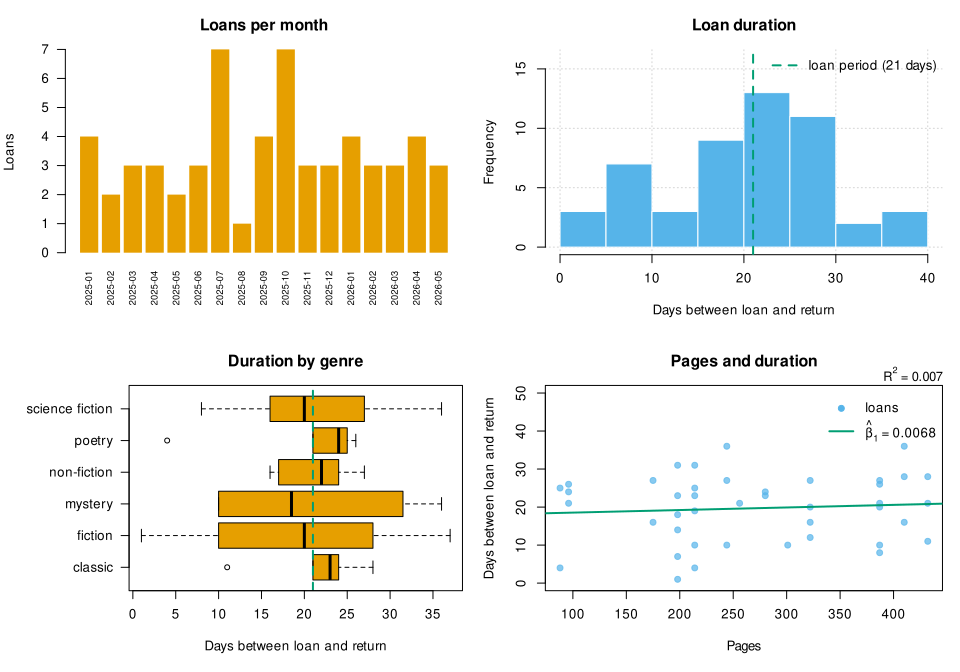
The file is 135 KB, 720 by 504 points (10 by 7 inches), and contains no <text> element: the cairo device drew every label as a glyph path (see SVG and the glyph-as-path output), so it looks the same in a browser, an editor or a document without any font installed. It was produced by the script as shown, run with Rscript in the container, and was not edited by hand: running the script again with the same R and the same fonts gives the same file byte for byte. A machine with other fonts would give slightly different glyph outlines.
Version notes
The entries come from the NEWS files of the releases (R NEWS); the R 3.x entries are in the R 3.x NEWS.
| Version | Change |
|---|---|
R 3.6.0 |
New |
R 4.0.0 |
The default |
R 4.1.0 |
Graphics engine version 14. |
R 4.1.1 |
|
R 4.2.0 |
Graphics engine version 15, with pattern fills as vectors and groups. New |
R 4.3.0 |
Graphics engine version 16, with typeset glyph rendering ( |
R 4.3.1 |
A bug in |
R 4.3.3 |
|
R 4.4.0 |
|
R 4.5.0 |
|
R 4.5.2 |
|
R 4.5.3 |
Tall subscripts in plotmath expressions are positioned correctly. |
R 4.6.0 |
Graphics engine version 17. |
The R-devel NEWS (the upcoming 4.7.0, never run here) lists no change to base graphics that this page depends on at the time of writing.
Where older tutorials differ
| Older tutorial writes | Current practice | Why | Since |
|---|---|---|---|
|
|
colour 2 of the default palette is |
R 4.0.0 |
|
|
the legacy generators have unbalanced lightness and chroma; the help page recommends |
R 3.6.0 |
|
|
|
always |
|
open, draw and close in a function with |
a file device is only finished when closed; the next plot goes on the same device |
always |
|
|
JPEG is lossy and gives artifacts around lines and text |
always |
|
the same with |
|
always |
|
nothing extra: |
the default of |
R 2.7.0 (the cairo option) |
|
|
the cairo devices need no display |
R 2.7.0 |
|
|
the screen device is platform-specific and fails without a display |
always |
|
nothing: |
the plotting symbols no longer use a symbol font |
R 4.0.0 |
|
|
|
always |
|
|
the method does not convert the character vector |
always |
|
|
the help page recommends a bar chart or a dot chart for this data |
always |
|
|
the grid is drawn first; before R 4.6.0 |
R 4.6.0 |
|
|
both are deprecated and |
R 4.4.0 and 4.5.0 |
|
save the data and the code, and redraw |
recorded plots depend on the R version |
always |
Where to go next
-
Grid Graphics and Lattice for the second graphics system on the same engine: viewports, units, grobs, and the lattice formula with
|for conditioned panels. -
ggplot2 and the Grammar of Graphics for plots that are objects, which can be changed before they are drawn, and for the shelf charts rebuilt with layers.
-
Statistical Models for the diagnostic plots of
lm()andglm()(plot(fit)) and for the lines thatabline(fit)draws. -
Distributions and Random Numbers and Descriptive Statistics and Tests for what
curve(),hist(),qqnorm()andboxplot()show. -
Formulas for the formula interface of
plot(),boxplot()andbarplot(). -
Data Frames, Factors and Dates and Times for preparing what is drawn, including dates on an axis.
-
Scripts and the Command Line for
Rscript, which sends plots toRplots.pdf, andR_DEFAULT_DEVICE. -
Conditions and Error Handling and Functions for the
tryCatch()andon.exit()patterns used by the wrappers. -
Encodings, Locales and Internationalization for the UTF-8 text that
pdf()cannot always draw andcairo_pdf()can.
References
-
An Introduction to R: 12 Graphical procedures; 12.1 High-level plotting commands, 12.2 Low-level plotting commands, 12.2.1 Mathematical annotation, 12.3 Interacting with graphics, 12.4 Using graphics parameters, 12.5 Graphics parameters list, 12.5.3 Figure margins, 12.5.4 Multiple figure environment, 12.6 Device drivers, 12.6.2 Multiple graphics devices, 12.7 Dynamic graphics
-
rgl (package documentation, CRAN page) and rggobi (archived from CRAN on 2020-07-15)
-
R Internals: 6 Graphics; 6.1 Graphics Devices, 6.3 Base graphics
-
R FAQ 7.13: How can I substitute into a plot label?
-
R FAQ 7.19: How do I produce PNG graphics in batch mode?
-
R FAQ 7.39: How do I create a plot with two y-axes?
-
R NEWS: Changes in R 4.0.0 to 4.6.1; R 3.x NEWS; R-devel NEWS
-
hcl.colors, hcl.pals, rainbow and the other palette functions