Creating Packages
|
This content was generated with the assistance of AI and should be verified against the official documentation before being relied on in production. The reference material consulted while preparing these pages is listed in the section bibliography. |
Checked against R 4.6.1 (2026-06-24) on 2026-10-20; R 4.6.2 is scheduled for 2026-10-29. The base R packages tools and utils do most of the work behind the commands on this page. The add-on packages that drive them were checked at these versions: usethis 3.2.2, devtools 2.5.2, roxygen2 8.1.1, testthat 3.3.2, knitr 1.52, rmarkdown 2.32, withr 3.0.3, lintr 3.4.0, pkgload 1.5.3 and fs 2.1.0. devtools builds and checks through pkgbuild 1.4.8, rcmdcheck 1.4.0 and pak 0.11.1, and covr 3.6.5 measured the test coverage that is mentioned once. Four more packages appear only as names in a deliberately broken copy of the package or in one dependency demonstration: jsonlite 2.0.0, stringr 1.6.0, Rcpp 1.1.2 and MASS 7.3-65. Everything else is base R.
A package is the unit in which R code is shared: a directory with a DESCRIPTION file that says what the code is, a NAMESPACE file that says which names it offers and which it borrows, and the code, documentation, data and tests that belong with it. This page explains what each part of that directory is for, which fields and directives R understands, how the usual tools write them, and how a source directory becomes something other people can install. The same steps are then done by hand with the R CMD commands that ship with R, so that nothing about the tooling is a mystery when it prints a warning.
Every example is a script that was run with Rscript on R 4.6.1 with warnings printed as they happen (options(warn = 1)), and the lines that start with #> are what it printed. The scripts pass the default lintr linters. The package that the page builds is called shelf. It is the analysis side of the running library-shelf scenario described on the section index: the same books and loans data frames, the same book class and the same overdue-loan analyses, packaged. It was created, documented, tested, built and checked for real with the tools on this page, and its files are shown as the tools wrote them (the R code of the step-by-step section as excerpts). The package directory is written ~/shelf throughout, and the longer absolute paths that some messages print were shortened to it ("paths shortened"). Blocks that show a file of the package (R/book.R, DESCRIPTION, NAMESPACE) are package sources, not scripts: they define functions and metadata for the package and are not run by Rscript; they were checked with lintr’s lint_package(), which sees the whole package at once. Blocks that show the calls of the recorded creation session (the usethis steps) are fragments of that one session, and the text before them says so. Check output is shown without its first lines: the platform header (the operating system, the compiler, the time and the temporary directory) is left out, and every check step that is shown comes from the real run.
The page is the first of the package pages. Packages, Libraries and Namespaces explains how to use other people’s packages (libraries, attaching, ::). Documentation with Rd, roxygen2 and Vignettes writes the help pages and vignettes of shelf, Testing with testthat writes its tests, and Publishing to CRAN takes the finished package to CRAN. Here the subject is the package itself: its structure, its metadata and the road from source to installed.
What a package is
R’s own manual defines the word precisely, and the rest of the page depends on the definition. A package is a directory of files that extend R, and the manual distinguishes three things that people all call "the package": the source package (the master files), a tarball that contains the files of a source package, and the installed package, which is the result of running R CMD INSTALL on a source package. On some platforms there is a fourth, a binary package: a compressed copy of an installed package that can be unpacked instead of built. The R FAQ (question 5.5, "How can I create an R package?") gives the same list of subdirectories and files and says that a package consists of a subdirectory containing a file DESCRIPTION and the subdirectories R, data, demo, exec, inst, man, po, src and tests, some of which can be missing. R itself is distributed with about thirty packages (base, stats, utils, methods and the recommended ones), and they are built exactly like yours.
Two terms are easy to confuse. A package is not a library: a library is a directory into which packages are installed, so a library is a folder of package folders (R FAQ 7.29, "What is the difference between package and library?", says the same in one sentence: a package is a standardized collection of material extending R, and a library is a place where R knows to find packages). library(shelf) therefore means "find the package shelf in a library and load it". The other confusing word is "compile". Installing a package that contains C, C++ or Fortran code compiles that code, but a package of R code only is not compiled: R byte-compiles its functions on installation, which has been the default for every package since R 3.5.0 (the NEWS of R 3.5.0 lists it among the significant user-visible changes), and Writing R Extensions points out that compilation is not a correct term for a package of R code.
Why write a package at all, even for private code? A package gives a bundle of functions a name, a version and a place to live. Its namespace keeps its internal helpers from clashing with names in the user’s workspace and says what is public. Its documentation is checked against its code, so a renamed argument that nobody documented is reported. Its tests run in a clean session against the installed code. Its dependencies are declared, so installing it installs what it needs, and a missing dependency is an error at install time instead of a surprise at run time. The cost of all that was once a day of reading manuals, and it is now a few commands, which is why the usual advice is to turn a collection of scripts into a package as soon as a second project reuses it. A package does not have to be published: the same directory can be installed from a local path or from a tarball on a shared disk, and the rest of the page never needs a network.
The five states of a package
A package is not one thing but a thing in five different states. The community book R Packages (a free online book by the authors of the tools used below) names them: a source package, a bundled package, a binary package, an installed package and an in-memory package, and the page uses its vocabulary because it matches the manual. Each state is produced from an earlier one by one command, and every problem a package author meets happens at one of those steps, which is why the figure puts the command on each arrow. The left half of the figure is the directory that the next section opens, and the dashed boxes in it are the entries that R CMD build leaves out of the bundle.
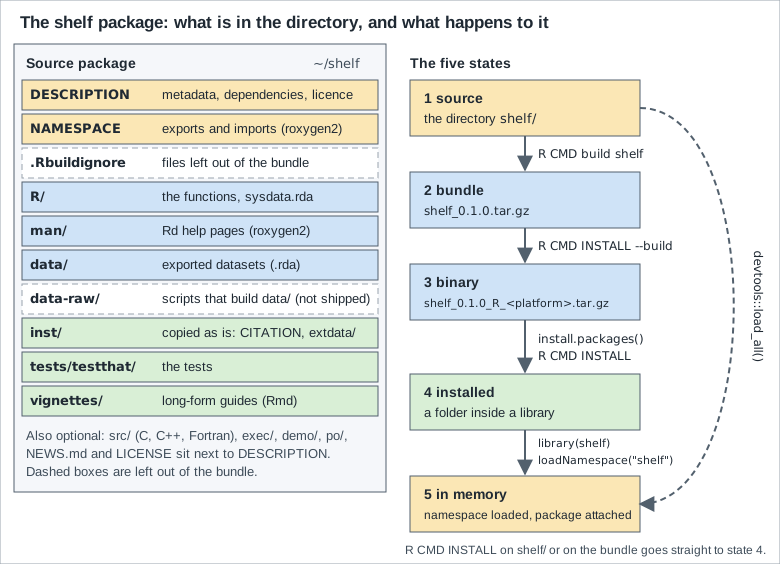
| State | What it is | Made by | Used by |
|---|---|---|---|
1. Source |
A directory with the files edited by hand and by tools, |
You, with |
|
2. Bundle |
A single compressed file, |
|
|
3. Binary |
A compressed copy of the installed package, specific to one operating system and R series; it holds the lazy-load databases, not the R source. |
|
|
4. Installed |
A folder inside a library (the first entry of |
|
|
5. In memory |
The namespace loaded in a running session, with the package attached to the search path when |
|
Your code. |
The steps are one-way and each one adds something. The build step runs the vignettes, because a bundle should not need knitr or pandoc on the machine that installs it. The install step lays the package out as R reads it: the code of R/ is evaluated once and stored in a lazy-load database (R/shelf.rdb and R/shelf.rdx), so loading the package does not run your top-level code again, and the help pages are converted into a database as well. A binary package is that installed layout in a tarball; the section on R CMD INSTALL lists its contents. The in-memory state is where almost all of the confusion about packages comes from: library() performs two steps, loading the namespace and attaching the package to the search path, and a namespace can be loaded without being attached, which is what shelf::normalise_isbn() does. The page returns to the difference when the load hooks are explained, and Packages, Libraries and Namespaces covers it from the user’s side.
Because the five states are different files, the same package can behave differently in two of them, and most "it works on my machine" reports are of this kind. A function that reads a file with a path relative to the source tree works under load_all() and fails when installed; a helper that is not exported is visible from inside the package and from a load_all() session but not to library() users; a dataset that was never saved into data/ exists in the author’s workspace and nowhere else. The tools below exist to test the package in the state the user will have it in, and the habit that pays is to run R CMD check on a bundle, because the bundle is the state in between that the rest of the world sees.
The anatomy of a package directory
The finished shelf source package is the directory below, listed with fs::dir_tree() from the package root, hidden files included. Every file in it was written by a tool or copied in as the step-by-step section shows; the only files written by hand are the contents of R/, data-raw/, tests/, vignettes/ and the text of NEWS.md and inst/CITATION.
# The source tree of the finished package, hidden files included.
fs::dir_tree(".", all = TRUE)
#> .
#> ├── .Rbuildignore
#> ├── .gitignore
#> ├── .lintr
#> ├── DESCRIPTION
#> ├── LICENSE
#> ├── LICENSE.md
#> ├── NAMESPACE
#> ├── NEWS.md
#> ├── R
#> │   ├── book.R
#> │   ├── clean.R
#> │   ├── data.R
#> │   ├── isbn.R
#> │   ├── loans.R
#> │   ├── sysdata.rda
#> │   └── zzz.R
#> ├── cran-comments.md
#> ├── data
#> │   ├── books.rda
#> │   └── loans.rda
#> ├── data-raw
#> │   ├── books.R
#> │   ├── books.csv
#> │   └── loans.csv
#> ├── inst
#> │   └── CITATION
#> ├── man
#> │   ├── book-methods.Rd
#> │   ├── book.Rd
#> │   ├── books.Rd
#> │   ├── clean_books.Rd
#> │   ├── loan_summary.Rd
#> │   ├── loans.Rd
#> │   ├── loans_per_month.Rd
#> │   ├── normalise_isbn.Rd
#> │   └── overdue_loans.Rd
#> ├── tests
#> │   ├── testthat
#> │   │   ├── _snaps
#> │   │   │   └── book.md
#> │   │   ├── fixtures
#> │   │   │   └── books-small.csv
#> │   │   ├── helper-shelf.R
#> │   │   ├── test-book.R
#> │   │   ├── test-clean.R
#> │   │   └── test-loans.R
#> │   └── testthat.R
#> └── vignettes
#>     ├── .gitignore
#> └── shelf.RmdTwo files are the heart of every package and are not optional: DESCRIPTION and, in practice, NAMESPACE (every package has a namespace since R 2.14.0 in October 2011; if the author wrote no file, R CMD build creates a default one, as the NAMESPACE section shows). Everything else is a directory that R knows by name. Writing R Extensions lists the subdirectories that R reads: R, data, demo, exec, inst, man, po, src, tests, tools and vignettes; some of them can be missing, but none of them should be empty. The table gives each entry, what reads it, and what shelf puts there.
| Entry | What it is for | In shelf |
|---|---|---|
|
The metadata: name, version, title, authors, licence, dependencies and the settings of tools. Read by |
Shown in full below. |
|
The exported and imported names and the S3 methods to register. |
Written by roxygen2 from the |
|
R code files only; the extension should be |
|
|
Help pages in Rd format, one file per topic. |
Nine |
|
Test code run by |
|
|
Datasets that users get with |
|
|
Not an R convention: a place for the scripts and raw files that build |
|
|
Files copied unchanged to the top of the installed package: |
|
|
Sources of the long-form guides. |
|
|
C, C++ or Fortran sources, with |
None: |
|
Installed scripts, demos run by |
None. |
|
Optional files that R knows: a hand-written object index (normally generated), the Unix configure and cleanup scripts, the licence text and the news. |
|
|
Regular expressions, one per line, for files that |
Four patterns, discussed below. |
Writing R Extensions asks that the package subdirectory be given the same name as the package, that file names be portable (ASCII letters, digits, ., _ and a handful of other characters, no two names that differ only by case, no Windows device names such as con or aux), and that a package not contain Unix-style hidden files, with a few exceptions that the tools need. The tree above has several (.Rbuildignore, .gitignore, .lintr and vignettes/.gitignore), and the build handles them in different ways: .Rbuildignore is read by R CMD build and left out of the bundle, together with the files of version-control tools such as .gitignore, and .lintr is excluded by a pattern of .Rbuildignore itself. .Rinstignore is the exception that goes the other way: it is shipped, because it is read at installation. Any other hidden file is bundled, and the check reports it, as the real run below shows.
The R/ directory
The R code files are read in the C locale’s alphabetical order, so the order in which functions are defined does not matter for a function that is only called later: a function body is evaluated when it is called, not when it is defined. The manual says that it should be possible to read the files with source(), that the files should assign R objects and not call functions with side effects such as library(), require() or options(), and that there need be no connection between a file name and the objects defined in it. shelf follows the common practice of one file per topic (book.R for the class, isbn.R for ISBN handling, clean.R, loans.R) and a file called zzz.R for the load hooks, which sorts last.
There is a consequence of this rule that surprises everyone once. The files are evaluated at installation, and the objects they create are stored in the installed package, so a top-level expression is computed once, when the package is installed, not every time it is loaded. A definition of today’s date at the top level of a file freezes the date of the installation into the package. That is why shelf defines shelf_today(), a function that returns the current date and is evaluated when it is called (the same function can be replaced in tests, a trick the testing page uses), and why overdue_loans() takes today as an argument.
Where the order of the files does matter, for example when a top-level call in one file needs an object that another file creates, or when an S4 class must exist before its methods, the Collate field of DESCRIPTION lists the order. Writing it by hand is error-prone, so roxygen2 writes it from @include tags; the DESCRIPTION section shows the real result.
Only ASCII characters should appear in the code files. Other characters are accepted in comments, but the comments may not read correctly in every locale, and non-ASCII characters in object names normally fail at installation. A string that needs a non-ASCII character is written with a \u escape, and R CMD check warns about the rest ("checking code files for non-ASCII characters" in the section on reading the output of R CMD check, which shows the real warning).
The man/ directory
The man/ subdirectory holds the help pages, in R’s own documentation format Rd, one .Rd file per topic. R CMD check compares them with the code: every exported object must have an entry, every argument in \usage must be described, and the \usage must match the function’s real signature (the steps named "checking for missing documentation entries" and "checking for code/documentation mismatches" in the log). Nobody writes Rd files by hand any more. roxygen2 turns the comments above each function into them, which is why the first line of every file in man/ says "% Generated by roxygen2: do not edit by hand". Rd itself, the tags and the vignettes are the subject of Documentation with Rd, roxygen2 and Vignettes, and this page only uses them.
The tests/ directory
R CMD check runs the R files in tests/ in a clean session with the package installed, and compares each output with a .Rout.save file if there is one. testthat’s convention is one tiny file, tests/testthat.R, that loads the package and calls test_check("shelf"), and a directory tests/testthat/ of test-*.R files, helper files and fixtures. The same call is made by devtools::test(), which runs the tests against the loaded source. The details are the subject of Testing with testthat; for this page it is enough to know that the tests are part of the package and are executed by the check, and that R CMD check --no-tests skips them.
The vignettes/ directory
A vignette is a long-form document that is part of the package: a tutorial that runs real code against the package. The sources live in vignettes/, R CMD build runs them and stores the output in inst/doc of the bundle, and R CMD INSTALL installs that output. The VignetteBuilder field names the package that knows how to run them (knitr here), and that package, and rmarkdown for the html_vignette output, must be in Suggests. The build runs the vignettes with the package installed into a temporary library, which is why the build log says "installing the package (it is needed to build vignettes)". A tree that has vignettes/ but a bundle without inst/doc is reported by the check, as the section on reading the output of R CMD check shows.
The src/ directory and compiled code
A package can contain C, C++ and Fortran sources in src/. When it is installed, make compiles them into one shared object that R loads with the namespace, using useDynLib() in NAMESPACE. Compiled code needs the dependency field LinkingTo for header-only packages such as Rcpp, a NeedsCompilation field set by the build, and a compiler on the machine that installs the package from source (Rtools on Windows, the Xcode command-line tools on macOS). shelf has no src/ and the page treats the subject in one place: the DESCRIPTION and NAMESPACE sections name the fields and directives, and Interfacing C, C++ and Fortran writes the code.
exec/, demo/, po/ and tools/
Four more directories are rarely needed and are named here so that their names are not a surprise. exec/ holds scripts that the package needs at run time for an interpreter other than R (a shell, Perl or Python script): only files are installed from it, and they are marked executable. The manual remarks that most packages put such files in inst/ instead, because exec/ is not suited to compiled programs (installed packages can serve several architectures). demo/ holds R scripts that demo() runs, with a 00Index file listing them; they are not run by R CMD check unless it is asked to (--run-demo, added in R 4.5.0). po/ holds the translation files for the messages of a package, which Writing R Extensions covers in the chapter on internationalization. tools/ is the preferred place for auxiliary files needed while configuring a package that has a configure script.
The .Rbuildignore file
.Rbuildignore lists, one regular expression per line, the files and directories that R CMD build must not put in the bundle. The expressions are Perl-like and are matched case-insensitively against each path relative to the package root. Because they are regular expressions and not file globs, a dot must be escaped and the two ends should be anchored with ^ and $. shelf has these four lines, written by the usethis functions that created the files they refer to (use_mit_license(), use_data_raw(), use_cran_comments() and lintr::use_lintr()).
^LICENSE\.md$
^data-raw$
^cran-comments\.md$
^\.lintr$The script below applies those patterns to a list of paths the way the build does, to make the anchoring visible. LICENSE.md and license.MD are excluded (the matching ignores case), the directory data-raw is excluded, and R/data-raw-helpers.R and R/lintr.R are kept; the second half of the output shows what the same names would do without anchors: a pattern data-raw or lintr matches anywhere in a path and would throw away the helper files as well.
# .Rbuildignore holds one Perl-style regular expression per line, matched
# case-insensitively against each path relative to the package root.
patterns <- c(
  "^LICENSE\\.md$", "^data-raw$", "^cran-comments\\.md$", "^\\.lintr$"
)
paths <- c(
  "DESCRIPTION", "LICENSE", "LICENSE.md", "license.MD", "data-raw",
  "data-raw/books.R", "R/data-raw-helpers.R", "cran-comments.md",
  ".lintr", "R/lintr.R"
)
is_ignored <- function(path, patterns) {
  hits <- vapply(patterns, grepl, logical(1L), x = path,
                 perl = TRUE, ignore.case = TRUE)
  any(hits)
}
ignored <- vapply(paths, is_ignored, logical(1L), patterns = patterns)
data.frame(path = paths, ignored = ignored, row.names = NULL)
#>                    path ignored
#> 1           DESCRIPTION   FALSE
#> 2               LICENSE   FALSE
#> 3            LICENSE.md    TRUE
#> 4            license.MD    TRUE
#> 5              data-raw    TRUE
#> 6      data-raw/books.R   FALSE
#> 7  R/data-raw-helpers.R   FALSE
#> 8      cran-comments.md    TRUE
#> 9                .lintr    TRUE
#> 10            R/lintr.R   FALSE

# The anchors matter. Without them a pattern matches anywhere in the path.
loose <- c("data-raw", "lintr")
vapply(paths, is_ignored, logical(1L), patterns = loose)
#>          DESCRIPTION              LICENSE           LICENSE.md
#>                FALSE                FALSE                FALSE
#>           license.MD             data-raw     data-raw/books.R
#>                FALSE                 TRUE                 TRUE
#> R/data-raw-helpers.R     cran-comments.md               .lintr
#>                 TRUE                FALSE                 TRUE
#>            R/lintr.R
#>                 TRUE

# "^data-raw$" ignores the directory; R CMD build then does not descend
# into it, so "data-raw/books.R" is not matched on its own and does not
# need to be.The build also leaves out, without being told, some directories and files: those of version-control systems and of editors, directories named check, chm or ending in .Rcheck, Old or old, files such as GNUMakefile and Read-and-delete-me, backup files ending in ~, .bak or .swp, and the tarballs of earlier builds of the same package (Writing R Extensions, "Building package tarballs"). usethis adds a line for you: usethis::use_build_ignore("notes.txt") appends the escaped, anchored ^notes\.txt$, as the section on reading the output of R CMD check shows. A related file, .Rinstignore, excludes files of inst/ from the installation, not from the bundle.
A small experiment on a copy of the package shows the three behaviours of hidden and ignored files at once. The first lines create, inside the package directory, a file .hidden at the top level, a directory inst/extra with two files, keep.txt and skip.tmp, and a .Rinstignore that holds the pattern \.tmp$. Then the commands run from the parent of the package: the bundle is built without the vignettes to keep the run short, the listing shows what ended up in it, the package is installed into a library directory lib, and R CMD check is run with its slow steps switched off.
cd shelf
mkdir -p inst/extra
echo a > inst/extra/keep.txt
echo b > inst/extra/skip.tmp
echo '\.tmp$' > .Rinstignore
echo x > .hidden
cd ..
R CMD build --no-build-vignettes shelf
tar tzf shelf_0.1.0.tar.gz | grep -e '/\.[A-Za-z]' -e extra
mkdir lib
R CMD INSTALL --library=lib shelf_0.1.0.tar.gz
ls lib/shelf/extra
R CMD check --no-manual --no-vignettes --no-tests --no-examples shelf_0.1.0.tar.gzThe bundle holds .hidden and .Rinstignore and both files of inst/extra, so the build did not apply .Rinstignore; the installation did, and installed only keep.txt; and the check reported the hidden file. The lines that are not the point (the build and installation logs, the platform header and the steps that passed) are left out, and so is the check’s final status: with --no-vignettes and --no-tests the check also warns about the vignettes that the build skipped, which has nothing to do with the experiment.
shelf/.Rinstignore
shelf/.hidden
shelf/inst/extra/
shelf/inst/extra/keep.txt
shelf/inst/extra/skip.tmp
[...]
keep.txt
[...]
* checking for hidden files and directories ... NOTE
Found the following hidden files and directories:
  .hidden
These were most likely included in error. See section ‘Package
structure’ in the ‘Writing R Extensions’ manual.The DESCRIPTION file
DESCRIPTION is a plain text file in the format of a Debian control file: a field name, a colon, and a value, with continuation lines that start with a space or a tab. R reads it with read.dcf(), library() reads it before loading a package, R CMD INSTALL copies it into the installed package, and CRAN and every package manager read it to resolve dependencies. Field names are case-sensitive and all the ones R uses are capitalised. Here is the file of shelf exactly as the tools left it. The order of the fields is the order in which the tools added them (Depends is near the end because usethis::use_package() added it after the file existed), and the order has no meaning.
Package: shelf
Title: Tools for a Small Library Catalogue
Version: 0.1.0
Authors@R:
    person("Shelf", "Maintainers", , "maintainer@example.com", role = c("aut", "cre", "cph"))
Description: Cleans a small library catalogue and its loans table,
    validates ISBN-13 strings, and reports overdue loans and overdue rates
    by genre. Ships the example 'books' and 'loans' datasets used by the
    documentation.
License: MIT + file LICENSE
Config/roxygen2/version: 8.1.1
Encoding: UTF-8
Roxygen: list(markdown = TRUE)
Suggests:
    knitr,
    rmarkdown,
    testthat (>= 3.0.0),
    withr
Config/testthat/edition: 3
Depends:
    R (>= 4.1.0)
VignetteBuilder: knitr
LazyData: trueWriting R Extensions makes seven fields mandatory: Package, Version, License, Description, Title, Author and Maintainer. The last two can be generated from Authors@R and may be left out if that field is given, and CRAN requires Authors@R for a submission, so a modern file has Authors@R and not Author and Maintainer. Everything else is optional. The sections below take the fields in the order in which a new package needs them.
| Field | Written by | What it does |
|---|---|---|
|
|
The name, a one-line title in title case, the version and a one-paragraph description. |
|
|
R code that builds a |
|
|
A standard licence abbreviation, optionally with |
|
|
The packages (and the version of R) that this package needs. |
|
|
How the files are encoded, whether datasets load lazily, and which package builds the vignettes. |
|
|
Settings of tools, kept in the file so that every contributor gets the same ones. |
|
You, roxygen2 or the build |
Optional: file order, web addresses, external software, whether there is compiled code, a release date, the language of the documentation. |
Package, Title and Description
The Package field is the name, and the rule is short and strict: only ASCII letters, numbers and dots, at least two characters, a letter first, and no dot at the end. A hyphen or an underscore is not allowed. usethis checks this before it creates anything, and its message names the rules; the first call below is that check.
# A new package with the defaults: the name is checked first.
tryCatch(
  usethis::create_package("~/my-package", open = FALSE),
  error = \(e) cat(conditionMessage(e), "\n")
)
#> ✖ "my-package" is not a valid package name. To be allowed on CRAN, it
#>   should:
#> • Contain only ASCII letters, numbers, and '.'.
#> • Have at least two characters.
#> • Start with a letter.
#> • Not end with '.'.

# A valid name creates the directory, DESCRIPTION and NAMESPACE.
usethis::create_package("~/tinyshelf", rstudio = FALSE, open = FALSE)
#> ✔ Creating '~/tinyshelf/'.
#> ✔ Setting active project to "~/tinyshelf".
#> ✔ Creating 'R/'.
#> ✔ Writing 'DESCRIPTION'.
#> Package: tinyshelf
#> Title: What the Package Does (One Line, Title Case)
#> Version: 0.0.0.9000
#> Authors@R (parsed):
#>     * First Last <first.last@example.com> [aut, cre]
#> Description: What the package does (one paragraph).
#> License: `use_mit_license()`, `use_gpl3_license()` or friends to pick a
#>     license
#> Config/roxygen2/version: 8.1.1
#> Encoding: UTF-8
#> Roxygen: list(markdown = TRUE)
#> ✔ Writing 'NAMESPACE'.
#> ✔ Setting active project to "<no active project>".
usethis::proj_set("~/tinyshelf")
#> ✔ Setting active project to "~/tinyshelf".
list.files("~/tinyshelf", all.files = TRUE, no.. = TRUE)
#> [1] "DESCRIPTION" "NAMESPACE"   "R"

# A first function, a licence and the version bump for development.
usethis::use_r("squish")
#> ☐ Edit 'R/squish.R'.
usethis::use_mit_license("Shelf Maintainers")
#> ✔ Adding "MIT + file LICENSE" to 'License'.
#> ✔ Writing 'LICENSE'.
#> ✔ Writing 'LICENSE.md'.
#> ✔ Adding "^LICENSE\\.md$" to '.Rbuildignore'.
usethis::use_news_md(open = FALSE)
#> ✔ Writing 'NEWS.md'.
usethis::use_version("dev")
#> ✔ Adding "0.0.0.9001" to 'Version'.
readLines("~/tinyshelf/NEWS.md")
#> [1] "# tinyshelf (development version)" ""
#> [3] "* Initial CRAN submission."
unlink("~/tinyshelf", recursive = TRUE)The output after the error is what a package looks like straight after create_package() with no arguments: a DESCRIPTION with placeholders (Title: What the Package Does (One Line, Title Case), a made-up author, a version 0.0.0.9000 and a licence field that tells you to pick one), an empty NAMESPACE and an empty R/. The calls after it show the next three steps, each writing or editing a file: use_r() makes R/squish.R (the name goes with the function), use_mit_license() adds the licence, and use_news_md() adds a NEWS.md.
A package name is also a name in CRAN’s namespace of packages: The CRAN Repository Policy asks that a package be named in a way that does not conflict, irrespective of case, with any current or past CRAN package or any current Bioconductor package. The check that tests it is the incoming one that the section on R CMD check runs on shelf, which fails, for a reason that is the best illustration of the rule: a package called SHELF exists. The name is a decision to make before the first release, and Publishing to CRAN says what to do about it.
The Title is what package lists show. It is a short phrase in title case, with no markup, no continuation lines and no full stop at the end; it should not repeat the package name (it is nearly always displayed after it), and other packages and external software are written in single quotes, such as 'Rcpp' or 'GDAL'. Some listings truncate it at 65 characters, so the first 65 should carry the meaning. tools::toTitleCase() applies the capitalisation rules. The Description is a paragraph of complete sentences that says what the package does and why it is useful, aimed at everyone who might look for it. It should not start with "This package" or the package name, it uses single quotes for names of software and data (as shelf does for 'books' and 'loans'), double quotes for quotations, and angle brackets around URLs, as in https://www.r-project.org.
Version
The Version is a sequence of at least two, and usually three, non-negative integers separated by single . or - characters. It is not a decimal number, so 0.9 is less than 0.75 because 9 is less than 75, and 1.10 is later than 1.9. R represents such versions with numeric_version and, for package versions, its subclass package_version; getRversion() returns the same kind of object for R itself, and packageVersion() returns one for an installed package. The script shows what the class does.
# Version numbers are not decimals: they are sequences of integers.
v <- package_version(c("0.1.0", "0.1.0.9000", "0.9", "0.75", "1.0.0", "1.0-1"))
v
#> [1] ‘0.1.0’      ‘0.1.0.9000’ ‘0.9’        ‘0.75’       ‘1.0.0’
#> [6] ‘1.0.1’
class(v)
#> [1] "package_version" "numeric_version"
v[[3L]] < v[[4L]]
#> [1] TRUE
sort(v)
#> [1] ‘0.1.0’      ‘0.1.0.9000’ ‘0.9’        ‘0.75’       ‘1.0.0’
#> [6] ‘1.0.1’
max(v)
#> [1] ‘1.0.1’

# The pieces of a version.
x <- package_version("0.1.0.9000")
unlist(x)
#> [1]    0    1    0 9000
x$major
#> [1] 0
x$minor
#> [1] 1
x$patchlevel
#> [1] 0

# Comparisons accept a string on one side.
package_version("1.10.0") > "1.9.0"
#> [1] TRUE
numeric_version("1.10.0") > numeric_version("1.9.0")
#> [1] TRUE
as.numeric("1.10") > as.numeric("1.9")
#> [1] FALSE

# `-` and `.` are equivalent separators, and trailing zeros are not
# significant for comparison.
package_version("1.0-1") == package_version("1.0.1")
#> [1] TRUE
package_version("0.5") == package_version("0.5.0")
#> [1] TRUE
compareVersion("1.10.0", "1.9.0")
#> [1] 1

# What R itself is.
getRversion() >= "4.1.0"
#> [1] TRUE
getRversion() >= "4.7.0"
#> [1] FALSE
is.numeric_version(getRversion())
#> [1] TRUE
class(getRversion())
#> [1] "R_system_version" "package_version"  "numeric_version"

# A malformed version is an error.
tryCatch(package_version("1.0.beta"), error = \(e) conditionMessage(e))
#> [1] "invalid version specification ‘1.0.beta’"

# Installed packages report their version as a package_version.
packageVersion("stats") >= "4.1.0"
#> [1] TRUE
packageVersion("utils")
#> [1] ‘4.6.1’

# Leading zeros are dropped within a component: "0.01" is 0.1.
unlist(package_version("0.01"))
#> [1] 0 1The comparisons in the middle of that output are the ones that matter for a package: package_version("1.10.0") > "1.9.0" is TRUE and the same comparison on decimals is FALSE, a string on one side is converted, - and . separate components in the same way, trailing zeros do not change the comparison, and getRversion() >= "4.1.0" is the idiom for code that depends on the R version. The last lines show that a leading zero is dropped inside a component ("0.01" is the version 0.1) and that a malformed version is an error.
Most packages use three components, major.minor.patch, plus a fourth component while they are in development. The convention, which comes from the community tooling and is not an R rule, is to give a development version a fourth component that starts at 9000: 0.1.0.9000 is later than the release 0.1.0 and earlier than the next release 0.1.1 or 0.2.0, so anybody who installs from the repository can tell a released version from a work in progress. usethis automates it with use_version(): the argument is "major", "minor", "patch" or "dev", and it also edits the heading of NEWS.md (and, in a package under Git, commits the change). The script below runs the whole sequence on a copy of shelf: a development version, a patch release, a minor release and a development version again.
# Version bumps with usethis, on a copy of the package.
desc_version <- \() read.dcf("DESCRIPTION", fields = "Version")[[1L]]
desc_version()
#> [1] "0.1.0"
usethis::use_version("dev")
#> ✔ Setting active project to
#>   "~/shelf".
#> ✔ Adding "0.1.0.9000" to 'Version'.
#> ✔ Adding new heading to 'NEWS.md'.
desc_version()
#> [1] "0.1.0.9000"
usethis::use_version("patch")
#> ✔ Adding "0.1.1" to 'Version'.
#> ✔ Replacing development heading in 'NEWS.md'.
desc_version()
#> [1] "0.1.1"
usethis::use_version("minor")
#> ✔ Adding "0.2.0" to 'Version'.
#> ✔ Adding new heading to 'NEWS.md'.
desc_version()
#> [1] "0.2.0"
usethis::use_version("dev")
#> ✔ Adding "0.2.0.9000" to 'Version'.
#> ✔ Adding new heading to 'NEWS.md'.
desc_version()
#> [1] "0.2.0.9000"
readLines("NEWS.md")
#>  [1] "# shelf (development version)"
#>  [2] ""
#>  [3] "# shelf 0.2.0"
#>  [4] ""
#>  [5] "# shelf 0.1.1"
#>  [6] ""
#>  [7] "# shelf 0.1.0"
#>  [8] ""
#>  [9] "* Initial version: the `book` class, `clean_books()`, `clean_loans()`,"
#> [10] "  `overdue_loans()`, `loan_summary()` and `loans_per_month()`, with the"
#> [11] " `books` and `loans` datasets."The first use_version("dev") added the heading "shelf (development version)" to NEWS.md, the patch release replaced that heading with # shelf 0.1.1 (on use_version("patch") the heading of the development version becomes the heading of the release) and the next "dev" started a new development heading. The Version field is also what packageVersion("shelf") and citation("shelf") report, and the one place where the number must not be edited by hand is a release: CRAN requires the version to increase with every submission, and the release step of the CRAN page is where use_version() is used.
Authors@R and the person class
The Authors@R field is R code, evaluated when the package is built or installed, that creates an object of class person with person(), or several of them joined with c(). A person has given and family names, an e-mail address, one or more roles and a comment. The roles are codes from the MARC list of relators, and ?person suggests how to use them in packages: "aut" (author) for people who made substantial contributions and should appear in the citation, "cre" (creator) for the maintainer, "ctb" (contributor) for smaller contributions, "cph" (copyright holder, which has to be the legal name of a person or an institution), "fnd" (funder) for who paid for the work, and "com", "ctr", "dtc", "rev", "ths" and "trl" for compilers, contractors, data contributors, reviewers, thesis advisors and translators. No role is assumed: a person without a role is not listed as an author. The comment can hold an ORCID or a ROR identifier under the names ORCID and ROR, which print() and format() turn into links; the identifier in the script is the example iD that ORCID itself uses in its documentation.
# Authors@R is R code that builds a "person" object.
authors <- c(
  person("Shelf", "Maintainers", email = "maintainer@example.com",
         role = c("aut", "cre", "cph")),
  person("Ada", "Contributor", role = "ctb",
         comment = c(ORCID = "0000-0002-1825-0097")),
  person("Example Library Fund", role = "fnd")
)
authors
#> [1] "Shelf Maintainers <maintainer@example.com> [aut, cre, cph]"
#> [2] "Ada Contributor [ctb] (ORCID: <https://orcid.org/0000-0002-1825-0097>)"
#> [3] "Example Library Fund [fnd]"

# The pieces are available as fields.
authors$role
#> [[1]]
#> [1] "aut" "cre" "cph"
#> [[2]]
#> [1] "ctb"
#> [[3]]
#> [1] "fnd"
authors[[1L]]$email
#> [1] "maintainer@example.com"
authors[[2L]]$comment
#>                 ORCID
#> "0000-0002-1825-0097"

# R CMD build and R CMD INSTALL derive the Author and Maintainer fields:
format(authors, include = c("given", "family", "role"))
#> [1] "Shelf Maintainers [aut, cre, cph]" "Ada Contributor [ctb]"
#> [3] "Example Library Fund [fnd]"
cre <- Filter(\(p) "cre" %in% p$role, authors)
format(cre, include = c("given", "family", "email"),
       braces = list(email = c("<", ">")))
#> [1] "Shelf Maintainers <maintainer@example.com>"
Source: R documentation: person
R CMD build and R CMD INSTALL derive the plain Author and Maintainer fields from Authors@R, which is what the last two lines of the script format: Author: Shelf Maintainers [aut, cre, cph] and Maintainer: Shelf Maintainers <maintainer@example.com> are in the installed DESCRIPTION, as the inspection section shows. The cre person needs a valid e-mail address that will keep working for the life of the package, because that is where CRAN writes. The address of shelf is a placeholder, which is one more reason why the package cannot be submitted as it is.
License
Every package needs a License field, and without one it is not even legal for other people to distribute it. R wants the field in a standard form so that tools can tell whether a licence is "free or open source" (FOSS) and whether it restricts use. A licence is written as an abbreviation from R’s licence database, optionally with a version restriction, such as GPL (>= 3), LGPL (>= 2.1) or Apache License (== 2.0); as one of the standard short forms (GPL-2, GPL-3, LGPL-2, LGPL-2.1, LGPL-3, AGPL-3, Artistic-2.0, BSD_2_clause, BSD_3_clause and MIT); as file LICENSE, which refers to a file of the package; or as alternatives separated by a vertical bar. "Public domain" is not a valid licence, because it is not recognised everywhere. The script reads the database that ships with R and asks the internal helper that R CMD check uses to judge a few specifications.
# R keeps a database of recognised licences next to the standard texts.
db <- read.dcf(file.path(R.home("share"), "licenses", "license.db"))
nrow(db)
#> [1] 32
version <- ifelse(is.na(db[, "Version"]), "", paste0(" ", db[, "Version"]))
standard <- paste0(db[, "Abbrev"], version)
head(standard[!grepl("^NA", standard)], 14L)
#>  [1] "GPL 2"        "GPL 3"        "LGPL 2"       "LGPL 2.1"     "LGPL 3"
#>  [6] "AGPL 3"       "CeCILL 2"     "CeCILL 2.1"   "FreeBSD"      "MIT"
#> [11] "BSD_2_clause" "BSD_3_clause" "MPL 1.0"      "MPL 1.1"
sort(list.files(file.path(R.home("share"), "licenses"), pattern = "^[A-Z]"))
#>  [1] "AGPL-3"       "Apache-2.0"   "Artistic-2.0" "BSD_2_clause" "BSD_3_clause"
#>  [6] "CC0-1.0"      "GPL-2"        "GPL-3"        "LGPL-2"       "LGPL-2.1"
#> [11] "LGPL-3"       "MIT"

# `tools:::analyze_license()` is the internal helper that R CMD check uses
# to judge the License field; it is not a stable API, it is shown only to
# see what check sees.
specs <- c("MIT + file LICENSE", "GPL (>= 3)", "GPL-3 | file LICENSE",
           "Apache License (== 2.0)", "Public domain")
verdict <- lapply(specs, \(s) {
  a <- tools:::analyze_license(s)
  data.frame(License = s, canonical = a$is_canonical, FOSS = a$is_FOSS,
             restricts_use = a$restricts_use)
})
do.call(rbind, verdict)
#>                   License canonical FOSS restricts_use
#> 1      MIT + file LICENSE      TRUE TRUE         FALSE
#> 2              GPL (>= 3)      TRUE TRUE         FALSE
#> 3    GPL-3 | file LICENSE      TRUE TRUE         FALSE
#> 4 Apache License (== 2.0)      TRUE TRUE         FALSE
#> 5           Public domain     FALSE   NA            NA
Source: Writing R Extensions: Licensing
shelf uses MIT + file LICENSE. The MIT licence is a template: it needs a year and a copyright holder, and R’s convention is that a licence that needs additional information is written with + file LICENSE, where LICENSE is a small file with the two fields and nothing else. usethis::use_mit_license() wrote that file, the full licence text as LICENSE.md (which GitHub shows and the bundle does not need: ^LICENSE\.md$ went into .Rbuildignore), and the field. The file is two lines.
YEAR: 2026
COPYRIGHT HOLDER: shelf authorsWriting R Extensions says that the copyright holder must be a real legal entity and not something vague such as the name of the package with "authors" added. use_mit_license() was called without a name, so it wrote shelf authors, which is acceptable for a demonstration and is the kind of thing the CRAN reviewers ask to change; pass your name or your organisation’s, as in use_mit_license("Shelf Maintainers"). The other functions of the same family write other licences: use_gpl_license(), use_agpl_license(), use_lgpl_license() and use_apache_license() (each with a version and an include_future argument that makes the licence "or any later version"), use_cc0_license() and use_ccby_license() for data packages, and use_proprietary_license() for code that is not to be shared. They save the standard text as LICENSE.md and add it to .Rbuildignore, because CRAN does not accept copies of the standard licences inside a package. Which licence to use is the author’s choice and a legal one; the rules of the CRAN policy are in Publishing to CRAN.
Depends, Imports, Suggests, LinkingTo and Enhances
A package declares what it needs in five fields that differ in what R does with the names.
| Field | What R does with the packages | Use it for |
|---|---|---|
|
Installs them and attaches them to the search path before attaching this package. Also the place to state the minimum version of R. |
Packages the user must have attached to use yours, such as the packages whose functions your functions are extensions of, and |
|
Installs them and loads their namespaces when this one is loaded, but does not attach them. The names they export are available to this package through |
Packages whose functions the code calls. The default home for dependencies. |
|
Does not install them by default. They are needed to run the tests, examples and vignettes, or for an optional feature. |
Testing and documentation packages, packages used only conditionally ( |
|
Makes their C and C++ header files available when this package’s compiled code is built. |
Header-only or header-providing packages such as Rcpp. |
|
Nothing is installed. The package says that it adds support for objects or methods from these packages. |
Rare: packages for whose objects you provide methods without needing them. |
The rules in Writing R Extensions fit on a few lines. A package should be listed in only one of the fields. A package whose functions this one calls belongs in Imports; Depends is only for packages that have to be attached for the user’s benefit, and the manual says that the field should be used only rarely nowadays, because attaching a package changes the search path of everybody who loads yours (the Packages, Libraries and Namespaces page explains masking). Packages used to run examples, tests or vignettes belong in Suggests, which also lets checkers verify that everything needed for a full check is installed, and code that uses a suggested package must test for it first. Version requirements are written in parentheses with a comparison operator, testthat (>= 3.0.0); for Depends and Imports R checks them when the package is loaded, and for Suggests the code that uses the package is responsible for checking.
usethis::use_package() edits the right field, adds a version requirement when asked, and prints the advice that goes with the field. The script runs it on a copy of shelf, for an import, a suggestion, a LinkingTo entry and an import with a minimum version, and then reads the result back; the second half of the script shows what @include does to the Collate field, which is discussed with the other optional fields below. The messages print the path of the package, which is shortened here to ~/shelf.
# Declaring dependencies: use_package() edits the right field.
usethis::use_package("utils")
#> ✔ Setting active project to
#>   "~/shelf".
#> ✔ Adding utils to 'Imports' field in DESCRIPTION.
#> ☐ Refer to functions with `utils::fun()`.
usethis::use_package("stringr", "Suggests")
#> ✔ Adding stringr to 'Suggests' field in DESCRIPTION.
#> ☐ Use `requireNamespace("stringr", quietly = TRUE)` to test if stringr is
#>   installed.
#> ☐ Then directly refer to functions with `stringr::fun()`.
usethis::use_package("Rcpp", "LinkingTo")
#> ✔ Adding Rcpp to 'LinkingTo' field in DESCRIPTION.
#> Possible includes are:
#>   #include <Rcpp.h>
#>   #include <RcppCommon.h>
usethis::use_package("MASS", min_version = "7.3-60")
#> ✔ Adding MASS to 'Imports' field in DESCRIPTION.
#> ☐ Refer to functions with `MASS::fun()`.
fields <- c("Depends", "Imports", "Suggests", "LinkingTo")
desc <- read.dcf("DESCRIPTION", fields = fields)
cat(paste0(fields, ": ", gsub("\n", " ", desc[1L, ]), collapse = "\n"), "\n")
#> Depends: R (>= 4.1.0)
#> Imports: MASS (>= 7.3-60), utils
#> Suggests: knitr, rmarkdown, stringr, testthat (>= 3.0.0), withr
#> LinkingTo: Rcpp

# roxygen2 writes the Collate field when a file says it must come after
# another one with @include.
clean <- readLines("R/clean.R")
export_at <- grep("^#' @export$", clean)[[1L]]
clean <- append(clean, "#' @include isbn.R", after = export_at - 1L)
writeLines(clean, "R/clean.R")
roxygen2::roxygenise()
#> Updating collate directive in
#> '~/shelf/DESCRIPTION'
#> ℹ Loading shelf
#> shelf 0.1.0: loan period is 21 days
desc <- read.dcf("DESCRIPTION", fields = "Collate")
cat("Collate:", gsub("\n", " ", desc[[1L]]), "\n")
#> Collate: 'book.R' 'isbn.R' 'clean.R' 'data.R' 'loans.R' 'zzz.R'The advice that came with Suggests is the standard pattern for an optional dependency, and it is the one that Writing R Extensions recommends: test with requireNamespace("stringr", quietly = TRUE) and call the function as stringr::fun(). The manual explains why a require() call is not good practice in package code: it alters the search path for the rest of the session, and it relies on other packages not masking functions. For the same reason there is no library() call anywhere in the code of shelf.
The line Depends: R (>= 4.1.0) is the one that shelf cannot do without, and its story is a good example of how the checks work. R/isbn.R uses the function shorthand \(i), which was added in R 4.1.0 together with the native pipe |>. A package that uses either must say so, because on an older R the file does not even parse. When the field is missing, R CMD build notices it and adds the dependency itself, with a warning that says what it saw. The next block runs R CMD build on a copy of shelf whose Depends lines were deleted.
R CMD build shelf* checking for file ‘shelf/DESCRIPTION’ ... OK
* preparing ‘shelf’:
* checking DESCRIPTION meta-information ... OK
* installing the package (it is needed to build vignettes)
* creating vignettes ... OK
* checking for LF line-endings in source and make files and shell scripts
* checking for empty or unneeded directories
NB: this package now depends on R (>= 3.5.0)
WARNING: Added dependency on R >= 3.5.0 because serialized objects in
serialize/load version 3 cannot be read in older versions of R.
File(s) containing such objects:
‘shelf/R/sysdata.rda’ ‘shelf/data/books.rda’ ‘shelf/data/loans.rda’
NB: this package now depends on R (>= 4.1.0)
WARNING: Added dependency on R >= 4.1.0 because package code uses the
pipe |> or function shorthand \(...) syntax added in R 4.1.0.
File(s) using such syntax:
‘isbn.R’
* building ‘shelf_0.1.0.tar.gz’There are two warnings in that output, both for the same family of reasons. The second is the one for the missing field: the build found isbn.R using syntax added in R 4.1.0 and added R (>= 4.1.0) to the DESCRIPTION of the bundle. The first is the same mechanism applied to the data files: usethis::use_data() saves with serialization version 3, which R 3.5.0 introduced (the NEWS of R 3.6.0 made it the default for save()), and an older R cannot read such a file, so the build added R (>= 3.5.0) too. Writing Depends: R (>= 4.1.0) in the source makes both messages go away, because 4.1.0 is later than 3.5.0. A build that adds a dependency has also changed the DESCRIPTION of the bundle, so that the bundle and the source no longer agree, which is one more reason to write the field yourself. The manual recommends a minimum version of R with a patch level of zero: a package that requires a patch release makes every package that depends on it unusable on the earlier patch releases of the same series.
Two more fields belong with the dependencies. Additional_repositories is a comma-separated list of repository URLs where packages named in the other fields can be found; R CMD check uses it to check that they can be found, at least as source packages. Remotes is not an R field: it belongs to the community tools (remotes, pak, devtools) and says where to install a dependency that is not on CRAN, which is why a package that is to go to CRAN cannot depend on one (usethis::use_dev_package() writes it). Dependencies outside R, such as a command-line program or a system library, are listed in SystemRequirements, in words, because R cannot install them.
Two ways of getting the dependency fields wrong stop the installation, and both have a short, exact message. A package that needs a newer R than the one in use, and a package whose dependency is not installed, are reported by R CMD INSTALL and nothing is installed. The two copies of shelf below had R (>= 9.0.0) in Depends and notinstalledpkg in Imports.
R CMD INSTALL --library=lib shelfSource: R documentation: INSTALL
ERROR: this R is version 4.6.1, package 'shelf' requires R >= 9.0.0
ERROR: dependency ‘notinstalledpkg’ is not available for package ‘shelf’
Perhaps try a variation of:
install.packages('notinstalledpkg')The first line came from the first copy and the other three from the second; the second copy also printed a line that says it removed the half-installed package from the library, which is left out. In both cases the installation fails with a non-zero status and the library is left as it was.
The other fields
The remaining fields are optional. The ones that matter most are these.
| Field | What it says |
|---|---|
|
The encoding of the |
|
A logical: whether the datasets in |
|
The package or packages that build the vignettes: |
|
|
|
The version of roxygen2 that last documented the package. roxygen2 8.0.0 and later store it here and no longer write |
|
The options of roxygen2 for the package: |
|
Where the package lives and where to report problems. Each may be a list of URLs, converted into links on CRAN. |
|
Dependencies outside R, in words: "GNU make", "libxml2 (>= 2.9)", a C++ standard. |
|
|
|
The order in which the R files are read, if the default alphabetical order is not right. If present, it must list every file. |
|
A release date in ISO 8601 form ( |
|
Switches for the tools: byte-compile on installation (the default), keep source references, build vignettes in |
|
|
The roxygen2 fields changed with roxygen2 8.0.0 (2026-05-01), which is the series installed here (8.1.1). Its NEWS says that the options can now be set in Config/roxygen2/ fields, so Config/roxygen2/markdown: TRUE replaces Roxygen: list(markdown = TRUE) and the old field is still supported, and that the version is now stored in Config/roxygen2/version instead of RoxygenNote. usethis 3.2.2 still writes Roxygen: list(markdown = TRUE) for a new package, which is why the shelf file has the old field next to the new version field. A package last documented with roxygen2 7.x has RoxygenNote; the first document() with roxygen2 8 migrates it, as the first of the two scripts below shows (the second field is left as it is), and the second script shows that the new Config/roxygen2/markdown form gives the same help pages: all the Rd files have the same checksums.
# A package last documented with roxygen2 7.x records RoxygenNote.
desc <- readLines("DESCRIPTION")
desc[desc == "Config/roxygen2/version: 8.1.1"] <- "RoxygenNote: 7.3.2"
writeLines(desc, "DESCRIPTION")
grep("oxygen", readLines("DESCRIPTION"), value = TRUE)
#> [1] "RoxygenNote: 7.3.2"             "Roxygen: list(markdown = TRUE)"

# The first document() with roxygen2 8.x migrates the field.
roxygen2::roxygenise()
#> ℹ Setting Config/roxygen2/version to "8.1.1"
#> ℹ Loading shelf
#> shelf 0.1.0: loan period is 21 days
grep("oxygen", readLines("DESCRIPTION"), value = TRUE)
#> [1] "Roxygen: list(markdown = TRUE)" "Config/roxygen2/version: 8.1.1"# roxygen2 8.x reads its options from Config/roxygen2/* fields as well.
desc <- readLines("DESCRIPTION")
old <- "Roxygen: list(markdown = TRUE)"
desc[desc == old] <- "Config/roxygen2/markdown: TRUE"
writeLines(desc, "DESCRIPTION")
grep("oxygen", readLines("DESCRIPTION"), value = TRUE)
#> [1] "Config/roxygen2/version: 8.1.1" "Config/roxygen2/markdown: TRUE"
before <- tools::md5sum(list.files("man", full.names = TRUE))
roxygen2::roxygenise()
#> ℹ Loading shelf
#> shelf 0.1.0: loan period is 21 days
after <- tools::md5sum(list.files("man", full.names = TRUE))
identical(before, after)
#> [1] TRUEThe Collate field is the one where hand-editing is most error-prone, so roxygen2 maintains it from @include tags. Without a tag there is no Collate field; with the line #' @include isbn.R in the comment block of clean_books() the field appeared in the script above (for the dependency copy) and listed every file of R/ with isbn.R placed before clean.R. The @include tag says that the current file needs the other one to be read first.
What the tools add
The DESCRIPTION of an installed package is not the file you wrote. The build and the installation add fields, and Writing R Extensions says that a source package should not have them itself: Packaged (who built the bundle and when), Author and Maintainer (derived from Authors@R), NeedsCompilation and, on installation, Built (the version of R, the platform and the date). The list of field names of the installed shelf is printed by names(packageDescription("shelf")), in the inspection section below.
The NAMESPACE file
A namespace is the part of a package that decides which of its names the world sees and which names it borrows from other packages. Without one, every function a package defines would be dumped into the user’s search path, masking what was already there. With one, a package exports a chosen few, keeps the rest private, and states precisely what it imports. Writing R Extensions describes the mechanism: the NAMESPACE file at the top of the package holds directives for exports, imports, S3 method registration and shared objects, and although the file looks like R code (and may have R-style comments) it is not processed as R code, apart from a very simple conditional on if statements. Loading a package loads its namespace, and attaching it puts only the exports on the search path. Two properties follow. Namespaces are sealed once loaded, so the bindings of a package cannot be changed from outside, and a function’s free variables are looked up in a fixed order: first the namespace itself, then the imports, then the base namespace, and only then the global environment and the rest of the search path.
The NAMESPACE of shelf was written by roxygen2, from the @export tags above the functions, the first time document() ran. It is a short file and it is complete.
# Generated by roxygen2: do not edit by hand

S3method(format,book)
S3method(print,book)
S3method(print,summary.book)
S3method(summary,book)
export(book)
export(clean_books)
export(clean_loans)
export(is_valid_isbn13)
export(loan_summary)
export(loans_per_month)
export(new_book)
export(normalise_isbn)
export(overdue_loans)
export(validate_book)It has two kinds of line. export(book) makes the function book() available to library(shelf) and to shelf::book. S3method(print, book) registers the function print.book() as the print method for class book, so print(b) dispatches to it. The function itself, print.book, is not exported and does not need to be, which is the point of registration: the generic print finds the method in a table that library() fills, not by searching for a name. All four methods of the book class are registered this way, and the print method of summary.book is too. The script asks the loaded namespace what it exposes.
# What a namespace exposes: the exports, and everything else.
ns <- asNamespace("shelf")
exports <- getNamespaceExports("shelf")
length(exports)
#> [1] 10
"squish" %in% exports
#> [1] FALSE
"squish" %in% ls(ns)
#> [1] TRUE

# An internal function is not reachable from outside by name ...
exists("squish")
#> [1] FALSE
tryCatch(shelf::squish("x"), error = \(e) conditionMessage(e))
#> [1] "'squish' is not an exported object from 'namespace:shelf'"
# ... but `:::` reaches it, which is fine in a test and wrong in other code.
shelf:::squish("  two   words  ")
#> [1] "two words"

# Inside the package, a name is looked up in the namespace, then in the
# imports, then in the base namespace, then on the search path.
environmentName(ns)
#> [1] "shelf"
environmentName(parent.env(ns))
#> [1] "imports:shelf"
environmentName(parent.env(parent.env(ns)))
#> [1] "base"
environmentName(parent.env(parent.env(parent.env(ns))))
#> [1] "R_GlobalEnv"
Source: R documentation: getNamespace, getNamespaceExports and the other namespace reflection functions
Ten functions are exported and everything else is private: squish(), shelf_today(), the two hooks, the S3 methods, and isbn_weights, which lives in R/sysdata.rda. The error message is the one a user sees when they try to call an internal function with ::, and ::: goes round the barrier. Using ::: on another package’s internals is "generally not recommended" in the words of the manual, because the author may rename or remove an unexported object in a routine release. The last four lines show the lookup chain that makes the namespace useful: the namespace shelf, its imports environment (here empty, because shelf imports nothing), the base namespace, and then the global environment, which is where the search path starts.
The directives
NAMESPACE has a small vocabulary. The table gives each directive with the roxygen2 tag that generates it, so a package maintained with roxygen2 never edits the file by hand.
| Directive | What it does | roxygen2 tag |
|---|---|---|
|
Exports the named objects. Names may be quoted, and must be for reserved words and non-syntactic names. |
|
|
Exports every object whose name matches a POSIX extended regular expression. Writing R Extensions says it is better to list the exports, or to use narrow groups, than a broad pattern such as |
|
|
Registers the method for dispatch without exporting it. A third argument names a function with a different name. Since R 3.6.0 |
|
|
Imports every exported name of |
|
|
Imports only the named objects. Writing R Extensions recommends it over |
|
|
Loads the shared object |
|
|
S4: exports the class and the methods of the generic. Also |
|
|
S4: imports classes and methods. |
|
|
A simple conditional on a condition such as |
|
The script below writes a NAMESPACE with one of each directive and asks parseNamespaceFile(), the function that loadNamespace() uses, what it understood. It is a way to see the data structure behind the file: the exports are a character vector, the S3 methods a matrix of generic and class, the imports a list in which a bare name means "all" and a pair means "only these", and the dynamic library is a name.
# A NAMESPACE file looks like R code, but it is parsed with
# parseNamespaceFile(), which understands a fixed set of directives.
pkg <- file.path(tempdir(), "demopkg")
dir.create(pkg)
writeLines(c(
  "# every directive in one file",
  "export(f, g)",
  "exportPattern(\"^api_\")",
  "S3method(print, demo)",
  "S3method(format, demo)",
  "import(stats)",
  "importFrom(utils, head, tail)",
  "importFrom(tools, file_ext)",
  "exportClasses(Shelf)",
  "exportMethods(show)",
  "importClassesFrom(methods, ANY)",
  "useDynLib(demopkg, .registration = TRUE)"
), file.path(pkg, "NAMESPACE"))

ns <- parseNamespaceFile("demopkg", tempdir())
names(ns)
#>  [1] "imports"             "exports"             "exportPatterns"
#>  [4] "importClasses"       "importMethods"       "exportClasses"
#>  [7] "exportMethods"       "exportClassPatterns" "dynlibs"
#> [10] "nativeRoutines"      "S3methods"
ns$exports
#> [1] "f" "g"
ns$exportPatterns
#> [1] "^api_"
ns$S3methods[, 1:2]
#>      [,1]     [,2]
#> [1,] "print"  "demo"
#> [2,] "format" "demo"
str(ns$imports)
#> List of 3
#>  $ : chr "stats"
#>  $ :List of 2
#>   ..$ : chr "utils"
#>   ..$ : chr [1:2] "head" "tail"
#>  $ :List of 2
#>   ..$ : chr "tools"
#>   ..$ : chr "file_ext"
ns$exportClasses
#> [1] "Shelf"
ns$exportMethods
#> [1] "show"
ns$dynlibs
#>
#> "demopkg"
unlink(pkg, recursive = TRUE)The directives are the same in every package, and writing them is the part that roxygen2 does. The tags themselves are listed in Documentation with Rd, roxygen2 and Vignettes. The mapping above is enough to read a NAMESPACE and to predict what a tag will produce.
Importing from other packages
A package that uses functions of another package has three ways to say so, and they differ in what they cost. importFrom(pkg, f) in NAMESPACE, made by @importFrom pkg f, puts f in the imports environment, so the code calls f() plainly and the NAMESPACE records the dependency. pkg::f() in the code names the package at each call, loads but does not attach pkg when evaluated, and is slightly slower than a formal import; Writing R Extensions notes that it also loses the advantage of recording dependencies in NAMESPACE, but they still have to be recorded in DESCRIPTION. A fully qualified call is the only way to use two functions of the same name from different packages. The third, import(pkg), takes everything and risks name clashes with the package’s own functions, and the manual advises against it for large packages. Whichever way is used, the package must be listed in Imports (or Suggests for a conditional use), and R CMD check verifies it: the real warning for an undeclared jsonlite::toJSON() is in the section on check messages below.
The rule that has no exception is that package code does not call library() or require() to get at a function. Both attach a package, which changes the search path of the user’s whole session as a side effect of calling your function, and both fail in an uncontrolled way when the package is missing (library() stops, require() returns FALSE with a warning, and code that ignores the result fails later). For a package listed in Depends the call is unnecessary because it is already attached; for a package in Imports, :: or a formal import is the tool; and for a package in Suggests, requireNamespace("pkg", quietly = TRUE) followed by pkg::fun() tests for it without attaching anything. R CMD check reports a library() call in package code, as the real run below shows.
Generating the file
devtools::document() calls roxygen2::roxygenise(), which writes the NAMESPACE and the Rd files. roxygen2 does not trust a file that it did not make: the first line of the shelf file is "Generated by roxygen2: do not edit by hand", and a NAMESPACE without that line is left alone. The script writes a two-line hand-made file into a copy of the package and runs roxygen2, which skips the file and says why.
# A NAMESPACE written by hand (no "Generated by roxygen2" first line) is
# not overwritten by roxygen2.
writeLines(c("export(book)", "S3method(print, book)"), "NAMESPACE")
readLines("NAMESPACE")
#> [1] "export(book)"          "S3method(print, book)"
roxygen2::roxygenise()
#> ℹ Loading shelf
#> shelf 0.1.0: loan period is 21 days
#> ✖ Skipping NAMESPACE
#>   (<file://~/shelf/NAMESPACE>)
#> ℹ It already exists and was not generated by roxygen2.
readLines("NAMESPACE")
#> [1] "export(book)" "S3method(print, book)"Hand-written NAMESPACE files are the way older tutorials work, and they were the only way until roxygen2 existed. They still work, and a package that already has one can keep it. What a new package gains from the generator is that the file can no longer disagree with the code: an exported function that is renamed has its @export tag in the same block, so the renaming is made once.
A package with no NAMESPACE file
Since R 2.14.0 every package has a namespace, and a package whose author wrote none gets one made for it. A copy of shelf with its NAMESPACE deleted shows the result: R CMD build says that it created a default file, the file is in the bundle, and the check then notices the consequence. The first command of the script removes the file, and tar xzOf prints the file from the tarball to the terminal.
rm shelf/NAMESPACE
R CMD build --no-build-vignettes shelf
tar xzOf shelf_0.1.0.tar.gz shelf/NAMESPACE
R CMD check --no-manual --no-vignettes --no-tests --no-examples shelf_0.1.0.tar.gz* creating default NAMESPACE file
* building ‘shelf_0.1.0.tar.gz’
# Default NAMESPACE created by R
# Remove the previous line if you edit this file
# Export all names
exportPattern("^[^.]")
[...]
* checking for missing documentation entries ... WARNING
Undocumented code objects:
‘isbn_weights’ ‘shelf_today’ ‘squish’
All user-level objects in a package should have documentation entries.
See chapter ‘Writing R documentation files’ in the ‘Writing R
Extensions’ manual.The default file exports every object whose name does not start with a dot. Since R 4.4.0 that is the pattern that the manual recommends (R NEWS: Changes in R 4.4.0: before it, R CMD build exported everything). It is why the check, in the second part of the output, reports isbn_weights, shelf_today and squish as undocumented code objects: they are the internal helpers, and without a NAMESPACE of their own they became part of the public interface. The run used --no-vignettes and the two other switches of the earlier experiment to keep it short, and the warnings about vignettes that it also printed are left out because they have nothing to do with the namespace. The lesson is that a default namespace is a stop-gap: a package that is meant to be used by other people has a NAMESPACE that lists what it exports.
Load hooks, options and start-up messages
Four hooks let a package run code when its namespace is loaded, attached, detached and unloaded. They are ordinary functions with fixed names, defined in the package and not exported (except for one, below), and R calls them at the right moment. The package shelf has two, in the file R/zzz.R, whose name makes it sort last, a convention that keeps the hooks out of the way. Here is the file, a package source like the others.
.onLoad <- function(libname, pkgname) {
  op <- options()
  op_shelf <- list(shelf.loan_days = 21L)
  to_set <- !(names(op_shelf) %in% names(op))
  if (any(to_set)) {
    options(op_shelf[to_set])
  }
  invisible()
}

.onAttach <- function(libname, pkgname) {
  packageStartupMessage(
    "shelf ", utils::packageVersion("shelf"),
    ": loan period is ", getOption("shelf.loan_days"), " days"
  )
}.onLoad() runs when the namespace is loaded, and it is where the package sets its options. The idiom here is the standard one: collect the package’s options with their defaults in a list, find which of them the user has not already set, and set only those. A user who put options(shelf.loan_days = 14L) in their .Rprofile keeps 14, because the hook only fills in what is missing. .onAttach() runs when library() attaches the package, and it is where the start-up banner belongs. It uses packageStartupMessage(), which is a message() with a class that suppressPackageStartupMessages() recognises, so a script that does not want the banner can silence it without silencing real messages, and so can R CMD check: one of its steps is "checking whether startup messages can be suppressed". The script shows the whole story with the installed package: the namespace is loaded without a message, the banner appears only on library(), it can be silenced, and a user’s own setting wins.
# The scratch library holds the built shelf 0.1.0 (R_LIBS points to it).
# Loading the namespace runs .onLoad(), which sets the package option.
isNamespaceLoaded("shelf")
#> [1] FALSE
is.null(getOption("shelf.loan_days"))
#> [1] TRUE
requireNamespace("shelf", quietly = TRUE)
isNamespaceLoaded("shelf")
#> [1] TRUE
getOption("shelf.loan_days")
#> [1] 21
"package:shelf" %in% search()
#> [1] FALSE
shelf::normalise_isbn("978-0-00-100010-0")
#> [1] "9780001000100"

# library() attaches the package; .onAttach() prints the start-up message.
library(shelf)
#> shelf 0.1.0: loan period is 21 days
"package:shelf" %in% search()
#> [1] TRUE

# The message is a condition, so it can be silenced.
detach("package:shelf")
suppressPackageStartupMessages(library(shelf))

# A user's own setting wins: .onLoad() only fills in what is unset.
detach("package:shelf", unload = TRUE)
options(shelf.loan_days = 14L)
library(shelf)
#> shelf 0.1.0: loan period is 14 days
getOption("shelf.loan_days")
#> [1] 14Four lessons are packed in that output. Loading a namespace (here with requireNamespace(), and the same would hold for shelf::normalise_isbn()) runs .onLoad() and not .onAttach(): the option was set to 21 and package:shelf is not on the search path. library() runs .onAttach(), which printed the version and the loan period. A message created by packageStartupMessage() disappears under suppressPackageStartupMessages(). And the option of the user, set before library(), survived: .onLoad() saw shelf.loan_days already in options() and left it.
The four hooks in full, with the times at which R calls them and what each should be used for, are in the table.
| Hook | Called | Use it for |
|---|---|---|
|
After the code is loaded, before the namespace is sealed and its exports processed. Runs for |
Setting options, initialising state of the namespace, loading compiled code if there is no |
|
When |
A start-up banner (through |
|
When the package is detached. Only one runs: |
Undoing what |
|
Before the namespace is unloaded by |
Unloading compiled code with |
Source: Writing R Extensions: Load hooks
A package of five lines can demonstrate the order, and the next script builds three such packages in a temporary library. The first, hooky, defines .onLoad, .onAttach, .onDetach and .onUnload, each printing a line with cat() (a real package would not print anything, and would use packageStartupMessage() for the banner). The second, lasty, defines only an exported .Last.lib, and the third, both, defines .onDetach and an exported .Last.lib. The script loads, attaches, detaches (twice) and unloads the first and prints the order in which the hooks ran, then attaches and detaches the other two.
# Build tiny packages whose hooks announce themselves, install them into a
# temporary library and watch the order in which the hooks run. (A real
# package uses packageStartupMessage(); cat() keeps the output ordered here.)
make_package <- function(name, exports, code) {
  src <- file.path(tempdir(), name)
  dir.create(file.path(src, "R"), recursive = TRUE)
  writeLines(c(
    paste("Package:", name), "Version: 0.0.1", "Title: Announce Load Hooks",
    "Description: Prints a line when each load hook runs.",
    "License: MIT + file LICENSE", "Encoding: UTF-8"
  ), file.path(src, "DESCRIPTION"))
  writeLines(c("YEAR: 2026", "COPYRIGHT HOLDER: hook authors"),
             file.path(src, "LICENSE"))
  writeLines(exports, file.path(src, "NAMESPACE"))
  writeLines(code, file.path(src, "R", "hooks.R"))
  install.packages(src, repos = NULL, type = "source", lib = lib, quiet = TRUE)
}
lib <- file.path(tempdir(), "lib")
dir.create(lib)

make_package("hooky", "export(hello)", c(
  "hello <- function() \"hello\"",
  paste(".onLoad <- function(libname, pkgname)",
        "cat(\"  .onLoad   \", pkgname, \"\\n\")"),
  paste(".onAttach <- function(libname, pkgname)",
        "cat(\"  .onAttach \", pkgname, \"\\n\")"),
  ".onDetach <- function(libpath) cat(\"  .onDetach\\n\")",
  ".onUnload <- function(libpath) cat(\"  .onUnload\\n\")"
))
# The older hook: .Last.lib must be exported to be called.
make_package("lasty", "export(.Last.lib)", c(
  ".Last.lib <- function(libpath) cat(\"  .Last.lib\\n\")"
))
# With both, only .onDetach runs.
make_package("both", "export(.Last.lib)", c(
  ".onDetach <- function(libpath) cat(\"  .onDetach\\n\")",
  ".Last.lib <- function(libpath) cat(\"  .Last.lib\\n\")"
))
.libPaths(c(lib, .libPaths()))

cat("loadNamespace('hooky')\n")
#> loadNamespace('hooky')
invisible(loadNamespace("hooky"))
#>   .onLoad    hooky
cat("library(hooky)\n")
#> library(hooky)
library(hooky) # nolint: object_usage_linter.
#>   .onAttach  hooky
cat("detach('package:hooky')\n")
#> detach('package:hooky')
detach("package:hooky")
#>   .onDetach
cat("library(hooky) again\n")
#> library(hooky) again
library(hooky) # nolint: object_usage_linter.
#>   .onAttach  hooky
cat("detach('package:hooky', unload = TRUE)\n")
#> detach('package:hooky', unload = TRUE)
detach("package:hooky", unload = TRUE)
#>   .onDetach
#>   .onUnload
isNamespaceLoaded("hooky")
#> [1] FALSE
cat("hooky::hello()\n")
#> hooky::hello()
hooky::hello()
#>   .onLoad    hooky
#> [1] "hello"
unloadNamespace("hooky")
#>   .onUnload

cat("library(lasty); detach('package:lasty')\n")
#> library(lasty); detach('package:lasty')
library(lasty) # nolint: object_usage_linter.
detach("package:lasty")
#>   .Last.lib

cat("library(both); detach('package:both')\n")
#> library(both); detach('package:both')
library(both) # nolint: object_usage_linter.
detach("package:both")
#>   .onDetach
unlink(c(file.path(tempdir(), c("hooky", "lasty", "both")), lib),
recursive = TRUE)What the output shows is easy to get wrong in a package, and Writing R Extensions lists the usual mistakes. A namespace can be loaded without being attached (loadNamespace() ran .onLoad only). A package can be detached and attached again while its namespace stays loaded, so .onAttach ran twice and .onLoad once. detach(unload = TRUE) ran .onDetach first and then .onUnload, and the unloaded namespace was loaded again, with .onLoad, by the next hooky::hello(). Last, the two ways of writing a detach hook: .onDetach is in the namespace and is not exported, and the older .Last.lib has to be exported, and a package that defines both, like both, got only .onDetach in R 4.6.1: the help page says that the hook is called if .onDetach is in the namespace or .Last.lib is exported, and the output shows which of the two wins. People forget to export .Last.lib, which is why lasty has export(.Last.lib) in its NAMESPACE.
The rules of good practice in the help page are worth knowing by heart. A package should load silently. Any message that must be shown belongs in .onAttach() and goes through packageStartupMessage(). Hooks must not call library() or require(): a dependency is declared in Depends, or imported, and the namespace must not change the search path. They must not call installed.packages(), which is slow and can fail while another installation is running. Compiled code is loaded in .onLoad() (or by useDynLib) and unloaded in .onUnload() and nowhere else. And Writing R Extensions adds a warning about anything that depends on whether a suggested package is available: top-level code, .onLoad() functions and S4 class definitions run at installation time, and a reference to the namespace of a suggested package can be captured in the installed package, where it may be missing later.
Data in packages
A package can carry data in three places, and they have three different purposes. Which one to use is the first decision, and the table makes it.
| Where | What it is | How users and code reach it |
|---|---|---|
|
Datasets for the user: |
|
|
Objects for the package itself, such as lookup tables: |
By name from the package’s own functions. Not visible to users, and not exported. |
|
Raw files that the package reads or demonstrates, such as a CSV file. |
|
The data directory
The data/ directory is for data files that are to be available through data() or, if the LazyData field is true, as lazy-loaded objects that exist as soon as the package is attached. A data file is one of three kinds, recognised by its extension: R code (.R), a table (.tab, .txt or .csv, read in the formats that ?data describes, noting that .csv here is not the standard CSV), or an image written by save() (.rda or .RData). Writing R Extensions says that data/ should not be used for other data files that the package needs, for which the convention is inst/extdata, and that an R file there should be self-sufficient and silent, not attaching packages. An .rda file is the usual choice: it keeps the classes, attributes and Date columns exactly (loans$loan_date is a Date, which a CSV could not guarantee), and it is compact.
The tool that writes the files is usethis::use_data(), one object per file, with compress = "bzip2" and version = 3 as the defaults (the serialization version that only R 3.5.0 and later can read, which is why the build added a dependency on R in the real run earlier). The tool that records how the data were made is the data-raw/ directory, which usethis creates with use_data_raw(): the script in it is the recipe, the CSV files next to it are the raw material, and .Rbuildignore keeps them out of the bundle. The step-by-step section shows the shelf script and what it printed. For the installed package the data/ directory holds a lazy-load database, which is the reason books costs nothing until it is used.
How the files were saved can be checked with tools::checkRdaFiles(), which reports the size, whether it is ASCII, the compression and the serialization version, and tools::resaveRdaFiles() re-saves a file with a better compression. R CMD check also inspects data files: the steps "checking contents of ‘data’ directory", "checking data for non-ASCII characters", "checking LazyData" and "checking data for ASCII and uncompressed saves" appear in the log. The same script loads the files into scratch environments and shows what each holds: data/ has the two datasets and R/sysdata.rda the one internal object.
# How the data files of the package were saved.
tools::checkRdaFiles(c("data/books.rda", "data/loans.rda", "R/sysdata.rda"))
#>                size ASCII compress version
#> data/books.rda  823 FALSE    bzip2       3
#> data/loans.rda 1040 FALSE    bzip2       3
#> R/sysdata.rda   105 FALSE    bzip2       3

# R/sysdata.rda holds objects for the package's own use.
internal <- new.env()
load("R/sysdata.rda", envir = internal)
ls(internal)
#> [1] "isbn_weights"
internal$isbn_weights
#>  [1] 1 3 1 3 1 3 1 3 1 3 1 3 1

# data/*.rda hold the exported datasets.
public <- new.env()
load("data/books.rda", envir = public)
load("data/loans.rda", envir = public)
sort(ls(public))
#> [1] "books" "loans"
shape <- \(d) paste(dim(d), collapse = " x ")
vapply(mget(c("books", "loans"), envir = public), shape, character(1L))
#>    books    loans
#> "16 x 6" "60 x 5"CRAN has a size rule that matters to anyone with a large dataset. The policy says that, as a general rule, neither data nor documentation should exceed 5MB (Publishing to CRAN has the details), that reasonable compression should be used, and that a large amount of data is better placed in a separate data-only package. Writing R Extensions adds that LazyDataCompression and the --data-compress option of R CMD INSTALL choose the compression of the installed lazy-load database, and that the only way to know which is best is to try them. R CMD build also has --resave-data, with no, gzip (the default) and best.
A dataset needs documentation as much as a function does, and an undocumented one is reported by R CMD check. The documentation of a dataset is a roxygen block above the name of the dataset as a string. The file below is R/data.R of shelf: it contains two blocks and no code that runs, because books and loans already exist in data/. The @format section and the \describe list are Rd, written by hand inside the roxygen block, and the Documentation with Rd, roxygen2 and Vignettes page explains each tag. The link [clean_books()] resolves to the help page of clean_books(), and the [books] link to the dataset’s own page; the two document() runs shown later explain why the first run complained about them.
#' The shelf catalogue
#'
#' Sixteen books of a small library, as they were typed into the catalogue:
#' titles with stray blanks and inconsistent case, two spellings of one
#' author, genres in several spellings, hyphenated and bare ISBNs (one
#' missing, one with a wrong check digit) and missing years and page counts.
#' [clean_books()] tidies it.
#'
#' @format A data frame with 16 rows and 6 columns:
#' \describe{
#'   \item{title}{Title (character).}
#'   \item{author}{Author (character).}
#'   \item{isbn}{ISBN-13, hyphenated or bare (character).}
#'   \item{year}{Publication year (integer).}
#'   \item{genre}{Genre (character).}
#'   \item{pages}{Number of pages (integer).}
#' }
#' @source Synthetic data generated for this package; the ISBNs have valid
#'   check digits but are not the ISBNs of real books.
#' @family datasets
"books"

#' The shelf loans
#'
#' Sixty loans of the books in [books] between January 2025 and June 2026.
#' One ISBN is a digit short, one member name is empty and others are spelt
#' inconsistently, one loan date was impossible and is `NA`, one return date
#' lies before its loan date and the last seven loans have not been returned.
#' [clean_loans()] tidies it.
#'
#' @format A data frame with 60 rows and 5 columns:
#' \describe{
#'   \item{loan_id}{`"L001"` to `"L060"` (character).}
#'   \item{isbn}{Bare ISBN-13 of the book (character).}
#'   \item{member}{Name of the member (character).}
#'   \item{loan_date}{Date the book was taken out (`Date`).}
#'   \item{return_date}{Date it was returned, `NA` while it is out (`Date`).}
#' }
#' @source Synthetic data generated for this package.
#' @family datasets
"loans"The first line of each block is the title, the paragraph after it the description, and the last line, a bare string naming the object, is what roxygen2 documents. The roxygen2 8.0.0 NEWS says that documenting a value such as x <- 1:10 no longer adds the data-set markup, and that the way to document a dataset is the approach used here, a block above a string that names it.
Users reach the data in three ways, and the script that uses the installed package shows all three. The first is automatic: with LazyData, books is found as soon as library(shelf) has attached the package. The second is explicit and needs no attaching, shelf::books. The third is data(), which copies the dataset into the workspace; it is the only way when LazyData is false, and with LazyData: true it is rarely needed. The script also looks at the citation and at system.file(), which belong to the next section.
# Datasets declared with LazyData are visible once the package is attached.
suppressPackageStartupMessages(library(shelf))
data(package = "shelf")$results[, c("Item", "Title")]
#>      Item    Title
#> [1,] "books" "The shelf catalogue"
#> [2,] "loans" "The shelf loans"
dim(books)
#> [1] 16  6
class(loans$loan_date)
#> [1] "Date"
exists("books")
#> [1] TRUE
environmentName(environment(clean_books))
#> [1] "shelf"

# Without attaching, ask for the dataset by name.
detach("package:shelf")
exists("books")
#> [1] FALSE
head(shelf::books$title, 3L)
#> [1] "The Dispossessed"     "Pride and Prejudice"  "  the quiet streets "
data("loans", package = "shelf")
exists("loans")
#> [1] TRUE
rm(loans)

# inst/CITATION is what citation() prints.
citation("shelf")
#> To cite package ‘shelf’ in publications use:
#>   Maintainers S (2026). _shelf: Tools for a Small Library Catalogue_. R
#>   package version 0.1.0.
#> A BibTeX entry for LaTeX users is
#>   @Manual{,
#>     title = {shelf: Tools for a Small Library Catalogue},
#>     author = {Shelf Maintainers},
#>     year = {2026},
#>     note = {R package version 0.1.0},
#>   }

# system.file() finds files under inst/ of the installed package.
file.exists(system.file("CITATION", package = "shelf"))
#> [1] TRUE
basename(system.file("doc", "shelf.html", package = "shelf"))
#> [1] "shelf.html"
nzchar(system.file("no", "such", "file", package = "shelf"))
#> [1] FALSE
Source: R documentation: data
A data image can contain references to the namespaces of packages that were used to create it, and Writing R Extensions warns that such references make it impossible to install the package if the other package is not a dependency. The check for this is manual: load all the images in a vanilla session, call str() on each, and look at loadedNamespaces(). A dataset of an S4 class that is defined in another package needs that package in Imports or Depends, and the manual suggests it may be wiser then to build the dataset from a data/foo.R script.
R/sysdata.rda
Some data are for the package and not for the user: a table of constants, a trained model, a lookup. shelf has one, the check-digit weights of an ISBN-13, which are 1 and 3 alternating. The weights could be a vector in a file of R/, and they are computed in data-raw/books.R so that the data-making is in one place. The file R/sysdata.rda is lazy-loaded into the namespace, so isbn_weights is visible to every function of the package and to nobody else (shelf:::isbn_weights reaches it, as the output in the previous section showed). usethis writes it with use_data(isbn_weights, internal = TRUE); note that this form saves every internal object into the one file, so all internal objects must be passed together, and that, unlike the files in data/, the objects of sysdata.rda follow the usual export rules, so a broad exportPattern() would export them. Writing R Extensions lists the file as one of two exceptions to the rule that R/ should contain code only; the other is files ending in .in, generated by a configure script. The R CMD check step "checking R/sysdata.rda" is the one that looks at it, and the installed package has sysdata.rdb and sysdata.rdx in R/, the lazy-load database.
inst/, system.file() and other installed files
Everything under inst/ is copied, unchanged, to the top level of the installed package. That makes inst/ the place for all files that are not R code, help or data in the R sense and still have to be present at run time, and it makes the names that R uses itself reserved: R, data, demo, exec, libs, man, help, html and Meta. The installed shelf shows the effect: inst/CITATION became CITATION, and the vignette that the build put in inst/doc is the doc directory.
Three things go in inst/ in nearly every package. inst/CITATION is the file that citation() reads, inst/extdata/ holds raw data files, and inst/doc/ is where the built vignettes go (you do not write it yourself: R CMD build does). Package-level information files such as AUTHORS or COPYRIGHTS and a NEWS.Rd for the news() function also go there. Files like README and ChangeLog at the top level of the source are ignored by R and are not installed, except for INDEX, LICENSE and NEWS (and, from R 4.6.0 on, README.md, which the NEWS says is now installed and shown in the HTML help), so a file that the user should see must be put in inst/.
Finding installed files with system.file()
A file in inst/extdata is not at a fixed path once the package is installed: the library can be anywhere. system.file() finds it, given the path inside the package and the package name, and returns the empty string when the file does not exist. That returns a different path in two of the five states of a package, and pkgload (the package behind devtools::load_all()) makes it work in both by replacing system.file() with a version that looks in inst/ of the source tree. The script shows both, on a copy of the package where data-raw/books.csv was copied to inst/extdata/books.csv: the package is first installed into a temporary library, and system.file() gives the path inside it, extdata/books.csv; then load_all() makes the same call return inst/extdata/books.csv.
# Raw files that the package needs at run time go under inst/. By
# convention inst/extdata holds data files; everything in inst/ lands in
# the top level of the installed package.
dir.create("inst/extdata", recursive = TRUE)
file.copy("data-raw/books.csv", "inst/extdata/books.csv")
#> [1] TRUE

# Installed: the file is at <package>/extdata/books.csv.
lib <- tempfile("lib")
dir.create(lib)
install.packages(".", repos = NULL, type = "source", lib = lib, quiet = TRUE)
installed <- system.file("extdata", "books.csv", package = "shelf",
                         lib.loc = lib)
sub(".*/shelf/", "", installed)
#> [1] "extdata/books.csv"
nrow(read.csv(installed))
#> [1] 16

# Under load_all() the same call is answered from the source tree, where
# the file is at inst/extdata/books.csv.
devtools::load_all(quiet = TRUE)
#> shelf 0.1.0: loan period is 21 days
dev <- system.file("extdata", "books.csv", package = "shelf")
sub(".*/shelf/", "", dev)
#> [1] "inst/extdata/books.csv"
identical(read.csv(dev), read.csv(installed))
#> [1] TRUE

# A path that does not exist gives the empty string, not an error.
system.file("extdata", "missing.csv", package = "shelf")
#> [1] ""
unlink(lib, recursive = TRUE)
Source: R documentation: system.file
The lesson is in the paths. Code that reads file.path("inst", "extdata", "books.csv") would work in the source tree and fail when installed; code that uses system.file("extdata", "books.csv", package = "shelf") works in both states, and returns "" (so the next read.csv() fails with a clear error) when the file is missing, which is also a reason to test the result with nzchar(). The same idea explains why paths in vignettes and examples are relative to the installed package and why tests use testthat::test_path() for fixtures, covered in Testing with testthat.
inst/CITATION
The CITATION file is parsed as R code and must contain calls to bibentry(); citation("shelf") prints it. If a package has no CITATION, R generates a citation from the DESCRIPTION, which is usually what you want, and Writing R Extensions recommends that a custom file start with citation(auto = meta) so that the entry for the package itself stays in step with the metadata, and then adds other works, such as a paper or a book. The file of shelf writes one entry by hand, which is simple and goes stale if the version changes.
bibentry(
  bibtype = "Manual",
  title = "shelf: Tools for a Small Library Catalogue",
  author = person("Shelf", "Maintainers"),
  year = "2026",
  note = "R package version 0.1.0"
)The output of citation("shelf") in the previous section is this entry formatted twice, as text and as a BibTeX entry. The requirements are that the file produces no output when it is sourced and that it does not call functions that assume the package is installed, such as packageDescription(), because the file must work where the package is not installed in a library on the search path (the manual calls that essential for CRAN). An early draft of this file had a url field with a placeholder address, and R CMD check --as-cran reported it as not found, which is why it has none: the check looks up the URLs it finds in a package, so any link that goes into a package must exist.
The workflow with usethis and devtools
Making a package by hand means creating dozens of small files with the right names and the right contents, and then running a handful of R CMD commands in the right order. Two community packages automate it, and between them they have become the usual way to write a package. usethis (the use_* functions) creates and edits the files of a package and a project: it writes DESCRIPTION, adds a licence, a test directory, a vignette, a dependency. devtools (and the packages behind it: pkgload, pkgbuild, rcmdcheck, roxygen2 and testthat) runs the development loop: load the code, document it, test it, check it, install it. They are not part of R, and everything they do can be done with R CMD and an editor, as the next section shows; what they save is time and typing mistakes.
| Task | With usethis and devtools | Without them |
|---|---|---|
Create the package |
|
Create the directory and write |
Add a source file |
|
Create |
Declare a dependency |
|
Edit the field of |
Add a licence |
|
Write the |
Try the code |
|
|
Write help and |
|
Write the Rd files and the |
Run the tests |
|
The tests run inside |
Check the package |
|
|
Install it |
|
|
Build the bundle |
|
|
Add data |
|
Write the script, call |
Add a vignette |
|
Create |
Add tests |
|
Create |
The loop that a package author runs many times a day is shorter than the table suggests. Edit a file in R/; press the shortcut for load_all(), which loads the package from its source in a second and attaches it as if it were installed; try the function in the console, or run the tests with devtools::test(); add or change a roxygen block, and run document(); and now and then run check(). Only the last of those is slow, and the other four are what makes writing a package pleasant. load_all() does not run R CMD INSTALL: it reads the files of R/, evaluates them into a namespace, loads the data, runs the load hooks and attaches the package, but it does not lazy-load or byte-compile anything, and it replaces system.file() (as shown earlier) so that files of inst/ are found. The differences are what the other states of the package are for, and check() is how they are tested.
A few more of the use_* functions belong to the life of a package and are only named here, because they change a Git repository or talk to GitHub and are not run on this page. They are fragments, shown so that their names are known.
# Fragment, not run: they create a Git repository and talk to GitHub.
usethis::use_git()
usethis::use_github()
usethis::use_readme_rmd()
usethis::use_github_action("check-standard")use_git() initialises a repository and offers a first commit, use_github() creates the repository on GitHub and pushes, use_readme_rmd() writes a README.Rmd (and a git hook that keeps it in step with the README.md), and use_github_action() adds a workflow that runs R CMD check on every push. The releases are a chain of use_news_md(), use_cran_comments(), use_version() and devtools::release(), and they belong to Publishing to CRAN.
What devtools::check() adds to R CMD check
devtools::check() is R CMD build followed by R CMD check, but with a set of choices made for you. It documents the package first, if the installed roxygen2 matches the version recorded in DESCRIPTION; it builds the bundle in a temporary directory and checks that; it sets the compiler flags -Wall -pedantic; it runs the check with --as-cran (its cran = TRUE default, which the documentation says is a best-effort copy of what CRAN does and more than the flag alone); it sets NOT_CRAN=true, which testthat reads to decide whether to run tests marked skip_on_cran(); and it switches off the checks that need the network or a complete set of suggested packages: the remote part of the CRAN incoming check and the incoming check itself, the requirement that all suggested packages be installed (_R_CHECK_FORCE_SUGGESTS_) and the report of unused imports (_R_CHECK_PACKAGES_USED_IGNORE_UNUSED_IMPORTS_). The log of the real run on shelf prints exactly these settings, and the report at the end is formatted by rcmdcheck: errors, warnings and notes counted, and each one explained. Its output is shown in full in the step-by-step section below.
build(), install() and what devtools offers now
The two remaining functions of the table turn the source into the second and the fourth state. devtools::build() runs R CMD build through pkgbuild and, unless it is told otherwise, puts the tarball in the parent directory of the package, which is also where the command line puts it. The script builds the package, checks where the file went and removes the file again.
# build() runs R CMD build. By default the tarball goes to the parent of the
# package directory, which is where R CMD build leaves it too.
path <- devtools::build(quiet = FALSE)
#> ── R CMD build ─────────────────────────────────────────────────────────────────
#> * checking for file ‘~/shelf/DESCRIPTION’ ... OK
#> * preparing ‘shelf’:
#> * checking DESCRIPTION meta-information ... OK
#> * installing the package (it is needed to build vignettes)
#> * creating vignettes ... OK
#> * checking for LF line-endings in source and make files and shell scripts
#> * checking for empty or unneeded directories
#> * building ‘shelf_0.1.0.tar.gz’
basename(path)
#> [1] "shelf_0.1.0.tar.gz"
identical(dirname(path), dirname(getwd()))
#> [1] TRUE
file.exists(path)
#> [1] TRUE

# Only the tarball is kept for the next steps, so remove this one.
unlink(path)
file.exists(path)
#> [1] FALSEdevtools::install() installs the package. Its documentation says that it uses R CMD INSTALL after installing the needed dependencies with pak::local_install_deps(), and by default it builds the package first, so that the installation comes from a clean tarball. To install somewhere else than the first library, the documentation suggests withr::with_libpaths(), which the script does with a temporary library, so that no other library changes. Three kinds of lines are left out of the output because they show paths of the machine that ran it: the library paths that pak lists, the path of the temporary tarball and the installation directory.
# install() builds the package and installs it with R CMD INSTALL. Here it
# goes to a temporary library so that no other library changes.
lib <- tempfile("library")
dir.create(lib)
withr::with_libpaths(lib, devtools::install(quiet = FALSE), action = "prefix")
#> ── pak::local_install_deps() ───────────────────────────────────────────────────
#>
#>
#> ℹ No downloads are needed
#> ── R CMD build ─────────────────────────────────────────────────────────────────
#> * checking for file ‘~/shelf/DESCRIPTION’ ... OK
#> * preparing ‘shelf’:
#> * checking DESCRIPTION meta-information ... OK
#> * checking for LF line-endings in source and make files and shell scripts
#> * checking for empty or unneeded directories
#> * building ‘shelf_0.1.0.tar.gz’
#> ── R CMD INSTALL ───────────────────────────────────────────────────────────────
#> * installing *source* package ‘shelf’ ...
#> ** this is package ‘shelf’ version ‘0.1.0’
#> ** using staged installation
#> ** R
#> ** data
#> *** moving datasets to lazyload DB
#> ** inst
#> ** tests
#> ** byte-compile and prepare package for lazy loading
#> ** help
#> *** installing help indices
#> ** building package indices
#> ** installing vignettes
#> ** testing if installed package can be loaded from temporary location
#> ** testing if installed package can be loaded from final location
#> ** testing if installed package keeps a record of temporary installation path
#> * DONE (shelf)
list.files(lib)
#> [1] "shelf"
packageVersion("shelf", lib.loc = lib)
#> [1] ‘0.1.0’The --install-tests option that devtools passes (the line that was left out) installs the tests/ directory into the library, so that the tests can be run against the installed package afterwards. The messages after the R CMD INSTALL heading are the ones that the R CMD INSTALL section below explains line by line.
devtools has also shrunk over the years, and a tutorial that is a few years old may name functions that no longer exist in it. The last script lists which of the functions of this page devtools 2.5.2 exports and which it does not, and prints the body of the deprecated create().
# What devtools 2.5.2 still offers, and what it hands over to other packages.
exports <- getNamespaceExports("devtools")
c(
  load_all = "load_all" %in% exports,
  document = "document" %in% exports,
  test = "test" %in% exports,
  check = "check" %in% exports,
  build = "build" %in% exports,
  install = "install" %in% exports,
  use_testthat = "use_testthat" %in% exports,
  create_package = "create_package" %in% exports
)
#>       load_all       document           test          check          build
#>           TRUE           TRUE           TRUE           TRUE           TRUE
#>        install   use_testthat create_package
#>           TRUE          FALSE          FALSE

# create() is only a deprecated wrapper around usethis::create_package().
deparse(body(devtools::create))
#> [1] "{"
#> [2] "    lifecycle::deprecate_warn(\"2.5.0\", \"create()\", \"usethis::create_package()\")"
#> [3] "    usethis::create_package(path, ..., open = open)"
#> [4] "}"The loop functions (load_all(), document(), test(), check(), build() and install()) are devtools’s; use_testthat() and create_package() are not exported by it any more because they belong to usethis, and create() is a deprecated wrapper that calls usethis::create_package() and warns, with the version of devtools in which the deprecation started (2.5.0) as an argument of the warning.
The shelf package, step by step
This section builds shelf the way a person would, one step at a time. The output of each step is the real output of the call as the tools printed it, taken from the recorded session in which the package was made, with ~/shelf for the package directory. The calls are fragments of that session, in the order in which they were made, and each assumes the effect of the earlier ones (the active project, the working directory). The calls say usethis:: in front of every function, which is how they were recorded; in an interactive session one would run library(usethis) or library(devtools) once and drop the prefixes.
Step 1: create the package
create_package() creates the directory, the R/ subdirectory, DESCRIPTION and NAMESPACE. The call gives the title, version, description and authors, so that the file is right at once; in an interactive session create_package("~/shelf") alone is enough and the fields are edited in DESCRIPTION afterwards. rstudio = FALSE skips the RStudio project file and open = FALSE keeps the session where it is. proj_set() tells usethis which project the next calls apply to, because create_package() did not switch the session to the new project. The DESCRIPTION that usethis prints is the file it just wrote, with Authors@R shown parsed; License is still a hint, and Config/roxygen2/version and Roxygen were added by usethis because roxygen2 is the default way to document.
usethis::create_package(
  "~/shelf",
  fields = list(
    Title = "Tools for a Small Library Catalogue",
    Version = "0.1.0",
    Description = paste(
      "Cleans a small library catalogue and its loans table, validates",
      "ISBN-13 strings, and reports overdue loans and overdue rates by",
      "genre. Ships the example 'books' and 'loans' datasets used by the",
      "documentation."
    ),
    `Authors@R` = paste0(
      'person("Shelf", "Maintainers", email = "maintainer@example.com", ',
      'role = c("aut", "cre", "cph"))'
    )
  ),
  rstudio = FALSE, open = FALSE
)
usethis::proj_set("~/shelf")
#> ✔ Creating '~/shelf/'.
#> ✔ Setting active project to "~/shelf".
#> ✔ Creating 'R/'.
#> ✔ Writing 'DESCRIPTION'.
#> Package: shelf
#> Title: Tools for a Small Library Catalogue
#> Version: 0.1.0
#> Authors@R (parsed):
#>     * Shelf Maintainers <maintainer@example.com> [aut, cre, cph]
#> Description: Cleans a small library catalogue and its loans table,
#>     validates ISBN-13 strings, and reports overdue loans and overdue rates
#>     by genre. Ships the example 'books' and 'loans' datasets used by the
#>     documentation.
#> License: `use_mit_license()`, `use_gpl3_license()` or friends to pick a
#>     license
#> Config/roxygen2/version: 8.1.1
#> Encoding: UTF-8
#> Roxygen: list(markdown = TRUE)
#> ✔ Writing 'NAMESPACE'.
#> ✔ Setting active project to "<no active project>".
#> ✔ Setting active project to "~/shelf".The recorded script wrote the Authors@R string on one line; it is split over two here for width.
Step 2: the licence
use_mit_license() wrote the field, the two-line LICENSE file and the full LICENSE.md, and added the .Rbuildignore entry that keeps the long file out of the bundle. The Authors@R person has the role cph, but the function was called without a name and used the default copyright holder, which is why the LICENSE file said shelf authors earlier.
usethis::use_mit_license()
#> ✔ Adding "MIT + file LICENSE" to 'License'.
#> ✔ Writing 'LICENSE'.
#> ✔ Writing 'LICENSE.md'.
#> ✔ Adding "^LICENSE\\.md$" to '.Rbuildignore'.Step 3: tests
use_testthat(3) made tests/testthat/, the runner tests/testthat.R, added testthat to Suggests with a minimum version, and set the testthat edition in Config/testthat/edition. It suggests the next call, use_test(), which creates a test file. The tests themselves are the subject of Testing with testthat.
usethis::use_testthat(3)
#> ✔ Adding testthat to 'Suggests' field in DESCRIPTION.
#> ✔ Adding "3" to 'Config/testthat/edition'.
#> ✔ Creating 'tests/testthat/'.
#> ✔ Writing 'tests/testthat.R'.
#> ☐ Call `usethis::use_test()` to initialize a basic test file and open it for
#> editing.Step 4: dependencies
Two dependencies are declared: R itself, in Depends, and withr, in Suggests. The first call is the one that adds Depends: R (>= 4.1.0), and it is made for the reason that the earlier section on dependencies gave: R/isbn.R uses the \(i) shorthand. The second adds the package that the tests use to set options temporarily, and prints the advice for a suggested package.
usethis::use_package("R", "Depends", "4.1.0")
#> ✔ Adding R to 'Depends' field in DESCRIPTION.
usethis::use_package("withr", "Suggests")
#> ✔ Adding withr to 'Suggests' field in DESCRIPTION.
#> ☐ Use `requireNamespace("withr", quietly = TRUE)` to test if withr is
#>   installed.
#> ☐ Then directly refer to functions with `withr::fun()`.Step 5: a vignette
use_vignette() creates vignettes/shelf.Rmd from a template, adds knitr and rmarkdown to Suggests, names knitr in VignetteBuilder, and keeps the built output of the vignette out of Git (inst/doc in .gitignore, and *.html and *.R in vignettes/.gitignore). The template was then replaced by the real vignette, which the documentation page explains.
usethis::use_vignette("shelf", "Analysing library loans with shelf")
#> ✔ Adding knitr to 'Suggests' field in DESCRIPTION.
#> ✔ Adding "inst/doc" to '.gitignore'.
#> ✔ Adding rmarkdown to 'Suggests' field in DESCRIPTION.
#> ✔ Adding "knitr" to 'VignetteBuilder'.
#> ✔ Creating 'vignettes/'.
#> ✔ Adding "*.html" and "*.R" to 'vignettes/.gitignore'.
#> ✔ Writing 'vignettes/shelf.Rmd'.
#> ☐ Edit 'vignettes/shelf.Rmd'.Step 6: raw data, news, comments for CRAN, citation, lintr
A group of calls creates the other files that a package has. use_data_raw() makes data-raw/books.R and puts ^data-raw$ into .Rbuildignore. use_news_md() writes NEWS.md, use_cran_comments() writes cran-comments.md (a file for the submission, excluded from the bundle) and use_citation() writes a template inst/CITATION. lintr::use_lintr() is not a usethis function: it writes the .lintr configuration and, in a package, adds it to .Rbuildignore itself. usethis’s use_build_ignore() is the general way to exclude a file from the bundle; called after use_lintr(), it finds the entry already there and prints nothing.
usethis::use_data_raw("books", open = FALSE)
#> ✔ Creating 'data-raw/'.
#> ✔ Adding "^data-raw$" to '.Rbuildignore'.
#> ✔ Writing 'data-raw/books.R'.
#> ☐ Finish writing the data preparation script in 'data-raw/books.R'.
#> ☐ Use `usethis::use_data()` to add prepared data to package.
usethis::use_news_md(open = FALSE)
#> ✔ Writing 'NEWS.md'.
usethis::use_cran_comments(open = FALSE)
#> ✔ Writing 'cran-comments.md'.
#> ✔ Adding "^cran-comments\\.md$" to '.Rbuildignore'.
usethis::use_citation()
#> ✔ Creating 'inst/'.
#> ✔ Writing 'inst/CITATION'.
#> ☐ Edit 'inst/CITATION'.
lintr::use_lintr(path = usethis::proj_get(), type = "tidyverse")
#> Added ^\.lintr$ to `.Rbuildignore`.
usethis::use_build_ignore(".lintr")The templates were then replaced by the real data-raw/books.R, inst/CITATION, NEWS.md, cran-comments.md and the files of R/, tests/testthat/ and vignettes/, which were copied into place. Everything that follows is that code.
Step 7: the R code
The code of shelf is five files and the hooks. The excerpts below show what is specific to a package; each file of the finished tree continues in the same style. R/isbn.R holds ISBN handling: normalise_isbn() drops everything except digits and X, is_valid_isbn13() checks the length and the check digit, and squish() is a private helper. Two details of it are about packages. The function uses the \(i) shorthand for the anonymous function passed to vapply(), which is why the package declares R 4.1.0. And it uses isbn_weights, the object from R/sysdata.rda, which does not exist in any file of R/ and is created in step 8. The documentation comments above the functions are roxygen2: @export tags make the NAMESPACE, @param and @returns the help page, and @examples the examples that R CMD check runs.
#' Normalise and validate ISBN-13 strings
#'
#' `normalise_isbn()` drops everything except digits and `X` and upper-cases
#' the result, so `"978-0-00-100010-0"` and `"9780001000100"` compare equal.
#' `is_valid_isbn13()` checks that a (normalised) string has 13 digits and a
#' correct check digit: the digits are multiplied alternately by 1 and 3 and
#' the sum must be divisible by 10.
#'
#' @param x A character vector of ISBNs; `NA` and empty strings are allowed.
#' @returns `normalise_isbn()` returns a character vector of the same length;
#'   `is_valid_isbn13()` a logical vector of the same length, `FALSE` for
#'   `NA` and for the empty string.
#' @examples
#' normalise_isbn("978-0-00-100010-0")
#' is_valid_isbn13(c("978-0-00-100010-0", "9780001000101", "", NA))
#' @export
normalise_isbn <- function(x) {
  gsub("[^0-9X]", "", toupper(x))
}

#' @rdname normalise_isbn
#' @export
is_valid_isbn13 <- function(x) {
  digits <- normalise_isbn(x)
  ok <- !is.na(digits) & nchar(digits) == 13L &
    !grepl("X", digits, fixed = TRUE)
  vapply(seq_along(digits), \(i) {
    if (!ok[[i]]) {
      return(FALSE)
    }
    d <- as.integer(strsplit(digits[[i]], "")[[1L]])
    sum(d * isbn_weights) %% 10L == 0L
  }, logical(1L))
}

# Collapse runs of blanks and trim the ends; NA stays NA.
squish <- function(x) {
  gsub(" +", " ", trimws(x))
}R/book.R is the book class of the scenario in the three-function form that Advanced R (a community book) recommends and the S3 page of this reference explains: a low-level constructor new_book() that only checks types, a validator validate_book() that checks values, and a friendly helper book() that cleans its input and calls both. The print, format and summary methods are registered with @export, which roxygen2 turns into the S3method() lines seen above. The block named book-methods documents the four methods in one help page by putting @rdname on each of them, after an empty NULL object that carries the page. The excerpt shows the documented book() constructor and that block with the first method, format.book(); the validator, the other three methods and the rest of the file are left out. The class design itself is in S3 Classes and Generics.
#' The `book` class
#'
#' `book()` is the user-facing constructor of the `book` class: it trims the
#' text fields, normalises the ISBN with [normalise_isbn()], coerces `year`
#' and `pages` to integer and validates the result. `new_book()` is the
#' low-level constructor that only checks types, and `validate_book()` checks
#' the values; both are exported so that other packages can extend the class.
#'
#' @param title Title of the book (a single string).
#' @param author Author (a single string, or `NA`).
#' @param isbn ISBN-13, hyphenated or bare (a single string, or `NA`).
#' @param year Publication year (a single number, or `NA`).
#' @param genre Genre (a single string, or `NA`).
#' @param pages Number of pages (a single number, or `NA`).
#' @returns An object of class `book`: a list with the six fields above, each
#'   of length one.
#' @examples
#' b <- book("  the quiet streets ", "Mara Quill", "978-0-00-100010-0", 2019,
#'           "Fiction ", 214)
#' b
#' summary(b)
#' unclass(b)
#' @family book class
#' @export
book <- function(title, author = NA_character_, isbn = NA_character_,
                 year = NA_integer_, genre = NA_character_,
                 pages = NA_integer_) {
  validate_book(new_book(
    title = squish(title),
    author = squish(author),
    isbn = if (is.na(isbn)) NA_character_ else normalise_isbn(isbn),
    year = as.integer(year),
    genre = squish(genre),
    pages = as.integer(pages)
  ))
}
# [...]
#' Methods for the `book` class
#'
#' `format()` renders a book as `"<title> (<author>, <year>)"`, `print()`
#' shows that line with a `<book>` marker and `summary()` returns a small
#' `summary.book` object with its own print method.
#'
#' @param x,object A `book` object (for `print.summary.book()`, a
#'   `summary.book` object).
#' @param ... Ignored, present for compatibility with the generics.
#' @returns `format.book()` returns a string; `print.book()` and
#'   `print.summary.book()` return their argument invisibly;
#'   `summary.book()` returns a list of class `summary.book` with the
#'   elements `title`, `has_isbn` and `pages`.
#' @examples
#' b <- book("Salt and Static", "Mara Quill", "978-0-01-400145-3", 2018,
#'           "Mystery", 244)
#' format(b)
#' print(b)
#' s <- summary(b)
#' class(s)
#' s
#' @family book class
#' @name book-methods
NULL

#' @rdname book-methods
#' @export
format.book <- function(x, ...) {
  year <- if (is.na(x$year)) "n.d." else x$year
  sprintf("%s (%s, %s)", x$title, x$author, year)
}R/clean.R has the two cleaning functions, clean_books() and clean_loans(), which turn the messy books and loans of the scenario into tidy ones. R/loans.R has the analyses: overdue_loans() (which takes today and loan_days as arguments with defaults that come from shelf_today() and from the shelf.loan_days option that .onLoad() sets), loan_summary() and loans_per_month(). The small function shelf_today() wraps the call that returns the current date, so that tests can replace it, as explained in the section on the R/ directory. The excerpts stop after clean_books() and after shelf_today(); clean_loans(), loan_summary() and loans_per_month() follow in the same style.
#' Clean the catalogue and the loans table
#'
#' `clean_books()` trims and squishes `title` and `author`, lower-cases and
#' trims `genre`, and replaces `isbn` by its normalised form, with `NA` where
#' the ISBN is empty or fails the check digit. `clean_loans()` parses the two
#' date columns when they are still text, trims `member` (an empty member
#' becomes `NA`) and sets a `return_date` that lies before the `loan_date` to
#' `NA`, because such a return cannot have happened.
#'
#' @param books A data frame with the columns of [books].
#' @param loans A data frame with the columns of [loans]; `loan_date` and
#'   `return_date` may be `Date` or ISO 8601 strings.
#' @returns A data frame with the same columns and rows as the input.
#' @examples
#' head(clean_books(books), 4)
#' sum(is.na(clean_books(books)$isbn))
#' str(clean_loans(loans))
#' @family cleaning
#' @export
clean_books <- function(books) {
  books$title <- squish(books$title)
  books$author <- squish(books$author)
  books$genre <- tolower(squish(books$genre))
  isbn <- normalise_isbn(books$isbn)
  isbn[!is_valid_isbn13(isbn)] <- NA_character_
  books$isbn <- isbn
  books
}#' Overdue loans
#'
#' A loan is overdue when it was returned more than `loan_days` days after it
#' was taken out, or when it has not been returned and `today` is more than
#' `loan_days` days after the loan date. Loans whose `loan_date` is `NA` are
#' never reported.
#'
#' @param loans A data frame with the columns of [loans], with `loan_date`
#' and `return_date` as `Date` (see [clean_loans()]).
#' @param today The reference date for loans that are still out. Defaults to
#' the current date.
#' @param loan_days Length of the loan period in days. Defaults to the
#' `shelf.loan_days` option, which the package sets to 21 when it is loaded.
#' @returns The overdue rows of `loans` with an extra integer column
#' `days_out`: the days from the loan date to the return date, or to
#' `today` for a loan that is still out.
#' @examples
#' out <- overdue_loans(loans, today = as.Date("2026-06-30"))
#' nrow(out)
#' head(out[order(-out$days_out), ], 3)
#' @family loan analyses
#' @export
overdue_loans <- function(loans, today = shelf_today(),
loan_days = getOption("shelf.loan_days", 21L)) {
end <- loans$return_date
end[is.na(end)] <- today
days_out <- as.integer(end - loans$loan_date)
keep <- !is.na(days_out) & days_out > loan_days
loans <- loans[keep, , drop = FALSE]
loans$days_out <- days_out[keep]
rownames(loans) <- NULL
loans
}
# The reference date; kept as a function so that tests can replace it.
shelf_today <- function() {
Sys.Date()
}The remaining two files, R/data.R (the documentation of the two datasets) and R/zzz.R (the hooks), were shown earlier. The package sources pass lintr’s lint_package(); the script below runs it on the finished tree. The test helper calls testthat::test_path(), so the script attaches testthat first, as the test runner does.
# lintr sees the whole package, so it knows which names are defined in
# the other files of R/ and in R/sysdata.rda. The test helper calls
# testthat::test_path(), so testthat is attached first, as it is when the
# tests run.
library(testthat)
lintr::lint_package()
#> ℹ No lints found.Linting one file at a time is less helpful for a package. lintr’s object_usage_linter looks for names that are used and not defined, and a single file of shelf uses names defined in its neighbours (squish() in book.R, or isbn_weights in isbn.R), so it reports them as "no visible global function definition". lint_package() knows the whole package and reports nothing; it is also what the .lintr file configures. Style, Linting and Static Analysis covers the linters.
Step 8: the data
The recipe for the data is the script data-raw/books.R. It reads the two CSV files that sit next to it (the same books.csv and loans.csv as the scenario), parses the dates of the loans, saves the two data frames with use_data(), and then makes the internal object, a vector of the thirteen check-digit weights, with use_data(internal = TRUE). It is a package source and is run from the package root, as source("data-raw/books.R").
# Build the `books` and `loans` datasets from the CSV files in data-raw/.
books <- read.csv("data-raw/books.csv")
loans <- read.csv("data-raw/loans.csv", colClasses = "character")
loans$loan_date <- as.Date(loans$loan_date, format = "%Y-%m-%d")
loans$return_date <- as.Date(loans$return_date, format = "%Y-%m-%d")
usethis::use_data(books, loans, overwrite = TRUE)

# Internal data: the ISBN-13 check-digit weights used by is_valid_isbn13().
isbn_weights <- rep(c(1L, 3L), length.out = 13L)
usethis::use_data(isbn_weights, internal = TRUE, overwrite = TRUE)What use_data() printed: it created data/, set LazyData: true in DESCRIPTION because data/ now exists, saved the two datasets, reminded the author to document them (done in R/data.R), and then wrote the internal object to R/sysdata.rda.
source("data-raw/books.R")
#> ✔ Creating 'data/'.
#> ✔ Setting 'LazyData' to "true" in 'DESCRIPTION'.
#> ✔ Saving "books" and "loans" to "data/books.rda" and "data/loans.rda".
#> ☐ Document your data (see <https://r-pkgs.org/data.html>).
#> ✔ Saving "isbn_weights" to "R/sysdata.rda".Step 9: document
devtools::document() runs roxygen2: it reads the comments above the functions and writes the Rd files of man/ and the NAMESPACE. It was run twice, and the two runs print different things. The first run found no man/ directory, so every link in the comments to a topic of the package itself, written in Markdown as [normalise_isbn()] or [books], pointed at a help page that did not exist yet and was reported as one that "could not be resolved"; the run wrote all of the files in spite of that, the message says that it is "normal" until the topic is documented, and the second run, which could see the pages written by the first, is silent. Two of the ten warnings are shown, the first and the last, and the others are of the same kind. A package author who sees this message once on a new package has nothing to fix.
# document() runs roxygen2 on the R/ files: it writes man/*.Rd and NAMESPACE.
# The first run, with no man/ directory yet, cannot resolve links to topics
# that its own run is about to create.
devtools::document()
#> ℹ Updating shelf documentation
#> ℹ Loading shelf
#> shelf 0.1.0: loan period is 21 days
#> ✖ book.R:3: @description Could not resolve link to topic "normalise_isbn" in
#>   the dependencies or base packages..
#> ℹ If you haven't documented "normalise_isbn" yet, or just changed its name,
#>   this is normal. Once "normalise_isbn" is documented, this warning goes away.
#> ℹ Make sure that the name of the topic is spelled correctly.
#> ℹ Always list the linked package as a dependency.
#> ℹ Alternatively, you can fully qualify the link with a package name.
#> [...]
#> ✖ loans.R:47: @param Could not resolve link to topic "clean_books" in the
#>   dependencies or base packages..
#> ℹ If you haven't documented "clean_books" yet, or just changed its name, this
#>   is normal. Once "clean_books" is documented, this warning goes away.
#> ℹ Make sure that the name of the topic is spelled correctly.
#> ℹ Always list the linked package as a dependency.
#> ℹ Alternatively, you can fully qualify the link with a package name.
#> Writing 'NAMESPACE'
#> Writing 'book.Rd'
#> Writing 'book-methods.Rd'
#> Writing 'clean_books.Rd'
#> Writing 'books.Rd'
#> Writing 'loans.Rd'
#> Writing 'normalise_isbn.Rd'
#> Writing 'overdue_loans.Rd'
#> Writing 'loan_summary.Rd'
#> Writing 'loans_per_month.Rd'

# The second run finds the topics and has nothing to complain about.
devtools::document()
#> ℹ Updating shelf documentation
#> ℹ Loading shelf
#> shelf 0.1.0: loan period is 21 daysThe line marked [...] stands for the other eight warnings of the first run. The recorded creation session printed the same messages, with the same ten links, and both runs wrote the same NAMESPACE and the same nine Rd files. One of the files that it wrote is man/normalise_isbn.Rd. It shows what roxygen2 does with a block: the first paragraph of the comment became \title, the second \description, @param became \arguments, @returns became \value, @examples became \examples, and two functions documented in one block share the \name and have an \alias each, with their calls listed together in \usage. The first two lines say that the file is generated and which source file to edit.
% Generated by roxygen2: do not edit by hand
% Please edit documentation in R/isbn.R
\name{normalise_isbn}
\alias{normalise_isbn}
\alias{is_valid_isbn13}
\title{Normalise and validate ISBN-13 strings}
\usage{
normalise_isbn(x)

is_valid_isbn13(x)
}
\arguments{
\item{x}{A character vector of ISBNs; \code{NA} and empty strings are allowed.}
}
\value{
\code{normalise_isbn()} returns a character vector of the same length;
\code{is_valid_isbn13()} a logical vector of the same length, \code{FALSE} for
\code{NA} and for the empty string.
}
\description{
\code{normalise_isbn()} drops everything except digits and \code{X} and upper-cases
the result, so \code{"978-0-00-100010-0"} and \code{"9780001000100"} compare equal.
\code{is_valid_isbn13()} checks that a (normalised) string has 13 digits and a
correct check digit: the digits are multiplied alternately by 1 and 3 and
the sum must be divisible by 10.
}
\examples{
normalise_isbn("978-0-00-100010-0")
is_valid_isbn13(c("978-0-00-100010-0", "9780001000101", "", NA))
}
Source: Writing R Extensions: Rd format
The first line of that file ("do not edit by hand") is the rule of the workflow: the comments in R/ are the source and man/ is generated, so the generated files are committed to the repository (CRAN needs them in the bundle) but never edited. shelf has nine of them, and the NAMESPACE shown in the section above is the other generated file. The run on the copy that the page uses agrees: the Rd files and the NAMESPACE that document() wrote there are the same as those in the finished package.
Step 10: load the code and use it
devtools::load_all() attaches the package from its source. The script shows what that gives: the package is on the search path, the internal function squish() is visible (a difference from the installed package, where it is not), the data are lazy-loaded, the functions work, and is_dev_package() says that this is a development copy.
# load_all() simulates installing and attaching the package from its
# source directory, without building anything.
devtools::load_all()
#> ℹ Loading shelf
#> shelf 0.1.0: loan period is 21 days

# The package is attached, internal objects are visible too, and
# the data are lazy-loaded.
"package:shelf" %in% search()
#> [1] TRUE
exists("squish")
#> [1] TRUE
dim(books)
#> [1] 16  6

# A quick use.
b <- book("  the quiet streets ", "Mara Quill", "978-0-00-100010-0", 2019,
          "Fiction ", 214)
b
#> <book> the quiet streets (Mara Quill, 2019)
summary(b)
#> Book: the quiet streets
#> ISBN known: TRUE
#> Pages: 214
overdue <- overdue_loans(loans, today = as.Date("2026-06-30"))
nrow(overdue)
#> [1] 32
head(clean_books(books)$genre, 4L)
#> [1] "science fiction" "classic"         "fiction"         "fiction"

# pkgload knows this is a development copy and shims system.file().
pkgload::is_dev_package("shelf")
#> [1] TRUE
file.exists(system.file("CITATION", package = "shelf"))
#> [1] TRUEThe start-up message comes from .onAttach(), which load_all() runs because it attaches the package like library() does. overdue_loans(loans, today = as.Date("2026-06-30")) finds the 32 overdue loans of the scenario (25 returned late and 7 not returned at all, with today fixed so that the number does not depend on the date).
Step 11: test
devtools::test() loads the package and runs the testthat files. The package has 52 expectations in three files. The first run had two warnings, both "Adding new snapshot", because tests/testthat/_snaps/book.md did not exist yet and testthat wrote it; the second run, with the snapshot in place, was clean. The progress lines are left out here; the result line is the one to read: failures, warnings, skips and passes.
devtools::test()
#> Warning ('test-book.R:42:3'): a book prints and summarises as expected
#> Adding new snapshot:
#> Code
#>   print(b)
#> Output
#> [...]
#> ══ Results ═════════════════════════════════════════════════════════════════════
#> [ FAIL 0 | WARN 2 | SKIP 0 | PASS 52 ]
devtools::test()
#> ══ Results ═════════════════════════════════════════════════════════════════════
#> [ FAIL 0 | WARN 0 | SKIP 0 | PASS 52 ]A package can also be tested without devtools: R CMD check runs everything in tests/, and testthat.R is the file that does it (library(testthat), library(shelf) and test_check("shelf")). In an R CMD check run (the section on R CMD check below shows one) the tests run against the installed package, and two of them are skipped because NOT_CRAN is not set there, as the summary line in the check log shows: the test in test-loans.R that calls skip_on_cran(), and the snapshot test in test-book.R, whose expect_snapshot() is not verified on CRAN; devtools::check() sets NOT_CRAN, so under it nothing is skipped. The test coverage of the package, measured once with covr 3.6.5, was 93.81 %: R/zzz.R was at 40 % because .onAttach() runs only when the package is attached (and the tests do not attach it), R/loans.R at 96.43 % and the other three files at 100 %. The details of the testing tools are the subject of Testing with testthat.
Step 12: check
devtools::check() is the step that finds what the earlier ones did not. The call below skips the PDF manual (manual = FALSE), because making it needs a TeX installation, which the machine where this page was checked does not have. The first lines are the settings of the check (the compiler flags of the build step and the variables of the check step, among them NOT_CRAN=true), the second part is the result: Status: OK, and the summary rcmdcheck prints. The long list of checks in between is shown, in its longer R CMD check --as-cran form, in the next section. The summary also prints the time that the check took, which is left out.
# check() builds the package in a temporary directory and runs R CMD check
# on the tarball. manual = FALSE skips the PDF manual (it needs LaTeX).
devtools::check(manual = FALSE)
#> ══ Building ════════════════════════════════════════════════════════════════════
#> Setting env vars:
#> • CFLAGS    : -Wall -pedantic
#> • CXXFLAGS  : -Wall -pedantic
#> • CXX11FLAGS: -Wall -pedantic
#> • CXX14FLAGS: -Wall -pedantic
#> • CXX17FLAGS: -Wall -pedantic
#> • CXX20FLAGS: -Wall -pedantic
#> [...]
#> ══ Checking ════════════════════════════════════════════════════════════════════
#> Setting env vars:
#> • _R_CHECK_CRAN_INCOMING_REMOTE_               : FALSE
#> • _R_CHECK_CRAN_INCOMING_                      : FALSE
#> • _R_CHECK_FORCE_SUGGESTS_                     : FALSE
#> • _R_CHECK_PACKAGES_USED_IGNORE_UNUSED_IMPORTS_: FALSE
#> • NOT_CRAN                                     : true
#> [...]
#> Status: OK
#> ── R CMD check results ──────────────────────────────────────── shelf 0.1.0 ────
#> 0 errors ✔ | 0 warnings ✔ | 0 notes ✔That is the package. Everything from here on is how it travels: R CMD build makes a bundle of it, R CMD check checks the bundle, R CMD INSTALL installs it, and library() loads it, the same four states of the figure, done with the commands that ship with R.
R CMD build, INSTALL and check without devtools
Everything the devtools functions do for the last three steps is done by three commands that ship with R and run in a shell, not in an R session: R CMD build, R CMD check and R CMD INSTALL. They are the commands that CRAN and every continuous-integration service run, their messages are the ones that the earlier sections quoted, and a person who has met them once can read any build or check log. The commands below were run from the directory that contains the package directory shelf, because that is where R CMD build shelf leaves its tarball and where R CMD check leaves the shelf.Rcheck directory; the commands are shown as they were typed, and the paths in the output were shortened.
The three commands take a package from one state to the next. R CMD build turns the source directory (state 1) into the tarball (state 2). R CMD check takes the tarball, installs it into a scratch library, and runs every kind of test on the result. R CMD INSTALL turns the directory or the tarball into an installed package (state 4), and with --build it also leaves a binary package (state 3). The sections follow that order.
R CMD build
R CMD build makes the bundle. It reads .Rbuildignore and leaves out what it lists, builds the vignettes (which needs the package itself installed in a temporary library), makes a few clean-ups, and writes <package>_<version>.tar.gz, taking both names from DESCRIPTION.
R CMD build shelfThe log that it printed is the same one that devtools::build() showed earlier, apart from the first heading.
* checking for file ‘shelf/DESCRIPTION’ ... OK
* preparing ‘shelf’:
* checking DESCRIPTION meta-information ... OK
* installing the package (it is needed to build vignettes)
* creating vignettes ... OK
* checking for LF line-endings in source and make files and shell scripts
* checking for empty or unneeded directories
* building ‘shelf_0.1.0.tar.gz’Each line is a step. checking for file ‘shelf/DESCRIPTION’ and checking DESCRIPTION meta-information read the metadata and refuse a package that has no valid one. installing the package (it is needed to build vignettes) and creating vignettes are present because the package has a vignettes/ directory and a VignetteBuilder field; a package with no vignettes and no dynamic Rd content skips both lines (the manual says that the temporary installation is also what runs the \Sexpr macros of the Rd files, and R NEWS: Changes in R 4.2.0 records that a package whose only dynamic content is the \doi macro is built without it). checking for LF line-endings converts the line endings of the source and Makefile files of src/ when needed, and checking for empty or unneeded directories removes directories that have nothing in them, because an empty directory in a tarball is usually a mistake. The last line names the tarball.
The options of the command are the ones that the tool prints for itself, and the next block is that help text. The ones that matter in practice are --no-build-vignettes (the run of the earlier experiment), --resave-data, which recompresses the .rda files of data/ as the checks of the data section suggest, --compression and --no-manual. --md5 and --sha256 add checksum files to the tarball, and --sha256 is new in R 4.6.0 (R NEWS: Changes in R 4.6.0: the file is generated by default by R CMD INSTALL --build and optionally by R CMD build --sha256). --user (R 4.4.0) overrides the user name that R CMD build records in the Packaged field, which is the line that tells a reader who built the tarball and when.
R CMD build --helpUsage: R CMD build [options] pkgdirs
Build R packages from package sources in the directories specified by
‘pkgdirs’
Options:
-h, --help print short help message and exit
-v, --version print version info and exit
--force force removal of INDEX file
--keep-empty-dirs do not remove empty dirs
--no-build-vignettes do not (re)build package vignettes
--no-manual do not build the PDF manual even if \Sexprs are present
--resave-data= re-save data files as compactly as possible:
"no", "best", "gzip" (default)
--resave-data same as --resave-data=best
--no-resave-data same as --resave-data=no
--compact-vignettes= try to compact PDF files under inst/doc:
"no" (default), "qpdf", "gs", "gs+qpdf", "both"
--compact-vignettes same as --compact-vignettes=qpdf
--compression= type of compression to be used on tarball:
"gzip" (default), "none", "bzip2", "xz", "zstd"
--md5 add MD5 sums
--sha256 add SHA256 sums
--sign sign the package (implies --sha256, requires GnuPG)
--log log to file 'pkg-00build.log' when processing
the pkgdir with basename 'pkg'
--user= explicitly set the tarball creator name (for 'Packaged:')
instead of 'Sys.info()["user"]' or the "LOGNAME" env variableA bundle is a gzip-compressed tar archive, and its contents show what the build did to the directory. The listing below is the real one for shelf, sorted by the sort command, with a / at the end of every directory.
tar tzf shelf_0.1.0.tar.gz | sortshelf/build/
shelf/build/vignette.rds
shelf/data/
shelf/data/books.rda
shelf/data/loans.rda
shelf/DESCRIPTION
shelf/inst/
shelf/inst/CITATION
shelf/inst/doc/
shelf/inst/doc/shelf.html
shelf/inst/doc/shelf.R
shelf/inst/doc/shelf.Rmd
shelf/LICENSE
shelf/man/
shelf/man/book-methods.Rd
shelf/man/book.Rd
shelf/man/books.Rd
shelf/man/clean_books.Rd
shelf/man/loans_per_month.Rd
shelf/man/loans.Rd
shelf/man/loan_summary.Rd
shelf/man/normalise_isbn.Rd
shelf/man/overdue_loans.Rd
shelf/NAMESPACE
shelf/NEWS.md
shelf/R/
shelf/R/book.R
shelf/R/clean.R
shelf/R/data.R
shelf/R/isbn.R
shelf/R/loans.R
shelf/R/sysdata.rda
shelf/R/zzz.R
shelf/tests/
shelf/tests/testthat/
shelf/tests/testthat/fixtures/
shelf/tests/testthat/fixtures/books-small.csv
shelf/tests/testthat/helper-shelf.R
shelf/tests/testthat.R
shelf/tests/testthat/_snaps/
shelf/tests/testthat/_snaps/book.md
shelf/tests/testthat/test-book.R
shelf/tests/testthat/test-clean.R
shelf/tests/testthat/test-loans.R
shelf/vignettes/
shelf/vignettes/shelf.RmdCompare the list with the tree of the source package. Four things are gone: .lintr, cran-comments.md, LICENSE.md and the whole of data-raw/ are the entries that .Rbuildignore lists, and the file .Rbuildignore itself is not in the bundle either. Three things were added: inst/doc/ holds the built vignette in three forms (shelf.html, the tangled code shelf.R and the source shelf.Rmd), build/vignette.rds is an index of the built vignettes (the installed package has a Meta/vignette.rds of its own, as the binary listing below shows), and the directory entries are explicit. The tests/testthat/_snaps/book.md snapshot, the fixture and the helper are in because tests belong to the package.
Two warnings about the build step are worth knowing. The first is about vignettes: a package whose bundle was built with --no-build-vignettes has a vignettes/ directory and no inst/doc, and the check reports it (see the next section for the real output). The second is that the build can change DESCRIPTION: the missing Depends: R (>= ...) warnings of the dependency section are printed by the build step and written into the bundle’s DESCRIPTION, so a bundle is not always byte-for-byte the source that went in.
R CMD check
R CMD check is the step that finds what the earlier ones did not. Given a bundle, it unpacks it into <package>.Rcheck/00_pkg_src, installs it into <package>.Rcheck, and runs a long list of checks on the files, the code, the documentation, the data, the examples, the tests and the vignettes. The form used for a CRAN submission and for every output on this page is the one with --as-cran. --no-manual is added because the PDF manual needs a TeX installation, and _R_CHECK_CRAN_INCOMING_REMOTE_=false is set so that the check does not try to reach CRAN: the part on the incoming checks, below, shows what happens when it does.
_R_CHECK_CRAN_INCOMING_REMOTE_=false R CMD check --as-cran --no-manual shelf_0.1.0.tar.gzThe output of the finished shelf package, without the platform header, is below. Every line is one check; OK is the answer that every one of them wants. A check that finds something prints NOTE, WARNING or ERROR instead, followed by the explanation, as the next section shows for a damaged copy.
* using options ‘--no-manual --as-cran’
* checking for file ‘shelf/DESCRIPTION’ ... OK
* this is package ‘shelf’ version ‘0.1.0’
* package encoding: UTF-8
* checking CRAN incoming feasibility ... OK
* checking package namespace information ... OK
* checking package dependencies ... OK
* checking if this is a source package ... OK
* checking if there is a namespace ... OK
* checking for executable files ... OK
* checking for hidden files and directories ... OK
* checking for portable file names ... OK
* checking for sufficient/correct file permissions ... OK
* checking whether package ‘shelf’ can be installed ... OK
* checking installed package size ... OK
* checking package directory ... OK
* checking for future file timestamps ... OK
* checking ‘build’ directory ... OK
* checking DESCRIPTION meta-information ... OK
* checking top-level files ... OK
* checking for left-over files ... OK
* checking index information ... OK
* checking package subdirectories ... OK
* checking code files for non-ASCII characters ... OK
* checking R files for syntax errors ... OK
* checking whether the package can be loaded ... OK
* checking whether the package can be loaded with stated dependencies ... OK
* checking whether the package can be unloaded cleanly ... OK
* checking whether the namespace can be loaded with stated dependencies ... OK
* checking whether the namespace can be unloaded cleanly ... OK
* checking loading without being on the library search path ... OK
* checking whether startup messages can be suppressed ... OK
* checking use of S3 registration ... OK
* checking dependencies in R code ... OK
* checking S3 generic/method consistency ... OK
* checking replacement functions ... OK
* checking foreign function calls ... OK
* checking R code for possible problems ... OK
* checking Rd files ... OK
* checking Rd metadata ... OK
* checking Rd line widths ... OK
* checking Rd cross-references ... OK
* checking for missing documentation entries ... OK
* checking for code/documentation mismatches ... OK
* checking Rd \usage sections ... OK
* checking Rd contents ... OK
* checking for unstated dependencies in examples ... OK
* checking contents of ‘data’ directory ... OK
* checking data for non-ASCII characters ... OK
* checking LazyData ... OK
* checking data for ASCII and uncompressed saves ... OK
* checking R/sysdata.rda ... OK
* checking installed files from ‘inst/doc’ ... OK
* checking files in ‘vignettes’ ... OK
* checking examples ... OK
* checking for unstated dependencies in ‘tests’ ... OK
* checking tests ...
  Running ‘testthat.R’
 OK
* checking for unstated dependencies in vignettes ... OK
* checking package vignettes ... OK
* checking re-building of vignette outputs ... OK
* checking for non-standard things in the check directory ... OK
* checking for detritus in the temp directory ... OK
* DONE

Status: OKReading that list from the top is a tour of everything that a package promises. The table groups the checks by what they look at, and it is the best map of what a package author is responsible for.
| Checks (the words of the log) | What they look at | Where the answer is fixed |
|---|---|---|
|
The metadata: required fields, a valid version and licence, a maintainer, a name that does not clash on CRAN. |
|
|
That the |
|
|
The tree of the bundle: no binaries, no hidden files, portable names, no file that R does not know at the top level, no file dated in the future. |
|
|
The installation, the size of the installed package, loading, unloading, and that every start-up message is a |
|
|
The code: portability, syntax, calls to compiled code, and the static analysis that finds undefined globals and unused variables. |
|
|
The documentation: valid Rd, every exported object documented, the usage lines the same as the code, every argument described. |
|
|
The data files: how they were saved and whether |
|
|
The vignettes: built output present, sources buildable, packages declared. |
|
|
That every example and every test file runs without an error, with only the declared packages. |
|
|
That the check left nothing behind in its own directory or in the temporary one. |
nothing to fix usually |
The same package checked without --as-cran runs a shorter list: the 4.6.1 log of the damaged copy in the next section has no CRAN incoming feasibility, future file timestamps, use of S3 registration, Rd line widths, non-standard things in the check directory or detritus in the temp directory lines, and those six are what --as-cran adds to a package without compiled code. --as-cran also sets defaults for a number of environment variables, which R Internals documents one by one (R Internals: Tools).
The check leaves a directory next to the tarball, shelf.Rcheck, which is worth knowing when a log is not enough. It holds the log 00check.log, the installation log 00install.out, the unpacked source 00_pkg_src, the installed package shelf, the examples as a script (shelf-Ex.R) with their output (shelf-Ex.Rout) and timings, and the test directory with the .Rout files of the tests. The listing is the real one, and shelf inside is the installed package.
ls -1 shelf.Rcheck
ls shelf.Rcheck/shelf
ls shelf.Rcheck/tests00check.log
00install.out
00_pkg_src
R_check_bin
shelf
shelf-Ex.pdf
shelf-Ex.R
shelf-Ex.Rout
shelf-Ex.timings
tests
CITATION
data
DESCRIPTION
doc
help
html
INDEX
LICENSE
Meta
NAMESPACE
NEWS.md
R
startup.Rs
testthat
testthat.R
testthat.RoutThe three lists are, in order, the check directory, the installed package (it is the shelf directory of the check, and its entries are the ones that the binary package listing below explains) and the tests directory with the output of testthat.R. 00check.log is what the console showed, 00install.out is the installation log, shelf-Ex.R is the code of all the examples in one script, 00_pkg_src is the unpacked bundle that was checked, and testthat.Rout is the transcript of the test run.
The incoming checks and the name clash
Without _R_CHECK_CRAN_INCOMING_REMOTE_=false, --as-cran also runs the part of the CRAN incoming checks that needs the network, among them a comparison of the package name with the names of the packages that exist. That is the real result for shelf, and it is an ERROR that no change of code can remove.
R CMD check --as-cran --no-manual shelf_0.1.0.tar.gz
echo "exit status: $?"* checking CRAN incoming feasibility ... ERROR
Maintainer: ‘Shelf Maintainers <maintainer@example.com>’
New submission
Conflicting package names (submitted: shelf, existing: SHELF [https://CRAN.R-project.org/src/contrib])
Conflicting package names (submitted: shelf, existing: SHELF [CRAN archive])
[...]
Status: 1 ERROR
[...]
exit status: 1The four lines after the heading say, in order, who the maintainer is, that the package is a new submission (which cran-comments.md mentions when a package is sent), and that a package named SHELF already exists on CRAN, once among the current sources and once in the archive. CRAN compares names without regard to case, so shelf cannot be submitted. The exit status of the command is 1, which the echo line prints; a check that has only warnings or notes exits with 0 (the next section shows one that did), which is why a continuous-integration job needs to read the status line or use the error_on argument that devtools::check() passes on to rcmdcheck. Publishing to CRAN is about what to do with a name that is taken; for the rest of this page _R_CHECK_CRAN_INCOMING_REMOTE_=false is set so that the passing check is the one that is shown.
Options and environment variables
R CMD check --help lists the options that make a check shorter or longer (and says what each does). The ones used on this page are --no-manual, --as-cran, --no-tests, --no-examples and --no-vignettes. The others change what is checked: --run-donttest and --run-dontrun run example code that the author excluded, --run-demo (R 4.5.0) runs the scripts of demo/, --no-codoc skips the comparison of code and documentation, --library and --install-args control the test installation, --timings records how long each example takes, and --use-valgrind and --use-gct are for compiled code.
R Internals documents a long list of environment variables whose names start with _R_CHECK_, each of which switches an individual check on or off. Four matter to a package author. _R_CHECK_FORCE_SUGGESTS_ makes a missing suggested package an error (true by default, false for CRAN submission checks, and set to false by devtools). _R_CHECK_CRAN_INCOMING_ and _R_CHECK_CRAN_INCOMING_REMOTE_ select the incoming checks and the part of them that needs the network, and the second defaults to the value of the first. _R_CHECK_SUGGESTS_ONLY_ and _R_CHECK_DEPENDS_ONLY_ run the examples, tests and vignettes in a library that holds only the declared packages, which is the check that finds a package that was used and not declared. A fifth, NOT_CRAN, is not R’s: testthat’s skip_on_cran() reads it, and the next section shows its effect.
R CMD INSTALL
R CMD INSTALL is the command that every installation goes through: install.packages() for a source package calls it, and so does devtools::install(). It accepts a directory or a tarball, and an option, --library (-l), names the library to install into; without it the first directory of .libPaths() is used. The next commands make a library directory and install the bundle into it, so that nothing else on the machine changes.
mkdir lib
R CMD INSTALL --library=lib shelf_0.1.0.tar.gz
Source: R documentation: INSTALL
* installing *source* package ‘shelf’ ...
** this is package ‘shelf’ version ‘0.1.0’
** using staged installation
** R
** data
*** moving datasets to lazyload DB
** inst
** byte-compile and prepare package for lazy loading
** help
*** installing help indices
** building package indices
** installing vignettes
** testing if installed package can be loaded from temporary location
** testing if installed package can be loaded from final location
** testing if installed package keeps a record of temporary installation path
* DONE (shelf)The lines map onto the work that the install step does, and they are the lines to look for in 00install.out when an installation fails.
| Line of the log | What it did |
|---|---|
|
Installs into a temporary directory in the library and moves the package into place when everything worked, so a failed installation does not leave a half-installed package behind (the default since R 3.6.0, |
|
Evaluates the files of |
|
Saves each dataset of |
|
Copies |
|
Byte-compiles the functions (the default since R 3.5.0) and writes |
|
Converts the Rd files into the help database and the indices. |
|
Writes |
|
Loads the package from the staging directory and from its final place, and checks that nothing in it remembers the temporary path. |
The help text of the command (R CMD INSTALL --help) lists the other switches: --preclean and --clean remove files from earlier or from this installation, --no-docs leaves the help out, --install-tests also installs the tests/ directory (which devtools::install() does by default, as its log showed), --data-compress chooses the compression of the lazy-load database, --byte-compile and --no-byte-compile override the ByteCompile field, --no-test-load skips the loading tests, and --build makes a binary package.
A binary package
--build runs the installation and then packs the installed package into a second tarball in the current directory, a binary package. The name has the operating system and the R series in it, so the real name is shown with its platform part replaced by <platform>. The tarball does not contain R/*.R source; it holds what the installed directory holds.
R CMD INSTALL --library=lib --build shelf_0.1.0.tar.gz
ls *.tar.gz
Source: R documentation: INSTALL
* SHA256 sums
* creating tarball
packaged installation of ‘shelf’ as ‘shelf_0.1.0_R_<platform>.tar.gz’
* DONE (shelf)
shelf_0.1.0_R_<platform>.tar.gz
shelf_0.1.0.tar.gzThe installation log, which is the one shown above, is left out: only the lines that the option adds are shown, and the two file names that ls printed. The contents of the binary file are the installed package, plus a SHA256 file with the checksums of its files that R 4.6.0 generates by default for --build.
tar tzf shelf_0.1.0_R_<platform>.tar.gz | sed 's#^shelf/##' | sortCITATION
data/
data/Rdata.rdb
data/Rdata.rds
data/Rdata.rdx
DESCRIPTION
doc/
doc/index.html
doc/shelf.html
doc/shelf.R
doc/shelf.Rmd
help/
help/aliases.rds
help/AnIndex
help/paths.rds
help/shelf.rdb
help/shelf.rdx
html/
html/00Index.html
html/R.css
INDEX
LICENSE
Meta/
Meta/data.rds
Meta/features.rds
Meta/hsearch.rds
Meta/links.rds
Meta/nsInfo.rds
Meta/package.rds
Meta/Rd.rds
Meta/vignette.rds
NAMESPACE
NEWS.md
R/
R/shelf
R/shelf.rdb
R/shelf.rdx
R/sysdata.rdb
R/sysdata.rdx
SHA256Reading that list shows what an installed package is made of. DESCRIPTION and NAMESPACE are copied, INDEX and Meta/ are generated, the R code is only in the databases R/shelf.rdb, R/shelf.rdx and the loader R/shelf, the data are in data/Rdata.*, the help pages are in help/shelf.rdb and html/, and the vignette is in doc/. Nothing here can be edited by a reader, which is the point: the installed package is the state in which the code is fixed, and a change to the source needs a new installation.
Using the installed package
The package is now in lib, which is not on R’s library path. R_LIBS is the environment variable whose directories are put at the front of the library path of a new R session, which is the usual way to use a private library from the command line (R_LIBS_USER sets the per-user library, and .libPaths() changes the path inside a running session). The three commands load the package, ask for its version and build a book. The start-up message is printed by library() because .onAttach() ran; since the year is missing, the book is printed with n.d..
R_LIBS=lib Rscript -e 'library(shelf)' -e 'packageVersion("shelf")' -e 'book("Salt and Static", "Mara Quill")'shelf 0.1.0: loan period is 21 days
[1] ‘0.1.0’
<book> Salt and Static (Mara Quill, n.d.)Source: R documentation: Rscript
A script that does not want the banner silences it with suppressPackageStartupMessages(), and the option that .onLoad() set is there all the same.
R_LIBS=lib Rscript -e 'suppressPackageStartupMessages(library(shelf))' -e 'getOption("shelf.loan_days")'[1] 21Looking inside an installed package
An installed package can be questioned from R. The script reads the metadata of the installed shelf, lists the names that its namespace exports and the ones that it keeps to itself, and lists what the installed directory, its R/ and its data/ and doc/ subdirectories hold. It runs against the copy of shelf that the earlier R CMD INSTALL put in the scratch library.
# Inspecting an installed package.
packageVersion("shelf")
#> [1] ‘0.1.0’
packageVersion("shelf") >= "0.1.0"
#> [1] TRUE
basename(find.package("shelf"))
#> [1] "shelf"
desc <- packageDescription("shelf")
class(desc)
#> [1] "packageDescription"
desc$Title
#> [1] "Tools for a Small Library Catalogue"
desc$License
#> [1] "MIT + file LICENSE"
desc$Depends
#> [1] "R (>= 4.1.0)"
desc$Maintainer
#> [1] "Shelf Maintainers <maintainer@example.com>"
desc$Author
#> [1] "Shelf Maintainers [aut, cre, cph]"

# DESCRIPTION as installed: the fields the tools added are the last ones.
names(desc)
#>  [1] "Package"                 "Title"
#>  [3] "Version"                 "Authors@R"
#>  [5] "Description"             "License"
#>  [7] "Config/roxygen2/version" "Encoding"
#>  [9] "Roxygen"                 "Suggests"
#> [11] "Config/testthat/edition" "Depends"
#> [13] "VignetteBuilder"         "LazyData"
#> [15] "NeedsCompilation"        "Packaged"
#> [17] "Author"                  "Maintainer"
#> [19] "Built"

# The exports and the internal objects.
sort(getNamespaceExports("shelf"))
#>  [1] "book"            "clean_books"     "clean_loans"     "is_valid_isbn13"
#>  [5] "loan_summary"    "loans_per_month" "new_book"        "normalise_isbn"
#>  [9] "overdue_loans"   "validate_book"
everything <- ls(asNamespace("shelf"), all.names = TRUE)
setdiff(everything, getNamespaceExports("shelf"))
#>  [1] ".__NAMESPACE__."      ".__S3MethodsTable__." ".onAttach"
#>  [4] ".onLoad"              ".packageName"         "format.book"
#>  [7] "isbn_weights"         "print.book"           "print.summary.book"
#> [10] "shelf_today"          "squish"               "summary.book"
shelf:::isbn_weights
#>  [1] 1 3 1 3 1 3 1 3 1 3 1 3 1

# What an installed package directory holds.
sort(list.files(find.package("shelf"), recursive = FALSE))
#>  [1] "CITATION"    "data"        "DESCRIPTION" "doc"         "help"
#>  [6] "html"        "INDEX"       "LICENSE"     "Meta"        "NAMESPACE"
#> [11] "NEWS.md"     "R"
sort(list.files(file.path(find.package("shelf"), "R")))
#> [1] "shelf"       "shelf.rdb"   "shelf.rdx"   "sysdata.rdb" "sysdata.rdx"
sort(list.files(file.path(find.package("shelf"), "data")))
#> [1] "Rdata.rdb" "Rdata.rds" "Rdata.rdx"
sort(list.files(file.path(find.package("shelf"), "doc")))
#> [1] "index.html" "shelf.html" "shelf.R" "shelf.Rmd"The names of the installed DESCRIPTION show what the tools add to the file that was written: NeedsCompilation, Packaged (who built the bundle and when), Author and Maintainer (derived from Authors@R, as the two lines before the listing show) and Built (the R version, the platform and the date of the installation). The exports are the ten functions of the NAMESPACE. Everything else that the namespace holds is private: the two hooks, the S3 methods (registered in a table and not exported, which is why print.book is in the list and still works for print(b)), shelf_today(), squish(), isbn_weights from R/sysdata.rda, and the three objects that R itself keeps in every namespace (.__NAMESPACE__., .__S3MethodsTable__. and .packageName). The directory listing is the one that the binary package contained: the installed R/ has only databases and a loader, the datasets are in data/Rdata.*, and the built vignette is in doc/.
Running the tests without devtools
The tests of a package are run by R CMD check, as the checking tests line showed, and they can also be run alone against an installed package. tests/testthat.R is an ordinary script: it attaches testthat and the package and calls test_check("shelf"), which finds the testthat/ directory next to it. Running it from the tests directory with the installed package on the library path is what R CMD check does in its own directory. The first run is the one that a check makes: the variable NOT_CRAN is not set, so two tests are skipped: the one in test-loans.R that calls skip_on_cran(), and the snapshot test in test-book.R, because expect_snapshot() is not verified on CRAN. The second sets it, and nothing is skipped.
cd shelf/tests
R_LIBS=../../lib Rscript testthat.R
R_LIBS=../../lib NOT_CRAN=true Rscript testthat.Rshelf 0.1.0: loan period is 21 days
[ FAIL 0 | WARN 0 | SKIP 2 | PASS 49 ]
══ Skipped tests (2) ═══════════════════════════════════════════════════════════
• On CRAN (2): 'test-book.R:39:1', 'test-loans.R:40:3'
[ FAIL 0 | WARN 0 | SKIP 2 | PASS 49 ]
shelf 0.1.0: loan period is 21 days
[ FAIL 0 | WARN 0 | SKIP 0 | PASS 52 ]The summary line of a check with the tests skipped is [ FAIL 0 | WARN 0 | SKIP 2 | PASS 49 ], and the same line is in shelf.Rcheck/tests/testthat.Rout. With nothing skipped it is [ FAIL 0 | WARN 0 | SKIP 0 | PASS 52 ], which is what devtools::test() printed in the step before, because devtools::check() sets NOT_CRAN and R CMD check does not.
Reading the output of R CMD check
A passing check is one line, and a failing one is a short list, so the skill to learn is reading the list. Every finding has a level. An ERROR means that a check failed or crashed, and the package is broken in a way that must be fixed. A WARNING is a problem that is very likely to matter, and in principle CRAN admits a package only without warnings (CRAN Repository Policy). A NOTE is something that may be fine and that a submission has to explain in cran-comments.md. The last line of the log, Status:, counts them, and Status: OK means that there is none. The level matters for the exit status of the command, too: in the runs on this page a check with warnings and notes exited with 0, and a check with an ERROR exited with 1.
The real findings below come from deliberately damaged copies of shelf. Each copy was made by copying the finished package, adding the files named in the text, and running the same commands as before. The files that are added are package sources, written to show one mistake each. They sit in a directory of unlinted contrast files, because their purpose is to be wrong: one calls library() inside a function, and one uses a name that is only defined by the package’s data.
A copy with three mistakes in the code
The first copy has three new files in R/ and one stray file at the top level. extra.R exports a function and gives its roxygen block no title, json.R calls jsonlite::toJSON() without declaring jsonlite and attaches stringr with library() inside a function, and titles.R uses the dataset books as if it were a variable.
#' @export
shelf_greeting <- function() {
  "hello from shelf"
}#' The catalogue as JSON
#'
#' @param x A data frame.
#' @returns A JSON string.
#' @export
to_json <- function(x) {
jsonlite::toJSON(x)
}
#' Upper-case the titles
#'
#' @param x A character vector.
#' @returns A character vector.
#' @export
shout <- function(x) {
library(stringr)
str_to_upper(x)
}#' Titles of the catalogue
#'
#' @returns A character vector with the title of every book in [books].
#' @export
catalogue_titles <- function() {
books$title
}The next commands copy the files in, document the package, build it and check it in the default form, without --as-cran. The text of notes.txt, the stray file, is the words "scratch notes". The package is documented first because the new exports must reach NAMESPACE; roxygen2 writes three help pages and none for shelf_greeting(), which has no title.
cp messy/R/*.R shelf/R/
cp messy/notes.txt shelf/
cd shelf && Rscript -e 'devtools::document()'
cd .. && R CMD build shelf
R CMD check --no-manual shelf_0.1.0.tar.gz
echo "exit status: $?"The check found two warnings and a note. The passing steps are left out of the log, and so is the platform header; the line exit status: 0 at the end is the proof that warnings alone do not change the exit status.
* checking dependencies in R code ... WARNING
'::' or ':::' import not declared from: ‘jsonlite’
'library' or 'require' call not declared from: ‘stringr’
'library' or 'require' call to ‘stringr’ in package code.
  Please use :: or requireNamespace() instead.
  See section 'Suggested packages' in the 'Writing R Extensions' manual.
[...]
* checking R code for possible problems ... NOTE
catalogue_titles: no visible binding for global variable ‘books’
shout: no visible global function definition for ‘str_to_upper’
Undefined global functions or variables:
  books str_to_upper
[...]
* checking for missing documentation entries ... WARNING
Undocumented code objects:
  ‘shelf_greeting’
All user-level objects in a package should have documentation entries.
See chapter ‘Writing R documentation files’ in the ‘Writing R
Extensions’ manual.
[...]
Status: 2 WARNINGs, 1 NOTE
[...]
exit status: 0Each finding names its own cause. The first warning has three parts: jsonlite is called with :: and is not declared in DESCRIPTION, stringr is attached with library() and is not declared either, and the library() call itself is not allowed in package code. The note says that two names are used and never defined: books, because the dataset lives in data/ and not in the namespace of the package, and str_to_upper, because the library(stringr) call that would have attached it is hidden from the static analysis. The second warning says that shelf_greeting is an exported object that has no help page. All three are the check doing its job: they are the mistakes that make a package work on the author’s machine and fail on somebody else’s.
Run with --as-cran, the same copy has one more finding, because notes.txt sits at the top level, where R knows no such file.
* checking top-level files ... NOTE
Non-standard file/directory found at top level:
  ‘notes.txt’
[...]
Status: 2 WARNINGs, 2 NOTEsFixing them
The fixes are three usethis calls and three small edits. use_package() declares each package in Imports and prints the advice Refer to functions with jsonlite::fun(), use_build_ignore() adds an escaped, anchored pattern to .Rbuildignore, and the three edited files are the fixed versions shown after the output. The calls are a script that was run in the package directory of the copy; its output follows.
# Declare the two packages the code calls with `::`, and keep the scratch
# file out of the tarball. Each call edits one file and says what it did.
usethis::use_package("jsonlite")
#> ✔ Setting active project to
#>   "~/shelf".
#> ✔ Adding jsonlite to 'Imports' field in DESCRIPTION.
#> ☐ Refer to functions with `jsonlite::fun()`.
usethis::use_package("stringr")
#> ✔ Adding stringr to 'Imports' field in DESCRIPTION.
#> ☐ Refer to functions with `stringr::fun()`.
usethis::use_build_ignore("notes.txt")
#> ✔ Adding "^notes\\.txt$" to '.Rbuildignore'.The edits to the code are small. extra.R gets a title and a @returns line, json.R stops attaching stringr and uses stringr::str_to_upper() with the :: that the new Imports entry now allows, and titles.R writes shelf::books$title, which names the package that the dataset belongs to.
#' A greeting
#'
#' @returns A string.
#' @export
shelf_greeting <- function() {
  "hello from shelf"
}#' The catalogue as JSON
#'
#' @param x A data frame.
#' @returns A JSON string.
#' @export
to_json <- function(x) {
jsonlite::toJSON(x)
}
#' Upper-case the titles
#'
#' @param x A character vector.
#' @returns A character vector.
#' @export
shout <- function(x) {
stringr::str_to_upper(x)
}#' Titles of the catalogue
#'
#' @returns A character vector with the title of every book in [books].
#' @export
catalogue_titles <- function() {
shelf::books$title
}After devtools::document() (which wrote four help pages this time, one more than before), R CMD build and the --as-cran check, the log of the fixed copy ends where a log should: Status: OK. The .Rbuildignore has the fifth line, and Imports lists the two packages.
ℹ Updating shelf documentation
ℹ Loading shelf
shelf 0.1.0: loan period is 21 days
Writing 'NAMESPACE'
Writing 'shelf_greeting.Rd'
Writing 'to_json.Rd'
Writing 'shout.Rd'
Writing 'catalogue_titles.Rd'
^LICENSE\.md$
^data-raw$
^cran-comments\.md$
^\.lintr$
^notes\.txt$
Imports:
    jsonlite,
stringrStatus: OK
[...]
exit status: 0The note that appears alone: a variable that is not there
The most common single NOTE in a package that has data is the one for a dataset used by its bare name. It is also the one that deserves the most thought, because the static check cannot know that the object exists when the package is attached. The script below puts titles.R of the damaged copy alone into a copy of shelf, documents it and checks it, with the check’s output limited to the summary (quiet = TRUE).
# Run the checks quietly: only the summary is printed at the end.
devtools::document()
#> ℹ Updating shelf documentation
#> ℹ Loading shelf
#> shelf 0.1.0: loan period is 21 days
#> Writing 'NAMESPACE'
#> Writing 'catalogue_titles.Rd'
devtools::check(manual = FALSE, quiet = TRUE)
#> ── R CMD check results ──────────────────────────────────────── shelf 0.1.0 ────
#> ❯ checking R code for possible problems ... NOTE
#>   catalogue_titles: no visible binding for global variable ‘books’
#>   Undefined global functions or variables:
#>     books
#> 0 errors ✔ | 0 warnings ✔ | 1 note ✖The note names the function and the variable: books is not visible to the package code. It would be found at run time if the package was attached, and not if it was only loaded, so the function would work in the author’s session and fail in a script that called shelf::catalogue_titles() without attaching. The robust form is the one of the fixed copy: name the package, shelf::books, which loads the namespace and reads the lazy-loaded dataset from it. When a name is really a column that a non-standard-evaluation function creates, the other remedy is utils::globalVariables("name"), once, in a file of R/: it tells the check that the name is not an error (R documentation: globalVariables), and it should be reserved for the names that are not objects at all.
Four more mistakes, and the checks that catch them
The second damaged copy shows findings that the first did not. It has a new function, greet(), that is exported with its documentation and whose body calls a helper that was never written; the example in the roxygen block calls it. A second edit then adds an argument to the function and does not run document(), and a third declares stringr in Imports without using it. The string in the function holds a non-ASCII character, written as an escape in the script and saved as UTF-8 in the file. The script is the one that was run in the copy.
# Four ordinary mistakes, made on a copy of the package.
# 1. A new function that calls a helper nobody wrote, with an example.
#    The comments are roxygen2 comments; document() turns them into
#    man/greet.Rd. The string holds a non-ASCII character: it is written
#    here with an escape and saved as UTF-8 bytes (useBytes = TRUE).
writeLines(c(
  "#' Greet a member",
  "#'",
  "#' @param name A member name.",
  "#' @returns A string.",
  "#' @examples",
  "#' greet(\"Ada\")",
  "#' @export",
  "greet <- function(name) {",
  "  paste0(\"Caf\u00e9: \", capitalise(name))",
  "}"
), "R/greet.R", useBytes = TRUE)
roxygen2::roxygenise()
#> ℹ Loading shelf
#> shelf 0.1.0: loan period is 21 days
#> Writing 'NAMESPACE'
#> Writing 'greet.Rd'

# 2. The signature changes, and nobody runs document() again.
code <- readLines("R/greet.R")
old <- "greet <- function(name) {"
code[code == old] <- "greet <- function(name, punct = \"!\") {"
writeLines(code, "R/greet.R")

# 3. A package is declared in Imports and never used.
usethis::use_package("stringr")
#> ✔ Setting active project to
#>   "~/shelf".
#> ✔ Adding stringr to 'Imports' field in DESCRIPTION.
#> ☐ Refer to functions with `stringr::fun()`.The --as-cran check of the copy then gives one ERROR, two WARNINGs and two NOTEs. The five findings are in the order in which the check ran them.
* checking code files for non-ASCII characters ... WARNING
Found the following file with non-ASCII characters:
  R/greet.R
Portable packages must use only ASCII characters in their R code and
NAMESPACE directives, except perhaps in comments.
Use \uxxxx escapes for other characters.
Function ‘tools::showNonASCIIfile’ can help in finding non-ASCII
characters in files.
[...]
* checking dependencies in R code ... NOTE
Namespace in Imports field not imported from: ‘stringr’
  All declared Imports should be used.
[...]
* checking R code for possible problems ... NOTE
greet: no visible global function definition for ‘capitalise’
Undefined global functions or variables:
  capitalise
[...]
* checking for code/documentation mismatches ... WARNING
Codoc mismatches from Rd file 'greet.Rd':
greet
  Code: function(name, punct = "!")
  Docs: function(name)
  Argument names in code not in docs:
    punct
[...]
* checking examples ... ERROR
Running examples in ‘shelf-Ex.R’ failed
The error most likely occurred in:

> base::assign(".ptime", proc.time(), pos = "CheckExEnv")
> ### Name: greet
> ### Title: Greet a member
> ### Aliases: greet
>
> ### ** Examples
>
> greet("Ada")
Error in capitalise(name) : could not find function "capitalise"
Calls: greet -> paste0
Execution halted
[...]
Status: 1 ERROR, 2 WARNINGs, 2 NOTEs
[...]
exit status: 1The messages need little explaining once the files are known. The non-ASCII warning names the file and says what to use instead (\uxxxx escapes), and it names tools::showNonASCIIfile() to find the characters. The note about stringr says that a declared import is never imported from. The note about capitalise is the static analysis seeing a call to a function that does not exist, which is the same message that the damaged json.R produced for str_to_upper. The documentation mismatch shows the code and the documented signature side by side, with the argument that the help page does not know. The example failure is the real error of the example, with the file that holds it: shelf-Ex.R in the check directory. The status line counts the five findings in three levels, and the exit status is 1 because there is an ERROR.
Reading the messages: a summary table
The table collects the messages of this page, each with the text that the tool printed, so that a message found in a log can be looked up here.
| The message (from the tool) | It means | The remedy |
|---|---|---|
|
The code calls |
|
|
A function attaches a package, which changes the user’s search path. |
|
|
A package is declared and never used. |
Remove it from |
|
A name is used that the code, the imports and the base packages do not define. |
Qualify it ( |
|
A function that is called does not exist anywhere that the package can see. |
Define it or import it; the check often finds a typo. |
|
An exported object has no help page. |
Give the roxygen block a title, or document it with |
|
The usage in the Rd file is not the signature of the function. |
Run |
|
A character outside ASCII is in the code. |
Use |
|
An example raised an error. |
Fix the example or the function; |
|
A file at the top level that R does not know. |
Move it, or add a pattern to |
|
A hidden file is in the bundle. |
Remove it or add it to |
|
The bundle was built without the vignettes. |
Build with vignettes (the default); |
|
The name is taken, irrespective of case. |
A new name before a submission. |
|
The package uses syntax that older R cannot parse and does not say so. |
|
|
The installation needs a newer R or a package that is not installed. |
Install the dependency or use an R that satisfies |
|
The name breaks the rules for a package name. |
ASCII letters, numbers and dots only, two characters at least, a letter first, no dot at the end. |
|
A |
Run |
|
A snapshot test wrote its first reference file. |
Commit |
Each row is a message that was produced for this page, and the text of each is the real one, abbreviated where the tool printed more. The rows without a source that the page can link to (the usethis and roxygen2 messages) are explained in their own documentation, which Documentation with Rd, roxygen2 and Vignettes and Testing with testthat cover.
A bundle without vignettes
--no-build-vignettes is a time-saver for a quick experiment, and it is a reliable way to meet the two vignette warnings. A copy of the package was built with it and then checked in the default form.
R CMD build --no-build-vignettes shelf
R CMD check --no-manual shelf_0.1.0.tar.gz* checking files in ‘vignettes’ ... WARNING
Files in the 'vignettes' directory but no files in 'inst/doc':
‘shelf.Rmd’
[...]
* checking package vignettes ... WARNING
Directory 'inst/doc' does not exist.
Package vignette without corresponding single PDF/HTML:
‘shelf.Rmd’
[...]
Status: 2 WARNINGsThe bundle has vignettes/shelf.Rmd and no inst/doc, so the check warns twice, once for the directory and once for the vignette that has no built output.
package.skeleton(): the older form
Before usethis there was package.skeleton(), a function of the utils package that turns the objects of a workspace into a package directory. The R FAQ dates it to R 1.3.0 and still describes it as the way to set up directories, save data and code and create skeleton help files for a set of functions and datasets. It starts from objects that already exist, which is its good and its bad side: a person who has been working in a session with half a dozen functions gets a package out of them in one call, and a person who starts a package from nothing gets nothing useful from it. The script defines two small functions of the running scenario and makes a package called tinyshelf in the working directory (path = "."), looks at what was created, and removes it.
# package.skeleton() is the older way to start a package: it writes the
# files for objects that already exist in the workspace.
squish <- function(x) gsub(" +", " ", trimws(x))
is_blank <- function(x) is.na(x) | !nzchar(squish(x))

path <- package.skeleton("tinyshelf", list = c("squish", "is_blank"),
                         path = ".")
#> Creating directories ...
#> Creating DESCRIPTION ...
#> Creating NAMESPACE ...
#> Creating Read-and-delete-me ...
#> Saving functions and data ...
#> Making help files ...
#> Done.
#> Further steps are described in './tinyshelf/Read-and-delete-me'.
path
#> [1] "./tinyshelf"

# What it created.
sort(list.files("tinyshelf", recursive = TRUE, all.files = TRUE))
#> [1] "DESCRIPTION"              "man/is_blank.Rd"
#> [3] "man/squish.Rd"            "man/tinyshelf-package.Rd"
#> [5] "NAMESPACE"                "R/is_blank.R"
#> [7] "R/squish.R"               "Read-and-delete-me"

# The generated DESCRIPTION: placeholders to be edited (the Date line is
# today's date and is left out here).
desc <- readLines(file.path("tinyshelf", "DESCRIPTION"))
desc[!startsWith(desc, "Date:")]
#> [1] "Package: tinyshelf"
#> [2] "Type: Package"
#> [3] "Title: What the Package Does (Short Line)"
#> [4] "Version: 1.0"
#> [5] "Authors@R: c(person(\"Givenname\", \"Familyname\", role = c(\"aut\", \"cre\"),"
#> [6] "                    email = \"yourfault@somewhere.net\"),"
#> [7] "             person(\"Anotherone\", \"Ifany\", role = \"ctb\"))"
#> [8] "Description: More about what it does (maybe more than one line)."
#> [9] "License: What license is it under?"

# NAMESPACE lists every export explicitly (since R 4.0.0).
readLines(file.path("tinyshelf", "NAMESPACE"))
#> [1] "export(\"squish\", \"is_blank\")"

# The generated help file for one function is a template full of "~~" notes.
rd <- readLines(file.path("tinyshelf", "man", "squish.Rd"))
rd[1:22]
#>  [1] "\\name{squish}"
#>  [2] "\\alias{squish}"
#>  [3] "%- Also NEED an '\\alias' for EACH other topic documented here."
#>  [4] "\\title{"
#>  [5] "A Capitalized Title (ideally limited to 65 characters)"
#>  [6] "}"
#>  [7] "\\description{"
#>  [8] "%%  ~~ A concise (1-5 lines) description of what the function does. ~~"
#>  [9] "}"
#> [10] "\\usage{"
#> [11] "squish(x)"
#> [12] "}"
#> [13] "%- maybe also 'usage' for other objects documented here."
#> [14] "\\arguments{"
#> [15] "  \\item{x}{"
#> [16] "%%     ~~Describe \\code{x} here~~"
#> [17] "}"
#> [18] "}"
#> [19] "\\details{"
#> [20] "%%  ~~ If necessary, more details than the description above ~~"
#> [21] "}"
#> [22] "\\value{"
length(rd)
#> [1] 61

# Some of the lines of the instructions file it leaves behind.
readLines(file.path("tinyshelf", "Read-and-delete-me"))[c(1, 3, 4, 8, 9)]
#> [1] "* Edit the help file skeletons in 'man', possibly combining help files"
#> [2] "* Edit the package 'DESCRIPTION'."
#> [3] "* Edit the exports in 'NAMESPACE', and add necessary imports."
#> [4] "* Run R CMD build to build the package tarball."
#> [5] "* Run R CMD check to check the package tarball."

# Clean up.
unlink("tinyshelf", recursive = TRUE)
dir.exists("tinyshelf")
#> [1] FALSEReading the output is a short course in what a source package contains. The directory has a DESCRIPTION, a NAMESPACE, one R file for each function (R/squish.R, R/is_blank.R), one Rd file for each function and one more for the package (man/tinyshelf-package.Rd), and a file called Read-and-delete-me that lists the next steps. The DESCRIPTION is a set of placeholders that have to be edited (a title, a version of 1.0, two made-up authors and a licence field that asks "What license is it under?"). The NAMESPACE lists every function in one export() line, since R 4.0.0 (R NEWS: Changes in R 4.0.0: package.skeleton() now explicitly lists all exports in the NAMESPACE file), and the instruction file that the function leaves behind says to edit the exports and to add the necessary imports. The Rd files are templates full of ~~ notes that tell the author what to write. The function returns the path of the new directory invisibly since R 4.6.0 (R NEWS: Changes in R 4.6.0), which is why the script prints path explicitly, and the same release lets it create a blank skeleton without any objects.
The skeleton is not a package that passes a check, and the real log shows how far it is from one. The commands below build it and check it without any edit.
Rscript -e 'squish <- function(x) gsub(" +", " ", trimws(x))' -e 'package.skeleton("tinyshelf", list = "squish")'
R CMD build tinyshelf
R CMD check --no-manual tinyshelf_1.0.tar.gz* checking DESCRIPTION meta-information ... WARNING
Non-standard license specification:
What license is it under?
Standardizable: FALSE
[...]
* checking Rd files ... NOTE
prepare_Rd: squish.Rd:7-9: Dropping empty section \description
[...]
prepare_Rd: tinyshelf-package.Rd:33-35: Dropping empty section \examples
[...]
* checking Rd contents ... NOTE
Rd files without \description:
‘squish.Rd’
Argument items with no description in Rd file 'squish.Rd':
‘x’
Auto-generated content requiring editing in Rd file 'squish.Rd':
\title: ‘A Capitalized Title (ideally limited to 65 characters)’
[...]
Status: 1 WARNING, 2 NOTEsThree things stand out. The licence field is not a standard specification, and that is a WARNING. The Rd files have empty sections that the check drops (the prepare_Rd lines name each of them, and only the first and the last are shown), and the Rd contents check recognises the template: an argument item with no description, and an auto-generated title that still says "A Capitalized Title". NOTEs and WARNINGs are what a person has to remove before the package is real, and the 1.0 version, the made-up authors and the missing tests are what the check does not know about. The longer way round with usethis and roxygen2 gets the same files with less to delete, which is why it replaced the skeleton, and the table of the workflow section shows the one-to-one mapping.
The functions that package.skeleton() calls are available separately for a single object: prompt() writes a skeleton Rd file for a function, promptData() for a data frame and promptPackage() for the package overview. The Rd files that they write are the ones that roxygen2 now generates from comments (R documentation: prompt, promptData, promptPackage), and a package that is maintained with roxygen2 should not also keep hand-edited copies: the generated file starts with a line that says not to edit it by hand, and devtools::document() rewrites it.
Pitfalls
-
Editing a generated file.
NAMESPACEand every file ofman/start with "Generated by roxygen2: do not edit by hand", and the nextdevtools::document()overwrites them (or, for aNAMESPACEwithout that line, refuses to touch it and leaves a hand-written file that then disagrees with the code). Change the comment inR/instead, and commit the generated files, because CRAN needs them in the bundle. -
Top-level code that runs once. The files of
R/are evaluated when the package is installed, so a value computed at the top level of a file, such as today’s date, is the value of the day of the installation. Wrap such a value in a function (shelf_today()does), or compute it in.onLoad(), which runs at every load. -
library()orrequire()inside package code. Both attach a package as a side effect of calling your function. Declare the package inImportsand call it with::, or test for a suggested package withrequireNamespace("pkg", quietly = TRUE). The check reports the call. -
Using
Dependsfor convenience. A package inDependsis attached for every user, so the user’s search path changes and masking follows (see Packages, Libraries and Namespaces). The one entry that belongs there for most packages isR (>= x.y.z). -
Changing a signature and not running
document(). The usage line of the Rd file no longer matches the function, and the check warns about the mismatch (the real message is in the table of the check section). -
Reading files by a path relative to the source tree.
file.path("inst", "extdata", "books.csv")works underload_all()and fails when the package is installed. Usesystem.file("extdata", "books.csv", package = "shelf")and test the result withnzchar(), because it returns""for a file that is not there. -
Checking the directory and not the bundle.
R CMD check shelfworks on the directory and does not run every check: the checks of the package subdirectories, for example, are on by default only for a tarball (R CMD check --help). The tarball is what CRAN and the users receive, so build first (R CMD build, ordevtools::check(), which builds first). -
Forgetting that tests are skipped on CRAN.
R CMD checkleavesNOT_CRANunset, so tests that callskip_on_cran()do not run and snapshot tests are not verified, and the summary line saysSKIP 2;devtools::check()setsNOT_CRAN=true, so they do run. A test that passes under one and fails under the other is a real finding, not a flake. -
Unanchored
.Rbuildignorepatterns. The lines are regular expressions matched anywhere in the path:data-rawalso removesR/data-raw-helpers.R. Anchor with^and$and escape the dots, or letusethis::use_build_ignore()write the line. -
Output at load time. A package that prints with
cat()orprint()when it is loaded cannot be silenced. UsepackageStartupMessage()in.onAttach(), and print nothing in.onLoad(). -
A dataset that is not documented. Every dataset of
data/needs a help page (the roxygen block above a string with the name of the dataset), and the check reports the object that has none. -
Choosing a name last. A package name that exists on CRAN in any capitalisation cannot be submitted, as the real check of
shelfshowed. Look the name up before the package has a hundred commits (Publishing to CRAN shows how). -
Installing into the system library. An installation by an administrator changes the packages of every user, and a later update of R can orphan them. Use a per-user or per-project library (
R_LIBS_USER,--library, renv), which Reproducible Environments with renv covers. -
Installing a package and not finding it. A package installed into a library that the session does not search is not found by
library(). Check.libPaths()and the--libraryorlibargument that was used; R FAQ 7.30, "I installed a package but the functions are not there", is the entry for this case.
Version notes
The entries come from the NEWS files of R (R NEWS; the entries before R 3.6.1 are in R NEWS: Changes in R 3.x), from the R FAQ and from the NEWS of the add-on packages, which are named in the first column when they apply. The searches covered the NEWS of R 3.5.0 to 4.6.1 for package.skeleton, R CMD build, R CMD INSTALL, R CMD check, NAMESPACE, DESCRIPTION and the serialization format.
| Version | Change |
|---|---|
R 1.3.0 |
|
R 2.14.0 (October 2011) |
Every package has a namespace; the |
R 3.0.0 |
The transitional support for installing packages without a namespace is removed: |
R 3.5.0 |
All packages are byte-compiled on installation by default. Serialization format version 3 appears, which R versions before 3.5.0 cannot read, and it is why |
R 3.6.0 |
Source packages are installed with the staged installation by default ( |
R 4.0.0 |
|
R 4.1.0 |
The native pipe and the function shorthand |
R 4.2.0 |
|
R 4.3.0 |
Installing a package parses every |
R 4.4.0 |
|
R 4.5.0 |
|
R 4.6.0 |
Package |
roxygen2 8.0.0 (2026-05-01) |
Options can be set in |
usethis 3.2.2 |
Still writes |
devtools 2.5.0 |
|
The R 4.6.2 entries that exist in the R-devel NEWS are bug fixes only and none concerns the package tools on this page. R-devel (the upcoming 4.7.0) was not run here.
Where older tutorials differ
| Older tutorial writes | Current practice | Why | Since |
|---|---|---|---|
|
|
The skeleton leaves templates to delete and Rd files that drift from the code |
|
|
|
|
devtools 2.5.0 |
|
|
The |
now |
|
|
roxygen2 migrates the field itself |
roxygen2 8.0.0 |
|
|
The tool settings moved to |
roxygen2 8.0.0 |
|
|
Machine-readable roles and identifiers; the plain fields are derived when the package is built |
CRAN requires |
A hand-written |
|
The file cannot disagree with the code |
roxygen2 era |
|
|
No change of the search path, and the check can see the dependency |
always |
|
|
|
R 2.14.0 namespaces |
|
Nothing |
Byte compilation is the default |
R 3.5.0 |
|
Nothing |
The field is ignored |
R 2.14.0 |
A |
|
|
R 3.0.0 |
|
|
It can be silenced with |
always |
No |
A |
|
R 4.4.0 |
Vignettes built by hand into |
|
The sources and the output stay in step |
always |
|
testthat in |
Readable expectations and snapshots; the base mechanism still works |
|
A dataset saved with |
|
|
always |
Installing with |
A user library, |
Updates of R and other users |
always |
Where to go next
-
Documentation with Rd, roxygen2 and Vignettes for the roxygen tags, Rd, the vignette of
shelfandNEWS.md. -
Testing with testthat for the tests of
shelf, snapshots, mockingshelf_today()and coverage. -
Style, Linting and Static Analysis for
lintr::lint_package()and the.lintrfile that this page used. -
Publishing to CRAN for the policy, the incoming checks, the name clash that stopped
shelf, and the release steps. -
Packages, Libraries and Namespaces for the user’s side of
library(),::and the search path. -
Reproducible Environments with renv for libraries per project.
-
S3 Classes and Generics for the
bookclass thatR/book.Rregisters. -
Interfacing C, C++ and Fortran for
src/,LinkingTo,useDynLiband Rcpp. -
Scripts and the Command Line for
Rscript, exit status and the otherR CMDcommands, and packaging and distribution of command-line tools in general.
References
-
Writing R Extensions: 1 Creating R packages; 1.1 Package structure, 1.1.1 The DESCRIPTION file, 1.1.2 Licensing, 1.1.3 Package Dependencies, 1.1.5 Package subdirectories, 1.1.6 Data in packages, 1.3 Checking and building packages, 1.3.1 Checking packages, 1.3.2 Building package tarballs, 1.4 Writing package vignettes, 1.5 Package namespaces, 1.5.1 Specifying imports and exports, 1.6.3 Load hooks, 2.1.2 Documenting data sets, 1.9 CITATION files
-
R Installation and Administration: 6.3 Installing packages; 6 Add-on packages
-
R Internals: the
_R_CHECK_*environment variables -
R FAQ 5.5: How can I create an R package?; R FAQ 7.29: What is the difference between package and library?; R FAQ 7.30: I installed a package but the functions are not there
-
R NEWS: Changes in R 3.5.0 to 4.6.1; R 3.x NEWS
-
message, packageStartupMessage and suppressPackageStartupMessages
-
usethis package documentation: create_package, licenses, use_package, use_version, use_data, use_testthat, use_vignette, use_git
-
roxygen2 package documentation: NEWS, Getting started, Managing imports and exports