Quartz Fundamentals
|
This content was generated with the assistance of AI and should be verified against the official documentation before being relied on in production. The reference material consulted while preparing these pages is listed in the section bibliography. |
This page explains what is inside a Quartz scheduler before any framework is added on top of it: the library and its two
release lines, the small set of components that cooperate to fire a job, the three types you work with every day
(Job, JobDetail, Trigger), the fluent builders that create them, and the lifecycle of the scheduler itself. The
examples use plain Java, no Spring, so that every behaviour can be attributed to Quartz and not to a wrapper. The next
page, Getting Started with Spring Boot, shows what Spring
Boot adds. If you are still deciding whether you need Quartz at all, read
Standard Scheduling vs Quartz first.
It was written against Quartz 2.5.2, Spring Boot 4.1.1, Spring Framework 7.0.9 and Java 21, and every example below was compiled and run on 5 October 2026 against Quartz 2.5.2 in a test project (the run outputs are quoted, not assumed; the two version probes also ran against Quartz 2.4.1). The page itself uses no Spring API, so the Spring Boot 3.5 line (Boot 3.5.16, Spring Framework 6.2.19) changes nothing here: it manages the same Quartz 2.5.2.
What Quartz is
Quartz is a job scheduling library for the JVM. You add the artifact org.quartz-scheduler:quartz to your application,
create a Scheduler object inside your own process, tell it what to run (a Job class and the data it needs) and when
(one or more Trigger objects), and Quartz calls your code at those moments on threads that it owns. It is licensed under
the Apache License 2.0, its source lives at github.com/quartz-scheduler/quartz,
and the 2.5.2 POM lists the Terracotta engineers at IBM as the developers.
Three properties of that sentence matter for everything that follows.
-
It is a library, not a server. There is no Quartz daemon to deploy. The scheduler lives and dies with your JVM, and the only way for several application instances to cooperate is a shared job store (see Clustering).
-
It schedules calls, not processes. A job is a Java object whose
executemethod Quartz invokes on a worker thread. Running something in another process or container is out of scope (the comparison page lists the alternatives). -
Time-based state is separate from behaviour. What to run (
JobDetail), when to run it (Trigger) and where that information is kept (JobStore) are three independent pieces. That separation is what allows persistence, runtime rescheduling, many triggers per job and misfire handling, all of which@Scheduleddoes not have.
The API shown here is the Quartz 2.x API (since 2.0 the JobBuilder and TriggerBuilder DSL replaced creating
JobDetailImpl and CronTriggerImpl objects by hand). There is no 3.x release: the latest release on Maven Central at the
time of writing is 2.5.2, published on 1 December 2025.
The 2.4 and 2.5 lines
Quartz is developed on two parallel lines that differ in the platform they target, not in features. Both come from the same sources; pick the line that matches your application’s baseline.
| Aspect | 2.4.x (2.4.0, 2.4.1) | 2.5.x (2.5.0, 2.5.1, 2.5.2) |
|---|---|---|
Minimum Java |
Java 8. Measured: the 2.4.1 jar contains class files of major version 52. |
Java 11. Measured: the 2.5.2 jar contains class files of major version 55. |
Enterprise namespace |
|
|
Release dates |
2.4.0 on 13 November 2024 |
2.5.0 on 12 November 2024, 2.5.1 on 24 October 2025, 2.5.2 on 1 December 2025 |
Used by |
Applications on Java 8 or on |
Spring Boot 3.x and 4.x: both Boot 3.5.16 and Boot 4.1.1 manage Quartz 2.5.2 |
Source: Quartz 2.5.0 release notes and Quartz 2.4.0 release notes, plus the jar and POM contents of 2.4.1 and 2.5.2 inspected on Maven Central artifacts.
Everything else that changed in 2.4.0 applies to both lines, and it is the part that surprises people upgrading from 2.3.x.
| Change | What it means for your project |
|---|---|
Third-party libraries are |
The POMs generated since 2.4.0 declare c3p0, HikariCP and the log4j binding with |
|
The 2.5.2 jar contains no Terracotta class. Clustering is JDBC-only (community stores aside); the Terracotta pages that remain on the Quartz website describe a feature that no longer exists. |
|
The 2.4.0 release notes give code-execution security concerns as the reason. Measured: the 2.5.2 |
Build moved to Gradle |
Only matters if you build Quartz or its examples from source. |
Source: Quartz 2.4.0 release notes.
The 2.5.x line has one behaviour change you can observe from plain Java, in cron expressions: from 2.5.1 the L value can
be combined with other values in the day-of-month field. The probe below ran against both jars.
L probe, run on Quartz 2.4.1 and 2.5.2for (String e : new String[] {"0 0 12 L * ?", "0 0 12 5,15,L * ?"}) {
try {
CronExpression c = new CronExpression(e);
System.out.println(e + " -> valid, next: " + c.getNextValidTimeAfter(new Date()));
} catch (Exception ex) {
System.out.println(e + " -> invalid: " + ex.getMessage());
}
}Source: Quartz Cron Trigger Tutorial and the
2.5.2 CronExpression source.
L probeQuartz 2.5.2: 0 0 12 5,15,L * ? -> valid Quartz 2.4.1: 0 0 12 5,15,L * ? -> invalid: Support for specifying 'L' and 'LW' with other days of the month is not implemented both: 0 0 12 L * ? -> valid (last day of the month)
The full grammar is in Cron Expressions. The other differences between releases, and between Spring Boot 3.5 and 4.x, are collected in Migration & What’s Changed.
The architecture
A Scheduler is a facade over a handful of cooperating parts. Knowing them makes configuration properties,
thread-dump entries and log lines readable, and it shows precisely which parts you can replace.
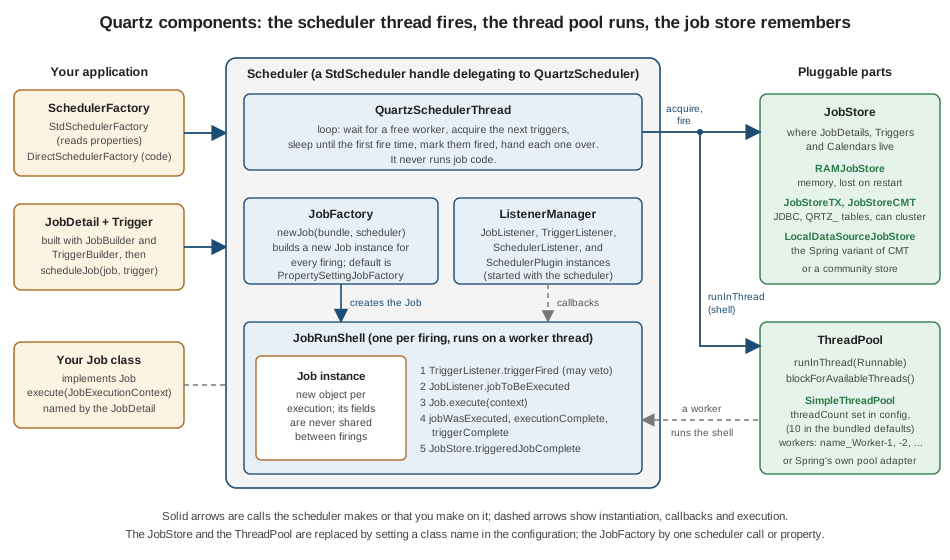
| Component | Type | Role and default |
|---|---|---|
|
Interface |
The client API: schedule, unschedule, pause, resume, listen, start and shut down. Every call goes through to the |
|
Interface with |
Builds and registers schedulers. |
|
|
The heart of the scheduler: a loop that waits for a free worker, asks the job store for the triggers due next, sleeps until the first fire time, marks them fired and hands each one to the thread pool. If it finds nothing to do it waits up to |
|
Interface |
The worker threads that run jobs. The default |
|
Interface |
Keeps |
|
Interface |
Creates the |
|
|
A |
|
|
Extension points around the same sequence. See Listeners & Plugins. |
Source: Quartz Tutorial — Lesson 10: Configuration, Resource Usage and SchedulerFactory, checked against the
2.5.2 QuartzSchedulerThread,
JobRunShell and
JobFactory sources.
Creating a scheduler: StdSchedulerFactory
StdSchedulerFactory is what almost every application uses, and it is what Spring’s SchedulerFactoryBean uses
internally. It builds the scheduler from a set of properties under the org.quartz. prefix: scheduler name and instance
id, thread pool, job store, listeners and plugins. Where those properties come from depends on the constructor.
| How you create it | Properties used |
|---|---|
|
The file named by the system property |
|
Only the properties you pass. Everything not set takes the library default, except that a |
|
The given file. |
Source: Quartz Configuration Reference: Main Configuration and the
2.5.2 StdSchedulerFactory source.
A scheduler is registered by name in a JVM-wide SchedulerRepository. Calling getScheduler() again with the same name
returns the existing instance (unless it has been shut down, in which case a new one is created), and
getScheduler(String) and getAllSchedulers() look schedulers up in that repository. That is also why two schedulers in
one JVM need different instanceName values.
org.quartz.scheduler.instanceName = BookshelfScheduler
org.quartz.threadPool.class = org.quartz.simpl.SimpleThreadPool
org.quartz.threadPool.threadCount = 4
org.quartz.jobStore.class = org.quartz.simpl.RAMJobStoreWiring the parts yourself: DirectSchedulerFactory
DirectSchedulerFactory skips properties altogether: you construct the thread pool and the job store and pass them in.
It is rarely the right choice (properties are easier to externalise), but it makes the architecture concrete, and it is
handy in tests.
DirectSchedulerFactory factory = DirectSchedulerFactory.getInstance();
factory.createScheduler("DirectBookshelf", "direct-1",
        new SimpleThreadPool(2, Thread.NORM_PRIORITY), new RAMJobStore());
Scheduler scheduler = factory.getScheduler("DirectBookshelf");
Source: Quartz Tutorial — Lesson 10 and the
2.5.2 DirectSchedulerFactory source.
The next block is the metadata of three schedulers created in one JVM: one from the bundled defaults, one from the
properties above and one from DirectSchedulerFactory. It comes from Scheduler.getMetaData(), which is also what a
monitoring endpoint would read.
--- StdSchedulerFactory(), bundled defaults
  name / instance : DefaultQuartzScheduler / NON_CLUSTERED
  thread pool     : org.quartz.simpl.SimpleThreadPool size 10
  job store       : org.quartz.simpl.RAMJobStore persistent=false clustered=false
  inStandby       : true, started=false
--- StdSchedulerFactory(Properties)
  name / instance : BookshelfScheduler / NON_CLUSTERED
  thread pool     : org.quartz.simpl.SimpleThreadPool size 4
--- DirectSchedulerFactory.createScheduler(...)
  name / instance : DirectBookshelf / direct-1
  thread pool     : org.quartz.simpl.SimpleThreadPool size 2
All schedulers in this JVM: [BookshelfScheduler, DefaultQuartzScheduler, DirectBookshelf]
Replacing the JobFactory
The JobFactory is the one component you will meet again on the Spring pages, so it is worth seeing in isolation. The
scheduler calls it once per firing, on the scheduler thread, before the job is handed to a worker. The default
PropertySettingJobFactory needs a public no-argument constructor and injects values through setters. Anything else, such
as constructor injection of a collaborator, needs your own factory (or, with Spring, SpringBeanJobFactory, which Spring
Boot’s auto-configuration installs for you).
public class RefreshJob implements Job {
    private final Catalogue catalogue;
    public RefreshJob(Catalogue catalogue) { this.catalogue = catalogue; }

    @Override
    public void execute(JobExecutionContext context) { catalogue.refresh(); }
}

JobFactory factory = new JobFactory() {
    private final JobFactory fallback = new SimpleJobFactory();

    @Override
    public Job newJob(TriggerFiredBundle bundle, Scheduler scheduler) throws SchedulerException {
        if (bundle.getJobDetail().getJobClass() == RefreshJob.class) {
            return new RefreshJob(catalogue);          // a new instance for every firing
        }
        return fallback.newJob(bundle, scheduler);
    }
};
scheduler.setJobFactory(factory);Run with a scheduled RefreshJob, the factory was called, the job executed and printed its line ([catalogue] refreshed).
If newJob throws, the scheduler moves every trigger of that job to the ERROR state, which needs a human to fix, so a
factory should fail only when it truly cannot build the job. The same property can be set in configuration with
org.quartz.scheduler.jobFactory.class. The Spring side is in
Getting Started with Spring Boot.
Job, JobDetail and Trigger
Quartz separates three things that @Scheduled fuses into one annotation.
| Type | What it is | Notes |
|---|---|---|
|
An interface with one method, |
A new instance is created for every execution by the |
|
The definition of a job: its key, the |
Created with |
|
The schedule: when to fire, for which job, with which priority and optional extra data. |
Created with |
Source: Quartz Tutorial — Lesson 2: The Quartz API, Jobs and Triggers and Lesson 3: More About Jobs and Job Details.
Keys and groups
A job and a trigger are each identified by a key, which is a name plus a group. JobKey and TriggerKey are different
types, so a job and a trigger may share a name (measured: jobKey("x").equals(triggerKey("x")) is false). If you
leave the group out, Quartz uses the group DEFAULT, and a key prints as group.name. Groups exist for you to organise
and to select: you can list, pause, resume or listen to everything in a group with a GroupMatcher. A trigger created
without an identity gets a generated name in the DEFAULT group.
JobDetail job = newJob(RemindJob.class)
        .withIdentity("memberReminder", "bookshelf")
        .usingJobData("memberId", "m-1")
        .storeDurably()
        .build();
scheduler.addJob(job, false);          // a durable job can exist without any trigger

Trigger t1 = newTrigger().withIdentity("reminder-1", "reminders").forJob(job)
        .usingJobData("memberId", "m-42")       // trigger data overrides job data
        .startNow()
        .withSchedule(simpleSchedule().withIntervalInMilliseconds(300).withRepeatCount(1))
        .build();
Trigger t2 = newTrigger().withIdentity("reminder-2")
        .forJob(jobKey("memberReminder", "bookshelf")).startNow().build();
scheduler.scheduleJob(t1);
scheduler.scheduleJob(t2);

scheduler.getJobKeys(jobGroupEquals("bookshelf"));        // [bookshelf.memberReminder]
scheduler.getTriggersOfJob(job.getKey());                  // both triggers
Source: Quartz Tutorial — Lesson 2 and the
Quartz Javadoc: Scheduler.
jobKey("x")                 = DEFAULT.x  group=DEFAULT
jobKey("x","bookshelf")     = bookshelf.x
same name, other type equal? false
job groups    : [bookshelf]
trigger groups: [reminders, DEFAULT]
jobs in bookshelf: [bookshelf.memberReminder]
triggers of job  : [reminders.reminder-1, DEFAULT.reminder-2]
  [job] instance @ea66c0c  reminds member m-1  (trigger DEFAULT.reminder-2)
  [job] instance @218bf60d reminds member m-42 (trigger reminders.reminder-1)
  [job] instance @2e9bd29e reminds member m-42 (trigger reminders.reminder-1)
The output shows two things beyond the keys. Each firing used a different job instance (three distinct hash codes for
three firings of one JobDetail), and the member id the job saw came from the trigger when the trigger carried one (m-42)
and from the job otherwise (m-1): the job receives a merged JobDataMap, with trigger values taking precedence. The
RemindJob has a setMemberId setter and no code to read the map, because the default PropertySettingJobFactory calls
setters named after the map keys. The merge rules and persistence are in
Jobs & Job Data.
The fluent DSL
Since Quartz 2.0 you create jobs and triggers with builders designed to be used with static imports, so the code reads as a sentence.
| Builder | Use |
|---|---|
|
|
|
|
|
Passed to |
|
Static helpers for start and end times: |
Source: Quartz Tutorial — Lesson 2 and the
Quartz Javadoc: JobBuilder.
import static org.quartz.CronScheduleBuilder.dailyAtHourAndMinute;
import static org.quartz.JobBuilder.newJob;
import static org.quartz.TriggerBuilder.newTrigger;

JobDetail job = newJob(OverdueLoanRemindersJob.class)
        .withIdentity("overdueLoanReminders", "bookshelf")
        .withDescription("Nightly overdue-loan reminders")
        .storeDurably()
        .build();

Trigger nightly = newTrigger()
        .withIdentity("overdueLoanRemindersTrigger", "bookshelf")
        .forJob(job)
        .withPriority(7)
        .withSchedule(dailyAtHourAndMinute(2, 0))
        .build();                                   // a CronTrigger

Date evenMinute = DateBuilder.evenMinuteDate(new Date());               // next whole minute
Date quarter = DateBuilder.nextGivenMinuteDate(new Date(), 15);         // :00, :15, :30 or :45
Source: Quartz Tutorial — Lesson 6: CronTrigger and the
Quartz Javadoc: DateBuilder.
Measured with the base time 10:07:13: evenMinuteDate returned 10:08:00 and nextGivenMinuteDate(.., 15) returned
10:15:00; the built trigger had type CronTrigger, priority 7 and the job key bookshelf.overdueLoanReminders, and a
trigger built without withPriority reported the default 5. The overdue reminder here is only a definition; making it
production-grade (time zone, calendar, misfire policy) is the subject of the pages that follow. Note that
dailyAtHourAndMinute uses the JVM’s default time zone unless you add inTimeZone, which matters as soon as a server
moves between regions: Cron Expressions covers it.
The scheduler lifecycle
A scheduler goes through a small number of states, and several surprises come from confusing them.
| Method | Effect | Measured state afterwards |
|---|---|---|
|
The scheduler is created and initialised in standby. Triggers can already be scheduled, but nothing fires. |
|
|
Leaves standby. The first call also starts the job store’s own processing (for the JDBC store, misfire and recovery handling) and the plugins. Later calls just resume. |
|
|
Returns immediately and calls |
Standby for the delay (measured: the call returned after 1 ms, the state was still standby, and 2.5 s later the scheduler had started) |
|
Stops firing triggers without destroying anything. The scheduler can be started again; trigger misfire instructions are not applied by the |
|
|
Stops firing, releases the threads and resources. |
|
Source: Quartz Cookbook: Putting a Scheduler in Stand-by Mode,
Shutting Down a Scheduler and the
Quartz Javadoc: Scheduler.
isStarted() only reports whether start() has ever been called; it stays true through standby and even after shutdown.
To ask whether jobs can fire right now, test isInStandbyMode() and isShutdown() as well. The program below walks the
whole lifecycle and prints those three flags at every step.
Scheduler s = StdSchedulerFactory.getDefaultScheduler();
state("after getScheduler()", s);
s.start();
state("after start()", s);
s.standby();
state("after standby()", s);
s.start();
s.standby();
s.startDelayed(2);                                  // returns at once
state("right after startDelayed(2)", s);
Thread.sleep(2_500);
state("2.5 s later", s);

s.scheduleJob(newJob(SlowReportJob.class).withIdentity("weeklyStatistics", "bookshelf").build(),
        newTrigger().startNow().withSchedule(simpleSchedule()).build());   // the job sleeps 2 s
Thread.sleep(500);
s.shutdown(true);                                   // waits for the running job

static void state(String label, Scheduler s) throws SchedulerException {
    System.out.printf("%-34s isStarted=%b isInStandbyMode=%b isShutdown=%b%n",
            label, s.isStarted(), s.isInStandbyMode(), s.isShutdown());
}
Source: Quartz Tutorial — Lesson 1: Using Quartz and the Quartz Cookbook: Shutting Down a Scheduler.
after getScheduler()               isStarted=false isInStandbyMode=true isShutdown=false
after start()                      isStarted=true isInStandbyMode=false isShutdown=false
after standby()                    isStarted=true isInStandbyMode=true isShutdown=false
right after startDelayed(2)        isStarted=true isInStandbyMode=true isShutdown=false
2.5 s later                        isStarted=true isInStandbyMode=false isShutdown=false
  [job] weekly report started
  [job] weekly report finished
shutdown(true) returned after 1504 ms
after shutdown(true)               isStarted=true isInStandbyMode=true isShutdown=true
start() after shutdown: The Scheduler cannot be restarted after shutdown() has been called.
Two details of that run deserve emphasis. First, isStarted was already true on the line "right after startDelayed(2)":
the earlier start() had set it, so it cannot tell you whether the delayed start has happened; isInStandbyMode did.
Second, the shutdown with waitForJobsToComplete=true blocked for about 1.5 s, the time the running job still needed,
and the job logged its finish before the scheduler logged "shutdown complete". The same scenario with
shutdown(false) returned after 1 ms and the job was left to finish on its worker thread (it printed "finished" 2 s
later), so the application could exit while the job was still running.
| Call | Behaviour |
|---|---|
|
Blocks until every running job has returned. Use for graceful application shutdown. A job that never returns blocks it forever: combine it with |
|
Returns without waiting. Running jobs continue on their threads until they end, unless |
Source: Quartz Configuration Reference: Main Configuration and the
2.5.2 QuartzScheduler.shutdown source.
Two practical consequences follow. The scheduler thread and the workers are non-daemon threads by default
(org.quartz.scheduler.makeSchedulerThreadDaemon is false), so a plain main that forgets shutdown keeps the JVM
alive. And standby() is not the same as pausing triggers: standby halts the whole scheduler and leaves every trigger
state untouched, while pauseAll() or pauseTrigger marks triggers as paused. Both leave work undone while they last,
which Quartz later treats as a misfire; Misfires explains how it recovers.
Under Spring Boot you rarely call these methods yourself. SchedulerFactoryBean calls start after the context is
refreshed, and Boot exposes the same choices as properties. These defaults were read from the Spring Boot 4.1.1 source.
spring:
  quartz:
    auto-startup: true                         # default true: start() when the context is ready
    startup-delay: 0s                          # default 0s: becomes startDelayed(seconds)
    wait-for-jobs-to-complete-on-shutdown: false   # default false: shutdown(false)
Source: Spring Boot Reference: Quartz Scheduler and the
application properties appendix; all spring.quartz.* properties are listed in
Spring Boot Configuration.
One trigger firing, step by step
Putting the components together, here is what happens each time a trigger comes due. The names in the diagram are real
methods, read from the 2.5.2 sources of QuartzSchedulerThread and JobRunShell.
Source: 2.5.2 QuartzSchedulerThread.run and
JobRunShell.run.
The steps, in words:
-
Wait for capacity. The scheduler thread blocks until the thread pool has a free worker, so it never acquires more triggers than it can run (bounded by
org.quartz.scheduler.batchTriggerAcquisitionMaxCount, default 1). -
Acquire. It asks the job store for the next triggers due before
now + idleWaitTime. With the JDBC store this is, by default, a conditional update of each trigger’s state (WAITINGtoACQUIRED) without a row lock; theTRIGGER_ACCESSrow lock is taken here only withacquireTriggersWithinLock=trueor a batch size above 1, and otherwise at the Fire and Complete steps; see Clustering. -
Sleep until the fire time. If a new, earlier trigger is scheduled in the meantime, the thread wakes up, releases what it acquired and starts again.
-
Fire. The job store marks each trigger as fired, computes its next fire time and returns a
TriggerFiredBundle. A trigger that was paused, or whose job must not run concurrently, comes back without a bundle and is released. -
Create the job. The
JobFactorybuilds a newJobinstance, and aJobRunShellis created for it. If that fails, the job’s triggers go to theERRORstate. -
Execute on a worker. The shell runs on a pool thread. A
TriggerListenercan veto the execution, then the job listeners are notified andexecuteis called. -
Complete. The outcome (including a thrown
JobExecutionExceptionor any otherThrowable, which Quartz logs and converts) becomes a completion instruction for the trigger and the job store, and the listeners are notified again.
The scheduler thread and the worker never share a stack: a slow job occupies one worker and nothing else, which is why
thread-pool size is the first scaling dial and why threadCount should exceed the number of jobs that can be due at once.
A first example in plain Java
The first example is the smallest complete Quartz program, modelled on Example 1 of the official examples module
(SimpleExample and HelloJob, which schedule a job for the next even minute and shut down after 65 seconds). The
Bookshelf version below refreshes the book catalogue. It starts a few seconds after launch, repeats every 2 seconds
three times, and shuts down so that the demo ends quickly; the five real Bookshelf jobs follow on the next pages.
<dependency>
    <groupId>org.quartz-scheduler</groupId>
    <artifactId>quartz</artifactId>
    <version>2.5.2</version>
</dependency>
<dependency>                                   <!-- any SLF4J binding; Quartz logs through SLF4J -->
    <groupId>org.slf4j</groupId>
    <artifactId>slf4j-simple</artifactId>
    <version>2.0.16</version>
</dependency>
Source: Quartz on Maven Central and the Quartz Quick Start.
import static org.quartz.JobBuilder.newJob;
import static org.quartz.SimpleScheduleBuilder.simpleSchedule;
import static org.quartz.TriggerBuilder.newTrigger;

public class FirstExample {

    public static class CatalogueRefreshJob implements Job {
        private static final Logger log = LoggerFactory.getLogger(CatalogueRefreshJob.class);

        @Override
        public void execute(JobExecutionContext context) {
            log.info("Refreshing the catalogue (job {}, fired at {}, thread {})",
                    context.getJobDetail().getKey(), context.getFireTime(),
                    Thread.currentThread().getName());
        }
    }

    public static void main(String[] args) throws Exception {
        Scheduler scheduler = StdSchedulerFactory.getDefaultScheduler();   // 1. create (in standby)

        JobDetail job = newJob(CatalogueRefreshJob.class)                   // 2. what to run
                .withIdentity("catalogueRefresh", "bookshelf")
                .build();

        Trigger trigger = newTrigger()                                      // 3. when to run it
                .withIdentity("catalogueRefreshTrigger", "bookshelf")
                .startAt(DateBuilder.futureDate(1, DateBuilder.IntervalUnit.SECOND))
                .withSchedule(simpleSchedule().withIntervalInSeconds(2).withRepeatCount(2))
                .build();

        scheduler.scheduleJob(job, trigger);                                // 4. register both
        scheduler.start();                                                  // 5. leave standby

        Thread.sleep(7_000);                                                // the JVM keeps working
        scheduler.shutdown(true);                                           // 6. wait and release
    }
}
Source: Quartz examples module: Example 1, SimpleExample and
Quartz Tutorial — Lesson 1: Using Quartz.
withRepeatCount(2) means two repeats after the first firing, so the job fires three times. The log below is the
measured output with the Quartz INFO lines trimmed to the ones that show the sequence.
INFO org.quartz.core.QuartzScheduler - Quartz Scheduler v2.5.2 created.
INFO org.quartz.simpl.RAMJobStore - RAMJobStore initialized.
  Using thread pool 'org.quartz.simpl.SimpleThreadPool' - with 10 threads.
  Using job-store 'org.quartz.simpl.RAMJobStore' - which does not support persistence. and is not clustered.
INFO org.quartz.impl.StdSchedulerFactory - Quartz scheduler 'DefaultQuartzScheduler' initialized from default resource file in Quartz package: 'quartz.properties'
INFO org.quartz.core.QuartzScheduler - Scheduler DefaultQuartzScheduler_$_NON_CLUSTERED started.
[DefaultQuartzScheduler_Worker-1] Refreshing the catalogue (job bookshelf.catalogueRefresh, fired at Mon Oct 05 11:26:26 CEST 2026, ...)
[DefaultQuartzScheduler_Worker-2] Refreshing the catalogue (job bookshelf.catalogueRefresh, fired at Mon Oct 05 11:26:28 CEST 2026, ...)
[DefaultQuartzScheduler_Worker-3] Refreshing the catalogue (job bookshelf.catalogueRefresh, fired at Mon Oct 05 11:26:30 CEST 2026, ...)
INFO org.quartz.core.QuartzScheduler - Scheduler DefaultQuartzScheduler_$_NON_CLUSTERED shutting down.
INFO org.quartz.core.QuartzScheduler - Scheduler DefaultQuartzScheduler_$_NON_CLUSTERED shutdown complete.
Read the output against the architecture: the three executions ran on three different worker threads of the default
10-thread SimpleThreadPool (each firing is handed to whichever worker is free), the scheduler name is
DefaultQuartzScheduler because no configuration was supplied, and the job store is the in-memory RAMJobStore, so
nothing about this scheduler would survive a restart. The Bookshelf job that is genuinely a plain @Scheduled task, this
five-minute catalogue refresh, does not need Quartz in production; it is used here only because it is the simplest job
that shows every part.
Where the Bookshelf jobs fit
Each of the five scheduled tasks of the running scenario exercises a different part of the model introduced here.
| Bookshelf job | Quartz concepts it needs | Where it is developed |
|---|---|---|
Catalogue refresh (every 5 minutes) |
A |
This page; Standard Scheduling vs Quartz |
Nightly overdue-loan reminders |
A durable |
|
Per-member reminders |
Jobs and one-shot triggers created at runtime, a |
|
Weekly statistics report |
|
|
Monthly retention cleanup |
An |
Pitfalls
| Symptom | Cause and fix |
|---|---|
Triggers are scheduled but nothing ever fires |
The scheduler is created in standby and needs |
The program never exits |
The scheduler thread and workers are non-daemon. Call |
|
|
|
|
A job field keeps its value only within one firing |
A new |
Settings in |
Spring does not read the classpath file by itself: use |
|
|
|
Use |
A cron expression of five fields fails or |
Quartz cron has six or seven fields, and combining |
What changed
| Release | Change that touches this page |
|---|---|
Quartz 2.0 |
The |
Quartz 2.4.0 |
Third-party libraries are |
Quartz 2.5.0 |
Move to the Jakarta namespace and to Java 11. |
Quartz 2.5.1 |
|
Quartz 2.5.2 |
Latest release (1 December 2025); managed by both Spring Boot 3.5.16 and 4.1.1. |
Spring Boot 3.5 to 4.x |
Nothing on this page changes. The auto-configuration moved packages (see Migration & What’s Changed). |