ICE, STUN and TURN
|
This content was generated with the assistance of AI and should be verified against the official documentation before being relied on in production. See the section bibliography for the reference material consulted while preparing these pages. |
Two browsers that want to exchange media or data directly almost never have a public address each. They sit behind home routers, corporate firewalls and carrier-grade NAT, so neither side can simply connect to the other. Interactive Connectivity Establishment (ICE) is the procedure that solves this: each side gathers every address at which it might be reachable, the two sides swap those addresses through the signalling channel, and they test pairs of addresses until one works. STUN lets a browser discover its public address, and TURN provides a relay of last resort. This page explains the whole mechanism, then configures two relay servers (coturn and eturnal), issues short-lived credentials from a Node.js endpoint, and proves in headless Chrome that a call forced through the relay really works.
All three scenarios of the section meet ICE, but with different weights. Huddle (videoconference) depends on it for every call: in mesh mode each pair of participants runs its own ICE, and in SFU mode each participant runs it against the media server. A fraction of Huddle users, mostly behind restrictive corporate networks, can only connect through TURN, so a videoconference product without a relay is a product that fails for exactly the customers who pay most. Pixel Arena (game) uses ICE whenever it moves game state over a peer-to-server or peer-to-peer data channel, and the same relay carries those datagrams. Chatterbox (chat) uses plain WebSocket over TLS and never needs ICE, which is one of the reasons WebSocket is the simpler choice when a call is not required.
Versions and specifications were checked on 2026-10-24. The baseline is the W3C WebRTC 1.0 Recommendation (2025-03-13
edition) with JSEP in RFC 9429, ICE in RFC 8445, trickle ICE in RFC 8838, STUN in RFC 8489, TURN in RFC 8656, coturn
4.18.0 (Docker image coturn/coturn:4.18.0) and eturnal 1.12.3. The examples ran on Node.js 24, Docker 29 and Google
Chrome driven by puppeteer-core 25.16.0 with a local Compose project containing coturn, eturnal and the credentials
endpoint.
The problem: NAT between the peers
A NAT router rewrites the source address of outgoing packets and keeps a mapping so that replies find their way back. It also drops incoming packets that do not match a mapping. The consequences for peer-to-peer traffic are covered on Networking Fundamentals, including the taxonomy of NAT behaviours (full cone, restricted cone, port-restricted cone and symmetric). The short version is this: if both peers send a packet to the other’s public address at about the same time, their routers each create a mapping and the packets get through ("hole punching"), unless one of the routers picks a different public port for every destination (a symmetric NAT, common in mobile and corporate networks), in which case the address learned from a third party is useless and only a relay works.
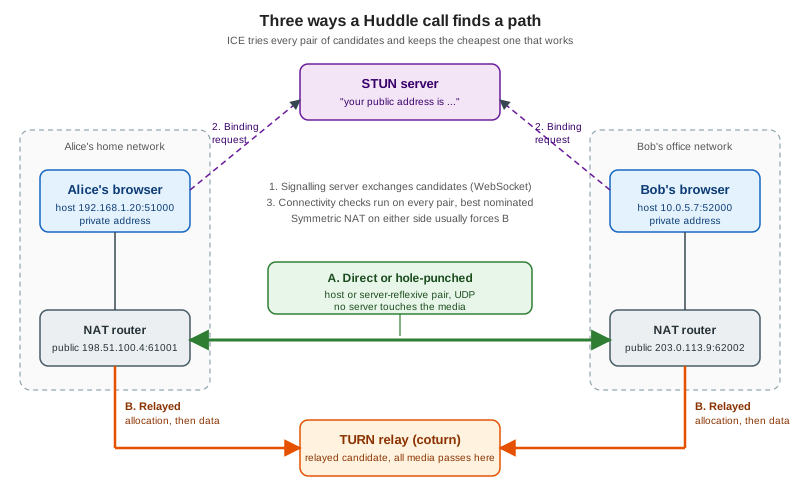
The figure shows the three outcomes. In path A the pair of candidates works directly, either because both peers share a network or because hole punching succeeded; no server touches the media. In path B at least one NAT blocks the direct path, so both browsers send their media to a TURN server that forwards it, which costs bandwidth on the server and one extra network hop. The STUN server only takes part in discovery and sees none of the call.
ICE in the browser
Candidates and their types
An ICE candidate is a transport address (IP address, port and protocol) at which a peer might receive traffic, plus a
priority and some bookkeeping. The browser gathers candidates of four types, defined by RFC 8445 and exposed as the
type field of RTCIceCandidate.
| Type | How it is obtained | Reachable when |
|---|---|---|
|
A local interface address of the machine, or an mDNS name standing in for it |
Both peers are on the same network, or one has a public address |
|
The public address and port that a STUN server saw the request come from |
The NAT lets the other peer’s packets through once both have sent traffic (hole punching) |
|
An address the browser learns during a connectivity check, from the source of an incoming check |
A NAT mapping appeared that no server told the peer about; typical behind symmetric NAT |
|
An address allocated on a TURN server |
Almost always, because both peers can reach the TURN server |
The relay type is why TURN is called the fallback of last resort and also why it never fails to connect when the
server is reachable: both browsers make outbound connections to a server with a public address, which every firewall that
allows web browsing at least partly allows.
A candidate travels in the SDP as an a=candidate attribute and, with trickle ICE, as a JSON-friendly
RTCIceCandidate object. The lines below were produced by Chrome while it gathered against the lab server of this page
(addresses replaced by documentation addresses). Note the .local name in the host candidate, the raddr that shows
which address a srflx or relay candidate is derived from, and the priority that makes the relay the least preferred
candidate.
candidate:1470850663 1 udp 2113937151 2ac62b8c-6ece-479f-803a-5becef4db60c.local 61731 typ host generation 0 ufrag uXsD network-cost 999
candidate:2221953911 1 udp 1677729535 198.51.100.4 58144 typ srflx raddr 0.0.0.0 rport 0 generation 0 ufrag uXsD network-cost 999
candidate:102955130 1 udp 50339839 203.0.113.10 40533 typ relay raddr 198.51.100.4 rport 58144 generation 0 ufrag uXsD network-cost 999
Source: MDN: RTCIceCandidate
Browsers hide local addresses by default. Instead of publishing 192.168.1.20, a browser that has not been granted
camera or microphone permission registers a random name in multicast DNS and publishes <uuid>.local; the other peer
resolves the name over mDNS, which succeeds only on the same link. This prevents any web page from reading the local
network addresses of its visitors through RTCPeerConnection. The mechanism is widely deployed but specified only in
draft-ietf-rtcweb-mdns-ice-candidates, an Internet-Draft that has expired, so treat it as a de facto behaviour and not as
a standard. Two consequences matter in practice. Two peers in different networks never use host candidates anyway, and
two peers on the same corporate network may fail to connect directly when the network blocks multicast DNS (many wireless
networks isolate clients), in which case ICE continues with the server-reflexive and relay candidates.
Gathering, trickle ICE and the connectivity checks
The browser starts gathering when setLocalDescription is called. Candidates arrive one by one in icecandidate
events, and the final event has candidate equal to null (the iceGatheringState becomes complete). Trickle ICE
(RFC 8838) means a peer sends each candidate to the other side as soon as it exists, instead of waiting for gathering to
finish, so a call can start with the first working pair while a slow STUN or TURN request is still outstanding. The
signalling side of this exchange is described on
Signaling and Perfect Negotiation; the browser side is
always the same two lines.
peer.onicecandidate = ({ candidate }) => signalling.send({ type: 'candidate', to: remoteId, candidate });
signalling.on('candidate', ({ candidate }) => peer.addIceCandidate(candidate).catch(ignoreIfStale));Once a peer has remote candidates it forms candidate pairs (every local candidate with every remote candidate of the same
IP version and component) and sorts them by priority. It then sends STUN Binding requests, the connectivity checks,
from each local candidate to each remote candidate, in priority order, with the integrity of every request protected by the
ICE username fragment and password (ice-ufrag and ice-pwd) that were exchanged in the SDP. A pair succeeds when a
check is answered. The controlling agent (the offerer by default) then nominates one of the succeeded pairs by sending
a check that carries the USE-CANDIDATE attribute, and from that moment media flows on the nominated pair. If a
better pair succeeds later, the connection can stay on the nominated one or the agent can renominate. A pair can also
succeed in only one direction at first, which is why both sides send checks.
iceConnectionState |
Meaning |
|---|---|
|
Gathering has not started or no remote candidate is known |
|
Connectivity checks are running and no pair has succeeded yet |
|
At least one pair works; checks may still be looking for a better pair |
|
Checks finished and a pair is nominated (browsers rarely stay in this state) |
|
Consent checks stopped being answered; the connection may recover by itself |
|
Every pair failed; an ICE restart is the only way out |
|
|
The aggregate connectionState property, which also covers DTLS, is the one an application should display; the
states of iceConnectionState are most useful for diagnosing. After nomination both sides keep sending consent
freshness checks (RFC 7675), roughly every five seconds, and the browser stops sending media when the other side stops
answering for about thirty seconds. That is why a laptop that wakes up on a different network first shows
disconnected and later failed. The state machines are shown in context on
Peer Connections and SDP.
Restarting ICE
When a participant changes network (Wi-Fi to cellular, a VPN toggles, a laptop wakes up) the nominated pair stops
working. Calling peer.restartIce() marks the next offer as an ICE restart: it carries new ice-ufrag and ice-pwd
values, the browser gathers fresh candidates and the connectivity checks run again, while the media keeps flowing on the
old pair for as long as it still works. Only the controlling side needs to react, but with perfect negotiation the
negotiationneeded event that restartIce() triggers makes the right peer send the offer. Credentials for the relay
expire too, and setConfiguration is how a running call receives new ones (see the client example below).
Configuring the relay: iceServers and iceTransportPolicy
| Setting | Behaviour |
|---|---|
|
A list of |
|
|
|
A number from 0 to 255 that makes the browser gather candidates in advance, before |
|
Not ICE settings, but they decide how many transports (and therefore ICE agents and allocations) a connection uses; the defaults, |
Setting iceTransportPolicy to relay has two uses. In tests it proves that the relay works, which is how this page’s examples
verify coturn. In production it hides the participants' IP addresses from each other, which some privacy-sensitive
products require, at the price of sending all the media through the relay. Never ship it as a default for a large
mesh call.
STUN and TURN on the wire
STUN
STUN (RFC 8489) is a small request/response protocol over UDP, TCP or TLS, normally on port 3478 (5349 for TLS). A client
sends a Binding request and the server answers with a XOR-MAPPED-ADDRESS attribute that contains the source address and
port as the server saw them, which is the client’s public address (the address is XORed with a magic cookie so that
application-level gateways do not rewrite it). That is all a STUN server does, which is why it is cheap, stateless and
safe to run, and why public STUN servers exist. The same Binding request is also the connectivity check that ICE sends
between peers and the consent check that keeps the connection alive.
TURN
TURN (RFC 8656) extends STUN with a relay. The exchange has four steps.
-
The client sends an
Allocaterequest to the server. The first request has no credentials, so the server answers401 Unauthorizedand includes aREALMand aNONCE. -
The client repeats the
AllocatewithUSERNAME,REALM,NONCEand aMESSAGE-INTEGRITYattribute computed from the credential. If it is valid the server answers with anXOR-RELAYED-ADDRESS(the relayed transport address, therelaycandidate) and aLIFETIME, 600 seconds by default. -
The client calls
CreatePermissionfor each remote IP address that may send packets to the relayed address, and the server drops packets from any other source. Permissions last five minutes and ICE refreshes them. -
Data then moves in
SendandDataindications, or in the smallerChannelDatamessages once aChannelBindhas associated a peer address with a channel number. The allocation itself is kept alive byRefreshrequests.
The client-to-server leg can run over UDP, TCP, TLS (turns:) or DTLS (RFC 7350). The server-to-peer leg is normally UDP.
The ability to run the client leg over TCP and over TLS on port 443 is the reason TURN works in networks that block all
UDP: to a firewall, TURN over TLS on 443 is indistinguishable from HTTPS. A deployment that wants to reach those users
publishes turn: over UDP for the normal case, turn: over TCP for UDP-hostile networks, and turns: on 443 as the last
resort. RFC 6062 defines a different feature, TCP allocations (the relay talks TCP to the peer), which browsers do not
use.
turn:turn.example.test:3478?transport=udp       lowest latency, blocked by some corporate firewalls
turn:turn.example.test:3478?transport=tcp       works through UDP-blocking firewalls, head-of-line blocking
turns:turn.example.test:443?transport=tcp TLS on 443, passes inspecting proxies that allow HTTPSCredentials are the part of TURN that applications get wrong most often. The long-term credential mechanism of the RFC needs
a username and a password known to the server, and a browser needs both inside JavaScript, so a static password ends up
in every page load, in browser caches and in screenshots. Anyone can then use the relay for their own traffic, at your
expense. The widely implemented solution is the "TURN REST API", a scheme in which the application server and the TURN
server share one secret, and the application server hands out credentials that expire. It is documented only in
draft-uberti-behave-turn-rest-00, an expired Internet-Draft, but coturn (use-auth-secret) and eturnal (secret)
both implement it and so do most hosted relays. The credentials are:
-
username: the decimal Unix timestamp at which the credential expires, optionally followed by a colon and a user identifier, for example1792878404:alice; -
credential: the Base64 encoding ofHMAC-SHA1(secret, username).
The TURN server recomputes the HMAC and compares it, and rejects the request when the timestamp has passed. No database, no lookup and no round trip to the application server is needed, and a leaked credential is useful for an hour, not for ever.
A lab: coturn, eturnal and a credentials endpoint
The examples below form one Compose project. It starts coturn 4.18.0 and eturnal 1.12.3 side by side (so that the same browser test can be run against both), and a small Node.js service that issues credentials and serves a test page. The host ports are shifted to 40500 and above so that the lab can run next to other software; in production publish 3478 and 443. The directory layout is:
huddle-turn/
  compose.yaml
  turnserver.conf
  eturnal.yml
  creds-server/server.mjs
  public/ice-check.html
Compose file
# Huddle TURN lab: coturn, eturnal and the ephemeral-credentials endpoint.
# Start:  TURN_HOST=<your LAN IP> docker compose up -d   (see the page: Chrome binds UDP sockets to LAN addresses)
# Stop:   docker compose down -v
name: huddle-turn

services:
  coturn:
    image: coturn/coturn:4.18.0
    # The image's entrypoint is turnserver; every option comes from the mounted file.
    command: ["-c", "/etc/coturn/turnserver.conf"]
    volumes:
      - ./turnserver.conf:/etc/coturn/turnserver.conf:ro
    networks:
      huddle:
        ipv4_address: 172.29.185.10
    ports:
      - "40500:3478/udp"
      - "40500:3478/tcp"
      - "40510-40540:40510-40540/udp"
    restart: unless-stopped

  eturnal:
    image: ghcr.io/processone/eturnal:1.12.3
    volumes:
      - ./eturnal.yml:/opt/eturnal/etc/eturnal.yml:ro
    networks:
      huddle:
        ipv4_address: 172.29.185.11
    ports:
      - "40501:3478/udp"
      - "40545-40575:40545-40575/udp"
    restart: unless-stopped

  credentials:
    image: node:24-alpine
    working_dir: /app
    command: ["node", "server.mjs"]
    environment:
      PORT: "8080"
      TURN_SHARED_SECRET: example-shared-secret-change-me
      HUDDLE_API_TOKEN: example-session-token
      TURN_HOST: ${TURN_HOST:-127.0.0.1}
      TURN_PORT: "40500"
      TURN_TTL_SECONDS: "3600"
    volumes:
      - ./creds-server/server.mjs:/app/server.mjs:ro
      - ./public:/app/public:ro
    networks: [huddle]
    ports:
      - "40502:8080"
    restart: unless-stopped

networks:
  huddle:
    ipam:
      config:
        - subnet: 172.29.185.0/24
The huddle network has a fixed subnet only because eturnal must be told, in relay_ipv4_addr, the address on which
clients reach its relay. In a real deployment that is the server’s public IPv4 address, and the same role is played in
coturn by external-ip. The relay port ranges (40510 to 40540 for coturn and 40545 to 40575 for eturnal) are published
as UDP ranges because every allocation takes one port from the range. The TURN_HOST variable is the address that the
endpoint puts into the iceServers it returns. It must be an address the browser can reach from its own network
interface, and the next section explains why localhost is the wrong choice for a UDP test.
See Compose Fundamentals for the Compose concepts used here.
coturn configuration
# coturn 4.18.0 configuration for the Huddle lab
listening-port=3478
min-port=40510
max-port=40540

# Ephemeral credentials (TURN REST API): username is "<expiry>:<user>",
# password is base64(HMAC-SHA1(static-auth-secret, username)).
use-auth-secret
static-auth-secret=example-shared-secret-change-me
realm=huddle.example.test

# Behind NAT or in a cloud VM, advertise the public address of the relay:
#external-ip=203.0.113.10/172.29.185.10

# Never let a client use the relay to reach internal services (SSRF protection).
no-multicast-peers
denied-peer-ip=0.0.0.0-0.255.255.255
denied-peer-ip=127.0.0.0-127.255.255.255
denied-peer-ip=169.254.0.0-169.254.255.255
denied-peer-ip=100.64.0.0-100.127.255.255
denied-peer-ip=192.168.0.0-192.168.255.255
denied-peer-ip=10.0.0.0-10.255.255.255
# 172.16.0.0/12 is deliberately NOT denied in this lab: both browser peers are
# relayed through the same server and their relay addresses live in the Docker
# network. In production add: denied-peer-ip=172.16.0.0-172.31.255.255

# Limits
user-quota=12
total-quota=1200
max-bps=3000000
bps-capacity=0
stale-nonce=600

# Hygiene
fingerprint
no-tls
log-file=stdout
simple-log
These are the options that matter, in the order in which they appear:
-
use-auth-secretandstatic-auth-secretturn on the time-limited credentials described above. Withoutuse-auth-secret, coturn expects a user database. The secret must be a long random value generated per environment; here it is a visible placeholder. -
realmis returned in the401response and takes part in the key derivation for long-term credentials. It can be any name you own, and it has to be the same on every coturn node that shares the secret. -
external-ipis needed when the server runs behind a one-to-one NAT, as virtual machines in most clouds do. The formpublic/privatemakes coturn put the public address intoXOR-RELAYED-ADDRESSwhile binding to the private one. Without it, clients receive a relay address they cannot reach. -
min-portandmax-portbound the UDP relay range, which must be open in the firewall; one allocation takes one port. -
denied-peer-ipis the SSRF protection described in the security section below, andno-multicast-peersrefuses multicast destinations.allowed-peer-ipexempts specific addresses, for example an SFU on a private network that the relay is meant to reach. -
user-quotalimits the allocations of one user (one browser opens several, so keep it above the number of peer connections times two),total-quotalimits the server,max-bpscaps each session in bytes per second andbps-capacitycaps the whole server. Setting these protects the bandwidth bill. -
stale-nonceforces clients to refresh their nonce periodically,fingerprintadds a fingerprint to TURN messages. The command line interface is off by default in coturn 4.18 (the oldno-clioption is deprecated and logs an error), so it is not listed; if you enable it withcli, set a strongcli-password.no-tlsis used because this lab has no certificate, and DTLS listeners are off by default in 4.18 (no-dtlsis rejected as a bad configuration line).
To serve TLS on port 443 (the firewall fallback), remove no-tls, add tls-listening-port=443, and set cert and
pkey to a certificate for the host name that clients put into the turns: URL; publish 443/tcp in Compose. The
certificate must be valid for that name, because browsers verify it. A TURN server that takes port 443 cannot share it with
a web server on the same address, so either use a dedicated address, or a TLS-terminating proxy that routes by SNI.
eturnal configuration
# eturnal 1.12.3 configuration for the Huddle lab
eturnal:
  # A list of secrets is accepted too: credentials derived from any entry are valid, which allows rotation.
  secret: "example-shared-secret-change-me"
  realm: "huddle.example.test"
  listen:
    - ip: "::"
      port: 3478
      transport: udp
    - ip: "::"
      port: 3478
      transport: tcp
  # The address clients must reach the relay on: the server's public IPv4 address.
  relay_ipv4_addr: "172.29.185.11"
  relay_min_port: 40545
  relay_max_port: 40575
  strict_expiry: true        # reject expired credentials when sessions are refreshed
  max_permissions: 10
  # blacklist_peers defaults to "recommended"; the lab whitelists the Docker network.
  whitelist_peers:
    - "172.16.0.0/12"
  log_level: info
  log_dir: stdout
  modules:
    mod_log_stun: {}
eturnal is written in Erlang and configured through one YAML file. Its secret is the same shared secret, and a list of
secrets is accepted, which allows rotation without breaking credentials that were issued with the previous secret.
blacklist_peers defaults to the value recommended, a built-in list of private and special-purpose address ranges, which
is why the lab has to whitelist the Docker subnet. strict_expiry: true makes the server reject an expired credential
also when an existing session refreshes. Credentials for both servers are interchangeable, so the endpoint below serves
either.
Source: eturnal documentation
The ephemeral credentials endpoint
The endpoint belongs to the application server of Huddle, and it must run behind the same authentication as the rest of the API, because anyone who can call it can use the relay. It derives the user identifier from the verified session; the lab reads it from the query string only to stay short.
// server.mjs: ephemeral TURN credentials for Huddle (Node.js 24, no dependencies)
import { createServer } from 'node:http';
import { createHmac, timingSafeEqual } from 'node:crypto';
import { readFile } from 'node:fs/promises';

const {
  PORT = '8080',
  TURN_SHARED_SECRET,
  HUDDLE_API_TOKEN,
  TURN_HOST = 'turn.example.test',
  TURN_PORT = '3478',
  TURN_TTL_SECONDS = '3600',
} = process.env;

if (!TURN_SHARED_SECRET || !HUDDLE_API_TOKEN) {
  throw new Error('TURN_SHARED_SECRET and HUDDLE_API_TOKEN are required');
}

/** username = "<unix expiry>:<user id>", credential = base64(HMAC-SHA1(secret, username)) */
export function turnCredentials(userId, secret, ttlSeconds, now = Date.now()) {
  const expiry = Math.floor(now / 1000) + ttlSeconds;
  const username = `${expiry}:${userId}`;
  const credential = createHmac('sha1', secret).update(username).digest('base64');
  return { username, credential, ttl: ttlSeconds };
}

function authorised(header = '') {
  const given = Buffer.from(header.replace(/^Bearer /, ''));
  const wanted = Buffer.from(HUDDLE_API_TOKEN);
  return given.length === wanted.length && timingSafeEqual(given, wanted);
}

const server = createServer(async (req, res) => {
  const url = new URL(req.url, 'http://localhost');
  if (url.pathname === '/turn-credentials' && req.method === 'GET') {
    if (!authorised(req.headers.authorization)) {
      res.writeHead(401, { 'WWW-Authenticate': 'Bearer' }).end();
      return;
    }
    // In Huddle the user id comes from the verified session, not from the query string.
    const userId = url.searchParams.get('user') ?? 'anonymous';
    const { username, credential, ttl } = turnCredentials(userId, TURN_SHARED_SECRET, Number(TURN_TTL_SECONDS));
    const body = {
      username,
      credential,
      ttl,
      iceServers: [
        { urls: `stun:${TURN_HOST}:${TURN_PORT}` },
        {
          urls: [`turn:${TURN_HOST}:${TURN_PORT}?transport=udp`, `turn:${TURN_HOST}:${TURN_PORT}?transport=tcp`],
          username,
          credential,
        },
      ],
    };
    res.writeHead(200, { 'Content-Type': 'application/json', 'Cache-Control': 'no-store' });
    res.end(JSON.stringify(body));
    return;
  }
  if (url.pathname === '/ice-check.html') {
    res.writeHead(200, { 'Content-Type': 'text/html; charset=utf-8' });
    res.end(await readFile(new URL('./public/ice-check.html', import.meta.url)));
    return;
  }
  res.writeHead(404).end();
});

server.listen(Number(PORT), () => console.log(`credentials endpoint on :${PORT}`));
Four details are worth noticing. The HMAC algorithm is SHA-1, because that is what the scheme specifies; here SHA-1 is a
keyed MAC, not a collision-resistant hash, and is not weakened the way plain SHA-1 signatures are. The expiry is in whole
seconds since 1970, so a clock that is minutes wrong on the TURN server shortens or lengthens the validity but does not
break the scheme. The bearer token comparison is constant-time. And the response has Cache-Control: no-store, because
a credential cached by an intermediary outlives its usefulness. The ttl field lets the client schedule a refresh.
The browser side: connecting with the credentials
The client of Huddle fetches the credentials just before it creates a peer connection, and again before they expire
for a long call. A running peer connection takes new servers through setConfiguration, and the next ICE restart uses
them.
// huddle-ice.mjs: create peer connections with fresh TURN credentials
let iceServers = [];
let refreshTimer;

async function refreshIceServers(sessionToken) {
  const response = await fetch('/turn-credentials', { headers: { Authorization: `Bearer ${sessionToken}` } });
  if (!response.ok) throw new Error(`credentials request failed: ${response.status}`);
  const { iceServers: servers, ttl } = await response.json();
  iceServers = servers;
  clearTimeout(refreshTimer);
  // Ask for new credentials when 80 percent of the lifetime has passed.
  refreshTimer = setTimeout(() => refreshIceServers(sessionToken), ttl * 800);
}

export async function createPeer(sessionToken, { relayOnly = false } = {}) {
  if (iceServers.length === 0) await refreshIceServers(sessionToken);
  const peer = new RTCPeerConnection({ iceServers, iceTransportPolicy: relayOnly ? 'relay' : 'all' });
  peer.addEventListener('icecandidateerror', (event) => {
    // 701 means the server could not be reached; 300-699 are STUN/TURN error codes (401: bad credentials).
    console.warn('ICE server error', event.errorCode, event.errorText, event.url);
  });
  peer.addEventListener('connectionstatechange', () => {
    if (peer.connectionState === 'failed') {
      peer.setConfiguration({ ...peer.getConfiguration(), iceServers });
      peer.restartIce();
    }
  });
  return peer;
}Testing that TURN really works
Why a relay-only test
A call that connects proves nothing about TURN: with the default policy, ICE prefers host and srflx pairs, and the call
works even when the relay is broken. The reliable test sets iceTransportPolicy to relay on both peers. If candidates
are gathered and the data channel opens, then the relay accepted the credentials, allocated an address, forwarded packets
between the two allocations and returned them. The page below does this with two peer connections inside one browser
tab, and reads the selected candidate pair from getStats().
<!doctype html>
<meta charset="utf-8">
<title>Huddle ICE check</title>
<pre id="out">idle</pre>
<script type="module">
// Two peer connections in one page, forced through the TURN relay.
async function fetchServers(turnPort, tamper, transport) {
  const res = await fetch('/turn-credentials?user=alice', { headers: { Authorization: 'Bearer example-session-token' } });
  const { iceServers } = await res.json();
  return iceServers.map((s) => {
    const urls = [].concat(s.urls).filter((u) => !transport || !u.includes('transport=') || u.includes(`transport=${transport}`)).map((u) => (turnPort ? u.replace(/:\d+(\?|$)/, `:${turnPort}$1`) : u));
    return { ...s, urls, ...(s.credential && tamper ? { credential: s.credential.replace(/.$/, 'A') } : {}) };
  });
}

window.runCheck = async function runCheck({ policy = 'relay', turnPort = null, tamper = false, transport = null, timeoutMs = 15000 } = {}) {
  const iceServers = await fetchServers(turnPort, tamper, transport);
  const a = new RTCPeerConnection({ iceServers, iceTransportPolicy: policy });
  const b = new RTCPeerConnection({ iceServers, iceTransportPolicy: policy });
  const seen = { a: [], b: [] };
  const errors = [];
  for (const [name, pc, other] of [['a', a, b], ['b', b, a]]) {
    pc.onicecandidate = (e) => {
      if (!e.candidate) return;
      seen[name].push({ type: e.candidate.type, protocol: e.candidate.protocol, address: e.candidate.address, relayProtocol: e.candidate.relayProtocol });
      other.addIceCandidate(e.candidate);
    };
    pc.onicecandidateerror = (e) => errors.push({ code: e.errorCode, text: e.errorText, url: e.url });
  }
  const channel = a.createDataChannel('ping');
  const echoed = new Promise((resolve) => {
    b.ondatachannel = (e) => { e.channel.onmessage = (m) => e.channel.send(`echo:${m.data}`); };
    channel.onmessage = (m) => resolve(m.data);
    channel.onopen = () => channel.send('hello-from-alice');
  });
  const offer = await a.createOffer();
  await a.setLocalDescription(offer);
  await b.setRemoteDescription(offer);
  const answer = await b.createAnswer();
  await b.setLocalDescription(answer);
  await a.setRemoteDescription(answer);

  const result = await Promise.race([
    echoed.then((reply) => ({ connected: true, reply })),
    new Promise((r) => setTimeout(() => r({ connected: false }), timeoutMs)),
  ]);
  let selected = null;
  if (result.connected) {
    const stats = await a.getStats();
    stats.forEach((s) => {
      if (s.type === 'transport' && s.selectedCandidatePairId) {
        const pair = stats.get(s.selectedCandidatePairId);
        const local = stats.get(pair.localCandidateId);
        const remote = stats.get(pair.remoteCandidateId);
        selected = { local: local.candidateType, remote: remote.candidateType, relayProtocol: local.relayProtocol, rttMs: pair.currentRoundTripTime * 1000 };
      }
    });
  }
  const types = (list) => [...new Set(list.map((c) => c.type))];
  const out = { policy, transport, connected: result.connected, reply: result.reply, aTypes: types(seen.a), bTypes: types(seen.b), selected, errors };
  a.close(); b.close();
  document.getElementById('out').textContent = JSON.stringify(out, null, 2);
  return out;
};
document.getElementById('out').textContent = 'ready';
</script>A short Node.js driver starts Chrome in headless mode and runs the check against each case. It uses puppeteer-core, which
drives an installed Chrome and downloads nothing. The page is served from localhost, a secure context, so no
certificate is needed.
{ "name": "huddle-ice-driver", "private": true, "type": "module", "dependencies": { "puppeteer-core": "25.16.0" } }import puppeteer from 'puppeteer-core';
const browser = await puppeteer.launch({
executablePath: '/Applications/Google Chrome.app/Contents/MacOS/Google Chrome',
headless: true,
args: ['--use-fake-device-for-media-stream', '--use-fake-ui-for-media-stream', '--no-first-run'],
});
const page = await browser.newPage();
await page.goto('http://localhost:40502/ice-check.html');
await page.waitForFunction(() => typeof window.runCheck === 'function');
const cases = [
['relay via coturn', { policy: 'relay', transport: 'udp' }],
['relay via coturn over TCP', { policy: 'relay', transport: 'tcp' }],
['relay via eturnal', { policy: 'relay', turnPort: 40501, transport: 'udp' }],
['relay with tampered credential', { policy: 'relay', tamper: true, transport: 'udp', timeoutMs: 8000 }],
['all policy', { policy: 'all' }],
];
for (const [name, opts] of cases) {
const r = await page.evaluate((o) => window.runCheck(o), opts);
console.log(name, JSON.stringify(r));
}
await browser.close();Start the lab, find the address of your machine, and run the driver. The TURN_HOST value must be an address of
the machine’s network interface, not localhost.
export TURN_HOST=$(ipconfig getifaddr en0)      # macOS; on Linux: hostname -I | cut -d' ' -f1
docker compose up -d
cd driver && npm install && node run.mjs
docker compose down -v
The run against coturn 4.18.0 and eturnal 1.12.3 printed the following (reformatted for width, rttMs removed). Both
relay-only runs connected with a relay candidate on each side, once with UDP and once with TCP between the browser and
coturn, and eturnal behaved identically over UDP. A credential whose last character was altered produced two
icecandidateerror events with code 401 and gathered no candidate, and the default policy connected on a host pair.
relay via coturn            connected, local relay, remote relay, relayProtocol udp
relay via coturn over TCP   connected, local relay, remote relay, relayProtocol tcp
relay via eturnal           connected, local relay, remote relay, relayProtocol udp
tampered credential         not connected, no candidates, errors: 401, 401
all policy                  connected, local host, remote host (srflx also gathered)
An expired credential (a timestamp 60 seconds in the past, with a correct HMAC) was rejected in the same way, with one
icecandidateerror of code 401.
Source: WebRTC samples: Trickle ICE
For interactive testing, the Trickle ICE page of the WebRTC samples lets you type a TURN URL, a username and a
credential (generate them with the curl command below), press "Gather candidates" and watch the candidate types and the
time each one took. A row of type relay proves the server and credentials work. If only host and srflx rows appear,
the TURN URL, the credentials or the network path is wrong.
curl -s -H 'Authorization: Bearer example-session-token' 'http://localhost:40502/turn-credentials?user=alice'The UDP trap: why localhost fails
Pointing the lab at localhost as the TURN host shows a puzzling result: the TCP cases connect while the UDP case
gathers no candidate, with no icecandidateerror at all. The cause is how browsers gather: Chrome binds one UDP socket to each local network
interface address and sends the STUN or TURN request from that socket. A socket bound to the LAN address cannot send a
packet to 127.0.0.1, so the request is silently lost and the browser reports nothing. TCP is different because
the browser opens the connection with the operating system’s routing table. When a UDP test gathers
nothing and shows no error, test with the machine’s real address, or with TCP, before suspecting the server.
Common errors and how to read them
| Symptom | Cause | Fix |
|---|---|---|
|
The browser could not reach the TURN or STUN server (wrong host, port, protocol, firewall, or the loopback trap above) |
Check the URL and |
|
Wrong or expired credential, wrong shared secret, wrong |
Compare the secret on both sides, regenerate the credential, check the clock of the issuing server |
403 Forbidden IP (in the server log) |
The peer address of a |
Correct for private ranges in production; allow the SFU’s address with |
437 Allocation Mismatch, 441 Wrong Credentials |
A request on an existing allocation came from another address or used different credentials than the ones that created it |
Keep one credential per peer connection and fetch a new one only when the connection restarts ICE |
486 Allocation Quota Reached |
|
Raise the quota; a mesh call opens one allocation per remote peer |
Relay candidate gathered, call never connects |
The relay address is unreachable by the other peer (missing |
Publish the full |
Works on Wi-Fi, fails on the office network |
UDP is blocked |
Offer |
Connects for an hour, then drops |
The credential expired and a refresh or an ICE restart ran with the old one |
Refresh at 80 percent of the TTL and call |
Works in tests, fails in production behind a load balancer |
An allocation belongs to one client address and port, so every packet of it must reach the same node, and a balancer may spread them |
Give each node its own public address, or use a balancer that keeps a client on one node; see the scaling page |
Two reading techniques help. First, use chrome://webrtc-internals (or about:webrtc in Firefox) to see every candidate
pair with its state, and the relay pair’s address, protocol and bytes. Second, in code, getStats() reports the
candidate-pair entries with state, nominated, currentRoundTripTime and availableOutgoingBitrate, and the
local-candidate entry’s relayProtocol and candidateType tell whether a call is relayed.
Stats, Quality and Bandwidth builds the monitoring on it.
Security
-
Never ship a static password. Issue ephemeral credentials from an authenticated endpoint, with a lifetime of about an hour for a call (a day is the longest reasonable value for a long webinar) and a refresh before expiry. Rotate the shared secret like any key; eturnal accepts a list so that old credentials stay valid during the rotation, and coturn accepts several
static-auth-secretlines for the same purpose. -
Block the relay from your internal network. A TURN server is a proxy: an attacker with a valid credential asks it to forward UDP to any address the server can reach, including cloud metadata services, databases and admin panels on the server’s private network.
denied-peer-ipfor the loopback, link-local (169.254.0.0/16, where the metadata services live), private and carrier-grade-NAT ranges, andno-multicast-peers, closes that path. Deploy the TURN server in a network zone with no sensitive neighbours, and allow only the media server’s address throughallowed-peer-ip. -
Never run an open relay. A server with
no-auth, or with a known static user, is found by scanners within hours and used to amplify attacks and to carry anonymous traffic. Leave the command line interface off (the default in coturn 4.18) or protect it with a strongcli-password, and do not expose the Prometheus port. -
Protect the endpoint. The credentials endpoint is a bandwidth faucet. Require the application session, rate limit it per user, and bind the identifier in the credential to the user so that the logs show who used the relay.
-
Quotas. Set
user-quota,total-quota,max-bpsandbps-capacityso that one account cannot exhaust the server. -
Privacy. The
relayvalue oficeTransportPolicyhides the peers' addresses from each other; the default policy exposes the public address of each participant to every other participant of a mesh call, and mDNS only protects local addresses. Mention this in the privacy policy of a product that mixes strangers in a room. -
Encryption. The relay forwards DTLS-SRTP packets and cannot read the media, and the TLS in
turns:protects only the leg between the browser and the server. A compromised TURN server can see who talks to whom and how much, but not what they say.
The site-wide guidance is on Security and Authentication and Authorization.
Capacity, bandwidth and placement
A relayed stream passes through the server twice (in from one peer, out to the other), so a participant who sends
1 Mbit/s of video through the relay costs the server 1 Mbit/s inbound and 1 Mbit/s outbound. A relay is therefore sized by bandwidth, not by CPU:
forwarding is cheap, and a modest virtual machine with a fast network interface carries thousands of relayed
streams. What varies is how many participants need the relay, which depends on your audience (corporate networks and
mobile networks need it far more often than home broadband) and which you should measure instead of assuming: log the
relayProtocol and candidateType of the selected pair for each call and chart the share of relayed calls.
-
Put the relay close to the users, because it adds the extra hop between them. Several regions with a latency-based DNS name, or an anycast address, beat one large server.
-
Mesh calls multiply relayed streams (each pair of participants uses its own relay path), while an SFU needs the relay only between each participant and the SFU, which is another reason to move to an SFU as rooms grow; see Topologies: Mesh, SFU and MCU.
-
TURN bandwidth is usually the largest part of the cost of a WebRTC product. The capacity planning, the UDP port ranges, Kubernetes and monitoring are covered on Scaling WebRTC and TURN.
-
SFUs such as mediasoup and LiveKit have public addresses and usually do not need TURN to reach the client, but clients behind UDP-blocking firewalls still need TURN (LiveKit includes a TURN service, and mediasoup supports ICE over TCP) to reach the SFU.
Version and standards history
-
RFC 5245 defined ICE in 2010; RFC 8445 (2018) replaced it and is the current text, with trickle ICE standardised as RFC 8838 and the SDP encoding in RFC 8839. WebRTC JSEP is now RFC 9429.
-
RFC 5389 defined STUN in 2008 and RFC 5766 defined TURN in 2010; they were replaced by RFC 8489 and RFC 8656 in 2020. The URI schemes
stun:,stuns:,turn:andturns:are in RFC 7064 and RFC 7065. -
TURN over TCP (RFC 6062) and over DTLS (RFC 7350) predate WebRTC; browsers use UDP, TCP and TLS to the server.
-
mDNS host candidates and the TURN REST API credentials are implemented by all the major browsers and relay servers but remain expired drafts.
-
coturn is at 4.18.0 (2026-09-08) and eturnal at 1.12.3 (2026-09-17). Pin the image tag in Compose; the
latesttag moves, and the image names changed over the years (coturn/coturnis the project’s own image).
Related pages
-
Networking Fundamentals for NAT types and ports.
-
Peer Connections and SDP for the state machines and ICE restart.
-
Signaling and Perfect Negotiation for the candidate exchange.
-
Data Channels for Pixel Arena.
-
Building a Videoconference App for the end-to-end Huddle, which uses this lab.