Deployment
|
This content was generated with the assistance of AI and should be verified against the official documentation before being relied on in production. The reference material consulted while preparing these pages is listed in the section bibliography. |
This page is written against Pyramid 2.1 (released 2026-03-11) on Python 3.13, checked on 2026-10-07, with Waitress 3.0.2,
Gunicorn 26.2.0, pyuwsgi 2.0.30.post1 (uWSGI 2.0.30), mod_wsgi 6.1.0, rutter 1.0, PasteDeploy 3.1.0, asgiref 3.12.1,
Uvicorn 0.54.0, SQLAlchemy 2.0.54 and WebTest 3.0.7. Every Python example was executed. The servers were started for
real on loopback ports, queried over HTTP and stopped with signals, and the outputs shown come from those runs. The
nginx configuration was checked with nginx -t (nginx 1.29), and the Dockerfile was built with Docker 29.8.2 and run
behind an nginx container with a read-only root file system and a non-root user. The Kubernetes manifest was parsed as
YAML but not applied, because no cluster was available. Three things could not be executed in the
verification environment and are marked as such where they appear: mod_wsgi itself (mod_wsgi-express refuses to load
the interpreter library of the macOS host because it is not code signed), the systemd unit (the host is not Linux) and
the Apache httpd directives taken from the official tutorial. The running example is the Bookshelf Shelves scenario:
public shelves owned by users, which grew over the earlier pages of this section.
Pyramid does not ship a production server. It is a WSGI application, and the only thing it asks of the outside world is
a server that can call that application. The official documentation therefore treats deployment as a short list of
choices rather than a chapter: Waitress is the default server of every generated project, Gunicorn, uWSGI and mod_wsgi
load the same .ini file or the same pyramid.wsgi script, and a reverse proxy sits in front. The decisions that are
specific to Pyramid are small but easy to miss: the settings that must be off, the fact that request.client_addr
trusts a header by itself, the two different ways a URL prefix reaches the application, and the fact that Pyramid itself
never becomes asynchronous. This page walks through them in the order a deployment meets them, from the application and
its production.ini to the server, the proxy, the container and finally the cases that go beyond plain WSGI.
Sibling frameworks of this site have the same page with their own details:
Flask: Deployment, WSGI Servers & Proxies covers
Gunicorn, uWSGI, mod_wsgi and ProxyFix for Flask and is the better reference for the servers themselves;
Tornado: Running & Deploying covers a server that is its own HTTP server;
and Tornado: WSGI Interoperability shows how a WSGI application such as
Pyramid can be mounted inside a Tornado process, and why that is not a way to deploy it. The earlier pages of this
section that this one builds on are
Cookiecutter Projects & pserve,
Settings, Environment & .ini Files,
Logging & Debug Toolbar,
Static Assets and
Command Line & p-scripts.
The Production Topology
A development setup has one process: pserve development.ini --reload starts Waitress, which serves everything,
including the debug toolbar and the static files. A production setup separates the jobs. A reverse proxy faces the
internet, terminates TLS, buffers slow clients and serves the static files from disk; a WSGI server runs several worker
processes that import the application once and answer the dynamic requests; configuration comes from a hardened
production.ini plus environment variables; and every worker owns its own pool of database connections.
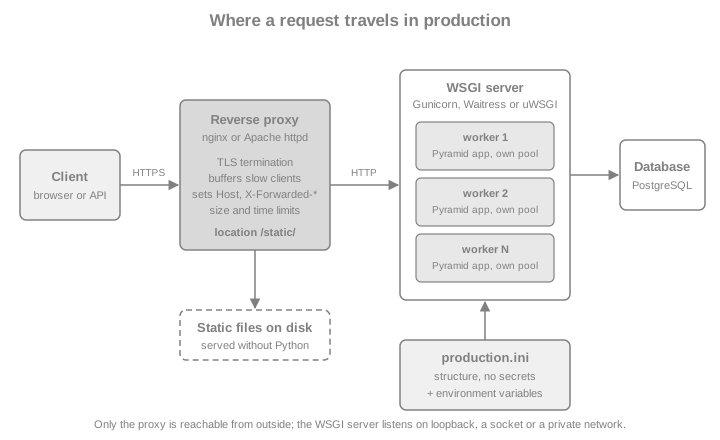
The table lists what changes between the two setups and where this page covers it.
| Concern | Development (development.ini) |
Production (production.ini) |
|---|---|---|
Server |
|
Gunicorn, Waitress, uWSGI or mod_wsgi, started by a supervisor |
Debug aids |
|
Off; the toolbar is not installed in the production environment |
Template and asset reloading |
|
Off (the defaults) |
Listening address |
|
Loopback, a Unix socket or a private network; never the internet |
TLS, compression, static files, request buffering |
Not handled |
The reverse proxy |
Secrets |
A throw-away random value generated at start-up |
Environment variables or mounted secret files |
Logging |
|
|
Process count |
One |
One or more workers per CPU core, each with its own connection pool |
The Bookshelf Shelves Application to Deploy
Deployment does not change how an application is written, but it adds three habits that the example below follows. The
application is created by an entry point that every server can load by name (main(global_config, **settings), the
PasteDeploy convention from the cookiecutter project). Its secret comes from the environment and the process refuses to
start without it, so a missing secret is found at deployment time and not at the first login. And its cookies are
configured for HTTPS: SignedCookieSessionFactory takes secure, httponly and samesite arguments.
The first example writes a small project into a temporary directory: the package, a static file, and a
production.ini. A project generated by the cookiecutter has the same shape; the only difference is the first line of
[app:main], which is use = egg:bookshelf_shelves there (an entry point of an installed package) and is
use = call:bookshelf_shelves:main here because the temporary directory is not installed. Everything else on this page
loads that file. The secret is generated with secrets.token_hex() and passed through an environment variable, which
stands for what systemd, Docker or Kubernetes would provide.
import json
import os
import pathlib
import secrets
import signal
import socket
import subprocess
import sys
import tempfile
import textwrap
import time
import urllib.request

root = pathlib.Path(tempfile.mkdtemp(prefix="shelves-deploy-"))
package = root / "bookshelf_shelves"
(package / "static").mkdir(parents=True)
(package / "static" / "shelves.css").write_text("body { font-family: sans-serif; }\n")

(package / "__init__.py").write_text(textwrap.dedent('''\
    import os

    from pyramid.config import Configurator
    from pyramid.session import SignedCookieSessionFactory
    from pyramid.settings import asbool


    def main(global_config, **settings):
        secret = os.environ.get("BOOKSHELF_SESSION_SECRET")
        if not secret:
            raise RuntimeError("BOOKSHELF_SESSION_SECRET must be set")
        with Configurator(settings=settings) as config:
            config.set_session_factory(
                SignedCookieSessionFactory(
                    secret,
                    secure=asbool(settings.get("bookshelf.cookie_secure", "true")),
                    httponly=True,
                    samesite="Lax",
                )
            )
            config.add_static_view("static", "static", cache_max_age=3600)
            config.add_route("healthz", "/healthz")
            config.add_route("whoami", "/whoami")
            config.add_route("visit", "/visit")
            config.scan(".views")
        return config.make_wsgi_app()
    '''))

(package / "views.py").write_text(textwrap.dedent('''\
    import os

    from pyramid.view import view_config


    @view_config(route_name="healthz", renderer="json")
    def healthz(request):
        return {"status": "ok", "pid": os.getpid()}


    @view_config(route_name="whoami", renderer="json")
    def whoami(request):
        return {
            "scheme": request.scheme,
            "host": request.host,
            "client_addr": request.client_addr,
            "remote_addr": request.remote_addr,
            "script_name": request.script_name,
            "url": request.route_url("whoami"),
        }


    @view_config(route_name="visit", renderer="json")
    def visit(request):
        request.session["visits"] = request.session.get("visits", 0) + 1
        return {"visits": request.session["visits"]}
    '''))

(root / "production.ini").write_text(textwrap.dedent('''\
    [app:main]
    use = call:bookshelf_shelves:main
    pyramid.reload_templates = false
    pyramid.reload_assets = false
    pyramid.debug_authorization = false
    pyramid.debug_notfound = false
    pyramid.debug_routematch = false
    pyramid.default_locale_name = en
    bookshelf.cookie_secure = true

    [server:main]
    use = egg:waitress#main
    listen = 127.0.0.1:%(http_port)s
    threads = 8
    channel_timeout = 60
    max_request_body_size = 10485760
    trusted_proxy = %(proxy_ip)s
    trusted_proxy_count = 1
    trusted_proxy_headers = x-forwarded-for x-forwarded-host x-forwarded-proto
    clear_untrusted_proxy_headers = true

    [loggers]
    keys = root, bookshelf_shelves

    [handlers]
    keys = console

    [formatters]
    keys = generic

    [logger_root]
    level = WARN
    handlers = console

    [logger_bookshelf_shelves]
    level = WARN
    handlers =
    qualname = bookshelf_shelves

    [handler_console]
    class = StreamHandler
    args = (sys.stderr,)
    level = NOTSET
    formatter = generic

    [formatter_generic]
    format = %(asctime)s %(levelname)-5.5s [%(name)s:%(lineno)s][%(threadName)s] %(message)s
    '''))

# What the platform would inject, and the import path for the child processes started below.
os.environ["BOOKSHELF_SESSION_SECRET"] = secrets.token_hex(32)
os.environ["PYTHONPATH"] = str(root)
os.environ["PYTHONWARNINGS"] = "ignore"
sys.path.insert(0, str(root))

import webtest
from pyramid.paster import get_app

app = get_app(str(root / "production.ini"), "main")
client = webtest.TestApp(app)

print(client.get("/healthz").json["status"])
cookie = client.get("/visit", extra_environ={"wsgi.url_scheme": "https"}).headers["Set-Cookie"]
print([part for part in cookie.split("; ")[1:]])
print(client.get("/static/shelves.css").headers["Cache-Control"])ok
['Path=/', 'secure', 'HttpOnly', 'SameSite=Lax']
max-age=3600Three details of the file deserve a comment. The server section interpolates two variables, %(http_port)s and
%(proxy_ip)s, which pserve production.ini http_port=8000 proxy_ip=127.0.0.1 supplies from the command line; the examples
below use this to pick a free port (the settings page describes this PasteDeploy feature). The file deliberately defines
no defaults for them: PasteDeploy does not let a command-line variable overwrite a value that [DEFAULT] already has, and
a missing variable fails when the server section is read, which is the behaviour a deployment wants. Gunicorn and uWSGI
never read that section, so they are unaffected. The logging sections
at the end are the ones that pserve and gunicorn --paste hand to logging.config.fileConfig; the
logging page explains them. And the secret appears nowhere in the
file.
The next example defines the helpers that the rest of the page uses: a free port, a server starter that waits for
/healthz, a JSON fetcher and a function that sends a signal and returns what the server printed.
BIN = pathlib.Path(sys.executable).parent


def free_port():
    with socket.socket() as sock:
        sock.bind(("127.0.0.1", 0))
        return sock.getsockname()[1]


def get_json(port, path, **headers):
    request = urllib.request.Request(f"http://127.0.0.1:{port}{path}", headers=headers)
    with urllib.request.urlopen(request, timeout=10) as response:
        return json.load(response)


def start(argv, port, health="/healthz"):
    proc = subprocess.Popen(
        [str(part) for part in argv], cwd=root,
        stdout=subprocess.PIPE, stderr=subprocess.STDOUT, text=True,
    )
    for _ in range(150):
        try:
            get_json(port, health)
            return proc
        except OSError:
            if proc.poll() is not None:
                break
            time.sleep(0.1)
    proc.kill()
    raise RuntimeError(proc.communicate()[0])


def stop(proc, sig=signal.SIGTERM):
    proc.send_signal(sig)
    return proc.communicate(timeout=30)[0]
Source: Python: subprocess
production.ini Hardening
The production.ini of the cookiecutter project is already close to what a server needs; the work is to keep it that
way. The checklist below is what to review in the file, and an environment audit follows, because environment variables
silently win over the file.
| Setting or practice | Production value | Why |
|---|---|---|
|
|
Re-reads template files on every request; slow, and it hides a stale deployment |
|
|
The same for asset specifications |
|
|
They print view-authorization, NotFound and route-matching details to stderr |
|
Absent |
The toolbar exposes settings, the request and a Python console; it belongs to |
|
|
Aggregates that switch on every |
|
Unset |
Stops every |
Server |
|
The generated |
Secrets |
Environment variables or mounted files |
A committed |
Logging |
Root at |
The container runtime or journald collects stderr; files need rotation |
|
Unset ( |
Would send unhandled exception tracebacks to the client |
Every pyramid.* setting can also be set through a PYRAMID_* environment variable (PYRAMID_RELOAD_TEMPLATES=1),
and the environment value wins over the .ini file, as the settings page explains. The unprefixed names (reload_templates) are accepted too, and the audit checks them. A shell that a developer used to debug
a problem, a stray line in a systemd environment file or a Compose environment: block is enough to re-enable a switch
that the file keeps off. A small audit run at start-up, or in the deployment pipeline against the real environment, turns
that into a failed deployment rather than a surprise. The function below reads the settings through the same
get_appsettings the application uses and checks both sources. The second call hands it a development-style
configuration to show a failing audit; the real file passes.
from pyramid.paster import get_appsettings
from pyramid.settings import asbool, aslist

DEBUG_SETTINGS = (
    "reload_templates",
    "reload_assets",
    "debug_authorization",
    "debug_notfound",
    "debug_routematch",
    "debug_all",
    "reload_all",
    "prevent_http_cache",
)


def audit(settings, environ):
    """Return a list of problems that must stop a production deployment."""
    problems = []
    for name in DEBUG_SETTINGS:
        if asbool(settings.get(f"pyramid.{name}", settings.get(name, "false"))):
            problems.append(f"pyramid.{name} is enabled in the settings")
        if asbool(environ.get(f"PYRAMID_{name.upper()}", "false")):
            problems.append(f"PYRAMID_{name.upper()} is set in the environment")
    includes = aslist(settings.get("pyramid.includes", ""))
    if any("debugtoolbar" in include for include in includes):
        problems.append("pyramid.includes lists the debug toolbar")
    if not environ.get("BOOKSHELF_SESSION_SECRET"):
        problems.append("BOOKSHELF_SESSION_SECRET is missing")
    return problems


settings = get_appsettings(str(root / "production.ini"), "main")
print("production.ini:", audit(settings, os.environ))

development_style = {"pyramid.reload_templates": "true", "pyramid.includes": "pyramid_debugtoolbar"}
print("development-style:", audit(development_style, {"PYRAMID_DEBUG_ROUTEMATCH": "1"}))production.ini: []
development-style: ['pyramid.reload_templates is enabled in the settings', 'PYRAMID_DEBUG_ROUTEMATCH is set in the environment', 'pyramid.includes lists the debug toolbar', 'BOOKSHELF_SESSION_SECRET is missing']pyramid.paster.get_appsettings is the call to use in a deployment script: it applies the plaster loader (the
PasteDeploy loader for .ini files) without constructing the application. The same file therefore serves the
application, the audit, the p* scripts and the migrations.
Waitress
Waitress is the server named in every generated .ini file (use = egg:waitress#main). It is a pure-Python,
multi-threaded WSGI server with no dependencies, it runs on Windows as well as Unix, and its documentation describes it
as production quality. It has one process and a pool of threads (threads, default 4), so it uses one core for Python
code at a time; scale it by running several processes behind the proxy, or choose Gunicorn if you want the server to
manage the processes for you. It does not terminate TLS, which is the first reason it always sits behind a proxy in
production.
Waitress takes the same arguments in three places: as keyword arguments of waitress.serve(), as the options of the
waitress-serve command, and as keys of the [server:main] section (the table lists the ones that matter for a
deployment, with the defaults from the official page).
| Argument | Default | Purpose |
|---|---|---|
|
|
Space-separated |
|
none, |
A Unix domain socket instead of TCP (not on Windows) |
|
4 |
Threads that run application code; also the number of simultaneous requests |
|
100 |
Stops accepting new channels beyond this count; each channel uses file descriptors |
|
120 |
Seconds an inactive connection may stay open |
|
1024 |
Queue of pending TCP connections |
|
1 GiB |
Bytes accepted in a request body; lower it to what the application needs |
|
256 KiB |
Bytes of all request headers together |
|
512 KiB, 1 MiB |
Above these sizes input and output spill into temporary files |
|
|
|
|
empty |
Becomes |
|
none |
Address of the one peer allowed to override WSGI variables with proxy headers; |
|
1 |
How many proxies in a chain are trusted; the documentation’s example is two trusted proxies, which need the value 2 |
|
none |
Which headers to honour: |
|
|
Removes the proxy headers that are not trusted, so that application code cannot read them by accident |
|
|
Never enable it in production |
Behind a Proxy: trusted_proxy
Behind a reverse proxy, the connection that reaches Waitress comes from the proxy, so by default the application sees
the proxy’s address, scheme http and whatever Host the proxy forwards. The fix is Waitress’s own proxy support, which
is the reason production.ini above has five trusted_proxy* lines. With trusted_proxy set to the proxy’s address,
Waitress rewrites REMOTE_ADDR, HTTP_HOST and wsgi.url_scheme from the trusted headers and removes the others. With
the address of anybody else, the same headers are ignored and cleared.
The next example starts pserve twice on the same file, once with the loopback address as the trusted proxy (the test
client plays the proxy) and once with a proxy address that is not the sender. The request carries forged-looking
forwarding headers in both runs.
forwarded = {
    "X-Forwarded-Proto": "https",
    "X-Forwarded-Host": "books.example.org",
    "X-Forwarded-For": "203.0.113.9",
}
for proxy_ip in ("127.0.0.1", "10.255.0.1"):
    port = free_port()
    proc = start([BIN / "pserve", "production.ini", f"http_port={port}", f"proxy_ip={proxy_ip}"], port)
    seen = get_json(port, "/whoami", **forwarded)
    stop(proc)
    host = seen["url"].split("/")[2].split(":")[0]
print(proxy_ip, "->", {key: seen[key] for key in ("scheme", "client_addr", "remote_addr")}, "route_url host:", host)127.0.0.1 -> {'scheme': 'https', 'client_addr': '203.0.113.9', 'remote_addr': '203.0.113.9'} route_url host: books.example.org
10.255.0.1 -> {'scheme': 'http', 'client_addr': '127.0.0.1', 'remote_addr': '127.0.0.1'} route_url host: 127.0.0.1When the sender is the trusted proxy, the application sees the HTTPS scheme, the public host name and the real client
address, and route_url produces the public URL. When it is not, the application sees the plain connection and the
forged headers do nothing. Set trusted_proxy_count to the number of proxies in the chain (a CDN in front of nginx makes
it 2); the documentation explains that the address a trusted proxy reports is believed, and anything further left is
not, so a count that is too low reports a proxy as the client and one that is too high believes addresses that the
client chose.
Starting and Stopping
Three ways to start Waitress exist, and they differ in what they offer, not in the server.
| Command | Reads | Use it for |
|---|---|---|
|
The whole |
Development, small deployments, and containers that want one entry point |
|
Command-line options only; the application is a module attribute, or a factory with |
Servers where the application object is built by a module and the |
|
Keyword arguments in your own script |
Tests and embedded servers |
Stopping deserves a measurement. A deployment stops processes on every release, and the stop signal decides whether an in-flight request finishes. The example runs a one-route application that takes three seconds, starts it under Waitress and under Gunicorn, sends a request, and signals the server half a second later.
(root / "slow.py").write_text(textwrap.dedent('''\
    import json
    import time


    def app(environ, start_response):
        if environ["PATH_INFO"] == "/slow":
            time.sleep(3)
        start_response("200 OK", [("Content-Type", "application/json")])
        return [json.dumps({"status": "ok", "pid": 0}).encode()]
    '''))


def signal_during_request(argv, port, sig):
    import threading

    proc = start(argv, port)
    outcome = {}

    def request():
        try:
            outcome["request"] = get_json(port, "/slow")["status"]
        except Exception as exc:
            outcome["request"] = type(exc).__name__

    thread = threading.Thread(target=request)
    thread.start()
    time.sleep(0.5)
    proc.send_signal(sig)
    thread.join()
    proc.communicate(timeout=30)
    return outcome["request"], proc.returncode


for name, sig in (("SIGINT", signal.SIGINT), ("SIGTERM", signal.SIGTERM)):
    port = free_port()
    argv = [BIN / "waitress-serve", f"--listen=127.0.0.1:{port}", "slow:app"]
    print("waitress", name, signal_during_request(argv, port, sig))

for name, sig in (("SIGTERM", signal.SIGTERM), ("SIGQUIT", signal.SIGQUIT)):
    port = free_port()
    argv = [BIN / "gunicorn", "--bind", f"127.0.0.1:{port}", "--graceful-timeout", "10", "--no-control-socket", "slow:app"]
    print("gunicorn", name, signal_during_request(argv, port, sig))
Source: Gunicorn: Signals
waitress SIGINT ('ok', 0)
waitress SIGTERM ('RemoteDisconnected', -15)
gunicorn SIGTERM ('ok', 0)
gunicorn SIGQUIT ('HTTPError', 0)
Waitress finishes the request on SIGINT (the Python interrupt, what Ctrl+C sends) but dies at once on SIGTERM, the
signal that systemd, Docker and Kubernetes send first; the connection is cut and the client sees an error. Gunicorn’s
master treats SIGTERM as the graceful stop (workers get graceful_timeout seconds to finish) and SIGQUIT as the
quick one. This is a practical reason to prefer Gunicorn, or a wrapper that converts the signal, in containers and under
supervisors, and the reason the proxy should retry idempotent requests on another upstream during a rolling deployment.
Gunicorn
Gunicorn is a pre-fork server: a master process starts workers, each worker imports the application and handles
requests, and the master restarts workers that die or hang. It has been the usual production server for Pyramid for
years because it reads the same .ini file as pserve. Pyramid uses the PasteDeploy loader for that, so --paste is
all the integration needed.
gunicorn --paste
gunicorn --paste production.ini loads the [app:main] section (and the logging configuration) and ignores
[server:main]: the options come from the command line, from a gunicorn.conf.py, or from GUNICORN_CMD_ARGS.
The alternative is to keep the options in the .ini file and start with pserve, replacing the server section with
use = egg:gunicorn#main and the Gunicorn settings as keys. The example does both on the same project, checks that the
application answers, and counts the workers that the master booted.
# 1. gunicorn --paste: the .ini file supplies the application only.
port = free_port()
proc = start([BIN / "gunicorn", "--paste", "production.ini", "--bind", f"127.0.0.1:{port}",
              "--workers", "2", "--no-control-socket"], port)
print("gunicorn --paste:", get_json(port, "/healthz")["status"])
log = stop(proc)
print([line.split("] ", 2)[-1] for line in log.splitlines() if "Booting worker" not in line and ("Using worker" in line or "Handling signal" in line)])
print("workers booted:", sum("Booting worker" in line for line in log.splitlines()))

# 2. pserve with a gunicorn server section: the options live in the .ini file.
port = free_port()
text = (root / "production.ini").read_text()
server_section = text[text.index("[server:main]"):text.index("[loggers]")]
(root / "gunicorn.ini").write_text(text.replace(server_section, textwrap.dedent(f'''\
    [server:main]
    use = egg:gunicorn#main
    host = 127.0.0.1
    port = {port}
    workers = 2

    ''')))
proc = start([BIN / "pserve", "gunicorn.ini"], port)
log = stop(proc)
print("pserve + egg:gunicorn#main: workers booted:", sum("Booting worker" in line for line in log.splitlines()))gunicorn --paste: ok
['[INFO] Using worker: sync', '[INFO] Handling signal: term']
workers booted: 2
pserve + egg:gunicorn#main: workers booted: 2Gunicorn settings that matter in a Pyramid deployment (defaults from the settings reference of the installed 26.2 series):
| Setting (command line) | Default | Purpose |
|---|---|---|
|
1, or the environment variable |
Worker processes; the documentation suggests two to four times the number of cores as a starting range to tune |
|
1 |
Threads per worker; more than one selects the |
|
|
|
|
30 |
Workers silent for longer are killed and restarted |
|
30 |
Time workers get to finish after a stop or reload signal |
|
0 (off) |
Restarts a worker after this many requests (plus a random jitter); a cheap guard against slow memory leaks |
|
|
Imports the application in the master before forking; faster start and less memory, but a code change then needs a full restart and pools must be reset after the fork (see Forking and Connection Pools) |
|
|
Front ends allowed to send |
|
none |
Directory for the worker heartbeat files; in containers point it at a memory file system such as |
|
off |
Gunicorn 26 opens a control socket under the user’s home by default; switch it off in containers and read-only file systems |
Source: Gunicorn: Settings
Gunicorn’s handling of the proxy headers is not the same as Waitress’s, and the difference matters for a Pyramid
application. Gunicorn reads X-Forwarded-Proto only from the addresses in forwarded_allow_ips; it does not rewrite
REMOTE_ADDR (it keeps the proxy’s address, as RFC 3875 requires) and it does not touch X-Forwarded-For or
X-Forwarded-Host. The application then relies on the proxy to send a correct Host header, and on what is said in
the nginx section about request.client_addr.
A Configuration File
Beyond three or four options, a gunicorn.conf.py in the working directory (Gunicorn loads it automatically) reads
better than a long command line and can hold hooks. The example writes one, starts Gunicorn with --paste and a single
extra option from the environment, and prints the hook output.
(root / "gunicorn.conf.py").write_text(textwrap.dedent('''\
    import os

    bind = os.environ.get("BOOKSHELF_BIND", "127.0.0.1:8000")
    workers = int(os.environ.get("WEB_CONCURRENCY", "2"))
    threads = 2
    timeout = 30
    graceful_timeout = 30
    keepalive = 5
    max_requests = 1000
    max_requests_jitter = 100
    control_socket_disable = True


    def post_fork(server, worker):
        server.log.info("bookshelf worker ready (hook ran after the fork)")
    '''))

port = free_port()
os.environ["BOOKSHELF_BIND"] = f"127.0.0.1:{port}"
proc = start([BIN / "gunicorn", "--paste", "production.ini", "-c", "gunicorn.conf.py"], port)
print("status =", get_json(port, "/healthz")["status"])
log = stop(proc)
for line in log.splitlines():
    if any(word in line for word in ("Using worker", "bookshelf worker", "Shutting down")):
        print(line.split("] ", 2)[-1])
del os.environ["BOOKSHELF_BIND"]
Source: Gunicorn: Settings
status = ok
[INFO] Using worker: gthread
[INFO] bookshelf worker ready (hook ran after the fork)
[INFO] bookshelf worker ready (hook ran after the fork)
[INFO] Shutting down: Master
--paste and -c combine, and a setting in the configuration file takes precedence over the same setting in the
[server:main] section when pserve is used (the Cookbook page says so). threads = 2 switched the worker class
to gthread, as the table says. The hook ran once per worker, after the fork, which is where the next section puts the
connection-pool reset.
Forking and Connection Pools
Pre-fork servers (Gunicorn with preload_app, uWSGI by default) import the application once and fork the workers, so
anything created at import time is shared by every worker: open sockets, file descriptors, random-number generator
state and connection pools. The Community Cookbook has a short page on this ("Forked and Threaded Servers") and its main
example is still right: an SQLAlchemy Engine that has opened a connection before the fork hands the same socket to every
worker, and two workers speaking on one database connection corrupt each other. A Pyramid application that connects only
inside requests (the usual request.dbsession pattern of the SQLAlchemy page) is safe, because pools connect lazily;
one that connects while the application is created, to check the schema or to warm a cache, must reset the pool in
every child. SQLAlchemy’s documentation gives the recipe: engine.dispose(close=False) in the child, which discards the
inherited connections without closing the sockets that the parent still uses.
The example builds a small application with an engine that connects during import, runs it under Gunicorn with
--preload, and has the hook report the pool before and after.
(root / "forkapp.py").write_text(textwrap.dedent('''\
    import json
    import os

    from sqlalchemy import create_engine

    engine = create_engine("sqlite:///" + os.environ["FORKAPP_DB"])
    with engine.connect() as connection:  # connects before the fork, as a start-up check would
        connection.exec_driver_sql("select 1")


    def app(environ, start_response):
        start_response("200 OK", [("Content-Type", "application/json")])
        return [json.dumps({"status": "ok", "pid": os.getpid()}).encode()]
    '''))
(root / "fork_conf.py").write_text(textwrap.dedent('''\
    import forkapp

    preload_app = True
    workers = 2


    def post_fork(server, worker):
        before = forkapp.engine.pool.checkedin()
        forkapp.engine.dispose(close=False)
        server.log.info("pool before=%s after=%s", before, forkapp.engine.pool.checkedin())
    '''))

port = free_port()
os.environ["FORKAPP_DB"] = str(root / "fork.sqlite")
proc = start([BIN / "gunicorn", "-c", "fork_conf.py", "--bind", f"127.0.0.1:{port}", "--no-control-socket", "forkapp:app"], port)
log = stop(proc)
print(sorted(line.split("] ", 2)[-1] for line in log.splitlines() if "pool before" in line))['[INFO] pool before=1 after=0', '[INFO] pool before=1 after=0']Each worker found one checked-in connection inherited from the master and dropped it. uWSGI has the same hook as
uwsgidecorators.postfork, and the Waitress case is different in kind: it does not fork, but its threads share the
engine, which is what the pool is designed for. The Cookbook page also mentions seeding the PyCrypto random generator
after a fork; that library is unmaintained, and the standard library’s secrets and os.urandom do not need it.
mod_wsgi
mod_wsgi embeds Python in Apache httpd. The official Pyramid tutorial is the reference, and it is short: a project
created from the cookiecutter, a pyramid.wsgi script, and a handful of Apache directives. The script is the part
that is Pyramid’s:
(root / "pyramid.wsgi").write_text(textwrap.dedent(f'''\
    from pyramid.paster import get_app, setup_logging

    ini_path = "{root}/production.ini"
    setup_logging(ini_path)
    application = get_app(ini_path, "main")
    '''))

import runpy

namespace = runpy.run_path(str(root / "pyramid.wsgi"))
print(sorted(name for name in namespace if name == "application"))
print(webtest.TestApp(namespace["application"]).get("/healthz").json["status"])['application']
okThe script was executed the way mod_wsgi does it, and the application it exposes answered. The assignment to the name
application is mandatory: mod_wsgi looks for it by name. setup_logging is needed because, unlike pserve,
mod_wsgi never reads the logging sections of the .ini file. The Apache side is the configuration of the official
tutorial (not run here; the python-path must name the virtual environment that holds the application):
# Not run: needs Apache httpd with mod_wsgi loaded
WSGIApplicationGroup %{GLOBAL}
WSGIPassAuthorization On
WSGIDaemonProcess pyramid user=shelves group=shelves threads=4 \
  python-path=/srv/shelves/env/lib/python3.13/site-packages
WSGIScriptAlias /shelves /srv/shelves/pyramid.wsgi

<Directory /srv/shelves>
  WSGIProcessGroup pyramid
  Require all granted
</Directory>The three non-obvious lines are the ones the tutorial explains. WSGIApplicationGroup %{GLOBAL} runs the application in
the main Python interpreter instead of a sub-interpreter, because sub-interpreters do not get along with C extensions;
WSGIPassAuthorization On passes the Authorization header through, which Apache otherwise withholds from WSGI
(security policies that read it, such as token authentication, need it); and WSGIDaemonProcess with
WSGIProcessGroup runs the application in separate daemon processes under their own user, not inside Apache’s. The
WSGIScriptAlias /shelves ... line also mounts the application at a prefix: mod_wsgi sets SCRIPT_NAME for you
(see virtual hosting). The interpreter that mod_wsgi was built against must be the one that created the virtual
environment. mod_wsgi-express (pip install mod_wsgi) starts a private Apache from the command line and is the easier
way to try it; it needs a Python library that the operating system allows Apache to load, which is the failure that
stopped it on the macOS machine used for this page. The Flask page covers
mod_wsgi-express on Linux in more detail.
uWSGI
uWSGI also understands PasteDeploy: the --paste option takes a config: URI of the .ini file, and the Cookbook has
three recipes around it. pyuwsgi is the wheel-installable build of uWSGI; it provides the uwsgi command.
port = free_port()
proc = start([BIN / "uwsgi", "--http-socket", f"127.0.0.1:{port}", "--master", "--processes", "2",
              "--paste", f"config:{root}/production.ini", "--need-app", "--die-on-term"], port)
log = stop(proc)
print("uwsgi --paste: workers spawned:", sum("spawned uWSGI worker" in line for line in log.splitlines()))

# The same options in uWSGI's own .ini format; $(NAME) reads an environment variable.
(root / "uwsgi.ini").write_text(textwrap.dedent('''\
    [uwsgi]
    http-socket = 127.0.0.1:$(BOOKSHELF_PORT)
    master = true
    processes = 2
    need-app = true
    die-on-term = true
    paste = config:%d/production.ini
    '''))
port = free_port()
os.environ["BOOKSHELF_PORT"] = str(port)
proc = start([BIN / "uwsgi", "--ini", "uwsgi.ini"], port)
log = stop(proc)
print("uwsgi --ini: workers spawned:", sum("spawned uWSGI worker" in line for line in log.splitlines()))
Source: uWSGI: Configuring uWSGI
uwsgi --paste: workers spawned: 2
uwsgi --ini: workers spawned: 2
--need-app makes uWSGI exit when the application cannot be loaded, instead of running a server that answers every
request with an error; --die-on-term makes SIGTERM stop the process, because uWSGI by default interprets it as a
reload request, which breaks supervisors and container runtimes (uWSGI documents that SIGTERM means "brutally reload the stack" until 2.1). %d in the .ini form is the directory of the
configuration file. Run uWSGI behind a proxy that speaks its protocol (uwsgi_pass in nginx, with --socket) or plain
HTTP (--http-socket, as above); --http starts uWSGI’s own router and is not for the internet.
nginx in Front
The proxy does what the Python server should not: TLS, slow clients, limits, static files, compression and the
Host/X-Forwarded-* headers. The configuration below is the one used with the Docker example later in the page. It
was validated with nginx -t in an nginx 1.29 container; the proxy-to-Pyramid path was checked with the servers and
header combinations of the earlier examples.
upstream shelves_app {
    server shelves-app:8000;
    keepalive 16;
}

server {
    listen 80;
    server_name books.example.org;
    client_max_body_size 10m;

    # Static files straight from disk, with the cache lifetime the application asked for.
    location /static/ {
        alias /srv/shelves/static/;
        expires 1h;
        access_log off;
    }

    location / {
        proxy_pass http://shelves_app;
        proxy_http_version 1.1;
        proxy_set_header Connection "";
        proxy_set_header Host $host;
        proxy_set_header X-Forwarded-For $remote_addr;
        proxy_set_header X-Forwarded-Proto $scheme;
        proxy_read_timeout 60s;
    }
}
Source: nginx: ngx_http_proxy_module
Source: Gunicorn: Deploy
Line by line: Host $host passes the public host name, which Pyramid uses for every absolute URL (route_url, redirects,
resource_url); the Waitress documentation asks for exactly this header. X-Forwarded-Proto $scheme tells the
application that the client used HTTPS, so that links and secure cookies come out right. keepalive together with
proxy_http_version 1.1 and an empty Connection header reuses upstream connections. location /static/ serves the
files without Python; the alias directory must hold the same files as the package’s static directory (mount or copy
them into the proxy’s file system at deployment time), and the URL prefix must match the path of the static view. The generated
project’s static view is /static, which is why no rewrite is needed. With a sync Gunicorn worker the proxy is not
optional: the worker handles one request at a time, so a client that sends its request slowly would occupy it, and nginx
buffers the request until it is complete.
X-Forwarded-For and request.client_addr
One line of that configuration is deliberate and different from many copies found on the web: X-Forwarded-For
$remote_addr replaces the header, where the usual $proxy_add_x_forwarded_for appends to whatever the client sent. The
reason is request.client_addr. Pyramid’s request is a WebOb request, and client_addr returns the first address of
X-Forwarded-For if the header exists, and REMOTE_ADDR only if it does not. The official API page carries a warning
about it: a client can put any value there, and the value can be trusted only if the server sits behind a proxy that
controls the header. Behind Waitress with trusted_proxy, the server rewrites REMOTE_ADDR and clears the header, and
the property is safe. Behind Gunicorn or uWSGI, which leave X-Forwarded-For alone, it is only as good as the proxy’s
configuration. The next example makes the difference visible with a request that arrives with a forged first entry.
forged = {"X-Forwarded-For": "198.51.100.77", "X-Forwarded-Proto": "https", "Host": "books.example.org"}

port = free_port()
proc = start([BIN / "gunicorn", "--paste", "production.ini", "--bind", f"127.0.0.1:{port}", "--no-control-socket"], port)
seen = get_json(port, "/whoami", **forged)
stop(proc)
print("gunicorn", {key: seen[key] for key in ("scheme", "client_addr", "remote_addr")})

# What nginx does with "X-Forwarded-For $remote_addr": the client-supplied value is replaced.
overwritten = dict(forged, **{"X-Forwarded-For": "203.0.113.9"})
port = free_port()
proc = start([BIN / "gunicorn", "--paste", "production.ini", "--bind", f"127.0.0.1:{port}", "--no-control-socket"], port)
seen = get_json(port, "/whoami", **overwritten)
stop(proc)
print("gunicorn behind a proxy that overwrites the header", {key: seen[key] for key in ("client_addr", "remote_addr")})
Source: Pyramid: Request.client_addr
gunicorn {'scheme': 'https', 'client_addr': '198.51.100.77', 'remote_addr': '127.0.0.1'}
gunicorn behind a proxy that overwrites the header {'client_addr': '203.0.113.9', 'remote_addr': '127.0.0.1'}
In the first run, remote_addr is the real peer (the proxy) while client_addr is the forged address; any rate limit,
audit log or ban list that uses client_addr behind Gunicorn can be fooled by a client that simply adds the header. In
the second run the proxy has overwritten it and the property reports the real client. The rule that follows: configure
the proxy to overwrite X-Forwarded-For (or use trusted_proxy with Waitress), and use request.remote_addr when the
application must not depend on that configuration.
Virtual Hosting and URL Prefixes
Sometimes the application does not live at the root of the site: https://example.org/bookshelf/ is the
application, https://example.org/ is something else. The WSGI answer is SCRIPT_NAME, the part of the path that the
server has consumed before the application starts; Pyramid’s route_url, route_path, static_url and resource_url
prepend it, and routing matches against PATH_INFO, the rest. The official Virtual Hosting chapter describes
the two situations, and there are several ways to set SCRIPT_NAME, each with a different trust model.
| Mechanism | How | Notes |
|---|---|---|
|
|
Waitress sets |
|
|
The pure-Python solution of the official chapter; requests outside the prefix are 404; it ignores forwarded host headers, so a proxy must send |
PasteDeploy |
|
Sets |
mod_wsgi |
|
Apache and mod_wsgi set it; nothing to configure in the |
|
The proxy adds |
For traversal applications: the resource at |
Source: Pyramid: Virtual Hosting
Source: PasteDeploy: paste.deploy.config
Without any of them, an application served under a prefix generates links without it: the browser then asks the proxy
for /home instead of /bookshelf/home, and gets the wrong site. The example mounts one small application, a
resource tree with a URL-dispatch route and a view for shelves, in the four first ways, and prints what the
application sees.
(root / "shelves_tree.py").write_text(textwrap.dedent('''\
    from pyramid.config import Configurator
    from pyramid.view import view_config


    class Shelf:
        def __init__(self, name, parent):
            self.__name__, self.__parent__ = name, parent

        def __getitem__(self, key):
            if key == "dune":
                return Shelf("dune", self)
            raise KeyError(key)


    class Root:
        __name__ = __parent__ = None

        def __getitem__(self, key):
            if key == "ada":
                return Shelf("ada", self)
            raise KeyError(key)


    @view_config(route_name="home", renderer="json")
    def home(request):
        return {"url": request.route_url("home"), "script_name": request.script_name, "path_info": request.path_info}


    @view_config(context=Shelf, renderer="json")
    def shelf(context, request):
        return {"shelf": request.resource_url(context), "root": request.resource_url(request.root)}


    def main(global_config, **settings):
        with Configurator(settings=settings, root_factory=lambda request: Root()) as config:
            config.add_route("home", "/home")
            config.scan()
        return config.make_wsgi_app()
    '''))
(root / "urlmap.ini").write_text(textwrap.dedent('''\
    [app:shelves]
    use = call:shelves_tree:main

    [composite:main]
    use = egg:rutter#urlmap
    /bookshelf = shelves
    '''))
(root / "prefix.ini").write_text(textwrap.dedent('''\
    [app:main]
    use = call:shelves_tree:main
    filter-with = proxy-prefix

    [filter:proxy-prefix]
    use = egg:PasteDeploy#prefix
    prefix = /bookshelf
    '''))

# 1. rutter urlmap composite
mapped = webtest.TestApp(get_app(str(root / "urlmap.ini"), "main"))
print("rutter  ", mapped.get("/bookshelf/home").json)
print("rutter   outside the prefix:", mapped.get("/home", status="*").status)
print("rutter   traversal:", mapped.get("/bookshelf/ada/dune").json)
print("rutter   forwarded headers:", mapped.get("/bookshelf/home", headers={"X-Forwarded-Host": "books.example.org"}).json["url"])

# 2. PasteDeploy PrefixMiddleware: honours the forwarded headers from anybody
prefixed = webtest.TestApp(get_app(str(root / "prefix.ini"), "main"))
print("prefix   forwarded headers:", prefixed.get("/bookshelf/home", headers={"X-Forwarded-Proto": "https", "X-Forwarded-Host": "books.example.org"}).json["url"])

# 3. Waitress url_prefix
(root / "waitress_prefix.ini").write_text(textwrap.dedent('''\
    [app:main]
    use = call:shelves_tree:main

    [server:main]
    use = egg:waitress#main
    listen = 127.0.0.1:%(http_port)s
    url_prefix = /shelves
    '''))
port = free_port()
proc = start([BIN / "pserve", "waitress_prefix.ini", f"http_port={port}"], port, health="/shelves/home")
seen = get_json(port, "/shelves/home")
print("waitress", seen["script_name"], seen["path_info"], seen["url"].split("/", 3)[3])
stop(proc)

# 4. X-Vhm-Root: serve the shelf "ada" as the root of the site (traversal only)
tree = webtest.TestApp(__import__("shelves_tree").main({}))
print("vhm      no header:", tree.get("/ada/dune").json)
print("vhm      root=/ada:", tree.get("/dune", extra_environ={"HTTP_X_VHM_ROOT": "/ada"}).json)
Source: Pyramid: Virtual Hosting
rutter   {'url': 'http://localhost/bookshelf/home', 'script_name': '/bookshelf', 'path_info': '/home'}
rutter   outside the prefix: 404 Not Found
rutter   traversal: {'shelf': 'http://localhost/bookshelf/ada/dune/', 'root': 'http://localhost/bookshelf/'}
rutter   forwarded headers: http://localhost/bookshelf/home
prefix   forwarded headers: https://books.example.org/bookshelf/home
waitress /shelves /home shelves/home
vhm      no header: {'shelf': 'http://localhost/ada/dune/', 'root': 'http://localhost/'}
vhm      root=/ada: {'shelf': 'http://localhost/dune/', 'root': 'http://localhost/'}
Read the outputs against the table. rutter mounts the application and builds prefixed URLs from the path, and it does
not look at X-Forwarded-Host: the generated URL keeps the Host it received, which is the official chapter’s warning.
PrefixMiddleware does translate the forwarded headers, which is convenient behind a proxy and wrong for a server that
clients can reach directly, because anybody can then choose the scheme and host of the URLs the application generates;
use it only when the proxy is the sole route to the server, or prefer Waitress’s trusted_proxy. Waitress’s
url_prefix is the simplest and the least flexible. X-Vhm-Root is a traversal feature: the resource URLs of the
virtual root come out without the physical path (http://localhost/dune/ for a resource that is at
/ada/dune in the tree), and the header is only honoured, as written in the chapter, by traversal; a URL-dispatch
route is unaffected. The header comes from the proxy, so the proxy must overwrite whatever the client sent, as with
X-Forwarded-For. In every case the proxy rewrites or strips the prefix as the mechanism requires (rutter and
WSGIScriptAlias expect the prefix to arrive, Waitress’s url_prefix also accepts requests without it).
Process Supervision
Nothing in the topology restarts itself. A supervisor starts the services at boot, restarts them when they crash, stops
them with the signal the server expects, and collects their logs. On a Linux host that is systemd. In a container the
runtime plays that role and the server runs in the foreground (see Docker and Kubernetes). A unit for the
Gunicorn setup of this page runs as an unprivileged user, reads the secrets from an environment file owned by root with
mode 0600, stops with SIGTERM (the graceful signal measured above) and reloads with SIGHUP, which makes the
master start new workers and retire the old ones gracefully. It was not run: the verification host is not Linux.
# /etc/systemd/system/shelves.service  (not run: needs systemd)
[Unit]
Description=Bookshelf Shelves (Gunicorn)
After=network.target

[Service]
User=shelves
Group=shelves
WorkingDirectory=/srv/shelves/current
EnvironmentFile=/etc/shelves/shelves.env
ExecStart=/srv/shelves/env/bin/gunicorn --paste production.ini --config gunicorn.conf.py
ExecReload=/bin/kill -s HUP $MAINPID
KillMode=mixed
TimeoutStopSec=35
Restart=on-failure
PrivateTmp=true
NoNewPrivileges=true

[Install]
WantedBy=multi-user.target
Source: systemd.service(5)
TimeoutStopSec is a little longer than graceful_timeout, so that systemd does not kill the workers before Gunicorn
does. pserve is not a supervisor: the Cookbook’s "nginx + pserve + supervisord" recipe combines it with Supervisor,
which still works, but a unit file gives the same with less. A --reload start never belongs in a unit, and the process must stay
in the foreground.
Docker and Kubernetes
A container image of a Pyramid application is a Python image, the installed package, production.ini and Gunicorn as
the entry point; pserve and Waitress are fine for a single replica but do not stop gracefully on SIGTERM. The
generic material (layers, multi-stage builds, non-root users, image scanning) is covered by the
Dockerfile fundamentals,
multi-stage builds and
image best practices pages. The Pyramid-specific points are
few: install the package into the image and not from the source tree, so that the entry point egg:bookshelf_shelves
resolves; install Gunicorn there and not the debug toolbar; keep the secrets out of the image; and point
--worker-tmp-dir at memory.
The Dockerfile below builds wheels in a first stage and installs them into a slim image that runs as a numeric non-root
user (Kubernetes' runAsNonRoot check needs a numeric id). It was built and run with Docker 29.8.2 and python:3.13-slim, on
the project of this page packaged with a pyproject.toml that has a paste.app_factory entry point, with a read-only
root file system and /dev/shm as a memory file system; behind the nginx configuration above the container answered
/healthz, /whoami reported the address that nginx had written into X-Forwarded-For and not the forged one, and
docker stop ended it in a third of a second, because Gunicorn handles SIGTERM gracefully.
# syntax=docker/dockerfile:1
FROM python:3.13-slim AS build
WORKDIR /src
COPY pyproject.toml README.md ./
COPY bookshelf_shelves ./bookshelf_shelves
RUN pip wheel --no-cache-dir --wheel-dir /wheels . gunicorn

FROM python:3.13-slim
ENV PYTHONUNBUFFERED=1 \
    PYTHONDONTWRITEBYTECODE=1
RUN useradd --system --uid 10001 --home-dir /nonexistent --no-create-home shelves
WORKDIR /app
COPY --from=build /wheels /wheels
RUN pip install --no-cache-dir --no-index --find-links=/wheels bookshelf_shelves gunicorn \
    && rm -rf /wheels
COPY production.ini .
USER 10001
EXPOSE 8000
CMD ["gunicorn", "--paste", "production.ini", "--bind", "0.0.0.0:8000", "--workers", "2", "--worker-tmp-dir", "/dev/shm", "--access-logfile", "-", "--no-control-socket"]
Source: Docker: Multi-stage builds
PYTHONUNBUFFERED=1 makes the logs appear immediately. The bind is 0.0.0.0 because inside a container the proxy
reaches the process over the container network; what keeps it private is the network, not the address. Gunicorn’s
forwarded_allow_ips default (loopback) then does not match the proxy’s address, so X-Forwarded-Proto is ignored;
set FORWARDED_ALLOW_IPS to the proxy’s network (a CIDR such as 10.0.0.0/8 is accepted) in the environment
of the container. In Kubernetes the manifest provides what the image does not have: replicas, the secret from a
Secret, and probes on the /healthz view, which does no database work and therefore only reports that the process
answers.
apiVersion: apps/v1
kind: Deployment
metadata:
  name: shelves
spec:
  replicas: 3
  selector:
    matchLabels:
      app: shelves
  template:
    metadata:
      labels:
        app: shelves
    spec:
      securityContext:
        runAsNonRoot: true
        runAsUser: 10001
      terminationGracePeriodSeconds: 40
      containers:
        - name: web
          image: registry.example.org/bookshelf-shelves:1.0
          ports:
            - containerPort: 8000
          env:
            - name: BOOKSHELF_SESSION_SECRET
              valueFrom:
                secretKeyRef:
                  name: shelves-secrets
                  key: session-secret
            - name: FORWARDED_ALLOW_IPS
              value: "10.0.0.0/8"
          readinessProbe:
            httpGet: {path: /healthz, port: 8000}
            periodSeconds: 5
          livenessProbe:
            httpGet: {path: /healthz, port: 8000}
            initialDelaySeconds: 10
            periodSeconds: 10
          securityContext:
            allowPrivilegeEscalation: false
            readOnlyRootFilesystem: true
          volumeMounts:
            - name: shm
              mountPath: /dev/shm
      volumes:
        - name: shm
          emptyDir: {medium: Memory}
---
apiVersion: v1
kind: Service
metadata:
  name: shelves
spec:
  selector:
    app: shelves
  ports:
    - port: 80
targetPort: 8000The terminationGracePeriodSeconds is longer than Gunicorn’s graceful_timeout (30), so that the kubelet’s SIGKILL
arrives after the workers have finished. The Secret, the Ingress that replaces nginx, rolling updates and probes have
their own pages on this site: Secrets,
Health probes and lifecycle,
ReplicaSets and Deployments,
Services and Ingress. Migrations
(see SQLAlchemy, Transactions & Migrations) are one
more command, alembic upgrade head, run once per release by a Job or an init step, never by every replica at
start-up.
ASGI
Pyramid is a WSGI framework and there is no ASGI-native Pyramid. The Cookbook’s ASGI page shows the supported route:
wrap the WSGI application with asgiref.wsgi.WsgiToAsgi, and run the result with an ASGI server such as Uvicorn or
Hypercorn. The wrapper runs each request in a thread pool, so the application stays synchronous and nothing becomes
faster; the reasons to do it are a platform that only offers ASGI servers, or sharing a process with ASGI components.
The page itself warns that not every WSGI feature survives the conversion (file handles of incoming POST bodies are
named), and that its WebSocket extension is one possible design, not a feature of Pyramid. The Tornado page on
WSGI interoperability covers the opposite direction, serving a WSGI
application from inside an asynchronous server, and the
FastAPI page on WSGI middleware the same idea with a
different host.
(root / "asgi_app.py").write_text(textwrap.dedent('''\
    from asgiref.wsgi import WsgiToAsgi
    from pyramid.paster import get_app, setup_logging

    setup_logging("production.ini")
    app = WsgiToAsgi(get_app("production.ini", "main"))
    '''))

port = free_port()
proc = start([BIN / "uvicorn", "asgi_app:app", "--host", "127.0.0.1", "--port", str(port), "--no-access-log"], port)
seen = get_json(port, "/whoami")
log = stop(proc)
print({key: seen[key] for key in ("scheme", "remote_addr", "script_name")})
print([line for line in log.splitlines() if line.startswith("INFO") and "lifespan" in line])
Source: Pyramid Community Cookbook: ASGI
{'scheme': 'http', 'remote_addr': '127.0.0.1', 'script_name': ''}
["INFO:     ASGI 'lifespan' protocol appears unsupported."]
The application answered through Uvicorn. Uvicorn reports that the lifespan protocol is unsupported, which is harmless
for a wrapped WSGI application (no start-up or shutdown events exist to receive). The proxy headers follow Uvicorn’s own
rules (--proxy-headers and --forwarded-allow-ips), not Pyramid’s or Waitress’s, so a deployment of this kind needs the
same attention to who may set X-Forwarded-For as above.
Community Cookbook Deployment Recipes
The Pyramid Community Cookbook has a Deployment section whose pages were last built on 2022-04-22 (Sphinx 1.8.6). Some are current because the facts they describe have not changed; some describe platforms that no longer exist. The list is a reading guide, not a verdict on every line of each page.
| Recipe | Status | Comment |
|---|---|---|
gunicorn |
Current |
|
uWSGI (basic) |
Current |
The |
uWSGI with cookiecutter, nginx and systemd (three pages) |
Mostly current |
Written for the older cookiecutter layout; the commands and file paths need adapting, the ideas are unchanged |
nginx + pserve + supervisord |
Current in structure |
The nginx configuration works; prefer Gunicorn to several |
ASGI |
Current |
The |
Forked and threaded servers |
Current except one item |
The SQLAlchemy advice stands; the |
gevent |
Dated |
Points to talks and posts from 2011 and 2012 |
Apache + mod_wsgi |
Pointer only |
The page just links to the official mod_wsgi tutorial in the Pyramid manual |
Windows (services, IIS) |
Dated |
Windows services through pywin32, and the ISAPI-WSGI and PyISAPIe bridges for IIS; Waitress runs on Windows, and a reverse proxy in front of it replaces the IIS bridges |
Heroku |
Dated |
Written around the |
DotCloud and OpenShift Express |
Obsolete |
The platforms were shut down; the DotCloud page itself says the company was acquired by Docker |
Google App Engine (three pages) |
Obsolete |
Python 2.7 runtime, buildout and the App Engine Flex datastore tutorial |
AWS Elastic Beanstalk |
Links only |
Points to two third-party tutorials |
The official manual’s own deployment content is the mod_wsgi tutorial, the virtual hosting chapter, the
production.ini generated by the cookiecutter and the Waitress documentation; the cookiecutter-generated project
page of the manual (narr/project) is partly stale, as the
cookiecutter page of this section notes.
Sizing, Reloading and Zero-Downtime Deploys
The sizing rules are the generic ones of the Flask deployment page, and nothing in Pyramid changes them, but the Pyramid-specific parts are worth stating.
-
Workers times threads equals concurrency. A Gunicorn
syncworker serves one request at a time; with--threads 4it serves four. A Waitress process servesthreadsrequests at a time. Python’s global interpreter lock means that threads help only while a request waits (database, network); CPU-bound work needs processes. -
Every worker has its own pool. The connection pool of the SQLAlchemy page is per process, so
workers x (pool_size + max_overflow)connections must fit in the database’s connection limit, before counting replicas. -
Keep requests short. Gunicorn kills a worker that does not answer within
timeout; Waitress does not, and a hung request holds one of the few threads. Long work belongs to a task queue, not a view. -
Reload with a signal, not a restart.
kill -HUPon the Gunicorn master starts new workers and retires the old ones gracefully; withoutpreload_appthe application code is reloaded too, with it only the configuration is. A change of the.inifile takes effect on that reload.pserve --reloadandhupperare development tools. -
Roll replicas, not processes. In containers the orchestrator replaces replicas one by one (the Kubernetes Deployment above), and the health probe decides when a new one receives traffic.
-
Warm up after the fork, not before. Template compilation caches and other lazy state fill on the first request; a readiness probe on a lightweight view followed by one request to the heaviest page moves the cost off the user.
Pitfalls
-
*:6543inproduction.inilistens on every interface. Combined with a proxy, that leaves a second, unprotected entrance. Bind to loopback, a socket or a private address. -
Waitress dies on
SIGTERM. In-flight requests are cut. Use Gunicorn (or a wrapper) under systemd, Docker and Kubernetes, or accept the cut and let the proxy retry. -
request.client_addrtrustsX-Forwarded-For. Overwrite the header in the proxy, use Waitress’strusted_proxy, or userequest.remote_addr. -
Gunicorn and the scheme.
X-Forwarded-Protois honoured only fromforwarded_allow_ips. In a container whose proxy is not on loopback, links come outhttp://and secure cookies break until the variable is set;*fixes it and is safe only if nothing else can reach the port. -
PrefixMiddlewaretrusts whoever talks to it. It is a convenience behind a proxy, not a security boundary. -
A prefix that only the proxy knows. If
SCRIPT_NAMEis not set by the server, the application, or a filter, generated links ignore the prefix. -
Secrets in the image or in
production.ini. Environment variables and mounted files only; the application refuses to start without them. -
PYRAMID_*variables overrule the file. Audit the environment, as above. -
The toolbar in the production dependencies. Keep
pyramid_debugtoolbarin a development extra and out of the production image; it must never appear inpyramid.includesof a production file. -
pserve --daemon. Pyramid 1.8 (2016) removed the daemon commands and options ofpserve(--daemon,--pid-file,--log-file,--stop-daemon,--status); older tutorials still show them. Run the process in the foreground under a supervisor. -
Preloading and pools. Reset database pools in
post_fork. -
Static files through the application. A Pyramid static view works, but a Python worker that serves a stylesheet is a worker that cannot serve a page. Let the proxy do it.
Recent Changes and Outdated Material
-
Pyramid 2.0 (2021) and 2.1 (2026-03-11). Nothing in either release changes how a Pyramid application is deployed; the loaders and the entry points are those of 1.x. Pyramid 2.1 still imports
pkg_resourcesand pinssetuptoolsbelow 82, so a production image that installs Pyramid must not upgradesetuptoolspast that. -
Waitress 3.0 (2024).
clear_untrusted_proxy_headersis nowtrueby default, which is the setting this page relies on; older documentation and tutorials still show the opt-in form. -
Gunicorn 26. The control socket is opened by default; the examples and the Dockerfile switch it off. The project’s documentation moved to
gunicorn.org; some olddocs.gunicorn.orgaddresses found in older pages no longer resolve. -
The Community Cookbook was last built in 2022; read it with the table above in hand. Serving a WSGI application such as Pyramid from Tornado’s
WSGIContaineris possible but not a way to deploy it; see Tornado: WSGI Interoperability. -
Python versions. Pyramid 2.1 needs Python 3.10 or newer, while the generated
pyproject.tomlstill saysrequires-python >= 3.8; build images on a current Python.
Summary
-
A Pyramid deployment is a hardened
production.ini, a WSGI server that loads it, and a reverse proxy; the same file servespserve, Gunicorn--paste, uWSGI--pasteand apyramid.wsgiscript. -
Keep the debug switches off, in the file and in the environment, keep secrets in the environment, and make the application refuse to start without them.
-
Waitress is the default server and has its own proxy support (
trusted_proxy); Gunicorn stops gracefully and is the usual choice in containers; both want a reverse proxy. -
request.client_addrtrustsX-Forwarded-For; overwrite the header in the proxy. -
SCRIPT_NAMEdecides URL prefixes: set it with Waitress, rutter,PrefixMiddlewareor mod_wsgi, and know whom each trusts. -
Pools must be reset after a fork; pods and processes must be stopped with the graceful signal.
-
ASGI is a wrapper, not a feature; the Cookbook’s deployment recipes are partly obsolete.