Trust Boundaries and Threat Modeling
|
This content was generated with the assistance of AI and should be verified against the official documentation of each tool and framework before being relied on in production. This section’s bibliography lists the reference material consulted while preparing these pages. |
Written on 2026-10-01 against the OWASP Top 10 for LLM Applications 2026 edition, MITRE ATLAS (technique IDs confirmed on that date, see the version baseline), the Cloud Security Alliance MAESTRO framework (blog post of 2025-02-06) and NIST AI 600-1 (July 2024). The page contains no code that needs a runtime; the one YAML listing is a threat-register format, not a tool configuration. Threat modelling is a design activity, so nothing here was run.
A threat model answers four questions: what are we building, what can go wrong, what are we going to do about it, and did we do a good enough job. For an LLM application the first answer is the hard one, because the model is not a function with a fixed contract. The approach below is paraphrased from the threat-modelling chapters of the books listed in the bibliography (Wilson, Albada, Walls) and combined with the public frameworks.
The architecture and its trust boundaries
A trust boundary is a line across which data or control passes between parties that deserve different levels of trust. In a classic web application the boundaries are the network edge, the service-to-service calls and the database. An LLM application adds boundaries that are easy to miss because they are not network hops: they are places where text written by someone else becomes part of the model’s context.
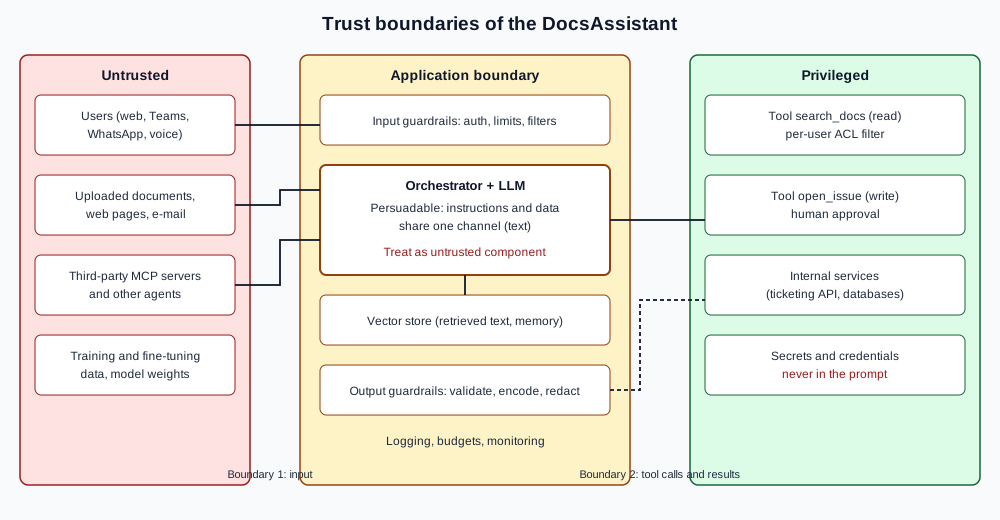
The parties and data flows to enumerate for every system are these.
| Element | Why it matters | Typical control |
|---|---|---|
Users and channels |
Anyone who can type, speak or upload is an author of model input, including anonymous users of a web widget or a phone line. |
Authentication, rate limits, input validation (see Operating Chat Channels). |
The model |
Instructions and data share one channel, so the model can be persuaded by any text in its context. It is a useful but untrusted component. |
Never grant it more authority than the least privileged user it serves. |
Training and fine-tuning data |
Poisoned or leaking data persists in the weights and cannot be patched like code. |
Provenance, review and signing (see Supply Chain Security). |
Retrieved and live data |
Documents, web pages, e-mail and database rows enter the context as text and can carry instructions (indirect injection). |
Per-document access control, ingestion sanitisation (see RAG and Vector Security). |
Tools and internal services |
Tools turn model output into actions with the application’s credentials. |
Least privilege, parameter validation, human approval (see Excessive Agency and Tool Security). |
Other agents and MCP servers |
Their descriptions and results are text from a third party, and a compromised one can steer your agent. |
Allow-lists, pinning, scoped tokens (see MCP security). |
The output |
What the model writes is rendered in browsers, executed by interpreters or sent to other systems. |
Treat as untrusted input (see Improper Output Handling). |
The most important consequence is a rule that the later pages keep applying: the model’s authority is the minimum of the authority of everyone whose text is in its context. If the context contains a paragraph from an anonymous uploaded document, then anything the model can do, that anonymous author can attempt to make it do.
STRIDE applied to an LLM application
STRIDE is Microsoft’s mnemonic for six threat categories: spoofing, tampering, repudiation, information disclosure, denial of service and elevation of privilege. It applies to each element and flow of the diagram above; the LLM-specific reading of each letter is the useful part.
| STRIDE | LLM-specific example against the DocsAssistant | OWASP 2026 risk |
|---|---|---|
Spoofing |
An uploaded document claims to be a system message; a rogue MCP server impersonates the real docs server; a caller reuses another user’s session in a chat channel. |
LLM01, LLM04 |
Tampering |
Poisoned documents in the vector store, a tampered model file, an edited prompt template in a registry. |
LLM05, LLM04, LLM09 |
Repudiation |
No log of which prompt, retrieved chunks and tool arguments led to an issue being opened. |
(cross-cutting; see LLMSecOps) |
Information disclosure |
The answer quotes a document the user may not read; the system prompt or a tool schema is echoed back; an image URL carries data to an attacker. |
LLM02, LLM08, LLM09, LLM10 |
Denial of service |
Token flooding, recursive tool loops, an expensive query that exhausts the monthly budget (denial of wallet). |
LLM06 |
Elevation of privilege |
Injected instructions make the agent call |
LLM03, LLM01 |
MAESTRO for agents
STRIDE looks at elements of a system. MAESTRO (Multi-Agent Environment, Security, Threat, Risk and Outcome), published by the Cloud Security Alliance, organises agentic threats by layer, which suits systems where several agents, tools and data stores interact. It describes seven layers: foundation models, data operations, agent frameworks, deployment and infrastructure, evaluation and observability, security and compliance, and the agent ecosystem, and it asks the modeller to consider threats inside each layer and across layers, for example a poisoned dataset in layer 2 that surfaces as a goal hijack in layer 7. For the DocsAssistant the cross-layer view is what shows that an ingestion pipeline weakness (data operations) becomes an agent action (ecosystem). Use STRIDE for the data-flow diagram and MAESTRO as a checklist that no layer was forgotten; the OWASP Top 10 for Agentic Applications gives names to the results.
MITRE ATLAS techniques
MITRE ATLAS is a knowledge base of adversary tactics and techniques against AI systems, modelled on ATT&CK. Recording the ATLAS technique next to each threat lets a security operations team reuse its existing vocabulary and detections. The techniques used in this sub-section were confirmed against the ATLAS data repository on 2026-10-01.
| Technique | Name | Where it appears |
|---|---|---|
AML.T0051 |
LLM Prompt Injection |
|
AML.T0054 |
LLM Jailbreak |
|
AML.T0053 |
AI Agent Tool Invocation |
|
AML.T0056 |
Extract LLM System Prompt |
|
AML.T0057 |
LLM Data Leakage |
|
AML.T0070 |
RAG Poisoning |
|
AML.T0020 |
Poison Training Data |
|
AML.T0010 |
AI Supply Chain Compromise |
|
AML.T0029 |
Denial of AI Service |
|
AML.T0024 |
Exfiltration via AI Inference API |
A worked threat model of the DocsAssistant
The scope is the five parts listed on the landing page.
The assets are the confidential documents in the vector store, the users' identities and conversations, the ticketing system
that open_issue writes to, the monthly token budget, and the organisation’s reputation for accurate answers. The attackers
considered are an anonymous chat user, an authenticated user trying to read documents above their clearance, an author of
a document the assistant ingests, and the operator of a third-party MCP server.
Each path in the flow becomes one row of a threat register. Keep the register in the repository next to the code so it is reviewed with every change; a format such as the following is enough.
# threats/docsassistant.yaml -- illustrative format, not a tool configuration
- id: T-01
  title: Instructions hidden in an uploaded document change the answer or trigger a tool call
  stride: [Tampering, Elevation of privilege]
  owasp_llm_2026: LLM01
  owasp_agentic: ASI01
  atlas: AML.T0051
  nist_600_1: Information security
  controls: [spotlighting, least-privilege tools, human approval for open_issue]
  test: promptfoo redteam, garak promptinject probes
  status: mitigated-partially
- id: T-02
  title: A user retrieves a document above their clearance through the retrieval tool
  stride: [Information disclosure]
  owasp_llm_2026: LLM02
  atlas: AML.T0057
  nist_600_1: Data privacy
  controls: [metadata filter by caller identity applied in the retriever, not the prompt]
  test: authorisation test suite with two users
  status: mitigated
The format is the author’s own; the fields are chosen so that each risk can be reported in the vocabulary of any of the frameworks on the framework map. The NIST categories are those of NIST AI 600-1. A threat model is "good enough" when every register row has a control, a test and an owner, and when the residual risk is written down and accepted by a named person rather than silently carried.
Using the model
-
Draw the diagram first and mark every place where text from outside enters the model’s context.
-
Walk STRIDE over each flow and MAESTRO over each layer; add rows to the register.
-
For each row choose controls from the risk pages and decide how it will be tested (see AI Red Teaming).
-
Re-run the exercise whenever a tool, data source, channel or model changes: adding one MCP server or one document source adds a boundary.
References
-
OWASP Top 10 for LLM Applications 2026: https://genai.owasp.org/resource/owasp-genai-llm-top-10-2026/
-
OWASP Top 10 for Agentic Applications: https://genai.owasp.org/resource/owasp-top-10-for-agentic-applications-for-2026/
-
MITRE ATLAS: https://atlas.mitre.org/ and https://github.com/mitre-atlas/atlas-data
-
CSA, Agentic AI Threat Modeling Framework: MAESTRO: https://cloudsecurityalliance.org/blog/2025/02/06/agentic-ai-threat-modeling-framework-maestro
-
Microsoft, Threat modeling (STRIDE): https://learn.microsoft.com/en-us/azure/security/develop/threat-modeling-tool-threats
-
NIST AI 600-1: https://doi.org/10.6028/NIST.AI.600-1