App Intents, Siri, Shortcuts, Spotlight, Deep Links and Extensions
|
This content was generated with the assistance of AI and should be verified against the official documentation before being relied on in production; see the section bibliography for the reference material consulted while preparing these pages. |
Widgets, Complications and Controls gave FieldNotes a widget whose pin
button runs TogglePinIntent, and a control that opens the capture sheet. This page defines those intents and
everything around them. App Intents is the one framework through which an app reaches Siri, the Shortcuts app,
Spotlight, widgets, controls, the Action button, visual intelligence and Apple Intelligence; the page then covers
the other ways into an app: deep links (universal links, custom URL schemes and NSUserActivity) and app
extensions such as the share extension. Everything targets the 27 releases (iOS 27, iPadOS 27, macOS 27,
watchOS 27 and visionOS 27), built with Xcode 27 and Swift 6.4. FieldNotes keeps a deployment minimum
of 26, so every 27-only API is labelled and guarded with if #available or @available.
App Intents replaced SiriKit custom intents, where an Intents extension defined INIntent subclasses in an
.intentdefinition file to reach Siri and Shortcuts; new actions in a 27-baseline app are App Intents, which reach
Siri, Shortcuts, Spotlight and the rest of the system. SiriKit’s system domains remain current where they apply:
messaging and calling apps still use intents such as
INSendMessageIntent and
INStartCallIntent, which
communication
notifications require. App Intents are plain Swift: structs with property wrappers and an async method. Xcode
extracts their metadata
at build time, so the system knows the app’s actions and content before the app ever runs. The concurrency rules
that apply to perform() are in the Swift reference under
Async/Await and Tasks and
Actors, Isolation and Sendable.
One Intent, Every Surface
An intent is a verb (create a note, pin this note). An entity is a noun (a note). A query is how the system finds nouns by identifier or by text. Once FieldNotes declares them, each system surface uses the same declarations; there is no Siri-specific or Spotlight-specific code path to maintain.
Figure: FieldNotes’s Intents and Entity Feeding System Surfaces
AppEntity + IndexedEntity"] Q["NoteEntityQuery"] O["OpenNoteIntent"] C["CreateNoteIntent"] T["TogglePinIntent"] S["FieldNotesShortcuts
AppShortcutsProvider"] E --- Q O --> E T --> E S --> C S --> O end S --> Siri["Siri and
Apple Intelligence"] S --> Shortcuts["Shortcuts app
and automations"] S --> Action["Action button"] E --> Spotlight["Spotlight search
(indexAppEntities)"] O --> Spotlight E --> VI["Visual intelligence
(IntentValueQuery)"] T --> Widget["PinnedNotesWidget
Button(intent:)"] O --> Control["Controls
(OpenIntent)"] C --> Schema["App schema domain
.notes (27)"]
Where the Intents Live
Intents run in whichever process the system chooses. A widget button runs its intent in the widget extension; an
intent that opens the app runs in the app; Siri and Shortcuts use the app, launching it in the background if
needed. So the intent files sit in a shared folder with target membership in FieldNotes, FieldNotesWidgets
and FieldNotesWatchWidgets, and the shared intents read and write through the App Group store with
SharedNoteAccess, the helper defined on
Widgets, Complications and Controls. It opens one container per process,
so in the app it is the same persistence AppServices gives NoteStore. The app’s in-memory NoteStore reloads
from the store when the app becomes active, so a pin that a widget button toggled in the extension is on screen when
the user returns. App-only intents such as CreateNoteIntent go through NoteStore itself, obtained with
@Dependency.
| Type | Targets | Why |
|---|---|---|
|
app, widget extensions |
Widget buttons and configuration run in the extension. |
|
app, |
Apple requires a control’s |
|
app only |
They open the app or only make sense with the full app installed. |
Core Types
NoteEntity
An app entity is a Sendable, Identifiable value that stands for one of the app’s objects. It needs a type
name, a per-instance displayRepresentation (the title, subtitle and image Siri, Shortcuts and Spotlight show), a
defaultQuery, and whichever properties the system should see, marked with @Property. FieldNotes's entity is
built from a Note; it is not the model, just a projection of it:
// Shared/Intents/NoteEntity.swift  (FieldNotes, FieldNotesWidgets, FieldNotesWatchWidgets)
import AppIntents
import FieldNotesModel

struct NoteEntity: AppEntity {
    static let typeDisplayRepresentation = TypeDisplayRepresentation(
        name: "Note", numericFormat: "\(placeholder: .int) notes")
    static let defaultQuery = NoteEntityQuery()

    let id: UUID

    @Property(title: "Title")
    var title: String

    @Property(title: "Tags")
    var tags: [String]

    @Property(title: "Pinned")
    var isPinned: Bool

    @Property(title: "Created")
    var createdAt: Date

    var body: String
    var placeName: String?

    var displayRepresentation: DisplayRepresentation {
        DisplayRepresentation(title: "\(title)",
                              subtitle: "\(placeName ?? tags.joined(separator: ", "))",
                              image: .init(systemName: isPinned ? "pin.fill" : "note.text"))
    }

    init(_ note: Note) {
        id = note.id
        body = note.body
        placeName = note.location?.placeName
        title = note.title
        tags = note.tags
        isPinned = note.isPinned
        createdAt = note.createdAt
    }
}The identifier is the note’s own UUID, the same one the deep links carry and the one SwiftData stores as
NoteRecord.id. That makes the entity stable across launches, which Shortcuts needs to remember "this note", and
across devices once iCloud sync copies the record.
NoteEntity also conforms to IndexedEntity (for Spotlight) wherever Core Spotlight exists; that conformance is
shown under Spotlight with IndexedEntity.
NoteEntityQuery
The query resolves identifiers back into entities, and suggests entities when the user is picking one in Shortcuts
or a widget’s edit sheet. Adding EntityStringQuery lets Siri and Shortcuts search by spoken or typed text:
// Shared/Intents/NoteEntityQuery.swift
import AppIntents

struct NoteEntityQuery: EntityQuery {
    func entities(for identifiers: [NoteEntity.ID]) async throws -> [NoteEntity] {
        let persistence = try SharedNoteAccess.persistence()
        var entities: [NoteEntity] = []
        for id in identifiers {                              // one indexed lookup per requested note
            if let note = try await persistence.note(id: id) { entities.append(NoteEntity(note)) }
        }
        return entities
    }

    func suggestedEntities() async throws -> [NoteEntity] {
        let notes = try await SharedNoteAccess.persistence().fetchNotes()
        return notes.sorted { ($0.isPinned ? 1 : 0, $0.createdAt) > ($1.isPinned ? 1 : 0, $1.createdAt) }
            .prefix(10)
            .map(NoteEntity.init)
    }
}

extension NoteEntityQuery: EntityStringQuery {
    func entities(matching string: String) async throws -> [NoteEntity] {
        let notes = try await SharedNoteAccess.persistence().fetchNotes()
        return notes.filter {
            $0.title.localizedStandardContains(string) || $0.tags.contains { $0.localizedStandardContains(string) }
        }
        .map(NoteEntity.init)
    }
}entities(for:) looks notes up one by one with note(id:) from Persisting Models
with SwiftData, because the system often asks for a single note. The suggestion and string queries still fetch every
note, which is fine for a notebook-sized app; a larger store would give them their own #Predicate fetches.
TogglePinIntent
An intent has a static title, @Parameter properties the system fills in (asking the user if needed), and a
perform() method. TogglePinIntent is the one the widget’s pin button runs. Its supportedModes (26) says it
never needs the app in the foreground:
// Shared/Intents/TogglePinIntent.swift  (FieldNotes, FieldNotesWidgets, FieldNotesWatchWidgets)
import AppIntents
import WidgetKit

struct TogglePinIntent: AppIntent {
    static let title: LocalizedStringResource = "Toggle Pin"
    static let description = IntentDescription("Pins or unpins a note.")
    static let supportedModes: IntentModes = .background

    @Parameter(title: "Note")
    var note: NoteEntity

    init() {}
    init(note: NoteEntity) { self.note = note }

    func perform() async throws -> some IntentResult {
        let persistence = try SharedNoteAccess.persistence()
        guard var current = try await persistence.note(id: note.id) else { return .result() }
        current.isPinned.toggle()
        try await persistence.save(current)
        await registerUndo(for: current.id, wasPinned: !current.isPinned)   // see UndoableIntent below
        WidgetCenter.shared.reloadTimelines(ofKind: SharedNoteAccess.pinnedNotesWidgetKind)
        return .result()
    }
}The explicit init() is required once a custom initializer exists: the system creates intents with init() and
then sets their parameters. IntentModes arrived in the 26 releases; before them, openAppWhenRun was the only
switch.
CreateNoteIntent
CreateNoteIntent is the action behind "Create a note in FieldNotes". It returns the new note as a value so that a
Shortcut can pass it to the next action, speaks a confirmation, and, if the user asks for it, continues in the
foreground to show the note. The parameter summary is the sentence the Shortcuts editor displays:
// FieldNotes/Intents/CreateNoteIntent.swift  (app only)
import AppIntents
import WidgetKit
import FieldNotesModel
import FieldNotesServices

struct CreateNoteIntent: AppIntent {
    static let title: LocalizedStringResource = "Create Note"
    static let description = IntentDescription("Creates a new field note.")
    static let supportedModes: IntentModes = [.background, .foreground(.dynamic)]

    @Parameter(title: "Title", requestValueDialog: "What should the note be called?")
    var noteTitle: String

    @Parameter(title: "Text", default: "")
    var text: String

    @Parameter(title: "Pin It", default: false)
    var pin: Bool

    @Parameter(title: "Open After Creating", default: false)
    var openAfterCreating: Bool

    @Dependency private var router: IntentRouter
    @Dependency private var store: NoteStore        // registered by FieldNotesApp; this intent runs in the app

    static var parameterSummary: some ParameterSummary {
        Summary("Create \(\.$noteTitle)") {
            \.$text
            \.$pin
            \.$openAfterCreating
        }
    }

    func perform() async throws -> some IntentResult & ReturnsValue<NoteEntity> & ProvidesDialog {
        let note = Note(title: noteTitle, body: text, isPinned: pin)
        // Through the app's NoteStore, so the note is on screen at once and saved by the one container.
        await store.add(note)
        await store.waitForPendingWrites()
        if pin { WidgetCenter.shared.reloadTimelines(ofKind: SharedNoteAccess.pinnedNotesWidgetKind) }
        if openAfterCreating {
            try await continueInForeground(alwaysConfirm: false)
            await MainActor.run { router.pendingNoteID = note.id }
        }
        return .result(value: NoteEntity(note), dialog: "Created “\(noteTitle)”.")
    }
}.foreground(.dynamic) tells the system the intent may move to the foreground; continueInForeground does it,
here without an extra confirmation because the user asked for it in a parameter.
OpenNoteIntent and IntentRouter
An intent that shows something in the app conforms to OpenIntent, whose target parameter is the entity to
open. Spotlight uses it when a note result is tapped, and visual intelligence uses it for its results. The app
decides what "open" means, so the intent hands the note’s identifier to an @Observable router that the app
registers with AppDependencyManager:
// Shared/Intents/IntentRouter.swift  (FieldNotes, FieldNotesWidgets)
import Observation
import Foundation

@Observable @MainActor
final class IntentRouter {
    var pendingNoteID: UUID?
    var pendingScreen: FieldNotesScreen?
}

// FieldNotes/Intents/OpenNoteIntent.swift  (app only)
import AppIntents

struct OpenNoteIntent: OpenIntent {
    static let title: LocalizedStringResource = "Open Note"

    @Parameter(title: "Note", requestValueDialog: "Which note?")
    var target: NoteEntity

    @Dependency private var router: IntentRouter

    @MainActor
    func perform() async throws -> some IntentResult {
        router.pendingNoteID = target.id
        return .result()
    }
}The app creates the router once, registers it and the shared NoteStore for @Dependency, puts it in the environment, and ContentView
turns a pending identifier into navigation with the same code the onOpenURL handler on
Navigation and Presentation runs, factored into an
open(_:) method that takes a DeepLink:
// FieldNotes/FieldNotesApp.swift (excerpt): the parts this page adds
import SwiftUI
import AppIntents
import FieldNotesServices

@main
struct FieldNotesApp: App {
    @State private var store = AppServices.shared.store   // the single owner, see Background Execution
    @State private var intentRouter: IntentRouter
    @Environment(\.scenePhase) private var scenePhase

    init() {
        let router = IntentRouter()
        _intentRouter = State(initialValue: router)
        AppDependencyManager.shared.add(dependency: router)
        // The store too: ExportNotebookIntent on Background Execution reads it with @Dependency.
        AppDependencyManager.shared.add(dependency: AppServices.shared.store)
    }

    var body: some Scene {
        WindowGroup {
            ContentView()
                .environment(store)
                .environment(intentRouter)
        }
        .onChange(of: scenePhase) { _, phase in
            if phase == .active { Task { await store.load() } }   // pick up notes intents wrote
        }
    }
}

// FieldNotes/ContentView.swift (excerpt)
struct ContentView: View {
    @Environment(NoteStore.self) private var store
    @Environment(IntentRouter.self) private var intentRouter
    @State private var isCapturing = false
    @State private var selectedNotebook: Notebook.ID?
    @State private var selectedNote: Note.ID?
    // ... column state from Navigation and Presentation ...

    var body: some View {
        splitView                                   // the NavigationSplitView shown on that page
            .onOpenURL { url in
                if let link = DeepLink(url: url) { open(link) }
            }
            .onChange(of: intentRouter.pendingNoteID) { _, id in
                guard let id else { return }
                open(.note(id))
                intentRouter.pendingNoteID = nil
            }
            // Notification taps (Notifications and Live Activities); initial: handles a tap that launched the app.
            .onChange(of: AppServices.shared.pendingNoteID, initial: true) { _, id in
                guard let id else { return }
                open(.note(id))
                AppServices.shared.pendingNoteID = nil
            }
            .onChange(of: intentRouter.pendingScreen) { _, screen in
                switch screen {
                case .capture: isCapturing = true
                case .pinned: selectedNote = nil          // NoteList lists pinned notes first
                case nil: break
                }
                intentRouter.pendingScreen = nil
            }
            .sheet(isPresented: $isCapturing) {
                NoteComposer(notebookID: selectedNotebook)
            }
    }

    private func open(_ link: DeepLink) {
        // The switch from the onOpenURL handler on Navigation and Presentation, moved here unchanged:
        // it sets selectedNotebook, selectedNote and the compact column for .note and .notebook links.
    }
}Register dependencies in the App initializer, before any intent can run; an intent that reads an unregistered
@Dependency fails at run time.
AppEnum: FieldNotesScreen
An app enum is a fixed set of values the system can show and speak. FieldNotes uses one to name the screens a
control or a Shortcut can open. OpenFieldNotesScreenIntent is the action of QuickCaptureControl; because it’s an
OpenIntent, its target can be an enum instead of an entity:
// Shared/Intents/OpenFieldNotesScreenIntent.swift  (FieldNotes, FieldNotesWidgets, FieldNotesWatch, FieldNotesWatchWidgets)
import AppIntents

enum FieldNotesScreen: String, AppEnum {
    case capture
    case pinned

    static let typeDisplayRepresentation = TypeDisplayRepresentation(name: "FieldNotes Screen")
    static let caseDisplayRepresentations: [FieldNotesScreen: DisplayRepresentation] = [
        .capture: DisplayRepresentation(title: "New Note", image: .init(systemName: "square.and.pencil")),
        .pinned: DisplayRepresentation(title: "Pinned Notes", image: .init(systemName: "pin"))
    ]
}

struct OpenFieldNotesScreenIntent: OpenIntent {
    static let title: LocalizedStringResource = "Open FieldNotes Screen"

    @Parameter(title: "Screen")
    var target: FieldNotesScreen

    @Dependency private var router: IntentRouter

    init() {}
    init(screen: FieldNotesScreen) { self.target = screen }

    @MainActor
    func perform() async throws -> some IntentResult {
        router.pendingScreen = target                 // runs in the app process, which registered the router
        return .result()
    }
}The file is compiled into the widget extension only so the control can reference the intent; the system runs an
OpenIntent's perform() in the app it opens.
FieldNotesShortcuts
An App Shortcut is an intent plus the phrases that trigger it. App Shortcuts need no setup by the user: they appear in Siri, Spotlight, the Shortcuts app and the Action button’s list as soon as the app is installed. Every phrase must contain the app name token. A phrase can also contain an entity parameter; Siri then matches the spoken name against the query’s suggested entities:
// FieldNotes/Intents/FieldNotesShortcuts.swift  (app only)
import AppIntents

struct FieldNotesShortcuts: AppShortcutsProvider {
    static var appShortcuts: [AppShortcut] {
        AppShortcut(intent: CreateNoteIntent(),
                    phrases: ["Create a note in \(.applicationName)",
                              "New \(.applicationName) note"],
                    shortTitle: "New Note",
                    systemImageName: "square.and.pencil")
        AppShortcut(intent: OpenNoteIntent(),
                    phrases: ["Open \(\.$target) in \(.applicationName)"],
                    shortTitle: "Open Note",
                    systemImageName: "note.text")
        AppShortcut(intent: OpenFieldNotesScreenIntent(screen: .pinned),
                    phrases: ["Show my pinned notes in \(.applicationName)"],
                    shortTitle: "Pinned Notes",
                    systemImageName: "pin")
    }

    static let shortcutTileColor: ShortcutTileColor = .teal
}Phrases with a parameter are only as good as the list of values Siri knows. After notes change, the app calls
FieldNotesShortcuts.updateAppShortcutParameters() so the suggested titles are current:
// FieldNotesApp body, next to the widget reload
.onChange(of: store.notes.map(\.title)) {
    FieldNotesShortcuts.updateAppShortcutParameters()
}The Action button (iPhone 15 Pro and later, Apple Watch Ultra) lists App Shortcuts and controls; testing it needs a device that has one.
Spotlight with IndexedEntity
Conforming an entity to IndexedEntity lets FieldNotes put notes into the Spotlight index as entities. Spotlight
then shows them in search results, opens them with OpenNoteIntent, and Apple Intelligence can use the indexed
content. @Property values and displayRepresentation are indexed automatically; attributeSet adds the rest.
Core Spotlight isn’t on watchOS, so the conformance is guarded:
// Shared/Intents/NoteEntity+Spotlight.swift
#if canImport(CoreSpotlight) && !os(watchOS)
import AppIntents
@preconcurrency import CoreSpotlight
import FieldNotesModel

extension NoteEntity: IndexedEntity {
    var attributeSet: CSSearchableItemAttributeSet {
        let attributes = CSSearchableItemAttributeSet()
        attributes.contentDescription = body
        attributes.keywords = tags
        attributes.namedLocation = placeName
        return attributes
    }
}

enum NoteSpotlightIndex {
    static let index = CSSearchableIndex(name: "FieldNotes-Notes")

    static func update(_ notes: [Note]) async throws {
        try await index.indexAppEntities(notes.map(NoteEntity.init))
    }

    static func remove(_ ids: [Note.ID]) async throws {
        try await index.deleteAppEntities(identifiedBy: ids, ofType: NoteEntity.self)
    }
}
#endifApple recommends a named index, not CSSearchableIndex.default(), outside prototypes. Indexing an entity whose
identifier is already there updates it in place. FieldNotes calls update(_:) after saves and remove(_:) after
deletions, from the same onChange that reloads the widget.
Reindexing (new in 27). If the index is damaged, Spotlight asks the app to rebuild it. On the 27 releases an
entity query adopts IndexedEntityQuery to answer:
// FieldNotes/Intents/NoteEntityQuery+Reindex.swift  (app only)
#if canImport(CoreSpotlight) && !os(watchOS)
import AppIntents
import CoreSpotlight
import FieldNotesModel

@available(iOS 27, macOS 27, visionOS 27, *)
extension NoteEntityQuery: IndexedEntityQuery {
    func reindexEntities(for identifiers: [NoteEntity.ID],
                         indexDescription: CSSearchableIndexDescription) async throws {
        let persistence = try SharedNoteAccess.persistence()
        var notes: [Note] = []
        for id in identifiers {                              // only the notes the system asked for
            if let note = try await persistence.note(id: id) { notes.append(note) }
        }
        try await NoteSpotlightIndex.update(notes)
    }

    func reindexAllEntities(indexDescription: CSSearchableIndexDescription) async throws {
        try await NoteSpotlightIndex.update(SharedNoteAccess.persistence().fetchNotes())
    }
}
#endifVisual Intelligence
Visual intelligence lets someone point the camera at something, or take a screenshot, and search apps for matching
content. The system sends FieldNotes a SemanticContentDescriptor with general labels (in English, such as
bird or tree) and the pixel buffer; the app answers with entities through an IntentValueQuery. FieldNotes
matches the labels against note tags, so pointing at a heron finds notes tagged "heron" or "birds":
// FieldNotes/Intents/NoteVisualSearchQuery.swift  (app only)
#if os(iOS) || os(macOS)
import AppIntents
import VisualIntelligence

@available(iOS 26, macOS 27, *)
struct NoteVisualSearchQuery: IntentValueQuery {
    func values(for input: SemanticContentDescriptor) async throws -> [NoteEntity] {
        let labels = Set(input.labels.map { $0.lowercased() })
        let notes = try await SharedNoteAccess.persistence().fetchNotes()
        return notes
            .filter { note in note.tags.contains { labels.contains($0.lowercased()) } }
            .prefix(50)
            .map(NoteEntity.init)
    }
}
#endifTapping a result runs OpenNoteIntent, the same one Spotlight uses, which is why every entity type returned here
needs an OpenIntent. Visual intelligence is on iOS and iPadOS 26 and on macOS from 27, and it needs Apple
Intelligence hardware.
An app may have only one IntentValueQuery that takes a SemanticContentDescriptor. To return more than one
entity type from it, wrap them in an enum marked with the @UnionValue macro. If FieldNotes also had an entity for
notebooks, the query’s result would be:
// Sketch: a union result, if FieldNotes also exposed a NotebookEntity (not part of the app)
@UnionValue
enum FieldNotesVisualResult {
    case note(NoteEntity)
    case notebook(NotebookEntity)
}App Schema Domains for Siri with Apple Intelligence
Custom App Shortcuts need phrases. App schema domains go further: an intent or entity that adopts a system
schema tells Apple Intelligence exactly what it does, in the same shape as every other app in that domain, so Siri
can use it with natural, unscripted requests and pass results between apps. The macros @AppIntent(schema:) and
@AppEntity(schema:) check the conformance at compile time.
The 27 releases add a .notes domain with createNote and updateNote intents and note, folder and
account entities, which is exactly FieldNotes's territory. The schema fixes the property names and types
(name and content as AttributedString, attachments as [IntentFile], and so on), which differ from
NoteEntity's, and the whole type must be 27-only. So FieldNotes adds schema-conforming siblings next to its
26-compatible types, sharing the same persistence code:
// FieldNotes/Intents/SiriNoteSchema.swift  (app only; iOS, iPadOS, macOS and visionOS 27)
#if !os(watchOS)
import AppIntents
import FieldNotesModel

@available(iOS 27, macOS 27, visionOS 27, *)
@AppEntity(schema: .notes.note)
struct SiriNoteEntity {
    static let defaultQuery = SiriNoteEntityQuery()

    let id: UUID
    var name: AttributedString
    var content: AttributedString?
    var attachments: [IntentFile]
    var isPinned: Bool
    var creationDate: Date?
    var modificationDate: Date?
    var folder: SiriNotebookEntity?               // declared the same way with @AppEntity(schema: .notes.folder)

    var displayRepresentation: DisplayRepresentation { DisplayRepresentation(title: "\(name)") }

    // Maps a `Note`; `SiriNoteEntityQuery` and `SiriCreateNoteIntent` both call it.
    init(_ note: Note) {
        id = note.id
        name = AttributedString(note.title)
        content = note.body.isEmpty ? nil : AttributedString(note.body)
        // Not exposed yet: `PhotoAttachment` is metadata only, and its bytes load asynchronously
        // through `PhotoDataStoring.photoData(for:)`, which this synchronous init can't call.
        attachments = []
        isPinned = note.isPinned
        creationDate = note.createdAt
        modificationDate = nil                    // `Note` records no modification date
        folder = nil
    }

    struct SiriNoteEntityQuery: EntityQuery {
        func entities(for identifiers: [UUID]) async throws -> [SiriNoteEntity] {
            try await SharedNoteAccess.persistence().fetchNotes()
                .filter { identifiers.contains($0.id) }
                .map(SiriNoteEntity.init)
        }
    }
}

@available(iOS 27, macOS 27, visionOS 27, *)
@AppIntent(schema: .notes.createNote)
struct SiriCreateNoteIntent {
    var name: AttributedString
    var content: AttributedString?
    var attachments: [IntentFile]
    var isPinned: Bool
    var folder: SiriNotebookEntity?

    func perform() async throws -> some ReturnsValue<SiriNoteEntity> {
        let note = Note(title: String(name.characters), body: content.map { String($0.characters) } ?? "",
                        notebookID: folder?.id, isPinned: isPinned)
        try await SharedNoteAccess.persistence().save(note)
        return .result(value: SiriNoteEntity(note))
    }
}
#endifSiriNoteEntity.init(_:) maps a Note the same way NoteEntity.init(_:) does, for the fields Note has.
Two schema properties stay empty for now: Note has no modification date, so modificationDate is nil, and
attachments is empty because a PhotoAttachment holds only an identifier and a file name. Exposing photos would
mean loading each note’s image bytes from SwiftData (see
Camera, Media and Photos) into an IntentFile in the query, which
FieldNotes doesn’t do yet. Xcode generates the template when
you type notes_ and pick a schema, which is the quickest way to get the required members right. When
FieldNotes's deployment minimum reaches 27, the siblings can merge into NoteEntity and CreateNoteIntent. The
schema-based experiences need a device that supports Apple Intelligence, with Siri enabled.
New in 27
The issue groups the following as this year’s App Intents additions. Apple’s reference pages give the release each one first appeared in, which for some is a 26.x update:
| API | First release (per reference) | What FieldNotes uses it for |
|---|---|---|
|
27 |
Declares that |
|
27 |
|
|
26.4 |
|
|
26 |
Shake-to-undo after |
|
26 |
|
|
18 |
Multi-type visual-intelligence results (sketch above). |
|
27 |
Spotlight reindexing and Siri, above. |
AppIntentsTesting framework |
27 |
Tests below. |
SyncableEntity
SyncableEntity tells the system that an entity’s identifier means the same thing on every device, so Siri can
carry a conversation about "that note" from iPhone to Mac. FieldNotes's notes keep their UUID through CloudKit
sync, so the conformance needs no code:
// Shared/Intents/NoteEntity+Syncable.swift
import AppIntents

@available(iOS 27, macOS 27, watchOS 27, visionOS 27, *)
extension NoteEntity: SyncableEntity {}LongRunningIntent and CancellableIntent
A normal intent has a short time budget. LongRunningIntent (a ProgressReportingIntent) runs its heavy part in
performBackgroundTask, which gets extended background time, and reports progress the system can display.
CancellableIntent adds a handler that receives why the intent was cancelled:
// FieldNotes/Intents/ReindexNotesIntent.swift  (app only)
#if canImport(CoreSpotlight) && !os(watchOS)
import AppIntents

@available(iOS 27, macOS 27, visionOS 27, *)
struct ReindexNotesIntent: LongRunningIntent, CancellableIntent {
    static let title: LocalizedStringResource = "Rebuild FieldNotes Search Index"

    func perform() async throws -> some IntentResult {
        let notes = try await SharedNoteAccess.persistence().fetchNotes()
        progress.totalUnitCount = Int64(notes.count)
        try await withIntentCancellationHandler {
            try await performBackgroundTask {
                for batch in stride(from: 0, to: notes.count, by: 100) {
                    try Task.checkCancellation()
                    let slice = Array(notes[batch..<min(batch + 100, notes.count)])
                    try await NoteSpotlightIndex.update(slice)
                    progress.completedUnitCount += Int64(slice.count)
                }
            }
        } onCancel: { reason in
            print("Reindex cancelled: \(reason)")
        }
        return .result()
    }
}
#endifLongRunningTaskOptions has a requiresGPU option for work such as on-device model inference; indexing doesn’t
need it. The same protocol appears on Persisting Models with SwiftData for a large
import, and the general background-time rules are on
Background Execution.
UndoableIntent
When TogglePinIntent runs while the app is open (from Siri, say), UndoableIntent gives it the scene’s undo
manager, so shake-to-undo or ⌘Z reverts the pin:
// Shared/Intents/TogglePinIntent+Undo.swift
import AppIntents

extension TogglePinIntent: UndoableIntent {
    @MainActor
    func registerUndo(for noteID: UUID, wasPinned: Bool) {
        undoManager?.registerUndo(withTarget: UndoPinTarget.shared) { _ in
            Task {
                let persistence = try SharedNoteAccess.persistence()
                guard var note = try await persistence.note(id: noteID) else { return }
                note.isPinned = wasPinned
                try await persistence.save(note)
            }
        }
        undoManager?.setActionName("Toggle Pin")
    }
}

@MainActor final class UndoPinTarget { static let shared = UndoPinTarget() }TogglePinIntent.perform() calls registerUndo(for:wasPinned:) right after saving, as shown in its listing. In the
widget extension undoManager is nil, so the call does nothing there.
Testing Intents with AppIntentsTesting (New in 27)
Intents break silently: a renamed property or a changed identifier doesn’t crash anything, Siri just stops finding notes. The AppIntentsTesting framework runs intents, queries and Spotlight lookups through the real App Intents machinery from a UI testing target, looking types up by name so the test doesn’t import the app:
// FieldNotesUITests/FieldNotesIntentTests.swift
import XCTest
import AppIntentsTesting

@available(iOS 27, macOS 27, *)
final class FieldNotesIntentTests: XCTestCase {
    var definitions: IntentDefinitions!

    @MainActor
    override func setUp() async throws {
        XCUIApplication().launch()            // XCUIApplication is main-actor isolated: create it here
        definitions = IntentDefinitions(bundleIdentifier: "com.example.fieldnotes")
    }

    func testCreateNoteReturnsTheNote() async throws {
        let result = try await definitions.intents["CreateNoteIntent"]
            .makeIntent(noteTitle: "Otter tracks", text: "Mud flat, low tide", pin: true)
            .run()
        let title: String = try result.value.title
        XCTAssertEqual(title, "Otter tracks")
    }

    func testTogglePinAcceptsAQueriedEntity() async throws {
        let notes = try await definitions.entities["NoteEntity"].entities(matching: "Otter")
        XCTAssertFalse(notes.isEmpty)
        _ = try await definitions.intents["TogglePinIntent"].makeIntent(note: notes[0]).run()
    }

    func testNotesAreInSpotlight() async throws {
        let indexed = try await definitions.entities["NoteEntity"].spotlightQuery("Otter")
        XCTAssertFalse(indexed.isEmpty)
    }
}A setup-only intent with static let isDiscoverable = false, wrapped in #if DEBUG, can reset the store before
each test. The framework runs out of process through XCTest’s UI-testing host; the rest of FieldNotes's tests use
Swift Testing, described on Unit Testing with Swift Testing, and
UI-test targets and plans on UI Tests, Test Plans, Performance Tests and Coverage.
Deep Links
Intents are for the system; links are for people and for other apps. FieldNotes accepts the two link forms that
Navigation and Presentation already routes through its
DeepLink parser and onOpenURL: the custom scheme fieldnotes://note/<uuid> and the universal link
https://fieldnotes.example.com/note/<uuid>;. This section covers the configuration behind them and when to use
each.
Custom URL Schemes and Their Risks
A custom scheme is declared in the target’s Info › URL Types, which writes CFBundleURLTypes into Info.plist:
<key>CFBundleURLTypes</key>
<array>
    <dict>
        <key>CFBundleURLName</key>
        <string>com.example.fieldnotes</string>
        <key>CFBundleURLSchemes</key>
        <array>
            <string>fieldnotes</string>
        </array>
    </dict>
</array>Custom schemes are convenient and work offline, but nothing stops another app from registering the same scheme,
and the system doesn’t say which app wins. Treat every scheme URL as untrusted input: accept only the shapes
DeepLink recognizes, never perform a destructive action straight from a link, and never carry tokens or secrets
in one. That is why FieldNotes uses its scheme only for links it creates itself, from its own widgets, and why
OAuth redirects on a mobile app should use a universal link or the ASWebAuthenticationSession callback (RFC 8252),
as explained in OAuth for Native and Mobile Apps.
Universal Links
A universal link is an ordinary https URL on a domain the developer controls. If the app is installed and the
domain vouches for it, the link opens the app; otherwise it opens the web page, which makes it safe to put in email,
messages and shared notes. The two halves of the trust relationship are the Associated Domains entitlement in
the app and the apple-app-site-association (AASA) file on the server:
<!-- FieldNotes.entitlements -->
<key>com.apple.developer.associated-domains</key>
<array>
    <string>applinks:fieldnotes.example.com</string>
    <string>webcredentials:fieldnotes.example.com</string>
</array>The AASA file is served at https://fieldnotes.example.com/.well-known/apple-app-site-association, as JSON, over
HTTPS with a valid certificate and without redirects. It extends the file shown on the navigation page with a
default, an excluded path and the webcredentials section that passkeys on
Security and Privacy rely on:
{
  "applinks": {
    "defaults": { "caseSensitive": false },
    "details": [
      {
        "appIDs": ["ABCDE12345.com.example.fieldnotes"],
        "components": [
          { "/": "/account/*", "exclude": true, "comment": "Account pages stay on the web" },
          { "/": "/note/*", "comment": "fieldnotes.example.com/note/<uuid>" },
          { "/": "/notebook/*" }
        ]
      }
    ]
  },
  "webcredentials": {
    "apps": ["ABCDE12345.com.example.fieldnotes"]
  }
}Components are matched in order, so the exclusion comes first. Devices don’t fetch the file from the domain
directly; Apple’s CDN fetches it and devices download it from there when the app is installed or updated. During
development, the suffix applinks:fieldnotes.example.com?mode=developer makes a development-signed build fetch the
file directly from the server, so edits take effect without waiting for the CDN. Needs the Associated Domains
capability and a paid developer account (the entitlement is tied to the Team ID in appIDs); link opening is best
tested on a physical device.
Figure: Universal-Link Resolution
SwiftUI delivers a universal link to the same onOpenURL handler as the custom scheme, so no extra code is needed.
Apps that manage scenes themselves receive it as an NSUserActivity of type NSUserActivityTypeBrowsingWeb, and a
SwiftUI view can observe that form too:
// Alternative to onOpenURL for universal links, with access to the full activity
.onContinueUserActivity(NSUserActivityTypeBrowsingWeb) { activity in
    guard let url = activity.webpageURL, let link = DeepLink(url: url) else { return }
    open(link)
}When the user taps a universal link inside a page already on the same domain, the system keeps it in the browser; that’s by design. The server side of universal links, and how they compare with Android App Links in an OAuth flow, is in OAuth for Native and Mobile Apps.
NSUserActivity: Handoff and On-Screen Content
NSUserActivity describes what the user is doing now. Advertising one from the note detail view enables
Handoff (continue on another device), adds the note to the on-device search history, and, with an
appEntityIdentifier, tells Siri and Apple Intelligence which NoteEntity is on screen, so "pin this" means this
note:
// FieldNotes/Views/NoteDetail+Activity.swift
import SwiftUI
import AppIntents
import FieldNotesModel

extension View {
    func advertisesViewing(_ note: Note) -> some View {
        userActivity("com.example.fieldnotes.viewNote") { activity in
            activity.title = note.title
            activity.isEligibleForHandoff = true
            activity.isEligibleForSearch = true
            activity.webpageURL = URL(string: "https://fieldnotes.example.com/note/\(note.id.uuidString)")
            activity.targetContentIdentifier = note.id.uuidString
            activity.appEntityIdentifier = EntityIdentifier(for: NoteEntity.self, identifier: note.id)
        }
    }
}

// In NoteDetail(note:)'s body:  .advertisesViewing(note)
// In ContentView, receiving Handoff on another device:
.onContinueUserActivity("com.example.fieldnotes.viewNote") { activity in
    guard let id = activity.targetContentIdentifier.flatMap(UUID.init(uuidString:)) else { return }
    open(.note(id))
}The activity type must be listed under NSUserActivityTypes in Info.plist. Setting webpageURL to the universal
link means a Mac or device without FieldNotes opens the web page instead. Handoff needs the devices signed in to
the same Apple Account.
App Extensions
An app extension is a separate bundle inside the app that the system launches on its own to provide one service: a widget, a notification service, a share destination. Each extension runs in its own process with its own sandbox and memory limit, much lower than the app’s. It can’t call into the running app, and the app can’t call into it. Everything they share goes through an App Group container or the network. FieldNotes ships four:
| Extension | Platforms | Page |
|---|---|---|
|
iOS, iPadOS, macOS, visionOS |
|
|
watchOS |
|
|
iOS, iPadOS, macOS, watchOS, visionOS |
|
|
iOS, iPadOS, macOS |
this page |
App Groups
App Groups are the shared-container half of the extension model. Each target that joins the group gets the same
entitlement, and UserDefaults(suiteName:) and FileManager.containerURL(forSecurityApplicationGroupIdentifier:)
open the shared defaults and directory:
<!-- FieldNotes.entitlements, FieldNotesWidgets.entitlements, FieldNotesShareExtension.entitlements -->
<key>com.apple.security.application-groups</key>
<array>
    <string>group.com.example.fieldnotes</string>
</array>On iOS, iPadOS, watchOS and visionOS, the group must be registered in the developer account, so this needs a paid
account. On macOS, a group can also be named <Team ID>.<name>, and macOS then checks that the process’s code
signature carries that Team ID. The same group. identifier can double as a Keychain access group, which
Security and Privacy uses to share sign-in state with extensions.
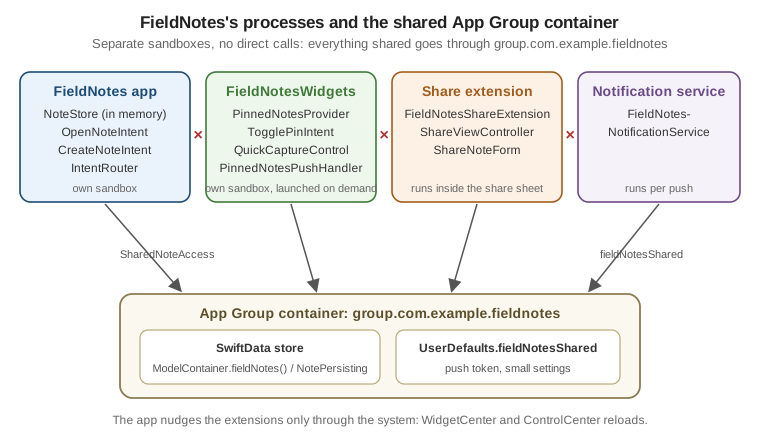
FieldNotesShareExtension
The share extension puts FieldNotes in every app’s share sheet: share a web page from Safari or text from Notes, and it becomes a field note. The extension’s Info.plist says what it accepts, and the system shows FieldNotes only for matching content:
<!-- FieldNotesShareExtension/Info.plist -->
<key>NSExtension</key>
<dict>
    <key>NSExtensionPointIdentifier</key>
    <string>com.apple.share-services</string>
    <key>NSExtensionPrincipalClass</key>
    <string>$(PRODUCT_MODULE_NAME).ShareViewController</string>
    <key>NSExtensionAttributes</key>
    <dict>
        <key>NSExtensionActivationRule</key>
        <dict>
            <key>NSExtensionActivationSupportsText</key>
            <true/>
            <key>NSExtensionActivationSupportsWebURLWithMaxCount</key>
            <integer>1</integer>
        </dict>
    </dict>
</dict>The principal class receives the shared items through its extensionContext, shows a small SwiftUI form, saves the
note to the App Group store, and completes the request. The iOS version hosts SwiftUI in a UIHostingController:
// FieldNotesShareExtension/ShareViewController.swift
#if os(iOS)
import UIKit
import SwiftUI
import UniformTypeIdentifiers
import FieldNotesModel

final class ShareViewController: UIViewController {
    override func viewDidLoad() {
        super.viewDidLoad()
        Task { @MainActor in
            let (title, body) = await sharedContent()
            let form = ShareNoteForm(title: title, text: body,
                                     onSave: { [weak self] note in self?.save(note) },
                                     onCancel: { [weak self] in self?.cancel() })
            let host = UIHostingController(rootView: form)
            addChild(host)
            host.view.frame = view.bounds
            host.view.autoresizingMask = [.flexibleWidth, .flexibleHeight]
            view.addSubview(host.view)
            host.didMove(toParent: self)
        }
    }

    private func sharedContent() async -> (String, String) {
        let items = extensionContext?.inputItems as? [NSExtensionItem] ?? []
        let providers = items.flatMap { $0.attachments ?? [] }
        for provider in providers where provider.hasItemConformingToTypeIdentifier(UTType.url.identifier) {
            if let url = try? await provider.loadItem(forTypeIdentifier: UTType.url.identifier) as? URL {
                return (items.first?.attributedContentText?.string ?? url.host() ?? "Link", url.absoluteString)
            }
        }
        for provider in providers where provider.hasItemConformingToTypeIdentifier(UTType.plainText.identifier) {
            if let text = try? await provider.loadItem(forTypeIdentifier: UTType.plainText.identifier) as? String {
                return (String(text.prefix(40)), text)
            }
        }
        return ("Shared note", "")
    }

    private func save(_ note: Note) {
        Task {
            try? await SharedNoteAccess.persistence().save(note)
            extensionContext?.completeRequest(returningItems: nil)
        }
    }

    private func cancel() {
        extensionContext?.cancelRequest(withError: CocoaError(.userCancelled))
    }
}

struct ShareNoteForm: View {
    @State var title: String
    @State var text: String
    let onSave: (Note) -> Void
    let onCancel: () -> Void

    var body: some View {
        NavigationStack {
            Form {
                TextField("Title", text: $title)
                TextField("Note", text: $text, axis: .vertical)
            }
            .navigationTitle("Save to FieldNotes")
            .toolbar {
                ToolbarItem(placement: .cancellationAction) { Button("Cancel", action: onCancel) }
                ToolbarItem(placement: .confirmationAction) {
                    Button("Save") { onSave(Note(title: title, body: text, tags: ["shared"])) }
                        .disabled(title.isEmpty)
                }
            }
        }
    }
}
#endifThe form doesn’t read NoteStore; the extension has no store, only the App Group. The macOS build of the extension
uses the same form and sharedContent() logic in an AppKit view controller. Keep the extension small: it shares the
FieldNotesModel and FieldNotesServices packages but not the app’s UI, and it’s killed if it exceeds its memory
limit.
ShareLink: Sharing Out of FieldNotes
The share extension brings content in; ShareLink sends it out. In NoteDetail, the toolbar shares the note’s
universal link, so the recipient lands on the web page or, with FieldNotes installed, straight on the note:
// FieldNotes/Views/NoteDetail.swift (toolbar excerpt)
ToolbarItem {
    ShareLink(item: URL(string: "https://fieldnotes.example.com/note/\(note.id.uuidString)")!,
              subject: Text(note.title),
              message: Text(note.body.prefix(140))) {
        Label("Share", systemImage: "square.and.arrow.up")
    }
}ShareLink accepts any Transferable value. Sharing the note itself as a .fieldnotes document, with the
NotebookExportDocument type, is covered on
Preferences, Files and Document-Based Apps.
Platform availability
| API or feature | iOS | iPadOS | macOS | watchOS | visionOS |
|---|---|---|---|---|---|
|
Yes (16) |
Yes (16) |
Yes (13) |
Yes (9) |
Yes (not versioned in the reference) |
|
Yes (16) |
Yes (16) |
Yes (13) |
Yes (9) |
Yes |
|
New in 26 |
New in 26 |
New in 26 |
New in 26 |
New in 26 |
|
New in 26.4 |
New in 26.4 |
New in 26.4 |
New in 26.4 |
New in 26.4 |
|
New in 27 |
New in 27 |
New in 27 |
New in 27 |
New in 27 |
|
Yes (18) |
Yes (18) |
Yes (15) |
Not available |
Yes (2) |
|
New in 27 |
New in 27 |
New in 27 |
Not available |
New in 27 |
Visual intelligence ( |
New in 26 |
New in 26 |
New in 27 |
Not available |
Not available |
|
New in 27 |
New in 27 |
New in 27 |
Not available |
New in 27 |
Universal links, |
Yes |
Yes |
Yes |
Yes |
Yes |
|
Yes (18.2) |
Yes (18.2) |
Yes (15.2) |
Yes (11.2) |
Yes (2.2) |
Share extensions |
Yes |
Yes |
Yes |
Not available |
Not available |
|
Yes (16) |
Yes (16) |
Yes (13) |
Yes (9) |
Yes (1) |
Siri with Apple Intelligence, visual intelligence and schema-based actions also depend on the device supporting Apple Intelligence and on the user’s language and region.
References
-
Apple Developer Documentation — Associated Domains Entitlement
-
Apple Developer Documentation — Implementing communication notifications
-
Apple Developer Documentation — Getting started with the App Intents framework
-
Apple Developer Documentation -- continueInForeground(_:alwaysConfirm:)
-
Apple Developer Documentation — Making app entities available in Spotlight
-
Apple Developer Documentation — Integrating your app with visual intelligence
-
Apple Developer Documentation — Testing your App Intents code
-
Apple Developer Documentation — Defining a custom URL scheme for your app
-
Apple Developer Documentation — Supporting associated domains
-
Apple Developer Documentation -- onContinueUserActivity(_:perform:)
-
Apple Developer Documentation -- userActivity(_:isActive:_:)