State
|
This content was generated with the assistance of AI and should be verified against the official documentation before being relied on in production; see the section bibliography for the reference material consulted while preparing these pages. |
Every Terraform and OpenTofu configuration is paired with a record of what it has built: which real object each resource instance in the code stands for, what that object looked like the last time the tool saw it, and a few facts that are needed to destroy it safely later. That record is the state. It is the least visible part of the tool and the one that causes the most outages, because almost every serious incident in a Terraform project, such as a destroyed database, a duplicated resource, a stuck lock or a leaked password, is in the end a problem with state.
This page describes state as documented for Terraform 1.17 (released 2026-10-21) and OpenTofu 1.13 (latest patch 1.13.2).
It explains why state exists, what the file contains, why it must be treated as a secret, how locking protects it, how to
read and change it with the state family of commands and with the configuration-driven alternatives, how backups work,
and how to detect and reconcile drift. It follows
The Dependency Graph and the Plan and
CLI Essentials in the reading path, and it leads into
Backends and Remote State, where the places that hold state are
described in detail.
The examples use the Bookshelf scenario (catalog-api, reviews-api, web, PostgreSQL, Redis, a covers bucket). All
names, identifiers and values are placeholders. No state shown on this page comes from a real account, and the JSON
documents are abbreviated and marked as illustrative, because the exact content of a state file depends on the provider
versions in use.
Why Terraform needs state
Terraform could in theory ask the cloud provider on every run what exists and compare it with the code. It does not, for reasons that the official documentation spells out in its page on the purpose of state. There are four of them.
| Purpose | What it means in practice |
|---|---|
Mapping to the real world |
The configuration says |
Metadata |
Alongside the binding, state keeps the dependencies that were in force when the object was last applied, the provider
configuration that manages it, and some provider-internal data. This is what lets Terraform destroy an object whose
|
Performance |
State caches the attributes of every managed object. For a small infrastructure Terraform refreshes all of them on
every plan. For a very large one, refreshing every object is slow and hits API rate limits, so people use
|
Syncing a team |
With a local file, everyone must have the latest state before running anything. With remote state and a locking backend, everyone starts from the latest snapshot and nobody writes at the same time. |
The official docs state the central rule in one sentence: the primary purpose of state is to store bindings between
objects in a remote system and resource instances declared in your configuration. Terraform expects a one-to-one
mapping. If a remote object were bound to two resource instances, the mapping would be ambiguous and Terraform
"may behave unexpectedly". Terraform guarantees one-to-one when it creates objects itself, but when you add or remove
bindings by other means (terraform import, an import block, terraform state rm, terraform state mv), the
guarantee becomes your responsibility. Importing the same bucket into two resource addresses is the textbook way to break
it.
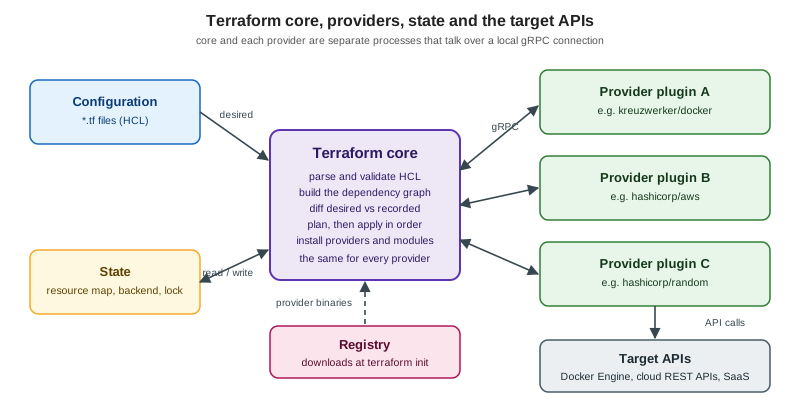
State is also the reason a configuration is not enough to describe a deployment. Two copies of the same code with different state files manage two different sets of objects, and the same state file used with two different codebases is a recipe for destroying things. That is why the section on Workspaces, Environments and Project Structure spends so much time on how many states a project should have.
Where state lives
By default Terraform keeps each workspace’s state in a local file named terraform.tfstate, and the previous snapshot in
terraform.tfstate.backup, both in the working directory. That needs no configuration, but the official docs list the
two reasons it does not scale: it makes collaboration hard, and the state is lost if the file is lost. The
recommendation is to store state in HCP Terraform or in a remote backend, and the docs warn against version control or
any storage that lacks locking and secure access control, because that risks data loss and the exposure of secrets
stored in the state.
Three different files in a working directory have confusingly similar names.
| File | What it is |
|---|---|
|
The state of the selected workspace when the |
|
The previous snapshot, written by the |
|
Not infrastructure state. It records the backend configuration of this working directory, created by |
Source: Terraform Docs — State and Terraform Docs — Backends
With a remote backend the state lives in the backend: an S3 object, a Google Cloud Storage object, an Azure blob, a row
in PostgreSQL, a Kubernetes secret, or an HCP Terraform workspace. Terraform holds it in memory while it works and does
not leave a copy on disk, apart from the backups that the terraform state commands write (see Backups and recovery). The
catalogue of backends, partial configuration and migration with terraform init -migrate-state are the subject of
Backends and Remote State.
The state file format
State is a JSON document. The official docs are firm on two points: do not edit it by hand, because the terraform state
commands exist to modify it safely, and do not build software on the raw format, because the format "is subject to
change in new Terraform versions" even though new versions are generally backward compatible with earlier snapshots.
For tools that need to read state, Terraform provides stable JSON views: terraform output -json for root module
outputs and terraform show -json for the full latest snapshot. The raw file is nevertheless worth understanding,
because you will read it during incidents.
The top level of a state file has seven fields. This list comes from the state file encoder in the Terraform source
code (internal/states/statefile, tag v1.17.0), because the format is not a documented interface.
| Field | Meaning |
|---|---|
|
The state format version. It is hard-coded to |
|
The version of Terraform that wrote the snapshot. Terraform uses it to decide whether the installed version can read the state. |
|
A counter that increases every time a new snapshot of the same state is written. It orders snapshots of one state. |
|
A unique identifier created when the state is first created. It identifies this state across all its snapshots, so two files with different lineages are unrelated states. |
|
The root module output values, with their types and a |
|
One entry per resource (and data source) with its |
|
The last known results of |
Each entry in resources[].instances[] has its own fields: index_key (for count and for_each), status,
deposed (a key present when a replaced object is being kept until its replacement is created, as happens with
create_before_destroy), schema_version, attributes, sensitive_attributes, identity_schema_version and
identity (the resource identity used by identity-based import), private (opaque provider data), dependencies and
create_before_destroy.
The following document is illustrative. It is abbreviated from what the encoder defines for a covers bucket and a
generated database password, with values replaced by placeholders. A real file contains every attribute of every
resource, and it contains the real value of every sensitive attribute, which is why this page shows <redacted>
instead.
{
  "version": 4,
  "terraform_version": "1.17.0",
  "serial": 12,
  "lineage": "<uuid-generated-when-the-state-was-first-created>",
  "outputs": {
    "covers_bucket_name": {
      "value": "bookshelf-covers-example",
      "type": "string"
    },
    "db_password": {
      "value": "<redacted>",
      "type": "string",
      "sensitive": true
    }
  },
  "resources": [
    {
      "mode": "managed",
      "type": "aws_s3_bucket",
      "name": "covers",
      "provider": "provider[\"registry.terraform.io/hashicorp/aws\"]",
      "instances": [
        {
          "schema_version": 0,
          "attributes": {
            "bucket": "bookshelf-covers-example",
            "id": "bookshelf-covers-example"
          },
          "sensitive_attributes": [],
          "identity_schema_version": 0,
          "identity": {
            "bucket": "bookshelf-covers-example"
          },
          "private": "<opaque>",
          "dependencies": []
        }
      ]
    },
    {
      "module": "module.catalog_db",
      "mode": "managed",
      "type": "random_password",
      "name": "admin",
      "provider": "provider[\"registry.terraform.io/hashicorp/random\"]",
      "instances": [
        {
          "schema_version": 3,
          "attributes": {
            "result": "<redacted>",
            "length": 24
          },
          "sensitive_attributes": [
            [
              { "type": "get_attr", "value": "result" }
            ]
          ]
        }
      ]
    }
  ],
  "check_results": [
    {
      "object_kind": "var",
      "config_addr": "var.environment",
      "status": "pass",
      "objects": [
        { "object_addr": "var.environment", "status": "pass" }
      ]
    }
  ]
}
Source: Terraform Docs — State and Terraform source — version4.go
Four properties of this file matter in practice.
-
serialandlineageare the integrity checks.terraform state pushrefuses to overwrite a state whose lineage differs, and refuses to overwrite a state whose serial is higher than the one being pushed. Both protections exist so that an old copy never replaces a newer one by accident. They can be bypassed with-force, which is why-forceon a push is one of the most dangerous flags in the tool. -
Attributes are stored in plain text. The
sensitive_attributeslist only records which paths are sensitive so that Terraform can hide them in its output. The values are still in the file. -
The state does not store your variable values or your configuration. It stores outputs, resource attributes and metadata. A
terraform.tfvarssecret reaches the state only if it flows into a resource attribute or an output. -
The
versionfield belongs to the format. Older formats exist, and Terraform upgrades the snapshot in memory when it reads one.terraform state pulldocuments that it "upgrades the local copy to the latest state file version that is compatible with locally-installed Terraform" before printing it, so it cannot be used to find out which Terraform version wrote the remote state.
For tools, use the supported views instead of parsing the file. terraform show -json prints a values representation
(root_module with resources and child_modules, plus outputs) together with a format_version, and the guidance
is that consumers should ignore unrecognized properties and reject an unsupported major format_version. The details
of those formats belong to
Machine-readable Output and Integrations.
Sensitive data in state
State holds the attributes of every managed object, so it holds every secret that is an attribute of one: the initial password of a database, the private key of a TLS certificate, an API token returned by a provider. The official sensitive-data guide puts it plainly: Terraform state and plan files contain detailed information about your infrastructure, and with local state the file is plain text that includes any secret values defined in your configuration. OpenTofu’s page on sensitive data in state says the same: "treat the state itself as sensitive data."
Two things the sensitive argument does not do are worth repeating, because they are the most common misconception.
-
Marking a variable or output
sensitive = truehides it from CLI output and from the HCP Terraform UI. It does not keep it out of the state file or the plan file. -
A
random_passwordmarked sensitive in the plan is still stored in the clear in the state.
What you can do about it falls into four groups, which the official guide orders by how much they protect.
| Approach | What it protects | Available from |
|---|---|---|
|
CLI output and the HCP Terraform UI. The value is still stored in state and plan. |
Terraform 0.15 |
Ephemeral values: |
Terraform omits them from state and plan files entirely. |
Terraform 1.10 |
Write-only arguments on managed resources ( |
The argument is sent to the provider and never persisted in state or plan. |
Terraform 1.11 |
Secure storage of the state itself: remote backend with encryption at rest and access control, OpenTofu state encryption |
Protects the file as a whole, but anyone who can read the decrypted state sees every value that is stored in it. |
Backend-specific; OpenTofu 1.7 for encryption |
Source: Terraform Docs — Manage sensitive data in your configuration and OpenTofu Docs — Sensitive Data in State
The preferred order is therefore: keep the secret out of the state if the provider supports an ephemeral resource or a write-only argument, otherwise treat the state as the secret it is. The full treatment of ephemeral and write-only values, with the provider arguments that exist today, is in Sensitive Data, Ephemeral Values and Write-only Arguments.
Rules that follow from this, and that apply to the Bookshelf project:
-
Never commit
terraform.tfstateor a state backup. Add*.tfstate,*.tfstate.*and.terraform/to.gitignore. -
Use a remote backend with encryption at rest, versioning and access control, and restrict read access to the state as tightly as write access. Reading a state is enough to obtain every secret in it.
-
Treat a saved plan file (
-out=plan.tfplan) the same way: it contains a copy of the state at the time of the plan and the proposed new values. -
Do not store state as a CI artifact. Jobs that archive
terraform.tfstateleak it to anyone who can download artifacts. -
Be careful with
terraform state pullandterraform show: their output goes to a terminal or a log, and sensitive attributes are shown bystate pullin the clear because it prints the raw document. -
Prefer short-lived credentials (OIDC from CI) so that the state does not hold long-lived keys for provider configurations. Provider configuration does not itself enter the state, but credentials passed as resource arguments do.
OpenTofu state and plan encryption
OpenTofu 1.7 added optional encryption of state and plan files at rest, for local storage and for any backend. It is
configured in an encryption block inside terraform, by choosing a key provider, an encryption method (currently
AES-GCM) and attaching the method to state, plan or both. The passphrase below is supplied through the
TF_ENCRYPTION environment variable instead of the code, so that it never reaches version control.
terraform {
  required_version = ">= 1.13"

  encryption {
    # The key provider and method are declared in the TF_ENCRYPTION
    # environment variable (see below). The code only says that state and plan
    # must be encrypted and that nothing may be read or written in clear text.
    state {
      enforced = true
    }
    plan {
      enforced = true
    }
  }
}
# Illustrative. The passphrase comes from a secrets manager, not from this file.
export TF_ENCRYPTION=$(cat <<EOF
key_provider "pbkdf2" "bookshelf" {
passphrase = "$BOOKSHELF_STATE_PASSPHRASE"
}
method "aes_gcm" "bookshelf" {
keys = key_provider.pbkdf2.bookshelf
}
state {
method = method.aes_gcm.bookshelf
}
plan {
method = method.aes_gcm.bookshelf
}
EOF
)
tofu initThe OpenTofu documentation lists the cautions that apply before turning this on: once encryption is enabled the files
are unrecoverable without the key, so keep a backup of the key and test the recovery plan first; encryption protects
data at rest but does not protect against data loss or against a replay of an older state; and enabling it on an
existing project needs an unencrypted fallback method so OpenTofu can read the old clear-text state. Key providers
include PBKDF2, AWS KMS, GCP KMS, Azure Key Vault, OpenBao and an external program. Terraform has no equivalent: the
protection of Terraform state is the responsibility of the backend. The comparison is continued in
Backends and Remote State and
OpenTofu.
Locking
If the backend supports it, Terraform locks the state for every operation that could write it, so that two runs cannot modify the same state at once. The lock is taken automatically, silently, and released when the operation ends. If acquiring the lock fails, Terraform stops. If it takes longer than expected, Terraform prints a status message.
| Option or command | Effect |
|---|---|
|
Do not lock for this command. Available on most commands that read or write state. The docs state they "do not recommend
it", and for |
|
Retry acquiring the lock for the given time (for example |
|
Remove a lock manually. Takes the lock ID that Terraform prints when it cannot acquire or release a lock. |
The lock ID acts as a nonce: the command refuses to unlock anything other than the lock whose ID you supply, which prevents unlocking the wrong lock by mistake. The documentation of the state locking page has a blunt warning about the command: be very careful, because unlocking while someone else holds the lock can produce multiple writers, and it should be used only to remove your own lock in the case where automatic unlocking failed. How the lock behaves "is dependent on the backend being used", and for local state files another process cannot unlock them.
The following console session is illustrative; the exact wording differs between versions and backends.
$ terraform apply
Acquiring state lock. This may take a few moments...
Error: Error acquiring the state lock

  Lock Info:
    ID:        6b1f0a2c-0000-0000-0000-000000000000
    Operation: OperationTypeApply
    Who:       ci-runner@build-17
    Created:   2026-10-23 09:12:41 +0000 UTC

# Confirm that the run which holds the lock has really died (cancelled job,
# crashed runner), then:
$ terraform force-unlock 6b1f0a2c-0000-0000-0000-000000000000The safe procedure for a stuck lock is therefore: read the lock information, check with the person or the pipeline that holds it, confirm that its process is really gone, and only then force-unlock. After a crash, check the state before the next apply, because an interrupted apply may have created objects that the state does not yet record. The way to recover those objects is described in Recovering from a failed apply.
Not every backend locks. local locks the file locally; s3 locks with a lock file next to the state when
use_lockfile = true, which became generally available in Terraform 1.11 and deprecated the DynamoDB arguments
(dynamodb_table); gcs, azurerm, pg, kubernetes and HCP Terraform lock natively, while http depends on the server.
The list per backend, with the arguments, is kept in one place:
Backends and Remote State.
HCP Terraform goes further than a lock: it queues runs per workspace, so two runs for the same workspace are serialized, and it can detect an attempt to create a new plan while another is waiting for approval. See HCP Terraform and Terraform Enterprise.
Inspecting state
The terraform state command group has seven subcommands in the 1.17 documentation: identities, list, mv, pull,
replace-provider, rm and show. (The command also has a push, documented on its own page; it is missing from the
command index, but exists.) The read-only ones do not write a backup. The documentation recommends combining their
output with Unix tools, since it was designed to be friendly to grep and awk.
| Command | What it does | Notes |
|---|---|---|
|
Lists the resource instances in state, sorted by module depth and then alphabetically. Addresses filter the output. |
|
|
Shows the attributes of exactly one resource instance. |
|
|
Lists the resource identities of instances in state, as JSON. Resources without an identity are not listed. |
|
|
Downloads the state from its backend, upgrades it in memory to the latest format that the installed Terraform supports, and prints the raw document to stdout. |
Prints secrets in the clear. Useful with |
Source: Terraform Docs — terraform state commands; state list; state show; state identities; state pull
Addresses use the resource addressing syntax: aws_s3_bucket.covers, aws_instance.web[0],
module.catalog_api, module.catalog_api.module.network.aws_subnet.private["eu-west-1a"]. Brackets and quotes have a
meaning in shells, so quote the address with single quotes in Unix shells; PowerShell and cmd.exe need different
escaping, and the documentation of state show shows all three.
$ terraform state list
aws_s3_bucket.covers
module.catalog_db.aws_db_instance.this
module.catalog_db.random_password.admin
module.catalog_api.module.network.aws_subnet.private["eu-west-1a"]
module.catalog_api.module.network.aws_subnet.private["eu-west-1b"]

$ terraform state list module.catalog_db
module.catalog_db.aws_db_instance.this
module.catalog_db.random_password.admin

$ terraform state show 'aws_s3_bucket.covers'
# aws_s3_bucket.covers:
resource "aws_s3_bucket" "covers" {
    bucket = "bookshelf-covers-example"
    id     = "bookshelf-covers-example"
    # (attributes abbreviated)
}

$ terraform state identities -json aws_s3_bucket.covers
{
  "aws_s3_bucket.covers": { "bucket": "bookshelf-covers-example" }
}
Source: Terraform Docs — terraform state list; the sample output is illustrative and abbreviated, derived from the examples on the state show and state identities pages.
terraform show and terraform output are the other inspection commands. terraform show without arguments prints the
whole current state in human-readable form, terraform show -json prints it for programs, and terraform output -json
prints the root outputs. The distinction between state show and show is simple: state show takes one resource
address; show prints all of it, or a saved plan.
Identities are worth a sentence of their own. A resource identity is a set of attributes that uniquely identifies a
remote object in a provider’s terms, such as a bucket name and a region, and is stored beside the resource’s
attributes in the state (identity_schema_version and identity in the file). It is what makes identity-based import
blocks possible. state identities is a read-only way to see the values Terraform has recorded. Not all providers
and resource types implement identities yet, and a resource that does not is simply left out of the output. The import
side is covered in Import and Query.
Changing state
Changing state does not change infrastructure. It changes what Terraform believes about infrastructure, and that is exactly why it is dangerous: a wrong edit makes the next plan destroy or duplicate something real. The tool gives you five commands for it, plus two configuration-driven alternatives that are preferred whenever they apply.
| Command | Effect | Typical use |
|---|---|---|
|
Re-binds the remote object tracked at SOURCE to DESTINATION. Source and destination must be the same kind of thing (instance to instance, module to module), and a resource can only move to an address of the same type. |
Renaming a resource or moving it into or out of a module without destroying it. |
|
Removes the binding. The remote object continues to exist but Terraform no longer manages it. |
Handing an object over to another configuration, or abandoning management. A later plan will propose to create a new object for each forgotten instance. |
|
Changes the provider address of all resources that use FROM, for example when moving to a mirror or fork, or from
|
Provider namespace changes and migrations between Terraform and OpenTofu registries. |
|
Reads the whole state, see above. |
Reading, and the first step of a manual repair. |
|
Uploads a local file as the state of the configured backend. |
Last-resort repair, restoration from a backup. |
Source: state mv; state rm; state replace-provider; state push
state mv
When a resource block is renamed in code, Terraform’s default interpretation is "delete the old object and create a new
one at the new address". state mv overrides that by re-attaching the existing object to the new address first. The
workflow is always the same: edit the code, run state mv, then run terraform plan and check that it proposes no
changes.
# 1. The resource was renamed in code from cover_images to covers.
# 2. Move the binding. -dry-run reports what would move without changing anything.
terraform state mv -dry-run aws_s3_bucket.cover_images aws_s3_bucket.covers
terraform state mv         aws_s3_bucket.cover_images aws_s3_bucket.covers

# Move the resource into a module (the resource block now lives in module.covers).
terraform state mv aws_s3_bucket.covers module.covers.aws_s3_bucket.this

# Move one instance of a resource created with count.
terraform state mv 'aws_instance.worker[0]' 'aws_instance.job[0]'

# Move one instance of a resource created with for_each (Unix shells).
terraform state mv 'aws_instance.worker["reviews"]' 'aws_instance.job["reviews"]'

# Always verify: the plan must show no changes for the moved objects.
terraform planThe documentation has one warning that matters for teams: if you use state mv for a refactor, you must "communicate
carefully with your coworkers" so that nobody applies the configuration change between your code change and your
state mv, since they would plan a destroy and a create. This coordination problem is the main reason
moved blocks were introduced. A moved block is code, travels with the commit, and is applied by every user of the
configuration on their next plan.
Options accepted by state mv include -dry-run, -lock=false, -lock-timeout=DURATION and, for the local backend,
the legacy -state, -state-out, -backup and -backup-out. When a configuration uses a non-local backend, using
-backup or -backup-out without -state is an error since Terraform 1.1, because those options operate on a local
file only and were silently ignored before.
state rm
state rm forgets objects. It is useful when you want a different configuration, or a different tool, to own the
object, or when you are removing something that was imported by mistake. It also has the sharpest edge in the family,
the rule that after it a plan will try to create a new object for each instance that was forgotten. If the name of the
object is unique in the remote system, that creation fails, which is the lucky case; the unlucky case is a second
object created next to the first.
# What would be forgotten? Nothing is changed.
terraform state rm -dry-run 'module.legacy_cache'

# Forget one resource and everything inside one module.
terraform state rm 'aws_elasticache_cluster.sessions'
terraform state rm 'module.legacy_cache'Since Terraform 1.7 the recommended way to do the same is a removed block with lifecycle { destroy = false }, which
is planned and applied like any change and can therefore be reviewed. The docs for state rm themselves say that you can
use removed blocks instead and that they let you review removals as part of the normal workflow. state rm remains for
the cases in which editing configuration is not an option. See
Refactoring: moved, removed and import.
state replace-provider
When a provider moves to another source address, existing resources in state still reference the old address and
terraform init reports that the provider cannot be found for them. state replace-provider rewrites them. It always
writes a backup first (backups cannot be disabled for it, "due to the destructive nature of this command") and asks for
approval unless -auto-approve is given.
# Illustrative: move resources managed by hashicorp/aws to a private mirror namespace.
terraform state replace-provider hashicorp/aws registry.example.internal/acme/awsThe new source must also be reflected in required_providers and then in the lock file via terraform init. See
Providers.
state pull and state push
pull and push are the two commands that touch the whole document, and they are the most dangerous in the family
because they bypass every consistency check that normal operations enjoy. The official recommendation for push is that
it be used "only when you must manually modify the remote state". The safe procedure is:
# 1. Make sure nobody else is working (use the locking and the team channel).
# 2. Download a copy and keep it safe, since it contains secrets.
terraform state pull > bookshelf-before.tfstate

# 3. Edit the copy. Increase "serial" by one: pushing a state whose serial is not
#    higher than the destination's is refused.
$EDITOR bookshelf-before.tfstate

# 4. Push it. The lineage and serial checks protect you; do NOT add -force.
terraform state push bookshelf-before.tfstate

# 5. Verify.
terraform planThe checks that push performs are the differing lineage check and the higher remote serial check, described in
the format section. -force disables both, "this is not recommended", and with them disabled the destination state is
overwritten. Treat a push with -force as an emergency tool that is permitted only after a copy of the destination
state has been saved. The same documentation notes that state files must be UTF-8 without a byte order mark, which
matters in PowerShell, where redirecting output with > may produce another encoding; use Set-Content instead.
pull and push were popular for moving state to a remote backend in older tutorials. That is no longer how it is
done: change the backend block and run terraform init -migrate-state, which copies the state, checks the lineage and
leaves the local file as a record. This is described in
Backends and Remote State.
The -backup flags
Every terraform state command that modifies state writes a backup, read-only commands write none, and "backups for
state modification can not be disabled". With the local backend the backup path can be set with the legacy -backup
option (and -backup-out for state mv); with a remote backend those options are only usable together with
-state pointing at a local file. The local backend documentation mentions that -backup=- disables the creation of
backup files altogether for its own legacy options, but the terraform state command reference says plainly that
state-modifying commands always write one, so do not rely on turning it off. With remote state, backups are
still written to local disk, so the timestamped backup files that appear next to the state after
a state mv contain the same secrets as the state: delete them when they are no longer needed and never commit them.
Choosing between commands and blocks
Configuration-driven blocks have replaced most of what state mv, state rm and terraform import were used for. The
rule of thumb is to prefer the block, because it is reviewed in the pull request, planned before it is applied, and
applied identically by everyone.
| Intent | Preferred (code) | Legacy (command) |
|---|---|---|
Rename a resource or module, move it into a module, change |
|
|
Stop managing an object but keep it, or remove it from state and destroy it |
|
|
Bring an existing object under management |
|
|
Change the provider source address |
No block; |
|
Repair a damaged or inconsistent state |
No block; |
|
Source: Terraform Docs — Refactor Terraform state, Remove a resource from state and terraform state rm
The pair moved and removed is documented on
Refactoring: moved, removed and import, and the import block
and terraform query on Import and Query. What matters here is the
model: all of them are ways to edit the bindings of the state, and they differ in whether the edit is declared in the
configuration and planned or performed directly and immediately. A removed block with destroy = true is the only
form of "remove from state" that also destroys the object, and OpenTofu supports the same block with the same meaning
(see Terraform and OpenTofu differences).
The same state mv is also the technique for splitting a large state. The official refactoring guide recommends
planning the split by volatility, by whether resources are stateful or stateless, and by team ownership, and
documents two ways to migrate resources between state files: the pair state rm and import (which re-creates the
binding in the destination), or state mv -state-out, which writes to a second local file. After the split, share values
between the pieces with terraform_remote_state, a data source, or a store such as SSM or Key Vault. See
Backends and Remote State.
Backups and recovery
Terraform protects its state in several overlapping ways. Understanding which one applies to your backend tells you what you can recover.
| Mechanism | What it gives you |
|---|---|
|
One file: the snapshot before the last write. It is overwritten on every save, so it protects against the last step only. |
Backups from |
One file per state-modifying |
Backend versioning |
The strongest tool. S3 bucket versioning and Google Cloud Storage object versioning keep every previous version of the state object, which the documentation of both backends recommends enabling. Azure Blob Storage and HCP Terraform also keep earlier state versions; check the settings of your platform. |
Plan files and CI artifacts |
A saved plan contains the prior state. It is a source of recovery information and a source of secrets. |
|
Terraform writes |
Source: Terraform Docs — S3 backend, GCS backend, state commands and the OpenTofu v1.13 CHANGELOG
The recovery routine depends on what was lost.
-
The last
statecommand was a mistake. Use the backup that the command wrote, and push it back withterraform state push(after checking the serial; the backup has a lower serial than the current state, so you may need to raise it). Runterraform planto confirm. -
The state object was overwritten or deleted in the backend. Restore the previous version through the backend’s versioning (S3 version restore, GCS object restore), then run
terraform plan. -
Someone applied from a stale copy. The plan shows objects as new that already exist. Do not apply: compare
terraform state listwith the backend’s history, restore, and re-plan. -
There is no backup at all. Rebuild the state by importing every object, ideally with
importblocks and-generate-config-out, and letterraform planguide you until it is clean. It is slow and error-prone, which is why backend versioning is not optional for a team.
Recovering from a failed apply
An apply that dies halfway leaves a state that records what was done before the failure. Terraform saves state after every resource operation, so most of the work is recorded, and the plan after a failed apply will continue where it stopped. The cases that need attention:
-
The lock is still held. Use
force-unlockafter confirming the run is gone, as described above. -
errored.tfstateexists. Terraform could not write the state to the backend, so it wrote the final state locally. Push it withterraform state push errored.tfstate, then delete it, because it holds secrets. -
A resource was created but is missing from the state. If the provider reports a conflict on the next apply, import the object instead of deleting it.
-
A resource is
tainted. Terraform marks an object that was created but failed provisioning, and replaces it on the next apply. In current versions preferterraform apply -replace=ADDRESSto force a replacement deliberately.
Source: Terraform Docs — terraform state push and terraform apply
Drift: when reality and state disagree
Drift is any difference between what the state records and what actually exists, introduced outside Terraform: an engineer changes a security group in the console during an incident, a scaling policy resizes a group, another automation modifies a tag. Terraform’s normal plan already reconciles drift in one direction: before computing changes it refreshes the state, reading every managed object, and then plans to bring reality back to the configuration. Drift therefore shows up as a proposed change, and it is overwritten if you apply.
That is not always what you want. Sometimes the manual change was intentional and the right move is to update the code or to accept the new value into the state without touching the object. For that, Terraform offers the refresh-only planning mode.
| Command | Behavior |
|---|---|
|
Creates a plan whose only goal is to update the state and the root module outputs to match changes made to remote objects outside Terraform. It shows the drift and changes nothing. |
|
Shows the same plan and, when you approve it, writes the detected values to the state. No remote object is changed.
This is the documented replacement for the deprecated |
|
Skips the refresh. Faster, but external changes are ignored, so the plan may be incomplete or wrong. Cannot be combined with refresh-only mode. |
|
New in Terraform 1.17: refresh only the resource instances that the plan proposes to change. It saves API calls
but ignores external changes to everything else. Cannot be used with refresh-only mode or with |
|
Deprecated. Effectively |
The reason refresh was deprecated is explicit in the documentation: with misconfigured provider credentials,
Terraform "may be misled into thinking that all of the managed objects have been deleted", and an automatic refresh
would then remove every tracked object from the state without any prompt. apply -refresh-only has the same effect on
the state but with a confirmation, so you can notice that the whole infrastructure appears to be gone. The mode was
introduced in Terraform 0.15.4.
A drift review for the Bookshelf covers bucket looks like the following. The output is illustrative, abbreviated from the format Terraform prints for refresh-only plans.
$ terraform plan -refresh-only

Note: Objects have changed outside of Terraform

Terraform detected the following changes made outside of Terraform since the
last "terraform apply" which may have affected this plan:

  # aws_s3_bucket.covers has changed
  ~ resource "aws_s3_bucket" "covers" {
      ~ tags = {
          + "owner" = "support-team"
        }
        # (attributes abbreviated)
    }

This is a refresh-only plan, so Terraform will not take any actions to undo
these. If you were expecting these changes then you can apply this plan to
record the updated values in the Terraform state without changing your
configuration.
Source: Terraform Docs — terraform plan (refresh-only mode); the console text is illustrative and abbreviated, not a verbatim copy.
You then have three choices: accept it (terraform apply -refresh-only), codify it (add owner to the code, so that the
plan is clean), or reverse it (a normal terraform apply). The same decision, made on a schedule, is the heart of drift
detection: HCP Terraform offers health assessments that run a refresh-only check on a schedule, and a pipeline can
simply run terraform plan -refresh-only -detailed-exitcode nightly and alert on exit code 2. Exit code 2 of
-detailed-exitcode means a diff exists, as with a normal plan; see
CI/CD and Automation and
HCP Terraform and Terraform Enterprise.
To avoid drift that you do not want to see, use lifecycle { ignore_changes = [...] } for attributes that another system
legitimately owns, which is described in
Lifecycle, Validation and Checks. A check block with a
scoped data source is a way to be warned when an external condition stops being true.
Three other sources of confusion are commonly mistaken for drift:
-
Provider upgrades that change attribute schemas show as changes in the plan. The state is upgraded to the new schema version and
schema_versionincreases. -
Computed attributes that change on each read (timestamps, rotating tokens) produce a perpetual diff. Fix them in the provider, or with
ignore_changes. -
Conflicting automation, where two tools manage the same object. The state records one writer’s view, and the next plan from the other writer changes it back. The fix is ownership, not a state command.
The life of state during a run
The following diagram puts the pieces together for one terraform apply with a remote, locking backend: where the lock
is taken, where the refresh happens, and when the state is written.
Source: Terraform Docs — State and State Locking; the sequence is a simplified original drawing.
The sequence makes several practical rules visible. A plan that is saved and applied later (-out and then apply
plan.tfplan) is rejected if the state has changed since the plan was made, because the plan records the state it was
based on (Terraform reports a stale plan); that is the reason saved plans are the safe way to separate review from execution in a pipeline. The
write happens after each object, not at the end, which is why a failed apply leaves a consistent partial result. And
read-only commands such as plan also take the lock (except with -lock=false), because they may refresh and, in
refresh-only mode, write.
What changed recently
| Version | Change |
|---|---|
Terraform 0.15.4 |
|
Terraform 1.1 |
|
Terraform 1.2 |
|
Terraform 1.5 |
|
Terraform 1.7 |
|
Terraform 1.10 |
Ephemeral resources, variables and outputs keep values out of state and plan. The S3 backend gains native state locking with |
Terraform 1.11 |
Write-only arguments. S3 native state locking becomes generally available and the DynamoDB arguments are deprecated. |
Terraform 1.12 |
Identity-based |
Terraform 1.15 |
|
Terraform 1.16 |
|
Terraform 1.17 |
|
Deprecated and legacy items to know when you read older material: terraform refresh (use -refresh-only); the
-state, -state-out and -backup options of the local backend (documented as legacy features preserved for
compatibility; use the path argument of the backend, and note that the state-flag deprecation is tracked in the
version table of the CLI page, CLI Essentials); the S3 backend arguments
dynamodb_table and related (deprecated in favor of use_lockfile); and the use of terraform state rm and
terraform import where a removed or import block can do the job.
Terraform and OpenTofu differences
State is the area where the two tools are most compatible and, since the fork, most different in one respect: protection of the file.
| Aspect | Terraform 1.17 | OpenTofu 1.13 |
|---|---|---|
State file format |
JSON, |
Same format and compatible with Terraform’s; a state written by one can be read by the other within the compatibility
window, subject to version checks. The |
|
|
|
|
Prints the resource as JSON (1.16). |
|
Encryption of state and plan |
None. Rely on the backend and HCP Terraform. |
Built-in |
Locking |
Backend-specific; |
Same command ( |
Refresh-only |
|
|
Crash recovery |
|
Also writes |
Removing from state |
|
|
Where the books are outdated or wrong
The state chapters of the books covered by this section remain conceptually correct: the file is JSON, serial and
lineage exist, drift is the difference between state and reality. What is out of date:
-
state pullandstate pushto migrate to a remote backend. This was the published way for a long time. Today the procedure is to add or change thebackendblock and runterraform init -migrate-state. -
terraform refreshas a way to detect drift. It is deprecated; useterraform plan -refresh-onlyandterraform apply -refresh-only, which show the drift and ask for approval. -
state mvandstate rmas the refactoring tools. They still work butmovedandremovedblocks, andimportblocks for the reverse, are now the preferred, reviewable form. -
DynamoDB tables for S3 locking. Replaced by
use_lockfile = true; the DynamoDB arguments are deprecated. -
Static CI secrets and archiving
terraform.tfstateas a build artifact. State holds secrets; use a remote backend with encryption and locking, and OIDC rather than stored keys. -
Secrets in state treated as unavoidable. Ephemeral resources (1.10) and write-only arguments (1.11) keep many of them out of state altogether.
-
No mention of identities,
state show -json,-minimal-refreshor OpenTofu encryption, which were all added after those books went to print.
Pitfalls
-
Editing
terraform.tfstatein an editor, or committing it to Git. -
Running
terraform state push -force, or pushing without raisingserialand checking the lineage. -
Forgetting that
state rmmakes the next plan create a duplicate, not just stop managing. -
Using
-lock=falsein CI "to stop lock errors", which turns the problem into silent corruption. Use-lock-timeout. -
Force-unlocking a lock that belongs to a running pipeline.
-
Using
state mvin a team without telling anyone, instead of amovedblock. -
Treating
sensitive = trueas protection of the state file. It is not. -
Leaving the backup files created by
statecommands lying around, or uploading them with the build. -
Applying
terraform refresh(orapply -refresh-only -auto-approve) with broken credentials. -
Importing the same object into two resource addresses, or into two different states.
-
Parsing the raw state file in tools instead of using
terraform show -jsonandterraform output -json. -
Sharing one state file between environments, so that a mistake in staging can destroy production.
-
Enabling OpenTofu encryption without a tested copy of the key and an unencrypted backup.