Fluent Overview and Database Drivers
|
This content was generated with the assistance of AI and should be verified against the official documentation before being relied on in production. The reference material consulted while preparing these pages is listed in the section bibliography. |
This page is written against Vapor 4.122.2 on Swift 6.4 (the package builds in the Swift 6 language mode with tools
version 6.3, as the official template does; Vapor 4.122.2 itself needs tools version 6.0), with Fluent 4.13.0, FluentKit
1.57.0, fluent-postgres-driver 2.14.0 (PostgresKit 2.17.0, PostgresNIO 1.33.1), fluent-mysql-driver 4.8.0 (MySQLKit
4.10.1), fluent-sqlite-driver 4.9.0 (SQLiteKit 4.5.2) and fluent-mongo-driver 1.4.0 (MongoKitten 6.7.15), all checked on
2026-10-17. Every Swift listing on this page was compiled in the Swift 6 language mode with zero warnings, with the same
upcoming-feature flags as the official template (ExistentialAny, InternalImportsByDefault,
MemberImportVisibility). The SQLite listings were also run, and the output shown for them is captured from those runs.
The PostgreSQL, MySQL and MongoDB listings compile but were not run against a live server (no database server was
available where the page was written), so their behaviour is taken from the sources of the drivers at the tags above,
from the official documentation and, for the one connection-refused case shown under Common errors, from a real run
against a closed port. Vapor 5 is at 5.0.0-beta.4 and is not released; its status for Fluent is covered under
Version notes. The page opens the data part of this section: it explains the layers and configures the connection.
Models, relations, migrations and queries are the subject of the Fluent Models,
Fluent Relations, Migrations &
Schema and Fluent Queries and Pagination pages of the section,
and the same Bookshelf domain (authors, books, reviews, users, tags and loans) is used throughout. Swift itself is
covered by the Swift Reference, and Sendable and isolation by
Actors, Isolation and Sendable. The same problem in
Rust is in Databases with SQLx.
What Fluent is
Fluent is Vapor’s ORM: it maps Swift types (models) to rows or documents and Swift expressions (query builders) to the database’s own query language, and it runs the migrations that create and evolve the schema. It is deliberately split into layers, and knowing which layer a type or an error comes from is most of what you need to read its documentation and its stack traces.
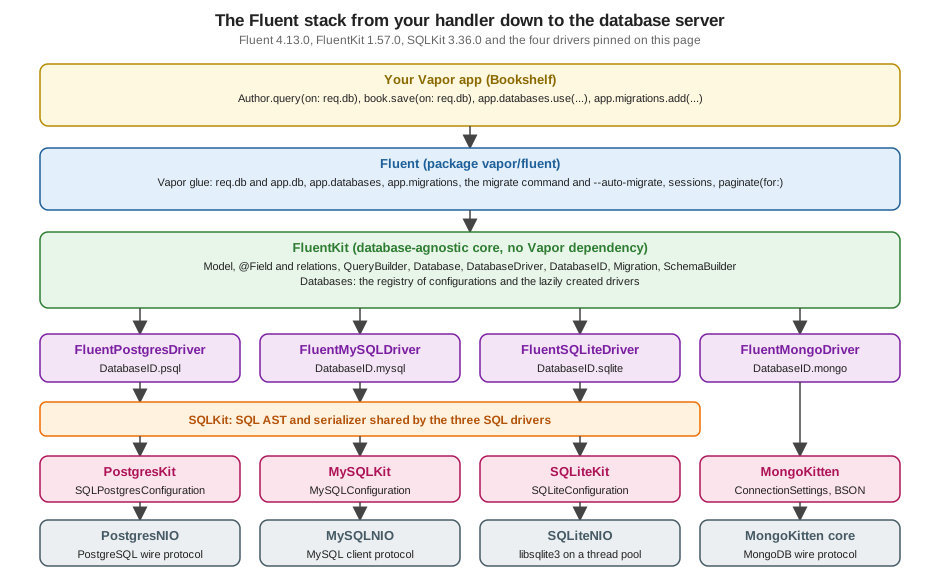
| Layer | Package | What it does |
|---|---|---|
Fluent |
|
The Vapor integration and nothing else: |
FluentKit |
|
The database-agnostic core with no Vapor dependency: |
SQLKit |
|
A Swift AST for SQL plus a serializer with per-dialect hooks. The three SQL drivers translate Fluent queries into SQLKit expressions; |
Fluent drivers |
|
One package per database. Each exposes a |
Kits |
PostgresKit, MySQLKit, SQLiteKit, MongoKitten |
Dialect and connection-pool code. The first three sit on SQLKit and AsyncKit’s connection pool; MongoKitten is a standalone MongoDB client that also covers BSON. |
NIO libraries |
PostgresNIO, MySQLNIO, SQLiteNIO, MongoKitten’s core |
The wire protocols over SwiftNIO (SQLiteNIO runs |
Two consequences are used throughout the page. First, a Fluent model is portable between the SQL drivers but not free of
database differences (column types, enum support, JSON); the schema layer is where those differences show up. Second,
MongoDB is not an SQL dialect: the driver reuses Fluent’s model and query API, but it has no SQLKit underneath and needs
its own ID type for the best fit (see MongoDB).
Where it sits in the application
Fluent is not part of the request pipeline in the way middleware and the router are. It is a service that lives on the
Application, is configured once during boot, and is used by handlers through the request.
configure(app)                               boot                         request                      shutdown
  app.databases.use(config, as: id)    -->   --auto-migrate? runs   -->   req.db / req.db(id)   -->  databases.shutdownAsync()
app.migrations.add(...) app.autoMigrate() Model.query(on: req.db) closes every pool and driver-
app.databases.use(...)stores a configuration under aDatabaseID. It does not open a connection and it does not validate that the server is reachable. The driver, and its connection pool, are created lazily the first time that database is requested throughapp.databases.database(...), which is whatreq.dbandapp.dbcall. -
The
migratecommand and the--auto-migrate/--auto-revertflags are registered by Fluent the first time anything touchesapp.databasesorapp.migrations. Withapp.autoMigrate()inconfigure, a wrong password or an unreachable host is reported at boot; without it, the first request that touches the database reports it. -
req.dbreturns a lightweightany Databasevalue bound to the request’s event loop and logger; it is not a connection. Each query or transaction borrows a pooled connection for its own duration and returns it. -
On shutdown, Fluent’s lifecycle handler calls
databases.shutdownAsync(), which closes every driver that was created. The entrypoint in the official template already awaitsapp.asyncShutdown(); see Application Lifecycle and Entrypoint.
Packages and products
| Database | Package (pinned here) | Product | DatabaseID |
Configuration entry point |
|---|---|---|---|---|
PostgreSQL |
|
|
|
|
MySQL, MariaDB |
|
|
|
|
SQLite |
|
|
|
|
MongoDB |
|
|
|
|
A DatabaseID is only a wrapper around a string (DatabaseID(string: "psql")); the drivers define the four constants
above as static properties and you define your own for extra databases (see Several databases at once). The Vapor
template asks you which driver you want when you run vapor new, and writes the dependency and the first
app.databases.use call for you. Written by hand, the dependencies are:
// swift-tools-version:6.3
import PackageDescription

let package = Package(
    name: "Bookshelf",
    platforms: [.macOS(.v13)],
    dependencies: [
        .package(url: "https://github.com/vapor/vapor.git", from: "4.122.2"),
        .package(url: "https://github.com/vapor/fluent.git", from: "4.13.0"),
        // One driver is normally enough; all four are listed here because the page compiles them all.
        .package(url: "https://github.com/vapor/fluent-postgres-driver.git", from: "2.14.0"),
        .package(url: "https://github.com/vapor/fluent-mysql-driver.git", from: "4.8.0"),
        .package(url: "https://github.com/vapor/fluent-sqlite-driver.git", from: "4.9.0"),
        .package(url: "https://github.com/vapor/fluent-mongo-driver.git", from: "1.4.0"),
        // Only needed when your own code names NIOSSL types, as the PostgreSQL TLS listing below does.
        .package(url: "https://github.com/apple/swift-nio-ssl.git", from: "2.37.0"),
    ],
    targets: [
        .executableTarget(name: "App", dependencies: [
            .product(name: "Vapor", package: "vapor"),
            .product(name: "Fluent", package: "fluent"),
            .product(name: "FluentPostgresDriver", package: "fluent-postgres-driver"),
            .product(name: "FluentMySQLDriver", package: "fluent-mysql-driver"),
            .product(name: "FluentSQLiteDriver", package: "fluent-sqlite-driver"),
            .product(name: "FluentMongoDriver", package: "fluent-mongo-driver"),
            .product(name: "NIOSSL", package: "swift-nio-ssl"),
        ]),
    ]
)
Source: Vapor docs: Fluent overview
The package versions are an example: the official documentation shows from: "2.0.0", "4.0.0", "4.0.0" and
"1.0.0" as minimums for the drivers, which is the lowest version that works with Vapor 4, not the version you should
deploy. Commit Package.resolved for an application so every build uses the versions you tested.
A pitfall with the template’s upcoming-feature flags: with MemberImportVisibility on, a file that writes .sqlite or
.postgres(...) must itself import the driver module that declares the member, even though another file of the
target already imports it. The compiler says exactly that (see Common errors). Fluent does not re-export the
drivers, so configure.swift imports Fluent and each driver it uses.
Registering a database: app.databases.use
public func use(_ configuration: DatabaseConfigurationFactory, as id: DatabaseID, isDefault: Bool? = nil)-
The factory is what
.postgres(...),.mysql(...),.sqlite(...)and.mongo(...)return. It captures the configuration values and builds the driver later, whenDatabasesneeds it. -
as:names the database. Names are global to the application, and registering twice under the same id replaces the earlier configuration. -
isDefaultdecides which databasereq.dbandModel.query(on: req.db)use when no id is given. The first database registered becomes the default unless you passisDefault: false;isDefault: truetakes the default over from an earlier one.app.databases.default(to:)changes the default later. -
app.databases.ids()returns the registered ids, andapp.databases.configuration(for:)the stored configuration.
Registration order matters in one more place: migrations. app.migrations.add(_:to:) takes a database id and defaults
to the default database, so decide the default before adding migrations (see Several databases at once).
PostgreSQL
fluent-postgres-driver is built on PostgresKit and PostgresNIO. PostgreSQL is the database the official documentation
recommends and the one the template offers first. There are three ways to build the configuration, and all of them end
in a SQLPostgresConfiguration.
From a URL
A URL carries the host, port, credentials, database name and the TLS mode in one string, which suits a DATABASE_URL
environment variable (the pattern used by Heroku, Fly.io, Render and most container platforms):
import Vapor
import Fluent
import FluentPostgresDriver

struct MissingConfiguration: Error { let name: String }

/// Reads a credential from the environment. Production must set it; other environments may fall back to a
/// local placeholder, with a warning.
func credential(_ name: String, _ app: Application, developmentDefault: String) throws -> String {
    if let value = Environment.get(name) { return value }
    guard app.environment != .production else { throw MissingConfiguration(name: name) }
    app.logger.warning("\(name) is not set; using the local development placeholder")
    return developmentDefault
}

/// PostgreSQL from a URL: the TLS mode travels in the query string.
func usePostgresFromURL(_ app: Application) throws {
    let url = try credential("DATABASE_URL", app,
                             developmentDefault: "postgres://bookshelf:replace-me@localhost:5432/bookshelf?tlsmode=require")
    app.databases.use(
        try .postgres(url: url, maxConnectionsPerEventLoop: 4, connectionPoolTimeout: .seconds(10), sqlLogLevel: .debug),
        as: .psql
    )
}
Source: Vapor docs: Fluent overview, configuration and vapor/postgres-kit 2.17.0: SQLPostgresConfiguration.swift
credential(_:_:developmentDefault:) is how every listing on this page reads a password or a URL that contains one:
the placeholder is only for a local database, and in the production environment a missing variable stops the
application at startup instead of connecting with a known password. The MySQL and MongoDB listings below reuse it.
The accepted shapes, from the PostgresKit source, are postgres://user:password@host:port/database?tlsmode=mode,
postgres+tcp://... (an alias of the first), and postgres+uds://user:password@localhost/path?tlsmode=mode#database
for a UNIX domain socket. Only host and user are required for TCP. The password is part of a URL, so percent-encode any
character that is not URL-safe (@, :, /, #, ?, %).
The tlsmode values are:
| Value | Behaviour |
|---|---|
|
Do not use TLS, even if the server offers it. |
|
Use TLS if the server supports it, fall back to plaintext if it does not. This is the default for TCP URLs (and |
|
Use TLS and fail the connection if the server does not support it. |
sslmode, tls and ssl are accepted as aliases of tlsmode, for compatibility with libpq, and several spellings
exist for each value. The documentation comment states the rule that matters: whenever a TLS connection is made, full
certificate verification (chain of trust and host name) is always enforced, whatever the mode. So prefer still
verifies the certificate when the server offers TLS; what it permits is the downgrade to plaintext when the server
does not. That makes prefer the wrong choice for anything that crosses a network you do not control: an attacker who
strips TLS support from the negotiation gets plaintext. Use require outside local development.
From parts, with TLS decided in code
import Vapor
import Fluent
import FluentPostgresDriver
import NIOSSL

/// PostgreSQL from parts, with TLS decided in code (NIOSSL verifies the chain and the host name by default).
func usePostgresExplicit(_ app: Application) throws {
    let tls = try NIOSSLContext(configuration: .makeClientConfiguration())
    let configuration = SQLPostgresConfiguration(
        hostname: Environment.get("DB_HOST") ?? "localhost",
        port: SQLPostgresConfiguration.ianaPortNumber,
        username: Environment.get("DB_USER") ?? "bookshelf",
        password: Environment.get("DB_PASSWORD"),
        database: Environment.get("DB_NAME") ?? "bookshelf",
        tls: .require(tls)   // .disable for a local container, .prefer(tls) to fall back to plaintext
    )
    app.databases.use(.postgres(configuration: configuration), as: .psql)
}tls: is a PostgresConnection.Configuration.TLS, which has exactly three forms: .disable, .prefer(NIOSSLContext)
and .require(NIOSSLContext). The context carries the trust roots and the verification settings; to trust a private CA,
build the TLSConfiguration first (var config = TLSConfiguration.makeClientConfiguration(); config.trustRoots =
.file("/etc/ssl/db-ca.pem")) and pass it to NIOSSLContext(configuration:). The official documentation’s own example
uses tls: .disable because it targets a local container. There is also an initialiser for UNIX domain sockets
(SQLPostgresConfiguration(unixDomainSocketPath:username:password:database:)) and one for a pre-established Channel,
for tunnelling.
Options common to the factory methods
| Parameter | Default | Meaning |
|---|---|---|
|
|
Upper bound of pooled connections per event loop, so the total is this times the number of event loops (see Connection pools). |
|
|
How long a query may wait for a free connection before failing. |
|
|
How often idle connections are checked, in the overloads that take it. Together with |
|
|
The JSON encoder and decoder used for |
|
|
The log level at which the generated SQL is logged (see Logging the SQL). |
MySQL and MariaDB
fluent-mysql-driver is built on MySQLKit and MySQLNIO and works with MariaDB too.
import Vapor
import Fluent
import FluentMySQLDriver

/// MySQL or MariaDB: certificate verification stays on, except for the local Docker case.
func useMySQL(_ app: Application, localDocker: Bool) throws {
    var tls = TLSConfiguration.makeClientConfiguration()   // verifies chain and host name
    if localDocker {
        tls.certificateVerification = .none                // local development only
    }
    app.databases.use(
        .mysql(
            hostname: Environment.get("DB_HOST") ?? "localhost",
            username: Environment.get("DB_USER") ?? "bookshelf",
            password: try credential("DB_PASSWORD", app, developmentDefault: "replace-me"),   // from the PostgreSQL listing
            database: Environment.get("DB_NAME") ?? "bookshelf",
            tlsConfiguration: tls
        ),
        as: .mysql
    )
}
Source: Vapor docs: Fluent overview, configuration and vapor/mysql-kit 4.10.1: MySQLConfiguration.swift
TLS is where MySQL setups most often go wrong, and the defaults are now the safe ones:
-
tlsConfigurationdefaults toTLSConfiguration.makeClientConfiguration(), which verifies the server certificate chain and the host name. Passnilfor plaintext; do not pass a configuration with verification off to a server you do not control. The official documentation showscertificateVerification = .noneonly for MySQL 8 in a local Docker container, where the server has a self-signed certificate, and says not to do it in production. The listing above makes that a conscious switch. -
For a server with a private CA, keep verification on and add the CA:
tls.trustRoots = .file("/etc/ssl/db-ca.pem"). -
The URL form (
.mysql(url:)) takesssl-mode=DISABLED|PREFERRED|REQUIRED(aliasestls-mode,tls,ssl;VERIFY_CAandVERIFY_IDENTITYare accepted as aliases ofREQUIRED). If none is given, the default isREQUIREDfor TCP andDISABLEDfor UNIX sockets. In MySQLKit 4.10.1PREFERREDbehaves exactly likeREQUIRED(the source documents this as a limitation of the underlying implementation), so a URL cannot downgrade to plaintext by accident. Full certificate verification is enforced whenever TLS is used; emulating the non-verifyingREQUIREDoflibmysqlclientneeds the explicitTLSConfigurationform shown above. -
The factory has
maxConnectionsPerEventLoop,connectionPoolTimeout, pruning options andsqlLogLevelwith the same meaning and defaults as the PostgreSQL ones.sqlLogLevelis optional here (nilturns query logging off).
SQLite
fluent-sqlite-driver is built on SQLiteKit and SQLiteNIO. SQLite has no server: the "connection" is a file (or memory),
and every call runs libsqlite3 on the application’s NIOThreadPool.
import Vapor
import Fluent
import FluentSQLiteDriver

/// SQLite: a file for development, memory for tests.
func useSQLite(_ app: Application, path: String?) {
    if let path {
        app.databases.use(.sqlite(.file(path)), as: .sqlite)
    } else {
        app.databases.use(.sqlite(.memory), as: .sqlite)
    }
}-
.file(path)stores the database in a file. A relative path is relative to the process’s working directory, so it moves when the application is started from another directory (the launch directory of an Xcode scheme is not the package directory); an absolute path avoids that. -
.memorykeeps the database in memory under a random identifier, generated each time.memoryis evaluated. The data lives only until the last connection to it closes; a later connection, even with the same identifier, starts empty. Use it for tests and throw-away demos. The identifier form (SQLiteConfiguration.Storage.memory(identifier:)) lets several connections share one in-memory database on purpose. -
The pool of a SQLite database has one connection per event loop whatever
maxConnectionsPerEventLoopsays (the parameter is documented as ignored). SQLite serialises writers anyway. -
SQLite does not enforce foreign keys unless asked to, and SQLiteKit asks:
SQLiteConfiguration.enableForeignKeysdefaults totrueand issuesPRAGMA foreign_keys = ONon every connection, so thereferencesandonDelete: .cascadeof the Bookshelf migrations are enforced. The.fileand.memoryshorthands use that default.
MongoDB
The MongoDB page of this section goes beyond the connection setup shown here.
fluent-mongo-driver integrates Fluent with MongoKitten, an independent, community-maintained client (github.com/orlandos-nl/MongoKitten) that covers BSON, the wire protocol and the connection cluster.
import Vapor
import Fluent
import FluentMongoDriver

/// MongoDB: the connection string names the target database.
func useMongo(_ app: Application) throws {
    let uri = try credential("MONGO_URL", app, developmentDefault: "mongodb://bookshelf:replace-me@localhost:27017/bookshelf")
    try app.databases.use(.mongo(connectionString: uri), as: .mongo)
}
Source: Vapor docs: Fluent overview, configuration and vapor/fluent-mongo-driver 1.4.0: MongoDB.swift
The connection string is the standard MongoDB URI (mongodb:// or mongodb+srv://, with options such as tls,
authSource and replicaSet parsed by MongoKitten’s ConnectionSettings). Two things follow from the driver’s source:
-
The string must name a database in its path. Without one,
.mongo(connectionString:)throwsFluentMongoError.noTargetDatabaseSpecified, and an empty host list throwsFluentMongoError.missingHosts; both happen at configuration time, which is why the call istry. -
The connection is lazy:
MongoCluster(lazyConnectingTo:)is called when the driver is created, and a malformed specification at that point stops the process withfatalError("The MongoDB connection specification was malformed"). There is nosqlLogLevel, no SQL and no SQLKit underneath. Mongo’s log lines come from MongoKitten.
MongoDB differs from the SQL drivers in what the model looks like. The official documentation says to declare the
identifier as @ID(custom: .id) with an ObjectId when a model is Mongo-only, and to keep UUID (the Bookshelf
models of this section) if the same models must also work with SQL; it also recommends nesting data and arrays of ids
over join tables, a Document field for free-form data, and .custom queries for features Fluent cannot express
(regular expressions). Migrations are mostly no-ops for Mongo, because collections are created on first write; the
Migrations & Schema page covers what SchemaBuilder does and does not do
there.
Choosing the database from the environment
A service usually runs on SQLite or in-memory in development and tests, and on PostgreSQL in production. The decision
belongs in configure.swift, driven by the Environment, never by a compile-time flag, so the same binary runs
everywhere. The variable names are yours; the pattern is:
import Vapor
import Fluent
import FluentPostgresDriver
import FluentSQLiteDriver

func configureDatabase(_ app: Application) throws {
    if let url = Environment.get("DATABASE_URL") {
        app.databases.use(try .postgres(url: url), as: .psql)
    } else if app.environment == .testing {
        app.databases.use(.sqlite(.memory), as: .sqlite)
    } else {
        app.databases.use(.sqlite(.file("bookshelf.sqlite")), as: .sqlite)
    }
}
Because req.db resolves the default database, the handlers and models of the rest of the application do not change
between the two branches. Where DATABASE_URL comes from (the process environment, a .env file loaded by Vapor, or a
secret store) is the subject of Configuration and Environment.
Never commit a URL with a real password.
Source: Vapor docs: Environment
Several databases at once
A DatabaseID per database lets one application talk to several, of the same or different kinds: an OLTP primary and a
read-only reporting copy, PostgreSQL for the domain and SQLite for a local cache, or a legacy MySQL beside a new
PostgreSQL. This listing is the one that was run (two SQLite databases, so it needs no server):
import Vapor
import Fluent
import FluentSQLiteDriver
import SQLKit

extension DatabaseID {
    /// A second database for reporting; DatabaseID is just a string wrapper.
    static var reporting: DatabaseID { DatabaseID(string: "reporting") }
}

func configureMultipleDatabases(_ app: Application) async throws {
    // The first database registered becomes the default unless isDefault says otherwise.
    app.databases.use(.sqlite(.file("bookshelf.sqlite"), sqlLogLevel: .debug), as: .sqlite)
    app.databases.use(.sqlite(.memory, sqlLogLevel: .info), as: .reporting, isDefault: false)
    app.logger.logLevel = .debug

    app.migrations.add(CreateBookshelf())                 // runs on the default database
    app.migrations.add(CreateBookshelf(), to: .reporting) // and again on the reporting one
    try await app.autoMigrate()
}

func registerDatabaseRoutes(_ app: Application) {
    app.get("databases") { req async throws -> [String] in
        req.application.databases.ids().map(\.string).sorted()
    }

    app.get("count", ":which") { req async throws -> String in
        let which = req.parameters.get("which") ?? "default"
        let db: any Database = which == "reporting" ? req.db(.reporting) : req.db
        let n = try await Author.query(on: db).count()
        return "\(which): \(n) authors"
    }

    app.get("sql-version") { req async throws -> String in
        guard let sql = req.db as? any SQLDatabase else {
            throw Abort(.internalServerError, reason: "Default database is not an SQL database.")
        }
        let row = try await sql.raw("SELECT sqlite_version() AS v").first()
        return try row?.decode(column: "v", as: String.self) ?? "unknown"
    }
}CreateBookshelf is the migration of the Bookshelf tables from the
Migrations & Schema page. Started with App serve --hostname 127.0.0.1
--port 8089, the three routes answer:
$ curl -s localhost:8089/databases
["reporting","sqlite"]
$ curl -s localhost:8089/count/default
default: 0 authors
$ curl -s localhost:8089/count/reporting
reporting: 0 authors
$ curl -s localhost:8089/sql-version
3.54.1
What the listing shows, and the traps around it:
-
req.dbis the default database;req.db(.reporting)is another.Model.query(on:)andmodel.save(on:)take whicheverany Databaseyou hand them, so every query names its database through the value it is given. A model has no built-in home database. ReadingAuthorfrom the reporting database and saving it into the default one is a normal two-line operation, and it is a normal source of mistakes: pass the samedbvalue through a function instead of re-readingreq.dbin the middle of it. -
app.migrations.add(_:to:)is per database. Withoutto:the migration runs on the default only. The migration table (_fluent_migrations) and the enum table (_fluent_enums, which SQLite uses to emulate enum types) are created in each database that is migrated. -
req.application.databases.ids()is what the first route returns, and the log lines of every query carrydatabase-idas metadata. -
The cast
req.db as? any SQLDatabaseworks only for the SQL drivers, and that is why the route has a guard. See Dropping down to SQLKit and MongoKitten. -
Transactions are per database and per connection:
req.db.transaction { ... }cannot span twoDatabaseIDvalues. Cross-database consistency is a design problem (outbox, saga), not a Fluent feature.
Connection pools
Every SQL driver keeps connection pools from AsyncKit (EventLoopGroupConnectionPool): one pool per event loop of the
application’s EventLoopGroup, each holding at most maxConnectionsPerEventLoop connections. A query made from a
request runs on the request’s event loop, so it uses that loop’s pool; connections never migrate between loops. Vapor
creates one event loop per CPU core by default (System.coreCount), so:
maximum connections to one database = cores x maxConnectionsPerEventLoopA 4-core container with the PostgreSQL defaults opens up to 4 connections, an 8-core one 8, and a 16-core one with
maxConnectionsPerEventLoop: 4 up to 64 per replica. Multiply by the number of replicas and compare with the server’s
max_connections (100 by default in PostgreSQL) and with any connection pooler in between (PgBouncer, RDS Proxy). This
is the most common reason a scaled-out Vapor service starts failing with "too many connections". The
Production and Performance page works through the
pool arithmetic for replicas and poolers.
Behaviour worth knowing, all from the AsyncKit and driver sources:
-
Connections are opened on demand, one per concurrent query, up to the limit. A connection is held for the duration of a query or of a whole
transaction { }closure, and returned afterwards. A handler that holds a transaction open while it awaits a slow HTTP call ties up a connection for that long. -
When every connection of the loop’s pool is busy, the next query waits in a queue. It fails with AsyncKit’s
ConnectionPoolTimeoutError.connectionRequestTimeoutafterconnectionPoolTimeout(10 seconds by default). A small timeout turns a stall into fast errors, which is usually what an API wants. -
Idle connections are pruned only when
pruneIntervalis set (the PostgreSQL and MySQL factories offer it). Behind a firewall that silently drops idle connections, set it; how a pool recovers from a connection that died while idle is not documented and was not tested here. -
SQLite is the exception: one connection per event loop, always.
-
MongoKitten manages its own connection cluster; the settings that bound it (pool size, timeouts, replica set options) are options of the connection string, not parameters of the Fluent factory.
Logging the SQL
Fluent logs every query twice, at different layers and levels. FluentKit logs Running query at debug level with the
query’s structure (action, fields, filters, limits); the driver logs Executing query with the final SQL and its bound
parameters at sqlLogLevel, which is .debug by default for PostgreSQL, MySQL and SQLite. Both carry the database-id
and, inside a request, the request-id, because req.db is built with the request’s logger.
[ INFO ] GET /count/default [request-id: 670AB4B9-8DB2-4E43-B663-3DEA70F053BA]
[ DEBUG ] Running query [action: aggregate(count(authors[id])), database-id: sqlite, request-id: 670AB4B9-..., schema: authors, ...]
[ DEBUG ] Executing query [binds: [], database-id: sqlite, request-id: 670AB4B9-..., sql: SELECT COUNT("authors"."id") AS "aggregate" FROM "authors"]
[ INFO ] GET /count/reporting [request-id: 20EE7DA3-BEFF-442D-BA29-B9228EA06C0E]
[ INFO ] Executing query [binds: [], database-id: reporting, request-id: 20EE7DA3-..., sql: SELECT COUNT("authors"."id") AS "aggregate" FROM "authors"]
(The log lines are shortened with ...; the sqlLogLevel: .debug of the first database and the .info of the
reporting one are what make the same statement appear at different levels.) To see the SQL in development, lower the
application’s log level in configure (app.logger.logLevel = .debug, or run with --log debug or the LOG_LEVEL
environment variable; see the Logging page) and leave sqlLogLevel at its default. In
production keep the application at .info and leave sqlLogLevel at .debug so the SQL is not logged; raising
sqlLogLevel to .info there would log every statement and, with it, every bound value, including emails and password
hashes. Treat query logs as sensitive.
Dropping down to SQLKit and MongoKitten
Fluent covers the common queries, and the official documentation names the escape hatches for the rest:
-
Raw SQL (see SQLKit and Raw SQL). Every SQL driver’s
any Databasecan be cast toany SQLDatabase(import FluentSQL, orimport SQLKitas in the listing above).sql.raw("...")and the SQLKit query builders then run on the same pooled connection, in the same transaction if you are inside one. Interpolate values intorawwith\(bind:), never with plain string interpolation, so they are sent as bound parameters and not spliced into the SQL. -
The driver’s own type. Cast to
any PostgresDatabase,any MySQLDatabaseorany SQLiteDatabase(after importing the driver) for what the driver’s own API offers beyond SQL. -
.customand.sql(unsafeRaw:). Most query and schema value types have a.customcase that takes a string or aSQLExpression, and a.sql(unsafeRaw:)convenience (the renamed, now deprecated.sql(raw:)) works in both queries and schemas (for example a MySQL-specific column type). -
MongoDB. Cast to
any MongoDatabaseRepresentableand read itsrawproperty to get the MongoKittenMongoDatabase, with the whole MongoKitten API (aggregation pipelines, change streams, GridFS).
Source: Vapor docs: Fluent advanced
Databases in Docker for development
A throw-away database in a container is the usual way to develop against PostgreSQL, MySQL or MongoDB without installing a server. The values are placeholders for local development only (the password, user and database names are not secrets, and no real instance should use them; running the service itself in a container is the subject of Deployment with Docker). These commands and the Compose file were not run while writing this page, because no container runtime was running there; they use the official images' documented environment variables.
docker run --name bookshelf-postgres -e POSTGRES_USER=bookshelf -e POSTGRES_PASSWORD=replace-me \
  -e POSTGRES_DB=bookshelf -p 5432:5432 -d postgres:17

docker run --name bookshelf-mysql -e MYSQL_USER=bookshelf -e MYSQL_PASSWORD=replace-me \
  -e MYSQL_DATABASE=bookshelf -e MYSQL_RANDOM_ROOT_PASSWORD=yes -p 3306:3306 -d mysql:8

docker run --name bookshelf-mongo -e MONGO_INITDB_ROOT_USERNAME=bookshelf -e MONGO_INITDB_ROOT_PASSWORD=replace-me \
  -p 27017:27017 -d mongo:8
The same as a Compose file, with a volume so the data survives docker compose down and a health check so scripts can
wait for the database:
services:
  db:
    image: postgres:17
    environment:
      POSTGRES_USER: bookshelf
      POSTGRES_PASSWORD: replace-me
      POSTGRES_DB: bookshelf
    ports:
      - "5432:5432"
    volumes:
      - bookshelf-data:/var/lib/postgresql/data
    healthcheck:
      test: ["CMD-SHELL", "pg_isready -U bookshelf -d bookshelf"]
      interval: 5s
      timeout: 3s
      retries: 10

volumes:
  bookshelf-data:
Then point the service at it:
DATABASE_URL='postgres://bookshelf:replace-me@localhost:5432/bookshelf?tlsmode=disable' swift run App serveNotes: the stock PostgreSQL image does not enable TLS, so a require URL fails against it with a TLS error: use
tlsmode=disable locally and require in the deployed environment. MySQL 8 in a container creates a self-signed
certificate, which is why the MySQL listing above has a localDocker switch. Inside a Compose network the host is the
service name (db), not localhost.
Swift 6 concurrency notes
-
DatabaseConfigurationFactoryisSendable(itsmakeclosure is@Sendable), and so are the configuration structs of the drivers, so a factory can be built anywhere.Databasesis@unchecked Sendablewith its mutable state behind a lock, which is whyapp.databases.usecan be called fromconfigureon any thread; do it before the server starts anyway, since replacing a configuration does not replace a driver that has already been created (usedatabases.reinitialize(_:)for that). -
Databaseis declaredpublic protocol Database: Sendablein FluentKit 1.57.0, soany Databasecan cross isolation boundaries and the compiler accepts capturingreq.dbin aTask. BeingSendabledoes not make it long-lived:req.dbcarries the request’s logger and event loop, and its lifetime is the request’s. Do not store it in a long-lived object or use it from aTaskthat outlives the request; pass the id (DatabaseIDisSendable) and ask forapp.db(id)where you need it. In background work useapp.db, not a stored request’s. -
The
asyncAPI (try await Author.query(on: db).all()) is the one to use; theEventLoopFutureAPI still exists in FluentKit, but it is the legacy form and this section does not use it.autoMigrate()andautoRevert()haveasyncoverloads, and the older future versions are what Vapor’s lifecycle calls from non-async code paths. -
Models are classes with mutable state, which is why they are declared
@unchecked Sendable; the Fluent Models page explains the trade-off, and Swift Concurrency in Vapor the general rules. -
With
NIOSingletons.unsafeTryInstallSingletonPosixEventLoopGroupAsConcurrencyGlobalExecutor(), the commented-out option in the official template’s entrypoint, calls into.wait()-style legacy code can deadlock; the template warns about it. Fluent’s synchronousshutdown()is marked unavailable from async contexts for the same reason.
Common errors
| Symptom | Cause and fix |
|---|---|
Compile error |
The file writes |
Fatal error |
A query asked for a |
|
|
A |
The PostgreSQL server is unreachable (here, a closed port). The response body is deliberately generic; the real cause is in the log. The failure shows up at the first query, not at boot, unless |
|
Wrong credentials, or |
TLS handshake or certificate error against MySQL, from a managed service or a local container |
The default |
Queries time out with a pool timeout, or the database reports too many connections |
The pool is exhausted or the total of |
|
The Mongo connection string has no database in its path: |
|
The connection string was accepted by the URL parser but not by MongoKitten’s cluster; check scheme, options and percent-encoding of the password. |
SQLite data disappears between runs, or between two connections |
|
|
The migrations did not run on that database: forgotten |
Version notes
-
Vapor 3 to Vapor 4. Vapor 3 used
FluentPostgreSQLand friends as providers (services.register(FluentPostgreSQLProvider()),DatabasesConfig) andModelsubclasses withPostgreSQLModel. In Vapor 4, drivers are plain factories registered withapp.databases.use, models conform toModelwith property wrappers, and the migrations areMigration/AsyncMigrationvalues. There is no provider registration step. -
Fluent releases. The versions used are the latest releases on 2026-10-17: Fluent 4.13.0, FluentKit 1.57.0, fluent-postgres-driver 2.14.0, fluent-mysql-driver 4.8.0, fluent-sqlite-driver 4.9.0, fluent-mongo-driver 1.4.0. The
postgres(configuration:)factory takesSQLPostgresConfiguration; the olderPostgresConfiguration-based initialisers are deprecated in 2.x of the driver. -
Vapor 5. Vapor 5 is at 5.0.0-beta.4. The Fluent repository’s
mainbranch still declares a dependency onvaporfrom 4.117.0 in itsPackage.swift, and no Fluent release targets Vapor 5 yet, so how Fluent will integrate with Vapor 5 is not yet published. Treat the Fluent integration as unchanged for Vapor 4 projects, and re-check the Fluent release notes before moving a Fluent application to Vapor 5. -
Tools versions. fluent 4.13.0 needs tools version 6.0 on
main, fluent-postgres-drivermaintools 6.2. The application’s own tools version can be lower than the template’s 6.3 as long as it is at least what the dependencies need.
Where the books are outdated
-
Condon et al. (Server-Side Swift with Vapor, Kodeco) introduces the drivers in chapters 5 to 7 (SQLite, MySQL, PostgreSQL and MongoDB, with Docker) and a Vapor 3 and early Vapor 4 style:
DatabaseConfigurationFactorycalls withoutisDefault, futures, and a MySQL setup for a local container. Its chapter-6 MySQL setup turns certificate verification off (certificateVerification: .none) and falls back to hard-coded credentials (?? "vapor_password"); both are listed among the errata of this section. The correction is what the MySQL section above states: keep certificate verification on by default (the 4.8 driver does), turn it off only for a local container, never through a URL that downgrades the connection, and read the password from the environment with no fallback in production. -
Yeung (Packt) installs PostgreSQL, SQLite and MySQL and registers the Fluent drivers in Vapor 4 style, with completion-handler and future-based code around the connection; the
asyncforms of this page replace the futures, andreq.dbis used the same way. -
Patel (Packt) uses Vapor 2’s Fluent with
DropletandPreparation, and afluent.jsonconfiguration file. None of that exists any more: drivers are registered in code, andPreparationbecameMigration.
References
-
Vapor docs: Fluent advanced (SQL and MongoDB) and Fluent migrations
-
vapor/fluent 4.13.0, vapor/fluent-kit 1.57.0 and vapor/sql-kit 3.36.0
-
fluent-postgres-driver 2.14.0, fluent-mysql-driver 4.8.0, fluent-sqlite-driver 4.9.0 and fluent-mongo-driver 1.4.0
-
PostgresKit 2.17.0, MySQLKit 4.10.1, SQLiteKit 4.5.2 and MongoKitten
-
PostgreSQL docs: SSL support in libpq (the
sslmodesemantics thetlsmodevalues follow) and Docker Hub: postgres -
Kodeco: Server-Side Swift with Vapor (Condon et al.)