Immersive Reader, Video Indexer and Retired Services
|
This content was generated with the assistance of AI and should be verified against the official documentation before being relied on in production. See the section bibliography for the reference material consulted while preparing these pages. |
This page targets Azure CLI 2.90.0, the Immersive Reader JavaScript SDK (@microsoft/immersive-reader-sdk), and
azure-identity 1.26.0 / Azure.Identity 1.21.0 for the token service, checked on 2026-10-06. Retirement dates come
from the official notices linked in the table and were re-checked on 2026-10-06 where the notice was reachable.
Immersive Reader
Azure AI Immersive Reader is an embeddable reading experience. Your web page launches it in a full-screen iframe with the text to read, and it offers:
-
read aloud with word highlighting, in many voices and speeds
-
translation of the whole text or single words into 100+ languages
-
parts of speech coloring (nouns, verbs, adjectives) and syllable splitting
-
a picture dictionary for single words
-
line focus, text spacing and theme options that help readers with dyslexia
Immersive Reader needs its own single-service resource (--kind ImmersiveReader) with a custom subdomain and Entra
ID authentication. Your backend gets a token for the scope https://cognitiveservices.azure.com/.default and hands it
to the page, together with the subdomain; the page never sees a secret.
Token flow
# catalog-api endpoint: GET /immersive-reader/token
from azure.identity import DefaultAzureCredential

credential = DefaultAzureCredential()

def immersive_reader_token():
    token = credential.get_token("https://cognitiveservices.azure.com/.default")
return {"token": token.token, "subdomain": "reader-bookshelf"}using Azure.Core;
using Azure.Identity;
app.MapGet("/immersive-reader/token", async () =>
{
AccessToken token = await new DefaultAzureCredential().GetTokenAsync(
new TokenRequestContext(new[] { "https://cognitiveservices.azure.com/.default" }));
return Results.Ok(new { token = token.Token, subdomain = "reader-bookshelf" });
});Source: Immersive Reader quickstart (C#)
The page launches the reader with the SDK:
import { launchAsync } from "@microsoft/immersive-reader-sdk";

const { token, subdomain } = await (await fetch("/immersive-reader/token")).json();
const content = {
  title: "Sample chapter: The Lighthouse Keeper",
  chunks: [{ content: document.querySelector("#sample-chapter").innerText, lang: "en", mimeType: "text/plain" }],
};
await launchAsync(token, subdomain, content, { uiZIndex: 2000 });
Source: Immersive Reader SDK reference
Testing the token endpoint with curl:
curl -s https://catalog.bookshelf.example/immersive-reader/token | jq '{subdomain, token: (.token | .[0:16])}'Provisioning
In the Azure portal
-
Create a resource of type Immersive Reader named
reader-bookshelfinrg-bookshelf, with custom subdomainreader-bookshelf. -
On its Access control (IAM) blade, assign
Cognitive Services Immersive Reader Usertoid-catalog-api.
With the Azure CLI
az cognitiveservices account create \
  --name reader-bookshelf --resource-group "$RG" --location "$LOCATION" \
  --kind ImmersiveReader --sku S0 --custom-domain reader-bookshelf --yes

az role assignment create \
  --assignee "$(az identity show --name id-catalog-api --resource-group "$RG" --query principalId -o tsv)" \
  --role "Cognitive Services Immersive Reader User" \
--scope "$(az cognitiveservices account show --name reader-bookshelf --resource-group "$RG" --query id -o tsv)"Use cases
| Scenario | Feature | Why this feature | Example input → output |
|---|---|---|---|
Bookshelf: sample chapters |
Read aloud, translation, line focus |
Readers try a chapter in their own way before buying. |
Sample chapter → reader with highlighting and Spanish translation |
Education |
Parts of speech, syllables, picture dictionary |
Early readers and language learners. |
Lesson text → colored parts of speech |
Accessibility |
Read aloud, text spacing, themes |
Low-vision and dyslexic readers. |
Article → high-contrast spaced view with audio |
Dyslexia support |
Line focus, syllables |
Reduces visual crowding. |
Homework text → one line at a time |
When not to use it
-
When you only need audio, call text to speech directly (Text to Speech and Avatars).
-
When the reading UI must be fully custom, build it with text to speech and Translator; Immersive Reader’s UI is fixed. See Choosing a Foundry Tool (or a Foundry Model).
Azure AI Video Indexer
Azure AI Video Indexer analyzes video and audio (transcripts, faces, labels, topics, scenes, brands) with its own portal, widgets and API. It is a separate service built on Azure AI capabilities, not part of the Foundry Tools catalog.
-
Choose Video Indexer for a media library with a ready-made portal, embeddable player widgets and media-specific insights.
-
Choose Content Understanding video analyzers (Content Understanding: Multimodal Analyzers) when you want your own fields, chapters and summaries as JSON inside a pipeline, next to document and audio analyzers.
Source: What is Azure AI Video Indexer?
Retired and deprecated services
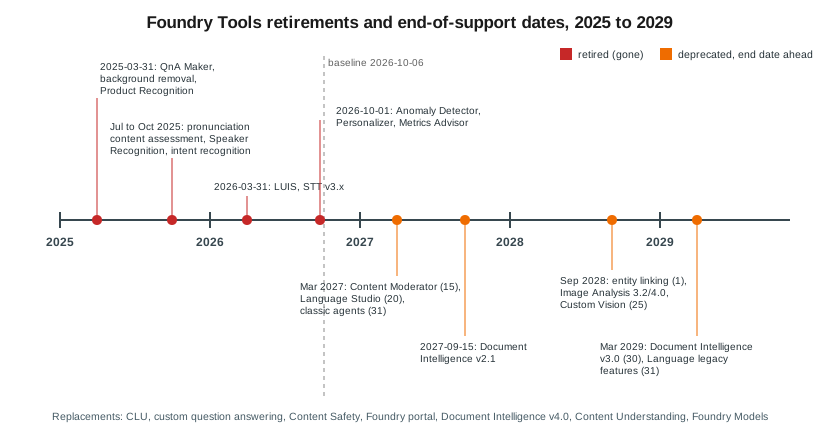
Retired features are listed only here and in short migration notes on the tool pages. Deprecated-but-supported features carry a warning on their own page.
| Item | Status | Date | Replacement | Notice |
|---|---|---|---|---|
QnA Maker |
Retired |
2025-03-31 |
Custom question answering |
|
Background removal, Product Recognition, Image Analysis model customization |
Retired |
2025-03-31 |
None |
|
Pronunciation content assessment |
Retired |
July 2025 |
Azure OpenAI (Foundry Models) |
|
Speaker Recognition |
Retired |
2025-09-30 (Speech SDK 1.47) |
None; diarization is unaffected |
|
Speech intent recognition |
Retired |
October 2025 (Speech SDK 1.47) |
CLU or an LLM |
|
Spatial Analysis, Video Retrieval |
Retired |
2025 |
Content Understanding (+ AI Search) |
|
ConversationTranslator (multi-device) |
Removed |
Speech SDK 1.51 |
Speech translation, Live Interpreter |
|
LUIS |
Retired |
2026-03-31 |
CLU |
|
Speech to text REST v3.0 and v3.2 previews |
Retired |
2026-03-31 |
REST |
|
Anomaly Detector |
Retired |
2026-10-01 |
Fabric anomaly detection |
|
Personalizer |
Retired |
2026-10-01 |
|
|
Metrics Advisor |
Retired |
2026-10-01 |
None |
|
Translator v3 BreakSentence, Detect, Dictionary |
Not in |
— |
Language detection; adaptive custom translation |
|
Content Moderator |
Deprecated |
Retires 2027-03-15 |
Content Safety |
|
Language Studio |
Deprecated |
Retires 2027-03-20 |
Foundry portal |
|
Foundry classic agents |
Deprecated |
Retire 2027-03-31 |
New Foundry agents |
|
Document Intelligence v2.1 |
End of support |
2027-09-15 |
v4.0 |
|
Entity linking |
Deprecated |
End of support 2028-09-01 |
Language NER or Foundry Models |
|
Image Analysis 3.2 / 4.0, multimodal embeddings |
Deprecated |
Retire 2028-09-25 |
Document Intelligence Read, Face, Content Understanding, Foundry Models |
|
Custom Vision |
Deprecated |
Retires 2028-09-25 |
AutoML, Foundry Models, Content Understanding classifier |
|
Document Intelligence v3.0 |
End of support |
2029-03-30 |
v4.0 |
|
Language legacy features (sentiment, key phrases, summarization, CLU, CQA, custom text classification, orchestration) |
Deprecated |
End of support 2029-03-31 |
Foundry Models |
The Personalizer date follows the official Azure update (2026-10-01). Some Learn pages showed an earlier date (2026-08-25); either way the service is retired as of this page’s baseline date.
Related pages
-
Text to Speech and Avatars covers the voices behind read-aloud.
-
Content Understanding: Multimodal Analyzers covers video analyzers.
-
Language: Sentiment, Summarization, CLU and Question Answering covers the Language legacy features and the LUIS and QnA Maker migrations.
-
Vision: Image Analysis and OCR covers the Image Analysis and Custom Vision retirements.