Telephony with Asterisk and SIP
|
This content was generated with the assistance of AI and should be verified against the official documentation of each tool and framework before being relied on in production. This section’s bibliography lists the reference material consulted while preparing these pages. |
Written on 2026-10-01 against Asterisk 23.5.0, 22.11.0 and 20.21.0 (a 24.0.0 release candidate exists; see the
version baseline), the chan_websocket channel driver (available from
Asterisk 23.0.0, 22.6.0, 21.11.0 and 20.16.0), the third-party FreeSWITCH module mod_audio_stream 1.1.0 (MIT), Jambonz,
the OpenAI Realtime SIP integration, Python 3.12 with Pipecat 1.12.0 and FastAPI 0.142.2, and Spring Boot 4.1.x on Java 21.
Asterisk, a SIP trunk and a telephone cannot be exercised from this repository, so every step on this page was documented
from the official pages linked after each block and none was run: the configuration files, dialplan, ARI calls and
service code are illustrative, not compiled, and the exact option names must be checked against the documentation of the
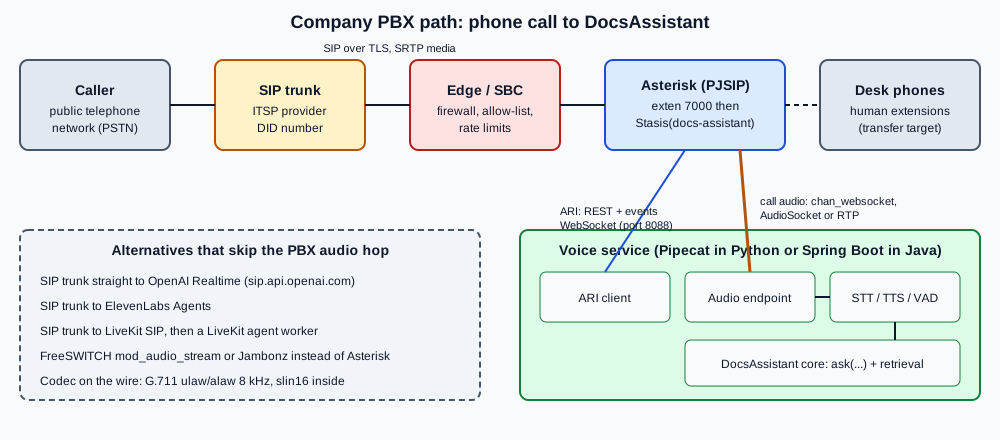
Asterisk version you install. This is the "company PBX" path of the running scenario: a colleague dials extension 7000 and
reaches the DocsAssistant.
SIP trunking basics
SIP (RFC 3261) sets up, changes and ends sessions; the audio itself travels separately as RTP (RFC 3550), described in the session by SDP (RFC 8866). Four terms cover most of what this page needs:
-
SIP trunk. A logical link between your PBX and a provider (an ITSP) that carries many calls and the telephone numbers (DIDs) you rent from it. Authentication is by registration with credentials or by the provider’s source IP address.
-
Dialog and signalling. An
INVITEcreates the call, the provider answers100,180and200, andBYEends it. -
Media. The
200 OKcarries an SDP answer that names the codec and the RTP address and port. Signalling and media can take different network paths, which is why NAT and firewalls cause one-way or no audio. -
Codec negotiation. The PBX offers a list and the far end picks; Telephone networks mostly use G.711 mu-law or A-law at 8 kHz, and wideband codecs such as G.722 or Opus appear only between modern endpoints.
For a voice agent the trunk is only a way in. The agent must answer in under about a second after the caller stops speaking (see Voice Architectures for the budget) and the PBX adds a media hop, so keep Asterisk and the voice service in the same data centre.
Asterisk building blocks
Asterisk models every leg of a call as a channel. Channels join bridges, and a dialplan (extensions.conf) decides
what runs when a call arrives. The pieces used here:
| Piece | Role for the voice agent |
|---|---|
PJSIP ( |
The SIP stack. Defines the trunk endpoint, its authentication and its address of record. |
Dialplan ( |
Routes the DID or extension 7000 to the agent with |
ARI ( |
REST interface plus an events WebSocket. A Stasis application takes control of a channel: your code decides to answer, create bridges, add channels and hang up. |
External Media |
An ARI operation that creates a channel whose audio goes to an external host instead of a phone. |
AudioSocket |
A small TCP protocol that carries 16-bit signed linear PCM frames, with a UUID that identifies the call. |
|
A channel driver that carries audio as WebSocket binary frames and control as text frames, in either direction of connection. |
A minimal trunk and dialplan
The sketch below registers to a provider and sends calls for extension 7000 and for the rented DID to a Stasis application. Names, hosts and secrets are placeholders.
[transport-tls]
type=transport
protocol=tls
bind=0.0.0.0:5061
cert_file=/etc/asterisk/keys/asterisk.crt
priv_key_file=/etc/asterisk/keys/asterisk.key
method=tlsv1_2

[itsp]
type=registration
outbound_auth=itsp
server_uri=sip:sip.example-itsp.test
client_uri=sip:company-account@sip.example-itsp.test
transport=transport-tls

[itsp]
type=auth
auth_type=userpass
username=company-account
password=CHANGE_ME

[itsp]
type=aor
contact=sip:sip.example-itsp.test

[itsp]
type=endpoint
transport=transport-tls
context=from-trunk
disallow=all
allow=ulaw,alaw
outbound_auth=itsp
aors=itsp
media_encryption=sdes

[itsp]
type=identify
endpoint=itsp
match=203.0.113.10
Source: Asterisk: Configuring res_pjsip
[from-trunk]
exten => _+X.,1,Goto(internal,7000,1)

[internal]
exten => 7000,1,NoOp(DocsAssistant call from ${CALLERID(num)})
 same => n,Stasis(docs-assistant,${EXTEN})
 same => n,Hangup()
Source: Asterisk: Dialplan
Goto() with only an extension and a priority stays in the current context, so the jump out of [from-trunk] names the
internal context explicitly. The same-named sections in pjsip.conf are legal because each has a different type. The endpoint sets
media_encryption=sdes so that SRTP is negotiated; the security section below explains why. Registration trunks need an
outbound_auth on the endpoint, while IP-authenticated trunks need only the identify section.
ARI: Stasis, bridges and External Media
The Asterisk REST Interface lets an external program drive a call. Enable the HTTP server and an ARI user, then connect an
events WebSocket for the application name used in Stasis().
; http.conf
[general]
enabled=yes
bindaddr=127.0.0.1
bindport=8088

; ari.conf
[general]
enabled=yes

[docs-voice]
type=user
read_only=no
password=CHANGE_ME
password_format=plain
Source: Asterisk: ARI configuration
When the dialplan runs Stasis(docs-assistant,7000) the application receives a StasisStart event with the caller
channel. The application then answers, creates a mixing bridge, adds the caller to it, creates an External Media
channel and adds that to the same bridge, so audio flows caller to voice service and back. The External Media operation
takes these parameters (from the Channels REST API reference):
| Parameter | Values | Meaning |
|---|---|---|
|
Stasis app name, |
Required. For the websocket client mode |
|
|
Payload wrapper. Must be |
|
|
How the media is carried: UDP for RTP, TCP for AudioSocket, websocket for |
|
|
|
|
|
Only |
|
optional |
For websocket, appended to the dialstring, for example |
Source: Asterisk: Channels REST API
The three transports differ in what your service must implement:
-
RTP (
encapsulation=rtp,transport=udp): you receive plain RTP packets atexternal_host, and Asterisk sets theUNICASTRTP_LOCAL_ADDRESSandUNICASTRTP_LOCAL_PORTvariables on the new channel so that you know where to send audio back. You write an RTP depacketiser, with sequence numbers, timestamps and jitter handling, yourself. -
AudioSocket (
encapsulation=audiosocket,transport=tcp): a TCP stream of frames with a three-byte header, one byte of type and two bytes of big-endian length. Type0x01is the call UUID,0x10is 16-bit little-endian PCM at 8 kHz (0x12is 16 kHz),0x03is a DTMF digit,0x00terminates and0xffis an error. There is no RTP to parse. -
WebSocket (
transport=websocket,encapsulation=none): binary frames carry audio and text frames carry control, handled in the next section.
Source: Asterisk: AudioSocket
AudioSocket can also be used straight from the dialplan, without ARI, which is the simplest possible route:
exten => 7001,1,Answer()
 same => n,Set(CALL_UUID=${SHELL(uuidgen | tr -d '\n')})
 same => n,AudioSocket(${CALL_UUID},voice.internal:9019)
same => n,Hangup()AudioSocket(uuid,service) takes the UUID and the host:port of your TCP server and exchanges 16-bit, 8 kHz mono PCM
by default. Generating the UUID with uuidgen through SHELL() is one option; the UUID() dialplan function, if your
Asterisk version provides it, avoids spawning a process. Because dialplan-only AudioSocket has no ARI, the application
cannot bridge or transfer the call; it can only end it by closing the socket.
chan_websocket
chan_websocket (available from Asterisk 23.0.0, 22.6.0, 21.11.0 and 20.16.0) turns a WebSocket into a channel. It is
the transport recommended by the Asterisk documentation for new work because browsers, FastAPI and Spring all speak
WebSocket natively. Two connection modes exist:
-
Outgoing (
connection_type=client): Asterisk connects to your server using a section ofwebsocket_client.conf. Onlyper_call_configconnections are supported, and the same connection must not be shared between ARI and media. -
Incoming (
connection_type=server,external_host=INCOMING): Asterisk creates the channel and waits. Your service reads the channel variableMEDIA_WEBSOCKET_CONNECTION_IDand connects to Asterisk’s HTTP server with that ephemeral identifier in the URI.
; websocket_client.conf
[docs-voice-service]
type=websocket_client
uri=wss://voice.internal:8443/asterisk/media
protocols=media
connection_type=per_call_configPOST /ari/channels/externalMedia?app=docs-assistant&transport=websocket&encapsulation=none
&external_host=docs-voice-service&format=slin16&transport_data=f(json)The dialplan form uses the dialstring Dial(WebSocket/<connection_id>/<options>). The options include c(codec) such as
c(ulaw), n to prevent auto-answer, f(format) to choose plain-text or json control messages, p for passthrough
(required for Opus, Speex and G.729, where your application then owns framing), d(direction) and v(uri_params).
The protocol has these properties:
-
Audio is sent in binary frames; commands and events are text frames. The JSON format is preferred, and plain text is deprecated.
-
On connection the client receives a
MEDIA_STARTmessage with the connection id, the channel and the codec. It also reports an optimal frame size (160 bytes for 20 ms of mu-law), so write audio in multiples of it, or useSTART_MEDIA_BUFFERINGandSTOP_MEDIA_BUFFERINGand let Asterisk reframe. -
Control commands from the client include
ANSWER,HANGUP,PAUSE_MEDIA,CONTINUE_MEDIA,FLUSH_MEDIA,MARK_MEDIA,GET_STATUS,REPORT_QUEUE_DRAINEDandSET_MEDIA_DIRECTION. -
The playback queue holds about 1000 frames, roughly 20 seconds of audio; Asterisk sends
MEDIA_XOFFabove 900 frames andMEDIA_XONbelow 800, which a streaming TTS sender must honour. The maximum message is 65,500 bytes. -
FLUSH_MEDIAis the barge-in primitive: when the voice service detects the caller speaking (see Turn-Taking and Interruptions), it sends it to discard the agent’s queued speech immediately.
A Python ARI service with Pipecat
The service has two jobs: handle ARI events (the control plane) and run the audio pipeline (the media plane). The ARI part
below uses aiohttp against the REST and events interfaces; it creates the bridge and an incoming-mode WebSocket
External Media channel.
import asyncio
import json
import aiohttp

ARI = "http://asterisk.internal:8088"
AUTH = aiohttp.BasicAuth("docs-voice", "CHANGE_ME")
APP = "docs-assistant"


async def ari_post(session, path, **params):
    async with session.post(f"{ARI}/ari{path}", params=params, auth=AUTH) as r:
        r.raise_for_status()
        return await r.json() if r.content_type == "application/json" else None


media_channels: set[str] = set()   # External Media channels this service created


async def on_stasis_start(session, caller_id: str):
    await ari_post(session, f"/channels/{caller_id}/answer")
    bridge = await ari_post(session, "/bridges", type="mixing")
    media = await ari_post(
        session, "/channels/externalMedia",
        app=APP, transport="websocket", encapsulation="none",
        external_host="INCOMING", connection_type="server",
        format="slin16", transport_data="f(json)",
    )
    media_channels.add(media["id"])
    await ari_post(session, f"/bridges/{bridge['id']}/addChannel", channel=caller_id)
    await ari_post(session, f"/bridges/{bridge['id']}/addChannel", channel=media["id"])
    # The incoming connection id is a channel variable of the media channel.
    async with session.get(
        f"{ARI}/ari/channels/{media['id']}/variable",
        params={"variable": "MEDIA_WEBSOCKET_CONNECTION_ID"}, auth=AUTH,
    ) as r:
        connection_id = (await r.json())["value"]
    asyncio.create_task(run_pipeline(connection_id))


async def main():
    async with aiohttp.ClientSession() as session:
        url = f"{ARI}/ari/events?app={APP}"
        async with session.ws_connect(url, auth=AUTH) as ws:
            async for msg in ws:
                event = json.loads(msg.data)
                channel_id = event.get("channel", {}).get("id")
                if event["type"] == "StasisStart":
                    # The External Media channel joins the same Stasis app and raises its own StasisStart:
                    # only caller channels start a new bridge, or every media channel would spawn another one.
                    if channel_id not in media_channels:
                        asyncio.create_task(on_stasis_start(session, channel_id))
                elif event["type"] == "StasisEnd":
                    media_channels.discard(channel_id)


asyncio.run(main())
Source: Asterisk: Channels REST API
The External Media channel created by the service is itself placed in the docs-assistant Stasis application, so the
events socket also delivers a StasisStart for it. The loop therefore remembers the media channel ids it created and starts
a bridge only for caller channels; without that check each media channel would trigger another bridge and another media
channel. on_stasis_start runs as a task so that one call’s REST round trips do not hold up events for other calls.
run_pipeline(connection_id) is the media plane. In Pipecat it is a pipeline whose transport is a WebSocket client to
Asterisk’s HTTP server (incoming mode) and whose frame serializer maps chan_websocket binary audio to
InputAudioRawFrame and back (see Pipecat). Pipecat ships serializers for Twilio, Telnyx,
Plivo, Exotel and others but not for chan_websocket, so a small FrameSerializer subclass does the mapping: binary frames
are raw slin16 audio, text frames are JSON control messages, and an interruption becomes FLUSH_MEDIA.
import json
import os

from pipecat.frames.frames import Frame, InputAudioRawFrame, InterruptionFrame, OutputAudioRawFrame
from pipecat.pipeline.pipeline import Pipeline
from pipecat.pipeline.worker import PipelineParams, PipelineWorker
from pipecat.serializers.base_serializer import FrameSerializer
from pipecat.transports.websocket.client import WebsocketClientParams, WebsocketClientTransport
from pipecat.workers.runner import WorkerRunner

SAMPLE_RATE = 16000   # the channel format is slin16


class AsteriskWebSocketSerializer(FrameSerializer):
    """chan_websocket with f(json): binary frames are audio, text frames are JSON control messages."""

    async def serialize(self, frame: Frame) -> str | bytes | None:
        if isinstance(frame, InterruptionFrame):
            return json.dumps({"command": "FLUSH_MEDIA"})   # barge-in: drop the agent's queued speech
        if isinstance(frame, OutputAudioRawFrame):
            return frame.audio                               # 16-bit little-endian PCM at 16 kHz
        return None

    async def deserialize(self, data: str | bytes) -> Frame | None:
        if isinstance(data, bytes):
            return InputAudioRawFrame(audio=data, sample_rate=SAMPLE_RATE, num_channels=1)
        return None                                          # MEDIA_START, MEDIA_XOFF/XON, ... (log or act on them)


async def run_pipeline(connection_id: str) -> None:
    transport = WebsocketClientTransport(
        uri=f"ws://asterisk.internal:8088/media/{connection_id}",
        params=WebsocketClientParams(
            audio_in_enabled=True, audio_in_sample_rate=SAMPLE_RATE,
            audio_out_enabled=True, audio_out_sample_rate=SAMPLE_RATE,
            add_wav_header=False, serializer=AsteriskWebSocketSerializer(),
        ),
    )
    stt, user_agg, llm, tts, assistant_agg = build_services()   # as on the Pipecat page; llm calls the DocsAssistant core
    pipeline = Pipeline([transport.input(), stt, user_agg, llm, tts, transport.output(), assistant_agg])
    worker = PipelineWorker(pipeline, params=PipelineParams(audio_in_sample_rate=SAMPLE_RATE,
                                                            audio_out_sample_rate=SAMPLE_RATE))
    await WorkerRunner(handle_sigint=False).add_workers(worker)
Source: Pipecat: FrameSerializer,
Pipecat: WebSocket client transport
and Asterisk: WebSocket channel driver
The class and module names were checked against the Pipecat 1.12.0 source; the media URI path (/media/<connection id> on
the Asterisk HTTP server) and the JSON control-message names should be checked against the WebSocket channel driver page of
your Asterisk version. build_services() stands for the STT, context aggregators, LLM step and TTS set up on the
Pipecat page; the LLM step can be the custom processor there that calls the DocsAssistant
core (LangChain create_agent). The pipeline order is the cascaded one from
Voice Architectures. With the ulaw channel format, use 8 kHz and convert
mu-law in the serializer instead. A production serializer should also honour MEDIA_XOFF/MEDIA_XON flow control.
A Spring Boot WebSocket service
For the Java track the voice service is a Spring WebSocket handler. Asterisk (in outgoing mode) connects to
wss://voice.internal:8443/asterisk/media; every binary message is a slice of caller audio and every text message is a
JSON event.
@Configuration
@EnableWebSocket
class AsteriskMediaConfig implements WebSocketConfigurer {

    private final AsteriskMediaHandler handler;

    AsteriskMediaConfig(AsteriskMediaHandler handler) { this.handler = handler; }

    @Override
    public void registerWebSocketHandlers(WebSocketHandlerRegistry registry) {
        registry.addHandler(handler, "/asterisk/media").setAllowedOrigins("*");
    }
}

@Component
class AsteriskMediaHandler extends AbstractWebSocketHandler {

    private final VoiceTurnPipeline pipeline; // VAD, TranscriptionModel, ChatClient, TextToSpeechModel

    AsteriskMediaHandler(VoiceTurnPipeline pipeline) { this.pipeline = pipeline; }

    private final Map<String, WebSocketSession> safeSessions = new ConcurrentHashMap<>();

    @Override
    public void afterConnectionEstablished(WebSocketSession session) {
        // The pipeline sends audio from Reactor threads and FLUSH_MEDIA from the VAD thread: serialise all sends.
        this.safeSessions.put(session.getId(), new ConcurrentWebSocketSessionDecorator(session, 5_000, 512 * 1024));
    }

    @Override
    protected void handleTextMessage(WebSocketSession session, TextMessage message) throws IOException {
        JsonNode event = new ObjectMapper().readTree(message.getPayload());
        if ("MEDIA_START".equals(event.path("event").asText())) {
            WebSocketSession safe = this.safeSessions.get(session.getId());
            pipeline.start(session.getId(), audio -> sendAudio(safe, audio),
                    () -> sendText(safe, "{\"command\":\"FLUSH_MEDIA\"}"));
        }
    }

    @Override
    protected void handleBinaryMessage(WebSocketSession session, BinaryMessage message) {
        pipeline.onCallerAudio(session.getId(), message.getPayload()); // 16-bit PCM or ulaw frames
    }

    @Override
    public void afterConnectionClosed(WebSocketSession session, CloseStatus status) {
        this.safeSessions.remove(session.getId());
        pipeline.stop(session.getId());
    }

    private void sendAudio(WebSocketSession session, ByteBuffer audio) {
        try { session.sendMessage(new BinaryMessage(audio)); } catch (IOException e) { /* drop */ }
    }

    private void sendText(WebSocketSession session, String json) {
        try { session.sendMessage(new TextMessage(json)); } catch (IOException e) { /* drop */ }
    }
}VoiceTurnPipeline is the hand-written pipeline of Building a
Voice Pipeline by Hand: voice activity detection, a TranscriptionModel (or StreamingTranscriptionModel), the Spring AI
ChatClient with the RAG advisor, and a StreamingTextToSpeechModel whose output is converted to the channel codec.
Spring AI 1.0 called the speech abstraction SpeechModel; 2.0.1 uses the TextToSpeechModel and TranscriptionModel
families shown here. A plain WebSocketSession is not safe for concurrent sendMessage calls, which is why the handler
wraps it in ConcurrentWebSocketSessionDecorator before handing it to the pipeline. The command text frame shown for barge-in
must match the JSON control format documented for your Asterisk version. Blocking calls belong on virtual threads or a
bounded executor, not on the WebSocket’s receive thread; see reactive
programming for the alternatives.
FreeSWITCH and Jambonz
Asterisk is not the only PBX that can feed an agent:
-
FreeSWITCH
mod_audio_stream(third-party, version 1.1.0, MIT) streams a call’s audio over a WebSocket. From the FreeSWITCH console or the dialplan you start it on the channel’s UUID with a URL, a mix type and a sampling rate, and it sends the caller’s audio to your server and can play audio the server sends back. Because it is not part of FreeSWITCH itself, you compile and maintain it, and you must check its README for the exact command syntax of your release. -
Jambonz is an open-source CPaaS built on FreeSWITCH. Its
llmverb hands the call to a speech-to-speech model: you give avendor,model,authandllmOptions, plusactionHook(called when the session ends),toolHook(called when the model requests a function) andeventHook(transcripts and events). YourtoolHookis where the DocsAssistant core is called, as in the tool-call pattern of Realtime APIs.
[
  {
    "verb": "llm",
    "vendor": "openai",
    "model": "gpt-realtime",
    "auth": { "apiKey": "sk-..." },
    "actionHook": "/llm-complete",
    "eventHook": "/llm-event",
    "toolHook": "/llm-tool",
    "llmOptions": {
      "session_update": {
        "type": "realtime",
        "instructions": "You are DocsAssistant. Answer from the documentation using the search tool.",
        "tools": [
          {
            "type": "function",
            "name": "search_docs",
            "description": "Search the documentation and return a short spoken answer",
            "parameters": {
              "type": "object",
              "properties": { "question": { "type": "string" } },
              "required": ["question"]
            }
          }
        ]
      }
    }
  }
]
Source: Jambonz: llm verb
SIP straight to a voice platform
When the voice platform speaks SIP itself, the PBX only needs to forward the call and the middle service disappears.
-
OpenAI Realtime SIP. A SIP trunk (or an Asterisk
Dial()) targetssip:$PROJECT_ID@sip.api.openai.com;transport=tls(the EU residency endpoint issip-eu.api.openai.com). An incoming call triggers arealtime.call.incomingwebhook with thecall_idand SIP headers. Your server answers withPOST /v1/realtime/calls/{call_id}/acceptand a session body, and can laterreject,refer(transfer totarget_uri) orhangup. Media is G.711 mu-law or A-law protected by SRTP. Tools for the DocsAssistant are configured on the session or on a server-side WebSocket, as in Realtime APIs. -
ElevenLabs Agents. The platform provides SIP trunking numbers and credentials for a trunk to dial; the agent behind it is the one described in ElevenLabs Agents, with the custom LLM pointing at the DocsAssistant core.
-
LiveKit SIP. A LiveKit inbound trunk and dispatch rule put each caller in a room, where a LiveKit agent worker joins it (see LiveKit Agents).
{
  "type": "realtime",
  "model": "gpt-realtime-2.1",
  "instructions": "You are DocsAssistant. Keep answers short and speak numbers clearly."
}
Source: OpenAI: Telephony and SIP
exten => 7002,1,NoOp(Forward to OpenAI Realtime)
 same => n,Dial(PJSIP/proj_abc123@openai-sip)
 same => n,Hangup()
Source: Asterisk: Dial() application
The openai-sip endpoint is a PJSIP endpoint with transport=transport-tls and media_encryption=sdes whose AOR contact
is the OpenAI SIP URI; you define it as in the earlier trunk sketch. proj_abc123 stands for your project id.
Vonage and Telnyx are carriers that can sit on either side. Vonage Voice API can open a WebSocket to your server with the
audio of a call (its connect action with a websocket endpoint and an audio/l16;rate=16000 content type). Telnyx offers
SIP trunks and a media streaming WebSocket as well, and Pipecat has a Telnyx serializer for it. Treat both as alternatives
to the PBX: they hand you the audio over WebSocket, so the voice-service code on this page applies, with their frame
formats in place of Asterisk’s. Check each provider’s current documentation for message shapes.
Codecs and transcoding
The codec on the wire is set by negotiation; the codec inside your pipeline is whatever STT and TTS expect. Mismatches cost CPU and quality.
| Codec | Rate and size | Notes |
|---|---|---|
G.711 mu-law ( |
8 kHz, 8 bits, 64 kbit/s, 160 bytes per 20 ms |
The baseline of the telephone network (mu-law in North America and Japan, A-law elsewhere). Narrowband, so consonants such as "f" and "s" are hard to recognise, and speech models trained on wideband audio lose accuracy. |
|
16-bit PCM at 8 kHz or 16 kHz |
Asterisk’s internal format. |
G.722 |
16 kHz wideband |
Offered by desk phones and some trunks; improves recognition when end to end. |
Opus |
8 to 48 kHz, variable |
Carried in |
G.729 |
8 kHz, 8 kbit/s |
Compressed and licensed; avoid in the agent path, passthrough only. |
Transcoding is automatic in Asterisk when two channels share no codec, but each conversion costs CPU and can add a few
milliseconds. A practical rule is to request the External Media format that your STT consumes directly: slin16 for a
16 kHz model, ulaw when a vendor accepts G.711. Convert the TTS output back to the channel format once, at the edge of
the voice service, and chunk it in multiples of the optimal frame size. The conversion to 8 kHz also means the TTS voice
can sound thinner on the phone than in the browser, which is expected rather than a fault.
Security
A PBX connected to the internet is attacked continuously. The agent adds a new cost: every call can invoke paid STT, LLM and TTS services, so abuse is both a telephone bill and a model bill.
-
Encrypt signalling and media. Use SIP over TLS (
transport=tls, a valid certificate, TLS 1.2 or later) and SRTP withmedia_encryption=sdesor DTLS (media_encryption=dtls). OpenAI’s SIP endpoint requires TLS and SRTP; most providers support them. Encrypt the voice-service hop too (wss://), because the audio there is plain PCM. -
Restrict who can send calls. Allow-list the provider’s IP ranges at the firewall and with PJSIP
identifysections; reject calls from unknown sources (anidentifymatch or authentication on every endpoint) and never expose AMI or ARI to the internet. Bind ARI to localhost or an internal network, with a strong password. -
Prevent toll fraud. Limit outbound dialling to the numbers and countries you need, block premium-rate prefixes, set maximum concurrent calls and per-minute spend alerts on the trunk, and prefer a dialplan that has no outbound route at all for the agent’s context. The agent’s tool set must not include a "transfer to arbitrary number" tool.
-
Limit abuse of the agent. Cap call duration, concurrent agent sessions and silence time, authenticate the voice-service endpoint (mutual TLS or a signed token in
v(uri_params)), and throttle by caller id. Rate limiting and similar controls are developed on Production Voice Agents. -
Protect recordings and transcripts. Call audio is personal data; consent, retention and redaction are covered on the production page. The AI Security & Responsible AI sub-section covers prompt injection in Prompt Injection; its principles apply to spoken input.
Documented only, not tested
Nothing on this page was run. Specifically, these steps are documented from the official pages and unverified here: the
PJSIP trunk and TLS/SRTP configuration; the ARI sequence (answer, bridge, External Media, add channels); the
websocket_client.conf section and the exact set of chan_websocket control messages and URI for the incoming mode; the
AudioSocket dialplan; the Python and Java services (including the unshown Pipecat serializer); the FreeSWITCH
mod_audio_stream commands; the Jambonz verb; and the SIP integrations with OpenAI, ElevenLabs and LiveKit. The Asterisk
documentation and the asterisk-websocket-examples repository are the sources to follow when you build it.
Choosing a telephony path
Use the Asterisk path when a PBX already exists, calls must stay on your network, or you need on-premises models: ARI with
a chan_websocket External Media channel is the recommended starting point on current releases, because it needs no RTP
code and supports flushing for barge-in. Choose AudioSocket for the smallest service when you do not need bridges or
transfers, and RTP only when another component already speaks it. Choose a direct SIP trunk to OpenAI Realtime, ElevenLabs or
LiveKit when you want no media service of your own, and Twilio (Telephony with
Twilio) when you also want phone numbers and programmable voice from one vendor. Choose FreeSWITCH or Jambonz when that is
already your switch. Whatever the route, keep the DocsAssistant core channel-agnostic and put codec conversion, echo
handling and barge-in at the voice-service edge.