Image Loading, Caching and Transformations with Coil and Glide
|
This content was generated with the assistance of AI and should be verified against the official documentation of Android before being relied on in production. See the section bibliography for the reference material consulted while preparing these pages. |
TrailMate shows a photo for almost every trail: a thumbnail in the row TrailAdapter/TrailViewHolder binds in
RecyclerView and Lists, a larger hero image on the detail screen,
and the trail photos a hiker captures on
Local Storage: DataStore, Files, Scoped Storage and
MediaStore's PhotoCaptureScreen. This page covers the two libraries TrailMate uses to load those images — Coil 3.6.3 (io.coil-kt.coil3:coil-compose, coil-network-okhttp) for the Compose UI, and Glide 5.0.9
(com.github.bumptech.glide:glide, KSP compiler) for the legacy Views UI’s TrailViewHolder — what problem an
image-loading library solves in the first place, the request-to-display pipeline both libraries implement, Bitmap
fundamentals that explain why that pipeline looks the way it does, and where Fresco and Picasso fit as legacy
options. Networking concepts this page builds on (the shared OkHttpClient, interceptors, caching headers) are
covered on Networking with Retrofit, OkHttp and Ktor;
how TrailMateApplication wires a singleton ImageLoader alongside its other DI setup is expanded on
Dependency Injection with Hilt, Dagger and Koin.
Coroutines and Flow, used internally by Coil, are covered in
Coroutines Basics and are not re-explained here.
Why an Image Library, Not BitmapFactory.decodeStream
Loading trail.photoUrl into an ImageView or an Image composable looks, at first glance, like it should be a
one-line BitmapFactory.decodeStream(url.openStream()). In practice that line hides several problems that a
naive implementation gets wrong, all of which an image-loading library solves once instead of once per screen:
-
Threading. Decoding a JPEG/PNG/WebP is CPU-bound work that must not run on the main thread — doing so janks scrolling and can trigger an ANR on a large image, the same main-thread rule networking libraries enforce (see Networking with Retrofit, OkHttp and Ktor).
-
Downsampling. A 12-megapixel camera photo decoded at full resolution into a 48dp thumbnail wastes memory by two orders of magnitude and can throw
OutOfMemoryErroroutright; the decoder must be told to downsample before allocating the full bitmap, not after. -
Caching. Re-fetching and re-decoding the same
trail.photoUrlevery timeTrailListScreenrecomposes, or every time aRecyclerViewrow scrolls back into view, is wasteful in both network and CPU terms. An in-memory cache of already-decoded bitmaps and a disk cache of the raw encoded bytes both matter, for different reasons. -
View recycling and cancellation. In a
RecyclerView, aViewHoldergets reused for a different item while a previous image request for it is still in flight; whichever bitmap arrives last must not be shown on the wrong row. Compose has an equivalent problem when a composable leaves composition mid-request. A request tied to the target’s lifecycle must be cancelled, not merely ignored. -
Placeholders, error states and transformations. Showing a placeholder while loading, an error drawable on failure, and applying a shape (circle, rounded corners) or a color transformation (grayscale) to the result are common enough to deserve first-class API support rather than being hand-rolled on every screen.
Coil and Glide both solve every one of these the same general way, which is why the two libraries look similar from the outside despite very different internal implementations. That shared shape is the pipeline below.
The Image Loading Pipeline
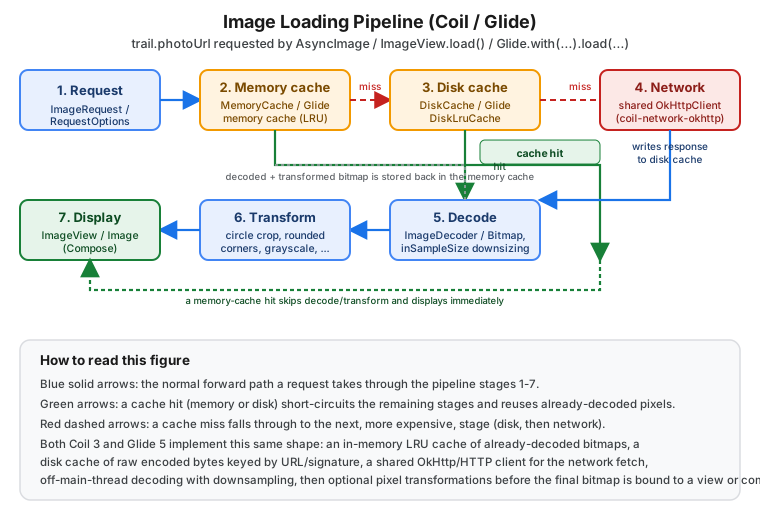
Every stage after the first two is progressively more expensive, which is exactly why the pipeline checks them in this order — a request that only ever hits the memory cache never touches the disk, the network or the CPU decoder at all:
| Stage | What happens |
|---|---|
1. Request |
An |
2. Memory cache |
An in-memory LRU cache of already-decoded, already-transformed bitmaps, keyed by the request’s parameters. A hit returns instantly on the calling thread — no coroutine dispatch, no disk I/O. |
3. Disk cache |
A disk-backed cache of the raw encoded bytes (the JPEG/WebP as downloaded), keyed by URL by default or by a custom cache key/signature. A hit still needs decoding (stage 5) but skips the network entirely. |
4. Network |
A shared HTTP client ( |
5. Decode |
The encoded bytes become a |
6. Transform |
Optional pixel-level transformations (crop to a circle, round the corners, convert to grayscale) run on the decoded bitmap; the result — not the untransformed bitmap — is what gets cached in stage 2 and shown. |
7. Display |
The final bitmap is bound to an |
Bitmap fundamentals (inSampleSize, ImageDecoder, hardware bitmaps) are expanded later on this page; they
explain the machinery stage 5 relies on. The rest of this page covers Coil, then Glide, each following this same
shape with different APIs and defaults.
Coil 3.6: Image Loading for Compose (and Views)
Coil ("Coroutine Image Loader") is built on Kotlin coroutines from the ground up; Coil 3 additionally made the library Kotlin-Multiplatform-capable and split networking into a separate artifact so an app chooses its own HTTP engine. TrailMate depends on:
// gradle/libs.versions.toml
[versions]
coil = "3.6.3"

[libraries]
coil-compose = { module = "io.coil-kt.coil3:coil-compose", version.ref = "coil" }
coil-network-okhttp = { module = "io.coil-kt.coil3:coil-network-okhttp", version.ref = "coil" }
coil-gif = { module = "io.coil-kt.coil3:coil-gif", version.ref = "coil" }
coil-svg = { module = "io.coil-kt.coil3:coil-svg", version.ref = "coil" }
coil-video = { module = "io.coil-kt.coil3:coil-video", version.ref = "coil" }
coil-test = { module = "io.coil-kt.coil3:coil-test", version.ref = "coil" }coil-compose pulls in Coil’s core plus its Compose integration; coil-network-okhttp is a separate artifact
in Coil 3 precisely so that a Kotlin Multiplatform target that cannot use OkHttp (a pure iOS/JS target) is not
forced to depend on it — an Android-only app like TrailMate always adds it. See
Coil — Upgrading to Coil 3 for what changed from Coil 2.
See also Essential Multiplatform Libraries in the Kotlin Multiplatform section for Coil 3 in shared code and Compose Multiplatform.
AsyncImage, SubcomposeAsyncImage and rememberAsyncImagePainter
// feature/trails/src/main/kotlin/com/example/trailmate/feature/trails/TrailListItemRow.kt
package com.example.trailmate.feature.trails

import androidx.compose.foundation.layout.size
import androidx.compose.material3.Text
import androidx.compose.runtime.Composable
import androidx.compose.ui.Modifier
import androidx.compose.ui.draw.clip
import androidx.compose.ui.graphics.painter.Painter
import androidx.compose.ui.layout.ContentScale
import androidx.compose.ui.res.painterResource
import androidx.compose.ui.unit.dp
import coil3.compose.AsyncImage
import coil3.compose.SubcomposeAsyncImage
import coil3.compose.rememberAsyncImagePainter
import coil3.request.ImageRequest
import coil3.request.crossfade
import com.example.trailmate.core.model.Trail

@Composable
fun TrailThumbnail(trail: Trail, modifier: Modifier = Modifier) {
    AsyncImage(
        model = ImageRequest.Builder(androidx.compose.ui.platform.LocalContext.current)
            .data(trail.photoUrl)
            .crossfade(true)
            .build(),
        contentDescription = trail.name,
        contentScale = ContentScale.Crop,
        placeholder = painterResource(com.example.trailmate.feature.trails.R.drawable.trail_placeholder),
        error = painterResource(com.example.trailmate.feature.trails.R.drawable.trail_error),
        modifier = modifier.size(96.dp),
    )
}

@Composable
fun TrailHeroImage(trail: Trail, modifier: Modifier = Modifier) {
    SubcomposeAsyncImage(
        model = trail.photoUrl,
        contentDescription = trail.name,
        modifier = modifier,
    ) {
        val state = painter.state.collectAsState().value
        if (state is coil3.compose.AsyncImagePainter.State.Loading) {
            androidx.compose.material3.CircularProgressIndicator()
        } else {
            SubcomposeAsyncImageContent()
        }
    }
}

@Composable
fun trailPainter(trail: Trail): Painter =
rememberAsyncImagePainter(model = trail.photoUrl)AsyncImage is the common case: it composes Image internally and swaps between placeholder, content and error
states automatically — there is no way to observe the intermediate loading state from outside it, which is
exactly why it is the right default when a screen has nothing extra to show while loading. SubcomposeAsyncImage
exists for the opposite case: TrailHeroImage needs a CircularProgressIndicator (a composable, not a
drawable) while loading, and subcomposition is what lets it inspect painter.state and choose what to compose
next. rememberAsyncImagePainter is the lowest-level of the three — a bare Painter for call sites that need to
pass an image into an API expecting a Painter directly (a Modifier.paint(…), or a custom layout that is not
built around Image itself) rather than a ready-made composable. A common mistake is reaching for
SubcomposeAsyncImage by default: subcomposition has a real performance cost in a list, so AsyncImage (with
drawable placeholder/error) should be preferred unless a composable loading/error state is genuinely needed.
ImageRequest and the Singleton ImageLoader
An ImageRequest describes one load (the data, target size, placeholders, transformations, cache policies); an
ImageLoader is the reusable engine that executes requests, owns the memory and disk caches, and should be
built once and shared app-wide, the same reasoning that applies to OkHttpClient on
Networking with Retrofit, OkHttp and Ktor. Coil 3
replaced a global mutable Coil.setImageLoader(…) with SingletonImageLoader.Factory, an interface
TrailMateApplication implements so the singleton is built lazily, on first use, from application context rather
than eagerly in onCreate():
// app/src/main/kotlin/com/example/trailmate/TrailMateApplication.kt
package com.example.trailmate

import android.app.Application
import android.os.Build
import coil3.ImageLoader
import coil3.PlatformContext
import coil3.SingletonImageLoader
import coil3.disk.DiskCache
import coil3.disk.directory
import coil3.gif.AnimatedImageDecoder
import coil3.gif.GifDecoder
import coil3.memory.MemoryCache
import coil3.network.okhttp.OkHttpNetworkFetcherFactory
import coil3.request.crossfade
import coil3.svg.SvgDecoder
import coil3.video.VideoFrameDecoder
import dagger.hilt.android.HiltAndroidApp
import okio.Path.Companion.toOkioPath
import javax.inject.Inject

@HiltAndroidApp
class TrailMateApplication : Application(), SingletonImageLoader.Factory {

    @Inject lateinit var sharedOkHttpClient: okhttp3.OkHttpClient

    override fun newImageLoader(context: PlatformContext): ImageLoader =
        ImageLoader.Builder(context)
            .memoryCache {
                MemoryCache.Builder()
                    .maxSizePercent(context, percent = 0.25)
                    .build()
            }
            .diskCache {
                DiskCache.Builder()
                    .directory(cacheDir.resolve("image_cache").toOkioPath())
                    .maxSizeBytes(50L * 1024 * 1024)
                    .build()
            }
            .components {
                add(OkHttpNetworkFetcherFactory(callFactory = { sharedOkHttpClient }))
                add(SvgDecoder.Factory())
                // AnimatedImageDecoder uses ImageDecoder (API 28+); minSdk is 26, so fall back to GifDecoder.
                if (Build.VERSION.SDK_INT >= Build.VERSION_CODES.P) {
                    add(AnimatedImageDecoder.Factory())
                } else {
                    add(GifDecoder.Factory())
                }
                add(VideoFrameDecoder.Factory())
            }
            .crossfade(true)
            .build()
}SingletonImageLoader.Factory is invoked at most once, the first time any Coil API needs the singleton, and its
result is cached for the process lifetime — this is what lets AsyncImage and ImageView.load() calls
throughout the app share one ImageLoader (and therefore one memory cache, one disk cache and one network
client) without every call site threading an ImageLoader instance through manually. Passing
OkHttpNetworkFetcherFactory(callFactory = { sharedOkHttpClient }) reuses the exact same OkHttpClient that
NetworkModule builds for TrailApi, so authentication interceptors, connection pooling and the network
security config are consistent across REST calls and image fetches; without this, Coil falls back to its own
default OkHttp client, which duplicates a connection pool and skips any interceptor an app already configured
for its API calls. See
Coil — Image loaders,
Coil — Network and
Android Developers — Images in
Compose (animated image support).
MemoryCache and DiskCache: Sizing, Policies and Keys
maxSizePercent(context, percent = 0.25) sizes the memory cache as a fraction of the app’s available memory
class rather than a fixed byte count, so it scales sensibly across low-end and high-end devices; maxSizeBytes
on the disk cache is a hard cap in bytes because disk space does not vary the same way memory does. Both caches
can be bypassed per request through CachePolicy:
// feature/trails/src/main/kotlin/com/example/trailmate/feature/trails/RefreshTrailPhoto.kt
import coil3.request.CachePolicy
import coil3.request.ImageRequest

fun refreshedPhotoRequest(context: android.content.Context, trail: com.example.trailmate.core.model.Trail) =
    ImageRequest.Builder(context)
        .data(trail.photoUrl)
        .memoryCachePolicy(CachePolicy.WRITE_ONLY) // never read a stale cached bitmap
        .diskCachePolicy(CachePolicy.ENABLED)
        .memoryCacheKey("trail_${trail.id}_v${trail.photoVersion}")
.build()CachePolicy.WRITE_ONLY on the memory cache is the pattern for "the trail photo may have changed" — for
example after a hiker uploads a new one — forcing a re-fetch/re-decode while still writing the fresh result back
for next time; CachePolicy.READ_ONLY is the inverse, useful for an offline mode that must not attempt a
network write. A custom memoryCacheKey/diskCacheKey (Coil derives a default key from the data and
transformations otherwise) is how trail.photoVersion invalidates a specific trail’s cached image without
clearing the whole cache — the same problem Glide’s signatures solve later on this page. See
Coil — Image loaders, Caching and
Coil — CachePolicy.
Transformations: Circle Crop, Rounded Corners and a Custom Grayscale Transform
// feature/trails/src/main/kotlin/com/example/trailmate/feature/trails/TrailAvatar.kt
package com.example.trailmate.feature.trails

import android.graphics.Bitmap
import android.graphics.Canvas
import android.graphics.ColorMatrix
import android.graphics.ColorMatrixColorFilter
import android.graphics.Paint
import coil3.size.Size
import coil3.transform.CircleCropTransformation
import coil3.transform.RoundedCornersTransformation
import coil3.transform.Transformation

/** Converts the decoded bitmap to grayscale, e.g. for an unavailable/closed trail. */
object GrayscaleTransformation : Transformation() {
    override val cacheKey: String = "com.example.trailmate.GrayscaleTransformation"

    override suspend fun transform(input: Bitmap, size: Size): Bitmap {
        val output = Bitmap.createBitmap(input.width, input.height, input.config ?: Bitmap.Config.ARGB_8888)
        val canvas = Canvas(output)
        val paint = Paint().apply {
            colorFilter = ColorMatrixColorFilter(ColorMatrix().apply { setSaturation(0f) })
        }
        canvas.drawBitmap(input, 0f, 0f, paint)
        return output
    }
}

// Usage inside an ImageRequest.Builder -- pass every transformation in ONE call; they run in order.
// A second .transformations(...) call replaces the list set by the first one.
// .transformations(GrayscaleTransformation, RoundedCornersTransformation(radius = 16f))CircleCropTransformation and RoundedCornersTransformation ship in Coil itself; a custom Transformation like
GrayscaleTransformation only needs cacheKey (used to distinguish cached results of the same source image with
different transformations applied — getting this wrong means either cache collisions across different
transformations or a cache that never hits) and a suspend transform function, run off the main thread as part
of pipeline stage 6. Multiple transformations are applied in sequence by passing them all to a single
.transformations(…) call (it takes a vararg or a List), each one receiving the previous one’s output;
calling .transformations(…) again does not chain — it replaces the list set by the earlier call. See
Coil — Transformations.
ImageView.load(): Coil in the Legacy Views UI
Coil is not Compose-only — coil-compose’s companion extension functions target `ImageView directly, which
matters for any screen not yet migrated (see
Migrating from Views to Compose):
// feature/settings/src/main/kotlin/com/example/trailmate/feature/settings/ProfileHeaderBinder.kt
import coil3.load
import coil3.request.crossfade
import coil3.transform.CircleCropTransformation

fun bindProfilePhoto(imageView: android.widget.ImageView, photoUrl: String) {
    imageView.load(photoUrl) {
        crossfade(true)
        transformations(CircleCropTransformation())
        placeholder(com.example.trailmate.feature.settings.R.drawable.avatar_placeholder)
    }
}ImageView.load(…) is a thin wrapper that builds an ImageRequest targeting that specific ImageView and
executes it against the singleton ImageLoader — it automatically cancels a previous, still-in-flight request
for the same view when a new one starts (and when the view is detached), which is what makes it safe to call from
onBindViewHolder() without manually tracking cancellation the way a hand-rolled loader would need to. See
Coil — Getting started and
Coil — View extensions.
SVG, GIF and Video Frame Decoders
The coil-svg, coil-gif and coil-video artifacts, registered above in TrailMateApplication’s `components
block, extend the decode stage (pipeline stage 5) to formats BitmapFactory cannot handle on its own: an SVG
region icon, an animated GIF celebration on completing a hike, or a representative frame extracted from a short
video clip a hiker recorded. Once registered, they are transparent to call sites — AsyncImage/load() picks
the right decoder from the data’s content type automatically; nothing at the call site changes to opt into
coil-svg versus the default raster decoder. See Coil — GIFs,
Coil — SVGs and Coil — Videos.
Preloading
A trail list often benefits from warming the cache for images that are about to scroll into view:
// feature/trails/src/main/kotlin/com/example/trailmate/feature/trails/TrailPhotoPreloader.kt
import coil3.ImageLoader
import coil3.request.ImageRequest

fun preloadUpcomingTrailPhotos(
    context: android.content.Context,
    imageLoader: ImageLoader,
    trails: List<com.example.trailmate.core.model.Trail>,
) {
    trails.forEach { trail ->
        val request = ImageRequest.Builder(context)
            .data(trail.photoUrl)
            .build()
        imageLoader.enqueue(request)
    }
}imageLoader.enqueue(…) runs the same pipeline (memory cache, then disk cache, then network, then decode) but
with no target to display into — its only effect is populating the memory and disk caches, so that when
AsyncImage/TrailViewHolder actually asks for the same URL moments later it resolves from stage 2 or 3 instead
of stage 4. Preloading too aggressively wastes bandwidth and battery on images the user may never scroll to, so
TrailMate limits it to a small lookahead window rather than the whole list. See
Coil — Image loaders, Preloading.
Testing with coil-test
// feature/trails/src/test/kotlin/com/example/trailmate/feature/trails/TrailThumbnailTest.kt
package com.example.trailmate.feature.trails

import android.graphics.Color
import coil3.ColorImage
import coil3.ImageLoader
import coil3.test.FakeImageLoaderEngine
import coil3.test.intercept
import org.junit.Test

class TrailThumbnailTest {
    @Test
    fun `fake engine returns a fixed image for any request`() {
        val engine = FakeImageLoaderEngine.Builder()
            // The predicate receives the request's data itself (here the URL String), not the request.
            .intercept({ it == "https://api.example.com/photos/t1.jpg" }, ColorImage(Color.GREEN))
            .default(ColorImage(Color.GRAY))
            .build()
        val imageLoader = ImageLoader.Builder(androidx.test.core.app.ApplicationProvider.getApplicationContext())
            .components { add(engine) }
            .build()
        // Inject `imageLoader` in place of the singleton for the composable/view under test.
    }
}coil-test’s `FakeImageLoaderEngine intercepts requests before they reach the real pipeline, returning a fixed
Coil Image (such as a ColorImage) per matcher instead of decoding a real image — this is what makes a Compose UI test or a Robolectric
test of TrailThumbnail deterministic and independent of network access. See
Coil — Testing and
Unit Testing with JUnit, Mockito, MockK and
Robolectric.
Glide 5: Image Loading for the Legacy Views UI
Glide predates Coil and remains the standard choice for RecyclerView-heavy, Views-based screens; TrailMate’s
legacy TrailAdapter.TrailViewHolder (introduced on
RecyclerView and Lists) uses it. The plain Glide.with(…) API
needs no code generation at all; an annotation processor (historically kapt, now KSP) is only needed to process
an AppGlideModule (below). Glide’s KSP processor does not generate the deprecated GlideApp "generated API" — code migrating from kapt must replace GlideApp/GlideRequests references with Glide/RequestManager
first. The recyclerview-integration artifact provides RecyclerViewPreloader:
// gradle/libs.versions.toml
[versions]
glide = "5.0.9"

[libraries]
glide = { module = "com.github.bumptech.glide:glide", version.ref = "glide" }
glide-ksp = { module = "com.github.bumptech.glide:ksp", version.ref = "glide" }
glide-recyclerview = { module = "com.github.bumptech.glide:recyclerview-integration", version.ref = "glide" }
glide-compose = "com.github.bumptech.glide:compose:1.0.0-beta10"// feature/trails/build.gradle.kts
plugins {
id("com.google.devtools.ksp")
}
dependencies {
implementation(libs.glide)
implementation(libs.glide.recyclerview)
ksp(libs.glide.ksp)
}Glide.with(…).load(…).into(…) in TrailViewHolder
// feature/trails/src/main/kotlin/com/example/trailmate/feature/trails/TrailAdapter.kt (excerpt)
package com.example.trailmate.feature.trails

import android.widget.ImageView
import androidx.recyclerview.widget.RecyclerView
import com.bumptech.glide.Glide
import com.bumptech.glide.load.engine.DiskCacheStrategy
import com.bumptech.glide.request.RequestOptions
import com.bumptech.glide.signature.ObjectKey

class TrailViewHolder(private val binding: ItemTrailBinding) : RecyclerView.ViewHolder(binding.root) {
    fun bind(trail: com.example.trailmate.core.model.Trail) {
        binding.trailName.text = trail.name

        val options = RequestOptions()
            .placeholder(com.example.trailmate.feature.trails.R.drawable.trail_placeholder)
            .error(com.example.trailmate.feature.trails.R.drawable.trail_error)
            .diskCacheStrategy(DiskCacheStrategy.RESOURCE)
            .signature(ObjectKey(trail.photoVersion))
            .centerCrop()

        Glide.with(binding.root)
            .load(trail.photoUrl)
            .apply(options)
            .into(binding.trailPhoto)
    }
}Glide.with(binding.root) (or Glide.with(fragment)/Glide.with(activity)) is what ties the request’s
lifecycle to whichever Android component was passed — Glide registers a headless Fragment against that
lifecycle owner and automatically pauses/resumes/clears the request as it starts, stops and is destroyed, so
scrolling TrailViewHolder off-screen and being recycled does not leak the previous request. Glide.with(view),
used above, resolves the nearest Activity/Fragment lifecycle automatically from the view’s context, which is
the common pattern inside a RecyclerView.ViewHolder.bind() where no Fragment reference is otherwise held. A
common mistake is calling Glide.with(applicationContext) from inside a ViewHolder: it compiles, but it ties
the request to the application’s lifecycle instead of the screen’s, so a request never gets cancelled when the
screen is destroyed.
RequestOptions, DiskCacheStrategy and skipMemoryCache
DiskCacheStrategy |
What it caches |
|---|---|
|
Nothing is written to Glide’s disk cache. Appropriate for a one-off image that will never be requested again (e.g. a fullscreen ephemeral preview). |
|
The original, unmodified bytes as fetched from the source, before any resizing/transformation. Useful when the same source is likely to be requested again at a different size or with different transformations. |
|
The final, transformed and resized bitmap. Fastest to reuse when the same request (same size, same transformations) recurs, as it does for `TrailViewHolder’s fixed-size thumbnails — this is what TrailMate sets explicitly for row images. |
|
Both |
|
Lets Glide choose per load based on the source: only the original |
skipMemoryCache(true) (a separate flag from diskCacheStrategy) opts a request out of the in-memory cache
entirely — appropriate for a very large, rarely-repeated image (a fullscreen photo viewer) where holding it in
the shared memory cache would evict smaller, more frequently reused thumbnails. See
Glide — Caching and
Glide — DiskCacheStrategy.
Signatures: Invalidating a Cached Image
Glide, like Coil, keys its caches on the request’s URL by default — if trail.photoUrl never changes even after
a hiker uploads a new photo for the same trail (a common backend pattern: a stable URL whose content changes), a
naive Glide request keeps serving the stale cached bitmap forever. ObjectKey(trail.photoVersion), used above,
folds an app-controlled version value into the cache key so that bumping photoVersion after an upload produces
a different key and therefore a fresh fetch, without needing to change the URL itself or clear the whole cache.
See Glide — Caching, Cache invalidation.
Transformations: centerCrop, circleCrop, RoundedCorners, MultiTransformation and a Custom BitmapTransformation
// feature/trails/src/main/kotlin/com/example/trailmate/feature/trails/GlideGrayscaleTransformation.kt
package com.example.trailmate.feature.trails

import android.graphics.Bitmap
import android.graphics.Canvas
import android.graphics.ColorMatrix
import android.graphics.ColorMatrixColorFilter
import android.graphics.Paint
import com.bumptech.glide.load.engine.bitmap_recycle.BitmapPool
import com.bumptech.glide.load.resource.bitmap.BitmapTransformation
import java.security.MessageDigest

class GrayscaleBitmapTransformation : BitmapTransformation() {
    companion object {
        private const val ID = "com.example.trailmate.GrayscaleBitmapTransformation"
        private val ID_BYTES = ID.toByteArray(Charsets.UTF_8)
    }

    override fun transform(pool: BitmapPool, toTransform: Bitmap, outWidth: Int, outHeight: Int): Bitmap {
        val result = pool.get(toTransform.width, toTransform.height, toTransform.config ?: Bitmap.Config.ARGB_8888)
        val canvas = Canvas(result)
        val paint = Paint().apply {
            colorFilter = ColorMatrixColorFilter(ColorMatrix().apply { setSaturation(0f) })
        }
        canvas.drawBitmap(toTransform, 0f, 0f, paint)
        return result
    }

    override fun equals(other: Any?): Boolean = other is GrayscaleBitmapTransformation
    override fun hashCode(): Int = ID.hashCode()

    override fun updateDiskCacheKey(messageDigest: MessageDigest) {
        messageDigest.update(ID_BYTES)
    }
}// Usage: combine centerCrop and rounded corners, or apply the custom grayscale transform.
import com.bumptech.glide.load.resource.bitmap.CenterCrop
import com.bumptech.glide.load.resource.bitmap.CircleCrop
import com.bumptech.glide.load.resource.bitmap.RoundedCorners
import com.bumptech.glide.load.resource.bitmap.MultiTransformation
RequestOptions().centerCrop()
RequestOptions().transform(CircleCrop())
RequestOptions().transform(MultiTransformation(CenterCrop(), RoundedCorners(16)))
RequestOptions().transform(GrayscaleBitmapTransformation())centerCrop()/circleCrop() are convenience methods on RequestOptions for the two most common built-in
transformations; MultiTransformation composes several Transformation<Bitmap> instances in sequence, the same
role a multi-argument .transformations(…) call plays for Coil. A custom BitmapTransformation must implement
updateDiskCacheKey (writing bytes that uniquely identify the transformation into a MessageDigest) and
equals/hashCode — both are required for Glide’s caches to distinguish "trail 1’s photo, grayscale" from
"trail 1’s photo, untransformed" correctly; a transformation that skips updateDiskCacheKey silently corrupts
the disk cache by writing multiple transformed variants under the same key. pool.get(…) reuses a
BitmapPool-managed bitmap instead of allocating a fresh one, reducing garbage-collector pressure — allocating
with Bitmap.createBitmap(…) instead works but defeats Glide’s bitmap pooling. See
Glide — Transformations and
Glide — BitmapTransformation.
AppGlideModule with KSP
// app/src/main/kotlin/com/example/trailmate/TrailMateGlideModule.kt
package com.example.trailmate

import android.content.Context
import com.bumptech.glide.GlideBuilder
import com.bumptech.glide.annotation.GlideModule
import com.bumptech.glide.load.engine.cache.InternalCacheDiskCacheFactory
import com.bumptech.glide.load.engine.cache.LruResourceCache
import com.bumptech.glide.load.engine.cache.MemorySizeCalculator
import com.bumptech.glide.module.AppGlideModule

@GlideModule
class TrailMateGlideModule : AppGlideModule() {
    override fun applyOptions(context: Context, builder: GlideBuilder) {
        val calculator = MemorySizeCalculator.Builder(context)
            .setMemoryCacheScreens(2f)
            .build()
        builder.setMemoryCache(LruResourceCache(calculator.memoryCacheSize.toLong()))
        builder.setDiskCache(InternalCacheDiskCacheFactory(context, 50L * 1024 * 1024))
    }

    // registerComponents(context, glide, registry) is overridden only to add custom
    // ModelLoaders/decoders; it can use glide.bitmapPool and glide.arrayPool when a
    // component needs Glide's shared pools.
}@GlideModule is what the KSP processor scans for at compile time, so that Glide applies this module’s options
and components when it initializes. With KSP there is no generated GlideApp class — Glide’s generated API is
deprecated and only the old Java annotation processor produces it — so the app keeps calling Glide.with(…)
exactly as earlier on this page. applyOptions is where global
defaults live (disk cache size and location, a default RequestOptions, a BitmapPool size); registerComponents
is where custom decoders/encoders are added, mirroring the role Coil’s components { add(…) } block plays in
TrailMateApplication. See Glide — Download & Setup
(Kotlin — KSP), Glide — Generated API and
Glide — Configuration.
RecyclerViewPreloader
// feature/trails/src/main/kotlin/com/example/trailmate/feature/trails/TrailPreloadSetup.kt
import androidx.recyclerview.widget.RecyclerView
import com.bumptech.glide.ListPreloader
import com.bumptech.glide.RequestBuilder
import com.bumptech.glide.RequestManager
import com.bumptech.glide.integration.recyclerview.RecyclerViewPreloader
import com.bumptech.glide.util.ViewPreloadSizeProvider
import com.example.trailmate.core.model.Trail

fun attachTrailPreloader(
    recyclerView: RecyclerView,
    trailAdapter: TrailAdapter,
    requestManager: RequestManager,
    // TrailViewHolder calls sizeProvider.setView(binding.trailPhoto) once, so preloads match the real size.
    sizeProvider: ViewPreloadSizeProvider<Trail>,
) {
    val preloadModelProvider = object : ListPreloader.PreloadModelProvider<Trail> {
        override fun getPreloadItems(position: Int): List<Trail> = listOf(trailAdapter.currentList[position])
        override fun getPreloadRequestBuilder(item: Trail): RequestBuilder<*> =
            requestManager.load(item.photoUrl).centerCrop()
    }
    // RecyclerViewPreloader is the RecyclerView.OnScrollListener adapter; ListPreloader itself is an
    // AbsListView.OnScrollListener and cannot be passed to addOnScrollListener.
    val preloader = RecyclerViewPreloader(
        requestManager, preloadModelProvider, sizeProvider, /* maxPreload = */ 10,
    )
    recyclerView.addOnScrollListener(preloader)
}RecyclerViewPreloader (from recyclerview-integration, wrapping the ListView-oriented ListPreloader) watches
scroll direction and position to preload the next maxPreload
items' images before their ViewHolder`s are bound, so that by the time `TrailAdapter.onBindViewHolder() calls
Glide.with(…).load(…) the request typically resolves from Glide’s own memory/disk cache instead of the
network — the same effect Coil’s manual imageLoader.enqueue(…) preloading achieves, but driven automatically
by scroll position rather than a fixed lookahead window. See
Glide — ListPreloader.
Glide Compose (Beta)
// feature/trails/src/main/kotlin/com/example/trailmate/feature/trails/TrailThumbnailGlide.kt
import com.bumptech.glide.integration.compose.GlideImage
import com.bumptech.glide.integration.compose.placeholder

@androidx.compose.runtime.Composable
fun TrailThumbnailGlide(trail: com.example.trailmate.core.model.Trail) {
    GlideImage(
        model = trail.photoUrl,
        contentDescription = trail.name,
        loading = placeholder(com.example.trailmate.feature.trails.R.drawable.trail_placeholder),
    )
}com.github.bumptech.glide:compose remains at a 1.0.0-beta10 release with no stable version yet — a
detail worth checking against Glide — Compose before
depending on it in production, since a beta API can still change. TrailMate’s Compose UI uses Coil (above)
rather than Glide Compose, precisely because Coil already has a stable Compose integration; Glide Compose exists
mainly for a codebase already standardized on Glide’s caching/transformation stack that is migrating its Views
screens to Compose incrementally and wants to avoid mixing two image libraries during the transition.
Bitmap Fundamentals
Both libraries' decode stage (pipeline stage 5) sits on the same platform APIs, worth understanding directly since they explain several of the defaults and pitfalls above.
inSampleSize and Downsampling
BitmapFactory.Options.inSampleSize tells the decoder to produce a bitmap at 1/inSampleSize the source
image’s dimensions during decoding, rather than decoding at full size and scaling down afterwards — the
difference matters because full-size decoding briefly allocates the full-resolution bitmap in memory regardless
of what happens next. The standard pattern reads the image’s dimensions first with inJustDecodeBounds = true
(which decodes only the header, not the pixels), computes the largest power-of-two inSampleSize that still
covers the target size, then decodes for real:
// core/model/src/main/kotlin/com/example/trailmate/core/model/BitmapDownsampling.kt
import android.graphics.BitmapFactory

fun calculateInSampleSize(options: BitmapFactory.Options, reqWidth: Int, reqHeight: Int): Int {
    val (height, width) = options.outHeight to options.outWidth
    var inSampleSize = 1
    if (height > reqHeight || width > reqWidth) {
        val halfHeight = height / 2
        val halfWidth = width / 2
        while (halfHeight / inSampleSize >= reqHeight && halfWidth / inSampleSize >= reqWidth) {
            inSampleSize *= 2
        }
    }
    return inSampleSize
}Coil and Glide both apply this same idea internally, driven by the target ImageView’s/composable’s measured
size, which is why neither library needs an app to call `calculateInSampleSize manually in ordinary use — it is
shown here to explain what the libraries are doing under the hood, not as code TrailMate calls directly. See
Android Developers — Load large bitmaps
efficiently.
ImageDecoder and Hardware Bitmaps
Since API 28, android.graphics.ImageDecoder replaces the older BitmapFactory decode path with a builder-style
API (ImageDecoder.decodeBitmap(ImageDecoder.createSource(…)) { decoder, info, source → … }) that exposes
the same downsampling control via setTargetSize/setTargetSampleSize, plus post-processing hooks. Its more
consequential change is the default memory config: ImageDecoder decodes into Bitmap.Config.HARDWARE by
default, storing pixel data in GPU-accessible graphics memory rather than the regular Java heap. A hardware
bitmap draws faster and uses less regular heap memory, but it cannot be read pixel-by-pixel
(Bitmap.getPixel()), passed to most Canvas drawing operations that need direct pixel access, or safely mutated — code that needs those must explicitly opt out with ALLOCATOR_SOFTWARE or copy the hardware bitmap to a
software one first. Both Coil and Glide account for this: a Transformation that manipulates pixels directly (like
the custom grayscale transformations above) runs against a software bitmap internally rather than a hardware one.
See Android Developers — ImageDecoder and
Android Developers — Manage your app’s memory, Hardware bitmaps.
ExifInterface and Bitmap.compress
A photo TrailMate’s PhotoCaptureScreen captures with the camera carries EXIF metadata, including an
orientation tag recorded by the sensor rather than by rotating the pixel data itself — decoding the raw bytes
without reading that tag can show a hiker’s photo sideways or upside down:
// feature/trails/src/main/kotlin/com/example/trailmate/feature/trails/PhotoOrientation.kt
import androidx.exifinterface.media.ExifInterface
import android.graphics.Bitmap
import android.graphics.Matrix
import java.io.File

fun correctedOrientation(photoFile: File, bitmap: Bitmap): Bitmap {
    val exif = ExifInterface(photoFile.absolutePath)
    val orientation = exif.getAttributeInt(ExifInterface.TAG_ORIENTATION, ExifInterface.ORIENTATION_NORMAL)
    val degrees = when (orientation) {
        ExifInterface.ORIENTATION_ROTATE_90 -> 90f
        ExifInterface.ORIENTATION_ROTATE_180 -> 180f
        ExifInterface.ORIENTATION_ROTATE_270 -> 270f
        else -> return bitmap
    }
    val matrix = Matrix().apply { postRotate(degrees) }
    return Bitmap.createBitmap(bitmap, 0, 0, bitmap.width, bitmap.height, matrix, true)
}

fun saveCompressedPhoto(bitmap: Bitmap, outFile: File) {
    outFile.outputStream().use { stream ->
        bitmap.compress(Bitmap.CompressFormat.JPEG, /* quality = */ 85, stream)
    }
}androidx.exifinterface:exifinterface reads/writes EXIF tags across a wider range of formats and API levels
than the platform’s own android.media.ExifInterface, which is why AndroidX’s is the one to depend on.
Bitmap.compress(format, quality, stream) re-encodes a decoded (and possibly transformed/resized) bitmap back
to bytes for storage — JPEG at a quality around 80-90 is the usual choice for a photo library, since PNG
ignores the quality parameter and produces much larger files for photographic content, while WEBP_LOSSY
offers a smaller file at comparable visual quality on API 30+. See
Android Developers — ExifInterface and Android
Developers — Bitmap.compress.
Legacy: Fresco and Picasso
-
Fresco (Meta,
com.facebook.fresco:fresco, currently 3.9.0) predates both Coil and Glide’s current designs and was historically notable for decoding directly into native (ashmem) memory on older API levels to avoid Java heap pressure — a concern much less pressing since `ImageDecoder’s hardware bitmaps became available. It remains maintained and is still used in some large, long-lived codebases (originally built around it), but it is not the recommended starting point for a new app given Coil’s and Glide’s more active Kotlin/Compose-first development. -
Picasso (Square) is the direct ancestor of Glide’s API style and, per its own README, is explicitly positioned as superseded by Coil for new Kotlin projects. It is mentioned here only as legacy-code context; code encountered using
Picasso.get().load(url).into(imageView)maps almost directly onto the Glide/Coil patterns shown on this page.
Comparing Coil and Glide
| Coil 3 | Glide 5 | |
|---|---|---|
Language / concurrency model |
Kotlin-first, built on coroutines; Kotlin Multiplatform-capable since Coil 3. |
Java-based internally with a Kotlin-friendly API; Android/JVM only. |
Compose support |
First-class and stable ( |
Beta only ( |
Views support |
Supported via |
First-class and the library’s original design center; |
Setup |
No annotation processor; DI-friendly |
Plain |
Networking |
Pluggable engine via a separate artifact ( |
OkHttp integrated via |
Cache invalidation |
Custom |
|
Best fit |
A Compose-first app, or one sharing code across Kotlin Multiplatform targets. |
A Views-heavy, |
TrailMate’s own mixed codebase reflects the recommendation this table implies: its Compose screens use Coil, and
its legacy Views-based TrailAdapter/TrailViewHolder uses Glide. For a brand-new, Compose-only app, Coil alone
is the simpler starting point — there is little reason to add Glide’s KSP setup purely for its Compose
integration while it remains in beta. A team standardizing on a single library across a codebase that still has
significant Views-based screens, and that specifically relies on RecyclerViewPreloader, may reasonably choose
Glide for everything instead. See
Migrating from Views to Compose for how TrailMate
approaches this kind of screen-by-screen migration more generally.
For choosing the right image variant, BlurHash placeholders, Media3 video and device-side compression, see Android: Coil, Glide and BlurHash Placeholders in the Media Optimization section.