Shipping, Taxes, Payments and Checkout Settings
|
This content was generated with the assistance of AI and should be verified against the official documentation of each platform before being relied on in production. This section’s bibliography lists the reference material consulted while preparing these pages. |
This page was written against the Admin GraphQL API 2026-10 (the latest stable version, released 2026-10-01; 2027-01 is the release candidate), the Shopify Functions templates that Shopify CLI 5.0.0 generates (API version 2026-07) and the Shopify Help Center as it read on 2026-10-27, the day it was checked. It explains the four things a merchant configures after products exist and before the first real order: how shipping rates are built (delivery profiles today, shipping options by market as they roll out), how taxes are calculated and displayed, how payments are accepted and captured, and which checkout settings change what the buyer sees. For each area it lists the settings in the admin, the Admin and Storefront API operations that read or change them, the Shopify Functions that customize the result, the plan limits and the pitfalls. The running example is Pocket Coffee, the small Spanish specialty-coffee shop used across this section: two shipping zones (Spain at 4.90 EUR, free from 40 EUR, and the rest of the European Union at 9.90 EUR), a 5 kg parcel limit, a Coffee Club customer group, Spanish and English storefronts in EUR, and test customers ada@example.test and grace@example.test.
Everything that can run without a store was run: the GraphQL documents were validated against the introspected 2026-10
Admin and Storefront schemas (variables included), the two Shopify Functions were built with Shopify CLI 5.0.0 and run
with the function runner, the Liquid snippets were checked with Theme Check, the shopify.app.toml and extension
descriptors were validated by shopify app build, and the carrier-service callback was started locally and called with
sample requests. Nothing that needs a Shopify store, an account or a login was executed: the admin steps come from the
Help Center, the GraphQL mutations were not sent to a store, and the checkout behavior described for a live store is
documented behavior, not observed behavior. The section "What was run and what was not" lists the details.
The money path of a checkout
A Shopify checkout builds the amount a buyer pays in stages. The cart holds the variants, quantities, weights and the delivery address. Delivery options are produced from the shipping configuration (delivery profiles, or shipping options attached to markets), from carrier services, local delivery and pickup, and are then optionally reshaped by a Delivery Customization Function. Taxes are calculated by the tax service selected for each region (Shopify Tax, Basic Tax, Manual Tax or a tax app) and displayed as included or added. Payment methods come from Shopify Payments, third-party gateways, wallets and manual methods, and are optionally reshaped by a Payment Customization Function. The order records the transactions and the capture setting decides when the money is taken.
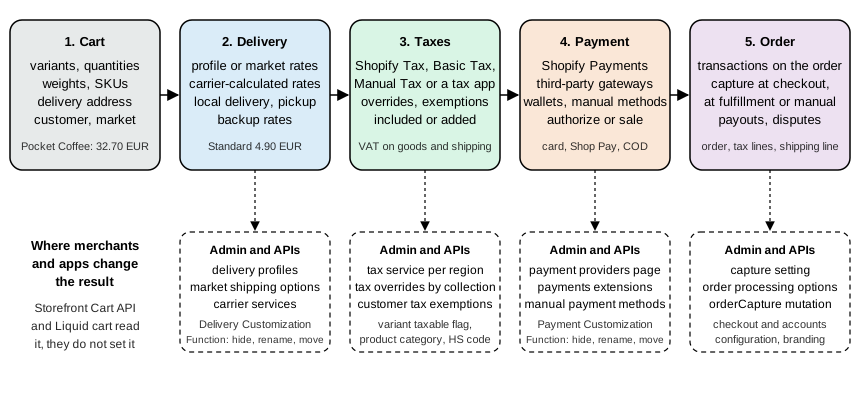
Buyers never see these stages as separate steps; one-page checkout shows them on a single page. The stages matter to developers because each one has its own configuration owner, its own API and its own plan restrictions:
| Stage | Admin location (Settings) | Admin GraphQL API | Access scope |
|---|---|---|---|
Delivery profiles and rates |
Shipping and delivery, Shipping profiles |
|
any shipping scope ( |
Carrier services |
Shipping and delivery, third-party carrier-calculated shipping |
|
|
Market-driven shipping options |
Markets, shipping options of a market |
|
|
Delivery customizations |
Shipping and delivery, Delivery customizations |
|
|
Taxes |
Taxes and duties |
|
|
Payment providers |
Payments |
|
|
Payment customizations |
Payments, Payment customizations |
|
|
Capture and transactions |
Payments, Payment capture |
|
|
Checkout appearance and apps |
Checkout, Configurations (checkout and accounts editor) |
|
|
The scopes are requested in shopify.app.toml. The app that the examples of this page belong to declares the scopes
below; the file was validated offline with shopify app build, which checks the descriptor but does not contact Shopify.
client_id = "00000000000000000000000000000000"
name = "pocket-coffee-checkout-app"
application_url = "https://example.invalid"
embedded = true

[access_scopes]
scopes = "read_shipping,write_shipping,write_delivery_customizations,write_payment_customizations,read_orders,write_orders,write_products,read_shopify_payments_accounts,write_checkout_and_accounts_configurations"

[auth]
redirect_urls = ["https://example.invalid/api/auth"]

[webhooks]
api_version = "2026-10"The client id is an obvious placeholder of 32 zeros and the URLs use the reserved .invalid top-level domain. Apps that
use the market-driven shipping API additionally need read_markets and write_markets, and apps that set customer tax
exemptions need write_customers. Reading the Shopify Payments account needs read_shopify_payments_accounts or the
approval-gated read_shopify_payments.
Plans and what they change
Most of the settings below exist on every plan. The differences that matter to a developer are the following, taken from the Help Center and the developer documentation on 2026-10-27.
| Capability | Basic, Grow, Advanced | Shopify Plus | Where it applies |
|---|---|---|---|
Checkout UI extensions on the information, shipping and payment steps |
not available |
available |
checkout customization |
Checkout UI extensions on the Thank you and Order status pages |
available |
available |
checkout customization |
Custom apps containing Shopify Functions |
not available |
available |
Functions |
Public apps containing Shopify Functions |
available |
available |
Functions |
Checkout Branding API (checkout and accounts configuration) |
not available |
available |
branding |
Payment customization: hide, rename, reorder payment methods |
non-card methods only in the United States and Canada |
including card fields |
payment customizations |
Payment customization: placements, payment terms, order review (B2B) |
placements ignored, hidden entirely |
placements, payment terms and B2B review supported |
payment customizations |
Capture automatically per fulfillment |
not available |
available |
payment capture |
Third-party carrier-calculated shipping |
Advanced included; lower plans with yearly billing or an extra monthly fee |
included |
carrier services |
Shopify Payments alongside a third-party gateway |
available |
early access on request for stores with a contract |
payment providers |
Bot protection at checkout |
not available |
available on request |
checkout settings |
Checkout and accounts pages adapted per market |
Advanced and Plus only |
available |
checkout customization |
Ship and pickup in one order |
not available |
feature preview (Plus and Enterprise) |
checkout settings |
Third-party gateway transaction fees and Shopify Payments rates also depend on the plan; they are in the payments section below.
Shipping
Vocabulary
Shipping has a vocabulary of its own that the admin and the API use with slightly different names.
| Term | Meaning | Admin API object |
|---|---|---|
Delivery profile |
A set of shipping rules for specific products and locations. Every store has a General profile that covers every product that is not in a custom profile. |
|
Location group |
The fulfillment locations of a profile that share the same zones and rates. |
|
Shipping zone |
A named group of countries or regions. Within one location group a country can be in only one zone. |
|
Shipping rate (shipping option in the admin) |
A named price a buyer can choose at checkout, flat, by order amount, by weight, or calculated by a carrier or an app. |
|
Rate condition |
A minimum and maximum order amount or weight that limits when a rate applies. |
|
Carrier service |
An app endpoint that returns rates in real time for a cart. |
|
Delivery option |
What the buyer sees at checkout: a rate, local delivery, store pickup or a pickup point. |
Functions input |
Delivery group |
The items of a cart that ship together; carts with different locations or profiles have several groups. |
|
Delivery customization |
A Shopify Function instance that hides, renames or reorders delivery options. |
|
Shipping option by market |
The market-driven replacement of profiles, location groups and zones: options attached to a market. |
|
Delivery profiles in the admin
Shipping is configured in Settings, Shipping and delivery. Each store has a General profile that applies to all products;
all existing and new products are added to it, and a product or variant that is not in a custom profile uses the General
rates. A store can create up to 99 custom profiles when different products need different rates, for example fragile
products that need a more expensive service. A product or variant belongs to exactly one profile at a time: adding it to
a second profile removes it from the first, and removing a variant from a custom profile returns it to the General
profile (the API field variantsToDissociate is documented the same way).
When a profile is created, every location that can fulfill online orders is added to it in one location group, so that all those locations share the same zones and rates. A location can be moved into its own location group to give it different zones and rates, removed from a group (shown under "Not fulfilling from"), or added to an existing group. If the last location of a group is removed, the group’s zones and rates are deleted. Locations that are deactivated are labeled Inactive: rates can be added to them, but they are not used at checkout until the location is activated. A location created after a profile is added to every profile as not fulfilling. Some apps that manage fulfillment, such as on-demand printing apps, are added to the profile as locations automatically and can change the setup.
A new store gets default rates created from the store location, domestic and international, and the Help Center warns that these frequently include a free shipping rate; they should be reviewed before the store accepts orders. Staff or collaborators need the Products and Manage settings permissions to work with shipping profiles.
Rate types
Within a zone, a rate has one of four types:
| Rate type | Behavior |
|---|---|
Flat |
One price for the zone. By default a flat rate applies once per order, not once per product; charging per product needs separate rates or an app. |
Order amount |
Price-based ranges, for example 24.99 USD from 0 to 100 USD, 9.99 USD from 100.01 to 200 USD and free above 200.01 USD. The maximum of the last range can be left empty. |
Weight |
Weight ranges evaluated on the combined weight of the items that ship from the same location with the same option. Every product needs a weight, or the rate does not calculate correctly; the store default package weight is added to each product. |
Carrier or app calculated |
The carrier or an app returns the price from weight, dimensions and destination. Built-in carrier integrations are available on all plans; connecting your own carrier accounts (UPS, FedEx, USPS, Canada Post, Australia Post) is third-party carrier-calculated shipping, which needs a plan or fee as described above. |
Any rate can be made free by leaving the price empty or entering 0, and the "Offer free shipping" option adds a minimum order amount above which the rate costs nothing. Flat rates can show a transit time (a suggested value or a custom range such as 3-5 days) that feeds the delivery estimate at checkout. Flat rates in local currencies exist only for stores that use Shopify Payments: a rate set per market currency is shown as set, whereas automatic conversion of a EUR rate shows a converted amount (the Help Center gives roughly 120 SEK for a 10 EUR rate); separate zones per region give fixed prices instead of converted ones.
How rates combine when a cart spans profiles and locations
Carts whose items sit in different profiles or ship from different locations get a single combined rate. The rules, as documented, are these:
-
Rates with the same name are added together and shown under that name, even if they are in different profiles. If the rate names differ, the cheapest options are added together and shown as "Shipping".
-
Price-based rates apply to the cart total; weight-based rates apply to each product’s weight plus the store default package weight, and the resulting rates are then combined.
-
If an order must ship from several locations of the same location group with a flat rate, one flat fee is charged: a 5 USD group charged once even when two locations are needed.
-
If several locations in the same group could fulfill all items, fulfillment priority picks the location, and the other location’s rate is free.
-
If an order needs different location groups, their rates are added.
The consequence is that the way profiles and rate names are organized changes what the buyer pays, and the Help Center states that a combined rate can lead to higher shipping costs. Two Pocket Coffee consequences: the Standard rate in the Spanish zone and the same-named Standard rate in a second profile for the Starter kit would be added together unless the profiles are deliberately named and priced as one rate, and the shop should keep every variant of the same parcel in one profile.
Backup rates
When all app or carrier calculated rates of a shipment fail and no other eligible rate exists, backup rates are shown so that checkout does not stall. They apply to the whole store by default and need no setup, only when at least one app or carrier-calculated rate exists. Shopify-supported carriers provide them where available (USPS, Canada Post, Evri, Chronopost, Poste Italiane and Correos in the listed countries), country-specific rates built from historical data cover the other zones, and legacy custom backup rates by order value or weight still work. Flat rates for the same destinations are always shown when eligible, so they can be chosen even while calculated rates work. A product without a weight is treated as weight 0 when backup rates are chosen, which can produce wrong prices. Since 2025-05-22 a 3xx or 4xx response from a carrier also triggers backup rates instead of a hard failure.
Pocket Coffee with delivery profiles in the Admin API
The Admin API reaches the same objects. The mutation below creates a profile for the beans with two Spanish rates that cover the order amount below and above 40 EUR, and an EU rate limited to 5 kg. The two Spanish rates are separate method definitions because a rate in the admin has either order amount conditions or weight conditions; the 5 kg parcel limit is enforced by the EU weight range and, for Spain, by splitting orders operationally. The variables use placeholder ids.
mutation CreateBeansProfile($profile: DeliveryProfileInput!) {
  deliveryProfileCreate(profile: $profile) {
    profile {
      id
      name
      profileLocationGroups {
        locationGroup {
          id
        }
        locationGroupZones(first: 5) {
          edges {
            node {
              zone {
                id
                name
              }
              methodDefinitions(first: 5) {
                edges {
                  node {
                    id
                    name
                    active
                  }
                }
              }
            }
          }
        }
      }
    }
    userErrors {
      field
      message
    }
  }
}
{
"profile": {
"name": "Pocket Coffee beans",
"variantsToAssociate": [
"gid://shopify/ProductVariant/1001",
"gid://shopify/ProductVariant/1002"
],
"locationGroupsToCreate": [
{
"locationsToAdd": [
"gid://shopify/Location/1"
],
"zonesToCreate": [
{
"name": "Spain",
"countries": [
{
"code": "ES",
"includeAllProvinces": true
}
],
"methodDefinitionsToCreate": [
{
"name": "Standard",
"description": "2 to 3 working days",
"active": true,
"rateDefinition": {
"price": {
"amount": "4.90",
"currencyCode": "EUR"
}
},
"priceConditionsToCreate": [
{
"operator": "LESS_THAN_OR_EQUAL_TO",
"criteria": {
"amount": "39.99",
"currencyCode": "EUR"
}
}
]
},
{
"name": "Free shipping",
"active": true,
"rateDefinition": {
"price": {
"amount": "0.00",
"currencyCode": "EUR"
}
},
"priceConditionsToCreate": [
{
"operator": "GREATER_THAN_OR_EQUAL_TO",
"criteria": {
"amount": "40.00",
"currencyCode": "EUR"
}
}
]
}
]
},
{
"name": "European Union",
"countries": [
{
"code": "DE",
"includeAllProvinces": true
},
{
"code": "FR",
"includeAllProvinces": true
},
{
"code": "IT",
"includeAllProvinces": true
},
{
"code": "PT",
"includeAllProvinces": true
}
],
"methodDefinitionsToCreate": [
{
"name": "Standard",
"description": "4 to 7 working days",
"active": true,
"rateDefinition": {
"price": {
"amount": "9.90",
"currencyCode": "EUR"
}
},
"weightConditionsToCreate": [
{
"operator": "LESS_THAN_OR_EQUAL_TO",
"criteria": {
"value": 5,
"unit": "KILOGRAMS"
}
}
]
}
]
}
]
}
]
}
}The document and the variables were validated against the 2026-10 Admin schema (types, enum values and required
fields); the mutation was not sent to a store. The fields of DeliveryProfileInput that matter:
| Field | Meaning |
|---|---|
|
Profile name. |
|
Create, change or delete location groups. The documentation recommends no more than 5 location groups per request because of the nesting depth. |
|
The location groups associated with the profile; the reference gives no further detail, so prefer the explicit create, update and delete fields. |
|
Attach variants to the profile; dissociated variants move back to the default profile. |
|
Delete zones, rates and conditions by id. |
|
Link subscription, pre-order and try-before-you-buy plans to the profile so that they get their own rates. |
|
Since 2026-07, only for app-owned shipping profiles: applies the rates to every shippable item without assigning products. It defaults to false on create, keeps the stored value on update and overrides explicit product assignments when true. |
Inside a location group, locationsToAdd, locationsToRemove (up to 250 each per request) and locations (move to
this group) manage locations, and zonesToCreate and zonesToUpdate manage zones (the documentation recommends at most
5 per request). A zone takes countries (each with code, provinces, includeAllProvinces or restOfWorld) and
methodDefinitionsToCreate. A method definition has name, description, active, a rateDefinition with the price,
or a participant for a carrier or app rate, and priceConditionsToCreate or weightConditionsToCreate whose
operator is GREATER_THAN_OR_EQUAL_TO or LESS_THAN_OR_EQUAL_TO. A condition is either a money amount or a weight
with the unit KILOGRAMS, GRAMS, POUNDS or OUNCES.
Reading a profile back returns its structure and the current rates. Rates are a union, so the query asks for
rateProvider with fragments for a plain rate and for a carrier or app participant, and for the conditions.
query BeansProfile($id: ID!) {
  deliveryProfile(id: $id) {
    id
    name
    default
    version
    coversAllItems
    activeMethodDefinitionsCount
    originLocationCount
    zoneCountryCount
    locationsWithoutRatesCount
    productVariantsCount {
      count
    }
    profileLocationGroups {
      locationGroup {
        id
      }
      locationGroupZones(first: 10) {
        edges {
          node {
            zone {
              name
              countries {
                code {
                  countryCode
                  restOfWorld
                }
              }
            }
            methodDefinitions(first: 10) {
              edges {
                node {
                  name
                  active
                  rateProvider {
                    __typename
                    ... on DeliveryRateDefinition {
                      price {
                        amount
                        currencyCode
                      }
                    }
                    ... on DeliveryParticipant {
                      fixedFee {
                        amount
                        currencyCode
                      }
                      percentageOfRateFee
                    }
                  }
                  methodConditions {
                    field
                    operator
                    conditionCriteria {
                      __typename
                      ... on MoneyV2 {
                        amount
                        currencyCode
                      }
                      ... on Weight {
                        value
                        unit
                      }
                    }
                  }
                }
              }
            }
          }
        }
      }
    }
  }
}{"id":"gid://shopify/DeliveryProfile/2"}version increases on each change and locationsWithoutRatesCount is the quickest way to find a location that
fulfills orders but has no rates. Adding and removing variants later is an update:
mutation AddVariants($id: ID!, $profile: DeliveryProfileInput!) {
  deliveryProfileUpdate(id: $id, profile: $profile) {
    profile {
      id
      version
      productVariantsCount {
        count
      }
    }
    userErrors {
      field
      message
    }
  }
}
{
"id": "gid://shopify/DeliveryProfile/2",
"profile": {
"variantsToAssociate": ["gid://shopify/ProductVariant/1003"],
"variantsToDissociate": ["gid://shopify/ProductVariant/1001"]
}
}Two changes to the shape of these objects are published and affect integrations that read merchant-managed profiles.
Starting with the unstable API version, a shipping option can contain several tiered rates, and
DeliveryMethodDefinition.rateGroups and DeliveryRateDefinition.conditions are meant to replace the legacy
rateProvider and methodConditions fields that the examples above use; the legacy fields are scheduled for
deprecation and become obsolete when merchants use multiple tiered rates. The 2026-10 schema validated for this page
still contains only the legacy fields. Apps that write merchant-managed profiles have to move to the new write input
(rateGroupsToCreate, rateGroupsToUpdate, freeConditions, currencyCode), whereas apps that read and write
profiles that they own need no action.
Product data that shipping and customs read
Rates only work if the variants carry the right data. The variant’s inventory item holds requiresShipping, the weight
(measurement.weight), the country of origin and the harmonized system code that customs and duty calculations use. The
mutation sets them for a Pocket Coffee bean variant; 090121 is the six-digit heading for roasted coffee that is not
decaffeinated.
mutation SetShippingAndTaxData($productId: ID!, $variants: [ProductVariantsBulkInput!]!) {
  productVariantsBulkUpdate(productId: $productId, variants: $variants) {
    productVariants {
      id
      sku
      taxable
      inventoryItem {
        requiresShipping
        harmonizedSystemCode
        countryCodeOfOrigin
        measurement {
          weight {
            value
            unit
          }
        }
      }
    }
    userErrors {
      field
      message
    }
  }
}
{
"productId": "gid://shopify/Product/501",
"variants": [
{
"id": "gid://shopify/ProductVariant/1001",
"taxable": true,
"inventoryItem": {
"requiresShipping": true,
"harmonizedSystemCode": "090121",
"countryCodeOfOrigin": "ES",
"measurement": { "weight": { "value": 0.25, "unit": "KILOGRAMS" } }
}
}
]
}The same mutation sets taxable, which the tax section below uses. The deprecated taxCode field of the same input is
discussed there.
Carrier services
A carrier service is an endpoint that Shopify calls for rates at checkout. It is registered with carrierServiceCreate
(scope write_shipping).
mutation RegisterCarrier($input: DeliveryCarrierServiceCreateInput!) {
  carrierServiceCreate(input: $input) {
    carrierService {
      id
      name
      active
      callbackUrl
      supportsServiceDiscovery
    }
    userErrors {
      field
      message
    }
  }
}
{
"input": {
"name": "Pocket Coffee courier rates",
"callbackUrl": "https://example.com/carrier-rates",
"supportsServiceDiscovery": true,
"active": true
}
}The requirements and behaviors of the callback are:
-
The store must be on the Advanced plan or higher, on a lower plan with yearly billing or with the feature added for a monthly fee, or be a development store that is not on the Basic plan. If the store later stops meeting this, the association is deactivated.
-
Shopify sends a POST with a
rateobject (origin, destination, items with grams, price andrequires_shipping,currency,locale). Since 2025-11-04 the payload also contains the order totals (subtotal_price,total_price,discount_amount) and the customer’s id and tags. For API-created services only the address fieldsaddress1,address2,city,zip,provinceandcountryare filled. -
The response is
{"rates": [...]}where every rate hasservice_name,description,service_code,currencyandtotal_price(as a string in minor units, so 1290 for 12.90 EUR), and optionallyphone_required,min_delivery_dateandmax_delivery_date. -
An empty array with a 2xx status means that the service cannot handle the request; a 40x or 50x status forces backup rates; redirects are followed only on the same domain; there is no retry.
-
The read timeout depends on the requests per minute of the shop and app pair: 10 seconds under 1,500, 5 seconds from 1,500 to 3,000 and 3 seconds above 3,000.
-
Shopify caches identical requests (same variants, quantities, weights, origin and destination) for 15 minutes after a success and 30 seconds after an error.
-
From API version 2026-10,
carrierServiceCreateonly registers the service; it is no longer added automatically to the General shipping profile or its zones. The rates must be added to a profile by the merchant in the admin (the recommended path) or programmatically through the profile APIs, or merchants see no rates from the new service. Older supported API versions keep the automatic behavior until they are retired.
A minimal callback for Pocket Coffee that offers an Express rate (12.90 EUR) inside Spain for parcels up to 5 kg:
import { createServer } from "node:http";

const EXPRESS_PRICE_CENTS = 1290; // 12.90 EUR
const MAX_GRAMS = 5000; // parcel limit

export function ratesFor(rate) {
  const grams = rate.items
    .filter((item) => item.requires_shipping)
    .reduce((sum, item) => sum + item.grams * item.quantity, 0);

  // Express is offered inside Spain only, and only below the parcel limit.
  if (rate.destination.country !== "ES" || grams > MAX_GRAMS) {
    return []; // empty array with a 2xx status: "cannot handle this request"
  }

  // Delivery dates use the format shown in the carrier service documentation.
  const formatDate = (date) => date.toISOString().replace("T", " ").replace(/\.\d+Z$/, " +0000");
  const tomorrow = new Date(Date.now() + 24 * 3600 * 1000);
  const dayAfter = new Date(Date.now() + 48 * 3600 * 1000);
  return [
    {
      service_name: "Express",
      service_code: "pc_express",
      description: "Next working day",
      currency: "EUR",
      total_price: String(EXPRESS_PRICE_CENTS), // subunits, as a string
      min_delivery_date: formatDate(tomorrow),
      max_delivery_date: formatDate(dayAfter),
    },
  ];
}

const server = createServer((req, res) => {
  if (req.method !== "POST" || req.url !== "/carrier-rates") {
    res.writeHead(404).end();
    return;
  }
  let body = "";
  req.on("data", (chunk) => (body += chunk));
  req.on("end", () => {
    try {
      const { rate } = JSON.parse(body);
      res.writeHead(200, { "Content-Type": "application/json" });
      res.end(JSON.stringify({ rates: ratesFor(rate) }));
    } catch {
      res.writeHead(400).end(); // a 4xx makes Shopify fall back to backup rates
    }
  });
});

server.listen(Number(process.env.PORT ?? 8787), "127.0.0.1");The callback was started locally and called with three sample requests built from the documented request format. A
Spanish destination with two 250 g bags returned the rate ("total_price":"1290", status 200). A German destination and
a Spanish cart of 8 kg both returned {"rates":[]} with status 200, and a request body that is not JSON returned 400,
which Shopify turns into backup rates. The REST page documents the wire format; the REST Admin API itself is legacy since
2024-10-01 and new public apps must use GraphQL since 2025-04-01, so registration goes through the GraphQL mutation
above.
Local delivery, pickup in store, pickup points, split shipping
Besides shipping, a store can offer other delivery methods:
-
Local delivery is activated per location, within a radius or a list of postal codes. The maximum radius is 160 kilometers or 100 miles and does not cross borders. A location has up to 10 delivery zones, each with up to 3 extra price-based rules, and a postal-code list is at most 3,000 characters. The option name "Local delivery" cannot be changed. Eligibility requires that all physical items come from one location with enough stock, that Google can verify the address, and that the buyer has not chosen an accelerated checkout other than Shop Pay in the first step. B2B checkouts do not support it, but a B2B draft order with local delivery preselected does.
-
Pickup in store is activated per location with a processing time, optional store transfers (inventory moved from other locations when the pickup location lacks stock), transfer exclusions by collection and a "ready for pickup" notification. When a store transfer is needed, the checkout shows an estimated pickup time that includes the transfer.
-
Pickup points (post offices, relay points, lockers) are early access for eligible stores and carriers. Apps that generate pickup point options with Shopify Functions are available only to custom apps on development stores or Plus stores.
-
Ship and pickup in one order lets Plus and Enterprise merchants offer shipping or pickup per item in one checkout; it was in feature preview on 2026-10-27. Checkouts then have several delivery groups and orders can contain fulfillment orders with different delivery methods (
SHIPPINGandPICK_UP), so apps must not assume one method per order. -
Split shipping happens when a cart cannot ship in one shipment: pre-orders, subscriptions, items from different locations, products from different profiles. The buyer sees the number of shipments and a method per shipment; by default the lowest total cost is selected. The setting is retired for stores upgraded to shipping options by market, where split shipping is always on.
Market-driven shipping (shipping options by market)
Shopify is replacing merchant-owned delivery profiles, location groups and zones with shipping options attached to each
market. A market has options (flat, order-value, weight or carrier-calculated), and inside one option the rate can vary
by product and location conditions. Product conditions are all products or collections (rates are no longer assigned to
single variants, so a group of variants needs a collection), and location conditions pick the fulfillment locations.
When several rates in the same option match a cart, only the highest matching rate is charged instead of the sum, and
when several options match, the option prices are added. The upgrade combines rates with the same name into one option,
turns the former product groupings into unpublished collections with the prefix [Shipping], can create sub-region
markets to keep the former zone coverage, and keeps split shipping on. Staff need the Markets permission to manage it
because existing roles do not receive it automatically.
The timeline (the dates are targets and may shift) is: feature preview from 2026-07-01 (selected when a development store is created), merchant rollout beginning on 2026-10-01 for stores whose apps are compatible, and all merchants on market-driven shipping by 2027-07-01. Until then the Help Center page for shipping options by market is labeled early access and only for certain stores, and a store keeps its profile-based setup until it is upgraded; a merchant can opt out during a window after the upgrade.
For apps the rule is simple. App-owned profiles keep working with deliveryProfileCreate and deliveryProfileUpdate
and can now use coversAllItems. The merchant-owned profile fields and mutations (deliveryProfile, deliveryProfiles,
deliveryProfilesCount, deliveryProfileLocationGroup, deliveryProfileLocationGroups, deliveryProfileCreate,
deliveryProfileUpdate, deliveryProfileRemove) no longer represent the live merchant configuration on a shop that
uses the new model: reads may return a stale snapshot and writes can succeed without changing anything. Readers should
switch to Contextual Product Feeds (for sales channels) or read Market.delivery, writers should become app-profile
integrations or write with marketCreate and marketUpdate, and the model of a shop is detected with
ShopFeatures.marketDrivenShipping. Apps that ship from their own locations (fulfillment networks, print on demand) fit
app-owned profiles; carrier-rate apps for the merchant’s own locations need the Markets API because, before the shop is
upgraded, the merchant’s rates take precedence at a location that appears in both profiles.
mutation SetMarketShipping($id: ID!, $input: MarketUpdateInput!) {
  marketUpdate(id: $id, input: $input) {
    market {
      id
      name
      delivery {
        shipping {
          isEnabled
          optionDefinitions(first: 10) {
            nodes {
              id
              isActive
              currency
              freeDeliveryMinimumValue {
                amount
                currencyCode
              }
              ... on DeliveryFlatRateOptionDefinition {
                name
                rateGroups(first: 5) {
                  nodes {
                    rate {
                      price {
                        amount
                        currencyCode
                      }
                    }
                  }
                }
              }
            }
          }
        }
      }
    }
    userErrors {
      field
      message
    }
  }
}
{
"id": "gid://shopify/Market/7001",
"input": {
"delivery": {
"shipping": {
"isEnabled": true,
"optionDefinitionsToCreate": [
{
"flatRate": {
"name": "Standard",
"description": "2 to 3 working days",
"isActive": true,
"currency": "EUR",
"freeDeliveryMinimumValue": { "amount": "40.00", "currencyCode": "EUR" },
"rateGroups": [
{
"rate": {
"price": { "amount": "4.90", "currencyCode": "EUR" },
"transitTimeMinSeconds": 172800,
"transitTimeMaxSeconds": 259200
}
}
]
}
}
]
}
}
}
}The document validates against the 2026-10 schema (MarketUpdateInput.delivery.shipping with
optionDefinitionsToCreate, a flat-rate option with rateGroups, freeDeliveryMinimumValue and transit times in
seconds). It requires read_markets and write_markets; isEnabled: false removes shipping for a market, a null
Market.delivery.shipping means the market inherits from its parent, and removeShipping: true in
MarketDeliveryConfigurationsUpdateInput removes a market’s own configuration. Carrier-calculated options exist as
DeliveryCarrierCalculatedOptionDefinition and the other types are DeliveryValueBasedOptionDefinition and
DeliveryWeightBasedOptionDefinition.
Customizing delivery options with a Shopify Function
A Delivery Customization Function changes the options that exist at checkout without changing the stored rates. It can
hide an option, rename it and move it to another position; the target is cart.delivery-options.transform.run. The
carrier name is prepended automatically when a carrier-calculated option is renamed (UPS Standard can become UPS Standard
Shipping, but never just Standard Shipping), and reordering must not push a more expensive option above the cheapest one
as the default. Shopify caches delivery options during checkout and may reuse function results. Since 2026-09-15 on API
version 2026-10 a delivery option exposes metafields to the function input, so a delivery option generator and a
customization function can exchange structured data instead of parsing titles. The CLI template is created with
shopify app generate extension --template delivery_customization --flavor vanilla-js --name pocket-coffee-delivery;
that command needs a logged-in organization and was not run. The extension below was created from the template files
instead (the schema and structure of functions-delivery-customization-js in Shopify’s extension templates repository).
The Pocket Coffee rule: show the Express option only to destinations in a configurable list of countries (Spain by
default) and call the Standard option "Standard (Coffee Club)" for customers with the tag Coffee Club. The tag test uses
an aliased hasAnyTag field in the input query.
api_version = "2026-07"

[[extensions]]
name = "Pocket Coffee delivery rules"
handle = "pocket-coffee-delivery"
type = "function"
description = "Hides the Express option outside Spain and labels the Standard option for Coffee Club members"

  [[extensions.targeting]]
  target = "cart.delivery-options.transform.run"
  input_query = "src/cart_delivery_options_transform_run.graphql"
  export = "cart-delivery-options-transform-run"

  [extensions.build]
  command = ""
path = "dist/function.wasm"query CartDeliveryOptionsTransformRunInput {
cart {
buyerIdentity {
customer {
isClubMember: hasAnyTag(tags: ["Coffee Club"])
}
}
deliveryGroups {
deliveryAddress {
countryCode
}
deliveryOptions {
handle
title
}
}
}
deliveryCustomization {
metafield(namespace: "$app:pocket-coffee-delivery", key: "function-configuration") {
jsonValue
}
}
}// @ts-check
/**
* @typedef {import("../generated/api").CartDeliveryOptionsTransformRunInput} CartDeliveryOptionsTransformRunInput
* @typedef {import("../generated/api").CartDeliveryOptionsTransformRunResult} CartDeliveryOptionsTransformRunResult
*/
/** @type {CartDeliveryOptionsTransformRunResult} */
const NO_CHANGES = { operations: [] };
/**
* @param {CartDeliveryOptionsTransformRunInput} input
* @returns {CartDeliveryOptionsTransformRunResult}
*/
export function cartDeliveryOptionsTransformRun(input) {
const configuration = input?.deliveryCustomization?.metafield?.jsonValue ?? {};
const expressCountries = configuration.expressCountries ?? ["ES"];
const isClubMember = input.cart.buyerIdentity?.customer?.isClubMember ?? false;
const operations = [];
for (const group of input.cart.deliveryGroups) {
const country = group.deliveryAddress?.countryCode;
for (const option of group.deliveryOptions) {
if (option.title === "Express" && !expressCountries.includes(country)) {
operations.push({ deliveryOptionHide: { deliveryOptionHandle: option.handle } });
} else if (option.title === "Standard" && isClubMember) {
operations.push({
deliveryOptionRename: {
deliveryOptionHandle: option.handle,
title: "Standard (Coffee Club)",
},
});
}
}
}
return operations.length ? { operations } : NO_CHANGES;
}The build and the two runs used Shopify CLI 5.0.0 and the bundled function runner, with no store. The extension has a
package.json with the codegen section and @shopify/shopify_function 2.0.1, the entry src/index.js re-exports the
function, and command = "" makes the CLI use its JavaScript builder.
export SHOPIFY_CLI_NO_ANALYTICS=1
shopify app build --no-input
shopify app function run --no-input --path extensions/pocket-coffee-delivery \
  --input "$PWD/extensions/pocket-coffee-delivery/input-es-member.json" \
  --export cart-delivery-options-transform-run
Source: Shopify CLI: app function run
The build printed Building GraphQL types, Bundling JS function, Running javy and pocket-coffee-app built!, and
wrote a Wasm module of 2,368 bytes. The input for a Spanish member (Express stays because ES is in the list) and the
function output:
{
  "cart": {
    "buyerIdentity": { "customer": { "isClubMember": true } },
    "deliveryGroups": [
      {
        "deliveryAddress": { "countryCode": "ES" },
        "deliveryOptions": [
          { "handle": "std-es", "title": "Standard" },
          { "handle": "exp-es", "title": "Express" }
        ]
      }
    ]
  },
  "deliveryCustomization": { "metafield": { "jsonValue": { "expressCountries": ["ES"] } } }
}
{
"operations": [
{
"deliveryOptionRename": {
"deliveryOptionHandle": "std-es",
"title": "Standard (Coffee Club)"
}
}
]
}Source: Shopify CLI: app function run
The run took 218,476 instructions. For a guest in Germany with no configuration metafield (the default list is
["ES"]) the output hides the Express option and leaves Standard alone, in 205,107 instructions:
{
  "operations": [
    {
      "deliveryOptionHide": {
        "deliveryOptionHandle": "exp-eu"
      }
    }
  ]
}Three things were learned from the run. The --input path must be absolute because the CLI resolves a relative path
against the extension directory. The extension needs the codegen key in its package.json or the type generation step
fails. And the function runner prints resource limits (input 125 KB, output 19.53 KB, 11 million instructions) next to
the measured benchmark, so the margin is visible; these runs used about 2 percent of the instruction limit.
The function is attached to a store with deliveryCustomizationCreate (scope write_delivery_customizations) using the
function handle from the descriptor; configuration travels in a metafield in the app-reserved namespace
$app:pocket-coffee-delivery, key function-configuration, which the input query reads with jsonValue.
mutation CreateDeliveryCustomization($deliveryCustomization: DeliveryCustomizationInput!) {
  deliveryCustomizationCreate(deliveryCustomization: $deliveryCustomization) {
    deliveryCustomization {
      id
      title
      enabled
    }
    userErrors {
      field
      message
    }
  }
}
{
"deliveryCustomization": {
"functionHandle": "pocket-coffee-delivery",
"title": "Pocket Coffee delivery rules",
"enabled": true,
"metafields": [
{
"namespace": "$app:pocket-coffee-delivery",
"key": "function-configuration",
"type": "json",
"value": "{\"expressCountries\":[\"ES\"]}"
}
]
}
}Merchants see the same customization under Settings, Shipping and delivery, Delivery customizations, where they add it and activate it; customizations also apply to draft order checkouts but are not visible while the draft order is being built in the admin. Public apps with Functions work on every plan, custom apps with Functions need Plus.
Reading delivery data on the storefront
The Storefront API exposes the delivery groups and options of a cart, in the context of a country and language. The queries were validated against the 2026-10 Storefront schema.
query CartDelivery($cartId: ID!) @inContext(country: ES, language: ES) {
  cart(id: $cartId) {
    checkoutUrl
    cost {
      subtotalAmount {
        amount
        currencyCode
      }
      totalAmount {
        amount
        currencyCode
      }
      totalAmountEstimated
    }
    deliveryGroups(first: 5) {
      nodes {
        id
        deliveryOptions {
          handle
          title
          description
          deliveryMethodType
          estimatedCost {
            amount
            currencyCode
          }
        }
        selectedDeliveryOption {
          handle
          title
        }
      }
    }
  }
}
mutation SelectDelivery($cartId: ID!, $selected: [CartSelectedDeliveryOptionInput!]!) {
cartSelectedDeliveryOptionsUpdate(cartId: $cartId, selectedDeliveryOptions: $selected) {
cart {
id
deliveryGroups(first: 5) {
nodes {
selectedDeliveryOption {
handle
title
}
}
}
}
userErrors {
field
message
}
}
}A cart only has delivery groups once it has a delivery address, and the options of a group already include the effect of
delivery customization Functions. The Storefront CartCost tax and duty fields (totalTaxAmount, totalDutyAmount and
their estimated flags) are deprecated since 2025-01-01 and tax and duty amounts are no longer available there, so a
headless storefront should show tax notes without computing them (see the tax section).
In a Liquid theme, a snippet can state the tax and shipping assumptions under the cart total. cart.taxes_included,
cart.duties_included, cart.requires_shipping, cart.items_subtotal_price, localization.country,
shop.address.country_code and shop.shipping_policy are Liquid objects, and the free shipping threshold is passed in
by the caller in the minor units of the presentment currency instead of being computed from a base price, which keeps it
correct when a market changes the currency.
{% doc %}
  Notes shown under the cart total: tax wording, duties wording and a
  free-shipping hint.

  @param {number} free_shipping_threshold - Minimum items subtotal, in the minor units of the presentment currency (cents), for free shipping
{% enddoc %}

{%- liquid
  assign threshold = free_shipping_threshold | default: 0
  assign missing = threshold | minus: cart.items_subtotal_price
  assign missing_money = missing | money
-%}

<div class="cart-price-notes">
  {%- if cart.taxes_included -%}
    <p>{{ 'cart.notes.taxes_included' | t }}</p>
  {%- else -%}
    <p>{{ 'cart.notes.taxes_excluded' | t }}</p>
  {%- endif -%}

  {%- if cart.duties_included == false and localization.country.iso_code != shop.address.country_code -%}
    <p>{{ 'cart.notes.duties_at_delivery' | t }}</p>
  {%- endif -%}

  {%- if cart.requires_shipping and threshold > 0 -%}
    {%- if missing > 0 -%}
      <p>{{ 'cart.notes.free_shipping_missing' | t: amount: missing_money }}</p>
    {%- else -%}
      <p>{{ 'cart.notes.free_shipping_reached' | t }}</p>
    {%- endif -%}
  {%- endif -%}

  <p>{{ 'cart.notes.shipping_at_checkout_html' | t: url: shop.shipping_policy.url }}</p>
</div>
Source: Shopify Liquid reference: cart
{% doc %}
  Lists the payment methods the store accepts, as inline SVG icons.
{% enddoc %}

{%- if shop.enabled_payment_types.size > 0 -%}
  <ul class="payment-icons" role="list">
    {%- for payment_type in shop.enabled_payment_types -%}
      <li>{{ payment_type | payment_type_svg_tag: class: 'payment-icons__icon' }}</li>
    {%- endfor -%}
  </ul>
{%- endif -%}<section class="cart-footer">
{% render 'cart-price-notes', free_shipping_threshold: section.settings.free_shipping_threshold %}
<a class="button" href="{{ routes.cart_url }}">{{ 'cart.checkout' | t }}</a>
{% render 'payment-icons' %}
</section>
{% schema %}
{
"name": "Cart footer",
"settings": [
{
"type": "number",
"id": "free_shipping_threshold",
"label": "Free shipping threshold (minor units of the presentment currency)",
"default": 4000
}
],
"presets": [{ "name": "Cart footer" }]
}
{% endschema %}{
"cart": {
"notes": {
"taxes_included": "Taxes included in the prices.",
"taxes_excluded": "Taxes are calculated at checkout.",
"duties_at_delivery": "Duties and import taxes may be charged on delivery.",
"free_shipping_missing": "Add {{ amount }} more for free shipping.",
"free_shipping_reached": "Your order ships free.",
"shipping_at_checkout_html": "<a href=\"{{ url }}\">Shipping</a> is calculated at checkout."
}
}
}Source: Shopify Liquid reference: cart
The three files and the locale keys were added to a copy of the Skeleton theme created with shopify theme init, and
shopify theme check reported 42 files inspected with no offenses found. Before the section referenced the two
snippets, Theme Check reported them as OrphanedSnippet warnings, and a deliberate typo (payment_type_svg_tags) was
caught as an UnknownFilter error, so the checker covers filter names as well as syntax. Theme Check does not render
the theme; the output on a real storefront was not observed.
Taxes
Responsibility and tax services
Tax is the merchant’s responsibility. Shopify calculates and, with Shopify Tax and automated filing, can file, but it does not remit or file taxes otherwise, and the Help Center repeats on every tax page that merchants should confirm rates with a tax professional. The tax service available depends on the store location:
| Store location | Available tax services |
|---|---|
United States, Canada, European Union, United Kingdom |
Shopify Tax, or Manual Tax to set rates yourself. In Canada, the United Kingdom and the European Union Basic Tax is available only for regions in which the store was set up to collect tax before 2026-05-13 and not if the store uses Manual Tax there; in the United States stores cannot enroll in Basic Tax as of 2025-07-14. |
Norway, Switzerland, Australia, New Zealand, Singapore |
Shopify’s Basic Tax service. |
Every other country |
Manual Tax. |
Everywhere |
Paid third-party tax apps instead of Shopify’s tax settings. |
Source: Shopify Help Center: Taxes
Shopify Tax calculates with tax registrations and product categories, uses rooftop accuracy in the United States, and for the EU and UK adds proportional shipping tax by product category, tax liability insights and VAT invoices. The feature differences that matter for a European store:
| Feature (EU and UK) | Shopify Tax | Basic Tax | Manual Tax |
|---|---|---|---|
Automatic rate calculation using tax registrations |
yes |
yes |
no |
Automatic rate calculation using product categories |
yes |
no |
no |
Automatic proportional shipping tax by product category |
yes |
no |
no |
Tax liability insights |
yes |
no |
no |
B2B tax exemptions |
yes |
yes |
no |
Customer tax exemptions |
yes |
yes |
no |
Manual tax rate overrides |
yes |
yes |
yes |
VAT invoices, and a custom logo on them |
yes |
no |
no |
Mixing services in the same region is discouraged: using Manual Tax together with Basic Tax or Shopify Tax in the EU and the UK can prevent duties from being collected correctly. Manual Tax does not offer the automatic calculations, rooftop accuracy, Managed Markets, tax holidays, liability insights, advanced reports, B2B or customer exemptions or VAT invoices.
Shopify Tax pricing
Shopify Tax is free until a sales threshold and then charges a percentage fee on orders from regions where collection is activated. The fee is billed with the Shopify subscription, never to buyers. The rules depend on when the store was created:
| Item | Stores created before 2026-05-13 | Stores created on or after 2026-05-13 |
|---|---|---|
Free threshold |
100,000 per calendar year (USD, EUR, GBP or CAD by store location) |
100,000 lifetime (same currencies) |
Maximum fee per order |
0.99 in the same currency |
0.99 in the same currency |
Maximum fees per year and region |
5,000 |
no annual cap listed |
Fee after the threshold, United States |
0.25% on Plus, 0.35% on Basic, Grow and Advanced |
same |
Fee after the threshold, EU, UK and Canada |
0.15% on Plus, 0.25% on Basic, Grow and Advanced |
same |
Contact for pricing |
annual sales above 25,000,000 USD |
lifetime sales above 25,000,000 USD |
The sales that count toward the threshold include online, other channels, Shopify POS, Shop, gift cards, sales with non-taxable products and every payment gateway. The fee also applies to orders where no tax was charged because of product exemptions, but not to orders from regions where tax collection is off and not to imported orders.
Displaying tax: included or added
By default prices are shown without tax and tax is added at checkout: a 100 USD product at 15 percent shows 100 USD and 115 USD at checkout. Two settings change the display only, never the calculation. "Include sales tax in product price and shipping rate" in Settings, Taxes and duties shows tax-inclusive prices everywhere, and per-market tax-inclusive pricing shows inclusive prices to customers in markets that expect them (for example the UK) and exclusive prices in others. With inclusion the tax is computed as the rate times the price divided by one plus the rate, shown as a line item, while the subtotal and total stay equal to the listed price. For a Pocket Coffee 250 g bag at 8.90 EUR and an illustrative 10 percent rate (the rate is only an example, not a statement about the coffee VAT rate in Spain):
| Display | Product part | Tax part | Buyer pays |
|---|---|---|---|
Prices exclude tax |
8.90 EUR |
0.89 EUR |
9.79 EUR |
Prices include tax |
8.09 EUR |
0.81 EUR |
8.90 EUR |
When a store sells in several tax-inclusive regions, the home tax rate (from the store address) is removed from the
listed price before the destination rate is applied: a 100 listed price at 10 percent home tax has a product part of
90.91, which is charged as 90.91 where no tax is due and as 109.09 where 20 percent applies. A customer marked tax
exempt still pays the full listed price when prices include tax. Tax inclusion by customer location is not supported for
stores that use third-party post-purchase upsell apps.
In the theme, cart.taxes_included and shop.taxes_included tell the storefront which wording to show, and the Admin API
exposes Shop.taxesIncluded, Shop.taxShipping and, per order, taxesIncluded, estimatedTaxes and taxLines.
Overrides, exemptions and product tax data
-
A single product can be taxed or not with "Charge tax on this product" (Admin API:
ProductVariant.taxable). For a group, an override applies a tax rate to a collection of manually added products (not smart collections and not collections populated by an app) or to shipping charges, and the percentage entered is the amount to collect, not the amount exempted. Set 0 percent to exempt. An override beats the product category, and an unpublished collection works as an override carrier. -
A customer’s tax exemption always wins over overrides. Customer exemptions can be set in the profile or with
customerAddTaxExemptions(scopewrite_customers), whose enum covers rules such asEU_REVERSE_CHARGE_EXEMPTION_RULE; B2B company locations carry tax IDs and exemptions. -
With Shopify Tax, product categories from the Standard Product Taxonomy decide exemptions and reduced rates, which reduces the need for overrides; with Manual Tax the overrides do the job.
-
"Company VAT number" in the checkout customer information triggers a reverse charge for a valid number on an eligible EU or UK cross-border order: VAT is removed and the customer reports it.
-
Charge tax on shipping rates is a global setting only for countries where tax on shipping is not automatic; in Australia, Canada, the European Union, New Zealand, Norway, Switzerland, the United Kingdom and the United States shipping is taxed where applicable regardless of it. When items in an order are not taxable the tax on shipping is proportional (by quantity, by price or exempt when everything is exempt, depending on the country), and in the EU and UK it follows the proportion of each VAT rate in the order.
-
Digital goods sold to EU consumers are charged VAT at the customer’s country rate; the Help Center lists OSS, Non-Union OSS and IOSS (physical goods only) and asks to collect two pieces of evidence of the buyer’s location.
-
Duties and import taxes can be charged at checkout when carriers support DDP labels, Shopify Fulfillment Network is not used and HS codes are set on products; the setting is managed in Taxes and duties and per market.
mutation ExemptCustomer($customerId: ID!, $taxExemptions: [TaxExemption!]!) {
  customerAddTaxExemptions(customerId: $customerId, taxExemptions: $taxExemptions) {
    customer {
      id
      taxExempt
      taxExemptions
    }
    userErrors {
      field
      message
    }
  }
}{"customerId":"gid://shopify/Customer/3001","taxExemptions":["EU_REVERSE_CHARGE_EXEMPTION_RULE"]}The validation against the 2026-10 schema confirmed the enum value, and a deliberately wrong value
(NOT_A_RULE) was rejected with Value "NOT_A_RULE" does not exist in "TaxExemption" enum.
Tax apps and the Tax Platform
A third-party tax app replaces Shopify’s tax service for the store; the two cannot be active together. It needs an
account at the provider and complete location addresses, keeps tax-inclusive pricing, the taxable flag, customer
non-taxable settings and duties collection active, and falls back to the settings in the admin when the app is
unavailable. Imported historical orders are sent to the provider unless they carry the tag import or imported.
Shopify’s Tax Platform for building tax calculation apps is available by invitation only to selected tax software
companies: the taxAppConfigure mutation (scope write_taxes, restricted to tax calculation apps) marks the app ready,
the tax_calculation extension template defines the calculation endpoint, and requests and the tax_summaries/create
webhook have received fields over time (merchant business entity since 2026-04-01, customer and company metafields,
cart line properties, global IDs on 2026-10-01). ProductVariant.taxCode is deprecated since 2025-10 because the Avalara
AvaTax app it served is discontinued; it applies only to stores that had that app. A change in 2026-10 recalculates
taxes when the shipping address of an order is updated.
Reading what was charged
Order-level tax data is read from the Admin API; amounts come as money bags with shop and presentment values.
query OrderTaxAndPayment($id: ID!) {
  order(id: $id) {
    name
    taxesIncluded
    taxExempt
    estimatedTaxes
    displayFinancialStatus
    paymentGatewayNames
    totalCapturableSet {
      shopMoney {
        amount
        currencyCode
      }
    }
    taxLines {
      title
      ratePercentage
      channelLiable
      priceSet {
        shopMoney {
          amount
          currencyCode
        }
      }
    }
    shippingLines(first: 5) {
      nodes {
        title
        code
        source
        originalPriceSet {
          shopMoney {
            amount
            currencyCode
          }
        }
        taxLines {
          title
          ratePercentage
        }
      }
    }
    transactions(first: 10) {
      id
      kind
      status
      gateway
      manuallyCapturable
      authorizationExpiresAt
      amountSet {
        shopMoney {
          amount
          currencyCode
        }
      }
    }
  }
}{"id":"gid://shopify/Order/1001"}Source: Admin GraphQL API: Order
The same operation shows the shipping line with its own tax lines and the transactions of the order, which the payments section uses.
Payments
Choosing providers
Customers pay with the methods activated in Settings, Payments, Payment providers. A store can use Shopify Payments, a third-party provider or both, and add PayPal, Amazon Pay, Apple Pay, Google Pay, Shop Pay, manual methods and others. Three facts constrain the choice: Shopify Payments exists only in a list of countries (Spain is one of them), stores that sell subscription products need Shopify Payments as the primary gateway, and customers in Finland get no payment method preselected to comply with regulation.
Shopify Payments is the integrated processor. It needs two-step authentication on the account, accepts the major methods as soon as the store exists, and charges no third-party transaction fee on orders processed through Shopify Payments, Shop Pay and Shop Pay Installments or on manual methods such as cash on delivery and bank transfer; PayPal is exempt from the fee when Shopify Payments is the primary provider. It offers test mode, payouts with a schedule, a store currency setting for display and payout currencies, and "managed payment methods", which activate local methods by region (for example Bancontact for Belgium or BLIK for Poland) and personalize their order at checkout; that feature requires Shopify Network Intelligence to be activated in the customer privacy settings.
A third-party provider is either direct (the buyer pays on the store) or external (the buyer pays on a page hosted elsewhere). More than 100 card providers are available, and a provider can be the only card processor or can run alongside Shopify Payments. Third-party transaction fees apply to every transaction processed through third-party and alternate gateways, even when Shopify Payments is activated. Using Shopify Payments next to one direct third-party provider is available on request: the provider remains the primary processor for cards, Shopify Payments handles Shop Pay and local payment methods that the provider does not offer and can recover failed card payments. Wallets are routed to the provider that offers them, and the recovery applies only to credit and debit cards (not to wallets, local methods or recurring subscription charges). Fees there are the third-party fee for the provider, the standard Shopify Payments rate plus a 1.25 percent premium for Shopify Payments transactions and the same for recovered payments; Shopify Capital eligibility counts both providers, Shopify Protect covers only Shopify Payments transactions, and multi-entity stores can use only Shopify Payments as a direct provider. The feature is in early access for Plus stores with a contract.
Manual payment methods (cash on delivery, bank deposit, money order, custom) create unpaid orders that the merchant
marks as paid after receiving the money; there are no transaction fees. Custom manual methods have a name, additional
details and payment instructions; the names Bank Deposit, Cash, Cash on Delivery (COD), custom, External Credit, External
Debit, Gift Card, Money Order and Store Credit are reserved. In the API orderMarkAsPaid (scope write_orders and the
mark_orders_as_paid permission) performs the same action.
Fees
The pricing page is localized by IP address; the EUR figures below are what it showed when fetched from Spain on 2026-10-27 and should be verified in the shop’s own admin before being used for decisions.
| Plan | Online card (Shopify Payments) | American Express and international cards | In-person card | Third-party gateway fee |
|---|---|---|---|---|
Basic |
2.1% plus 0.30 EUR |
3.2% plus 0.30 EUR |
1.7% plus 0.00 EUR |
2% |
Grow |
1.8% plus 0.30 EUR |
2.9% plus 0.30 EUR |
1.5% plus 0.00 EUR |
1% |
Advanced |
1.6% plus 0.30 EUR |
2.7% plus 0.30 EUR |
1.4% plus 0.00 EUR |
0.6% |
Plus |
1.3% plus 0.30 EUR |
2.3% plus 0.30 EUR |
1.3% plus 0.00 EUR |
0.2% |
Source: Shopify: Pricing
Klarna was listed at 4.99% plus 0.35 EUR (3.99% on Plus), and iDEAL and Bancontact at 2.4, 2.1, 1.8 and 1.5 percent plus 0.25 EUR across the four plans. Shopify’s variable platform fee for Plus stores with standard setups is not published as a percentage.
Authorization and capture
A card payment is authorized (checked and held) and then captured (charged) within the provider’s authorization period. The store setting in Settings, Payments, Payment capture chooses when:
-
Automatically at checkout (the default): the payment is captured at the sale.
-
Automatically when the order is fulfilled: authorized at checkout and captured when the whole order is fulfilled, provided the authorization has not expired; a notification email can warn one day before expiry.
-
Automatically per fulfillment (Plus only): captured as line items are fulfilled.
-
Manually: the order stays Authorized until the merchant captures it, which suits fraud review, accounting rules that require capture on fulfillment, regulations that require cash on delivery to be offered, or multiple captures.
Capture settings apply to online store orders only, not to POS. Providers that do not support manual capture capture
automatically, and combining a Shopify capture setting with an app that also captures can conflict. The Admin API reads
the same state in Order.transactions (kind, status, gateway, manuallyCapturable, authorizationExpiresAt) and
captures with orderCapture, which takes the order id, the parent authorization transaction id, the amount, the
currency and finalCapture.
mutation CaptureAuthorization($input: OrderCaptureInput!) {
  orderCapture(input: $input) {
    transaction {
      id
      kind
      status
    }
    userErrors {
      field
      message
    }
  }
}
{
"input": {
"id": "gid://shopify/Order/1001",
"parentTransactionId": "gid://shopify/OrderTransaction/2001",
"amount": "32.70",
"currency": "EUR",
"finalCapture": true
}
}Source: Admin GraphQL API: orderCapture
orderCapture needs write_orders (or the marketplace or buyer membership variants) and the user permission to capture
payments for orders. Other operations on the same transactions are transactionVoid and the refund mutations.
Chargebacks on Shopify Payments are deducted from the next payout and Shopify is not liable for them; the Admin API reads
disputes and payouts with shopifyPaymentsAccount.
query CheckoutRelevantShopSettings {
  shop {
    currencyCode
    enabledPresentmentCurrencies
    taxesIncluded
    taxShipping
    shipsToCountries
    checkoutApiSupported
    features {
      marketDrivenShipping
    }
    paymentSettings {
      supportedDigitalWallets
    }
  }
  shopifyPaymentsAccount {
    activated
    country
    defaultCurrency
    payoutSchedule {
      interval
      weeklyAnchor
      monthlyAnchor
    }
    balance {
      amount
      currencyCode
    }
  }
}This read-only query returns, in one request, the shop’s currency settings, the checkout-relevant tax flags, whether the
shop is on market-driven shipping, the supported digital wallets, and the Shopify Payments account state, payout
interval (DAILY, WEEKLY, MONTHLY or MANUAL) and balances. shopifyPaymentsAccount returns nothing useful for a
store that does not use Shopify Payments.
Building a payment gateway with a payments extension
Third-party gateways that integrate with Shopify checkout are payments extensions built on the Payments Platform. They can be built only by approved Payments Partners (custom payments extensions are limited to eligible Plus merchants), and a public listing requires meeting the published criteria. The five types are:
-
Credit card payments, with 3D Secure and optional UI extensibility for extra fields such as installments.
-
Custom credit card payments, where the partner defines the hosted fields.
-
Alternative payment extensions (onsite), where partners collect extra fields and complete the payment with or without redirecting the buyer.
-
Offsite payments, which redirect buyers to an app-hosted page.
-
Redeemable payments for third-party gift cards.
The supported operations are charge, refund, authorize, capture and void, and the methods include cards, buy now pay
later and installments, bank transfers, cryptocurrency, cash and ATM and wallets (with limitations). The lifecycle: a
merchant installs the app, configures it, the app marks itself ready through the Payments Apps API, the merchant
activates it and deactivates the legacy gateway to avoid duplicates. The Payments Apps API endpoint is
https://{shop_domain}/payments_apps/api/2026-10/graphql.json, requires an approved partner and resolves, pends or
rejects payment sessions and rejects or resolves captures, refunds and voids. The scopes write_payment_gateways and
write_payment_sessions are granted automatically through the extension and are omitted from the first deployment of
shopify.app.toml.
An offsite extension descriptor for Pocket Coffee (placeholder URLs on a reserved domain), validated with shopify app
build:
api_version = "2026-07"
[[extensions]]
name = "Pocket Coffee offsite payments"
handle = "pocket-coffee-offsite"
type = "payments_extension"
merchant_label = "Pocket Coffee offsite gateway"
payment_session_url = "https://example.com/payment"
refund_session_url = "https://example.com/refund"
supported_countries = ["ES"]
supported_payment_methods = ["visa", "master"]
supports_3ds = true
supports_installments = false
supports_deferred_payments = false
test_mode_available = true
[[extensions.targeting]]
target = "payments.offsite.render"The build accepted this descriptor, and changing supports_3ds to the string "yes" made shopify app build fail with
Validation error ... Invalid input, so the offline build checks the types of the fields. It does not check that the
payment session URLs work, that Shopify has approved the partner or that the provider can process a payment; none of
that was exercised.
Customizing payment methods with a Shopify Function
A Payment Customization Function changes the methods shown in checkout: hide, rename, reorder, set payment terms and, for
B2B, add a review requirement. The target is cart.payment-methods.transform.run. The documented limits are: at most 25
active payment customization functions per store; the function input always lists all payment methods, but operations on
restricted methods have no effect; hiding by placement (the Express section versus the payment section) works only on
Plus and elsewhere the whole method is hidden; wallets and the native gift card field cannot be renamed (names that are
logos, such as Shop Pay, Apple Pay and Google Pay), wallets can be removed from the Express section but not reordered;
Point of Sale does not run payment customizations; in Shop Pay they apply only to the native gift card field; payment
terms apply to the single order, exist only on Plus, cannot be set on accelerated checkouts, and a D2C checkout with
payment terms shows only deferred options. In the United States and Canada, stores below Plus can customize only non-card
methods.
The Pocket Coffee rule: hide the cash on delivery method when the cart total is above a limit stored in a metafield (100 EUR by default). Payment method ids are opaque, so the function matches by name.
api_version = "2026-07"
[[extensions]]
name = "Pocket Coffee payment rules"
handle = "pocket-coffee-payment"
type = "function"
description = "Hides Cash on Delivery (COD) for large carts"
[[extensions.targeting]]
target = "cart.payment-methods.transform.run"
input_query = "src/cart_payment_methods_transform_run.graphql"
export = "cart-payment-methods-transform-run"
[extensions.build]
command = ""
path = "dist/function.wasm"query CartPaymentMethodsTransformRunInput {
cart {
cost {
totalAmount {
amount
}
}
}
paymentMethods {
id
name
}
paymentCustomization {
metafield(namespace: "$app:pocket-coffee-payment", key: "function-configuration") {
value
}
}
}// @ts-check
/**
* @typedef {import("../generated/api").CartPaymentMethodsTransformRunInput} CartPaymentMethodsTransformRunInput
* @typedef {import("../generated/api").CartPaymentMethodsTransformRunResult} CartPaymentMethodsTransformRunResult
*/
/** @type {CartPaymentMethodsTransformRunResult} */
const NO_CHANGES = { operations: [] };
/**
* @param {CartPaymentMethodsTransformRunInput} input
* @returns {CartPaymentMethodsTransformRunResult}
*/
export function cartPaymentMethodsTransformRun(input) {
const configuration = JSON.parse(input?.paymentCustomization?.metafield?.value ?? "{}");
const maxCod = Number(configuration.maxCodAmount ?? 100);
const total = Number(input.cart.cost.totalAmount.amount);
if (total <= maxCod) {
return NO_CHANGES;
}
const operations = input.paymentMethods
.filter((method) => method.name.includes("Cash on Delivery"))
.map((method) => ({ paymentMethodHide: { paymentMethodId: method.id } }));
return operations.length ? { operations } : NO_CHANGES;
}{
"cart": { "cost": { "totalAmount": { "amount": "149.50" } } },
"paymentMethods": [
{ "id": "gid://shopify/PaymentCustomizationPaymentMethod/1", "name": "Credit card" },
{ "id": "gid://shopify/PaymentCustomizationPaymentMethod/2", "name": "Cash on Delivery (COD)" }
],
"paymentCustomization": { "metafield": { "value": "{\"maxCodAmount\": 100}" } }
}For a 149.50 EUR cart and a limit of 100 the function output hides the cash on delivery method (211,350 instructions; the Wasm module is 2,042 bytes):
{
"operations": [
{
"paymentMethodHide": {
"paymentMethodId": "gid://shopify/PaymentCustomizationPaymentMethod/2"
}
}
]
}Source: Shopify CLI: app function run
For a 32.70 EUR cart with no configuration metafield the output is {"operations": []} (158,468 instructions).
Both runs used shopify app function run --export cart-payment-methods-transform-run and no store. The function is registered with
paymentCustomizationCreate (scope write_payment_customizations), and merchants activate it under Settings, Payments,
Payment customizations. The PaymentCustomizationInput fields are functionHandle, title, enabled and metafields.
mutation CreatePaymentCustomization($paymentCustomization: PaymentCustomizationInput!) {
paymentCustomizationCreate(paymentCustomization: $paymentCustomization) {
paymentCustomization {
id
title
enabled
}
userErrors {
field
message
}
}
}{
"paymentCustomization": {
"functionHandle": "pocket-coffee-payment",
"title": "Hide COD on large carts",
"enabled": true,
"metafields": [
{
"namespace": "$app:pocket-coffee-payment",
"key": "function-configuration",
"type": "json",
"value": "{\"maxCodAmount\":100}"
}
]
}
}Testing payments without real money
There is no real-money test on a development store: dev stores are always password protected, cannot be transferred and do not support real transactions, so tests use one of three gateways.
-
The Test payment gateway: a payment provider any store can activate after choosing a paid plan, replacing the card provider while active (deactivate Shopify Payments by switching to a third-party provider first). It accepts the name on card "Test payment gateway", any future expiry, any 3-digit CVV and the card numbers 1 (approved), 2 (declined) and 3 (gateway failure). Real cards are rejected. It does not work with Shopify POS or subscription products; the test amount must exceed the equivalent of 1 USD.
-
Shopify Payments test mode (Settings, Payments, Manage, Enable test mode): real cards are not accepted for orders, but express wallets such as Apple Pay and Google Pay can still complete with real cards and no charge (check for the test banner on the order), local methods such as iDEAL are not available, and POS readers, Shop Pay Installments and PayPal Wallet are not covered. Published test card numbers include 4242424242424242 (Visa), 5555555555554444 (Mastercard) and 378282246310005 (American Express, 4-digit security code); failure cards include 4000000000000002 (declined), 4000000000009995 (insufficient funds), 4000000000000069 (expired) and 4000000000000259 (dispute). The expiry must be in the future and the name needs at least two words. A Shop Pay test card is added by starting the card nickname with
test_card. -
Test mode of a third-party provider, using that provider’s own test credentials.
Test orders and simulated transactions do not appear in payouts or reports. Customers cannot place live orders while a payment provider is in test mode, and shipping labels bought for test orders are charged, so test orders must not be fulfilled. B2B tests need customer accounts and a test company with a location.
Checkout settings
Settings, Checkout
Checkout settings live under Settings, Checkout and take up to 30 seconds to appear in the checkout. The main groups are:
| Setting | What it controls |
|---|---|
Customer contact method |
Email (the default on new stores) or "Phone number or email"; a link to track orders with the Shop app; whether customers must sign in to a customer account first. Requiring sign-in hides accelerated checkout buttons in the cart so that nobody bypasses it. Requiring both email and phone is not possible; make the shipping phone required instead. |
Customer information |
Full name (first and last name, or last name only), Company name (not included, optional or required), Company VAT number (not included or optional), Address line 2 and Shipping address phone number (not included, optional, required). They apply to the customer profile and shipping address, not billing, and not to B2B checkouts. Varying fields by country needs a Plus checkout app. Some regional components are fixed by country. |
Marketing opt-in |
Email checkbox on checkout, sign-in or both, with regions where it is preselected (Shopify’s recommendation or your choice); SMS opt-in that cannot be preselected; WhatsApp in some regions. Labels can be customized. |
Additional tax fields |
Extra required tax fields shown after the payment details in some countries; passport numbers are accepted for foreign nationals in most cases. |
Tipping |
Up to 3 percentage presets plus a custom amount, hide until chosen, calculated on the subtotal before tax and shipping, limited to 100 percent of the order and 1,000 USD, not available with Shop Pay Installments or with selling plans; offsite gateways may not recognize the tip line. |
Address collection |
Allow different billing and shipping addresses, require them to match (upgraded checkout, recommended only with high fraud; not applied to pickup, local delivery, draft order and B2B checkouts), address autocompletion and shipping address validation. |
Order processing |
A confirmation step (Review order page) that is on by default only where required by law, such as Japan and Europe; manual or automatic fulfillment (manual by default; automatic only for digital goods, gift cards or fulfillment services, and it needs captured payment); automatic archiving. |
Add-to-cart limit |
A maximum per variant in one cart, on by default, recommended from sales history (50 below 250 sales); it exists to avoid revealing stock and does not apply to POS, draft orders, B2B catalogs with quantity rules, B2B customers, untracked inventory and continue-selling variants. |
Checkout rules |
Cart and checkout validation Functions the merchant installs; a rule can block the order or allow it to complete on error. |
Store policies, language |
Policies shown in checkout and the checkout translations. |
The checkout and accounts editor and its API
Appearance and apps are edited in the checkout and accounts editor (Settings, Checkout, Configurations), separate from the
theme editor. It sets branding for checkout, Thank you and Order status, customer accounts pages and sign-in, installs
apps and switches the layout between one-page checkout (the default) and three-page checkout. Customizations survive a
layout switch, although the header differs and a background image may need to become a color. Configurations can be
active or draft, and checkout and accounts pages can be adapted per market, which requires the Advanced or Plus plan.
Apps that customize the Thank you and Order status pages and all customer accounts pages work on every paid plan,
whereas apps for the information, shipping and payment steps and access to the Checkout Branding API are Plus only. On
the Thank you and Order status pages checkout.liquid and additional scripts were sunset on 2025-08-28 and script tags
on those pages ended on 2025-08-28 for Plus and 2026-08-26 for the other plans; checkout.liquid is unsupported on the
information, shipping and payment steps; Shopify Scripts stopped executing on 2026-06-30.
The Admin API for branding and configuration is checkoutAndAccountsConfigurations and
checkoutAndAccountsConfigurationUpdate. It requires write_checkout_and_accounts_configurations (or the approval-gated
write_checkout_settings), the user permission manage_checkout_settings, access to the editor, and for overrides the
Markets permissions. The older checkoutBrandingUpsert, checkoutBranding, checkoutProfile and checkoutProfiles
operations are deprecated in the 2026-10 schema in favor of the new ones.
query CheckoutConfigurations {
checkoutAndAccountsConfigurations(first: 10) {
nodes {
id
name
isPublished
}
}
}mutation BrandCheckout($id: ID!, $configuration: CheckoutAndAccountsConfigurationInput!) {
checkoutAndAccountsConfigurationUpdate(id: $id, configuration: $configuration) {
configuration {
id
name
}
userErrors {
field
message
}
}
}{
"id": "gid://shopify/CheckoutAndAccountsConfiguration/1",
"configuration": {
"branding": {
"designTokens": {
"cornerRadius": { "small": 2, "base": 4, "large": 8 }
},
"surfaces": {
"checkout": {
"components": {
"header": { "alignment": "CENTER", "divided": true }
}
}
}
}
}
}Both documents were validated against the 2026-10 schema; the update sets the three corner radius tokens and centers the
checkout header with a divider. The changelog also lists a unified branding Checkout and Accounts Configuration API
(2026-05-13). The deep treatment of UI extensions, Functions and the checkout.liquid sunset is in the checkout
extensibility page of this subsection.
Cart permalinks
A cart permalink builds a checkout from a URL: the store domain, /cart/, then one or more variant_id:quantity pairs
separated by commas, followed by optional query parameters for line item properties, pre-filled checkout fields, a sales
channel attribution, discounts, tracking, the locale, payment=shop_pay for a Shop Pay checkout, and
storefront=true to land on the cart page instead of the checkout. The same link creates a new checkout for each
customer. For Pocket Coffee (the domain and variant ids are placeholders):
https://your-store.myshopify.com/cart/1001:2,1004:1
https://your-store.myshopify.com/cart/1001:1?payment=shop_pay&discount=CLUB10
https://your-store.myshopify.com/cart/1001:1?storefront=trueBot protection and other safeguards
Bot protection (Plus, activated through Plus support) is a fairness control for flash sales: it can protect up to 500 individual products or all products of the Online Store channel (not collections), one event at a time for at most 60 minutes, with a reCAPTCHA or hCaptcha challenge, and an active event cannot be edited, only deactivated. It does not address payment fraud. Fraud analysis on orders, chargeback monitoring programs and the add-to-cart limit are the other checkout-side safeguards.
Pocket Coffee end to end
Putting the pieces together for the Spanish shop, in the order a merchant would do them (the admin steps come from the Help Center and were not executed):
-
Products: weights on every variant (0.25 kg and 1 kg),
requiresShippingon, harmonized system code and country of origin set,taxableon (theproductVariantsBulkUpdateexample above). -
Shipping: a General profile with the Spain zone (Standard 4.90 EUR below 40 EUR, Free shipping from 40 EUR) and the European Union zone (9.90 EUR up to 5 kg), or the equivalent options on the Spain and EU markets once the store is upgraded; rate names kept identical across profiles where they should be added together, and different where they should not.
-
Optional Express from the carrier-service callback; remember that from API 2026-10 the carrier rate has to be added to a profile or market by the merchant or the app.
-
A Delivery Customization Function for the Coffee Club label and Express restriction.
-
Taxes: Shopify Tax for the EU, a registration for Spain and any OSS scheme the business uses, tax-inclusive prices, product categories on the beans, Coffee Club customers not tax exempt, VAT number field enabled only if B2B customers are expected.
-
Payments: Shopify Payments (available in Spain) with managed payment methods, a manual cash on delivery method only if needed, capture at checkout (or at fulfillment if beans are made to order), and the Payment Customization Function to hide cash on delivery above 100 EUR.
-
Checkout settings: email as the contact method, last name required, phone number optional, no company field, marketing email opt-in preselected only in regions where that is allowed, add-to-cart limit left on, one-page checkout.
-
Tests: the Test payment gateway or Shopify Payments test mode on a development store, one order per zone, one order as ada@example.test (tag Coffee Club) and one as grace@example.test (guest), a 40 EUR boundary cart, an order above 100 EUR to confirm cash on delivery disappears, and a refund.
What was run and what was not
Ran offline with Shopify CLI 5.0.0 and Node.js 24 on 2026-10-27, in throwaway local projects, with no account and no login:
-
16 GraphQL documents with their variables (14 against the 2026-10 Admin schema, covering profile, market shipping, carrier service, customization, capture, tax exemption and checkout configuration operations, and 2 against the 2026-10 Storefront schema) validated with the
graphqllibrary, 16.14.2. A wrong enum value and a misspelled field were rejected in negative tests. -
Two JavaScript Shopify Functions built (
shopify app build) and run with the bundled function runner for four inputs; instruction counts and module sizes are quoted above. -
shopify.app.tomland the extension descriptor of an offsite payments extension validated by the build, including a negative test with a wrongly typed field. -
Three Liquid files and locale keys checked with Theme Check in a copy of the Skeleton theme (no offenses) plus two negative checks.
-
The carrier-service callback started on 127.0.0.1 and called with three requests and one malformed body.
Not run, because they need a Shopify store or account: creating and reading delivery profiles, market shipping options,
carrier services, customizations, tax exemptions, captures and checkout configurations against a store, so the response
shapes and any business rule errors (userErrors) are not shown; installing and activating the Functions on a store;
the Payments Apps API and a real gateway; Shopify Payments, Shopify Tax and Shopify Markets behavior in checkout;
and every admin screen and plan behavior quoted from the Help Center. The Rust variants of the Functions were not
compiled because no Rust toolchain is installed in the environment.
Pitfalls
-
Treating a profile as a rate table: a variant is in exactly one profile, and rates from several profiles are summed unless the names match or the store uses shipping options by market.
-
Writing to merchant-owned delivery profiles on a shop that moved to market-driven shipping: calls may succeed and change nothing. Detect
ShopFeatures.marketDrivenShippingfirst. -
Creating a carrier service on API 2026-10 and expecting rates: it is registered but not placed in any profile.
-
Weight-based rates with products without weight, which also produces a weight of 0 for backup rates.
-
Computing a free-shipping threshold from the base currency in a theme: use the presentment amounts the cart returns.
-
Manual Tax together with Basic Tax or Shopify Tax in the EU and UK, which breaks duty collection.
-
Tax override percentages entered as the exempt part instead of the collected part, and overrides on smart collections, which are not supported.
-
Showing tax numbers from the Storefront cart: the tax and duty fields of
CartCostare deprecated. -
Combining automatic capture with an app that also captures payments.
-
Testing with Shopify Payments test mode in a production store, which blocks real card orders while it is on.
-
Fulfilling test orders, which buys real shipping labels.
-
Relying on payment customizations in POS or in Shop Pay (only the gift card field is customizable there) or hiding Express placements on non-Plus stores (the whole method is hidden instead).
-
Renaming a carrier-calculated option without its carrier name: the carrier name is always prepended.
-
Using the REST CarrierService page as an API reference for new code: it documents the callback wire format that both APIs share, but REST is legacy.
References
-
Shopify Help Center: Setting up shipping and order fulfillment
-
Shopify Help Center: Upgrading from shipping profiles to shipping options by market
-
Shopify Help Center: Supported countries for Shopify Payments
-
Shopify Help Center: Customizing and editing your checkout and accounts pages
-
Shopify developer docs: About delivery and shipping functions
-
Shopify developer docs: Feature preview for market-driven shipping