MongoDB
|
This content was generated with the assistance of AI and should be verified against the official documentation before being relied on in production. The reference material consulted while preparing these pages is listed in the section bibliography. |
This page is written against Vapor 4.122.2 on Swift 6.4 (the package builds in the Swift 6 language mode with tools
version
6.3, as the official template does), with Fluent 4.13.0, FluentKit 1.57.0, fluent-mongo-driver 1.4.0, MongoKitten 6.7.15
and BSON
7.0.31, checked on 2026-10-17. Every Swift listing on this page was compiled in the Swift 6 language mode with zero
warnings
in a scratch package. No MongoDB server was available while this page was written (no mongod on the machine and the
Docker
daemon was not running), so nothing here was run against a live database: the unit tests shown run without a server and
check what can be checked that way (configuration errors, the cast to MongoDatabaseRepresentable, the BSON/JSON form
of
ObjectId, the HTTP status of a malformed id, and, through the driver’s own debug log, the exact MongoDB command a
Fluent
query is translated to; the listing shows the technique with one query and the other log lines on this page were
captured the same way). Statements about behaviour on the wire that rest only on reading the driver’s source are marked
as
such. Vapor 5 is at 5.0.0-beta.4 and is not released yet; no Vapor-5-specific release of the driver exists. The page
extends
the Bookshelf service of the earlier pages with a document-shaped variant of its catalog. Swift itself is
covered by the Swift Reference, and Sendable by
Actors, Isolation and Sendable. The relational side
of
Fluent (SQLite, PostgreSQL and MySQL) is covered by Fluent Overview
and Database Drivers, Fluent Models,
Fluent Relations and
Fluent Queries and Pagination; the same topic in Rust is in
Databases with SQLx.
Read this first: the state of the Swift MongoDB drivers
Before choosing MongoDB for a Vapor service, check who maintains the code you depend on. Figures below come from the GitHub API on 2026-10-17.
| Package | Latest release | Status |
|---|---|---|
|
1.4.0, 2024-10-06 ("Update For Swift 6") |
Not archived. The only later commit on |
|
7.16.3, 2026-05-20 (7.x), but the 6.x line the Fluent driver uses ended at 6.7.15, 2024-07-24 |
Actively released on 7.x. The Fluent driver requires |
|
v1.3.1 |
Archived on GitHub; last push 2023-08. Its README announces that development has stopped and that "no further development, bug fixes, enhancements … or maintenance" will be provided, and points to MongoKitten as another option. |
|
v1.1.0 |
Archived on GitHub; last push 2023-07. |
Source: vapor/fluent-mongo-driver: releases, orlandos-nl/MongoKitten: releases, mongodb/mongo-swift-driver: README and mongodb/mongodb-vapor
The practical reading is this. The driver works with Vapor 4.122 and Swift 6 (release 1.4.0 turned on complete strict concurrency checking in its own build), it has had no release for two years, and the pull request that would change how indexes are named has waited since 2023. Of the two options the Vapor documentation names in its MongoDB note, the official MongoDB driver and its Vapor integration, both are archived today, so the documentation’s pointer to them describes software that is no longer maintained. Choose MongoDB for a new Vapor service only if the data is naturally documents and you accept a small, quiet dependency that you may need to fork or work around; keep MongoKitten (Fluent’s engine) or a raw-driver service behind your own repository type so that replacing it does not touch handlers. If the data is relational (books, authors, loans, reviews with constraints and transactions), the SQL drivers of the Fluent pages are better maintained and better matched to Fluent’s model. Nothing on this page changes with this status; it only tells you how much to rely on it.
Where it sits
The driver is a Fluent database driver, so a MongoDB-backed model is reached exactly like a SQLite or PostgreSQL one:
a handler calls Book.query(on: req.db), FluentKit builds a DatabaseQuery, and the driver turns that into a MongoDB
command.
What differs is everything below Fluent.
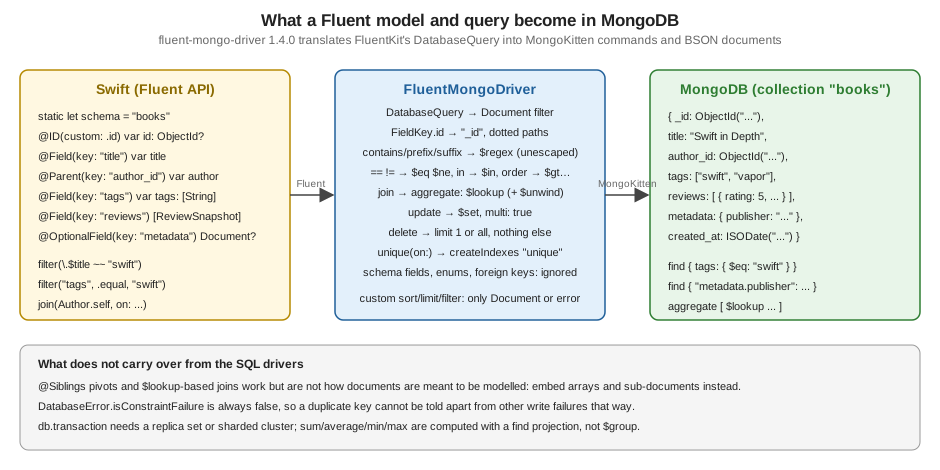
In the request lifecycle (middleware, router, handler, response encoding) the database is used inside the handler:
-
app.databases.use(.mongo(...), as: .mongo)runs once at start-up and creates aMongoClusterwithMongoCluster(lazyConnectingTo:on:). "Lazily" means no socket is opened yet; a wrong host or wrong credentials show up as an error from the first query, not fromconfigure. -
In a handler,
req.dbis aFluentMongoDatabasevalue bound to the request’s event loop (the test below checks this type through itsrawproperty). Each Fluent operation creates one MongoDB command and sends it over a connection the cluster picks. -
The driver is built on futures (
EventLoopFuture) internally; Fluent’sasyncAPI sits on top. No handler code on this page uses a future.
Adding the dependency
// Package.swift (excerpt)
dependencies: [
    .package(url: "https://github.com/vapor/vapor.git", from: "4.122.2"),
    .package(url: "https://github.com/vapor/fluent.git", from: "4.13.0"),
    .package(url: "https://github.com/vapor/fluent-mongo-driver.git", from: "1.4.0"),
],
targets: [
    .executableTarget(name: "App", dependencies: [
        .product(name: "Vapor", package: "vapor"),
        .product(name: "Fluent", package: "fluent"),
        .product(name: "FluentMongoDriver", package: "fluent-mongo-driver"),
    ]),
]FluentMongoDriver re-exports ObjectId, Document, Primitive (from BSON) and GridFSFile (from MongoKitten), so
import FluentMongoDriver is enough for the Fluent-level code on this page. To call MongoKitten itself (aggregations,
indexes,
collections) add import MongoKitten; it is a transitive dependency and needs no extra product entry.
Swift 6 trap: ObjectId and Document are not Sendable. BSON 7.0.31 does not mark them Sendable, so a model that
stores an ObjectId fails to compile in the Swift 6 language mode:
error: type 'ObjectId' does not conform to the 'Sendable' protocol
error: type 'Document' does not conform to the 'Sendable' protocol
error: stored property 'userID' of 'Sendable'-conforming struct 'ReviewSnapshot' has non-Sendable type 'ObjectId'
warning: add '@preconcurrency' to treat 'Sendable'-related errors from module 'BSON' as warnings
Importing the driver with @preconcurrency import FluentMongoDriver (and @preconcurrency import MongoKitten where you
use
it) turns those errors into nothing: with the attribute the module compiled with zero warnings. The attribute goes on
every
file that mentions the types. The alternative, declaring extension ObjectId: @retroactive @unchecked Sendable {}
yourself, changes the
type for the whole process and breaks the day BSON adds its own conformance, so prefer @preconcurrency.
Connecting
The connection string
.mongo(connectionString:) takes a standard MongoDB URI and throws if it cannot be used:
import Fluent
@preconcurrency import FluentMongoDriver
import Vapor

func configure(_ app: Application) async throws {
    // MONGODB_URL looks like mongodb://USER:PASSWORD@HOST:27017/bookshelf?authSource=admin (placeholders).
    // The path must name the database: .mongo(connectionString:) throws without one.
    let url = Environment.get("MONGODB_URL") ?? "mongodb://127.0.0.1:27017/bookshelf?maxConnections=8"
    try app.databases.use(.mongo(connectionString: url), as: .mongo)

    app.migrations.add(CreateBookshelfCollections())
    try routes(app)
    if app.environment != .testing { try await app.autoMigrate() }
}The parser (ConnectionSettings.init(_:) in MongoKitten 6.7.15) and the factory behave as follows; the errors were
produced by
the unit tests below:
-
The scheme must be
mongodb://ormongodb+srv://; anything else throwsMongoInvalidUriError("The given MongoDB connection URI is invalid").mongodb+srv://takes exactly one host, switches TLS on and resolves the cluster through DNS (the driver depends onDNSClientfor this). -
The URI must name the database (
mongodb://host:27017/bookshelf). Without a path the factory throwsFluentMongoError.noTargetDatabaseSpecified; the database name is the one Fluent uses for every collection. -
Credentials are split on
@and:, so a username or password containing@,:,/or%must be percent-encoded (mongodb://u:p@w@h/dbis rejected as malformed). The default authentication is automatic SCRAM;authMechanismacceptsSCRAM-SHA-1,SCRAM-SHA-256andMONGODB-CR, andauthSourcenames the authentication database. -
Query options the parser understands:
sslortls,tlsCAFile,sslVerify,authSource,authMechanism,appname,maxConnections,connectTimeoutMS,socketTimeoutMSanddnsServer. Others, such asreplicaSetandretryWrites, are kept inqueryParametersbut nothing in the Fluent driver acts on them. -
Defaults when an option is absent: one connection per cluster (
maximumNumberOfConnectionsis 1), a connect timeout of 300 seconds and a socket timeout of 300 seconds. A service that serves concurrent requests should setmaxConnectionsexplicitly (the example uses 8); 300 seconds of connect timeout means a dead host makes every request wait very long unless you lowerconnectTimeoutMS. -
.mongo(settings:)takes aConnectionSettingsvalue, for configuration built in code (hosts,useSSL, timeouts,Authentication.scramSha256(username:password:)) instead of a string. It throwsFluentMongoError.missingHostswhen the host list is empty. -
There is no
app.databases.use(..., maxConnectionsPerEventLoop:)as on the SQL drivers; pool size is the one setting above.
The URL belongs in the environment, never in the source (see
Configuration and Environment). Treat anything with credentials
as a secret: the example above reads
MONGODB_URL and falls back to an unauthenticated local server for development only. A production URL looks like
mongodb+srv://bookshelf:<password>@cluster.example.net/bookshelf?authSource=admin with a real password in a secret
store.
Never run production without authentication and TLS; the older Vapor 2 book setup of a MongoDB server with access
control
off is a development shortcut at best.
Several databases
DatabaseID.mongo is just the identifier the driver defines (DatabaseID(string: "mongo")). To use two MongoDB
databases, or
MongoDB next to SQLite, register each under its own DatabaseID and pick it per model or per query:
import Fluent
@preconcurrency import FluentMongoDriver
import Vapor

extension DatabaseID {
    static let analytics = DatabaseID(string: "analytics")
}

/// A model stored in the second database.
final class PageView: Model, @unchecked Sendable {
    static let schema = "page_views"
    static let defaultDatabaseID: DatabaseID? = .analytics

    @ID(custom: .id) var id: ObjectId?
    @Field(key: "path") var path: String

    init() {}
    init(id: ObjectId? = nil, path: String) {
        self.id = id
        self.path = path
    }
}

func configureTwoDatabases(_ app: Application, catalogURL: String, analyticsURL: String) throws {
    try app.databases.use(.mongo(connectionString: catalogURL), as: .mongo, isDefault: true)
    try app.databases.use(.mongo(connectionString: analyticsURL), as: .analytics)
}

func viewCount(_ req: Request) async throws -> Int {
    try await PageView.query(on: req.db(.analytics)).count()
}

/// Deleting more than one document: `limit` must be absent or 1, so delete by id set instead.
func deleteBooks(withIDs ids: [ObjectId], on database: any Database) async throws {
    try await Book.query(on: database).filter(\.$id ~~ ids).delete()
}A development server in Docker
# compose.yaml - development only; not run while writing this page
services:
  mongo:
    image: mongo:8
    command: ["--replSet", "rs0", "--bind_ip_all"]
    ports:
      - "27017:27017"
    healthcheck:
      test: >
        mongosh --quiet --eval
        "try { rs.status().ok } catch (e) { rs.initiate({_id: 'rs0', members: [{_id: 0, host: 'localhost:27017'}]}).ok }"
      interval: 5s
      retries: 20
A single-node replica set is what makes db.transaction available (see below); a standalone mongod rejects
transactions. The file was not run (the Docker daemon was off), and which MongoDB server versions the 2024 driver and
its
MongoKitten 6.7 protocol layer work with was not verified either; the Vapor documentation says the driver supports
server versions "3.4 and up".
Models with ObjectId
MongoDB’s native identifier is the 12-byte ObjectId, stored in the _id field. The Vapor documentation’s rule is: use
@ID(custom: .id) with ObjectId for a MongoDB-only model, and keep the default @ID(key: .id) with UUID if the
same model
must also run on a SQL driver. The driver maps the field key .id to _id, and it makes ObjectId generate itself
(ObjectId is declared RandomGeneratable), so create assigns the id on the client.
import Fluent
@preconcurrency import FluentMongoDriver
import Vapor

enum BookStatus: String, Codable, Sendable { case draft, published, archived }

/// A review embedded in its book document instead of living in its own collection.
struct ReviewSnapshot: Content {
    var userID: ObjectId
    var rating: Int
    var body: String
}

final class Author: Model, @unchecked Sendable {
    static let schema = "authors"

    @ID(custom: .id) var id: ObjectId?
    @Field(key: "name") var name: String
    @OptionalField(key: "bio") var bio: String?
    @Children(for: \.$author) var books: [Book]

    init() {}
    init(id: ObjectId? = nil, name: String, bio: String? = nil) {
        self.id = id
        self.name = name
        self.bio = bio
    }
}

final class Book: Model, @unchecked Sendable {
    static let schema = "books"

    @ID(custom: .id) var id: ObjectId?
    @Field(key: "title") var title: String
    @Field(key: "isbn") var isbn: String
    @Field(key: "published_year") var publishedYear: Int
    @Field(key: "price_cents") var priceCents: Int
    @Enum(key: "status") var status: BookStatus
    @Parent(key: "author_id") var author: Author
    @Timestamp(key: "created_at", on: .create) var createdAt: Date?
    @Timestamp(key: "updated_at", on: .update) var updatedAt: Date?

    // Page-local additions: nested data instead of the tags/reviews tables of the SQL model set.
    @Field(key: "tags") var tags: [String]
    @Field(key: "reviews") var reviews: [ReviewSnapshot]
    @OptionalField(key: "metadata") var metadata: Document?

    init() {}
    init(
        id: ObjectId? = nil, title: String, isbn: String, publishedYear: Int, priceCents: Int,
        status: BookStatus = .draft, authorID: ObjectId, tags: [String] = []
    ) {
        self.id = id
        self.title = title
        self.isbn = isbn
        self.publishedYear = publishedYear
        self.priceCents = priceCents
        self.status = status
        self.$author.id = authorID
        self.tags = tags
        self.reviews = []
        self.metadata = nil
    }
}
Source: Vapor docs: Fluent overview, MongoDB, Vapor docs: Fluent advanced, MongoDB and Vapor docs: Fluent models
The model follows the Bookshelf names (authors, books, isbn, price_cents, author_id, status) with these
page-local
additions that exist only because this is a document database: tags (an array of strings, replacing the tags table
and the
book_tag pivot of the SQL model set), reviews (an array of embedded ReviewSnapshot values, replacing the reviews
table)
and metadata (a free-form BSON Document). Users and loans are left out; they would be separate collections
referenced by
ObjectId, as author_id is.
How the property wrappers map:
-
@Field/@OptionalFieldstore the value under its key in the document.Codablevalues are converted withBSONEncoder:Datebecomes a BSON date,[String]an array,ReviewSnapshota nested document,Documentitself unchanged. A missing key reads back asnilfor optional fields and as a decoding error for required ones, so adding a required field to a model makes old documents unreadable until they are migrated. -
@Enumstores the enum’s raw string;db.enum(...)in a migration does nothing on MongoDB (the driver’sexecute(enum:)succeeds without touching the server), so there is no server-side enum check. -
@Timestampworks as on SQL: Fluent setscreated_at/updated_atbefore the command is built (the logged update below showsupdated_atinside the$set). -
@Parentstores the parent’sObjectIdunder its key and@Childrenreads it back with a filter on that key. These are references, resolved with extra queries (with(\.$author)) or$lookup, never database-enforced: nothing stops aauthor_idpointing at a deleted author. -
@Siblingswith a pivot model also works mechanically, but a pivot collection is the relational idiom this database is designed to avoid; store the array of related ids or names instead, astagsdoes here.
The id is hexadecimal text outside BSON. The unit test below confirms that ObjectId encodes as a 24-character hex
string with
JSONEncoder (so a Content struct containing one produces ordinary JSON), that ObjectId(String) parses it back, and
that
req.parameters.get("bookID", as: ObjectId.self) works because ObjectId is LosslessStringConvertible.
A model that is both a Fluent model and an API response is a trade-off exactly as on the SQL pages: the ObjectId id is
Codable, but returning the model leaks every stored field (including internal ones). BookDTO in the routes below is
the
alternative: a Content struct with id as the hex string.
Document modelling in Bookshelf
Data modelling guidance from MongoDB itself applies: embed what is read together and changes together, reference what grows without bound or is shared. In Bookshelf:
-
tagsandmetadataare embedded because they are read with the book and have no life of their own. -
reviewsis embedded here for reading speed with a small bound (a few dozen); a popular title with thousands of reviews would make the book document grow without limit (MongoDB documents are capped at 16 MiB) and every review write rewrites a large document, so it would go into its own collection withbook_id, likeauthor_id. -
author_idis a reference: authors are shared by many books and edited on their own.
Embedding changes how updates behave. book.reviews.append(review); try await book.update(on: db) rewrites the whole
array,
so two concurrent requests that both load the book and append lose one review. Fluent offers no $push; do the atomic
update
through MongoKitten (see "Raw access") or make reviews their own collection.
Migrations and indexes
The general migration mechanism is described in Migrations & Schema.
MongoDB creates collections implicitly on first insert, so the schema builder of a Fluent migration does much less than
on SQL
(this is from the driver’s MongoDB+Schema.swift):
-
createandupdatelook only at unique constraints: for each.unique(on:)or composite identifier they send acreateIndexescommand for those keys. Fields, data types,.required, enums and foreign keys are ignored. -
deletedrops the collection. -
There is no way to create a plain (non-unique), text, TTL or geospatial index through the schema builder.
import Fluent
@preconcurrency import FluentMongoDriver
import Vapor

struct CreateBookshelfCollections: AsyncMigration {
    func prepare(on database: any Database) async throws {
        // On MongoDB a schema builder only creates indexes for unique constraints; fields are ignored.
        try await database.schema(Author.schema).create()
        try await database.schema(Book.schema).unique(on: "isbn").create()
    }

    func revert(on database: any Database) async throws {
        try await database.schema(Book.schema).delete()
        try await database.schema(Author.schema).delete()
    }
}

/// Indexes the schema builder cannot express: plain (non-unique), text and TTL indexes need MongoKitten.
struct AddBookSearchIndexes: AsyncMigration {
    func prepare(on database: any Database) async throws {
        guard let mongo = database as? any MongoDatabaseRepresentable else { throw FluentMongoError.notMongoDB }
        let books = mongo.raw[Book.schema]
        // Legacy bridge: MongoKitten 6.7.15's createIndex returns EventLoopFuture and has no async overload.
        try await books.createIndex(named: "published_year_1", keys: ["published_year": 1]).get()
        try await books.createIndex(named: "title_text", keys: ["title": "text"]).get()
    }

    func revert(on database: any Database) async throws {
        // MongoKitten 6.7.15 has no dropIndex helper; run db.books.dropIndex("title_text") in mongosh,
        // or drop the whole collection in the migration that created it.
    }
}

func createBook(_ book: Book, on database: any Database) async throws {
    do {
        try await book.create(on: database)
    } catch FluentMongoError.insertFailed {
        // A duplicate isbn reaches Fluent as insertFailed: the driver does not surface the 11000 code.
        throw Abort(.conflict, reason: "A book with this ISBN may already exist")
    }
}CreateBookshelfCollections is the first migration and AddBookSearchIndexes the second. Register both with
app.migrations.add(_:)
(configure above adds the first; add the second the same way). Run them as on any Fluent project (swift run App
migrate, or the autoMigrate call in configure), and Fluent records them
in the _fluent_migrations collection.
Things to know, from the source:
-
Every unique index the driver creates is named "unique". Two unique indexes on one collection with different keys conflict by name on a real server (not run here). An open pull request (#60, since 2023-06) would let the migration choose the name. Until it lands, one
.unique(on:)per collection, or create further indexes withcreateIndex(named:keys:)asAddBookSearchIndexesdoes. -
MongoKitten 6.7.15 has helper functions
SortedIndex,UniqueIndex,TTLIndexandTextScoreIndexfor theMongoIndexBuilder, butSortedIndexcalls.unique()in its implementation, so it creates a unique index. UsecreateIndex(named:keys:)orCreateIndexes.Indexdirectly if you want the index you name. -
There is no
dropIndexhelper in that MongoKitten version; reverting an index meansmongoshor sending the rawdropIndexescommand. -
Backfilling a new required field is a normal update (
Book.query(on: db).set(...).update()), run in a migration, before the model starts requiring it.
Querying
Fluent’s query API is the same as on SQL, but the driver can translate only part of it. The driver logs the command it builds at debug level before it connects, so the translation can be read without a server. The test used for that:
@testable import App
import Fluent
@preconcurrency import FluentMongoDriver
import Testing
import Vapor
import VaporTesting

@Suite("Query translation without a server")
struct QueryTranslationTests {
    /// Runs `body` against an application whose MongoDB host does not exist.
    /// The driver connects lazily and logs the command it builds before it needs a connection,
    /// so the debug log shows the translation even though every query then fails.
    func withOfflineApp(_ body: (Application) async throws -> Void) async throws {
        let app = try await Application.make(.testing)
        app.logger.logLevel = .debug
        try app.databases.use(.mongo(connectionString: "mongodb://127.0.0.1:1/bookshelf?connectTimeoutMS=300"), as: .mongo)
        do {
            try await body(app)
        } catch {
            try await app.asyncShutdown()
            throw error
        }
        try await app.asyncShutdown()
    }

    @Test func fluentDatabaseIsMongoDatabaseRepresentable() async throws {
        try await withOfflineApp { app in
            let mongo = try #require(app.db as? any MongoDatabaseRepresentable)
            #expect(mongo.raw.name == "bookshelf")
        }
    }

    @Test func containsBuildsAnUnescapedRegex() async throws {
        try await withOfflineApp { app in
            // Fails with a connection error, after logging: filter=["title": ["$regex": ".*a.b.*"]]
            _ = try? await Book.query(on: app.db).filter(\.$title ~~ "a.b").all()
        }
    }

    @Test func deleteWithLimitIsRejected() async throws {
        try await withOfflineApp { app in
            await #expect(throws: FluentMongoError.self) {
                try await Book.query(on: app.db).limit(5).delete()
            }
        }
    }

    @Test func missingDatabaseNameIsRejected() throws {
        #expect(throws: FluentMongoError.self) {
            _ = try DatabaseConfigurationFactory.mongo(connectionString: "mongodb://127.0.0.1:27017")
        }
    }

    @Test func malformedUriIsRejected() throws {
        #expect(throws: (any Error).self) {
            _ = try DatabaseConfigurationFactory.mongo(connectionString: "postgres://127.0.0.1/bookshelf")
        }
    }

    @Test func objectIdIsAHexStringInJSON() throws {
        let review = ReviewSnapshot(userID: ObjectId(), rating: 5, body: "Great")
        let json = String(decoding: try JSONEncoder().encode(review), as: UTF8.self)
        let back = try JSONDecoder().decode(ReviewSnapshot.self, from: Data(json.utf8))
        #expect(back.userID == review.userID)
        #expect(json.contains(review.userID.hexString))
    }
}What the debug log shows for the queries tried (swift test output, abridged: the projection listing every field is
cut):
filter(\.$title ~~ "a.b")
  find "books" filter: ["title": ["$regex": ".*a.b.*"]]

filter(\.$title =~ "Swift").filter(\.$isbn ~= "X")
  find "books" filter: ["$and": [["title": ["$regex": "Swift.*"]], ["isbn": ["$regex": ".*X"]]]]

group(.or) { status == .draft, publishedYear > 2020 }.sort(\.$title, .descending).range(10..<20)
  find "books" filter: ["$or": [["status": ["$eq": "draft"]], ["published_year": ["$gt": 2020]]]]
       sort: ["title": -1]  skip: 10  limit: 10

filter("tags", .equal, "swift").filter("metadata.publisher", .equal, "Packt")
  find "books" filter: ["$and": [["tags": ["$eq": "swift"]], ["metadata.publisher": ["$eq": "Packt"]]]]

filter(.custom(["title": ["$regex": "^swift", "$options": "i"]]))
  find "books" filter: ["title": ["$regex": "^swift", "$options": "i"]]

filter(\.$status == .published).count()
  count condition: ["status": ["$eq": "published"]]

sum(\.$priceCents)
  find-group operation=$sum field=price_cents condition=[]

batch: filter(\.$status == .draft).set(\.$priceCents, to: 0).update()
  update filter: ["status": ["$eq": "draft"]]  updates: [["price_cents": 0, "updated_at": 2026-10-17 15:29:31 +0000]]
What each construct does:
| Fluent | MongoDB translation and caveats |
|---|---|
|
|
|
|
|
|
|
A field name given as a string reaches the server as written. On an array field Mongo’s equality means "contains the element". |
|
Dot notation into an embedded document works because the string key is passed through ( |
|
Any filter |
|
|
|
|
|
Computed by the driver with a |
|
An aggregation: |
|
Not a join: Fluent first runs the base |
|
A |
|
An |
|
A |
|
Not applicable: guard SQL-specific code with |
Source: Vapor docs: Fluent advanced, MongoDB (regular expressions and flexible data) and fluent-mongo-driver 1.4.0: Filter.swift
A search route that uses all of the filter styles above: a case-insensitive title match built as a custom Document
with the
user’s text escaped, an array-contains filter and a dot-notation filter. The aggregation route is the way to compute
grouped
figures, and the review route shows the embedded-array update.
import Fluent
@preconcurrency import FluentMongoDriver
@preconcurrency import MongoKitten
import Vapor

struct BookDTO: Content {
    var id: String?
    var title: String
    var isbn: String
    var tags: [String]
    var reviewCount: Int
}

extension Book {
    func toDTO() -> BookDTO {
        BookDTO(id: id?.hexString, title: title, isbn: isbn, tags: tags, reviewCount: reviews.count)
    }
}

struct BookSearch: Content {
    var q: String?
    var tag: String?
    var publisher: String?
}

struct AuthorStats: Content {
    var authorID: ObjectId
    var books: Int
    var avgPriceCents: Double
}

struct BookController: RouteCollection {
    func boot(routes: any RoutesBuilder) throws {
        let books = routes.grouped("books")
        books.get("search", use: search)
        books.get("stats", use: stats)
        books.post(":bookID", "reviews", use: addReview)
    }

    @Sendable func search(req: Request) async throws -> [BookDTO] {
        let criteria = try req.query.decode(BookSearch.self)
        let query = Book.query(on: req.db).sort(\.$title)
        if let text = criteria.q {
            // Case-insensitive title match; the text is escaped, so "C++" matches literally.
            var title = Document()
            title["title"]["$regex"] = NSRegularExpression.escapedPattern(for: text)
            title["title"]["$options"] = "i"
            query.filter(.custom(title))
        }
        if let tag = criteria.tag {
            query.filter("tags", .equal, tag) // matches when the array contains the element
        }
        if let publisher = criteria.publisher {
            query.filter("metadata.publisher", .equal, publisher) // dot-notation into a nested document
        }
        return try await query.all().map { $0.toDTO() }
    }

    @Sendable func stats(req: Request) async throws -> [AuthorStats] {
        guard let mongo = req.db as? any MongoDatabaseRepresentable else {
            throw Abort(.internalServerError, reason: "Not a MongoDB database")
        }
        var group = Document()
        group["_id"] = "$author_id"
        group["books"] = ["$sum": 1] as Document
        group["avgPriceCents"] = ["$avg": "$price_cents"] as Document
        let pipeline = mongo.raw[Book.schema].aggregate([
            AggregateBuilderStage(document: ["$group": group]),
            AggregateBuilderStage(document: ["$sort": ["avgPriceCents": -1] as Document]),
        ])
        let documents = try await pipeline.decode(Raw.self).allResults()
        return documents.map { AuthorStats(authorID: $0._id, books: $0.books, avgPriceCents: $0.avgPriceCents) }
    }

    private struct Raw: Decodable {
        var _id: ObjectId
        var books: Int
        var avgPriceCents: Double
    }

    @Sendable func addReview(req: Request) async throws -> HTTPStatus {
        guard let id = req.parameters.get("bookID", as: ObjectId.self) else { throw Abort(.badRequest) }
        let review = try req.content.decode(ReviewSnapshot.self)
        guard let book = try await Book.find(id, on: req.db) else { throw Abort(.notFound) }
        book.reviews.append(review)
        try await book.update(on: req.db)
        return .created
    }
}

func routes(_ app: Application) throws {
    try app.register(collection: BookController())
}The escaping matters. With the request GET /books/search?q=C%2B%2B&tag=swift&publisher=Packt, the driver’s debug log
(captured from an offline run, so the response was a 500; the log lines are the point) shows the command with the
escaped
pattern:
find "books" filter: ["$and": [["title": ["$regex": "C\\+\\+", "$options": "i"]],
                              ["tags": ["$eq": "swift"]],
                              ["metadata.publisher": ["$eq": "Packt"]]]]  sort: ["title": 1]
and the same request built with filter(\.$title ~~ text) would have sent .*C++.*, in which C++
is a possessive quantifier, so it
would have matched titles that merely contain a C. A user-supplied pattern is also a denial-of-service vector (a
pathological expression runs on the server),
so never pass raw user text as a regex.
# not run against a live server
curl -s 'http://localhost:8080/books/search?q=swift&tag=vapor'
curl -s 'http://localhost:8080/books/stats'
curl -s -X POST http://localhost:8080/books/65f0a1b2c3d4e5f607182930/reviews \
  -H 'content-type: application/json' \
  -d '{"userID":"65f0a1b2c3d4e5f607182931","rating":5,"body":"Clear and practical"}'
The only response observed, from the test with no database, is the one for a malformed id (the id is checked before any query):
POST /books/not-an-object-id/reviews -> 400 {"error":true,"reason":"Bad Request"}The test that asserts it:
@testable import App
import Testing
import Vapor
import VaporTesting

@Suite("Routes that do not need MongoDB")
struct RouteStatusTests {
    @Test func malformedObjectIdIsABadRequest() async throws {
        let app = try await Application.make(.testing)
        try await configure(app)
        try await app.testing().test(.POST, "books/not-an-object-id/reviews", beforeRequest: { req in
            try req.content.encode(["rating": 5])
        }, afterResponse: { res async in
            #expect(res.status == .badRequest)
        })
        try await app.asyncShutdown()
    }
}
Source: Vapor docs: Testing
Transactions
For the SQL side, including model middleware and soft delete, see Transactions, Model Middleware & Soft Delete.
req.db.transaction { ... } on this driver starts a MongoDB session transaction
(MongoDatabase.startTransaction(autoCommitChanges: false)), runs the closure with a database bound to it, commits on
success and
aborts if the closure throws. Three constraints, all from the source:
-
MongoDB supports multi-document transactions only on a replica set or a sharded cluster; a standalone
mongodrefuses. -
MongoKitten checks
pool.wireVersion?.supportsReplicaTransactionsbefore it starts one. Before the cluster has ever connected the wire version is unknown, and the call fails at once withMongoKittenError(kind: .unsupportedFeatureByServer). The offline test run produced exactly that error, so a transaction attempted as the very first operation after start-up may fail on a perfectly good replica set; run a cheap query (or a health check) first. -
A nested
transactioncall reuses the outer transaction.
If a document already holds everything the operation changes (the embedded-reviews design), a single-document update is atomic without a transaction, which is the reason to model that way.
Raw access with MongoDatabaseRepresentable
Anything the Fluent API lacks (grouped aggregation, $push, text search, indexes, findOneAndUpdate) is available
through the
underlying MongoKitten MongoDatabase. Cast the Fluent database to MongoDatabaseRepresentable and read raw:
guard let mongo = req.db as? any MongoDatabaseRepresentable else {
    throw Abort(.internalServerError, reason: "Not a MongoDB database")
}
let books = mongo.raw[Book.schema] // a MongoKitten MongoCollectionThis excerpt appears in the stats route above, and the test fluentDatabaseIsMongoDatabaseRepresentable confirms the
cast succeeds on the type req.db returns. The stats route runs a $group and $sort pipeline; its stages are
written as Document
values with explicit as Document conversions, because a nested dictionary literal of mixed value types does not
type-check. The
raw collection shares the Fluent cluster and its connection limit, so raw calls do not open another pool.
The driver also adds two conveniences on top of the raw handle, both EventLoopFuture-returning, so await them with
.get():
-
GridFSFile.upload(_:named:metadata:on:),GridFSFile.find(_:on:)andGridFSFile.read(_:on:)store and fetch large files in a GridFS bucket in the Fluent database (GridFSBucket(in: raw)). They fail withFluentMongoError.notMongoDBon a non-Mongo database. -
Model.watch(on:options:)opens a MongoDB change stream on the model’s collection (also a replica-set feature) and returns a MongoKittenChangeStream.
Neither was run (they need a server); their signatures are those of GridFS.swift and ChangeStream.swift in the 1.4.0
tag.
MongoKitten without Fluent
When MongoDB is the only database and Fluent’s model layer adds nothing, MongoKitten can be used directly. The driver’s
own
dependency means MongoKitten is already in the build; the listing registers a MongoDatabase in app.storage, shuts
its cluster
down with a LifecycleHandler and exposes two routes.
import Vapor
@preconcurrency import MongoKitten

/// A catalog entry stored by MongoKitten without Fluent.
struct CatalogEntry: Codable, Sendable {
    var _id: ObjectId
    var title: String
    var tags: [String]
}

/// MongoKitten's `MongoDatabase` is a reference type that is not marked `Sendable`.
struct DirectMongo: @unchecked Sendable {
    let database: MongoDatabase
}

extension Application {
    private struct DirectMongoKey: StorageKey { typealias Value = DirectMongo }

    var directMongo: DirectMongo {
        get {
            guard let value = self.storage[DirectMongoKey.self] else {
                fatalError("Call configureDirectMongo(_:url:) first")
            }
            return value
        }
        set { self.storage[DirectMongoKey.self] = newValue }
    }
}

struct DirectMongoShutdown: LifecycleHandler {
    func shutdownAsync(_ application: Application) async {
        if let cluster = application.directMongo.database.pool as? MongoCluster {
            try? await cluster.disconnect().get()
        }
    }
}

func configureDirectMongo(_ app: Application, url: String) throws {
    let database = try MongoDatabase.lazyConnect(url, on: app.eventLoopGroup)
    app.directMongo = DirectMongo(database: database)
    app.lifecycle.use(DirectMongoShutdown())
}

func catalogRoutes(_ app: Application) {
    app.get("catalog", "search") { req async throws -> [String] in
        let tag = try req.query.get(String.self, at: "tag")
        let entries = req.application.directMongo.database["catalog"]
        let found = try await entries.find(["tags": tag] as Document).decode(CatalogEntry.self).allResults()
        return found.map(\.title)
    }
    app.post("catalog") { req async throws -> HTTPStatus in
        let title = try req.query.get(String.self, at: "title")
        let entries = req.application.directMongo.database["catalog"]
        _ = try await entries.async.insertEncoded(CatalogEntry(_id: ObjectId(), title: title, tags: ["new"]))
        return .created
    }
}Notes on the listing:
-
MongoDatabaseis a reference type that is notSendable, so the stored value is a small wrapper marked@unchecked Sendable, which is whatStorageKeyrequires. The wrapper only tells the compiler what the library’s documentation and design promise; it is not checked. -
MongoDatabase.lazyConnect(_:on:)getsapp.eventLoopGroup, so MongoKitten shares Vapor’s threads. This listing creates a second cluster next to any Fluent one; if you use both, take therawhandle from Fluent instead. -
find(...).decode(Type.self).allResults()has anasyncoverload;insertEncodedreturns a future, so the code calls it through.async. There are noTaskhops to write. -
MongoKitten 7.x (newer than the 6.7.15 pinned by Fluent) is the line still being released, so a service that does not use the Fluent driver can depend on it directly. Its API differs from the 6.x calls above (check its documentation); the listing was compiled against 6.7.15 only.
Error handling
The driver reports problems as FluentMongoError, MongoKitten’s MongoError and MongoWriteError, or as a
MongoKittenError.
FluentMongoError, MongoError and MongoWriteError conform to Fluent’s DatabaseError, and every
isConstraintFailure, isSyntaxError and isConnectionClosed is false, so
code written for the SQL drivers that maps isConstraintFailure to 409 never fires. Cases seen in the offline run:
| Situation | Error | Notes |
|---|---|---|
URI without a database |
|
Thrown by |
Wrong scheme or malformed credentials |
|
Thrown by the same call. The connection string, including the password, can end up in logs of the code that catches it; do not print the string. |
Host unreachable, wrong credentials |
|
Raised by the first query, after |
|
|
Raised before any network call. |
Unsupported operator, join or custom filter |
|
All cases of |
Transaction on a server not ready for it |
|
See "Transactions". |
Duplicate value in a unique index |
Source reading: the driver’s |
A duplicate key returns |
createBook in the migrations listing shows a conservative mapping:
-
catch
FluentMongoError.insertFailedand answer 409; -
say "may already exist" in the response (the error can in principle have other causes);
-
for certainty, query by the unique key first (race-prone) or insert through MongoKitten and read the
InsertReply.writeErrorsyourself.
A request that fails with a driver error is an unexpected failure: Vapor’s default ErrorMiddleware turns an error that
is not an
Abort into a 500 with the error’s reason, which in the testing environment was the text above including the
"Check if your hosts are online" hints. In a release build the default middleware hides the details of non-Abort
errors; do not
rely on that to hide a connection string that may be echoed by other code. See the
Error Handling page for
the mapping of domain errors to Abort.
The open driver issue about "Reply received from MongoDB, but no request was waiting for the result" after about twelve hours of uptime (issue #62) describes a connection that stopped working after a long idle period. If you see it, restarting the process recovers; a health check that runs a cheap query regularly (and fails readiness when it errors) turns it into a restart.
Swift 6 and concurrency notes
-
The package’s own build uses
StrictConcurrency=completeand@preconcurrencyimports of MongoKitten, so it is a Swift 6-era package, but its public types from BSON (ObjectId,Document) and MongoKitten (MongoDatabase,MongoCollection) are notSendable. The@preconcurrency importshown above is the supported way to use them from Swift 6 code; the compiler then does not check that you pass them across isolation boundaries safely. KeepDocumentandObjectIdvalues local to one task, and copy the fields you need intoSendablestructs (AuthorStats,BookDTO) before returning or storing them. -
Fluent models remain
final class ...: Model, @unchecked Sendableas on the SQL pages. A model holding aDocumentfield is mutable shared state; do not hand one instance to two tasks. -
The
FluentMongoDatabaseruns commands on the cluster’s connection and hops the result back to the request’s event loop, soawait`ing Fluent from a handler keeps the usual `asyncsemantics. The@preconcurrencyattributes on the driver’s ownexecutemethods mean it is not isolation-checked by the compiler either. -
app.databases.use(...)and theDirectMongoShutdownhandler run on the application’s lifecycle. The cluster is shut down when the application shuts down (the Fluent driver callscluster.disconnect()inshutdownAsync), sotry await app.asyncShutdown()in the entrypoint is required.
Common errors and pitfalls
| Symptom | Cause and fix |
|---|---|
|
BSON 7.0.31 types are not |
|
The URI has no |
Every request hangs for minutes, then "No hosts could be connected with" |
The server is unreachable and |
Throughput does not scale with concurrency |
The default pool is one connection. Add |
|
Percent-encode credentials. |
A search for |
|
|
Only no limit (all matches) or |
|
They use a find projection, not |
Second unique index fails with an index-name conflict |
All driver-created unique indexes are named "unique". Create extra indexes with |
|
Standalone |
Lost reviews under concurrent writes |
Read-modify-write on an embedded array. Use an atomic |
A required |
There is no schema; backfill in a migration before deploying the model. |
|
The driver always returns |
Version notes
-
fluent-mongo-driver: 1.0.0 (2020-06-16) for Vapor 4 with Fluent 4; 1.3.0 (2023-05) raised the minimum Swift version and platforms; 1.4.0 (2024-10-06) is the "Update For Swift 6" release (tools version 5.9,
StrictConcurrency=complete, FluentKit 1.49 or later, MongoKitten 6.7.13 or later). Nothing newer exists as of 2026-10-17, and there is no Vapor-5-specific release of it; whether it builds with Vapor 5.0.0-beta.4 was not tested. -
Vapor 3 to 4: packages written for Vapor 3’s Fluent are not compatible with Vapor 4; the Vapor 4 model is
Modelwith property wrappers andDatabaseID.mongo. -
Vapor 5 (see What’s New, Upgrading and Vapor 5) is in beta; the Fluent MongoDB driver’s compatibility and maintenance outlook are unknown. Plan to isolate the dependency.
-
Official drivers: MongoDB Inc.'s Swift driver and
mongodb-vaporstopped development in 2023 (both repositories archived), so the option of replacing the community driver with the vendor’s no longer exists; the other current route is MongoKitten 7 directly.
Where the books are outdated
-
Patel (Hands-On Full-Stack Development with Swift, Packt, 2018, chapter 4) builds a MongoDB-backed server on Vapor 2, with a provider package for MongoDB,
Dropletconfiguration through JSON files and a server whose access control is off. None of that exists in Vapor 4: the integration is Fluent plusFluentMongoDriver, configured inconfigure(_:)withapp.databases.use(.mongo(connectionString:), as: .mongo), and the Vapor 2Providermechanism is replaced byLifecycleHandler,app.storageand database drivers (see Services, Storage and Dependency Injection). Enable authentication and TLS rather than copying the book’s local setup. The idea that a provider package wraps a database driver survives; the code does not. -
Condon et al. (Server-Side Swift with Vapor, Kodeco), as summarised in the bibliography, covers MongoDB as one of the Fluent drivers in its early Fluent chapters but builds its application on SQL databases, and its later chapters are Vapor 3
EventLoopFuturecode. The differences are those of the other Fluent pages: property-wrapper models,AsyncMigrationandasyncqueries. The book predates the 2023 archiving of the official Swift driver, so it cannot tell you the driver landscape described at the top of this page.
References
-
vapor/fluent-mongo-driver (1.4.0 sources, releases, pull requests)
-
mongodb/mongo-swift-driver and mongodb/mongodb-vapor (both archived)
-
MongoDB manual: Data modeling, connection strings and transactions
-
Packt: Hands-On Full-Stack Development with Swift (Patel) and Kodeco: Server-Side Swift with Vapor (Condon et al.)