The Type System
|
This section documents the current TypeScript release line as published at the official TypeScript documentation, which is the reference these pages are written and verified against. No specific patch version is pinned. This content was generated with the assistance of AI and should be verified against the official documentation before being relied on in production, since TypeScript iterates quickly. This section’s bibliography lists the reference material consulted while preparing these pages. |
TypeScript layers a static type system over JavaScript’s runtime values. Three ideas explain most of its behaviour: types are compared by shape rather than by name, every type is a set of values, and type expressions live in a separate namespace from ordinary expressions. This page covers those three, plus the everyday choice between letting a type be inferred, annotating it, or asserting it.
Structural typing
TypeScript uses structural typing: a value is assignable to a type when it has (at least) the required members with compatible types. The declared name of the type is irrelevant. This is the opposite of the nominal typing used by Java or C#, where two classes with identical members are still distinct types.
type Point = { x: number; y: number };
type Vec2 = { x: number; y: number };

const p: Point = { x: 1, y: 2 };
const v: Vec2 = p;   // OK -- same shape, so Point is assignable to Vec2
const q: Point = v;  // OK -- assignable the other way too

// A plain object literal with the right shape fits as well:
function length(pt: { x: number; y: number }): number {
  return Math.hypot(pt.x, pt.y);
}
length({ x: 3, y: 4 }); // 5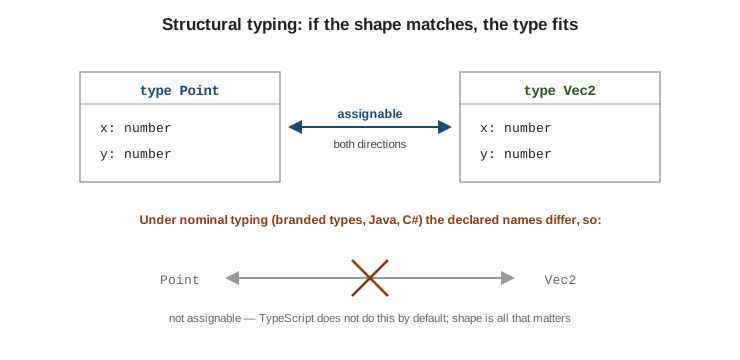
Extra members are allowed when the source is a variable — its type is simply a subtype — but not when the source is a fresh object literal. That case triggers excess-property checking, a deliberate exception meant to catch typos in options bags.
interface Options { width: number; height?: number }

const base = { width: 10, colour: "red" };
const a: Options = base;                          // OK -- excess `colour` ignored for a variable
const b: Options = { width: 10, colour: "red" };  // Error -- excess property on a literal
// Object literal may only specify known properties, and 'colour' does not exist in type 'Options'.
Reading an assignability error. TypeScript reports the outermost mismatch first, then drills in with "Types of property '…' are incompatible" lines. The last, most-indented line is the root cause — read it from the bottom up.
Type '{ x: number; y: string; }' is not assignable to type 'Point'.
  Types of property 'y' are incompatible.
    Type 'string' is not assignable to type 'number'.
See Type Compatibility for the full rules, and Everyday Types for the object-type syntax used above.
Types as sets of values
Every type is the set of values that inhabit it. Assignability is the subset relation, and the type operators are set operators.
| Type | Set of values |
|---|---|
|
|
|
exactly one value, the string |
|
two values |
|
every string |
|
every value — the universal set |
type Nothing = never;            // {}
type Lit = "a";                  // {"a"}
type Pair = "a" | "b";           // {"a", "b"}
type Prim = string;              // all strings
type Top = unknown;              // everything

const x: Pair = "a";             // OK -- "a" is in the set
// const y: Pair = "c";          // Error -- "c" is not in {"a", "b"}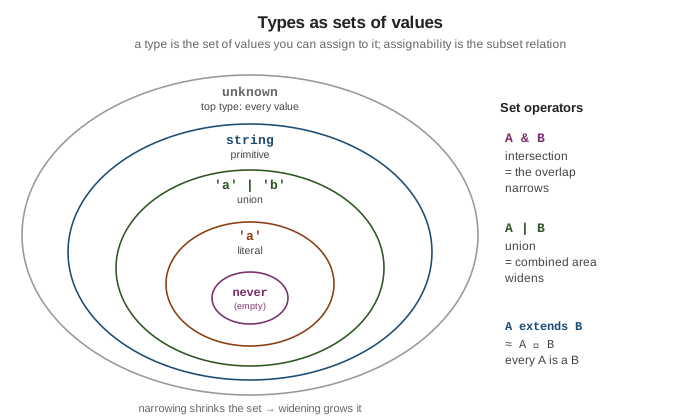
| is union: it widens, producing the combined set. & is intersection: it narrows, producing
only the values present in both sets.
type A = { id: number };
type B = { name: string };

type Both = A & B;               // { id: number; name: string } -- must satisfy both
const ab: Both = { id: 1, name: "z" };

type Either = A | B;             // only `id`, or only `name`, is guaranteed present
type Impossible = "a" & "b";     // never -- no value is both "a" and "b"
A extends B in a constraint or conditional type is roughly "A is a subset of B": every value of A is
also a value of B.
type IsString<T> = T extends string ? "yes" : "no";
type R1 = IsString<"hello">;     // "yes" -- {"hello"} is a subset of all strings
type R2 = IsString<number>;      // "no"
Unions and Narrowing covers how control-flow analysis shrinks these sets at runtime.
Type space vs. value space
Every identifier lives in the type space, the value space, or both. type and interface
declarations introduce type-space names only; const, let, and function introduce value-space names.
class and enum introduce both.
type Colour = "red" | "green";   // type space only
const Colour = { red: "#f00" };  // value space only -- unrelated to the type, despite the shared name

let c: Colour;                   // `Colour` here resolves to the type
const hex = Colour.red;          // `Colour` here resolves to the object
typeof exists in both spaces and does a different job in each. In a type position it reads the static
type of a value; as a runtime expression it is the JavaScript operator that returns a string tag.
const settings = { debug: true, level: 3 };

type Settings = typeof settings; // type-space typeof -> { debug: boolean; level: number }

const kind = typeof settings;    // runtime typeof -> the string "object"
A handful of constructs cross the boundary: typeof x (value → type), T['key'] indexed access, and
class/enum names used as types. Mixing the spaces up produces "'X' refers to a value, but is being used
as a type here" or the reverse — the fix is usually a typeof.
Inference vs. annotation vs. assertion
TypeScript infers types from initializers, return statements, and surrounding context. The guidance from
Type Inference and
Type Assertions boils
down to a short priority order.
Prefer inference. An annotation on an obviously-typed local is just noise, and it drifts out of date.
const count = 42;                         // inferred number -- `: number` adds nothing
const names = ["ann", "bo"];              // inferred string[]
const lengths = names.map(n => n.length); // inferred number[]
Annotate signatures and empty containers. Function parameters have no initializer to infer from, and a
container TypeScript would otherwise infer as any[] or \{} needs a hint.
function area(w: number, h: number): number { // annotate params; return type is optional but documents intent
  return w * h;
}

const stack: number[] = [];               // without the annotation this is `any[]`
const cache: Record<string, number> = {}; // without it, `\{}`
Prefer annotations to assertions. An annotation is a check; as is an override that can lie. Reach
for as const or satisfies first, and keep as for the cases where you genuinely know more than the
checker (DOM lookups, JSON.parse).
// Annotation -- verified against the value:
const user: { name: string } = { name: "Ada" };

// Assertion -- unchecked, and wrong here, but no error until runtime:
const el = document.getElementById("app") as HTMLCanvasElement;

// Safer tools:
const route = "/home" as const;                              // literal type "/home", not string
const config = { port: 80 } satisfies Record<string, number>; // checked, and keeps the narrow type
let vs. const and literal widening. A const primitive keeps its literal type; a let binding
widens to the base primitive, because it can be reassigned.
const a = "hello";               // type "hello"
let b = "hello";                 // type string -- widened

const nums = [1, 2, 3];          // number[]
const tuple = [1, 2, 3] as const; // readonly [1, 2, 3]
Type Assertions and Modifiers goes deeper on as, as const, satisfies, and
the readonly family.