Configuration, TypeScript & Environment Variables
|
This content was generated with the assistance of AI and should be verified against the official documentation before being relied on in production. The reference material consulted while preparing these pages is listed in the section bibliography. |
This page is written against Next.js 16.3.8 (the latest release on 2026-10-03, when everything below was checked;
the official documentation @doc-version is also 16.3.8), React 19.3.0, Node.js 20.9 or later and TypeScript 5.1 or
later. It describes the App Router; the places where the Pages Router differs are called out in the text.
Configuration keys do not depend on the rendering model, but a few options (cacheComponents, partialPrefetching,
cacheLife) only matter under Cache Components, which is still opt-in, while the rest of the page describes
behaviour that is identical under the previous caching model (the default today, with fetch and GET Route
Handlers uncached); where an example needs one or the other, it says so. The page is the reference for every
project-level file: next.config.ts, tsconfig.json, next-env.d.ts, eslint.config.mjs, the .env* files and the
import aliases. Every example was built and run on Next.js 16.3.8 in a scratch copy of the Bookshelf application with
Node.js 24, in both caching models where it matters; the output blocks are real output from those runs, and each example
is followed by the official page it derives from. The folder layout around these files is covered in
Project Structure.
Where Configuration Lives
A Next.js project is configured by a small, fixed set of files in the project root. Each is read by a different tool at a different moment, which is what decides whether a change needs a restart, a rebuild or nothing at all.
| File | Owns | Read by |
|---|---|---|
|
Framework behaviour: routing rules, caching model, images, headers, bundler options, build output, TypeScript and build flags, experimental flags. |
The Next.js CLI at |
|
TypeScript compiler options, the |
|
|
References to Next.js’s own ambient types, regenerated for you. |
TypeScript only. Never edit it. |
|
Lint rules, through the |
The |
|
Values that differ between machines and environments: URLs, feature flags, secrets, and |
Next.js loads them into |
|
Scripts, dependencies, the |
Node.js and the package manager. |
|
Request interception and start-up hooks. They are code rather than configuration and have their own pages. |
At request time, and once on server start. |
Source: next.config.js, TypeScript, ESLint and Environment Variables
The pieces interact. next.config.ts sets typedRoutes, which makes Next.js generate types that tsconfig.json must
include, which tsc and the editor then check. A .env value feeds next.config.ts through process.env because the
config file runs in Node.js with the environment already loaded. The sections below follow that order.
next.config.ts
The configuration file lives in the project root (next to package.json, not inside app/ or src/). Next.js
accepts four spellings: next.config.ts, next.config.js (CommonJS, with module.exports), next.config.mjs and
next.config.mts. The official reference states that .cjs and .cts are not supported; in the scratch app a
next.config.cjs stops next typegen and next build with "Configuring Next.js via 'next.config.cjs' is not supported. Please replace the file with 'next.config.js', 'next.config.mjs', or 'next.config.ts'". TypeScript
configuration (next.config.ts) arrived in Next.js 15.0 and is what create-next-app generates. The file is a
regular Node.js module that runs when the CLI starts, so it can read process.env, compute values and import other
modules, but it is not processed by Turbopack, webpack or Babel: avoid JavaScript syntax your Node.js version lacks.
| File name | Module system | Result in the scratch app |
|---|---|---|
|
ES module syntax in TypeScript. Documented since Next.js 15.0. |
Loads. Use the |
|
CommonJS ( |
Loads. Use a JSDoc |
|
ES module ( |
Loads. |
|
ES module in TypeScript. |
Loads (the TypeScript reference recommends it when you need top-level |
|
CommonJS. |
Rejected. The build stops with |
The smallest useful file exports an object typed with NextConfig. The Bookshelf’s version below turns on the checks
and hardening that every project should have and adds one redirect, one header rule and one remote image host.
import type { NextConfig } from "next";

const nextConfig: NextConfig = {
  reactStrictMode: true,
  poweredByHeader: false,
  typedRoutes: true,
  images: {
    remotePatterns: [
      { protocol: "https", hostname: "covers.example.com", pathname: "/covers/**" },
    ],
  },
  async redirects() {
    return [{ source: "/catalogue", destination: "/en", permanent: true }];
  },
  async headers() {
    return [
      {
        source: "/:path*",
        headers: [
          { key: "X-Content-Type-Options", value: "nosniff" },
          { key: "Referrer-Policy", value: "strict-origin-when-cross-origin" },
        ],
      },
    ];
  },
};

export default nextConfig;
Source: next.config.js
The same configuration was built and started on port 3214 of the scratch app. The route table comes from next build,
and curl confirms the effect of each key: poweredByHeader: false removes the x-powered-by header, headers()
adds the security headers, and redirects() answers /catalogue with a permanent redirect before the Proxy runs.
$ npx next build
▲ Next.js 16.3.8 (Turbopack)
- Environments: .env.local
✓ Running next.config.ts took 11ms

Route (app)
┌ ○ /_not-found
├ ƒ /[locale]
├ ƒ /[locale]/(.)books/[id]
├   /[locale]/books/[id]
│ ├ ● /en/books/1
│ ├ ● /en/books/2
│ ├ ● /en/books/3
│ └ ● [+3 more paths]
├ ƒ /api/auth/[...nextauth]
└ ƒ /api/books

ƒ Proxy (Middleware)

$ npx next start -p 3214 &
$ curl -sI localhost:3214/en | head -4
HTTP/1.1 200 OK
X-Content-Type-Options: nosniff
Referrer-Policy: strict-origin-when-cross-origin
Vary: rsc, next-router-state-tree, next-router-prefetch, next-router-segment-prefetch, Accept-Encoding

$ curl -sI localhost:3214/catalogue | head -3
HTTP/1.1 308 Permanent Redirect
location: /en
Refresh: 0;url=/en
Source: next.config.js, poweredByHeader, headers and redirects
JavaScript projects get the same editor checking from a JSDoc type. Both forms below loaded in the scratch app with
cacheComponents switched on, and the build printed Running next.config.js or Running next.config.mjs followed by
Cache Components enabled.
// @ts-check

/** @type {import('next').NextConfig} */
const nextConfig = {
  cacheComponents: true,
}

module.exports = nextConfig
Source: next.config.js
// @ts-check

/** @type {import('next').NextConfig} */
const nextConfig = {
  cacheComponents: true,
}

export default nextConfigIf a project contains both next.config.js and next.config.ts, 16.3.8 loaded the .js file and ignored the .ts one
(in a re-check, next typegen printed the console.log of the .js file and then failed on its module.exports
because the package had "type": "module"). The documentation does not promise an order, so keep exactly one config
file.
A function instead of an object
The default export may also be a function (sync or async) that receives the current phase and returns the
configuration. Phases are string constants exported by next/constants; the function form is how you make a setting
depend on whether Next.js is running the dev server, a production build or the production server. Async functions have
been supported since Next.js 12.1.
import type { NextConfig } from "next";
import { PHASE_DEVELOPMENT_SERVER, PHASE_PRODUCTION_BUILD } from "next/constants";

export default async function config(phase: string): Promise<NextConfig> {
  const isDev = phase === PHASE_DEVELOPMENT_SERVER;
  console.log(`[next.config] phase=${phase}`);
  return {
    reactStrictMode: true,
    poweredByHeader: false,
    typedRoutes: true,
    // Serve static assets from a CDN only in production builds.
    assetPrefix: phase === PHASE_PRODUCTION_BUILD ? "https://cdn.example.com" : undefined,
    allowedDevOrigins: isDev ? ["bookshelf.local"] : undefined,
    env: { BUILD_LABEL: "bookshelf-2026-10" },
  };
}
Running it shows when the file is evaluated. The log line appeared three or four times during one next build, so Next.js evaluates the file more than once; a
configuration function must be free of side effects. In the scratch app next build printed
[next.config] phase=phase-production-build and next dev printed [next.config] phase=phase-development-server;
after a production build the HTML referenced https://cdn.example.com/_next/static/chunks/…; for every script.
Source: Configuration as a Function and assetPrefix
next/constants exports PHASE_DEVELOPMENT_SERVER, PHASE_PRODUCTION_BUILD, PHASE_PRODUCTION_SERVER, PHASE_EXPORT,
PHASE_TEST, PHASE_INFO and PHASE_ANALYZE (the seven names were listed from the installed package); their values
are strings such as phase-development-server. The function also receives a second argument, an object holding the
defaultConfig. next typegen loads the config with the production build phase, so it needs the same environment
variables as a build. In the scratch app each command printed its own phase value, and a single next build printed the
phase line three times, because the configuration is evaluated in more than one process.
$ npx next dev
[next.config] phase=phase-development-server

$ npx next build
[next.config] phase=phase-production-build      # printed three or four times in one build

$ npx next start
[next.config] phase=phase-production-server
Source: Phase
Native ESM, top-level await and next.config.mts
Module resolution inside next.config.ts is limited to CommonJS semantics. On Node.js 22.10 or later, Next.js detects
Node’s native TypeScript support through process.features.typescript, and the file can then use native ESM, including
top-level await and dynamic import(). The feature is on by default from Node.js 22.18; on 22.10 to 22.17 you start
the CLI with NODE_OPTIONS=--experimental-transform-types. In a CommonJS project the documentation recommends the
.mts spelling so that Node.js knows the file is ESM from the start.
import type { NextConfig } from "next";

// Top-level await and dynamic import() work in next.config.mts (Node.js 22.10+).
const flags = await import("./flags.mjs").then((m) => m.default);

const nextConfig: NextConfig = {
  typedRoutes: Boolean(flags.typedRoutes),
  poweredByHeader: false,
};

export default nextConfig;
With a one-line flags.mjs (export default { typedRoutes: true };) next to it, npx next typegen and
npx next build both reported Running next.config.mts and loaded the flag on Node.js 24.16. A flags.js in a
project without "type": "module" also works, but Node.js prints a MODULE_TYPELESS_PACKAGE_JSON warning because it
has to reparse the file; naming it .mjs avoids that.
The caching-model switch used by the Bookshelf
cacheComponents is the one option that changes how the rest of the application is rendered, which is why the scratch
app drives it from an environment variable (CACHE_COMPONENTS=1) read in the configuration function. Everything else in
this page works in both models. When the option is on, next build prints Cache Components enabled before the route
table, and the table uses the ◐ (Partial Prerender) symbol for routes that mix a static shell with streamed dynamic
content. Later pages explain the model; here you only need to know where it is switched on.
export default async function bookshelfConfig(phase: string): Promise<NextConfig> {
  return {
    // CACHE_COMPONENTS=1 -> Cache Components; unset -> the previous caching model
    cacheComponents: process.env.CACHE_COMPONENTS === "1",
    typedRoutes: true,
  };
}
Source: cacheComponents
$ npx next build                       # previous model
├   /[locale]/env-demo/frozen
│ ├ ● /en/env-demo/frozen
│ └ ● /es/env-demo/frozen
├ ƒ /[locale]/env-demo/runtime
└ ƒ /api/env

$ CACHE_COMPONENTS=1 npx next build    # Cache Components
- Cache Components enabled
├   /[locale]/env-demo/runtime
│ ├ ◐ /[locale]/env-demo/runtime
│ ├ ◐ /en/env-demo/runtime
│ └ ◐ /es/env-demo/runtime
└ ƒ /api/env
The symbols mean ○ static, ● SSG via generateStaticParams, ◐ partial prerender and ƒ dynamic. The env-demo
routes are built in the build-time versus runtime section.
Source: cacheComponents
What Next.js does with unknown and removed keys
The configuration is validated when it loads. An unknown key does not stop the build: it prints a warning that links to
https://nextjs.org/docs/messages/invalid-next-config, which is easy to miss in CI logs. A few keys that were removed in
earlier majors are fatal, with a message that names the replacement. This configuration, deliberately wrong, was built on
Next.js 16.3.8 to show the output.
import type { NextConfig } from "next";

const nextConfig = {
  typedRoutes: true,
  reactStrictModee: true, // typo
  serverRuntimeConfig: { authSecret: process.env.AUTH_SECRET }, // removed in 16
  publicRuntimeConfig: { apiUrl: "/api" }, // removed in 16
  eslint: { ignoreDuringBuilds: true }, // removed in 16
  experimental: { notARealFlag: true },
} as unknown as NextConfig;

export default nextConfig;▲ Next.js 16.3.8 (Turbopack)
- Environments: .env.local
⚠ `eslint` configuration in next.config.ts is no longer supported. See more info here: https://nextjs.org/docs/app/api-reference/cli/next#next-lint-options
⚠ Invalid next.config.ts options detected:
⚠ Unrecognized key(s) in object: 'notARealFlag' at "experimental"
⚠ Unrecognized key(s) in object: 'reactStrictModee', 'serverRuntimeConfig', 'publicRuntimeConfig', 'eslint'
⚠ See more info here: https://nextjs.org/docs/messages/invalid-next-config
✓ Running next.config.ts took 52ms
- Experiments (use with caution):
? notARealFlag (invalid experimental key)Two things to take from the output. The Environments line lists the .env files that were loaded, which is the
quickest way to confirm which file a value came from. The Experiments list prints the experimental flags that are
set, so it is also a record of what your build opted into (an invalid key shows up there with a ?). Removed flags are
fatal rather than silent: experimental.ppr stops the build with the message that it "has been merged into
cacheComponents`", and `experimental.dynamicIO with "has been replaced by `cacheComponents`". Treat any warning as a
failure in CI.
The Option Catalogue
The official next.config.js reference has one page per option, 72 of them at @doc-version 16.3.8 (one of them,
incrementalCacheHandlerPath, documents the cacheHandler key, and turbopackIgnoreIssue documents
turbopack.ignoreIssue). This catalogue lists every one of them, grouped by purpose, with its status, the version where
it appeared or changed where the documentation gives one, and a link to its page. Read it as an index: the option pages
carry the full detail, and most options are expanded on the later page that uses them.
Three rules decide where a key goes in NextConfig, and putting a key in the wrong object is the most common reason an
option is silently ignored.
-
Top level: stable options such as
basePath,imagesortypedRoutes. -
Under
experimental: options marked experimental, for exampleexperimental.staleTimes. Their names and behaviour may change in a minor release. The same rule holds for several options that have long been in use, such asexperimental.serverActionsfor itsallowedOriginsandbodySizeLimitsettings. The tables write the full path of these keys. -
A key that is not in the schema at all: a warning (see above), or an error for removed flags.
The status column uses four words. Stable means a documented top-level option. Experimental means the documentation
page carries the experimental banner and the key lives under experimental. Legacy or deprecated means the page
says so. Removed means the key is no longer in the schema.
Routing, URLs and Output
| Option | Status and version | What it does |
|---|---|---|
Stable |
Serves the app under a sub-path such as |
|
Stable |
Serves |
|
Stable (9.5) |
Redirects |
|
Stable (13.1) |
Turns off the automatic trailing-slash redirects so that Proxy can decide. An advanced Proxy flag. |
|
Stable. Renamed in 16.0 from |
Lets Proxy see the original request URL instead of the normalised one. An advanced Proxy flag. |
|
Stable |
Extensions treated as page files. The default is |
|
Stable (9.5; |
An array of |
|
Stable (9.5; |
Maps a request path to another destination while keeping the URL, acting as a URL proxy. Also applied to client-side navigation. |
|
Stable (9.5; |
Adds response headers for matching paths. A function returning |
|
Stable |
|
|
Stable |
Replaces the |
|
Legacy, deprecated |
Belonged to the removed |
|
Legacy. Unnecessary since 13.4 |
Once enabled the App Router. In 16.3.8 the key is no longer in the schema and logs |
Rendering, Caching and Deployment
| Option | Status and version | What it does |
|---|---|---|
Stable flag, opt-in (16.0) |
Turns on Cache Components and the |
|
Stable flag, opt-in (16.3) |
Prefetches only the static parts of each route by default (Instant Navigations). Requires |
|
Stable, needs |
Defines named cache profiles ( |
|
Stable (16.0) |
Custom storage for |
|
Stable. Renamed from |
Custom store for the server cache: ISR pages, Route Handler responses and optimised images. Not used by |
|
Stable |
Size in bytes of the in-memory cache per server instance (50 MB by default). Set |
|
Stable |
The |
|
Experimental (14.2). Default |
Overrides how long the client router cache keeps |
|
Experimental |
|
|
Experimental. Added in 16.2, on by default since 16.3 |
Bundles small prefetch responses into one request. Leave it on unless you are debugging navigation or measuring request volume. |
|
Experimental |
Caches Server Component |
|
Stable (15.2) |
A regular expression of user agents that receive blocking metadata instead of streamed metadata. |
|
Stable |
Maximum length of the preload headers React emits while prerendering (6000 by default, App Router only). Lower it behind proxies that truncate long headers. |
|
Stable (14.1.4; was |
An identifier for version-skew protection and cache busting. Next.js adds |
|
Stable |
Returns a stable build ID (for example a git hash) so several containers built separately serve the same build. Has no effect when |
|
Stable |
ETag generation for pages is on by default; set |
|
Stable (16.3) |
A salt mixed into content-addressed output file names, to invalidate cached assets across deployments. |
|
Stable (16.3), for adapter authors |
Lets static asset URLs omit the |
|
Stable top-level since 16.2 |
Path to a deployment adapter module. |
|
Stable feature since 14; options live under |
|
|
Experimental |
Enables the |
|
Experimental |
Enables React’s |
|
Experimental |
Limit (10 MB by default) on the request body Next.js buffers so that Proxy and the handler can both read it. Accepts a number of bytes or a string such as |
Compilation, Bundling and Styles
| Option | Status and version | What it does |
|---|---|---|
Stable top-level since 15.3 (was |
Loader rules, |
|
Experimental |
Tunes the production chunker thresholds ( |
|
|
Experimental keys; on by default for dev since 16.1 and for builds since 16.3 |
Persists Turbopack’s work under |
Stable (16.2) |
Hides known Turbopack warnings from the CLI and the overlay, matched by |
|
Experimental (16.3) |
Resolves |
|
Experimental (16.3) |
Lets Turbopack drop in-memory copies of data already persisted by the file-system cache. Only affects |
|
Experimental (16.3) |
Runs the native Rust port of the React Compiler inside Turbopack. Needs |
|
Stable, not covered by semver |
A function that edits the webpack config, called three times (client, Node.js server, Edge server). On 16 a project with a custom |
|
Stable in 16, off by default |
Enables the React Compiler ( |
|
Stable (13.0) |
Compiles named dependencies that ship raw TypeScript, JSX or modern syntax. Package names only, no globs. |
|
Stable. Was |
Opts dependencies out of Server Components bundling so Node.js |
|
Experimental |
Loads only the modules you import from packages that export hundreds of modules. A default list (icon and utility libraries) is already optimised. |
|
Experimental |
Compiles MDX with the Rust compiler when used with |
|
Stable |
Options for the Sass compiler. Only |
|
Experimental. Ignored by Turbopack since 14.2; |
Webpack option for Lightning CSS, with |
|
Experimental |
|
|
Experimental |
Emits |
|
Experimental |
Allows importing modules from URLs, restricted to an allow-list of domains. Only trust domains you control. |
|
Stable |
Emits browser source maps in production builds (off by default so you do not publish your source). Increases build time and memory. |
Server Delivery and Images
| Option | Status and version | What it does |
|---|---|---|
Stable |
gzip compression in |
|
Stable |
The |
|
Stable |
Keep-alive settings for server-side |
|
Stable |
|
|
Stable. |
Image optimisation and loaders: |
Development Experience and Diagnostics
| Option | Status and version | What it does |
|---|---|---|
Stable |
Extra origins (host names, with wildcards) allowed to request dev-only assets. Cross-origin requests are blocked by default in development. |
|
Stable. |
Position of the on-screen route indicator, or |
|
Stable. |
Development logging: |
|
Stable |
How long the dev server keeps built pages in memory ( |
|
Experimental |
Adds attribution data (for example the shifted element for CLS) to Web Vitals reports. |
|
Stable (16.3) |
Modules imported on the client before |
|
Experimental (16.x) |
Enables the connectivity detection behind |
TypeScript, React and Environment
| Option | Status and version | What it does |
|---|---|---|
Stable (15.5; was |
Generates a route type so |
|
Stable |
|
|
Experimental, on by default (16.3) |
Type-checks |
|
Stable. |
React Strict Mode in development. Only the Pages Router needs the explicit opt-in. |
|
Legacy |
Inlines the listed values into the JavaScript bundle at build time whatever their name. Superseded by |
|
Experimental |
Generates |
The documented order of evaluation of the routing options is: headers, redirects, the Proxy, beforeFiles rewrites,
static files and non-dynamic pages, afterFiles rewrites, dynamic routes, and finally fallback rewrites. rewrites()
returns either a plain array (treated as afterFiles) or an object with those three keys. That order is why /catalogue
in the first example of this page is redirected before the Proxy’s locale logic can touch it.
Source: rewrites
A single file touching the keys above is useful as a loading test. Every key in the following configuration was accepted
by next build on 16.3.8 without an "Unrecognized key" warning, typed as NextConfig it passed tsc, and the build
then completed. The values are illustrative, not recommendations; cacheComponents is on here, so it also exercises the
Cache Components model.
import type { NextConfig } from "next";

// Every key below was loaded by `next build` on Next.js 16.3.8 without an
// "Unrecognized key(s)" warning. Values are illustrative, not recommendations.
const nextConfig: NextConfig = {
  // Output and deployment
  distDir: ".next",
  basePath: "",
  assetPrefix: "",
  deploymentId: "bookshelf-2026-10",
  generateBuildId: async () => "bookshelf-build",
  outputHashSalt: "bookshelf-salt",
  trailingSlash: false,
  skipTrailingSlashRedirect: false,
  skipProxyUrlNormalize: false,
  supportsImmutableAssets: false,
  compress: true,
  generateEtags: true,
  poweredByHeader: false,
  crossOrigin: "anonymous",
  httpAgentOptions: { keepAlive: true },
  expireTime: 3600,
  pageExtensions: ["tsx", "ts"],

  // Routing
  async headers() {
    return [{ source: "/:path*", headers: [{ key: "x-bookshelf", value: "1" }] }];
  },
  async redirects() {
    return [{ source: "/old", destination: "/en", permanent: true }];
  },
  async rewrites() {
    return [{ source: "/legacy", destination: "/en" }];
  },

  // Rendering and caching
  cacheComponents: true,
  partialPrefetching: true,
  cacheLife: { blog: { stale: 3600, revalidate: 900, expire: 86400 } },
  cacheMaxMemorySize: 50 * 1024 * 1024,
  reactStrictMode: true,
  reactMaxHeadersLength: 6000,
  htmlLimitedBots: /MySpecialBot/,
  images: { remotePatterns: [{ protocol: "https", hostname: "covers.example.com" }] },
  sassOptions: { implementation: "sass-embedded" },
  productionBrowserSourceMaps: false,

  // Dependencies and bundling
  serverExternalPackages: ["@acme/native"],
  transpilePackages: ["@acme/ui"],
  turbopack: { debugIds: true },

  // Developer experience
  allowedDevOrigins: ["local-origin.dev"],
  devIndicators: { position: "bottom-right" },
  logging: { fetches: { fullUrl: true }, serverFunctions: true, incomingRequests: true },
  onDemandEntries: { maxInactiveAge: 25 * 1000, pagesBufferLength: 2 },

  // TypeScript
  typedRoutes: true,
  typescript: { ignoreBuildErrors: false, tsconfigPath: "tsconfig.json" },

  experimental: {
    authInterrupts: true,
    cssChunking: true,
    inlineCss: false,
    mdxRs: false,
    optimizePackageImports: ["lucide-react"],
    prefetchInlining: true,
    proxyClientMaxBodySize: "10mb",
    serverActions: { allowedOrigins: ["my-proxy.example.com"], bodySizeLimit: "2mb" },
    serverComponentsHmrCache: true,
    staleTimes: { dynamic: 0, static: 300 },
    staticGenerationRetryCount: 1,
    staticGenerationMaxConcurrency: 8,
    staticGenerationMinPagesPerWorker: 25,
    taint: true,
    turbopackChunking: { minChunkSize: 50000 },
    turbopackFileSystemCacheForDev: true,
    turbopackFileSystemCacheForBuild: true,
    turbopackLocalPostcssConfig: false,
    turbopackMemoryEviction: "auto",
    typedEnv: true,
    useLightningcss: false,
    useOffline: false,
    useTypeScriptCli: true,
    webVitalsAttribution: ["CLS", "LCP"],
  },
};

export default nextConfig;
Source: cacheComponents, staleTimes, turbopack and serverActions
The remaining catalogue keys need a file or a package to exist, so they were loaded in a second test configuration.
adapterPath, cacheHandler, cacheHandlers and instrumentationClientInject take paths to modules: cacheHandlers
failed the build with "cache handler path provided does not exist" until the file existed, and adapterPath is loaded
with require, so give it require.resolve('./my-adapter.js') as the reference does. env, exportPathMap,
output: 'standalone', reactCompiler, turbopack.ignoreIssue, webpack, experimental.turbopackRustReactCompiler and
experimental.urlImports produced no schema warning. Two more loads failed for a reason other than the schema:
reactCompiler: true without the babel-plugin-react-compiler package stopped the build with "Failed to resolve package
babel-plugin-react-compiler", and the same package listed in both transpilePackages and serverExternalPackages made the
Turbopack build fail with a conflict error naming it.
Removed, Renamed and Deprecated Keys
Next.js 15 and 16 cleaned up the schema. The table lists the keys that the books and older tutorials use, and what to write today. The behaviour column is from the scratch builds on 16.3.8 where it says so.
| Old key | Gone in | Replacement and behaviour |
|---|---|---|
|
16.0 |
Environment variables: |
|
16.0, with |
Run the ESLint CLI yourself. The build warns that the key is "no longer supported". |
|
16.0 |
Dropped. Use normal pages. |
|
16.0 |
|
|
Renamed in 15.3 |
Top-level |
|
Renamed in 15.0 |
|
|
Renamed in 15.0 |
|
|
Renamed in 16.0 |
|
|
Deprecated in 16 |
|
|
Not needed since 13.4 |
Delete it. 16.3.8 warns it is unrecognised. |
|
Never supported there |
16.3.8 prints |
|
16.0 |
Use |
Source: Upgrading: Version 16 and Upgrading: Version 15
Unit-testing the routing rules
Since 15.1 the experimental next/experimental/testing/server package contains unstable_getResponseFromNextConfig,
which runs only the headers, redirects and rewrites of a configuration against a request. It ignores the Proxy and
file-system routes, so use it for configuration regressions rather than end-to-end routing. The test below uses the
built-in Node.js test runner; the .js suffix on the import is needed only because plain Node.js ESM does not resolve
extensionless subpath imports (Vitest and Jest resolve next/experimental/testing/server as written in the reference).
import assert from "node:assert/strict";
import { test } from "node:test";
import { getRedirectUrl, unstable_getResponseFromNextConfig } from "next/experimental/testing/server.js";

test("/catalogue redirects permanently to /en", async () => {
  const response = await unstable_getResponseFromNextConfig({
    url: "https://bookshelf.example.com/catalogue",
    nextConfig: {
      async redirects() {
        return [{ source: "/catalogue", destination: "/en", permanent: true }];
      },
    },
  });
  assert.equal(response.status, 308);
  assert.equal(getRedirectUrl(response), "https://bookshelf.example.com/en");
});
Running node --test scripts/config-rules.test.mjs printed pass 1, and the response status was 308 because the rule
is permanent.
Source: Unit Testing (experimental)
TypeScript
TypeScript is first-class in Next.js. A project made with create-next-app is already TypeScript; to add it to an
existing project, rename a file to .ts or .tsx and run next dev or next build, which installs the missing
packages and writes a tsconfig.json with the recommended options. If a jsconfig.json exists, copy its paths into
the new tsconfig.json and delete it. The required levels are TypeScript 5.1 or later (an async Server Component
returns a Promise, which only type-checks from TypeScript 5.1.3 with @types/react 18.2.8 or later; otherwise you see
"`Promise<Element>` is not a valid JSX element").
The tsconfig.json that create-next-app 16.3.8 generated for the Bookshelf is below. Three entries are
Next.js-specific: the next plugin, the paths alias, and the include globs for the generated type files.
{
  "compilerOptions": {
    "target": "ES2017",
    "lib": ["dom", "dom.iterable", "esnext"],
    "allowJs": true,
    "skipLibCheck": true,
    "strict": true,
    "noEmit": true,
    "esModuleInterop": true,
    "module": "esnext",
    "moduleResolution": "bundler",
    "resolveJsonModule": true,
    "isolatedModules": true,
    "jsx": "react-jsx",
    "incremental": true,
    "plugins": [
      {
        "name": "next"
      }
    ],
    "paths": {
      "@/*": ["./*"]
    }
  },
  "include": [
    "next-env.d.ts",
    "**/*.ts",
    "**/*.tsx",
    ".next/types/**/*.ts",
    ".next/dev/types/**/*.ts",
    "**/*.mts"
  ],
  "exclude": ["node_modules"]
}".next/types//.ts" holds the types written by next build and next typegen, and ".next/dev/types//.ts"
holds the ones written by next dev, which builds into .next/dev since 16.0 so that the dev server and a production
build can run at the same time. next-env.d.ts is regenerated by next dev, next build and next typegen; it
references the Next.js types, including the declarations that allow importing images and stylesheets. It is an
implementation detail, belongs in .gitignore (the generated .gitignore already lists it) and must not be edited.
Read the file in three groups. noEmit, isolatedModules and moduleResolution: "bundler" are there because the bundler,
not tsc, produces the output; tsc only checks. plugins registers the next TypeScript plugin for the editor. The
include list matters most: next-env.d.ts and the two .next/**/types folders hold generated files, and a
hand-written project that omits them loses the global helpers described below. The language itself is covered in the
TypeScript reference, the compiler options in
tsconfig and compiler options and the jsx
setting in JSX and frameworks; this section covers only
what Next.js adds.
Source: TypeScript and Installation
The editor plugin
Next.js ships a TypeScript language-service plugin (the "plugins": [{ "name": "next" }] entry above). In VS Code you
enable it by opening the command palette, running "TypeScript: Select TypeScript Version" and choosing "Use Workspace
Version"; other editors that load workspace TypeScript plugins work similarly. The plugin warns about invalid values of
route segment config options such as dynamic or revalidate, shows in-context documentation, checks that the
'use client' directive is used correctly, and flags client-only hooks like useState in Server Components. It only
affects the editor; next build type-checks with the project’s own tsc.
Source: TypeScript: IDE plugin
Generated types and next-env.d.ts
Next.js generates two kinds of type files. next-env.d.ts sits in the project root and pulls in the Next.js ambient
types (so that importing an image or a stylesheet type-checks) plus the generated route types. The route types live in
.next/types (production) or .next/dev/types (development). Regenerate them with next dev, next build or
next typegen. The file is rewritten by those commands, so put your own ambient declarations in a file of your own and
list it in include; anything you add to next-env.d.ts is overwritten.
/// <reference types="next" />
/// <reference types="next/image-types/global" />
import "./.next/types/routes.d.ts";
import "./.next/types/root-params.d.ts";

// (two generated comment lines follow: the file must not be edited by hand)
Source: TypeScript: next-env.d.ts
The typescript key and the build
next build fails when the project has type errors. Two keys of the typescript object adjust that:
tsconfigPath selects a different file (for example tsconfig.build.json that extends the main one and relaxes a
check for the production build), and ignoreBuildErrors skips the type-checking step entirely, which the reference
calls dangerous unless a separate type-check runs in CI. The configured path is used by next dev, next build and
next typegen; in development only tsconfig.json is watched, so restart the dev server after editing a different file.
import type { NextConfig } from "next";

const isProd = process.env.NODE_ENV === "production";

const nextConfig: NextConfig = {
  typescript: {
    tsconfigPath: isProd ? "tsconfig.build.json" : "tsconfig.json",
  },
};

export default nextConfig;
In 16.3.8 the production build runs the project-local tsc CLI by default. That makes TypeScript 7, which does not
provide the JavaScript compiler API, usable for next build after npm install -D typescript@^7; the trade-off is that
the output is the native tsc diagnostics without Next.js-specific code frames. Set experimental.useTypeScriptCli
to false to return to the compiler-API checker. Incremental type checking ("incremental": true, already in the
generated file) has been supported since 10.2.1.
Source: Custom tsconfig path, typescript and useTypeScriptCli
TypeScript 7 and useTypeScriptCli
TypeScript 7 (7.0.2 was the latest on npm on 2026-10-03) does not expose the JavaScript compiler API that Next.js used
for its build-time check. Since 16.3 next build runs the project-local tsc command by default
(experimental.useTypeScriptCli, on by default), so installing TypeScript 7 is enough. The trade-off is that the output
is the native tsc diagnostics without Next.js-specific code frames, and the checker covers the whole project that your
tsconfig selects, test files included. Set experimental.useTypeScriptCli to false to return to the compiler-API
checker. Incremental type checking ("incremental": true, already in the generated file) has been supported since
Next.js 10.2.1.
$ npm install -D typescript@^7
$ npx tsc -v
Version 7.0.2
$ npx next build
✓ Compiled successfully in 2.0s
  Running TypeScript ...
components/nav.tsx(7,13): error TS2322: Type '"/en/boks/1"' is not assignable to type 'UrlObject | RouteImpl<"/en/boks/1">'.
Failed to type check.
Source: TypeScript: using TypeScript 7 and useTypeScriptCli
With experimental.useTypeScriptCli: false the same project stops with a clear message instead: "TypeScript 7.0.2 does
not provide the compiler API required by Next.js. Set experimental.useTypeScriptCli back to true in your Next.js config
to use the TypeScript CLI, or install TypeScript 6 instead." TypeScript 7 also removed the baseUrl compiler option: the
scratch app with baseUrl set failed under 7.0.2 with error TS5102: Option 'baseUrl' has been removed, and the
compiler suggested a paths entry instead. See absolute imports.
Typed Routes, Route Helpers and next typegen
Three features make the file-system router visible to the compiler. They all rest on one generated artefact: a
declaration file produced from the app/ tree (and from the redirects() of the configuration).
typedRoutes
With typedRoutes: true (stable since 15.5; it used to be experimental.typedRoutes), the href of next/link and the
arguments of push, replace and prefetch from next/navigation are checked against the real route list. Literal
strings and template literals with dynamic segments are validated; a string built at run time needs a cast to Route.
In the Pages Router the feature types next/link’s `href only, not next/router.
"use client";

import type { Route } from "next";
import Link from "next/link";
import { useRouter } from "next/navigation";

export function Nav({ locale, genre }: { locale: string; genre: string }) {
  const router = useRouter();
  return (
    <nav>
      <Link href="/en">Catalogue</Link>
      <Link href={`/${locale}/books/1`}>First book</Link>
      <Link href={`/en/books/1?genre=${genre}`}>Filtered</Link>
      <Link href={("/" + locale + "/books/2") as Route}>Cast</Link>
      <button onClick={() => router.push("/en/books/3")}>Open</button>
    </nav>
  );
}
Source: Statically Typed Links
With <Link href="/boks/1"> added, both tsc and next build rejected the file. The next build output, which on
Next.js 16.3.8 prints the native compiler diagnostics, was:
$ npx next build
  Running TypeScript ...
app/[locale]/books/[id]/page.tsx(10,58): error TS2344: Type '"/[locale]/boks/[id]"' does not satisfy the constraint 'AppRoutes'.
components/nav.tsx(11,46): error TS2322: Type '"/boks/1"' is not assignable to type 'UrlObject | RouteImpl<"/boks/1">'.
Failed to type check.
Source: typedRoutes and Statically Typed Links
PageProps, LayoutProps and RouteContext
Next.js declares three global helper types, so they need no import. Each takes the route as a string literal and
derives the shape from the folder tree: PageProps<'/blog/[slug]'> gives params (a Promise, since the sync access
was removed in 16) and searchParams; LayoutProps<'/dashboard'> gives children, params and one prop per parallel
route slot (@modal becomes modal); RouteContext<'/users/[id]'> gives the params of a Route Handler. A
PageProps for a static route has params equal to {}. They are available once types have been generated.
import { Suspense } from "react";
import { locales, dict, isLocale } from "@/lib/i18n";
import { notFound } from "next/navigation";
import { BookDetail } from "./book-detail";

export function generateStaticParams() {
  return locales.flatMap((locale) => ["1", "2", "3"].map((id) => ({ locale, id })));
}

export default async function Page({ params }: PageProps<"/[locale]/books/[id]">) {
  const { locale, id } = await params;
  if (!isLocale(locale)) notFound();
  return (
    <Suspense fallback={<p>…</p>}>
      <BookDetail id={id} label={dict[locale].send} />
    </Suspense>
  );
}
Source: Page Props Helper
import type { Metadata } from "next";
import { notFound } from "next/navigation";
import { locales, isLocale } from "@/lib/i18n";
import "../globals.css";

export function generateStaticParams() {
  return locales.map((locale) => ({ locale }));
}

export const metadata: Metadata = { title: "Bookshelf" };

export default async function RootLayout({
  children,
  modal,
  params,
}: LayoutProps<"/[locale]">) {
  const { locale } = await params;
  if (!isLocale(locale)) notFound();
  return (
    <html lang={locale}>
      <body>
        {children}
        {modal}
      </body>
    </html>
  );
}
Source: Layout Props Helper
import type { NextRequest } from "next/server";
import { getBook } from "@/lib/books";

export async function GET(_req: NextRequest, ctx: RouteContext<"/api/books/[id]">) {
  const { id } = await ctx.params;
  const book = await getBook(id);
  if (!book) return Response.json({ error: "not found" }, { status: 404 });
  return Response.json(book);
}
Source: Route Context Helper
The handler was built and served: curl localhost:3214/api/books/1 returned the book as JSON and an unknown id returned
a 404 with an error body.
$ curl -s localhost:3214/api/books/1
{"id":"1","title":"Dune","author":"Frank Herbert","priceCents":999}

$ curl -si localhost:3214/api/books/9 | sed -n '1p;$p'
HTTP/1.1 404 Not Found
{"error":"not found"}
Source: Page Props Helper, Layout Props Helper and Route Context Helper
app/[locale]/typo/page.tsx(2,11): error TS2339: Property 'slug' does not exist on type '{ locale: string; id: string; }'.Source: Page Props Helper
next typegen
Types used to exist only while next dev or next build ran, so a bare tsc --noEmit in CI could not see
PageProps or the route union. next typegen (added in 15.5.0) generates them on their own, without compiling the
app. Its output goes to <distDir>/types (.next/types, or .next/dev/types for the dev server), and it also writes
next-env.d.ts. It takes an optional project directory, and it loads next.config.ts using the production-build
phase, so environment variables and packages required by the configuration must be available.
$ npx next typegen && npx tsc --noEmit
Generating route types...
✓ Types generated successfully
$ echo $?
0

$ ls .next/types
cache-life.d.ts  link.d.ts  root-params.d.ts  routes.d.ts  validator.ts
Source: next typegen options
$ rm -rf .next && npx tsc --noEmit        # types not generated yet
app/[locale]/books/[id]/page.tsx(10,48): error TS2304: Cannot find name 'PageProps'.
app/[locale]/layout.tsx(16,4): error TS2304: Cannot find name 'LayoutProps'.
...

$ npx next typegen && npx tsc --noEmit    # generated, typo caught
components/nav.tsx(7,13): error TS2322: Type '"/en/boks/1"' is not assignable to type 'UrlObject | RouteImpl<"/en/boks/1">'.

$ # fix the href to "/en/books/1", then:
$ npx next typegen && npx tsc --noEmit
$ echo $?
0
The first block is a pitfall rather than a bug: PageProps, LayoutProps and RouteContext come from the generated
files, so a bare tsc on a fresh checkout fails until they exist. Put the two commands in one script.
{
  "scripts": {
    "typegen": "next typegen",
    "typecheck": "next typegen && tsc --noEmit",
    "lint": "eslint"
  }
}
Source: next typegen options
The first lines of the generated routes.d.ts show what the helpers are built from. A redirects() entry becomes a
valid RedirectRoutes member, which is why <Link href="/catalogue"> type-checks even though no app/catalogue
folder exists.
type AppRoutes = "/[locale]" | "/[locale]/books/[id]"
type AppRouteHandlerRoutes = "/api/auth/[...nextauth]" | "/api/books"
type LayoutRoutes = "/" | "/[locale]"
type RedirectRoutes = "/catalogue"

interface ParamMap {
  "/[locale]": { "locale": string; }
  "/[locale]/books/[id]": { "locale": string; "id": string; }
  "/api/auth/[...nextauth]": { "nextauth": string[]; }
}
Source: next typegen options
The scratch app’s own routes.d.ts also listed type RewriteRoutes = "/api/v1/books" next to RedirectRoutes: redirect
and rewrite sources from next.config become valid href values, because they are real URLs of the site.
Type IntelliSense for environment variables
With experimental.typedEnv: true and TypeScript, the dev server writes .next/dev/types/env.d.ts, which augments
NodeJS.ProcessEnv with the keys loaded from the .env* files and documents which file each one came from. Keys that
appear in several files are de-duplicated by the load order described below. Only variables loaded at
development time are listed, so .env.production* keys are missing unless you run next dev with
NODE_ENV=production.
import type { NextConfig } from "next";

const nextConfig: NextConfig = {
  experimental: {
    typedEnv: true,
  },
};

export default nextConfig;// Type definitions for Next.js environment variables
declare global {
namespace NodeJS {
interface ProcessEnv {
/** Loaded from `.env.development.local` */
NEXT_PUBLIC_API_BASE?: string
/** Loaded from `.env.local` */
AUTH_SECRET?: string
/** Loaded from `.env.local` */
GREETING?: string
/** Loaded from `.env` */
DB_HOST?: string
}
}
}
export {}Pages Router types
The Pages Router has no route-literal helpers. Its types are GetStaticProps, GetStaticPaths and GetServerSideProps
(applied with satisfies since TypeScript 4.9), NextApiRequest and NextApiResponse for API routes, and AppProps for
a custom _app. typedRoutes still checks next/link there.
Source: TypeScript (Pages Router)
ESLint With the Flat Config CLI
Since Next.js 16.0, next lint and the eslint key of next.config.js are gone, and next build no longer runs the
linter. You run ESLint yourself with its own CLI and a flat config file, eslint.config.mjs. The package
eslint-config-next bundles the @next/eslint-plugin-next rules with the recommended rule sets of
eslint-plugin-react and eslint-plugin-react-hooks, and has three entry points: the base configuration,
eslint-config-next/core-web-vitals (which turns the rules that affect Core Web Vitals from warnings into errors and is
what create-next-app selects) and eslint-config-next/typescript (type-aware rules from typescript-eslint, used
together with one of the others).
import { defineConfig, globalIgnores } from "eslint/config";
import nextVitals from "eslint-config-next/core-web-vitals";
import nextTs from "eslint-config-next/typescript";

const eslintConfig = defineConfig([
  ...nextVitals,
  ...nextTs,
  // Override default ignores of eslint-config-next.
  globalIgnores([
    // Default ignores of eslint-config-next:
    ".next/**",
    "out/**",
    "build/**",
    "next-env.d.ts",
  ]),
]);

export default eslintConfig;
Source: Setup ESLint
The generated package.json has the script "lint": "eslint"; npx eslint . lints the project and exits non-zero when
a rule at error level fires. To see it work, a throwaway component was added with a plain <a> to an internal page and an
<img>:
export function Cover({ src }: { src: string }) {
  return (
    <a href="/en">
      <img src={src} alt="Cover" />
    </a>
  );
}
Source: no-html-link-for-pages and no-img-element
$ npx eslint .
components/cover.tsx
  3:5  error    Do not use an `<a>` element to navigate to `/en/`. Use `<Link />` from `next/link` instead.
       See: https://nextjs.org/docs/messages/no-html-link-for-pages  @next/next/no-html-link-for-pages
  4:7  warning  Using `<img>` could result in slower LCP and higher bandwidth. Consider using `<Image />` from `next/image`
       See: https://nextjs.org/docs/messages/no-img-element  @next/next/no-img-element

✖ 4 problems (3 errors, 1 warning)
$ echo $?
1
Source: ESLint rules
Running the old command in 16.3.8 no longer lints: npx next lint treats lint as a project directory and prints
"Invalid project directory provided, no such directory: …/lint".
To change a rule, add an object with rules after the spread configurations. For a monorepo where Next.js is not in
the root, give the plugin settings: { next: { rootDir: 'packages/my-app/' } } (a path, a glob or an array of them). To
combine with Prettier, add eslint-config-prettier/flat last. If your own configuration already has conflicting
react, react-hooks, jsx-a11y or import plugins, register @next/eslint-plugin-next directly and spread
nextPlugin.configs.recommended.rules instead of the whole config. The Next.js docs include a codemod, next-lint-to-eslint-cli, that
migrates a project from next lint.
import { defineConfig, globalIgnores } from "eslint/config";
import nextVitals from "eslint-config-next/core-web-vitals";
import nextTs from "eslint-config-next/typescript";

export default defineConfig([
  ...nextVitals,
  ...nextTs,
  { rules: { "@next/next/no-img-element": "off" } },
  globalIgnores([".next/**", "out/**", "build/**", "next-env.d.ts"]),
]);
Source: ESLint Plugin and Upgrading to version 16
The package installs with npm i -D eslint eslint-config-next, and because the build no longer lints, put eslint in CI
next to tsc. Projects that still have a legacy .eslintrc.* file can migrate with the codemod
npx @next/codemod@canary next-lint-to-eslint-cli .. The upgrade guide names Biome as the other supported linter for
projects that do not want ESLint.
Environment Variables
Next.js loads .env* files into process.env before it evaluates next.config.ts, so the configuration file itself
can read them. Files are plain KEY=value lines. Multi-line values are allowed inside double quotes, and a $OTHER
reference is expanded from another variable (escape a literal dollar as \$). Three rules decide what code can see a
variable: the load order, the NEXT_PUBLIC_ prefix, and whether the code runs at build time or per request.
Files and load order
For each variable Next.js looks, in order, in: the real process environment, .env.$(NODE_ENV).local, .env.local
(skipped when NODE_ENV is test), .env.$(NODE_ENV) and .env, and stops at the first place that defines it.
NODE_ENV is development for next dev and production for every other command (build, start), and test
only if a test runner sets it. The files are looked up in the project root, also when you use a src/ folder.
The order is easier to follow as a decision for one variable, as the next diagram shows. The reason for the test exception is reproducibility: tests should give the same result for everyone, so .env.local, the personal overrides, is ignored when NODE_ENV is test.
| File | Loaded when | Commit it? |
|---|---|---|
|
Always. |
Yes, for non-secret defaults. |
|
Only when |
Yes, for non-secret per-environment defaults. |
|
Always except |
No. |
|
Only when |
No. |
The create-next-app template adds .env* to .gitignore (line 34 of the Bookshelf’s), which ignores every file in the
table, including those marked "yes"; the official guide warns that you almost never want to commit these files. If you
want to share non-secret defaults or an example file with placeholder names, add a negation such as !.env.example to
.gitignore, and keep real values in the deployment platform.
The Bookshelf scratch app got the files below, with obviously fake values, and a Route Handler that echoes one variable. Because it reads the request URL, the handler runs at request time.
# .env
GREETING=from-env
DB_HOST=db.internal.example
NEXT_PUBLIC_API_BASE=https://api.example.com/v1

# .env.local          (AUTH_SECRET is a server-only placeholder)
AUTH_SECRET=replace-me-with-a-long-random-value
AUTH_TRUST_HOST=true
GREETING=from-env-local

# .env.production
GREETING=from-env-production

# .env.production.local
GREETING=from-env-production-local
Source: Loading Environment Variables
export async function GET(request: Request) {
  // Reading the request makes this handler dynamic: it runs on every request.
  const verbose = new URL(request.url).searchParams.has("verbose");
  return Response.json({
    nodeEnv: process.env.NODE_ENV,
    greeting: process.env.GREETING,
    ...(verbose && { apiBase: process.env.NEXT_PUBLIC_API_BASE, dbHost: process.env.DB_HOST }),
  });
}
Source: Environment Variable Load Order
The experiment started next start (so NODE_ENV=production) five times, removing one file each time, and the shell
variable was exported only for the last run. The output below is what curl localhost:3214/api/env returned.
all four files present                       {"nodeEnv":"production","greeting":"from-env-production-local"}
without .env.production.local                {"nodeEnv":"production","greeting":"from-env-local"}
without .env.local too                       {"nodeEnv":"production","greeting":"from-env-production"}
without .env.production too (only .env)      {"nodeEnv":"production","greeting":"from-env"}
same, GREETING=from-shell exported           {"nodeEnv":"production","greeting":"from-shell"}
The startup banner confirms which files were read: next dev printed
- Environments: .env.development.local, .env.local, .env.development, .env and next build printed
- Environments: .env.production.local, .env.local, .env.production, .env. In development .env.local beat
.env.development, exactly as the order says.
Source: Environment Variable Load Order
Loading variables outside Next.js with @next/env
Tools that run outside Next.js (an ORM config, a seed script, a test setup) can load the same files with the
@next/env package, which Next.js uses internally. loadEnvConfig takes the project directory and a flag for
development mode, and returns the files it loaded. In plain Node.js ESM import the CommonJS package through its
default export; with a bundler or tsx the documented named import works.
import nextEnv from "@next/env";

const { loadEnvConfig } = nextEnv;
const { loadedEnvFiles } = loadEnvConfig(process.cwd(), process.env.NODE_ENV === "development");
console.log("NODE_ENV     =", process.env.NODE_ENV);
console.log("loaded files =", loadedEnvFiles.map((f) => f.path).join(", "));
console.log("GREETING =", process.env.GREETING);$ NODE_ENV=development node envcheck.mjs
NODE_ENV = development
loaded files = .env.development.local, .env.local, .env.development, .env
GREETING = from-env-local
$ NODE_ENV=production node envcheck.mjs
NODE_ENV = production
loaded files = .env.production.local, .env.local, .env.production, .env
GREETING = from-env-production-local
$ NODE_ENV=test node envcheck.mjs
NODE_ENV = test
loaded files = .env.test, .env
GREETING = from-env-testExpanding and escaping values
A $NAME in a .env value is expanded from variables already defined, which lets you derive values. A literal dollar
sign is written \$. Multi-line values are allowed inside double quotes.
API_HOST=api.example.test
API_URL=https://$API_HOST/v1
PRICE_NOTE=costs \$5

# resolved: API_URL = https://api.example.test/v1 PRICE_NOTE = costs $5NEXT_PUBLIC_ inlining versus runtime reads
Variables without a prefix exist only in the Node.js process. To make a value available to browser code, prefix it with
NEXT_PUBLIC_; at next build Next.js then replaces each process.env.NEXT_PUBLIC_* expression with the literal
value from the environment of the build. The consequences follow from that: the value is public, it is frozen in the
bundle, and changing the variable after the build has no effect. A single Docker image promoted from staging to
production therefore keeps the staging value of every NEXT_PUBLIC_ variable.
loaded into process.env"] --> B{"next build"} B -->|"NEXT_PUBLIC_ prefix"| I["Literal inlined into client
and server bundles"] B -->|"no prefix"| S["Stays a process.env read"] S -->|"route prerendered at build"| P["Value frozen into the HTML
and RSC payload"] S -->|"read after connection(), cookies(),
headers() or other request-time API"| R["Read again on every request
by next start"]
The substitution is a text replacement made at build time, and it has three consequences.
-
The value becomes part of a public JavaScript file, so every visitor can read it.
-
It is frozen at build time: changing the variable on a running server changes nothing.
-
The replacement is static. The guide says that
process.env[name]andconst env = process.env; env.NEXT_PUBLIC_Xare not inlined; the table below shows what Turbopack in 16.3.8 really does, and the safe rule is to write the fullprocess.env.NEXT_PUBLIC_Xexpression.
The same facts, arranged by where the code runs, are in the next figure.
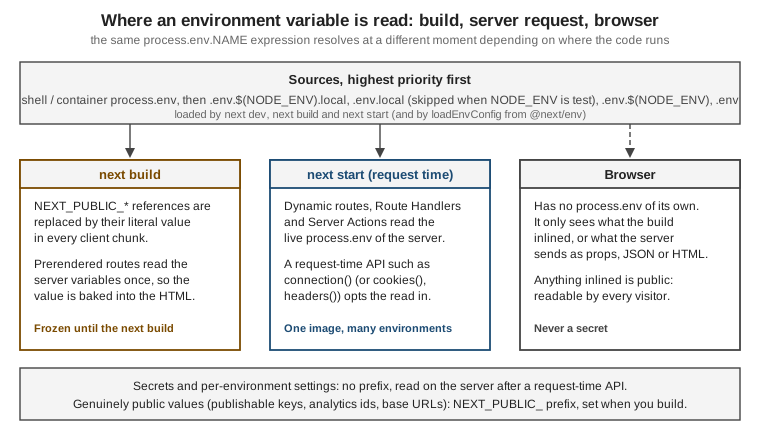
The experiment shows both halves. The build ran with NEXT_PUBLIC_API_BASE=https://api.example.com/v1 from .env; the
server was then started with a different value and GREETING=from-runtime.
"use client";

function read(key: string) {
  return process.env[key]; // key unknown at build time: not inlined
}

export function EnvBadge({ key2 }: { key2: string }) {
  return (
    <ul>
      <li data-testid="static">{process.env.NEXT_PUBLIC_API_BASE}</li>
      <li data-testid="dynamic">{String(read(key2))}</li>
    </ul>
  );
}import { connection } from "next/server";
import { EnvBadge } from "./env-badge";
export default async function Page() {
await connection(); // opt into request-time rendering so process.env is read per request
return (
<main>
<EnvBadge key2="NEXT_PUBLIC_API_BASE" />
<p data-testid="server">Server greeting: {process.env.GREETING}</p>
</main>
);
}Source: Runtime Environment Variables
$ npx next build        # NEXT_PUBLIC_API_BASE comes from .env
$ NEXT_PUBLIC_API_BASE=https://changed.example.com/v1 GREETING=from-runtime npx next start -p 3214

$ curl -s localhost:3214/en/env | sed 's/<[^>]*>/ /g' | grep -o "Public API.*Server greeting: [a-z-]*"
Public API: https://api.example.com/v1 Server greeting: from-runtimeThe public value stayed at the build-time https://api.example.com/v1, even in the HTML rendered on the server, because
the literal is in the server bundle too. The server-only value followed the runtime environment, because connection()
makes the page render per request. Searching the built chunks confirmed the inlining: the literal was in
.next/static/chunks/*.js and in .next/server/chunks.
The same page under Cache Components must put the request-time read inside <Suspense>. Without it the build fails with
"Route "/[locale]/env": Next.js encountered uncached or runtime data during prerendering" (the
blocking-prerender-dynamic message); with it the route is ◐ (Partial Prerender) and the greeting streams in.
import { Suspense } from "react";
import { connection } from "next/server";
import { EnvBadge } from "./env-badge";

async function ServerGreeting() {
  await connection(); // request-time: process.env is read when the request arrives
  return <p data-testid="server">Server greeting: {process.env.GREETING}</p>;
}

export default function Page() {
  return (
    <main>
      <EnvBadge key2="NEXT_PUBLIC_API_BASE" />
      <Suspense fallback={<p>Loading greeting...</p>}>
        <ServerGreeting />
      </Suspense>
    </main>
  );
}
Source: Bundling Environment Variables for the Browser, Runtime Environment Variables, connection and blocking-prerender-dynamic
| Expression in a Client Component | Result in the 16.3.8 build | Why |
|---|---|---|
|
The literal from build time. |
Static property access with the prefix: the documented case. |
|
Compiled to a lookup on the browser’s |
The name is unknown at build time. Nothing from your |
|
Also the literal: Turbopack folded the constant. |
The guide says dynamic lookups are not inlined; with Turbopack a lookup whose key is a compile-time constant is. Do not rely on either. |
|
Also the literal in the same build. |
Same: the guide says it is not inlined; Turbopack resolved it. Write the full expression. |
|
Not available in the browser. |
Server-only; reading it in a Client Component gives |
The last two rows are behaviour of Turbopack in 16.3.8 that differs from what the guide states, and the safe rule is the
guide’s: write process.env.NEXT_PUBLIC_NAME literally wherever you need it. Never put a secret behind a NEXT_PUBLIC_
name, and read secrets only in server-only modules (import 'server-only'), a Data Access Layer, Route Handlers and Server Actions.
Reading a non-public variable in a Client Component
This is the experiment that proves it. A Client Component reads one public and one unprefixed variable:
"use client";

export function PublicBadge() {
  return (
    <p>
      {/* inlined into the client chunk at build time */}
      Build label: <b>{process.env.NEXT_PUBLIC_BUILD_LABEL}</b>
      {/* not prefixed: undefined in the browser bundle */}
      {" / "}server-only var in the browser: <b>{String(process.env.BOOKSHELF_API_URL)}</b>
    </p>
  );
}The app was built with NEXT_PUBLIC_BUILD_LABEL=build-A and BOOKSHELF_API_URL=https://api.build.example, and
started with different values (runtime-B, https://api.runtime.example). Searching the build output:
$ grep -l "build-A" -r .next/static
.next/static/chunks/3jrblxpawq_-6.js            # inlined in the client chunk

$ grep -l "runtime-B" -r .next/static           # no output: the runtime value never reaches the client

$ grep -o 'server-only var.\{0,200\}' .next/static/chunks/3jrblxpawq_-6.js
server-only var in the browser: ",(0,r.jsx)("b",{children:String(i.default.env.BOOKSHELF_API_URL)})]})}])}]);Two details deserve attention. The unprefixed reference was not replaced: in the browser it evaluates against an
empty process.env and yields undefined. Yet the server-rendered HTML of the same Client Component printed the
real URL (Client Components are also rendered once on the server). Opening /en/env-demo/runtime in a browser showed
server-only var in the browser: undefined after hydration and logged Minified React error #418 in the console,
React’s text hydration mismatch. Reading a non-public variable in a Client Component is therefore always a bug. The
fix is to read it in a Server Component, or in a Server Action or Route Handler, and pass the result to the client.
Build-time versus runtime variables
NEXT_PUBLIC_ values are build-time. Server values can be either, depending on whether the code that reads them
runs while the page is being prerendered or while a request is being served. The official guidance: server code can
read variables at runtime during dynamic rendering, and any request-time API (connection(), cookies(),
headers()) opts the surrounding code into that. One Docker image can then be promoted through several
environments with different values.
The figure above summarises the three places a value can be read. The two pages and the Route Handler below read the same server variable at different moments.
import { PublicBadge } from "../public-badge";

// No dynamic API: the page is prerendered, so process.env is read once, at build time.
export default function Page() {
  return (
    <main>
      <PublicBadge />
      <p>
        Server value (frozen at build): <b>{process.env.BOOKSHELF_API_URL}</b>
      </p>
    </main>
  );
}
Source: Runtime Environment Variables
import { Suspense } from "react";
import { connection } from "next/server";
import { PublicBadge } from "../public-badge";

async function RuntimeValue() {
  await connection(); // wait for a real request before reading the environment
  return (
    <p>
      Server value (read per request): <b>{process.env.BOOKSHELF_API_URL}</b>
    </p>
  );
}

export default function Page() {
  return (
    <main>
      <PublicBadge />
      <Suspense fallback={<p>loading…</p>}>
        <RuntimeValue />
      </Suspense>
    </main>
  );
}
Source: Runtime Environment Variables and connection
import { connection } from "next/server";

export async function GET() {
  await connection(); // opt out of build-time prerendering (needed with Cache Components)
  return Response.json({
    publicLabel: process.env.NEXT_PUBLIC_BUILD_LABEL,
    apiUrl: process.env.BOOKSHELF_API_URL,
  });
}
Source: Runtime Environment Variables and connection
Built with the build-A / api.build.example values and started with runtime-B / api.runtime.example, the
previous model and Cache Components behaved the same way for these three:
$ curl -s localhost:3204/en/env-demo/frozen | grep -o -E "Build label: <b>[^<]*</b>|Server value[^<]*<b>[^<]*</b>"
Build label: <b>build-A</b>
Server value (frozen at build): <b>https://api.build.example</b>

$ curl -s localhost:3204/en/env-demo/runtime | grep -o -E "Build label: <b>[^<]*</b>|Server value[^<]*<b>[^<]*</b>"
Build label: <b>build-A</b>
Server value (read per request): <b>https://api.runtime.example</b>

$ curl -s localhost:3204/api/env
{"publicLabel":"build-A","apiUrl":"https://api.runtime.example"}
Source: Runtime Environment Variables
The public label stays build-A everywhere, including in the HTML the server renders for the runtime page; the
server variable follows the runtime value only where a request-time API ran first. The response headers show the
difference in how the two pages are served:
$ curl -sI localhost:3204/en/env-demo/frozen | grep -i "cache-control\|x-nextjs"
x-nextjs-cache: HIT
x-nextjs-prerender: 1
Cache-Control: s-maxage=31536000

$ curl -sI localhost:3204/en/env-demo/runtime | grep -i "cache-control"
Cache-Control: private, no-cache, no-store, max-age=0, must-revalidate
Source: Runtime Environment Variables
With Cache Components the runtime page’s response also carries x-nextjs-postponed: 1: the static shell is served
from the prerender and the Suspense content is streamed from a fresh render. Two differences between the models
matter for configuration code, and both were reproduced:
-
Route Handlers. In the previous model a
GEThandler that readsprocess.envis dynamic (ƒ /api/env). With Cache Components aGEThandler without a dynamic API is prerendered at build time. Built without theawait connection()line,/api/envwas listed as○ /api/envand returned the build-time value ("apiUrl":"https://api.build.example") even though the server was started with a different one. With the line in place it isƒand returns the runtime value. -
Where
connection()may go. Under Cache Components,connection()outside aSuspenseboundary fails the build. The scratch build stopped withRoute "/[locale]/env-demo/bad": Next.js encountered uncached or runtime data during prerenderingand a pointer to blocking-prerender-dynamic (the three fixes it offers areSuspense,use cacheandexport const instant = false). Theruntimepage above is the fix: the read is inside a child component underSuspense.
To run code once when the server starts (for example to validate that required variables exist), use the
register function of instrumentation.ts, covered in a later page.
Runtime environment variables
By default variables are only available on the server, and a NEXT_PUBLIC_ variable is a build-time constant. To read a
value at runtime, read it on the server during dynamic rendering (after await connection() or another request-time API
such as cookies() or headers()), in a Route Handler for a client that must discover its configuration, or in code that
runs at startup through the register function of instrumentation.ts. A client that needs a runtime value fetches
it from an endpoint or receives it as a prop from a Server Component; the guide states that you have to set up your own API
for this. That is the pattern that lets one Docker image run in several environments.
Source: Runtime Environment Variables and Instrumentation
The env key of next.config.ts
The env key in the configuration defines build-time constants that always go into the bundle; the NEXT_PUBLIC_ prefix
has no effect on them. The reference marks the key as legacy since 9.4. In the experiment,
env: { BUILD_LABEL: "bookshelf-2026-10" } made process.env.BUILD_LABEL appear as the literal "bookshelf-2026-10"
in the client chunk. Because destructuring process.env cannot be replaced, write process.env.BUILD_LABEL in full.
Prefer .env files unless you need a value computed in next.config.ts, such as a Git hash.
Source: env
Pages Router differences
The Pages Router reads .env* files with the same rules and the same NEXT_PUBLIC_ inlining. For runtime values the
guide recommends getServerSideProps (or adopting the App Router incrementally); getStaticProps runs at build
time, so what it reads is frozen into the generated HTML and JSON.
Secrets and the NEXT_PUBLIC_ prefix
The prefix is a publication switch, not a naming style. NEXT_PUBLIC_ is correct only for values that are safe to
show every visitor: a publishable payment key, an analytics identifier, a public site URL. Credentials of any kind
(API secret keys, database URLs, CMS write tokens, signing secrets such as AUTH_SECRET) must carry no prefix and
must be read only in server code: Server Components, Route Handlers, Server Actions and proxy.ts. A variable that is
unprefixed stays out of the client bundle by construction, which is the protection to rely on. Keeping a .env file out
of git protects the repository, not the browser: the file’s contents still reach the page if the name starts with the
prefix.
Concrete rules for the Bookshelf code:
-
Keep every secret unprefixed, for example
STRIPE_SECRET_KEY,SANITY_API_WRITE_TOKENorDATABASE_URL, and import the module that reads it throughimport "server-only"so that a Client Component importing it fails the build. -
Use the prefix only for values you would put in HTML anyway, such as
NEXT_PUBLIC_SITE_URL. -
After a build, search the client output for the secret’s value. A secret that appears under
.next/statichas leaked and must be rotated. -
Never rely on the "frozen at build time" behaviour to hide a value: build artefacts and Docker layers are readable.
-
Values that differ per environment (an API host, a feature flag) are better as unprefixed variables read at request time than as
NEXT_PUBLIC_values, which would force a rebuild per environment. When a Docker image is built once and promoted, pass genuinely public values as build arguments, because setting them on the running container does nothing.
The data-security page of this section (Data Security & CSP) covers the Data Access Layer, server-only and the
taint APIs in depth.
Source: Data security guide and Environment variables
The Removed Runtime Config
Older Pages Router projects configured values with serverRuntimeConfig and publicRuntimeConfig in next.config.js
and read them with getConfig() from next/config. Both keys were removed in Next.js 16.0 and the next/config module
is no longer in the package (no node_modules/next/config.js in 16.3.8). The scratch build confirms it: the keys are
reported under "Unrecognized key(s) in object" (see the warning block above) and are ignored. The replacement is
environment variables, with the split described above.
| Before (up to 15) | Now (16) |
|---|---|
|
Read |
|
|
|
Read a variable on the server after |
The upgrade guide shows the three replacements in code: a server-only value read from process.env in a Server Component, a client-visible value with the NEXT_PUBLIC_ prefix set at build time, and a value that must be read at runtime rather than bundled, which calls connection() first.
async function fetchData() {
  const dbUrl = process.env.DATABASE_URL;
  // use for server-side operations only
}"use client";
export default function ClientComponent() {
return <p>API URL: {process.env.NEXT_PUBLIC_API_URL}</p>;
}import { connection } from "next/server";
export default async function Page() {
await connection();
return <p>{process.env.RUNTIME_CONFIG}</p>;
}The Bookshelf’s replacement is the example of the previous section: the public API base URL is a NEXT_PUBLIC_ constant
that is correct for the environment where the image was built, and the value that must change at deploy time is read in a
Server Component after connection() inside <Suspense>. The Next.js guide also suggests the taint API
(experimental.taint) to prevent sensitive server values from reaching Client Components by accident.
Source: Runtime Configuration (upgrading to version 16) and taint
Absolute Imports and Module Path Aliases
Next.js reads the baseUrl and paths compiler options of tsconfig.json (or jsconfig.json), so import { Button }
from '@/components/button' replaces '../../../components/button'. The generated file already contains
"paths": { "@/": ["./"] }. A baseUrl makes every top-level folder importable by name, and paths adds named
aliases whose targets are relative to baseUrl (or to the tsconfig.json when there is none). Turbopack, webpack, the
type checker and the editor plugin all use the same mapping, so there is no second place to configure; test runners do
need their own alias configuration.
{
  "compilerOptions": {
    "baseUrl": ".",
    "paths": {
      "@/*": ["./*"],
      "@ui/*": ["components/*"]
    }
  }
}import { dict } from "lib/i18n"; // resolved through baseUrl
import { Nav } from "@ui/nav"; // resolved through paths
import { listBooks } from "@/lib/books";
export default async function Page() {
const books = await listBooks();
return (
<main>
<Nav locale="en" genre="sf" />
<p>{dict.en.send}</p>
<p>{books.length} books</p>
</main>
);
}This built with next build (the page appeared as /en/abs and /es/abs in the route table), and tsc --noEmit
accepted it. Without paths entries that match, an import such as @/app/… fails with Turbopack’s "Module not found:
Can’t resolve '@/app/[locale]/books/[id]/book-detail'", which is what happened when the @/ alias was left out
of the first attempt; aliases are not additive between extends files, so repeat the ones you need. When a project
uses a src/ folder, .env files and next.config.ts stay in the root, and the usual alias becomes "@/": ["./src/"].
create-next-app asks Would you like to customize the import alias (@/* by default)?, and with the src/ option the
default alias points at src/*. A baseUrl also lets bare specifiers such as components/nav resolve from a folder: the
scratch app built and passed tsc on TypeScript 5.9 with "baseUrl": "." and an import of components/nav next to one
of @/components/nav. Under TypeScript 7, however, baseUrl no longer exists (error TS5102, shown in the
TypeScript section), so new code should use paths only, with entries resolved relative to the
tsconfig.json when there is no baseUrl.
{
  "compilerOptions": {
    "paths": {
      "@/components/*": ["./components/*"],
      "@/lib/*": ["./lib/*"]
    }
  }
}Pitfalls
| Symptom | Cause | Fix |
|---|---|---|
A config option seems to do nothing |
Misspelt key, removed key, or a key in the wrong object (top-level versus |
Read the |
Both |
16.3.8 loaded the |
Keep exactly one configuration file. |
The configuration function logs or does work several times |
The config is evaluated in several processes and phases (three phase lines in one build). |
Keep it pure and fast. |
|
It requires |
Enable both, or neither. |
Build fails with "This build is using Turbopack, with a |
A |
Migrate to the |
|
The compiler package is not installed. |
Install |
The Turbopack build fails with a conflict error naming a package |
The same package is listed in |
List it in one only. |
A |
The value is a plain |
Build the string from literals, or cast with |
|
Types are not generated yet. |
Run |
|
|
Run |
|
TypeScript 7 dropped |
Use |
|
The type-check step is skipped entirely. |
Only acceptable when CI type-checks separately. |
|
|
Use |
A |
It was inlined at build time. |
Rebuild, or read the value at runtime on the server and pass it down. |
A dynamic lookup of a public variable is |
|
Write the full literal expression |
A non-public variable is |
A Client Component read an unprefixed variable: the server-rendered HTML had the real value, the browser has none. |
Read it in a Server Component, Server Action or Route Handler and pass the result down. |
A secret appears in the browser bundle |
It was given a |
Remove the prefix, rotate the secret, and keep it in server-only modules. |
A server variable is frozen at build time |
It was read in a prerendered route without a request-time API. |
Call |
A |
Under Cache Components a handler without a dynamic API is prerendered ( |
Add |
The build fails with "Next.js encountered uncached or runtime data during prerendering" |
|
Wrap the reading component in |
Variables in |
Files are read from the project root only. |
Keep |
Tests do not see |
It is not loaded when |
Put test values in |
What Changed Recently
| Version | Change |
|---|---|
9.4 |
|
10.2.1 |
Incremental type checking supported. |
12.1 |
Async configuration functions. |
13.0 |
|
13.4 |
App Router stable; |
13.5.1 |
React Strict Mode on by default in the App Router. |
14.1 |
|
15.0 |
|
15.1 |
Experimental |
15.2 |
|
15.3 |
|
15.5 |
|
16.0 |
|
16.1 |
Turbopack file-system cache on by default for |
16.2 |
|
16.3 |
|
Source: Next.js 15, Next.js 15.5, Upgrading to version 16 and Next.js 16.3
Where the Books Are Outdated
Real-World Next.js (Riva, Packt, 2022) targets Next.js 12 and the Pages Router, and Practical Next.js for E-Commerce
(Libby, Apress, 2023) targets 13.2, when the App Router was still in beta; both of those majors are out of support. Their
configuration, TypeScript and environment chapters stay correct about the principles (a root configuration file, .env
files, the per-environment load order, $VAR expansion, NEXT_PUBLIC_ inlining, path aliases) but the details have moved
on.
| If a tutorial from that era shows | Today |
|---|---|
|
Still works, but |
|
Not needed since 13.4; the key is now unrecognised. |
A custom |
SWC compiles by default and Turbopack is the default bundler, so a |
|
Removed in 16.0: |
|
Removed in 16.0: environment variables, with |
The |
Pages Router only; an App Router project gets the warning |
|
|
|
Deprecated; use |
Typing routes by hand, hand-typed props for |
|
Synchronous |
|
|
Removed in 15.0; |
|
|
Config examples for the Pages Router only ( |
Still supported; new work targets the App Router. This page’s typing helpers are App Router only. |
Source: Upgrading to version 16, Upgrading to version 15 and ESLint Plugin
Where to Go Next
Continue with Project Structure to see where next.config.ts, proxy.ts and the
other root files sit among the app folders, and with Getting Started for
create-next-app and its prompts. For the language side of the TypeScript material see the
TypeScript reference and
React with TypeScript. The React-level view of deployment is in
Build & Deployment and the NestJS comparison in
NestJS vs Next.js. Later pages of this section go deeper on the options
introduced here: caching and cacheComponents, proxy.ts, Turbopack and the compiler, images, deployment and data
security.
References
-
next.config.js and its option pages